
28 Best ERP Inventory Management Software For 2026

The Top 10 ERP Inventory Management Software to Consider
Hey, it’s the lauded top 10 list of the best ERP inventory management software, according to us:


Inventory doesn’t manage itself. If you’ve ever grappled with spreadsheets at midnight, scrambled to find missing SKUs, or dealt with a warehouse that thinks FIFO is a band—not a policy—you know the stakes.
ERP inventory management software means fewer fire drills and more control.
Whether you're running retail, ecommerce, or manufacturing, you need accurate stock visibility, smoother purchase orders, and a supply chain that doesn't stall every time demand shifts.
I’ve done the grunt work—inventory control, warehousing, international shipping—and I’ve seen what happens when systems break down. This isn’t just a roundup from someone who sat through vendor demos.
I’ve picked the tools that handle real-world complexity: real-time updates, lean workflows, and integrations that actually connect.
Let’s get you a system that works as hard as your ops team.
Why Trust Our Software Reviews
We’ve been testing and reviewing retail and ecommerce software since 2021.
As retail experts ourselves, we know how critical and difficult it is to make the right decision when selecting software. We invest in deep research to help our audience make better software purchasing decisions.
We’ve tested more than 2,000 tools for different retail management use cases and written over 1,000 comprehensive software reviews. Learn how we stay transparent & check out our software review methodology.
Comparing the Best ERP Inventory Management Software, Side-by-Side
Need a quick side-by-side before diving in? This table breaks down price points and standout strengths so you can spot which ERP system fits your size, complexity, and budget. Whether you’re looking to automate order flows, reduce stockouts, or ditch clunky modules, start here.
| Tool | Best For | Trial Info | Price | ||
|---|---|---|---|---|---|
| 1 | Best for automating complex workflows | Free demo available | Pricing upon request | Website | |
| 2 | Best for production planning tools | Free trial available | From $44.92/user/month (billed annually) | Website | |
| 3 | Best for open-source flexibility | Free trial available | From $5/month onwards | Website | |
| 4 | Best for QuickBooks integration | 30-day free trial | From $64.95/month | Website | |
| 5 | Best for visual inventory tracking | Free 14-day trial + free plan available | From $24/month (billed annually) | Website | |
| 6 | Best for automotive suppliers | Free demo available | Pricing upon request | Website | |
| 7 | Best for manufacturing industries | Free demo available | Pricing available upon request | Website | |
| 8 | Best for small to mid-sized businesses | Free demo available | From $100/user/month | Website | |
| 9 | Best for warehouse management | Free demo available | From $149/month | Website | |
| 10 | Best for order processing efficiency | Free demo available | From $0/month | Website |
The 10 Best ERP Inventory Management Software, Reviewed
Below, I break down the top ERP inventory management software—what each one does best, who it’s built for, and where it might fall short. No marketing gloss, no vague buzzwords—just clear intel to help you choose a system that won’t blow up your workflows.

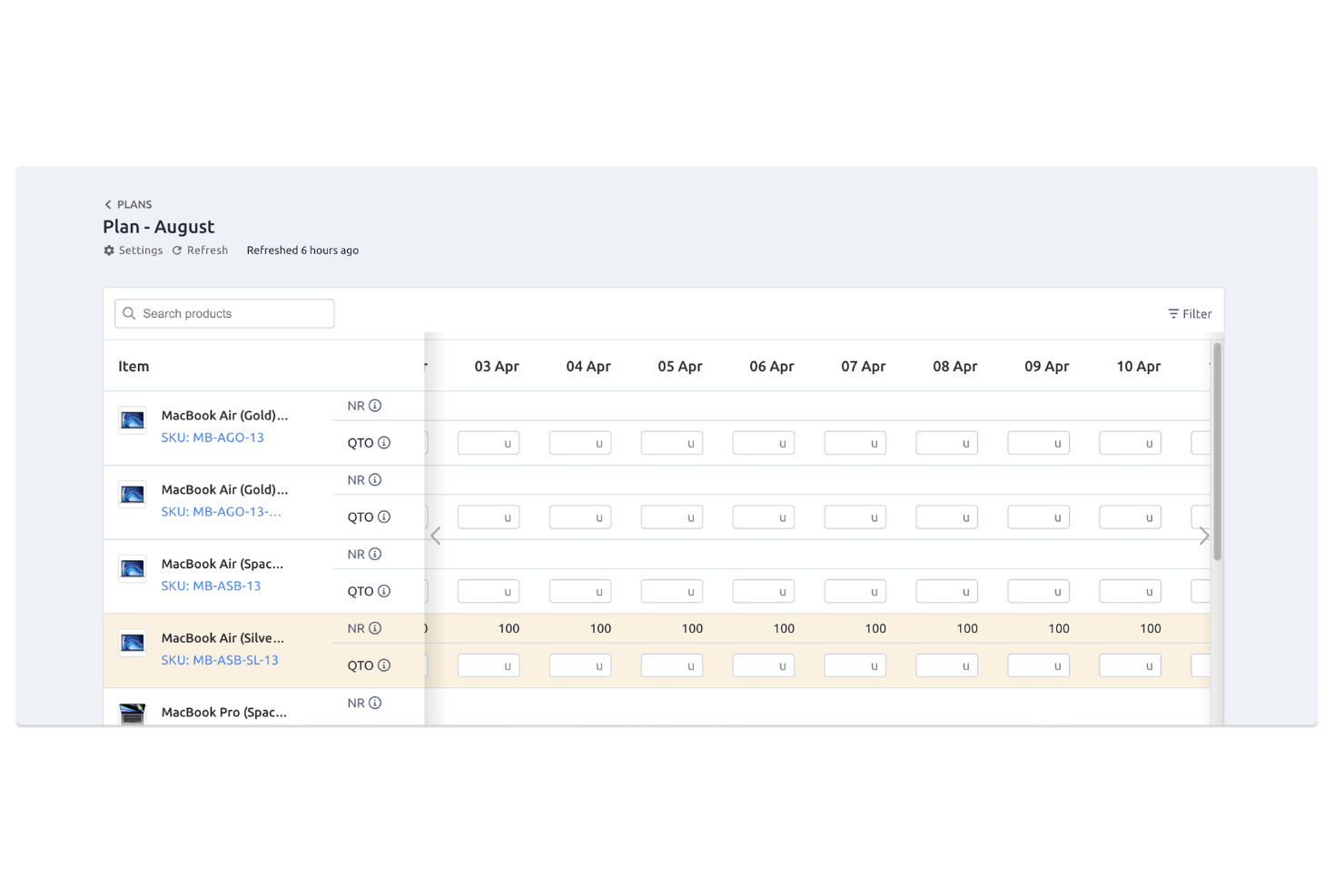
Fulfil is an AI-native ERP inventory management software built for ecommerce and wholesale operations. It centralizes order management, warehouse workflows, and financial reporting while updating stock levels in real time across every channel you sell through. With automation at its core, it helps you reduce manual processes and keep operations flowing smoothly.
Why I picked Fulfil: I picked Fulfil for its ability to take the complexity out of multi-channel order processing. Instead of juggling spreadsheets or patching systems together, you can rely on Fulfil’s smart allocation rules and automated workflows to handle fulfillment from start to finish. That means fewer overselling headaches, faster order turnaround, and more time for you to focus on strategy instead of firefighting. I also like how it extends beyond inventory, connecting into production planning and financial data so you get a full operational picture in one place.
Fulfil standout features & integrations:
Features include real-time inventory synchronization across channels, automated order processing, warehouse management tools for picking and packing, and AI-powered reporting to generate insights quickly.
Integrations include Amazon, Shopify, eBay, Etsy, DHL, FedEx, UPS, PayPal, Stripe, TaxJar, and ShipBob.
Pros and Cons
Pros:
- Supports omnichannel fulfillment
- Supports omnichannel fulfillment
- Real-time stock synchronization
Cons:
- Setup may require expertise
- Pricing not transparent


MRPeasy is a cloud-based ERP platform designed for small and medium-sized manufacturers that need to manage production, inventory, sales, and finances from a single dashboard. It helps you organize every stage of the manufacturing process, from materials planning to finished goods delivery, with real-time visibility into inventory levels.
Why I picked MRPeasy: I picked MRPeasy because it provides real-time inventory tracking that keeps you updated on stock levels and prevents costly overstocking or stockouts. This helps you keep production running smoothly while maintaining lean inventory levels. I also like its production planning tools, which make it easy to balance capacity and materials, and its procurement forecasting, which ensures you have what you need when you need it. Together, these features make MRPeasy an efficient, cost-aware ERP system for growing manufacturers.
MRPeasy standout features and integrations
Features include production planning, workforce management, procurement forecasting, and detailed financial tracking. MRPeasy also supports lot and serial number tracking, barcoding, and automated reorder points for tighter inventory control.
Integrations include Amazon, BigCommerce, EDI, HubSpot, Magento, Microsoft Power BI, Pipedrive, QuickBooks Online, Salesforce, ShipStation, Shopify, Ware2Go, WooCommerce, Xero, and Zapier.
Pros and Cons
Pros:
- Affordable for small manufacturers
- Intuitive and easy to set up
- Real-time inventory visibility
Cons:
- Limited advanced ERP customization
- Customer support response times vary
New Product Updates from MRPeasy
MRPeasy Adds Estimated Weight Calculation for Items
MRPeasy introduces an estimated weight calculation feature, enhancing efficiency. For more information, visit MRPeasy's official site.
 .
.
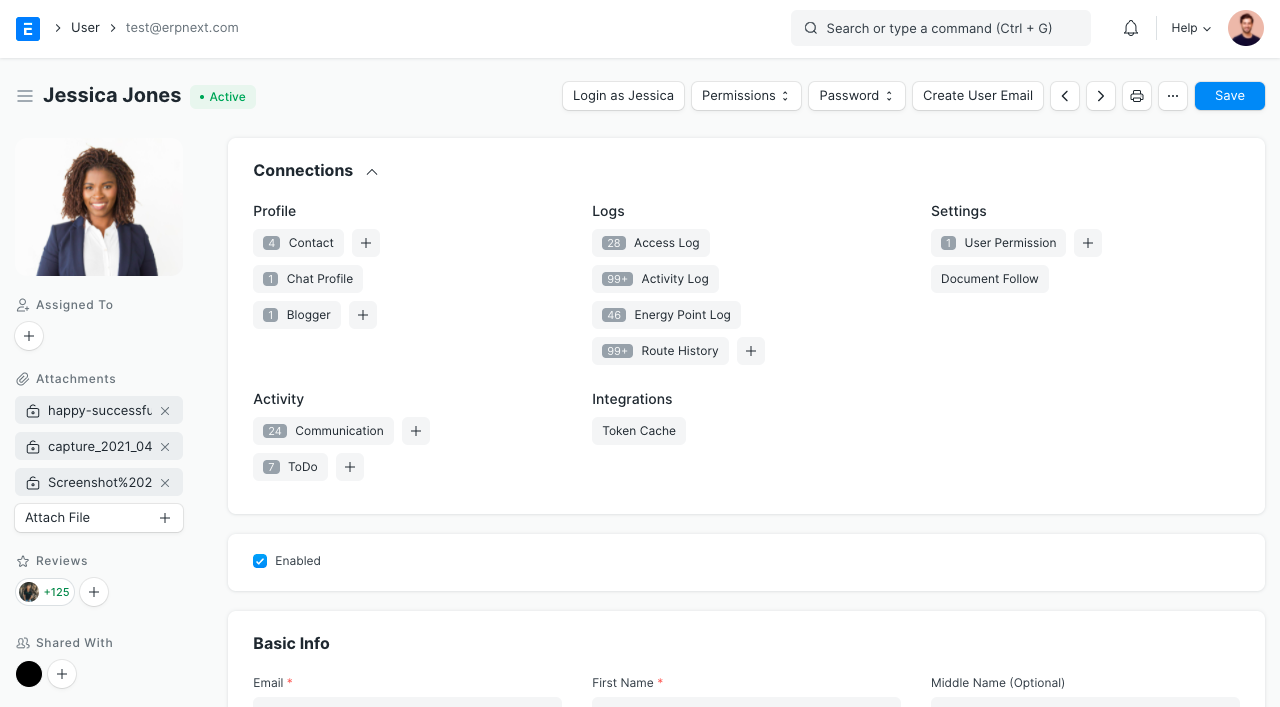
ERPNext is an open-source ERP solution designed for businesses of various sizes, offering flexibility and customization. It helps manage crucial business functions like inventory, sales, and accounting.
Why I picked ERPNext: It provides open-source flexibility, allowing you to tailor the software to your specific needs. The tool offers customizable modules for inventory management, sales tracking, and financial reporting. Its open-source nature means you can modify and adapt the system as your business evolves. This adaptability is ideal for teams that need personalized solutions without being locked into a rigid structure.
Standout features & integrations:
Features include a comprehensive accounting module that simplifies financial tracking, a project management tool to keep tasks on schedule, and a CRM feature to enhance customer relationship management. These features work together to improve your business operations and customer interactions.
Integrations include Shopify, WooCommerce, Amazon, Slack, Google Drive, Dropbox, PayPal, Stripe, QuickBooks, and Microsoft Excel.
Pros and Cons
Pros:
- Modular design
- Strong community support
- Open-source flexibility
- Highly customizable
Cons:
- Frequent updates needed
- Initial setup complexity
- Limited official support


SOS Inventory is a cloud-based inventory management solution tailored for small to medium-sized businesses. It offers tools for inventory tracking, order management, and manufacturing processes, providing value through efficient stock control and order processing.
Why I picked SOS Inventory: It integrates seamlessly with QuickBooks, making it a top choice for businesses already using that platform. SOS Inventory allows you to manage inventory, orders, and manufacturing tasks all in one place. You can track items across multiple locations and set reorder points to prevent stockouts. Its real-time data synchronization with QuickBooks ensures your financials are always up to date.
Standout features & integrations:
Features include multi-location inventory tracking to keep tabs on stock across different sites, customizable order management to fit your workflow, and detailed manufacturing tracking for production processes. These features help you maintain a streamlined operation and accurate inventory levels.
Integrations include QuickBooks Online, QuickBooks Desktop, Shopify, WooCommerce, Amazon, eBay, ShipStation, Square, Stripe, and PayPal.
Pros and Cons
Pros:
- Detailed manufacturing tracking
- Real-time data updates
- Multi-location tracking
- QuickBooks integration
Cons:
- Requires regular updates
- Limited advanced reporting
- Initial setup complexity


Sortly is an inventory management solution designed primarily for small to medium-sized businesses. It helps you track, manage, and organize inventory with visual tools, making it easy to see what you have at a glance.
Why I picked Sortly: It excels in visual inventory tracking, allowing users to manage stock with photos and QR codes. The tool offers a simple interface that lets you organize items by categories and locations. You can set up alerts for low stock levels to ensure you never run out. Customizable fields let you tailor the system to your specific needs.
Standout features & integrations:
Features include a mobile app that lets you manage inventory on the go, barcode and QR code scanning for easy updates, and customizable reports to track inventory trends. These features help you keep your inventory organized and accessible.
Integrations include QuickBooks, Xero, Shopify, WooCommerce, Square, Amazon, eBay, Etsy, Google Drive, and Dropbox.
Pros and Cons
Pros:
- Alerts for low stock
- Mobile app accessibility
- Customizable fields
- Easy QR code setup
Cons:
- Limited scalability options
- Requires manual data entry
- Basic analytics capabilities


QAD Adaptive ERP is a cloud-based enterprise resource planning solution designed for manufacturers, with a focus on the automotive industry. It helps businesses manage supply chain operations, manufacturing processes, and financial activities.
Why I picked QAD Adaptive ERP: This tool is tailored for automotive suppliers, offering industry-specific features. It includes supply chain management and manufacturing execution systems to meet unique automotive demands. The software supports global operations with localization capabilities, catering to multinational suppliers. Its user-friendly interface makes it accessible for teams at various levels.
Standout features & integrations:
Features include real-time analytics that provide valuable insights, demand and supply chain planning tools to optimize operations, and adaptive user interfaces for enhanced usability. These features help you better manage your resources and respond to market changes.
Integrations include Microsoft Dynamics, Salesforce, Oracle, SAP, IBM, Workday, Amazon Web Services, Google Cloud, Microsoft Azure, and Tableau.
Pros and Cons
Pros:
- Demand planning tools
- Real-time analytics
- Adaptive user interfaces
- Supports global operations
Cons:
- Initial setup time-consuming
- Limited industry scope
- Complex customization options

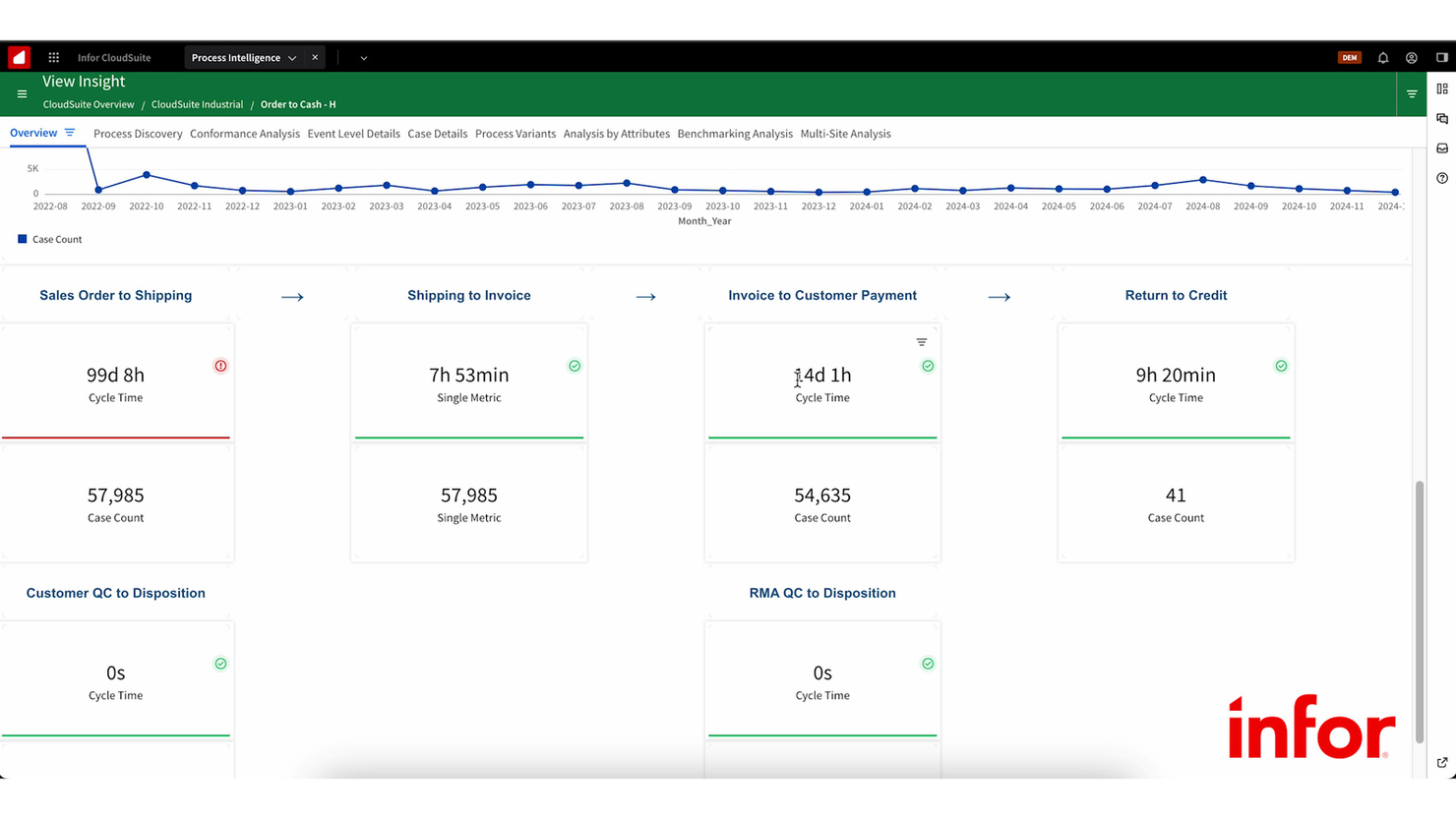
Infor CloudSuite is a cloud-based ERP solution designed for industries like manufacturing, distribution, and services. It helps businesses manage key operations such as financials, human capital, and supply chain processes.
Why I picked Infor CloudSuite: This tool excels in manufacturing industries with its industry-specific capabilities. It provides financial management, human capital management, and supply chain management to cater to complex manufacturing needs. Advanced analytics and AI tools offer insights that enhance decision-making. The platform's cloud-based nature ensures scalability and flexibility for growing businesses.
Standout features & integrations:
Features include advanced analytics that provide actionable insights, financial management tools to streamline accounting processes, and supply chain management solutions to optimize logistics. These features help you make informed decisions and manage resources efficiently.
Integrations include Salesforce, Microsoft Azure, Amazon Web Services, IBM Watson, Google Cloud, Microsoft 365, Oracle, SAP, Workday, and Tableau.
Pros and Cons
Pros:
- Scalable for growth
- AI-driven insights
- Advanced analytics
- Cloud-based flexibility
Cons:
- Limited customization
- Complex implementation
- Steep learning curve


Epicor ERP is a comprehensive enterprise resource planning solution designed for small to mid-sized businesses. It supports essential business functions like inventory management, financial operations, and supply chain management.
Why I picked Epicor ERP: It caters to small and mid-sized businesses with its scalable solutions. The software offers extensive inventory management capabilities to maintain optimal stock levels. Financial management tools help streamline accounting and reporting. Its intuitive design ensures accessibility for teams with varying technical expertise.
Standout features & integrations:
Features include advanced inventory tracking for precise stock management, customizable reporting tools to fit diverse business needs, and supply chain management capabilities that enhance operational efficiency. These features are designed to support your business growth and adaptability.
Integrations include Salesforce, Microsoft Dynamics, Oracle, SAP, QuickBooks, Amazon Web Services, Google Cloud, Microsoft Azure, Shopify, and Mailchimp.
Pros and Cons
Pros:
- Supports diverse industries
- Advanced inventory tracking
- Customizable reporting
- Scalable for business growth
Cons:
- Steep learning curve
- Limited mobile accessibility
- Complex initial setup

Zenventory is an inventory management solution designed for businesses that require detailed warehouse management capabilities. It serves industries like retail, ecommerce, and logistics by offering tools for inventory tracking, order management, and warehouse operations.
Why I picked Zenventory: It excels in warehouse management with features tailored for complex inventory needs. The software provides tools for managing multiple warehouse locations, ensuring you can track inventory across different sites. Barcode scanning simplifies the process of updating stock levels and processing orders. Automated alerts for low stock help prevent stockouts and maintain smooth operations.
Standout features & integrations:
Features include customizable reporting to fit your specific business needs, a mobile app for on-the-go inventory management, and batch tracking for enhanced control over inventory. These features ensure you can efficiently manage your warehouse operations and inventory.
Integrations include QuickBooks, Shopify, WooCommerce, Amazon, eBay, ShipStation, Square, PayPal, Stripe, and Xero.
Pros and Cons
Pros:
- Batch tracking features
- Automated stock alerts
- Barcode scanning capability
- Multi-location tracking
Cons:
- May need additional support
- Requires frequent updates
- Complex setup process

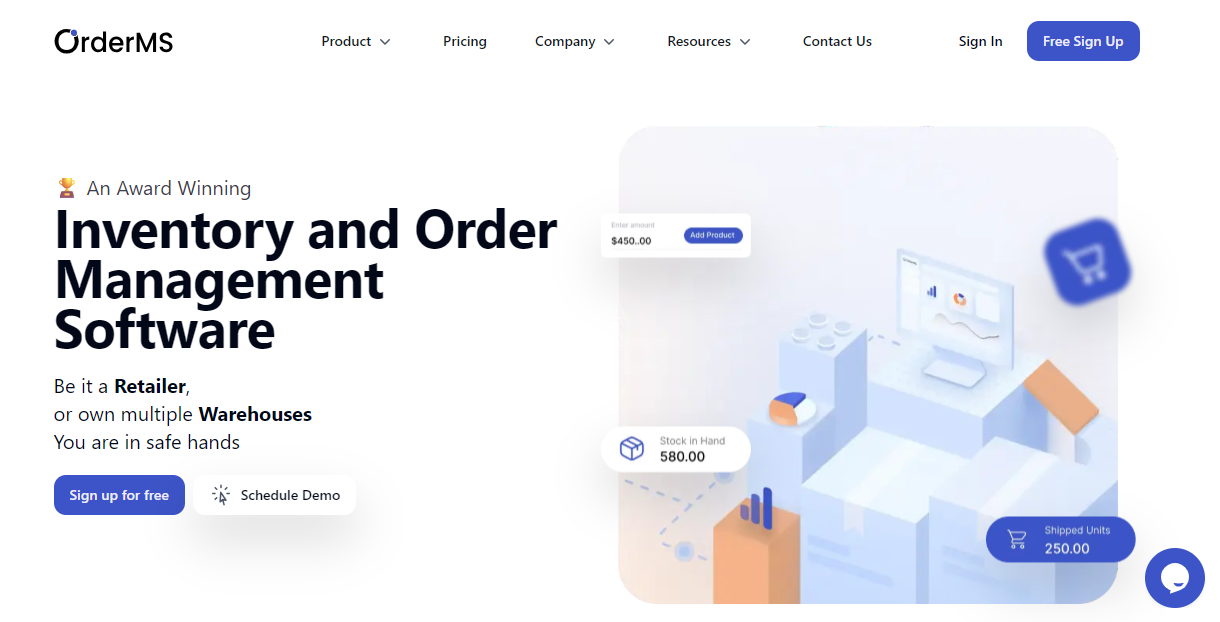
OrderMS is an order management system tailored for businesses looking to enhance their order processing capabilities. It focuses on streamlining order management, inventory control, and shipping processes for small to medium-sized businesses.
Why I picked OrderMS: It excels in order processing efficiency, making it ideal for businesses with high order volumes. The tool automates order workflows, reducing errors and speeding up fulfillment. Inventory control features ensure you maintain optimal stock levels. Real-time tracking provides visibility into the entire order process, helping you manage operations smoothly.
Standout features & integrations:
Features include automated order workflows that reduce manual tasks, real-time inventory updates to prevent stockouts, and comprehensive reporting tools for better decision-making. These features help you maintain efficiency and control over your order management.
Integrations include QuickBooks, Shopify, WooCommerce, Amazon, eBay, ShipStation, Xero, PayPal, Stripe, and Square.
Pros and Cons
Pros:
- Inventory control features
- Comprehensive reporting
- Real-time tracking
- Automated workflows
Cons:
- Learning curve for new users
- Needs frequent updates
- Limited customization options
Other ERP Inventory Management Software
Here are some additional ERP inventory management software options that didn’t make it onto my shortlist, but are still worth checking out:
- Alpen
For retail businesses
- Sellful
For website integration
- ShopXpert
For ecommerce platforms
- Deskera
For integrated accounting features
- NetSuite
For enterprise scalability
- Brightpearl
For omnichannel retailers
- Acumatica
For cloud deployment
- Zoho Inventory
For small businesses
- Microsoft Dynamics 365
For global operations
- Sage X3
For process manufacturing
- SAP Business One
For growing businesses
- inFlow Inventory
For barcode tracking
- Inventory Planner
For demand forecasting
- Fishbowl Inventory
For QuickBooks users
- Cin7 Omni
For retail integrations
- Katana MRP
For manufacturers
- Odoo
For open-source customization
- Unleashed Software
For inventory analytics


Our Selection Criteria For ERP Inventory Management Software
I’ve evaluated each ERP inventory management system with the same mindset you'd use walking a warehouse floor: what’s actually going to keep things running, cut down on manual work, and not break when the pressure’s on. Here’s how I scored each tool.
Core functionality (25% of total score)
This is the must-have list. If a system can’t get these right, it’s not on the list.
- Inventory tracking. Real-time updates on stock levels, across locations, with clear visibility—no guesswork.
- Order management. End-to-end workflows from purchase orders to fulfillment, minus the manual bottlenecks.
- Barcode and SKU support. Built-in or integrated tools to reduce human error and speed up operations.
- Reporting and analytics. Clean, customizable dashboards that help with forecasting and planning, not just rearview reporting.
Additional standout features (25% of total score)
This is where great systems separate from the pack.
- Multichannel sales sync. Your POS, ecommerce, and B2B orders should all speak the same language.
- Custom fields and workflows. Systems that adapt to your ops—not the other way around.
- Advanced forecasting. Tools that go beyond reorder points and actually help you anticipate demand.
- CRM or procurement tie-ins. Bonus points for platforms that extend into supplier or customer relationship management.
Usability (10% of total score)
You shouldn’t need a consultant just to check your stock levels.
- Intuitive UI. Clean design and logical menus make a big difference in daily use.
- Mobile accessibility. Inventory isn’t always managed from a desk.
- Fast onboarding. Your team should be able to pick it up without a weeklong bootcamp.
Onboarding (10% of total score)
The implementation window is when most ERP fails happen.
- Training resources. Looked for vendors with walkthroughs, webinars, and clear documentation.
- Support during setup. Live chat, dedicated reps, or at least a human email contact.
- Templates and import tools. Spreadsheets shouldn’t become roadblocks.
Customer support (10% of total score)
Because when your system breaks, you can’t just “circle back next week.”
- Availability. 24/7 is best, especially for global or ecommerce businesses.
- Response time. Fast, informed help beats generic replies and ticket queues.
- Self-serve options. Forums, knowledge bases, and real documentation—not just marketing gloss.
Value for money (10% of total score)
It’s not about being cheap—it’s about being cost-effective at scale.
- Clear pricing tiers. No hidden fees for extra warehouses or integrations.
- Features-per-dollar ratio. What are you actually getting for that monthly per-seat rate?
- Scalability without sticker shock. You shouldn’t have to re-platform just because you added a second warehouse.
Customer reviews (10% of total score)
I’ve read hundreds of reviews so you don’t have to.
- Functionality in practice. Does it actually deliver what the site promises?
- Feedback on support and onboarding. These are often make-or-break.
- Long-term reliability. Any pattern of bugs, breakdowns, or missing features shows up here.
What is ERP Inventory Management Software?
ERP inventory management software is a system that tracks inventory, orders, and stock movement across your supply chain—all in one place.
It’s what you use when spreadsheets just aren’t cutting it anymore.
These systems give you real-time visibility into what’s moving, what’s stuck, and what needs to be reordered before your sales team starts panicking.
Instead of bouncing between platforms or chasing down SKUs across warehouses, you get clean data, synced workflows, and fewer surprises. And when the rest of your ERP—like accounting or procurement—talks to your inventory? That’s when things start actually working.
How to Choose ERP Inventory Management Software
Picking an ERP system isn’t like signing up for a new app—it’s a long-term operational move.
Get it wrong, and you’re stuck untangling workflows, training staff twice, and explaining to leadership why orders keep slipping through the cracks.
This table walks through the core decision points, so you can ask the right questions before you commit. Whether you’re managing one warehouse or juggling a multi-channel beast, these are the factors that actually move the needle.
| Factor | What to consider |
|---|---|
| Scalability | Can it handle more SKUs, locations, or sales channels without imploding? |
| Integrations | Will it plug into your accounting software, ecommerce platform, and CRM? |
| Customizability | Can you tweak fields, workflows, and dashboards—or are you locked into defaults? |
| Ease of use | Will your team actually use it—or just keep updating the old spreadsheet? |
| Implementation & onboarding | How painful is go-live? Look for clean data imports, strong support, and live training. |
| Cost | Is the pricing transparent and reasonable? Watch for “extras” like per-module fees. |
| Security safeguards | Does it meet compliance needs? Look for encryption, backups, and role-based access. |
| Support availability | When something breaks, how fast can you get a real answer—not just an FAQ link? |
Features of ERP Inventory Management Software
These are the features that actually matter when you’re trying to stay ahead of stockouts, shrinkage, and angry customers. Look for these when comparing options:
- Inventory tracking. Real-time visibility into stock levels across locations—no more “let me check the back” guesswork.
- Order management. Automates purchase orders, sales orders, and returns so fewer things slip through the cracks.
- Barcode and QR code support. Speeds up receiving, picking, and audits—no more hand-counting or double entry.
- Supplier management. Centralizes vendor data and purchase histories so you can negotiate better and reorder faster.
- Reporting and analytics. Custom dashboards that surface actual insights—not just pretty charts.
- Multichannel support. Syncs inventory across ecommerce, retail, wholesale, and marketplaces in real time.
- Forecasting tools. Helps you avoid overstocking or running dry by actually predicting demand, not just reacting.
- Custom fields and workflows. Adapt the system to your operation, not the other way around.
- Mobile access. Inventory doesn't live at a desk—your tools shouldn't either.
- Integration-ready. Plays nice with your ERP system, POS, CRM, and accounting software without needing a developer for every sync.
Benefits of ERP Inventory Management Software
ERP inventory management software doesn’t just make things look cleaner on a dashboard—it solves problems that cost you time, money, and customers. Here’s what you actually gain:
- Real-time inventory visibility. Know your stock levels across warehouses and sales channels without waiting for someone to update a spreadsheet.
- Fewer stockouts and overstocking. Forecasting tools and reorder points help you avoid lost sales and excessive carrying costs.
- Streamlined order workflows. Automate purchase orders, invoicing, and fulfillment so your team isn’t buried in manual tasks.
- Stronger supplier relationships. Centralized procurement tools improve communication, reduce lead times, and increase traceability.
- Lower human error rates. Barcode scanning, serial numbers, and automation mean fewer costly mistakes in picking, shipping, and receiving.
- Improved cash flow. Accurate inventory control and better forecasting let you tie up less money in excess inventory.
- Scalable processes. Whether you're adding SKUs, channels, or new locations, cloud ERP systems can grow with your business needs.
- Smarter decision-making. Dashboards and real-time analytics let you react fast—and plan smarter for the next quarter.
Costs and Pricing of ERP Inventory Management Software
ERP inventory systems come in all shapes and sizes—so does the pricing.
Some charge per user, some per module, and others sneak in costs for things like extra warehouses or sales channels. Know what you're paying for before you commit.
This table gives a rough snapshot of what you can expect across typical pricing tiers. Always check the fine print—transaction fees, implementation costs, or API limits can quickly blow your budget.
| Plan type | Average price | Common features | Best for |
|---|---|---|---|
| Free Plan | $0 | Basic inventory tracking, order management, limited reporting | Early-stage or solo ops |
| Personal Plan | $5–$25/user/month | Inventory tracking, basic reporting, barcode scanning, email support | Freelancers, small shops |
| Business Plan | $30–$75/user/month | Multichannel sync, integrations, real-time updates, low stock alerts | Growing SMBs |
| Enterprise Plan | $80–$150+/user/month | Custom dashboards, forecasting, procurement, advanced reporting, ERP modules | Multi-location or high-volume teams |
Additional cost considerations
ERP pricing isn’t just about the monthly per-user rate. Here’s what vendors don’t always highlight upfront:
- Implementation and setup fees. Many platforms charge for onboarding, data migration, or custom configuration—especially at the enterprise level.
- Add-on modules. Need forecasting, CRM, or warehouse automation? Some platforms charge separately for each module.
- API and integration limits. Want to connect your ERP to your ecommerce store, POS, or accounting software? There may be limits on the number of integrations—or extra charges for API access.
- Support tiers. Basic support might be free, but dedicated account managers or faster response times often cost more.
- Usage caps. Some tools charge based on transaction volume, SKUs, or number of warehouse locations. Exceed those, and you’ll be bumped to a higher pricing tier.
- Training and certifications. If you want official user training or admin certification, vendors may charge separately.
ERP Inventory Management Software FAQs
Here are some answers to common questions about ERP inventory management software:
Can I phase in ERP inventory management without doing a full system switch right away?
Yes, but it depends on the platform. Some ERP systems let you roll out modules gradually—starting with inventory, then adding procurement or finance later.
This phased approach minimizes disruption, but make sure your data syncs cleanly with existing systems during the transition.
Will ERP inventory software support serialized inventory or lot tracking?
Most mid- to enterprise-level ERPs will, but don’t assume—it’s often locked behind higher tiers or custom modules. If you deal with traceability, compliance, or warranty tracking, make sure the system supports serial number management and audit logs from day one.
Does this replace my POS system or sync with it?
ERP inventory software typically syncs with your POS—it doesn’t replace it.
Look for platforms with native POS integrations or a middleware layer so sales, returns, and restocks reflect instantly across your ecosystem.
Can I manage inventory across multiple countries or tax regions?
Some ERP software are built for global ops, with multi-currency, tax rules, and localization baked in. Others need third-party workarounds. If you’re selling internationally, confirm support for regional compliance and cross-border warehousing.
What happens if I outgrow the system I choose?
If your ERP can’t scale—more SKUs, more users, more channels—you’ll eventually need a painful migration. Look for tools with modular expansion, higher-tier plans, or enterprise migration paths. Future-you will thank you.
What kind of user permissions and access controls do ERPs offer?
Good ones let you control access by role, location, or function—so warehouse staff don’t mess with financials, and customer service can’t alter SKUs. This protects data integrity and keeps audits clean.
Time to Stop Babysitting Your Inventory
Running blind on stock levels, chasing down missing POs, or reconciling three systems that don’t talk to each other? That’s not operations—it’s duct tape.
The right ERP inventory management software gives you real-time control, automates the grunt work, and actually scales with your business. Whether you’re managing one store or juggling warehouses and ecommerce channels, you don’t need to settle for spreadsheets and stress.
Invest in a system that helps your team move faster, fix less, and grow smarter.
Retail never stands still—and neither should you. Subscribe to our newsletter for the latest insights, strategies, and career resources from top retail leaders shaping the industry.