
12 E-commerce Integration Software Solutions for 2026

E-commerce Integration Software Shortlist
Here’s my shortlist of e-commerce integration software:


E-commerce integration software connects your ecommerce site with other business systems, letting you sync ecommerce data, automate workflows, and manage operations from a single place. If you’re searching for ways to reduce time-consuming manual work, avoid costly errors, and keep your sales channels in sync, the right platform can help optimize operations and improve the overall customer experience for your online business. Many e-commerce solutions function as all-in-one platforms that connect customer relationship management, email marketing, order fulfillment, and social media tools within a unified ecosystem. This helps businesses manage omnichannel sales while maintaining consistent data across their ecommerce software stack.
This list will help you compare leading e-commerce integration software for 2026, so you can find a user-friendly solution that fits your team’s tech stack, sales channels, and growth plans.
Why Trust Our Software Reviews
Best E-commerce Integration Software Summary
This comparison chart summarizes pricing details for my top e-commerce integration software selections to help you find the best one for your budget and business needs.
| Tool | Best For | Trial Info | Price | ||
|---|---|---|---|---|---|
| 1 | Best for enterprise-grade integrations | Free demo available | Pricing upon request | Website | |
| 2 | Best for custom workflow automation | Free trial available | From $1,595/year | Website | |
| 3 | Best for accounting platform syncing | 15-day free trial | From $24.50/month | Website | |
| 4 | Best for rapid cloud deployment | 30-day free trial + free demo available | From $99/month | Website | |
| 5 | Best for multichannel store connections | Free demo available | Pricing upon request | Website | |
| 6 | Best for marketplace integration support | 14-day free trial + free demo available | From $300/month | Website | |
| 7 | Best for AI-powered data mapping | Free demo available | Pricing upon request | Website | |
| 8 | Best for prebuilt automation templates | 30-day free trial + free demo available | Pricing upon request | Website | |
| 9 | Best for ERP system connectivity | 30-day free trial + free demo available | Pricing upon request | Website | |
| 10 | Best for unified API access | Free trial available | From $539/month (billed annually) | Website |
E-commerce Integration Software Reviews
Below are my detailed summaries of the e-commerce integration software that made it onto my shortlist. My reviews offer a detailed look at the features, integrations, and best use cases of each platform to help you find the best one for your business.

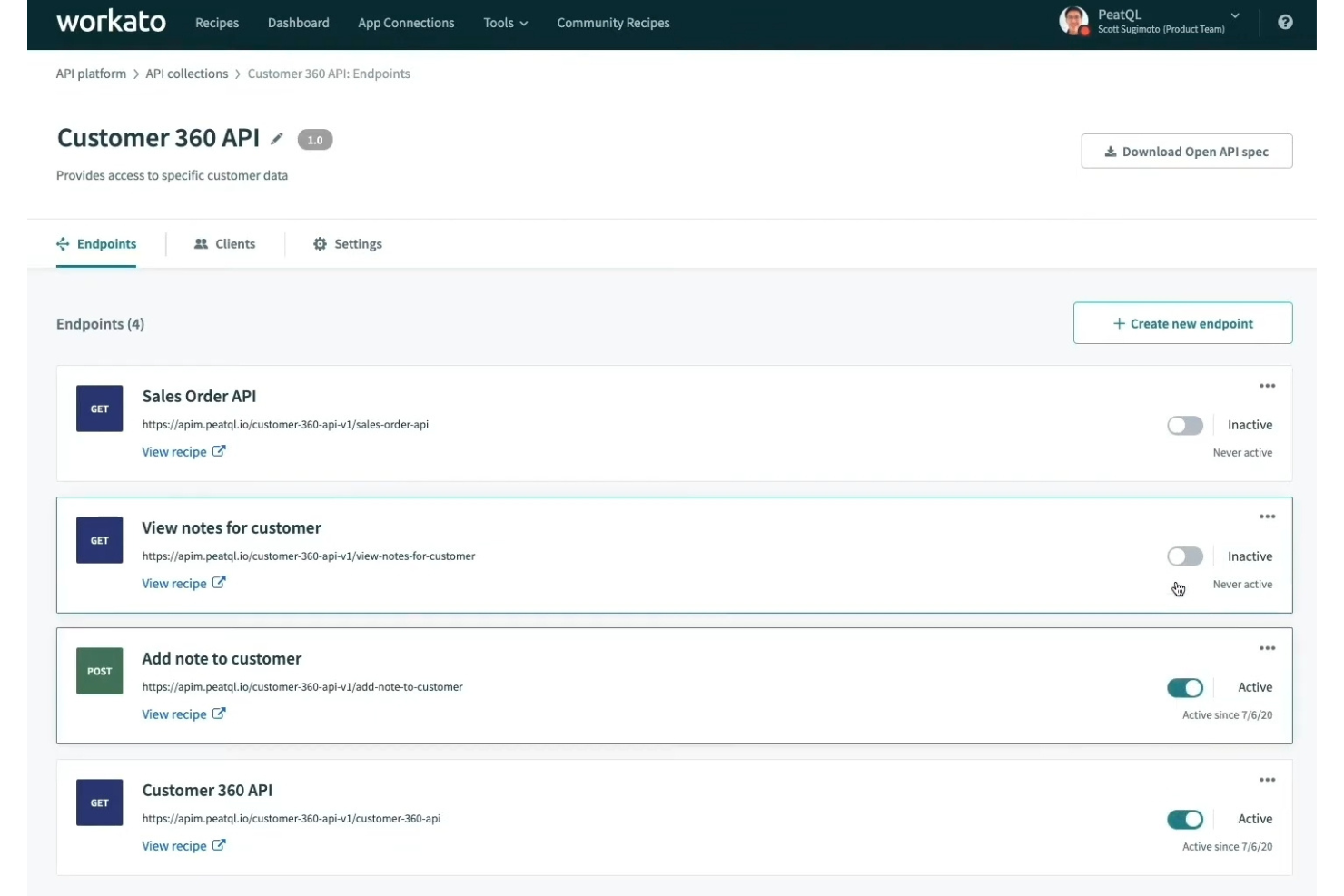
Workato is designed for large retailers and enterprises that need to connect complex systems across e-commerce, ERP, and CRM platforms. The platform appeals to IT and operations teams looking for advanced automation, data orchestration, and secure integrations at scale. Workato’s enterprise-grade approach helps businesses manage high transaction volumes and strict compliance requirements across multiple channels.
Why I Picked Workato
What sets Workato apart is its focus on enterprise-grade integrations, which is essential for retailers and brands managing large-scale operations. The platform offers advanced workflow automation with features like conditional logic, data mapping, and multi-step processes that support complex e-commerce scenarios. I appreciate that Workato includes built-in governance and security controls, which help IT teams maintain compliance and protect sensitive data. For businesses that need to orchestrate data and processes across multiple systems and high transaction volumes, Workato delivers the depth and reliability required.
Workato Key Features
Some other features that make Workato a strong choice for e-commerce integration include:
- Recipe Library: Access a large collection of prebuilt automation recipes for common e-commerce and business processes.
- API Management: Create, publish, and manage APIs directly within the platform for custom integrations.
- Real-Time Data Sync: Keep data updated instantly across connected systems without manual intervention.
- Collaboration Tools: Allow multiple team members to build, test, and manage integrations together.
Workato Integrations
Integrations include Salesforce, Shopify, NetSuite, Slack, Marketo, ServiceNow, Workday, Snowflake, Zendesk, Jira, and more.
Pros and Cons
Pros:
- Real-time monitoring with detailed error logs
- Built-in governance for compliance-heavy industries
- Handles high transaction volumes without lag
Cons:
- Occasional delays in deploying new connectors
- Recipe complexity can require developer support
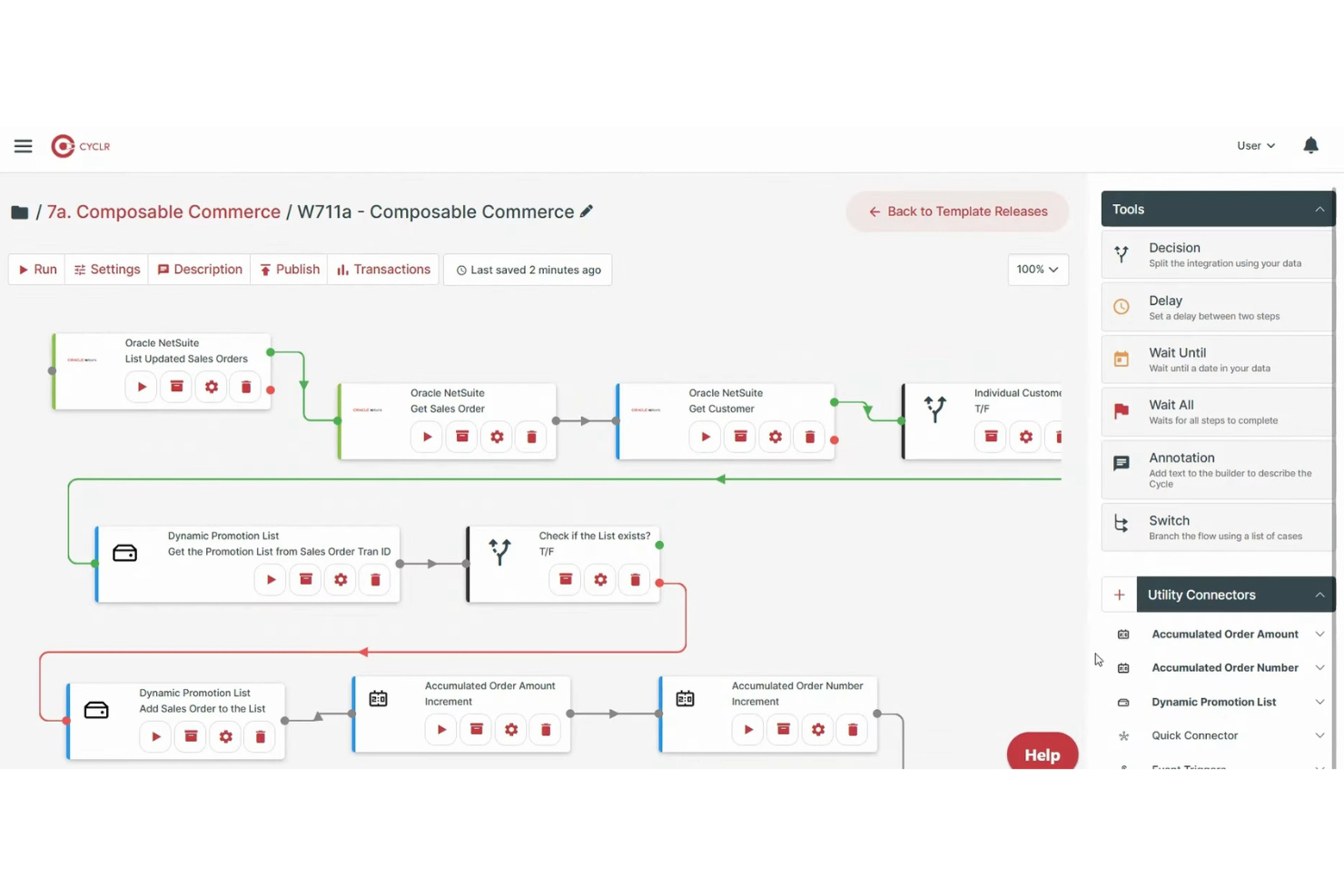
Cyclr gives e-commerce teams a way to build custom workflow automations between their storefronts and business systems. This platform is a strong fit for retailers and agencies that need to design, deploy, and manage unique integrations without heavy development work. If your business relies on tailored data flows or wants to embed automation directly into your own SaaS, Cyclr offers flexible tools for those needs.
Why I Picked Cyclr
What sets Cyclr apart is its focus on building custom workflow automation for e-commerce teams. The platform lets you visually design and deploy complex data flows between your e-commerce store, marketing tools, and back-office systems. I appreciate that Cyclr offers a drag-and-drop workflow builder and supports embedding these automations directly into your own SaaS or client portals. This makes it a strong choice for businesses that need tailored, scalable automation beyond standard integration templates.
Cyclr Key Features
Some other Cyclr features that e-commerce teams may want to know about include:
- White-Label Integration Hub: Offer customers a branded integration experience within your own platform.
- Connector Library: Access a wide range of prebuilt connectors for e-commerce, CRM, ERP, and marketing tools.
- API Management Tools: Manage, monitor, and secure API connections from a single dashboard.
- Version Control for Workflows: Track changes and roll back to previous workflow versions as needed.
Cyclr Integrations
Integrations include Shopify, WooCommerce, Magento, BigCommerce, Salesforce, HubSpot, Mailchimp, QuickBooks, Xero, Zendesk, and more.
Pros and Cons
Pros:
- Version control for managing workflow changes
- White-label integration hub for SaaS providers
- Visual workflow builder supports complex automations
Cons:
- No public marketplace for prebuilt workflows
- Limited documentation for troubleshooting errors

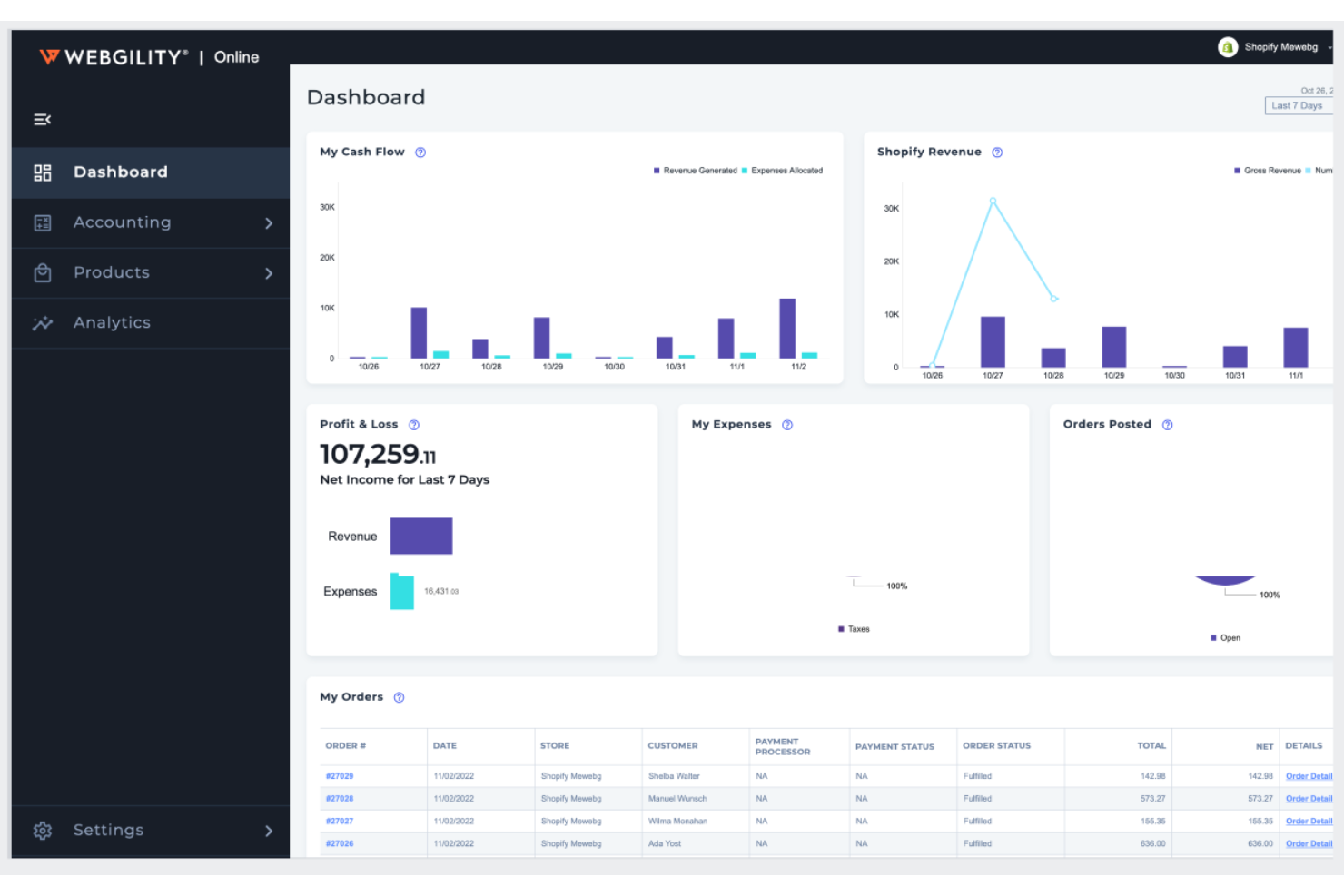
Webgility is designed for e-commerce businesses that need to sync sales, inventory, and order data directly with their accounting platforms. It’s especially useful for retailers and brands that rely on QuickBooks or Xero and want to automate bookkeeping across multiple sales channels. By connecting storefronts and marketplaces to accounting software, Webgility helps reduce manual data entry and keeps financial records accurate in real time.
Why I Picked Webgility
What sets Webgility apart is its deep focus on syncing e-commerce data with accounting platforms, which is a top priority for many retailers and brands. The tool automates the transfer of orders, refunds, fees, and inventory updates directly into accounting software like QuickBooks and Xero. I like that Webgility also supports multi-channel reconciliation, so you can keep financial records accurate even when selling across several storefronts and marketplaces. For businesses that want to eliminate manual bookkeeping and reduce accounting errors, Webgility’s syncing capabilities are especially valuable.
Webgility Key Features
Some other features that make Webgility useful for e-commerce teams include:
- Automated Sales Tax Calculation: Calculate and apply sales tax rates for each order based on location.
- Batch Order Processing: Process multiple orders at once to save time on fulfillment tasks.
- Shipping Label Generation: Create and print shipping labels directly from the platform.
- Performance Analytics Dashboard: View sales, expenses, and profitability metrics in real time.
Webgility Integrations
Integrations include Shopify, Amazon, QuickBooks Online, WooCommerce, BigCommerce, eBay, Etsy, Walmart, Magento, Stripe, and more.
Pros and Cons
Pros:
- Offers detailed analytics on sales performance
- Automates sales tax calculation for transactions
- Supports multi-channel sales reconciliation
Cons:
- Limited support for international tax rules
- Occasional sync delays with some marketplaces

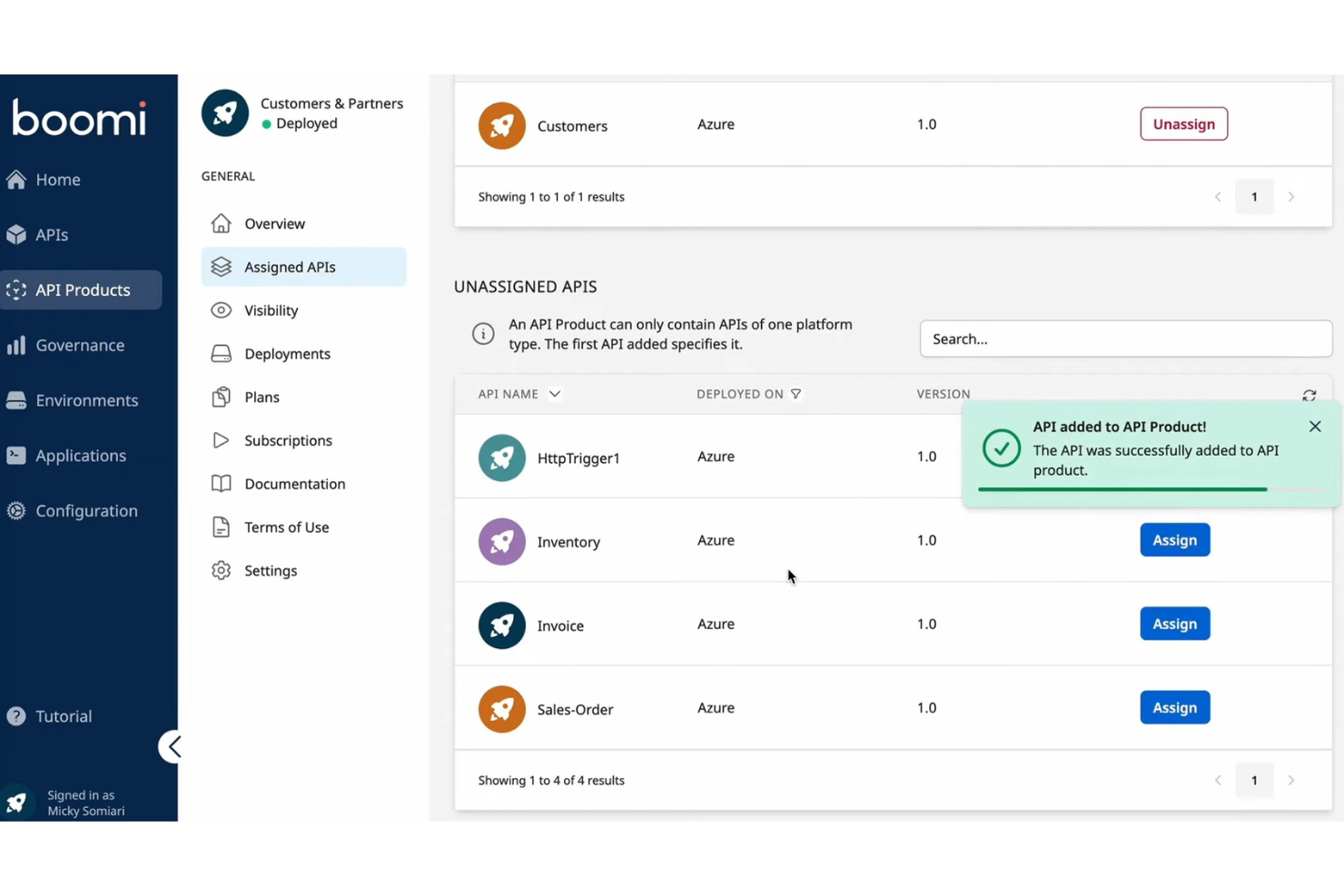
Boomi offers a low-code integration platform designed for businesses that need to connect cloud and on-premises systems quickly. It’s a strong fit for e-commerce teams looking to accelerate cloud deployments and automate data flows across multiple applications. Boomi helps reduce IT bottlenecks by enabling rapid integration between e-commerce platforms, ERPs, CRMs, and other business tools.
Why I Picked Boomi
For e-commerce teams that need to move fast, Boomi’s rapid cloud deployment capabilities make it a strong choice. The platform’s low-code interface lets you build and launch integrations quickly, so you can connect new sales channels or back-end systems without long development cycles. I appreciate how Boomi’s prebuilt connectors and drag-and-drop process builder help reduce the time it takes to automate order, inventory, and customer data flows. If your business is focused on scaling or adapting to new cloud-based tools, Boomi’s approach to fast deployment is especially valuable.
Boomi Key Features
Some other features that make Boomi useful for e-commerce integration include:
- Boomi AtomSphere API Management: Manage, monitor, and secure APIs from a single dashboard.
- Data Mapping Tools: Transform and map data between different systems with a visual editor.
- Process Library: Access a library of reusable integration templates for common e-commerce workflows.
- Built-In Error Handling: Automatically detect and log integration errors for faster troubleshooting.
Boomi Integrations
Integrations include SAP, Salesforce, NetSuite, ServiceNow, AWS, Slack, Workday, Stripe, Shopify, Google Drive, and more.
Pros and Cons
Pros:
- Built-in API management for custom workflows
- Supports hybrid cloud and on-premises environments
- Low-code builder accelerates integration deployment
Cons:
- User interface updates can disrupt existing workflows
- Occasional platform performance slowdowns reported

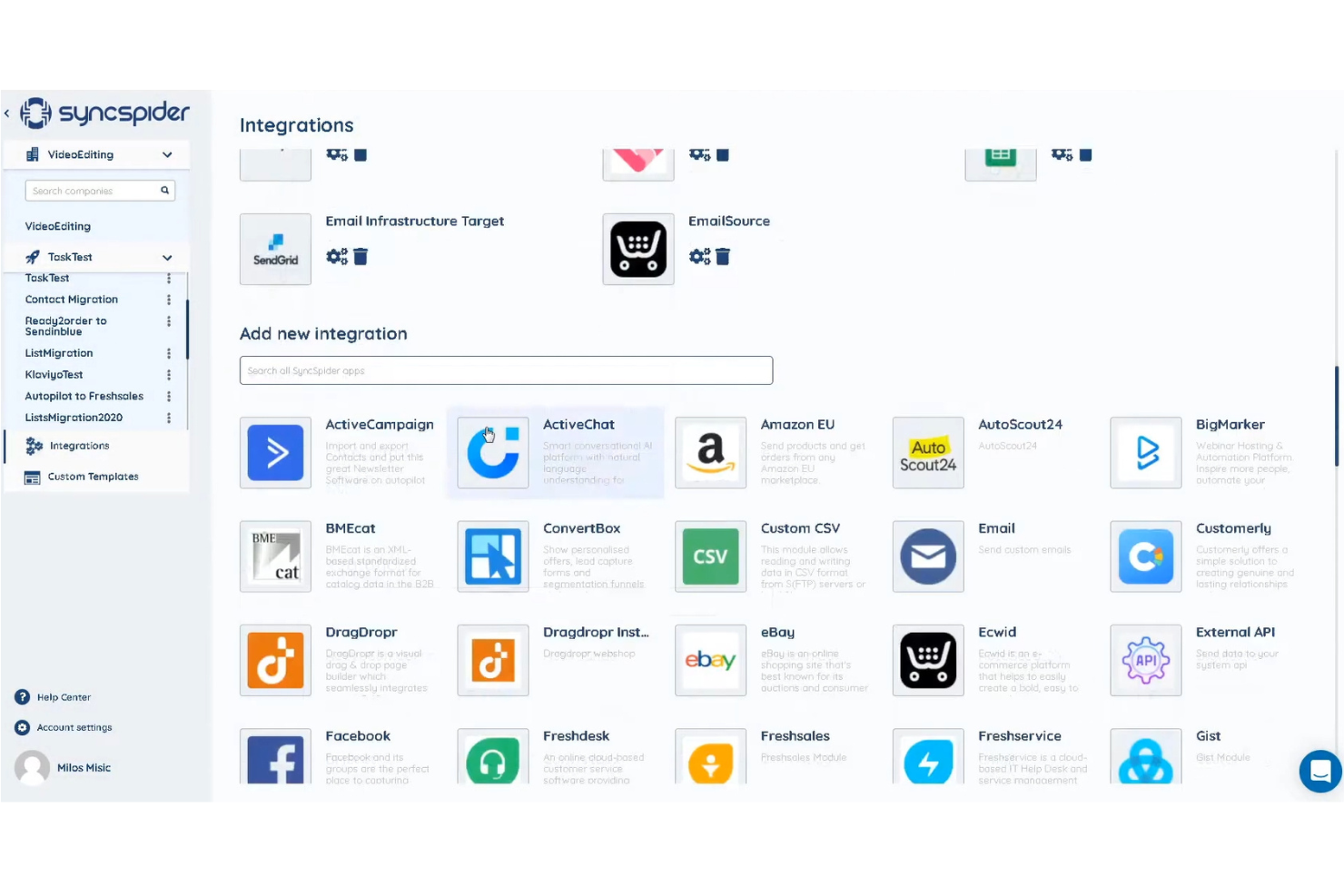
SyncSpider is designed for retailers and e-commerce teams managing multiple sales channels. This platform helps you connect and sync data between your online stores, marketplaces, and business apps. If you need to keep inventory, orders, and product details consistent across platforms, SyncSpider offers specialized tools for multichannel coordination, helping teams manage real-time inventory, support supply chain visibility, and improve conversion rates by keeping product information accurate across channels.
Why I Picked SyncSpider
I chose SyncSpider because it’s built specifically to help businesses manage connections across multiple e-commerce channels. The platform lets you automate product, inventory, and order syncing between your web stores, marketplaces, and business apps. I like that SyncSpider supports scheduled and event-based data transfers, so you can keep information up to date without manual work. Its focus on multichannel coordination makes it a strong fit for retailers juggling several online storefronts.
SyncSpider Key Features
Some other SyncSpider features that e-commerce teams may find useful include:
- Custom Field Mapping: Map data fields between different platforms to ensure accurate data transfer and compatibility.
- Prebuilt Integration Templates: Access a library of ready-made templates for popular e-commerce platforms and business apps.
- Automated Error Handling: Set up rules to manage failed syncs or data mismatches automatically, reducing manual intervention.
- Multi-User Access Controls: Assign roles and permissions to team members for secure and organized workflow management.
SyncSpider Integrations
Integrations include Shopify, WooCommerce, Magento, BigCommerce, PrestaShop, eBay, Amazon, Etsy, Salesforce, HubSpot, and more.
Pros and Cons
Pros:
- Provides multi-user access and permissions
- Allows custom field mapping between systems
- Handles inventory and order data syncing
Cons:
- Occasional sync delays reported by users
- Limited documentation for advanced workflows

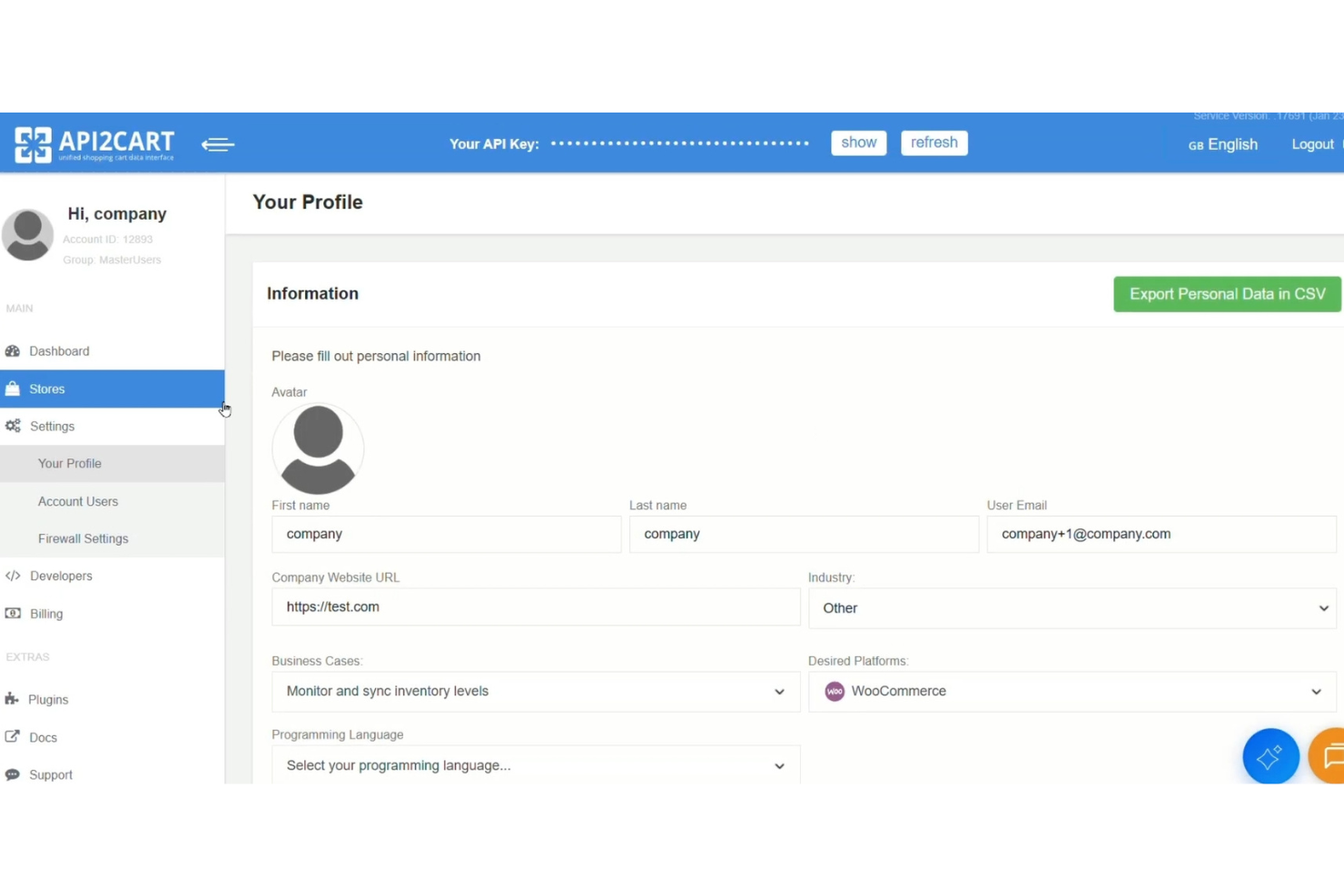
API2Cart is designed for software providers and agencies that need to connect with a wide range of e-commerce marketplaces and shopping carts. If your business relies on syncing product, order, or inventory data across multiple platforms, API2Cart offers a single API to manage those integrations. This approach helps teams reduce the complexity of supporting dozens of marketplace connections in one place.
Why I Picked API2Cart
What sets API2Cart apart is its strong focus on marketplace integration support, which is essential for businesses that need to connect with a wide variety of e-commerce platforms. The platform provides a unified API that lets you access and manage data from dozens of shopping carts and marketplaces, including product, order, and customer information. I appreciate that API2Cart offers automated data synchronization and supports batch operations, which can help reduce manual work for your team. This makes it a practical choice for software vendors and agencies that want to expand their reach across multiple e-commerce channels without building separate integrations for each one.
API2Cart Key Features
Some other API2Cart features that e-commerce teams may want to know about include:
- Webhook Notifications: Receive automated alerts for changes in orders, products, or inventory across connected platforms.
- API Console: Test and debug API calls directly within the platform’s interface.
- Multi-Store Support: Connect and manage data from multiple stores under a single account.
- Detailed API Documentation: Access detailed guides and reference materials for all supported methods and endpoints.
API2Cart Integrations
Integrations include Shopify, WooCommerce, Magento, BigCommerce, PrestaShop, OpenCart, osCommerce, VirtueMart, X-Cart, 3dcart, and more.
Pros and Cons
Pros:
- Includes API console for live testing
- Provides webhook notifications for real-time updates
- Offers unified API for multiple marketplaces
Cons:
- Documentation can be inconsistent across endpoints
- Limited visibility into supported platform versions

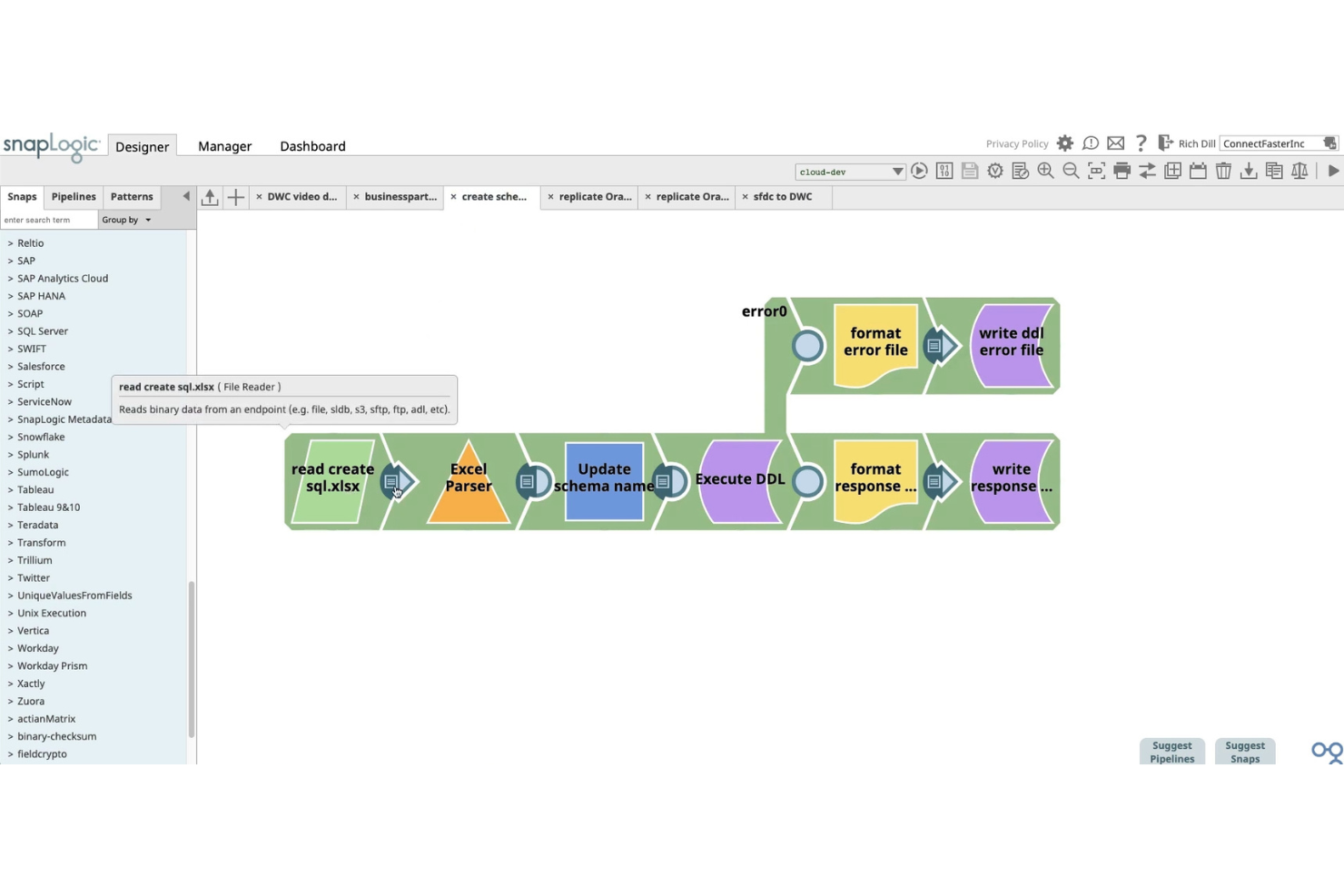
SnapLogic uses AI-powered data mapping to help e-commerce teams automate complex integrations across cloud and on-premise systems. This platform is a strong fit for retailers and digital operations teams that need to unify data from multiple sources without heavy manual configuration. SnapLogic’s intelligent mapping and transformation tools address challenges like syncing product, order, and customer data across diverse platforms.
Why I Picked SnapLogic
SnapLogic stands out for its AI-powered data mapping, which is especially valuable for e-commerce teams dealing with large volumes of complex data. The platform’s Iris AI engine automatically suggests data mappings and transformations, reducing manual effort and speeding up integration projects. I like that SnapLogic supports both structured and unstructured data, making it easier to connect everything from product catalogs to customer feedback. For businesses that need to keep data consistent and accurate across multiple systems, SnapLogic’s intelligent automation offers a clear advantage.
SnapLogic Key Features
Some other features that make SnapLogic useful for e-commerce integration include:
- Prebuilt Snaps: Choose from hundreds of connectors for popular e-commerce, ERP, and CRM platforms.
- Pipeline Designer: Build and visualize integration workflows with a drag-and-drop interface.
- Real-Time Data Processing: Move and transform data instantly between systems as transactions occur.
- Role-Based Access Controls: Manage user permissions and data access for different team members.
SnapLogic Integrations
Integrations include Salesforce, Shopify, NetSuite, SAP, Workday, Snowflake, Marketo, ServiceNow, Slack, Google BigQuery, and more.
Pros and Cons
Pros:
- Visual pipeline builder simplifies workflow design
- Supports both cloud and on-premise systems
- AI-driven mapping reduces manual data work
Cons:
- Occasional lag with large data volumes
- Limited documentation for advanced use cases

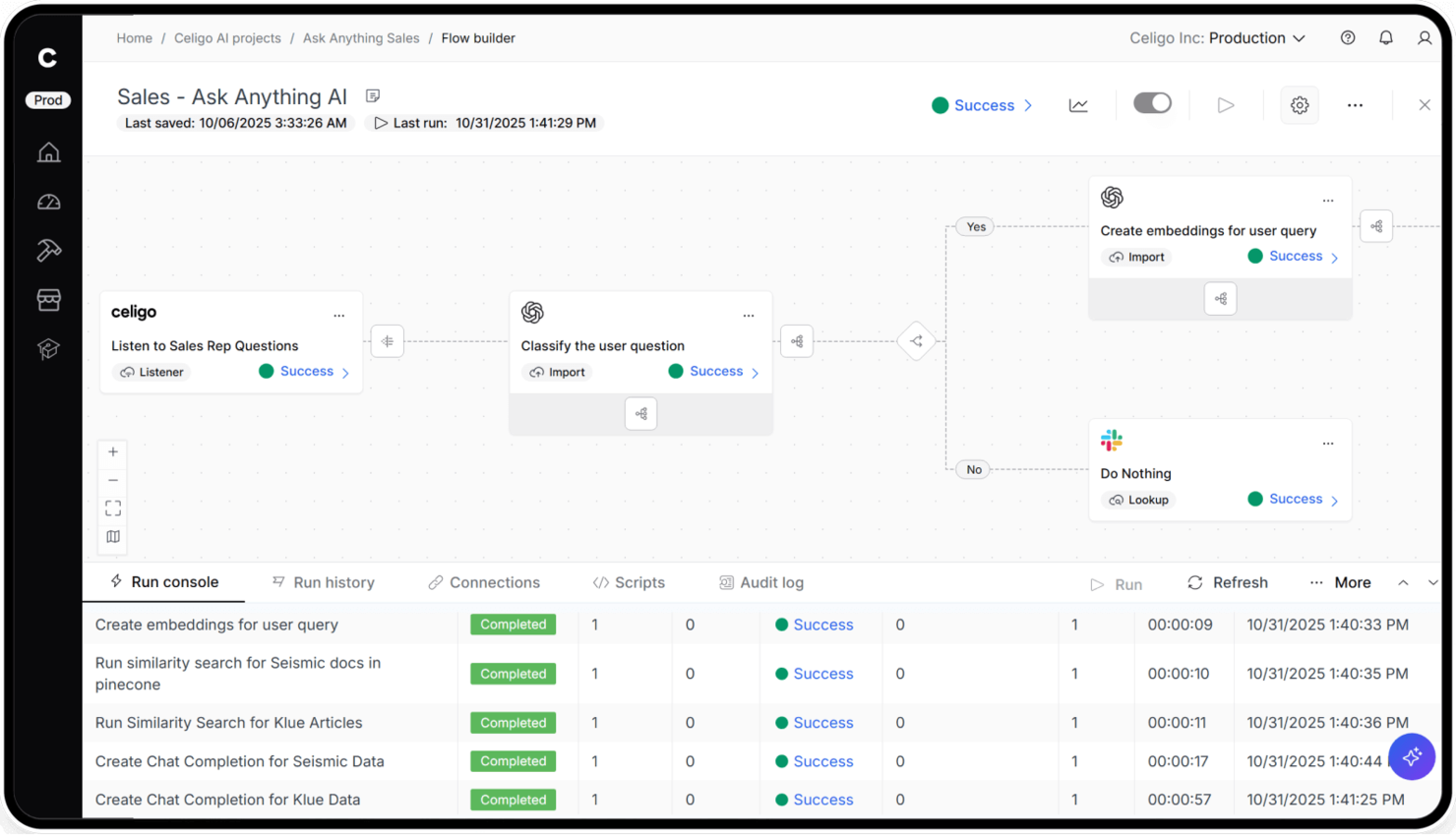
Celigo stands out for e-commerce teams that want to automate workflows quickly using prebuilt templates. The platform is especially useful for retailers and brands looking to connect storefronts, ERPs, and fulfillment systems without heavy custom development. With Celigo, you can deploy automation for order management, inventory sync, and returns across multiple channels in less time.
Why I Picked Celigo
Celigo caught my attention because of its extensive library of prebuilt automation templates, which can help e-commerce teams launch integrations much faster. These templates cover common e-commerce processes like order-to-cash, inventory updates, and returns management, so you don’t have to start from scratch. I like that Celigo also lets you customize these templates to fit your specific business rules and workflows. This approach is especially useful for retailers and brands that want to automate across multiple systems without heavy IT involvement.
Celigo Key Features
In addition to its automation templates, Celigo offers several other features worth noting:
- Flow Builder: Design and manage integration workflows visually with a drag-and-drop interface.
- Error Management Dashboard: Monitor, troubleshoot, and resolve integration errors from a centralized dashboard.
- Role-Based Access Controls: Set permissions and manage user access for different team members.
- Prebuilt Connectors: Access a catalog of connectors for popular e-commerce, ERP, and logistics platforms.
Celigo Integrations
Integrations include Salesforce, Microsoft Dynamics 365, Oracle NetSuite, SAP, Amazon, Shopify, Snowflake, Acumatica, ADP, Walmart, and more.
Pros and Cons
Pros:
- Role-based access controls for team management
- Supports multi-system order and inventory sync
- Real-time error monitoring and alerting
Cons:
- Limited documentation for advanced integration scenarios
- Some connectors require additional configuration steps

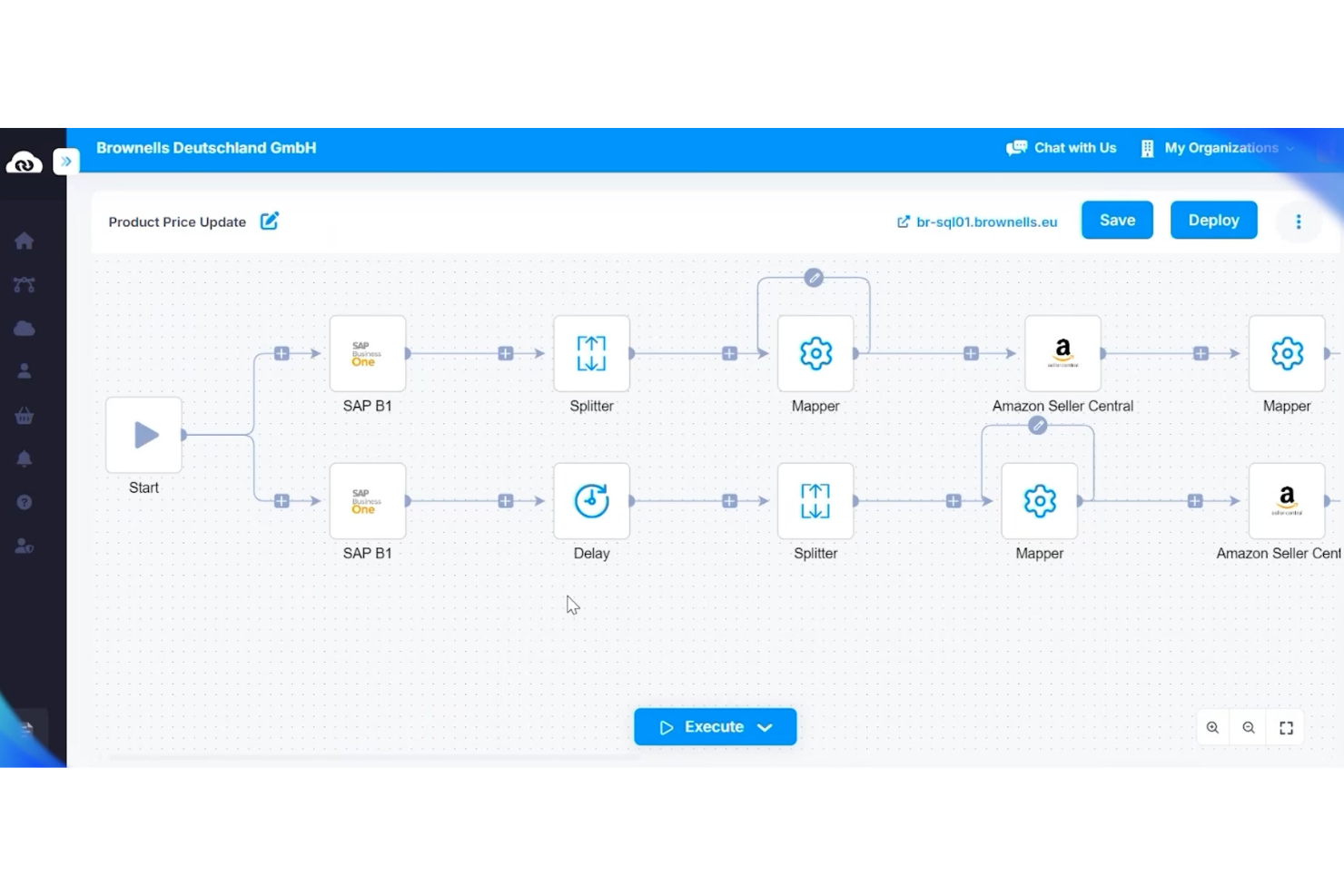
APPSeCONNECT specializes in connecting e-commerce platforms with ERP systems, making it a strong choice for retailers and distributors managing complex back-office operations. This tool is especially useful for businesses that need to sync inventory, orders, and customer data between their online store and ERP software. APPSeCONNECT helps reduce manual data entry and errors by automating data flows between critical business systems.
Why I Picked APPSeCONNECT
What sets APPSeCONNECT apart is its deep focus on ERP system connectivity, which is a top priority for many e-commerce businesses with complex operational needs. The platform offers prebuilt connectors for major ERP systems like SAP, Microsoft Dynamics, and Oracle, allowing you to automate data exchange between your e-commerce storefront and back-office systems. I appreciate how APPSeCONNECT handles real-time synchronization of orders, inventory, and customer data, which helps prevent costly errors and delays. For teams that rely on accurate, up-to-date ERP data to drive e-commerce operations, this level of integration is essential.
APPSeCONNECT Key Features
Some other features that make APPSeCONNECT valuable for e-commerce teams include:
- Visual Workflow Designer: Create and customize integration workflows using a drag-and-drop interface.
- API Management Console: Monitor, manage, and secure APIs from a centralized dashboard.
- Multi-Platform Support: Connect multiple e-commerce platforms and marketplaces within a single environment.
- Error Handling and Alerts: Receive notifications and detailed logs when integration issues occur.
APPSeCONNECT Integrations
Integrations include SAP Business One, SAP S/4HANA, Microsoft Dynamics 365 Business Central, Salesforce, Shopify, WooCommerce, BigCommerce, Amazon, and more.
Pros and Cons
Pros:
- Supports multi-store and multi-channel setups
- Visual workflow builder for integration mapping
- Real-time sync for orders and inventory
Cons:
- Some connectors require additional configuration fees
- Limited self-service options for connector updates

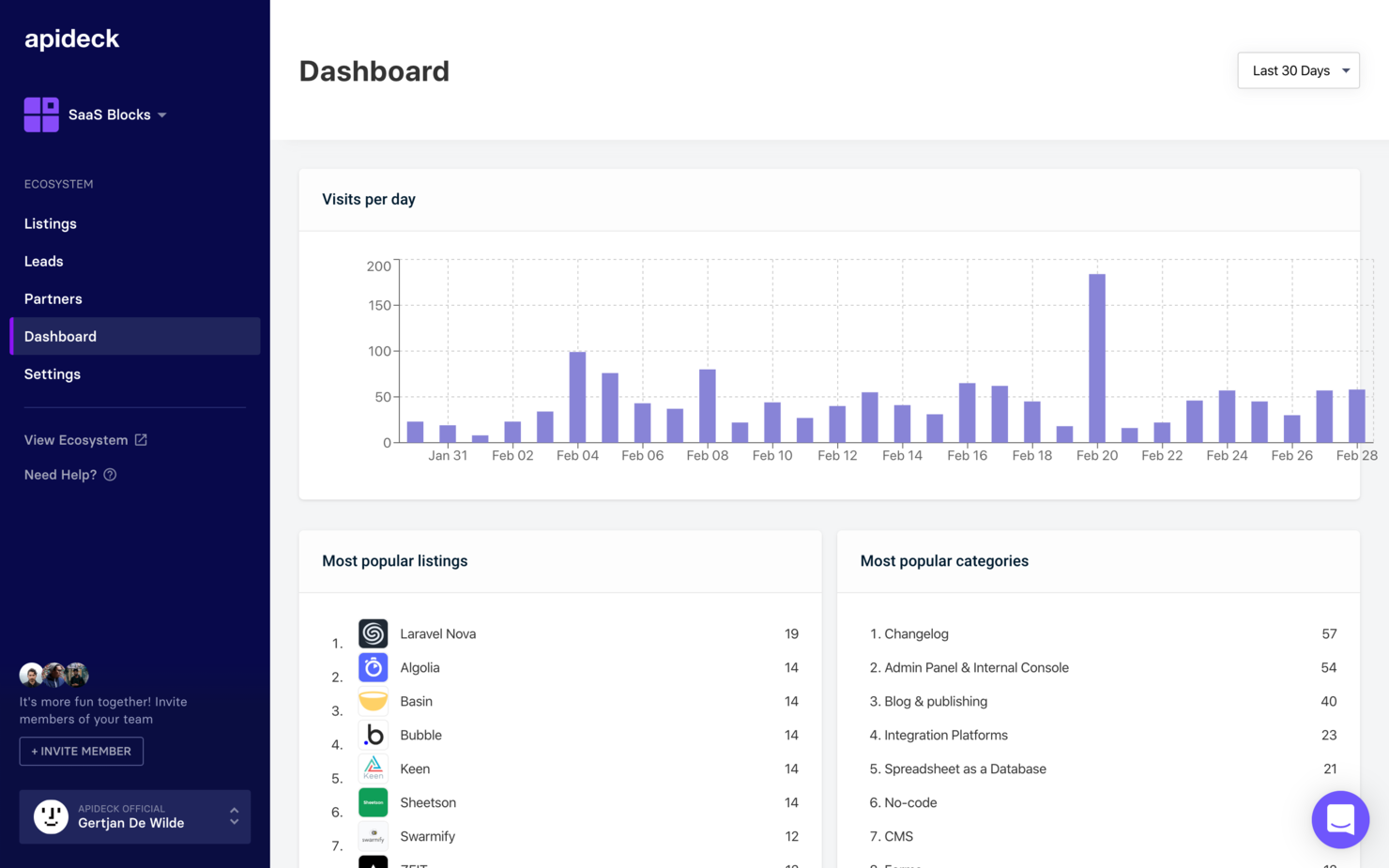
Apideck offers a unified API layer for e-commerce teams that need to connect with multiple storefront and marketplace platforms. This solution is especially useful for SaaS providers, agencies, and developers who want to simplify integration maintenance and reduce time spent on custom connectors. If your business manages data across several e-commerce platforms, Apideck helps centralize those connections through a single, consistent API.
Why I Picked Apideck
For e-commerce teams that need to connect with multiple platforms, Apideck’s unified API access stands out as a practical solution. Instead of building and maintaining separate integrations for each storefront or marketplace, you can use Apideck’s single API to manage connections across many vendors. I like that Apideck handles data normalization and authentication, which reduces the technical overhead for your team. This approach is especially helpful for SaaS providers and agencies that want to offer broad platform coverage without the complexity of custom development for every integration.
Apideck Key Features
Some other Apideck features that e-commerce teams may want to consider include:
- Connector Status Dashboard: Monitor the health and status of all connected APIs in real time.
- Unified Data Models: Work with standardized data structures for products, orders, and customers across platforms.
- API Key Management: Generate and manage API keys for secure access and integration control.
- Webhooks Support: Receive real-time updates from connected e-commerce platforms through webhook events.
Apideck Integrations
Integrations include Shopify, WooCommerce, Magento, BigCommerce, Salesforce, HubSpot, QuickBooks, Xero, Mailchimp, Zendesk, and more.
Pros and Cons
Pros:
- Sandbox environment for safe integration testing
- API key management for secure access control
- Real-time webhook support for instant data updates
Cons:
- Platform coverage may lag behind direct competitors
- Limited documentation for e-commerce-specific use cases


E-commerce Integration Software Selection Criteria
When selecting the best e-commerce integration software to include in this list, I considered common buyer needs and pain points like syncing data across multiple sales channels and automating accounting workflows. I also used the following framework to keep my evaluation structured and fair:
Core Functionality (25% of total score)
To be considered for inclusion in this list, each solution had to fulfill these common use cases:
- Sync order data between e-commerce and accounting platforms
- Update inventory levels across all connected channels
- Import and export customer information automatically
- Reconcile payments and refunds from multiple sources
- Generate basic sales and performance reports
Additional Standout Features (25% of total score)
To help further narrow down the competition, I also looked for unique features, such as:
- Automated sales tax calculation and filing
- Multi-currency and international support
- Built-in shipping label generation
- Real-time analytics dashboards
- Pre-built connectors for niche marketplaces
Usability (10% of total score)
To get a sense of the usability of each system, I considered the following:
- Simple and intuitive user interface
- Clear navigation between modules
- Minimal manual data entry required
- Customizable dashboard layouts
- Responsive design for mobile and tablet
Onboarding (10% of total score)
To evaluate the onboarding experience for each platform, I considered the following:
- Step-by-step setup wizards or product tours
- Access to training videos and documentation
- Availability of onboarding webinars or live sessions
- Pre-built templates for common integrations
- In-app chat or chatbot support during setup
Customer Support (10% of total score)
To assess each software provider’s customer support services, I considered the following:
- Multiple support channels like chat, email, and phone
- Fast response times for urgent issues
- Access to a searchable knowledge base
- Availability of dedicated account managers
- Community forums or user groups
Value For Money (10% of total score)
To evaluate the value for money of each platform, I considered the following:
- Transparent and predictable pricing structure
- Flexible plans for different business sizes
- No hidden fees for core integrations
- Free trial or demo availability
- Discounts for annual billing or multi-user accounts
Customer Reviews (10% of total score)
To get a sense of overall customer satisfaction, I considered the following when reading customer reviews:
- Positive feedback on integration reliability
- Reports of responsive and helpful support
- Comments on ease of setup and use
- Critiques of any recurring technical issues
- Overall value compared to similar tools
How to Choose E-commerce Integration Software
It’s easy to get bogged down in long feature lists and complex pricing structures. To help you stay focused as you work through your unique software selection process, here’s a checklist of factors to keep in mind:
| Factor | What to Consider |
|---|---|
| Scalability | Will the software handle your transaction volume as your business grows? Check for user, order, or channel limits and ask about upgrade paths. |
| Integrations | Does the tool natively connect with your e-commerce platforms, accounting software, and marketplaces? Confirm compatibility with your current tech stack. |
| Customizability | Can you tailor workflows, data mappings, or sync schedules to fit your business processes? Beware of rigid systems that force you to adapt your workflow. |
| Ease of use | Is the interface intuitive for your team? Consider who will use it daily and whether training will be required for non-technical staff. |
| Implementation and onboarding | How long will setup take, and what resources are needed? Ask about migration support, onboarding services, and typical time to value. |
| Cost | What is the total cost of ownership, including setup, monthly fees, and add-ons? Watch for hidden charges tied to order volume or premium integrations. |
| Security safeguards | How does the vendor protect your data? Look for encryption, access controls, and compliance with standards like PCI DSS or GDPR. |
| Support availability | What support channels are offered, and during what hours? Consider if you need 24/7 help or dedicated account management for urgent issues. |
What is E-commerce Integration Software?
E-commerce integration software connects your online sales channels, marketplaces, and back-office systems to automate data flow between them. This type of software syncs orders, inventory, customer details, and financial data across platforms, reducing manual entry and errors. By centralizing and automating these connections, e-commerce integration software helps retailers maintain accurate records, simplify operations, and support growth across multiple channels.
Features
When selecting e-commerce integration software, keep an eye out for the following key features:
- Order syncing: Automatically transfers order data between your e-commerce storefronts, marketplaces, and back-office systems to keep records up to date.
- Inventory management: Updates stock levels across all connected channels in real time to prevent overselling and stockouts.
- Multi-channel integration: Connects multiple sales channels, such as online stores, marketplaces, and POS systems, within a single platform.
- Accounting platform integration: Syncs sales, refunds, and fees directly with accounting software to simplify bookkeeping and reconciliation.
- Automated sales tax calculation: Calculates and applies the correct sales tax rates for each transaction based on customer location and product type.
- Shipping and fulfillment integration: Connects with shipping carriers and fulfillment services to automate label creation, tracking, and status updates.
- Customer data syncing: Consolidates customer information from all channels, making it easier to manage profiles, preferences, and communication.
- Payment reconciliation: Matches payments, refunds, and fees from various channels to your financial records, reducing manual errors.
- Reporting and analytics: Provides dashboards and reports on sales, inventory, and channel performance to support data-driven decisions.
E-commerce integration software solutions do not typically include AI as part of their feature offering. As a result, I will not proceed with this section.
Benefits
Implementing e-commerce integration software provides several benefits for your team and your business. Here are a few you can look forward to:
- Accurate data syncing: Automated order, inventory, and customer data syncing reduces manual entry and minimizes errors across platforms.
- Centralized operations: Managing multiple sales channels and back-office systems from one platform simplifies workflows and oversight.
- Faster order processing: Real-time updates and automated workflows help your team fulfill orders and manage inventory more quickly.
- Improved financial accuracy: Direct integration with accounting platforms ensures sales, refunds, and fees are accurately recorded and reconciled.
- Improved reporting: Consolidated analytics and reporting tools provide a clear view of sales, inventory, and channel performance.
- Reduced compliance risk: Automated sales tax calculation and payment reconciliation help your business stay compliant with tax and financial regulations.
- Scalable growth: Flexible integrations and multi-channel support make it easier to add new sales channels or expand into new markets as your business grows.
Costs & Pricing
Selecting e-commerce integration software requires an understanding of the various pricing models and plans available. Costs vary based on features, team size, add-ons, and more. The table below summarizes common plans, their average prices, and typical features included in e-commerce integration software solutions:
Plan Comparison Table for E-commerce Integration Software
| Plan Type | Average Price | Common Features |
|---|---|---|
| Free Plan | $0 | Basic order syncing, limited channel connections, capped monthly orders, and email support. |
| Personal Plan | $20-$50/month | Multi-channel integration, inventory syncing, basic reporting, and standard customer support. |
| Business Plan | $100-$300/month | Advanced automation, accounting platform integration, sales tax calculation, and priority support. |
| Enterprise Plan | $500-$2,000/month | Custom integrations, dedicated account management, advanced security safeguards, and onboarding assistance. |
E-commerce Integration Software FAQs
Here are some answers to common questions about e-commerce integration software:
How do I know if my e-commerce platform is compatible with integration software?
Check the integration software’s list of supported platforms and connectors. Most vendors publish compatibility lists on their websites. If your platform isn’t listed, ask about custom connectors or API support before committing.
Can e-commerce integration software handle multiple sales channels at once?
Yes, most e-commerce integration software is designed to connect and sync data across multiple online stores, marketplaces, and even physical POS systems. This helps you manage inventory, orders, and customer data from a single dashboard.
What happens if an integration fails or data doesn’t sync correctly?
Most solutions include error logs, alerts, and retry mechanisms to flag and resolve sync issues. Look for tools that offer clear troubleshooting steps and responsive support to minimize disruptions to your operations.
Is it difficult to switch from manual processes to automated integration?
Switching can take some planning, but most platforms offer onboarding support, setup wizards, and migration tools to help you transition. Start with a pilot integration and gradually expand as your team gets comfortable.
How secure is my data when using e-commerce integration software?
Reputable vendors use encryption, access controls, and compliance standards like PCI DSS or GDPR to protect your data. Always review a vendor’s security documentation and ask about their data handling practices before signing up.