
The 24 Best Catalog Management Software, Ranked & Reviewed for 2026

The Top 10 Catalog Management Software You Should Consider
These are my top 10 from the full list—each with a clear “best for” use case at a glance.


You’re here to pick catalog management software that cleans up product data, speeds launches, and keeps every sales channel straight.
We reviewed the top options and ranked the best for ecommerce teams that need reliable PIM workflows, real-time sync, and multichannel syndication to Amazon, marketplaces, and social.
Pain points these tools solve for: messy spreadsheets, duplicate SKUs, slow imports, brittle feeds, and integrations that don’t play nice with your ERP, CRM, and ecommerce platforms.
We looked at automation, templates, digital asset management, APIs, data quality controls, user roles, and scalability—plus pricing, onboarding, SLAs, and data portability.
What you’ll get: a tight Top 10, a side-by-side comparison, and clear notes on functionality and use cases so you can streamline catalog creation and product listing.
I spent over a decade in retail and ecommerce managing warehouses and hundreds of SKUs; this is the field guide I wish I had.
Why Trust Our Software Reviews
Comparing the Best Catalog Management Software, Side-by-Side
Here’s your quick scan of pricing, trial info, and “best for” use cases. Sort your shortlist by budget and deployment fit, then click into the full reviews for workflow and integration details.
| Tool | Best For | Trial Info | Price | ||
|---|---|---|---|---|---|
| 1 | Best for real-time inventory tracking | 60-days free trial available | Pricing upon request | Website | |
| 2 | Best for tailored product attributes | Free demo available | Pricing upon request | Website | |
| 3 | Best for product search and discovery | Free + pay-as-you-go plans available | Pricing upon request | Website | |
| 4 | Best for product data | Free demo available | Pricing available upon request | Website | |
| 5 | Best data repository | Free demo available | From $9,900/year | Website | |
| 6 | Best for publishing interactive catalogs | 14-day free trial | From $499/month | Website | |
| 7 | Best free product catalog | Not available | Free To Use | Website | |
| 8 | Best for unifying your data sources | Free demo available | From $199//month (billed annually) | Website | |
| 9 | Best for product suppliers | Free trial available | From $350/month | Website | |
| 10 | Best for omnichannel selling | Free demo | Pricing upon request | Website |
The 10 Best Catalog Management Software, Reviewed
Deep dives start here—who each pick serves, where it shines, and key considerations. Use these notes to match functionality and integrations to your stack before you book a demo.
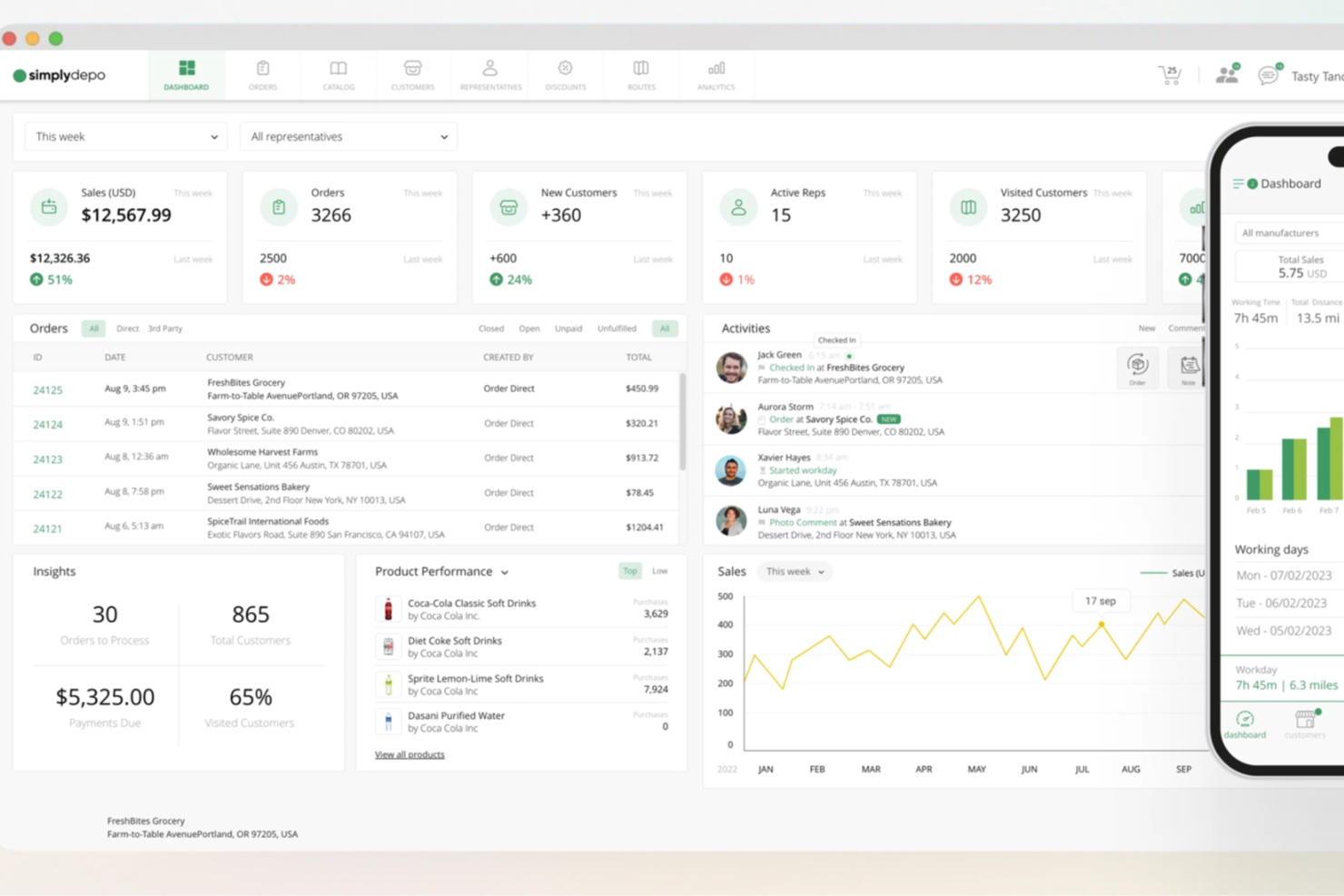
In distribution and retail, speed and accuracy matter. SimplyDepo is a flexible solution built for brands, distributors, and merchandisers that need better control over order management and route planning. It focuses on solving day-to-day operational challenges while supporting smoother workflows. By combining these capabilities, SimplyDepo helps improve efficiency and strengthen customer relationships, making it a practical option for businesses looking for reliable catalogue management software.
Why I Picked SimplyDepo
I chose SimplyDepo because it brings order management and real-time inventory tracking together in one system, which is essential for effective catalogue management. Its B2B order management tools make it easier to process and track orders without gaps or delays. The built-in CRM also supports stronger customer relationships, which is important for businesses managing large or complex catalogues. Taken together, these features provide a dependable setup for handling catalogue management at scale.
SimplyDepo Key Features
In addition to its standout features, SimplyDepo offers several other functionalities that make it a valuable tool for catalogue management software:
- Retail Execution Tools: Enable your team to optimize in-store operations and enhance product visibility.
- Field Sales Management: Provides real-time data and insights for your sales team to drive growth and productivity.
- Route Planning: Helps in optimizing delivery routes, reducing travel time, and improving delivery efficiency.
- Flexible Integrations: Allows seamless integration with various platforms to enhance operational workflows.
SimplyDepo Integrations
Integrations include Quickbooks, Shopify, Salesforce, and an API is available for custom integrations.
Pros and cons
Pros:
- Route planning for field sales
- B2B order portal with CRM
- Real time inventory tracking available
Cons:
- Pricing details not publicly disclosed
- Native integrations list is limited


Rierino is a product information management (PIM) solution designed to help you organize and distribute product data across various channels. It offers a flexible data model that adapts to different industries and business structures, ensuring consistency and accuracy in your product information.
Why I picked Rierino: Rierino's hyperflexible data model is a key reason to consider it for catalog management. This feature allows you to tailor product attributes to fit your specific industry needs, such as adding care instructions or technical specifications. This customization ensures that your product data is both relevant and comprehensive, making it easier for customers to find the information they need.
I also like Rierino's AI-powered validations and content generation. The platform uses natural language processing and image processing to validate and optimize product data, helping you maintain high-quality information. Additionally, Rierino offers one-click translations and content rewording, enabling you to quickly localize your product information for different markets.
Rierino Standout Features and Integrations
Features include multi-language support, multi-currency synchronization, multi-channel synchronization, advanced NLP validations, image processing controls, custom data quality rules, drag-and-drop workflow customization, SLA tracking, trigger-based notifications, and embedded analytics dashboards.
Integrations include Adyen, Amazon Web Services, Google Cloud Platform, Microsoft Azure, Stripe, MongoDB, Redis, Algolia, Elastic, Odoo, SAP, and Twilio.
Pros and cons
Pros:
- AI-powered validations enhance data quality
- Flexible data modeling allows for industry-specific customization
- Advanced workflow customization
Cons:
- AI-generated content may need refinement
- Extensive customization options may be overwhelming without proper guidance
New Product Updates from Rierino
Rierino Expands Validation, AI, and UI Capabilities
Rierino’s latest updates introduce advanced validation parameters, smarter AI agent interactions, enhanced UI flexibility, and upgraded file event handling. These improvements strengthen automation, accuracy, and data presentation across the platform. For more information, visit Rierino's official site.
 .
.

Algolia helps your ecommerce business create catalogs with product search and discovery capabilities.
Why I picked Algolia: The software helps your business design and implement unique search experiences when visiting your online store. It builds these experiences with AI and configurable rules. It also uses a robust API that helps you add related products and frequently bought-together functionality to your catalog.
Algolia helps any sized ecommerce store looking to add search functionality to their product catalog. You can implement and manage consistent experiences across multiple channels from one platform. You don’t have to build this experience from scratch; just implement Algolia’s building blocks to deliver the right experiences immediately.
Algolia Standout Features and Integrations
Features include extensive documentation, actionable insights, A/B tests, data dashboard, pre-built libraries, visual editor, voice search, image search, and a site crawler.
Integrations include Salesforce Commerce Cloud, Netlify, Magento, Shopify, and Zendesk. Additional options can be unlocked using a plan through Zapier, but this may incur additional costs.
Algolia costs from $1.00/1,000 requests/month. Algolia offers a free forever subscription tier.
Pros and cons
Pros:
- Create rules according to customer needs.
- Works with most coding languages.
- Large developer community.
Cons:
- Can take time to index products.
- Can be buggy.


Sales Layer identifies gaps and errors in your product data to help you enhance your content and increase orders.
Why I picked Sales Layer: It works with all data sources to determine where you can improve your product data. The information it provides can help you improve your product listing’s rankings, so your target audience will find it. You can get insights into your catalog’s performance including team performance, quality progress, content completeness, and channel analysis. Sales Layer can also help you track changes in a real-time activity feed that details all team members’ actions and when they made the changes.
Sales Layer is a cloud-based solution that helps any sized ecommerce store manage and organize product information. The platform will synchronize and update your data automatically, analyze its quality, and publish it throughout multiple sales channels and platforms. It also maps every product field with the proper categories, attributes, and groups.
Sales Layer Standout Features and Integrations
Features include a data scanner, quality score, activity feed, data history, quick data import, intuitive exporting, digital asset management, access permissions, product workflows, and version history.
Integrations include CS-Cart Multi-Vendor, Salesforce, WordPress, Shopify, Microsoft Excel, WooCommerce, Magento, BigCommerce, PrestaShop, and ChannelAdvisor.
Sales Layer offers custom pricing upon request. Sales Layer offers a 30-day free trial for new users.
Pros and cons
Pros:
- Easy to use.
- Unifies all product details.
- Excellent customer service.
Cons:
- Product filtering needs work.
- Sometimes information transfer is slow.


Pimcore is an open source platform that unites your data and experience management in a single repository.
Why I picked Pimcore: The software offers your business product information management, digital asset management, master data management, digital commerce, and web content management in one central location. Pimcore is a single and trusted view of your product information to ensure your business, and customers get high-level data consistency. It can integrate into IT frameworks and acquire and manage all digital data types.
Pimcore is open source software, which means any ecommerce business can use it for free to manage its product catalog. If you have multiple domains or operate ecommerce stores in different markets, Pimcore’s flexibility can deliver data from a central repository and display it on any sales channel. You can also manage millions of SKUs with thousands of attributes through the platform, even with the most complex data.
Pimcore Standout Features and Integrations
Features include data modeling, data management, workflow management, data quality management, digital asset management, omnichannel publishing, product experience portal, product data syndication, and product feed management.
Integrations include Oracle NetSuite, Salesforce Marketing Cloud, JetRails, Alumio, CELUM, Combeenation, Hostripples, Drupal, Shopify, Microsoft Azure, Episerver, SAP ERP, Sitecore, and InterServer.
Pimcore costs from $1,800/month. Pimcore offers a free forever subscription.
Pros and cons
Pros:
- Advanced role permissions.
- Helpful field collection and classification.
- Flexible data modeling.
Cons:
- No default configurations.
- Long learning curve.

Publitas helps retailers create an immersive, shoppable experience to inspire customers to buy their products.
Why I picked Publitas: The platform can help you create an interactive product catalog that will grab your customers’ attention right away. When using Publitas, you can create, publish, and manage digital catalogs throughout all sales channels and show your products to online buyers. You can combine various media, such as slideshows and videos, to create dynamic content and increase relevance through personalization. This will help your business get more engagement from your customers.
Publitas helps any sized ecommerce business increase conversion by adding shoppable content that helps customers through the buying journey. You can also use the platform’s product overlay functionality to show additional details. Your marketing teams can automate search engine optimization to engage with your target audience and provide a personalized shopping experience through the Publitas platform.
Publitas Standout Features and Integrations
Features include shopping cart and product page integration, dynamic publications, personalized promotions, traffic tracking, multiple brand management, team management, product information editing, password protection, and multiple product views.
Integrations include Bynder, Google Analytics, Adobe Analytics, Spott, Datatrics, Adform, and an API that allows you to create custom integrations with your current systems.
Publitas costs from $499/month when paying monthly or $449/month when billed annually. Publitas offers a 14-day free trial for new users.
Pros and cons
Pros:
- Regularly add new features.
- Helpful customer support.
- Excellent user interface.
Cons:
- Dynamic templates are complex.
- Expensive for some businesses.


Salsify Open Catalog is a free product catalog that makes it easier for ecommerce brands to collaborate and standardize product data.
Why I picked Salsify Open Catalog: The software is a free and open catalog platform that centralizes standardized data that makes it easier for ecommerce retailers and their teams to collaborate on its content. You can use it to easily and quickly transfer data to syndicate your product content to multiple sales channels simultaneously. You can retrieve and use the data from numerous sources, such as an API, a file transfer protocol, or a manual user interface export.
Salsify Open Catalog is a part of the Product Experience Management solution, which combines product information management, digital asset management, and experience builder tools. It works for businesses of any size looking for ways to organize and share products. Its capabilities enable sales from multiple sales channels, including online marketplaces and social media.
Salsify Open Catalog Standout Features and Integrations
Features include product information distribution, content updating, brand experience maintenance, product information syndication, analytics, data import, data visualization, and 2-factor authentication.
Integrations include Widen Collective, Bynder, Qliktag Platform, Clear Spider, Titan CMS, Aprimo, Exenta, HubSoft, and an API that allows custom integrations.
Salsify Open Catalog is free to use.
Pros and cons
Pros:
- Provides an excellent knowledge base.
- Creates excellent ecommerce experiences.
- Automated Workflows.
Cons:
- Fixing bugs takes time.
- Limited to US ecommerce stores.


Hygraph is a content platform that enables your business to get true value from your backend data sources.
Why I picked Hygraph: The software helps your business integrate all your data sources and distribute content anywhere you need. It uses a drag-and-drop interface that removes the need for coding knowledge or hiring an experienced developer. You can use the system to add all necessary data from your backend and create a well-developed product catalog that contains all the product information your customers need.
Hygraph helps businesses of all sizes visualize their content flow to ensure all information goes where it’s needed. It can save your business time and money you might spend overhauling your current tech stack to match your growing needs. Hygraph can help you enhance their capabilities and remove the overhead while creating a product catalog that works for you.
Hygraph Standout Features and Integrations
Features include schema builder, scheduled publishing, granular permissions, rich text, webhooks, document indexing, version control, customizable templates, and a form builder.
Integrations include Commerce Layer, Bynder, Salesforce, Slack, BigCommerce, Plasmic, Popupsmart, Uniform, Stackreaction, and an API that allows users to create custom integrations.
Hygraph costs from $399/project/month when paying monthly or $299/project/month when billed annually. Hygraph has a free forever subscription for up to three users.
Pros and cons
Pros:
- Extremely flexible.
- Excellent documentation.
- Fast user interface.
Cons:
- Paid plans are expensive.


B2B Wave allows product manufacturers, suppliers, and distributors to create efficient online catalogs.
Why I picked B2B Wave: The platform is a complete B2B ordering portal where customers can log in to see your product catalog and price list. B2B provides a sales rep portal where your representatives can log in, add customers, manage current customers, and add new orders. You can easily set up an ecommerce platform, accept online orders, and speak with customers to increase your sales.
B2B Wave is an excellent choice for small and medium suppliers who sell their products to other businesses. When using this software, you can have your ecommerce portal ready to go in less than 48 hours. It’s a cloud-based solution, so you can cut down on your expenses compared to implementing on-site tools.
B2B Wave Standout Features and Integrations
Features include domain hosting, site customization, multi-language support, product search, product import and export, product configuration, product variants, featured products, price lists, discounts, and tax rates.
Integrations include Stripe, Quickbooks, Xero, Authorize.net, Brightpearl, Zynk, Green Project, Stackreaction, Fortnox, and an API you can use to create custom system connections. Additional options can be unlocked using a plan through Zapier, but this may incur additional costs.
B2B Wave costs from $295/month when paying monthly or $250.75/month when billed annually. B2B Wave offers a 14-day trial for new subscribers.
Pros and cons
Pros:
- Very user-friendly.
- Highly customizable.
- Responsive support.
Cons:
- Servers can be slow.
- Some occasional bugs.

Productsup Advertising PX helps ecommerce stores sell large amounts of products directly through various sales channels.
Why I picked Productsup Advertising PX: Ecommerce organizations can use this all-in-one solution to manage product information chains and content data across their sales channels. The Advertising PX solution from Productsup enables your business to sell more and sell faster by helping you create excellent experiences across all touchpoints. It can help you produce perfectly tailored product catalogs for any sales channel and audience while overcoming the complexity of modern advertising environments.
Productsup Advertising PX can help medium and large ecommerce enterprises allow machine learning to systematically connect product information to channel-specific attributes. You can use the platform to clean your current catalog with its editing tools. The software will also provide immediate feedback on your sales channel’s readiness, including existing errors, optimization potential, and implementation options.
Productsup Advertising PX Standout Features and Integrations
Features include automatic data mapping, image and video designer, channel previews, campaign optimization, product information management, and A/B testing.
Integrations include Widen Collective, CS-Cart Multi-Vendor, Google Analytics, Shopify, WooCommerce, Magento, BigCommerce, OpenCart, Pinnacle Cart, LemonStand, Contentserv, SAP Business One, Salesforce Commerce Cloud, and Cdiscount.
Productsup Advertising PX offers custom pricing upon request. Productsup Advertising PX offers a free demo to help you determine whether the platform is right for you.
Pros and cons
Pros:
- Synchronizes product data.
- Friendly and helpful customer support.
- Control and manage all products.
Cons:
- Difficult to navigate.
- Complex feed management.
Other Catalog Management Software Picks
Let’s see some other great options that didn’t quite make the top 10, but are also quite good.
- Elastic Path Product Experience Manager
For dynamic catalog rules
- CatBase
For data publishing
- Jasper PIM
For popular ecommerce platforms
- Plytix
For product information management
- Subbly
For subscription-based businesses
- Syndigo
For creating core product content.
- Flipsnack
PDF-to-flipbook publication converter.
- Feedonomics
Full-service product feed platform.
- Catalog Machine
For sharing digital catalogs. Catalog Maker by for BigCommerce
- Catalog Maker by for BigCommerce
Intuitive drag-and-drop catalog builder interface.
- iPaper
For creating digital catalogs from PDFs.
- Wholesale/Retail Catalog Maker for Shopify
For taking orders from your catalog.
- Catsy
Product content HUB.
- Akeneo Shared Catalogs
For product information collaboration.


Our Selection Criteria For Catalog Management Software
Here’s how I evaluate catalog management software for real retail and ecommerce use—what matters day to day, not brochureware.
Core functionality (25% of total score)
What I look for:
- Single source of truth. Central repository for product data, variants, and attributes across all sales channels.
- Data modeling depth. Flexible schemas, category trees, and relationships that scale to thousands of SKUs.
- Bulk import/export. Fast CSV, XLSX, and JSON handling with mapping, validation, and deduplication.
- Data quality controls. Required fields, completeness scoring, rules, and error flags you can act on.
- Localization. Languages, currencies, units, and region-specific content without duplicate records.
- Change tracking. Version history, audit logs, and rollbacks you can trust.
Additional standout features (25% of total score)
What moves a tool up the list:
- Syndication at scale. Native templates for Amazon, Google, social, and marketplaces with channel rules.
- Digital asset management. Image and video handling, derivatives, and metadata tied to SKUs.
- Automation and workflows. Triggers, approvals, and rule-based updates that cut manual work.
- AI-powered enrichment. Categorization, attributes, and product descriptions that are actually usable.
- APIs and webhooks. Modern, well-documented API, SDKs, and real-time events for your stack.
- Experience tools. Product experience portals, online catalogs, and shareable line sheets when you need them.
Usability (10% of total score)
How quickly a team can work:
- User-friendly UI. Clean grids, filters, and saved views that make sense to non-tech users.
- Speed. Snappy bulk edits and searches, even with large catalogs.
- Role-based access. Permissions, field-level controls, and safe collaboration.
- Inline editing. Fewer clicks to update attributes, images, and relationships.
Onboarding (10% of total score)
Getting from spreadsheets to production:
- Data migration help. Mappings, templates, and sample files that reduce cleanup time.
- Time to first value. Days, not months, to load products and publish a channel.
- Guided setup. Checklists, playbooks, and sandbox environments for testing.
- Services and training. Real implementation support, not a PDF and a prayer.
Customer support (10% of total score)
When things break or scale:
- Responsive channels. Email, chat, and phone with clear SLAs and escalation paths.
- Catalog expertise. Specialists who understand PIM, feeds, and ERP nuances.
- Proactive comms. Release notes, status pages, and honest timelines.
Value for money (10% of total score)
Costs you can plan for:
- Transparent pricing. Clear tiers by SKUs, users, or channels, with fair overage policies.
- Included vs add-ons. Connectors, DAM, and workflows that aren’t all extra line items.
- Contract terms. Reasonable commitments, data export included, and no lock-in games.
Customer reviews (10% of total score)
Signals from real operators:
- Scale confidence. Proof it holds up with big catalogs, heavy automation, and multichannel workloads.
- Patterns over hype. Consistent feedback on stability, support quality, and promised functionality.
What is Catalog Management Software?
Catalog management software is a centralized system to create, govern, and distribute product data—titles, attributes, media, pricing, and availability—across your ecommerce platforms and sales channels.
Teams in retail, distribution, and DTC use it as a single source of truth for SKUs, replacing error-prone spreadsheets with structured workflows and real-time updates.
It solves inconsistent product details, slow launches, and brittle feeds by standardizing data, handling digital assets, and syndicating to marketplaces and social.
In short: faster time to market and cleaner product information management without the firefighting.
How to Choose Catalog Management Software
You don’t need a hundred features—you need the right ones that fit your stack, budget, and workflows. Here’s the fast path.
| Focus | What to assess | Action tip |
|---|---|---|
| Scope your catalog | Current and future SKUs, variants, attributes, locales, and media volume | Write the data model you need so the PIM and DAM won’t choke later |
| Map your channels | Storefront, marketplaces (Amazon), social, and B2B requirements and templates | List every sales channel and required fields to avoid custom one-offs |
| Audit data sources | Where product data lives now: ERP, CRM, spreadsheets, apps, and legacy tools | Decide which systems must sync in real time via APIs or flat files |
| Choose core fit | PIM vs feed management vs digital asset management and what’s truly required | Start with a PIM, then add feed or DAM only if the catalog demands it |
| Pressure-test automation | Rules, approvals, scheduling, and AI-powered enrichment and categorization | Verify bulk updates and workflows cut time to market, not add steps |
| Check data quality | Validation, completeness scoring, versioning, and rollback safeguards | Require field rules and error flags so bad product data can’t publish |
| Validate integrations | Native connectors for ecommerce platforms plus API/webhook depth | Confirm your ERP, CRM, and online store get reliable bidirectional sync |
| Run a proof of value | Import, enrich, and syndicate a slice of the catalog to one channel | Measure time to first publish and error rate on product listings |
| Model total cost | Pricing by SKUs, users, channels, and add-ons with growth in mind | Compare cloud-based tiers vs open source and note export/exit terms |
Top Features of Catalog Management Software
The right stack does more than store product data—it enforces data quality, speeds syndication, and plugs cleanly into your systems. Here’s what I value most.
- Single source of truth. Central repository for product data, variants, attributes, and media across every sales channel.
- Flexible data modeling. Category trees, product families, relationships, and localization that scale to large SKU counts.
- Data quality and validation. Required fields, completeness scoring, deduping, and approvals that prevent bad listings.
- Bulk operations. Fast import/export from CSV, Excel, and JSON with mapping, scheduling, and delta updates.
- Digital asset management. Image/video linking to SKUs, automatic renditions, metadata control, and CDN delivery.
- Syndication and templates. Channel-ready feeds for Amazon, Google, and social with field mapping and previews.
- Automation and workflows. Rule-based updates, scheduled jobs, and AI-powered enrichment for categorization and descriptions.
- APIs and integrations. Modern REST/GraphQL, webhooks, and connectors for your ERP, CRM, and ecommerce platforms.
- Versioning and audit trails. Full change history with rollbacks and user-level accountability.
- Permissions and governance. Role-based access, field-level controls, and environment separation for safer changes.
- Scalability and performance. Snappy search and edits at millions of SKUs with real-time updates and clear SLAs.
Benefits of Catalog Management Software
This isn’t about features for features’ sake—it’s about cleaner operations, faster launches, and better customer experience where it counts.
- Faster time to market. Automation and templates cut the lag between sourcing data and going live.
- Higher data quality. Fewer errors and returns thanks to validation, consistent attributes, and reliable availability.
- Omnichannel consistency. Real-time sync keeps product details aligned across ecommerce, marketplaces, and social.
- Team productivity. Less spreadsheet chasing and more user-friendly workflows with clear ownership.
- Revenue lift from findability. Clean taxonomy and metadata improve search, discovery, and conversion.
- Lower integration risk. Native connectors and stable APIs reduce brittle scripts and surprise downtime.
- Executive visibility. Dashboards show completeness, channel readiness, and error trends you can act on.
- Governance and compliance. Permissions, audit logs, and export options keep data portable and controlled.
- Future-proofing. Cloud-based scalability and open architecture support growth without a replatform.
Pricing & Cost Breakdown for Catalog Management Software
Pricing in this category swings by SKU count, users, channels, and whether you need DAM, feed management, or search/discovery. Use these directional ranges to frame budgets before you talk to a provider.
| Plan | Average price | Common features | Best for |
|---|---|---|---|
| Free / open source | $0 (self-hosted); hosted tiers vary | Core PIM, basic workflows, community support, spreadsheets/CSV import | Teams with engineering support and smaller catalogs |
| Starter (SMB SaaS) | ~$250–$700/month | Central repository, templates, bulk import/export, basic automation, limited users/SKUs | Small ecommerce brands moving off spreadsheets |
| Growth / Pro | ~$700–$2,000/month | Data quality rules, DAM basics, channel syndication, APIs/webhooks, roles/permissions | Multichannel retailers scaling SKUs and marketplaces |
| Enterprise | ~$2,000–$10,000+/month or annual contracts | Advanced workflows, SLA uptime, SSO/SCIM, sandbox, custom integrations, governance | Large catalogs, complex ERP/CRM stacks, global teams |
| Usage-based add-ons | Pay-as-you-go (e.g., per 1,000 requests) | Search/discovery, image processing, enrichment, CDN | Stores optimizing product discovery and performance |
Caveats to budget for
- Connectors and apps. Some ecommerce, ERP, and marketplace integrations are paid add-ons.
- Storage and DAM. Image/video limits and CDN egress can trigger overages.
- API usage. High call volumes, webhooks, and real-time sync often carry metered fees.
- Implementation. Data mapping, onboarding, and training may require services or a partner.
- Contract terms. Watch user/SKU caps, auto-renewals, and export/exit provisions.
- Regional needs. Localization, VAT/GST, and data residency can change pricing.
Catalog Management Software FAQs
OK, you’ve read the post, soaked up the insights, seen the picks—now, you still have some questions. Well, hopefully these are those questions and that we answer them well.
What’s the difference between PIM, DAM, MDM, and feed management?
PIM is your catalog management system for product data and workflows. DAM stores and serves images/videos tied to SKUs. MDM governs data across the business (customers, vendors, products). Feed management formats/syndicates data to sales channels. Many tools bundle PIM + DAM; feed tools handle channel-specific rules and syndication.
How many SKUs justify dedicated catalog management software?
If you’re past a few hundred SKUs, multiple locales, or more than two sales channels, a PIM usually beats spreadsheets. Signals you’re ready: daily CSV firefighting, duplicate product details, stalled launches, and brittle scripts between ERP/CRM and ecommerce platforms.
Can a PIM replace my ERP or ecommerce platform?
No. The PIM governs product data and enrichment; the ERP handles inventory, purchasing, and financials; the ecommerce platform runs storefront and checkout. You want clean APIs/webhooks so product information flows real-time without double entry.
How do I keep data quality high after go-live?
Use validation rules, required fields, and completeness scoring. Lock roles/permissions, enable versioning, and audit changes. Automate enrichment for product descriptions and metadata, then monitor error rates by channel to optimize time to market.
How long does implementation really take for catalog management software?
A focused rollout is weeks, not months: import a slice of the catalog, apply templates, and syndicate one channel. Timelines stretch when you add custom workflows, complex attributes, or multiple ERPs. Time to first publish is the metric to track.
What integrations matter most for catalog management software?
Native connectors for your ecommerce platforms and marketplaces, plus stable APIs for ERP/CRM. Look for bi-directional sync, field-level mapping, and webhook events. Bonus points for templates, categorization rules, and channel-ready product listing exports.
Wrapping It Up (And Picking One)
If you're in the process of researching catalog management software, connect with a SoftwareSelect advisor for free recommendations.
You fill out a form and have a quick chat where they get into the specifics of your needs. Then you'll get a shortlist of software to review. They'll even support you through the entire buying process, including price negotiations.