
18 Amazon Inventory Management Software for 2026

Amazon Inventory Management Software Shortlist
Here’s my shortlist of Amazon inventory management software:


Amazon inventory management software helps your business track, organize, and replenish products sold through Amazon and other channels. A reliable inventory management system ensures accurate stock levels, simplified replenishment, and better visibility across warehouses and marketplaces.
If you’re searching for the best tools to keep inventory accurate, avoid stockouts, and handle multichannel sales, you know how quickly manual processes or spreadsheets can lead to lost sales or excess stock.
This list will help you compare leading Amazon inventory management solutions, so you can choose the right fit for your team’s workflows, sales volume, integration needs, and key inventory metrics. Get a clear view of your options and make a confident decision for 2026.
Why Trust Our Software Reviews
Best Amazon Inventory Management Software Summary
This comparison chart summarizes pricing details for my top Amazon inventory management software selections to help you find the best one for your budget and business needs.
| Tool | Best For | Trial Info | Price | ||
|---|---|---|---|---|---|
| 1 | Best for high-volume multichannel sellers | Free plan + free demo available | From $19/month | Website | |
| 2 | Best for easy multi-marketplace listing management | Free plan available | From $24/month (billed annually) | Website | |
| 3 | Best for omnichannel inventory synchronization | Free demo available | Pricing upon request | Website | |
| 4 | Best for direct integration with eBay and Walmart | 30-day free trial available | From $68/month (billed annually) | Website | |
| 5 | Best for advanced warehouse and fulfillment workflows | Free demo available | Pricing upon request | Website | |
| 6 | Best for profit analytics with inventory tracking | 1-month free trial + free demo available | From $15/month (billed annually) | Website | |
| 7 | Best for managing multiple storefronts in one dashboard | Free demo available | From £150/month | Website | |
| 8 | Best for centralized order and inventory control | Free demo available | Pricing upon request | Website | |
| 9 | Best for FBA restocking and purchase order automation | Free trial + free demo available | From $34/month | Website | |
| 10 | Best for integrated FBA restock suggestions | Free demo available | From $99/month (billed annually) | Website |
Amazon Inventory Management Software Reviews
Below are my detailed summaries of the Amazon inventory management software that made it onto my shortlist. My reviews offer a detailed look at the features, best use cases, and integrations of each software to help you find the best one for your business.

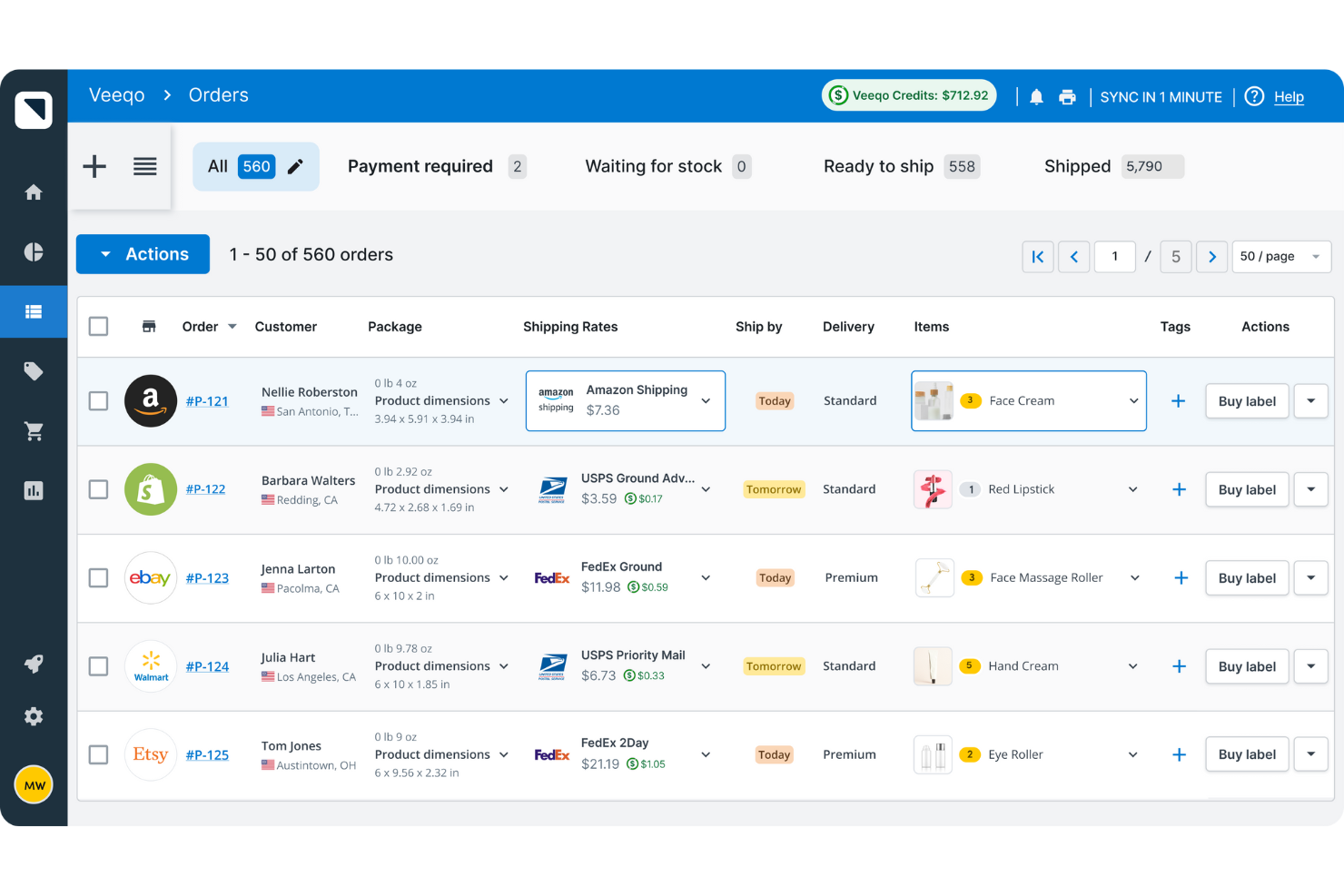
Veeqo is designed for retailers managing bulk customer orders, large product catalogs and selling across multiple channels, including Amazon. This software helps you keep inventory levels accurate and orders organized, even as your sales volume grows. If you need to sync stock, automate shipping, and handle high order volumes without manual work, Veeqo offers features built for your workflow.
Why I Picked Veeqo
For businesses handling high-volume, multichannel sales, Veeqo stands out with its ability to centralize inventory and order management across Amazon and other platforms. I picked Veeqo because it offers real-time stock syncing, which helps prevent overselling and stockouts as orders come in from multiple sources. The built-in shipping automation lets you process and fulfill large numbers of orders quickly, reducing manual steps. Veeqo’s bulk order management tools also make it easier to handle spikes in demand without losing track of inventory.
Veeqo Key Features
Some other features in Veeqo help you manage inventory and orders more efficiently:
- Purchase Order Management: Create, send, and track purchase orders to suppliers directly from the platform.
- Returns Management: Handle customer returns and restock items with built-in returns workflows.
- Barcode Scanning: Use barcode scanning to speed up picking, packing, and stocktaking processes.
- Reporting and Analytics: Access detailed reports on sales, inventory levels, and fulfillment performance.
Veeqo Integrations
Integrations include Shopify, WooCommerce, Amazon, eBay, Magento, BigCommerce, Etsy, Xero, QuickBooks, and ShipStation.
Pros and Cons
Pros:
- Built-in shipping automation
- Real-time inventory syncing
- Handles high-order volumes
Cons:
- Occasional syncing delays
- Limited advanced forecasting features

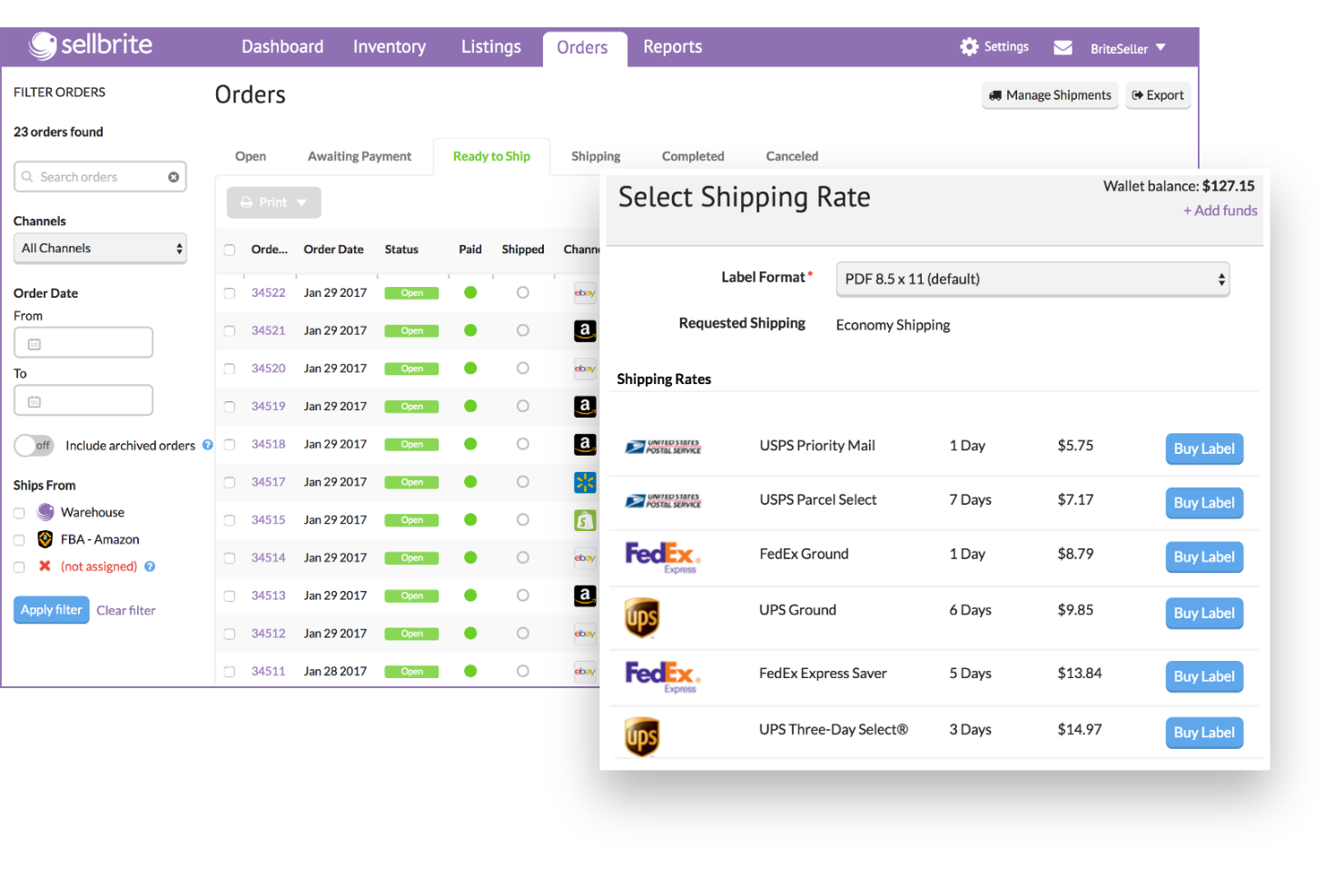
Sellbrite simplifies the process of managing product listings across multiple marketplaces, making it ideal for small to mid-size ecommerce businesses. It offers a centralized platform to create, edit, and organize listings, reducing the risk of duplicate entries and manual errors. This tool also supports FBA inventory management. It is perfect for sellers looking to simplify multi-channel inventory management while maintaining accuracy and efficiency.
Why I Picked Sellbrite
Managing product listings across multiple marketplaces can get complicated fast, which is why I picked Sellbrite for this list. Sellbrite stands out for its ability to let you create, edit, and publish Amazon listings alongside other channels from a single dashboard. The bulk listing and editing tools help you quickly update product details and inventory across all your connected marketplaces. For sellers who want to avoid the hassle of jumping between different platforms, Sellbrite offers a straightforward way to keep listings organized and consistent.
Selbrite Key Features
Some other Sellbrite features help you manage Amazon inventory and orders more efficiently:
- Inventory Syncing: Automatically updates inventory levels across all connected sales channels in real time.
- Order Routing: Directs orders from multiple marketplaces to the correct fulfillment location.
- FBA Integration: Lets you fulfill orders from any channel using Amazon FBA directly within Sellbrite.
- Multi-Warehouse Support: Tracks and manages inventory across several warehouse locations.
Selbrite Integrations
Integrations include Amazon, eBay, Walmart, Shopify, BigCommerce, WooCommerce, Etsy, and QuickBooks. Sellbrite also offers an API for custom integrations.
Pros and Cons
Pros:
- Automated bulk listing
- Multi-warehouse support
- Direct Amazon FBA sync
Cons:
- Manual variation handling
- No built-in purchase order management

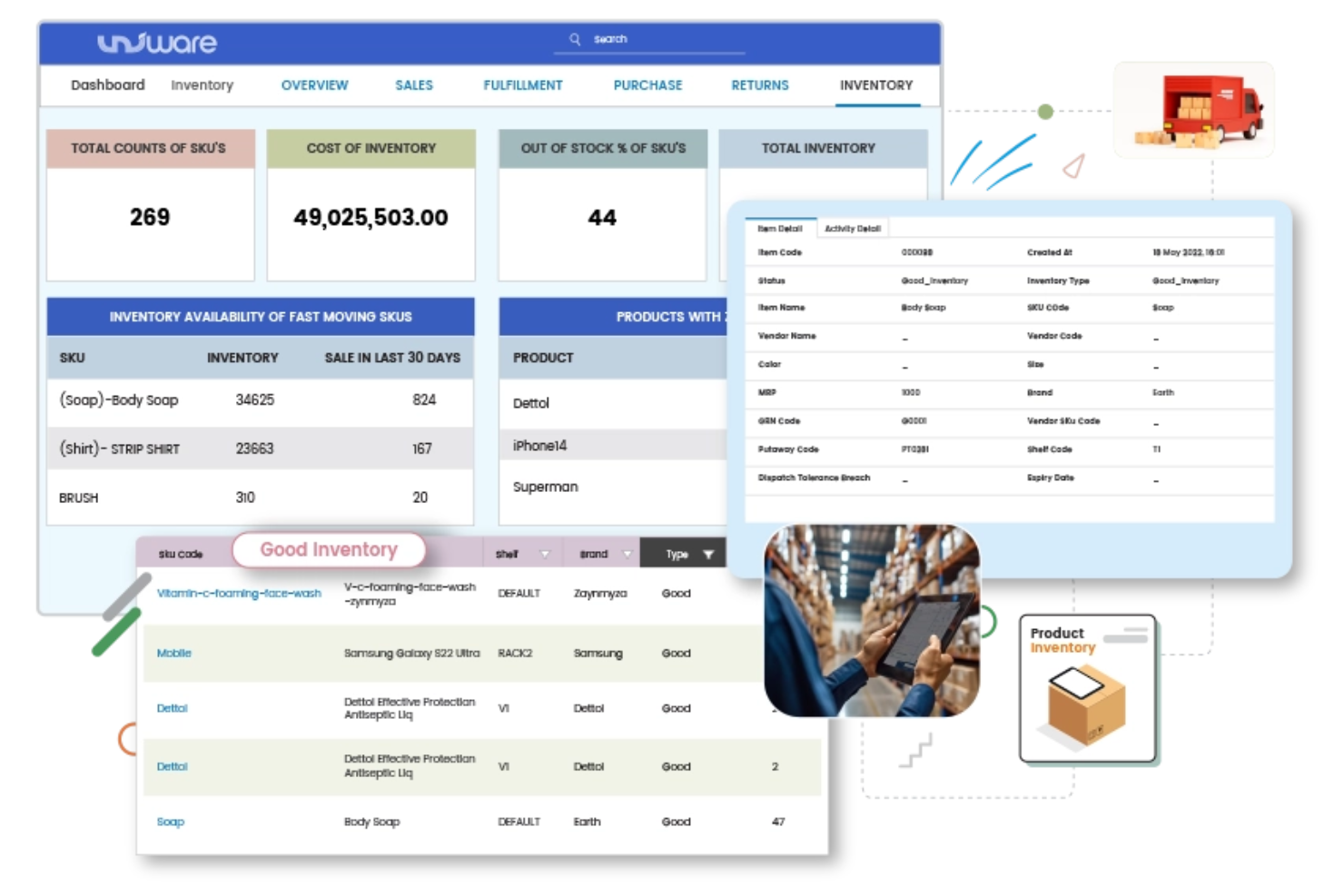
Unicommerce is built for retailers and brands that need to keep inventory synchronized across Amazon, other marketplaces, and physical stores. If you’re managing stock in multiple locations or selling on several channels, Unicommerce helps you avoid overselling and stockouts by updating inventory in real time. It also supports tracking inbound shipments and monitoring storage fees, giving you better cost visibility across fulfillment centers. This platform is especially useful for businesses focused on omnichannel fulfillment and unified inventory control.
Why I Picked Unicommerce
What sets Unicommerce apart is its focus on real-time omnichannel inventory synchronization, which is essential for businesses selling on Amazon and other platforms. I picked Unicommerce because it automatically updates stock levels across all your sales channels and warehouses, reducing the risk of overselling or stock discrepancies. The platform also supports centralized order processing, so you can manage Amazon and non-Amazon orders from a single dashboard. For retailers juggling inventory across multiple locations, Unicommerce’s synchronization tools help keep everything accurate and up to date.
Unicommerce Key Features
Some other features that make Unicommerce useful for Amazon inventory management include:
- Returns Management: Handles returns and reverse logistics for Amazon and other channels.
- Barcode Scanning: Supports barcode-based inventory tracking and order picking.
- Automated Replenishment: Triggers purchase orders or stock transfers when inventory falls below set thresholds.
- Customizable Reporting: Offers detailed reports on sales, inventory, and order fulfillment.
Unicommerce Integrations
Integrations include Amazon, Flipkart, eBay, Shopify, Magento, WooCommerce, Myntra, Snapdeal, Tata CLiQ, and Paytm.
Pros and Cons
Pros:
- End-to-end returns sync
- Automated stock protection
- Centralized multi-channel hub
Cons:
- Manual ERP/Marketplace sync
- Opaque pricing structures

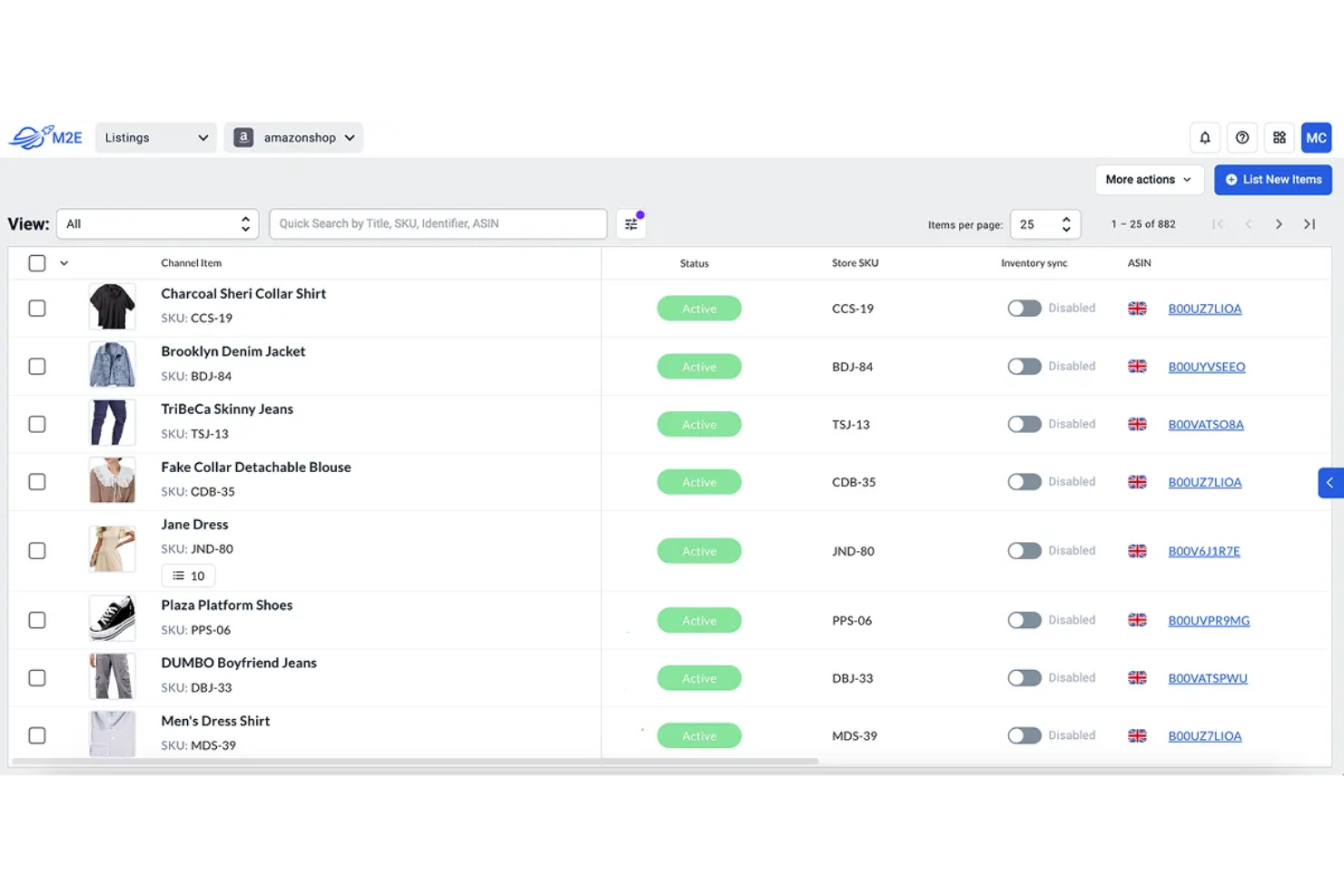
M2E Cloud is designed for multichannel sellers who want to manage Amazon, eBay, and Walmart inventory from one place. It’s particularly useful for retailers and brands handling listings, inbound shipments, stock, and orders across multiple marketplaces. The platform stands out with real-time synchronization and automation for eBay and Walmart alongside Amazon, helping prevent overselling and reduce manual updates.
Why I Picked M2E Cloud
Direct integration with eBay and Walmart is what makes M2E Cloud a strong choice for multichannel Amazon inventory management. I picked M2E Cloud because it lets you sync inventory, orders, and product data across Amazon, eBay, and Walmart without relying on third-party connectors. The platform’s real-time synchronization helps prevent overselling and keeps your stock levels accurate across all channels. For businesses selling on multiple marketplaces, this direct connection simplifies listing management and reduces the risk of manual errors.
M2E Cloud Key Features
Some other features that make M2E Cloud useful for multichannel inventory management include:
- Bulk Listing Tools: Lets you create and update multiple product listings across marketplaces at once.
- Automated Repricing: Adjusts your product prices automatically based on marketplace rules and competition.
- Order Routing: Directs orders to specific warehouses or fulfillment partners based on your settings.
- Inventory Rules Engine: Allows you to set custom rules for stock allocation and listing availability.
M2E Cloud Integrations
Integrations include eBay, Amazon, Shopify, Magento, WooCommerce, BigCommerce, PrestaShop, Walmart, Etsy, and Newegg.
Pros and Cons
Pros:
- Real-time price adjustment
- Simplified product updates
- Cross-platform inventory alignment
Cons:
- Limited core marketplace sync
- Custom API requirements

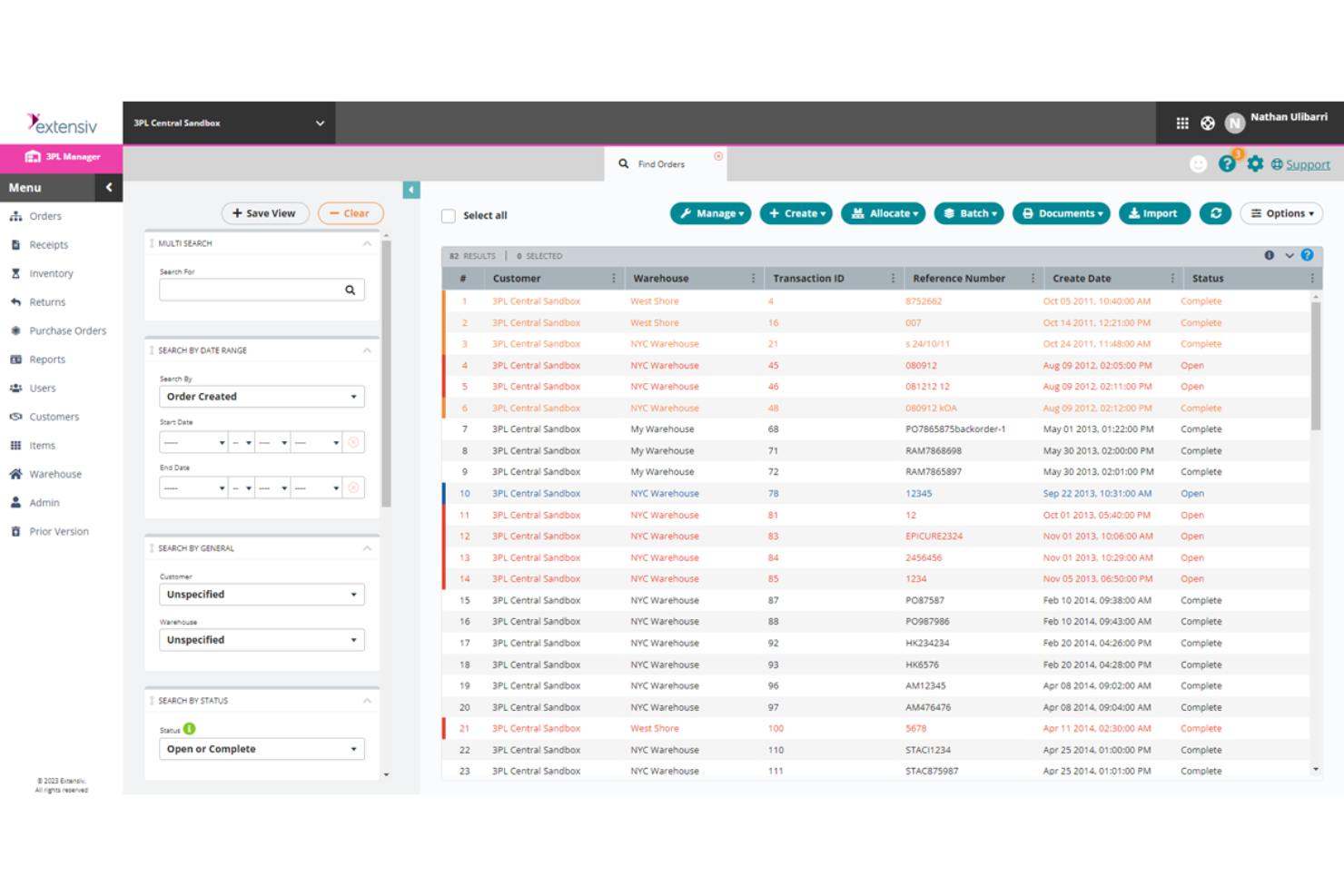
Extensiv is designed for retailers and brands managing complex warehouse and fulfillment operations across Amazon and other channels. This platform is a strong fit for businesses with high order volumes, multiple warehouses, or advanced fulfillment needs. Extensiv stands out by offering deep control over inventory, order routing, and warehouse workflows, supported by intelligent algorithms that optimize stock allocation and fulfillment efficiency beyond basic Amazon inventory management.
Why I Picked Extensiv
For businesses that need more than basic inventory tracking, Extensiv offers advanced warehouse and fulfillment workflows that are hard to match. I picked Extensiv because it supports multi-warehouse management, automated order routing, and real-time inventory visibility across Amazon and other channels. These features help you coordinate stock, inbound shipments, and fulfillment tasks at scale, which is essential for high-volume or multi-location operations. If your Amazon business relies on complex logistics, Extensiv’s workflow automation and granular control make it a strong choice.
Extensiv Key Features
Some other features that make Extensiv valuable for Amazon inventory management include:
- Returns Management: Tracks and processes product returns from Amazon and other channels.
- Purchase Order Management: Lets you create, send, and track purchase orders to suppliers.
- Inventory Auditing Tools: Supports cycle counts and inventory reconciliation for accuracy.
- Custom Reporting: Generates detailed reports on inventory, orders, and fulfillment performance.
Extensiv Integrations
Integrations include Amazon, Shopify, Magento, WooCommerce, BigCommerce, eBay, Walmart, Jet, Etsy, and Newegg.
Pros and Cons
Pros:
- Built-in returns automation
- Automated PO/Supplier sync
- Centralized multi-node fulfillment
Cons:
- Custom-quoted scaling
- Extended enterprise rollout

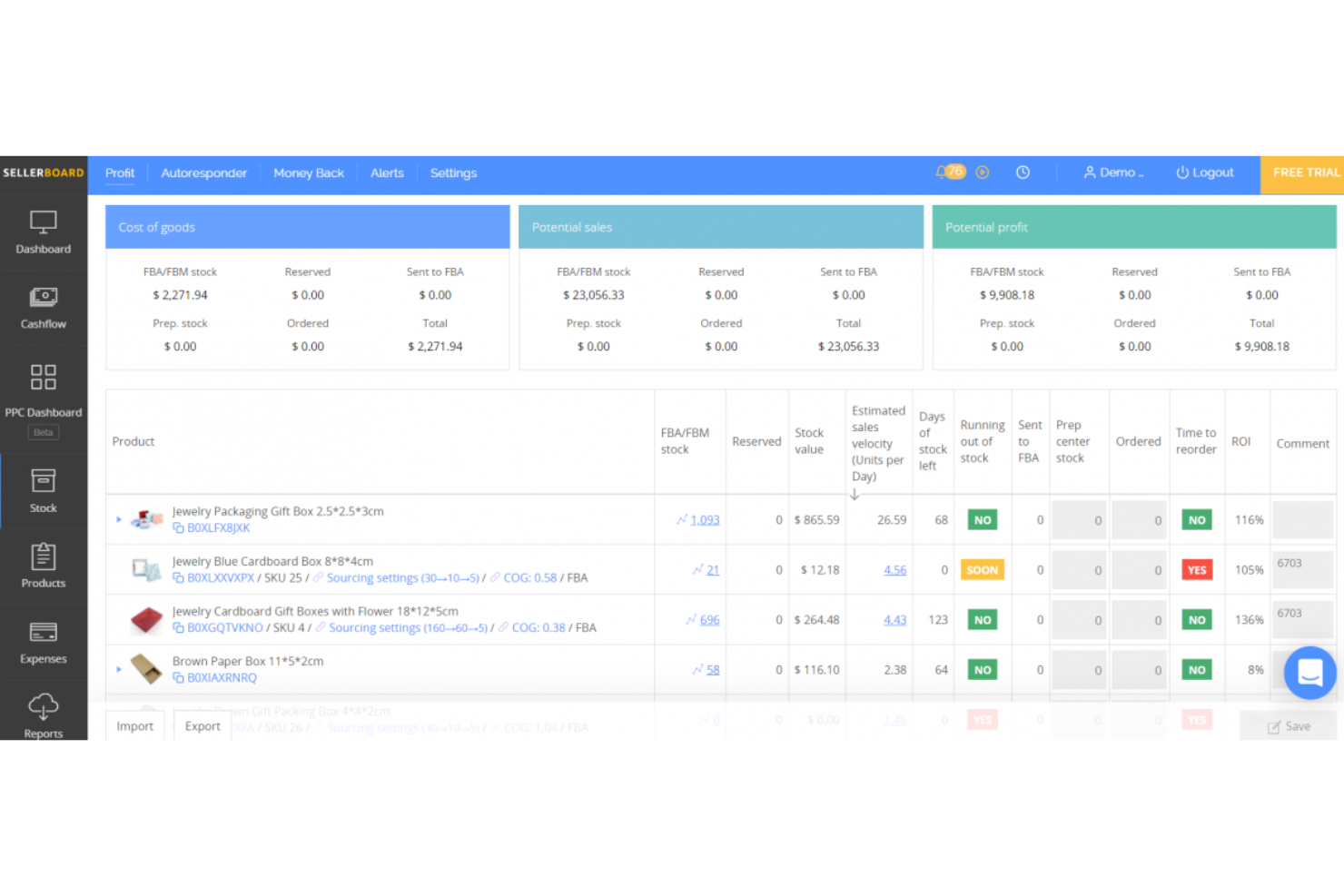
sellerboard is designed for Amazon sellers who need precise profit analytics combined with solid inventory tracking. It caters to e-commerce businesses that require detailed cost management and real-time insights to optimize profitability. By integrating profit calculations with inventory monitoring, sellerboard helps sellers make informed decisions about restocking and financial planning.
Why I Picked sellerboard
What sets sellerboard apart is its focus on profit analytics combined with inventory tracking, which is especially valuable for Amazon sellers who want to understand their true margins. I picked sellerboard because it automatically calculates real-time profit by factoring in all Amazon fees, refunds, PPC costs, and other expenses. The inventory tracking feature alerts you when stock is running low and helps you forecast future needs based on sales velocity. For anyone who wants to connect financial performance directly to inventory decisions, Sellerboard brings these insights together in one place.
sellerboard Key Features
Some other sellerboard features help you manage your Amazon business more thoroughly:
- PPC Optimization Module: Tracks advertising spend and performance to help you analyze campaign profitability.
- Refunds and Lost Inventory Tracking: Monitors Amazon for lost or damaged inventory and helps you claim reimbursements.
- Alerts and Notifications: Sends automatic alerts for important account changes, such as hijacker detection or listing issues.
- User Access Management: Lets you set different permission levels for team members working in your Sellerboard account.
sellerboard Integrations
Integrations include Amazon Seller Central, Shopify, QuickBooks, Xero, eBay, Etsy, WooCommerce, Google Ads, Facebook Ads, and Zapier.
Pros and Cons
Pros:
- Profit-driven PPC tracking
- Low-stock alerts
- Real-time profit analytics
Cons:
- Does not support supplier management
- Lacks multi-channel inventory management

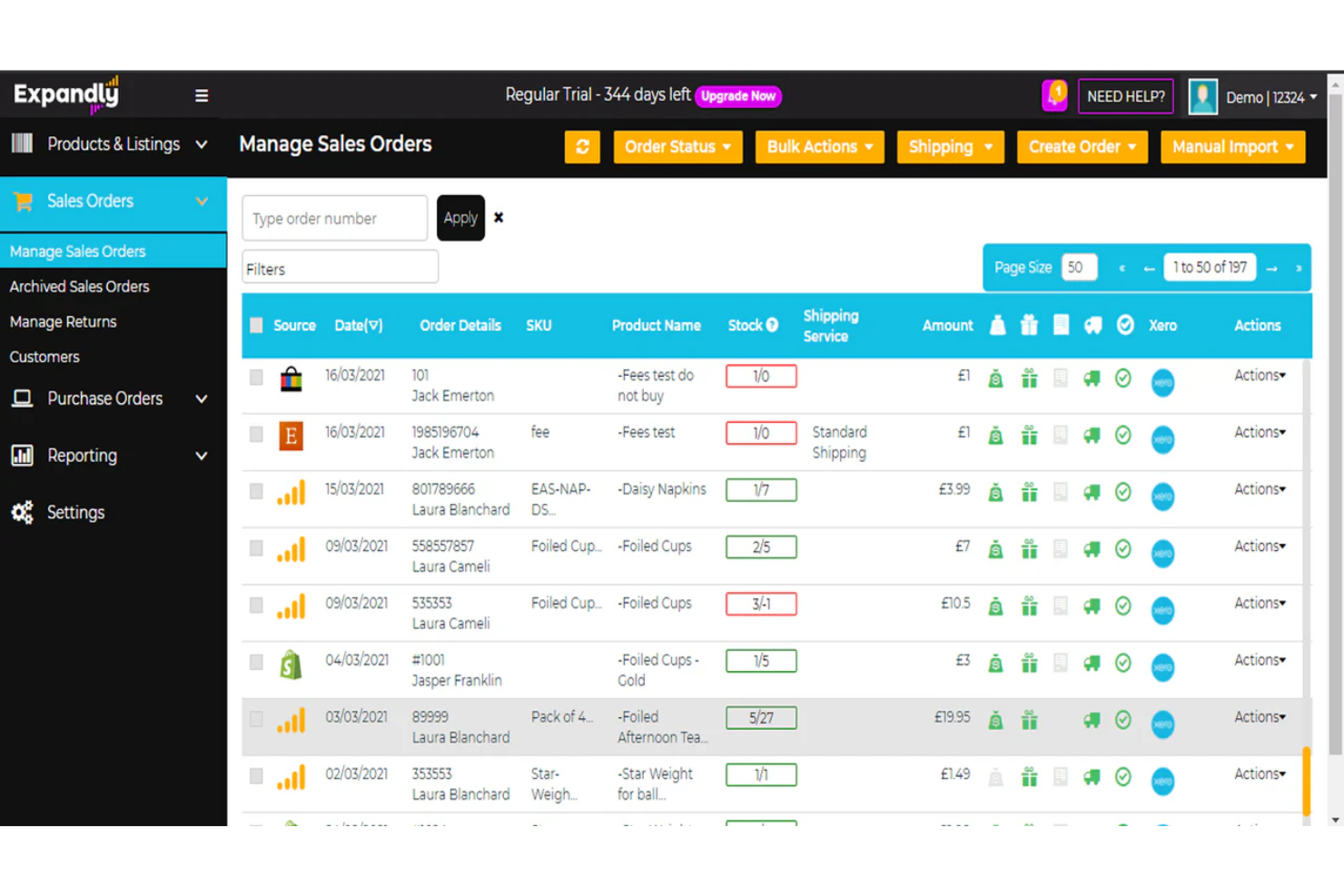
Expandly gives ecommerce teams a single dashboard to manage inventory, orders, and listings across multiple Amazon storefronts and other marketplaces. If you’re juggling several brands or regional Amazon accounts, Expandly helps you keep stock levels accurate and product data consistent everywhere you sell. This tool is especially useful for businesses that need to centralize operations across different storefronts without switching between platforms.
Why I Picked Expandly
Managing multiple Amazon storefronts from one dashboard is a challenge for many e-commerce teams, and that’s exactly where Expandly excels. I picked Expandly because it lets you control inventory, orders, and product listings for several Amazon accounts or brands in a single place. The platform’s bulk listing and editing tools help you keep product data consistent across all storefronts without repetitive manual work. For businesses with complex, multi-store operations, Expandly’s unified dashboard makes it easier to stay organized and avoid stock discrepancies.
Expandly Key Features
Some other features that make Expandly useful for Amazon inventory management include:
- Multi-Channel Order Management: Consolidates orders from Amazon and other marketplaces into one workflow.
- Shipping Label Generation: Creates shipping labels directly within the platform for multiple carriers.
- Inventory Adjustment Logs: Tracks all inventory changes with detailed logs for audit and review.
- Custom User Permissions: Let you set different access levels for team members managing your storefronts.
Expandly Integrations
Integrations include Amazon, eBay, Etsy, Shopify, WooCommerce, Magento, BigCommerce, Walmart, Jet, and Newegg.
Pros and Cons
Pros:
- Traceable stock adjustments
- Built-in multi-carrier shipping
- Unified multi-Amazon hub
Cons:
- Onboarding large catalogs is time-consuming
- Lacks advanced sales trend analytics

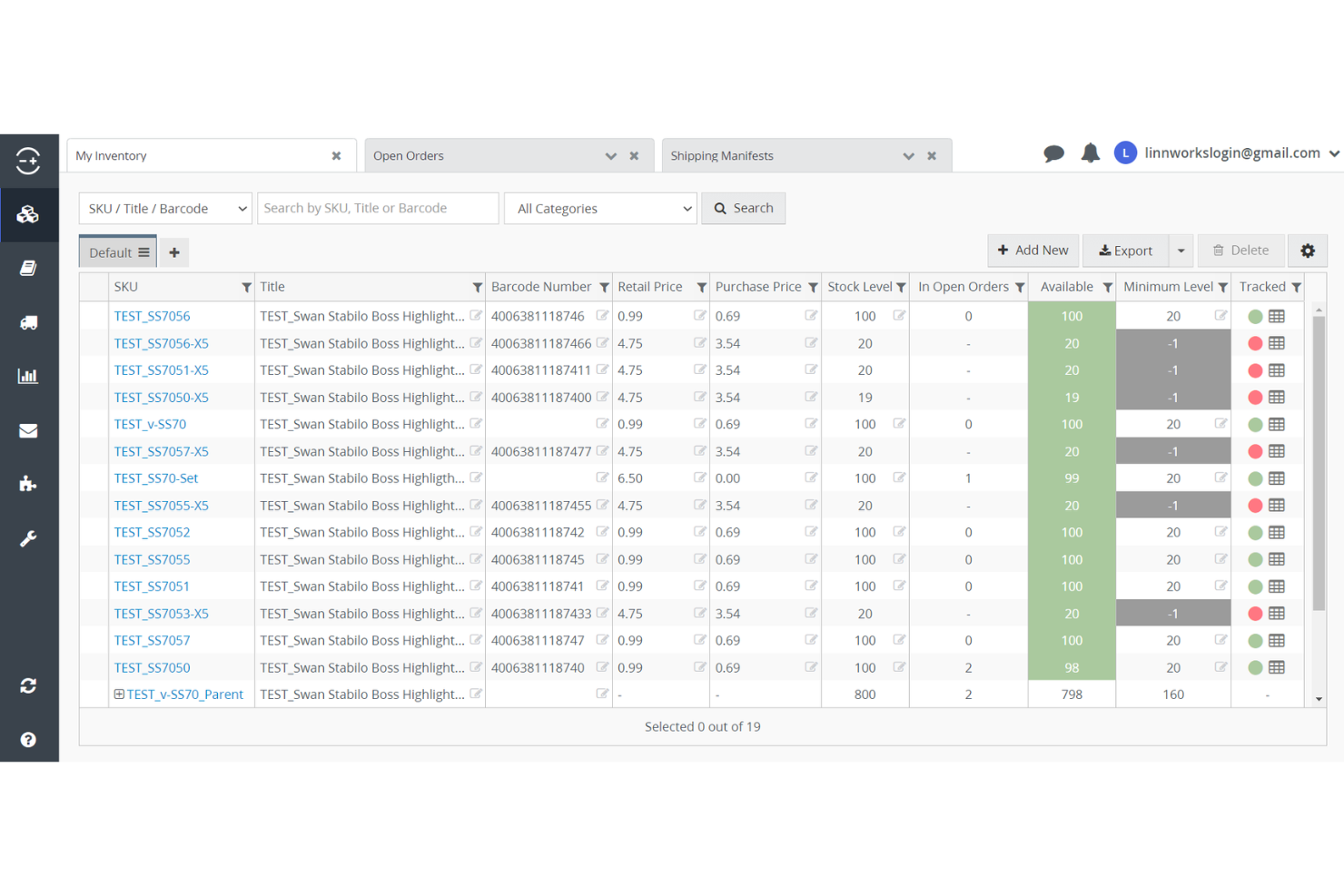
Linnworks gives multichannel retailers a single platform to manage orders and inventory across Amazon and other sales channels. This tool is a strong fit for Amazon inventory management software ecommerce businesses that need to centralize control over stock, fulfillment, and order processing. Linnworks helps you keep inventory levels accurate and avoid overselling by syncing data in real time across all your connected marketplaces.
Why I Picked Linnworks
Centralized order and inventory control is where Linnworks really delivers for Amazon sellers managing multiple channels. I picked Linnworks because it lets you sync inventory and orders across Amazon, eBay, and your own webstore from one dashboard. The platform’s automated stock updates and unified order processing help prevent overselling and missed shipments. For businesses juggling several sales channels, Linnworks offers the kind of centralized control that keeps operations running smoothly.
Linnworks Key Features
Some other Linnworks features help you manage Amazon inventory with more flexibility:
- Shipping Management: Set up shipping rules, print labels, and track shipments directly from the platform.
- Returns Management: Process and track product returns with built-in workflows.
- Reporting and Analytics: Access sales, inventory, and order reports to monitor performance.
- Purchase Order Management: Create, send, and track purchase orders to suppliers within the system.
Linnworks Integrations
Integrations include Amazon, eBay, Shopify, WooCommerce, BigCommerce, and more.
Pros and Cons
Pros:
- Efficient supply workflows
- Automated stock syncing
- Centralized dashboard
Cons:
- Unpredictable support timing
- Unstable UX consistency

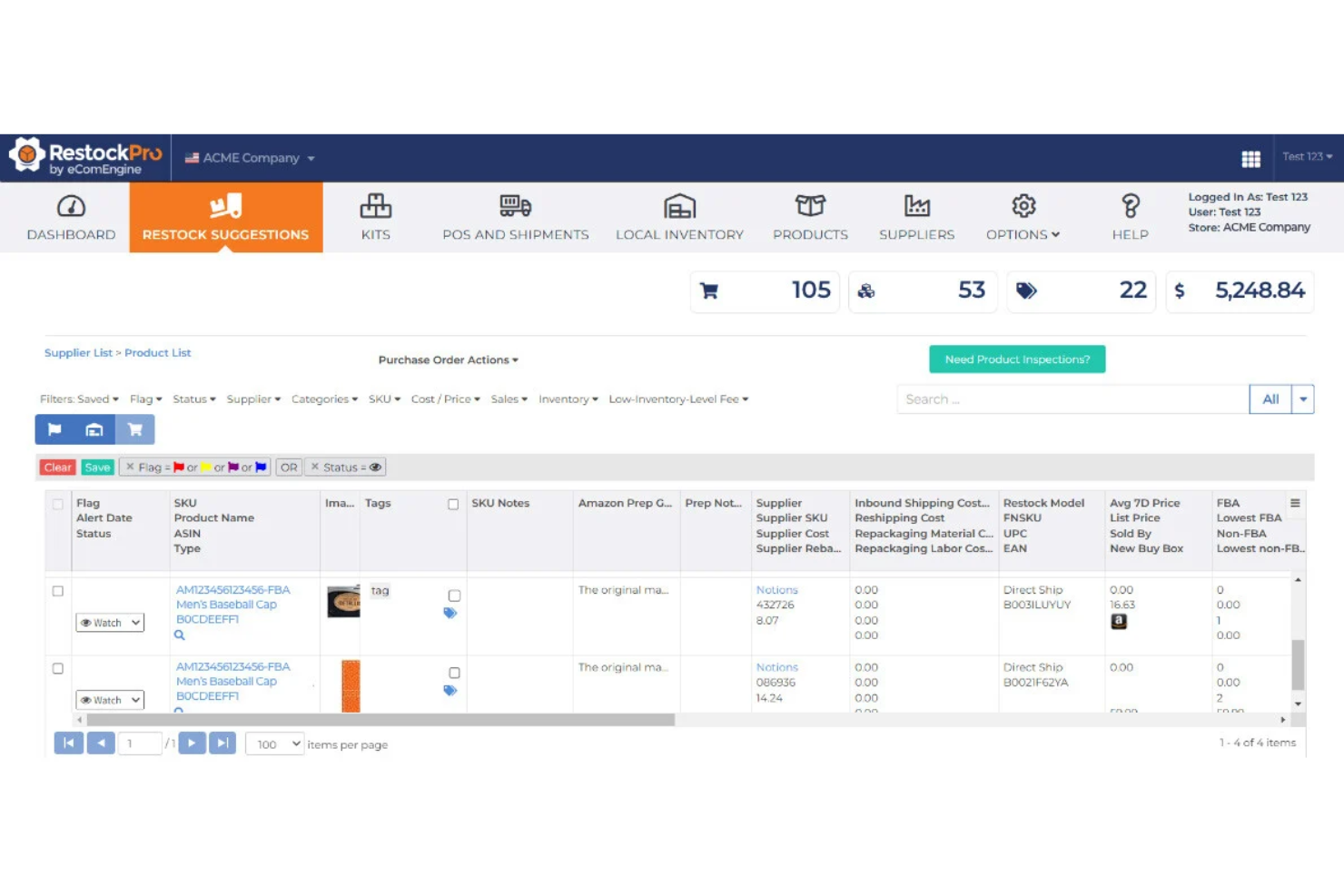
RestockPro is built for Amazon FBA sellers who want to automate restocking and simplify purchase order creation. The tool is especially useful for businesses managing complex supplier relationships and frequent inventory turnover. With features that track FBA stock levels, manage inbound shipments, forecast demand, and automate PO workflows, RestockPro helps you keep your Amazon inventory moving without manual guesswork.
Why I Picked RestockPro
What sets RestockPro apart is its focus on automating FBA restocking and purchase order processes for Amazon sellers. I picked RestockPro because it lets you generate purchase orders directly from restock suggestions, reducing manual steps and errors. The tool tracks FBA inventory levels and supplier lead times, so you can time your orders to avoid stockouts or overstocking. For anyone managing multiple SKUs and suppliers on Amazon, RestockPro’s automation features help keep inventory flowing smoothly.
RestockPro Key Features
In addition to its automation for FBA restocking and purchase orders, RestockPro offers several other features worth noting:
- Kit and Bundle Management: Lets you track and manage inventory for product kits and bundles sold on Amazon.
- Customizable Restock Rules: Allows you to set your own restock thresholds and lead times for each SKU.
- Shipment Tracking Dashboard: Provides a centralized view of all inbound FBA shipments and their statuses.
- Profitability Analytics: Breaks down costs, fees, and margins for each product to help you monitor profitability.
RestockPro Integrations
Integrations include Amazon Seller Central, QuickBooks, Shopify, Xero, ShipStation, Deliverr, Newegg, Walmart, eBay, and Etsy.
Pros and Cons
Pros:
- SKU-level margin breakdown
- Restock suggestions
- Automated purchase order creation
Cons:
- Scaling cost model
- Manual inventory entry only

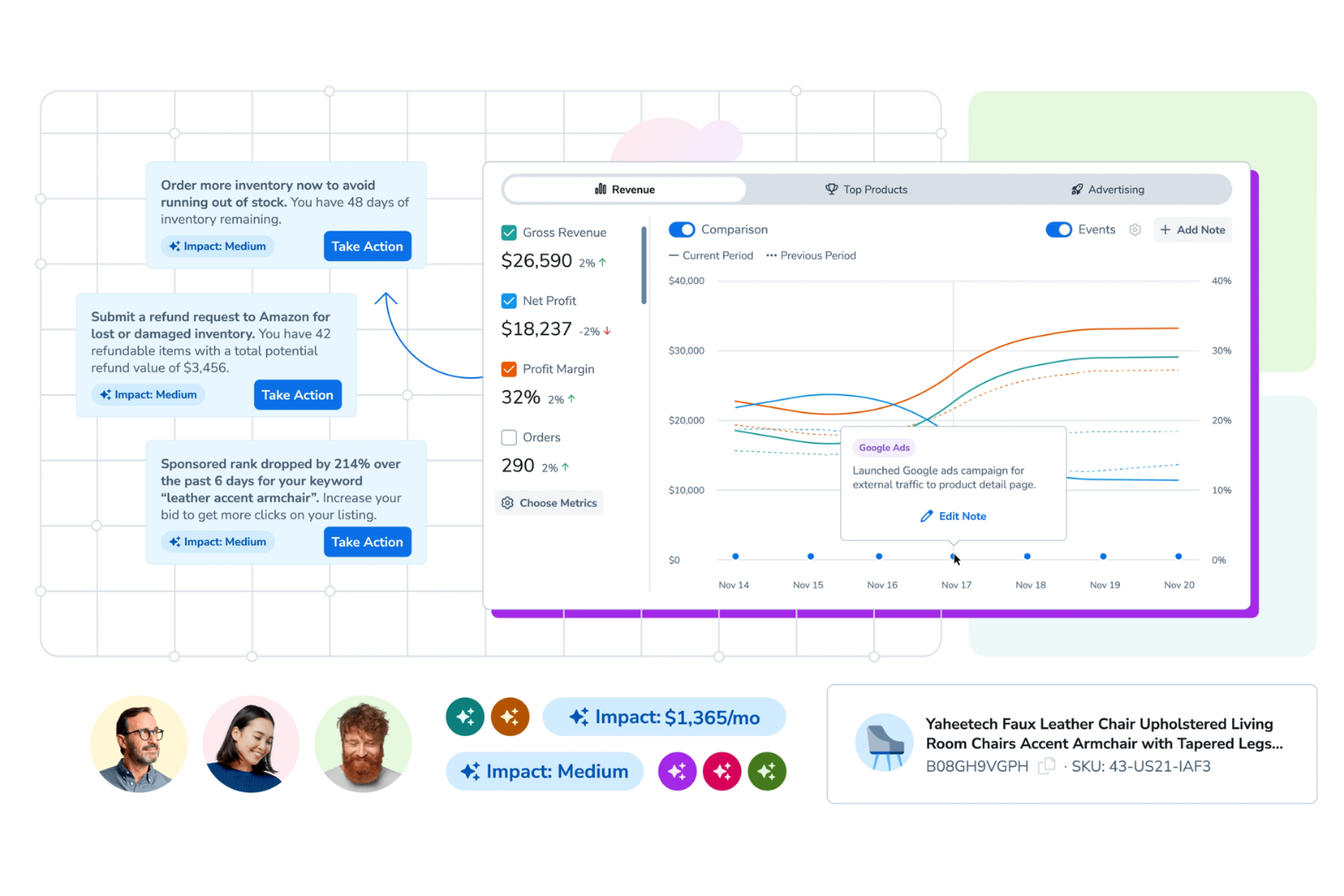
Helium 10 is suited for Amazon sellers seeking a simplified way to manage inventory with integrated FBA restock suggestions. It appeals to businesses that need precise, data-driven insights to optimize stock levels and avoid costly stockouts or overstock situations. By combining sales velocity, lead times, and FBA requirements, Helium 10 delivers actionable restock recommendations that simplify inventory operations.
Why I Picked Helium 10
Helium 10 stands out for its ability to generate integrated FBA restock suggestions that are suited to Amazon’s unique fulfillment requirements. I picked Helium 10 because it analyzes real-time sales data, lead times, and FBA inventory levels to recommend exactly when and how much to restock. The tool’s restock dashboard brings together historical sales trends and current inventory positions, making it easier to plan shipments and avoid costly stockouts. For Amazon sellers who want actionable, data-backed restock guidance, Helium 10’s inventory management features are purpose-built for this need.
Helium 10 Key Features
Some other Helium 10 features help you manage your Amazon inventory and operations more completely:
- Multi-Marketplace Inventory Sync: Keeps inventory levels updated across multiple Amazon marketplaces in real time.
- Automated Purchase Order Creation: Generates purchase orders based on inventory thresholds and supplier data.
- Sales Velocity Tracking: Monitors product sales rates to help you spot trends and adjust inventory plans.
- Supplier Management Module: Stores supplier contact details, lead times, and order histories for easy reference.
Helium 10 Integrations
Integrations include Amazon Seller Central, Shopify, eBay, Walmart, Etsy, QuickBooks, Facebook Ads, Google Ads, Mailchimp, and Zapier.
Pros and Cons
Pros:
- Sales velocity tracking
- Automated purchase order creation
- Multi-marketplace inventory sync
Cons:
- Volume-dependent fees
- Does not support barcode scanning
Other Amazon Inventory Management Software
Here are some additional Amazon inventory management software options that didn’t make it onto my shortlist, but are still worth checking out:
- Jungle Scout
For sales-driven inventory planning
- SoStocked
For customizable forecasting workflows
- Finale Inventory
For barcode-based stock control
- Brightpearl
For integrated accounting workflows
- Zoho Inventory
For automated reorder point management
- Ordoro
For bundled product kitting features
- Cin7 Core
For built-in B2B portal integration
- LitCommerce
For quick channel setup and migration


Amazon Inventory Management Software Selection Criteria
When selecting the best Amazon inventory management software to include in this list, I considered common buyer needs and pain points like syncing inventory across multiple Amazon channels and preventing overselling due to inaccurate stock counts. I also used the following framework to keep my evaluation structured and fair:
Core Functionality (25% of total score)
To be considered for inclusion in this list, each solution had to fulfill these common use cases:
- Sync inventory levels across Amazon channels
- Track and manage purchase orders
- Automate order routing and fulfillment
- Generate inventory and sales reports
- Support bulk product listing and editing
Additional Standout Features (25% of total score)
To help further narrow down the competition, I also looked for unique features, such as:
- Multi-storefront management from a single dashboard
- Automated FBA and FBM stock reconciliation
- Barcode scanning and mobile inventory apps
- Advanced kitting and bundling tools
- Real-time low stock alerts and reorder automation
Usability (10% of total score)
To get a sense of the usability of each system, I considered the following:
- Simple and intuitive dashboard navigation
- Clear labeling of inventory and order statuses
- Customizable views and filters for large catalogs
- Responsive design for desktop and mobile use
- Minimal manual data entry required
Onboarding (10% of total score)
To evaluate the onboarding experience for each platform, I considered the following:
- Step-by-step setup wizards or product tours
- Availability of training videos and documentation
- Pre-built templates for Amazon product listings
- Access to onboarding webinars or live training
- In-app chatbots or support during migration
Customer Support (10% of total score)
To assess each software provider’s customer support services, I considered the following:
- Multiple support channels like chat, email, and phone
- Fast response times for urgent issues
- Access to a searchable help center or knowledge base
- Availability of dedicated account managers
- Community forums or user groups for peer support
Value For Money (10% of total score)
To evaluate the value for money of each platform, I considered the following:
- Transparent and competitive pricing tiers
- No hidden fees for core inventory features
- Flexible plans for different business sizes
- Free trial or demo options available
- Discounts for annual billing or multi-channel use
Customer Reviews (10% of total score)
To get a sense of overall customer satisfaction, I considered the following when reading customer reviews:
- Consistent positive feedback on inventory accuracy
- Reports of reliable Amazon integration performance
- User comments on support quality and responsiveness
- Feedback on ease of onboarding and daily use
- Noted limitations or frustrations with specific features
How to Choose Amazon Inventory Management Software
It’s easy to get bogged down in long feature lists and complex pricing structures. To help you stay focused as you work through your unique software selection process, here’s a checklist of factors to keep in mind:
| Factor | What to Consider |
|---|---|
| Scalability | Will the software handle your current and projected order volume, SKUs, and new Amazon channels? |
| Integrations | Does it connect natively to your ecommerce platforms, shipping carriers, and accounting tools? |
| Customizability | Can you tailor workflows, user permissions, and reporting to match your business processes? |
| Ease of use | Will your team be able to learn and use the system quickly without extensive training? |
| Implementation and onboarding | How long will setup take, and what resources or support will you need to get up and running? |
| Cost | Are pricing tiers clear, and do they align with your business size, order volume, and feature needs? |
| Security safeguards | Does the vendor offer data encryption, user access controls, and regular security updates? |
| Support availability | Can you reach support during your business hours, and are there SLAs for urgent issues? |
What Is Amazon Inventory Management Software?
Amazon inventory management software is a digital tool that helps businesses track, organize, and control their product stock across one or more Amazon storefronts. These systems automate inventory updates, manage orders, and sync product data to prevent overselling or stockouts. They’re essential for maintaining accurate inventory levels, supporting multi-channel sales, and streamlining fulfillment processes for Amazon sellers.
Features
When selecting Amazon inventory management software, keep an eye out for the following key features:
- Inventory syncing: Automatically updates stock levels across all Amazon channels to prevent overselling and stockouts.
- Order management: Centralizes order processing, tracking, and fulfillment for all Amazon sales in one dashboard.
- Bulk product listing: Allows you to upload, edit, and manage multiple product listings at once, saving time on catalog updates.
- Purchase order management: Tracks supplier orders, deliveries, and restocks to maintain optimal inventory levels.
- Multi-channel support: Manages inventory and orders across Amazon and other sales channels from a single platform.
- Stock alerts: Notifies you when inventory falls below set thresholds so you can reorder before running out.
- Shipping label generation: Creates shipping labels for various carriers directly within the software to speed up fulfillment.
- Reporting and analytics: Provides detailed reports on inventory, sales, and order trends to support data-driven decisions.
- User permissions: Let you control access levels for different team members, ensuring secure and organized operations.
- Audit trails: Maintains logs of all inventory changes and user actions for transparency and compliance.
Benefits
Implementing Amazon inventory management software provides several benefits for your team and your business. Here are a few you can look forward to:
- Accurate stock tracking: Real-time inventory syncing across Amazon channels helps prevent overselling and stockouts.
- Centralized order processing: Managing all Amazon orders in one dashboard reduces manual work and errors.
- Faster fulfillment: Built-in shipping label generation and order routing speed up the shipping process.
- Improved reporting: Detailed analytics and audit trails support better forecasting and compliance.
- Multi-channel efficiency: Managing inventory for Amazon and other sales channels from one platform saves time and reduces complexity.
- Proactive inventory control: Automated stock alerts and purchase order management help you reorder before running out.
- Enhanced team collaboration: User permissions and activity logs keep operations organized and secure for teams of any size.
Costs and Pricing
Selecting Amazon inventory management software requires an understanding of the various pricing models and plans available. Costs vary based on features, team size, add-ons, and more. The table below summarizes common plans, their average prices, and typical features included in Amazon inventory management software solutions:
Plan Comparison Table for Amazon Inventory Management Software
| Plan Type | Average Price | Common Features |
|---|---|---|
| Free Plan | $0 | Basic inventory tracking, limited order management, single-channel support, and basic reporting. |
| Personal Plan | $30-$60/month | Multi-channel inventory syncing, order management, low stock alerts, and basic shipping tools. |
| Business Plan | $100-$300/month | Bulk product listing, purchase order management, advanced reporting, user permissions, and integrations. |
| Enterprise Plan | $500-$2000/month | Custom workflows, API access, dedicated support, advanced analytics, and multi-location management. |
Amazon Inventory Management Software FAQs
Here are some answers to common questions about Amazon inventory management software:
Can Amazon inventory management software handle both FBA and FBM orders?
Yes, most Amazon inventory management software can manage both Fulfillment by Amazon (FBA) and Fulfillment by Merchant (FBM) orders. This allows you to track inventory, process orders, and sync stock levels across both fulfillment methods from a single dashboard.
How does inventory syncing work with multiple Amazon marketplaces?
Inventory syncing automatically updates stock levels across all connected Amazon marketplaces when a sale occurs. This prevents overselling and ensures accurate inventory counts, even if you sell on Amazon US, UK, or other regional sites at the same time.
What integrations should I look for in Amazon inventory management software?
Look for integrations with your e-commerce platforms, shipping carriers, accounting tools, and third-party logistics providers. These connections help automate workflows, reduce manual data entry, and keep your business systems in sync.
Is it difficult to migrate to a new Amazon inventory management software?
Migration can be straightforward if the software offers import tools, setup wizards, and onboarding support. Check for available training resources, data import options, and customer support to help your team transition smoothly.
How do stock alerts work in Amazon inventory management software?
Stock alerts notify you when inventory levels fall below a set threshold. You can set custom alert points for each product, so you know when it’s time to reorder and avoid running out of stock.
What’s Next:
If you're in the process of researching Amazon inventory management software, connect with a SoftwareSelect advisor for free recommendations.
You fill out a form and have a quick chat where they get into the specifics of your needs. Then you'll get a shortlist of software to review. They'll even support you through the entire buying process, including price negotiations.