

Software-ul de gestionare a comerțului cu amănuntul eficientizează totul, de la urmărirea inventarului pe baza codurilor de bare la tranzacțiile POS mobile, acuratețea comenzilor de achiziție și raportarea pe mai multe canale — ajutându-vă să vă administrați magazinul mai inteligent și să vă creșteți profitul.
Platforma potrivită elimină încetinirile sistemului, astfel încât să puteți menține rafturile aprovizionate și clienții mulțumiți în timp real.
După ani de experiență în transportul internațional, operațiunile de depozit și comerțul electronic, am testat cele mai bune soluții software pentru gestionarea comerțului cu amănuntul.
Aici vă voi arăta ce instrumente oferă rezultate și cum să îl alegeți pe cel mai potrivit pentru afacerea dvs.
Why Trust Our Software Recommendations
6,700+
Reviews
20
Industry experts
16+
Evaluation factors
14
Years
Our team has been testing and reviewing software since 2012. As retail leaders ourselves, we know how difficult—and important—it is to choose the right software.
For this guide, we evaluated tools using hands-on testing and independent research, scoring tools using our selection criteria.
Our reviews reflect our independent judgment—not a sales pitch.
Tabel comparativ al software-urilor de gestionare a comerțului cu amănuntul
Tabelul de mai jos sintetizează fiecare soluție software de gestionare a comerțului cu amănuntul într-o prezentare a tipului de utilizator pentru care este „cea mai potrivită”, detalii despre perioada de testare și prețul de pornire:
Sorted by: Default
| Tool | Starting Price | Website | |
|---|---|---|---|
Best for independent supply stores | Not rated | $499/month Free demo available | Website |
Best for enterprise retailers | 5.0 out of 5 | Pricing upon request Free demo available | Website |
Best for real-time stock notifications | 4.8 out of 5 | $59/month Free trial + free demo available | Book Demo |
Best for end-to-end retail management | 4.4 out of 5 | Pricing upon request Free demo available | Website |
Best for cross-module workflows | 4.4 out of 5 | Pricing upon request Free demo available | Website |
Best for warehouse management | 4.3 out of 5 | $29/organization/month 14-day free trial + free demo available | Website |
Best for field team management | 4.4 out of 5 | Pricing upon request Free demo available | Website |
Best for table-service restaurants | 3.8 out of 5 | $99/month Free demo available | Website |
Best for retail cash flow management | 5.0 out of 5 | $199/month Free plan available | Website |
Best for small businesses | Not rated | $29/month Free plan available | Website |


Cele mai bune software-uri de gestionare a comerțului cu amănuntul, analizate
Recenziile de mai jos analizează modul în care fiecare platformă gestionează fluxurile de lucru din lumea reală: acuratețea codurilor de bare, disponibilitatea POS-ului mobil, gestionarea comenzilor și raportarea pe mai multe canale. Am păstrat descrierile instrumentelor intacte, dar am adăugat context privind funcționalitatea, particularitățile de preț și cine ar trebui (sau nu ar trebui) să îl includă în infrastructura sa tehnologică.
 Best for independent supply stores
- Free demo available
- From $499/month (billed annually)
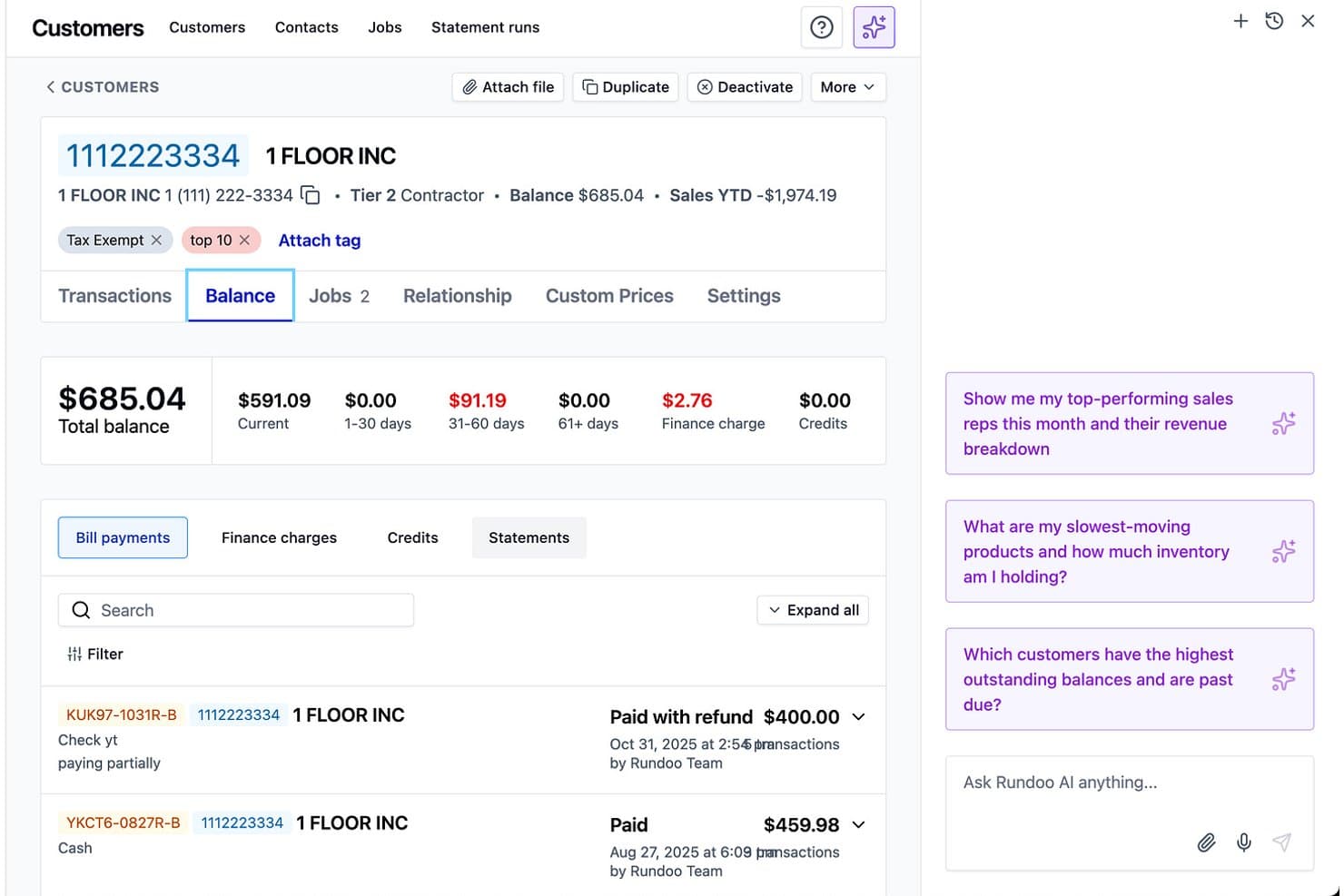
Rundoo offers a detailed customer balance screen and AI-powered business insights for store billing management. Rundoo is a cloud-based POS and ERP platform built for independent supply retailers, covering point of sale, inventory management, purchasing, contractor charge accounts, and AI-driven reporting in one system.
Who Is Rundoo Best For?
Rundoo is a strong fit for independent hardware, paint, lumber, farm & feed, and garden center store owners moving off legacy POS systems like Epicor Eagle or Paladin.
Why I Picked Rundoo
Rundoo earns its spot on my shortlist because of how precisely it's built around the way independent supply stores actually sell. I love that Dooey, Rundoo's AI assistant, generates purchase orders automatically by reading your actual sales velocity, low-stock signals, and seasonal patterns. On top of that, contractor charge accounts with per-customer pricing and autopay are built directly into the POS, which is something most general retail platforms don't handle natively.
Rundoo Key Features
- Paint tint system integration: Rundoo syncs directly with leading paint color catalogs and tinting machines, supporting sales and inventory in one workflow.
- Multi-location inventory tracking: Manage stock, transfers, and variants across multiple stores, including unique vertical requirements like dimensional and bulk inventory.
- Vendor catalog integrations: Connects with major industry distributors and buying groups, automating item setup and pricing updates from supplier feeds.
- Contractor account management: Provides tools for managing charge accounts, per-customer pricing, statements, and automated payments for trade customers.
Rundoo Integrations
Rundoo offers native integrations with Stripe, QuickBooks, Benjamin Moore COLORx, Orgill, Do It Best, True Value, Sherwin-Williams, PPG, and more. An API is available for custom integrations.
Pros and Cons
Pros:
- Contractor charge accounts built into POS
- AI-generated POs from actual sales data
- Built specifically for supply store verticals
Cons:
- Missing employee scheduling and labor tracking
- No ecommerce or omnichannel sales support
Learn more about Rundoo: Best for enterprise retailers
- Free demo available
- Pricing upon request
Visit WebsiteCustomer Rating:5/5
Oracle Retail’s merchandising feature helps manage and optimize retail operations by enabling efficient inventory management, demand forecasting, and assortment planning. Oracle Retail is built for enterprise retailers that need accurate, cross-channel control over merchandising, pricing, and inventory.
You get a unified platform for planning, buying, allocating, and tracking stock across huge store networks. It’s best for teams managing complex product hierarchies and large seasonal assortments.
Who is Oracle Retail Best For?
Retail operations and merchandising executives in large enterprises globally managing complex retail operations and enterprise-scale workflows.
Why I Picked Oracle Retail
I picked Oracle Retail because it gives you one system for item setup, purchasing, and stock governance—critical when you’re dealing with thousands of SKUs across hundreds of stores.
Your team benefits from demand forecasting and planning tools that recommend buys and allocations based on real sales patterns, not gut feel.
I also like that the pricing and promotion modules tie margin targets directly to regular, promo, and markdown strategies.
Finally, Oracle's store operations tools help associates receive, count, and fulfill orders with more accurate on-hand data.
Oracle Retail Key Features
In addition to the core merchandising tools, Oracle Retail includes several modules you can use to strengthen daily planning and store execution.
- Lifecycle Pricing Optimization: Models regular, promo, and markdown prices against margin and sell-through goals.
- Assortment Planning: Helps planners localize assortments with forecast-driven option counts and seasonal insights.
- Order Management Suite: Routes and fulfills orders across channels based on actual availability.
- Store Inventory Operations: Supports receiving, counting, and inventory adjustments from mobile devices.
Oracle Retail Integrations
Integrations include Salesforce, SAP, Shopify, Snowflake, ServiceNow, and Workday.
Pros and Cons
Pros:
- OMS and store tools help teams fulfill orders with fewer stock errors.
- Unified merchandising workflows improve financial and inventory accuracy.
- Extensive planning and pricing tools support complex retail structures.
Cons:
- Pricing aligns more with large retail enterprises than smaller chains.
- Long, resource-heavy implementations.
Learn more about Oracle Retail: Best for real-time stock notifications
- Free trial + free demo available
- From $59/month
Visit WebsiteCustomer Rating:4.8/5
KORONA POS lets you track and manage stock remotely with its cloud-based system. KORONA POS gives growing retailers a way to keep shelves stocked, stores compliant, and margins intact across one or many locations.
It’s especially useful if you’re juggling complex inventory—liquor, vape, specialty food, or gift shops—and need real-time visibility instead of guessing from yesterday’s reports.
Who is KORONA POS Best For?
Store managers and inventory supervisors in small to mid-sized retail businesses in North America and Europe requiring real-time stock notifications.
Why I Picked KORONA POS
I picked KORONA POS because it gives you real-time stock notifications and automated reordering, so you can set par levels and let the system flag issues before stockouts or overstock pile up on your balance sheet.
You can also manage vendors directly through the platform, which means your team can compare supplier performance and tighten up purchasing instead of chasing spreadsheets.
I like that the same inventory logic works whether you’re running a single shop or a growing chain, so your team can keep one playbook as you add locations.
For compliance-heavy retailers, KORONA POS includes age verification and product flags that help cashiers catch restricted items at checkout, reducing risk while keeping lines moving.
On the payments side, it stays processor-agnostic, so you can shop for better rates instead of being locked into one provider.
KORONA POS Key Features
Beyond those inventory and compliance tools, a few extra features make KORONA POS feel like an actual retail management hub, not just a cash register.
- KORONA Studio Dashboard: Cloud-based back office where you adjust pricing, promotions, and ordering rules from anywhere.
- Advanced Reporting And KPIs: Prebuilt reports for sales, categories, locations, and staff performance so you can spot trends faster.
- Customer Loyalty Programs: Built-in loyalty and promotions engine that lets you reward repeat shoppers without bolting on another app.
- Ticketing And Membership Tools: Support for tickets, passes, and memberships for verticals like museums, wineries, and attractions.
KORONA POS Integrations
Integrations include WooCommerce, Adobe Commerce, QuickBooks Online, Bookkeep, bLoyal, Bottlecapps, TimeForge, Octopus Bridge, Card Market, and CMS Max.
Pros and Cons
Pros:
- Age-verification and shelf-life tracking support liquor, vape, and specialty food retailers.
- Franchise tools handle royalties and multi-store reporting in one shared backend.
- Real-time inventory alerts prevent stockouts and overstock across all locations.
Cons:
- Performance on some tablets can lag during busy retail hours.
- Limited offline functionality; some features require constant internet connectivity.
Learn more about KORONA POS: Best for end-to-end retail management
- Free demo available
- Pricing upon request
Visit WebsiteCustomer Rating:4.4/5
Brightpearl is a retail management software that helps businesses manage their operations across various sales channels. Brightpearl gives growing multi-channel retailers and wholesalers a single place to run inventory, orders, purchasing, warehousing, CRM, and accounting.
It’s best if you’re past the starter-tool phase and need tighter control over post-purchase operations across ecommerce, marketplaces, and stores.
Who is Brightpearl Best For?
Retail managers and operations leads in small to mid-sized omnichannel retailers globally managing end-to-end retail operations.
Why I Picked Brightpearl
I picked Brightpearl for retailers who want one “source of truth” for operations instead of stitching together separate inventory, order, and accounting tools.
When you update stock, ship an order, or receive a purchase order, those changes roll through the same system so your team isn’t reconciling spreadsheets at month-end.
You can set up rules so Brightpearl automatically allocates stock, prioritizes certain channels, or routes orders to the right warehouse, which means your team spends more time solving exceptions and less time keying repetitive updates.
For multichannel brands, it supports higher order volume—online, marketplace, and in-store—while still giving you accurate available-to-sell numbers and landed-cost-aware margins.
Because accounting, inventory, and order data live together, you get cleaner performance reporting by product, channel, and location, which makes it easier to decide where to invest in stock and marketing.
Brightpearl Key Features
Here are a few Brightpearl features retailers actually use day to day.
- Multi-Location Inventory Planning: Coordinate stock, transfers, and safety levels across warehouses so planners can protect availability without overbuying.
- Backorder And Preorder Management: Capture demand when items aren’t on the shelf and automatically allocate incoming stock so sales, purchasing, and service stay aligned.
- Returns And RMA Workflows: Track returns from authorization through restocking or write-off so refunds, stock levels, and margins stay accurate.
- Retail Analytics Dashboards: Monitor channel, SKU, and location performance in configurable views so leadership can quickly spot bottlenecks and underperforming lines.
Brightpearl Integrations
Integrations include Shopify, BigCommerce, Magento, Amazon, eBay, Walmart, Xero, QuickBooks Online, Sage Intacct, and Mailchimp.
Pros and Cons
Pros:
- Multichannel stock sync helps prevent overselling across ecommerce, marketplaces, and stores.
- Automation rules reduce manual work in allocation, purchasing, and order routing.
- Unified operations platform for inventory, orders, purchasing, CRM, and accounting.
Cons:
- Quote-based pricing and no public tiers complicate upfront cost comparisons.
- Initial implementation and configuration can be demanding for smaller internal teams.
Learn more about Brightpearl: Best for cross-module workflows
- Free demo available
- Pricing upon request
Visit WebsiteCustomer Rating:4.4/5
Acumatica Cloud ERP provides features for retail management all in one platform. Acumatica Cloud ERP is built for retailers trying to wrangle inventory, orders, and customers across stores, warehouses, and ecommerce without living in spreadsheets.
It’s a good fit for mid-market retailers with multi-location or omnichannel operations who want one place to manage stock, financials, POS, and commerce instead of stitching together a dozen point solutions.
Who is Acumatica Cloud ERP Best For?
Finance and operations teams in mid-sized to large companies in North America and Europe coordinating workflows across multiple business modules.
Why I Picked Acumatica Cloud ERP
I picked Acumatica Cloud ERP because it gives you one system for inventory, orders, customers, and financials, so your team isn’t reconciling mismatched data every week.
You get real-time stock visibility across warehouses, stores, and ecommerce, helping you reduce overselling while keeping lean inventory.
Its POS ties directly into order and inventory data, letting you support BOPIS and returns without manual rekeying.
I also like the native commerce connectors, which keep product data and orders synced across Shopify, BigCommerce, and Amazon.
Acumatica Cloud ERP Key Features
Here are a few retail-specific capabilities that matter once you’re past basic inventory and need real operational control.
- Customer Self-Service Portal: Let customers track orders, view invoices, and submit cases online, cutting support tickets while keeping account history tied to your CRM.
- Warehouse Management System: Use barcode-driven receiving, picking, and packing to keep back-of-house activity synced with sales, reducing mis-picks and shipping mistakes.
- Role-Based Dashboards: Give store managers, buyers, and finance their own live KPIs for sales, margin, stock turns, and returns, instead of static reports that are outdated by Monday afternoon.
- Retail Pricing And Promotions: Centralize catalog, pricing, and discount rules so you can run consistent promotions across stores and channels without hand-editing POS and ecommerce settings.
Acumatica Cloud ERP Integrations
Integrations include Shopify, BigCommerce, Magento, Amazon, ShipStation, SPS Commerce, 3G Pacejet Shipping, and Avalara.
Pros and Cons
Pros:
- Role-based dashboards give store and ops leaders quick margin insights.
- Native ecommerce connectors keep online orders and stock reliably aligned.
- Real-time inventory across stores and channels reduces overselling risk.
Cons:
- Advanced configuration can feel heavy for small single-location retailers.
- Implementation and setup typically require a partner experienced with retail.
Learn more about Acumatica: Best for warehouse management
- 14-day free trial + free demo available
- From $29/organization/month (billed annually)
Visit WebsiteCustomer Rating:4.3/5
The inventory feature of Zoho Inventory enables businesses to effectively manage and track their stock levels, orders, and fulfillment processes in a centralized system. Zoho Inventory is built for retailers and wholesalers who are juggling inventory across multiple warehouses, channels, and regions.
You get granular control over batches, serials, and locations so you can see exactly what’s sitting where—and what’s at risk of expiring or running out—without graduating to a heavy ERP.
It’s a strong fit if your team needs warehouse-level visibility, not just a stock-on-hand number in your POS.
Who is Zoho Inventory Best For?
Warehouse managers and operations teams in small to mid-sized organizations globally overseeing inventory tracking and stock control.
Why I Picked Zoho Inventory
I picked Zoho Inventory because it gives you true multi-warehouse visibility—each location has its own stock, bins, and transfer orders, so you can route fulfillment with confidence.
You also get batch and serial tracking for products that need traceability, letting your team handle recalls, warranties, or expiry-sensitive items without spreadsheets.
Barcode scanning speeds up picking and packing by capturing SKUs, batches, or serials directly into orders.
And the built-in reorder alerts keep you ahead of low-stock issues by tying replenishment to actual warehouse activity.
Zoho Inventory Key Features
Beyond the core warehouse controls, Zoho Inventory adds a few operational features your team will actually use day to day.
- Replenishment Planning: Uses reorder levels and replenishment views to highlight low-stock items so you can raise purchase orders before you hit stockouts.
- Pick, Pack, And Ship Workflows: Supports picklists, packages, and shipments in one place so your team can move orders from shelf to truck without hopping between tools.
- Shipping Rate And Label Management: Connects to shipping carriers for live rates, label generation, and shipment tracking inside Zoho Inventory.
- Inventory And Sales Reporting: Surfaces stock movement, backorders, and warehouse-level performance so you can tweak layouts, purchase quantities, and fulfillment rules with actual data.
Zoho Inventory Integrations
Integrations include Shopify, Amazon, eBay, Etsy, Zoho Commerce, Zoho Books, Zoho CRM, USPS, UPS, and AfterShip.
Pros and Cons
Pros:
- Reorder alerts and replenishment views reduce out-of-stock risk.
- Batch and serial tracking plus barcode scans support precise picking.
- Multi-warehouse tracking with transfer orders keeps stock balanced across locations.
Cons:
- No built-in demand forecasting for complex, multi-season inventory patterns.
- Advanced tracking features locked to higher-tier paid subscription plans.
Learn more about Zoho Inventory: Best for field team management
- Free demo available
- Pricing upon request
Visit WebsiteCustomer Rating:4.4/5
Repsly offers real-time analytics with insights dashboards for tracking performance metrics. Repsly helps CPG brands and retail service providers keep field reps, merchandisers, and store conditions under control across a huge retail footprint.
You get a mobile-first app for visits in the field plus HQ dashboards that turn store-level activity, photos, and surveys into decisions about promotions, facings, and availability.
Who is Repsly Best For?
Field sales managers and team supervisors in mid-sized consumer goods and retail companies in North America and Europe managing mobile teams.
Why I Picked Repsly
I picked Repsly because it gives field teams clear visit agendas, photo tools, and mobile forms so every store stop produces useful data, not guesswork.
Its AI image recognition turns shelf photos into SKU-level insights, helping you spot out-of-stocks and display issues through trained models tied to your product catalog.
Managers get dashboards that compare execution by retailer, brand, or rep, giving you concrete follow-up actions instead of anecdotes.
Repsly Key Features
Beyond basic field visit tracking, Repsly gives you tools aimed squarely at retail execution quality and coverage.
- Territory Management & Scheduling: Define territories, set visit frequencies, and assign routes so reps hit priority accounts at the right cadence.
- In-Store Order Capture: Let reps submit orders, returns, and replenishment requests from the aisle, tied to each account’s history.
- Mobile Forms & Surveys: Build store audit templates, promo compliance checklists, and survey forms that reps complete on their phones.
- Insights Dashboards & KPIs: Track execution metrics, shelf conditions, and promotion performance in near real time across regions and teams.
Repsly Integrations
Integrations include Salesforce, HubSpot, Zoho CRM, QuickBooks, Xero, Mailchimp, Google Sheets, and Microsoft 365.
Pros and Cons
Pros:
- Mobile forms and surveys capture consistent data across every store visit.
- Territory and visit planning tools support large, distributed retail footprints.
- AI shelf recognition helps catch out-of-stocks and display issues quickly.
Cons:
- Visit submissions are hard to fix when reps check in at wrong locations.
- Form builder can take time to configure for complex workflows.
Learn more about Repsly: Best for table-service restaurants
- Free demo available
- From $99/month
Visit WebsiteCustomer Rating:3.8/5
Use Revel’s POS interface to manage table-service restaurant orders seamlessly. Revel Systems is built for busy table-service restaurants and multi-location retailers that can’t afford order chaos or inventory guesswork.
You get an iPad-based POS that ties together table management, ingredient-level inventory, and central reporting so you can keep orders moving while actually trusting your numbers.
Who is Revel Systems Best For?
Restaurant managers and owners in table-service establishments across North America needing integrated POS and workflow management.
Why I Picked Revel Systems
I picked Revel Systems because it gives table-service restaurants and chains real control over both the dining room and the back office.
You can manage tables, split checks, route orders to the right kitchen stations, and keep an eye on ticket times from a single POS screen, so service doesn’t grind to a halt on Friday nights.
For retail-style operations, ingredient and item-level inventory tracking lets you monitor stock across locations, then trigger purchase orders based on real usage instead of gut feel.
I also like the “Always On” mode, which lets you keep taking orders and payments when the internet flakes, then syncs everything once you’re back online, so your sales history and stock counts stay accurate.
Finally, Revel’s centralized console means you can change menus, prices, and promos once and push them to every store, which saves your team from logging into a dozen systems and hoping they didn’t miss one.
Revel Systems Key Features
Beyond the table and ticket tools, Revel has a few extras that matter for serious retail and restaurant operations.
- Kitchen Display Systems: Send digital tickets to kitchen screens, prioritize courses, and track bump times to keep the line moving.
- Employee Scheduling And Timecards: Build schedules, track clock-ins, and tie labor reports to sales so you can spot overstaffed shifts.
- Centralized Menu And Catalog Management: Update items, prices, and modifiers once in the back office and roll changes out to every location.
- Customer Profiles And Loyalty: Capture guest data, record visit history, and run built-in loyalty programs to reward frequent diners and shoppers.
Revel Systems Integrations
Integrations include QuickBooks Online, Como Loyalty, Punchh, Twilio, DoorDash Marketplace, Uber Eats, Apple Pay, and Revel Advantage (Adyen).
Pros and Cons
Pros:
- Centralized console pushes menu, pricing, and promo updates to every store.
- Ingredient-level inventory tools help prevent stockouts and over-ordering across locations.
- Always On offline mode keeps orders and payments flowing during outages.
Cons:
- Some users report occasional sync glitches that require reconciliation time.
- Configuration and rollout can be complex for teams without dedicated IT.
Learn more about Revel Systems: Best for retail cash flow management
- Free plan available
- From $199/month
Visit WebsiteCustomer Rating:5/5
Settle's dashboard provides visibility into various metrics, like cash flow and payments. Settle gives inventory-led retailers one place to manage cash going out the door—connecting purchase orders, vendor bills, and payments so you don’t lose track of what’s tied up in stock.
It’s especially useful for CPG and omnichannel brands that constantly juggle reorders, long lead times, and tight margins.
Who is Settle Best For?
Finance and retail operations managers in small to mid-sized retailers in North America optimizing cash flow and payment processing.
Why I Picked Settle
I picked Settle for retail management because it ties together bill pay, inventory, and purchasing, so you can see exactly how every PO affects cash flow and stock levels.
You aren’t just paying invoices in isolation—you’re matching them against purchase orders and receipts, which helps catch overbilling and mismatched quantities before cash leaves your account.
For inventory-heavy brands, I like that Settle calculates landed costs at the SKU level using real invoices, freight, and duties, so your team gets honest margin numbers instead of guesses. The working capital tools let you finance purchase orders directly inside the same platform you use to manage AP, helping you cover big buys without starving the rest of the business.
If you’re running on Shopify and selling through marketplaces, Settle also pulls in order and product data, which makes it easier to prioritize reorders and funding decisions based on what’s actually selling, not just what’s sitting in a spreadsheet.
Settle Key Features
Beyond AP automation and landed cost tracking, here are a few other capabilities retail teams will actually lean on day to day.
- Inventory-Aware Bill Pay: Connect bills to specific POs and receipts so every vendor payment ties back to actual inventory movements.
- Purchase Order Automation: Generate, approve, and update purchase orders from one place, keeping buyers and finance aligned on quantities, timing, and vendor terms.
- Working Capital Programs: Access PO and inventory financing inside the same workflow you use for payables, with clear repayment schedules that map to your cash flow.
- Multi-Channel Inventory Visibility: Pull product and sales data from ecommerce platforms and marketplaces so you can spot fast movers and adjust reorders before stockouts hit.
Settle Integrations
Integrations include QuickBooks Online, NetSuite, Shopify, Amazon, Walmart, Faire, TikTok Shop, A2X, Finaloop, and various warehouse management systems.
Pros and Cons
Pros:
- Built-in working capital lets you finance inventory purchases without separate tools.
- SKU-level landed cost tracking gives accurate margins for inventory-led brands.
- Inventory-aware AP workflows connect purchase orders, bills, and vendor payments.
Cons:
- Full value depends on connecting accounting, sales channels, and WMS integrations.
- Designed primarily for CPG and inventory-heavy brands, not services businesses.
Learn more about Settle:

Square for Retail’s POS app enables businesses to process sales, manage inventory, and track customer data at the point of sale. Square for Retail is designed for small retailers who want a simple way to manage sales, inventory, and customer data in one place.
It’s especially useful for shop owners and boutique managers who need built-in payment processing and barcode scanning without extra hardware. The platform helps you keep track of stock, process returns, and manage staff from a single, easy-to-use dashboard.
Who is Square for Retail Best For?
Small business owners and retail managers in North America and Europe looking for simple, point-of-sale solutions.
Why I Picked Square for Retail
For small businesses, Square for Retail stands out because it combines essential retail functions in a single, accessible platform.
I picked it for its built-in payment processing, which lets you accept card and contactless payments without extra hardware or complicated setup.
The inventory management tools are straightforward, allowing you to track stock levels, set alerts, and manage product variants easily.
These features make Square for Retail a practical choice for shop owners who want to keep operations simple and efficient.
Square for Retail Key Features
Some other features that make Square for Retail useful for small business owners include:
- Customer Directory: Store and organize customer profiles, purchase history, and contact information in one place.
- Barcode Label Printing: Print barcode labels directly from the system for easy product scanning and tracking.
- Employee Permissions: Set custom access levels for staff to control who can view reports, process refunds, or manage inventory.
- Multi-Location Management: Manage inventory, sales, and staff across multiple store locations from a single dashboard.
Square for Retail Integrations
Integrations include QuickBooks, Xero, WooCommerce, BigCommerce, Wix, Mailchimp, Tidio, Afterpay, and QuickBooks Online.
Pros and Cons
Pros:
- Includes a free plan.
- Competitive pricing.
- Compatible with iOS devices.
Cons:
- Limited inventory features.
- Dependency on Square payment processing software.
Learn more about Square for Retail:
Alte software-uri de gestionare a comerțului cu amănuntul
Iată o listă cu câteva alte sisteme de gestionare a comerțului cu amănuntul pe care le puteți analiza:
- 11Microsoft Dynamics 365 for RetailBest all-in-one retail management software
- 12SAP RetailBest for merchandise management
- 13NetSuite SuiteCommerceBest for direct integration to NetSuite ERP
- 14Lightspeed RetailBest for inventory management
- 15ZebraBest for barcode solutions in the retail sector
- 16Epicor Retail Management SuiteBest for speciality retail businesses
- 17Payline DataBest for enhancing customer loyalty
- 18Retail ProBest for in-depth reporting
- 19DualEntryBest for multichannel sales
- 20FishbowlBest for automated purchasing
- 21SimplyDepoBest for CPG retail execution
- 22AgilironBest for B2B and B2C websites
- 23Blue YonderBest for supply chain management
- 24NCR CounterpointBest for integrating front and back office
- 25QuickBooks Point of SaleBest for Shopify users
- 26NCR SystemsBest for wholesale businesses
Recenzii asociate despre software-ul pentru comerț electronic
Dacă încă nu ați găsit aici ceea ce căutați, consultați aceste instrumente asociate pentru comerț electronic pe care le-am testat și evaluat.
- Platforme de comerț electronic
- Software de gestionare a inventarului
- Software de procesare a plăților
- Soluții pentru coșul de cumpărături
- Sisteme de gestionare a comenzilor
- Software de gestionare a depozitului
How I Evaluate Retail Management Software
I split my evaluation into baseline requirements—like POS, inventory, and omnichannel sync—and the differentiators that separate a good platform from the right one for your operation.
Core Functionality (Table Stakes For This List)
When I'm selecting tools for my list, I rank each one on a scale from 0 (does not offer the functionality) to 5 (excels in this area) for each core functionality listed below. Then, I calculate the tool's total score into a percentage. Each tool needs to achieve a minimum total score of 75% to be considered for inclusion.
- Point of Sale System: I check whether the POS handles split payments, returns, exchanges, and barcode scanning while syncing every transaction back to inventory.
- Inventory Management: Multi-location stock tracking, variant handling for sizes and colors, and automated reorder triggers are what I evaluate here.
- Omnichannel Sales Integration: I look at how well a platform unifies its product catalog across in-store, ecommerce, and marketplace channels like Amazon or Etsy.
- Purchasing & Supplier Management: A tool should let you create POs, track vendor lead times, and receive stock against orders without jumping into a separate system.
- Retail Reporting & Analytics: I evaluate whether reports break down sales by store, product, and time period so you can spot margin issues or top performers quickly.
- Customer & Loyalty Management: Capturing purchase history and running a points or tiered loyalty program from within the same platform is what I look for here.
Once I have a list of tools that meet this criteria, I consider what sets each platform apart.
Differentiating Factors (What Sets Vendors Apart)
Here's how I compare and contrast different vendors:
Standout Features
Mobile POS and clienteling tools matter for stores where associates need to look up stock or complete sales anywhere on the floor. I also evaluate whether a platform offers demand forecasting—seasonal retailers benefit when replenishment suggestions account for historical trends and sell-through velocity. An open API and app marketplace is another factor I weigh, since most retail teams need to connect their management platform to accounting, shipping, or marketing tools they already use.
Beyond Features
Scalability is a big one—I check whether a platform can grow from a single storefront to dozens of locations without requiring a migration to a different product tier. The integration ecosystem also matters because most retailers rely on tools like QuickBooks or Xero for accounting and need sales data flowing there automatically. I evaluate compliance and payment security too, especially PCI-DSS adherence and region-appropriate tax handling for businesses selling across multiple jurisdictions.
Cum să alegeți software-ul de gestionare a comerțului cu amănuntul
Cea mai spectaculoasă demonstrație nu înseamnă nimic dacă platforma dă greș în magazinul dvs. Înainte să scoateți cardul de credit, analizați realitățile afacerii dvs. — SKU-uri, personal, canale și flux de numerar — și obligați fiecare furnizor să demonstreze că le poate gestiona.
Tabelul de mai jos vă prezintă un proces riguros de evaluare pe care îl folosesc atunci când un director general îmi spune: „Alegeți ceva care nu se va prăbuși în ziua lansării.” Urmați acești pași, iar câștigătorul se va evidenția rapid.
| Pas | Acțiune | De ce este important |
|---|---|---|
| Pas1. Diagnosticați blocajul | AcțiuneEnumerați primele trei probleme (plată lentă, inventar fantomă, date online/offline necorelate). | De ce este importantVă împiedică să cumpărați un briceag elvețian când aveți nevoie, de fapt, de un bisturiu. |
| Pas2. Cartografiați fluxurile de lucru critice | AcțiuneSchimbați modul în care circulă astăzi comenzile, inventarul și datele clienților — și identificați punctele în care apar probleme. | De ce este importantVă permite să solicitați demonstrații live pe fluxul dvs. de lucru, nu o prezentare standardizată. |
| Pas3. Testați riguros integrările | AcțiuneOferiți furnizorului lista infrastructurii dvs. tehnologice și solicitați un mediu de testare funcțional sau un client de referință. | De ce este importantEvită costurile neașteptate pentru componentele intermediare și transferul responsabilității după lansare. |
| Pas4. Derulați un proiect pilot „O zi din viață” | AcțiuneImplicați personalul din prima linie în perioada de testare: recepționați o livrare, procesați retururi, generați un raport de vânzări. | De ce este importantDezvăluie problemele de utilizare pe care echipa IT nu le observă niciodată. |
| Pas5. Calculați costul total real de proprietate | AcțiuneAdăugați hardware-ul, procesarea plăților, modulele suplimentare și taxele de implementare la prețul afișat. | De ce este importantPrevine depășirea bugetului după șase luni. |
| Pas6. Stabiliți din timp indicatorii succesului | AcțiuneDefiniți doi KPI care trebuie atinși (de exemplu, pierderi <1%, acuratețea stocului 98%). Includeți-i în clauzele de reînnoire. | De ce este importantVă oferă un avantaj dacă furnizorul nu livrează rezultatele promise și menține proiectul axat pe rezultate, nu pe exagerări. |
Ce este software-ul de gestionare a comerțului cu amănuntul?
Software-ul de gestionare a comerțului cu amănuntul este un centru de control bazat pe cloud care reunește POS-ul, inventarul, CRM-ul și raportarea într-un singur tablou de bord.
Proprietarii de magazine, operatorii de comerț electronic și lanțurile cu mai multe locații îl folosesc pentru a renunța la foile de calcul, a reduce epuizările stocului și a sincroniza datele vânzărilor din magazine și online cu ajutorul celor mai bune sisteme POS pentru retail.
Dacă ești nevoit să comuți între aplicații separate pentru SKU-uri, comenzile de achiziție către furnizori și programele de loialitate, un sistem de management al retailului reunește aceste fluxuri de lucru într-o singură vizualizare în timp real — astfel încât să poți acționa, nu să ghicești.
Caracteristicile unui program excelent de management al retailului
Renunță la grilele interminabile de caracteristici. Dacă o soluție de management al retailului excelează la cele opt elemente de mai jos, vei avea baza necesară pentru operațiuni fluide în magazine și extindere fără stres.
- POS + CRM unificate. Un singur tablou de bord bazat pe cloud conectează datele vânzărilor în timp real la profilurile clienților, programele de loialitate și promoțiile direcționate — astfel încât să nu mai ghicești și să începi să personalizezi.
- Control automatizat al inventarului. Scanarea codurilor de bare, reaprovizionarea automată și vizualizările stocurilor din mai multe locații mențin SKU-urile corecte în depozite, magazine temporare și magazinul tău de comerț electronic.
- Direcționarea comenzilor pe toate canalele. Expedierea din magazin, comanda online cu ridicare din magazin și sincronizarea cu platformele de vânzări online se realizează nativ, fără module improvizate sau fișiere procesate în loturi peste noapte.
- Analize care permit acțiuni concrete. Datele vânzărilor, hărțile termice ale marjelor și prognozele cererii apar direct în aplicație — fără exporturi în foi de calcul, decât dacă ești nostalgic.
- Fluxuri de lucru concepute pentru dispozitive mobile. POS complet, recepție și inventarieri ciclice pe dispozitive iOS și Android, astfel încât personalul din magazin să rezolve sarcinile fără să fugă la biroul administrativ.
- Integrări deschise. Conectori gata de utilizare pentru Shopify, NetSuite, QuickBooks și majoritatea procesatorilor de plăți; API-uri REST pentru orice altceva.
- Automatizări și alerte. Mesajele pentru stoc redus, regulile de modificare a prețurilor și semnalările de fraudă se declanșează automat, reducând verificările manuale și pierderile neașteptate.
- Cloud securizat și scalabil. Găzduire conformă SOC, seifuri criptate pentru carduri de credit și actualizări fără gestionarea versiunilor — permițându-ți să te concentrezi pe implicarea clienților, nu pe administrarea corecțiilor.
Beneficiile programului de management al retailului
O listă de caracteristici este utilă; beneficiile sunt și mai bune. Iată ce oferă cel mai bun program de management al retailului după implementare.
- Creștere fără fricțiuni. Instrumentele pentru gestionarea mai multor magazine, monede și depozite îți permit să adaugi locații sau canale fără să-ți reconstruiești infrastructura tehnologică.
- Marjă mai mare. Inventarul corect și stabilirea dinamică a prețurilor previn reducerile aplicate stocurilor excedentare și vânzările pierdute.
- Clienți mai mulțumiți. Finalizarea rapidă a cumpărăturilor, punctele de loialitate unificate și vizibilitatea stocurilor în timp real cresc satisfacția clienților — și numărul vizitelor repetate.
- Mai puține nopți târzii. Comenzile de achiziție, facturarea și planificarea programului angajaților automatizate reduc considerabil munca administrativă de rutină.
- Decizii mai inteligente. Instrumentele integrate de inteligență de afaceri evidențiază tendințele pe canal, locație și SKU, fără a avea nevoie de o echipă de BI.
Costul și prețurile programului de management al retailului
Prețurile afișate variază enorm — de la niveluri gratuite pentru totdeauna până la contracte ERP de cinci cifre — așa că ai nevoie de un etalon clar înainte ca furnizorii să-ți prezinte materiale de vânzări strălucitoare.
Am colectat prețurile actuale pentru 2026, direct de pe site-urile furnizorilor și din rapoartele analiștilor, pentru a-ți oferi o perspectivă realistă.
| Tipul planului | Interval de preț obișnuit (USD / lună) | Caracteristici comune | Potrivit pentru |
|---|---|---|---|
| Tipul planuluiGratuit | Interval de preț obișnuit (USD / lună)$0 | Caracteristici comunePOS de bază, inventar limitat, un singur magazin, asistență din partea comunității | Potrivit pentruActivități secundare, proiecte-pilot de validare a conceptului |
| Tipul planuluiDe bază | Interval de preț obișnuit (USD / lună)$29 – $89 | Caracteristici comunePOS de bază, scanarea codurilor de bare și numărarea stocurilor, o locație, rapoarte inițiale | Potrivit pentruMagazine temporare, prima locație de retail |
| Tipul planuluiProfesional | Interval de preț obișnuit (USD / lună)$79 – $249 | Caracteristici comuneGestionare avansată a inventarului, CRM/loialitate, sincronizare între mai multe magazine, tablouri de bord analitice | Potrivit pentruComercianți omnicanal în creștere |
| Tipul planuluiÎntreprindere | Interval de preț obișnuit (USD / lună)$999 – $4,000+ | Caracteristici comuneIntegrare ERP de la un capăt la altul, module personalizate, SKU-uri nelimitate, asistență dedicată | Potrivit pentruLanțuri complexe cu mai multe locații și branduri globale |
Considerații suplimentare privind costurile
- Hardware și periferice. Cititoarele de carduri costă $0–$49; casele de marcat complet echipate cu ecran tactil depășesc $1,200 fiecare. Include în buget scanere, imprimante de etichete și sertare de numerar de rezervă.
- Comisioane de procesare a plăților. Așteaptă-te la 2.3 %–2.6 % + $0.10 pentru fiecare plată efectuată prin glisarea cardului în magazin; negociază sau vei vedea cum dispare marja.
- Suplimente per locație sau per casă de marcat. Mulți furnizori POS adaugă $14.95–$39 pentru fiecare casă de marcat sau locație suplimentară — un element mic de cost care se amplifică pe măsură ce te extinzi.
- Implementare și instruire. Suitele pentru întreprinderi includ adesea integrarea inițială obligatorie; ia în calcul de 1×–3× valoarea licenței din primul an pentru migrarea datelor, testarea în mediul de testare și instruirea personalului.
- Module viitoare. Marketingul prin e-mail, gestionarea depozitului sau portalurile B2B pot fi funcții suplimentare achiziționate separat, așa că elaborează o foaie de parcurs pe trei ani înainte de a semna.
- Durata contractului și clauzele de reziliere. Unii furnizori te obligă să închei contracte pe 36 de luni, cu penalități mari pentru rezilierea anticipată. Solicită un contract de la o lună la alta dacă fluxul de numerar este prioritar.
Concluzia: calculează costul total de deținere — software, hardware, integrări și comisioane pentru carduri — în raport cu factorii de rentabilitate care contează (pierderi, rata de vânzare a stocului, orele de lucru ale personalului). Așa îți menții bugetele sub control și îți menții operațiunile de planificare a activității de vânzare cu amănuntul în mișcare.
Întrebări frecvente despre programul de gestionare a magazinelor
Iată răspunsurile la întrebările frecvente despre sistemul de gestionare a magazinelor (RMS):
Cât durează implementarea programului de gestionare a magazinelor?
Depinde, dar nu aștepți o minune. Majoritatea echipelor sunt operaționale în 2-12 săptămâni. Dacă migrezi de la pix și hârtie, de obicei durează mai puțin. Implementările mai ample, în mai multe locații (cu funcționalități personalizate), pot prelungi termenul.
Factorul decisiv? Cât de curate sunt datele tale actuale și dacă echipa ta participă efectiv la instruire. Sfat de profesionist: desemnează un responsabil clar pentru proiect, altfel vei pierde săptămâni urmărind aprobările.
Care este cea mai sigură modalitate de a migra datele istorice către un sistem nou?
Începe prin a muta doar ceea ce vei folosi efectiv — nu lăsa acel cimitir de SKU-uri antice să te urmeze. Exportă datele și curăță-le. Apoi fă-le o copie de rezervă — de două ori.
Colaborează cu furnizorul sau cu un specialist care cunoaște migrările din retail pentru import. Iar dacă îți sugerează o rulare de test într-un mediu izolat de testare, acceptă. Am văzut mai mult de câteva povești de groază care au început cu „Am crezut că migrarea completă era în regulă…”. Testează mai întâi.
Ce KPI-uri ar trebui să urmăresc în primele 90 de zile?
Concentrează-te pe rata de vânzare, rotația stocului, marja brută și pierderile de inventar. Nu neglija nici performanța angajaților sau retenția clienților. Primele trei luni sunt despre a demonstra că sistemul funcționează și despre a obține rezultate rapide, nu despre a încerca să rezolvi totul deodată. Caută semnale de alarmă, blocaje sau erori ale utilizatorilor și rezolvă-le în loc să construiești rapoarte pe care nu le vei verifica niciodată.
Ce integrări ar trebui să prioritizez cu programul de gestionare a magazinelor?
Începe cu contabilitatea (de exemplu QuickBooks sau Xero) și platforma ta de comerț electronic. Fidelizarea, ERP-ul și expedierea urmează — doar dacă sunt esențiale pentru fluxul tău zilnic.
Nu te lăsa prins în „proliferarea integrărilor”. Fiecare legătură suplimentară este încă un lucru care se poate defecta când ești copleșit într-o sâmbătă. Alege-le pe cele care îți economisesc timp real sau îți protejează marjele.
Cum compar programul de gestionare a magazinelor pentru administrarea mai multor locații?
Ai nevoie de tablouri de bord centralizate, vizibilitate în timp real asupra stocurilor și rapoarte specifice fiecărei locații. Sistemele bune îți permit să treci de la un magazin la altul printr-un singur clic, fără să pierzi din vedere imaginea de ansamblu.
Permisiunile flexibile pentru utilizatori sunt obligatorii — altfel, un începător aflat în tabloul de bord greșit poate da peste cap întreaga operațiune. Puncte bonus pentru instrumentele care îți permit să implementezi promoții sau prețuri în mai multe locații fără să creezi un coșmar de foi de calcul.
Ce funcții de securitate ar trebui să includă programul de gestionare a magazinelor?
Nu face economii aici. Conformitatea PCI, criptarea datelor în repaus și în tranzit, controalele accesului utilizatorilor și jurnalele de audit detaliate sunt elemente de bază. Autentificarea cu doi factori este aproape obligatorie.
Întreabă dacă programul tău primește actualizări regulate de securitate, nu doar după ce se defectează ceva. Dacă răspunsul furnizorului este „Luăm securitatea foarte în serios”, fără detalii concrete, renunță.
Poate programul de gestionare a magazinelor să ajute la monitorizarea performanței angajaților?
Absolut. Platformele mai bune corelează datele despre vânzări, performanța pe ture și chiar opiniile clienților cu fiecare angajat — fără să te transforme în Fratele cel Mare.
Folosește-l pentru a-ți identifica eroii neobservați sau pentru a-i îndruma pe membrii echipei care întâmpină dificultăți. Doar nu lăsa cifrele să spună totul; contextul contează în continuare (știm cu toții cine ajunge să se ocupe de retururi într-o zi proastă).