Why KORONA POS Is Built Around Inventory
For most specialty retailers, inventory is central to the business. Knowing what you have, what's selling, what's sitting, what you need to order, and what might be walking out the door without a receipt is an everyday routine.
KORONA POS was built with this in mind. Our inventory management tools are the foundation of the platform, designed for retailers with high SKU counts, complex product structures, multiple unit sizes, perishable goods, and multi-location stock. This article walks through what those tools do, how they work, and where they make the biggest difference for your business.
One Centralized Product Catalog That Syncs Across Every Location
The starting point for everything in KORONA's inventory system is the centralized product catalog in KORONA Studio. No matter how many locations you operate, you access your inventory from a single catalog.
This matters in practice for several reasons. When you add a new product, it becomes available at every terminal immediately. When you update a price, it is reflected across all locations. When you run a promotion, every store participates automatically. And when you're looking at inventory levels, you can see the full picture across all locations in one view (or drill into individual store data).
For businesses migrating from another system, KORONA's support team can import your existing product database to KORONA Studio. You don't rebuild your catalog from scratch.
Want to learn more about KORONA POS?
Inventory Reports That Drive Smarter Decisions
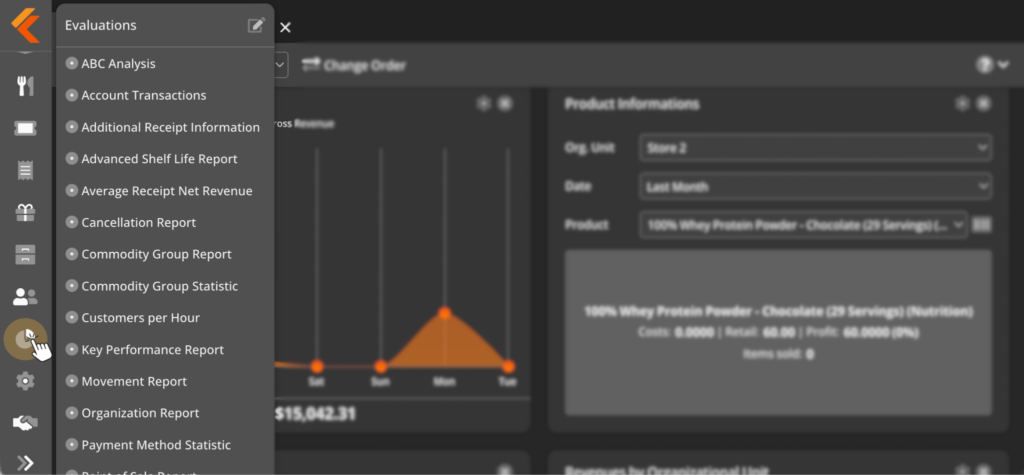
Tracking inventory accurately is necessary. Using that data to make smarter decisions is what actually drives your profit. KORONA Studio's inventory reporting gives you both.
The core inventory reports include:
- Stock Valuation Report: total inventory value at a glance, with column totals for current stock, goods value, stock receipt quantity, and total net, with no export required
- Movement Report: tracks stock flows between locations, useful for understanding which stores are drawing from central inventory and at what rate
- Internal Transfer Report: logs every product transfer between your locations with timestamps and quantities
- Stock Receipt Discrepancies: flags differences between vendor shipments and what was actually received
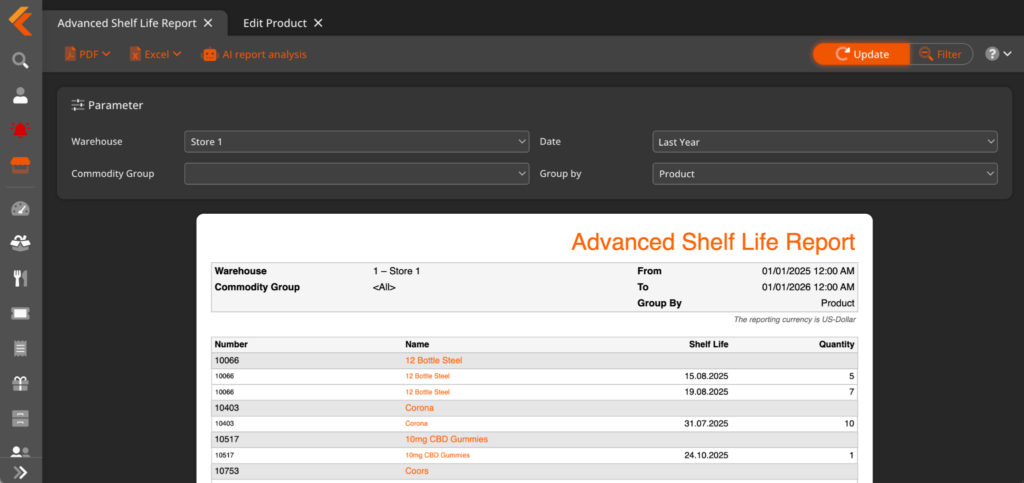
- Advanced Shelf Life Report: surfaces perishables approaching expiry, organized by urgency
- ABC Analysis: grades every product in your catalog by profitability and sales velocity, identifying your top performers, steady mid-range sellers, and slow or dead stock
All reports export as PDF or Excel, and the Automatic Report Dispatch feature on the Plus plan lets you schedule any report to be emailed automatically, which is useful for owners who want regular inventory snapshots delivered to their inbox without logging in.
Selling Products in Multiple Sizes Without the Headache
For retailers who sell products in multiple unit sizes, particularly liquor stores, convenience stores, and wholesale-adjacent businesses, standard POS inventory systems create a persistent headache: how do you track a case of beer, a six-pack, and individual cans as separate sellable units without duplicating your catalog or manually adjusting counts every time?
KORONA POS handles case breaks through container products and multiple product codes. You define the parent container (a case of 24, for example), its child units (a six-pack, an individual can), and the quantities that link them. When you sell a six-pack, KORONA POS automatically deducts the equivalent from your case inventory. When you sell individual units, the same math applies. You can assign separate barcodes to each unit size without creating duplicate catalog entries.
Automated Reordering and Order Level Optimization
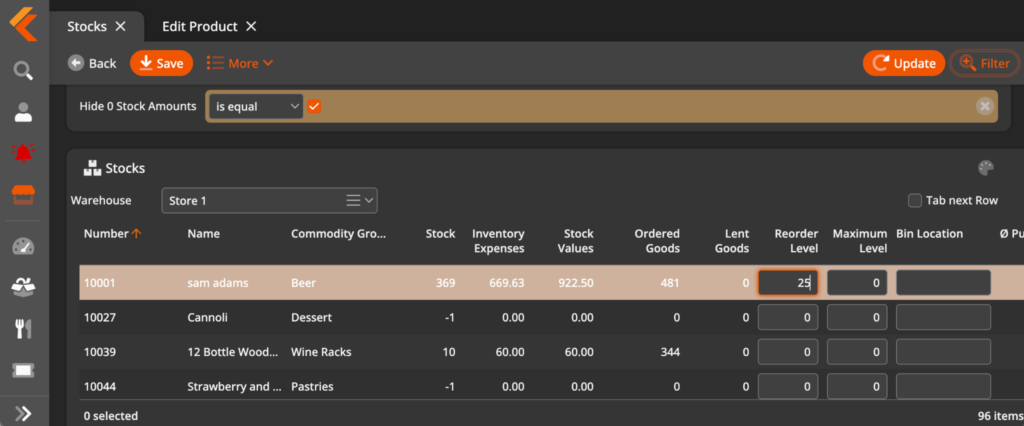
Knowing when to reorder is just as important as knowing what you have. KORONA POS offers two layers of reorder management.
The first is basic reorder levels: you set a minimum stock threshold per product, and KORONA POS generates an alert and, optionally, an automated purchase order when stock falls below that threshold. This is available on all plans and works for any product with a defined minimum.
The second is Order Level Optimization, available on the Plus plan. Rather than using a fixed threshold, the system analyzes your actual purchase history, sales velocity, and seasonal trends to automatically recalculate ideal par levels for each product. The calculation runs in seconds and adjusts across your entire catalog without manual intervention.
Real-Time Stock Tracking and Proactive Alerts
Every transaction at the POS updates inventory levels instantly, and KORONA's tracking system proactively flags issues. The software automatically identifies products with negative stock counts, items selling below expected velocity, and products approaching reorder thresholds. So rather than discovering a stockout at the register, you see the issue before it becomes a customer-facing problem, and set automatic reorder levels.
For eCommerce-enabled retailers, KORONA POS integrates with WooCommerce, keeping your online store and in-store inventory in lockstep. An item purchased online immediately reduces your physical count, and an in-store sale does the same for your online available quantity. No manual reconciliation, no overselling.
Receiving, Shipment Tracking, and Vendor Management
Receiving shipments can be done from three places: KORONA Studio on any browser, directly at a POS terminal, or through the KORONA mobile inventory app. This means your team doesn't need to be at a desk to receive a shipment. A floor manager with a tablet can handle it in the stockroom.
KORONA POS can import vendor shipment notifications directly, so when a vendor confirms a delivery, the expected contents appear in Studio before the boxes arrive. When your team receives the shipment, any discrepancy between what was shipped and what was actually received surfaces immediately in the Stock Receipt Discrepancies report.
Vendor management sits alongside this: you can manage multiple suppliers per product, track costs over time, and generate purchase orders directly from within KORONA Studio based on current stock levels and reorder triggers. Vendor cost changes feed directly into margin calculations, so you always have an accurate picture of how much you're making on each product.
Inventory Counts With Built-In Loss Prevention
Inventory counts can be done with KORONA Studio or the KORONA mobile inventory app with a handheld scanner. Your team can spread counts across the floor or warehouse without being tied to a single workstation, and the results sync in real time.
Additionally, KORONA POS supports both full counts and cycle counting, in which different sections of your catalog are counted on a rolling schedule throughout the year rather than in a single disruptive annual session. The automated count scheduling tool generates daily or weekly stock lists so every product gets counted at least once over a defined period.
And, significantly for loss prevention, KORONA POS has permission control so inventory information is only accessible for users who have been granted access. Cashiers and floor employees complete their counts based on what they physically find, not on what the system expects.
This prevents conscious or unconscious count manipulation, ensuring a genuinely unbiased reconciliation every time. Any discrepancy in your reports between the count and the system's expected total is worth investigating.
Expiration Date Tracking and Shelf Life Management
KORONA POS supports expiration date tracking at the product level. You set expiry dates when products are received, and KORONA POS alerts you before items pass their prime, giving you time to markdown, sell through, or remove stock before it becomes a compliance issue or a write-off.
The Advanced Shelf Life Report in KORONA Studio surfaces all products approaching expiry in one view, organized by urgency. Rather than discovering expired products during a count or at the point of sale, you can act proactively. For bakeries using day-old pricing, this integrates directly with KORONA's pricing tools to automatically apply the discounted price at the appropriate time.
Who Gets the Most Out of KORONA's Inventory Tools
KORONA's inventory management delivers the most value to businesses where product complexity is a real day-to-day operational challenge.
Specialty retailers with high SKU counts, including liquor stores, smoke and vape shops, convenience stores, and gift shops, benefit most from the centralized catalog, case break management, automated reordering, and ABC analysis. Managing hundreds or thousands of products across multiple unit sizes and pricing tiers is where KORONA's depth shows.
Multi-location operators use the centralized catalog and cross-location reporting to manage stock transfers, identify which locations are over- or understocked, and push pricing and catalog changes without having to look at each store individually.
Businesses with perishable inventory, including bakeries, wineries, dispensaries, and convenience stores with food, rely on expiration date tracking and the Advanced Shelf Life Report to stay compliant and reduce write-offs.
Franchise operators use the order portal and centralized catalog to ensure franchisees are stocking approved products and to push promotions and pricing consistently across the network. KORONA POS can also automatically calculate franchisee royalties.
FAQs
Does KORONA POS support inventory management for multiple locations?
Yes. All locations share one centralized product catalog in KORONA Studio. Pricing changes, new products, and promotions are pushed to every location simultaneously. You can view inventory levels per location or across all stores in a consolidated view.
Can KORONA POS handle products sold in multiple unit sizes?
Yes. Container products allow you to define a parent unit (a case, for example) and its child units (six-packs, individual items) with linked quantities. Selling any unit automatically adjusts the associated inventory across all linked formats without manual adjustments.
How does KORONA POS handle inventory counts?
Counts can be performed from KORONA Studio, a POS terminal, or the KORONA mobile inventory app. Staff performing counts do not see the system’s expected quantities, which ensures an unbiased reconciliation. Both full counts and rolling cycle counts are supported.
Does KORONA POS support expiration date tracking?
Yes. Expiration dates can be set per product at the time of receiving. KORONA POS alerts you before items pass their prime, and the Advanced Shelf Life Report surfaces all products approaching expiry in a single view, organized by urgency.
What is Order Level Optimization, and which plan includes it?
Order Level Optimization is a feature on the KORONA POS Plus plan that analyzes purchase history, sales velocity, and seasonal trends to automatically recalculate ideal reorder levels for each product. Unlike a fixed threshold, it adjusts to actual demand patterns over time.
Can I import my existing product catalog into KORONA POS?
Yes. KORONA’s support team can import your existing product database in any format, including CSV and Excel, during setup. You don’t need to rebuild your catalog manually.