

Programvare for butikkstyring effektiviserer alt fra lagerstyring basert på strekkoder til mobile POS-transaksjoner, nøyaktighet i innkjøpsordrer og rapportering på tvers av kanaler – slik at du kan drive butikken smartere og øke fortjenesten.
Den rette plattformen eliminerer systemforsinkelser, slik at du kan holde hyllene fulle og kundene fornøyde i sanntid.
Etter mange år innen global frakt, lagerdrift og netthandel har jeg satt den beste programvaren for butikkstyring på prøve.
Her viser jeg deg hvilke verktøy som gir resultater, og hvordan du velger det beste for virksomheten din.
Why Trust Our Software Recommendations
6,700+
Reviews
20
Industry experts
16+
Evaluation factors
14
Years
Our team has been testing and reviewing software since 2012. As retail leaders ourselves, we know how difficult—and important—it is to choose the right software.
For this guide, we evaluated tools using hands-on testing and independent research, scoring tools using our selection criteria.
Our reviews reflect our independent judgment—not a sales pitch.
Sammenligningstabell for programvare for butikkstyring
Tabellen nedenfor oppsummerer hvert programvarevalg for butikkstyring med én linje om hva det passer best til, prøveopplysninger og startpris:
| Tool | Best For | Trial Info | Price | ||
|---|---|---|---|---|---|
| 1 | Best for independent supply stores | Free demo available | From $499/month (billed annually) | Website | |
| 2 | Best for enterprise retailers | Free demo available | Pricing upon request | Website | |
| 3 | Best for real-time stock notifications | Free trial + free demo available | From $59/month | Website | |
| 4 | Best for end-to-end retail management | Free demo available | Pricing upon request | Website | |
| 5 | Best for cross-module workflows | Free demo available | Pricing upon request | Website | |
| 6 | Best for warehouse management | 14-day free trial + free demo available | From $29/organization/month (billed annually) | Website | |
| 7 | Best for field team management | Free demo available | Pricing upon request | Website | |
| 8 | Best for table-service restaurants | Free demo available | From $99/month | Website | |
| 9 | Best for retail cash flow management | Free plan available | From $199/month | Website | |
| 10 | Best for small businesses | Free plan available | From $29/month | Website |


Den beste programvaren for butikkstyring – vurdert
Omtalene nedenfor viser hvordan hver plattform håndterer arbeidsflyter fra den virkelige verden: strekkodenøyaktighet, oppetid for mobil POS, ordrehåndtering og rapportering på tvers av kanaler. Jeg har beholdt de korte verktøybeskrivelsene, men lagt til kontekst om funksjonalitet, særegenheter ved priser og hvem som bør (eller ikke bør) ta det inn i teknologistakken sin.
 Best for independent supply stores
- Free demo available
- From $499/month (billed annually)
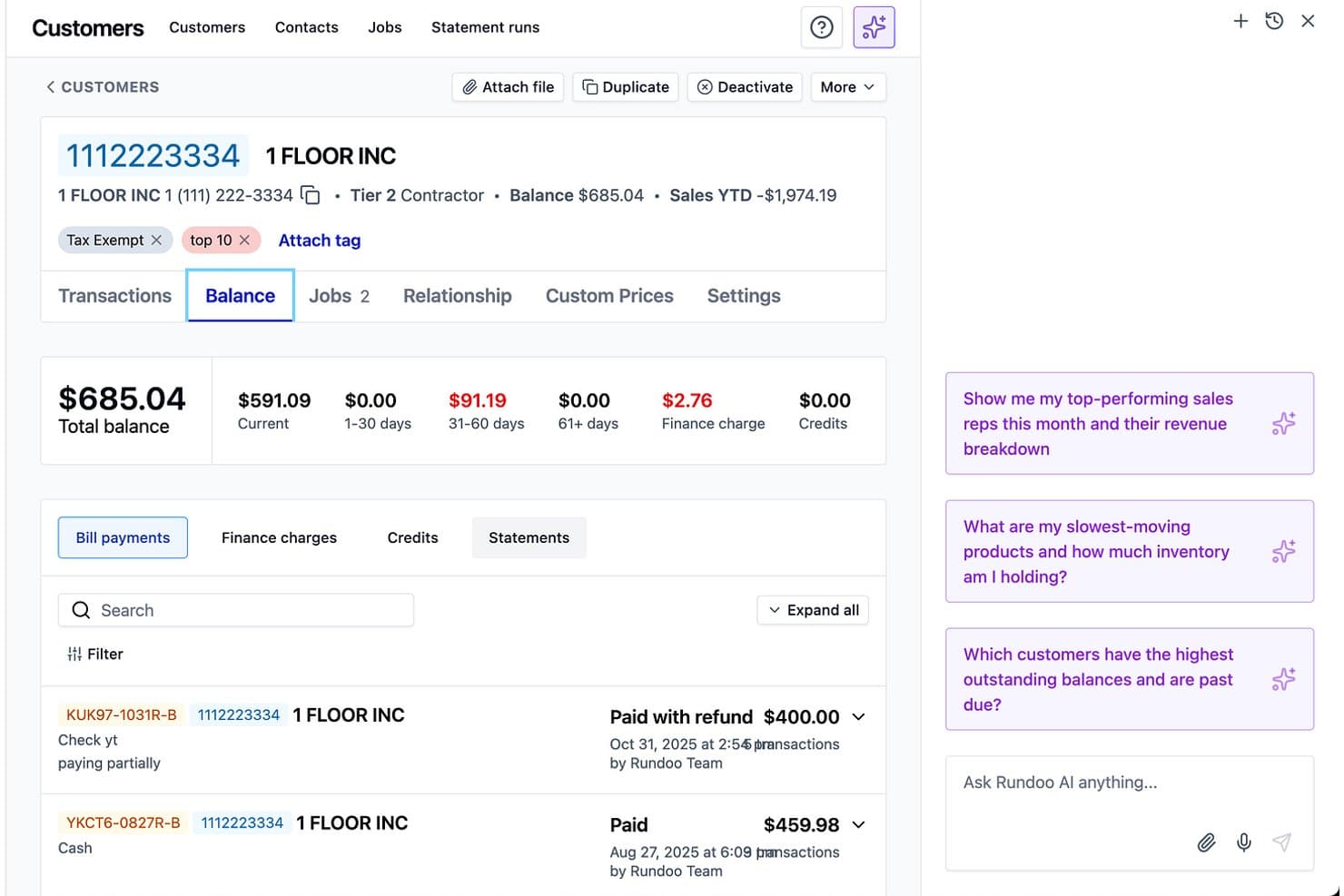
Rundoo offers a detailed customer balance screen and AI-powered business insights for store billing management. Rundoo is a cloud-based POS and ERP platform built for independent supply retailers, covering point of sale, inventory management, purchasing, contractor charge accounts, and AI-driven reporting in one system.
Who Is Rundoo Best For?
Rundoo is a strong fit for independent hardware, paint, lumber, farm & feed, and garden center store owners moving off legacy POS systems like Epicor Eagle or Paladin.
Why I Picked Rundoo
Rundoo earns its spot on my shortlist because of how precisely it's built around the way independent supply stores actually sell. I love that Dooey, Rundoo's AI assistant, generates purchase orders automatically by reading your actual sales velocity, low-stock signals, and seasonal patterns. On top of that, contractor charge accounts with per-customer pricing and autopay are built directly into the POS, which is something most general retail platforms don't handle natively.
Rundoo Key Features
- Paint tint system integration: Rundoo syncs directly with leading paint color catalogs and tinting machines, supporting sales and inventory in one workflow.
- Multi-location inventory tracking: Manage stock, transfers, and variants across multiple stores, including unique vertical requirements like dimensional and bulk inventory.
- Vendor catalog integrations: Connects with major industry distributors and buying groups, automating item setup and pricing updates from supplier feeds.
- Contractor account management: Provides tools for managing charge accounts, per-customer pricing, statements, and automated payments for trade customers.
Rundoo Integrations
Rundoo offers native integrations with Stripe, QuickBooks, Benjamin Moore COLORx, Orgill, Do It Best, True Value, Sherwin-Williams, PPG, and more. An API is available for custom integrations.
Pros and Cons
Pros:
- Contractor charge accounts built into POS
- AI-generated POs from actual sales data
- Built specifically for supply store verticals
Cons:
- Missing employee scheduling and labor tracking
- No ecommerce or omnichannel sales support
Learn more about Rundoo: Best for enterprise retailers
- Free demo available
- Pricing upon request
Visit WebsiteCustomer Rating:5/5
Oracle Retail’s merchandising feature helps manage and optimize retail operations by enabling efficient inventory management, demand forecasting, and assortment planning. Oracle Retail is built for enterprise retailers that need accurate, cross-channel control over merchandising, pricing, and inventory.
You get a unified platform for planning, buying, allocating, and tracking stock across huge store networks. It’s best for teams managing complex product hierarchies and large seasonal assortments.
Who is Oracle Retail Best For?
Retail operations and merchandising executives in large enterprises globally managing complex retail operations and enterprise-scale workflows.
Why I Picked Oracle Retail
I picked Oracle Retail because it gives you one system for item setup, purchasing, and stock governance—critical when you’re dealing with thousands of SKUs across hundreds of stores.
Your team benefits from demand forecasting and planning tools that recommend buys and allocations based on real sales patterns, not gut feel.
I also like that the pricing and promotion modules tie margin targets directly to regular, promo, and markdown strategies.
Finally, Oracle's store operations tools help associates receive, count, and fulfill orders with more accurate on-hand data.
Oracle Retail Key Features
In addition to the core merchandising tools, Oracle Retail includes several modules you can use to strengthen daily planning and store execution.
- Lifecycle Pricing Optimization: Models regular, promo, and markdown prices against margin and sell-through goals.
- Assortment Planning: Helps planners localize assortments with forecast-driven option counts and seasonal insights.
- Order Management Suite: Routes and fulfills orders across channels based on actual availability.
- Store Inventory Operations: Supports receiving, counting, and inventory adjustments from mobile devices.
Oracle Retail Integrations
Integrations include Salesforce, SAP, Shopify, Snowflake, ServiceNow, and Workday.
Pros and Cons
Pros:
- OMS and store tools help teams fulfill orders with fewer stock errors.
- Unified merchandising workflows improve financial and inventory accuracy.
- Extensive planning and pricing tools support complex retail structures.
Cons:
- Pricing aligns more with large retail enterprises than smaller chains.
- Long, resource-heavy implementations.
Learn more about Oracle Retail: Best for real-time stock notifications
- Free trial + free demo available
- From $59/month
Visit WebsiteCustomer Rating:4.8/5
KORONA POS lets you track and manage stock remotely with its cloud-based system. KORONA POS gives growing retailers a way to keep shelves stocked, stores compliant, and margins intact across one or many locations.
It’s especially useful if you’re juggling complex inventory—liquor, vape, specialty food, or gift shops—and need real-time visibility instead of guessing from yesterday’s reports.
Who is KORONA POS Best For?
Store managers and inventory supervisors in small to mid-sized retail businesses in North America and Europe requiring real-time stock notifications.
Why I Picked KORONA POS
I picked KORONA POS because it gives you real-time stock notifications and automated reordering, so you can set par levels and let the system flag issues before stockouts or overstock pile up on your balance sheet.
You can also manage vendors directly through the platform, which means your team can compare supplier performance and tighten up purchasing instead of chasing spreadsheets.
I like that the same inventory logic works whether you’re running a single shop or a growing chain, so your team can keep one playbook as you add locations.
For compliance-heavy retailers, KORONA POS includes age verification and product flags that help cashiers catch restricted items at checkout, reducing risk while keeping lines moving.
On the payments side, it stays processor-agnostic, so you can shop for better rates instead of being locked into one provider.
KORONA POS Key Features
Beyond those inventory and compliance tools, a few extra features make KORONA POS feel like an actual retail management hub, not just a cash register.
- KORONA Studio Dashboard: Cloud-based back office where you adjust pricing, promotions, and ordering rules from anywhere.
- Advanced Reporting And KPIs: Prebuilt reports for sales, categories, locations, and staff performance so you can spot trends faster.
- Customer Loyalty Programs: Built-in loyalty and promotions engine that lets you reward repeat shoppers without bolting on another app.
- Ticketing And Membership Tools: Support for tickets, passes, and memberships for verticals like museums, wineries, and attractions.
KORONA POS Integrations
Integrations include WooCommerce, Adobe Commerce, QuickBooks Online, Bookkeep, bLoyal, Bottlecapps, TimeForge, Octopus Bridge, Card Market, and CMS Max.
Pros and Cons
Pros:
- Age-verification and shelf-life tracking support liquor, vape, and specialty food retailers.
- Franchise tools handle royalties and multi-store reporting in one shared backend.
- Real-time inventory alerts prevent stockouts and overstock across all locations.
Cons:
- Performance on some tablets can lag during busy retail hours.
- Limited offline functionality; some features require constant internet connectivity.
Learn more about KORONA POS: Best for end-to-end retail management
- Free demo available
- Pricing upon request
Visit WebsiteCustomer Rating:4.4/5
Brightpearl is a retail management software that helps businesses manage their operations across various sales channels. Brightpearl gives growing multi-channel retailers and wholesalers a single place to run inventory, orders, purchasing, warehousing, CRM, and accounting.
It’s best if you’re past the starter-tool phase and need tighter control over post-purchase operations across ecommerce, marketplaces, and stores.
Who is Brightpearl Best For?
Retail managers and operations leads in small to mid-sized omnichannel retailers globally managing end-to-end retail operations.
Why I Picked Brightpearl
I picked Brightpearl for retailers who want one “source of truth” for operations instead of stitching together separate inventory, order, and accounting tools.
When you update stock, ship an order, or receive a purchase order, those changes roll through the same system so your team isn’t reconciling spreadsheets at month-end.
You can set up rules so Brightpearl automatically allocates stock, prioritizes certain channels, or routes orders to the right warehouse, which means your team spends more time solving exceptions and less time keying repetitive updates.
For multichannel brands, it supports higher order volume—online, marketplace, and in-store—while still giving you accurate available-to-sell numbers and landed-cost-aware margins.
Because accounting, inventory, and order data live together, you get cleaner performance reporting by product, channel, and location, which makes it easier to decide where to invest in stock and marketing.
Brightpearl Key Features
Here are a few Brightpearl features retailers actually use day to day.
- Multi-Location Inventory Planning: Coordinate stock, transfers, and safety levels across warehouses so planners can protect availability without overbuying.
- Backorder And Preorder Management: Capture demand when items aren’t on the shelf and automatically allocate incoming stock so sales, purchasing, and service stay aligned.
- Returns And RMA Workflows: Track returns from authorization through restocking or write-off so refunds, stock levels, and margins stay accurate.
- Retail Analytics Dashboards: Monitor channel, SKU, and location performance in configurable views so leadership can quickly spot bottlenecks and underperforming lines.
Brightpearl Integrations
Integrations include Shopify, BigCommerce, Magento, Amazon, eBay, Walmart, Xero, QuickBooks Online, Sage Intacct, and Mailchimp.
Pros and Cons
Pros:
- Multichannel stock sync helps prevent overselling across ecommerce, marketplaces, and stores.
- Automation rules reduce manual work in allocation, purchasing, and order routing.
- Unified operations platform for inventory, orders, purchasing, CRM, and accounting.
Cons:
- Quote-based pricing and no public tiers complicate upfront cost comparisons.
- Initial implementation and configuration can be demanding for smaller internal teams.
Learn more about Brightpearl: Best for cross-module workflows
- Free demo available
- Pricing upon request
Visit WebsiteCustomer Rating:4.4/5
Acumatica Cloud ERP provides features for retail management all in one platform. Acumatica Cloud ERP is built for retailers trying to wrangle inventory, orders, and customers across stores, warehouses, and ecommerce without living in spreadsheets.
It’s a good fit for mid-market retailers with multi-location or omnichannel operations who want one place to manage stock, financials, POS, and commerce instead of stitching together a dozen point solutions.
Who is Acumatica Cloud ERP Best For?
Finance and operations teams in mid-sized to large companies in North America and Europe coordinating workflows across multiple business modules.
Why I Picked Acumatica Cloud ERP
I picked Acumatica Cloud ERP because it gives you one system for inventory, orders, customers, and financials, so your team isn’t reconciling mismatched data every week.
You get real-time stock visibility across warehouses, stores, and ecommerce, helping you reduce overselling while keeping lean inventory.
Its POS ties directly into order and inventory data, letting you support BOPIS and returns without manual rekeying.
I also like the native commerce connectors, which keep product data and orders synced across Shopify, BigCommerce, and Amazon.
Acumatica Cloud ERP Key Features
Here are a few retail-specific capabilities that matter once you’re past basic inventory and need real operational control.
- Customer Self-Service Portal: Let customers track orders, view invoices, and submit cases online, cutting support tickets while keeping account history tied to your CRM.
- Warehouse Management System: Use barcode-driven receiving, picking, and packing to keep back-of-house activity synced with sales, reducing mis-picks and shipping mistakes.
- Role-Based Dashboards: Give store managers, buyers, and finance their own live KPIs for sales, margin, stock turns, and returns, instead of static reports that are outdated by Monday afternoon.
- Retail Pricing And Promotions: Centralize catalog, pricing, and discount rules so you can run consistent promotions across stores and channels without hand-editing POS and ecommerce settings.
Acumatica Cloud ERP Integrations
Integrations include Shopify, BigCommerce, Magento, Amazon, ShipStation, SPS Commerce, 3G Pacejet Shipping, and Avalara.
Pros and Cons
Pros:
- Role-based dashboards give store and ops leaders quick margin insights.
- Native ecommerce connectors keep online orders and stock reliably aligned.
- Real-time inventory across stores and channels reduces overselling risk.
Cons:
- Advanced configuration can feel heavy for small single-location retailers.
- Implementation and setup typically require a partner experienced with retail.
Learn more about Acumatica: Best for warehouse management
- 14-day free trial + free demo available
- From $29/organization/month (billed annually)
Visit WebsiteCustomer Rating:4.3/5
The inventory feature of Zoho Inventory enables businesses to effectively manage and track their stock levels, orders, and fulfillment processes in a centralized system. Zoho Inventory is built for retailers and wholesalers who are juggling inventory across multiple warehouses, channels, and regions.
You get granular control over batches, serials, and locations so you can see exactly what’s sitting where—and what’s at risk of expiring or running out—without graduating to a heavy ERP.
It’s a strong fit if your team needs warehouse-level visibility, not just a stock-on-hand number in your POS.
Who is Zoho Inventory Best For?
Warehouse managers and operations teams in small to mid-sized organizations globally overseeing inventory tracking and stock control.
Why I Picked Zoho Inventory
I picked Zoho Inventory because it gives you true multi-warehouse visibility—each location has its own stock, bins, and transfer orders, so you can route fulfillment with confidence.
You also get batch and serial tracking for products that need traceability, letting your team handle recalls, warranties, or expiry-sensitive items without spreadsheets.
Barcode scanning speeds up picking and packing by capturing SKUs, batches, or serials directly into orders.
And the built-in reorder alerts keep you ahead of low-stock issues by tying replenishment to actual warehouse activity.
Zoho Inventory Key Features
Beyond the core warehouse controls, Zoho Inventory adds a few operational features your team will actually use day to day.
- Replenishment Planning: Uses reorder levels and replenishment views to highlight low-stock items so you can raise purchase orders before you hit stockouts.
- Pick, Pack, And Ship Workflows: Supports picklists, packages, and shipments in one place so your team can move orders from shelf to truck without hopping between tools.
- Shipping Rate And Label Management: Connects to shipping carriers for live rates, label generation, and shipment tracking inside Zoho Inventory.
- Inventory And Sales Reporting: Surfaces stock movement, backorders, and warehouse-level performance so you can tweak layouts, purchase quantities, and fulfillment rules with actual data.
Zoho Inventory Integrations
Integrations include Shopify, Amazon, eBay, Etsy, Zoho Commerce, Zoho Books, Zoho CRM, USPS, UPS, and AfterShip.
Pros and Cons
Pros:
- Reorder alerts and replenishment views reduce out-of-stock risk.
- Batch and serial tracking plus barcode scans support precise picking.
- Multi-warehouse tracking with transfer orders keeps stock balanced across locations.
Cons:
- No built-in demand forecasting for complex, multi-season inventory patterns.
- Advanced tracking features locked to higher-tier paid subscription plans.
Learn more about Zoho Inventory: Best for field team management
- Free demo available
- Pricing upon request
Visit WebsiteCustomer Rating:4.4/5
Repsly offers real-time analytics with insights dashboards for tracking performance metrics. Repsly helps CPG brands and retail service providers keep field reps, merchandisers, and store conditions under control across a huge retail footprint.
You get a mobile-first app for visits in the field plus HQ dashboards that turn store-level activity, photos, and surveys into decisions about promotions, facings, and availability.
Who is Repsly Best For?
Field sales managers and team supervisors in mid-sized consumer goods and retail companies in North America and Europe managing mobile teams.
Why I Picked Repsly
I picked Repsly because it gives field teams clear visit agendas, photo tools, and mobile forms so every store stop produces useful data, not guesswork.
Its AI image recognition turns shelf photos into SKU-level insights, helping you spot out-of-stocks and display issues through trained models tied to your product catalog.
Managers get dashboards that compare execution by retailer, brand, or rep, giving you concrete follow-up actions instead of anecdotes.
Repsly Key Features
Beyond basic field visit tracking, Repsly gives you tools aimed squarely at retail execution quality and coverage.
- Territory Management & Scheduling: Define territories, set visit frequencies, and assign routes so reps hit priority accounts at the right cadence.
- In-Store Order Capture: Let reps submit orders, returns, and replenishment requests from the aisle, tied to each account’s history.
- Mobile Forms & Surveys: Build store audit templates, promo compliance checklists, and survey forms that reps complete on their phones.
- Insights Dashboards & KPIs: Track execution metrics, shelf conditions, and promotion performance in near real time across regions and teams.
Repsly Integrations
Integrations include Salesforce, HubSpot, Zoho CRM, QuickBooks, Xero, Mailchimp, Google Sheets, and Microsoft 365.
Pros and Cons
Pros:
- Mobile forms and surveys capture consistent data across every store visit.
- Territory and visit planning tools support large, distributed retail footprints.
- AI shelf recognition helps catch out-of-stocks and display issues quickly.
Cons:
- Visit submissions are hard to fix when reps check in at wrong locations.
- Form builder can take time to configure for complex workflows.
Learn more about Repsly: Best for table-service restaurants
- Free demo available
- From $99/month
Visit WebsiteCustomer Rating:3.8/5
Use Revel’s POS interface to manage table-service restaurant orders seamlessly. Revel Systems is built for busy table-service restaurants and multi-location retailers that can’t afford order chaos or inventory guesswork.
You get an iPad-based POS that ties together table management, ingredient-level inventory, and central reporting so you can keep orders moving while actually trusting your numbers.
Who is Revel Systems Best For?
Restaurant managers and owners in table-service establishments across North America needing integrated POS and workflow management.
Why I Picked Revel Systems
I picked Revel Systems because it gives table-service restaurants and chains real control over both the dining room and the back office.
You can manage tables, split checks, route orders to the right kitchen stations, and keep an eye on ticket times from a single POS screen, so service doesn’t grind to a halt on Friday nights.
For retail-style operations, ingredient and item-level inventory tracking lets you monitor stock across locations, then trigger purchase orders based on real usage instead of gut feel.
I also like the “Always On” mode, which lets you keep taking orders and payments when the internet flakes, then syncs everything once you’re back online, so your sales history and stock counts stay accurate.
Finally, Revel’s centralized console means you can change menus, prices, and promos once and push them to every store, which saves your team from logging into a dozen systems and hoping they didn’t miss one.
Revel Systems Key Features
Beyond the table and ticket tools, Revel has a few extras that matter for serious retail and restaurant operations.
- Kitchen Display Systems: Send digital tickets to kitchen screens, prioritize courses, and track bump times to keep the line moving.
- Employee Scheduling And Timecards: Build schedules, track clock-ins, and tie labor reports to sales so you can spot overstaffed shifts.
- Centralized Menu And Catalog Management: Update items, prices, and modifiers once in the back office and roll changes out to every location.
- Customer Profiles And Loyalty: Capture guest data, record visit history, and run built-in loyalty programs to reward frequent diners and shoppers.
Revel Systems Integrations
Integrations include QuickBooks Online, Como Loyalty, Punchh, Twilio, DoorDash Marketplace, Uber Eats, Apple Pay, and Revel Advantage (Adyen).
Pros and Cons
Pros:
- Centralized console pushes menu, pricing, and promo updates to every store.
- Ingredient-level inventory tools help prevent stockouts and over-ordering across locations.
- Always On offline mode keeps orders and payments flowing during outages.
Cons:
- Some users report occasional sync glitches that require reconciliation time.
- Configuration and rollout can be complex for teams without dedicated IT.
Learn more about Revel Systems: Best for retail cash flow management
- Free plan available
- From $199/month
Visit WebsiteCustomer Rating:5/5
Settle's dashboard provides visibility into various metrics, like cash flow and payments. Settle gives inventory-led retailers one place to manage cash going out the door—connecting purchase orders, vendor bills, and payments so you don’t lose track of what’s tied up in stock.
It’s especially useful for CPG and omnichannel brands that constantly juggle reorders, long lead times, and tight margins.
Who is Settle Best For?
Finance and retail operations managers in small to mid-sized retailers in North America optimizing cash flow and payment processing.
Why I Picked Settle
I picked Settle for retail management because it ties together bill pay, inventory, and purchasing, so you can see exactly how every PO affects cash flow and stock levels.
You aren’t just paying invoices in isolation—you’re matching them against purchase orders and receipts, which helps catch overbilling and mismatched quantities before cash leaves your account.
For inventory-heavy brands, I like that Settle calculates landed costs at the SKU level using real invoices, freight, and duties, so your team gets honest margin numbers instead of guesses. The working capital tools let you finance purchase orders directly inside the same platform you use to manage AP, helping you cover big buys without starving the rest of the business.
If you’re running on Shopify and selling through marketplaces, Settle also pulls in order and product data, which makes it easier to prioritize reorders and funding decisions based on what’s actually selling, not just what’s sitting in a spreadsheet.
Settle Key Features
Beyond AP automation and landed cost tracking, here are a few other capabilities retail teams will actually lean on day to day.
- Inventory-Aware Bill Pay: Connect bills to specific POs and receipts so every vendor payment ties back to actual inventory movements.
- Purchase Order Automation: Generate, approve, and update purchase orders from one place, keeping buyers and finance aligned on quantities, timing, and vendor terms.
- Working Capital Programs: Access PO and inventory financing inside the same workflow you use for payables, with clear repayment schedules that map to your cash flow.
- Multi-Channel Inventory Visibility: Pull product and sales data from ecommerce platforms and marketplaces so you can spot fast movers and adjust reorders before stockouts hit.
Settle Integrations
Integrations include QuickBooks Online, NetSuite, Shopify, Amazon, Walmart, Faire, TikTok Shop, A2X, Finaloop, and various warehouse management systems.
Pros and Cons
Pros:
- Built-in working capital lets you finance inventory purchases without separate tools.
- SKU-level landed cost tracking gives accurate margins for inventory-led brands.
- Inventory-aware AP workflows connect purchase orders, bills, and vendor payments.
Cons:
- Full value depends on connecting accounting, sales channels, and WMS integrations.
- Designed primarily for CPG and inventory-heavy brands, not services businesses.
Learn more about Settle:

Square for Retail’s POS app enables businesses to process sales, manage inventory, and track customer data at the point of sale. Square for Retail is designed for small retailers who want a simple way to manage sales, inventory, and customer data in one place.
It’s especially useful for shop owners and boutique managers who need built-in payment processing and barcode scanning without extra hardware. The platform helps you keep track of stock, process returns, and manage staff from a single, easy-to-use dashboard.
Who is Square for Retail Best For?
Small business owners and retail managers in North America and Europe looking for simple, point-of-sale solutions.
Why I Picked Square for Retail
For small businesses, Square for Retail stands out because it combines essential retail functions in a single, accessible platform.
I picked it for its built-in payment processing, which lets you accept card and contactless payments without extra hardware or complicated setup.
The inventory management tools are straightforward, allowing you to track stock levels, set alerts, and manage product variants easily.
These features make Square for Retail a practical choice for shop owners who want to keep operations simple and efficient.
Square for Retail Key Features
Some other features that make Square for Retail useful for small business owners include:
- Customer Directory: Store and organize customer profiles, purchase history, and contact information in one place.
- Barcode Label Printing: Print barcode labels directly from the system for easy product scanning and tracking.
- Employee Permissions: Set custom access levels for staff to control who can view reports, process refunds, or manage inventory.
- Multi-Location Management: Manage inventory, sales, and staff across multiple store locations from a single dashboard.
Square for Retail Integrations
Integrations include QuickBooks, Xero, WooCommerce, BigCommerce, Wix, Mailchimp, Tidio, Afterpay, and QuickBooks Online.
Pros and Cons
Pros:
- Includes a free plan.
- Competitive pricing.
- Compatible with iOS devices.
Cons:
- Limited inventory features.
- Dependency on Square payment processing software.
Learn more about Square for Retail:
Annen programvare for butikkstyring
Her er en liste over noen flere systemer for butikkstyring du kan se nærmere på:
- 11Microsoft Dynamics 365 for RetailBest all-in-one retail management software
- 12SAP RetailBest for merchandise management
- 13NetSuite SuiteCommerceBest for direct integration to NetSuite ERP
- 14Lightspeed RetailBest for inventory management
- 15ZebraBest for barcode solutions in the retail sector
- 16Epicor Retail Management SuiteBest for speciality retail businesses
- 17Payline DataBest for enhancing customer loyalty
- 18Retail ProBest for in-depth reporting
- 19DualEntryBest for multichannel sales
- 20FishbowlBest for automated purchasing
- 21SimplyDepoBest for CPG retail execution
- 22AgilironBest for B2B and B2C websites
- 23Blue YonderBest for supply chain management
- 24NCR CounterpointBest for integrating front and back office
- 25QuickBooks Point of SaleBest for Shopify users
- 26NCR SystemsBest for wholesale businesses
Relaterte omtaler av programvare for netthandel
Hvis du fortsatt ikke har funnet det du leter etter her, kan du se nærmere på disse relaterte netthandelsverktøyene som vi har testet og vurdert.
- Netthandelsplattformer
- Programvare for lagerstyring
- Programvare for betalingsbehandling
- Handlekurvløsninger
- Ordrehåndteringssystemer
- Programvare for lagerstyring
How I Evaluate Retail Management Software
I split my evaluation into baseline requirements—like POS, inventory, and omnichannel sync—and the differentiators that separate a good platform from the right one for your operation.
Core Functionality (Table Stakes For This List)
When I'm selecting tools for my list, I rank each one on a scale from 0 (does not offer the functionality) to 5 (excels in this area) for each core functionality listed below. Then, I calculate the tool's total score into a percentage. Each tool needs to achieve a minimum total score of 75% to be considered for inclusion.
- Point of Sale System: I check whether the POS handles split payments, returns, exchanges, and barcode scanning while syncing every transaction back to inventory.
- Inventory Management: Multi-location stock tracking, variant handling for sizes and colors, and automated reorder triggers are what I evaluate here.
- Omnichannel Sales Integration: I look at how well a platform unifies its product catalog across in-store, ecommerce, and marketplace channels like Amazon or Etsy.
- Purchasing & Supplier Management: A tool should let you create POs, track vendor lead times, and receive stock against orders without jumping into a separate system.
- Retail Reporting & Analytics: I evaluate whether reports break down sales by store, product, and time period so you can spot margin issues or top performers quickly.
- Customer & Loyalty Management: Capturing purchase history and running a points or tiered loyalty program from within the same platform is what I look for here.
Once I have a list of tools that meet this criteria, I consider what sets each platform apart.
Differentiating Factors (What Sets Vendors Apart)
Here's how I compare and contrast different vendors:
Standout Features
Mobile POS and clienteling tools matter for stores where associates need to look up stock or complete sales anywhere on the floor. I also evaluate whether a platform offers demand forecasting—seasonal retailers benefit when replenishment suggestions account for historical trends and sell-through velocity. An open API and app marketplace is another factor I weigh, since most retail teams need to connect their management platform to accounting, shipping, or marketing tools they already use.
Beyond Features
Scalability is a big one—I check whether a platform can grow from a single storefront to dozens of locations without requiring a migration to a different product tier. The integration ecosystem also matters because most retailers rely on tools like QuickBooks or Xero for accounting and need sales data flowing there automatically. I evaluate compliance and payment security too, especially PCI-DSS adherence and region-appropriate tax handling for businesses selling across multiple jurisdictions.
Slik velger du programvare for butikkstyring
Den mest prangende demonstrasjonen betyr ingenting hvis plattformen svikter på salgsgulvet. Før du drar kredittkortet, må du kartlegge realitetene i virksomheten din – SKU-er, ansatte, kanaler og kontantstrøm – og tvinge hver leverandør til å bevise at de kan håndtere dem.
Tabellen nedenfor leder deg gjennom en direkte vurderingsprosess jeg bruker når en administrerende direktør sier til meg: «Finn noe som ikke bryter sammen på lanseringsdagen.» Følg disse trinnene, så vil vinneren raskt vise seg.
| Trinn | Handling | Hvorfor det er viktig |
|---|---|---|
| Trinn1. Finn flaskehalsen | HandlingList opp de tre største problemområdene (treg betaling, spøkelseslager, usammenhengende nettbaserte data og butikkdata). | Hvorfor det er viktigHindrer deg i å kjøpe en sveitsisk lommekniv når du egentlig trenger en skalpell. |
| Trinn2. Kartlegg kritiske arbeidsflyter | HandlingSkisser hvordan bestillinger, lagerbeholdning og kundedata beveger seg i dag – og hvor de stopper opp. | Hvorfor det er viktigLar deg kreve demonstrasjoner i sanntid av din arbeidsflyt, ikke en standardisert omvisning. |
| Trinn3. Belastningstest integrasjonene | HandlingGi leverandøren en liste over teknologistakken din, og be om en fungerende sandkasse eller en referansekunde. | Hvorfor det er viktigUnngår uventede kostnader til mellomvare og ansvarsfraskrivelse etter lansering. |
| Trinn4. Gjennomfør et pilotprosjekt for «en dag i livet» | HandlingLa de ansatte som møter kundene, delta i prøveperioden: ta imot en leveranse, behandle returer og hent ut en salgsrapport. | Hvorfor det er viktigAvdekker brukervennlighetsproblemer IT-teamet aldri ser. |
| Trinn5. Beregn de faktiske eierkostnadene | HandlingLegg maskinvare, betalingsbehandling, tilleggsmoduler og implementeringsgebyrer til listeprisen. | Hvorfor det er viktigForhindrer at budsjettet sprekker etter seks måneder. |
| Trinn6. Fastsett suksessmål tidlig | HandlingDefiner to KPI-er som må nås (f.eks. svinn <1 %, lagerbeholdningsnøyaktighet 98 %). Knytt dem til klausuler om fornyelse. | Hvorfor det er viktigGir deg forhandlingskraft hvis leverandøren leverer under forventning, og forankrer prosjektet i resultater – ikke begeistring. |
Hva er programvare for detaljhandelsstyring?
Programvare for detaljhandelsstyring er et skybasert kontrollsenter som samler POS, lagerbeholdning, CRM og rapportering i ett dashbord.
Butikkeiere, netthandelsaktører og kjeder med flere lokasjoner bruker det til å kvitte seg med regneark, redusere utsolgte varer og synkronisere salgsdata fra butikk og nett med de beste POS-systemene for detaljhandel.
Hvis du stadig må hoppe mellom separate apper for SKU-er, innkjøpsordrer til leverandører og lojalitetsprogrammer, samler et system for detaljhandelsstyring disse arbeidsflytene i én sanntidsvisning – slik at du kan handle i stedet for å gjette.
Funksjoner i god programvare for detaljhandelsstyring
Dropp de endeløse funksjonsoversiktene. Hvis en løsning for detaljhandelsstyring mestrer de åtte punktene nedenfor, er du godt rustet for smidig butikkdrift og stressfri skalering.
- Samlet POS + CRM. Ett skybasert dashbord kobler salgsdata i sanntid til kundeprofiler, lojalitetsprogrammer og målrettede kampanjer – slik at du slutter å gjette og begynner å skreddersy.
- Automatisert lagerstyring. Strekkodeskanning, automatiserte gjenbestillinger og lageroversikter på tvers av lokasjoner holder SKU-ene korrekte på tvers av lagre, pop-up-butikker og nettbutikken din.
- Ordredirigering på tvers av kanaler. Forsendelse fra butikk, klikk-og-hent og synkronisering med markedsplasser skjer innebygd, uten sammenteipede moduler eller nattlige batchfiler.
- Handlingsrettet analyse. Salgsdata, varmekart for marginer og etterspørselsprognoser vises i appen – ingen eksport til regneark med mindre du savner det.
- Arbeidsflyter utviklet for mobil. Full POS-funksjonalitet, varemottak og syklustelling på iOS- og Android-enheter, slik at butikkpersonalet kan få unna oppgaver uten å løpe til bakrommet.
- Åpne integrasjoner. Koble enkelt til Shopify, NetSuite, QuickBooks og de fleste betalingsbehandlere; REST-API-er for alt annet.
- Automatisering og varsler. SMS-varsler ved lav lagerbeholdning, regler for prisendringer og svindelvarsler utløses automatisk, noe som reduserer manuelle kontroller og uventet svinn.
- Skalerbar og sikker sky. SOC-kompatibel vertsdrift, krypterte kortdatabokser og oppdateringer uten versjonsproblemer – slik at du kan fokusere på kundeengasjement, ikke oppdateringshåndtering.
Fordeler med programvare for detaljhandelsstyring
En funksjonsliste er fint; gevinsten er enda bedre. Dette er hva den beste programvaren for detaljhandelsstyring leverer når den er tatt i bruk.
- Friksjonsfri vekst. Verktøy for drift av flere butikker, flere valutaer og lagerstyring lar deg legge til lokasjoner eller kanaler uten å bygge om teknologistakken.
- Høyere margin. Nøyaktig lagerbeholdning og dynamisk prissetting forhindrer rabattering av overfylte lagre og tapt salg.
- Fornøyde kunder. Rask betaling, samlede lojalitetspoeng og synlighet i lagerbeholdningen i sanntid øker kundetilfredsheten – og antallet gjenbesøk.
- Færre sene kvelder. Automatiserte innkjøpsordrer, fakturering og vaktplanlegging reduserer tidkrevende administrativt arbeid.
- Smartere beslutninger. Innebygd forretningsanalyse avdekker trender etter kanal, lokasjon og SKU uten et eget analyseteam.
Kostnader og priser for programvare for detaljhandelsstyring
Listeprisene varierer enormt – fra nivåer som er gratis for alltid til femsifrede ERP-kontrakter – så du trenger en tydelig målestokk før leverandørene overøser deg med glansede presentasjoner.
Jeg hentet gjeldende 2026-priser direkte fra leverandørenes nettsteder og analytikerrapporter for å gi deg en realitetssjekk.
| Plantype | Typisk prisintervall (USD / måned) | Vanlige funksjoner | Best egnet for |
|---|---|---|---|
| PlantypeGratis | Typisk prisintervall (USD / måned)$0 | Vanlige funksjonerGrunnleggende POS, begrenset lagerbeholdning, én butikk, brukerstøtte fra fellesskapet | Best egnet forSidevirksomheter, pilotprosjekter for konseptvalidering |
| PlantypeGrunnleggende | Typisk prisintervall (USD / måned)$29 – $89 | Vanlige funksjonerKjernefunksjoner for POS, strekkoder og lageropptelling, én lokasjon, startrapporter | Best egnet forPop-up-butikker, første butikk på et fast sted |
| PlantypeProfesjonell | Typisk prisintervall (USD / måned)$79 – $249 | Vanlige funksjonerAvansert lagerstyring, CRM/lojalitet, synkronisering av flere butikker, analyseoversikter | Best egnet forVoksende forhandlere på tvers av flere kanaler |
| PlantypeBedrift | Typisk prisintervall (USD / måned)$999 – $4,000+ | Vanlige funksjonerHelhetlig ERP-integrasjon, tilpassede moduler, ubegrenset antall SKU-er, dedikert brukerstøtte | Best egnet forKomplekse kjeder med flere lokasjoner og globale merkevarer |
Andre kostnadshensyn
- Maskinvare og periferiutstyr. Kortlesere koster $0–$49; komplette berøringsskjermkasser koster over $1,200 per stykk. Sett av penger til skannere, etikettskrivere og ekstra kassaskuffer.
- Betalingsbehandlingsgebyrer. Regn med 2.3 %–2.6 % + $0.10 per kortbetaling i butikk; forhandle, ellers forsvinner marginen.
- Tillegg per lokasjon eller kasse. Mange POS-leverandører legger til $14.95–$39 per ekstra kasse eller lokasjon – en liten kostnadspost som vokser raskt når du skalerer.
- Implementering og opplæring. Bedriftspakker inkluderer ofte obligatorisk oppstart; beregn 1×–3× lisensavgiftene for det første året til datamigrering, testing i sandkassemiljø og opplæring av ansatte.
- Fremtidige moduler. E-postmarkedsføring, lagerstyring eller B2B-portaler kan være tillegg som kjøpes separat, så lag en treårsplan før du signerer.
- Avtalelengde og oppsigelsesklausuler. Noen leverandører binder deg til avtaler på 36 måneder med høye gebyrer ved tidlig oppsigelse. Be om en løpende månedsavtale hvis likviditet er avgjørende.
Kort sagt: Beregn de totale eierkostnadene – programvare, maskinvare, integrasjoner og kortgebyrer – opp mot de lønnsomhetsfaktorene som betyr noe (svinn, utsalgsgrad, arbeidstimer). Slik holder du budsjettene stramme og får driften av detaljhandelsplanleggingen til å gå effektivt.
Vanlige spørsmål om programvare for detaljhandelsstyring
Her er svarene på vanlige spørsmål om systemer for detaljhandelsstyring (RMS):
Hvor lang tid tar implementeringen av programvare for detaljhandelsstyring?
Det kommer an på, men du trenger ikke vente på et mirakel. De fleste team er i gang innen 2–12 uker. Hvis du migrerer fra penn og papir, går det vanligvis raskere. Større utrullinger på flere lokasjoner (med tilpassede funksjoner og finesser) kan ta lengre tid.
Den virkelige X-faktoren? Hvor ryddige de nåværende dataene dine er, og om teamet ditt faktisk møter opp til opplæringen. Profftips: Utnevn en tydelig prosjektansvarlig, ellers kan du bruke flere uker på å jakte på godkjenninger.
Hva er den tryggeste måten å migrere historiske data til et nytt system på?
Begynn med å bare flytte det du faktisk kommer til å bruke – ikke la den gravplassen av gamle SKU-er følge med. Eksporter dataene og rydd opp i dem. Ta deretter en sikkerhetskopi – to ganger.
Samarbeid med leverandøren din, eller en ekspert som kjenner detaljhandelsmigreringer, om importen. Og hvis de foreslår en prøvekjøring i et sandkassemiljø: si ja. Jeg har sett mer enn noen få skrekkhistorier som begynte med «Vi trodde full migrering gikk fint …» Test først.
Hvilke KPI-er bør jeg følge med på de første 90 dagene?
Fokuser på utsalgsgrad, lageromløpshastighet, bruttofortjeneste og svinn. Ikke glem de ansattes prestasjoner eller kundelojalitet heller. De tre første månedene handler om å bevise at systemet fungerer og oppnå noen raske gevinster – ikke om å løse alle problemer på én gang. Se etter varselsignaler, flaskehalser eller brukerfeil – og rett opp disse i stedet for å lage rapporter du aldri kommer til å sjekke.
Hvilke integrasjoner bør jeg prioritere med programvare for detaljhandelsstyring?
Begynn med regnskap (for eksempel QuickBooks eller Xero) og e-handelsplattformen din. Kundelojalitet, ERP og frakt kommer deretter – men bare hvis de er avgjørende for den daglige arbeidsflyten din.
Ikke la deg suge inn i «integrasjonsspredning». Hver ekstra kobling er enda en ting som kan gå i stykker når du har det travelt på en lørdag. Velg dem som sparer deg for reell tid eller beskytter marginene dine.
Hvordan sammenligner jeg programvare for detaljhandelsstyring for drift på flere lokasjoner?
Du trenger sentraliserte dashbord, sanntidsinnsikt i lagerbeholdningen og lokasjonsspesifikk rapportering. De gode systemene lar deg bytte mellom butikker med ett klikk, uten at du mister helheten av syne.
Fleksible brukertillatelser er et absolutt krav – ellers kan én nybegynner i feil dashbord rote til hele driften. Ekstrapoeng for verktøy som lar deg rulle ut kampanjer eller priser på tvers av lokasjoner uten å skape et regnearkmareritt.
Hvilke sikkerhetsfunksjoner bør programvare for detaljhandelsstyring inneholde?
Her bør du ikke spare. PCI-samsvar, kryptering i hvile og under overføring, tilgangskontroller for brukere og detaljerte revisjonslogger er helt grunnleggende. Flerfaktorautentisering er nesten et must.
Spør om programvaren gir deg regelmessige sikkerhetsoppdateringer, ikke bare etter at noe går galt. Hvis leverandørens svar er «Vi tar sikkerhet svært alvorlig», uten konkrete detaljer, bør du styre unna.
Kan programvare for detaljhandelsstyring hjelpe med å følge opp de ansattes prestasjoner?
Absolutt. De bedre plattformene knytter salgsdata, skiftprestasjoner og til og med kundetilbakemeldinger til de enkelte ansatte – uten å gjøre deg til Storebror.
Bruk det til å oppdage de ukjente heltene dine eller veilede teammedlemmer som sliter. Bare ikke la tallene få si alt; konteksten betyr fortsatt noe (vi vet alle hvem som blir sittende med å håndtere returer på en dårlig dag).