

Il software POS cloud è un sistema per il punto vendita che funziona sul cloud e consente al tuo team di gestire vendite, inventario e dati dei clienti da qualsiasi dispositivo con una connessione Internet. Se stai cercando il miglior software POS cloud, probabilmente vuoi semplificare le operazioni, mantenere accurati i dati dell'inventario e offrire un'esperienza coerente su ogni canale.
Questa guida confronta le principali opzioni per il 2026, così puoi valutare rapidamente funzionalità, integrazioni e punti di forza distintivi per trovare la soluzione più adatta alla tua attività di vendita al dettaglio o di commercio elettronico.
Perché fidarsi dei nostri consigli sui software
6,700+
Reviews
20
Industry experts
16+
Evaluation factors
14
Years
Il nostro team testa e recensisce software dal 2012. In quanto leader del retail noi stessi, sappiamo quanto sia difficile — e importante — scegliere il software giusto.
Per questa guida, abbiamo valutato gli strumenti attraverso test pratici e ricerche indipendenti, assegnando un punteggio agli strumenti in base ai nostri criteri di selezione.
Le nostre recensioni riflettono il nostro giudizio indipendente, non un discorso di vendita.
Tabella di confronto dei software POS cloud
Questa tabella di confronto riassume i dettagli dei prezzi delle mie migliori selezioni di software POS cloud.
| Tool | Best For | Trial Info | Price | ||
|---|---|---|---|---|---|
| 1 | Ideale per automazione di ordini e prezzi basata su IA | Demo gratuita disponibile | Prezzi su richiesta | Website | |
| 2 | Ideale per le funzionalità di gestione dei ristoranti | Piano gratuito disponibile | Da $69/mese | Website | |
| 3 | Ideale per il controllo dell’inventario multi-sede | Prova gratuita di 14 giorni disponibile | Da $89/mese (fatturato annualmente) | Website | |
| 4 | Ideale per configurazione e onboarding rapidi | Demo gratuita disponibile | Prezzo su richiesta | Website | |
| 5 | Ideale per configurazioni POS specifiche per settore | Piano gratuito disponibile | Da $35/mese | Website | |
| 6 | Ideale per analisi a livello aziendale | Demo gratuita disponibile | Prezzi disponibili su richiesta | Website | |
| 7 | Ideale per la gestione unificata di clienti e inventario | Demo gratuita disponibile | Prezzo su richiesta | Website | |
| 8 | Ideale per biglietteria e vendita di eventi | Prova gratuita + demo gratuita disponibile | Da $59/mese | Website | |
| 9 | Ideale per l'integrazione ecommerce | Prova gratuita di 3 giorni | Da $29/mese (fatturato annualmente) | Website | |
| 10 | Ideale per opzioni hardware personalizzabili | Demo gratuita disponibile | Da $135/mese | Website |


Recensioni dei software POS cloud
Di seguito trovi i miei riepiloghi dettagliati dei software POS cloud inclusi nel mio elenco ristretto. Le mie recensioni offrono una panoramica dettagliata delle funzionalità, delle integrazioni e dei casi d’uso migliori di ogni piattaforma, per aiutarti a trovare quella più adatta a te.
 Ideale per automazione di ordini e prezzi basata su IA
- Demo gratuita disponibile
- Prezzi su richiesta
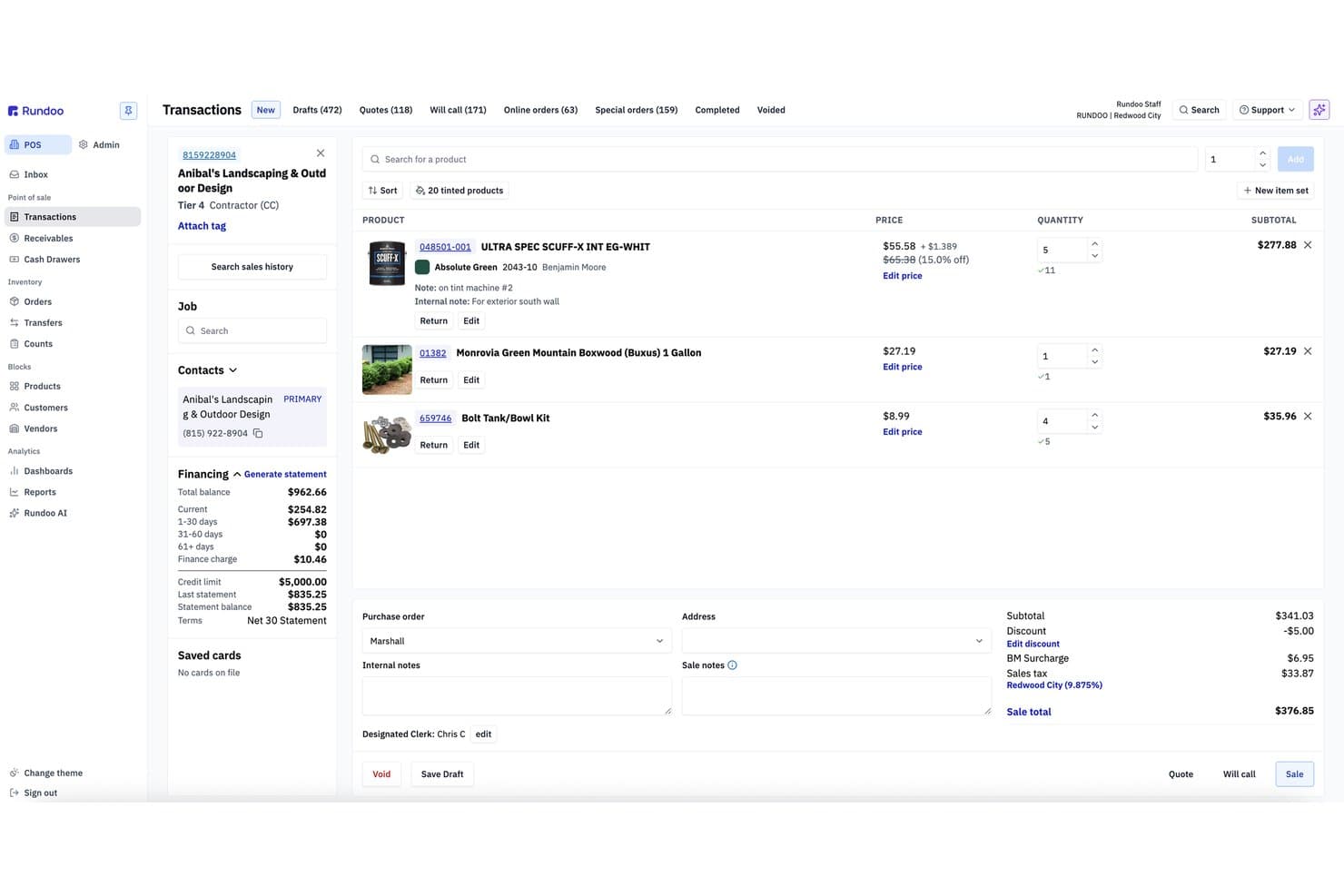
Rundoo offre un'interfaccia per transazioni POS basata su cloud con elenchi di prodotti, dettagli sul finanziamento dei clienti e totale dell'ordine in tempo reale. Rundoo è una piattaforma POS ed ERP nativa del cloud creata per negozi di forniture indipendenti, che combina punto vendita, gestione dell'inventario in tempo reale, integrazione con cataloghi di fornitori e reportistica guidata dall'IA in un unico sistema.
Per chi è più adatto Rundoo?
Rundoo è particolarmente adatto ai proprietari di negozi indipendenti di ferramenta, vernici, legname, forniture agricole e mangimi e giardinaggio che gestiscono uno o più punti vendita negli Stati Uniti e in Canada.
Perché ho scelto Rundoo
Rundoo si è guadagnato un posto nella mia lista grazie a Dooey, il suo assistente IA integrato in ogni schermata della piattaforma. Mi piace il modo in cui crea ordini di acquisto analizzando la cronologia delle vendite, i livelli di scorte basse e la stagionalità, eliminando completamente il lavoro manuale. Confronta inoltre i prezzi del negozio con quelli dei concorrenti nelle vicinanze in tempo reale, offrendo un livello di intelligenza sui prezzi che non avevo mai visto integrato in modo nativo in un POS cloud.
Funzionalità principali di Rundoo
- Piattaforma POS basata su cloud: Funziona interamente tramite browser senza necessità di un server locale per il checkout o la reportistica.
- Gestione dell'inventario multilocalità: Tiene traccia di inventario, codici prodotto e trasferimenti tra tutti i negozi collegati in tempo reale.
- Integrazione con cataloghi di fornitori: Si integra direttamente con i principali cataloghi di fornitori come True Value, Do It Best e Orgill.
- Supporto per periferiche hardware: Compatibile con lettori di codici a barre, stampanti di ricevute Star, cassetti per contanti e lettori di carte Stripe abilitati Wi-Fi.
Integrazioni di Rundoo
Rundoo offre integrazioni native con Stripe, QuickBooks, Benjamin Moore COLORx, True Value, Do It Best, Orgill, Emery Jensen, AllPro, House Hasson, Blish-Mize e Lancaster. È disponibile un'API per integrazioni personalizzate.
Pros and Cons
Pros:
- L'IA automatizza gli ordini di acquisto dai dati di vendita
- Benchmarking dei prezzi dei concorrenti integrato in tempo reale
- Progettato su misura per il commercio retail di forniture specialistiche
Cons:
- Nessuna sincronizzazione nativa del canale ecommerce disponibile
- Un solo processore di pagamento limita la flessibilità del commerciante
Learn more about Rundoo: Ideale per le funzionalità di gestione dei ristoranti
- Piano gratuito disponibile
- Da $69/mese
Visit WebsiteCustomer Rating:4.2/5
Toast offre un moderno sistema POS progettato per i ristoranti, facilitando la gestione di ordini, piatti, sconti e pagamenti da un'unica interfaccia intuitiva. Toast è progettato appositamente per i ristoranti che necessitano di più di un semplice POS di base, offrendo strumenti per la gestione della sala, della cucina e delle consegne. È particolarmente indicato per ristoranti di servizio rapido, servizio completo e con più sedi che desiderano connettere ordini, pagamenti e flussi di lavoro del personale in un unico sistema. Toast aiuta a risolvere problematiche come modifiche al menu, gestione dei tavoli e ordini online, tutto da un'unica piattaforma basata su cloud.
Perché ho scelto Toast
Ciò che per me distingue Toast è il suo forte focus sulle funzionalità di gestione dei ristoranti che vanno oltre le capacità standard di un POS. Toast offre strumenti integrati per la gestione del menu, permettendo di aggiornare prodotti e prezzi su tutti i terminali all’istante. La piattaforma supporta anche sistemi di visualizzazione in cucina, che aiutano a ottimizzare il flusso degli ordini dalla sala alla cucina. Se cerchi un software POS cloud pensato su misura per le esigenze specifiche dei ristoranti, le funzioni specializzate di Toast lo rendono una scelta valida.
Caratteristiche chiave di Toast
Altre funzionalità che rendono Toast interessante per i team di ristorazione includono:
- Ordinazioni e pagamenti al tavolo: Prendi ordini ed elabora pagamenti direttamente al tavolo utilizzando dispositivi portatili.
- Gestione dei programmi di fidelizzazione: Crea e gestisci programmi di premi per i clienti che si integrano con il POS.
- Integrazione con gli ordini online: Collega il tuo POS al sistema di ordini online di Toast per asporto e consegne.
- Strumenti di pianificazione del personale: Crea e gestisci gli orari dei dipendenti all’interno della stessa piattaforma.
Integrazioni di Toast
Le integrazioni includono 7shifts, Homebase, Grubhub, DoorDash, OpenTable, MarketMan, Restaurant365, xtraCHEF, QuickBooks e Resy.
Pros and Cons
Pros:
- Aggiornamenti del menu applicati istantaneamente sui dispositivi
- Supporto integrato per il sistema di visualizzazione della cucina
- Ordinazioni e pagamenti al tavolo
Cons:
- La configurazione iniziale del menu può richiedere tempo
- I tempi di risposta dell'assistenza clienti possono variare
Learn more about Toast: Ideale per il controllo dell’inventario multi-sede
- Prova gratuita di 14 giorni disponibile
- Da $89/mese (fatturato annualmente)
Visit WebsiteCustomer Rating:4.1/5
L’interfaccia cloud POS di Lightspeed offre gestione dei tavoli, griglie menu personalizzabili e altro ancora. Lightspeed è pensato per rivenditori e attività nel settore dell’ospitalità che hanno bisogno di gestire l’inventario su più sedi da un’unica dashboard. È particolarmente utile per le aziende con esigenze di magazzino complesse, come boutique, negozi di biciclette o operazioni multi-negozio. Lightspeed ti aiuta a tracciare i movimenti di inventario, trasferire scorte tra sedi diverse e mantenere i dati dei prodotti coerenti ovunque tu venda.
Perché ho scelto Lightspeed
Per i rivenditori che gestiscono l’inventario su più sedi, Lightspeed si distingue per le sue funzionalità di controllo dell’inventario multi-sede. Puoi monitorare i livelli delle scorte in tempo reale in ciascun negozio, trasferire prodotti tra le diverse sedi e impostare livelli di riordino automatici per evitare esaurimenti di stock.
Ho scelto Lightspeed perché consente di centralizzare la gestione dell’inventario continuando però a personalizzare i cataloghi prodotto per ogni punto vendita. Questo lo rende particolarmente adatto per chi deve mantenere l’inventario preciso e uniforme in più negozi.
Funzionalità principali di Lightspeed
Altre funzionalità che rendono Lightspeed interessante per rivenditori e aziende del settore ospitalità includono:
- Ordini di acquisto integrati: Crea e invia ordini di acquisto ai fornitori direttamente dalla piattaforma.
- Profili cliente e cronologia vendite: Archivia informazioni dettagliate sui clienti e tieni traccia della cronologia degli acquisti per offrire un servizio personalizzato.
- Analisi e report integrati: Accedi a report su vendite, inventario e prestazioni dei dipendenti in tempo reale.
- Strumenti di vendita omnicanale: Sincronizza i canali di vendita fisici e online per una gestione unificata di inventario e ordini.
Integrazioni di Lightspeed
Le integrazioni includono QuickBooks, Xero, Mailchimp, Shopify, BigCommerce, 7shifts, MarketMan, Grubhub, Deputy e OpenTable.
Pros and Cons
Pros:
- Gestione centralizzata dell’inventario multi-sede
- Ordini di acquisto integrati con i fornitori
- Analisi in tempo reale per vendite e performance
Cons:
- Le importazioni del catalogo possono essere lente
- L’assistenza clienti può avere orari limitati
Learn more about Lightspeed: Ideale per configurazione e onboarding rapidi
- Demo gratuita disponibile
- Prezzo su richiesta
Visit WebsiteCustomer Rating:3.8/5
Epos Now offre un sistema POS cloud con supporto multi-dispositivo, inclusi smartphone, tablet e desktop con dashboard per analisi di vendita in tempo reale, elaborazione di pagamenti e gestione dell'inventario. Portare rapidamente online il tuo sistema POS è il punto di forza di Epos Now. Questa piattaforma basata su cloud è pensata per i commercianti e le attività di ospitalità che desiderano un tempo di configurazione minimo e un onboarding guidato. Epos Now aiuta i team a iniziare a vendere velocemente, senza installazioni complesse o lunghe sessioni di formazione.
Perché ho scelto Epos Now
Epos Now è pensato per le aziende che vogliono partire subito con un software POS cloud, senza un processo di onboarding complicato. Ho scelto Epos Now perché offre procedure guidate di configurazione e risorse passo passo che permettono ai nuovi utenti di impostare il proprio sistema in pochi minuti.
La piattaforma fornisce anche cataloghi di prodotti pre-caricati e modelli specifici per settore, così commercianti e operatori dell’ospitalità possono iniziare subito a gestire le vendite. Questa attenzione alla rapida implementazione rende Epos Now una scelta ideale per le aziende che devono ridurre al minimo i tempi morti e formare velocemente il personale.
Funzionalità principali di Epos Now
Oltre agli strumenti per un onboarding rapido, Epos Now offre diverse altre funzionalità rilevanti:
- Report di vendita in tempo reale: Accedi ai dati sulle vendite e alle analisi aggiornate in tempo reale da qualsiasi dispositivo.
- Gestione multi-sede: Supervisiona inventario, personale e vendite in più punti vendita attraverso un’unica dashboard.
- Integrazione pagamenti: Accetta un’ampia gamma di metodi di pagamento, inclusi pagamenti contactless e da dispositivi mobili.
- Strumenti per programmi fedeltà clienti: Crea e gestisci programmi fedeltà direttamente dal sistema POS.
Integrazioni Epos Now
Le integrazioni includono Loyalzoo, Mailchimp, Shopify, Epos Now Online, Sage, Epos Now Delivery, Epos Now Order & Pay, Deputy, KDS e OpenTable.
Pros and Cons
Pros:
- Onboarding guidato che semplifica la configurazione iniziale
- Cataloghi pre-caricati per una partenza veloce
- Visibilità in tempo reale su vendite e inventario
Cons:
- Personalizzazione dei report limitata
- Occasionali ritardi di sincronizzazione con strumenti di terze parti
Learn more about Epos Now: Ideale per configurazioni POS specifiche per settore
- Piano gratuito disponibile
- Da $35/mese

Square offre una visualizzazione della mappa del locale POS basata su cloud con stato aggiornato in tempo reale di tavoli e bancone, inclusi timer codificati a colori per la gestione dei ristoranti. Square offre una piattaforma POS cloud progettata per negozi, ristoranti e aziende di servizi che desiderano un'elaborazione dei pagamenti integrata e opzioni hardware flessibili. È una soluzione ideale se hai bisogno di accettare pagamenti ovunque, gestire le vendite in tempo reale e collegare le transazioni in presenza e online. Square aiuta a semplificare il check-out e a unificare i dati di vendita su tutti i canali.
Perché ho scelto Square
Per le aziende che necessitano di elaborazione pagamenti integrata, Square si distingue per l'accettazione dei pagamenti integrata e le opzioni di deposito rapido. Ho scelto Square perché ti permette di gestire pagamenti con carta, contactless e mobile direttamente tramite il POS, senza bisogno di altri processori di pagamento. Il sistema include anche il monitoraggio delle vendite in tempo reale e le ricevute digitali, che aiutano a unificare i dati di pagamento e vendita. Queste caratteristiche rendono Square una scelta eccellente se desideri un POS cloud che mantenga l'elaborazione dei pagamenti semplice e completamente connessa alle tue operazioni quotidiane.
Funzionalità chiave di Square
Altre funzionalità della piattaforma POS cloud di Square utili per negozi e aziende di servizi includono:
- Gestione dell'inventario: Tieni traccia dei livelli di stock, imposta avvisi per scorte basse e gestisci le varianti dei prodotti direttamente dalla dashboard POS.
- Gestione del personale: Assegna ruoli, monitora le ore lavorate e controlla le prestazioni di vendita di ciascun membro del team.
- Directory clienti: Crea e mantieni un database di profili clienti, inclusa la cronologia degli acquisti e i dati di contatto.
- Integrazione con ordini online: Sincronizza i canali di vendita fisici e online, consentendo ai clienti di effettuare ordini per ritiro o consegna.
Integrazioni Square
Le integrazioni includono QuickBooks, Xero, Wix, WooCommerce, BigCommerce, Mailchimp, Homebase, 7shifts, Jotform e OpenTable.
Pros and Cons
Pros:
- Soluzioni POS dedicate per negozi, ristoranti e servizi
- Opzioni hardware compatte inclusi dispositivi con pagamento contactless
- Configurazione rapida con formazione minima richiesta
Cons:
- Non ideale per catene ad alto volume o con più sedi
- Blocchi e sospensioni dell'account occasionali
Learn more about Square: Ideale per analisi a livello aziendale
- Demo gratuita disponibile
- Prezzi disponibili su richiesta

Shift4 offre una dashboard dettagliata con moduli operativi tra cui Registro delle ore, Ordini, Report, Tavoli e altro ancora. Shift4 è una piattaforma commerciale basata sul cloud che combina l'elaborazione dei pagamenti, le funzionalità POS e gli strumenti per le transazioni online in un unico sistema. È progettata per le aziende del settore della vendita al dettaglio, dell'ospitalità e della ristorazione che desiderano gestire insieme i pagamenti di persona e digitali. Con soluzioni come SkyTab POS e Shift4 One, la piattaforma si concentra sul collegamento tra pagamenti, hardware e operazioni aziendali in un unico luogo.
Perché ho scelto Shift4
Shift4 si distingue per la capacità di riunire pagamenti, POS e commercio online in un unico ecosistema. Ho scelto Shift4 perché consente alle aziende di gestire le transazioni su più canali senza dover ricorrere a fornitori separati. La piattaforma supporta i pagamenti di persona, le transazioni mobili e il checkout online, tutto collegato a un unico sistema di backend.
Il suo approccio integrato a hardware, software ed elaborazione dei pagamenti la rende un'opzione valida per le aziende che desiderano avere meno fornitori e una configurazione più unificata. Questo è particolarmente utile per i team del settore dell'ospitalità e della vendita al dettaglio che necessitano di una gestione coerente delle transazioni in diversi contesti di vendita.
Funzionalità principali di Shift4
Tra le altre funzionalità che rendono Shift4 interessante per le aziende della vendita al dettaglio e dell'ospitalità figurano:
- Elaborazione dei pagamenti omnicanale: Accetta pagamenti in negozio, da dispositivi mobili e online da un'unica piattaforma
- Dashboard tutto-in-uno: Accedi a report, dati sulle transazioni e informazioni sull'attività in un unico luogo
- Pagamenti mobili e contactless: Supporta le transazioni tramite avvicinamento e portafogli digitali
- Soluzioni hardware: Utilizza terminali, dispositivi portatili e lettori di pagamento progettati per diverse configurazioni
Integrazioni di Shift4
Le integrazioni includono Shopify, WooCommerce, BigCommerce, Oracle, PAR Technology e diversi sistemi per l'ospitalità e la gestione delle proprietà.
Pros and Cons
Pros:
- Combina strumenti per i pagamenti, il POS e il commercio online
- Supporta i flussi di lavoro della vendita al dettaglio, dell'ospitalità e della ristorazione
- Dashboard unificata per i dati sulle transazioni e i report
Cons:
- L'offerta POS è meno definita rispetto ai sistemi autonomi
- Le funzionalità variano a seconda dei prodotti selezionati
Learn more about Shift4: Ideale per la gestione unificata di clienti e inventario
- Demo gratuita disponibile
- Prezzo su richiesta

Retail Cloud POS unifica vendite, inventario e dati dei clienti in un unico posto. Retail Cloud POS di Salesforce è pensato per i rivenditori che hanno bisogno di collegare le operazioni in negozio e online tramite un'unica piattaforma. Questa soluzione è ideale per le aziende che vogliono gestire inventario, vendite e dati dei clienti in tempo reale su più sedi. È particolarmente utile per i team che desiderano unificare i processi retail e ottenere approfondimenti dettagliati sul comportamento dei clienti.
Perché ho scelto Retail Cloud POS di Salesforce
Ho scelto Retail Cloud POS perché riunisce la gestione di clienti e inventario in un'unica piattaforma cloud. Il sistema permette di tracciare i livelli di inventario in tempo reale e sincronizza i dati su tutti i canali di vendita, caratteristica fondamentale per i rivenditori che gestiscono più punti vendita. Apprezzo anche come centralizza i profili dei clienti, permettendo al team di accedere alla cronologia degli acquisti e alle preferenze da qualsiasi punto di contatto. Queste funzionalità rendono più facile offrire un servizio coerente e mantenere l'inventario accurato, ovunque i clienti scelgano di acquistare.
Funzionalità principali di Retail Cloud POS di Salesforce
Altre funzionalità che spiccano in Retail Cloud POS di Salesforce includono:
- Gestione degli ordini omnicanale: Gestisci gli ordini da canali online, in negozio e mobile attraverso un'unica dashboard.
- Funzionalità POS mobile: Utilizza tablet o smartphone come dispositivi di cassa per servire i clienti ovunque sul punto vendita.
- Motore promozionale personalizzabile: Configura e gestisci sconti, coupon e offerte speciali su misura per le esigenze della tua attività.
- Analisi e reportistica in tempo reale: Accedi a dati aggiornati sulle vendite, inventario e clienti per supportare le decisioni aziendali.
Integrazioni di Retail Cloud POS di Salesforce
Le integrazioni includono Commerce Cloud, Loyalty Management, Service Cloud, Data 360, Marketing Cloud, Tableau e Slack.
Pros and Cons
Pros:
- Il POS mobile consente pagamenti direttamente in corsia
- Strumenti integrati di gestione ordini omnicanale
- Analisi avanzata con Salesforce Data 360
Cons:
- Richiede l'ecosistema Salesforce per funzionalità complete
- La configurazione può essere complessa per i piccoli rivenditori
Learn more about Retail Cloud POS by Salesforce: Ideale per biglietteria e vendita di eventi
- Prova gratuita + demo gratuita disponibile
- Da $59/mese
Visit WebsiteCustomer Rating:4.8/5
KORONA POS offre un’interfaccia touchscreen completa con pannello di anteprima della ricevuta, tastierino numerico e numerosi tasti funzione per la selezione dei liquori, bicchieri, gestione dell’inventario, elaborazione dei pagamenti e operazioni amministrative. KORONA POS è progettato per te se hai bisogno di un sistema POS cloud che gestisca la biglietteria e la vendita di eventi. La piattaforma è pensata per sedi di eventi, musei, parchi di divertimento e attrazioni che devono gestire le vendite al dettaglio e l'ammissione in un unico sistema. KORONA POS aiuta i team a monitorare l'inventario dei biglietti, gestire le vendite di gruppo e organizzare ingressi a orario programmato con funzionalità ideate appositamente per ambienti ad alto volume e guidati dagli eventi.
Perché ho scelto KORONA POS
KORONA POS si distingue per le aziende che hanno bisogno di funzioni avanzate di biglietteria e gestione eventi all'interno del proprio software POS cloud. Ho scelto KORONA POS perché offre strumenti di biglietteria integrati che consentono di vendere, convalidare e tracciare i biglietti direttamente dal POS.
Il sistema supporta ingressi a orario programmato, vendite di gruppo e abbonamenti stagionali, rendendolo una soluzione ideale per location con esigenze di ammissione complesse. Grazie ai report in tempo reale sulle vendite dei biglietti e sulla partecipazione, KORONA POS aiuta le aziende orientate agli eventi a gestire le operazioni di vendita al dettaglio e biglietteria in un unico luogo.
Funzionalità chiave di KORONA POS
Altre caratteristiche che rendono KORONA POS interessante per attività commerciali e aziende legate agli eventi includono:
- Cataloghi di prodotti e prezzi personalizzabili: Imposta prezzi, sconti e pacchetti di prodotti unici per diversi eventi o articoli retail.
- Monitoraggio orari del personale: Tieni traccia delle ore lavorate dallo staff e gestisci i permessi direttamente all'interno del sistema POS.
- Strumenti di gestione dell’inventario: Controlla i livelli di stock, automatizza i punti di riordino e gestisci più sedi da un’unica dashboard.
- CRM e profili clienti: Archivia dati dei clienti, cronologia degli acquisti e preferenze per supportare campagne di marketing mirato e programmi fedeltà.
Integrazioni di KORONA POS
Le integrazioni includono Bottlecapps, Card Market, mapAds, TimeForge, City Hive, CMS Max, Octopus Bridge, springbig, bLoyal e Quick PO.
Pros and Cons
Pros:
- Biglietteria integrata per eventi e attrazioni
- Solida tracciabilità dell'inventario multi-sede
- Permessi del personale altamente configurabili
Cons:
- L’interfaccia può risultare datata per alcuni utenti
- Funzionalità di automazione marketing limitate
Learn more about KORONA POS: Ideale per l'integrazione ecommerce
- Prova gratuita di 3 giorni
- Da $29/mese (fatturato annualmente)
Visit WebsiteCustomer Rating:4.4/5
Shopify POS offre un sistema di punto vendita mobile-friendly che consente ai rivenditori di gestire clienti, applicare sconti, creare carrelli e completare il checkout senza interruzioni su dispositivi iPad e iPhone. Shopify POS riunisce le vendite ecommerce e quelle in presenza in un unico sistema, se gestisci sia un negozio online che uno fisico. È particolarmente utile per i rivenditori che desiderano sincronizzare inventario, ordini e dati dei clienti su tutti i canali. Shopify POS ti aiuta a gestire operazioni omnicanale senza dover utilizzare strumenti o database separati.
Perché ho scelto Shopify POS
Shopify POS si distingue per i rivenditori che vogliono un vero ponte tra le loro operazioni online e in negozio. Ho scelto Shopify POS perché sincronizza automaticamente inventario, ordini e profili dei clienti tra ecommerce e punti vendita fisici, così avrai sempre un'unica fonte attendibile dei dati.
La dashboard unificata ti permette di gestire i prodotti, monitorare le vendite ed evadere gli ordini da qualsiasi canale senza cambiare sistema. Questo rende Shopify POS una soluzione ideale per le aziende focalizzate sulla vendita omnicanale e sull'esperienza cliente.
Funzionalità di Shopify POS
Altre funzionalità che rendono Shopify POS utile per i rivenditori includono:
- Griglia intelligente personalizzabile: Organizza le azioni, gli sconti e i prodotti più utilizzati sulla schermata principale del POS per un accesso rapido.
- Supporto hardware integrato: Collega scanner di codici a barre, stampanti di ricevute e lettori di carte direttamente al sistema POS.
- Strumenti per la gestione del personale: Assegna ruoli, traccia le vendite per membro dello staff e gestisci i permessi dalla dashboard.
- Checkout mobile: Gestisci vendite e accetta pagamenti ovunque nel negozio utilizzando dispositivi mobili.
Integrazioni di Shopify POS
Le integrazioni includono Shopify Payments, Shop Pay, Shopify Fulfillment Network, Shopify Inbox, Shopify Email, Shopify Flow, QuickBooks Online, Xero, Mailchimp e Google Analytics.
Pros and Cons
Pros:
- Inventario unificato tra canali online e retail
- Supporta il ritiro in negozio degli ordini online
- Funzionalità POS mobile per un checkout flessibile
Cons:
- Report avanzati disponibili solo nei piani superiori
- L'elaborazione dei rimborsi può essere lenta
Learn more about Shopify POS: 10Ideale per opzioni hardware personalizzabili
Clover
- Demo gratuita disponibile
- Da $135/mese
Visit WebsiteCustomer Rating:3.9/5
Clover offre una dashboard POS tutto-in-uno dove le aziende possono gestire ordini, transazioni, mance, turni, inventario, clienti, sconti e report, tutto da un unico hub centralizzato. Clover offre a rivenditori e ristoranti una vasta gamma di opzioni hardware che possono essere personalizzate per adattarsi a diversi spazi sul bancone e flussi di lavoro. È una scelta solida per le aziende che desiderano combinare terminali, dispositivi portatili e accessori in base alle proprie esigenze specifiche. Con Clover, puoi costruire un sistema POS che si adatta all’aspetto del tuo marchio e alle tue esigenze operative, che tu gestisca un caffè, una boutique o un negozio con più sedi.
Perché ho scelto Clover
A differenza di molti sistemi POS in cloud che offrono opzioni hardware limitate, Clover ti permette di scegliere tra una varietà di terminali, registratori di cassa e dispositivi portatili per adattarsi alla configurazione fisica della tua attività. Ho scelto Clover perché puoi combinare stazioni da banco, lettori di carte mobili e display rivolti al cliente per creare un’esperienza di pagamento su misura.
La gamma modulare di hardware significa che puoi iniziare in piccolo e aggiungere altri dispositivi man mano che la tua azienda cresce o le tue esigenze cambiano. Questa flessibilità è particolarmente utile per rivenditori e ristoranti che desiderano un sistema POS in grado di adattarsi ai loro spazi e flussi di lavoro specifici.
Funzionalità principali di Clover
Oltre alle sue opzioni hardware flessibili, Clover offre anche diverse funzionalità che supportano le attività di vendita al dettaglio e ristorazione:
- Strumenti di gestione dell’inventario: Monitora i livelli delle scorte, imposta avvisi per scorte basse e gestisci le varianti di prodotto dal pannello di controllo.
- Gestione permessi dipendenti e orari: Assegna ruoli, imposta livelli di accesso e monitora le ore lavorate dal personale direttamente dal sistema.
- Elaborazione dei pagamenti integrata: Accetta pagamenti con carta di credito, debito, contactless e portafogli digitali senza processori di terze parti.
- Marketplace di app: Accedi a una vasta gamma di app aggiuntive per programmi fedeltà, contabilità e marketing direttamente dal marketplace di Clover.
Integrazioni Clover
Le integrazioni includono QuickBooks, Mailchimp, WooCommerce, BigCommerce, Shopify, Yelp, Xero, Gusto, Homebase e molte altre.
Pros and Cons
Pros:
- Opzioni hardware flessibili per diverse configurazioni
- Funzionalità integrate per programmi fedeltà e gift card
- Il marketplace di app supporta funzionalità aggiuntive
Cons:
- Vincolato all’utilizzo dei servizi di pagamento Clover
- La configurazione iniziale può essere complessa
Learn more about Clover:
Altri software POS cloud
Ecco alcune ulteriori opzioni di software POS cloud che non sono entrate nel mio elenco ristretto, ma che vale comunque la pena esaminare:
Come Valuto i Software POS Cloud
Divido la mia valutazione in due livelli: la soglia minima che ogni sistema di cassa deve superare per essere considerato e i fattori differenzianti—come la resilienza offline o l'adattamento a settori specifici—che distinguono una piattaforma dall'altra.
Funzionalità Principali (Requisiti Fondamentali per Questa Lista)
Quando seleziono gli strumenti per la mia lista, assegno a ciascuno un punteggio da 0 (non offre la funzionalità) a 5 (eccelle in quest'area) per ogni funzionalità principale elencata di seguito. Poi converto il punteggio totale dello strumento in una percentuale. Ogni strumento deve raggiungere un punteggio totale minimo del 65% per essere preso in considerazione.
- Gestione delle Transazioni Basata su Cloud: Verifico se il sistema funziona nativamente sul cloud e se è operativo su tablet, smartphone e desktop, così che il personale possa gestire le vendite ovunque nel punto vendita.
- Monitoraggio dell'Inventario in Tempo Reale: Le giacenze devono aggiornarsi al momento di ogni vendita, reso o trasferimento—cerco il tracciamento in tempo reale di SKU e varianti su tutte le casse collegate.
- Integrazione con Sistemi di Pagamento: Valuto quali metodi e gateway di pagamento supporta ogni piattaforma, dai pagamenti contactless e portafogli mobili fino alla gestione di pagamenti frazionati in cassa.
- Supporto Multi-Sede & Omnicanale: Per i retailer con più punti vendita o un negozio online, guardo a come la piattaforma centralizza inventario, ordini e prezzi su tutti i canali.
- Gestione Clienti & Fidelizzazione: Considero come ogni strumento raccoglie profili cliente e cronologia acquisti, e se supporta programmi fedeltà o sconti mirati direttamente in cassa.
- Reportistica & Analisi delle Vendite: I dashboard devono mostrare in tempo reale vendite giornaliere, prodotti più venduti e performance dello staff—valuto la profondità dei report e l'accesso ai dati da remoto.
Una volta selezionati gli strumenti che rispettano questi criteri, considero cosa distingue ogni piattaforma.
Fattori Differenzianti (Cosa Distingue i Fornitori)
Ecco come confronto i diversi fornitori:
Funzionalità di Spicco
La resilienza offline ha molta importanza—verifico se una piattaforma può continuare a gestire vendite e accodare transazioni quando il Wi-Fi cade durante un turno e poi sincronizzare tutto appena la connessione torna. Un'altra caratteristica che considero è la sincronizzazione ecommerce integrata, fondamentale per chi vende online e in negozio e vuole un inventario unificato senza fare affidamento su middleware esterni. Valuto anche l'API del fornitore e il marketplace di app, per vedere quanto è facile connettersi ad altri strumenti di contabilità, marketing e gestionali già usati dal team.
Oltre le Funzionalità
Il costo totale di proprietà è uno dei primi aspetti che valuto—se il prezzo si riferisce al singolo registratore o al punto vendita, se è possibile utilizzare un processore di pagamenti personale e quanto incide l'hardware proprietario sul totale. Anche l'adattamento verticale è rilevante, perché un negozio di abbigliamento che gestisce taglie e colori ha esigenze di catalogo molto diverse rispetto a un supermercato che traccia articoli a peso. Controllo anche la qualità dell'onboarding e del supporto, poiché la migrazione da sistemi POS legacy in piena operatività richiede importazione dati rapida ed assistenza pronta in caso di problemi alle casse.
Come scegliere un software POS cloud
È facile perdersi in lunghi elenchi di funzionalità e strutture tariffarie complesse. Per aiutarti a rimanere concentrato mentre affronti il tuo esclusivo processo di selezione del software, ecco una checklist dei fattori da tenere a mente:
| Fattore | Cosa considerare |
|---|---|
| FattoreScalabilità | Cosa considerareIl software supporterà la tua crescita, ad esempio consentendoti di aggiungere nuove sedi, casse o canali di vendita? Verifica i limiti relativi a utenti, prodotti o transazioni. |
| FattoreIntegrazioni | Cosa considerareIl POS si collega nativamente ai tuoi sistemi di contabilità, commercio elettronico o gestione dell'inventario? Verifica la compatibilità con il tuo stack tecnologico esistente per evitare il lavoro manuale. |
| FattorePersonalizzazione | Cosa considerarePuoi adattare flussi di lavoro, ricevute o autorizzazioni degli utenti in base ai processi della tua attività? Cerca impostazioni flessibili, non solo opzioni di personalizzazione del marchio. |
| FattoreFacilità d'uso | Cosa considerareIl tuo personale imparerà rapidamente a usare il sistema? Verifica la chiarezza e la velocità dell'interfaccia, soprattutto nei periodi di maggiore affluenza. |
| FattoreImplementazione e avvio | Cosa considerareQuanto tempo richiederà la configurazione e quali risorse saranno necessarie? Informati sulla migrazione dei dati, sulla formazione e sull'assistenza durante l'avvio. |
| FattoreCosto | Cosa considerareTutte le tariffe sono chiare, inclusi hardware, elaborazione dei pagamenti e componenti aggiuntivi? Confronta il costo totale di proprietà, non solo le tariffe mensili. |
| FattoreMisure di sicurezza | Cosa considerareIl POS è conforme agli standard PCI e offre la crittografia dei dati? Informati sugli strumenti di prevenzione delle frodi e sui controlli di accesso degli utenti. |
| FattoreDisponibilità dell'assistenza | Cosa considerareQuali canali di assistenza sono disponibili e in quali orari? Valuta se hai bisogno di supporto 24 ore su 24, 7 giorni su 7, o di una gestione dedicata dell'account. |
Che cos'è un software POS cloud?
Il software POS basato sul cloud è un sistema punto vendita che opera online e consente alle piccole imprese di elaborare le vendite, gestire l'inventario e accedere ai dati aziendali da qualsiasi dispositivo connesso a Internet. A differenza di un POS tradizionale o di un registratore di cassa, questi sistemi archiviano le informazioni in modo sicuro nel cloud, rendendo più semplice mantenere la sicurezza dei dati e accedere a informazioni dettagliate in tempo reale sul POS per la vendita al dettaglio tra diverse sedi.
Questo tipo di software aiuta le aziende a sostituire i sistemi obsoleti con strumenti più flessibili, offrendo ai team una visibilità migliore sulle operazioni e supportando decisioni più consapevoli. Il software POS basato sul cloud è ampiamente utilizzato da rivenditori e fornitori di servizi che necessitano di un controllo centralizzato e dell'accesso remoto ai propri dati aziendali.
Funzionalità
Quando selezioni un software POS cloud, presta attenzione alle seguenti funzionalità chiave:
- Elaborazione delle vendite: Gestisci le transazioni in presenza e online, accetta diversi metodi di pagamento ed emetti ricevute digitali o stampate senza dipendere da un POS tradizionale o da un registratore di cassa
- Gestione dell'inventario: Monitora i livelli delle scorte in tempo reale e gestisci i prodotti in una o più sedi con visibilità in tempo reale sul POS per la vendita al dettaglio
- Gestione dei clienti: Archivia i profili dei clienti, la cronologia degli acquisti e i dati di contatto per favorire la fidelizzazione e offrire un servizio personalizzato
- Report e analisi: Genera report sulle vendite e sulle prestazioni che aiutano i team a prendere decisioni consapevoli utilizzando dati aggiornati
- Gestione dei dipendenti: Assegna ruoli, imposta autorizzazioni e monitora l'attività del personale all'interno del sistema
- Supporto per più sedi: Gestisci vendite, inventario e report di più negozi da un'unica piattaforma
- Pagamenti integrati: Accetta carte di credito, carte di debito e pagamenti mobili direttamente nel POS
- Collegamenti al software di contabilità: Sincronizza i dati delle transazioni con il software di contabilità per semplificare la tenuta dei registri e il monitoraggio finanziario
- Controlli per la sicurezza dei dati: Proteggi i dati delle transazioni e dei clienti con archiviazione sicura, crittografia e controlli degli accessi
- Modalità offline: Continua a elaborare le vendite e ad archiviare i dati delle transazioni durante le interruzioni della connessione Internet
Vantaggi
L'implementazione di un software POS cloud offre diversi vantaggi al tuo team e alla tua azienda. Ecco alcuni dei vantaggi che puoi aspettarti:
- Gestione centralizzata: Accedi ai dati relativi a vendite, inventario e clienti di tutte le sedi da un'unica piattaforma basata sul cloud.
- Informazioni in tempo reale: Monitora le tendenze delle vendite, i livelli delle scorte e le prestazioni dei dipendenti con report e analisi aggiornati.
- Accessibilità da remoto: Gestisci la tua attività ed elabora le transazioni da qualsiasi dispositivo connesso a Internet, sia che tu sia sul posto sia che ti trovi altrove.
- Scalabilità: Aggiungi nuovi registratori di cassa, sedi o utenti man mano che la tua attività cresce, senza apportare modifiche significative all'hardware o al software.
- Aggiornamenti automatici: Ricevi automaticamente nuove funzionalità, patch di sicurezza e aggiornamenti per la conformità, riducendo la necessità di manutenzione IT.
- Esperienza cliente migliorata: Offri pagamenti più rapidi, ricevute digitali e un servizio personalizzato utilizzando strumenti integrati per la gestione dei clienti.
- Continuità aziendale: Continua a elaborare le vendite e ad archiviare i dati anche durante le interruzioni della connessione Internet grazie alla funzionalità offline.
Costi e prezzi
La scelta di un software POS cloud richiede la comprensione dei vari modelli e piani tariffari disponibili. I costi variano in base alle funzionalità, alle dimensioni del team, agli extra e ad altri fattori. La tabella seguente riassume i piani più comuni, i relativi prezzi medi e le funzionalità tipicamente incluse nelle soluzioni software POS cloud:
Tabella comparativa dei piani per il software POS cloud
| Tipo di piano | Prezzo medio | Funzionalità comuni |
|---|---|---|
| Tipo di pianoPiano gratuito | Prezzo medio$0 | Funzionalità comuniElaborazione di base delle vendite, gestione limitata dell'inventario, supporto per un singolo registratore di cassa e report di base. |
| Tipo di pianoPiano personale | Prezzo medio$10-$40/utente/mese | Funzionalità comuniAccesso da più dispositivi, strumenti di inventario avanzati, profili dei clienti e gestione di base dei dipendenti. |
| Tipo di pianoPiano aziendale | Prezzo medio$40-$100/utente/mese | Funzionalità comuniSupporto per più sedi, report avanzati, pagamenti integrati, programmi fedeltà e automazione fiscale. |
| Tipo di pianoPiano aziendale avanzato | Prezzo medio$100-$300/utente/mese | Funzionalità comuniIntegrazioni personalizzate, assistenza dedicata, sicurezza avanzata, accesso API e servizi personalizzati di configurazione iniziale. |
Domande frequenti sul software POS cloud
Ecco alcune risposte alle domande comuni sul software POS cloud:
Il software POS cloud può funzionare offline?
Sì, la maggior parte dei software POS cloud offre una modalità offline che consente di elaborare le vendite e memorizzare i dati delle transazioni anche senza una connessione Internet. Quando torni online, il sistema sincronizza automaticamente i dati per garantire che i registri rimangano accurati.
Quanto è sicuro il software POS cloud per la gestione dei pagamenti?
Il software POS cloud utilizza la crittografia, la conformità PCI e i controlli degli accessi degli utenti per proteggere i dati dei pagamenti. Verifica sempre che il tuo fornitore rispetti gli standard di sicurezza del settore e offra aggiornamenti regolari per affrontare le nuove minacce.
Quale hardware mi serve per utilizzare il software POS cloud?
In genere serve un tablet, un computer o uno smartphone con accesso a Internet, oltre a hardware opzionale come stampanti per ricevute, lettori di codici a barre e cassetti per il denaro. Molti sistemi sono compatibili con diversi dispositivi di terze parti, ma verifica sempre i requisiti specifici.
Posso integrare il software POS cloud con la mia piattaforma di e-commerce?
Sì, molte soluzioni POS cloud offrono integrazioni con le piattaforme di e-commerce più diffuse, consentendo di sincronizzare inventario, vendite e dati dei clienti tra i diversi canali. Verifica la disponibilità di integrazioni native o di API per assicurarti che siano compatibili con i sistemi già in uso.
Come posso trasferire i miei dati a un nuovo sistema POS cloud?
La maggior parte dei fornitori offre strumenti per l’importazione dei dati, guide alla configurazione o assistenza durante l’avvio per aiutarti a trasferire dal vecchio sistema i dati relativi a inventario, clienti e vendite. Chiedi quali formati di file sono supportati e se l’assistenza alla migrazione è inclusa nel tuo piano.