

El software TPV en la nube es un sistema de punto de venta que funciona en la nube y permite a tu equipo gestionar las ventas, el inventario y los datos de los clientes desde cualquier dispositivo con conexión a Internet. Si buscas el mejor software TPV en la nube, probablemente quieras simplificar las operaciones, mantener el inventario actualizado y ofrecer una experiencia coherente en todos los canales.
Esta guía compara las principales opciones para 2026, para que puedas evaluar rápidamente sus funciones, integraciones y ventajas distintivas y encontrar la opción adecuada para tu negocio minorista o de comercio electrónico.
Por qué confiar en nuestras recomendaciones de software
6,700+
Reviews
20
Industry experts
16+
Evaluation factors
14
Years
Nuestro equipo lleva probando y evaluando software desde 2012. Como líderes del sector retail, sabemos lo difícil —y lo importante— que es elegir el software adecuado.
Para esta guía, evaluamos las herramientas mediante pruebas prácticas e investigación independiente, puntuando las herramientas según nuestros criterios de selección.
Nuestras reseñas reflejan nuestro criterio independiente, no un discurso de ventas.
Tabla comparativa de software TPV en la nube
Esta tabla comparativa resume los detalles de precios de mis principales selecciones de software TPV en la nube.
| Tool | Best For | Trial Info | Price | ||
|---|---|---|---|---|---|
| 1 | Ideal para automatización de pedidos y precios con IA | Demostración gratuita disponible | Precio a consultar | Website | |
| 2 | Mejor para funciones de gestión de restaurantes | Plan gratuito disponible | Desde $69/mes | Website | |
| 3 | Lo mejor para control de inventario en múltiples ubicaciones | Prueba gratuita de 14 días disponible | Desde $89/mes (facturado anualmente) | Website | |
| 4 | Ideal para configuración y puesta en marcha rápida | Demo gratuita disponible | Precio bajo solicitud | Website | |
| 5 | Mejor para configuraciones POS específicas por industria | Plan gratuito disponible | Desde $35/mes | Website | |
| 6 | La mejor para análisis de nivel empresarial | Demostración gratuita disponible | Precios disponibles previa solicitud | Website | |
| 7 | Ideal para la gestión unificada de clientes e inventario | Demo gratuita disponible | Precio bajo consulta | Website | |
| 8 | Ideal para venta de entradas y eventos | Prueba gratuita + demo gratuita disponible | Desde $59/mes | Website | |
| 9 | Ideal para integración con ecommerce | Prueba gratuita de 3 días | Desde $29/mes (facturado anualmente) | Website | |
| 10 | Ideal para opciones de hardware personalizables | Demo gratuita disponible | Desde $135/mes | Website |


Análisis del software TPV en la nube
A continuación se resumen detalladamente los programas de software TPV en la nube que han entrado en mi selección. Mis análisis ofrecen una visión detallada de las funciones, integraciones y mejores casos de uso de cada plataforma para ayudarte a encontrar la más adecuada para ti.
 Ideal para automatización de pedidos y precios con IA
- Demostración gratuita disponible
- Precio a consultar
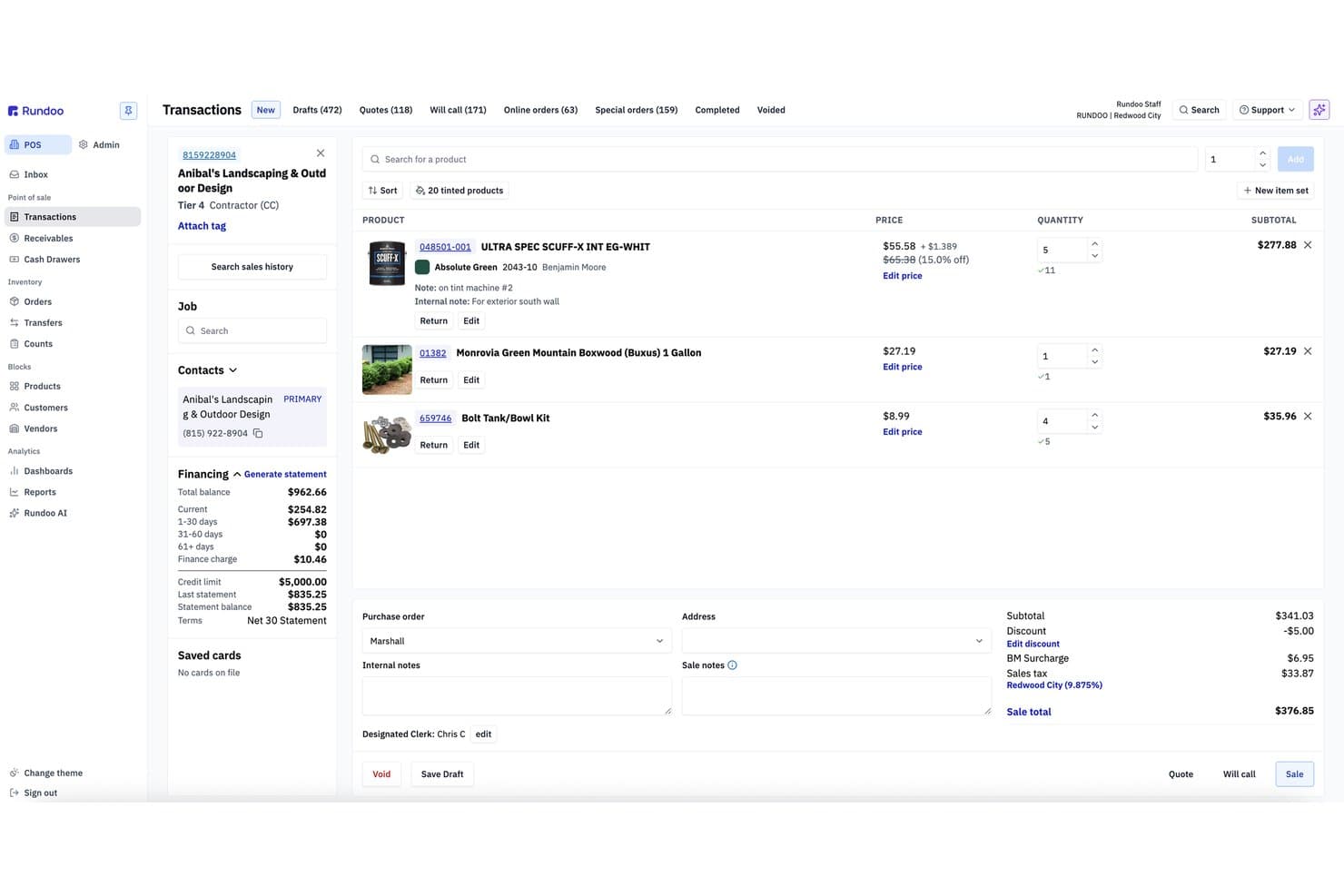
Rundoo ofrece una interfaz de transacción POS basada en la nube con listados de productos, detalles de financiamiento al cliente y totales de pedido en tiempo real. Rundoo es una plataforma de punto de venta (POS) y ERP nativa en la nube diseñada para tiendas de suministros independientes. Combina punto de venta, gestión de inventario en tiempo real, integración con catálogos de proveedores y reportes impulsados por IA en un solo sistema.
¿Para quién es mejor Rundoo?
Rundoo es ideal para propietarios de ferreterías, tiendas de pintura, madera, suministros agrícolas y de jardinería independientes que operan una o más sucursales en EE. UU. y Canadá.
Por qué elegí Rundoo
Rundoo se gana su lugar en mi lista gracias a Dooey, su asistente de IA integrado en cada pantalla de la plataforma. Me encanta cómo elabora órdenes de compra analizando el historial de ventas, niveles bajos de inventario y la estacionalidad, eliminando por completo el trabajo manual. También compara los precios de la tienda con los de competidores cercanos en tiempo real, ofreciendo un nivel de inteligencia de precios que no había visto integrado de forma nativa en un POS en la nube antes.
Características clave de Rundoo
- Plataforma POS basada en la nube: Funciona completamente desde el navegador sin requerir servidor local para pagos o reportes.
- Gestión de inventario en múltiples ubicaciones: Rastrea el inventario, SKUs y transferencias en todas las tiendas conectadas en tiempo real.
- Integraciones con catálogos de proveedores: Se integra directamente con catálogos de proveedores importantes como True Value, Do It Best y Orgill.
- Soporte para periféricos de hardware: Funciona con escáneres de códigos de barras, impresoras de recibos Star, cajones de efectivo y lectores de tarjetas Stripe habilitados para Wi-Fi.
Integraciones de Rundoo
Rundoo ofrece integraciones nativas con Stripe, QuickBooks, Benjamin Moore COLORx, True Value, Do It Best, Orgill, Emery Jensen, AllPro, House Hasson, Blish-Mize y Lancaster. Hay una API disponible para integraciones personalizadas.
Pros and Cons
Pros:
- La IA automatiza las órdenes de compra a partir de los datos de ventas
- Comparación de precios con la competencia incorporada en tiempo real
- Desarrollada especialmente para verticales de tiendas de suministros especializados
Cons:
- No dispone de sincronización nativa con canales de ecommerce
- Un solo procesador de pagos limita la flexibilidad del comerciante
Learn more about Rundoo: Mejor para funciones de gestión de restaurantes
- Plan gratuito disponible
- Desde $69/mes
Visit WebsiteCustomer Rating:4.2/5
Toast ofrece un sistema de punto de venta moderno diseñado para restaurantes, facilitando la gestión de pedidos, elementos del menú, descuentos y pagos desde una única interfaz simplificada. Toast está diseñado específicamente para restaurantes que necesitan más que un simple punto de venta, ofreciendo herramientas para la gestión del salón, la cocina y la entrega. Es una excelente opción para restaurantes de servicio rápido, servicio completo y con múltiples ubicaciones que buscan conectar pedidos, pagos y flujos de trabajo del personal en un solo sistema. Toast ayuda a abordar desafíos como cambios en el menú, gestión de mesas y pedidos en línea, todo desde una sola plataforma basada en la nube.
Por qué elegí Toast
Lo que distingue a Toast para mí es su profundo enfoque en funciones de gestión de restaurantes que van más allá de las capacidades estándar de un POS. Toast ofrece herramientas integradas para la gestión del menú, lo que permite actualizar los artículos y precios en todos los terminales al instante. La plataforma también admite sistemas de visualización en cocina, que ayudan a agilizar el flujo de pedidos desde el salón a la cocina. Si buscas un software POS en la nube adaptado a las necesidades particulares de los restaurantes, las funciones especializadas de Toast lo convierten en una excelente elección.
Características clave de Toast
Otras funciones que hacen que Toast sea atractivo para los equipos de restaurantes incluyen:
- Pedidos y pagos en mesa: Toma pedidos y procesa pagos directamente en la mesa utilizando dispositivos portátiles.
- Gestión de programas de fidelidad: Configura y gestiona programas de recompensas para clientes que se integran con el POS.
- Integración con pedidos en línea: Conecta tu POS al sistema de pedidos en línea de Toast para pedidos para llevar y entregas.
- Herramientas de programación de empleados: Crea y gestiona los horarios del personal dentro de la misma plataforma.
Integraciones de Toast
Las integraciones incluyen 7shifts, Homebase, Grubhub, DoorDash, OpenTable, MarketMan, Restaurant365, xtraCHEF, QuickBooks y Resy.
Pros and Cons
Pros:
- Actualizaciones de menú que se aplican instantáneamente en todos los dispositivos
- Soporte incluido para sistemas de visualización en cocina
- Capacidad para pedidos y pagos en mesa
Cons:
- La configuración inicial del menú puede requerir tiempo
- La respuesta del soporte al cliente puede variar
Learn more about Toast: Lo mejor para control de inventario en múltiples ubicaciones
- Prueba gratuita de 14 días disponible
- Desde $89/mes (facturado anualmente)
Visit WebsiteCustomer Rating:4.1/5
La interfaz de punto de venta en la nube de Lightspeed ofrece gestión de mesas, menús personalizables y más. Lightspeed está diseñado para minoristas y negocios de hostelería que necesitan gestionar inventario en varias ubicaciones desde un solo panel de control. Es especialmente útil para empresas con necesidades de stock complejas, como boutiques, tiendas de bicicletas u operaciones con varias sucursales. Lightspeed te ayuda a rastrear el movimiento de inventario, transferir stock entre tiendas y mantener datos de productos consistentes en todos los lugares donde vendas.
Por qué elegí Lightspeed
Para minoristas que gestionan inventario en varias ubicaciones, Lightspeed destaca por sus funciones de control de inventario en múltiples lugares. Puedes seguir los niveles de stock en tiempo real en cada tienda, transferir productos entre ubicaciones y establecer puntos de pedido automáticos para evitar quedarte sin existencias.
Elegí Lightspeed porque te permite centralizar la gestión de inventario mientras personalizas los catálogos de productos para cada sitio. Esto lo convierte en una opción sólida para empresas que necesitan mantener inventarios precisos y consistentes en múltiples tiendas.
Funciones clave de Lightspeed
Otras funciones que hacen atractivo a Lightspeed para minoristas y negocios de hostelería incluyen:
- Órdenes de compra integradas: Crea y envía órdenes de compra a los proveedores directamente desde la plataforma.
- Perfiles de clientes e historial de ventas: Almacena información detallada de clientes y sigue el historial de compras para un servicio personalizado.
- Análisis e informes integrados: Accede en tiempo real a informes de ventas, inventario y desempeño de empleados.
- Herramientas de venta omnicanal: Sincroniza tus canales de ventas en tienda y online para una gestión unificada de inventario y pedidos.
Integraciones de Lightspeed
Las integraciones incluyen QuickBooks, Xero, Mailchimp, Shopify, BigCommerce, 7shifts, MarketMan, Grubhub, Deputy y OpenTable.
Pros and Cons
Pros:
- Gestión centralizada de inventario en varias ubicaciones
- Órdenes de compra integradas con proveedores
- Analíticas en tiempo real para ventas y rendimiento
Cons:
- La importación de catálogos puede ser lenta
- El horario de atención al cliente puede ser limitado
Learn more about Lightspeed: Ideal para configuración y puesta en marcha rápida
- Demo gratuita disponible
- Precio bajo solicitud
Visit WebsiteCustomer Rating:3.8/5
Epos Now ofrece un sistema POS basado en la nube con soporte multidispositivo, incluyendo interfaces para smartphone, tablet y escritorio que muestran análisis de ventas en tiempo real, procesamiento de pagos y paneles de gestión de inventario. Poner en marcha tu sistema POS rápidamente es donde Epos Now destaca. Esta plataforma basada en la nube está diseñada para comercios minoristas y negocios de hostelería que desean un tiempo de configuración mínimo y una incorporación guiada. Epos Now ayuda a los equipos a empezar a vender rápido, sin instalaciones complicadas ni formaciones largas.
Por qué elegí Epos Now
Epos Now está desarrollado para empresas que quieren empezar con un software POS en la nube de forma rápida, sin un proceso de incorporación complicado. Elegí Epos Now porque ofrece asistentes de configuración guiada y recursos paso a paso que ayudan a los nuevos usuarios a configurar su sistema en minutos.
La plataforma también proporciona catálogos de productos precargados y plantillas específicas por sector, para que minoristas y equipos de hostelería puedan empezar a operar ventas de inmediato. Este enfoque en el despliegue rápido hace que Epos Now sea una gran opción para negocios que necesitan minimizar el tiempo de inactividad y formar al personal rápidamente.
Características clave de Epos Now
Además de sus herramientas de incorporación rápida, Epos Now ofrece otras características destacables:
- Informes de ventas en tiempo real: Accede a datos y análisis de ventas actualizados al instante desde cualquier dispositivo.
- Gestión multi-sucursal: Supervisa inventario, personal y ventas en varias tiendas desde un solo panel.
- Procesamiento de pagos integrado: Acepta una amplia variedad de métodos de pago, incluyendo pagos sin contacto y móviles.
- Herramientas para programas de fidelización de clientes: Configura y gestiona esquemas de fidelización directamente dentro del sistema POS.
Integraciones de Epos Now
Las integraciones incluyen Loyalzoo, Mailchimp, Shopify, Epos Now Online, Sage, Epos Now Delivery, Epos Now Order & Pay, Deputy, KDS y OpenTable.
Pros and Cons
Pros:
- La incorporación guiada simplifica la configuración inicial
- Catálogos precargados facilitan un inicio rápido
- Visibilidad en tiempo real de ventas e inventario
Cons:
- La personalización de los informes es limitada
- Ocasionales retrasos de sincronización con herramientas de terceros
Learn more about Epos Now: Mejor para configuraciones POS específicas por industria
- Plan gratuito disponible
- Desde $35/mes

Square ofrece una vista de plano de sala POS basada en la nube mostrando el estado en tiempo real de mesas y barra con temporizadores codificados por color para la gestión de restaurantes. Square ofrece una plataforma de punto de venta (POS) en la nube diseñada para minoristas, restaurantes y negocios de servicios que desean procesamiento de pagos integrado y opciones flexibles de hardware. Es una excelente opción si necesitas aceptar pagos en cualquier lugar, gestionar ventas en tiempo real y conectar transacciones presenciales y en línea. Square ayuda a simplificar el proceso de cobro y unificar tus datos de ventas a través de todos los canales.
Por qué elegí Square
Para negocios que necesitan procesamiento de pagos integrado, Square destaca por su aceptación de pagos incorporada y opciones de depósito rápido. Elegí Square porque te permite gestionar pagos con tarjeta, sin contacto y móviles directamente desde el POS, sin requerir procesadores de terceros. El sistema también incluye seguimiento de ventas en tiempo real y recibos digitales, lo que ayuda a unificar los datos de ventas y pagos. Estas características hacen que Square sea una opción sólida si buscas un POS en la nube que mantenga el procesamiento de pagos simple y completamente conectado a tus operaciones diarias.
Principales características de Square
Otras funciones útiles en la plataforma POS en la nube de Square para minoristas y negocios de servicios incluyen:
- Gestión de inventario: Controla los niveles de stock, configura alertas para inventario bajo y gestiona variantes de productos directamente desde el panel de control del POS.
- Gestión de empleados: Asigna roles, registra horas y supervisa el desempeño de ventas de cada miembro del equipo.
- Directorio de clientes: Crea y mantiene una base de datos de perfiles de clientes, incluyendo historial de compras e información de contacto.
- Integración para pedidos en línea: Sincroniza tus canales de ventas presenciales y en línea, permitiendo a los clientes hacer pedidos para recoger o entregar.
Integraciones de Square
Las integraciones incluyen QuickBooks, Xero, Wix, WooCommerce, BigCommerce, Mailchimp, Homebase, 7shifts, Jotform y OpenTable.
Pros and Cons
Pros:
- Soluciones POS diseñadas específicamente para retail, restauración y servicios
- Opciones de hardware compactas incluyendo dispositivos con tap to pay
- Configuración rápida con mínima capacitación requerida
Cons:
- No ideal para cadenas de alto volumen o múltiples ubicaciones
- Ocasionales congelaciones y retenciones de cuenta
Learn more about Square: La mejor para análisis de nivel empresarial
- Demostración gratuita disponible
- Precios disponibles previa solicitud

Shift4 ofrece un panel de control detallado con módulos operativos que incluyen Reloj de fichaje, Pedidos, Informes, Mesas y mucho más. Shift4 es una plataforma de comercio basada en la nube que combina el procesamiento de pagos, las capacidades de POS y las herramientas de transacciones en línea en un único sistema. Está diseñada para empresas del sector minorista, la hostelería y los restaurantes que desean gestionar conjuntamente los pagos presenciales y digitales. Con soluciones como SkyTab POS y Shift4 One, la plataforma se centra en conectar los pagos, el hardware y las operaciones empresariales en un solo lugar.
Por qué elegí Shift4
Shift4 destaca por su capacidad para integrar los pagos, el POS y el comercio en línea en un único ecosistema. Elegí Shift4 porque permite a las empresas gestionar transacciones a través de múltiples canales sin depender de proveedores independientes. La plataforma admite pagos presenciales, transacciones móviles y pagos en línea, todo vinculado a un único sistema de servidor.
Su enfoque integrado de hardware, software y procesamiento de pagos la convierte en una opción sólida para las empresas que desean trabajar con menos proveedores y contar con una configuración más unificada. Esto resulta especialmente útil para los equipos de hostelería y comercio minorista que necesitan una gestión coherente de las transacciones en diferentes entornos de venta.
Características principales de Shift4
Otras características que hacen que Shift4 resulte atractiva para las empresas del comercio minorista y la hostelería incluyen:
- Procesamiento de pagos omnicanal: Acepta pagos en tienda, móviles y en línea desde una única plataforma
- Panel de control todo en uno: Accede a informes, datos de transacciones e información empresarial en un solo lugar
- Pagos móviles y sin contacto: Admite pagos sin contacto y transacciones con billeteras digitales
- Soluciones de hardware: Utiliza terminales, dispositivos portátiles y lectores de pagos diseñados para diferentes configuraciones
Integraciones de Shift4
Las integraciones incluyen Shopify, WooCommerce, BigCommerce, Oracle, PAR Technology y diversos sistemas de hostelería y gestión de propiedades.
Pros and Cons
Pros:
- Combina herramientas de pagos, POS y comercio en línea
- Admite flujos de trabajo de comercios minoristas, empresas de hostelería y restaurantes
- Panel de control unificado para datos de transacciones e informes
Cons:
- La oferta de POS está menos definida que la de los sistemas independientes
- Las funciones varían según los productos seleccionados
Learn more about Shift4: Ideal para la gestión unificada de clientes e inventario
- Demo gratuita disponible
- Precio bajo consulta

Retail Cloud POS unifica ventas, inventario y datos de clientes en un solo lugar. Retail Cloud POS de Salesforce está diseñado para minoristas que necesitan conectar operaciones en tienda y en línea a través de una sola plataforma. Esta solución es ideal para empresas que buscan gestionar inventario, ventas y datos de clientes en tiempo real en varias ubicaciones. Es especialmente útil para equipos que desean unificar sus procesos minoristas y obtener información más profunda sobre el comportamiento de los clientes.
Por qué elegí Retail Cloud POS de Salesforce
Elegí Retail Cloud POS porque integra la gestión de clientes e inventario en una única plataforma basada en la nube. El sistema te permite rastrear los niveles de inventario en tiempo real y sincroniza los datos en todos los canales de venta, lo cual es esencial para minoristas que gestionan múltiples ubicaciones. También valoro cómo centraliza los perfiles de los clientes, permitiendo que tu equipo acceda al historial de compras y preferencias en cualquier punto de contacto. Estas características facilitan ofrecer un servicio consistente y mantener el inventario preciso, sin importar dónde compren tus clientes.
Características clave de Retail Cloud POS de Salesforce
Otras funciones destacadas de Retail Cloud POS de Salesforce incluyen:
- Gestión de pedidos omnicanal: Administra pedidos desde canales en línea, en tienda y móviles con un solo panel de control.
- Funcionalidad de POS móvil: Utiliza tablets o smartphones como dispositivos de cobro para atender clientes en cualquier lugar de la tienda.
- Motor de promociones personalizable: Configura y gestiona descuentos, cupones y ofertas especiales adaptadas a las necesidades de tu negocio.
- Analítica e informes en tiempo real: Accede a datos actualizados de ventas, inventario y clientes para respaldar la toma de decisiones.
Integraciones de Retail Cloud POS de Salesforce
Las integraciones incluyen Commerce Cloud, Loyalty Management, Service Cloud, Data 360, Marketing Cloud, Tableau y Slack.
Pros and Cons
Pros:
- POS móvil con soporte para cobro en pasillo
- Herramientas integradas de gestión de pedidos omnicanal
- Análisis avanzados con Salesforce Data 360
Cons:
- Requiere el ecosistema Salesforce para toda la funcionalidad
- La configuración puede ser compleja para minoristas pequeños
Learn more about Retail Cloud POS by Salesforce: Ideal para venta de entradas y eventos
- Prueba gratuita + demo gratuita disponible
- Desde $59/mes
Visit WebsiteCustomer Rating:4.8/5
KORONA POS ofrece una interfaz completa de pantalla táctil con un panel de vista previa de recibos, teclado numérico y abundantes botones de función para selección de licores, cristalería, gestión de inventario, procesamiento de pagos y tareas administrativas. KORONA POS está diseñado para ti si necesitas un punto de venta en la nube que gestione la venta de entradas y eventos. La plataforma está pensada para recintos de eventos, museos, parques de diversiones y atracciones que deben administrar ventas minoristas y de admisión en un solo sistema. KORONA POS ayuda a los equipos a rastrear el inventario de entradas, procesar ventas grupales y gestionar el acceso por horarios con funciones adaptadas a entornos de gran volumen y orientados a eventos.
Por qué elegí KORONA POS
KORONA POS destaca para los negocios que requieren capacidades avanzadas de venta de entradas y eventos dentro de su software de punto de venta en la nube. Elegí KORONA POS porque ofrece herramientas de venta de entradas integradas que te permiten vender, validar y rastrear entradas directamente desde el punto de venta.
El sistema admite acceso por horarios, ventas grupales y pases de temporada, por lo que es una excelente opción para lugares con necesidades de admisión complejas. Con informes en tiempo real de ventas de entradas y asistencia, KORONA POS ayuda a los negocios orientados a eventos a gestionar tanto operaciones minoristas como de ventas de entradas en un solo lugar.
Características clave de KORONA POS
Otras funciones que hacen atractivo a KORONA POS para negocios minoristas y orientados a eventos incluyen:
- Catálogos de productos y precios personalizables: Configura precios únicos, descuentos y paquetes de productos para distintos eventos o artículos minoristas.
- Seguimiento de horarios de empleados: Controla las horas de trabajo y gestiona permisos directamente en el sistema POS.
- Herramientas de gestión de inventario: Supervisa los niveles de stock, automatiza puntos de reorden y gestiona múltiples ubicaciones desde un solo panel.
- CRM y perfiles de clientes: Almacena datos de clientes, historial de compras y preferencias para respaldar programas de fidelidad y marketing segmentado.
Integraciones de KORONA POS
Las integraciones incluyen Bottlecapps, Card Market, mapAds, TimeForge, City Hive, CMS Max, Octopus Bridge, springbig, bLoyal y Quick PO.
Pros and Cons
Pros:
- Venta de entradas integrada para eventos y atracciones
- Sólido control de inventario en múltiples ubicaciones
- Permisos de empleados altamente configurables
Cons:
- La interfaz puede parecer anticuada para algunos usuarios
- Funciones de automatización de marketing limitadas
Learn more about KORONA POS: Ideal para integración con ecommerce
- Prueba gratuita de 3 días
- Desde $29/mes (facturado anualmente)
Visit WebsiteCustomer Rating:4.4/5
Shopify POS ofrece un sistema de punto de venta compatible con dispositivos móviles que permite a los minoristas gestionar clientes, aplicar descuentos, crear carritos y finalizar compras sin problemas en iPad y iPhone. Shopify POS reúne tus ventas de comercio electrónico y en persona en un solo sistema si cuentas tanto con una tienda en línea como física. Es especialmente útil para minoristas que desean sincronizar inventario, pedidos y datos de clientes en todos los canales. Shopify POS te ayuda a gestionar operaciones omnicanal sin tener que manejar herramientas o bases de datos por separado.
Por qué elegí Shopify POS
Shopify POS destaca para los minoristas que buscan un verdadero puente entre sus operaciones en línea y en tienda. Elegí Shopify POS porque sincroniza automáticamente el inventario, los pedidos y los perfiles de clientes tanto del comercio electrónico como de las ubicaciones físicas, de modo que siempre tienes una única fuente de información.
El panel unificado te permite gestionar productos, rastrear ventas y completar pedidos desde cualquier canal sin cambiar de sistema. Esto hace que Shopify POS sea una excelente opción para negocios enfocados en ventas omnicanal y experiencia del cliente.
Funciones de Shopify POS
Otras funcionalidades que hacen de Shopify POS una herramienta útil para minoristas incluyen:
- Cuadrícula inteligente personalizable: Organiza acciones, descuentos y productos de uso frecuente en la pantalla de inicio del POS para un acceso rápido.
- Soporte integrado para hardware: Conecta escáneres de código de barras, impresoras de recibos y lectores de tarjetas directamente al sistema POS.
- Herramientas de gestión de personal: Asigna roles, rastrea las ventas por empleados y gestiona permisos desde el panel de administración.
- Capacidad de cobro móvil: Realiza ventas y acepta pagos en cualquier lugar de tu tienda usando dispositivos móviles.
Integraciones de Shopify POS
Las integraciones incluyen Shopify Payments, Shop Pay, Shopify Fulfillment Network, Shopify Inbox, Shopify Email, Shopify Flow, QuickBooks Online, Xero, Mailchimp y Google Analytics.
Pros and Cons
Pros:
- Inventario unificado entre canales en línea y minoristas
- Soporta flujos de compra online con retiro en tienda
- Funcionalidad POS móvil para un cobro flexible
Cons:
- Los informes avanzados requieren niveles superiores
- El procesamiento de reembolsos puede ser lento
Learn more about Shopify POS: 10Ideal para opciones de hardware personalizables
Clover
- Demo gratuita disponible
- Desde $135/mes
Visit WebsiteCustomer Rating:3.9/5
Clover ofrece un panel POS todo en uno donde los negocios pueden gestionar pedidos, transacciones, propinas, turnos, inventario, clientes, descuentos e informes desde un centro centralizado. Clover ofrece a minoristas y restaurantes una amplia gama de opciones de hardware que pueden adaptarse para ajustarse a diferentes espacios de mostrador y flujos de trabajo. Es una opción sólida para negocios que desean combinar terminales, dispositivos portátiles y accesorios para adaptarse a sus necesidades específicas. Con Clover, puedes construir un sistema POS que refleje la imagen de tu marca y necesidades operativas, ya sea que administres una cafetería, boutique o una tienda con varias sucursales.
Por qué elegí Clover
A diferencia de muchos sistemas POS en la nube que ofrecen opciones limitadas de hardware, Clover te permite seleccionar entre una variedad de terminales, cajas registradoras y dispositivos portátiles para ajustarse a la configuración física de tu negocio. Elegí Clover porque puedes combinar estaciones de mostrador, lectores de tarjetas móviles y pantallas orientadas al cliente para crear una experiencia de pago personalizada.
La línea de hardware modular significa que puedes empezar con poco e ir añadiendo más dispositivos a medida que tu negocio crece o tus necesidades cambian. Esta flexibilidad es especialmente útil para comercios y restaurantes que buscan un sistema POS que se adapte a su espacio y flujo de trabajo particulares.
Principales características de Clover
Además de sus opciones de hardware flexibles, Clover ofrece varias otras funcionalidades que apoyan las operaciones minoristas y de restauración:
- Herramientas de gestión de inventario: Supervisa los niveles de stock, establece alertas de bajo inventario y gestiona variantes de productos desde el panel de control.
- Permisos de empleados y seguimiento de horas: Asigna roles, configura niveles de acceso y monitorea las horas de los empleados dentro del sistema.
- Procesamiento de pagos integrado: Acepta pagos con tarjeta de crédito, débito, sin contacto y monedero móvil sin necesidad de procesadores de terceros.
- Marketplace de aplicaciones: Accede a una amplia gama de aplicaciones complementarias para programas de fidelidad, contabilidad y marketing directamente desde el marketplace de Clover.
Integraciones de Clover
Las integraciones incluyen QuickBooks, Mailchimp, WooCommerce, BigCommerce, Shopify, Yelp, Xero, Gusto, Homebase y más.
Pros and Cons
Pros:
- Opciones de hardware flexibles para diferentes configuraciones
- Funcionalidad integrada de fidelidad y tarjetas regalo
- El marketplace de apps permite añadir funcionalidades
Cons:
- Debes usar los servicios de procesamiento de Clover
- La configuración inicial puede ser compleja
Learn more about Clover:
Otros programas TPV en la nube
Estas son algunas opciones adicionales de software TPV en la nube que no han entrado en mi selección, pero que merece la pena consultar:
Cómo evalúo el software de punto de venta en la nube
Divido mi evaluación en dos capas: los requisitos mínimos que todo sistema de caja debe cumplir para calificar y los diferenciadores—como la resiliencia sin conexión o la adecuación por sector—que distinguen una plataforma de otra.
Funcionalidad básica (requisitos indispensables para esta lista)
Cuando elijo herramientas para mi lista, califico cada una en una escala del 0 (no ofrece la funcionalidad) al 5 (sobresale en esta área) para cada funcionalidad básica mencionada a continuación. Luego, calculo la puntuación total de la herramienta en porcentaje. Cada herramienta debe alcanzar una puntuación mínima total del 65% para ser considerada.
- Procesamiento de transacciones en la nube: Verifico si el sistema funciona nativamente en la nube y es compatible con tabletas, teléfonos y computadoras, para que el personal pueda procesar ventas desde cualquier lugar.
- Seguimiento de inventario en tiempo real: El conteo de stock debe actualizarse en el instante en que ocurre una venta, devolución o transferencia—busco el seguimiento en vivo por SKU y por variante en todas las cajas conectadas.
- Procesamiento de pagos integrado: Evalúo qué métodos y pasarelas de pago admite cada plataforma, desde pagos por aproximación y billeteras móviles hasta pagos divididos en caja.
- Soporte multilocal y omnicanal: Para comercios con más de una tienda o una tienda online, analizo cómo la plataforma centraliza inventario, pedidos y precios a través de los diferentes canales.
- Gestión de clientes y programas de fidelidad: Considero cómo cada herramienta captura los perfiles de clientes y el historial de compras, y si admite recompensas de fidelidad o descuentos dirigidos en la caja.
- Reportes y análisis de ventas: Los paneles deben mostrar ventas diarias, productos más vendidos y el rendimiento del personal en tiempo real—evalúo la profundidad de los reportes y si el acceso a los datos es remoto.
Una vez que tengo una lista de herramientas que cumplen con estos requisitos, considero qué distingue a cada plataforma.
Factores diferenciadores (qué distingue a los proveedores)
Así comparo y contrasto a los diferentes proveedores:
Características destacadas
La resiliencia sin conexión es muy importante: reviso si una plataforma puede seguir procesando ventas y encolar transacciones cuando la conexión Wi-Fi falla durante un turno, y luego sincronizar todo al restaurarse la conectividad. La sincronización integrada con comercio electrónico es otro factor relevante, ya que los minoristas que venden presencial y online necesitan un inventario unificado sin depender de conectores de terceros. También evalúo la API de cada proveedor y su marketplace de aplicaciones para ver cuán fácilmente se conecta con herramientas contables, plataformas de marketing y ERPs que tu equipo ya usa.
Más allá de las funcionalidades
El costo total de propiedad es uno de los primeros elementos que evalúo—si el precio es por caja o por local, si puedes usar tu propio procesador de pagos y cuánto suma el hardware propietario a la factura. La adaptación al sector retail también importa, ya que una tienda de ropa que gestiona matrices de talla/color tiene necesidades de catálogo muy distintas a una tienda de abarrotes que rastrea productos por peso. Verifico también la calidad de la capacitación y el soporte, ya que migrar desde un POS heredado en pleno funcionamiento exige una importación rápida de datos y ayuda ágil cuando las cajas dejan de funcionar.
Cómo elegir un software TPV en la nube
Es fácil perderse entre largas listas de funciones y estructuras de precios complejas. Para ayudarte a mantener la atención mientras avanzas en tu proceso específico de selección de software, aquí tienes una lista de factores que debes tener en cuenta:
| Factor | Qué tener en cuenta |
|---|---|
| FactorEscalabilidad | Qué tener en cuenta¿Admitirá el software tu crecimiento, como la incorporación de nuevas ubicaciones, cajas o canales de venta? Comprueba si existen límites para usuarios, productos o transacciones. |
| FactorIntegraciones | Qué tener en cuenta¿Se conecta el TPV de forma nativa con tus sistemas de contabilidad, comercio electrónico o inventario? Confirma la compatibilidad con tu infraestructura tecnológica actual para evitar el trabajo manual. |
| FactorCapacidad de personalización | Qué tener en cuenta¿Puedes adaptar los flujos de trabajo, los recibos o los permisos de usuario para que coincidan con los procesos de tu empresa? Busca configuraciones flexibles, no solo opciones de personalización de marca. |
| FactorFacilidad de uso | Qué tener en cuenta¿Aprenderá tu personal a utilizar el sistema rápidamente? Prueba la claridad y velocidad de la interfaz, especialmente durante los periodos de mayor actividad de ventas. |
| FactorImplementación e incorporación | Qué tener en cuenta¿Cuánto tardará la configuración y qué recursos serán necesarios? Pregunta por la migración de datos, la formación y el soporte durante la puesta en marcha. |
| FactorCoste | Qué tener en cuenta¿Están claras todas las tarifas, incluidos el hardware, el procesamiento y los complementos? Compara el coste total de propiedad, no solo las tarifas mensuales. |
| FactorMedidas de seguridad | Qué tener en cuenta¿Cumple el TPV la normativa PCI y ofrece cifrado de datos? Pregunta por las herramientas de prevención del fraude y los controles de acceso de los usuarios. |
| FactorDisponibilidad del soporte | Qué tener en cuenta¿Qué canales de soporte se ofrecen y en qué horario? Considera si necesitas ayuda las 24 horas del día, los 7 días de la semana, o una gestión de cuenta específica. |
¿Qué es el software TPV en la nube?
El software de TPV basado en la nube es un sistema de punto de venta que funciona en línea y permite a las pequeñas empresas procesar ventas, gestionar el inventario y acceder a los datos del negocio desde cualquier dispositivo conectado a Internet. A diferencia de un TPV tradicional o una caja registradora, estos sistemas almacenan la información de forma segura en la nube, lo que facilita mantener la seguridad de los datos y acceder a información en tiempo real del TPV minorista en distintas ubicaciones.
Este tipo de software ayuda a las empresas a sustituir los sistemas heredados por herramientas más flexibles, proporciona a los equipos una mejor visibilidad de las operaciones y favorece una toma de decisiones más informada. El software de TPV basado en la nube es muy utilizado por minoristas y proveedores de servicios que necesitan un control centralizado y acceso remoto a los datos de su negocio.
Funciones
Al seleccionar un software de TPV en la nube, presta atención a las siguientes funciones clave:
- Procesamiento de ventas: Gestiona transacciones presenciales y en línea, acepta varios tipos de pago y emite recibos digitales o impresos sin depender de un TPV tradicional o una caja registradora
- Gestión del inventario: Controla los niveles de existencias en tiempo real y gestiona productos en una o varias ubicaciones con visibilidad en tiempo real del TPV minorista
- Gestión de clientes: Almacena perfiles de clientes, historial de compras y datos de contacto para fomentar la repetición de compras y ofrecer un servicio personalizado
- Informes y análisis: Genera informes de ventas y rendimiento que ayudan a los equipos a tomar decisiones informadas utilizando datos actualizados
- Gestión de empleados: Asigna roles, establece permisos y realiza un seguimiento de la actividad del personal dentro del sistema
- Compatibilidad con varias ubicaciones: Gestiona las ventas, el inventario y los informes de varias tiendas desde una única plataforma
- Pagos integrados: Acepta tarjetas de crédito, tarjetas de débito y pagos móviles directamente desde el TPV
- Conexiones con software de contabilidad: Sincroniza los datos de las transacciones con el software de contabilidad para simplificar la contabilidad y el seguimiento financiero
- Controles de seguridad de los datos: Protege los datos de las transacciones y de los clientes mediante almacenamiento seguro, cifrado y controles de acceso
- Modo sin conexión: Continúa procesando ventas y almacenando datos de transacciones durante las interrupciones de Internet
Ventajas
Implementar un software de TPV en la nube ofrece varias ventajas para tu equipo y tu negocio. Estas son algunas de las que puedes esperar:
- Gestión centralizada: Accede a los datos de ventas, inventario y clientes de todas las ubicaciones desde un único panel basado en la nube.
- Información en tiempo real: Supervisa las tendencias de ventas, los niveles de inventario y el rendimiento de los empleados con informes y análisis actualizados.
- Acceso remoto: Gestiona tu negocio y procesa transacciones desde cualquier dispositivo conectado a Internet, tanto si estás en las instalaciones como fuera de ellas.
- Escalabilidad: Añade nuevos terminales, ubicaciones o usuarios a medida que crece tu negocio sin realizar cambios importantes en el hardware o el software.
- Actualizaciones automáticas: Recibe automáticamente nuevas funciones, parches de seguridad y actualizaciones de cumplimiento normativo, reduciendo las necesidades de mantenimiento informático.
- Mejora de la experiencia del cliente: Ofrece procesos de pago más rápidos, recibos digitales y un servicio personalizado mediante herramientas integradas de gestión de clientes.
- Continuidad del negocio: Continúa procesando ventas y almacenando datos incluso durante cortes de Internet gracias a la funcionalidad del modo sin conexión.
Costes y precios
Seleccionar un software de TPV en la nube requiere comprender los distintos modelos de precios y planes disponibles. Los costes varían en función de las funciones, el tamaño del equipo, los complementos y otros factores. La tabla siguiente resume los planes habituales, sus precios medios y las funciones que suelen incluir las soluciones de software de TPV en la nube:
Tabla comparativa de planes de software de TPV en la nube
| Tipo de plan | Precio medio | Funciones habituales |
|---|---|---|
| Tipo de planPlan gratuito | Precio medio$0 | Funciones habitualesProcesamiento básico de ventas, gestión limitada del inventario, compatibilidad con un único terminal e informes básicos. |
| Tipo de planPlan personal | Precio medio$10-$40/usuario/mes | Funciones habitualesAcceso desde varios dispositivos, herramientas de inventario ampliadas, perfiles de clientes y gestión básica de empleados. |
| Tipo de planPlan empresarial | Precio medio$40-$100/usuario/mes | Funciones habitualesCompatibilidad con varias ubicaciones, informes avanzados, pagos integrados, programas de fidelización y automatización fiscal. |
| Tipo de planPlan para empresas | Precio medio$100-$300/usuario/mes | Funciones habitualesIntegraciones personalizadas, asistencia exclusiva, seguridad avanzada, acceso a API y servicios de incorporación personalizados. |
Preguntas frecuentes sobre el software TPV en la nube
Aquí tienes algunas respuestas a preguntas frecuentes sobre el software TPV en la nube:
¿Puede funcionar sin conexión el software TPV en la nube?
Sí, la mayoría de los programas TPV en la nube ofrecen un modo sin conexión que permite procesar ventas y almacenar los datos de las transacciones incluso sin conexión a Internet. Cuando vuelvas a estar conectado, el sistema sincroniza tus datos automáticamente para garantizar que los registros sigan siendo precisos.
¿Es seguro el software TPV en la nube para gestionar pagos?
El software TPV en la nube utiliza cifrado, cumplimiento de la normativa PCI y controles de acceso de usuarios para proteger los datos de pago. Confirma siempre que tu proveedor cumple las normas de seguridad del sector y ofrece actualizaciones periódicas para hacer frente a nuevas amenazas.
¿Qué hardware necesito para utilizar el software TPV en la nube?
Normalmente necesitas una tableta, un ordenador o un teléfono inteligente con acceso a Internet, además de hardware opcional como impresoras de recibos, lectores de códigos de barras y cajones portamonedas. Muchos sistemas son compatibles con una amplia variedad de dispositivos de terceros, pero debes comprobar siempre los requisitos específicos.
¿Puedo integrar el software TPV en la nube con mi plataforma de comercio electrónico?
Sí, muchas soluciones TPV en la nube ofrecen integraciones con plataformas de comercio electrónico populares, lo que permite sincronizar el inventario, las ventas y los datos de los clientes en todos los canales. Comprueba si existen integraciones nativas o API disponibles para garantizar la compatibilidad con tus sistemas actuales.
¿Cómo migro mis datos a un nuevo sistema TPV en la nube?
La mayoría de los proveedores ofrecen herramientas de importación de datos, guías de configuración o asistencia durante la incorporación para ayudarte a transferir el inventario y los datos de clientes y ventas desde tu sistema anterior. Pregunta qué formatos de archivo son compatibles y si la asistencia para la migración está incluida en tu plan.