

Running a Shopify store means you don’t have time for payment headaches—but Shopify Payments can still hit you with high transaction fees, limited payment methods, or roadblocks if you’re selling across borders.
If you’re tired of payouts getting delayed, fraud protection that feels flimsy, or checkout options that don’t match your customers’ expectations, it’s time to look at alternatives.
I’ve been in the trenches—managing inventory, warehouses, international sales, and ecommerce marketing—so I know how the wrong payment processor can drag down your checkout process and your bottom line.
The right one gives you flexibility, better conversion rates, and a sense of control over your payment processing.
This guide cuts through the noise and breaks down the best Shopify Payments alternatives: what they cost, how they handle credit cards and digital wallets, what their fraud protection looks like, and whether their customer support is actually useful.
Why Trust Our Software Recommendations
6,700+
Reviews
20
Industry experts
16+
Evaluation factors
14
Years
Our team has been testing and reviewing software since 2012. As retail leaders ourselves, we know how difficult—and important—it is to choose the right software.
For this guide, we evaluated tools using hands-on testing and independent research, scoring tools using our selection criteria.
Our reviews reflect our independent judgment—not a sales pitch.
Shopify Payments Alternatives Comparison Table
Here’s a quick comparison of pricing, trial details, and use cases for each Shopify Payments alternative.
Score legend (out of 5)
- Excellent4.5–5
- Good4–4.4
- Average3–3.9
- Below average2–2.9
- Poor1–1.9
Sorted by: Default
| Tool | Starting Price | Website | |||||||
|---|---|---|---|---|---|---|---|---|---|
Best for flexible payment options | Not rated | 4 | Not rated | 1 | 5 | 4 | 4 | $49/month Free plan + 30-day trial available | Website |
Best for ERP-based invoice payment collection | Not rated | 2 | Not rated | Not rated | 3 | 2 | 3 | Pricing upon request Not available | Website |
Best for omnichannel integration | 4.2 out of 5 | 4 | 3 | 4 | 5 | 4 | 5 | $0.13 + payment method fee Not available | Website |
Best for cross-border cash flow reporting | Not rated | 1 | 3 | 3 | Not rated | 4 | 4 | Pricing upon request Not available | Website |
Best for payment links without a storefront | Not rated | 3 | Not rated | 4 | 2 | 4 | 4 | Pricing upon request Not available | Website |
Best for markets outside Shopify Payments | Not rated | 3 | 3 | 4 | Not rated | 4 | 4 | Pricing upon request Not available | Website |
Best for Shopify order and refund management | 3.2 out of 5 | 2 | 3 | 3 | 3 | 4 | 4 | $15/month Not available | Website |
Best for cross-border payment approvals | 3.2 out of 5 | 3 | 2 | 4 | 2 | 4 | 4 | $0.30 per successful card transaction Not available | Website |
Best for large‑scale enterprise processing | Not rated | 3 | Not rated | 3 | 4 | 4 | 4 | $42/month Free plan available | Website |
Best for Canadian businesses | Not rated | 2 | 2 | 2 | Not rated | 4 | 4 | Pricing upon request Not available | Website |


The 10 Best Shopify Payments Alternatives, Reviewed
Here’s where we get into the details. Below, you’ll find my hands-on breakdowns of each payment provider’s standout features, pricing, integrations, and support—so you know exactly what you’re getting before you commit.
 Best for flexible payment options
- Free plan + 30-day trial available
- From $49/month
Visit WebsiteCustomer Rating:4.7/5
Square's hosted checkout allows you to set up an online payment form. Square is a payment processing platform built by Block that lets omnichannel merchants accept payments in person, online, and via invoices or payment links—all under one account with synced inventory and reporting.
Who Is Square Best For?
Square is a strong fit for omnichannel retailers who want one account to cover in-person POS, online checkout, invoicing, and payment links—especially those open to migrating away from Shopify entirely.
Why I Picked Square
I picked Square as one of the best because it's the rare payment platform that genuinely unifies in-person and online transactions under one account. I love how Square lets you accept payments through a physical terminal, a payment link, or an online store checkout, with inventory and sales reporting syncing across all of them automatically. Risk Manager adds another layer I appreciate, letting you set custom rules to alert or decline suspicious online transactions based on conditions like card origin, AVS mismatch, or payment velocity.
Square Key Features
- Offline payment processing: Accept card payments without an internet connection and upload transactions once your device reconnects.
- Payment Links: Create shareable links that accept one-time or recurring payments via card, Apple Pay, Google Pay, or Cash App Pay—no website required.
- Risk Manager: Set custom rules to alert, block, or trigger 3D Secure on online transactions based on conditions like card origin, AVS mismatch, or payment velocity.
- Payout scheduling: Choose from standard, same-day, instant, manual, or custom transfer schedules to control when funds hit your bank account.
Square Integrations
Square has documented integrations with Wix, Thrive Inventory, and QuickBooks, but no direct Shopify integration. Its Payments API, Checkout API, Web Payments SDK, Mobile Payments SDK, and Terminal API support custom integrations.
Pros and Cons
Pros:
- Strong analytics and reporting
- Free POS system included
- Wide variety of POS hardware
Cons:
- Limited marketplace integrations
- Higher fees for large sellers
 Best for ERP-based invoice payment collection
- Not available
- Pricing upon request
Visit WebsiteCustomer Rating:4.7/5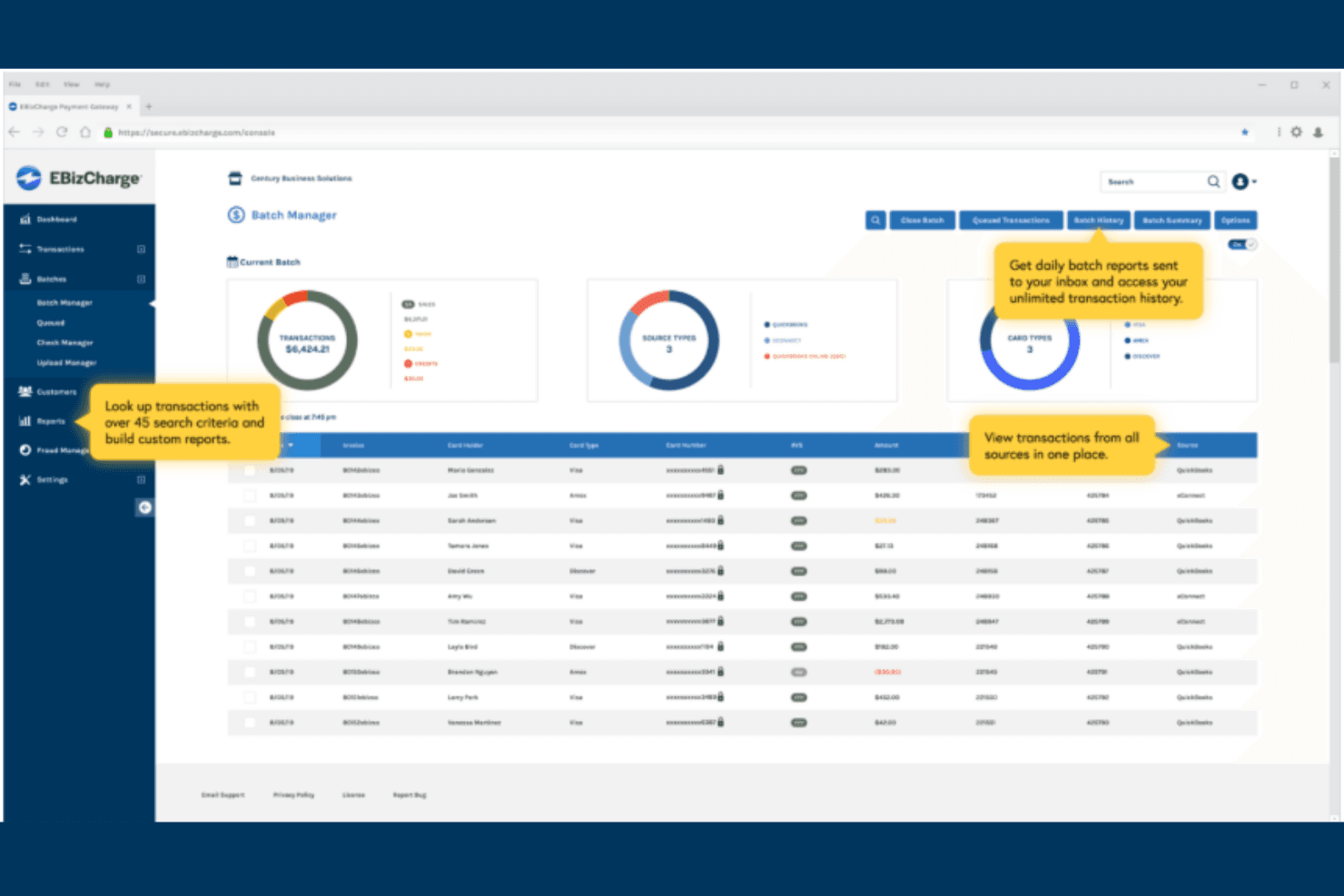
EBizCharge centralizes batch transaction management across all payment sources. EBizCharge is an embedded payment processing platform built for businesses that run operations through ERP, accounting, or CRM systems, letting you accept card and eCheck payments directly inside the tools you already use.
Who Is EBizCharge Best For?
EBizCharge is a strong fit for finance and operations teams that run payments inside ERP or accounting systems like NetSuite, QuickBooks, or Sage.
Why I Picked EBizCharge
I picked EBizCharge as one of the best because of how much control it gives you over how payments are configured and collected. I particularly like the branded email payment forms, which let you embed your business name and colors directly into the checkout experience customers see. The Auto-Pay setup is also genuinely flexible, letting you collect full or partial statement balances on a schedule you define, whether monthly, yearly, or custom.
EBizCharge Key Features
- Hosted checkout pages: Embed a payment form directly into your website without custom development.
- EMV terminal support: Accept in-person card payments using Ingenico hardware that syncs transaction data back to your connected business software.
- Saved cards: Store tokenized customer payment methods to collect payment against invoices or sales orders without re-entering card details.
- Customer payment portal: Automatically upload invoices to a self-service portal where customers can view and pay outstanding balances.
EBizCharge Integrations
EBizCharge offers 100+ native integrations, including BigCommerce, WooCommerce, Adobe Commerce, Magento, NetSuite, QuickBooks Online, Sage Intacct, Microsoft Dynamics, and Salesforce. It also provides 25+ shopping-cart connections and a SOAP API for custom integrations; Shopify isn’t listed.
Pros and Cons
Pros:
- EMV terminals support in-person retail payments
- Flexible statement autopay supports repeat billing
- Reviewers value automated invoice payment posting
Cons:
- Wallet and currency support remain unclear
- Weak fit for Shopify-first merchants
Learn more about EBizCharge: Best for omnichannel integration
- Not available
- From $0.13 + payment method fee
Visit WebsiteCustomer Rating:3.8/5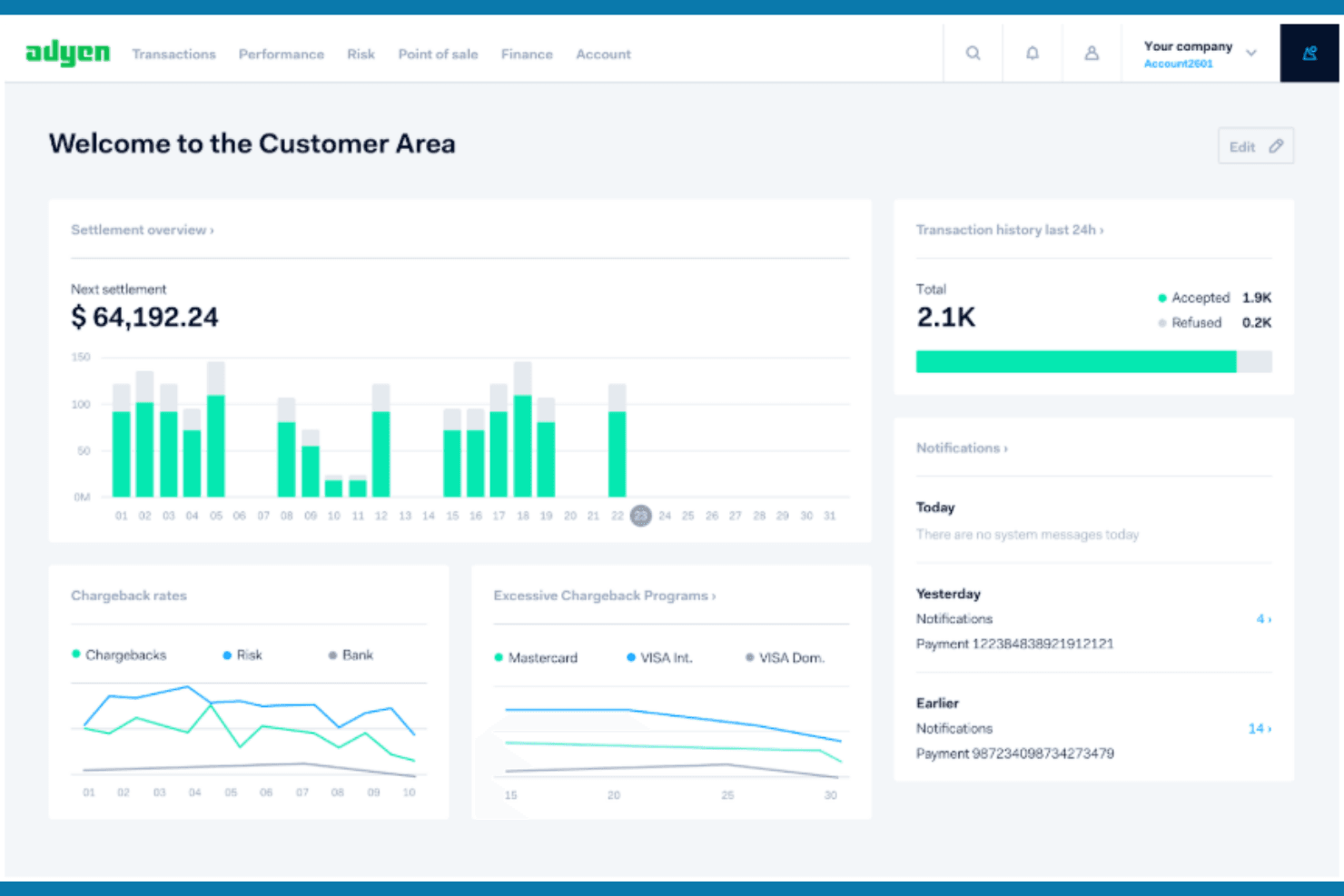
Adyen gives merchants a real-time view of settlements and transactions. Adyen is an enterprise payment platform built for retailers and large merchants who need to accept payments online, in person, and in-app—spanning 200+ payment methods, local acquiring networks, and cross-channel data in one integration.
Who Is Adyen Best For?
Adyen is built for enterprise retailers and large merchants that run both online and in-person sales and need a single platform to handle payment data across every channel.
Why I Picked Adyen
I picked Adyen as one of the best because it's the only platform on this list that natively unifies online and in-person payment data in real time, with no additional middleware required. Its pre-built Shopify app pairs Adyen's global acquiring network with Shopify's checkout, so a retailer running both a Shopify storefront and physical POS terminals sees all transaction data in one place. I also appreciate Adyen Uplift, which uses AI to optimize payment routing, reduce false declines, and cut chargeback costs across every channel simultaneously.
Adyen Key Features
- Local acquiring network: Adyen lets you open legal entities in supported regions to process payments locally, which can reduce interchange fees and increase authorization rates.
- Tokenization for recurring payments: Adyen stores customer payment details as tokens to support one-click, subscription, and irregular-schedule payments across supported payment methods.
- Dispute management portal: Merchants can view, accept, or defend disputes directly in the Customer Area or via the Disputes API, with auto-defense available for eligible card chargebacks.
- 200+ payment methods: Adyen supports cards, digital wallets, buy-now-pay-later, direct debit, and regional methods across global markets through a single integration.
Adyen Integrations
Adyen has integrations with Shopify, Adobe Commerce, Salesforce Commerce Cloud, SAP Commerce, Microsoft Dynamics 365, Oracle Retail, and Cegid. Its Payments APIs, Platforms APIs, and webhooks support custom integrations.
Pros and Cons
Pros:
- Auto-defense reduces card dispute workload
- Broad regional payment method coverage
- Unified online and in-store payment data
Cons:
- Users report held funds and unclear timelines
- Shopify account setup can be difficult
Learn more about Adyen: Best for cross-border cash flow reporting
- Not available
- Pricing upon request
Visit WebsiteCustomer Rating:3.2/5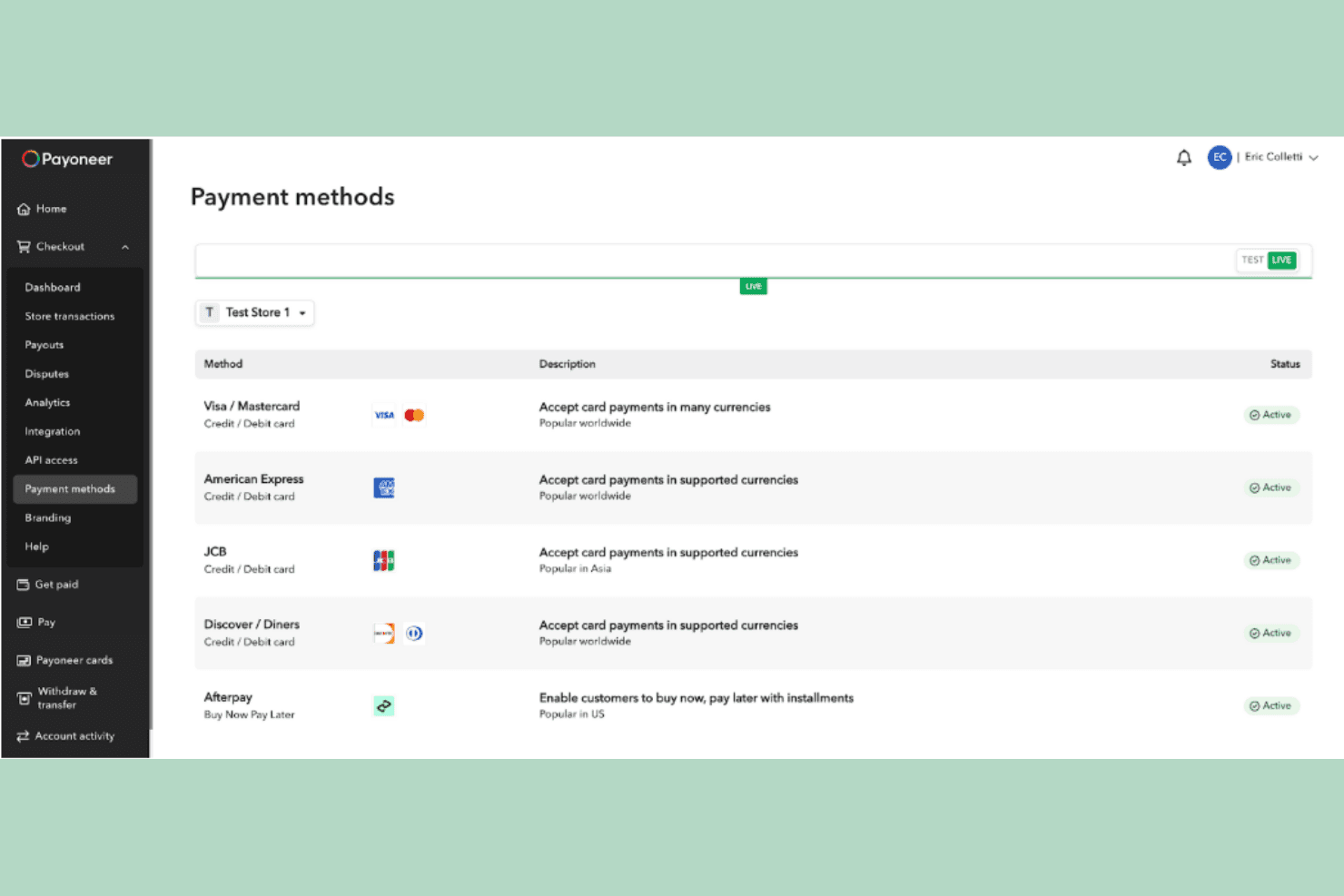
Payoneer lets users manage multiple payment methods for their store. Payoneer Checkout is a cross-border payment gateway built for ecommerce businesses that need to accept payments from international customers across 190+ countries, with support for major cards, digital wallets, and local payment methods in a single checkout flow.
Who Is Payoneer Best For?
Payoneer Checkout is a strong fit for ecommerce businesses registered in the US, UK, Hong Kong, or Singapore that sell cross-border and need a single checkout to accept payments across 190+ countries.
Why I Picked Payoneer
I picked Payoneer as one of the best because it gives you genuine control over how your checkout looks, behaves, and processes payments across markets. I appreciate that you can configure payment methods, currencies, fraud rules, and checkout appearance from a single dashboard, and choose between single-page or multi-page layouts to match your store's flow. The ability to set Affirm for US buyers, Afterpay for UK buyers, and Klarna for cross-border routes from one account is the kind of payment customization that's hard to replicate in a more rigid processor.
Payoneer Key Features
- Embedded and hosted checkout: Merchants choose between embedding payment fields directly in their storefront or redirecting customers to a branded Payoneer-hosted payment page.
- Shopify app with test mode: A dedicated Shopify app supports immediate and deferred transaction capture, with a built-in test mode to verify transactions and refunds before going live.
- Real-time fraud detection: Stripe-powered risk scoring runs on every transaction, backed by 24/7 global risk monitoring and pre-dispute alert tools.
- Dedicated account manager: Each merchant is assigned an account manager who conducts regular account reviews and provides proactive outreach in the merchant's language and time zone.
Payoneer Integrations
Payoneer Checkout offers four documented native integrations: Shopify, WooCommerce, Shopline, and Shoplazza. It also provides an API and payment widget SDK for custom integrations.
Pros and Cons
Pros:
- Reviewers praise international payment handling
- Consolidated multi-currency payment reporting
- Customizable checkout flows across markets
Cons:
- Reviewers report delayed withdrawals
- Dispute-rate threshold may restrict eligibility

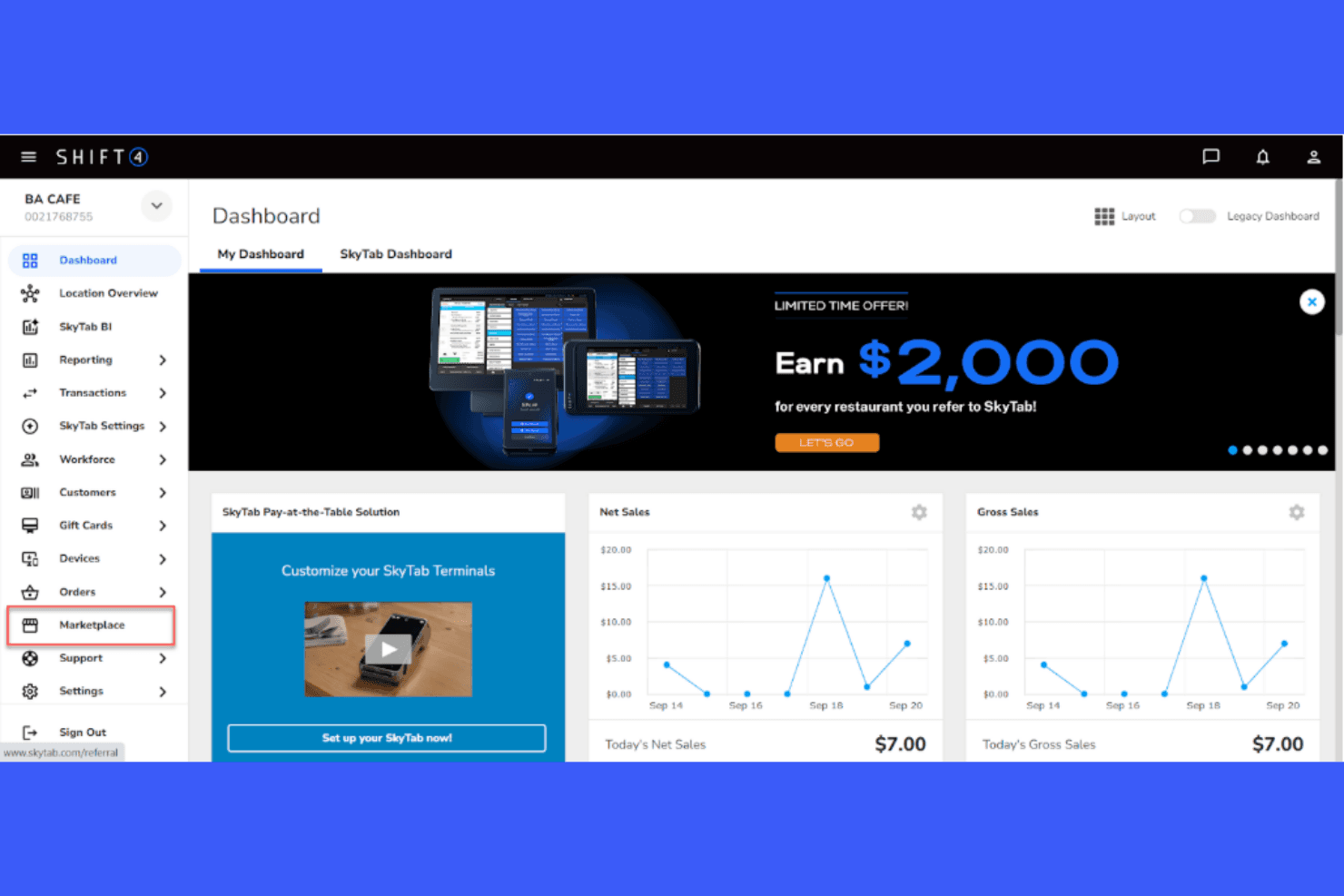
Shift4 displays real-time sales data and referral offers on its dashboard. Shift4's Online Payments platform is a developer-friendly payment solution built for ecommerce businesses that need to accept a wide range of payment methods across borders, with strong fraud prevention and flexible recurring billing support.
Who Is Shift4 Best For?
Shift4's Online Payments platform is a strong fit for ecommerce businesses that prioritize AI-driven fraud prevention and need to accept a wide range of payment methods across multiple currencies.
Why I Picked Shift4
I picked Shift4 as one of the best because its AI-driven fraud prevention goes deeper than basic rule-sets. The platform uses machine learning to score every transaction in real time, flags anomalies automatically, and lets you build custom blocking rules by IP address, card details, or geographic location. When a suspicious charge slips through, chargeback representment tools let you fight disputes directly with supporting documentation.
Shift4 Key Features
- 100+ payment methods: Accept major credit cards, digital wallets, ACH, buy now pay later, bank transfers, cryptocurrency, and local payment options through one integration.
- Customizable embedded checkout: Embed a mobile-friendly, PCI-compliant checkout form on your product pages with one-page or multistep payment flow options.
- Subscription and usage-based billing: Manage recurring billing alongside one-time payments, including pay-per-use and pay-per-seat models with stored payment credentials.
- Settlement in 17 currencies: Receive payouts in 17 currencies, with configurable settlement frequency and optional seven-day settlement available through your merchant agreement.
Shift4 Integrations
Shift4 lists 24 named integrations, including Magento Commerce and OpenCart, and says hundreds more are available. Its REST API and SDKs support custom checkout integrations, but no Shopify integration is documented.
Pros and Cons
Pros:
- Reviewers praise helpful onboarding staff
- Recurring and usage-based billing options
- AI-driven fraud scoring flags anomalies
Cons:
- Reviewers report billing disputes and slow support
- Hosted confirmation screen interrupts branded checkout
Learn more about Shift4:
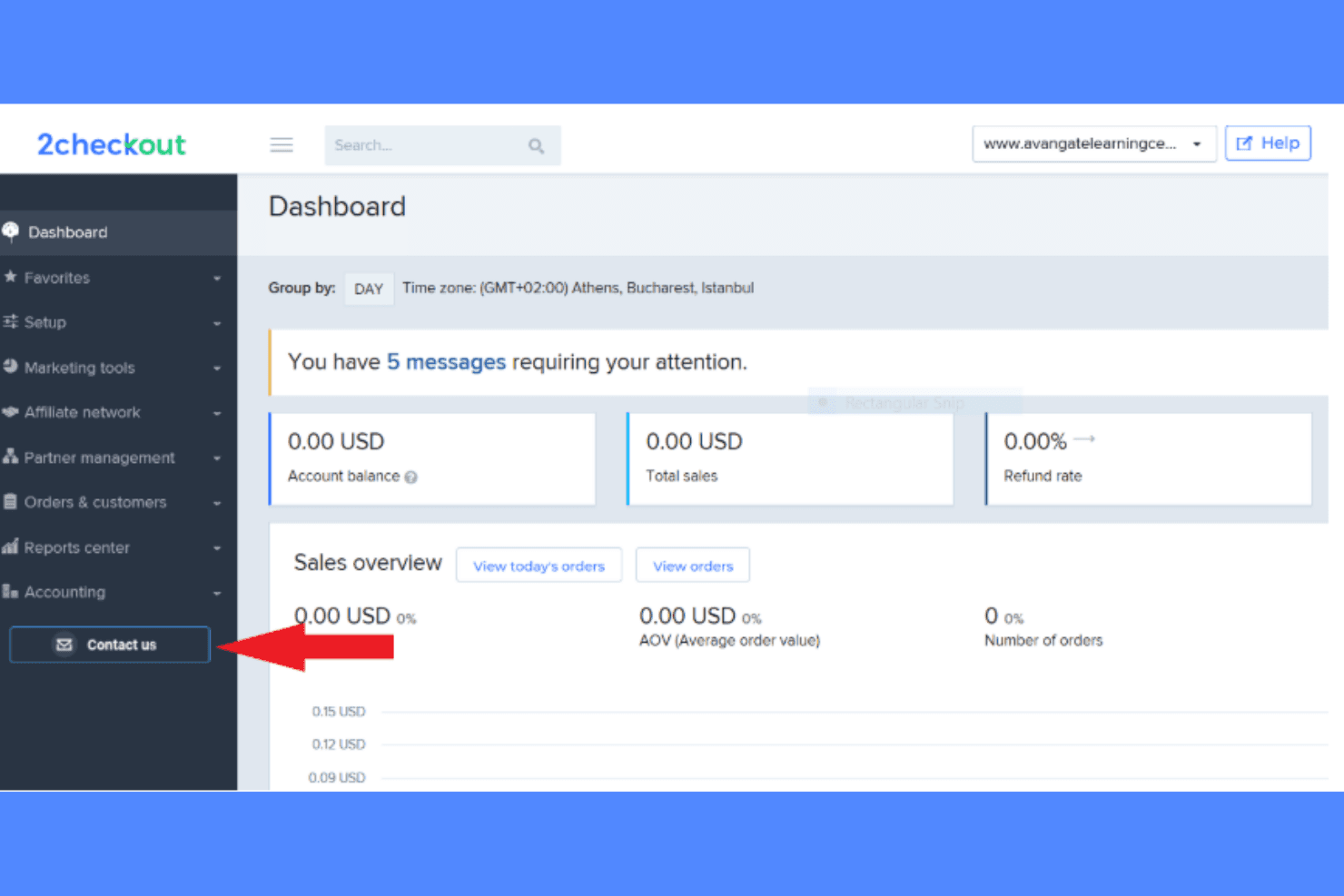
2Checkout displays sales, balance, and refund metrics on its dashboard. 2Checkout is a global payment platform that helps ecommerce businesses and digital sellers accept payments across 200+ countries, manage subscriptions, and navigate cross-border tax and compliance complexity.
Who Is 2Checkout Best For?
2Checkout suits digital sellers and ecommerce businesses that sell across multiple countries and need automated tax handling as part of their payment setup.
Why I Picked 2Checkout
I picked 2Checkout because it's one of the few payment platforms that acts as a merchant of record, automatically calculating, collecting, and remitting VAT, GST, and sales tax across global markets on your behalf. That's a real advantage if you're selling digital goods into the EU or across multiple tax jurisdictions where compliance overhead adds up fast. I also like that the 2Monetize plan extends this to invoice management and 45+ payment methods, so you're not just covered on tax but on localized checkout too.
2Checkout Key Features
- Multi-tier fraud detection: Uses proprietary algorithms, AI, and manual review to screen transactions, with customization by industry and geography.
- Subscription lifecycle management: Supports upgrades, downgrades, prorations, renewals, and churn-prevention tools across flat-rate, usage-based, or hybrid billing plans.
- Dedicated chargeback team: Disputes chargebacks on your behalf and provides guidance on evidence submission for collaboration disputes.
- ConvertPlus Shopify connector: Connects your Shopify checkout to 2Checkout for payment processing, including localized checkout and recurring payment support.
2Checkout Integrations
2Checkout documents 120+ shopping-cart integrations, including native Shopify and Salesforce integrations. It also offers REST, SOAP, JSON, webhooks, and SDK tools for custom integrations.
Pros and Cons
Pros:
- Reviewers report successful Shopify payment processing
- Broad regional payment coverage supports expansion
- Global tax handling supports cross-border compliance
Cons:
- Reviewers raise concerns about unclear fees
- Merchants report payout holds and account freezes
Learn more about 2Checkout:
Elavon offers a payment gateway for seamless business transactions. Elavon is a payment processing platform built for businesses that need to accept payments across online, in-person, and mobile channels under one provider—making it a natural fit for omnichannel retailers and merchants who want unified transaction management alongside AI-driven fraud protection.
Who Is Elavon Best For?
Elavon is a strong fit for omnichannel merchants and mid-to-large retailers that need a single provider to handle in-person, online, and mobile payments with AI-driven fraud protection built in.
Why I Picked Elavon
Elavon earns its spot on my shortlist because of Pay Defense, its machine learning-powered fraud detection that evaluates transactions in real time and returns a recommendation to accept, prevent, or escalate for review before money moves. I also appreciate that merchants can layer in configurable fraud rules checking things like high-risk IP addresses, card-use frequency, and billing country mismatches, giving you granular control over which transactions get flagged. For omnichannel merchants processing high volumes across in-person and online channels, that combination of AI-driven decisioning and custom rule sets meaningfully reduces both fraud losses and false declines.
Elavon Key Features
- Hosted payment page: Shoppers complete transactions on an Elavon-hosted page, keeping sensitive card data off your servers.
- Multi-currency conversion: Accept payments in 100+ currencies and settle in your choice of 17 currencies, including EUR, GBP, USD, and CAD.
- Recurring billing and subscriptions: Set automated billing schedules by day, week, month, or year using stored cards or ACH payment methods.
- Dispute lifecycle management: Manage retrievals, chargebacks, representment, and pre-arbitration through a documented end-to-end dispute process.
Elavon Integrations
Elavon offers a Shopify marketplace integration, Wix-powered ecommerce tools, and listed connectivity with Oracle NetSuite. Its API supports custom payment integrations.
Pros and Cons
Pros:
- Omnichannel processing supports store and web sales
- Transaction reports aid deposit reconciliation
- Machine-learning fraud decisions flag risky transactions
Cons:
- Reviewers cite slow, hard-to-track disputes
- Some reviewers report delayed funds and holds
Learn more about Elavon: Best for cross-border payment approvals
- Not available
- From 2.9% + $0.30 per successful card transaction
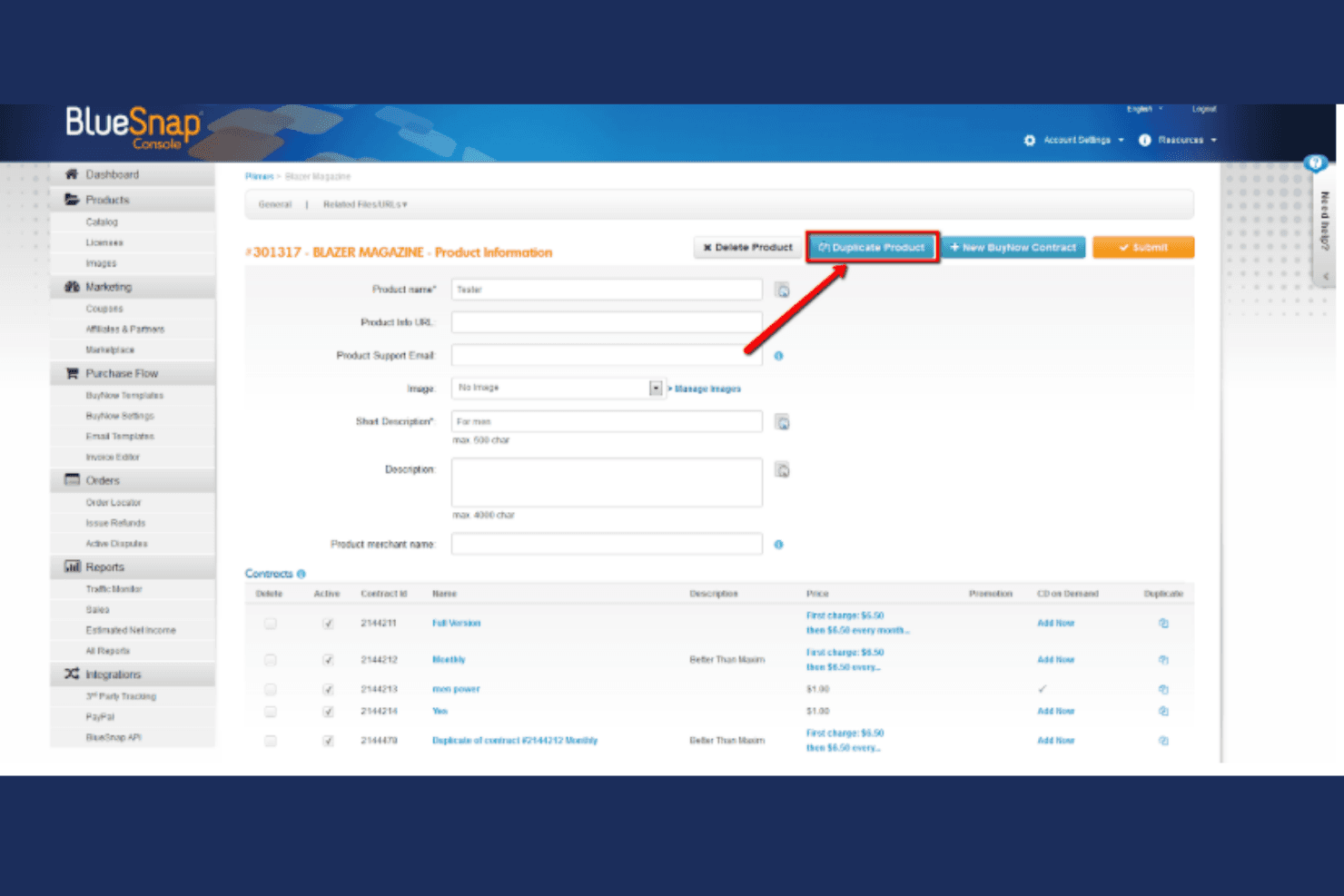
BlueSnap lets users duplicate products and manage subscription contracts easily. BlueSnap is a global payment orchestration platform built for ecommerce merchants and finance teams that need to accept payments across multiple currencies, regions, and payment methods through a single integration.
Who Is BlueSnap Best For?
BlueSnap suits ecommerce merchants and finance teams that sell across multiple countries and need a single platform to manage currencies, local acquiring, and payment compliance.
Why I Picked BlueSnap
I picked BlueSnap as one of the best because it gives you genuine control over how your checkout behaves across different markets. I particularly appreciate its Intelligent Payment Routing, which analyzes each transaction's currency, issuing country, and payment type, then sends it to the acquirer most likely to approve it. Pair that with local acquiring in 50 countries and built-in Equifax fraud rules you can configure yourself, and you have a processor that bends to your business rather than the other way around.
BlueSnap Key Features
- Hosted payment page: A brandable, PCI DSS Level 1 compliant checkout page that accepts cards, digital wallets, and alternative payment methods without custom development.
- Subscription billing engine: Merchant-defined billing schedules with configurable frequency, currency, retry logic for failed payments, and automatic card updates via Account Updater.
- Chargeback dispute management: Built-in Chargebacks911 tools let merchants build, submit, and track representment cases, with optional managed dispute services.
- Multi-account SSO reporting: A single sign-on view aggregates transaction and payout data across multiple BlueSnap accounts with customizable cross-account reports.
BlueSnap Integrations
BlueSnap offers documented native integrations with Shopify, BigCommerce, Magento, WooCommerce, Chargebee, Zuora, NetSuite, Avalara, and Chargebacks911. It also provides REST APIs, Android and iOS SDKs, and Zapier.
Pros and Cons
Pros:
- Reviewers praise reporting customization
- Custom fraud rules and dispute workflows
- Broad currency support for cross-border sales
Cons:
- Some users report confusing setup guidance
- Merchants report payout delays and reserves
Learn more about BlueSnap: Best for large‑scale enterprise processing
- Free plan available
- From $42/month

Global Payments offers a worldwide commerce ecosystem for businesses of all sizes. Global Payments is an enterprise-grade payment processing platform that lets multi-channel merchants accept in-person, online, and embedded payments under one unified system, with strong fraud management and cross-border currency support across 130+ currencies.
Who Is Global Payments Best For?
Global Payments suits large multi-channel merchants and enterprise retailers that need a single provider for in-person, online, and embedded payments across multiple locations or geographies.
Why I Picked Global Payments
I picked Global Payments as one of the best because it's built specifically for the kind of scale where a single payment relationship needs to cover in-store terminals, online checkout, and cross-border transactions all at once. I appreciate how its unified commerce API connects POS and online channels under one dashboard, so a retailer running dozens of locations isn't reconciling payments from separate systems. Its ML-based fraud detection and customizable fraud rules add a layer of enterprise-grade risk management that most processors reserve for their largest accounts.
Global Payments Key Features
- Hosted payment page: Use a prebuilt, brandable payment page for web and app checkout, with iFrame, Lightbox, and full-page redirect rendering options.
- Dynamic currency conversion: Let international customers pay in their own currency while you settle in yours, across 130+ supported currencies.
- Recurring billing schedules: Configure automated billing on daily, weekly, monthly, quarterly, or annual cycles, with up to ten payment retries before suspension.
- 24/7 live support: Access round-the-clock phone support and live-agent chat for ongoing payment operations and troubleshooting.
Global Payments Integrations
Global Payments lists Shopify, Magento, WooCommerce, Salesforce Commerce Cloud, Oracle Commerce, PrestaShop, and OpenCart as commerce partners, but doesn’t document each connection’s scope. REST APIs and SDKs support custom integrations.
Pros and Cons
Pros:
- Cross-channel reporting helps unify payment operations
- Custom fraud rules support risk controls
- Reviewers praise responsive account managers
Cons:
- Some reviewers report terminal reliability issues
- Some reviewers report cancellation friction
Learn more about Global Payments:
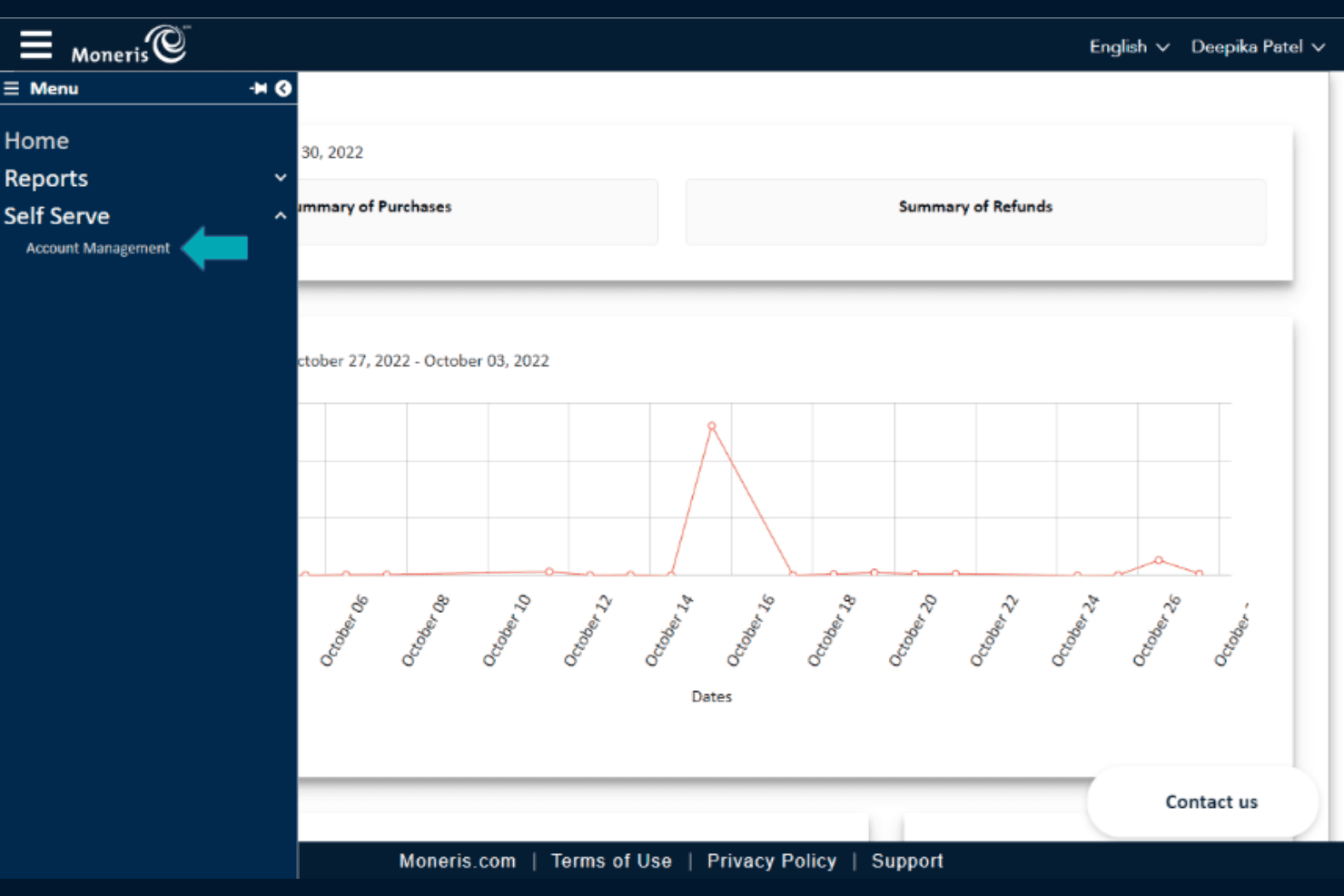
Moneris lets users navigate account management via the Self Serve menu. Moneris Gateway is a Canadian payment processing solution that lets ecommerce merchants accept online payments through a hosted checkout, API integration, or ecommerce plug-ins like WooCommerce and Magento.
Who Is Moneris Best For?
Moneris Gateway is a strong fit for Canadian ecommerce businesses that want a domestic payment processor with built-in fraud tools and local support.
Why I Picked Moneris
I picked Moneris because it's purpose-built for Canadian businesses that need a domestic payment processor rather than a global one. Its hosted Moneris Checkout supports credit, debit, Apple Pay, Google Pay, and Konek bank payments, covering the full range of how Canadian customers actually pay. I also appreciate that Kount fraud tools and 3-D Secure authentication come included at no extra cost on flat-rate plans, which matters when you're processing real volume.
Moneris Key Features
- RESTful API integration: Connect your existing website directly to Moneris payment processing using the OpenAPI-based REST API, with support for purchases, pre-authorizations, refunds, and voids.
- Recurring billing: Set up subscription payments on a custom schedule through Moneris Checkout, with tokenized card storage to support repeat transactions.
- Moneris Portal dispute management: Review chargeback details, upload supporting documents, and respond to disputes directly through the Moneris Portal.
- Ecommerce plugin support: Add Moneris Checkout to your store using pre-built plugins for WooCommerce, Magento 2.x, and Ecwid.
Moneris Integrations
Moneris lists Ecwid, Magento 2.x, and WooCommerce as featured plugins, plus Apple Pay, Google Pay, and Konek payment connections. Its RESTful API supports custom integrations.
Pros and Cons
Pros:
- Built-in fraud screening and dispute tools
- Reviewers praise responsive, knowledgeable support
- Canadian-focused payment processing
Cons:
- Long contracts can complicate switching
- Shopify checkout capabilities remain unclear
Learn more about Moneris:
Other Shopify Payments Alternatives
Here are some additional Shopify Payments alternatives that didn’t make it onto my shortlist, but are still worth checking out:
- 11Checkout.comBest for AI-driven fraud protection
- 12Authorize.netBest for global tax compliance
- 13WorldpayBest for multi‑currency global reach
- 14StripeBest for developer-friendly API
- 15HelcimBest for transparent pricing
- 16Payment DepotBest for low transaction fees
- 17AirwallexBest for international business accounts
- 18Merchant OneBest for personalized customer support
- 19Paypal EnterpriseBest for large-scale enterprise needs
- 20Stax PaymentsBest for subscription-based pricing
- 21Payline DataBest for flexible payment options
How I Evaluate Shopify Payments Alternatives
I split my evaluation into two layers: what a gateway must do to work with Shopify, and what sets the best ones apart for merchants dealing with high fees, limited regions, or niche payment needs.
Core Functionality (Table Stakes For This List)
When I'm selecting tools for my list, I rank each one on a scale from 0 (does not offer the functionality) to 5 (excels in this area) for each core functionality listed below. Then, I calculate the tool's total score into a percentage. Each tool needs to achieve a minimum total score of 65% to be considered for inclusion.
- Shopify Checkout Integration: I check whether a provider connects to Shopify through a native app or requires a manual workaround, since a clunky integration can break your checkout flow.
- Card Processing Coverage: Each provider should accept all major card brands at minimum, so your customers aren't turned away at checkout over a missing network.
- Multi-Currency & Global Reach: For merchants selling internationally, I evaluate how many currencies and countries a gateway supports with local acquiring capabilities.
- Alternative Payment Methods: I look for support beyond cards—wallets like Apple Pay, BNPL options, and region-specific methods that match how your customers actually prefer to pay.
- PCI Compliance & Fraud Prevention: Every gateway should hold PCI-DSS certification and offer fraud tools like 3D Secure, since chargebacks eat directly into your margins.
- Transparent Pricing & Payouts: I evaluate whether fee structures are clearly published and whether payout timelines are predictable, so you can forecast cash flow accurately.
Once I have a list of tools that meet this criteria, I consider what sets each platform apart.
Differentiating Factors (What Sets Vendors Apart)
Here's how I compare and contrast different vendors:
Standout Features
Smart payment routing is a major differentiator. Gateways that route transactions across multiple acquirers boost authorization rates, which directly impacts revenue on high-volume stores. I also look for chargeback protection, where providers absorb dispute costs rather than passing them to you. For merchants selling online and in-store, a unified omnichannel POS matters. It ties physical and digital transactions into one reporting view, saving hours of reconciliation.
Beyond Features
Total cost of ownership goes beyond the published per-transaction rate. I evaluate whether a provider charges additional cross-border fees, chargeback fees, or monthly minimums that add up fast on high-volume stores. Geographic and industry fit also matters—merchants in restricted verticals or underserved regions need a gateway that actually approves their application. I also consider the integration ecosystem, especially connections to accounting tools like QuickBooks or Xero and tax platforms, since clean financial data saves hours at month-end.
Related Reviews
What is Shopify Payments?
Shopify Payments is Shopify’s built-in payment processing solution—meaning you can accept credit cards, debit cards, and digital wallets right from your Shopify admin, no third-party gateways or extra logins required.
It’s designed to make life easier for ecommerce store owners: setup is automatic, payouts are tracked in real time, and you get multi-currency support to reach customers around the world.
For most Shopify merchants, the big draw is simplicity—no need to wrangle external payment providers, and no extra transaction fees if you stick with Shopify Payments. You also get built-in fraud analysis, support for Apple Pay and Google Pay, and a customizable checkout page that matches your brand.
In short: it’s a streamlined, all-in-one way to process online transactions, manage chargebacks, and keep your store’s cash flow moving.
Why Look For A Shopify Payments Alternative?
Shopify Payments works for a lot of ecommerce businesses, but it’s not a one-size-fits-all solution—especially if you’re running into high transaction fees, limited payment methods, or you’re expanding internationally.
Maybe you need better fraud protection, more flexible payment options, or advanced reporting that doesn’t make you want to pull your hair out.
Here’s why many Shopify merchants start shopping around for a payment processor that actually fits the way they operate:
- You’re facing high transaction fees that eat into your margins
- You need support for more currencies or alternative payment methods
- Your team needs stronger fraud detection and chargeback management
- You’re selling in regions where Shopify Payments isn’t available
- Your business requires advanced reporting tools or better payout control
- You want a checkout experience that boosts conversion rates and matches your brand
If any of these pain points sound familiar, it’s time to consider a Shopify Payments alternative that’s built for how you really do business.
Shopify Payments Alternatives Key Features
Here’s what you should expect from any Shopify Payments alternative worth your time (and your transaction fees). If the provider you’re looking at can’t check these boxes, keep shopping:
- Integrated payment gateway. Seamlessly process credit cards, debit cards, digital wallets, and alternative payment methods—without a tangled mess of third-party plugins.
- Multi-currency support. Let customers pay in their local currency, whether you’re selling across borders or just want to make checkout frictionless.
- Fraud detection and protection. Real-time tools to flag suspicious transactions, stop chargebacks, and actually keep your team out of the fraud fire drill.
- Automatic or easy setup. Get up and running fast—no IT heroics required, and onboarding that doesn’t kill your week.
- Competitive, transparent pricing. No hidden fees, no gotchas. You want to know exactly what you’re paying for every transaction.
- Chargeback and dispute management. Built-in tools to help you fight and recover revenue from chargebacks, not just eat the loss.
- Payout tracking and control. See payout schedules and histories in real time, and control when and how you get paid.
- Mobile and digital wallet support. Accept Apple Pay, Google Pay, and other digital wallets for a customer experience that doesn’t kill conversions.
- Customizable checkout experience. Tailor your checkout page to match your brand and optimize for higher conversion rates.
- Reporting and analytics. Get real-time sales data, transaction reporting, and actionable insights—so you’re not flying blind.