
20 Best Payment Gateways for Secure Transactions in 2026

The 10 Best Payment Gateway Providers Shortlist
Here’s your cheat sheet for the 10 best payment gateways on the market, including what each is best for.


Payment gateways handle every card swipe, digital wallet tap, and bank transfer so you get paid securely and reliably. They’re the backbone of your checkout.
In this guide, we evaluate each provider on security (encryption, tokenization, fraud filters), integration capabilities (APIs, plugins, headless commerce), pricing transparency (subscription plans versus per-transaction fees), and scalability features (recurring billing, global currencies, volume handling).
No more surprise fees. No more platform lock-ins. Just honest, expert-backed recommendations to help you pick the gateway that fits your business and keeps revenue flowing.
Why Trust Our Software Reviews
Comparing the Best Payment Gateway Solutions
First, we’ll start by comparing the pricing for each payment gateway in a handy table. Then, click Compare Software to find comparisons on all the other features.
| Tool | Best For | Trial Info | Price | ||
|---|---|---|---|---|---|
| 1 | Best value for high transaction volumes | 3-month free trial | From $79/month | Website | |
| 2 | Best payment getaway provider for unified business management | Free quote available | From $99/month | Website | |
| 3 | Best for omnichannel retail integration | 3-day free trial | From $29/month (billed annually) | Website | |
| 4 | Best for 0% cost credit card processing | Not available | From $29/month | Website | |
| 5 | Best for access to top payment gateways | Free consultation available | From $50/hr | Website | |
| 6 | Best payment gateway provider for invoicing | 30-day free trial | From $30/user/month | Website | |
| 7 | Best for cost-effective payment processing | Free demo available | From Interchange + 0.40% + 8¢ (varies by volume) | Website | |
| 8 | Best customizable payment solutions tailored to specific business needs | Free quote available | Pricing upon request | Website | |
| 9 | Best for POS integration services | Free demo available | From $135/month | Website | |
| 10 | Best for B2B businesses | Free demo available | From $15/month | Website |
The 10 Best Payment Gateway Providers, Reviewed For You
Here are the top 10 payment gateway software that I will outline in detail, including the best use case for each, key features, and pros/cons.
I’ll follow up this list with a quick summary of my other picks, so keep reading even if you don’t find anything you love here.


Payment Depot is a compelling option for ecommerce businesses seeking a reliable payment gateway provider. Its subscription-based pricing model offers a cost-effective solution for businesses with high transaction volumes, allowing merchants to pay a flat monthly fee plus a small per-transaction charge over wholesale rates. This setup significantly reduces transaction costs compared to traditional percentage-based fee structures.
Why I picked Payment Depot: Its transparent pricing model eliminates hidden fees, making it easy for businesses to predict monthly expenses and manage budgets. Payment Depot also includes a free payment gateway in its subscription plans, allowing merchants to process online transactions without additional fees. Its virtual terminal capabilities, powered by partnerships like SwipeSimple, enable seamless online, mobile, and over-the-phone payments.
Payment Depot standout features & integrations
Standout features include its subscription-based pricing model, which offers a flat monthly fee structure that significantly reduces costs for high-volume businesses. The platform’s inclusion of a free payment gateway helps merchants process online payments without incurring additional gateway fees. Additionally, its intuitive interface and reporting tools make it easy to analyze sales data and gain business insights.
Integrations include OpenCart, PrestaShop, 3dCart, BigCommerce, WooCommerce, Magento, Zen Cart, NCR, Authorize.Net, PayTrace, and more.

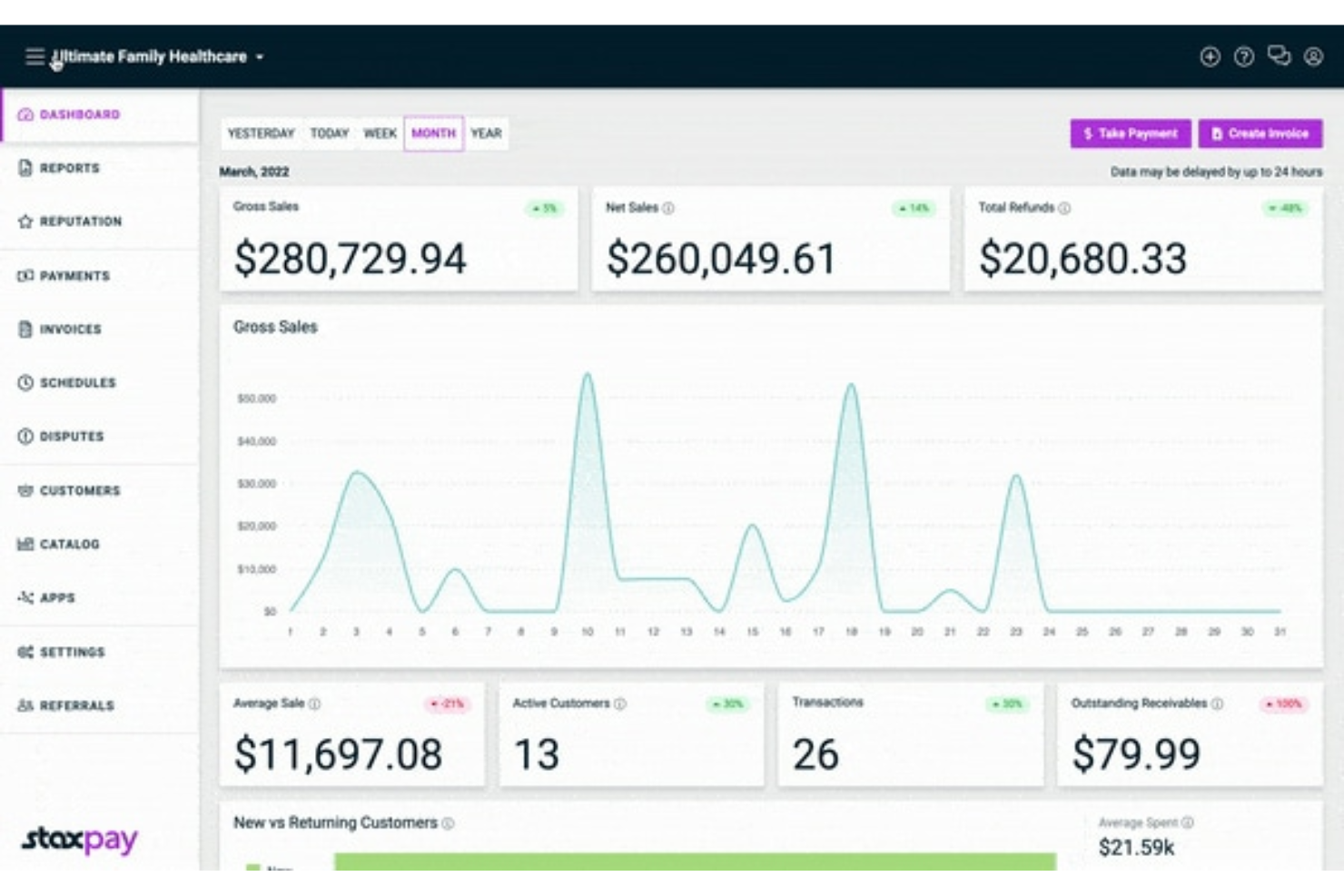
Stax Pay is an all-in-one business management platform that simplifies payment processes for businesses, offering secure credit card payment processing and a comprehensive platform for running and growing a business.
Why I picked Stax Pay: One of Stax Pay's standout features is its all-in-one, unified approach to business management. This approach not only simplifies the management of various payment methods but also integrates crucial tools like invoicing, billing, and customer management into one dashboard. This integration reduces the need for multiple platforms, which helps streamline operations and minimize errors.
Additionally, the platform's robust mobile payment solutions make it ideal for businesses on the go. Users can accept payments anywhere, anytime, through mobile devices with options for swiped, dipped, or tapped card payments. Stax Pay also offers compatibility with digital wallets like Apple Pay and Google Pay. This flexibility is crucial for modern businesses that operate both online and offline.
Stax Pay standout features & integrations
Standout features include its unified, all-in-one platform that merges payment processing with invoicing, billing, and customer management, reducing the need for multiple tools and streamlining operations. The platform excels with no-code, customizable payment solutions, such as hosted payment pages, links, buttons, and QR codes, enabling businesses to offer a flexible, user-friendly payment experience. Additionally, Stax Pay’s data and analytics capabilities provide valuable insights into financial performance, helping businesses make informed decisions.
Integrations include various in-person, online, ACH, and mobile payment methods. Stax Pay also works seamlessly with business tools such as Slack, Zapier, Microsoft Office, Google Suite, and CRMs, enhancing workflow automation and efficiency.
Pros and Cons
Pros:
- Transparent pricing model
- All-in-one payment management
- Comprehensive dashboard and analytics
Cons:
- Potential integration complexities with some tools
- Limited international support
New Product Updates from Stax Pay
Stax Processing: New End-to-End Payments Platform
Stax Payments introduces Stax Processing, an end-to-end payments platform offering an integrated transaction lifecycle and direct card network access. For more information, visit Stax Pay's official site.
 .
.

Shopify POS is a versatile point-of-sale system designed to unify online and in-person sales for seamless retail operations. Fully integrated with Shopify’s ecommerce platform, it enables merchants to manage inventory, customer data, and orders across all channels. Whether you’re running a brick-and-mortar store, an online shop, or both, Shopify POS offers the tools to streamline sales, enhance customer experience, and provide detailed analytics for better decision-making.
Why I picked Shopify POS: Shopify POS stands out for its seamless integration with Shopify’s ecommerce ecosystem, creating a unified dashboard to manage both online and offline sales. This level of synchronization saves time, eliminates data silos, and ensures a consistent customer experience across channels. Additionally, its customizable smart grid interface is a game-changer, allowing businesses to tailor the POS layout for faster, more efficient transactions.
Shopify POS standout features & integrations
Standout features include its customizable smart grid, which lets merchants organize frequently used apps, products, and features for quick access during transactions. This customization enhances operational efficiency and employee productivity.
The system also supports a wide range of payment methods, ensuring customers can pay how they prefer, while offering advanced security features to safeguard sensitive information. Lastly, its built-in analytics tools provide actionable insights into sales performance, helping businesses make data-driven decisions.
Integrations include Shopify Payments, Shopify Shipping, Shopify Email, QuickBooks, Xero, Klaviyo, Google Analytics, Oberlo, Printful, and Gift Cards & Loyalty Program by Smile.io. These integrations enhance functionality across payments, shipping, marketing, accounting, and customer loyalty, making Shopify POS an all-in-one solution for retail businesses.


CardX by Stax is a payment processing tool that allows businesses to accept credit card payments at 0% cost, ensuring compliance with surcharging regulations.
Why I picked CardX by Stax: CardX by Stax stands out due to its automated compliance and customer-friendly approach, ensuring that businesses are fully compliant with all rules and regulations. The software offers 0% cost credit card processing, which allows businesses to keep 100% of their credit card sales. This feature is particularly beneficial for businesses looking to increase their margins without incurring interchange fees.
CardX by Stax offers online, in-office, and in-person payment processing solutions, making it easy for businesses to complete credit card transactions. Additionally, it offers transparent pricing with no hidden fees, allowing merchants to pass on processing costs to customers who choose to pay with credit cards.
CardX by Stax standout features & integrations
Standout features include its 0% cost credit card processing model, which allows businesses to pass processing fees to customers while retaining 100% of sales revenue. The platform’s automated compliance tools ensure seamless adherence to surcharging regulations, removing the guesswork for businesses. Additionally, its real-time reporting provides detailed insights into transactions, helping businesses monitor performance and make data-driven decisions.
Integrations include Stax Pay, Stax Connect, Stax Bill, Stax Processing, and Click to Pay, ensuring a smooth experience within the Stax ecosystem for unified payment management.
Pros and Cons
Pros:
- API access for advanced integrations
- Automatic surcharge calculation
- Customizable branding and checkout experiences
Cons:
- Complex integrations processes
- Limited international support


Swipesum is a consultative payment processing solution that helps businesses of all sizes find the right payment gateway and processor for their specific needs. By acting as a “Chief Payments Officer” for its clients, Swipesum offers a unique approach to payment solutions.
Why I picked Swipesum: Swipesum stands out as a payment gateway provider with its processor-agnostic platform. This approach allows your business to access nearly any leading payment gateway or processor through a single portal, making it easier to integrate payment solutions that best suit your needs. Swipesum’s consultation process is designed to help you quickly determine the ideal gateway and secure favorable terms, all without the need to navigate separate platforms or providers.
Another strength is Swipesum’s commitment to optimizing your costs with features like Staitment, an AI-driven tool for continuous rate and fee monitoring. Staitment audits monthly merchant statements to identify errors and negotiable charges, keeping your rates as low as possible and helping you manage disputes as they arise. Whether you’re a large enterprise or a smaller business, having this kind of proactive support reduces the time you need to spend on payment management.
Swipesum standout features & integrations
Standout features include its processor-agnostic platform, which allows businesses to access nearly any payment gateway or processor through a single portal. This flexibility makes it easier to customize payment solutions to fit specific needs. Swipesum also offers Staitment, an AI-driven tool for monitoring merchant fees, identifying errors, and negotiating better rates, helping businesses reduce costs and manage disputes efficiently.
Additionally, its dedicated engineering team can build custom workflows and integrations, ensuring seamless functionality across systems.
Integrations include Shopify, NetSuite, QuickBooks, Square, Stripe, PayPal, WooCommerce, BigCommerce, Magento, Revel, Lightspeed, Toast, and Clover.
Pros and Cons
Pros:
- Processor-agnostic approach allows flexible provider options
- Supports chargeback management and fraud prevention
- AI-driven statement analysis for transparent fee management
Cons:
- Not ideal for businesses preferring a self-service setup
- Customized solutions can take longer to set up

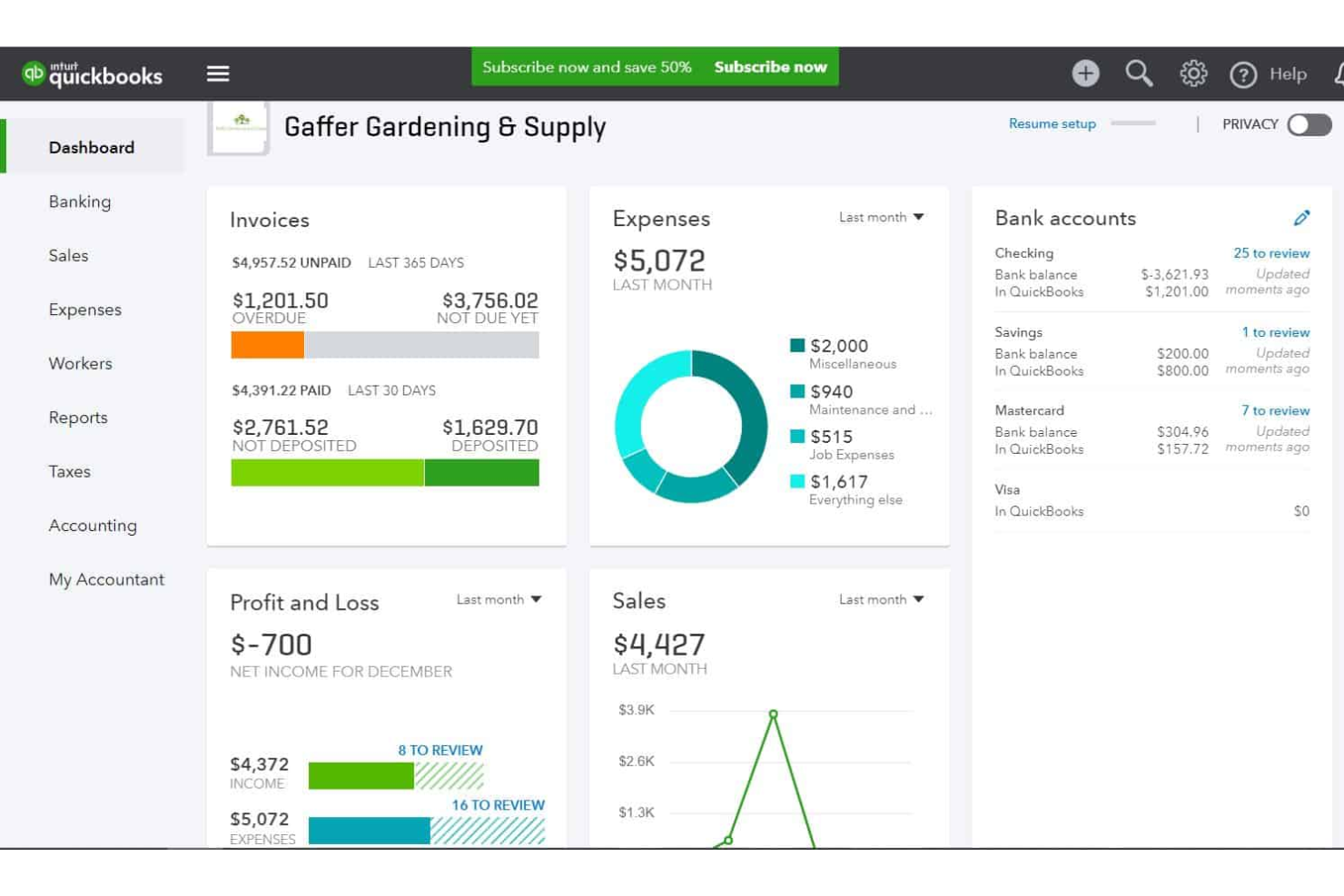
QuickBooks Online is an accounting software designed specifically for small and medium-sized businesses. It can help you manage your finances, track expenses, create and send invoices, and process payments.
Why I picked QuickBooks Online: The software's payment processing system tracks transaction details to help you spot errors. This also supports you in accurate record keeping. You can connect your bank feeds to the platform, eliminating the need for manual data entry. The software also calculates sales tax automatically and allows you to charge clients and customers via invoice.
You can create professional, customizable invoices using the software, and send them either by email or by printing and mailing them. For regular clients, you can set up recurring invoices to alleviate your workload. The software's expense tracking feature lets you categorize and track your business expenses, helping you keep clean and up-to-date financial records for your business.
QuickBooks Online standout features & integrations
Standout features include its ability to streamline financial management through tools like expense tracking and receipt management, which help businesses maintain accurate, up-to-date financial records. The software also simplifies invoicing with customizable templates and recurring invoice options for regular clients, saving time and effort. Additionally, its automated sales tax calculations ensure compliance and accuracy, reducing the risk of errors in tax reporting.
Integrations include over 450 business apps, such as Square, Stripe, Insightly CRM, Mailchimp, Shopify, eBay, BigCommerce, Magento, Squarespace, and Etsy.
Pros and Cons
Pros:
- Automates tax deductions and filings
- Caters specifically to small businesses
- Payroll and accounting in the same software
Cons:
- No free-forever plan available
- Not available globally
New Product Updates from QuickBooks Online
QuickBooks Online Checking Account
QuickBooks Online now lets you open a QuickBooks Checking account and make instant deposits with zero fees, all from within your bookkeeping workflow. Visit QuickBooks Online's website for more details.
 for more details.
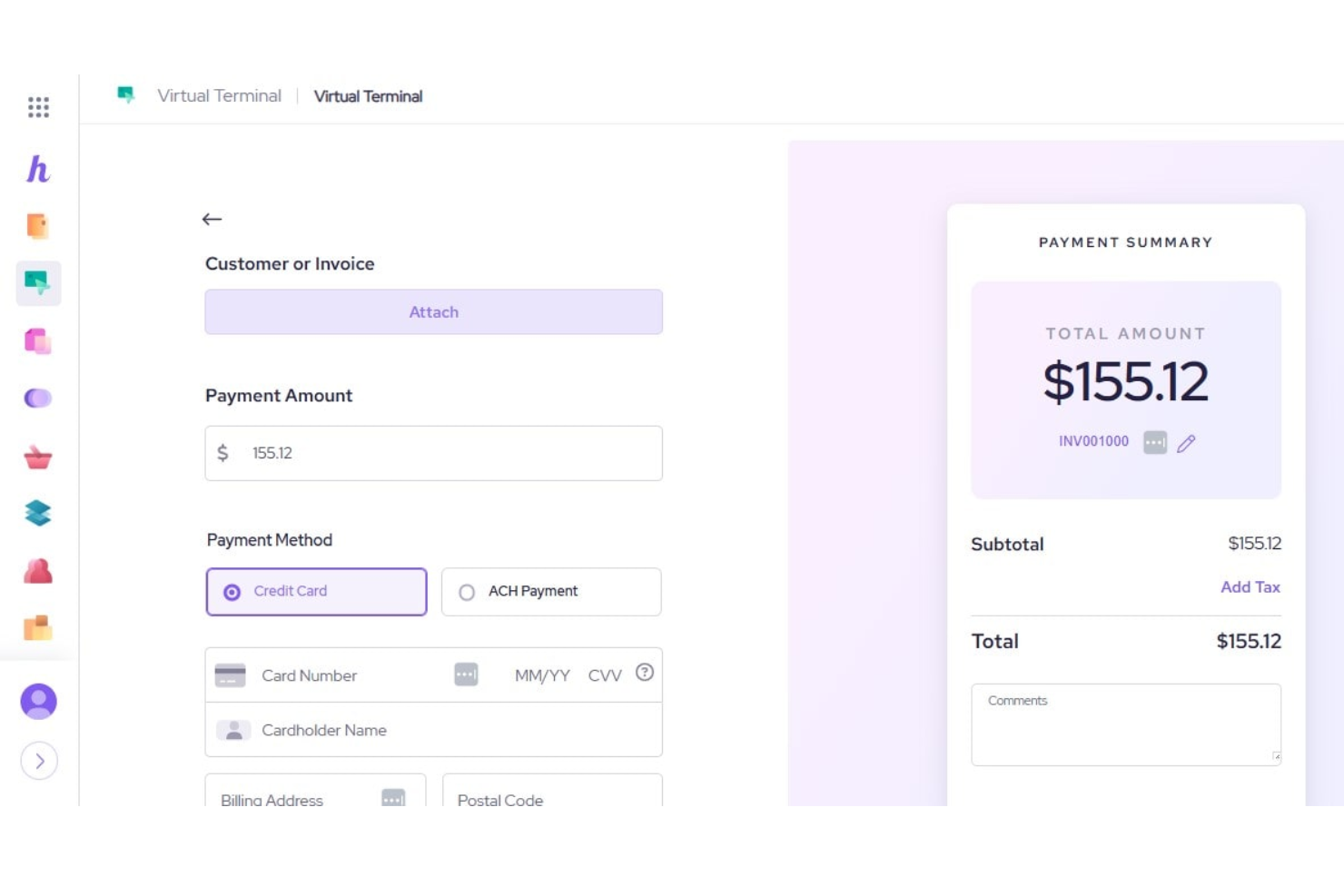
Helcim is a payment solution tool that offers transparent and affordable options for small and medium businesses accepting credit card payments in-person or online. With its emphasis on low processing rates and complete transparency, Helcim stands out as the best tool for businesses seeking a reliable and affordable payment processing solution.
I chose Helcim as a payment gateway provider because of its commitment to affordability and transparency in payment processing. What makes Helcim different is its Interchange Plus pricing model, which can lead to significant savings for businesses by offering lower processing rates. Additionally, the Helcim Fee Saver program presents an opportunity for free credit card processing, which is a unique offering in the market.
Beyond just payment processing, Helcim provides a full suite of integrated services, including a comprehensive merchant platform that supports a wide range of functionalities such as invoicing, customer management, and inventory management. This all-in-one platform approach enables businesses to manage various aspects of their operations seamlessly within one ecosystem, enhancing efficiency and streamlining workflows.
Helcim standout features & integrations
Standout features include its transparent Interchange Plus pricing model, which offers lower processing rates and significant cost savings for businesses. The Helcim Fee Saver program further stands out by providing an option for free credit card processing, a rare feature in the market. Additionally, Helcim’s all-in-one merchant platform combines payment processing with tools for invoicing, customer management, and inventory management, streamlining business operations within a single ecosystem.
Integrations include Xero, QuickBooks, WooCommerce, Foxy.io, and Great Exposure, enabling businesses to connect Helcim with accounting, e-commerce, and other operational tools for seamless workflows.

Best customizable payment solutions tailored to specific business needs

Merchant One is a payment processing solution that supports a variety of business sectors, including retail, restaurants, hospitality, and ecommerce. With a focus on next-day funding and robust point-of-sale (POS) systems, it provides reliable payment tools to keep businesses running smoothly.
Why I picked Merchant One: Merchant One stands out due to its commitment to inclusivity and efficiency. Its high approval rates for businesses across various industries, including high-risk sectors, make it an accessible choice for merchants who might struggle to secure traditional payment processing. The platform’s next-day funding ensures businesses maintain steady cash flow, and its personalized support through dedicated account managers sets it apart, providing expert guidance from setup to optimization.
Merchant One standout features & integrations
Standout features include its next-day funding capability, which ensures businesses receive their payments quickly to maintain steady cash flow. The platform also supports high approval rates for businesses, including those in high-risk industries, allowing more merchants to access reliable payment processing. Additionally, Merchant One offers dedicated account managers who guide businesses through setup, optimize payment configurations, and provide ongoing support for a seamless experience.
Integrations include Authorize.net, Payeezy Gateway, Payflow Pro, Paytrace Gateway, USAePay, Aloha, Micros, Maitre’D, 1ShoppingCart, BigCommerce, Ecwid, Fishbowl, Magento, PrestaShop, Salesforce, and many others. Its broad compatibility ensures a smooth connection to ecommerce platforms, shopping cart solutions, and sales tools for a streamlined payment process.

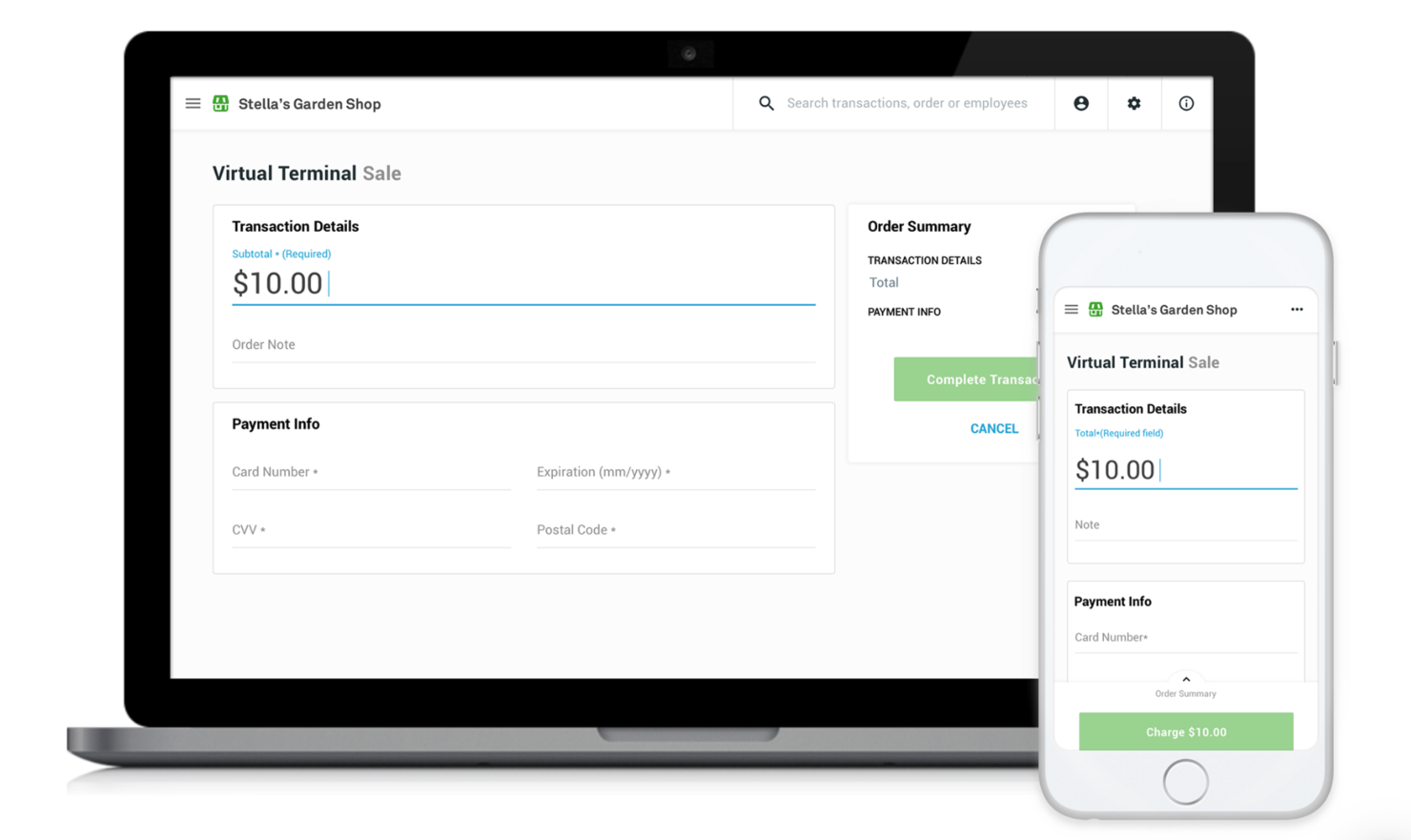
Clover is a comprehensive point-of-sale (POS) system designed to cater to the needs of small businesses through a comprehensive ecosystem that includes a robust suite of hardware and software solutions designed to cater to a wide range of business needs, from small retail setups to bustling restaurants.
Why I picked Clover: I chose Clover because it delivers a comprehensive POS system that supports a variety of payment methods, including credit, debit, gift cards, and contactless payments. This capability is critical in today's market, where consumers expect convenience and flexibility in payment options.
The system allows you to take payments from card readers, POS devices, and online platforms. It even has a virtual terminal you can use whenever you are away from a physical device. This will help you quickly process payments from any device with internet access, like your phone or personal computer.
Clover standout features & integrations
Standout features include its ability to support a wide range of business needs through tools like inventory tracking, staff management, app integration, and customer loyalty programs. Clover’s robust security features, such as end-to-end encryption and PCI compliance, provide peace of mind for businesses and their customers by ensuring transaction safety. The platform’s versatility makes it a great fit for retail setups, restaurants, and other small business environments.
Integrations include a variety of third-party applications, such as Mailchimp for marketing automation, DocuSign for electronic signatures, Shopify for ecommerce, Gusto for payroll and HR, and Xero for accounting. These integrations allow businesses to manage operations across marketing, HR, and financial workflows seamlessly within Clover’s system.
Pros and Cons
Pros:
- 24/7 customer support
- Gift card options
- Modern design
Cons:
- Pricing can be difficult to understand
- Not suitable for all types of businesses


EBizCharge is a payment gateway solution designed for B2B businesses to accept credit card and eCheck payments across multiple channels. It connects directly with your existing ERP, CRM, ecommerce, or accounting system, so you don’t need to juggle extra tools.
Why I picked EBizCharge: I picked EBizCharge because of its flexibility across payment channels. You can accept payments through hosted checkouts, virtual terminals, and even email pay links—all without needing to write code. The gateway supports EMV terminals for secure in-person transactions and gives your customers access to a self-service portal to pay invoices online anytime. It also supports recurring billing, saved cards, and auto-pay, which helps speed up cash flow without extra manual work.
I also like its built-in invoice and sales order management features. You can generate, preauthorize, and update invoices directly inside the platform, and have payments sync automatically into your ERP or accounting software. This not only cuts down on double entry and human error but also means you get paid faster. Plus, tools like auto-reconciliation and tokenization further improve your payment workflows and data security.
EBizCharge standout features & integrations
Standout features include a customizable fraud module that lets you set different levels of security on your gateway, depending on your needs. You also get advanced reporting tools with 50+ search filters to help track transactions, payment channels, and outstanding invoices.
Integrations include Acumatica, QuickBooks Desktop, QuickBooks Online, NetSuite, Microsoft Dynamics, Magento, BigCommerce, Salesforce, Zoho CRM, WooCommerce, Volusion, and Shopify.
Pros and Cons
Pros:
- Secure card data storage with tokenization
- Easy invoice payment for customers via portals
- Integrates well with accounting platforms
Cons:
- Limited language support
- Initial setup can be time-consuming
Other Payment Gateway Options
I didn’t have the space to include full reviews for each of these additional payment gateway providers but they offer some cool features and functionality that could be exactly what you need. Presented for your consideration:
- Stripe
Payment gateway provider for handling recurring transactions
- Braintree
Payment gateway provider for ecommerce businesses
- Payoneer
Payment gateway provider for global businesses and freelancers
- Shift4
Payment gateway provider for businesses of all sizes
- 2Checkout
Payment gateway provider for subscription-based businesses
- Skrill
Payment gateway provider for secure and fast transactions
- BlueSnap
Payment gateway provider for cross-border transactions
- Dwolla
Payment gateway provider for ACH transfers
- Authorize.net
Payment gateway provider for an all-in-one plan
- WePay
Payment gateway provider for WePay platform partners


Our Selection Criteria for Payment Gateway Providers
Choosing the right payment gateway is a crucial step for ecommerce businesses. The ideal solution not only ensures smooth transactions but also enhances security, improves customer satisfaction, and integrates seamlessly with your existing systems.
We’ve designed these selection criteria to match the needs, pain points, and functionalities that matter most. Here’s what to consider:
Core functionality (25% of total weighting score)
These are the fundamental features every payment gateway should include.
- Support for multiple payment methods. Handles credit cards, digital wallets, and bank transfers to give customers flexibility.
- Secure processing. Complies with PCI DSS standards and uses encryption to protect sensitive data.
- Fast processing times. Provides real-time transaction authorization to keep the checkout experience smooth.
- Integration capabilities. Easily integrates with your ecommerce platform, accounting tools, and CRMs.
- Comprehensive reporting. Offers insights into sales, refunds, and transaction trends for smarter business decisions.
Additional features (25% of total weighting score)
These extras offer added value that sets top-tier solutions apart.
- Advanced fraud detection. Leverages AI to detect and prevent suspicious activity.
- Customizable checkout. Lets you tweak the checkout experience to align with your brand.
- Support for global payments. Facilitates multi-currency and cross-border transactions.
- Mobile payment support. Ensures a seamless mobile shopping experience.
- Subscription billing. Automates recurring payments, perfect for businesses offering memberships or services.
Usability (10% of total weighting score)
How user-friendly is the gateway?
- User interface (UI). Clean and intuitive design that makes it easy for staff to navigate.
- Ease of customization. Drag-and-drop functionality that requires no coding knowledge.
- Educational resources. Clear documentation, tutorials, and how-to guides to help users get the most out of the system.
Onboarding (10% of total weighting score)
How quickly and easily can you start using the system?
- Setup process. Simple setup so you can start processing payments without delays.
- Training materials. Includes videos, tutorials, and step-by-step onboarding guides.
- Support during onboarding. Responsive customer support to answer any questions during the setup process.
Customer support (10% of total weighting score)
How well does the provider support you?
- 24/7 support. Round-the-clock assistance through chat, email, or phone.
- Expert team. Knowledgeable support staff who provide quick and effective solutions.
- Self-service resources. Access to forums, FAQs, and a knowledge base for troubleshooting.
Value for money (10% of total weighting score)
Is the pricing fair for what you get?
- Competitive pricing. Cost reflects the feature set and performance of the solution.
- Transparent pricing. No hidden fees or confusing charges.
- Flexible pricing plans. Scalable plans that grow with your business.
Customer reviews (10% of total weighting score)
What do real users think?
- User satisfaction. Positive reviews highlight ease of use and customer service.
- Performance reliability. High ratings for uptime and consistent performance.
- Business impact. Testimonials noting improvements in sales or customer experience.
When choosing a payment gateway provider, you need to consider how well the service can meet your business's needs today and in the future.
What is a Payment Gateway Provider?
Payment gateway providers are services that securely route credit card details, digital wallet tokens, and bank transfers between your checkout and the financial networks.
They handle encryption, tokenization, and customizable fraud filters so you can ditch the compliance headaches.
Retailers, marketplaces, and subscription-based businesses use them to accept every payment method under the sun and scale without sweating the technical bits.
With easy API and plugin integrations, transparent pricing models, and multi-currency support, they keep your revenue flowing and your dev team happy.
How to Choose Payment Gateway Solutions
Choosing a payment gateway is strategic. Pick wrong and you’ll be staring at failed checkouts and angry customers. This table lays out the must-have criteria, what to vet, and why it matters—so you can make a bulletproof decision.
| Criterion | What to look for | Why it matters |
|---|---|---|
| Business needs & volume | Handles your average and peak transaction load. Supports one-off and subscription payments. | Prevent slowdowns or outages during spikes. Ensure your gateway scales with your growth. |
| Integration & customization | Native plugins, REST APIs, SDKs, headless support, white-label checkout options. | Get up and running fast. Tailor the checkout experience to match your brand and tech stack. |
| Security & fraud prevention | AES-256 encryption, tokenization, PCI DSS compliance, machine-learning fraud filters. | Shield your revenue and customers. Reduce chargebacks and compliance headaches. |
| Pricing transparency | Clear breakdown of subscription vs. per-transaction fees; interchange-plus vs. blended rates; no hidden add-ons. | Know your true cost. Negotiate volume discounts. Avoid surprise fees that kill your margins. |
| Scalability & subscription billing | Support for recurring billing, multi-currency, volume discounts, cloud-native infrastructure. | Keep pace with seasonal spikes. Launch or expand subscription models without breaking a sweat. |
| Support & SLA guarantees | 24/7 support channels, dedicated account managers, uptime SLAs. | When payments break, you need help now. Minimize downtime and lost sales. |
When selecting a payment gateway, don't overlook these nonprofit payment processors designed for charitable organizations. And if you're allergic to Stripe, we've got a roundup of the best Stripe alternatives to consider.
Payment Gateway Trends to Watch
Payments never stand still. These shifts will reshape checkout experiences—and your bottom line.
- Real-time payments & instant settlements. Funds clear in seconds, not days, boosting cash flow and cutting reconciliation headaches.
- Digital wallets as identity hubs. Apple Pay and Google Pay evolve beyond payments into secure digital IDs—expect tighter integration with loyalty programs and authentication.
- BNPL’s institutional glow-up. Banks and big finance are backing buy-now-pay-later, driving down costs and expanding options beyond big-ticket items.
- Crypto payments gaining traction. Bitcoin, Ether, stablecoins—and even central bank digital currencies—offer low-fee, cross-border rails for privacy-minded shoppers.
- Omnichannel unification. One checkout flow for online, in-store, mobile app, and social commerce. No more siloed payment stacks or fragmented data.
- Biometric & password-less flows. Fingerprint, facial recognition, even voice payments reduce friction and fraud. Your customers will barely notice—until they try anything else.
- Embedded finance & white-label platforms. Non-bank brands are launching their own “buy” buttons and wallet services, turning checkout into a brand touchpoint.
- Green payments & sustainability. Carbon-neutral processing, e-receipt defaults, and eco-conscious surcharging let you align payments with your ESG goals.
Stay on these trends and your checkout tech will feel cutting-edge, not ancient.
Key Features of Payment Gateways to Consider
A rock-solid gateway is a complete toolkit for your checkout. Here’s what to look for:
- Versatile payment methods. Cards, e-wallets (Apple/Google Pay), ACH transfers, even crypto—give customers every way to pay.
- Integration capabilities. Native plugins, REST APIs, SDKs, headless support—snap into Shopify, WooCommerce, your custom stack, or all three without rewiring your code.
- Security measures. AES-256 encryption, tokenization, PCI DSS compliance, 3D Secure, and ML-driven fraud filters keep data—and fines—in check.
- Subscription & invoicing features. Recurring billing, automated invoices, customizable retry rules—ideal for memberships, SaaS, or any model that thrives on predictable MRR.
- Fraud prevention tools. Custom rule engines, velocity checks, geoblocking, real-time alerts—stop fraudsters without blocking real customers.
- Customization & branding. White-label checkouts, custom fields, developer toolkits—make every payment flow feel like part of your brand.
- Types of gateways. Self-hosted vs redirect (non-hosted) vs fully hosted SaaS—choose your control vs compliance trade-off.
- Mobile & international support. Responsive checkout, in-app payments, local methods, FX conversion, and global compliance for cross-border sales.
- Reporting, analytics & UI. Intuitive dashboards deliver transaction details, sales trends, refund rates, and customer insights at a glance.
- Scalability & performance. Cloud-native architecture with auto-scaling, load balancing, and sub-second authorizations—no slowdowns at peak traffic.
- Chargeback management. Built-in dispute tools, evidence collection, and lifecycle tracking help you win more reversals.
Top Benefits of Great Payment Gateway Providers
Payment gateways do far more than move money. They boost customer trust, cut fraud losses, and give you real-time insights—powering better decisions and smoother operations at every turn.
- Rock-solid security & fraud prevention. AES-256 encryption, tokenization, and ML-driven filters shield your revenue from crooks and compliance fines.
- Higher conversion with versatile payments. Cards, e-wallets, ACH, even crypto—offer every way to pay and watch cart abandonment drop.
- Seamless integration for smoother ops. Native plugins, REST APIs, SDKs, and headless support bolt into Shopify, WooCommerce, or your custom stack without code gymnastics.
- Transparent pricing & cost control. Interchange-plus or flat-fee models, subscription vs. per-transaction plans, and volume-discount options eliminate nasty fee surprises.
- Scalable performance that grows with you. Cloud-native infra auto-scales for traffic spikes, while built-in subscription tools lock in reliable MRR.
- Automated recurring revenue. Recurring billing, retry rules, and dunning management free you from late-pay headaches.
- Brand-tailored checkout UX. White-label pages, custom fields, and developer toolkits keep the payment flow unmistakably yours.
- Global reach made simple. Multi-currency support, local methods, and compliance baked in for cross-border sales without extra headaches.
- Actionable analytics at a glance. Dashboards packed with transaction data, refund metrics, and sales trends fuel smarter strategies.
- Mobile-first convenience. Responsive checkouts and in-app payments deliver a frictionless experience on any device.
Cost & Pricing for Payment Gateway Providers
Pricing can feel like a minefield—monthly plans, per-transaction fees, and hidden charges can eat your margins alive. Finding cheapest credit card processing services becomes essential for cost-conscious businesses. This table lays out four common pricing tiers so you can eyeball what fits your budget and your transaction volume.
| Plan type | Monthly fee | Transaction fee (avg) | Best for |
|---|---|---|---|
| Pay-as-you-go | $0 | 2.9% + $0.30 per txn | Micro-stores, pop-ups, side hustles |
| Starter | $15–30/month | 2.6% + $0.25 per txn | Small online shops ($5k–50k/mo volume) |
| Growth | $50–100/month | 2.4% + $0.20 per txn | Scaling SMBs ($50k–500k/mo) |
| Enterprise | Custom pricing | Negotiated interchange-plus rates | High-volume & global brands |
Key considerations
- Subscription vs pay-as-you-go. Fixed monthly fees cap your costs; transaction-only plans keep startups lean.
- Interchange-plus vs blended rates. Interchange-plus shows wholesale fees plus markup. Blended simplifies billing but can hide markups.
- Hidden-fee hotspots. Watch for cross-border surcharges, currency-conversion fees, chargeback/refund fees, PCI compliance charges, and statement fees.
- Volume discounts & negotiation. If you process big numbers, haggle for custom rate tiers, waived setup fees, and priority support.
- Settlement times & payout delays. Faster funds improve cash flow—know each provider’s payout schedule.
- Support & SLAs. 24/7 support, dedicated account managers, and uptime guarantees keep your revenue pipeline healthy.
Payment Gateway FAQs
As you continue learning about payment gateway providers, you may encounter some common questions. Here are a few of the most frequently asked questions.
How quickly do payment gateways settle funds and what affects payout times?
Authorization happens instantly, but settlement (when funds hit your bank) can take anywhere from same-day to three business days. Timing depends on your merchant level, your bank’s processing windows, and any holds on high-risk or international transactions.
How can I test and sandbox a payment gateway before going live?
Most gateways provide a dedicated sandbox environment with test API keys and dummy cards so you can simulate real-world transactions—and all the “oops” scenarios—without touching live funds. Always run authorization, capture, refund, and webhook tests before flipping the switch to production.
Can I switch or migrate payment gateways without losing historical data?
Modern gateways let you export/import customer tokens, recurring-billing profiles, and transaction logs via CSV or API. Plan an overlap period with both gateways live, verify your reports, then sunset the old service to keep every penny of history intact.
What parts of PCI compliance does my gateway handle, and what’s still on me?
Gateways tackle core requirements—encryption, tokenization, and secure data transmission—shrinking your PCI DSS scope. You’re on the hook for securing checkout pages, maintaining your SAQ paperwork, and following your provider’s integration best practices.
Which metrics should I monitor in my payment gateway dashboard?
Keep an eye on authorization rates, decline reasons, chargeback ratios, average order value, and payment-method performance. These stats spotlight friction points, cost leakers, and growth opportunities so you can tweak your setup for max revenue.
How do I optimize my payment gateway for mobile-first customers?
Choose a gateway with a responsive checkout, in-app SDKs, and native support for mobile wallets like Apple Pay and Google Pay. Test on real devices, trim form fields, and leverage autofill tokens to cut friction on small screens.
Other Payment Software Reviews
These software review lists may complement your search for payment gateway software. I focused on software reviews for payment or payment-adjacent technologies, like payment processing software or BNPL.
- Buy-Now-Pay-Later (BNPL) Platforms: Let your customers pay for high ticket items in installments, making for a much more user-friendly experience.
- Ecommerce Fraud Prevention Software: Make sure every transaction on your store website is legitimate; protect yourself and your customers!
- Ecommerce Accounting Software: Make sure you have access to a complete accounting system for collecting payments and tracking taxes.
What's Next?
If you're in the process of researching payment gateway providers, connect with a SoftwareSelect advisor for free recommendations.
You fill out a form and have a quick chat where they get into the specifics of your needs. Then you'll get a shortlist of software to review. They'll even support you through the entire buying process, including price negotiations.ng the industry.