

Il software di integrazione per l'e-commerce collega il tuo sito di e-commerce ad altri sistemi aziendali, consentendoti di sincronizzare i dati dell'e-commerce, automatizzare i flussi di lavoro e gestire le operazioni da un unico luogo. Se stai cercando modi per ridurre il lavoro manuale che richiede molto tempo, evitare errori costosi e mantenere sincronizzati i tuoi canali di vendita, la piattaforma giusta può aiutarti a ottimizzare le operazioni e migliorare l'esperienza complessiva dei clienti della tua attività online. Molte soluzioni di e-commerce funzionano come piattaforme tutto-in-uno che collegano la gestione delle relazioni con i clienti, il marketing via e-mail, l'evasione degli ordini e gli strumenti per i social media all'interno di un ecosistema unificato. Questo aiuta le aziende a gestire le vendite omnicanale mantenendo dati coerenti nel proprio insieme di software per l'e-commerce.
Questo elenco ti aiuterà a confrontare i principali software di integrazione per l'e-commerce del 2026, così potrai trovare una soluzione facile da usare che si adatti allo stack tecnologico del tuo team, ai canali di vendita e ai piani di crescita.
Perché fidarsi dei nostri consigli sui software
6,700+
Reviews
20
Industry experts
16+
Evaluation factors
14
Years
Il nostro team testa e recensisce software dal 2012. In quanto leader del retail noi stessi, sappiamo quanto sia difficile — e importante — scegliere il software giusto.
Per questa guida, abbiamo valutato gli strumenti attraverso test pratici e ricerche indipendenti, assegnando un punteggio agli strumenti in base ai nostri criteri di selezione.
Le nostre recensioni riflettono il nostro giudizio indipendente, non un discorso di vendita.
Tabella comparativa dei software di integrazione per l'e-commerce
Questa tabella comparativa riassume i dettagli dei prezzi delle mie migliori selezioni di software di integrazione per l’e-commerce:
| Tool | Best For | Trial Info | Price | ||
|---|---|---|---|---|---|
| 1 | Ideale per modelli di automazione preconfigurati | Prova gratuita di 30 giorni | Prezzi su richiesta | Website | |
| 2 | Ideale per l'automazione di flussi di lavoro personalizzati | Demo gratuita disponibile | A partire da $1,495/mese | Website | |
| 3 | Ideale per integrazioni di livello aziendale | Piano gratuito disponibile | A partire da $100/al mese | Website | |
| 4 | Ideale per collegare negozi multicanale | Prova gratuita di 14 giorni | Da $95/mese | Website | |
| 5 | Ideale per implementazioni cloud rapide | 30 giorni di prova gratuita | A partire da $99/mese | Website | |
| 6 | La soluzione migliore per il supporto all'integrazione con i marketplace | Prova gratuita di 14 giorni | A partire da 300 $ al mese (con fatturazione annuale) | Website | |
| 7 | Ideale per la mappatura dei dati basata sull'intelligenza artificiale | Demo gratuita disponibile | A partire da $9,995/anno (fatturato annualmente) | Website | |
| 8 | Ideale per la connettività dei sistemi ERP | Prova gratuita di 30 giorni | Da $99/mese | Website | |
| 9 | Ideale per l'accesso a API unificate | Prova gratuita di 30 giorni | A partire da $599/mese | Website | |
| 10 | Ideale per la sincronizzazione con le piattaforme di contabilità | Prova gratuita di 15 giorni | A partire da $69/mese | Website |


Recensioni dei software di integrazione per l'e-commerce
Di seguito trovi i miei riepiloghi dettagliati dei software di integrazione per l’e-commerce inclusi nel mio elenco ristretto. Le mie recensioni offrono una panoramica dettagliata delle funzionalità, delle integrazioni e dei migliori casi d’uso di ogni piattaforma, per aiutarti a trovare quella più adatta alla tua attività.
 Ideale per modelli di automazione preconfigurati
- Prova gratuita di 30 giorni
- Prezzi su richiesta
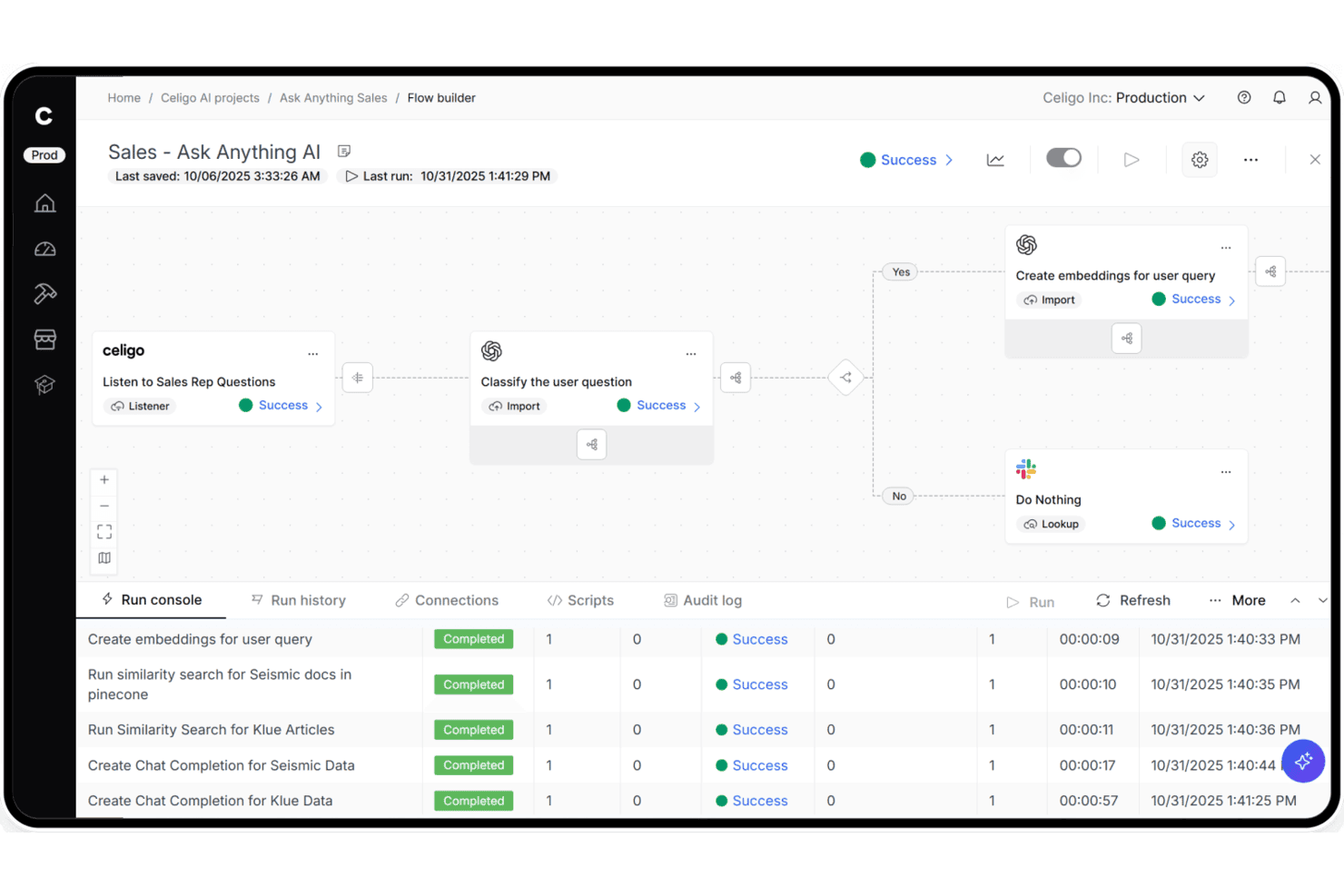
Celigo consente agli utenti di creare flussi di vendita basati sull'IA con un'automazione passo dopo passo. Celigo è una piattaforma iPaaS che collega vetrine di e-commerce, marketplace, ERP e sistemi di evasione degli ordini tramite una libreria di oltre 1.000 connettori preconfigurati, un generatore visivo di flussi, il supporto EDI nativo e la gestione degli errori basata sull'IA.
Per chi è più adatto Celigo?
Celigo è particolarmente adatto ai rivenditori del mercato medio e alle aziende, che devono collegare più canali di vendita, ERP e sistemi di evasione degli ordini senza dipendere eccessivamente dal reparto tecnico.
Perché ho scelto Celigo
Ho scelto Celigo come una delle soluzioni migliori perché la sua libreria di oltre 1.000 connettori preconfigurati consente di implementare un'integrazione tra Shopify e NetSuite o tra Amazon e QuickBooks in meno di tre giorni, anziché in settimane. Apprezzo in particolare la Gestione delle eccezioni con IA, che risolve automaticamente il 95–96% degli errori di sincronizzazione senza alcun intervento. Anche il Gestore B2B nativo per l'EDI è integrato direttamente nella piattaforma, così è possibile attivare partner commerciali del settore della vendita al dettaglio come Walmart o Target in appena due settimane.
Funzionalità principali di Celigo
- EDI nativo tramite il Gestore B2B: Una soluzione EDI integrata che supporta tipi di documenti commerciali come 850, 810 e 856, con connettori preconfigurati per partner commerciali tra cui Walmart, Target e Costco.
- Generatore visivo di flussi: Un'interfaccia con funzionalità di trascinamento per creare e configurare flussi di integrazione senza scrivere codice, disponibile sia per gli utenti tecnici sia per quelli non tecnici.
- Modelli di agenti IA per il commercio: Agenti IA preconfigurati per attività come la riconciliazione dei pagamenti Amazon, il rilevamento delle vendite oltre la disponibilità e la pianificazione della domanda, che operano autonomamente all'interno dei flussi di lavoro.
- Connettori per pipeline di dati: Integrazioni integrate con Snowflake, Google BigQuery, Tableau e Looker che trasferiscono i dati commerciali e operativi direttamente al tuo ecosistema di analisi.
Integrazioni di Celigo
Celigo offre oltre 1.000 connettori preconfigurati e oltre 300 integrazioni del marketplace, tra cui Shopify, Amazon, NetSuite, Walmart Marketplace, BigCommerce, QuickBooks, ShipBob, Stripe, Snowflake e Google BigQuery. I connettori universali supportano HTTP, FTP, JDBC, AS2, GraphQL e i ganci web.
Pros and Cons
Pros:
- Risolve automaticamente la maggior parte degli errori di sincronizzazione grazie all'IA
- I modelli di integrazione preconfigurati vengono implementati in pochi giorni
- L'EDI integrato supporta i principali partner della vendita al dettaglio
Cons:
- L'interfaccia per la mappatura dei campi può risultare frustrante per gli utenti non tecnici
- I messaggi di errore possono non contenere descrizioni chiare
Learn more about Celigo: Ideale per l'automazione di flussi di lavoro personalizzati
- Demo gratuita disponibile
- A partire da $1,495/mese
Visit WebsiteCustomer Rating:4.8/5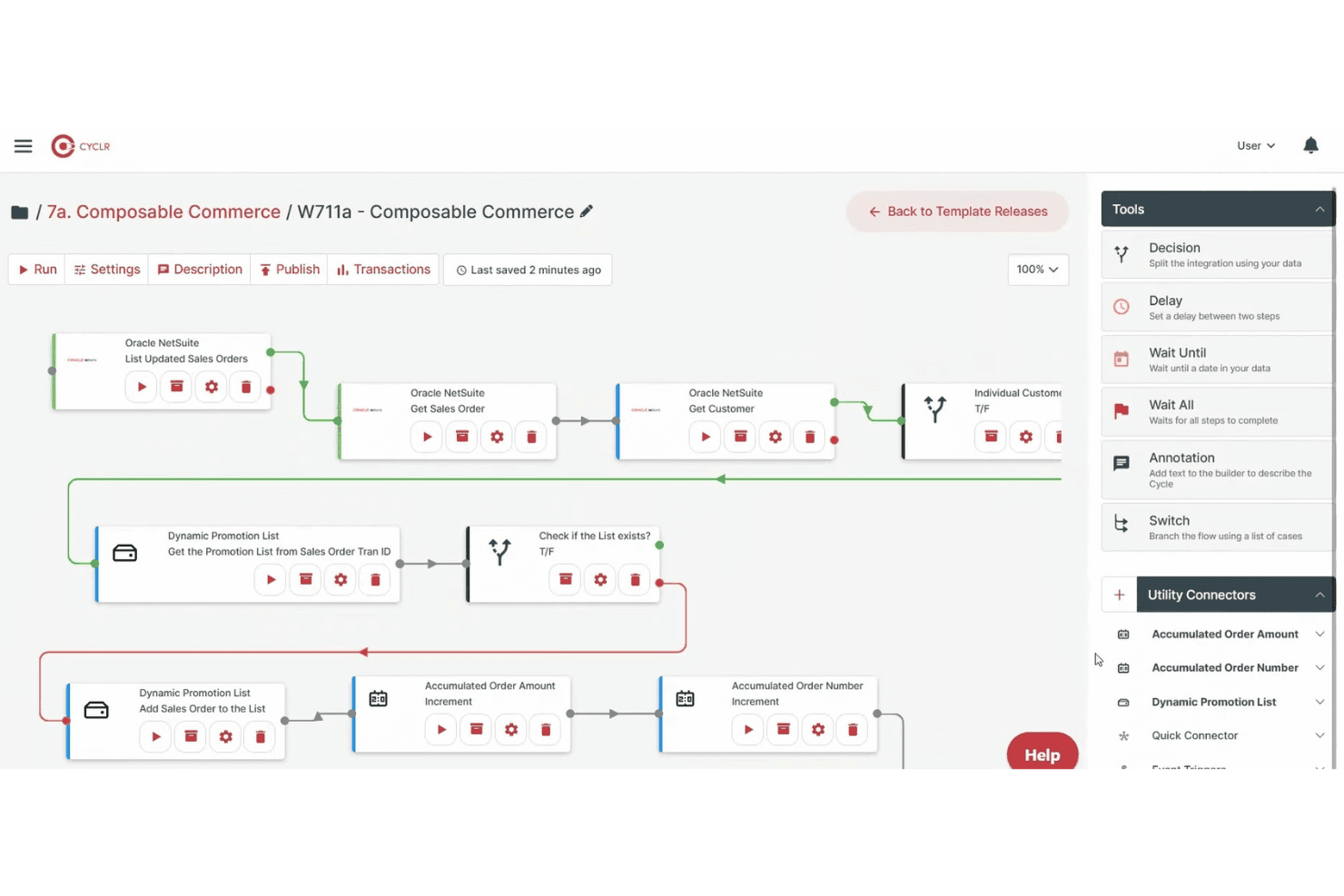
Cyclr consente agli utenti di creare flussi di lavoro automatizzati con strumenti logici basati sul trascinamento. Cyclr è una piattaforma iPaaS integrabile con una libreria di oltre 600 connettori API, inclusi 55 specifici per l'e-commerce, che consente di creare, distribuire e gestire flussi di lavoro di integrazione automatizzati tra vetrine online, ERP, strumenti di contabilità e sistemi logistici.
A chi è più adatto Cyclr?
Cyclr è particolarmente adatto alle aziende SaaS che desiderano integrare flussi di lavoro personalizzati per l'e-commerce nei propri prodotti, mettendoli a disposizione degli utenti finali.
Perché ho scelto Cyclr
Cyclr entra nella mia selezione ristretta per la flessibilità con cui consente di estendere la logica dei flussi di lavoro personalizzati senza dover scrivere da zero il codice completo dell'integrazione. Apprezzo molto il fatto che il suo strumento di creazione visivo supporti gli script JavaScript e la diramazione condizionale a livello di campo, permettendo di gestire scenari complessi come la suddivisione di un ordine Shopify tra più destinazioni 3PL o l'arricchimento dei dati degli ordini WooCommerce prima che arrivino in NetSuite. L'architettura basata su modelli consente di distribuire istantaneamente questi flussi di lavoro personalizzati tra più istanze dei clienti.
Caratteristiche principali di Cyclr
- Mercato integrato delle integrazioni: Un mercato delle integrazioni a marchio bianco che puoi integrare direttamente nel tuo prodotto SaaS, così gli utenti finali possono configurare autonomamente le integrazioni senza sviluppare un'interfaccia utente personalizzata.
- Toolkit per connettori personalizzati: Un toolkit integrato per creare connettori verso API proprietarie utilizzando un convertitore automatico OpenAPI/Swagger oppure la mappatura manuale, passo dopo passo, delle API.
- Supporto per server MCP: Espone i metodi dei connettori e-commerce, come stato degli ordini, inventario ed evasione, come strumenti MCP governati che gli agenti di IA possono chiamare direttamente.
- Distribuzione di flussi di lavoro tra più istanze: I modelli di integrazione possono essere distribuiti e gestiti centralmente tra più istanze dei clienti da un unico punto di controllo.
Integrazioni di Cyclr
Cyclr offre 55 integrazioni e-commerce native, tra cui Shopify, WooCommerce, Magento 2, BigCommerce, eBay, Amazon Selling Partner, Ecwid, Wix, Squarespace e Lightspeed eCommerce. Il toolkit per connettori personalizzati supporta le API proprietarie tramite OpenAPI/Swagger o la mappatura manuale delle API.
Pros and Cons
Pros:
- Gestisce l'automazione di flussi di lavoro complessi per i rivenditori
- Fornisce un mercato delle integrazioni per gli utenti SaaS
- Consente la mappatura e gli script dei dati a livello di campo
Cons:
- È più adatto ai fornitori SaaS che ai rivenditori direttamente
- Non offre supporto nativo per le integrazioni EDI
Learn more about Cyclr: Ideale per integrazioni di livello aziendale
- Piano gratuito disponibile
- A partire da $100/al mese
Visit WebsiteCustomer Rating:4.7/5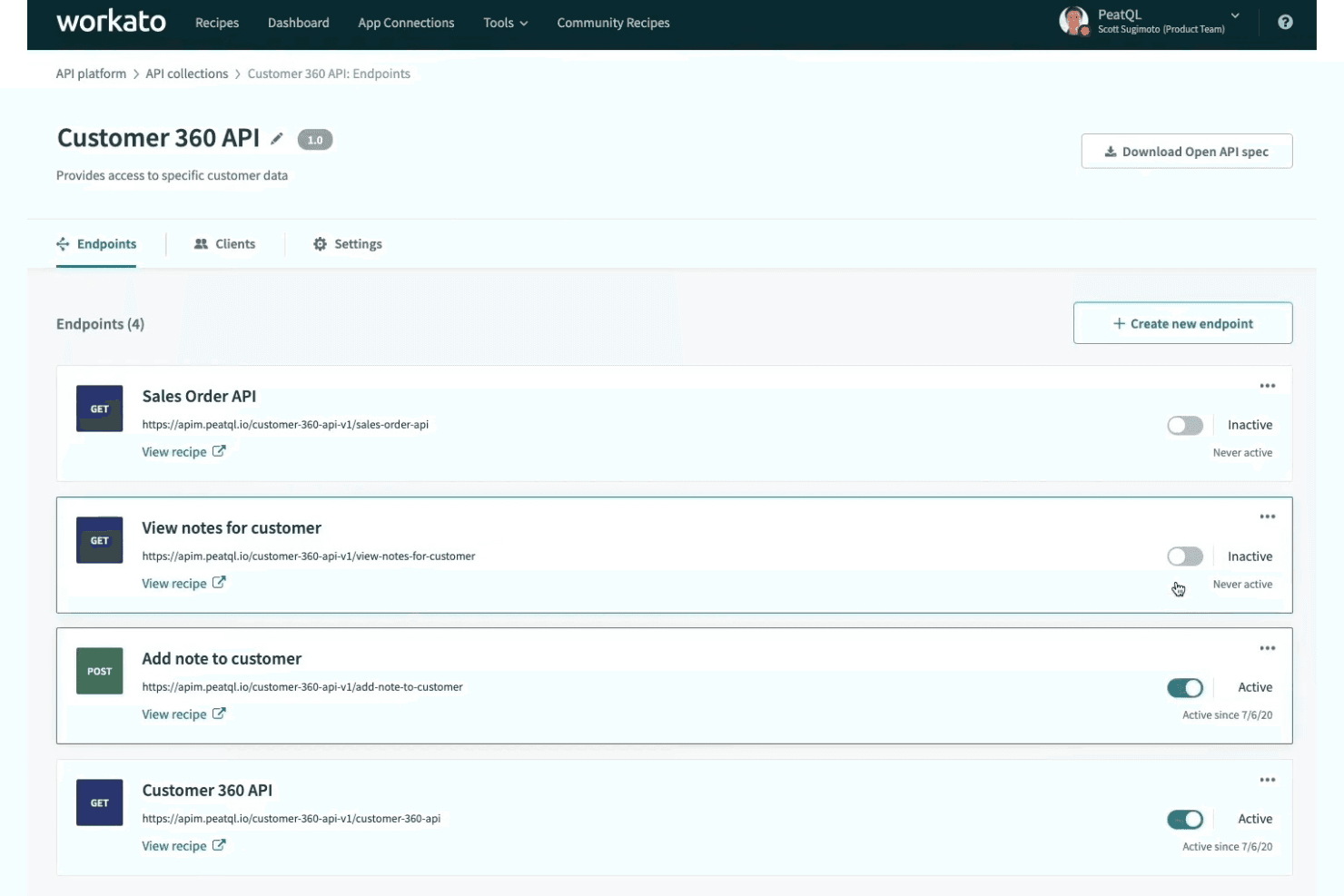
Workato consente agli utenti di gestire e attivare gli endpoint API da un'unica dashboard. Workato è una piattaforma di integrazione a basso codice che collega vetrine di e-commerce, marketplace e sistemi di back-office tramite connettori predefiniti, automazione dei flussi di lavoro, sincronizzazione dei dati in tempo reale e supporto EDI nativo.
Per chi è più adatto Workato?
Workato è particolarmente adatto ai team di vendita al dettaglio e di e-commerce del mercato medio e delle grandi aziende che gestiscono integrazioni complesse tra più piattaforme, ERP e partner commerciali.
Perché ho scelto Workato
Workato è entrato nella mia rosa dei preferiti perché il suo supporto EDI nativo, basato su Orderful, gestisce le transazioni 850/856/810 in tempo reale e consente di configurare nuovi partner commerciali in appena nove giorni. L'ho scelto nello specifico per i team aziendali che gestiscono operazioni multicanale complesse, dove i suoi modelli decisionali consentono di gestire la logica di evasione degli ordini e le regole di determinazione dei prezzi in tabelle decisionali autonome, invece di nascondere tale logica nei singoli flussi di lavoro. La sincronizzazione omnicanale dell'inventario collega POS, vetrine, magazzini ed ERP come NetSuite e SAP in centinaia di sedi contemporaneamente.
Funzionalità principali di Workato
- Mappatura con AI Copilot: un assistente IA che prepara bozze di ricette, suggerisce mappature dei campi e aiuta a risolvere gli errori direttamente nel generatore di ricette.
- Agente locale: un agente leggero che collega i sistemi locali, come ERP e database precedenti, al cloud di Workato senza aprire porte in ingresso nel firewall.
- Elaborazione intelligente dei documenti: estrae automaticamente i dati da fatture, ricevute e ordini di acquisto e li indirizza nei flussi di lavoro collegati.
- Oltre 700.000 ricette della comunità: una raccolta consultabile di modelli di flussi di lavoro predefiniti che puoi clonare e adattare agli scenari comuni di integrazione del commercio elettronico e della vendita al dettaglio.
Integrazioni di Workato
Workato offre oltre 1.200 connettori predefiniti, incluse integrazioni native con Shopify, BigCommerce, WooCommerce, Magento 2, Amazon Seller Central, Walmart Seller Center, NetSuite, SAP, Dynamics 365 e QuickBooks. Il suo connettore HTTP supporta integrazioni personalizzate e sistemi locali.
Pros and Cons
Pros:
- Sincronizzazione omnicanale in tempo reale dell'inventario e degli ordini
- Supporto EDI nativo con configurazione rapida dei partner
- AI Copilot accelera la risoluzione degli errori e la mappatura
Cons:
- L'analisi dei CSV e le tabelle di ricerca hanno limiti
- Il debug e il tracciamento dei flussi di lavoro possono essere complessi
Learn more about Workato: Ideale per collegare negozi multicanale
- Prova gratuita di 14 giorni
- Da $95/mese
Visit WebsiteCustomer Rating:4.7/5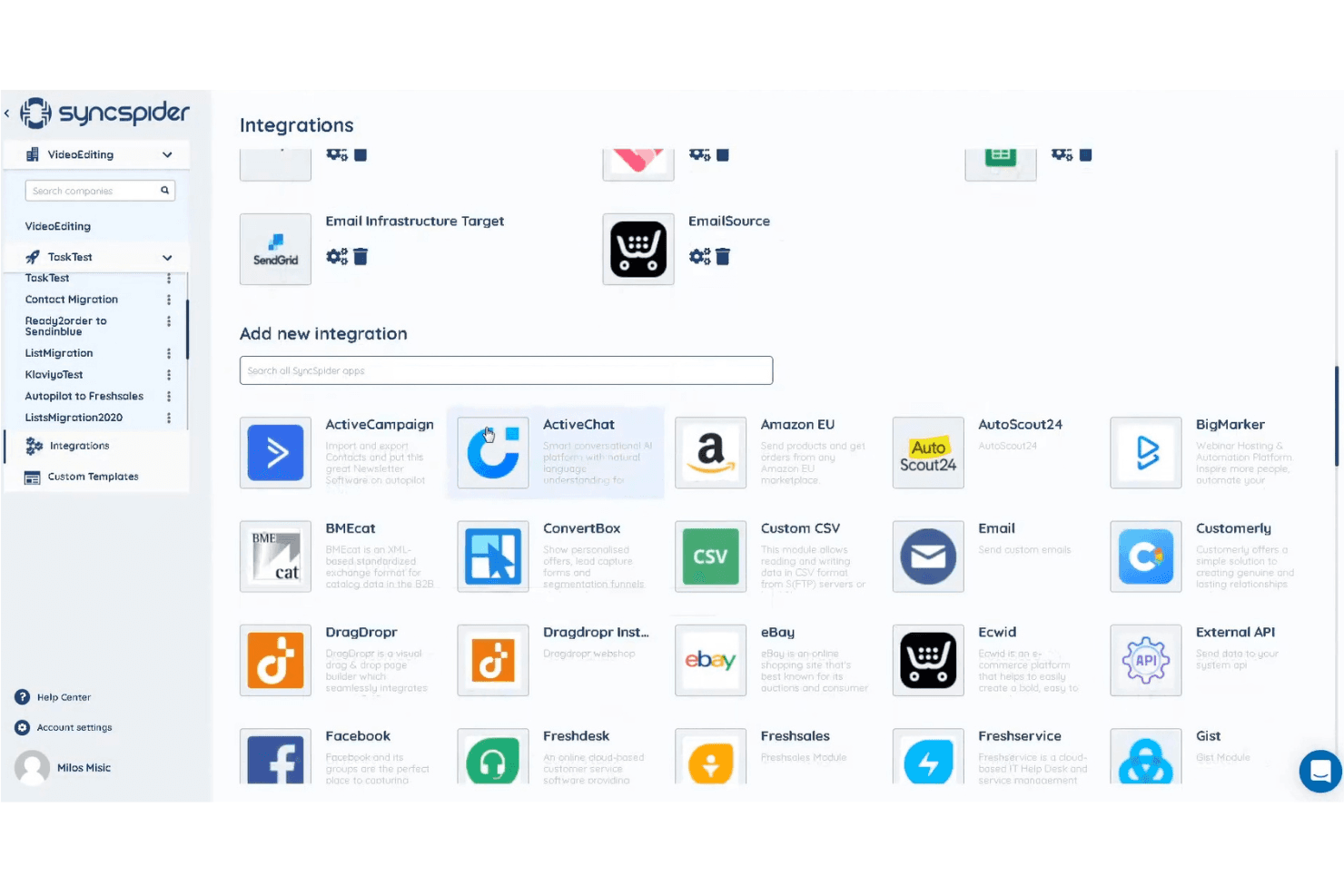
SyncSpider consente agli utenti di collegare le app tramite una libreria di integrazioni ricercabile. SyncSpider è una piattaforma di integrazione pensata innanzitutto per l'e-commerce che collega negozi online, marketplace, ERP e sistemi di back office tramite oltre 400 connettori preconfigurati, un generatore visivo di flussi di lavoro e un DataHub centralizzato per gestire e arricchire i dati di prodotti, ordini e inventario su più canali.
Per chi è più adatto SyncSpider?
SyncSpider è una soluzione ideale per i team di e-commerce multicanale che devono collegare più negozi, marketplace e sistemi di back office senza creare integrazioni personalizzate da zero.
Perché ho scelto SyncSpider
SyncSpider è entrato nella mia lista ristretta perché è stato sviluppato specificamente per l'e-commerce multicanale, anziché essere adattato da uno strumento generico di automazione. Mi piace molto il modo in cui il suo DataHub centralizza i dati di prodotti, ordini e inventario di ogni negozio e marketplace collegato, così non è necessario riconciliare manualmente le scorte tra Shopify, Amazon e Zalando. Anche il suo connettore di database per Windows si distingue: collega gli ERP locali che non dispongono di API standard, una lacuna reale che la maggior parte delle piattaforme basate esclusivamente sul cloud semplicemente non riesce a colmare.
Funzionalità principali di SyncSpider
- Mappatura automatica tramite IA: Suggerisce automaticamente le corrispondenze tra i campi dei sistemi di origine e di destinazione, riducendo la configurazione manuale quando si collegano le piattaforme.
- Automazione dei marketplace multi-vendor: Automatizza l'inserimento dei venditori, le inserzioni dei prodotti e la sincronizzazione degli ordini per gli operatori che gestiscono ambienti marketplace multi-vendor.
- Attivatori delle attività configurabili: Supporta sincronizzazioni pianificate (ogni ora, ogni giorno, ogni settimana) e attivatori basati su eventi tramite webhook, attivatori URL o eventi di completamento delle attività.
- Logica di nuovi tentativi automatici: Ritenta automaticamente le attività non riuscite fino a tre volte quando i timeout o gli errori della piattaforma di destinazione interrompono una sincronizzazione.
Integrazioni di SyncSpider
SyncSpider offre oltre 400 integrazioni preconfigurate, tra cui Shopify, WooCommerce, Magento 2, BigCommerce, Amazon Seller Central, eBay, Zalando, SAP, Microsoft Dynamics 365 e Odoo. Il suo generatore di integrazioni personalizzate supporta le connessioni API, mentre il connettore di database per Windows collega i database locali.
Pros and Cons
Pros:
- Progettato specificamente per i flussi di lavoro dell'e-commerce
- Il DataHub centralizzato gestisce le informazioni sui prodotti
- Gestisce le esigenze di integrazione con ERP locali
Cons:
- Nessun connettore nativo per il marketplace Walmart
- Per alcuni flussi di lavoro avanzati è necessario l'aiuto di uno sviluppatore
Learn more about SyncSpider: Ideale per implementazioni cloud rapide
- 30 giorni di prova gratuita
- A partire da $99/mese
Visit WebsiteCustomer Rating:4.4/5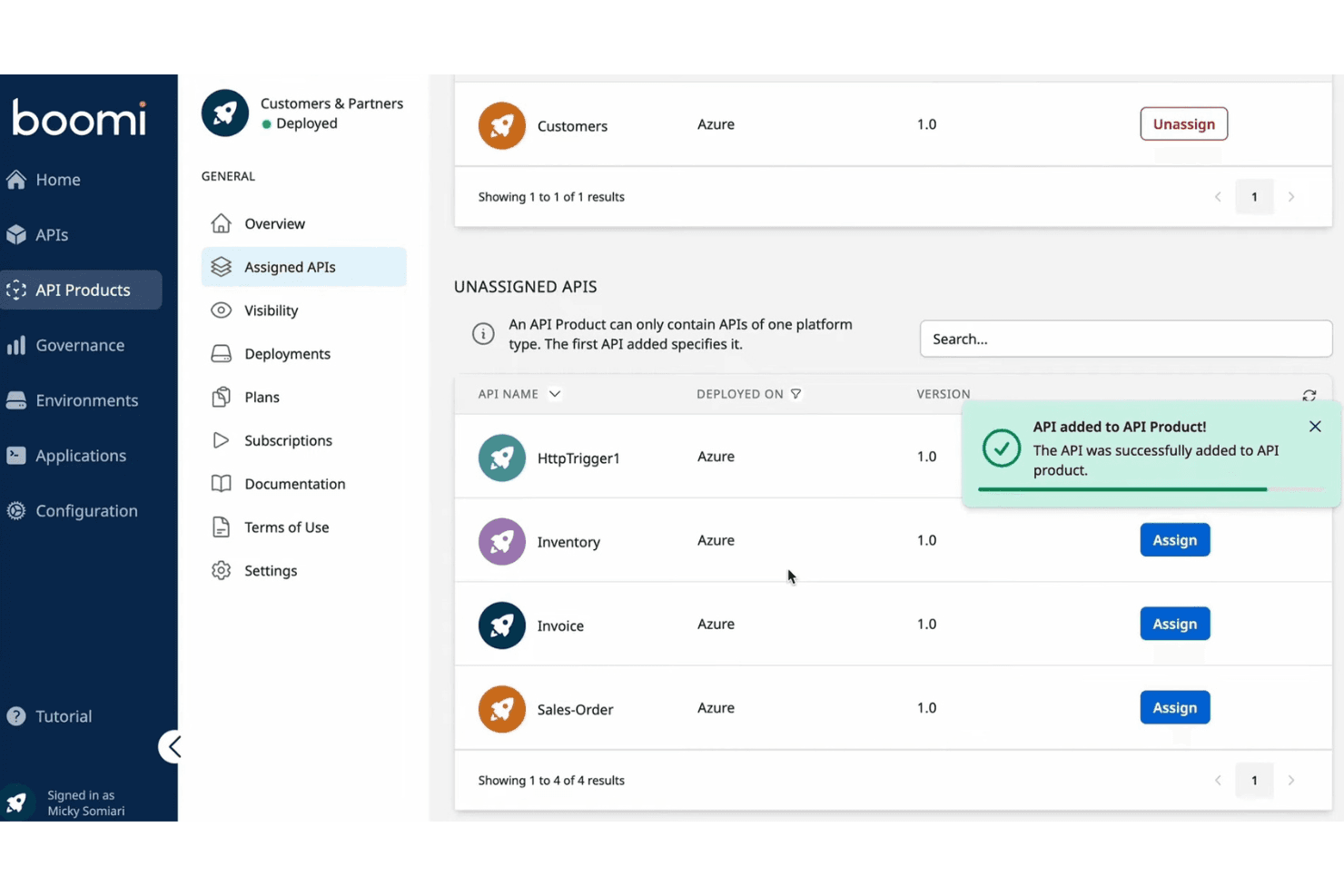
Boomi consente agli utenti di assegnare e gestire le API all'interno di un prodotto API. Boomi è una iPaaS aziendale che collega vetrine ecommerce, ERP, marketplace e sistemi di back office attraverso oltre 1.000 connettori predefiniti, mappatura dei dati a basso codice, sincronizzazione bidirezionale e gestione B2B/EDI nativa.
Per chi è più adatto Boomi?
Boomi è una soluzione adatta ai retailer di medie e grandi dimensioni con team IT o di integrazione dedicati, che hanno bisogno di collegare sistemi ERP come NetSuite o SAP alle proprie vetrine ecommerce su larga scala.
Perché ho scelto Boomi
Ho scelto Boomi come una delle soluzioni migliori perché i suoi acceleratori predefiniti riducono concretamente i tempi di implementazione, in modi che non riscontro nella maggior parte degli strumenti iPaaS. Ad esempio, NetSuite + Shopify Integration Accelerator gestisce la sincronizzazione in tempo reale di ordini, inventario, prodotti e pagamenti fin dall'inizio, evitando di dover creare questi flussi da zero. Boomi Suggest utilizza inoltre l'intelligenza artificiale per consigliare automaticamente le mappature dei campi, velocizzando il lavoro di configurazione che in genere rallenta le implementazioni cloud.
Caratteristiche principali di Boomi
- Gestione B2B/EDI nativa: Boomi include il supporto EDI integrato per partner commerciali, operatori 3PL e distributori all'ingrosso, senza richiedere middleware separati.
- Flussi di eventi: questo modulo abilita un flusso di dati in tempo reale e basato sugli eventi tra i sistemi collegati, mantenendo aggiornati i dati di inventario e degli ordini durante i periodi di elevati volumi.
- Pannello Boomi Insights: un livello di analisi SaaS che monitora le eccezioni di esecuzione, gli errori dei listener, lo stato di salute dell'ambiente di esecuzione e la scadenza dei certificati in tutte le integrazioni.
- SDK dei connettori: i team possono creare connettori personalizzati per piattaforme non coperte nativamente, estendendo Boomi oltre la sua libreria predefinita.
Integrazioni di Boomi
Boomi offre oltre 1.000 connettori predefiniti, incluse integrazioni native con Shopify, NetSuite, SAP, Salesforce, Microsoft Dynamics, Workday e QuickBooks, oltre a integrazioni marketplace per Magento, BigCommerce, WooCommerce e Amazon Selling Partner API. Il suo SDK dei connettori e il supporto OpenAPI consentono di realizzare integrazioni personalizzate.
Pros and Cons
Pros:
- Gli acceleratori predefiniti riducono drasticamente i tempi di implementazione
- Sincronizzazione dei dati in tempo reale tra più canali
- Gestione B2B ed EDI nativa inclusa
Cons:
- Non è specializzato nelle integrazioni marketplace
- Le trasformazioni complesse dei dati richiedono competenze di scripting
Learn more about Boomi: La soluzione migliore per il supporto all'integrazione con i marketplace
- Prova gratuita di 14 giorni
- A partire da 300 $ al mese (con fatturazione annuale)
Visit WebsiteCustomer Rating:4.7/5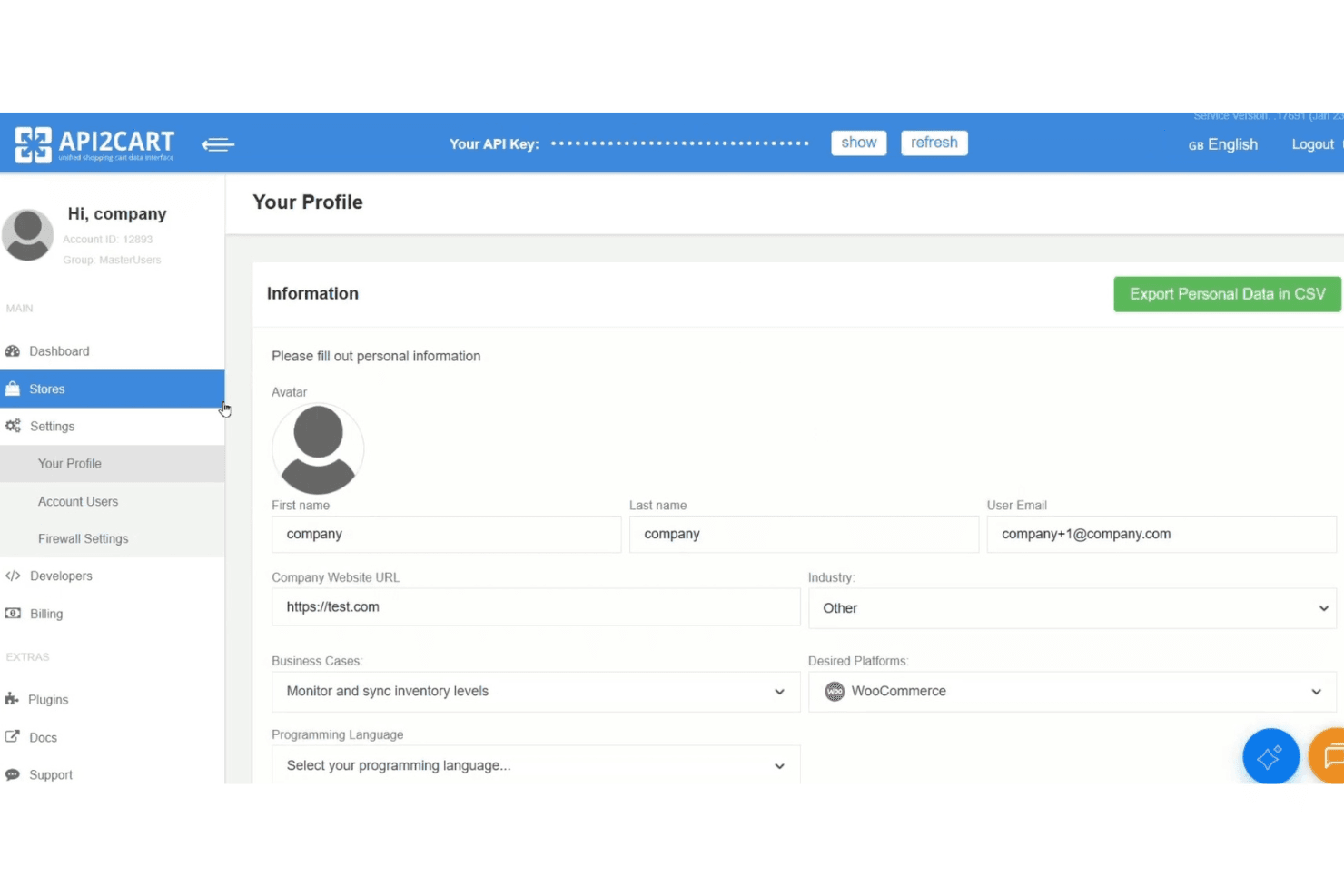
API2Cart consente agli utenti di gestire le impostazioni del profilo e l'accesso alle chiavi API. API2Cart è una piattaforma API unificata che si connette a oltre 80 piattaforme e marketplace di e-commerce, tra cui Shopify, Amazon, eBay, Walmart e TikTok Shop, attraverso un unico punto di integrazione per gestire ordini, prodotti, inventario e dati dei clienti.
Per chi è più adatto API2Cart?
API2Cart è particolarmente adatto agli sviluppatori software e ai team ISV che realizzano prodotti che devono connettersi a decine di piattaforme e marketplace di e-commerce tramite un'unica API.
Perché ho scelto API2Cart
Ho scelto API2Cart come una delle migliori soluzioni perché nessun altro strumento della mia lista si connette a un numero così elevato di marketplace tramite un'unica API, includendo Amazon, eBay, Walmart, TikTok Shop, Mercado Libre, Lazada e Temu, oltre a più di 80 piattaforme di e-commerce. Apprezzo particolarmente il sistema di filtraggio dei webhook, che attiva gli eventi di sincronizzazione solo quando vengono soddisfatte condizioni specifiche, evitando così che i team che realizzano flussi di ordini per più marketplace siano sommersi da chiamate non necessarie. Il modello di dati normalizzato consente inoltre a una singola chiamata API di gestire prodotti, ordini e clienti in ogni negozio connesso, senza dover creare mappature specifiche per ciascuna piattaforma.
Caratteristiche principali di API2Cart
- Modello di dati unificato: Un singolo schema normalizzato gestisce prodotti, ordini, clienti e inventario su tutte le oltre 80 piattaforme connesse, senza mappature dei campi specifiche per ciascuna piattaforma.
- Implementazione locale per aziende: Ospita API2Cart sulla tua infrastruttura AWS, Azure, Google Cloud o Hetzner per avere il pieno controllo sui dati e utilizzare un marchio personalizzato.
- Generatore di plugin: Un componente aggiuntivo che genera plugin personalizzati e pronti per la distribuzione sulle principali piattaforme di e-commerce, senza dover scrivere da zero codice personalizzato per i plugin.
- Filtraggio
response_fields: Consente di specificare esattamente quali campi restituire in qualsiasi risposta API, riducendo le dimensioni del carico utile e il consumo mensile di richieste API.
Integrazioni di API2Cart
API2Cart si integra con oltre 80 piattaforme e marketplace di e-commerce, tra cui Shopify, WooCommerce, BigCommerce, Magento, Amazon, eBay, Walmart, TikTok Shop, Mercado Libre e Temu. La sua API unificata supporta integrazioni personalizzate con software ERP, POS, WMS, PIM e di contabilità.
Pros and Cons
Pros:
- Supporta oltre 80 piattaforme e marketplace di e-commerce
- L'API unificata riduce il lavoro di sviluppo per più piattaforme
- Webhook avanzati con filtraggio per la sincronizzazione in tempo reale
Cons:
- Nessun generatore visivo di flussi di lavoro per gli utenti non sviluppatori
- La documentazione sulle funzionalità avanzate di monitoraggio è limitata
Learn more about API2Cart: Ideale per la mappatura dei dati basata sull'intelligenza artificiale
- Demo gratuita disponibile
- A partire da $9,995/anno (fatturato annualmente)
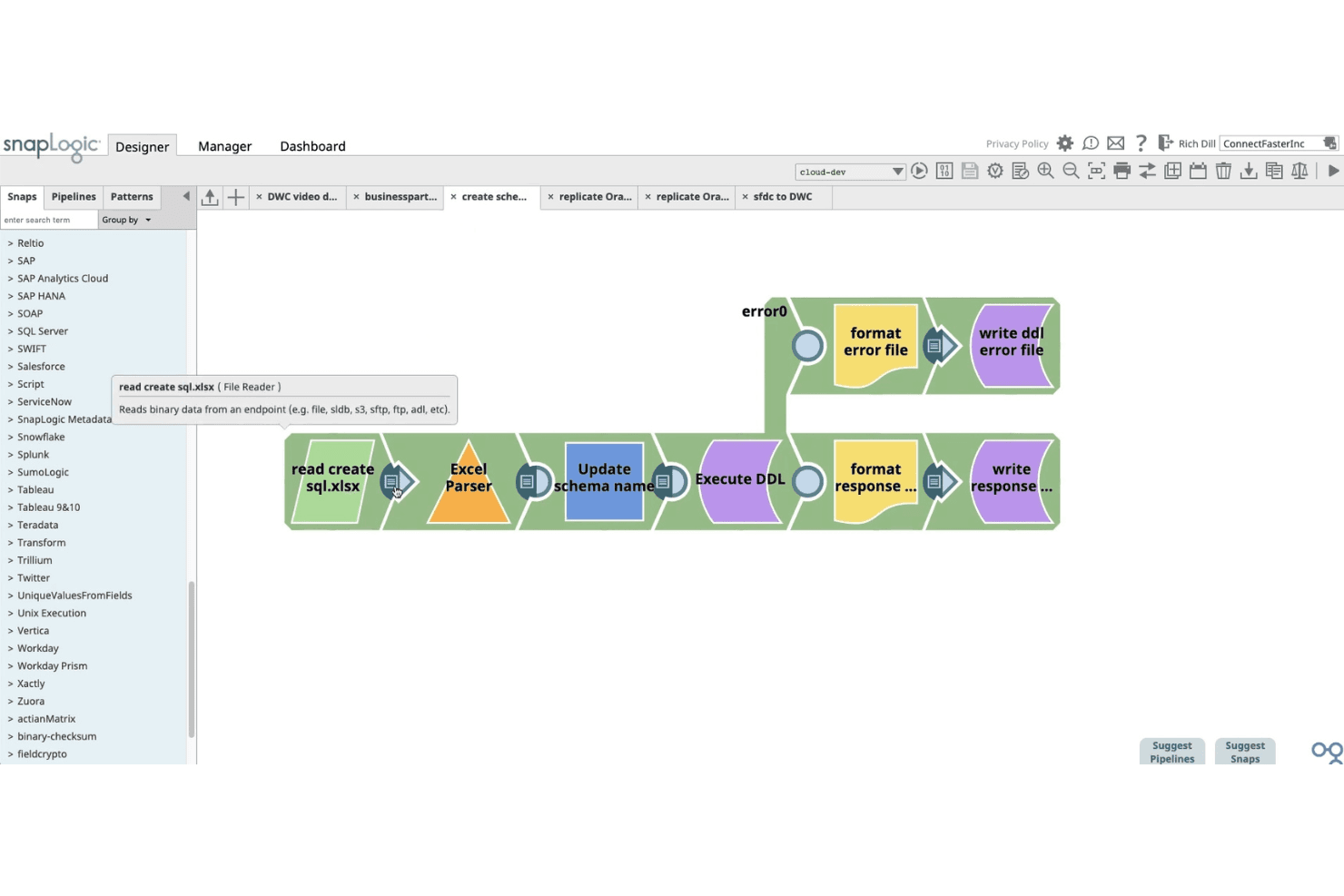
SnapLogic consente agli utenti di creare visivamente pipeline di dati utilizzando snap con funzionalità di trascinamento della selezione. SnapLogic è una piattaforma di integrazione basata sull'intelligenza artificiale che collega vetrine di commercio elettronico, ERP, database e sistemi amministrativi interni attraverso una libreria di oltre 1.000 connettori predefiniti, un generatore visivo di pipeline a basso codice e strumenti di intelligenza artificiale generativa per la mappatura e la trasformazione dei dati.
Per chi è più indicato SnapLogic?
SnapLogic è particolarmente adatto ai retailer aziendali e ai responsabili delle integrazioni che devono collegare vetrine Shopify a sistemi amministrativi interni complessi come SAP, NetSuite o Dynamics 365.
Perché ho scelto SnapLogic
Ho scelto SnapLogic come una delle soluzioni migliori perché le sue funzionalità di mappatura dei dati basate sull'intelligenza artificiale sono davvero all'avanguardia nel settore. SnapGPT consente di descrivere un'integrazione in linguaggio naturale e genera la pipeline automaticamente, mentre AutoSuggest apprende dai modelli di mappatura precedenti per consigliare automaticamente le corrispondenze tra i campi. Ritengo questa funzionalità particolarmente preziosa quando si collega Shopify a un ERP complesso come SAP S/4HANA o Dynamics 365, dove le discrepanze tra i modelli di dati rappresentano il principale ostacolo.
Funzionalità principali di SnapLogic
- Shopify Snap Pack: Un connettore dedicato con supporto CRUD completo per ordini, clienti, cataloghi di prodotti, evasione degli ordini, rimborsi e aggiornamenti dell'inventario nella vetrina Shopify.
- Pipeline ripristinabili: Pipeline che si ripristinano automaticamente dagli errori a partire dal punto dell'interruzione, evitando di dover riavviare un intero flusso di lavoro quando si verifica un problema durante l'esecuzione.
- Ultra Tasks: Esecuzione delle pipeline quasi in tempo reale che mantiene sincronizzati i livelli dell'inventario, gli stati degli ordini e i record dei clienti tra i sistemi collegati, senza i ritardi delle elaborazioni batch.
- EDI Snap Pack: Supporto integrato per gli standard documentali X12 ed EDIFACT, inclusi gli ordini di acquisto al dettaglio (850) e le fatture (810), con connettività a partner commerciali come Walmart e Tesco.
Integrazioni di SnapLogic
SnapLogic offre oltre 1.000 connettori predefiniti, tra cui Shopify, NetSuite, SAP, Microsoft Dynamics 365, Oracle, Workday e sistemi di database. Gli Snap REST e OpenAPI supportano integrazioni personalizzate con piattaforme come Amazon Seller Central, eBay, Walmart Marketplace, WooCommerce, Magento e BigCommerce.
Pros and Cons
Pros:
- Mappatura dei dati basata sull'intelligenza artificiale con SnapGPT
- Generatore visivo a basso codice per trasformazioni complesse
- Sincronizzazione bidirezionale in tempo reale tra i sistemi
Cons:
- Nessun connettore dedicato per i principali mercati online
- Il debug di pipeline complesse può essere impegnativo
Learn more about SnapLogic: Ideale per la connettività dei sistemi ERP
- Prova gratuita di 30 giorni
- Da $99/mese
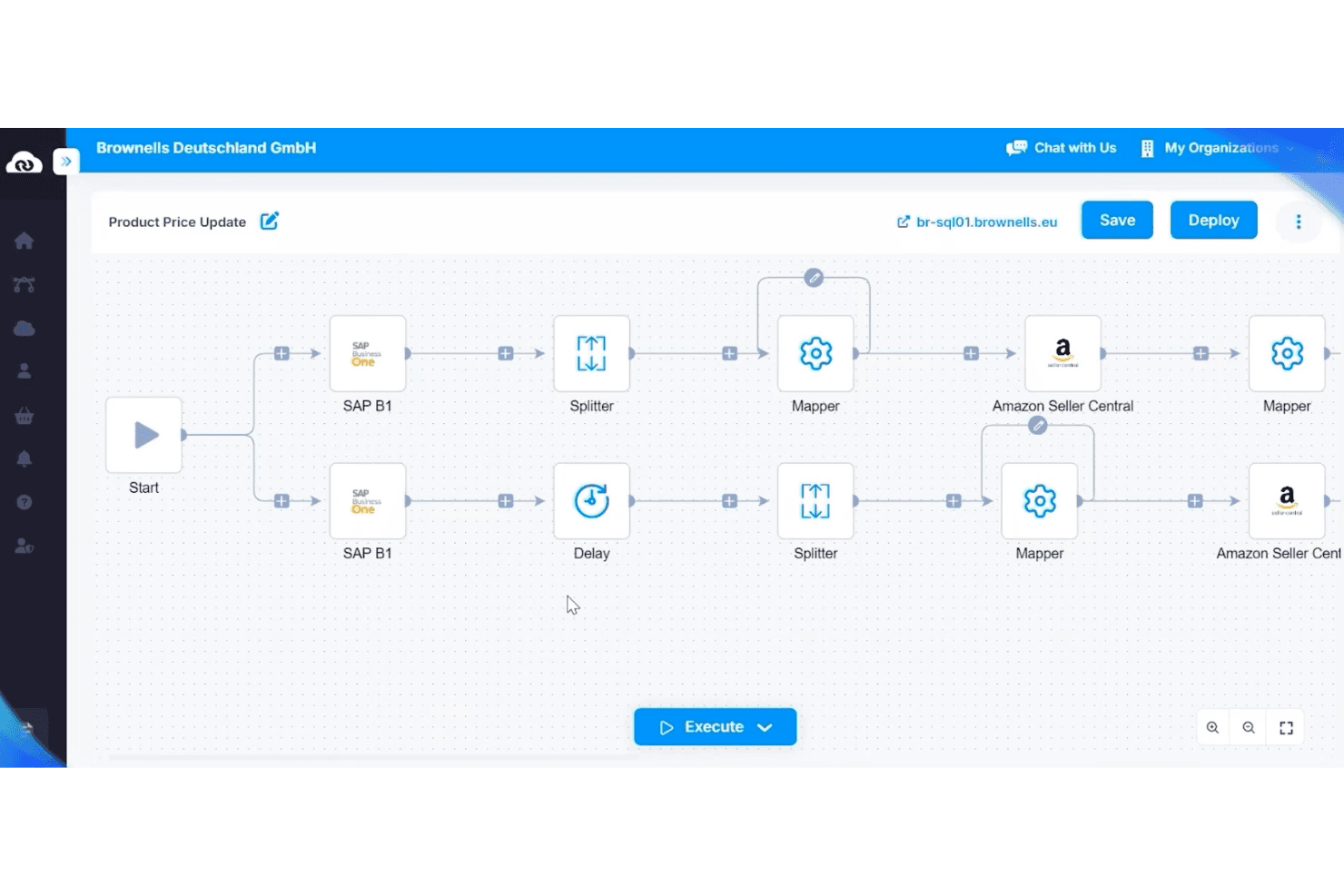
APPSeCONNECT automatizza gli aggiornamenti dei prezzi dei prodotti tra SAP B1 e Amazon. APPSeCONNECT è una piattaforma di integrazione ERP-first che collega vetrine ecommerce, marketplace, CRM e sistemi WMS a piattaforme ERP come SAP, Microsoft Dynamics e NetSuite tramite un generatore visivo di flussi di lavoro low-code.
Per chi è più adatto APPSeCONNECT?
APPSeCONNECT è particolarmente adatto alle aziende del mercato intermedio che utilizzano SAP, Microsoft Dynamics o NetSuite e hanno bisogno di collegare il proprio ERP a vetrine ecommerce e marketplace senza ricorrere a un intenso sviluppo personalizzato.
Perché ho scelto APPSeCONNECT
APPSeCONNECT si è guadagnato un posto nella mia rosa di candidati perché la sua intera architettura è costruita intorno all'ERP come sistema di riferimento, che è esattamente ciò di cui hanno bisogno le aziende del mercato intermedio che utilizzano SAP, Microsoft Dynamics o NetSuite. Sono particolarmente colpito dal suo ProcessFlow Designer, che consente di mappare visivamente le trasformazioni dei dati a livello di campo tra, ad esempio, SAP Business One e Shopify senza scrivere codice personalizzato. Anche il livello EDI integrato si distingue, poiché gestisce i tipi di transazione richiesti dai rivenditori, come gli ordini di acquisto (850) e gli ASN (856), all'interno della stessa piattaforma invece di richiedere middleware separati.
Funzionalità principali di APPSeCONNECT
- Marketplace integrato: Esplora e distribuisci connettori predefiniti dall'interfaccia utente della piattaforma senza passare da strumenti esterni.
- Agente on-premise: Esegui localmente i flussi di lavoro di integrazione per collegare direttamente le piattaforme cloud ai sistemi ERP on-premise.
- appse ai: Un livello di intelligenza artificiale integrato nella piattaforma che suggerisce le mappature dei campi e segnala i flussi non funzionanti prima che causino errori di sincronizzazione.
- Supporto per le transazioni EDI: Gestisci tipi di documenti EDI come ordini di acquisto (850), fatture (810) e ASN (856) all'interno della stessa piattaforma utilizzata per le altre integrazioni.
Integrazioni di APPSeCONNECT
APPSeCONNECT offre oltre 200 connettori predefiniti, tra cui Shopify, Magento, WooCommerce, BigCommerce, Amazon Seller Central, eBay, Walmart, SAP Business One, Dynamics 365 Business Central e NetSuite, oltre al supporto per REST, SOAP, FTP/SFTP, GraphQL e webhook per le integrazioni personalizzate.
Pros and Cons
Pros:
- Sincronizzazione ERP ed ecommerce bidirezionale in tempo reale
- Modelli di flusso predefiniti per una distribuzione rapida
- Supporto EDI integrato per le transazioni al dettaglio
Cons:
- Il processo di nuova sincronizzazione manuale può creare confusione
- La prova Enterprise non è disponibile per SAP o Dynamics
Learn more about APPSeCONNECT: Ideale per l'accesso a API unificate
- Prova gratuita di 30 giorni
- A partire da $599/mese
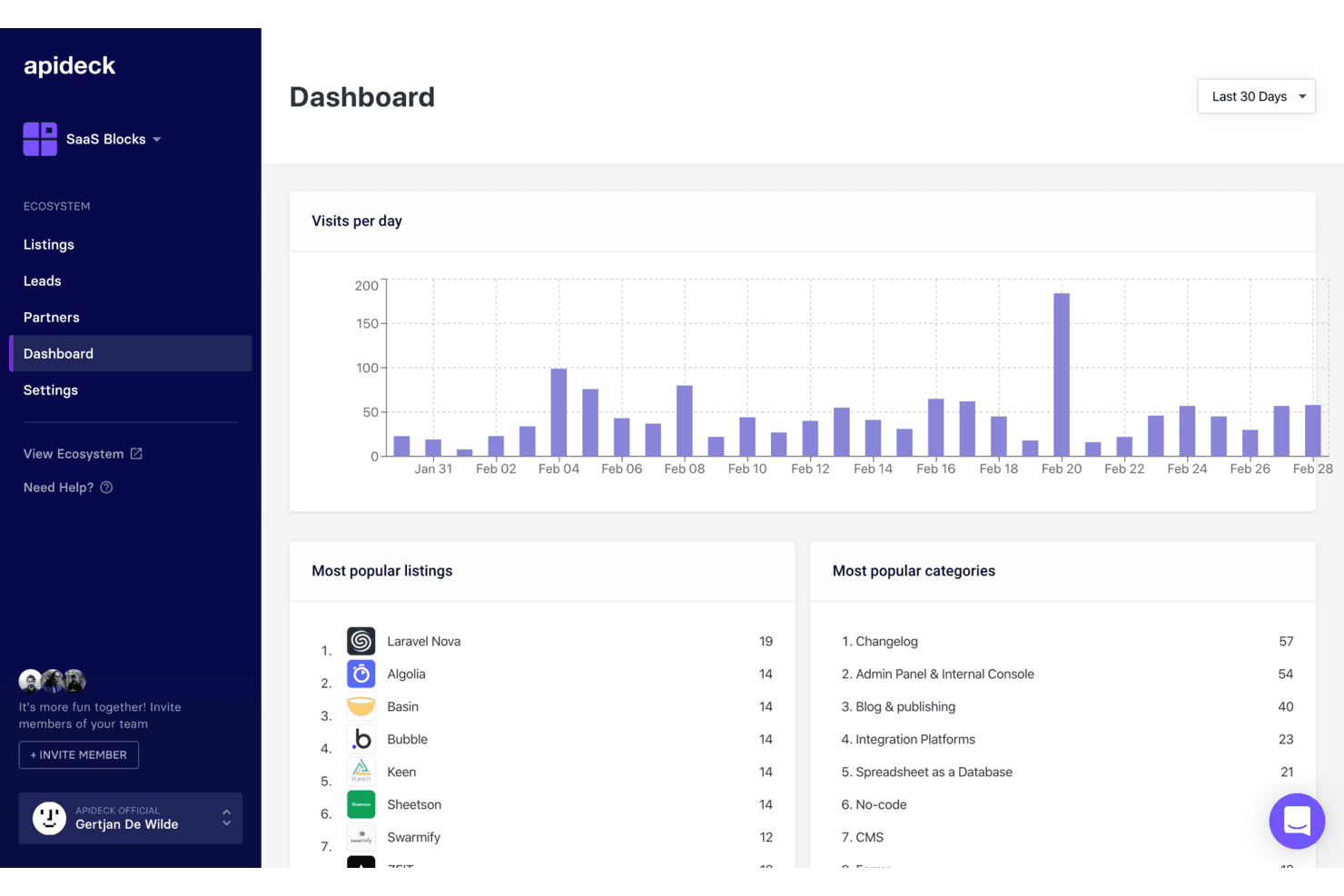
Apideck monitora le visite giornaliere, gli annunci principali e le categorie in un'unica dashboard. Apideck è una piattaforma API unificata orientata agli sviluppatori che collega vetrine ecommerce, marketplace, sistemi ERP e strumenti POS attraverso un unico livello API normalizzato.
Per chi è più adatto Apideck?
Apideck è una soluzione particolarmente adatta ai team di sviluppatori di aziende SaaS o rivenditori che devono collegare vetrine ecommerce, marketplace e sistemi ERP tramite un'unica API normalizzata.
Perché ho scelto Apideck
Apideck si è guadagnato un posto nella mia lista ristretta perché è l'unico strumento che ho trovato in grado di offrire ai team di sviluppatori un unico livello API normalizzato che copre contemporaneamente 17 connettori ecommerce (Shopify, Amazon Seller Central, TikTok Shop, Walmart) e oltre 56 sistemi ERP e di contabilità (NetSuite, SAP S/4HANA, Dynamics 365). Apprezzo in particolare il modello di connettori gestiti dal fornitore: quando Shopify introduce una modifica incompatibile all'API, Apideck la assorbe così il tuo team non deve farlo. È un vantaggio concreto quando si gestiscono pipeline dal punto vendita al back office su larga scala.
Funzionalità principali di Apideck
- Endpoint API ecommerce unificato: un'unica API normalizzata consente ai tuoi sviluppatori di accedere a oltre 17 piattaforme ecommerce, tra cui Shopify, WooCommerce, Magento e Amazon Seller Central, senza dover creare integrazioni separate per ciascuna.
- Motore di webhook virtuali: per le piattaforme prive di supporto nativo ai webhook, Apideck rileva le modifiche tramite polling basato su date e checksum, simulando notifiche di eventi in tempo reale.
- API proxy di pass-through: disponibile su tutti i piani, consente al tuo team di interrogare endpoint specifici delle piattaforme che non rientrano nello schema normalizzato, senza perdere il livello di connessione unificato.
- Server MCP per agenti IA: un server ospitato del Model Context Protocol consente agli agenti IA di interagire con tutte le oltre 200 app collegate, supportando strumenti come Claude, LangChain e OpenAI Agents SDK.
Integrazioni di Apideck
Apideck collega oltre 17 piattaforme ecommerce, tra cui Shopify, WooCommerce, BigCommerce, Magento, Amazon Seller Central, eBay, Walmart, Etsy, TikTok Shop e bol.com, oltre a più di 56 sistemi ERP e di contabilità come NetSuite, SAP S/4HANA, QuickBooks e Xero. Le sue API e il proxy di pass-through supportano integrazioni personalizzate.
Pros and Cons
Pros:
- Gestisce tutti i connettori, riducendo al minimo la manutenzione interna
- I log centralizzati semplificano la risoluzione dei problemi per gli ingegneri
- Collega ecommerce, ERP e POS tramite un'unica API
Cons:
- Nessuna automazione visiva dei flussi di lavoro integrata
- I webhook basati sul polling possono ritardare la sincronizzazione dei dati
Learn more about Apideck: Ideale per la sincronizzazione con le piattaforme di contabilità
- Prova gratuita di 15 giorni
- A partire da $69/mese
Visit WebsiteCustomer Rating:4.3/5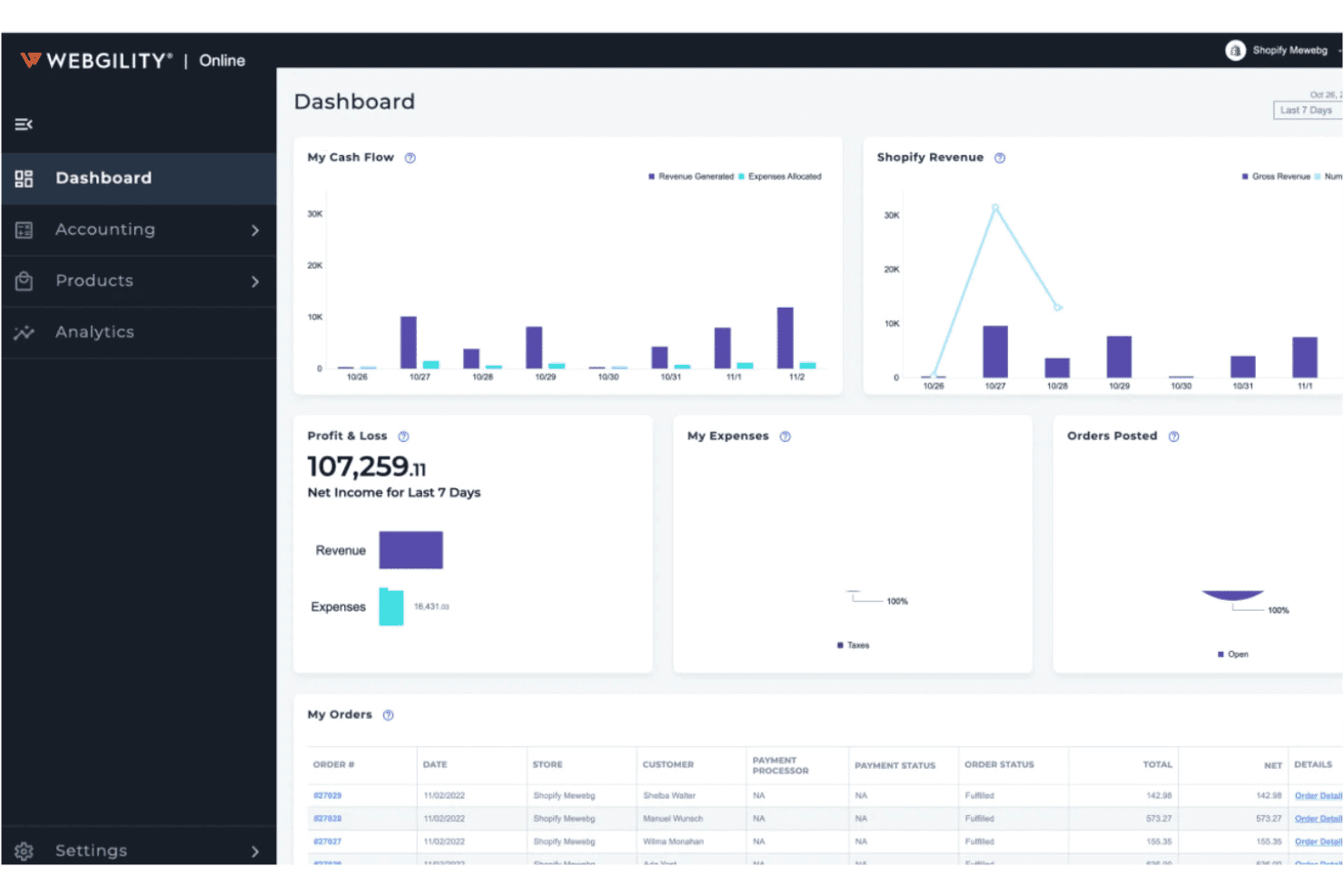
Webgility centralizza flusso di cassa, profitti e perdite e ordini in un unico pannello di controllo. Webgility è una piattaforma di integrazione per l'e-commerce che sincronizza ordini, inventario, prezzi e dati relativi agli accrediti tra oltre 60 canali di vendita, marketplace e sistemi POS con QuickBooks, Xero e altre piattaforme di contabilità.
A chi è più adatto Webgility?
Webgility è una soluzione ideale per i venditori multicanale di piccole e medie dimensioni che gestiscono la propria contabilità aziendale tramite QuickBooks o Xero e hanno bisogno di mantenere sincronizzati i canali di vendita, l'inventario e gli accrediti senza inserire manualmente i dati.
Perché ho scelto Webgility
Webgility si guadagna un posto nella mia lista ristretta grazie alla profondità della sua integrazione con QuickBooks, registrando ogni ordine, commissione, rimborso e accredito singolarmente anziché come registrazioni contabili riepilogative. Apprezzo particolarmente il fatto che la riconciliazione degli accrediti sia progettata per gestire contemporaneamente pianificazioni complesse, associando i regolamenti di Amazon o i depositi di Shopify agli ordini esatti che li compongono. Inoltre, la sua mappatura degli SKU basata sull'intelligenza artificiale individua le incongruenze prima che arrivino nei registri contabili.
Caratteristiche principali di Webgility
- Automazione degli ordini di acquisto: Webgility monitora i livelli di inventario e crea automaticamente gli ordini di acquisto in QuickBooks quando le scorte scendono al di sotto delle soglie definite, utilizzando i dati sulla velocità delle vendite per consigliare le quantità da riordinare.
- Coda delle eccezioni: Gli ordini con errori nell'indirizzo, SKU non riconosciuti o pagamenti sospesi vengono messi in attesa per una verifica manuale invece di essere registrati con voci parziali o con conti predefiniti.
- Monitoraggio dell'inventario in più sedi: Tiene traccia delle scorte in più magazzini e sedi di inventario di QuickBooks, con regole di riordino e assegnazioni dei fornitori specifiche per ogni sede.
- Previsione dei ricavi: Genera dati previsionali sui ricavi fino a 14 mesi in anticipo, con viste dettagliate per canale, negozio o metodo di evasione.
Integrazioni di Webgility
Webgility supporta oltre 60 integrazioni, tra cui Shopify, BigCommerce, WooCommerce, Amazon, eBay, Walmart, Etsy, TikTok Shop, QuickBooks, Xero, NetSuite, Shopify POS, Square e ShipStation. La sua connettività più solida riguarda la sincronizzazione tra e-commerce e contabilità, soprattutto per QuickBooks.
Pros and Cons
Pros:
- Registra ogni ordine e accredito singolarmente
- La coda delle eccezioni impedisce registrazioni contabili errate
- La mappatura degli SKU basata sull'intelligenza artificiale individua le incongruenze tra i prodotti
Cons:
- Nessuna integrazione nativa con SAP o Dynamics
- La configurazione e l'avviamento possono essere complessi
Learn more about Webgility:
Altri software di integrazione per l'e-commerce
Ecco alcune opzioni aggiuntive di software di integrazione per l’e-commerce che non sono entrate nel mio elenco ristretto, ma che vale comunque la pena considerare:
Come Valuto i Software di Integrazione Ecommerce
Divido la mia valutazione in due livelli: la soglia minima che uno strumento deve superare—come la sincronizzazione bidirezionale tra Shopify e NetSuite—e i fattori che distinguono un fornitore dall'altro.
Funzionalità Principali (Requisiti Fondamentali per Questa Lista)
Quando seleziono gli strumenti per la mia lista, valuto ognuno su una scala da 0 (non offre la funzionalità) a 5 (eccelle in quest'area) per ciascuna delle funzionalità principali elencate di seguito. Poi, calcolo il punteggio totale dello strumento in percentuale. Ogni strumento deve raggiungere un punteggio totale minimo del 65% per essere considerato per l'inclusione.
- Connettori Multipiattaforma: Verifico quali piattaforme ecommerce e marketplace sono supportati nativamente da ogni strumento, inclusi i principali canali come Shopify, BigCommerce, Amazon e Walmart.
- Integrazione con Sistemi Gestionali: Ogni strumento dovrebbe collegare gli store ai sistemi ERP, POS, WMS e contabili come NetSuite, SAP o QuickBooks senza middleware personalizzati.
- Sincronizzazione Bidirezionale dei Dati: Valuto se ordini, inventario, prodotti e dati clienti fluiscono in entrambe le direzioni in tempo reale o programmato, e non solo come importazione unilaterale.
- Automazione Ordini e Inventari: Gli strumenti avanzati consentono di impostare regole per l'instradamento degli ordini, la divisione delle spedizioni e l'allocazione automatica degli inventari tra magazzini e canali.
- Mapping e Trasformazione dei Dati: Osservo come ogni strumento gestisce il mapping a livello di campo tra sistemi con modelli dati differenti, come la traduzione delle varianti prodotto di Shopify nelle strutture SKU degli ERP.
- Gestione degli Errori e Monitoraggio: I fallimenti nella sincronizzazione possono accadere, quindi valuto se uno strumento offre dashboard, avvisi, logica di ripetizione e audit log per rilevare e risolvere rapidamente i problemi.
Una volta ottenuta la lista degli strumenti che soddisfano questi criteri, considero cosa distingue ogni piattaforma.
Fattori Differenzianti (Cosa Distingue i Fornitori)
Ecco come confronto e metto a confronto i diversi fornitori:
Funzionalità Distintive
I template di integrazione predefiniti sono un grande elemento distintivo. Strumenti come Celigo e Jitterbit offrono flussi pronti all'uso per scenari comuni come la sincronizzazione ordini da Shopify a NetSuite, riducendo i tempi d'implementazione da settimane a giorni. Cerco anche editor low-code dei flussi di lavoro che permettano ai team operativi di modificare le integrazioni senza attendere gli sviluppatori. Il supporto EDI è importante se vendi attraverso grandi retailer—un EDI nativo consente lo scambio di ordini d'acquisto e fatture senza middleware separato.
Oltre le Funzionalità
La scalabilità è una delle prime cose che valuto. Una piattaforma che gestisce bene i volumi giornalieri ma va in crisi durante il Black Friday o i saldi lampo è un problema. Controllo come ogni fornitore gestisce i limiti API e la capacità nei picchi stagionali. La trasparenza dei prezzi è altrettanto importante—alcuni strumenti fanno pagare a connettore, altri per volume di transazioni, e le fee per eccesso possono sorprenderti rapidamente. Considero anche i tempi di implementazione, inclusa la disponibilità di ambienti sandbox per poter testare le integrazioni prima della messa in produzione.
Come scegliere il software di integrazione per l'e-commerce
È facile perdersi in lunghi elenchi di funzionalità e strutture tariffarie complesse. Per aiutarti a rimanere concentrato mentre affronti il tuo specifico processo di selezione del software, ecco un elenco di fattori da tenere presenti:
| Fattore | Cosa considerare |
|---|---|
| FattoreScalabilità | Cosa considerareIl software sarà in grado di gestire il volume delle transazioni man mano che la tua attività cresce? Verifica eventuali limiti relativi a utenti, ordini o canali e informati sulle possibilità di aggiornamento. |
| FattoreIntegrazioni | Cosa considerareLo strumento si collega nativamente alle tue piattaforme di e-commerce, al software di contabilità e ai marketplace? Conferma la compatibilità con il tuo attuale stack tecnologico. |
| FattorePersonalizzazione | Cosa considerarePuoi adattare i flussi di lavoro, le mappature dei dati o le pianificazioni della sincronizzazione per adeguarli ai processi della tua attività? Fai attenzione ai sistemi rigidi che ti costringono ad adattare il tuo flusso di lavoro. |
| FattoreSemplicità d'uso | Cosa considerareL'interfaccia è intuitiva per il tuo team? Considera chi lo utilizzerà quotidianamente e se sarà necessaria una formazione per il personale non tecnico. |
| FattoreImplementazione e avviamento | Cosa considerareQuanto tempo richiederà la configurazione e quali risorse saranno necessarie? Informati sull'assistenza alla migrazione, sui servizi di avviamento e sui tempi medi per ottenere valore. |
| FattoreCosto | Cosa considerareQual è il costo totale di proprietà, inclusi configurazione, canoni mensili e componenti aggiuntivi? Fai attenzione ai costi nascosti legati al volume degli ordini o alle integrazioni premium. |
| FattoreMisure di sicurezza | Cosa considerareIn che modo il fornitore protegge i tuoi dati? Cerca funzionalità di crittografia, controlli degli accessi e conformità a standard come PCI DSS o GDPR. |
| FattoreDisponibilità dell'assistenza | Cosa considerareQuali canali di assistenza sono disponibili e in quali orari? Valuta se hai bisogno di assistenza 24 ore su 24, 7 giorni su 7, o di un account manager dedicato per i problemi urgenti. |
Che cos'è il software di integrazione per l'e-commerce?
Il software di integrazione per l'e-commerce collega i tuoi canali di vendita online, i marketplace e i sistemi di back-office per automatizzare il flusso di dati tra loro. Questo tipo di software sincronizza ordini, inventario, dettagli dei clienti e dati finanziari tra le piattaforme, riducendo l'inserimento manuale e gli errori. Centralizzando e automatizzando queste connessioni, il software di integrazione per l'e-commerce aiuta i rivenditori a mantenere registri accurati, semplificare le operazioni e sostenere la crescita su più canali.
Funzionalità
Quando scegli un software di integrazione per l'e-commerce, presta attenzione alle seguenti funzionalità chiave:
- Sincronizzazione degli ordini: Trasferisce automaticamente i dati degli ordini tra i tuoi negozi online, i marketplace e i sistemi di back-office per mantenere aggiornati i registri.
- Gestione dell'inventario: Aggiorna in tempo reale i livelli delle scorte su tutti i canali collegati per evitare vendite eccessive e l'esaurimento delle scorte.
- Integrazione multicanale: Collega più canali di vendita, come negozi online, marketplace e sistemi POS, all'interno di un'unica piattaforma.
- Integrazione con le piattaforme di contabilità: Sincronizza vendite, rimborsi e commissioni direttamente con il software di contabilità per semplificare la tenuta dei registri e la riconciliazione.
- Calcolo automatico dell'imposta sulle vendite: Calcola e applica le aliquote corrette dell'imposta sulle vendite per ogni transazione in base alla posizione del cliente e al tipo di prodotto.
- Integrazione con spedizioni e logistica: Si collega ai corrieri e ai servizi di logistica per automatizzare la creazione delle etichette, il tracciamento e gli aggiornamenti dello stato.
- Sincronizzazione dei dati dei clienti: Consolida le informazioni dei clienti provenienti da tutti i canali, semplificando la gestione dei profili, delle preferenze e delle comunicazioni.
- Riconciliazione dei pagamenti: Abbina pagamenti, rimborsi e commissioni provenienti da vari canali ai tuoi registri finanziari, riducendo gli errori manuali.
- Report e analisi: Fornisce dashboard e report su vendite, inventario e prestazioni dei canali per supportare decisioni basate sui dati.
Le soluzioni software di integrazione per l'e-commerce in genere non includono l'IA tra le funzionalità offerte. Di conseguenza, non procederò con questa sezione.
Vantaggi
L'implementazione di un software di integrazione per l'e-commerce offre diversi vantaggi al tuo team e alla tua attività. Eccone alcuni di cui potrai beneficiare:
- Sincronizzazione accurata dei dati: La sincronizzazione automatica di ordini, inventario e dati dei clienti riduce l'inserimento manuale e minimizza gli errori tra le piattaforme.
- Operazioni centralizzate: La gestione di più canali di vendita e sistemi di back-office da un'unica piattaforma semplifica i flussi di lavoro e la supervisione.
- Elaborazione più rapida degli ordini: Gli aggiornamenti in tempo reale e i flussi di lavoro automatizzati aiutano il tuo team a evadere gli ordini e gestire l'inventario più rapidamente.
- Maggiore accuratezza finanziaria: L'integrazione diretta con le piattaforme di contabilità garantisce che vendite, rimborsi e commissioni siano registrati e riconciliati accuratamente.
- Reportistica migliorata: Gli strumenti consolidati di analisi e reportistica offrono una visione chiara delle vendite, dell'inventario e delle prestazioni dei canali.
- Riduzione del rischio di non conformità: Il calcolo automatico dell'imposta sulle vendite e la riconciliazione dei pagamenti aiutano la tua attività a rispettare le normative fiscali e finanziarie.
- Crescita scalabile: Le integrazioni flessibili e il supporto multicanale facilitano l'aggiunta di nuovi canali di vendita o l'espansione in nuovi mercati man mano che la tua attività cresce.
Costi e prezzi
La scelta di un software per l'integrazione dell'e-commerce richiede una conoscenza dei vari modelli e piani tariffari disponibili. I costi variano in base alle funzionalità, alle dimensioni del team, ai componenti aggiuntivi e ad altri fattori. La tabella seguente riassume i piani più comuni, i relativi prezzi medi e le funzionalità tipicamente incluse nelle soluzioni software per l'integrazione dell'e-commerce:
Tabella di confronto dei piani per il software di integrazione dell'e-commerce
| Tipo di piano | Prezzo medio | Funzionalità comuni |
|---|---|---|
| Tipo di pianoPiano gratuito | Prezzo medio$0 | Funzionalità comuniSincronizzazione di base degli ordini, connessioni limitate ai canali, numero massimo di ordini mensili e assistenza via e-mail. |
| Tipo di pianoPiano personale | Prezzo medio$20-$50/mese | Funzionalità comuniIntegrazione multicanale, sincronizzazione dell'inventario, reportistica di base e assistenza clienti standard. |
| Tipo di pianoPiano aziendale | Prezzo medio$100-$300/mese | Funzionalità comuniAutomazione avanzata, integrazione con piattaforme contabili, calcolo delle imposte sulle vendite e assistenza prioritaria. |
| Tipo di pianoPiano per grandi aziende | Prezzo medio$500-$2,000/mese | Funzionalità comuniIntegrazioni personalizzate, gestione dedicata dell'account, misure di sicurezza avanzate e assistenza per la configurazione iniziale. |
Domande frequenti sul software di integrazione dell'e-commerce
Ecco alcune risposte alle domande più comuni sul software di integrazione dell’e-commerce:
Come posso sapere se la mia piattaforma di e-commerce è compatibile con il software di integrazione?
Controlla l’elenco delle piattaforme e dei connettori supportati dal software di integrazione. La maggior parte dei fornitori pubblica gli elenchi di compatibilità sui propri siti web. Se la tua piattaforma non è inclusa, chiedi informazioni sui connettori personalizzati o sul supporto API prima di procedere.
Il software di integrazione dell'e-commerce può gestire più canali di vendita contemporaneamente?
Sì, la maggior parte dei software di integrazione dell’e-commerce è progettata per collegare e sincronizzare i dati tra più negozi online, marketplace e persino sistemi POS fisici. Questo consente di gestire l’inventario, gli ordini e i dati dei clienti da un’unica dashboard.
Cosa succede se un'integrazione non riesce o i dati non vengono sincronizzati correttamente?
La maggior parte delle soluzioni include registri degli errori, avvisi e meccanismi di ripetizione dei tentativi per segnalare e risolvere i problemi di sincronizzazione. Cerca strumenti che offrano procedure chiare per la risoluzione dei problemi e un’assistenza reattiva, così da ridurre al minimo le interruzioni delle attività.
È difficile passare dai processi manuali all'integrazione automatizzata?
Il passaggio può richiedere una certa pianificazione, ma la maggior parte delle piattaforme offre assistenza per la configurazione iniziale, procedure guidate e strumenti di migrazione per aiutarti nella transizione. Inizia con un’integrazione pilota ed espandila gradualmente man mano che il team acquisisce familiarità.
Quanto sono sicuri i miei dati quando utilizzo un software di integrazione dell'e-commerce?
I fornitori affidabili utilizzano crittografia, controlli degli accessi e standard di conformità come PCI DSS o GDPR per proteggere i tuoi dati. Esamina sempre la documentazione sulla sicurezza del fornitore e chiedi informazioni sulle sue pratiche di gestione dei dati prima di registrarti.