

Mit Software für digitale Menütafeln können Sie Ihre Menüs von einem Ort aus auf jedem Bildschirm in Ihrem Unternehmen steuern und aktualisieren. Für Einzelhandels- und Restaurantgruppen, die Dutzende oder Hunderte von Standorten verwalten, beseitigt das richtige Tool das Chaos kurzfristiger Werbeaktionen, Preisänderungen und Compliance-Aktualisierungen – ohne wochenlange manuelle Arbeit.
In diesem Leitfaden finden Sie meine Auswahl für 2026 der Softwarelösungen für digitale Menütafeln, die sich am besten für Teams mit mehreren Standorten eignen und eine zentrale Kontrolle, POS-Integration, Markenkonsistenz und operative Transparenz benötigen. Erfahren Sie, wie Sie mit diesen Lösungen Ihre Menüs übersichtlich, flexibel und stets synchron halten.
Warum Sie unseren Software-Empfehlungen vertrauen können
6,700+
Reviews
20
Industry experts
16+
Evaluation factors
14
Years
Unser Team testet und bewertet Software seit 2012. Als Führungskräfte im Einzelhandel selbst wissen wir, wie schwierig – und wichtig – es ist, die richtige Software auszuwählen.
Für diesen Leitfaden haben wir Tools mithilfe von praktischen Tests und unabhängiger Recherche bewertet und dabei die Tools anhand unserer Bewertungskriterien bewertet.
Unsere Bewertungen spiegeln unser unabhängiges Urteilsvermögen wider – keine Verkaufsstrategie.
Vergleichstabelle für Software für digitale Menütafeln
Diese Vergleichstabelle fasst die Preisinformationen meiner wichtigsten Softwareempfehlungen für digitale Menütafeln zusammen:
| Tool | Best For | Trial Info | Price | ||
|---|---|---|---|---|---|
| 1 | Am besten geeignet für die KI-gestützte Überwachung von Menütafelflotten | 14-tägige kostenlose Testversion + kostenlose Demo verfügbar | Preis auf Anfrage | Website | |
| 2 | Am besten für Menü- und Anzeigenplanung an mehreren Standorten geeignet | Kostenlose Demo verfügbar | Preis auf Anfrage | Website | |
| 3 | Am besten für hardwareunabhängige Bereitstellungen von Menütafeln geeignet | 14-tägige kostenlose Testversion + kostenlose Demo verfügbar | Ab $20/Bildschirm/Monat (jährlich abgerechnet) | Website | |
| 4 | Am besten für umfassend betreute Rollouts von Menütafeln | Kostenlose Testversion und kostenlose Demo verfügbar | Ab $15/Monat (jährlich abgerechnet) | Website | |
| 5 | Am besten für Unternehmensbeschilderung für mehrere Standorte in großem Maßstab | Kostenlose Demo verfügbar | Preis auf Anfrage | Website | |
| 6 | Am besten für die Tageszeitplanung bei QSR über mehrere Standorte hinweg | 30-tägige kostenlose Testversion + kostenlose Vorführung verfügbar | Ab 14 $/Bildschirm/Monat (jährlich abgerechnet) | Website | |
| 7 | Am besten für die Verwaltung von Menütafeln mit SOC-2-Zertifizierung geeignet | 14-tägige kostenlose Testversion + kostenlose Demo verfügbar | Ab $3.5/Gerät/Monat (jährlich abgerechnet) | Website | |
| 8 | Am besten für Menütafel-Bereitstellungen mit nativer Apple-TV-Unterstützung | 14-tägige kostenlose Testversion + kostenlose Demo verfügbar | Ab 7 $/Bildschirm/Monat (jährliche Abrechnung) | Website | |
| 9 | Am besten für die Verwaltung von Menütafeln mit unbefristeter Lizenz geeignet | Kostenlose Demo verfügbar | Ab 450 $ einmalig | Website | |
| 10 | Am besten für die Verwaltung großer Menütafel-Flotten geeignet | Kostenlose Demo verfügbar | Ab 14 $/Monat/Player | Website |


Bewertungen von Software für digitale Menütafeln
Im Folgenden finden Sie meine detaillierten Zusammenfassungen der besten Softwarelösungen für digitale Menütafeln, die es in meine engere Auswahl geschafft haben. Meine Bewertungen bieten einen detaillierten Überblick über die Funktionen, Möglichkeiten und Integrationen jeder Software, damit Sie die beste Lösung für sich finden.
 Am besten geeignet für die KI-gestützte Überwachung von Menütafelflotten
- 14-tägige kostenlose Testversion + kostenlose Demo verfügbar
- Preis auf Anfrage
Visit WebsiteCustomer Rating:4.5/5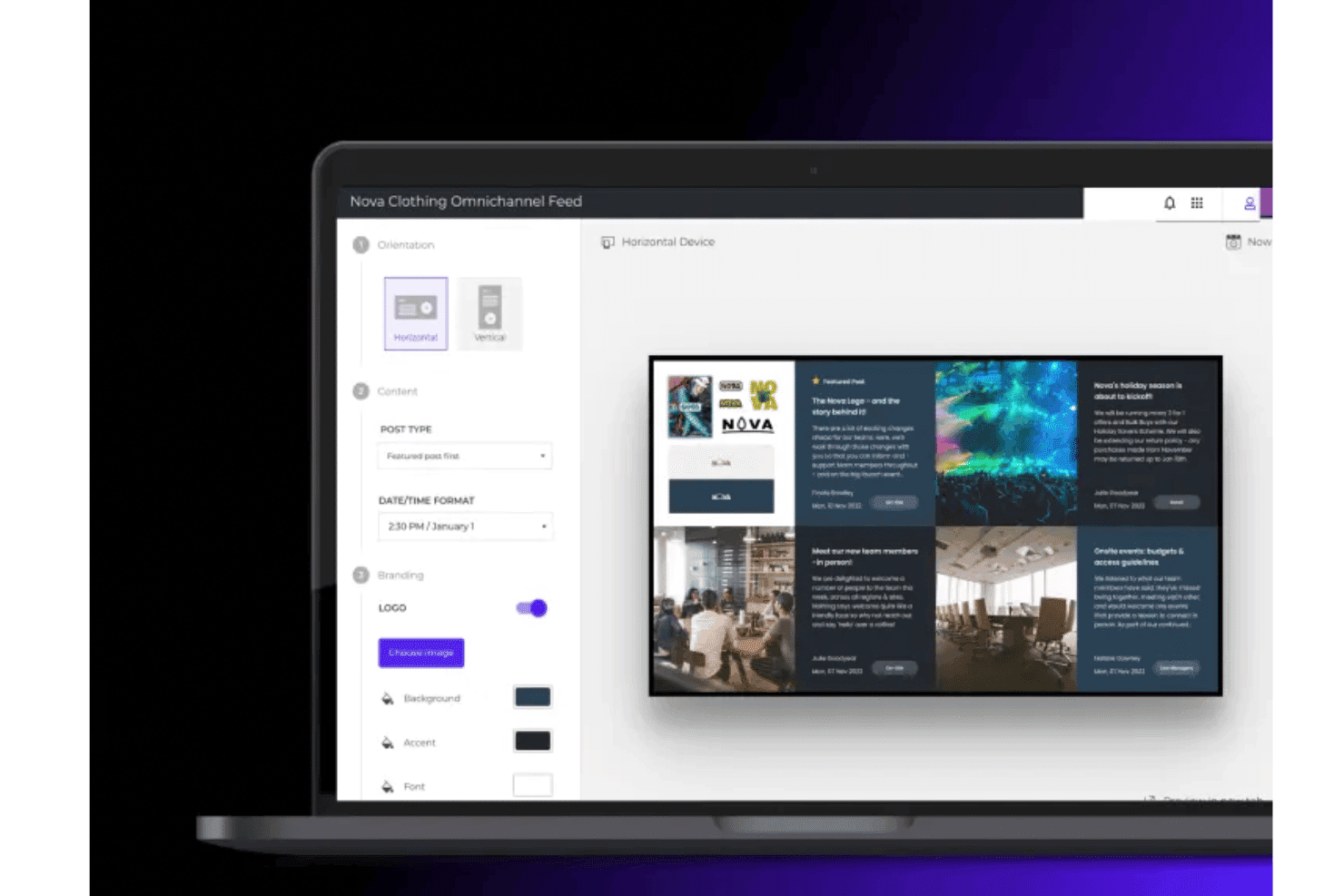
Mit Poppulo können Teams Layouts für digitale Menütafeln mit markengerechten Inhalten, Bildern und dynamischen Datenfeeds erstellen und anpassen. Poppulo ist eine digitale Beschilderungsplattform für Unternehmen, die cloudbasiertes Content-Management, die Planung für mehrere Bildschirme, die Fernüberwachung von Geräteflotten und die Integration von Echtzeit-Datenfeeds kombiniert, um groß angelegte Bereitstellungen digitaler Menütafeln an verteilten Standorten zu verwalten.
Für wen ist Poppulo am besten geeignet?
Poppulo eignet sich besonders für Einzelhandelsketten und Franchise-Betreiber auf Unternehmensebene, die eine zentrale Verwaltung großer, verteilter Bildschirmflotten an Hunderten oder Tausenden von Standorten benötigen.
Warum ich Poppulo ausgewählt habe
Ich habe Poppulo als eine der besten Lösungen ausgewählt, weil sein KI-Agent die Verwaltung groß angelegter Menütafelflotten grundlegend verändert. Er überwacht Wiedergabe- und Gerätedaten auf Tausenden von Bildschirmen, erkennt Anomalien und zeigt automatisch Trends bei der Inhaltsleistung auf. Zusammen mit der Überwachung des Gerätezustands in Echtzeit und dem Gerätestatus-Tracker kann Ihr IT-Team einen ausgefallenen Bildschirm an einem bestimmten Standort lokalisieren, bevor ihn jemand in diesem Geschäft bemerkt.
Die wichtigsten Funktionen von Poppulo
- Tageszeitplanung: Inhalte werden an allen Standorten automatisch entsprechend der Tageszeit ausgetauscht, ohne manuellen Eingriff – für Frühstück, Mittagessen, Abendessen und andere festgelegte Zeitabschnitte.
- Rollenbasierte Veröffentlichungsberechtigungen: Legen Sie detaillierte Zugriffskontrollen fest, damit zentrale Teams die Markenstandards verwalten, während lokale Teams Inhalte innerhalb definierter Grenzen veröffentlichen.
- Wiedergabenachweise: Verfolgen Sie genau, welche Inhalte auf welchem Bildschirm und zu welcher Zeit abgespielt wurden – hilfreich, um Ausgaben für gemeinschaftliche Marketingmaßnahmen und die Einhaltung von Franchise-Vorgaben zu überprüfen.
- Live-Daten-Widgets: Rufen Sie Echtzeitdaten aus Wetter-, Social-Media-, Geschäftskennzahlen- und RSS-Quellen direkt auf den Anzeigebildschirmen ab, ohne dass sich Benutzer anmelden müssen.
Poppulo-Integrationen
Poppulo bietet native Integrationen, die für den Einsatz mit Menütafeln relevant sind, darunter Oracle Hospitality Integration Platform (OHIP), Salesforce, Microsoft Power BI, Tableau und weitere.
Pros and Cons
Pros:
- Die KI überwacht Gerätestatus und Wiedergabe in Echtzeit
- Die Tageszeitplanung automatisiert den Austausch von Menütafelinhalten
- Wiedergabenachweise bestätigen Kampagnen- und Compliance-Anforderungen
Cons:
- Professionelle Unterstützung bei Einführung und Einrichtung erforderlich
- Für Unternehmen mit nur einem Standort zu komplex
Learn more about Poppulo: Am besten für Menü- und Anzeigenplanung an mehreren Standorten geeignet
- Kostenlose Demo verfügbar
- Preis auf Anfrage
Visit WebsiteCustomer Rating:4.6/5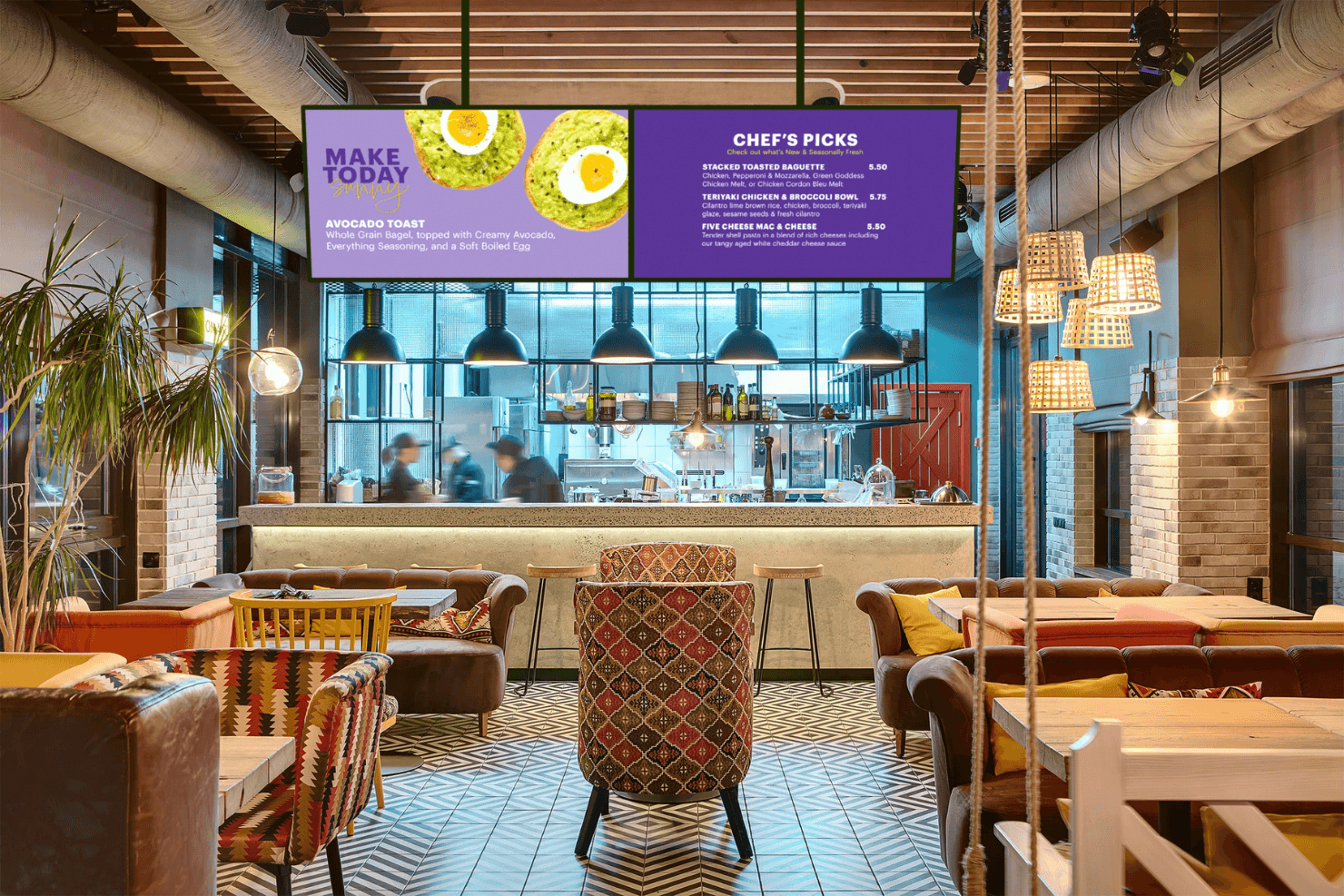
Spectrio ermöglicht dynamische digitale Menütafeln für Restaurants. Spectrio ist eine cloudbasierte Plattform für digitale Menütafeln und Beschilderung, die die Verwaltung von Inhalten auf mehreren Bildschirmen, eine auf Tageszeitsegmentierung basierende Planung, Zielgruppenmessung und einen Anzeigenplaner für kampagnenbasierte Menü- und Werbeeinblendungen in großen Bildschirmnetzwerken kombiniert.
Für wen ist Spectrio am besten geeignet?
Spectrio eignet sich besonders für Franchise- und Filialunternehmen, die Bildschirminhalte an Dutzenden oder Hunderten von Standorten verwalten.
Warum ich Spectrio ausgewählt habe
Spectrio steht auf meiner engeren Auswahlliste, weil die Lösung wirklich für Betreiber entwickelt wurde, die Bildschirme an Dutzenden oder Hunderten von Standorten verwalten. Mir gefällt besonders, wie der Anzeigenplaner und die Werkzeuge zur Tageszeitsegmentierung zusammenspielen und es ermöglichen, zeitbasierte Menüwechsel zu automatisieren sowie standortspezifische Werbekampagnen über eine einzige Cloud-Oberfläche auszuspielen. Die Governance-Ebene für Franchiseunternehmen hebt Spectrio besonders hervor: Zentrale Teams können markenrelevante Inhalte sperren und gleichzeitig einzelnen Standorten Raum für Anpassungen geben.
Die wichtigsten Funktionen von Spectrio
- Spectrio Measure: Verwendet Radar- und Sensoren für maschinelles Sehen, um Zielgruppendemografie, Verweildauer und Auslastung in Echtzeit zu erfassen, einschließlich Unterstützung für A/B-Inhaltstests.
- Einzelhandelsmediennetzwerk: Ermöglicht es, bis zu 30 % des Bildschirmbestands zu monetarisieren, indem programmatische Markenanzeigen neben eigenen Nachrichten für den Einsatz im Geschäft ausgespielt werden.
- Notfallmeldungs-Überschreibung: Überträgt Notfallwarnungen und Sicherheitsinhalte direkt aus dem CMS sofort auf jeden verbundenen Bildschirm.
- Interaktive Touchscreen-Kioske: Unterstützt Kioske für die Aufstellung auf Theken und als freistehende Modelle zur selbstständigen Orientierung, Produkterkundung und Markeninteraktion.
Spectrio-Integrationen
Spectrio bietet integrierte Schnittstellen zu Google Sheets, Slack und Google Kalender sowie Hardware-Partnerunterstützung für BrightSign-, Samsung-Tizen- und LG-WebOS-Abspielgeräte.
Pros and Cons
Pros:
- KI-gestützte Zielgruppenmessung und Auslösung von Inhalten
- Unterstützt komplexe standortübergreifende Werbeplanung
- Einzelhandelsmediennetzwerk für Werbeeinnahmen im Geschäft
Cons:
- Kassensystem-Integration noch nicht vollständig verfügbar
- Gemeldete Zuverlässigkeitsprobleme bei Hardware-Abspielgeräten
Learn more about Spectrio: 3Am besten für hardwareunabhängige Bereitstellungen von Menütafeln geeignet
Fugo
- 14-tägige kostenlose Testversion + kostenlose Demo verfügbar
- Ab $20/Bildschirm/Monat (jährlich abgerechnet)
Visit WebsiteCustomer Rating:4.5/5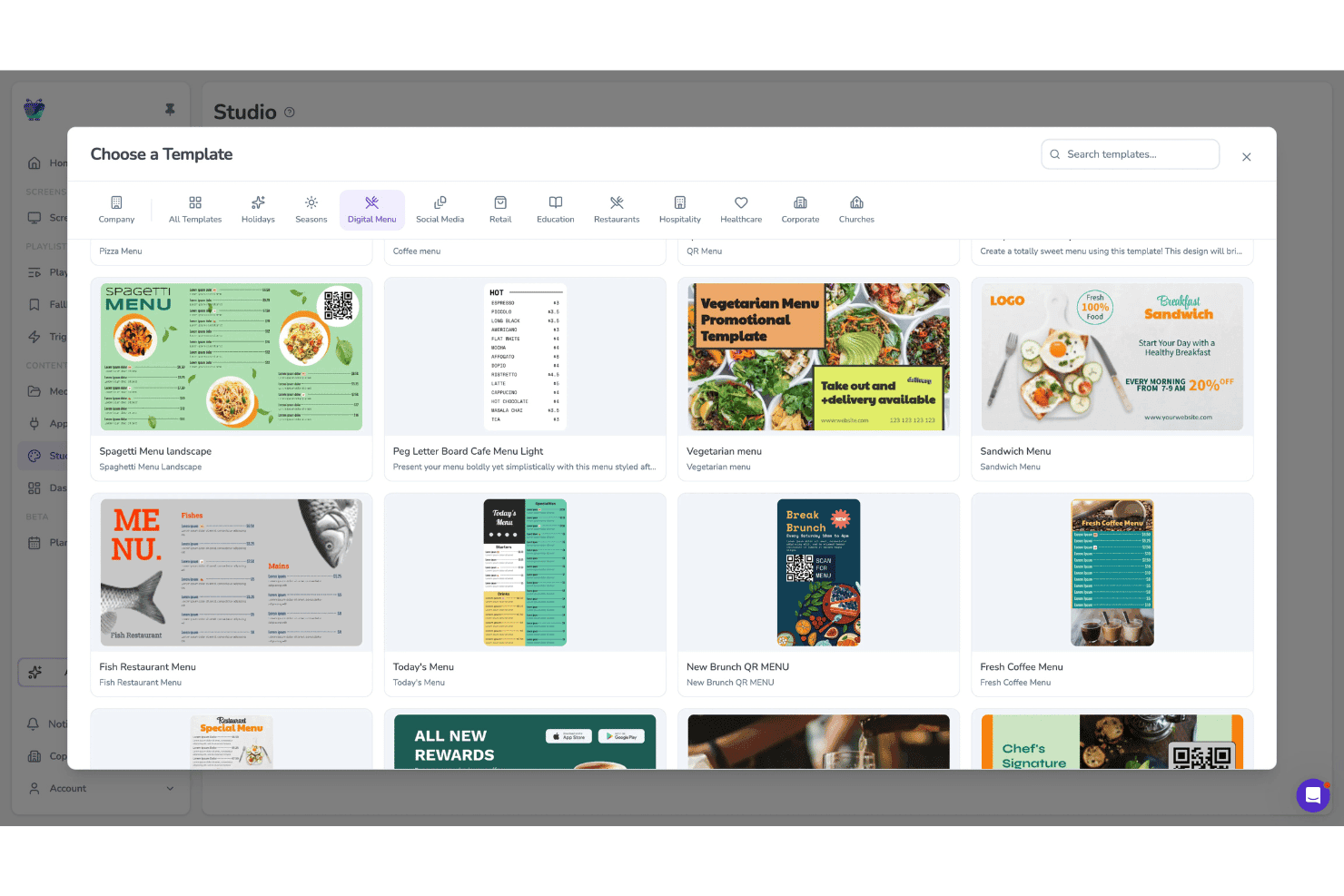
Fugo ermöglicht es Benutzern, aus Vorlagen für digitale Menüs auf Bildschirmen auszuwählen. Fugo ist eine cloudbasierte Plattform für digitale Menütafeln und digitale Beschilderung, die ein Designstudio mit Ziehen-und-Ablegen-Funktion, die zeitgesteuerte Planung mehrerer Bildschirme mit Tageszeitensteuerung, die Fernverwaltung von Geräteflotten und eine hardwareunabhängige Player-App kombiniert.
Für wen eignet sich Fugo am besten?
Fugo eignet sich besonders für Betreiber von Gastronomie- und Einzelhandelsunternehmen mit mehreren Standorten, die Inhalte für Menütafeln auf einer heterogenen Hardwareflotte verwalten müssen, ohne an proprietäre Displays gebunden zu sein.
Warum ich Fugo ausgewählt habe
Fugo gehört zu meiner engeren Auswahl, weil es auf nahezu jeder Bildschirmhardware läuft, die Sie bereits besitzen – von Amazon Fire TV Sticks über Samsung-Tizen-Displays bis hin zu Raspberry-Pi-Geräten. Dadurch werden Sie nie zu einem Kauf proprietärer Hardware gezwungen. Besonders beeindruckt bin ich von der speziellen App für digitale Menüs, mit der Sie Menütafeln direkt im CMS erstellen und aktualisieren können – einschließlich Ausverkauft-Anzeigen und Allergen-Symbolen, die in dem Moment, in dem Sie veröffentlichen, mit jedem Standort synchronisiert werden.
Die wichtigsten Funktionen von Fugo
- Tageszeitenplaner: Legen Sie Regeln für Inhalte nach Tageszeit, Wochentag und Feiertagen fest, die Wiedergabelisten für Menütafeln automatisch umschalten, ohne dass manuelle Aktualisierungen erforderlich sind.
- Editor für Mehrzonen-Layouts: Erstellen Sie Bildschirm-Layouts mit mehreren unabhängigen Inhaltszonen, die nebeneinander gemischte Medien, Textüberlagerungen und Live-Daten-Widgets unterstützen.
- Wiedergabenachweis-Berichte: Greifen Sie auf Wiedergabeprotokolle zu, die bestätigen, welche Inhalte auf welchem Bildschirm und zu welchem Zeitpunkt angezeigt wurden – verfügbar in den Tarifen Core und Enterprise.
- Anzeige von Allergen-Symbolen: Fügen Sie Ernährungs- und Allergen-Symbole für jedes Menüelement direkt in der App für digitale Menüs hinzu und aktualisieren Sie sie. Die Änderungen werden sofort mit allen verbundenen Bildschirmen synchronisiert.
Fugo-Integrationen
Fugo bietet Integrationen unter anderem für Power BI, Looker und Workspace sowie Social-Media-Wände für Facebook und X. Kassensysteme werden über eine API angebunden; eine REST-API für benutzerdefinierte Integrationen ist im Enterprise-Tarif verfügbar.
Pros and Cons
Pros:
- Funktioniert mit nahezu jeder vorhandenen Bildschirmhardware
- Integrierte App für digitale Menüs in Restaurants
- Allergen- und Compliance-Symbole werden sofort aktualisiert
Cons:
- Keine schlüsselfertigen Kassensystem-Anbindungen verfügbar
- Einige Touchscreen-Funktionen sind Berichten zufolge unzuverlässig
Learn more about Fugo: Am besten für umfassend betreute Rollouts von Menütafeln
- Kostenlose Testversion und kostenlose Demo verfügbar
- Ab $15/Monat (jährlich abgerechnet)
Visit WebsiteCustomer Rating:4.7/5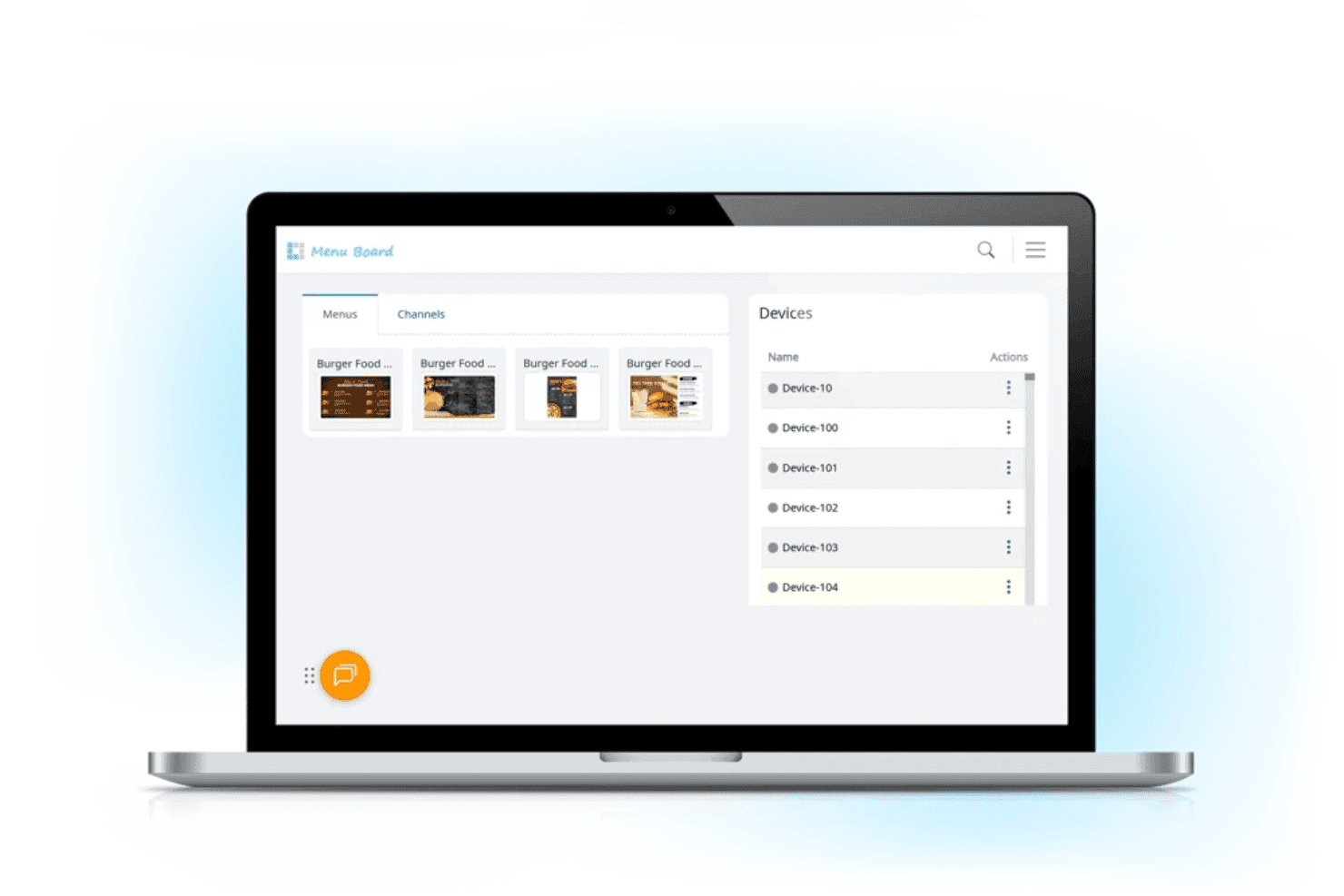
Mit L Squared können Restaurantteams digitale Menüinhalte und verbundene Anzeigegeräte über ein zentrales Dashboard verwalten. L Squared ist eine cloudbasierte Plattform für digitale Menütafeln und Beschilderung, die für Betreiber mit mehreren Standorten entwickelt wurde und ein zentrales CMS, eine automatisierte Tageszeitplanung, eine Bibliothek mit mehr als 150 Widgets sowie Unterstützung für Touchscreen-Kioske kombiniert.
Für wen eignet sich L Squared am besten?
L Squared eignet sich besonders für Betreiber von Unternehmen und Franchise-Netzwerken, die einen vollständig betreuten durchgängigen Rollout wünschen – einschließlich Hardwarebeschaffung, Installation und laufendem Support.
Warum ich mich für L Squared entschieden habe
Ich habe L Squared als eine der besten Lösungen ausgewählt, weil die Plattform Rollouts von Menütafeln durchgängig abwickelt – von der Hardwarebeschaffung über die Installation bis hin zum laufenden Support. Besonders beeindruckend finde ich Intelligent Daypart Merchandising, das Frühstücks-, Mittags- und Abendmenüs automatisch nach einem Zeitplan wechselt, ohne dass jemand das Dashboard bedienen muss. In Kombination mit der Governance auf Unternehmensebene für mehr als 10.000 Bildschirme erhalten Betreiber mit mehreren Standorten eine vollständig verwaltete Bereitstellung, die mit einem Selbstbedienungstool nur schwer nachzubilden ist.
Die wichtigsten Funktionen von L Squared
- Widget-Bibliothek mit Live-Daten: Greifen Sie im Professional-Tarif auf mehr als 50 Widgets zu – darunter Echtzeit-Wetter, Nachrichten, Social-Media-Feeds und Sportergebnisse –, um kontextbezogene Inhalte auf jedem Bildschirm anzuzeigen.
- Rollenbasierte Zugriffskontrolle: Weisen Sie Berechtigungen bis auf Ebene einzelner Bildschirme zu. Für die Verwaltung von Unternehmensteams sind Single Sign-on und Multi-Faktor-Authentifizierung integriert.
- Überschreibung für Notfallmeldungen: Senden Sie Sicherheitswarnungen oder dringende Ankündigungen sofort an alle verbundenen Bildschirme und unterbrechen Sie geplante Inhalte automatisch.
- Unterstützung für Touchscreen-Kioske: Stellen Sie interaktive Touchscreen-Displays für die Selbstbedienungsbestellung, Produktentdeckung, Orientierung sowie die Suche nach Allergen- oder Nährwertinformationen bereit.
Integrationen von L Squared
L Squared bietet mehr als 100 widgetbasierte Integrationen und native Verbindungen innerhalb des Microsoft-Ökosystems, darunter Microsoft 365, Power BI und Teams sowie Cisco Meraki, Achievers und weitere.
Pros and Cons
Pros:
- Menüinhalte werden automatisch an die Tageszeit angepasst
- Touchscreen-Kioske für interaktive Nutzung werden unterstützt
- Audit- und Gerätesteuerung auf Unternehmensebene
Cons:
- Langsamer Einführungsprozess bei den ersten Bereitstellungen
- In einer Bewertung wurden häufige Dienstausfälle gemeldet
Learn more about L Squared: Am besten für Unternehmensbeschilderung für mehrere Standorte in großem Maßstab
- Kostenlose Demo verfügbar
- Preis auf Anfrage
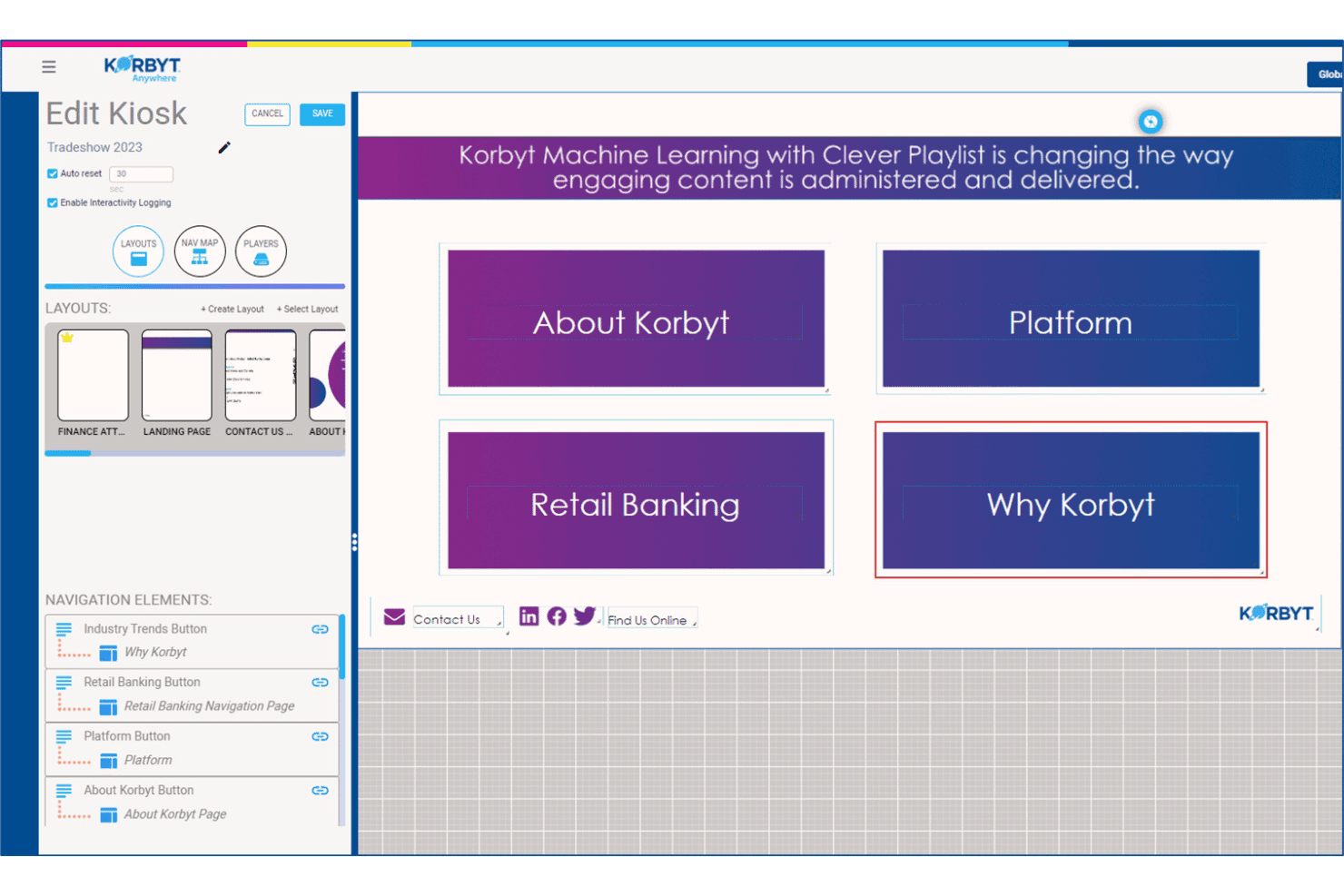
Mit Korbyt können Benutzer interaktive Navigationslayouts für Kiosksysteme erstellen und verwalten. Korbyt ist eine digitale Beschilderungsplattform für Unternehmen, die Inhaltsverwaltung, die Planung für mehrere Bildschirme, Zielgruppenanalysen und KI-gestützte Inhaltserstellung über groß angelegte Bildschirmnetzwerke hinweg bereitstellt.
Für wen ist Korbyt am besten geeignet?
Korbyt eignet sich besonders für IT- und Kommunikationsteams in Unternehmen, die große, verteilte Bildschirmnetzwerke an Dutzenden oder Hunderten von Standorten verwalten.
Warum ich Korbyt ausgewählt habe
Korbyt hat sich einen Platz auf meiner Auswahlliste verdient, weil keine andere von mir getestete Plattform mit seiner Fähigkeit mithalten kann, Inhalte gleichzeitig über Hunderte von Standorten hinweg zu verwalten. Besonders angetan haben es mir die intelligenten Wiedergabelisten und die ML-gestützte Planungs-Engine, die automatisch anpasst, was auf jedem Bildschirm angezeigt wird – abhängig von Standort, Tageszeit und Auslösern durch Live-Daten, ganz ohne manuelle Eingriffe. In Kombination mit rollenbasierten Genehmigungsabläufen und Sperrfunktionen für die Markenvorgaben können Ihre regionalen Teams ihre Bildschirme aktualisieren, ohne Ihre Markenstandards zu verletzen.
Wichtige Funktionen von Korbyt
- Korbyt Optics Zielgruppenanalyse: Ein Zusatzmodul auf Basis einer USB-Kamera, das die Anwesenheit von Betrachtern und die Verweildauer vor Bildschirmen erfasst und auf Grundlage der erkannten Zielgruppe in Echtzeit Inhaltswechsel auslöst.
- Generativer Inhaltsagent CreateAI: Erstellt markengerechte Grafiken für die Beschilderung aus einer Texteingabe und verwendet dabei Ihre gespeicherten Logos, Schriftarten und Markenfarben.
- Editor für Mehrzonenlayouts: Ein Designer zum Ziehen und Ablegen, mit dem Sie einen einzelnen Bildschirm in unabhängige Inhaltsbereiche aufteilen können, die jeweils von unterschiedlichen Teams oder Datenquellen gesteuert werden.
- Übersteuerung für Notfallmeldungen: Überträgt dringende Warnungen sofort an alle verbundenen Bildschirme und unterbricht jede aktive Wiedergabeliste in Ihrem gesamten Standortnetzwerk.
Integrationen von Korbyt
Korbyt bietet native Integrationen mit ServiceNow, Cisco Webex, Zoom Rooms, Crestron, Barco ClickShare, Adobe Experience Manager, Google Drive, Dropbox, Box sowie Integrationen im gesamten Microsoft-Ökosystem.
Pros and Cons
Pros:
- Ermöglicht eine einfache Verwaltung von Inhalten für mehrere Marken
- Unterstützt lokale, cloudbasierte und hybride Bereitstellungen
- Integrierte Tools zur kamerabasierten Messung der Zielgruppe
Cons:
- Keine Funktionen zur Synchronisierung von Einzelhandelsmenüs
- Fokus auf Beschilderung für Unternehmen und Banken
Learn more about Korbyt: Am besten für die Tageszeitplanung bei QSR über mehrere Standorte hinweg
- 30-tägige kostenlose Testversion + kostenlose Vorführung verfügbar
- Ab 14 $/Bildschirm/Monat (jährlich abgerechnet)
Visit WebsiteCustomer Rating:4.9/5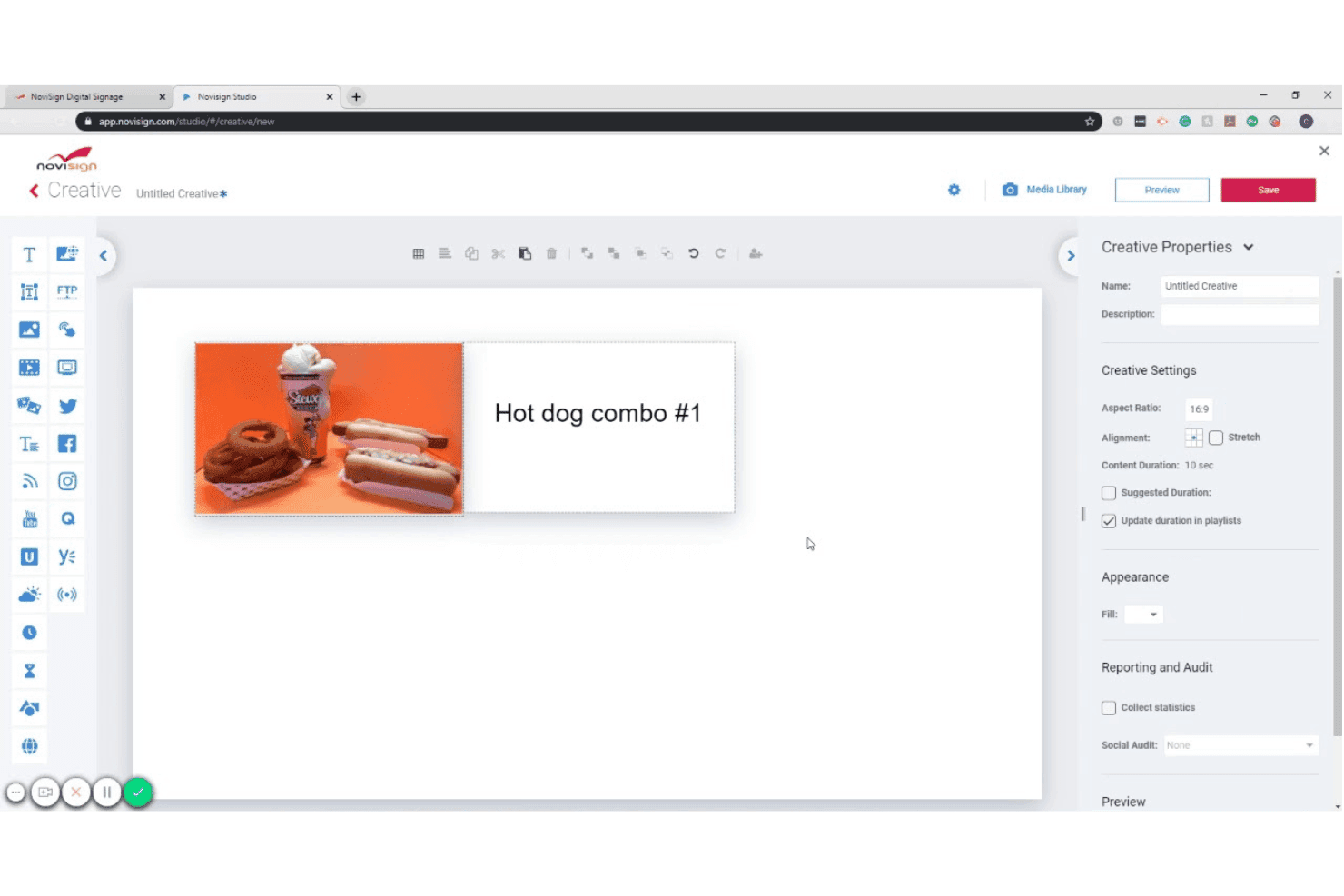
Mit NoviSign können Nutzer Motive für digitale Beschilderung mit Bildern und Text gestalten. NoviSign ist eine cloudbasierte Plattform für digitale Menütafeln, die einen Inhaltseditor zum Ziehen und Ablegen, eine Tageszeitplanung, Live-Datenintegrationen und die Verwaltung von Bildschirmen an mehreren Standorten für Android, Samsung Tizen, LG webOS, BrightSign und andere Bildschirmbetriebssysteme kombiniert.
Für wen ist NoviSign am besten geeignet?
NoviSign eignet sich besonders für Betreiber von Schnellrestaurants und Restaurants mit schneller Küche, die Inhalte für Menütafeln an mehreren Standorten verwalten.
Warum ich NoviSign ausgewählt habe
NoviSign schafft es auf meine engere Auswahl, weil die Automatisierung der Tageszeitplanung die komplexe Terminplanung, mit der QSR-Betreiber an Dutzenden oder Hunderten von Standorten konfrontiert sind, sehr gut bewältigt. Mir gefällt, dass man unbegrenzt viele Wiedergabelisten erstellen kann, die bestimmten Tageszeiten wie Frühstück, Mittagessen, Abendessen und der Vergünstigungsstunde zugeordnet sind, und dass diese automatisch wechseln, ohne dass jemand die Bildschirme bedienen muss. Die native Synchronisierung mit dem Toast-POS ist ebenfalls ein echter Vorteil: Sie überträgt aktuelle Menüpreise und die Verfügbarkeit von Artikeln direkt auf Ihre Tafeln, sobald sich etwas im POS ändert.
Wichtige Funktionen von NoviSign
- Über 500 Designvorlagen: Wählen Sie aus einer Bibliothek branchenspezifischer Vorlagen, darunter digitale Menütafeln, Vorlagen für den Einzelhandel und die Gastronomie, und passen Sie sie direkt im Zeichenflächeneditor zum Ziehen und Ablegen an.
- Bildschirmlayouts mit mehreren Zonen: Teilen Sie eine einzelne Anzeige in mehrere Inhaltszonen auf, um gleichzeitig in einem Bereich Menüelemente und in einem anderen Werbeinhalte oder soziale Inhaltsströme anzuzeigen.
- Berichte zum Ausspielungsnachweis: Erstellen Sie Berichte, in denen protokolliert wird, welche Inhalte auf welchem Bildschirm und zu welchem Zeitpunkt ausgespielt wurden – nützlich für die Überprüfung von Gemeinschaftsmarketing und Prüfungen zur Einhaltung von Inhaltsvorgaben.
- Durch IoT und Sensoren ausgelöste Inhalte: Verbinden Sie RFID-Lesegeräte, Barcode-Scanner und andere IoT-Sensoren, um auf Grundlage realer Ereignisse kontextbezogene Inhaltsänderungen auf dem Bildschirm auszulösen.
NoviSign-Integrationen
NoviSign bietet native Integrationen mit Toast POS, Power BI, Tableau und Google Sheets und lässt sich über Zapier mit mehr als 5.000 zusätzlichen Apps verbinden. Die Plattform unterstützt außerdem DOOH-Werbenetzwerke und stellt eine API für individuelle Integrationen bereit.
Pros and Cons
Pros:
- Zentralisierte Planung für mehrere Veranstaltungsorte
- Vorlagenbibliothek für Menüdesign
- Verwaltung mehrerer Marken mit Unterkonten
Cons:
- Keine Unterstützung für iOS-Wiedergabegeräte
- Mindestanzahl an Bildschirmen für den Premium-Tarif
Learn more about NoviSign: Am besten für die Verwaltung von Menütafeln mit SOC-2-Zertifizierung geeignet
- 14-tägige kostenlose Testversion + kostenlose Demo verfügbar
- Ab $3.5/Gerät/Monat (jährlich abgerechnet)
Visit WebsiteCustomer Rating:4.8/5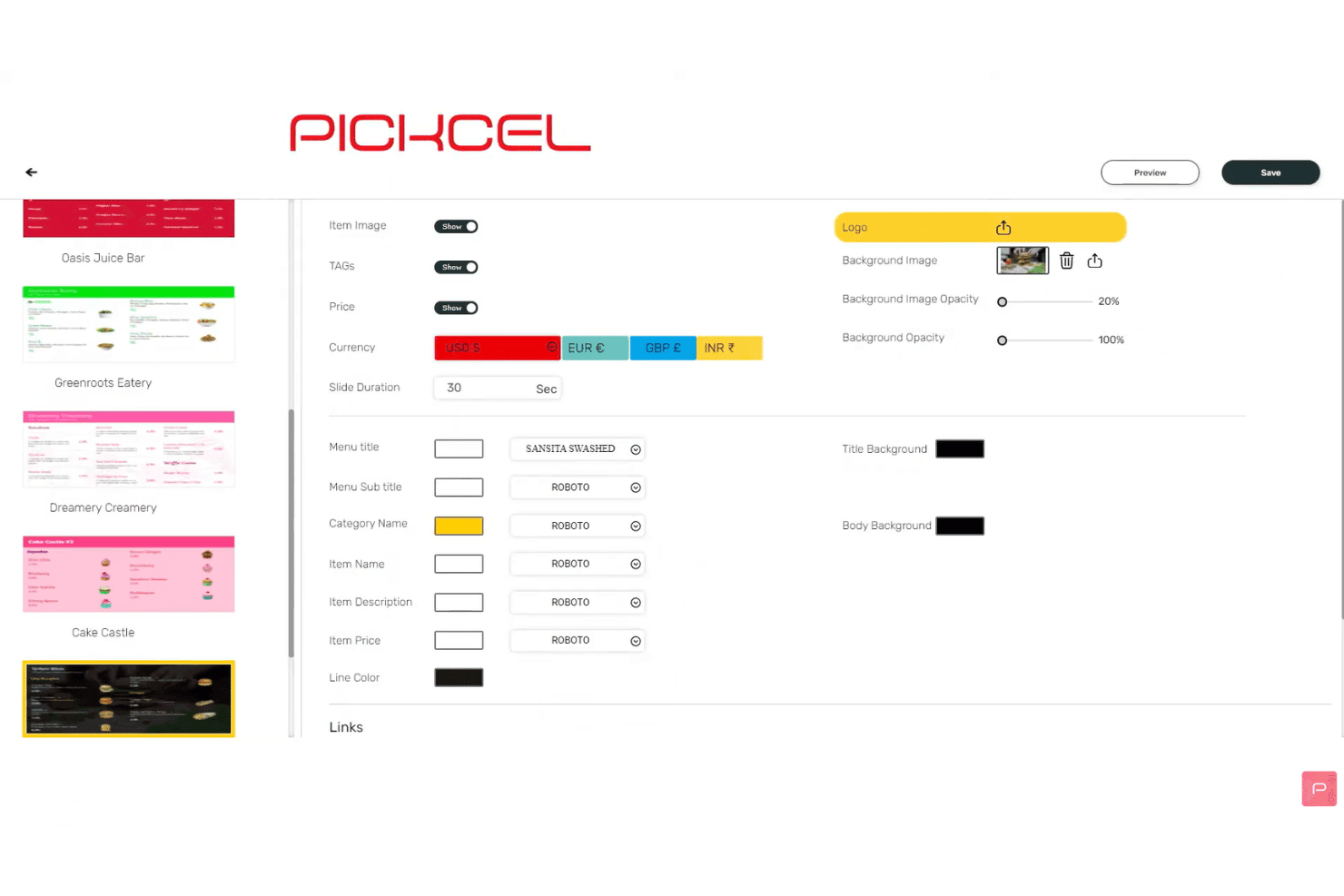
Mit Pickcel können Nutzer die Einstellungen und Schriftarten der Menüanzeige anpassen. Pickcel ist eine cloudbasierte Plattform für digitale Menütafeln mit einem Inhaltseditor mit Ziehen-und-Ablegen-Funktion, automatisierter Tageszeitsteuerung, der Planung für mehrere Bildschirme, POS-Datenintegrationen und zentraler Fernverwaltung von Geräteflotten über mehr als 50 Gerätetypen hinweg.
Für wen ist Pickcel am besten geeignet?
Pickcel eignet sich besonders für IT- und Betriebsteams von Gastronomie- und Einzelhandelsmarken mit mehreren Standorten, die neben der täglichen Verwaltung digitaler Menütafeln Sicherheitszertifizierungen auf Unternehmensniveau benötigen.
Warum ich Pickcel ausgewählt habe
Pickcel steht auf meiner engeren Auswahl, weil es die einzige Plattform für digitale Menütafeln ist, die ich gefunden habe und die Zertifizierungen nach SOC 2 Typ II und ISO 27001 mit einem voll ausgestatteten CMS für digitale Menütafeln kombiniert. Das ist wichtig, wenn IT-Sicherheitsprüfungen Teil Ihres Beschaffungsprozesses sind. Besonders gut gefällt mir die Option zur lokalen Bereitstellung, mit der regulierte Marken die gesamte Plattform selbst hosten können und so vollständige Datenhoheit erhalten. Die Prüfprotokolle und RBAC-Steuerelemente sorgen dafür, dass jede Inhaltsänderung standortübergreifend erfasst und mit entsprechenden Berechtigungen versehen wird.
Wichtigste Funktionen von Pickcel
- Automatisierte Tageszeitsteuerung: Planen Sie, dass Menüinhalte je nach Tageszeit oder Wochentag automatisch zwischen Frühstück, Mittagessen, Abendessen und dem späten Abend wechseln.
- Datenfeeds aus Google Sheets und Excel: Verbinden Sie aktuelle Tabellen, damit sich Menüpreise und Artikel auf dem Bildschirm automatisch aktualisieren, sobald sich die Quelldaten ändern.
- Editor für Mehrzonen-Layouts: Teilen Sie einen einzelnen Bildschirm in mehrere Inhaltszonen auf, in denen gleichzeitig jeweils unabhängige Medien, Widgets oder Menüinhalte ausgeführt werden.
- Wiedergabenachweise: Exportieren Sie Protokolle zur Kampagnenwiedergabe und Berichte zur Geräteverfügbarkeit als CSV-Dateien, um die Inhaltsübermittlung in Ihrem Bildschirmnetzwerk zu überprüfen.
Integrationen von Pickcel
Pickcel bietet integrierte Verbindungen mit Square, Shopify, Google Sheets, Excel und Canva und lässt sich mit Zapier verbinden. Für kundenspezifische Integrationen stehen eine offene REST-API und Webhooks zur Verfügung.
Pros and Cons
Pros:
- Unterstützt mehr als 50 Gerätetypen und Betriebssysteme
- Automatischer Menüwechsel für Kampagnen nach Tageszeit
- Lokale Bereitstellung mit Prüfprotokollen und RBAC
Cons:
- Die Vorlagenauswahl ist kleiner als bei Wettbewerbern
- Einige Berichte über eine langsame Leistung der Übersichtsseite
Learn more about Pickcel: Am besten für Menütafel-Bereitstellungen mit nativer Apple-TV-Unterstützung
- 14-tägige kostenlose Testversion + kostenlose Demo verfügbar
- Ab 7 $/Bildschirm/Monat (jährliche Abrechnung)
Visit WebsiteCustomer Rating:4.5/5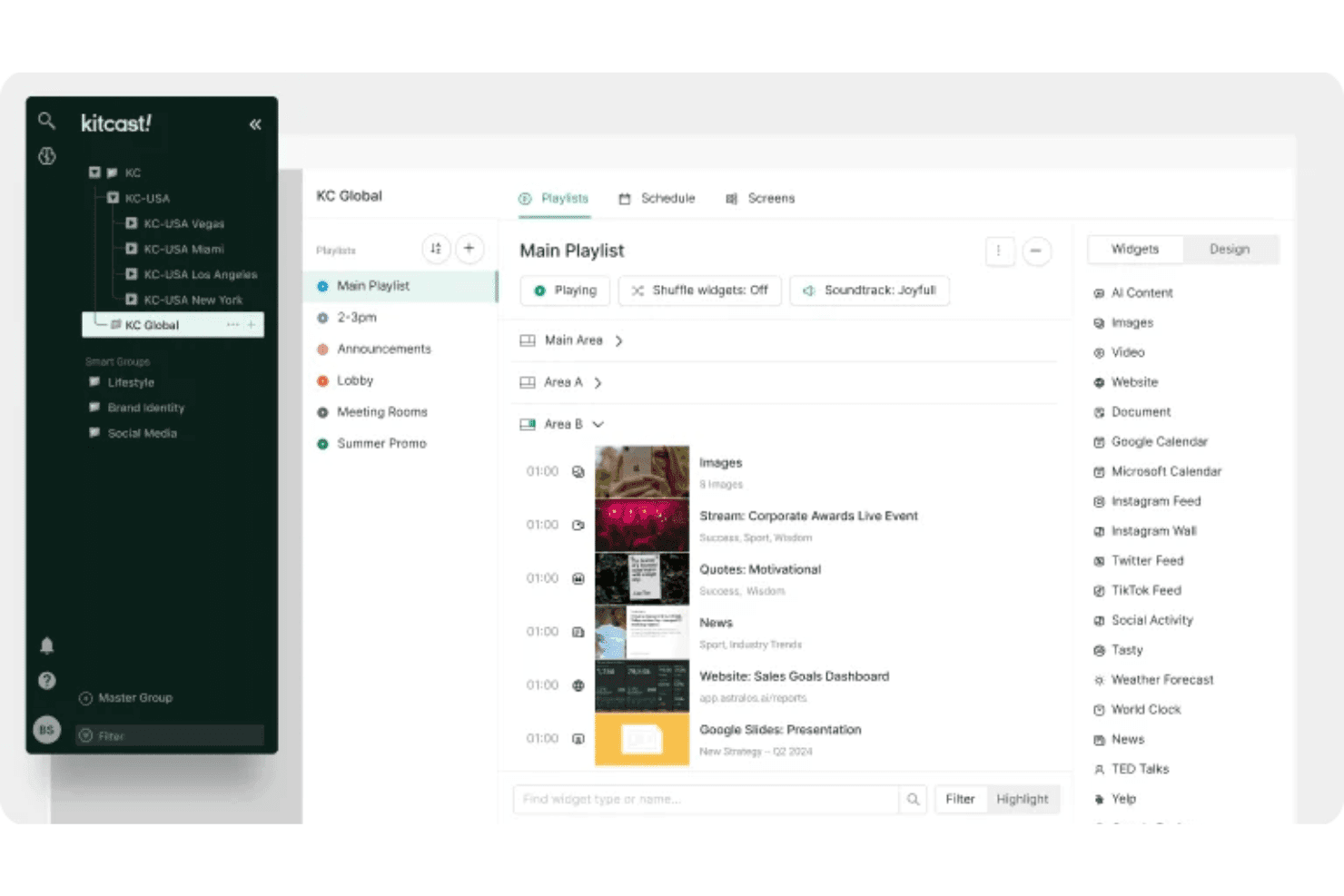
Mit Kitcast können Benutzer Wiedergabelisten und Widgets auf mehreren Bildschirmen organisieren. Kitcast ist eine cloudbasierte Plattform für digitale Beschilderung mit einer nativen Apple-TV-App, die Inhaltsplanung, POS-synchronisierte Menüveröffentlichung, Tageszeitenautomatisierung und die Fernverwaltung mehrerer Bildschirme abdeckt.
Für wen ist Kitcast am besten geeignet?
Kitcast eignet sich besonders für Restaurants und Cafés, die Apple-TV-Hardware einsetzen und Menütafeln benötigen, die automatisch mit ihrem POS synchronisiert werden.
Warum ich mich für Kitcast entschieden habe
Kitcast hat sich einen Platz auf meiner Auswahlliste verdient, weil es die einzige Plattform für digitale Beschilderung ist, die nativ auf tvOS entwickelt wurde. Dadurch rendert Apple TV jedes Element einer Menütafel – Live-Widgets, Videos und dynamische Preise – ohne die Umgehungslösungen, die andere Plattformen auf Apple-Hardware benötigen. Besonders gut gefällt mir die POS-Synchronisierung mit Square, Toast und Clover, bei der nicht verfügbare Artikel automatisch abgedunkelt oder ausgeblendet werden, sobald sich der Lagerbestand ändert. In Kombination mit der echten Tageszeitenautomatisierung erfolgen Übergänge vom Frühstücks- zum Mittagsangebot nach einem voreingestellten Zeitplan – ganz ohne manuelles Eingreifen.
Die wichtigsten Funktionen von Kitcast
- Rollenbasierte Berechtigungen: Administratoren können Markenstandards wie Schriftarten, Farben und Layouts unternehmensweit festlegen, während lokale Redakteure Preise und Angebote innerhalb der genehmigten Grenzen aktualisieren.
- Notfallwarnungs-Überschreibung: Die CAP-Integration im Pro-Tarif ermöglicht es, Sicherheitswarnungen oder Ankündigungen sofort auf jeden Bildschirm im gesamten Netzwerk zu übertragen und dabei alle aktiven Inhalte zu überschreiben.
- Wiedergabenachweise: Kitcast erstellt verifizierte Aufzeichnungen darüber, welche Inhalte auf welchem Bildschirm und zu welchem Zeitpunkt wiedergegeben wurden – nützlich für Berichte von Franchise-Unternehmen und die Einhaltung von Vorgaben für gemeinschaftliche Marketingmaßnahmen.
- KI-Inhaltsersteller: Menülayouts und Werbematerialien lassen sich direkt aus Texteingaben erstellen, ohne ein separates Design-Tool oder eine externe Medienbibliothek zu benötigen.
Kitcast-Integrationen
Kitcast bietet native Integrationen mit Square, Toast, Clover, Lightspeed Restaurant, Revel Systems, Canva, Google Workspace und dem Microsoft-Ökosystem (einschließlich Microsoft 365, SharePoint und Azure AD über SCIM).
Pros and Cons
Pros:
- Native Bereitstellung von Apple-TV-Menütafeln
- Notfallwarnungs-Überschreibung für alle Bildschirme
- Rollenbasierte Berechtigungen für die Markensteuerung
Cons:
- Begrenzte Dokumentation zu interaktiven Touchscreen-Funktionen
- Keine integrierten Funktionen zur Personalisierung für Zielgruppen
Learn more about Kitcast: 9Am besten für die Verwaltung von Menütafeln mit unbefristeter Lizenz geeignet
Mvix
- Kostenlose Demo verfügbar
- Ab 450 $ einmalig
Visit WebsiteCustomer Rating:4.6/5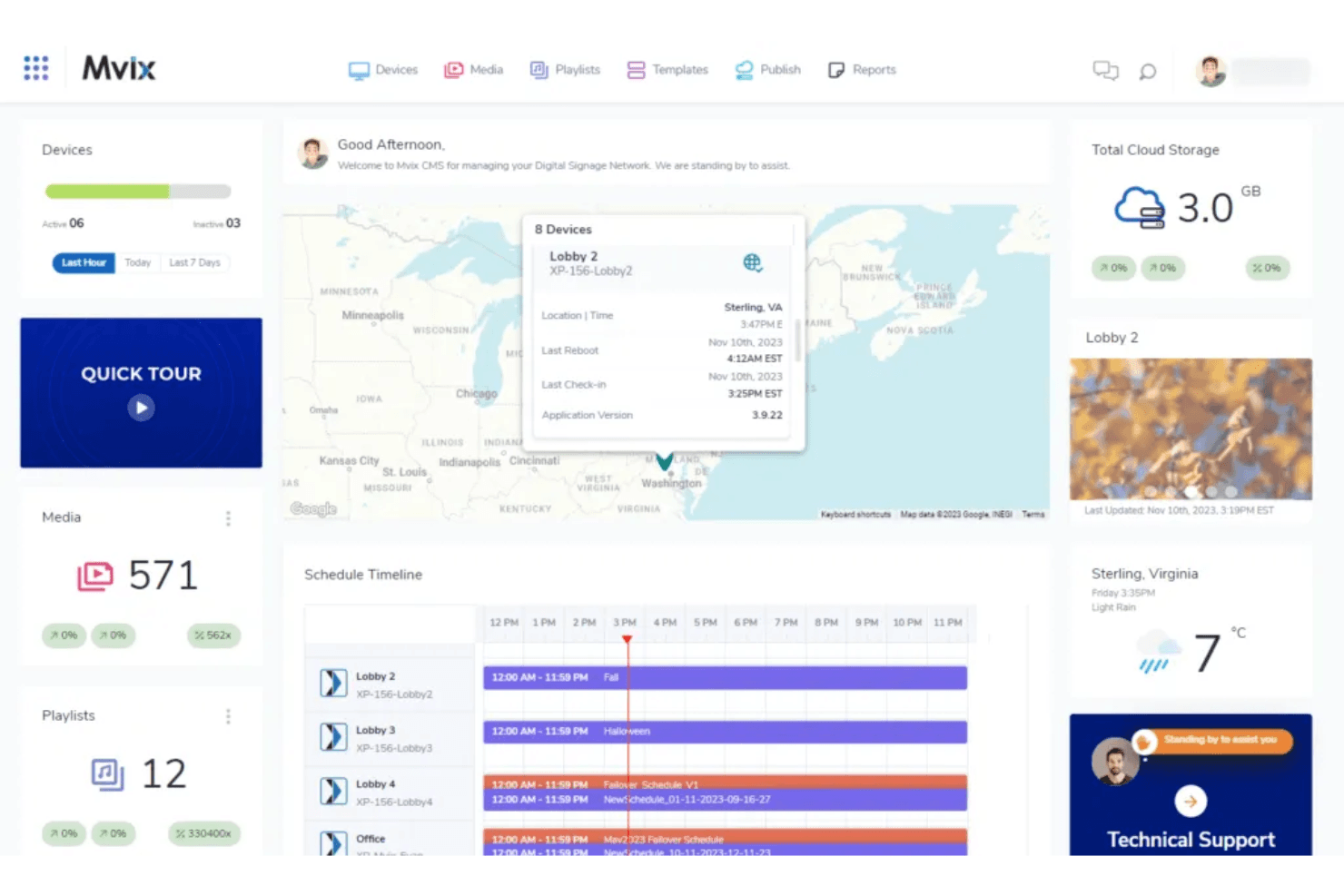
Das Mvix-Übersichtsseite ermöglicht es Benutzern, Geräte, Zeitpläne und Medien in einer Ansicht zu überwachen. Mvix ist eine Plattform für digitale Menütafeln und Beschilderungen, die proprietäre Mediaplayer mit einem cloudbasierten CMS kombiniert und die Gestaltung von Layouts mit mehreren Zonen, die Planung nach Tageszeiten, POS-Integration und die Fernverwaltung von Geräten bietet.
Für wen ist Mvix am besten geeignet?
Mvix eignet sich besonders für Betreiber mehrerer Standorte und IT-Teams, die wiederkehrende SaaS-Gebühren vermeiden möchten, indem sie Hardware mit einer enthaltenen lebenslangen CMS-Lizenz kaufen.
Warum ich Mvix ausgewählt habe
Mvix schafft es auf meine engere Auswahl, weil es die einzige Plattform für digitale Menütafeln ist, die ich gefunden habe und die eine lebenslange CMS-Lizenz in einen einmaligen Hardwarekauf integriert, ohne wiederkehrende Gebühren pro Bildschirm. Besonders gefällt mir die Tageszeit-App, die die Inhaltsrotation nach Tageszeit (vom Frühstück bis spät in die Nacht) automatisiert, ohne dass eine manuelle Planung erforderlich ist. Die Menü-Ersteller-App synchronisiert außerdem aktuelle Preise und den Lagerstatus direkt aus Toast, Clover und Square, sodass Menütafeln in Echtzeit aktualisiert werden, wenn Artikel ausverkauft sind oder sich Preise ändern.
Die wichtigsten Funktionen von Mvix
- Layout-Gestalter mit mehreren Zonen: Teilen Sie jeden Bildschirm in bis zu 10 unabhängige Inhaltszonen auf, in denen jeweils gleichzeitig unterschiedliche Medien ausgeführt werden.
- Gerätezustandsportal: Überwachen Sie CPU-Auslastung, Speicher, WLAN-Signalstärke und Temperatur für jeden Player in Ihrem Netzwerk über ein einziges Übersichtsseite.
- Überschreibung durch Notfallwarnungen: Die Integration des IPAWS/CAP-Protokolls ersetzt sofort alle geplanten Inhalte auf jedem Bildschirm durch Notfallmeldungen.
- Magische Ordner: Synchronisieren Sie Inhalte automatisch aus Microsoft Office 365 oder Google Drive, damit Ihre Anzeigen bei jeder Änderung der Quelldateien aktualisiert werden.
Integrationen von Mvix
Mvix bietet native Integrationen mit Toast, Square, Power BI, Tableau, Klipfolio und Slack sowie Social-Media-Feeds von Facebook, Instagram und X. Außerdem stehen REST-APIs und Webhooks für die Anbindung individueller POS-, CRM- und HR-Systeme zur Verfügung.
Pros and Cons
Pros:
- Lebenslange CMS-Lizenz beim Hardwarekauf
- Layout-Gestalter mit mehreren Zonen für Menütafeln
- Offline-Wiedergabe hält Bildschirme in Betrieb
Cons:
- Die Einrichtung erfordert häufig IT-Kenntnisse
- Einige Benutzer berichten von Hardwareproblemen
Learn more about Mvix: Am besten für die Verwaltung großer Menütafel-Flotten geeignet
- Kostenlose Demo verfügbar
- Ab 14 $/Monat/Player
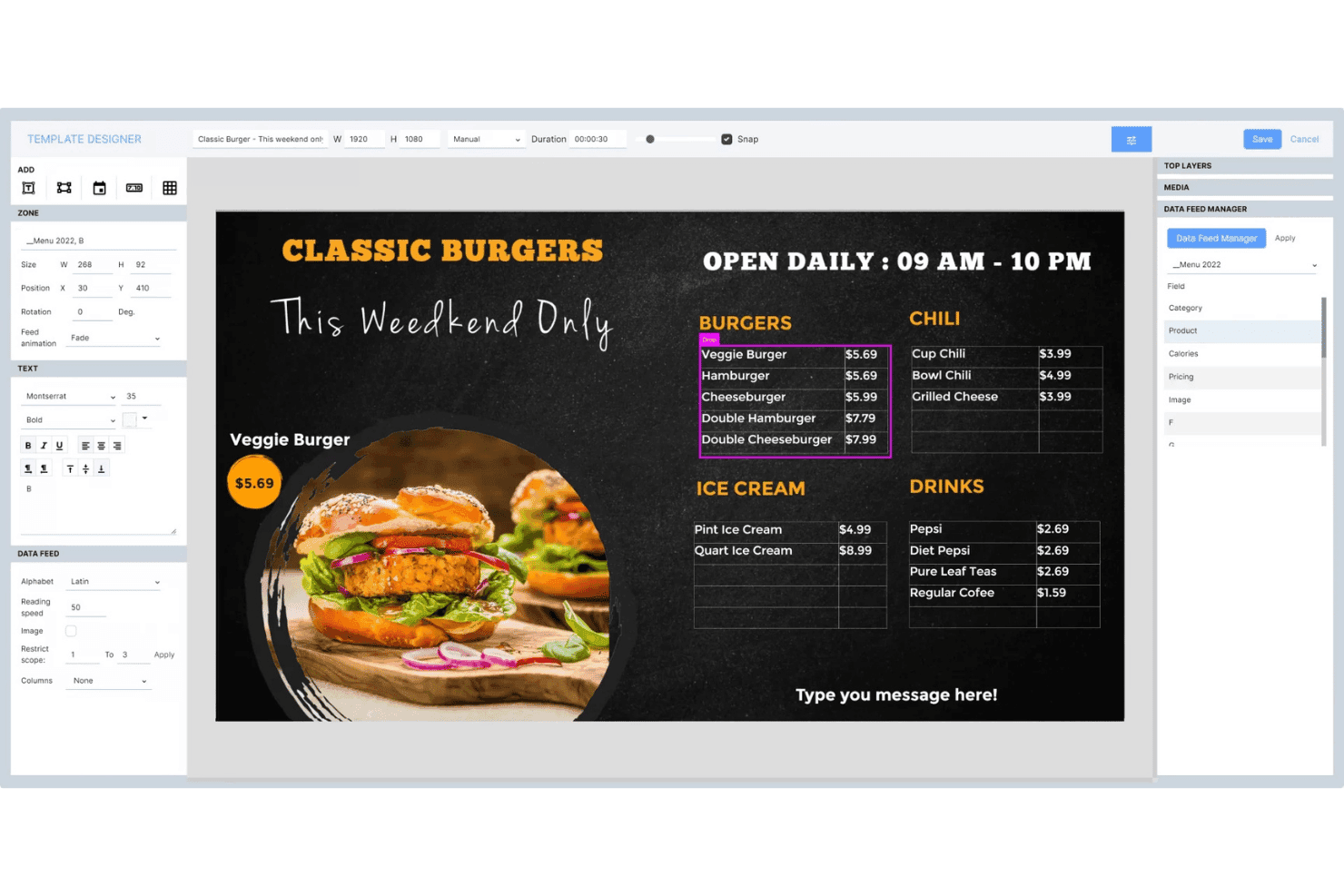
Mit Navori Labs können Nutzer dynamische Menütafeln mit Live-Datenfeeds gestalten. Navori Labs ist eine Plattform für digitale Menütafeln und Beschilderung, die für groß angelegte Bereitstellungen entwickelt wurde und mandantenfähige Inhaltsverwaltung, Tageszeitplanung, Live-Datenintegration sowie die Fernüberwachung von Gerätekonfigurationen über Tausende von Displays hinweg bietet.
Für wen eignet sich Navori Labs am besten?
Navori Labs eignet sich besonders für große QSR-Ketten und Einzelhändler mit mehreren Standorten, die Tausende von Displays über Filialen, Regionen und Marken hinweg von einem einzigen Backend aus verwalten müssen.
Warum ich mich für Navori Labs entschieden habe
Navori Labs hat sich seinen Platz auf meiner Auswahlliste verdient, weil keine andere von mir getestete Plattform die Verwaltung von Menütafeln über Tausende von Standorten hinweg so nahtlos skaliert. Besonders beeindruckt mich die mandantenfähige Architektur, mit der zentrale Teams landesweite Playlists festlegen können, während Franchisenehmer lokale Inhalte innerhalb definierter Leitplanken steuern. Das Tageszeitplanungsmodul wechselt Frühstückstafeln automatisch zu Mittagsmenüs, ohne dass eine manuelle Eingabe erforderlich ist, und die POS-Synchronisierung in Echtzeit überträgt Preise sowie den Status nicht verfügbarer Produkte direkt auf die Displays.
Die wichtigsten Funktionen von Navori Labs
- Mandantenfähige Architektur: Trennt Inhalte, Berechtigungen und Daten für Marken, Franchises oder Regionen innerhalb einer einzigen Backend-Instanz.
- AQUAJI-Zielgruppenanalyse: Nutzt Computer Vision über verbundene Kameras, um Besucheraufkommen, Verweildauer und demografische Daten für Berichte zur Inhaltsleistung zu messen.
- Notfallalarm-Übersteuerung: Integriert sich in CAP, OmniAlert und Gebäudealarmsysteme, um sofort bildschirmfüllende Warnmeldungen auf allen verwalteten Displays auszugeben.
- Unterstützung interaktiver Touchscreens: Ermöglicht Lift-and-Learn, RFID/NFC-Auslöser, Gestenerkennung und Eingaben von IoT-Sensoren für Kiosk- und Selbstbedienungs-Displaykonfigurationen.
Integrationen von Navori Labs
Navori Labs bietet native Integrationen mit Microsoft Power BI, Vistar Media, Hivestack, Screenfeed, Facebook, Instagram, LinkedIn und X (Twitter) sowie Live-Datenkonnektoren für RSS-, JSON-, XML- und iCal-Feeds.
Pros and Cons
Pros:
- Skaliert auf Zehntausende von Bildschirmen
- Mandantenverwaltung für Franchises und Marken
- Integrierte Notfallwarnungen für die Einhaltung von Handelsvorschriften
Cons:
- Erweiterte Funktionen können anfangs überwältigend wirken
- Details zur POS-Kompatibilität sind nicht öffentlich aufgeführt
Learn more about Navori Labs:
Weitere Software für digitale Menütafeln
Hier finden Sie einige zusätzliche Optionen für Software für digitale Menütafeln, die es nicht in meine engere Auswahl geschafft haben, aber dennoch einen Blick wert sind:
- 11WallboardAm besten geeignet für die Automatisierung POS-synchronisierter Menütafeln
- 12OptiSignsAm besten für umfangreiche, tageszeitbasierte Menüaktualisierungen geeignet
- 13YodeckAm besten für die Verwaltung von Menütafeln im kostenlosen Tarif
- 14Look Digital SignageAm besten für berührungsgesteuerte Menütafel-Kioske
- 15TelemetryTVAm besten für von Entwicklern erstellte, API-gesteuerte Menütafeln
- 16Samsung VXTAm besten geeignet für native Samsung-Menüboard-Netzwerke
- 17XiboAm besten für die Planung von Open-Source-Menütafeln geeignet
- 18NowSignageAm besten geeignet für die Lizenzierung von All-inclusive-Menütafeln
Wie ich Software für digitale Menütafeln bewerte
Ich teile meine Bewertung in grundlegende Kriterien auf, die jedes Tool erfüllen muss – etwa Tageszeitsteuerung, die Verwaltung von Bildschirmen aus der Ferne und POS-Synchronisierung – sowie in unterscheidende Faktoren, die eine leistungsfähige Plattform von der richtigen Lösung für Betreiber mit mehreren Standorten abheben.
Kernfunktionen (Grundvoraussetzungen für diese Liste)
Bei der Auswahl der Tools für meine Liste bewerte ich jedes einzelne für jede der unten aufgeführten Kernfunktionen auf einer Skala von 0 (bietet die Funktion nicht an) bis 5 (zeichnet sich in diesem Bereich aus). Anschließend rechne ich die Gesamtpunktzahl des Tools in einen Prozentsatz um und verwende 65% als Referenzwert, um die allgemeine Eignung für die Liste zu beurteilen.
- Content-Management-System: Ich achte auf ein cloudbasiertes CMS mit Benutzerrollen für mehrere Nutzer, Medienbibliotheken und Ordnerstrukturen, mit denen Teams Menüs nach Marke, Standort oder Kampagne organisieren können, ohne sich gegenseitig in die Quere zu kommen.
- Zeitplanung für mehrere Bildschirme: Hier zeigt sich, wie gut die Tageszeitsteuerung funktioniert. Ich prüfe, ob eine Plattform den automatischen Wechsel von Frühstücks- zu Mittagsmenüs auf Dutzenden von Bildschirmen ermöglichen kann, die nach Region, Zeitzone oder Geschäftsformat gruppiert sind.
- Verwaltung von Bildschirmen aus der Ferne: Ich prüfe, ob die Plattform die Überwachung des Bildschirmzustands, Offline-Warnungen und einen Neustart aus der Ferne bietet, damit Ihr Team einen ausgefallenen Bildschirm in einer anderen Stadt beheben kann, ohne jemanden dorthin schicken zu müssen.
- Vorlagen- und Designwerkzeuge: Ein Editor mit Drag-and-drop-Funktion und dynamischen Datenfeldern ist hier wichtig. Ich prüfe, ob Sie markengerechte Menülayouts erstellen können, in denen Preise oder die Verfügbarkeit von Artikeln automatisch aus einer verbundenen Datenquelle übernommen werden.
- Daten- und POS-Integrationen: Ich bewerte die Echtzeitsynchronisierung mit POS-Systemen wie Square, Toast oder Lightspeed. Änderungen an Menüpreisen oder ausgelistete Artikel sollten innerhalb weniger Minuten und nicht erst nach Stunden auf den Bildschirmen erscheinen.
- Kompatibilität mit Hardware und Betriebssystemen: Ich berücksichtige, wie viele Player-Typen eine Plattform unterstützt. Die besten Optionen funktionieren mit Android, BrightSign, Windows, Fire TV und Smart-TVs, sodass Sie nicht an einen einzigen Hardwareanbieter gebunden sind.
Sobald ich eine Liste von Tools habe, die die Kriterien erfüllen, prüfe ich, wodurch sich die einzelnen Plattformen voneinander abheben.
Unterscheidende Faktoren (Was Anbieter voneinander abhebt)
So vergleiche ich verschiedene Anbieter miteinander:
Herausragende Funktionen
Die Automatisierung der Tageszeitsteuerung ist das Erste, was ich bewerte. Ich prüfe, ob eine Plattform Menüs für Frühstück, Mittag- und Abendessen ohne manuelle Auslöser automatisch wechseln kann – und ob diese Regeln für Flotten in mehreren Regionen über verschiedene Zeitzonen hinweg gelten. Ebenso wichtig ist die Überschreibung von Notfallnachrichten. Wenn eine Sicherheitswarnung sofort auf jedem Bildschirm erscheinen muss, achte ich auf Überschreibungen mit einem einzigen Befehl, die geplante Inhalte vorübergehend ersetzen. Die KI-gestützte Personalisierung von Inhalten bildet den dritten Schwerpunkt meiner Bewertung. Plattformen wie Poppulo nutzen Publikumsanalysen, um die auf dem Bildschirm angezeigten Inhalte auf Grundlage der Besucherfrequenz oder der Länge von Warteschlangen anzupassen, was den richtigen Zeitpunkt für Zusatzverkäufe während der Stoßzeiten direkt beeinflussen kann.
Über die Funktionen hinaus
Ich bewerte die Gesamtbetriebskosten genau, da Modelle mit Preisen pro Bildschirm schnell teuer werden können, wenn weitere Standorte hinzukommen. Einige Anbieter bündeln die Hardware, während andere Player, Premiumvorlagen oder POS-Integrationen separat berechnen. Die Steuerung der Skalierbarkeit ist ebenso wichtig. Ich prüfe, ob eine Plattform die Inhaltsberechtigungen nach Region oder Franchisebetrieb segmentieren kann, sodass die Zentrale Markeninhalte sperren kann, während lokale Teams die Tagesangebote austauschen. Berichte zum Wiedergabenachweis sind ein weiterer Faktor, auf den ich achte, insbesondere wenn Sie von Anbietern finanzierte Werbeaktionen durchführen, für die verifizierte Wiedergabeprotokolle erforderlich sind, um gemeinschaftliche Marketingbudgets zurückzuerhalten.
So wählen Sie Software für digitale Menütafeln aus
Wenn Sie Software für digitale Menütafeln bewerten, sollten Sie darauf achten, wie jede Option Ihnen die Verwaltung von Inhalten, Aktualisierungen und Compliance in dem Umfang ermöglicht, den Ihr Team benötigt – ohne dabei Kontrolle oder Flexibilität einzubüßen:
| Wenn Ihre Priorität ... ist | Achten Sie auf ... |
|---|---|
| Wenn Ihre Priorität ... istSchnelle Menüaktualisierungen an mehreren Standorten | Achten Sie auf ...Zentrale, gruppenbasierte Planung mit Tageszeitsteuerung |
| Wenn Ihre Priorität ... istMarkenkonformität und Nachvollziehbarkeit | Achten Sie auf ...Rollenbasierte Berechtigungskontrollen und Protokolle zur Wiedergabebestätigung |
| Wenn Ihre Priorität ... istLive-Synchronisierung von Preisen und Artikeln über das POS-System | Achten Sie auf ...Native POS-Integrationen in Echtzeit |
| Wenn Ihre Priorität ... istMinimale Beeinträchtigung der Hardware während der Einführung | Achten Sie auf ...Breite Kompatibilität mit Geräten und Betriebssystemen |
| Wenn Ihre Priorität ... istZuverlässige Leistung für große Geräteflotten | Achten Sie auf ...Garantierte Verfügbarkeit auf Unternehmensebene und Warnmeldungen |
So prüfen Sie Ihre engere Auswahl
- Tageszeitsteuerung für Menüs im großen Maßstab testen: Führen Sie während Ihres Tests an mindestens 10 Standorten einen zeitbasierten Menüwechsel durch.
- Nachweis der Wiedergabe anfordern: Bitten Sie um beispielhafte Wiedergabeprotokolle mit Angaben zu Datum, Standort und Inhalten.
- Verbindungsgeschwindigkeit zum POS überprüfen: Führen Sie über Ihr aktuelles POS-System eine Live-Aktualisierung des Menüs durch und messen Sie die Bildschirmaktualisierungszeiten innerhalb einer Minute.
- Berechtigungssteuerungen bewerten: Weisen Sie rollenbasierte Zugriffsstufen innerhalb von 48 Stunden einem simulierten Konto mit mehreren Regionen zu und testen Sie diese.
- Abwägung zwischen Eigentum und SaaS-Geschwindigkeit: Entscheiden Sie, ob die Kontrolle über eine unbefristete Lizenz die im Vergleich zu abonnementbasierten Anbietern langsameren Funktionsaktualisierungen wert ist.
Was ist Software für digitale Menütafeln?
Software für digitale Menütafeln ist eine cloudbasierte Plattform, mit der Sie digitale Menüs auf Bildschirmen an mehreren Standorten verwalten, planen und aktualisieren können. Sie bietet Teams im Einzelhandel und in der Gastronomie eine zentrale Anlaufstelle zur Steuerung von Menüinhalten, zur Automatisierung der Tageszeitplanung, zur Synchronisierung mit Kassensystemen und zur Wahrung der Markenkonsistenz. Diese Software ist für Unternehmen konzipiert, die schnelle, koordinierte Inhaltsänderungen ohne manuelle Aktualisierungen an jedem einzelnen Standort benötigen. Funktionen
Funktionen von Software für digitale Menütafeln
Achten Sie bei der Auswahl einer Software für digitale Menütafeln auf die folgenden wichtigen Funktionen:
- Inhaltsverwaltungssystem: Zentralisiert alle Inhalte Ihrer Restaurantmenüs und Beschilderungen und ermöglicht es Ihrem Team, Medieninhalte an einem Ort zu organisieren, zu aktualisieren und freizugeben. Unterstützt Versionskontrolle, geplante Veröffentlichungen und Benutzerberechtigungen für eine konsistente Markenpräsentation in großem Maßstab.
- Planung mehrerer Bildschirme: Ermöglicht es Ihnen, verschiedenen Standorten, Bildschirmen oder Tageszeiten individuelle digitale Menüanzeigen zuzuweisen. Ermöglicht koordinierte Menüwechsel für Frühstück, Mittagessen oder zeitlich begrenzte Angebote ohne manuelle Aktualisierungen.
- Fernverwaltung von Anzeigen: Ermöglicht es Ihnen, jede digitale Anzeige an allen Standorten von überall aus zu überwachen, zu steuern und Fehler zu beheben. Bietet Überwachung des Bildschirmstatus, Offline-Warnungen und Neustartbefehle, damit Sie Anzeigeprobleme schnell beheben können.
- Vorlagen- und Designwerkzeuge: Bietet Editoren mit Ziehen-und-Ablegen-Funktion, anpassbare Layouts, Vorlagen für Menütafeln, Animationen und dynamische Felder für Preise oder Artikeldaten. Erleichtert die Erstellung ansprechender Menüs, die auf jedem Bildschirm scharf dargestellt werden.
- POS-Integrationen: Synchronisiert Menüdaten direkt mit Ihrem Kassensystem und automatisiert Preisänderungen, neue Artikel sowie Aktualisierungen der Artikelverfügbarkeit. Reduziert die manuelle Dateneingabe und hält Menüs auf allen Bildschirmen auf dem neuesten Stand.
- Kompatibilität mit Geräten und Betriebssystemen: Unterstützt eine Vielzahl von Mediaplayern und Geräten wie Android, Windows, Fire TV, BrightSign und Smart-TVs, sodass Sie elektronische Menütafeln auf unterschiedlichen Gerätetypen einsetzen können.
- Steuerung von Benutzerrollen und Berechtigungen: Ermöglicht die Festlegung von Zugriffsstufen nach Region, Abteilung oder Person. Unterstützt die Einhaltung von Vorgaben und die Markenintegrität und gibt lokalen Teams gleichzeitig die Flexibilität, Menüs nach Bedarf zu aktualisieren.
- Berichte zum Wiedergabenachweis: Erfasst, wann und wo Menüinhalte angezeigt wurden. Nützlich zur Überprüfung von Gemeinschaftswerbung, rechtlicher Compliance oder Betriebsprüfungen.
- Verwaltung der Medienbibliothek: Bietet eine zentrale Medienbibliothek zum Speichern von Bildern, Videos und Vorlagen. Vereinfacht die Inhaltserstellung und stellt sicher, dass Teams freigegebene Medieninhalte verwenden.
- Unterstützung der Offline-Wiedergabe: Stellt sicher, dass Menüs auch dann auf den Bildschirmen sichtbar bleiben, wenn die Internetverbindung ausfällt. Dies ist entscheidend für einen unterbrechungsfreien Service an allen Standorten.
Häufige KI-Funktionen von Software für digitale Menütafeln
Über die oben aufgeführten Standardfunktionen von Software für digitale Menütafeln hinaus integrieren viele dieser Lösungen KI mit Funktionen wie:
- KI-gestützte Personalisierung von Inhalten: Verwendet Echtzeitanalysen des Publikums, um Menüs auf digitalen Anzeigen anhand von Faktoren wie Besucheraufkommen, Tageszeit oder Kundendemografie anzupassen, und unterstützt so relevantere Werbeaktionen und eine stärkere Kundenbindung.
- Automatisierte Empfehlungen für Zusatzverkäufe: Analysiert Verkaufsdaten und Kundenverhalten, um direkt auf der Menütafel margenstarke Ergänzungen oder Kombinationen vorzuschlagen. Dies kann den Umsatz steigern, indem während des Bestellvorgangs gezielte Empfehlungen angezeigt werden.
- Optimierung dynamischer Preise: Überwacht kontinuierlich Bestandsmengen, Nachfragemuster und die Preise der Wettbewerber, um Menüpreise automatisch anzupassen. So können Sie auf Marktveränderungen reagieren und den Umsatz ohne manuelles Eingreifen maximieren.
- Prädiktive Menüplanung: Nutzt historische Verkaufsdaten und externe Faktoren wie Wetter oder lokale Veranstaltungen, um die Nachfrage vorherzusagen und Menüänderungen automatisch zu planen. Dadurch werden Ihre beliebtesten oder profitabelsten Artikel dann hervorgehoben, wenn sie voraussichtlich am besten verkauft werden.
- Optimierung visueller Elemente: Setzt KI ein, um Menübilder durch Anpassung der Beleuchtung, Zuschneiden oder sogar die Erstellung neuer, zu Ihrem Markenstil passender Bilder zu verbessern. So bleiben Ihre Menütafeln visuell ansprechend, ohne dass Sie auf manuelle Grafikdesignarbeit angewiesen sind.
Vorteile von Software für digitale Menütafeln
Die Implementierung einer Software für digitale Menütafeln bietet Ihrem Team und Ihrem Unternehmen mehrere Vorteile. Hier sind einige Vorteile, auf die Sie sich freuen können:
- Zentralisierte Inhaltsverwaltung: Greifen Sie auf eine Plattform für Digital-Signage-Software zu, um Menüinhalte für jeden Standort über ein einziges Dashboard zu steuern, zu aktualisieren und zu organisieren.
- Automatisierte Menüplanung: Nutzen Sie Funktionen für die Planung mehrerer Bildschirme und die tageszeitabhängige Steuerung, um Menüs für Frühstück, Mittagessen oder besondere Veranstaltungen auszutauschen, ohne den Aufwand einer manuellen Aktualisierung gedruckter Menüs.
- POS-Integration in Echtzeit: Verbinden Sie Ihr Kassensystem direkt, damit Preise und Artikelverfügbarkeit auf den Bildschirmen innerhalb weniger Minuten nach Änderungen aktualisiert werden.
- Fernverwaltung von Bildschirmen: Überwachen Sie den Gerätezustand, beheben Sie Bildschirmausfälle und senden Sie dringende Nachrichten an jeden Anzeigestandort, ohne den Standort aufsuchen zu müssen.
- Kontrollen zur Markenkonformität: Legen Sie Benutzerrollen und Berechtigungen fest, um sicherzustellen, dass nur freigegebene Inhalte veröffentlicht werden, und unterstützen Sie so Prüfpfade und Berichte zur Wiedergabebestätigung.
- Flexibilität bei Hardware und Betriebssystemen: Stellen Sie Menütafeln auf verschiedenen Player-Typen bereit – etwa Android, Windows oder Smart-TVs –, sodass Sie nicht an einen einzigen Anbieter gebunden sind.
- KI-gestützte Personalisierung: Nutzen Sie Funktionen wie Zielgruppenanalysen und automatisierte Upselling-Aufforderungen, um Menüinhalte auf Grundlage des Kundenverhaltens in Echtzeit anzupassen.
Kosten und Preise
Bei der Auswahl einer Software für digitale Menütafeln ist es wichtig, die verschiedenen verfügbaren Preismodelle und Tarife zu verstehen. Die Kosten variieren je nach Funktionen, Teamgröße, Zusatzoptionen und weiteren Faktoren. Die folgende Tabelle fasst gängige Tarife, ihre durchschnittlichen Preise und typische in Lösungen für digitale Menütafeln enthaltene Funktionen zusammen:
Tarifvergleichstabelle für Software für digitale Menütafeln
| Tarifart | Durchschnittlicher Preis | Gängige Funktionen |
|---|---|---|
| TarifartKostenloser Tarif | Durchschnittlicher Preis$0-$10/Bildschirm/Monat | Gängige FunktionenGrundlegende Inhaltsplanung, eingeschränkter Zugriff auf Vorlagen, grundlegende Medienbibliothek und Support für einen einzelnen Benutzer. |
| TarifartPersönlicher Tarif | Durchschnittlicher Preis$10-$20/Bildschirm/Monat | Gängige FunktionenPlanung mehrerer Bildschirme, erweiterte Vorlagenbibliothek, cloudbasierte Inhaltsverwaltung und eingeschränkte POS-Integration. |
| TarifartGeschäftstarif | Durchschnittlicher Preis$20-$40/Bildschirm/Monat | Gängige FunktionenRollenbasierte Berechtigungen, tageszeitabhängige Steuerung, Fernverwaltung von Bildschirmen, POS-Synchronisierung und Berichterstattung zur Wiedergabebestätigung. |
| TarifartUnternehmenstarif | Durchschnittlicher Preis$40-$100/Bildschirm/Monat | Gängige FunktionenErweiterte Integrationen, White-Labeling, KI-gestützte Personalisierung, detaillierte Berechtigungskontrollen und SLA-Support. |
FAQs zur Software für digitale Menütafeln
\u003cspan data-slate-fragment=\u0022JTVCJTdCJTIyY2hpbGRyZW4lMjIlM0ElNUIlN0IlMjJ0ZXh0JTIyJTNBJTIySGVyZSUyMGFyZSUyMHNvbWUlMjBhbnN3ZXJzJTIwdG8lMjBjb21tb24lMjBxdWVzdGlvbnMlMjBhYm91dCUyMGRpZ2l0YWwlMjBtZW51JTIwYm9hcmQlMjBzb2Z0d2FyZSUzQSUyMiU3RCU1RCUyQyUyMnR5cGUlMjIlM0ElMjJwJTIyJTJDJTIyaWQlMjIlM0ElMjJkdE9GSXpVbnh2JTIyJTdEJTVE\u0022\u003eHier finden Sie Antworten auf häufig gestellte Fragen zur Software für digitale Menütafeln:\u003c/span\u003e
Wie verarbeiten Softwareplattformen für digitale Menütafeln umfangreiche Menüaktualisierungen?
\u003cspan data-slate-fragment=\u0022JTVCJTdCJTIyY2hpbGRyZW4lMjIlM0ElNUIlN0IlMjJ0ZXh0JTIyJTNBJTIyRGlnaXRhbCUyMG1lbnUlMjBib2FyZCUyMHNvZnR3YXJlJTIwbGV0cyUyMHlvdSUyMHB1c2glMjBtZW51JTIwY2hhbmdlcyUyMHRvJTIwaHVuZHJlZHMlMjBvZiUyMHNjcmVlbnMlMjBhdCUyMG9uY2UlMjB1c2luZyUyMGElMjBjZW50cmFsaXplZCUyMGNsb3VkJTIwZGFzaGJvYXJkLiUyMFlvdSUyMGNhbiUyMGdyb3VwJTIwbG9jYXRpb25zJTIwYnklMjByZWdpb24lMjBvciUyMGJyYW5kJTIwYW5kJTIwYXBwbHklMjBkYXlwYXJ0aW5nJTIwcnVsZXMlMjBzbyUyMGJyZWFrZmFzdCUyQyUyMGx1bmNoJTJDJTIwYW5kJTIwZGlubmVyJTIwc3dhcHMlMjBoYXBwZW4lMjBhdXRvbWF0aWNhbGx5LiUyMFRoaXMlMjBhcHByb2FjaCUyMGhlbHBzJTIweW91JTIwa2VlcCUyMGNvbnRlbnQlMjBjb25zaXN0ZW50JTIwYWNyb3NzJTIwbG9jYXRpb25zJTIwYW5kJTIwYXZvaWRzJTIwbWFudWFsJTIwdXBkYXRlcyUyMGF0JTIwZWFjaCUyMHNpdGUuJTIyJTdEJTVEJTJDJTIydHlwZSUyMiUzQSUyMnAlMjIlMkMlMjJpZCUyMiUzQSUyMjVLQ1lzenN0TUYlMjIlN0QlNUQ=\u0022\u003eMit Software für digitale Menütafeln können Sie Menüänderungen über ein zentralisiertes Cloud-Dashboard gleichzeitig auf Hunderte von Bildschirmen übertragen. Sie können Standorte nach Region oder Marke gruppieren und Regeln für Tageszeiten anwenden, sodass Frühstück, Mittagessen und Abendessen automatisch gewechselt werden. Dieser Ansatz hilft Ihnen, die Inhalte an allen Standorten konsistent zu halten, und verhindert manuelle Aktualisierungen an jedem einzelnen Standort.\u003c/span\u003e
Kann Software für digitale Menütafeln direkt in mein Kassensystem integriert werden?
\u003cspan data-slate-fragment=\u0022JTVCJTdCJTIyY2hpbGRyZW4lMjIlM0ElNUIlN0IlMjJ0ZXh0JTIyJTNBJTIyWWVzJTJDJTIwbW9zdCUyMGRpZ2l0YWwlMjBtZW51JTIwYm9hcmQlMjBzb2Z0d2FyZSUyMHBsYXRmb3JtcyUyMG9mZmVyJTIwcmVhbC10aW1lJTIwaW50ZWdyYXRpb25zJTIwd2l0aCUyMG1ham9yJTIwUE9TJTIwc3lzdGVtcyUyMGxpa2UlMjBTcXVhcmUlMkMlMjBUb2FzdCUyQyUyMG9yJTIwTGlnaHRzcGVlZC4lMjBXaXRoJTIwdGhlc2UlMjBjb25uZWN0aW9ucyUyQyUyMG1lbnUlMjBwcmljZXMlMjBhbmQlMjBpdGVtJTIwYXZhaWxhYmlsaXR5JTIwdXBkYXRlJTIwYWNyb3NzJTIweW91ciUyMHNjcmVlbnMlMjB3aXRoaW4lMjBtaW51dGVzJTIwb2YlMjBiZWluZyUyMGNoYW5nZWQlMjBpbiUyMHlvdXIlMjBQT1MuJTIwQWx3YXlzJTIwdGVzdCUyMHRoZSUyMGNvbm5lY3Rpb24lMjBkdXJpbmclMjBldmFsdWF0aW9uJUUyJTgwJTk0dXBkYXRlJTIwYW4lMjBpdGVtJTIwaW4lMjB5b3VyJTIwUE9TJTIwYW5kJTIwdGltZSUyMGhvdyUyMGZhc3QlMjBpdCUyMGFwcGVhcnMlMjBvbiUyMHlvdXIlMjBkaXNwbGF5cy4lMjIlN0QlNUQlMkMlMjJ0eXBlJTIyJTNBJTIycCUyMiUyQyUyMmlkJTIyJTNBJTIydFBRYkpnbjA2VSUyMiU3RCU1RA==\u0022\u003eJa, die meisten Softwareplattformen für digitale Menütafeln bieten Echtzeitintegrationen mit gängigen Kassensystemen wie Square, Toast oder Lightspeed. Über diese Verbindungen werden Menüpreise und die Verfügbarkeit von Artikeln innerhalb weniger Minuten nach einer Änderung in Ihrem Kassensystem auf allen Bildschirmen aktualisiert. Testen Sie die Verbindung während der Evaluierung immer, indem Sie einen Artikel im Kassensystem aktualisieren und messen, wie schnell er auf Ihren Displays erscheint.\u003c/span\u003e
Welche Preismodelle sind bei Software für digitale Menütafeln üblich?
\u003cspan data-slate-fragment=\u0022JTVCJTdCJTIyY2hpbGRyZW4lMjIlM0ElNUIlN0IlMjJ0ZXh0JTIyJTNBJTIyTW9zdCUyMGRpZ2l0YWwlMjBtZW51JTIwYm9hcmQlMjBzb2Z0d2FyZSUyMGlzJTIwcHJpY2VkJTIwcGVyJTIwc2NyZWVuJTIwcGVyJTIwbW9udGguJTIwUGxhbnMlMjBzdGFydCUyMHdpdGglMjBmcmVlJTIwb3IlMjBiYXNpYyUyMHRpZXJzJTIwYW5kJTIwc2NhbGUlMjB1cCUyMHRvJTIwYnVzaW5lc3MlMjBvciUyMGVudGVycHJpc2UlMjBwbGFucyUyMHdpdGglMjBhZHZhbmNlZCUyMGZlYXR1cmVzLiUyMFNvbWUlMjB2ZW5kb3JzJTIwY2hhcmdlJTIwZXh0cmElMjBmb3IlMjBoYXJkd2FyZSUyQyUyMGN1c3RvbSUyMHRlbXBsYXRlcyUyQyUyMG9yJTIwaW50ZWdyYXRpb25zLiUyMEFsd2F5cyUyMHJldmlldyUyMGhvdyUyMGNvc3RzJTIwbWlnaHQlMjBjaGFuZ2UlMjBhcyUyMHlvdSUyMGFkZCUyMG1vcmUlMjBsb2NhdGlvbnMlMjBvciUyMGZlYXR1cmVzLiUyMiU3RCU1RCUyQyUyMnR5cGUlMjIlM0ElMjJwJTIyJTJDJTIyaWQlMjIlM0ElMjJfb3hHY3Iwa1BtJTIyJTdEJTVE\u0022\u003eDie meisten Softwarelösungen für digitale Menütafeln werden pro Bildschirm und Monat berechnet. Die Tarife beginnen mit kostenlosen oder einfachen Basisstufen und reichen bis zu Geschäfts- oder Unternehmenstarifen mit erweiterten Funktionen. Einige Anbieter berechnen zusätzliche Kosten für Hardware, individuelle Vorlagen oder Integrationen. Prüfen Sie immer, wie sich die Kosten verändern könnten, wenn Sie weitere Standorte oder Funktionen hinzufügen.\u003c/span\u003e
Wie funktionieren Benutzerrollen und Berechtigungen in Software für digitale Menütafeln?
\u003cspan data-slate-fragment=\u0022JTVCJTdCJTIyY2hpbGRyZW4lMjIlM0ElNUIlN0IlMjJ0ZXh0JTIyJTNBJTIyUm9sZS1iYXNlZCUyMHBlcm1pc3Npb24lMjBjb250cm9scyUyMGxldCUyMHlvdSUyMGRlY2lkZSUyMHdobyUyMGNhbiUyMGVkaXQlMkMlMjBhcHByb3ZlJTJDJTIwYW5kJTIwcHVibGlzaCUyMGNvbnRlbnQuJTIwWW91JTIwY2FuJTIwYXNzaWduJTIwZGlmZmVyZW50JTIwYWNjZXNzJTIwcmlnaHRzJTIwYnklMjByZWdpb24lMkMlMjBsb2NhdGlvbiUyQyUyMG9yJTIwam9iJTIwZnVuY3Rpb24lMkMlMjBzbyUyMGJyYW5kJTIwbWFuYWdlcnMlMjBjb250cm9sJTIwY29yZSUyMGFzc2V0cyUyMHdoaWxlJTIwbG9jYWwlMjB0ZWFtcyUyMGFkZCUyMHNwZWNpYWxzLiUyMFRoaXMlMjBoZWxwcyUyMGVuc3VyZSUyMG9ubHklMjBhcHByb3ZlZCUyMGNvbnRlbnQlMjBnb2VzJTIwbGl2ZSUyMGFuZCUyMHN1cHBvcnRzJTIwY29tcGxpYW5jZSUyMHdpdGglMjBjb21wYW55JTIwc3RhbmRhcmRzLiUyMiU3RCU1RCUyQyUyMnR5cGUlMjIlM0ElMjJwJTIyJTJDJTIyaWQlMjIlM0ElMjJhbHgzLVFEUzBZJTIyJTdEJTVE\u0022\u003eRollenbasierte Berechtigungssteuerungen ermöglichen es Ihnen festzulegen, wer Inhalte bearbeiten, genehmigen und veröffentlichen darf. Sie können unterschiedliche Zugriffsrechte nach Region, Standort oder Tätigkeitsbereich vergeben, sodass Markenverantwortliche zentrale Inhalte verwalten können, während lokale Teams Sonderangebote hinzufügen. Dadurch wird sichergestellt, dass nur genehmigte Inhalte veröffentlicht werden, und die Einhaltung der Unternehmensstandards unterstützt.\u003c/span\u003e
Was sollte ich beim Testen einer Plattform für digitale Menütafeln prüfen?
\u003cspan data-slate-fragment=\u0022JTVCJTdCJTIyY2hpbGRyZW4lMjIlM0ElNUIlN0IlMjJ0ZXh0JTIyJTNBJTIyVGVzdCUyMGRheXBhcnRpbmclMjBieSUyMHNjaGVkdWxpbmclMjBhdXRvbWF0ZWQlMjBtZW51JTIwc3dhcHMlMjBhY3Jvc3MlMjBhdCUyMGxlYXN0JTIwMTAlMjBsb2NhdGlvbnMuJTIwUmVxdWVzdCUyMHNhbXBsZSUyMHByb29mLW9mLXBsYXklMjByZXBvcnRzJTIwdG8lMjBzZWUlMjBob3clMjBwbGF5YmFjayUyMGlzJTIwdHJhY2tlZC4lMjBFdmFsdWF0ZSUyMFBPUyUyMGludGVncmF0aW9uJTIwc3BlZWQlMjB3aXRoJTIwYSUyMGxpdmUlMjBtZW51JTIwdXBkYXRlLiUyMEFzc2lnbiUyMGFuZCUyMHRlc3QlMjBwZXJtaXNzaW9uJTIwcm9sZXMlMjB3aXRoaW4lMjBhJTIwbXVsdGktcmVnaW9uJTIwbW9jayUyMGFjY291bnQuJTIwVGhlc2UlMjB0ZXN0cyUyMHdpbGwlMjBzaG93JTIweW91JTIwaWYlMjB0aGUlMjBzb2Z0d2FyZSUyMGZpdHMlMjB5b3VyJTIwb3BlcmF0aW9ucyUyMGFuZCUyMHNjYWxlLiUyMiU3RCU1RCUyQyUyMnR5cGUlMjIlM0ElMjJwJTIyJTJDJTIyaWQlMjIlM0ElMjJIMVpsVVFEZE1vJTIyJTdEJTVE\u0022\u003eTesten Sie die Tageszeitsteuerung, indem Sie automatische Menüwechsel an mindestens 10 Standorten planen. Fordern Sie Beispielberichte zur Wiedergabe an, um zu sehen, wie die Wiedergabe erfasst wird. Bewerten Sie die Geschwindigkeit der Kassenintegration anhand einer Live-Menüaktualisierung. Weisen Sie Berechtigungsrollen in einem Testkonto mit mehreren Regionen zu und testen Sie sie. Diese Tests zeigen Ihnen, ob die Software für Ihre Abläufe und Ihre Größenordnung geeignet ist.\u003c/span\u003e