

Gestire un'attività nel settore retail non è facile e organizzare i turni del tuo team può essere una vera seccatura. Devi gestire modifiche dell'ultimo minuto, assenze impreviste e bilanciare le ore per mantenere tutti soddisfatti. È qui che entra in gioco il software per la pianificazione dei turni dei dipendenti del settore retail. Ti aiuta a risparmiare tempo, ridurre i conflitti e mantenere il tuo team organizzato.
Ho trascorso anni a testare e recensire questi strumenti per trovare le opzioni migliori per te. In questo articolo condividerò le mie scelte principali, concentrandomi su ciò che distingue ciascuna di esse. Il mio obiettivo è aiutarti a trovare una soluzione adatta alle tue esigenze e che ti semplifichi la vita. Esploriamo il mondo dei software per la pianificazione dei turni e scopriamo cosa funziona meglio per il tuo team.
Perché fidarsi dei nostri consigli sui software
6,700+
Reviews
20
Industry experts
16+
Evaluation factors
14
Years
Il nostro team testa e recensisce software dal 2012. In quanto leader del retail noi stessi, sappiamo quanto sia difficile — e importante — scegliere il software giusto.
Per questa guida, abbiamo valutato gli strumenti attraverso test pratici e ricerche indipendenti, assegnando un punteggio agli strumenti in base ai nostri criteri di selezione.
Le nostre recensioni riflettono il nostro giudizio indipendente, non un discorso di vendita.
Riepilogo dei migliori software per la pianificazione dei turni dei dipendenti del settore retail
Questa tabella comparativa riassume i dettagli dei prezzi delle mie migliori selezioni di software per la pianificazione dei turni dei dipendenti del settore retail, per aiutarti a trovare quello più adatto al tuo budget e alle esigenze della tua attività.
| Tool | Best For | Trial Info | Price | ||
|---|---|---|---|---|---|
| 1 | Ideale per squadre senza postazione fissa | Prova gratuita di 14 giorni + demo gratuita disponibile | Da $29/mese (fatturazione annuale) | Website | |
| 2 | Il migliore con sicurezza biometrica integrata | Prova gratuita di 30 giorni + demo gratuita disponibile | Da $50/mese | Website | |
| 3 | Ideale per la conformità normativa sul lavoro | Prova gratuita + demo gratuita disponibili | A partire da $5/utente/mese | Website | |
| 4 | Ideale per la pianificazione tramite dispositivi mobili | Prova gratuita disponibile | A partire da $2.50/utente/mese | Website | |
| 5 | Ideale per le capacità di integrazione | Demo gratuita disponibile | Prezzo su richiesta | Website | |
| 6 | Ideale per pianificazioni complesse | Demo gratuita disponibile | Prezzo su richiesta | Website | |
| 7 | Ideale per la forza lavoro globale | Demo gratuita disponibile | Prezzi su richiesta | Website | |
| 8 | Ideale per le aziende stagionali | Prova gratuita di 14 giorni + piano gratuito + demo gratuita disponibile | Da $2/membro attivo/mese (fatturazione annuale) | Website | |
| 9 | Ideale per i contact center | Demo gratuita disponibile | Prezzo su richiesta | Website | |
| 10 | Ideale per piccoli rivenditori | Prova gratuita + piano gratuito disponibili | A partire da $1.70/utente/mese (fatturato annualmente) | Website |


Recensione dei migliori software per la pianificazione dei turni dei dipendenti del settore retail
Di seguito trovi i miei riepiloghi dettagliati dei migliori software per la pianificazione dei turni dei dipendenti del settore retail inclusi nel mio elenco. Le mie recensioni offrono una panoramica dettagliata delle funzionalità principali, dei pro e dei contro, delle integrazioni e dei casi d’uso ideali di ogni strumento, per aiutarti a trovare quello più adatto a te.
 Ideale per squadre senza postazione fissa
- Prova gratuita di 14 giorni + demo gratuita disponibile
- Da $29/mese (fatturazione annuale)
Visit WebsiteCustomer Rating:4.6/5
Connecteam semplifica la gestione delle squadre senza postazione fissa in qualsiasi settore. Connecteam è uno strumento di gestione dei dipendenti pensato per squadre senza postazione fissa, che offre strumenti per la pianificazione dei turni, la rilevazione delle presenze, la gestione delle attività e la comunicazione. È progettato per diversi settori, come il commercio al dettaglio, ed è adatto sia alle piccole imprese che alle grandi aziende.
Perché ho scelto Connecteam: Connecteam si concentra sulle squadre senza postazione fissa con funzionalità come la rilevazione delle presenze e la gestione delle attività, rendendolo ideale per settori come il retail. Il suo punto di forza è lo strumento di pianificazione dei turni che consente di gestire i turni in modo efficiente. Gli strumenti di comunicazione mantengono il team connesso, assicurando che tutti rimangano informati. Le funzionalità HR aiutano a semplificare le attività amministrative, facendoti risparmiare tempo e fatica.
Funzionalità principali & integrazioni:
Funzionalità comprendono la rilevazione delle presenze che aiuta a monitorare con precisione le ore dei dipendenti, la gestione delle attività per assegnare e seguire facilmente i compiti, e strumenti di comunicazione per tenere il team coinvolto e informato.
Le integrazioni includono Gusto, QuickBooks, Xero, Zapier, Google Calendar, Microsoft Outlook, Slack, HubSpot, Salesforce e BambooHR.
Pros and Cons
Pros:
- Facile accesso da mobile
- Gestione delle attività personalizzabile
- Solide funzioni di comunicazione
- Rilevazione presenze efficiente
- Adatto a diversi settori
Cons:
- Calendario mobile meno intuitivo
- Le opzioni di esportazione richiedono l'upgrade
- Analisi avanzate limitate
- Occasionali malfunzionamenti dell'app
- Modifiche massive solo settimanali
Learn more about Connecteam: Il migliore con sicurezza biometrica integrata
- Prova gratuita di 30 giorni + demo gratuita disponibile
- Da $50/mese
Visit WebsiteCustomer Rating:4.5/5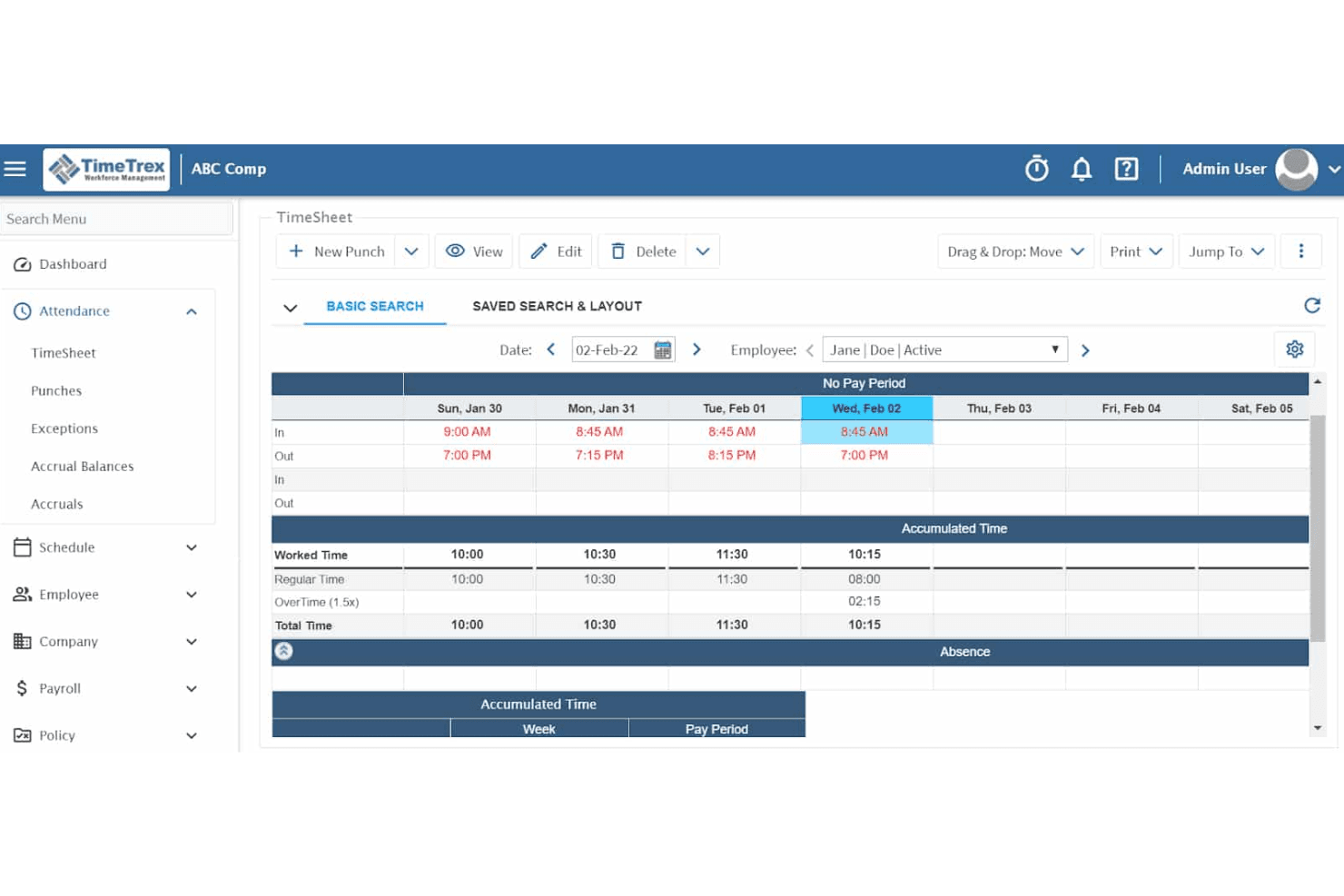
La funzione di rilevamento orari e presenze di TimeTrex garantisce una raccolta dati accurata per paghe e conformità. TimeTrex è una piattaforma di gestione della forza lavoro che combina programmazione dei turni, rilevamento delle presenze e degli orari di lavoro, elaborazione delle paghe e gestione delle risorse umane in un unico sistema.
Per chi è ideale TimeTrex?
TimeTrex è adatto a operatori al dettaglio multi-sede e a franchising che necessitano di un controllo rigoroso sull'integrità delle timbrature e sulla prevenzione degli abusi negli orari su più sedi.
Perché ho scelto TimeTrex
Ho scelto TimeTrex tra i migliori perché i terminali biometrici con riconoscimento facciale sono inclusi fin dal livello Professional di base, senza essere riservati solo a piani aziendali avanzati. In un ambiente retail con alta rotazione del personale e lavoratori part-time che timbrano su diverse casse, questa caratteristica fa la differenza. Apprezzo anche il fatto che il geofencing funzioni insieme ai sistemi biometrici, così un responsabile che gestisce tre punti vendita può limitare le timbrature a un perimetro fisico specifico per ciascuna sede.
Caratteristiche principali di TimeTrex
- Costruttore di turni drag-and-drop: Permette ai responsabili di assegnare e modificare rapidamente i turni per più dipendenti tramite una visualizzazione a calendario.
- Reportistica multi-sede: Unifica dati di orario, presenza e programmazione per più sedi in dashboard centralizzate.
- Modulo per calcolo dei costi del lavoro: Traccia la spesa per il personale suddivisa per reparto, ruolo o progetto per analisi approfondite di paghe e operazioni.
- Disponibilità dipendenti e richieste di ferie: I dipendenti possono comunicare le proprie preferenze di turno e richiedere giorni di permesso direttamente tramite la piattaforma.
Integrazioni di TimeTrex
TimeTrex offre integrazioni native con ADP, QuickBooks, Sage e Paychex. È disponibile un'API per integrazioni personalizzate.
Pros and Cons
Pros:
- Timbratura biometrica integrata che evita i passaggi di badge tra colleghi
- Paghe e pianificazione gestite in un'unica piattaforma
- Disponibile una versione open-source per installazione autonoma
Cons:
- L'interfaccia di pianificazione appare datata rispetto alla concorrenza
- L'app mobile è meno performante rispetto ai concorrenti più recenti
Learn more about TimeTrex: Ideale per la conformità normativa sul lavoro
- Prova gratuita + demo gratuita disponibili
- A partire da $5/utente/mese
Visit WebsiteCustomer Rating:4.6/5
Deputy semplifica la programmazione della forza lavoro nel retail e garantisce il rispetto delle normative sul lavoro. Deputy è un software di gestione della forza lavoro e di pianificazione degli orari per aziende di tutte le dimensioni, particolarmente indicato per il settore retail. Aiuta nella programmazione degli orari, nel monitoraggio delle presenze e nella gestione dei compiti, garantendo il rispetto delle normative sul lavoro.
Perché ho scelto Deputy: Deputy punta alla conformità normativa, offrendo funzionalità che aiutano il tuo team a rispettare i requisiti di legge. Lo strumento di pianificazione calcola automaticamente gli straordinari e assicura una distribuzione equa dei turni. Fornisce informazioni in tempo reale sui costi del lavoro e sulla conformità normativa. Le funzionalità di rilevazione presenze aiutano a prevenire frodi orarie e a garantire l’elaborazione accurata dei salari.
Funzionalità e integrazioni principali:
Le funzionalità comprendono uno strumento di scambio turni che consente ai dipendenti di sostituire i turni con facilità, uno strumento automatico di pianificazione che crea gli orari in base alla disponibilità dei dipendenti e un sistema di gestione dei compiti che assegna e monitora le attività in modo efficiente.
Le integrazioni includono Xero, QuickBooks, ADP, Gusto, Square, MYOB, NetSuite, BambooHR, Vend e Shopify.
Pros and Cons
Pros:
- Informazioni dettagliate sui costi del lavoro
- Opzioni di pianificazione flessibili
- Supporta sedi multiple
Cons:
- Logica di approvazione dei permessi restrittiva
- La configurazione iniziale può essere complessa
Learn more about Deputy: Ideale per la pianificazione tramite dispositivi mobili
- Prova gratuita disponibile
- A partire da $2.50/utente/mese
Visit WebsiteCustomer Rating:4.5/5
When I Work offre una pianificazione flessibile e mobile-friendly per team del retail sempre in movimento. When I Work è uno strumento di pianificazione e comunicazione per aziende che necessitano di soluzioni mobile-friendly. È ideale per settori come il retail, dove i membri del team sono spesso in movimento e richiedono opzioni di pianificazione flessibili.
Perché ho scelto When I Work: When I Work si distingue per la pianificazione mobile, offrendo un'app intuitiva che permette al tuo team di gestire i turni in qualsiasi momento. L'app consente ai dipendenti di timbrare l'ingresso e l'uscita direttamente dal telefono, rendendola comoda per chi è in movimento. Inoltre, fornisce promemoria sui turni per assicurare che il team non perda le proprie turnazioni. Gli strumenti di comunicazione mantengono tutti connessi, migliorando la coordinazione del gruppo.
Funzionalità principali & integrazioni:
Le funzionalità includono una funzione di scambio turno che permette ai dipendenti di cambiare facilmente i turni tra loro, uno strumento di messaggistica del team per facilitare la comunicazione e una funzione di rilevamento ore che garantisce l'elaborazione accurata delle paghe.
Le integrazioni comprendono QuickBooks, Gusto, ADP, BambooHR, Square, Xero, Google Calendar, Microsoft Outlook, Slack e Salesforce.
Pros and Cons
Pros:
- Facile scambio dei turni
- Notifiche di turno istantanee
- Rilevazione delle ore efficiente
Cons:
- Campi personalizzati limitati
- La chat richiede un'app separata
Learn more about When I Work: Ideale per le capacità di integrazione
- Demo gratuita disponibile
- Prezzo su richiesta
Visit WebsiteCustomer Rating:4.3/5
Workday unifica pianificazione, rilevazione e analisi per le attività delle grandi aziende. Workday è una soluzione cloud per la gestione della forza lavoro, ideale per le grandi organizzazioni che necessitano di sistemi HR e paghe integrati. Offre funzionalità di pianificazione, rilevazione delle presenze e analisi della forza lavoro per migliorare l'efficienza operativa.
Perché ho scelto Workday: Workday si distingue per le capacità di integrazione, rendendolo una scelta eccellente per le organizzazioni che richiedono sistemi unificati. La piattaforma collega HR e paghe, riducendo il carico amministrativo. Gli strumenti di analisi offrono spunti sulle prestazioni della forza lavoro, aiutandoti a prendere decisioni basate sui dati. Le funzionalità di pianificazione sono adattabili e supportano esigenze organizzative complesse.
Funzionalità principali & integrazioni:
Le funzionalità includono un'app mobile per accedere a orari e presenze in mobilità, una dashboard personalizzabile per adattare la visualizzazione alle proprie esigenze e una funzione di gestione della conformità per garantire il rispetto delle normative sul lavoro.
Le integrazioni includono Salesforce, Adobe, Slack, Microsoft Teams, SAP, Oracle, Kronos, ServiceNow, ADP e Google Workspace.
Pros and Cons
Pros:
- Analisi dettagliate della forza lavoro
- Opzioni di pianificazione flessibili
- Accesso mobile per maggiore comodità
Cons:
- Flussi di lavoro di pianificazione poco flessibili
- Personalizzazione dei report complessa
Learn more about Workday: Ideale per pianificazioni complesse
- Demo gratuita disponibile
- Prezzo su richiesta

Shiftboard gestisce pianificazioni complesse con strumenti avanzati di rilevamento delle presenze e conformità. Shiftboard è un software di pianificazione pensato per settori che richiedono soluzioni di pianificazione complesse, come la sanità e la produzione. Offre pianificazione avanzata, rilevamento delle presenze e gestione della conformità per garantire efficienza e precisione.
Perché ho scelto Shiftboard: Shiftboard è progettato su misura per esigenze di pianificazione complesse, offrendo funzionalità in grado di gestire schemi di turni intricati e rotazioni. Il software consente di impostare regole e vincoli per assicurare il rispetto delle normative e una pianificazione equa. I suoi strumenti avanzati di reportistica offrono una visione dettagliata della produttività della forza lavoro e dei costi del lavoro. Gli aggiornamenti in tempo reale tengono informato il tuo team su qualsiasi modifica ai turni, riducendo la confusione.
Caratteristiche principali & integrazioni:
Le funzionalità includono un motore di pianificazione avanzato basato su regole che garantisce la conformità alle leggi sul lavoro, uno strumento di comunicazione in tempo reale che tiene aggiornato il team e una funzione di reportistica completa che offre informazioni sull'efficienza della forza lavoro.
Le integrazioni includono ADP, SAP, Oracle, Microsoft Dynamics, QuickBooks, Kronos, Workday, BambooHR, Paychex e Gusto.
Pros and Cons
Pros:
- Gestisce schemi di turni complessi
- Pianificazione avanzata basata su regole
- Garantisce la conformità alle leggi sul lavoro
Cons:
- Manca l'avviso di sovrapposizione turni
- Aggiornamenti degli orari in tempo reale ritardati
Learn more about Shiftboard: 7Ideale per la forza lavoro globale
UKG
- Demo gratuita disponibile
- Prezzi su richiesta
Visit WebsiteCustomer Rating:4.4/5
UKG unifica pianificazione, monitoraggio e HR per forze lavoro globali complesse. UKG è una soluzione di gestione della forza lavoro pensata per le aziende con una presenza globale. Combina pianificazione, rilevamento delle presenze e gestione delle risorse umane per supportare le esigenze complesse e diversificate della forza lavoro in diverse regioni.
Perché ho scelto UKG: UKG è progettato per la gestione di una forza lavoro globale, offrendo funzionalità che soddisfano diversi requisiti normativi. Fornisce strumenti per la pianificazione e il monitoraggio delle presenze in più sedi, garantendo coerenza. Il software supporta capacità multilingue, rendendolo accessibile al tuo team internazionale. Le sue funzionalità di gestione della conformità aiutano a orientarsi tra le diverse leggi sul lavoro, riducendo i rischi.
Funzionalità principali e integrazioni:
Le funzionalità includono la gestione della conformità che ti aiuta a rispettare varie leggi internazionali sul lavoro, un'interfaccia multilingue che supporta team diversificati e strumenti avanzati di pianificazione che gestiscono modelli di turni complessi in più regioni.
Le integrazioni includono SAP, Oracle, Workday, Microsoft Dynamics, Salesforce, ADP, Kronos, QuickBooks, BambooHR e Gusto.
Pros and Cons
Pros:
- Funzionalità multilingue
- Gestisce schemi di turni complessi
- Riduce i rischi di non conformità
Cons:
- Problemi occasionali di sincronizzazione
- App mobile difficile da navigare
Learn more about UKG: Ideale per le aziende stagionali
- Prova gratuita di 14 giorni + piano gratuito + demo gratuita disponibile
- Da $2/membro attivo/mese (fatturazione annuale)

ZoomShift aiuta i team del retail a gestire orari variabili e esigenze di personale stagionale. ZoomShift è uno strumento di pianificazione per le aziende con esigenze di personale fluttuanti, come quelle nei settori retail e dell'ospitalità. Offre funzionalità di programmazione dei turni, rilevamento delle presenze e comunicazione del team per aiutare a gestire in modo efficiente i cambiamenti stagionali.
Perché ho scelto ZoomShift: ZoomShift si rivolge alle aziende stagionali offrendo opzioni di pianificazione flessibili che si adattano alle esigenze di forza lavoro variabili. Il suo costruttore di turni con funzione drag-and-drop consente di modificare rapidamente i turni man mano che la domanda cambia. La funzione di rilevamento delle presenze garantisce un'elaborazione accurata delle paghe durante le stagioni più intense. Le notifiche tengono informato il team, riducendo confusione e cambiamenti all'ultimo minuto.
Funzionalità e integrazioni principali:
Le funzionalità includono uno strumento di gestione delle assenze che permette al team di richiedere e approvare facilmente i giorni liberi, una funzione di esportazione delle paghe che semplifica l'elaborazione degli stipendi e uno strumento di budgeting per gestire efficacemente i costi del personale.
Le integrazioni includono QuickBooks, Gusto, ADP, Xero, Paychex, BambooHR, Square, Google Calendar, Microsoft Outlook e Slack.
Pros and Cons
Pros:
- Esportazione veloce delle paghe
- Strumenti di budgeting efficaci
- Supporta il personale stagionale
Cons:
- Rotazione dei turni semplice
- Funzionalità avanzate limitate
Learn more about ZoomShift:

Calabrio ottimizza la pianificazione, le prestazioni e la qualità del servizio nei contact center. Calabrio è un software di ottimizzazione della forza lavoro per i contact center, focalizzato sulla pianificazione, l'analisi delle prestazioni e la gestione della qualità. Aiuta le aziende a migliorare il servizio clienti ottimizzando le prestazioni dei dipendenti e l'efficienza operativa.
Perché ho scelto Calabrio: Calabrio è pensato specificamente per i contact center, offrendo funzionalità che migliorano la precisione della pianificazione e il coinvolgimento dei dipendenti. Il software fornisce analisi dettagliate per aiutarti a comprendere le tendenze delle prestazioni e prendere decisioni informate. I suoi strumenti di gestione della qualità supportano un'erogazione costante del servizio clienti. Le dashboard personalizzabili ti consentono di monitorare le principali metriche rilevanti per il tuo team.
Funzionalità e integrazioni principali:
Funzionalità includono uno strumento di analisi vocale che fornisce approfondimenti sulle interazioni con i clienti, un sistema di gestione della qualità che garantisce un servizio coerente, e una dashboard delle prestazioni che aiuta a monitorare in modo efficiente i principali indicatori.
Integrazioni includono Salesforce, Microsoft Dynamics, SAP, Oracle, Cisco, Avaya, Genesys, Five9, NICE e Amazon Connect.
Pros and Cons
Pros:
- Analisi dettagliate delle prestazioni
- Dashboard personalizzabili
- Strumenti di pianificazione precisi
Cons:
- Dashboard lenti nel caricamento
- Flessibilità di pianificazione limitata
Learn more about Verint: 10Ideale per piccoli rivenditori
Sling
- Prova gratuita + piano gratuito disponibili
- A partire da $1.70/utente/mese (fatturato annualmente)

Sling semplifica la pianificazione nel retail e mantiene i team organizzati e connessi. Sling è uno strumento di pianificazione e comunicazione per piccole attività al dettaglio, che offre funzionalità come la gestione dei turni, il rilevamento delle ore di lavoro e la comunicazione del team. Aiuta a semplificare i processi di programmazione e mantiene i team connessi e organizzati.
Perché ho scelto Sling: Sling è ideale per i piccoli rivenditori, mettendo l'accento sulla facilità d'uso e sulla convenienza. La funzione di gestione dei turni consente al tuo team di gestire gli orari in modo efficiente. Offre il rilevamento delle ore per garantire un'elaborazione accurata delle buste paga. Gli strumenti di comunicazione mantengono il team informato e coinvolto, rendendolo una soluzione perfetta per le piccole imprese.
Funzionalità principali & integrazioni:
Le funzionalità includono un timbratore che aiuta a registrare accuratamente le ore di lavoro dei dipendenti, un feed di notizie per tenere tutti aggiornati sugli annunci importanti e una lista di attività per assegnare e gestire i compiti in modo efficiente.
Le integrazioni includono Google Calendar, Microsoft Outlook, Apple Calendar, Slack, Gusto, QuickBooks, ADP, BambooHR, Square e Xero.
Pros and Cons
Pros:
- Semplice scambio di turni
- Adatto a piccoli team
- Notifiche personalizzabili
Cons:
- Impostazione complessa dei turni rotativi
- Opzioni limitate per il ruolo di amministratore
Learn more about Sling:
Altri software per la pianificazione dei turni dei dipendenti del settore retail
Ecco alcune opzioni aggiuntive di software per la pianificazione dei turni dei dipendenti del settore retail che non sono state incluse nel mio elenco, ma che vale comunque la pena prendere in considerazione:
- 11ADP WorkForce SuiteIdeale per grandi imprese
- 12TCP SoftwareIdeale per il monitoraggio delle presenze
- 13ShiftlabIdeale per le metriche di performance
- 14Workforce.comIdeale per l’analisi della forza lavoro
- 15HomebaseIdeale per strumenti di programmazione gratuiti
Come valuto i software di pianificazione del personale per il retail
Scompongo la mia valutazione in due livelli: la base che uno strumento deve superare—come la previsione legata al POS e la conformità alle normative sugli orari equi—e i fattori che differenziano le migliori opzioni.
Funzionalità di base (Requisiti minimi per questa lista)
Quando seleziono gli strumenti per la mia lista, valuto ciascuno su una scala da 0 (non offre la funzionalità) a 5 (eccelle in quest'area) per ogni funzionalità di base elencata qui sotto. Successivamente, calcolo il punteggio totale dello strumento in percentuale. Ogni strumento deve raggiungere un punteggio totale minimo del 65% per essere preso in considerazione.
- Pianificazione dei turni & Modelli: Cerco costruttori drag-and-drop con modelli riutilizzabili in modo che un responsabile possa clonare il piano della scorsa settimana tra i vari reparti in pochi click.
- Previsione basata sulla domanda: Verifico se lo strumento utilizza dati POS o sul flusso di clienti per prevedere il fabbisogno di personale—ad esempio aumentando la copertura prima di una promozione nel weekend.
- Self-service mobile per i dipendenti: Gli addetti devono poter scambiare i turni, indicare la propria disponibilità e richiedere permessi direttamente dallo smartphone senza dover chiamare un responsabile.
- Conformità alle normative sul lavoro: Valuto come la piattaforma gestisce i limiti sugli straordinari, le finestre di pausa obbligatorie e le regole di pianificazione predittiva per i team retail con contratto orario.
- Monitoraggio presenze & orari: Cerco un sistema integrato di timbratura collegato al piano turni—con geolocalizzazione e avvisi di eccezione che aiutano i responsabili a rilevare le assenze prima che si crei un buco in copertura.
- Comunicazione di squadra: Verifico se i manager possono inviare annunci e messaggi a singoli o gruppi.
Una volta creata una lista di strumenti che rispondono a questi criteri, considero ciò che distingue ogni piattaforma.
Fattori differenzianti (Cosa distingue i fornitori)
Ecco come confronto le diverse soluzioni:
Funzionalità distintive
La pianificazione automatica tramite intelligenza artificiale è un fattore di spicco. Cerco strumenti che generino il piano turni settimanale considerando disponibilità, competenze e budget di lavoro, così che i responsabili non debbano passare ore in aggiustamenti manuali. Un marketplace dei turni offre un valore aggiunto alle catene multi-sede, consentendo agli addetti di prendere turni disponibili nei punti vendita vicini senza catene di telefonate. Verifico anche la presenza di gestione attività associata ai turni, ad esempio con check-list di apertura o incarichi di rifornimento assegnati insieme al turno stesso.
Oltre le funzionalità
Le integrazioni con POS e payroll sono fondamentali. Controllo se una piattaforma si collega nativamente a sistemi come Shopify, Square o Lightspeed, affinché i dati di vendita previsti guidino davvero la pianificazione dei turni. Connessioni dirette con payroll sono altrettanto importanti—se i fogli presenze devono essere esportati manualmente, è un problema che il team di paghe sentirà a ogni ciclo. La scalabilità è un altro fattore che esamino attentamente, soprattutto per i franchising che necessitano di gerarchie a livello di distretto e condivisione del personale tra punti vendita. Anche la trasparenza dei prezzi è rilevante; valuto se funzionalità base come compliance o forecasting siano incluse o disponibili solo nelle fasce premium.
Come scegliere un software per la pianificazione dei turni dei dipendenti del settore retail
È facile perdersi tra lunghi elenchi di funzionalità e strutture tariffarie complesse. Per aiutarti a rimanere concentrato mentre affronti il tuo esclusivo processo di selezione del software, ecco un elenco di fattori da tenere a mente:
| Fattore | Cosa considerare |
|---|---|
| FattoreScalabilità | Cosa considerareIl software può crescere insieme alla tua attività? Valuta se è in grado di gestire un numero maggiore di dipendenti o sedi durante l'espansione. |
| FattoreIntegrazioni | Cosa considerareSi connette ai tuoi sistemi esistenti? Verifica se si integra con il sistema paghe, il software per le risorse umane o altri strumenti che utilizzi. |
| FattorePersonalizzazione | Cosa considerarePuoi adattarlo alle tue esigenze? Cerca opzioni per personalizzare turni, report e notifiche. |
| FattoreSemplicità d'uso | Cosa considerareL'interfaccia è intuitiva? Verifica la facilità d'uso per assicurarti che il tuo team possa imparare rapidamente a utilizzarlo. |
| FattoreImplementazione e inserimento | Cosa considerareQuanto tempo occorrerà per configurarlo? Considera il tempo e le risorse necessari per renderlo operativo senza problemi. |
| FattoreCosto | Cosa considerareRientra nel tuo budget? Confronta i piani tariffari e assicurati che non ci siano costi nascosti o spese impreviste. |
| FattoreMisure di sicurezza | Cosa considerareI tuoi dati sono protetti? Verifica le misure di sicurezza adottate per proteggere le informazioni dei dipendenti e dell'azienda. |
| FattoreRequisiti di conformità | Cosa considerareAiuta a rispettare gli standard di legge? Assicurati che supporti la conformità alle leggi sul lavoro specifiche del tuo settore e della tua area geografica. |
Che cos'è un software per la pianificazione dei turni dei dipendenti del settore retail?
Il software per la pianificazione dei turni dei dipendenti del settore retail è uno strumento che aiuta le aziende a gestire in modo efficiente i turni del personale. I responsabili dei punti vendita, i professionisti delle risorse umane e i team leader utilizzano generalmente questi strumenti per garantire un'adeguata copertura dei turni e ridurre i conflitti nella pianificazione. Le funzionalità di pianificazione automatizzata, scambio dei turni e monitoraggio del tempo aiutano a gestire i turni, migliorare la comunicazione e garantire la conformità alle leggi sul lavoro. Nel complesso, questi strumenti fanno risparmiare tempo e migliorano l'efficienza operativa delle attività nel settore retail.
Funzionalità
Quando scegli un software per la pianificazione dei turni dei dipendenti del settore retail, presta attenzione alle seguenti funzionalità principali:
- Pianificazione automatizzata: crea automaticamente i turni in base alla disponibilità dei dipendenti e alle esigenze aziendali, facendo risparmiare tempo e riducendo gli errori.
- Scambio dei turni: consente ai dipendenti di scambiarsi facilmente i turni con i colleghi, contribuendo a mantenere la copertura e la flessibilità.
- Monitoraggio delle ore: monitora con precisione le ore dei dipendenti per garantire una corretta elaborazione delle buste paga e la conformità alle leggi sul lavoro.
- Notifiche: invia avvisi e promemoria ai dipendenti sui turni imminenti e sulle modifiche alla pianificazione, migliorando la comunicazione.
- Accesso da dispositivi mobili: offre un'app mobile per accedere alla pianificazione e al monitoraggio delle ore anche in mobilità, aumentando la praticità per i dipendenti.
- Gestione della conformità: aiuta a garantire il rispetto delle leggi e delle normative sul lavoro, riducendo il rischio di problemi legali.
- Report personalizzabili: offre report personalizzati per monitorare la produttività della forza lavoro e i costi del lavoro, favorendo decisioni informate.
- Funzionalità di integrazione: si connette ai sistemi paghe, HR e ad altri sistemi per semplificare le operazioni e la gestione dei dati.
- Self-service per i dipendenti: consente ai dipendenti di visualizzare i turni, richiedere permessi e gestire la propria disponibilità, offrendo loro maggiore controllo.
- Analisi delle prestazioni: fornisce informazioni sulle prestazioni e sulla produttività dei dipendenti, supportando decisioni manageriali basate sui dati.
Vantaggi
L'implementazione di un software per la pianificazione dei turni dei dipendenti del settore retail offre diversi vantaggi al tuo team e alla tua azienda. Ecco alcuni dei vantaggi che puoi aspettarti:
- Risparmio di tempo: la pianificazione automatizzata riduce il tempo dedicato alla creazione e alla modifica manuale dei turni.
- Comunicazione migliorata: le notifiche e l'accesso da dispositivi mobili mantengono il team informato sui turni e sulle modifiche, riducendo i malintesi.
- Flessibilità: lo scambio dei turni e le funzionalità self-service danno ai dipendenti il controllo sui propri orari, migliorando la soddisfazione lavorativa.
- Garanzia di conformità: la gestione della conformità aiuta a rispettare le leggi sul lavoro, riducendo al minimo i rischi legali.
- Buste paga precise: il monitoraggio delle ore garantisce una registrazione accurata delle ore lavorate, consentendo una corretta elaborazione delle buste paga.
- Decisioni basate sui dati: le analisi delle prestazioni e i report personalizzabili forniscono informazioni utili per prendere decisioni manageriali consapevoli.
- Maggiore efficienza: le funzionalità di integrazione semplificano le operazioni collegandosi ai sistemi paghe e HR, riducendo il lavoro amministrativo.
Costi e prezzi
La scelta di un software per la pianificazione dei turni dei dipendenti del settore retail richiede la comprensione dei diversi modelli e piani tariffari disponibili. I costi variano in base alle funzionalità, alle dimensioni del team, agli extra e ad altri fattori. La tabella seguente riassume i piani più comuni, i relativi prezzi medi e le funzionalità generalmente incluse nelle soluzioni software per la pianificazione dei turni dei dipendenti del settore retail:
Tabella comparativa dei piani per il software di pianificazione dei turni dei dipendenti del settore retail
| Tipo di piano | Prezzo medio | Funzionalità comuni |
|---|---|---|
| Tipo di pianoPiano gratuito | Prezzo medio$0 | Funzionalità comuniPianificazione di base, scambio dei turni e notifiche. |
| Tipo di pianoPiano personale | Prezzo medio$5-$15/utente/mese | Funzionalità comuniPianificazione avanzata, monitoraggio delle ore e accesso da dispositivi mobili. |
| Tipo di pianoPiano aziendale | Prezzo medio$20-$35/utente/ mese | Funzionalità comuniGestione della conformità, funzionalità di integrazione e analisi delle prestazioni. |
| Tipo di pianoPiano enterprise | Prezzo medio$40-$60/utente/ mese | Funzionalità comuniReport personalizzabili, assistenza dedicata e funzionalità di sicurezza avanzate. |
Domande frequenti sul software di pianificazione dei turni dei dipendenti del commercio al dettaglio
Ecco alcune risposte alle domande più comuni sul software di pianificazione dei turni dei dipendenti del commercio al dettaglio:
Quanto è sicuro il software di pianificazione dei turni dei dipendenti del commercio al dettaglio?
Sì, il software di pianificazione dei turni dei dipendenti del commercio al dettaglio è generalmente sicuro. La maggior parte delle soluzioni utilizza la crittografia per proteggere i dati e rispetta gli standard del settore. Quando valuti le opzioni, cerca funzionalità come l’autenticazione a due fattori e aggiornamenti di sicurezza regolari. Esamina sempre l’informativa sulla privacy del fornitore e chiedi informazioni sulle sue pratiche di protezione dei dati per assicurarti che le tue informazioni siano al sicuro.
Il software di pianificazione dei turni dei dipendenti del commercio al dettaglio può integrarsi con i sistemi esistenti?
Sì, la maggior parte dei software di pianificazione dei turni dei dipendenti del commercio al dettaglio può integrarsi con sistemi esistenti come quelli per le buste paga, le risorse umane e la comunicazione. Verifica le funzionalità di integrazione del software per assicurarti che supporti i sistemi che utilizzi. Questo può contribuire a ridurre l’inserimento manuale dei dati e a migliorare l’efficienza dei flussi di lavoro. Alcuni strumenti offrono l’accesso alle API per integrazioni personalizzate, garantendo una flessibilità ancora maggiore.
È necessaria una formazione per utilizzare il software di pianificazione dei turni dei dipendenti del commercio al dettaglio?
Sì, spesso è necessaria una certa formazione, ma molte soluzioni offrono interfacce intuitive che riducono al minimo la curva di apprendimento. Cerca un software che fornisca risorse formative come video, webinar e guide per gli utenti. Queste risorse possono aiutare il tuo team a diventare operativo rapidamente.
Il software di pianificazione dei turni dei dipendenti del commercio al dettaglio può gestire più sedi?
Sì, molte soluzioni software per la pianificazione dei turni dei dipendenti del commercio al dettaglio sono progettate per gestire più sedi. Questi strumenti consentono di creare programmi per sedi diverse da un’unica piattaforma, semplificando la supervisione delle attività. Verifica se il software offre report basati sulla sede e gestione della conformità per assicurarti che soddisfi le tue esigenze.
Cosa succede in caso di interruzione del servizio?
In caso di interruzione del servizio, la maggior parte dei fornitori dispone di piani di emergenza per ridurre al minimo i disagi. Cerca fornitori che offrano un’assistenza clienti affidabile e una comunicazione trasparente sui problemi del servizio. È consigliabile predisporre procedure di backup, come l’esportazione regolare dei programmi, per garantire la continuità. Alcuni strumenti offrono anche l’accesso offline alle funzionalità essenziali.
Qual è il prossimo passo:
Se stai cercando un software di pianificazione dei turni dei dipendenti del commercio al dettaglio, contatta gratuitamente un consulente SoftwareSelect per ricevere consigli.
Compili un modulo e fai una breve conversazione durante la quale il consulente approfondisce le tue esigenze specifiche. Dopodiché riceverai un elenco ristretto di software da valutare. Ti assisterà anche durante l'intero processo di acquisto, comprese le trattative sul prezzo.