

Il software per la gestione dell'inventario Amazon aiuta la tua azienda a monitorare, organizzare e rifornire i prodotti venduti tramite Amazon e altri canali. Un sistema affidabile per la gestione dell'inventario garantisce livelli di scorte accurati, rifornimenti semplificati e una migliore visibilità tra magazzini e marketplace.
Se stai cercando i migliori strumenti per mantenere accurato l'inventario, evitare l'esaurimento delle scorte e gestire le vendite multicanale, sai quanto rapidamente i processi manuali o i fogli di calcolo possano portare a perdite di vendite o a scorte eccessive.
Questo elenco ti aiuterà a confrontare le principali soluzioni per la gestione dell'inventario Amazon, così potrai scegliere quella più adatta ai flussi di lavoro del tuo team, al volume delle vendite, alle esigenze di integrazione e alle principali metriche di inventario. Ottieni una panoramica chiara delle opzioni disponibili e prendi una decisione consapevole per il 2026.
Perché fidarsi dei nostri consigli sui software
6,700+
Reviews
20
Industry experts
16+
Evaluation factors
14
Years
Il nostro team testa e recensisce software dal 2012. In quanto leader del retail noi stessi, sappiamo quanto sia difficile — e importante — scegliere il software giusto.
Per questa guida, abbiamo valutato gli strumenti attraverso test pratici e ricerche indipendenti, assegnando un punteggio agli strumenti in base ai nostri criteri di selezione.
Le nostre recensioni riflettono il nostro giudizio indipendente, non un discorso di vendita.
Tabella comparativa dei software per la gestione dell'inventario Amazon
Questa tabella comparativa riassume i dettagli sui prezzi delle mie migliori selezioni di software per la gestione dell’inventario Amazon:
| Tool | Best For | Trial Info | Price | ||
|---|---|---|---|---|---|
| 1 | Ideale per la sincronizzazione dell'inventario omnicanale | Demo gratuita disponibile | Prezzi su richiesta | Website | |
| 2 | Ideale per gestire facilmente le inserzioni su più marketplace | Piano gratuito + demo gratuita disponibile | A partire da $24/mese(fatturato annualmente) | Website | |
| 3 | Ideale per la sincronizzazione Amazon in tempo reale e basata sugli eventi | Demo gratuita disponibile | Prezzi su richiesta | Website | |
| 4 | Ideale per l'integrazione diretta con eBay e Walmart | Prova gratuita di 30 giorni | A partire da $49/mese | Website | |
| 5 | Ideale per flussi di lavoro avanzati di magazzino ed evasione | Non disponibile | Prezzi su richiesta | Website | |
| 6 | Ideale per l'analisi della redditività con monitoraggio dell'inventario | Prova gratuita di 30 giorni + demo gratuita disponibile | Da $15/mese (fatturato annualmente) | Website | |
| 7 | Ideale per gestire più vetrine online in un'unica dashboard | Prova gratuita di 14 giorni + demo gratuita disponibile | A partire da £1,150/mese | Website | |
| 8 | Ideale per il controllo centralizzato di ordini e inventario | Dimostrazione gratuita disponibile | Prezzi su richiesta | Website | |
| 9 | Ideale per suggerimenti integrati di rifornimento FBA | Demo gratuita disponibile | A partire da 129 $/mese | Website | |
| 10 | Ideale per flussi di lavoro di previsione personalizzabili | Prova gratuita + demo gratuita disponibili | A partire da $175/mese | Website |


Recensioni dei software per la gestione dell'inventario Amazon
Di seguito trovi i miei riepiloghi dettagliati dei software per la gestione dell’inventario Amazon inclusi nel mio elenco ristretto. Le mie recensioni offrono un’analisi approfondita delle funzionalità, dei migliori casi d’uso e delle integrazioni di ciascun software, per aiutarti a trovare quello più adatto alla tua azienda.
 Ideale per la sincronizzazione dell'inventario omnicanale
- Demo gratuita disponibile
- Prezzi su richiesta
Visit WebsiteCustomer Rating:4.3/5
Unicommerce consente agli utenti di monitorare l'inventario del canale Amazon FBA per SKU. Unicommerce è una piattaforma di gestione dell'inventario multicanale che centralizza scorte, ordini, magazzino e resi tra oltre 290 integrazioni con marketplace, carrelli e canali di commercio rapido, incluso Amazon in oltre 12 regioni globali.
Per chi è più indicato Unicommerce?
Unicommerce è particolarmente adatto ai rivenditori multicanale e ai team operativi dell'e-commerce che vendono su Amazon insieme a Shopify, eBay e marketplace regionali e necessitano di un controllo centralizzato dell'inventario su larga scala.
Perché ho scelto Unicommerce
Ho incluso Unicommerce tra le mie scelte principali perché la sua sincronizzazione delta in tempo reale basata su Kafka tra oltre 290 integrazioni con marketplace, carrelli e canali di commercio rapido è davvero ai vertici del settore per i venditori che gestiscono le scorte su Amazon insieme a Shopify, Flipkart, Myntra e ai canali di commercio rapido contemporaneamente. Mi piace particolarmente il modo in cui i pool di inventario virtuale consentono di allocare le scorte separatamente tra i canali B2B e D2C senza rischiare vendite superiori alle scorte disponibili. Unicommerce copre inoltre Amazon in oltre 12 marketplace globali da un unico pannello di controllo, rendendo molto più semplice la vendita transfrontaliera.
Funzionalità principali di Unicommerce
- Avvisi automatici di scorte ridotte: Invia notifiche tramite e-mail, SMS e applicazione quando le scorte scendono al di sotto delle soglie definite su qualsiasi canale collegato.
- Generazione degli ordini di acquisto: Crea ordini di acquisto associati ai segnali della domanda e ai punti di riordino, con monitoraggio delle spedizioni in entrata tramite il modulo di gestione dei fornitori.
- Gestione di pacchetti e kit: Deduce automaticamente le scorte degli SKU componenti quando un prodotto in pacchetto o combinato viene venduto su qualsiasi marketplace collegato.
- Imballaggio verificato tramite video UniCapture: Registra una prova video dell'imballaggio dell'ordine per ogni spedizione, supportando la risoluzione delle controversie e la liquidazione dei rimborsi.
Integrazioni di Unicommerce
Unicommerce documenta oltre 290 integrazioni, tra cui Amazon, Shopify, WooCommerce, eBay, Flipkart, Magento, Shiprocket, Delhivery, SAP e Tally. Le integrazioni personalizzate e tramite API sono disponibili con il piano aziendale.
Pros and Cons
Pros:
- Sincronizzazione dell'inventario in tempo reale tra oltre 290 canali
- Supporta le vendite Amazon multimagazzino e transfrontaliere
- Deduzione automatica delle scorte di pacchetti e kit
Cons:
- I dati dell'inventario FBA vengono aggiornati solo una volta al giorno
- Nessun rapporto sulla redditività a livello di ASIN Amazon
Learn more about Unicommerce: Ideale per gestire facilmente le inserzioni su più marketplace
- Piano gratuito + demo gratuita disponibile
- A partire da $24/mese(fatturato annualmente)
Visit WebsiteCustomer Rating:4.8/5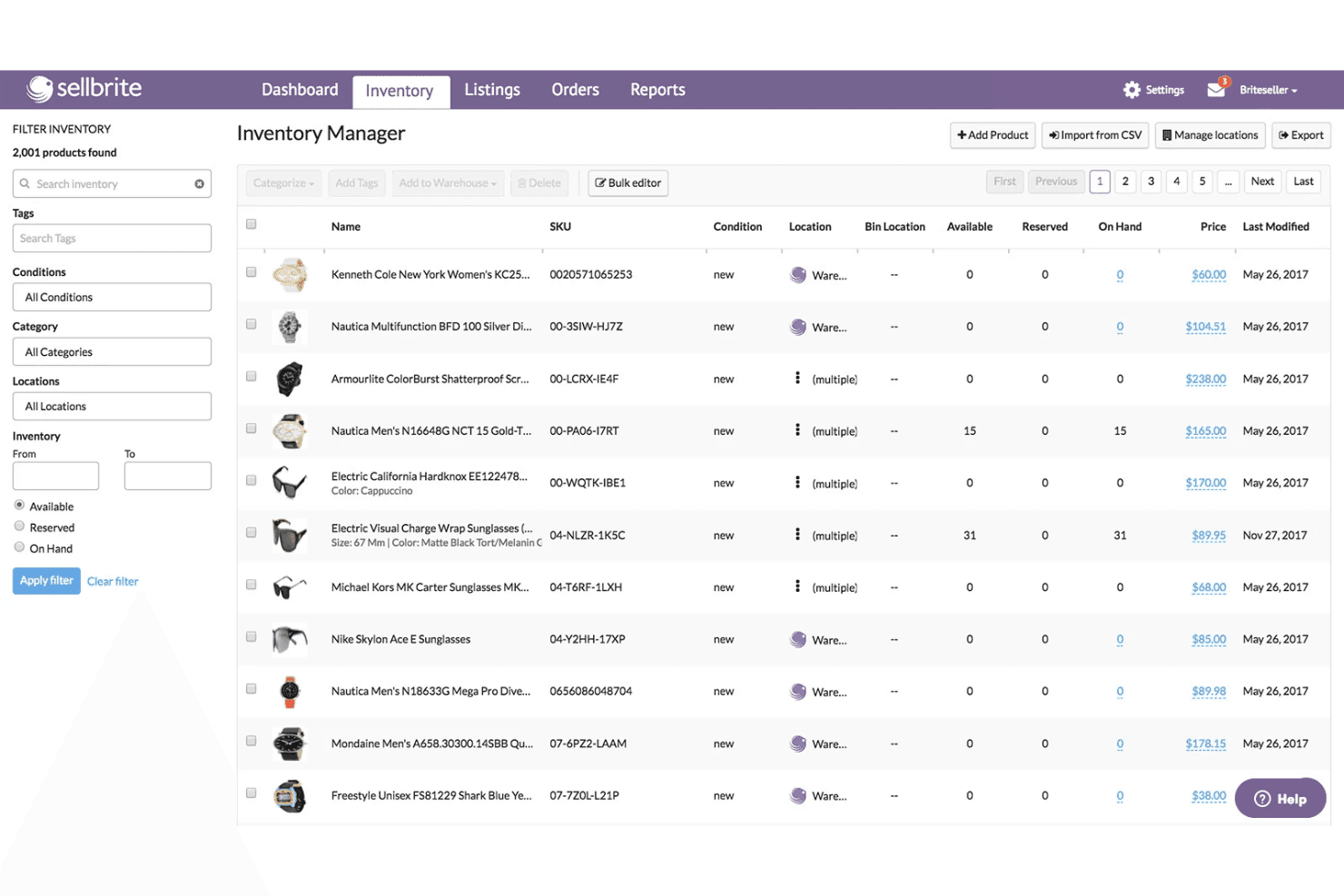
Sellbrite coordina l'inventario tra più sedi e le inserzioni dei prodotti. Sellbrite è uno strumento per la pubblicazione su più canali e la sincronizzazione dell'inventario che collega Amazon, eBay, Walmart, Etsy e i principali carrelli degli acquisti in un'unica dashboard per la gestione centralizzata degli ordini, il monitoraggio degli SKU e gli aggiornamenti dell'inventario tra i diversi canali.
Per chi è più adatto Sellbrite?
Sellbrite è ideale per i venditori di piccole e medie dimensioni che devono gestire inserzioni e inventario su Amazon, eBay, Etsy e Walmart da un'unica dashboard semplice da navigare.
Perché ho scelto Sellbrite
Ho incluso Sellbrite tra le mie scelte principali perché è l'opzione più accessibile per i venditori che devono gestire le inserzioni Amazon insieme a eBay, Etsy, Walmart e a un negozio Shopify o WooCommerce da un unico punto. La sincronizzazione dell'inventario ogni 15 minuti su tutti i canali collegati fa sì che una vendita su Etsy riduca immediatamente la disponibilità su Amazon, evitando vendite eccessive senza alcuna riconciliazione manuale. Apprezzo anche la possibilità di allocare l'inventario selettivamente per canale, così da non mostrare subito la quantità totale disponibile su ogni canale.
Caratteristiche principali di Sellbrite
- Allocazione dell'inventario su più magazzini: Assegna e monitora le scorte in più sedi fisiche di magazzino, controllando la quantità di inventario inviata a ciascun canale di vendita collegato.
- Evasione degli ordini multicanale tramite Amazon FBA: Inoltra gli ordini provenienti da eBay, Etsy o Shopify al tuo magazzino FBA per l'evasione degli ordini tramite un componente aggiuntivo da $19/mese.
- Gestione in blocco delle inserzioni tramite CSV: Importa, aggiorna ed esporta in blocco le inserzioni dei prodotti e i dati dell'inventario utilizzando file CSV su tutti i canali collegati.
- Report sulle vendite a livello di canale: Visualizza i ricavi e le prestazioni dei prodotti più venduti suddivisi per singolo marketplace, per confrontare le vendite tra i vari canali.
Integrazioni di Sellbrite
Sellbrite offre integrazioni native con Amazon Seller Central, eBay, Walmart, Etsy, Shopify, BigCommerce, WooCommerce, Fulfillment by Amazon e ShipStation.
Pros and Cons
Pros:
- La sincronizzazione dell'inventario tra più canali si aggiorna ogni 15 minuti
- SKU e account utente illimitati in tutti i piani
- Ampia copertura di Amazon, eBay, Etsy e Walmart
Cons:
- Impossibilità di pubblicare nuovi ASIN su Amazon
- Nessuna previsione della domanda o riordinamento automatizzato
Learn more about Sellbrite: Ideale per la sincronizzazione Amazon in tempo reale e basata sugli eventi
- Demo gratuita disponibile
- Prezzi su richiesta
Visit WebsiteCustomer Rating:4.1/5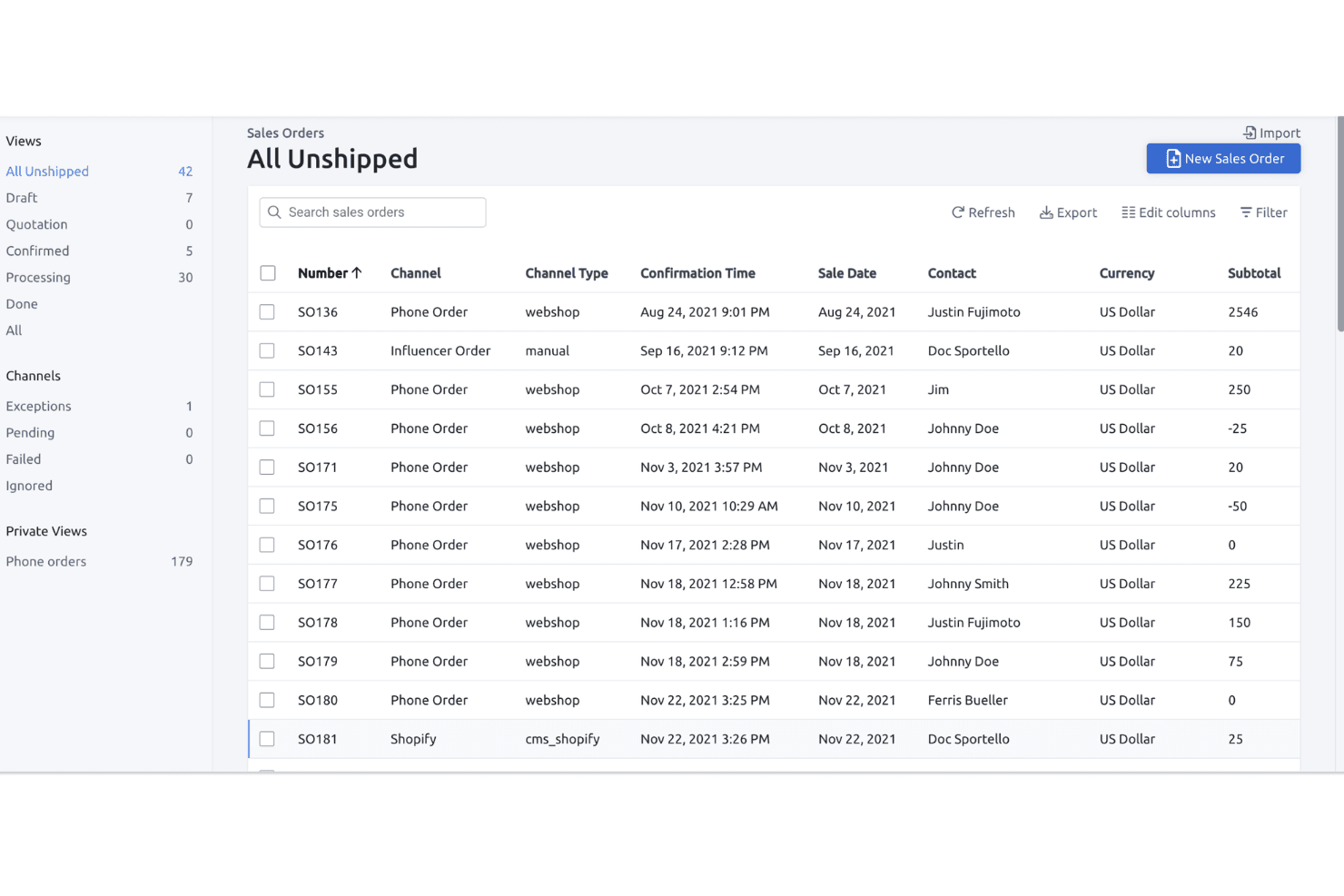
Fulfil consente agli utenti di monitorare e gestire tutti gli ordini di vendita non evasi in un'unica vista. Fulfil è un ERP multicanale che unifica la gestione dell'inventario Amazon, la gestione degli ordini, le operazioni di magazzino, gli acquisti e i dati finanziari per FBA, FBM e Vendor Central in un'unica piattaforma.
Per chi è più adatto Fulfil?
Fulfil è progettato per i brand DTC multicanale con un fatturato annuo di $15M o superiore, che necessitano di un unico ERP per gestire Amazon insieme a Shopify, alle operazioni di magazzino e ai dati finanziari.
Perché ho scelto Fulfil
Fulfil si è guadagnato un posto nella mia selezione perché la sua sincronizzazione con Amazon è realmente basata sugli eventi, non pianificata in lotti. Nella pratica, questa distinzione è importante: quando una vendita si conclude o un magazzino riceve della merce, Fulfil aggiorna in tempo reale l'inventario disponibile su Amazon invece di farlo durante la notte. Apprezzo molto anche i suoi controlli sulla visibilità dell'inventario, che consentono di definire esattamente ciò che Amazon 'vede', inclusi i buffer di sicurezza e le scorte in arrivo, così da evitare sempre il rischio di vendere più scorte di quelle disponibili in tutti i 23 marketplace globali.
Funzionalità principali di Fulfil
- Riconciliazione automatica dei regolamenti Amazon: Fulfil importa automaticamente i report dei regolamenti Amazon bisettimanali e registra commissioni, rimborsi e pagamenti direttamente nel libro mastro nativo.
- Regole di allocazione tra più magazzini: È possibile assegnare le scorte di magazzini specifici a canali specifici, con buffer di sicurezza per ciascun canale e inclusione degli ordini di acquisto in arrivo nelle quantità disponibili per la vendita.
- Instradamento dell'evasione multi-canale Amazon (MCF): Gli ordini provenienti da Shopify e da altri canali possono essere instradati all'inventario FBA per l'evasione, con opzioni di velocità di consegna e sincronizzazione automatica dei dati di tracciamento verso ciascun canale.
- Generazione degli ordini di acquisto basata sull'intelligenza artificiale: Fulfil genera automaticamente bozze di ordini di acquisto sulla base delle previsioni della domanda, considerando i vincoli MOQ, le dimensioni delle confezioni e i tempi di consegna dei fornitori.
Integrazioni di Fulfil
Fulfil supporta oltre 25 canali di vendita nativi, inclusi i 23 marketplace di Amazon, Shopify, Walmart, eBay e TikTok Shop. Si collega inoltre ad Amazon MCF, a oltre 400 sedi 3PL, a oltre 500 partner EDI della vendita al dettaglio e a Google BigQuery per la reportistica.
Pros and Cons
Pros:
- Sincronizzazione dell'inventario Amazon in tempo reale e basata sugli eventi
- Gestione unificata di FBA, FBM e Vendor
- Riconciliazione automatica dei regolamenti e delle commissioni Amazon
Cons:
- Nessuna funzionalità di ricalcolo dinamico dei prezzi su Amazon
- La configurazione richiede tempo e risorse significativi
Learn more about Fulfil: Ideale per l'integrazione diretta con eBay e Walmart
- Prova gratuita di 30 giorni
- A partire da $49/mese
Visit WebsiteCustomer Rating:4.8/5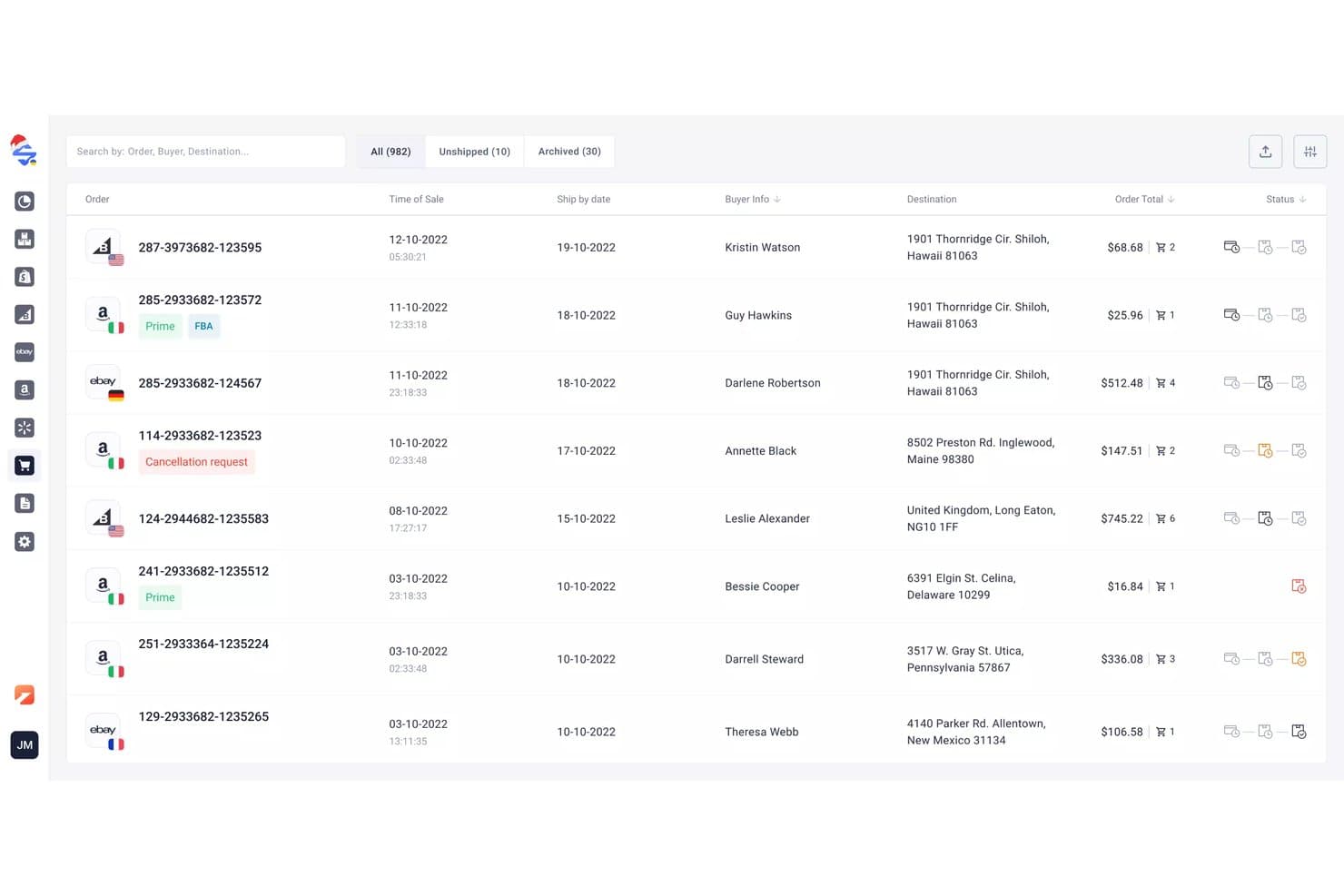
M2E Cloud sincronizza gli ordini multicanale tra i marketplace collegati. M2E Cloud è una piattaforma multicanale per la pubblicazione degli annunci e la sincronizzazione dell'inventario che collega Amazon Seller Central a oltre 19 marketplace globali, eBay, Walmart, TikTok Shop e oltre 600 altri canali, oltre a uno strumento di repricing integrato e a una dashboard di analisi delle vendite.
Per chi è più adatto M2E Cloud?
M2E Cloud è ideale per i venditori multicanale che devono mantenere sincronizzato l'inventario contemporaneamente su eBay, Walmart e Amazon.
Perché ho scelto M2E Cloud
Ho incluso M2E Cloud tra le mie scelte principali perché le sue integrazioni native con eBay e Walmart sono davvero solide, non aggiunte in modo superficiale. Quando una vendita viene completata su Walmart, i livelli delle scorte si aggiornano in tempo reale su Amazon ed eBay: è proprio il tipo di sincronizzazione bidirezionale che evita costose vendite di prodotti esauriti su più canali contemporaneamente. Mi piace anche il fatto che lo strumento di repricing Amazon integrato, che monitora i prezzi della concorrenza e punta al Buy Box 24 ore su 24, 7 giorni su 7, sia incluso senza costi aggiuntivi.
Caratteristiche principali di M2E Cloud
- Integrazione con Amazon Multi-Channel Fulfillment (MCF): Inoltra automaticamente gli ordini provenienti da eBay, Shopify, Walmart e altri canali collegati utilizzando il tuo inventario Amazon FBA per l'evasione.
- Politiche M2E: Consente di impostare da un'unica interfaccia regole specifiche per ogni canale relative a prezzi, scorte di sicurezza e modelli di spedizione per ciascun marketplace.
- Dashboard di analisi M2E: Tiene traccia dei volumi di vendita, delle commissioni sugli ordini, dei tassi di annullamento, dei prodotti più venduti e dei dati geografici dei clienti su tutti i canali collegati, senza costi aggiuntivi.
- Strumento di repricing Amazon: Monitora i prezzi della concorrenza 24 ore su 24, 7 giorni su 7, e modifica i prezzi Amazon entro i limiti minimi e massimi impostati per puntare automaticamente al Buy Box.
Integrazioni di M2E Cloud
M2E Cloud si collega ad Amazon Seller Central, Amazon FBA e MCF, eBay, Walmart, TikTok Shop, Temu, Shopify, BigCommerce, WooCommerce e Magento. Supporta inoltre oltre 600 integrazioni con marketplace in totale e fornisce un'API per integrazioni personalizzate.
Pros and Cons
Pros:
- Sincronizzazione dell'inventario in tempo reale su tutti i canali
- Strumento di repricing Amazon integrato incluso gratuitamente
- Supporta la gestione degli ordini FBA e MCF
Cons:
- Nessuno strumento automatizzato per il rifornimento o le previsioni
- Non dispone di analisi della redditività a livello di ASIN
Learn more about M2E Cloud: Ideale per flussi di lavoro avanzati di magazzino ed evasione
- Non disponibile
- Prezzi su richiesta
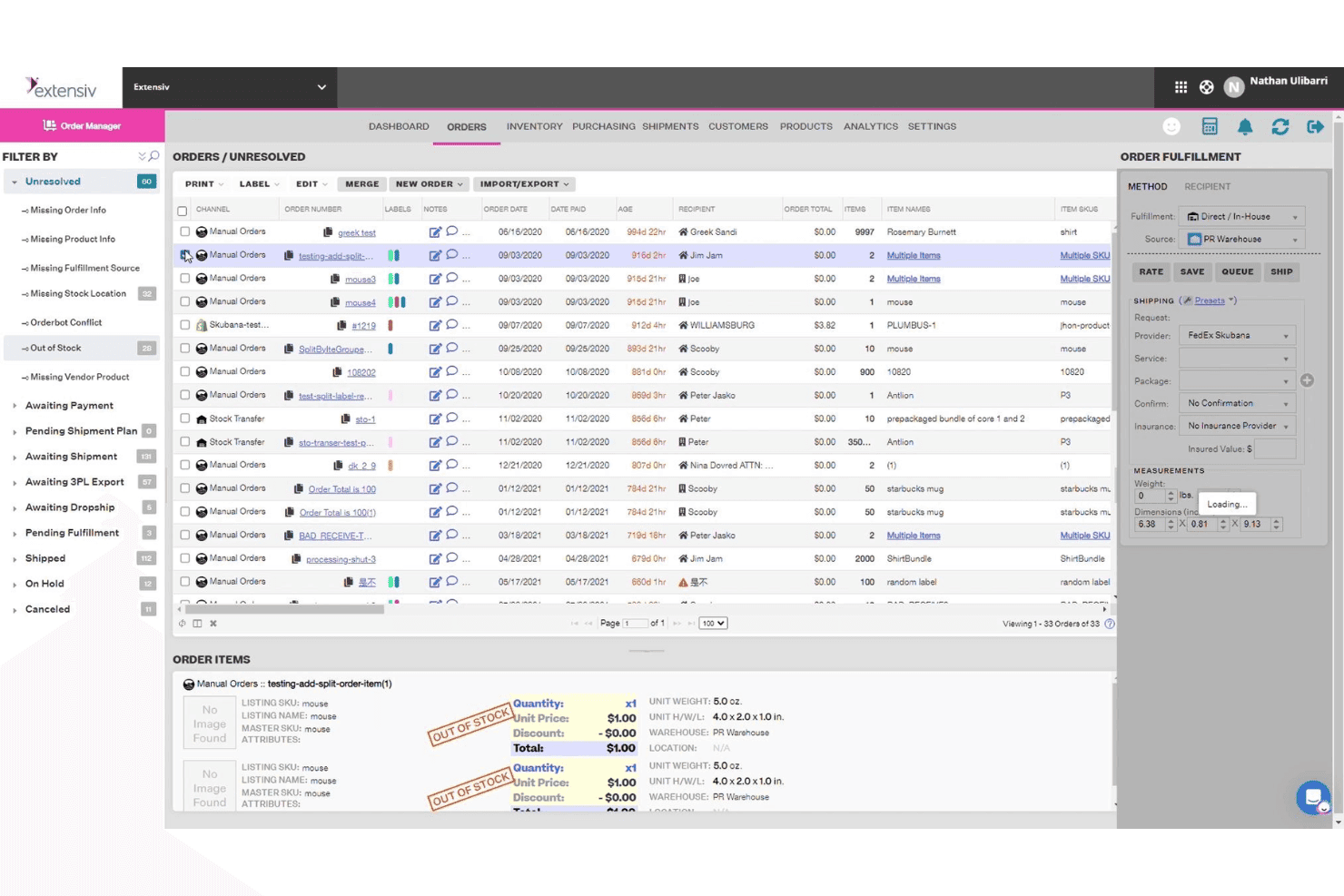
Extensiv raggruppa gli ordini non risolti con i principali dettagli dell'evasione in un'unica visualizzazione. Extensiv è una piattaforma di gestione degli ordini e dei magazzini che gestisce FBA, FBM e l'evasione multicanale, oltre alla sincronizzazione dell'inventario multicanale, agli ordini di acquisto automatizzati, alle previsioni della domanda e alla gestione dei bundle attraverso oltre 110 integrazioni e-commerce.
Per chi è più adatto Extensiv?
Extensiv è particolarmente adatto ai team operativi che gestiscono contemporaneamente processi di evasione complessi attraverso più magazzini, 3PL e canali di vendita.
Perché ho scelto Extensiv
Extensiv si è guadagnato un posto nella mia rosa di candidati grazie alla sua capacità di gestire complessità nell'evasione che gli strumenti più semplici non riescono ad affrontare. L'ho scelto in particolare per le operazioni che gestiscono FBA, FBM ed evasione multicanale fianco a fianco, poiché Extensiv gestisce tutti e tre da un unico luogo senza richiedere soluzioni alternative. Apprezzo anche la sua allocazione dell'inventario a livello di canale, che consente di assegnare una percentuale delle scorte disponibili a ciascun canale di vendita per evitare vendite eccessive contemporaneamente su Amazon, Walmart e Shopify. La generazione automatica degli ordini di acquisto, collegata ai tempi di approvvigionamento dei fornitori e alla velocità delle vendite, rende il rifornimento davvero automatico.
Funzionalità principali di Extensiv
- Mappatura da FNSKU a SKU principale: Collega più FNSKU a un unico SKU principale, con la selezione dell'FNSKU preferito configurabile per ogni ubicazione del magazzino.
- Scansione di codici a barre SmartScan: Il componente aggiuntivo per la scansione mobile dei codici a barre supporta i flussi di lavoro di prelievo, rifornimento e controllo dell'inventario nelle varie ubicazioni del magazzino.
- Monitoraggio dei costi FIFO: Tiene traccia dei costi dell'inventario utilizzando il metodo primo entrato, primo uscito, con lo storico del costo dei beni venduti collegato ai singoli ordini di acquisto.
- Sincronizzazione delle spedizioni in entrata FBA: Sincronizza automaticamente in Extensiv Order Management le spedizioni FBA in entrata create in Seller Central, per una visibilità unificata.
Integrazioni di Extensiv
Extensiv offre oltre 110 integrazioni e-commerce, tra cui Amazon Seller Central, Shopify, Walmart, eBay, Etsy, Wayfair, BigCommerce, WooCommerce e Magento, oltre a più di 1.000 connessioni con operatori 3PL. Gestore delle integrazioni si collega a oltre 60 destinazioni per gli ordini, mentre sono disponibili connessioni ERP personalizzate e connessioni NetSuite tramite i servizi per sviluppatori.
Pros and Cons
Pros:
- Gestione unificata di FBA, FBM ed evasione multicanale
- Ordini di acquisto automatizzati con dati della domanda in tempo reale
- Allocazione delle scorte a livello di canale per evitare vendite eccessive
Cons:
- Nessuna automazione nativa del ricalcolo dei prezzi su Amazon
- Manca un pannello di controllo dedicato al punteggio IPI integrato nella piattaforma
Learn more about Extensiv: Ideale per l'analisi della redditività con monitoraggio dell'inventario
- Prova gratuita di 30 giorni + demo gratuita disponibile
- Da $15/mese (fatturato annualmente)
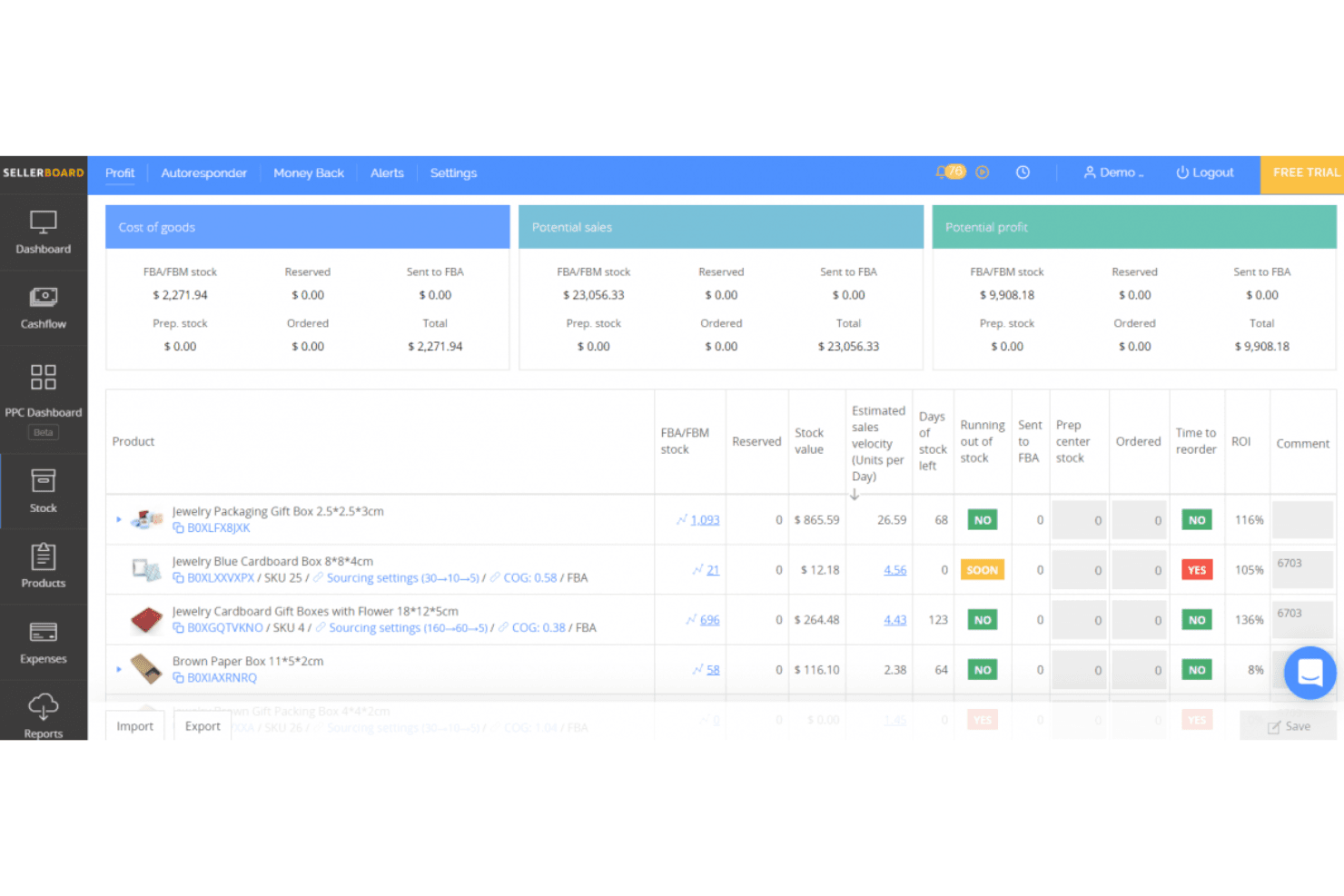
sellerboard valuta le prestazioni del negozio Amazon. sellerboard è uno strumento di analisi della redditività e gestione dell'inventario focalizzato su Amazon, che monitora la redditività a livello di ASIN, le commissioni FBA, le previsioni della domanda, gli ordini di acquisto e le prestazioni PPC su tutti i 24 marketplace globali di Amazon.
Per chi è più adatto sellerboard?
sellerboard è particolarmente indicato per i venditori Amazon FBA che desiderano una visione chiara della redditività per prodotto insieme alla pianificazione dell'inventario.
Perché ho scelto sellerboard
sellerboard è entrato nella mia selezione perché nessun altro strumento a questo prezzo offre questo livello di visibilità sull'utile per ASIN insieme alla pianificazione dell'inventario. Apprezzo molto il fatto che monitori oltre 100 tipi di commissioni Amazon, incluse le commissioni di stoccaggio AWD e di posizionamento in entrata, tutte attribuite a livello di SKU. Gli avvisi sulle commissioni per inventario ridotto sono particolarmente utili: sellerboard monitora settimanalmente le scorte e segnala esattamente quali ASIN saranno penalizzati da Amazon, insieme alla quantità e alla data di spedizione consigliate.
Funzionalità principali di sellerboard
- Metodi di monitoraggio del COGS: Supporta i metodi di calcolo del COGS FIFO, per lotto, basato sul periodo e specifico per marketplace, per mantenere accurati i dati sulla redditività.
- Automazione delle offerte PPC: Offre modalità di ottimizzazione manuale e automatica delle offerte, con raccolta automatizzata delle parole chiave e negazione delle parole chiave con prestazioni insufficienti.
- Gestione delle spedizioni in entrata FBA: Consente di creare e monitorare le spedizioni FBA in entrata dall'inizio alla fine, aggiornando dinamicamente le quantità di inventario man mano che le spedizioni avanzano.
- Dashboard riepilogativa per più marketplace: Aggrega le principali metriche delle prestazioni degli account Amazon, Walmart ed eBay in un'unica vista unificata.
Integrazioni di sellerboard
sellerboard offre integrazioni native con i marketplace Amazon Seller Central, Walmart Seller Center ed eBay, oltre alla connettività con l'API Amazon Advertising e Amazon Warehousing & Distribution. Shopify è supportato tramite la piattaforma separata sellerboard.io.
Pros and Cons
Pros:
- Redditività dettagliata per ASIN con monitoraggio completo delle commissioni
- Avvisi automatizzati di conformità sulle commissioni per inventario ridotto
- Gestisce i flussi di inventario FBA, dei centri di preparazione e AWD
Cons:
- Nessuna sincronizzazione dell'inventario tra i canali in tempo reale
- Segnalazioni di discrepanze nei calcoli dell'utile
Learn more about sellerboard: Ideale per gestire più vetrine online in un'unica dashboard
- Prova gratuita di 14 giorni + demo gratuita disponibile
- A partire da £1,150/mese
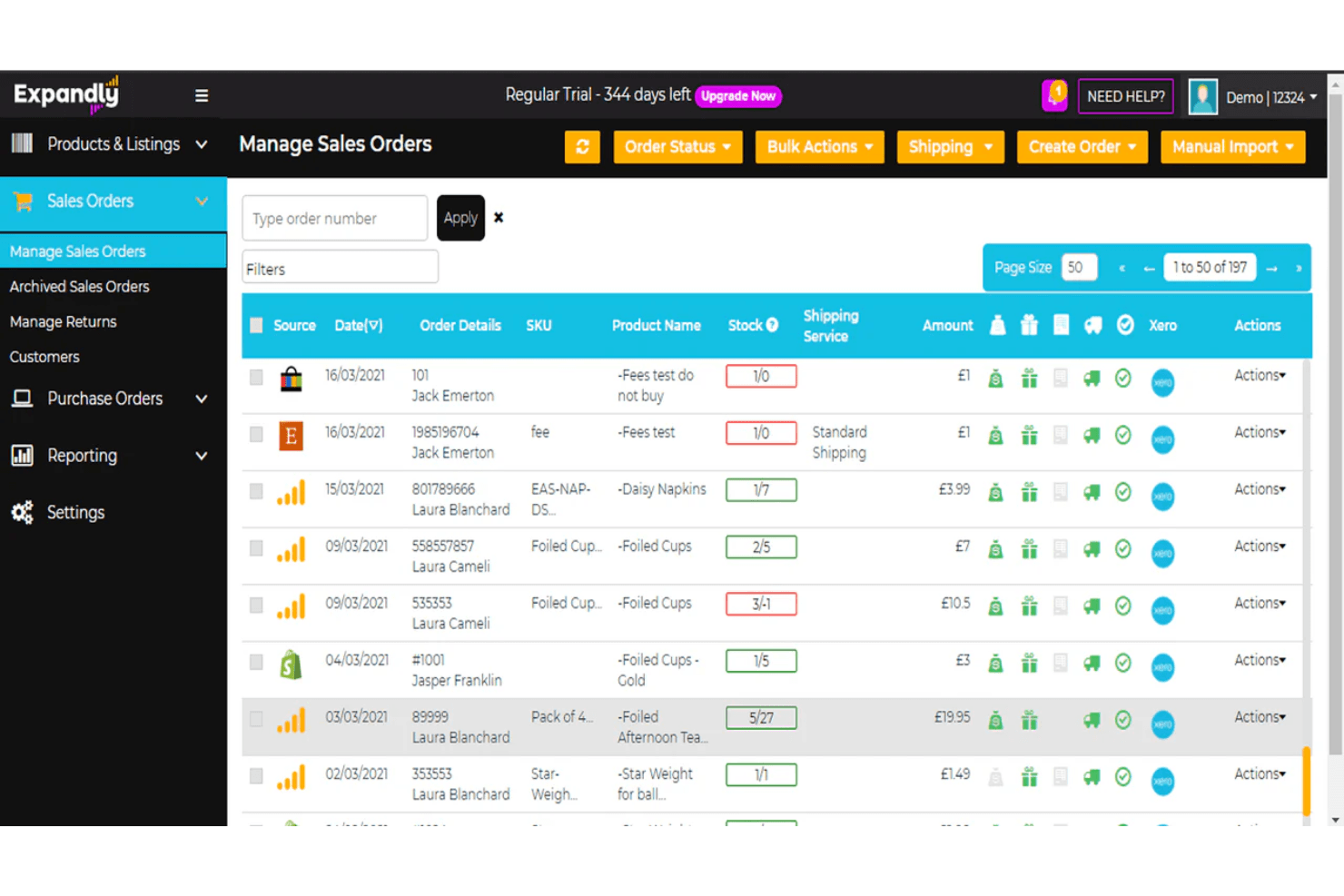
Expandly consente agli utenti di gestire e monitorare tutti gli ordini di vendita provenienti dai diversi canali in un unico luogo. Expandly è una piattaforma multicanale per la gestione dell'inventario e degli ordini che sincronizza scorte, annunci e ordini su Amazon, eBay, Etsy e oltre 25 carrelli per lo shopping da un'unica dashboard.
Per chi è più adatto Expandly?
Expandly è una soluzione particolarmente adatta ai venditori multicanale che gestiscono vetrine online su Amazon, eBay, Etsy e diversi carrelli per lo shopping e hanno bisogno di un unico luogo in cui mantenere sincronizzati i livelli delle scorte.
Perché ho scelto Expandly
Ho incluso Expandly tra le mie scelte migliori perché è davvero uno dei migliori strumenti per mantenere accurati i livelli delle scorte su un'ampia combinazione di vetrine online contemporaneamente. Quando una vendita si conclude su eBay, Amazon ed Etsy quasi nello stesso momento, la sincronizzazione automatica di Expandly aggiorna le quantità su tutti gli oltre 25 canali collegati prima che possa verificarsi una vendita oltre la disponibilità. Apprezzo anche la gestione di kit e pacchetti, grazie alla quale la vendita di un prodotto raggruppato attiva automaticamente la detrazione delle scorte a livello dei componenti su ogni canale.
Funzionalità principali di Expandly
- Gestione degli ordini di acquisto: Crea ordini di acquisto, registra la merce ricevuta e sincronizza i dati degli ordini di acquisto direttamente con Xero dalla piattaforma.
- Avvisi sul livello di riordino: Imposta soglie personalizzate per le scorte ridotte che attivano notifiche per sollecitare il rifornimento prima di esaurire le scorte.
- Instradamento dell'evasione FBA tra i canali: Invia gli ordini provenienti da vetrine online non Amazon ad Amazon FBA per l'evasione direttamente tramite la piattaforma.
- Caricamento massivo degli annunci: Crea e pubblica annunci di prodotto su più canali di vendita contemporaneamente utilizzando strumenti di caricamento in batch.
Integrazioni di Expandly
Expandly offre integrazioni con Amazon Seller Central, eBay, Etsy, Wish, Shopify, WooCommerce, Magento, BigCommerce, Xero, DHL e FedEx, oltre a più di 25 carrelli per lo shopping e diversi corrieri. L'accesso API è disponibile nei piani di livello superiore per le integrazioni personalizzate.
Pros and Cons
Pros:
- Sincronizza le scorte su oltre 25 canali di vendita
- Gestisce nativamente kit e pacchetti
- Include supporto di esperti per la conformità nel Regno Unito e nell'UE
Cons:
- Nessuna gestione delle spedizioni in entrata FBA
- Nessuna previsione della domanda o rifornimento automatico
Learn more about Expandly: Ideale per il controllo centralizzato di ordini e inventario
- Dimostrazione gratuita disponibile
- Prezzi su richiesta
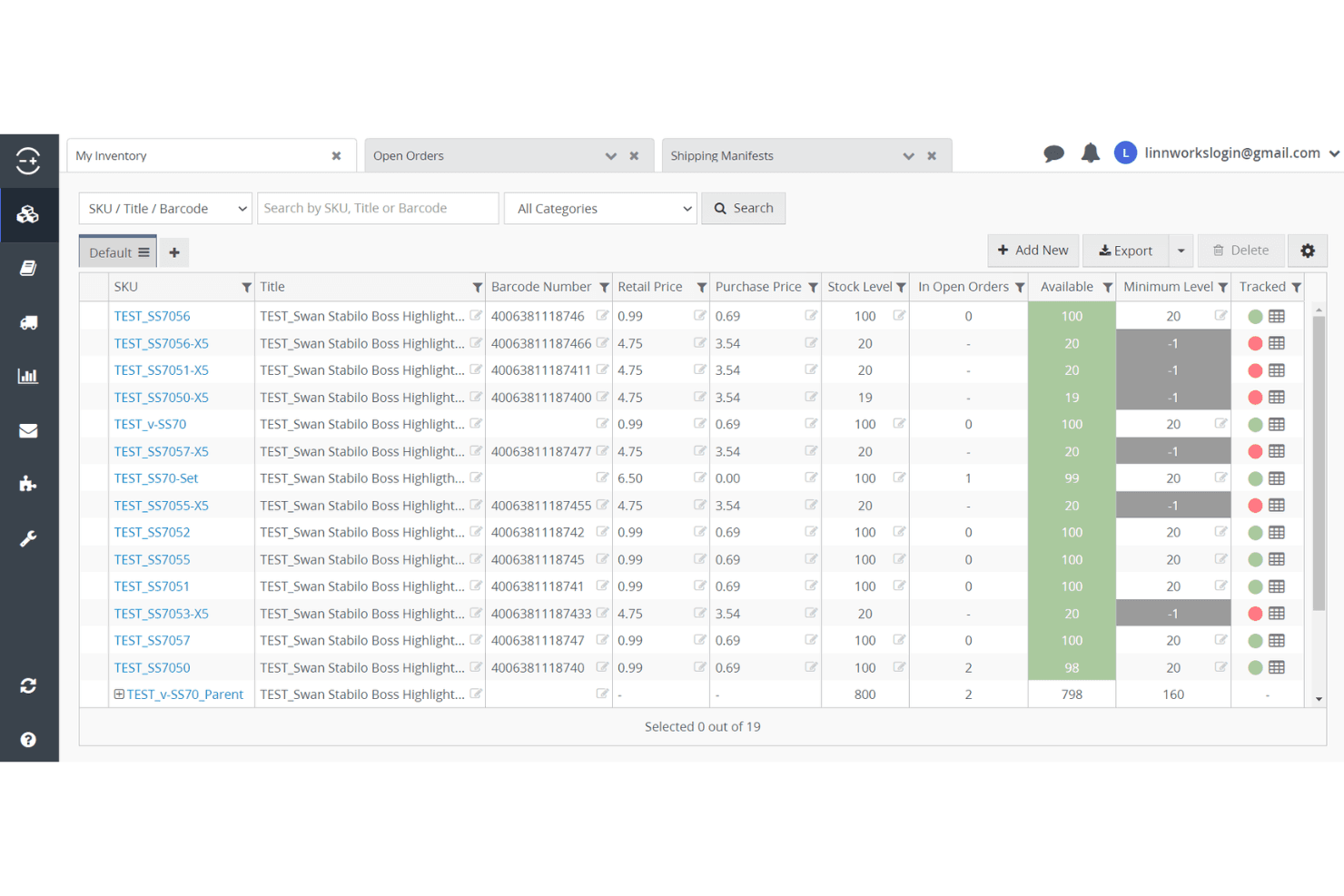
Linnworks consente agli utenti di monitorare i livelli delle scorte e gli ordini di tutti gli articoli dell'inventario. Linnworks è una piattaforma multicanale per la gestione dell'inventario e degli ordini che centralizza il controllo delle scorte, i flussi di lavoro FBA, la gestione delle spedizioni in entrata e l'instradamento degli ordini su oltre 100 canali di vendita, inclusi tutti i mercati Amazon globali.
Per chi è più adatto Linnworks?
Linnworks è particolarmente adatto ai rivenditori multicanale e ai venditori Amazon che devono gestire ordini, inventario ed evasione degli ordini su numerosi canali di vendita da un unico luogo.
Perché ho scelto Linnworks
Linnworks si è guadagnato un posto nella mia selezione perché nessun'altra piattaforma che ho testato è in grado di eguagliarne la profondità nel controllo centralizzato degli ordini e dell'inventario su un numero così elevato di canali. Sono particolarmente colpito dalla copertura SP-API sia di Seller Central sia di Vendor Central, che consente ai venditori che operano in entrambe le modalità di gestire le spedizioni FBA in entrata, l'instradamento ibrido FBA/FBM e gli ordini di acquisto di Vendor Central da un unico pannello di controllo. Il Motore delle regole, da solo, fa risparmiare molto tempo automatizzando l'instradamento dell'evasione degli ordini tra magazzini, operatori logistici terzi e centri logistici Amazon senza intervento manuale.
Funzionalità principali di Linnworks
- Integrazione con Amazon Multi-Channel Fulfillment (MCF): Invia automaticamente gli ordini non Amazon ai centri logistici Amazon, sincronizzando le quantità dell'inventario e le informazioni di tracciamento con tutti i canali di vendita collegati.
- Motore delle regole: Automatizza l'instradamento degli ordini tra FBA, FBM, operatori logistici terzi e sedi di magazzino utilizzando un numero illimitato di regole configurabili, senza intervento manuale.
- Gestione di kit e pacchetti: Tiene traccia in modo nativo delle detrazioni dell'inventario a livello di componente quando un prodotto in pacchetto o un kit viene venduto su qualsiasi canale collegato.
- SkuVault Core WMS: Aggiunge la scansione dei codici a barre, liste di prelievo digitali, conteggi ciclici e flussi di lavoro per il controllo qualità nelle operazioni di magazzino che alimentano il rifornimento FBA.
Integrazioni di Linnworks
Linnworks pubblicizza oltre 200 integrazioni, tra cui Amazon, eBay, Walmart, Shopify, BigCommerce, TikTok Shop, Amazon MCF, QuickBooks Online, Conjura e Inventory Planner. Un'API aperta supporta le integrazioni personalizzate.
Pros and Cons
Pros:
- Supporto sia per Amazon Seller Central sia per Vendor Central
- Sincronizzazione in tempo reale su oltre 100 canali di vendita
- Pannello di controllo centrale per tutti i flussi di lavoro FBA
Cons:
- I resoconti sulla redditività degli ASIN richiedono componenti aggiuntivi
- La mappatura degli SKU tra i diversi canali può essere macchinosa
Learn more about Linnworks: Ideale per suggerimenti integrati di rifornimento FBA
- Demo gratuita disponibile
- A partire da 129 $/mese
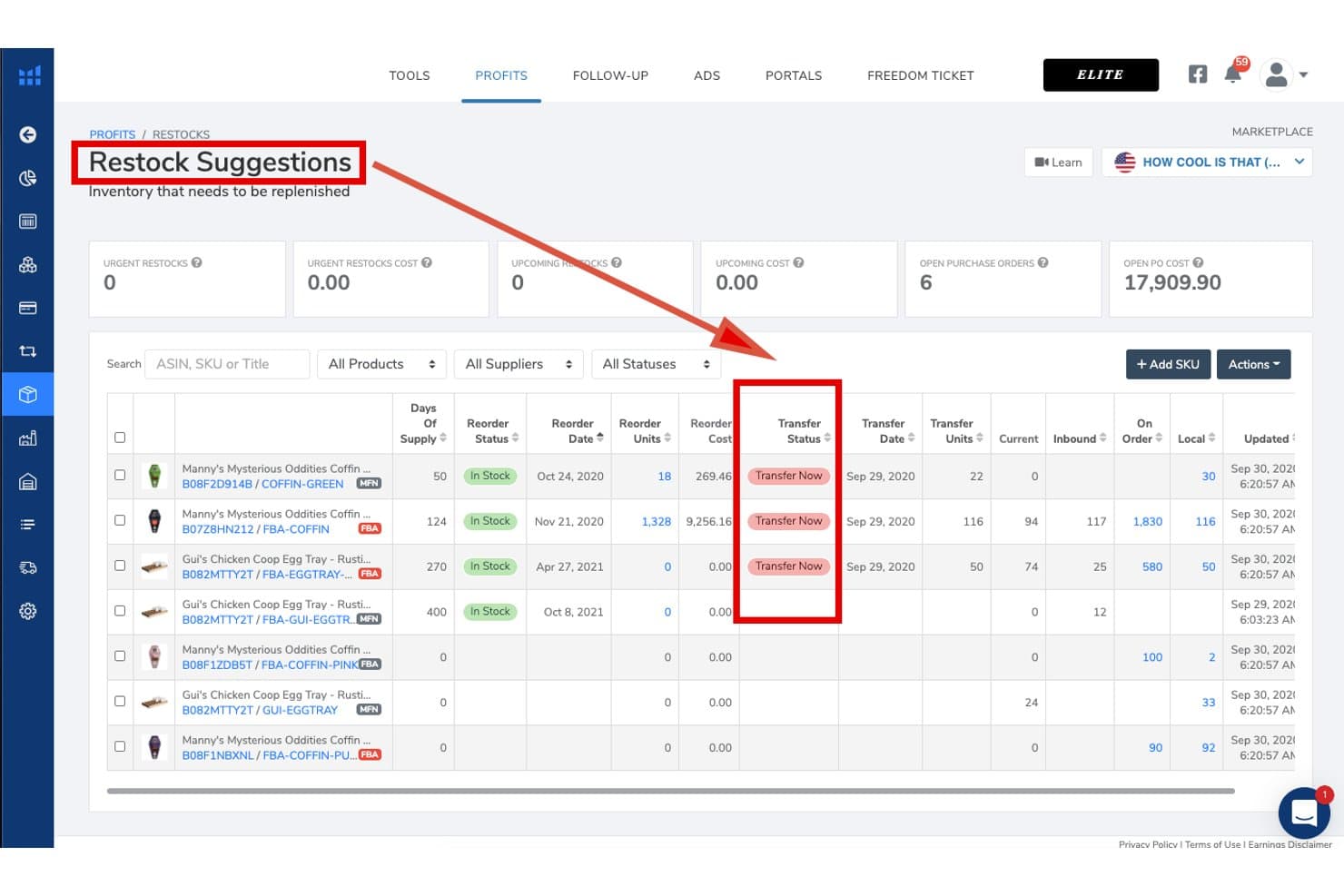
Helium 10 monitora le esigenze di rifornimento e lo stato dei trasferimenti per l'inventario Amazon. Helium 10 è una piattaforma per venditori Amazon che combina la gestione dell'inventario, la previsione della domanda, i suggerimenti di rifornimento FBA, il monitoraggio dei fornitori e degli ordini di acquisto, l'ottimizzazione delle offerte, la ricerca di parole chiave e l'analisi della redditività a livello di ASIN in un'unica suite.
Per chi è più adatto Helium 10?
Helium 10 è particolarmente adatto ai venditori Amazon FBA che desiderano suggerimenti di rifornimento, previsioni della domanda e gestione dei fornitori nella stessa piattaforma che utilizzano per la ricerca dei prodotti e l'ottimizzazione delle offerte.
Perché ho scelto Helium 10
Ho scelto Helium 10 come una delle migliori soluzioni perché il suo pannello Suggerimenti di rifornimento fa qualcosa che trovo davvero raro: riunisce in un'unica schermata la velocità delle vendite su Amazon, i tempi di approvvigionamento, la stagionalità e le curve di crescita, consentendo poi di generare un ordine di acquisto con un solo clic. La previsione della domanda gestisce anche i periodi di esaurimento delle scorte e gli ASIN con pochi dati, così i lanci di nuovi prodotti non vengono trascurati. Mi piace inoltre il fatto che i dettagli dei fornitori, il monitoraggio delle spedizioni in entrata e gli indicatori di rifornimento FBA siano tutti integrati nella stessa piattaforma che utilizzi già per l'ottimizzazione delle offerte e la ricerca di parole chiave.
Caratteristiche principali di Helium 10
- Strumento Profitti: Monitora in tempo reale i ricavi, le commissioni FBA, le commissioni di segnalazione, la spesa pubblicitaria, il costo delle merci vendute e i resi a livello di ASIN, per evidenziare la redditività di ciascun prodotto.
- Servizio di gestione dei rimborsi: Analizza 18 mesi di transazioni FBA per identificare e recuperare i rimborsi relativi a inventario smarrito, danneggiato o accreditato erroneamente.
- Scheda Magazzino locale: Monitora le scorte conservate fuori da Amazon presso la tua struttura e segnala quando trasferire l'inventario esistente a FBA è più economico rispetto a effettuare un nuovo ordine al fornitore.
- Sincronizzazione dell'inventario di TikTok Shop: Collega i prodotti TikTok agli SKU Amazon e utilizza una soglia configurabile di scorte di sicurezza per impedire che gli ordini TikTok esauriscano il tuo inventario FBA.
Integrazioni di Helium 10
Helium 10 offre un'integrazione nativa con Amazon Seller Central e un collegamento indiretto con TikTok Shop tramite Amazon Multi-Channel Fulfillment (MCF). Walmart supporta la ricerca e la pubblicità, ma non risultano documentate integrazioni native con Shopify, eBay, WooCommerce, software di contabilità, ERP o 3PL.
Pros and Cons
Pros:
- Pannello avanzato di suggerimenti di rifornimento Amazon FBA
- Analisi della redditività a livello di ASIN con dettaglio delle commissioni
- Gestisce la stagionalità e l'impatto dell'esaurimento delle scorte nelle previsioni
Cons:
- La gestione dell'inventario è limitata nei piani inferiori
- Nessuno strumento integrato di repricing dinamico per Amazon
Learn more about Helium 10: Ideale per flussi di lavoro di previsione personalizzabili
- Prova gratuita + demo gratuita disponibili
- A partire da $175/mese
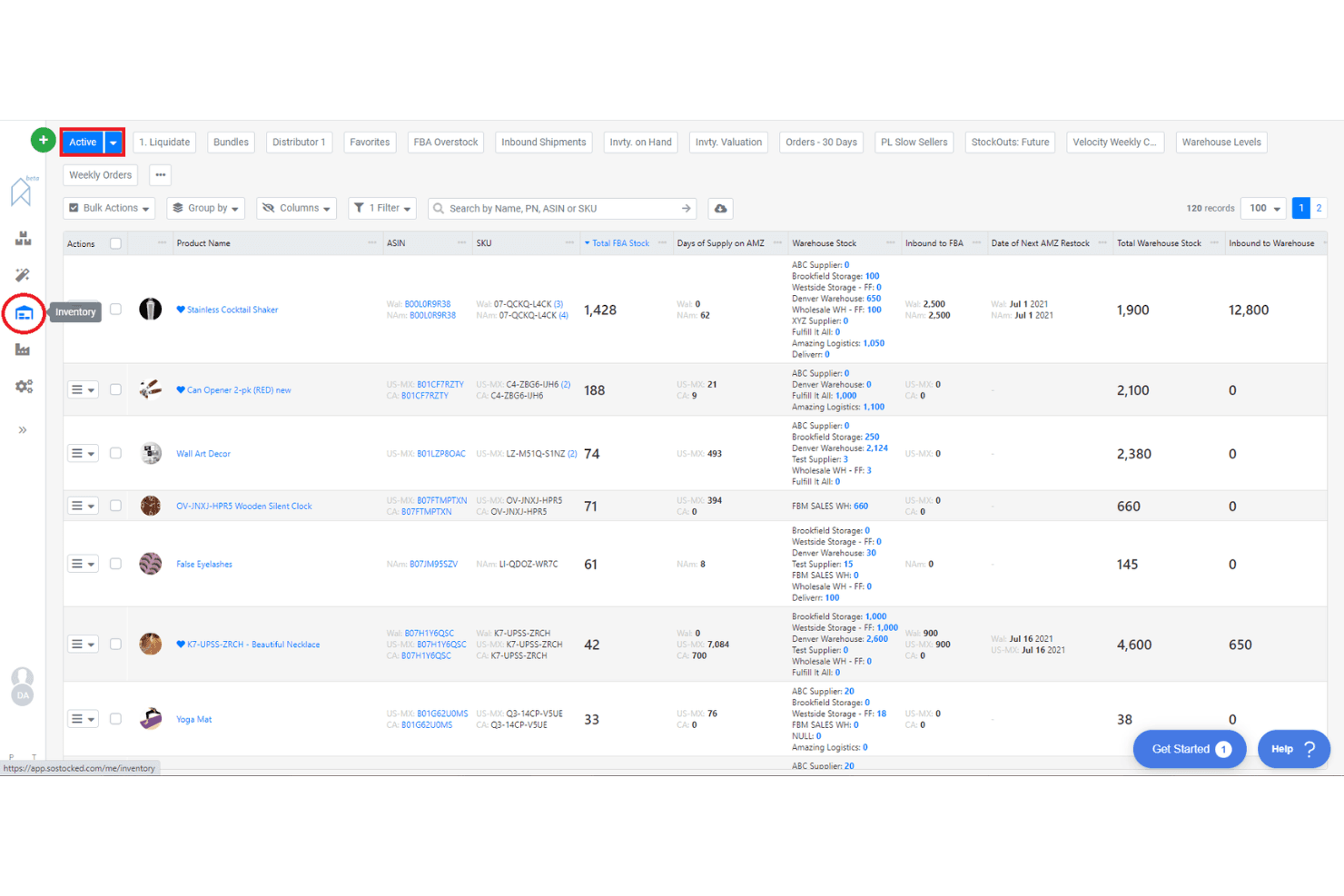
SoStocked consente agli utenti di monitorare i livelli di inventario in più magazzini. SoStocked è una piattaforma nativa di Amazon per la gestione e la previsione dell'inventario, che combina la previsione della domanda, il monitoraggio degli ordini di acquisto, gli avvisi di rifornimento, il monitoraggio dell'inventario FBA e l'analisi dei profitti a livello di ASIN.
Per chi è più indicato SoStocked?
SoStocked è particolarmente adatto ai venditori di marchi privati Amazon FBA e ai marchi all'ingrosso che necessitano di una logica di previsione trasparente e modificabile su più mercati internazionali.
Perché ho scelto SoStocked
SoStocked si è guadagnato un posto nella mia lista ristretta perché nessun altro strumento di inventario Amazon offre questo livello di controllo sui calcoli delle previsioni. Apprezzo molto la possibilità di modificare riga per riga i calcoli della velocità sottostanti, una funzione importante quando lo storico delle vendite include periodi di esaurimento delle scorte che altrimenti falserebbero i punti di riordino. La funzione di previsione combinata consente di sovrapporre i picchi di domanda del Prime Day o del BFCM a una base stagionale e di riutilizzare questi modelli di anno in anno.
Funzionalità principali di SoStocked
- Calcolo della velocità rettificato: Rimuove dallo storico delle vendite i giorni influenzati dall'esaurimento delle scorte, così i dati sulla domanda riflettono la velocità effettiva e non cali distorti.
- Integrazione dei limiti di rifornimento IPI: Recupera quotidianamente da Amazon i limiti di rifornimento dell'Indice delle prestazioni dell'inventario e li integra direttamente nei programmi di rifornimento e trasferimento.
- Analisi dei profitti a livello di ASIN con ProfitFlow: Prevede vendite, commissioni FBA e costi a livello di singolo ASIN per individuare perdite di margine e inserzioni con prestazioni insufficienti.
- Ottimizzatore delle fasce dimensionali FBA: Analizza le dimensioni dei prodotti e degli imballaggi per segnalare opportunità di ridimensionamento che riducono le commissioni di gestione FBA.
Integrazioni di SoStocked
SoStocked si integra con Amazon Seller Central tramite SP-API su mercati internazionali, oltre che con Amazon AWD e MCF. Non dispone di integrazioni native con Shopify, Walmart, eBay, WooCommerce o i fornitori 3PL, ma supporta flussi di lavoro personalizzati per i dati tramite il relativo strumento di conversione delle vendite del mercato online.
Pros and Cons
Pros:
- Formule di previsione modificabili per un controllo preciso
- Previsione combinata per stagionalità ed eventi
- I limiti di rifornimento IPI vengono integrati automaticamente
Cons:
- Nessun flusso di lavoro integrato per la creazione delle spedizioni
- È necessario monitorare manualmente l'inventario 3PL
Learn more about SoStocked:
Altri software per la gestione dell'inventario Amazon
Ecco alcune ulteriori opzioni di software per la gestione dell’inventario Amazon che non sono entrate nel mio elenco ristretto, ma che vale comunque la pena esaminare:
- 11RestockProIdeale per il riassortimento FBA e l'automazione degli ordini di acquisto
- 12Jungle ScoutIdeale per la pianificazione dell'inventario basata sulle vendite
- 13VeeqoIdeale per venditori multicanale con volumi elevati
- 14BrightpearlIdeale per flussi di lavoro contabili integrati
- 15Zoho InventoryIdeale per la gestione automatizzata dei punti di riordino
- 16OrdoroIdeale per le funzionalità di preparazione di kit di prodotti raggruppati
- 17Cin7 CoreIdeale per un portale B2B integrato
- 18Finale InventoryIdeale per il controllo delle scorte basato sui codici a barre
- 19LitCommerceIdeale per configurare e migrare rapidamente i canali
Come Valuto il Software di Gestione dell'Inventario Amazon
Divido la mia valutazione in due livelli: le capacità di base di FBA e Seller Central che uno strumento deve avere per essere considerato idoneo, e gli elementi differenzianti che determinano la soluzione giusta per la tua attività.
Funzionalità di Base (Requisiti Indispensabili per Questa Lista)
Quando seleziono gli strumenti per la mia lista, valuto ciascuno su una scala da 0 (non offre la funzionalità) a 5 (eccelle in quest'area) per ogni funzionalità di base elencata qui sotto. Poi, calcolo il punteggio totale dello strumento in percentuale. Ogni strumento deve raggiungere un punteggio totale minimo del 65% per essere preso in considerazione.
- Integrazione con Amazon Seller Central: Verifico se uno strumento si connette a Seller Central tramite API nativa o attraverso un ponte di terze parti, e se sincronizza ordini, inventario e inserzioni su più marketplace Amazon.
- Monitoraggio dell'Inventario FBA: Uno strumento dovrebbe mostrare più della sola quantità disponibile. Cerco visibilità su unità in ingresso, riservate, non idonee e bloccate, così i venditori possono rilevare problemi prima che si accumulino costi di stoccaggio.
- Previsione della Domanda e Avvisi di Riordino: Valuto se i suggerimenti di riordino tengano conto della reale velocità di vendita su Amazon, dei tempi di consegna dei fornitori e delle tendenze stagionali, invece di basarsi solo su soglie statiche impostate manualmente.
- Sincronizzazione Multi-Canale dell'Inventario: Per i venditori che pubblicano su Shopify, Walmart o eBay oltre che su Amazon, verifico su quanti canali avviene la sincronizzazione in tempo reale e se lo strumento supporta scorte di buffer o regole di allocazione specifiche per canale.
- Monitoraggio della Redditività e dei Costi a Livello di SKU: I migliori strumenti suddividono il margine per ASIN dopo commissioni referral, tariffe FBA, COGS e resi. Valuto quanto siano dettagliati gli input dei costi e se sono supportati i costi di sbarco.
- Gestione degli Ordini di Acquisto e dei Fornitori: Cerco la creazione di ordini d'acquisto collegata ai dati di domanda, un database dei fornitori, e il monitoraggio delle spedizioni in entrata verso magazzini FBA o di terzi, anziché semplici registri in stile foglio di calcolo.
Una volta compilata la lista degli strumenti che soddisfano questi criteri, considero cosa distingue ciascuna piattaforma.
Fattori Differenzianti (Ciò Che Distingue i Fornitori)
Ecco come confronto e metto a confronto i vari fornitori:
Funzionalità Distintive
Il monitoraggio dell'IPI e dei limiti di riassortimento è importante perché una sola spedizione respinta può bloccare le vendite per settimane. Cerco strumenti che segnalino quando ti stai avvicinando ai limiti di capacità, così puoi modificare i piani di spedizione in ingresso. La gestione di bundle e kit è un'altra area chiave: i venditori che offrono multipack hanno bisogno di detrazioni a livello di componente che scattino automaticamente al momento della vendita. L'integrazione PPC aggiunge vero valore qui, collegando la spesa pubblicitaria ai livelli di scorte in modo che tu possa sospendere le campagne sugli ASIN a bassa disponibilità invece di sprecare budget.
Oltre le Funzionalità
La trasparenza dei prezzi è fondamentale in questo settore. Verifico se i piani si adattano in base al volume degli ordini o al numero di SKU, e se funzionalità come forecasting o analisi PPC sono accessibili solo con piani premium. Anche le integrazioni nell'ecosistema hanno un peso significativo: il tuo strumento di gestione inventario deve sincronizzarsi con QuickBooks o Xero per la riconciliazione del COGS e collegarsi ai tuoi 3PL per i flussi in entrata. Valuto anche come uno strumento si adatta ai diversi tipi di venditore, dato che un venditore FBA solitario con poche centinaia di SKU ha esigenze molto diverse rispetto a un aggregatore che gestisce dozzine di brand su diversi modelli di logistica.
Come scegliere un software per la gestione dell'inventario Amazon
È facile perdersi in lunghi elenchi di funzionalità e strutture di prezzo complesse. Per aiutarti a rimanere concentrato mentre affronti il tuo processo di selezione del software, unico per la tua azienda, ecco un elenco di fattori da tenere a mente:
| Fattore | Cosa considerare |
|---|---|
| FattoreScalabilità | Cosa considerareIl software sarà in grado di gestire il volume di ordini attuale e previsto, gli SKU e i nuovi canali Amazon? |
| FattoreIntegrazioni | Cosa considerareSi connette nativamente alle tue piattaforme di commercio elettronico, ai corrieri e agli strumenti di contabilità? |
| FattorePersonalizzazione | Cosa considerarePuoi adattare i flussi di lavoro, le autorizzazioni degli utenti e i report per rispecchiare i processi aziendali? |
| FattoreFacilità d'uso | Cosa considerareIl tuo team sarà in grado di imparare a usare il sistema rapidamente senza una formazione approfondita? |
| FattoreImplementazione e onboarding | Cosa considerareQuanto tempo richiederà la configurazione e di quali risorse o supporto avrai bisogno per iniziare a utilizzarlo? |
| FattoreCosto | Cosa considerareI livelli di prezzo sono chiari e in linea con le dimensioni della tua azienda, il volume degli ordini e le funzionalità necessarie? |
| FattoreMisure di sicurezza | Cosa considerareIl fornitore offre la crittografia dei dati, controlli di accesso degli utenti e aggiornamenti di sicurezza regolari? |
| FattoreDisponibilità dell'assistenza | Cosa considerarePuoi contattare l'assistenza durante il tuo orario lavorativo e sono previsti SLA per i problemi urgenti? |
Che cos'è un software per la gestione dell'inventario Amazon?
Il software di gestione dell'inventario Amazon è uno strumento digitale che aiuta le aziende a monitorare, organizzare e controllare le scorte dei propri prodotti su uno o più negozi Amazon. Questi sistemi automatizzano gli aggiornamenti dell'inventario, gestiscono gli ordini e sincronizzano i dati dei prodotti per evitare vendite eccessive o esaurimenti delle scorte. Sono essenziali per mantenere livelli di inventario accurati, supportare le vendite multicanale e ottimizzare i processi di evasione degli ordini per i venditori Amazon.
Funzionalità
Quando selezioni un software di gestione dell'inventario Amazon, presta attenzione alle seguenti funzionalità principali:
- Sincronizzazione dell'inventario: aggiorna automaticamente i livelli delle scorte su tutti i canali Amazon per evitare vendite eccessive ed esaurimenti delle scorte.
- Gestione degli ordini: centralizza l'elaborazione, il monitoraggio e l'evasione di tutti gli ordini Amazon in un'unica dashboard.
- Inserimento in blocco dei prodotti: consente di caricare, modificare e gestire più schede prodotto contemporaneamente, risparmiando tempo negli aggiornamenti del catalogo.
- Gestione degli ordini di acquisto: monitora gli ordini ai fornitori, le consegne e i rifornimenti per mantenere livelli di inventario ottimali.
- Supporto multicanale: gestisce l'inventario e gli ordini su Amazon e sugli altri canali di vendita da un'unica piattaforma.
- Avvisi sulle scorte: ti avvisa quando l'inventario scende al di sotto delle soglie impostate, così puoi effettuare un nuovo ordine prima di rimanere senza prodotti.
- Generazione delle etichette di spedizione: crea le etichette di spedizione per diversi corrieri direttamente all'interno del software, velocizzando l'evasione degli ordini.
- Report e analisi: fornisce report dettagliati sull'inventario, sulle vendite e sulle tendenze degli ordini per supportare decisioni basate sui dati.
- Autorizzazioni degli utenti: consentono di controllare i livelli di accesso dei diversi membri del team, garantendo operazioni sicure e organizzate.
- Registri di controllo: conservano i registri di tutte le modifiche all'inventario e delle azioni degli utenti per garantire trasparenza e conformità.
Vantaggi
L'implementazione di un software di gestione dell'inventario Amazon offre diversi vantaggi al tuo team e alla tua azienda. Eccone alcuni:
- Monitoraggio accurato delle scorte: la sincronizzazione dell'inventario in tempo reale sui canali Amazon aiuta a prevenire vendite eccessive ed esaurimenti delle scorte.
- Elaborazione centralizzata degli ordini: la gestione di tutti gli ordini Amazon da un'unica dashboard riduce il lavoro manuale e gli errori.
- Evasione più rapida: la generazione integrata delle etichette di spedizione e l'instradamento degli ordini accelerano il processo di spedizione.
- Report migliorati: analisi dettagliate e registri di controllo supportano previsioni più accurate e la conformità.
- Efficienza multicanale: la gestione dell'inventario per Amazon e per gli altri canali di vendita da un'unica piattaforma fa risparmiare tempo e riduce la complessità.
- Controllo proattivo dell'inventario: gli avvisi automatici sulle scorte e la gestione degli ordini di acquisto aiutano a effettuare nuovi ordini prima di rimanere senza prodotti.
- Collaborazione del team migliorata: le autorizzazioni degli utenti e i registri delle attività mantengono le operazioni organizzate e sicure per team di qualsiasi dimensione.
Costi e prezzi
La scelta di un software di gestione dell'inventario Amazon richiede la comprensione dei diversi modelli e piani tariffari disponibili. I costi variano in base alle funzionalità, alle dimensioni del team, agli strumenti aggiuntivi e ad altri fattori. La tabella seguente riassume i piani più comuni, i relativi prezzi medi e le funzionalità generalmente incluse nelle soluzioni software di gestione dell'inventario Amazon:
Tabella comparativa dei piani per il software di gestione dell'inventario Amazon
| Tipo di piano | Prezzo medio | Funzionalità comuni |
|---|---|---|
| Tipo di pianoPiano gratuito | Prezzo medio$0 | Funzionalità comuniMonitoraggio di base dell'inventario, gestione limitata degli ordini, supporto per un singolo canale e report di base. |
| Tipo di pianoPiano personale | Prezzo medio$30-$60/mese | Funzionalità comuniSincronizzazione dell'inventario multicanale, gestione degli ordini, avvisi sulle scorte ridotte e strumenti di spedizione di base. |
| Tipo di pianoPiano aziendale | Prezzo medio$100-$300/mese | Funzionalità comuniInserimento in blocco dei prodotti, gestione degli ordini di acquisto, report avanzati, autorizzazioni degli utenti e integrazioni. |
| Tipo di pianoPiano per grandi aziende | Prezzo medio$500-$2000/mese | Funzionalità comuniFlussi di lavoro personalizzati, accesso API, assistenza dedicata, analisi avanzate e gestione di più sedi. |
Domande frequenti sul software di gestione dell'inventario Amazon
Ecco alcune risposte alle domande più comuni sul software di gestione dell’inventario Amazon:
Il software di gestione dell'inventario Amazon può gestire sia gli ordini FBA che quelli FBM?
Sì, la maggior parte dei software di gestione dell’inventario Amazon può gestire sia gli ordini Fulfillment by Amazon (FBA) che quelli Fulfillment by Merchant (FBM). Ciò consente di monitorare l’inventario, elaborare gli ordini e sincronizzare i livelli delle scorte per entrambi i metodi di evasione da un’unica dashboard.
Come funziona la sincronizzazione dell'inventario con più marketplace Amazon?
La sincronizzazione dell’inventario aggiorna automaticamente i livelli delle scorte su tutti i marketplace Amazon collegati quando si verifica una vendita. Ciò impedisce le vendite eccessive e garantisce conteggi accurati dell’inventario, anche se vendi contemporaneamente su Amazon USA, Regno Unito o altri siti regionali.
Quali integrazioni dovrei cercare in un software di gestione dell'inventario Amazon?
Cerca integrazioni con le tue piattaforme di commercio elettronico, i corrieri, gli strumenti di contabilità e i fornitori di servizi logistici di terze parti. Queste connessioni aiutano ad automatizzare i flussi di lavoro, ridurre l’inserimento manuale dei dati e mantenere sincronizzati i sistemi aziendali.
È difficile migrare a un nuovo software di gestione dell'inventario Amazon?
La migrazione può essere semplice se il software offre strumenti di importazione, procedure guidate di configurazione e assistenza per l’avvio. Verifica la disponibilità di risorse formative, opzioni per l’importazione dei dati e assistenza clienti per aiutare il tuo team a effettuare la transizione senza problemi.
Come funzionano gli avvisi sulle scorte nel software di gestione dell'inventario Amazon?
Gli avvisi sulle scorte ti informano quando i livelli dell’inventario scendono al di sotto di una soglia impostata. Puoi impostare soglie di avviso personalizzate per ogni prodotto, così saprai quando è il momento di effettuare un nuovo ordine ed eviterai di rimanere senza scorte.