

Una valida alternativa a Freshdesk offre strumenti di assistenza clienti basati sull'intelligenza artificiale, una gestione flessibile dei ticket e integrazioni adatte al flusso di lavoro del tuo team. Se stai cercando alternative a Freshdesk, probabilmente stai valutando opzioni in grado di eguagliare o superare la sua automazione, il supporto omnicanale e la reportistica, senza rinunciare alla facilità d'uso o al valore. Questo elenco ti aiuterà a confrontare fianco a fianco le principali piattaforme, così potrai scegliere con sicurezza la soluzione di assistenza clienti più adatta alla tua azienda nel 2026.
Che cos'è Freshdesk?
Freshdesk è una piattaforma di assistenza clienti basata sull'intelligenza artificiale che aiuta le aziende a gestire i ticket di supporto, automatizzare i flussi di lavoro e interagire con i clienti attraverso più canali. Offre funzionalità come l'instradamento dei ticket, la gestione della knowledge base e il supporto tramite chatbot per semplificare le interazioni con i clienti. I team utilizzano Freshdesk per centralizzare le comunicazioni con i clienti, monitorare le prestazioni e integrarsi con altri strumenti aziendali, rendendolo una scelta popolare per le aziende che desiderano migliorare le proprie attività di assistenza clienti.
Tabella di confronto delle alternative a Freshdesk
Questa tabella di confronto evidenzia i dettagli sui prezzi delle mie principali alternative a Freshdesk.
| Tool | Best For | Trial Info | Price | ||
|---|---|---|---|---|---|
| 1 | Ideale per il deployment di agenti AI senza programmazione | Piano gratuito disponibile | Da $32/mese (fatturazione annuale) | Website | |
| 2 | Ideale per le operazioni di assistenza basate su Slack | Prova gratuita di 14 giorni + piano gratuito + demo gratuita | A partire da $16/utente/mese (con fatturazione annuale) | Website | |
| 3 | Ideale con strumenti di messaggistica proattiva | Prova gratuita di 14 giorni + demo gratuita disponibile | Da $29/utente/mese (fatturato annualmente) | Website | |
| 4 | Ideale per la creazione di knowledge base | Piano gratuito + demo gratuita disponibile | Da $39,99/mese (fatturazione annuale) | Website | |
| 5 | Ideale per timeline cliente unificate | Dimostrazione gratuita disponibile | Prezzo su richiesta | Website | |
| 6 | Ideale per l’integrazione con il CRM | Piano gratuito + prova gratuita di 14 giorni + demo gratuita disponibile | Da $9/sede/mese (fatturato annualmente) | Website | |
| 7 | Ideale per team che collaborano in una casella condivisa | Demo gratuita disponibile | Da $25/postazione/mese | Website | |
| 8 | Ideale per la gestione omnicanale delle richieste | Prova gratuita + demo gratuita disponibile | Da $19/agente/mese (fatturato annualmente) | Website | |
| 9 | Ideale per automazione dei flussi di lavoro personalizzabili | Prova gratuita di 15 giorni + demo gratuita disponibile | Da $7/utente/mese (fatturazione annuale) | Website | |
| 10 | Ideale con funzionalità di analisi avanzate | Piano gratuito + demo gratuita disponibile | Da $25/utente/mese | Website |


Perché fidarsi dei nostri consigli sui software
6,700+
Reviews
20
Industry experts
16+
Evaluation factors
14
Years
Il nostro team testa e recensisce software dal 2012. In quanto leader del retail noi stessi, sappiamo quanto sia difficile — e importante — scegliere il software giusto.
Per questa guida, abbiamo valutato gli strumenti attraverso test pratici e ricerche indipendenti, assegnando un punteggio agli strumenti in base ai nostri criteri di selezione.
Le nostre recensioni riflettono il nostro giudizio indipendente, non un discorso di vendita.
Le migliori alternative a Freshdesk recensite
Di seguito trovi i miei riepiloghi dettagliati delle migliori alternative a Freshdesk incluse nel mio elenco. Le mie recensioni offrono uno sguardo approfondito sulle funzionalità, le capacità e le integrazioni di ciascuna piattaforma, per aiutarti a trovare quella più adatta al tuo team.
 Ideale per il deployment di agenti AI senza programmazione
- Piano gratuito disponibile
- Da $32/mese (fatturazione annuale)
Visit WebsiteCustomer Rating:4.4/5
Chatbase consente ai team di creare e distribuire agenti di supporto AI senza programmazione, utilizzando dati personalizzati per automatizzare le conversazioni con i clienti. Chatbase è una piattaforma di chatbot AI progettata per le aziende che desiderano automatizzare il supporto clienti e l'interazione senza un impegno tecnico gravoso. Se stai cercando un'alternativa a Freshdesk che offra intelligenza artificiale conversazionale e una distribuzione flessibile sui tuoi canali di supporto, Chatbase merita attenzione.
Per chi è ideale Chatbase?
Team di supporto clienti e aziende e-commerce che vogliono implementare agenti chat AI senza bisogno di programmare o di competenze tecniche.
Perché Chatbase è una buona alternativa a Freshdesk
Ho scelto Chatbase come alternativa a Freshdesk perché il mio team può lanciare agenti chat AI senza scrivere una sola riga di codice. Il builder drag-and-drop ci permette di progettare e distribuire rapidamente bot per il nostro sito web e le app di messaggistica. Apprezzo il fatto che possiamo personalizzare le risposte e i flussi di lavoro per adattarli al nostro brand. In pratica, questo significa che siamo in grado di automatizzare il supporto e scalare le conversazioni rapidamente, anche con risorse tecniche limitate.
Funzionalità chiave di Chatbase
- Distribuzione multicanale: Distribuisci chatbot su web, WhatsApp, Facebook Messenger e altri canali da una singola dashboard.
- Analisi in tempo reale: Monitora le interazioni e le prestazioni del chatbot con strumenti di analisi integrati.
- Integrazione di fonti dati personalizzate: Collega i bot alle tue fonti dati per risposte dinamiche e sempre aggiornate.
- Controlli accesso basati sui ruoli: Gestisci permessi e accessi per i diversi membri del team all'interno della piattaforma.
Integrazioni di Chatbase
Chatbase offre integrazioni native con Slack, WhatsApp, Facebook Messenger, Telegram e Google Sheets, e si collega a Zapier. È disponibile un'API per integrazioni personalizzate, rendendo semplice la connessione di Chatbase ai tuoi sistemi aziendali esistenti.
Pros and Cons
Pros:
- Offre sicurezza e conformità di livello enterprise
- Supporta piattaforme di messaggistica multicanale
- Fornisce analisi per monitorare le prestazioni dei chatbot
Cons:
- Funzionalità di ticketing e gestione dei casi limitate
- Le opzioni di personalizzazione dei flussi di lavoro sono basilari
Learn more about Chatbase: Ideale per le operazioni di assistenza basate su Slack
- Prova gratuita di 14 giorni + piano gratuito + demo gratuita
- A partire da $16/utente/mese (con fatturazione annuale)
Visit WebsiteCustomer Rating:4.6/5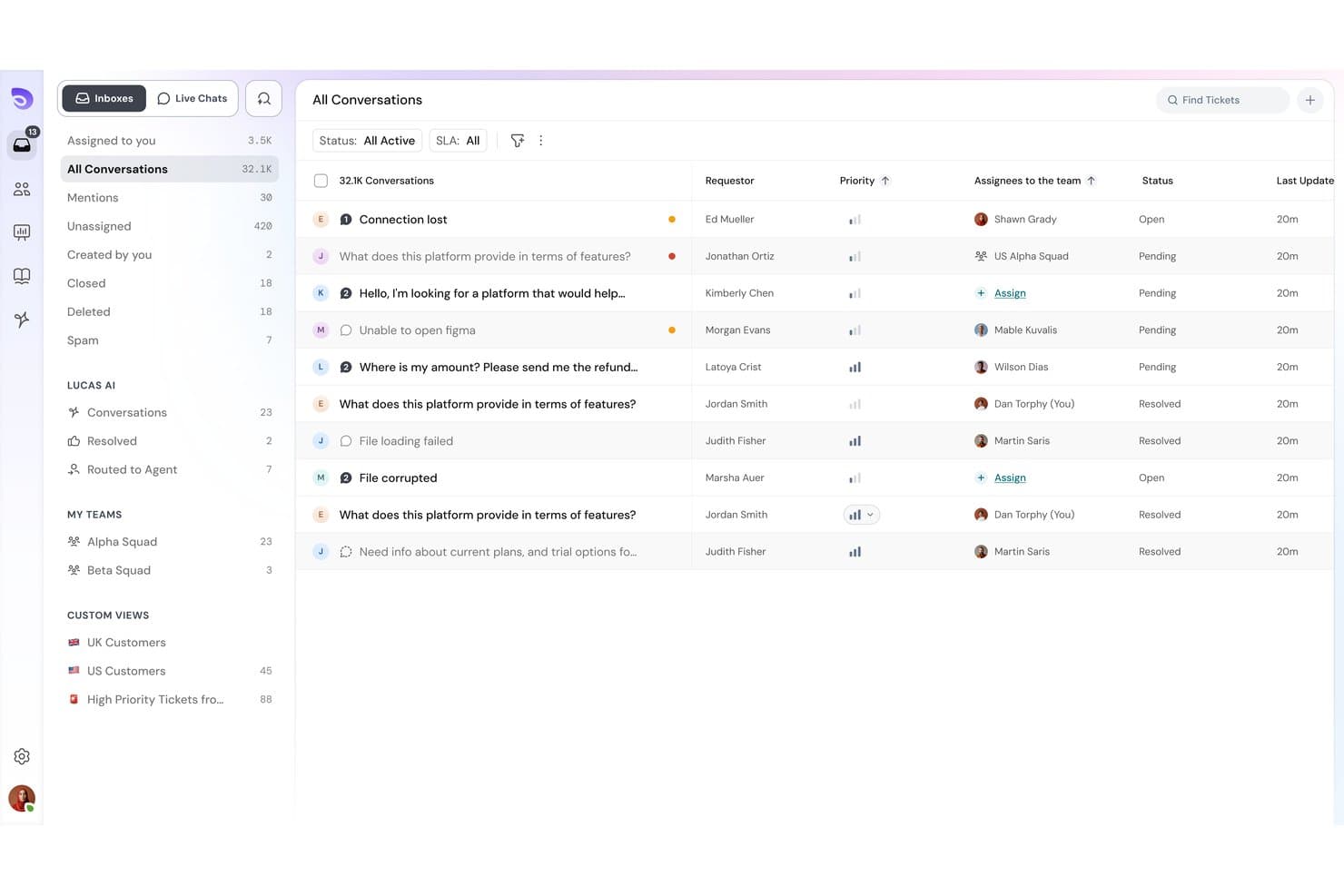
SparrowDesk offre una casella di posta omnicanale con tutte le conversazioni, i livelli di priorità, gli assegnatari e il monitoraggio dello stato in un'unica vista unificata. SparrowDesk è una piattaforma di assistenza progettata prima di tutto per l'AI, pensata per le PMI e i team di commercio elettronico che devono automatizzare un elevato volume di richieste di assistenza senza la complessità o i costi di strumenti aziendali come Freshdesk.
A chi è più adatto SparrowDesk?
È una soluzione particolarmente adatta a startup e piccoli team di assistenza che gestiscono le operazioni quotidiane all'interno di Slack e vogliono che l'AI gestisca le richieste di routine senza un lungo processo di configurazione.
Perché SparrowDesk è una buona alternativa a Freshdesk
Ho scelto SparrowDesk come una delle soluzioni migliori per il modo in cui trasforma Slack in un vero centro operativo per l'assistenza. Il mio team può classificare le richieste in arrivo aggiungendo un'emoji a un messaggio Slack e preparare risposte assistite dall'AI senza lasciare il canale. Inoltre, l'agente AI Zoona gestisce automaticamente oltre il 60% delle richieste di routine, così gli operatori intervengono solo quando una conversazione ha davvero bisogno del tocco umano.
Funzionalità principali di SparrowDesk
- Creazione di flussi di lavoro senza codice: Automatizza l'instradamento delle richieste, le notifiche e le attività di assistenza ripetitive senza ricorrere a risorse di ingegneria.
- Gestione granulare degli SLA: Imposta SLA complessi con pause automatiche dei timer in base allo stato della richiesta o agli input del cliente.
- Centri assistenza multibrand: Crea e gestisci centri assistenza pubblici separati per ogni marchio o negozio online da una singola istanza di SparrowDesk.
- Pannello di controllo analitico interattivo: Monitora la produttività degli operatori, il rispetto degli SLA e le tendenze delle richieste con report personalizzabili e metriche in tempo reale.
Integrazioni di SparrowDesk
SparrowDesk offre integrazioni native con Slack, Shopify e WhatsApp e mette a disposizione un'API per le integrazioni personalizzate.
Pros and Cons
Pros:
- La gestione delle richieste nativa di Slack non richiede di passare da una scheda all'altra
- Zoona AI risolve automaticamente la maggior parte delle richieste
- La configurazione leggera è adatta ai team di assistenza snelli
Cons:
- Copertura omnicanale limitata
- Meno opzioni di reportistica per i team aziendali
Learn more about SparrowDesk: Ideale con strumenti di messaggistica proattiva
- Prova gratuita di 14 giorni + demo gratuita disponibile
- Da $29/utente/mese (fatturato annualmente)
Visit WebsiteCustomer Rating:4.4/5
Intercom migliora il coinvolgimento dei clienti tramite chat e automazione. I team del settore retail e e-commerce che desiderano coinvolgere i clienti prima che sorgano problemi possono trovare Intercom particolarmente utile. La piattaforma è specializzata in messaggistica proattiva e consente di inviare messaggi mirati in-app, via email e chat in base al comportamento degli utenti. L'automazione potenziata dall'IA di Intercom e i bot personalizzabili ti aiutano a raggiungere i clienti al momento giusto, riducendo le domande ripetitive e migliorando la soddisfazione.
Perché Intercom è una buona alternativa a Freshdesk
Se desideri raggiungere i clienti prima ancora che richiedano aiuto, Intercom è da prendere in considerazione come alternativa a Freshdesk. Ho scelto Intercom perché i suoi strumenti di messaggistica proattiva permettono di inviare messaggi mirati in base alle azioni degli utenti, alla cronologia di navigazione o alla fase del ciclo di vita. I bot alimentati dall'IA possono avviare conversazioni, rispondere alle domande frequenti e indirizzare automaticamente le problematiche più complesse al tuo team. Questo approccio aiuta a ridurre i ticket ripetitivi e a creare un'esperienza cliente più personalizzata.
Funzionalità principali di Intercom
Altre funzionalità di Intercom che si distinguono includono:
- Posta in arrivo unificata: Gestisci tutte le conversazioni dei clienti da chat, email e canali social in un'unica vista.
- Help Center personalizzabile: Crea un portale self-service con articoli e FAQ brandizzati per i clienti.
- Product Tours: Guida gli utenti durante l'onboarding o sulle nuove funzionalità con walkthrough interattivi in-app.
- Valutazioni delle conversazioni: Raccogli feedback dei clienti sulle singole interazioni di supporto direttamente tramite l'interfaccia intuitiva.
Integrazioni di Intercom
Le integrazioni includono Salesforce, HubSpot, Slack, Shopify, Jira, Stripe, Google Analytics, Mailchimp e altro ancora.
Pros and Cons
Pros:
- Trigger chat basati sul comportamento utente
- Bot IA gestiscono domande ripetitive
- Product tour in-app per l’onboarding di nuovi utenti
Cons:
- Il prezzo aumenta rapidamente con il volume di utenti
- Regole restrittive per l’assegnazione delle conversazioni
Learn more about Intercom: Ideale per la creazione di knowledge base
- Piano gratuito + demo gratuita disponibile
- Da $39,99/mese (fatturazione annuale)
Visit WebsiteCustomer Rating:4.7/5
ProProfs Help Desk indirizza le richieste all’assistenza clienti. I rivenditori e i team e-commerce che desiderano costruire una knowledge base self-service accanto al proprio helpdesk potrebbero prendere in considerazione ProProfs Help Desk. Questa piattaforma si distingue per i suoi strumenti integrati per la knowledge base, che rendono più semplice creare, organizzare e aggiornare FAQ e articoli di supporto. È una soluzione ideale per le aziende che vogliono ridurre i ticket ripetitivi fornendo a clienti e agenti informazioni sempre aggiornate e facilmente ricercabili.
Perché ProProfs Help Desk è una valida alternativa a Freshdesk
Se il tuo team vuole dare priorità al self-service e alla condivisione della conoscenza, ProProfs Help Desk offre un vantaggio distintivo rispetto a Freshdesk. L’ho scelto perché il suo editor integrato per la knowledge base consente di creare, aggiornare e pubblicare articoli di supporto direttamente dall’helpdesk. È possibile organizzare i contenuti in categorie, aggiungere contenuti multimediali e rendere gli articoli facilmente ricercabili sia dai clienti che dagli agenti. Questo focus sulla gestione della conoscenza aiuta a ridurre i ticket ripetitivi e consente agli utenti di trovare autonomamente le risposte che cercano.
Funzionalità principali di ProProfs Help Desk
Altre funzionalità che rendono ProProfs Help Desk utile includono:
- Posta in arrivo condivisa: Gestisci tutte le email e i ticket dei clienti da una singola casella di posta collaborativa.
- Risposte preimpostate: Configura risposte pre-scritte per le domande più frequenti dei clienti per risparmiare tempo.
- Assegnazione automatica dei ticket: Instrada i ticket in arrivo al membro del team giusto in base a regole personalizzate.
- Sondaggi sulla soddisfazione del cliente: Raccogli feedback direttamente dai clienti dopo la chiusura del ticket.
Integrazioni di ProProfs Help Desk
Le integrazioni includono ProProfs Live Chat, ProProfs Knowledge Base, Qualaroo, BIGContacts, Salesforce e altre ancora.
Pros and Cons
Pros:
- Knowledge base integrata con template di articoli
- Risposte preimpostate per risposte a ticket ripetitivi
- Sondaggi sulla soddisfazione del cliente dopo la chiusura dei ticket
Cons:
- Integrazioni limitate con terze parti
- Nessun chatbot integrato o smistamento ticket tramite IA
Learn more about ProProfs Help Desk: Ideale per timeline cliente unificate
- Dimostrazione gratuita disponibile
- Prezzo su richiesta
Visit WebsiteCustomer Rating:4.5/5
Kustomer offre assistenza personalizzata e interazioni con i clienti. Kustomer è pensato per i team di vendita al dettaglio e di e-commerce che hanno bisogno di una visione completa di ogni interazione con il cliente. Organizzando conversazioni, ordini e cronologia dell’assistenza in timeline unificate, aiuta gli operatori a offrire un servizio più personalizzato. Questo approccio è particolarmente utile per aziende che gestiscono relazioni con i clienti complesse e multicanale e che vogliono superare la gestione tradizionale dei ticket isolati.
Perché Kustomer è una valida alternativa a Freshdesk
A differenza dei tradizionali sistemi di ticket, Kustomer offre una timeline unificata per ogni cliente, così gli operatori hanno il pieno contesto di ogni relazione. L’ho scelto perché questa vista a timeline riunisce conversazioni, ordini e attività da tutti i canali in un unico luogo. Gli strumenti potenziati dall’intelligenza artificiale aiutano a evidenziare dettagli rilevanti e ad automatizzare i compiti ripetitivi, facilitando la fornitura di un supporto su misura. Per i team che desiderano superare la gestione frammentata dei ticket, l’approccio di Kustomer offre un modo più olistico di gestire il servizio clienti.
Caratteristiche principali di Kustomer
Altre funzionalità che rendono Kustomer interessante includono:
- Chatbot alimentati da IA: Automatizza le risposte e gestisci le domande comuni dei clienti utilizzando agenti AI integrati.
- Instradamento omnicanale: Dirigi automaticamente le conversazioni da email, chat, SMS e social all’operatore più adatto.
- Workflow personalizzati: Crea flussi di lavoro automatizzati per compiti ripetitivi ed escalation senza bisogno di programmare.
- Gestione della knowledge base: Crea e organizza articoli self-service per clienti e operatori.
Integrazioni Kustomer
Le integrazioni includono Shopify, Amazon Connect, Aircall, 8x8, Ada, Acuity Scheduling, Amazon Redshift, Flip CX e altro ancora.
Pros and Cons
Pros:
- La timeline unificata mostra tutte le interazioni con il cliente
- I workflow personalizzati automatizzano i compiti ripetitivi degli agenti
- Integrazione nativa con Shopify
Cons:
- Nessuno strumento integrato per i sondaggi di soddisfazione del cliente
- Le azioni in blocco sui ticket non sono sempre disponibili
Learn more about Kustomer: Ideale per l’integrazione con il CRM
- Piano gratuito + prova gratuita di 14 giorni + demo gratuita disponibile
- Da $9/sede/mese (fatturato annualmente)
Visit WebsiteCustomer Rating:4.4/5
HubSpot Service Hub ottimizza il supporto clienti e la comunicazione. Se desideri un software di assistenza clienti strettamente connesso ai dati di vendita e marketing, HubSpot Service Hub merita attenzione. La piattaforma integra strumenti di supporto basati sull’IA direttamente nel CRM di HubSpot, rendendo semplice per i team retail e e-commerce gestire le conversazioni con i clienti con il massimo contesto. Questa integrazione ti aiuta a personalizzare il supporto, tracciare ogni interazione e coordinare l’assistenza con il resto della tua attività.
Perché HubSpot Service Hub è una valida alternativa a Freshdesk
Per i team che desiderano assistenza clienti e dati CRM in un’unica piattaforma, HubSpot Service Hub offre un chiaro vantaggio rispetto a Freshdesk. L’ho scelto perché puoi visualizzare la cronologia, gli acquisti e le conversazioni precedenti di ogni cliente direttamente insieme ai ticket di supporto. Gli strumenti di smistamento ticket basati sull’IA e la knowledge base lavorano direttamente all’interno del CRM, così il tuo team avrà sempre il quadro completo del cliente. Questa configurazione ti aiuta a offrire un’assistenza più personalizzata e coordinata in tutta l’azienda.
Funzionalità principali di HubSpot Service Hub
Altre funzionalità che rendono HubSpot Service Hub interessante includono:
- Sondaggi di feedback dei clienti: Raccogli e analizza la soddisfazione dei clienti e i dati NPS direttamente sulla piattaforma.
- Widget di live chat: Aggiungi una chat in tempo reale al tuo sito web per un’assistenza immediata ai clienti.
- Flussi di lavoro automatici: Imposta regole per automatizzare l’assegnazione dei ticket, i follow-up e le escalation.
- Dashboard di reportistica: Monitora le prestazioni del team e le metriche di supporto con report personalizzabili.
Integrazioni di HubSpot Service Hub
Le integrazioni includono Salesforce, Slack, Gmail, Outlook, Zoom, Microsoft Teams, Google Calendar, Shopify e altro ancora.
Pros and Cons
Pros:
- Dati di CRM e servizio unificati in un’unica piattaforma
- Smistamento ticket basato sull’IA per risposte più rapide
- Strumenti integrati di feedback e sondaggi per i clienti
Cons:
- Il widget di live chat non offre opzioni avanzate di targeting
- Supporto omnicanale limitato
Learn more about HubSpot Service Hub: Ideale per team che collaborano in una casella condivisa
- Demo gratuita disponibile
- Da $25/postazione/mese
Visit WebsiteCustomer Rating:4.6/5
Front indirizza i ticket dei clienti al team giusto. Front è progettato per i team che desiderano gestire insieme le conversazioni con i clienti in una casella di posta condivisa. È una soluzione ideale per team e-commerce, retail e operativi che devono collaborare su email, chat e SMS senza perdere traccia di chi è responsabile di ogni messaggio. A differenza di Freshdesk, Front consente di assegnare, commentare e automatizzare i flussi di lavoro direttamente all’interno della casella di posta, così il tuo team può risolvere i problemi più rapidamente ed evitare risposte duplicate.
Perché Front è una valida alternativa a Freshdesk
Per i team che devono collaborare sui messaggi dei clienti, Front offre un’esperienza di casella di posta condivisa che Freshdesk non è in grado di eguagliare. Ho scelto Front perché consente di assegnare conversazioni, lasciare commenti interni e coinvolgere i colleghi senza cambiare strumento. Le funzionalità di intelligenza artificiale della piattaforma aiutano a categorizzare, assegnare priorità e persino suggerire risposte, così il tuo team può concentrarsi sulle interazioni a maggior valore aggiunto. Questo rende Front particolarmente utile per le aziende in cui più persone devono avere visibilità e contribuire a ogni conversazione con i clienti.
Funzionalità principali di Front
Altre funzionalità che rendono Front interessante includono:
- Messaggistica omnicanale: Gestisci email, SMS, live chat e messaggi sui social media in un'unica casella condivisa.
- Dashboard analitica: Monitora le prestazioni del team e le metriche delle conversazioni con strumenti di report integrati.
- Automazione basata su regole: Imposta regole personalizzate per instradare, etichettare o gestire i messaggi in automatico.
- Integrazione con la Knowledge Base: Collega il tuo centro assistenza o i contenuti delle FAQ per offrire risposte rapide nelle conversazioni.
Integrazioni Front
Le integrazioni includono HubSpot, Salesforce, Asana, Aircall, Microsoft Teams, Slack, Shopify, Jira, WhatsApp e altro ancora.
Pros and Cons
Pros:
- I commenti interni mantengono il contesto del cliente sempre visibile
- L'assegnazione delle conversazioni previene risposte duplicate
- La dashboard analitica monitora i tempi di risoluzione
Cons:
- Nessun portale clienti integrato per la tracciatura dei ticket
- Le funzionalità AI richiedono piani di livello superiore
Learn more about Front: Ideale per la gestione omnicanale delle richieste
- Prova gratuita + demo gratuita disponibile
- Da $19/agente/mese (fatturato annualmente)

Zendesk semplifica i flussi di lavoro del supporto e aumenta la soddisfazione dei clienti. Zendesk offre una piattaforma unificata per le aziende che necessitano di gestire le conversazioni con i clienti su email, chat, social e canali voce. I team retail ed e-commerce che cercano un sistema avanzato di smistamento delle richieste e automazione basata su intelligenza artificiale troveranno particolarmente utili le capacità omnicanale di Zendesk. Se la tua azienda gestisce grandi volumi di richieste di assistenza da più fonti, Zendesk ti aiuta a mantenere ogni interazione organizzata e gestibile in un unico luogo.
Perché Zendesk è una buona alternativa a Freshdesk
Zendesk si distingue per la sua solida gestione omnicanale delle richieste, rendendolo una scelta ideale se hai bisogno di unificare le conversazioni dei clienti provenienti da più canali. Ho scelto Zendesk perché consente di instradare, dare priorità e tracciare le richieste arrivate via email, chat, social media e voce in un'unica dashboard. I suoi strumenti alimentati dall'intelligenza artificiale aiutano a classificare e assegnare automaticamente le richieste, così il tuo team può rispondere più rapidamente e con maggiore precisione. Per le aziende che gestiscono un alto volume di richieste di assistenza su più piattaforme, l'approccio centralizzato di Zendesk mantiene tutto organizzato e gestibile.
Funzionalità principali di Zendesk
Altre funzionalità di Zendesk degne di nota per i team di assistenza clienti includono:
- Chatbot basati su AI: Automatizza le risposte alle domande più comuni e guida i clienti verso le soluzioni senza l'intervento di un operatore.
- Centro assistenza personalizzabile: Crea e gestisci un portale self-service con il tuo marchio dove i clienti possono trovare risposte e inviare richieste.
- Gestione SLA: Imposta, monitora e applica gli accordi sui livelli di servizio per garantire risposte e risoluzioni tempestive.
- Sondaggi sulla soddisfazione dei clienti: Raccogli feedback direttamente dopo le interazioni di supporto per misurare e migliorare la qualità del servizio.
Integrazioni Zendesk
Le integrazioni includono Salesforce, Jira, Slack, Shopify, Mailchimp, HubSpot, GitHub, Asana, Trello e molte altre.
Pros and Cons
Pros:
- Gestisce efficacemente alti volumi di richieste
- Supporta numerose integrazioni di terze parti
- Include funzionalità di supporto multilingue e globale
Cons:
- Costo più elevato per le funzionalità avanzate
- Personalizzazione limitata nei piani base
Learn more about Zendesk: Ideale per automazione dei flussi di lavoro personalizzabili
- Prova gratuita di 15 giorni + demo gratuita disponibile
- Da $7/utente/mese (fatturazione annuale)

Zoho Desk automatizza la gestione dei ticket e ottimizza l’assistenza clienti. Se il tuo team ha bisogno di un’automazione flessibile per l’assistenza clienti, Zoho Desk offre una piattaforma altamente personalizzabile per gestire i flussi di lavoro del supporto. È una soluzione ideale per aziende retail ed e-commerce che desiderano adattare l’instradamento dei ticket, l’escalation e i processi di risposta alle esigenze operative specifiche. Zoho Desk si distingue grazie alle sue automazioni basate su regole e strumenti AI che permettono di modellare il supporto secondo il tuo business, e non il contrario.
Perché Zoho Desk è una valida alternativa a Freshdesk
Zoho Desk è un’ottima alternativa a Freshdesk se desideri un controllo approfondito su come funzionano i tuoi flussi di lavoro di supporto. Ho scelto Zoho Desk perché la sua funzione Blueprint permette di progettare processi personalizzati per i ticket, automatizzare le escalation e configurare approvazioni a più livelli che rispettano le regole della tua azienda. L’assistente Zia, basato su AI, aiuta inoltre ad automatizzare la classificazione dei ticket, l’analisi del sentiment e a suggerire risposte. Per i team che devono adattare i processi di supporto a requisiti specifici, l’automazione dei flussi di lavoro di Zoho Desk si distingue nettamente.
Funzionalità principali di Zoho Desk
Altre funzionalità di Zoho Desk che mi hanno colpito includono:
- Gestione ticket multicanale: Gestisci le richieste dei clienti provenienti da email, chat, social media e moduli web in un unico posto.
- Dashboard personalizzabili: Crea dashboard personalizzati per monitorare metriche e prestazioni del team.
- Gestione della knowledge base: Crea e organizza un portale self-service con articoli e FAQ per i clienti.
- Monitoraggio del tempo: Registra e monitora il tempo speso dagli agenti su ogni ticket per una migliore pianificazione delle risorse.
Integrazioni Zoho Desk
Le integrazioni includono Zoho CRM, Zoho Books, Zoho Analytics, Slack, Jira, HubSpot, Microsoft Teams, Mailchimp e altro ancora.
Pros and Cons
Pros:
- La funzione Blueprint consente una mappatura dettagliata dei flussi di lavoro
- Suggerisce automaticamente le risposte ai ticket
- Supporto multi-brand per la gestione di portali separati
Cons:
- Le opzioni di gestione SLA sono meno flessibili
- Integrazione limitata con i social media
Learn more about Zoho Desk: Ideale con funzionalità di analisi avanzate
- Piano gratuito + demo gratuita disponibile
- Da $25/utente/mese

Salesforce Service Cloud gestisce le interazioni con i clienti in modo efficiente. Salesforce Service Cloud si distingue per i team del settore retail ed e-commerce che necessitano di analisi approfondite e informazioni in tempo reale su tutti i canali di assistenza. Grazie a report avanzati basati sull'intelligenza artificiale e dashboard personalizzabili, aiuta i responsabili del servizio a individuare tendenze e ottimizzare le prestazioni degli agenti. Questo lo rende particolarmente adatto alle aziende che vogliono trasformare i dati dei clienti in miglioramenti concreti.
Perché Salesforce Service Cloud è una valida alternativa a Freshdesk
Per i team che cercano più di semplici report, Salesforce Service Cloud offre capacità analitiche avanzate che vanno ben oltre quanto propone Freshdesk. L'ho scelto perché i suoi dashboard basati sull'intelligenza artificiale e le analisi in tempo reale permettono di monitorare in dettaglio le prestazioni degli agenti, la soddisfazione dei clienti e l'andamento dei casi. Le previsioni e i report personalizzabili aiutano a individuare colli di bottiglia e a prendere rapidamente decisioni basate sui dati. Se desideri trasformare ogni interazione con il cliente in informazioni utili e concrete, gli strumenti di analisi di Service Cloud sono la scelta giusta.
Caratteristiche principali di Salesforce Service Cloud
Altre funzionalità che rendono Salesforce Service Cloud interessante includono:
- Gestione dei casi: Organizza, assegna e monitora le richieste dei clienti provenienti da più canali in un unico posto.
- Instradamento omnicanale: Assegna automaticamente i casi e le conversazioni all'agente più adatto in base alle competenze e alla disponibilità.
- Base di conoscenza: Crea e gestisci una libreria di articoli ricercabile, sia per gli agenti che per i clienti.
- Service Console: Fornisci agli agenti uno spazio di lavoro unificato con dettagli sui clienti, cronologia delle interazioni e strumenti per la produttività.
Integrazioni di Salesforce Service Cloud
Le integrazioni includono Slack, Amazon Connect, Genesys, NICE, Tableau, MuleSoft e altri ancora.
Pros and Cons
Pros:
- Fornisce analisi guidate da intelligenza artificiale
- Consente l'automazione dei flussi di lavoro per le attività degli agenti
- Supporta la gestione multilingue dei contenuti
Cons:
- L'interfaccia utente può sembrare affollata agli agenti
- Le esportazioni dei report hanno limiti di righe e di campi
Learn more about Salesforce Service Cloud:
Altre alternative a Freshdesk
Ecco alcune ulteriori alternative a Freshdesk che non sono state incluse nel mio elenco, ma che vale comunque la pena prendere in considerazione:
- 11LiveAgent Ideale per il supporto live chat multicanale
- 12ServiceNow Customer Service ManagementIdeale per l'automazione dei processi aziendali di grandi imprese
- 13Jira Service ManagementIdeale per la gestione delle richieste di servizi IT
- 14Gorgias HelpdeskIdeale per integrazione con piattaforme e-commerce
- 15Help ScoutIdeale per la semplicità della casella di posta condivisa
- 16DixaIdeale per l'unificazione dei contact center
Come valuto le alternative a Freshdesk
Divido la mia valutazione in criteri di base, come la gestione dei ticket omnicanale e le integrazioni con Shopify, e fattori distintivi che separano gli strumenti per cui vale la pena cambiare dagli altri.
Funzionalità principali (requisiti essenziali per questo elenco)
Quando seleziono gli strumenti da includere nel mio elenco, assegno a ciascuno un punteggio su una scala da 0 (non offre la funzionalità) a 5 (eccelle in quest'area) per ogni funzionalità principale elencata di seguito. Quindi, converto il punteggio totale dello strumento in una percentuale. Ogni strumento deve raggiungere un punteggio totale minimo del 65% per essere preso in considerazione.
- Gestione dei ticket omnicanale: verifico se le conversazioni via e-mail, chat, social, telefono e SMS confluiscono in un'unica coda, in modo che un agente che gestisce un messaggio diretto relativo a un pacco mancante possa vedere la precedente conversazione via e-mail del cliente.
- Integrazioni con il settore retail e l'e-commerce: in questo caso sono importanti le connessioni native a piattaforme come Shopify e BigCommerce, soprattutto la possibilità di inserire direttamente in un ticket i dati aggiornati dell'ordine.
- Base di conoscenza e self-service: cerco un centro assistenza pubblico in cui gli acquirenti possano trovare informazioni sulle politiche di reso, guide alle taglie o risposte sul tracciamento degli ordini prima ancora di aprire un ticket.
- Automazione e regole dei flussi di lavoro: le regole di instradamento, i timer SLA e le macro per scenari ripetitivi come "dov'è il mio ordine" o le richieste di reso mi mostrano quanto bene uno strumento gestisca code retail ad alto volume.
- Supporto basato sull'intelligenza artificiale e chatbot: valuto se una piattaforma offre risposte basate sull'intelligenza artificiale o chatbot in grado di risolvere le domande comuni degli acquirenti, come la verifica dello stato della consegna, senza il coinvolgimento di un agente.
- Reportistica e analisi: i pannelli di controllo che coprono il volume dei ticket, i tempi di risoluzione e i punteggi CSAT sono requisiti essenziali, ma cerco anche la possibilità di creare report personalizzati sulle impennate stagionali o sulle prestazioni specifiche di ciascun canale.
Una volta ottenuto un elenco di strumenti che soddisfano questi criteri, considero ciò che distingue ogni piattaforma.
Fattori distintivi (ciò che differenzia i fornitori)
Ecco come confronto i diversi fornitori:
Funzionalità distintive
Un profilo cliente unificato è una delle prime cose che cerco. Gli agenti devono poter visualizzare in un'unica schermata la cronologia degli ordini, lo stato del programma fedeltà e le interazioni precedenti, così da non chiedere a un cliente abituale di spiegare nuovamente il proprio problema. Valuto inoltre quanto bene una piattaforma gestisca nativamente i resi e i flussi di lavoro RMA, poiché i team retail elaborano continuamente sostituzioni e rimborsi. La messaggistica proattiva è un altro fattore distintivo: gli strumenti che inviano aggiornamenti automatici sulle spedizioni o avvisi sulla disponibilità dei prodotti possono ridurre il volume dei ticket in entrata prima che aumenti.
Oltre le funzionalità
Il prezzo e la scalabilità sono molto importanti nel settore retail, dove i team spesso aggiungono agenti stagionali durante i periodi di maggiore affluenza delle festività. Verifico se una piattaforma offre modelli flessibili per le postazioni che consentano di accogliere il personale temporaneo senza vincolarlo a impegni annuali. Il supporto per più marchi e più sedi è un altro fattore chiave: i rivenditori che gestiscono diversi negozi online hanno bisogno di report segmentati e di SLA separati per ogni marchio. Valuto inoltre la conformità allo standard PCI DSS e le funzionalità di oscuramento dei dati, poiché gli agenti gestiscono regolarmente richieste relative ai pagamenti e informazioni sensibili dei clienti.
Perché cercare un'alternativa a Freshdesk?
Sebbene Freshdesk sia una buona scelta per una soluzione di assistenza clienti basata sull'intelligenza artificiale, ci sono diversi motivi per cui alcuni utenti cercano soluzioni alternative. Potresti essere alla ricerca di un'alternativa a Freshdesk perché…
- Hai bisogno di funzionalità più avanzate per la collaborazione del team
- Desideri un'automazione e analisi basate sull'intelligenza artificiale più approfondite
- Hai bisogno del supporto nativo per un numero maggiore di canali di comunicazione
- Hai bisogno di una migliore integrazione con gli strumenti che già utilizzi
- Desideri opzioni più flessibili per la personalizzazione dei flussi di lavoro
- Cerchi un'interfaccia più semplice o moderna
Se ti riconosci in una di queste situazioni, sei nel posto giusto. Il mio elenco include diverse opzioni di soluzioni di assistenza clienti basate sull'intelligenza artificiale, più adatte ai team che affrontano queste difficoltà con Freshdesk e cercano soluzioni alternative.
Caratteristiche principali di Freshdesk
Ecco alcune delle caratteristiche principali di Freshdesk, che ti aiuteranno a mettere a confronto ciò che offrono le soluzioni software alternative per l'assistenza clienti:
- Assegnazione dei ticket e suggerimenti per le risposte basati sull'IA
- Supporto omnicanale per e-mail, chat, telefono e social media
- Gestione automatizzata dei flussi di lavoro e degli SLA
- Base di conoscenza integrata e opzioni di autoassistenza
- Campi e moduli dei ticket personalizzabili
- Dashboard integrate per report e analisi
- Supporto multilingue e per più fusi orari
- Sondaggi sulla soddisfazione dei clienti e strumenti per i feedback
- Catalogo con integrazioni native di app
- Rilevamento delle collisioni per impedire risposte duplicate