

Con tantas soluciones diferentes de software de contabilidad para comercio electrónico disponibles, es difícil determinar cuál es la adecuada para ti. Sabes que quieres optimizar tareas contables complejas, como hacer un seguimiento de las ventas, calcular impuestos y gestionar los costes de inventario, pero ahora necesitas averiguar qué herramienta es la mejor. ¡Yo te ayudo! En este artículo, te ayudaré a tomar una decisión fácilmente y compartiré mi experiencia personal utilizando docenas de herramientas contables diferentes con tiendas en línea de todos los tamaños, además de mis selecciones del mejor software de contabilidad para comercio electrónico en general.
¿Qué es el software de contabilidad para comercio electrónico?
El software de contabilidad para comercio electrónico es una herramienta especializada diseñada para gestionar las transacciones y los registros financieros de los negocios en línea. Automatiza y organiza las ventas, los gastos, el inventario y los cálculos de impuestos, y se integra perfectamente con diversas plataformas de comercio electrónico y procesadores de pagos.
Su objetivo es simplificar el proceso contable, proporcionar información financiera en tiempo real y ayudar a elaborar informes precisos. Es esencial que los negocios de comercio electrónico mantengan la exactitud financiera, cumplan las normativas fiscales y tomen decisiones financieras fundamentadas, lo que contribuye a la eficiencia y al crecimiento general del negocio en el mercado digital.
Por qué confiar en nuestras recomendaciones de software
6,700+
Reviews
20
Industry experts
16+
Evaluation factors
14
Years
Nuestro equipo lleva probando y evaluando software desde 2012. Como líderes del sector retail, sabemos lo difícil —y lo importante— que es elegir el software adecuado.
Para esta guía, evaluamos las herramientas mediante pruebas prácticas e investigación independiente, puntuando las herramientas según nuestros criterios de selección.
Nuestras reseñas reflejan nuestro criterio independiente, no un discurso de ventas.
Tabla comparativa de software de contabilidad para comercio electrónico
| Tool | Best For | Trial Info | Price | ||
|---|---|---|---|---|---|
| 1 | La mejor plataforma de contabilidad integral | Prueba gratuita de 30 días | Desde $19/mes | Website | |
| 2 | Mejor para libros listos para auditoría, certificados por expertos | Prueba gratuita disponible | Desde $69/mes (facturado anualmente) | Website | |
| 3 | Mejor para integraciones | Ofrece una prueba gratuita ilimitada | Desde $29/usuario/mes | Website | |
| 4 | Lo mejor para contabilidad sin intervención | Prueba gratuita disponible | Desde $249/mes (facturado anualmente) | Website | |
| 5 | La mejor para seguimiento en tiempo real y soporte multidivisa | Demostración gratuita disponible | Precio bajo consulta | Website | |
| 6 | Ideal para equipos en crecimiento | Prueba gratuita de 30 días disponible | Desde $2.50/mes | Website | |
| 7 | Mejor para usuarios de Zoho | Plan gratuito + demo gratis disponible | Desde $15/mes (facturado anualmente) | Website | |
| 8 | Ideal para simplificar la contabilidad del comercio electrónico | Prueba gratuita de 14 días disponible | Desde $30/mes | Website | |
| 9 | Mejor solución de automatización compra a pago (P2P) | Demostración disponible bajo solicitud | Desde £129 | Website | |
| 10 | Mejor para flujos de trabajo contables | Demostración gratuita disponible | Precio a consultar | Website |


Resumen de los 10 mejores programas de contabilidad para comercio electrónico
Aquí tienes una breve descripción de cada software de contabilidad para comercio electrónico para mostrar su caso de uso principal, algunas características destacadas, capturas de pantalla e información sobre precios.
 La mejor plataforma de contabilidad integral
- Prueba gratuita de 30 días
- Desde $19/mes
Visit WebsiteCustomer Rating:4/5
Rastrea ventas y gastos para ahorrar tiempo y reducir papeleo. QuickBooks Online es una plataforma de contabilidad basada en la nube que abarca la contabilidad, la facturación, el seguimiento de impuestos sobre ventas, la gestión de inventario y la integración con canales de comercio electrónico como Shopify, Amazon y eBay.
¿Para quién es mejor QuickBooks Online?
QuickBooks Online es ideal para pequeñas y medianas empresas de comercio electrónico que necesitan una suite de contabilidad completa sin contratar a un contador dedicado.
Por qué elegí QuickBooks Online
QuickBooks Online se gana su lugar como uno de los mejores en mi lista porque ninguna otra herramienta de contabilidad cubre el paquete completo de contabilidad para ecommerce de forma tan integral. Me gusta especialmente cómo gestiona el impuesto sobre ventas en varios estados con el seguimiento del nexo económico integrado, algo que complica a muchas empresas de comercio electrónico en crecimiento. También confío en su conciliación automática de pagos, que separa los pagos de Amazon o Shopify en ingresos, comisiones e impuestos sin necesidad de conciliación manual.
Características clave de QuickBooks Online
- Seguimiento de inventario: Supervise los niveles de stock, establezca puntos de reabastecimiento y genere órdenes de compra directamente desde sus libros.
- Pronóstico de flujo de caja: Proyecte posiciones de efectivo futuras basándose en facturas pendientes, cuentas por pagar y datos de transacciones históricas.
- Pérdidas y ganancias por clase: Segmente los ingresos y gastos por canal de ventas, línea de producto o ubicación para comparar el rendimiento.
- Sincronización con bancos: Conecte cuentas bancarias y tarjetas de crédito para importar y categorizar transacciones automáticamente a diario.
Pros and Cons
Pros:
- Realiza copias de seguridad automáticas de los datos financieros.
- Interfaz amigable para el usuario.
- Accesible desde cualquier lugar.
Cons:
- Soporte al cliente inconsistente.
- Ofrece opciones de personalización limitadas.
Learn more about QuickBooks Online: Mejor para libros listos para auditoría, certificados por expertos
- Prueba gratuita disponible
- Desde $69/mes (facturado anualmente)
Visit WebsiteCustomer Rating:4.3/5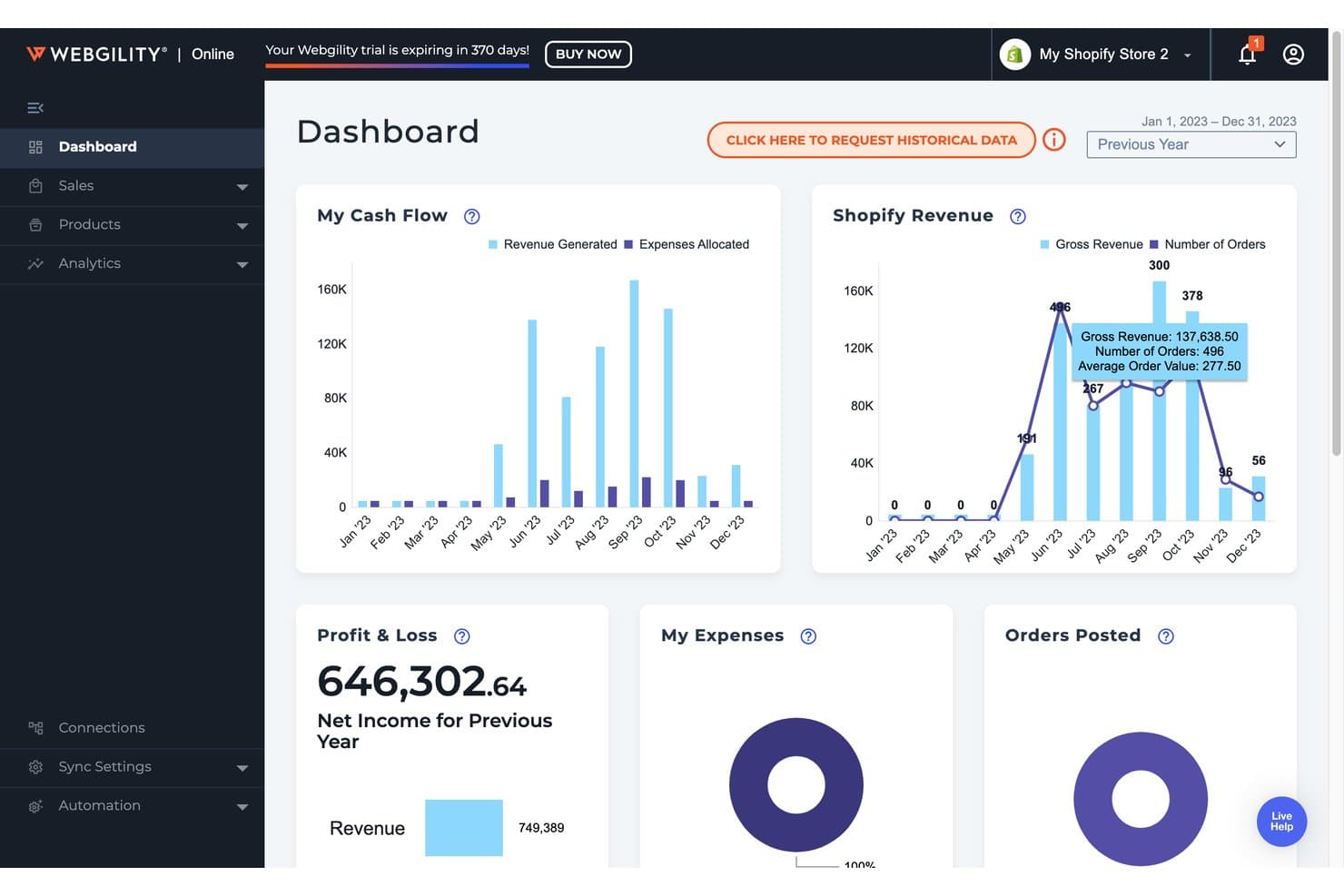
Webgility ofrece un panel de control contable para comercio electrónico que muestra flujo de caja, ingresos de Shopify, ganancias y pérdidas, y seguimiento de pedidos en una vista unificada. Webgility es una plataforma de automatización contable para comercio electrónico que sincroniza datos de transacciones a nivel de pedido—incluyendo comisiones, pagos, impuestos e inventario—a través de múltiples canales de venta directamente en QuickBooks y Xero, con verificación humana de un contador incorporada en sus planes de nivel superior.
¿Para quién es mejor Webgility?
Webgility es ideal para pequeñas y medianas empresas de comercio electrónico multicanal que venden en Amazon, Shopify o Walmart y operan su contabilidad en QuickBooks.
Por qué elegí Webgility
Elegí Webgility porque ninguna otra herramienta contable para comercio electrónico combina la automatización con un contador humano que certifica tus libros cada mes. La Garantía de Conciliación Mensual significa que un contador dedicado de comercio electrónico revisa las excepciones, resuelve discrepancias y valida una auditoría lista para cierre. Me gusta especialmente que el registro a nivel de pedido captura cada comisión, pago y reembolso antes de esa revisión, así el contador verifica datos limpios y no pierde tiempo persiguiendo errores.
Características clave de Webgility
- Sincronización de inventario en tiempo real: Sincroniza los niveles de inventario al instante en todos los canales conectados para evitar ventas excedidas.
- Integraciones multicanal: Conéctate a más de 50 plataformas incluyendo Shopify, Amazon, Walmart, eBay y BigCommerce.
- Automatización del impuesto sobre las ventas: Calcula y rastrea impuestos de ventas en varios estados e internacionales con la integración de Avalara AvaTax.
- Flujos de trabajo avanzados B2B/mayoristas: Administra la publicación de facturas, envíos parciales y sincronización de órdenes de compra para pedidos mayoristas.
Integraciones de Webgility
Webgility ofrece más de 50 integraciones nativas, incluyendo Shopify, Amazon, Walmart, eBay, WooCommerce, BigCommerce, Xero, QuickBooks Online, QuickBooks Desktop y Avalara AvaTax.
Pros and Cons
Pros:
- Revisión mensual de un contador para precisión en la conciliación
- Administra flujos de trabajo contables para múltiples entidades
- Publicación automática de pedidos con tarifas y pagos
Cons:
- Requiere QuickBooks o Xero para operar
- Sin seguimiento automatizado de proyectos o clases
Learn more about Webgility: 3Mejor para integraciones
A2X
- Ofrece una prueba gratuita ilimitada
- Desde $29/usuario/mes
Visit WebsiteCustomer Rating:4.9/5
La conciliación rigurosa es la base del compromiso de A2X con el cumplimiento de los estándares contables. A2X es un software de contabilidad para comercio electrónico que automatiza la conciliación de pagos entre Amazon, Shopify, eBay, Etsy, Walmart y PayPal, enviando resúmenes de transacciones categorizadas directamente a QuickBooks Online, Xero, Sage o NetSuite.
¿Para quién es mejor A2X?
A2X es ideal para los vendedores de comercio electrónico y sus contadores o tenedores de libros que venden a través de múltiples canales y necesitan unas finanzas limpias y listas para auditoría en su plataforma contable.
Por qué elegí A2X
A2X se gana su lugar en mi lista porque su cobertura de integraciones es difícil de superar en esta categoría. Se conecta con todos los principales canales de ventas—Amazon, Shopify, eBay, Etsy, Walmart y PayPal—directamente con QuickBooks Online, Xero, Sage o NetSuite. Lo que más me gusta es cómo gestiona la conciliación de pagos: en lugar de inundar tu plataforma contable con miles de registros de pedidos individuales, A2X envía una única entrada resumen que coincide exactamente con cada pago en tu banco. También valoro que contabilice aparte las pasarelas de pago como Stripe y PayPal, manteniendo las comisiones claras y categorizadas.
Características clave de A2X
- Flujos de trabajo de impuestos sobre ventas e IVA: Categoriza los impuestos y el IVA recaudados en los distintos canales y asígnalos correctamente a las cuentas fiscales en tu plataforma contable.
- Flujos de trabajo de costo de mercancía vendida e IMS: Importa datos de costo de producto desde sistemas de gestión de inventario o archivos CSV para controlar los costes a nivel de producto junto a tus ingresos.
- A2X Subledger: Relaciona los resúmenes de pagos con los pedidos y SKUs de origen en un registro de doble entrada, proporcionándote visibilidad detallada para el cierre de mes.
- A2X Clarity: Proporciona análisis de rentabilidad por SKU, canal, kit o cliente, basados en los mismos datos de transacciones conciliadas que alimentan A2X Core.
Pros and Cons
Pros:
- Excelente interfaz de usuario.
- Ofrece integraciones sencillas.
- Es fácil de usar.
Cons:
- El soporte al cliente necesita mejorar.
- El proceso de configuración tiene una curva de aprendizaje.
Learn more about A2X: Lo mejor para contabilidad sin intervención
- Prueba gratuita disponible
- Desde $249/mes (facturado anualmente)
Visit WebsiteCustomer Rating:4.5/5
Supervisa el flujo de caja y las transacciones actualizadas para comprender la salud financiera. Bench es un servicio de contabilidad y teneduría de libros para pequeñas empresas que combina software propio con un equipo dedicado de contadores para gestionar la contabilidad mensual, los informes financieros y la presentación de impuestos.
¿Para quién es mejor Bench?
Bench es ideal para propietarios de pequeñas empresas y emprendedores de comercio electrónico que prefieren que gestionen sus libros por ellos en vez de encargarse ellos mismos del software.
Por qué elegí Bench
He incluido Bench en mis principales recomendaciones porque es una de las pocas soluciones contables de esta lista que elimina por completo la gestión de la contabilidad para el usuario. Un contador dedicado se encarga de la categorización y conciliación mensual de tus transacciones, y luego entrega los estados financieros finalizados a través de la plataforma de Bench. Me gusta especialmente la sincronización automática de cuentas, que incorpora las transacciones de tus canales de venta y pasarelas de pago directamente a los libros sin la necesidad de ingresar datos manualmente.
Características clave de Bench
- Informes financieros en tiempo real: Accede y descarga estados de resultados y balances actualizados directamente desde la plataforma de Bench en cualquier momento.
- Declaración de impuestos y asesoría: Agentes autorizados y contadores públicos certificados se encargan de la preparación anual de impuestos sobre la renta, la presentación y los pagos de impuestos estimados trimestrales.
- Paquete financiero de fin de año: Tu equipo de contabilidad prepara un paquete financiero completo de fin de año, listo para entregar a tu asesor fiscal al inicio de la temporada de impuestos.
- Centro de notificaciones: Recibe recordatorios oportunos para mantenerte al día con las tareas financieras, solicitudes de documentos y fechas límite de presentación.
Pros and Cons
Pros:
- La interfaz de usuario es fácil de usar.
- Excelente soporte por correo electrónico y teléfono.
- Excelentes herramientas de seguimiento de gastos.
Cons:
- No se conecta a todas las cuentas empresariales.
- Hay una curva de aprendizaje para preparar informes.
Learn more about Bench: La mejor para seguimiento en tiempo real y soporte multidivisa
- Demostración gratuita disponible
- Precio bajo consulta
Visit WebsiteCustomer Rating:4/5
La página de cuentas muestra todo lo que los usuarios necesitan saber sobre las cuentas de la empresa. NetSuite es una plataforma ERP en la nube que combina contabilidad central, gestión de pedidos, inventario y operaciones de comercio electrónico en un solo sistema unificado para empresas en crecimiento y de nivel empresarial.
¿Para quién es mejor NetSuite?
NetSuite es una excelente opción para minoristas medianos a grandes y negocios de comercio electrónico que gestionan finanzas complejas en múltiples entidades, subsidiarias o mercados globales.
Por qué elegí NetSuite
He incluido NetSuite en mis mejores opciones porque la combinación de visibilidad financiera en tiempo real y soporte multidivisa es poco común a este nivel de profundidad en una sola plataforma. A través de NetSuite OneWorld, mi equipo puede procesar transacciones en más de 190 monedas con conversión en tiempo real y consolidación automática tanto a nivel de subsidiarias como de sede central. También confío en los tableros basados en funciones y en los informes financieros en tiempo real, los cuales muestran datos de rendimiento actualizados al minuto sin necesidad de realizar exportaciones manuales. Para las empresas de comercio electrónico que venden en varias regiones, esa visibilidad en vivo de pedidos y datos de ingresos en diferentes monedas permite que su equipo financiero actúe más rápido.
Características clave de NetSuite
- Reconocimiento de ingresos: Automatiza la programación y el informe de ingresos cumpliendo con los estándares ASC 606 e IFRS 15.
- SuiteTax: Calcula, procesa e informa impuestos en múltiples jurisdicciones y países dentro de un solo motor fiscal.
- Automatización de pedido a cobro: Automatiza todo el ciclo de gestión de pedidos, desde la captura hasta la facturación y la recolección del pago.
- Consolidación financiera: Consolida finanzas entre múltiples subsidiarias, unidades de negocio y entidades legales en tiempo real.
Pros and Cons
Pros:
- Ofrece los informes necesarios para monitorear y realizar el seguimiento de las transacciones.
- Los equipos remotos pueden acceder a los datos de la empresa desde cualquier lugar.
- La navegación por toda la plataforma es sencilla.
Cons:
- El software puede ser complejo para nuevos usuarios debido a las opciones de personalización.
- Ofrece los informes necesarios para monitorear y realizar el seguimiento de las transacciones.
Learn more about NetSuite: 6Ideal para equipos en crecimiento
Xero
- Prueba gratuita de 30 días disponible
- Desde $2.50/mes
Visit WebsiteCustomer Rating:4.4/5
Gestiona tareas y gastos de manera efectiva mediante el panel visual. Xero es una plataforma de contabilidad basada en la nube que ofrece facturación en múltiples monedas, seguimiento de inventario, conciliación bancaria e integraciones nativas con Shopify, Amazon y otros grandes canales de comercio electrónico.
¿Para quién es mejor Xero?
Xero es adecuado para pequeñas y medianas empresas de comercio electrónico que venden en múltiples canales y necesitan un único lugar para gestionar sus finanzas.
Por qué elegí Xero
Xero merece su lugar como uno de los mejores en mi lista porque puede escalar junto con tu equipo sin requerir una migración de plataforma. Me gusta que puedas añadir usuarios con permisos basados en roles, para que tu contable, responsable de operaciones y director financiero vean exactamente lo que necesitan. El complemento Analytics Plus proporciona a mi equipo pronósticos de flujo de caja y cuadros de salud financiera que se vuelven más valiosos a medida que crece el volumen de transacciones.
Características clave de Xero
- Facturación en múltiples monedas: Envía facturas y acepta pagos en más de 160 monedas, con actualizaciones automáticas de tipos de cambio.
- Conciliación bancaria: Conecta feeds bancarios en directo de más de 21,000 instituciones y empareja transacciones automáticamente.
- Inventory Plus: Realiza un seguimiento de los niveles de inventario y del costo de los productos, con sincronización directa con Shopify y Amazon FBA.
- Herramientas de impuestos sobre las ventas: Calcula y aplica tasas impositivas en las facturas, con informes fiscales detallados para la presentación.
Pros and Cons
Pros:
- Es fácil de navegar.
- Fácil de usar.
- Una excelente opción para pequeñas empresas.
Cons:
- No es adecuado para necesidades contables complejas.
- La elaboración de informes personalizados es compleja.
Learn more about Xero: Mejor para usuarios de Zoho
- Plan gratuito + demo gratis disponible
- Desde $15/mes (facturado anualmente)
Visit WebsiteCustomer Rating:4.3/5
Ver transacciones relacionadas con un solo cliente, incluyendo todos los detalles importantes. Zoho Books es una plataforma de contabilidad basada en la nube para empresas en crecimiento que abarca facturación, seguimiento de gastos, gestión de inventarios, conciliación bancaria, cumplimiento de impuestos sobre ventas y transacciones en múltiples monedas.
¿Para quién es mejor Zoho Books?
Zoho Books es una excelente opción para pequeñas y medianas empresas que ya utilizan otros productos Zoho y necesitan un software de contabilidad que se integre de forma nativa con sus herramientas existentes.
Por qué elegí Zoho Books
Zoho Books se gana su lugar en mi lista corta por la estrecha integración con el resto de la suite Zoho. Mi equipo puede sincronizar contactos y datos de negocios de Zoho CRM directamente en Zoho Books, por lo que las facturas se generan sin tener que volver a ingresar datos en distintos sistemas. También me gusta la conexión nativa con Zoho Inventory, que mantiene los niveles de existencias y el estado de los pedidos sincronizados en tiempo real entre los canales de venta.
Características clave de Zoho Books
- Transacciones en múltiples monedas: Aplica automáticamente tasas de cambio en tiempo real a facturas, pagos y cuentas en más de 170 monedas.
- Cumplimiento de impuestos sobre ventas: Calcula, rastrea y presenta impuestos sobre ventas en múltiples regiones, con soporte para grupos de impuestos e impuestos compuestos.
- Conciliación bancaria automática: Conecta tus cuentas bancarias y tarjetas de crédito para importar y categorizar transacciones diariamente.
- Portal del cliente: Permite a los clientes ver facturas, realizar pagos y aprobar presupuestos directamente a través de un portal de autoservicio con tu marca.
Pros and Cons
Pros:
- Los usuarios pueden personalizar los informes.
- Es fácil configurar las conexiones bancarias.
- Diseño sencillo de la interfaz de usuario.
Cons:
- No cuenta con muchas funciones avanzadas.
- Las opciones para compartir necesitan mejoras.
Learn more about Zoho Books: Ideal para simplificar la contabilidad del comercio electrónico
- Prueba gratuita de 14 días disponible
- Desde $30/mes
Visit WebsiteCustomer Rating:4.5/5
Haz seguimiento de ingresos y gastos en tiempo real para saber cómo va tu negocio. Kashoo es una plataforma de contabilidad basada en la nube para pequeñas empresas y trabajadores autónomos que abarca facturación, seguimiento de gastos, importación de transacciones bancarias, impuestos sobre ventas, soporte multicurrency y recaudación de pagos.
¿Para quién es mejor Kashoo?
Kashoo es una buena opción para propietarios de pequeñas empresas y freelancers que necesitan una contabilidad sencilla, sin la complejidad de un software a nivel empresarial.
Por qué elegí Kashoo
He incluido Kashoo en mis selecciones principales porque reduce la contabilidad a lo que realmente necesitan los pequeños negocios de comercio electrónico, sin funciones innecesarias. Realmente me gusta cómo la importación automática de transacciones bancarias arrastra las ventas y los gastos de todas las cuentas conectadas en tiempo real, por lo que tus libros se mantienen actualizados sin necesidad de ingresar datos manualmente. El seguimiento de impuestos sobre ventas integrado es otra función que encuentro realmente útil, ya que maneja los cálculos de impuestos en todas las transacciones automáticamente, sin requerir una herramienta externa o conciliación manual.
Características clave de Kashoo
- Soporte multicurrency: Acepta y registra transacciones en varias monedas, aplicando conversiones de tipo de cambio automáticamente en tus registros.
- Creación de facturas y recaudación de pagos: Crea y envía facturas personalizadas, y luego cobra pagos con tarjeta de crédito directamente a través de la plataforma.
- Seguimiento de inventario: Agrega detalles de productos y monitorea el valor del inventario disponible, manteniendo los costos de tus productos reflejados en tus registros financieros.
- Clasificación de ingresos y gastos: Asigna categorías a los ingresos y gastos para organizar las transacciones y generar informes precisos de ganancias y pérdidas.
Pros and Cons
Pros:
- Implementación sencilla.
- Funciona en la nube.
- Rápido y fácil de usar.
Cons:
- La aplicación móvil no es robusta.
- Las funciones de informes necesitan mejorar.
Learn more about Kashoo: 9Mejor solución de automatización compra a pago (P2P)
Yooz
- Demostración disponible bajo solicitud
- Desde £129
Visit WebsiteCustomer Rating:4.4/5
Yooz cuenta con un flujo de trabajo inteligente que personaliza las rutas de aprobación de facturas según las reglas de la organización y validación dinámica de tres vías para asegurar que los cargos sean verificados frente a órdenes de compra. Yooz es una plataforma de automatización de cuentas por pagar y de compras a pago que gestiona la captura de facturas, codificación, flujos de aprobación, automatización de pagos, conciliación de estados de cuenta de proveedores y gestión de presupuestos a lo largo de todo el ciclo de compras a pago.
¿Para quién es ideal Yooz?
Yooz es adecuado para equipos financieros de medianas y grandes empresas que gestionan altos volúmenes de facturas y necesitan flujos de aprobación estructurados y automatizados en múltiples entidades.
Por qué elegí Yooz
La automatización P2P de Yooz cubre todo el ciclo de adquisiciones en una sola plataforma, desde la creación de la solicitud de compra hasta el pago al proveedor, una capacidad que la mayoría de las herramientas de cuentas por pagar no ofrecen. Me gusta especialmente la conciliación de pedidos de compra a nivel de línea, con coincidencia de dos o tres vías, que compara facturas con órdenes de compra y recibos de entrega sin intervención manual. El panel de gestión presupuestaria en tiempo real permite al equipo financiero monitorear los gastos en relación con el presupuesto a medida que las órdenes de compra y las facturas avanzan en el proceso de aprobación, evitando sorpresas al final del mes.
Funciones clave de Yooz
- Captura omnicanal de documentos: Ingresa automáticamente facturas en cualquier formato o canal y utiliza la tecnología YoozSmartSplit para dividir y clasificar lotes de documentos sin clasificación manual.
- Configuración de flujos de trabajo sin código: Crea y modifica flujos de aprobación usando un motor BPMN2 que permite aprobaciones secuenciales, paralelas y automáticas, además de reglas de auto-escalamiento y auto-delegación.
- Detección de fraude impulsada por IA: Señala documentos falsos, importes atípicos, facturas duplicadas y datos de proveedores no verificados utilizando un modelo de IA propietario antes de procesar los pagos.
- Gestión multi-entidad: Maneja operaciones multimoneda, multi-impuesto, multiubicación y entre países para entidades ilimitadas dentro de una sola instancia de la plataforma.
Pros and Cons
Pros:
- Excelente función de coincidencia automática
- Gran cantidad de integraciones con terceros
- Software extremadamente fácil de usar
Cons:
- Puede ser difícil personalizar el panel de control
- No se puede ordenar por fecha de documento
Learn more about Yooz: Mejor para flujos de trabajo contables
- Demostración gratuita disponible
- Precio a consultar
Visit WebsiteCustomer Rating:4.3/5
Utilice informes en tiempo real con las métricas más relevantes según quién esté viendo el panel de control. Sage Intacct es una plataforma de gestión financiera y contabilidad basada en la nube, diseñada para empresas medianas y en crecimiento, que abarca consolidación de múltiples entidades, automatización de cuentas por pagar impulsada por IA, paneles de control en tiempo real, presupuestos y reconocimiento de ingresos.
¿Para quién es mejor Sage Intacct?
Sage Intacct es una excelente opción para empresas medianas con operaciones financieras complejas y de múltiples entidades que necesitan más de lo que una herramienta de contabilidad para pequeñas empresas puede ofrecer.
Por qué elegí Sage Intacct
He incluido Sage Intacct entre mis principales opciones porque realmente es una de las plataformas de contabilidad más orientadas al flujo de trabajo que he usado. El agente de automatización de cuentas por pagar gestiona la entrada de facturas de principio a fin, emparejando proveedores, señalando duplicados y creando facturas preliminares con más del 90% de precisión. El agente de cierre después rastrea cada tarea de fin de mes, detecta cuellos de botella y mantiene el cierre en el cronograma. Para empresas de ecommerce que procesan altos volúmenes de transacciones en múltiples canales, solo esas dos funciones reducen significativamente el trabajo manual contable.
Principales características de Sage Intacct
- Consolidación de múltiples entidades: Administre las finanzas entre diferentes entidades comerciales, monedas y subsidiarias desde una sola cuenta.
- Reconocimiento de ingresos: Automatice la programación y el reconocimiento de ingresos conforme a ASC 606 e IFRS 15.
- Informes multidimensionales: Etiquete transacciones en dimensiones personalizadas como canal, ubicación o línea de productos para un análisis financiero detallado.
- Gestión de impuestos sobre ventas y uso: Calcule y rastree obligaciones fiscales en múltiples jurisdicciones directamente en la plataforma.
Pros and Cons
Pros:
- Permite vistas detalladas de las finanzas.
- Es una plataforma flexible.
- Los informes personalizados son útiles.
Cons:
- La interfaz de usuario no es intuitiva.
- La curva de aprendizaje es pronunciada.
Learn more about Sage Intacct:
Otras opciones de contabilidad para comercio electrónico
Estas son algunas opciones más que no se incluyeron en la lista de los mejores programas de contabilidad para comercio electrónico:
- 11WaveMejor software de contabilidad gratuito para ecommerce
- 12Multiview ERPIdeal para visibilidad financiera
- 13FulfilIdeal para el registro automatizado de transacciones
- 14SettleIdeal para automatización de cuentas por pagar
- 15Acumatica Cloud ERPMejor para la personalización
- 16DualEntryIdeal para soportar la consolidación de múltiples entidades
Otros tipos de software financiero para comercio electrónico
Si buscas más software financiero para comercio electrónico para tu negocio en línea, aquí tienes algunas listas de herramientas seleccionadas que deberías consultar:
- Plataformas de compra ahora y paga después
- Procesamiento de tarjetas de crédito
- Software de impuestos sobre las ventas para comercio electrónico
- Software de procesamiento de pagos
Wie ich Buchhaltungssoftware für den E-Commerce bewerte
Ich teile meine Bewertung in zwei Ebenen: die grundlegenden Anforderungen – etwa die centgenaue Abstimmung von Amazon-Abrechnungen – und die Unterscheidungsmerkmale, die ein Tool von einem anderen abheben.
Kernfunktionen (Grundvoraussetzungen für diese Liste)
Wenn ich Tools für meine Liste auswähle, bewerte ich jedes einzelne auf einer Skala von 0 (bietet diese Funktion nicht) bis 5 (hervorragend in diesem Bereich) für jede nachfolgend aufgeführte Kernfunktion. Anschließend berechne ich die Gesamtpunktzahl des Tools als Prozentsatz. Jedes Tool muss eine Mindestgesamtbewertung von 65 % erreichen, um in Betracht gezogen zu werden.
- E-Commerce Plattform-Integrationen: Ich prüfe auf native Verbindungen zu den wichtigsten Plattformen wie Shopify, Amazon, eBay, WooCommerce und BigCommerce anstelle von CSV-Importen oder Drittanbieter-Middleware.
- Abstimmung von Verkäufen & Auszahlungen: Jedes Tool sollte Marktplatz-Auszahlungen und Zahlungsanbieter-Überweisungen mit Bankeinzahlungen abgleichen und dabei Gebühren, Rückerstattungen und Steuern automatisch differenzieren.
- Bestandsaufnahme & COGS-Verfolgung: Ich achte auf eine Echtzeit-Bewertung des Lagerbestands über Kanäle und Lager hinweg, mit Unterstützung für Bewertungsmethoden wie FIFO oder gewichteter Durchschnitt.
- Umsatzsteuer-Management: Die Verfolgung von Steuern in verschiedenen Regionen ist hier wichtig, insbesondere für Händler mit Steuerpflichten (Nexus) in mehreren Gebieten oder mit Umsatzsteuer-/Mehrwertsteueranforderungen.
- Hauptbuch- & Buchhaltungssynchronisation: Ich prüfe, ob das Tool Buchungen mit Plattformen wie QuickBooks, Xero oder NetSuite synchronisiert oder ein eigenes, doppelt geführtes Hauptbuch bietet.
- Multi-Channel-Finanzberichterstattung: Berichte sollten die Rentabilität nach Kanal, SKU oder Produktlinie aufschlüsseln, damit Händler genau sehen, wo die Margen am höchsten sind.
Nachdem ich eine Liste von Tools habe, die diese Kriterien erfüllen, bewerte ich, was jede Plattform einzigartig macht.
Unterscheidungsmerkmale (Was Anbieter auszeichnet)
So vergleiche ich unterschiedliche Anbieter:
Herausragende Funktionen
Mehrwährungsfähigkeit mit automatischer Erfassung von Wechselkursgewinnen und -verlusten ist wichtig für Verkäufer auf internationalen Marktplätzen, deren Auszahlungen in verschiedenen Währungen eingehen. Ich achte außerdem auf die Rückübertragung historischer Daten, sodass bei der Einführung des Tools mehrere Monate vergangener Transaktionen importiert werden können und die Buchhaltung von Anfang an stimmt. Automatisierte Kategorisierungsregeln runden das Ganze ab, indem sie Gebühren, Rückerstattungen und Einnahmen automatisch den richtigen Konten zuordnen, ohne dass bei jeder Auszahlungsrunde manuell sortiert werden muss.
Mehr als nur Funktionen
Preistransparenz ist ein großes Thema. Ich prüfe, ob die Tarife nach Bestellvolumen oder nach angebundenen Kanälen gestaffelt sind, denn ein Tool, das bei jeder weiteren Plattform schnell teuer wird, verfehlt das Ziel. Außerdem bewerte ich, ob der Anbieter ein Netzwerk zertifizierter Buchhalter oder ein Partnerprogramm anbietet, was den Einstieg erleichtert, wenn der eigene Steuerberater die Plattform bereits kennt. Die Integrations-Tiefe mit 3PLs, Versandtools und Werbeplattformen ist ebenfalls relevant, weil die Rentabilitätskontrolle ohne angebundene Ausgabendaten nicht funktioniert.
Características principales:
Estas son algunas de las características que debería tener la plataforma de contabilidad para comercio electrónico que implementes para ayudarte a gestionar mejor tus finanzas:
- Preparación de impuestos: Puedes facilitarte la vida a ti y a tu contable con un software de contabilidad para comercio electrónico que proporcione cálculos fiscales automáticos, informes fiscales y múltiples tipos impositivos.
- Contabilidad: Un software de contabilidad de alta calidad se encargará de muchas tareas contables diarias, como actualizar los libros contables, realizar conciliaciones bancarias, hacer un seguimiento de la depreciación y amortización de activos y gestionar las nóminas y las deducciones.
- Informes y previsiones financieras: Tu software de contabilidad para comercio electrónico almacenará los datos financieros y te permitirá utilizar esta información para crear informes y realizar previsiones que te proporcionen información empresarial útil.
- Cuentas por cobrar: Las soluciones de contabilidad para comercio electrónico pueden gestionar la facturación y hacer un seguimiento de lo que deben los clientes y de los pagos.
- Procesamiento de facturas: La plataforma de contabilidad que utilices debería, como mínimo, poder gestionar la facturación, incluida la impresión de facturas y el mantenimiento de registros básicos de información de clientes, como nombres, direcciones y números de cuenta.
- Horarios salariales variables: Tanto si tu equipo tiene un salario fijo como si le pagas por horas, la plataforma que elijas debería calcular con precisión lo que les debes, incluidas las prestaciones.
- Conciliación de cuentas bancarias: Si tu empresa tiene varias cuentas bancarias, es esencial utilizar un software de contabilidad que pueda realizar un seguimiento de ellas y conciliarlas mediante una función de libro mayor y la conciliación de cuentas corrientes.
- Herramientas de envío: Estas herramientas pueden ahorrarte mucho tiempo al simplificar el proceso de envío con etiquetas de envío, estimaciones de costes de envío y herramientas de seguimiento de envíos.
- Seguimiento del inventario: El software de contabilidad que puede gestionar las existencias y los niveles de inventario, así como realizar un seguimiento del inventario, puede ayudarte a asegurarte de no pedir demasiados productos ni quedarte corto.
Facilidad de uso:
Cualquier software de comercio electrónico debería ser fácil de aprender, utilizar y navegar. El comercio electrónico es único porque necesitas muchos programas, sistemas y herramientas para mantener todo en funcionamiento. Si incluso uno de ellos resulta difícil de aprender y gestionar, todo el proceso se ralentiza. El software de contabilidad para comercio electrónico debería seguir esta misma directriz. Busco software que cuente con materiales de formación completos, un servicio de atención al cliente útil y una interfaz de usuario intuitiva.
Integraciones de software:
Incluso con la aplicación más completa en cuanto a funciones y a un precio razonable, no será muy útil para tu tienda de comercio electrónico si el software no puede integrarse con tus sistemas actuales. El software que elijas debería integrarse con soluciones de terceros, como creadores de tiendas de comercio electrónico, sistemas de envío y aplicaciones de nóminas. Utilizar un software de contabilidad para comercio electrónico que funcione con tu infraestructura tecnológica actual garantizará que no experimentes problemas de compatibilidad que puedan provocar errores que consuman mucho tiempo.
Relación calidad-precio:
Es importante utilizar una solución de contabilidad para comercio electrónico que proporcione las funciones que necesitas a un precio asequible y que pueda adaptarse a medida que creces. Querrás una plataforma que puedas seguir utilizando sin preocuparte por cambiar a otra nueva. Muchas herramientas utilizan precios escalonados, lo que te permite empezar a utilizar el software a un nivel asequible y facilita una transición sencilla a un nivel más avanzado en el futuro. Deberías utilizar programas que te permitan pagar solo por lo que necesitas y que faciliten la personalización de tu suscripción sin gastar más de lo necesario.
Preguntas frecuentes
Estas son algunas preguntas populares que suelen hacer las personas cuando buscan un nuevo software de contabilidad para comercio electrónico, junto con sus respuestas para tu comodidad.
¿Cuáles son los beneficios del software de contabilidad para comercio electrónico?
Tanto si estás empezando tu primer negocio de comercio electrónico como si tu empresa lleva años operando, utilizar un software de contabilidad para comercio electrónico ofrece muchos beneficios. Estos son algunos de los beneficios de utilizar un software de contabilidad para comercio electrónico en tu organización que debes tener en cuenta.
- Ahorra tiempo: Cualquier buena plataforma de contabilidad para comercio electrónico automatizará procesos como la facturación y los recordatorios de pago que incluyen enlaces de pago en línea. Si se produce un error, la plataforma te enviará automáticamente una notificación y destacará qué ha fallado. La automatización puede eliminar los procesos manuales, ahorrar tiempo y mejorar la precisión.
- Visibilidad financiera: Al gestionar las finanzas de tu empresa, el software que utilices te proporcionará una forma sencilla de obtener informes financieros. Tu plataforma de contabilidad facilita la recopilación de tus informes e información financiera, como las cuentas por cobrar o los balances de comprobación.
- Sincroniza todos los datos financieros: Puede llevar mucho tiempo ir y volver entre plataformas para recopilar datos esenciales si están almacenados en varias plataformas, como cuentas bancarias, servicios de nóminas y cuentas de tarjetas de crédito. Tu software de contabilidad para comercio electrónico sincronizará todos los datos de las herramientas de contabilidad en línea mediante la API. Esto significa que no tendrás que descargar información financiera de cada fuente ni dedicar tiempo a introducir datos para crear un registro financiero completo.
- Mejora la toma de decisiones: Tu plataforma de contabilidad ayudará a mejorar tu proceso de toma de decisiones al proporcionar visibilidad sobre los datos en tiempo real y las métricas clave de tu empresa, como las tasas de compra de los clientes, los ingresos, los niveles de inventario y las ventas de productos. Esta información puede determinar la salud financiera de tu empresa. Un mayor nivel de conocimiento y control puede crear una base sólida para tomar decisiones empresariales fundamentales.
- Organiza los registros: Lo último que quieres ver son unas finanzas empresariales desorganizadas. Tu software de contabilidad para comercio electrónico te ayudará a organizar tus registros contables. Esta plataforma organizará fácilmente tus cuentas, facturas, recibos y otros registros financieros; ahora no tendrás que buscar apresuradamente la información que necesitas.
¿Puedes utilizar Shopify como software de contabilidad?
Si estás considerando utilizar Shopify para tus procesos contables, hay algunas limitaciones que debes tener en cuenta. Shopify no es una plataforma de contabilidad, sino un sistema de comercio electrónico, lo que significa que puedes utilizarlo para supervisar las ventas y el inventario, pero no puedes hacer cosas como crear facturas o gestionar las cuentas por cobrar. A medida que tu negocio crezca al utilizar Shopify, deberías empezar a considerar la integración de la plataforma con uno de los softwares de contabilidad para comercio electrónico que he mencionado anteriormente, para asegurarte de que tienes todo lo necesario para mantener registros financieros adecuados y llevar a cabo procesos contables esenciales.
¿Existe algún software gratuito de contabilidad para comercio electrónico?
Las pequeñas empresas o las empresas emergentes pueden beneficiarse del software de contabilidad gratuito. Un ejemplo es Wave Accounting, que ofrece software de contabilidad, software de facturación o software bancario solo para EE. UU. como servicio gratuito para siempre. Otro ejemplo es Zoho Books, que ofrece un plan gratuito para siempre para empresas con ingresos inferiores a $50,000 por año fiscal.