

Iată adevărul: cel mai bun sistem POS pentru mica ta întreprindere este cel care nu îți stă în cale și îți permite să vinzi rapid, fiabil și fără să îți golești contul bancar.
După mai bine de un deceniu în operațiunile de retail — reparând terminale POS în toiul aglomerației de la prânz, instruind angajați noi din mers și, da, negociind cu proprietarii — am văzut ce funcționează și ce este doar o ambalare strălucitoare.
Această listă nu este despre promovare exagerată; este despre soluțiile POS care chiar fac diferența pentru întreprinderile mici, chiar acum. Hai să îți oferim instrumente care își justifică investiția.
Why Trust Our Software Recommendations
6,700+
Reviews
20
Industry experts
16+
Evaluation factors
14
Years
Our team has been testing and reviewing software since 2012. As retail leaders ourselves, we know how difficult—and important—it is to choose the right software.
For this guide, we evaluated tools using hands-on testing and independent research, scoring tools using our selection criteria.
Our reviews reflect our independent judgment—not a sales pitch.
Tabel comparativ al programelor POS pentru întreprinderile mici
Acest tabel comparativ rezumă detaliile de preț pentru selecțiile mele de top de programe POS pentru întreprinderile mici:
Sorted by: Default
| Tool | Starting Price | Website | |
|---|---|---|---|
Best with AI-powered workflows for supply stores | Not rated | $499/month Free demo available | Website |
Best for integrating payment management with analytics | 4.2 out of 5 | $99/month Free demo available | Website |
Best for advanced inventory tracking | 4.8 out of 5 | $59/month Free trial + free demo available | Book Demo |
Best for ecommerce, mobile, and physical payment terminals | 4.7 out of 5 | Pricing upon request Free demo available | Website |
Best omnichannel POS system | 4.4 out of 5 | $89/month 3-day free trial | Website |
Best for iPad-driven restaurant POS systems | 5.0 out of 5 | Pricing upon request Free demo available | Website |
Best for scalability | 5.0 out of 5 | Pricing upon request | Website |
Best for small businesses saving on fees | 4.4 out of 5 | From Interchange + 0.40% + 8¢ Free demo available | Website |
Best for hardware options | 3.8 out of 5 | $16/month 90-day free trial | Website |
Best for direct, low-cost processing | 5.0 out of 5 | Pricing upon request Free quote available | Website |


Cele mai bune 10 programe POS pentru întreprinderile mici, analizate
Mai jos vei găsi prezentări generale ale celor mai bune soluții POS pentru întreprinderile mici. Fiecare prezentare include un rezumat al funcțiilor remarcabile, al integrărilor, al detaliilor de preț disponibile și al unor avantaje și dezavantaje importante.
 Best with AI-powered workflows for supply stores
- Free demo available
- From $499/month (billed annually)
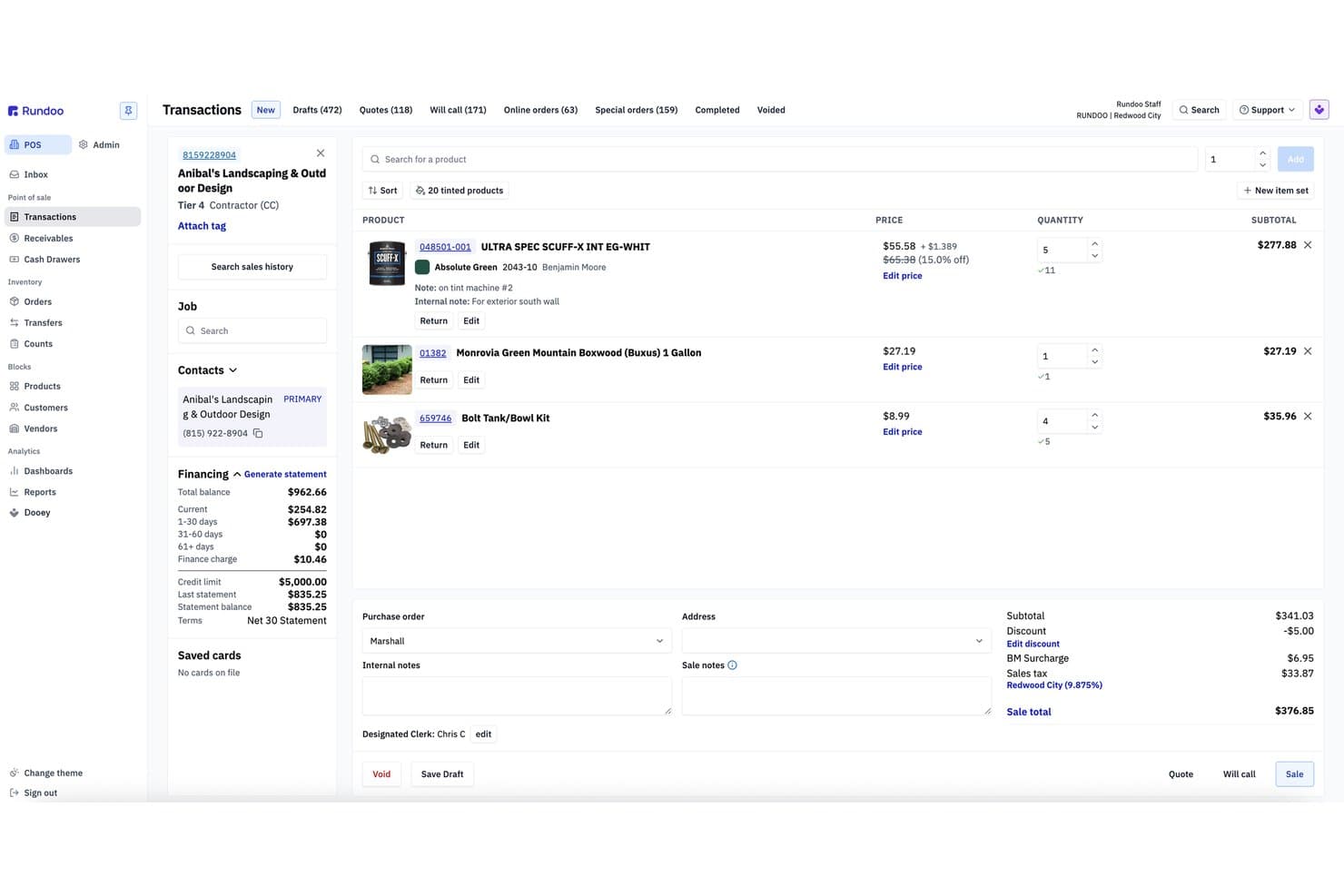
Rundoo offers a detailed POS transaction screen with product listings, customer financing info, pricing, and sale totals for small business use. Rundoo is a POS and ERP platform built for independent supply stores—hardware, paint, farm & feed, lawn & garden, and lumber—combining point of sale, real-time inventory, purchasing, customer accounts, and an AI assistant in one system.
Who Is Rundoo Best For?
Rundoo is a strong fit for independent supply store owners in hardware, paint, farm & feed, lawn & garden, and lumber retail.
Why I Picked Rundoo
Rundoo earns its spot on my shortlist because of Dooey, its built-in AI assistant that does things I haven't seen in other small business POS tools. I can ask it to generate a purchase order based on recent sales trends and current stock levels, or pull a report on which products lost margin last month. It also runs live price comparisons against nearby competitors, which is genuinely useful for a paint or hardware store owner trying to stay sharp on pricing.
Rundoo Key Features
- Integrated distributor catalogues: Access real-time supplier product data and automated ordering from top hardware and paint industry vendors.
- Charge accounts for contractors: Manage contractor credit, billing, per-customer pricing, and direct statements from within the POS.
- Real-time inventory syncing: Track stock across locations with instant updates as sales and receipts are recorded.
- Native eCommerce module: Sell online with a built-in web storefront fully connected to in-store inventory and pricing.
Rundoo Integrations
Rundoo offers native integrations with QuickBooks, Orgill, Emery Jensen, House-Hasson, and Do it Best. An API is available for custom integrations.
Pros and Cons
Pros:
- Deep distributor catalog access from the POS
- Built specifically for hardware and supply stores
- Automates purchase orders and reporting
Cons:
- Smaller user community than mainstream POS tools
- Niche focus excludes most general retailers
Learn more about Rundoo: 2Best for integrating payment management with analytics
Stax
- Free demo available
- From $99/month
Visit WebsiteCustomer Rating:4.2/5
Stax Pay offers an all-in-one POS solution for processing payments, reporting, and analytics. Stax Pay is a payment processing platform that provides businesses with integrated solutions, including payment acceptance, automated billing, and compliant surcharging. Its all-in-one POS and business management software allows for secure in-person and online payment processing, as well as the integration of necessary tools, like accounting software, within a single dashboard
Why I picked Stax Pay: I selected Stax Pay because it offers a unified business management platform that supports both in-person and online credit card payment processing. This all-in-one approach is ideal for small businesses looking to consolidate functions like invoicing, scheduling of recurring billing, payment tracking, and financial management. I also like that the platform offers robust analytics and reporting capabilities to monitor trends, refunds, and transaction history.
Stax Pay Standout Features and Integrations
Standout features include scheduled and automated payments, synchronized in-person and online transaction information, and integrated business tools. The platform also offers a compliant surcharging feature that allows businesses to pass on credit card processing fees to customers.
Additionally, Stax Pay offers a suite of POS capabilities for different payment scenarios, including SaaS platform integration, ACH payments, online and mobile payments, and in-person transactions.
Integrations include Slack, Zapier, Microsoft Office, Google Suite, and CRMs. You can also integrate payment processing capabilities into software and mobile apps with comprehensive mobile software development kits in Javascript and Python.
Pros and Cons
Pros:
- All-in-one tools and point-of-sale solution
- Recurring billing and invoicing tools
- Cost-effective with potential savings on processing fees
Cons:
- Potential additional costs
- May not be best suited to low-volume businesses
Learn more about Stax: Best for advanced inventory tracking
- Free trial + free demo available
- From $59/month
Visit WebsiteCustomer Rating:4.8/5
KORONA POS is a comprehensive solution for various industries, including retail, quick service restaurants, and ticketing services. KORONA POS is a cloud-based point-of-sale system designed to cater to a wide range of business types, including retail stores, wineries, event spaces, and more. Known for its versatility and robust feature set, Korona POS offers an intuitive interface that simplifies the sales process for both employees and managers.
Why I picked KORONA POS: One of the key reasons Korona POS stands out for small businesses is its scalability and ease of use. The system is designed to grow with your business, offering seamless integration with various hardware and software tools. Additionally, Korona POS offers robust inventory management features that help small business owners keep track of stock levels in real time, reducing the risk of overstocking or stockouts. The system's customer relationship management (CRM) tools also enable businesses to maintain strong customer relationships.
KORONA POS Standout Features and Integrations
Standout features include detailed and customizable reporting tools, allowing businesses to generate comprehensive reports on sales, inventory, and customer behavior. Furthermore, its integrated payment processing supports a variety of payment methods, including credit cards, mobile payments, and contactless transactions.
Integrations include QuickBooks, WooCommerce, Shopify, Magento, BigCommerce, Mailchimp, and various payment processors such as PayPal, Stripe, Worldpay, Authorize.Net, and CardConnect.
Pros and Cons
Pros:
- Provides robust inventory management tools
- The system is highly customizable
- Supports multiple business locations
Cons:
- Lacks on-location installation support
- Each terminal incurs a separate cost
Learn more about KORONA POS: Best for ecommerce, mobile, and physical payment terminals
- Free demo available
- Pricing upon request
Visit WebsiteCustomer Rating:4.7/5
Membership-based pricing makes for a cost-effective solution for high-volume businesses in various industries. Payment Depot is a merchant solutions provider that offers a POS system for ecommerce, mobile, and physical payment terminals. By focusing on transparent interchange pricing, it helps companies reduce the amount they spend on merchant service fees, making it a cost-saving solution for small and medium-sized businesses.
Why I picked Payment Depot: I selected Payment Depot because of its flexibility, which makes it a good option for businesses of different sizes and industries. It's suitable for small businesses in retail, services, restaurants and bars, healthcare, and more. A free payment gateway is available as well as virtual terminal capabilities provided through partnerships like SwipeSimple. These allow merchants to process payments online, via mobile, and over the phone without incurring additional gateway fees.
Payment Depot Standout Features and Integrations
Standout features include the membership-based pricing model for credit card processing, which offers tailored interchange+ pricing. The company is also recognized for its commitment to customer care, and has garnered positive feedback from clients who have experienced cost savings.
Integrations include Shopify, WooCommerce, BigCommerce, PrestaShop, and OpenCart. It also integrates with payment systems such as authorize.net and business management systems like Revel Systems.
Pros and Cons
Pros:
- Cost-effective for businesses with high transaction volumes
- User interface is straightforward and intuitive
- Comprehensive equipment offerings
Cons:
- Limited to US-based, non-high-risk merchants
- Not ideal for low-volume businesses
Learn more about Payment Depot:

Shopify POS provides a unified and consistent experience (for both customers and employees) across platforms and sales channels. Shopify POS is software that helps streamline business operations by unifying sales channels. By focusing on omnichannel solutions, Shopify helps deliver a more consistent customer experience.
Why I picked Shopify POS: I selected Shopify POS because it’s specially designed for omnichannel retailers. Customers and employees will have a predictable experience and workflow whether the order is an online, in-store, or ship-to-home order.
Standout features include real-time inventory monitoring so companies with multiple sales channels can ensure their most up-to-date inventory numbers are syncing across channels, helping avoid canceled transactions and surprise out-of-stock alerts.
I also like how Shopify’s real-time syncing also applies to customer data. It used to be difficult to analyze customer behavior when dealing with multiple sales channels—but Shopify makes it simpler by unifying customer data records across channels and automatically tagging transactions to a specific customer account based on factors like the credit card used.
Integrations include PayPal, Stripe, Authorize.Net, Square, QuickBooks, Xero, FreshBooks, Mailchimp, Klaviyo, Zendesk, Google Analytics, Metrilo, ShipStation, and Easyship.
Pros and Cons
Pros:
- Competitive payment processing rates for high-volume businesses
- Customer relationship management and data-tracking features
- Precise inventory management and tracking (with omnichannel syncing)
Cons:
- Many features require two paid subscriptions: Shopify + POS Pro, which starts at $89/month
- No free tier ($39/month + processing fees is the cheapest option)
Learn more about Shopify POS: 6Best for iPad-driven restaurant POS systems
Lavu
- Free demo available
- Pricing upon request
Visit WebsiteCustomer Rating:5/5
Lavu's iPad POS system centralizes restaurant activities, like ordering, menu customizations, and inventory management, in one place. Lavu is a POS system designed specifically for restaurants, bars, and other food and beverage establishments. As a cloud-based solution, Lavu offers a comprehensive suite of tools that centralize various aspects of restaurant management, from order processing and inventory management to employee scheduling and CRM.
Why I picked Lavu: I particularly like Lavu's iPad POS system, which offers a seamless and user-friendly experience, allowing staff to take orders, process payments, and manage tables with ease. This mobility and flexibility are crucial for small businesses that need to maximize space and efficiency. Additionally, the iPad POS system supports multiple payment methods, ensures quick transactions, and integrates smoothly with other Lavu features, making it a powerful tool for any small restaurant or bar.
Lavu Standout Features and Integrations
Standout features include the order management system, allowing businesses to tailor menus and ordering processes. The inventory management feature helps track stock levels in real-time, and the employee management tools, such as scheduling and time tracking, help optimize staff productivity and monitor performance.
Integrations include Digital Pour, Marketman, CheddarSuite, Up'n Go, CheckPlease, OpenTable, Pepper, LoyaltyMatch, Restaurant365, Shogo, Quickbooks, Xero, ADP, DoorDash, Uber Eats, Grubhub, and more.
Pros and Cons
Pros:
- Inventory management tools
- Reporting and analytics features
- Custom-built POS for restaurants
Cons:
- Not suitable for businesses outside the food and beverage industry
- Limited offline functionality
Learn more about Lavu:

Epos Now offers POS software and hardware for a range of businesses, including those in retail and hospitality. Epos Now is a provider of POS software designed to meet the of various business sizes, including small businesses. Offering a range of both hardware and software solutions, Epos Now aims to centralize operations for organizations in the retail and hospitality industries. The system is known for its user-friendly interface, extensive features, and cloud-based functionality.
Why I picked Epos Now: As a small business POS software, Epos Now stands out for its scalability, cloud-based nature, and feature-rich platform. The cloud-based system allows business owners to access real-time data from anywhere. This flexibility ensures that the software can grow alongside the business, adapting to increased demands. Other features that support small businesses include the ability to manage multiple locations, detailed sales and inventory reporting, and customizable user permissions.
Epos Now Standout Features and Integrations
Standout features include its customer relationship management (CRM) tools for tracking customer purchase histories and preferences, and its inventory management system for users to track stock levels, set up automatic reorder alerts, and manage suppliers efficiently. Additionally, Epos Now offers detailed analytics, providing insights into sales trends, employee schedules, and overall business health.
Integrations include WooCommerce, BigCommerce, Magento, PayPal, Stripe, Sage, Zapier, Google Analytics, Workforce.com, APO, Deputy, Deliveroo, Mr Yum, Hopt, QuickBooks, Xero, Mailchimp, Shopify, Appointedd, simpleERB, Worldpay, and more.
Pros and Cons
Pros:
- Flexible and customizable software
- Good reporting features
- User-friendly interface
Cons:
- Initial setup can take time
- Occasional slow system performance
Learn more about ePOS : Best for small businesses saving on fees
- Free demo available
- From Interchange + 0.40% + 8¢ (varies by volume)
Visit WebsiteCustomer Rating:4.4/5
Helcim's POS terminals are equipped to handle a variety of different payment methods, including debit and credit cards. Helcim's POS software for small businesses is designed to facilitate the acceptance of payments through various channels, including in-store, online, and mobile transactions.
Why I picked Helcim: I selected Helcim because it emphasizes transparent pricing without long-term contracts or hidden fees. It also provides a secure environment for processing payments, adhering to industry-standard security protocols.
Helcim Standout Features and Integrations
Standout features include an integrated system that allows businesses to manage sales, track inventory, and process payments using a single platform. It includes invoicing, customer management, and reporting tools to help business owners keep track of their sales and customer interactions.
I also like how Helcim offers a suite of services such as merchant accounts, POS systems, card readers, and an online payment gateway, which are designed to support the transactional needs of businesses across different industries.
Integrations include Xero Payments, QuickBooks, Great Exposure, Foxy.io, and WooCommerce.
Pros and Cons
Pros:
- Terminals and printers can be connected via USB or Bluetooth
- Excellent value for money
- Quick and easy application and approval processes
Cons:
- Lacks a manual or instructions
- Card terminal can be clunky for clients
Learn more about Helcim:

Clover offers multiple hardware options for its POS system. Clover offers POS and small business management systems for all types of businesses—whether you need a countertop POS or a handheld device.
Why I Picked Clover: I selected Clover because of its high-quality hardware options. Clover has handheld, mobile, and countertop POS hardware, and multiple terminals and devices that you can easily link together to customize your system.
Clover Standout Features and Integrations:
Standout features include the ability to accept multiple payment options (all major credit cards, mobile payments, cash, and even check scanning). This makes it easy for customers and ensures you don’t miss any sales.
I also like that Clover has team management and scheduling features built into the POS software.
Integrations include QuickBooks by Commerce Sync, Thrive Inventory, Digital Loyalty, Time Clock, and Skipcart Delivery.
Pros and Cons
Pros:
- 24/7 phone support
- Offline functionality
- Countertop, portable, and mobile POS devices
Cons:
- Expensive
- No free hardware
Learn more about Clover: Best for direct, low-cost processing
- Free quote available
- Pricing upon request
Visit WebsiteCustomer Rating:5/5
Merchant One offers a range of terminal options, including countertop terminals, mobile card readers, and virtual terminals. Merchant One is a payment processing service that offers businesses the ability to accept and manage credit card transactions.
Why I picked Merchant One: I selected Merchant One because it offers various tools designed to assist small business owners in managing day-to-day sales activities, tracking inventory levels, and understanding customer purchasing patterns. Merchant One's POS software is also part of a broader suite of services that includes merchant accounts and payment processing, aiming to provide a comprehensive system for small businesses to handle their financial transactions.
Merchant One Standout Features and Integrations
Standout features include competitive pricing structures, including interchange-plus pricing, which can provide businesses with transparency and potentially lower processing costs. This pricing model separates the interchange fees charged by card networks from the markup charged by the payment processor, allowing businesses to see the exact costs involved.
I also like how Merchant One supports a wide range of payment methods, including credit and debit cards, electronic checks, and mobile payments.
Integrations include First Data Corporation, Fifth Third Bank N.A., Maitre'D, Micros, Paytrace Gateway, Payeezy Gateway, Payflow Pro, Authorize.net, Aloha, and USAePay.
Pros and Cons
Pros:
- Offers a variety of hardware options
- User-friendly interface
- Provides a mobile app for on-the-go payments
Cons:
- May not be suitable for low-volume businesses
- Limited transparency in contract terms
Learn more about Merchant One:
Alte opțiuni de programe POS
În timpul cercetării am selectat și alte câteva instrumente. Nu au intrat chiar în lista principală, dar ar putea merita investigate în continuare.
- 11PayPal POSBest for no commitment
- 12ToastBest POS software for restaurants with multiple locations
- 13eHopperBest for value
- 14Revel SystemsBest for delivery services and take-out restaurants
- 15ProMerchantBest for transparent pricing and personalized support
- 16NCR SilverBest for remote teams
- 17TouchBistroBest for restaurant management
- 18Payline DataBest for enhancing customer loyalty
- 19STAXBest for high transaction volumes
- 20SquareMost versatile POS software
- 21AgilironBest for omnichannel businesses
- 22Odoo ERPBest for integrated business management software
- 23Rain POSBest for specialty retail stores
- 24Stripe TerminalBest for integration of online payments
- 25Brilliant POSBest for advanced inventory management
How I Evaluate POS Software for Small Business
I look at every POS in two layers: the baseline a boutique owner or pop-up vendor needs just to run a register, and the differentiators that make one platform the right long-term fit.
Core Functionality (Table Stakes For This List)
When I'm selecting tools for my list, I rank each one on a scale from 0 (does not offer the functionality) to 5 (excels in this area) for each core functionality listed below. Then, I calculate the tool's total score into a percentage. Each tool needs to achieve a minimum total score of 65% to be considered for inclusion.
- Payment Processing: I check whether the system handles cards, contactless, and mobile wallets at the counter—plus how many processor options you actually get.
- Inventory Management: Real-time stock tracking across SKUs and variants matters, especially for boutiques juggling sizes and colors across a small catalog.
- Retail Checkout Interface: I evaluate the register screen for speed and retail-readiness—barcode scanning, returns, discounts, and receipt options all factor in.
- Sales Reporting & Analytics: A shop owner needs to pull sales-by-product, daily tax summaries, and trend data without exporting everything to a spreadsheet.
- Customer Management & Loyalty: I look at how each tool stores purchase history and whether it supports loyalty points or repeat-buyer rewards out of the box.
- Hardware Compatibility: Whether you're running an iPad register at a weekend market or a full countertop setup, the POS should support your hardware choices.
Once I have a list of tools that meet this criteria, I consider what sets each platform apart.
Differentiating Factors (What Sets Vendors Apart)
Here's how I compare and contrast different vendors:
Standout Features
Offline mode is a big deal for pop-up vendors and market sellers who can't guarantee a stable connection—I check whether the POS queues transactions and syncs automatically once you're back online. eCommerce sync matters just as much for shops that sell in-store and online, since a native connection keeps inventory accurate across channels without manual updates. I also evaluate built-in marketing tools like email or SMS campaigns tied to purchase data, which help small retailers drive repeat visits without a separate platform.
Beyond Features
Pricing transparency is one of the first things I evaluate—hidden processing fees or surprise per-register charges can wreck a small retailer's margins fast. I also look at how each vendor handles hardware, including whether they offer bundled kits or let you bring your own iPad or tablet to keep startup costs low. Integrations with accounting tools like QuickBooks or Xero matter too, since most small shop owners need sales data flowing into their books without manual entry. Finally, I check for 24/7 support availability, because register issues during a Saturday rush can't wait until Monday.
Ce este un program POS pentru întreprinderile mici?
Programul POS pentru întreprinderile mici este un instrument care procesează vânzările, urmărește inventarul și conectează plățile cu activitatea administrativă.
Acesta înlocuiește vechea casă de marcat cu un sistem care gestionează cardurile, portofelele mobile și numerarul, actualizând automat stocurile.
Pentru micii operatori, un POS bun reduce erorile, accelerează procesarea la casă și generează rapoarte clare despre vânzări, fără foi de calcul completate noaptea târziu.
Multe includ și funcții suplimentare, precum programarea angajaților, programe de fidelizare a clienților și integrări cu platforme de comerț electronic sau programe de contabilitate.
Rezultatul: mai puțin timp petrecut cu gestionarea tranzacțiilor și mai mult timp dedicat administrării afacerii.
Cum alegi un program POS pentru întreprinderile mici
Alegerea din lista cu cele mai bune sisteme POS pentru retail nu înseamnă să urmărești cele mai multe funcții, ci să potrivești programul cu modelul afacerii, personalul și clienții tăi.
Alegerea potrivită ar trebui să accelereze tranzacțiile, să mențină inventarul sub control și să ofere rapoarte pe care chiar le vei folosi, fără să îți afecteze marjele.
| Pas | Ce trebuie să faci | Sfat de profesionist |
|---|---|---|
| Pas1. Definește elementele indispensabile | Ce trebuie să faciEnumeră cerințele de la care nu poți face compromisuri: tipuri de plăți, urmărirea inventarului, modul offline. | Sfat de profesionistClasifică-le în funcție de impact — ce menține magazinul în funcțiune dacă nimic altceva nu funcționează? |
| Pas2. Verifică compatibilitatea integrărilor | Ce trebuie să faciAsigură-te că POS-ul se conectează la programul de contabilitate, platforma de comerț electronic, sistemul de salarizare sau CRM-ul pe care îl folosești deja. | Sfat de profesionistSchimbarea platformei ulterior este costisitoare — alege una care funcționează bine cu ecosistemul tău. |
| Pas3. Compară costurile reale | Ce trebuie să faciAnalizează taxele pentru program, hardware și procesarea plăților, nu doar prețul lunar. | Sfat de profesionistCere furnizorilor facturi demonstrative pentru a descoperi taxele ascunse. |
| Pas4. Testează ușurința de utilizare | Ce trebuie să faciProfită de o perioadă de testare gratuită și pune angajații din prima linie să proceseze tranzacții reale. | Sfat de profesionistDacă un angajat nou nu poate înregistra o vânzare în 10 minute, mergi mai departe. |
| Pas5. Evaluează scalabilitatea | Ce trebuie să faciAsigură-te că POS-ul poate crește odată cu numărul de locații, utilizatori sau canale de vânzare. | Sfat de profesionistAlege un program care se extinde fără să dubleze costurile. |
| Pas6. Verifică asistența | Ce trebuie să faciConfirmă programul de lucru al serviciului de asistență și timpii de răspuns înainte de a semna. | Sfat de profesionistSună la numărul lor în afara orelor de program — vezi cât durează până ajungi la o persoană. |
Funcțiile principale ale programelor POS pentru întreprinderile mici
Un POS potrivit pentru întreprinderile mici reunește funcții practice, nimic ornamental. Iată funcțiile care contează la casă și în activitatea administrativă.
- Depuneri și contestații. Vizibilitatea programului de finanțare, instrumente de bază pentru contestarea tranzacțiilor și extrase care asociază comisioanele cu tranzacțiile.
- Plăți integrate. Acceptă plăți fără contact, cu carduri cu cip, prin glisare, carduri cadou, portofele mobile, plăți împărțite și aplicarea conformă a suprataxelor.
- Motor fiscal. Aplică cote statale, locale și speciale, cu reguli la nivel de articol, scutiri și actualizări automate.
- Inventar și catalog. Gestionează variante, pachete/compozite, coduri de bare, comenzi de achiziție, alerte pentru stoc redus și actualizări în lot.
- Sincronizare omnicanal. Menține aliniate comenzile din magazin, comerțul electronic și dispozitivele mobile — un singur inventar, un singur catalog de produse, o singură fișă a clientului.
- Fluxuri de plată. Butoane personalizate, reduceri, rezervări/plăți în rate, oferte, bacșișuri/conturi deschise și chitanțe digitale sau tipărite.
- Profiluri de clienți și fidelizare. Stochează istoricul achizițiilor, etichetează segmentele, acordă puncte sau credit și permite promoții sau carduri cadou.
- Gestionarea personalului și permisiuni. Acces pe bază de roluri, monitorizarea timpului, raportarea turelor și aprobări ale managerilor pentru acțiuni sensibile.
- Rapoarte și exporturi. Vânzări în funcție de articol, canal, casier sau interval al zilei, cu filtre personalizate, exporturi CSV și conectori pentru instrumente de inteligență de afaceri.
- Echipamente și periferice. iPad, Android sau terminale proprietare — plus cititoare certificate, imprimante, scanere, sertare de numerar și cântare.
- Mod offline. Continuă vânzările cu cardul prezent în timpul întreruperilor și sincronizează tranzacțiile și inventarul la reconectare.
- Integrări și API. Conexiuni native pentru comerț electronic, contabilitate, CRM și salarizare — plus API-uri REST și webhook-uri pentru fluxuri personalizate.
- Securitate și conformitate. PCI-DSS, criptare punct-la-punct, tokenizare, jurnale de audit ale utilizatorilor și gestionarea dispozitivelor.
- Gestionarea numerarului. Atribuirea caselor de marcat, depuneri fără numărare, depuneri în seif și închiderea casei cu urmărirea diferențelor.
Principalele beneficii ale software-ului POS pentru întreprinderile mici
Funcțiile reprezintă mecanismele, iar beneficiile sunt rezultatele care contează atunci când gestionezi personalul, stocurile și clienții. Iată ce obțin întreprinderile mici de la sistemul POS potrivit:
- Plată mai rapidă, mai puține erori. Plățile integrate și fluxurile intuitive accelerează cozile, reduc greșelile și mențin clienții mulțumiți.
- Control mai strict al inventarului. Urmărirea în timp real a stocurilor înseamnă că nu vei rămâne în mod neașteptat fără produse și nu vei mai avea momentele neplăcute în care trebuie să spui „nu mai avem” — astfel, protejezi vânzările și încrederea.
- Vizibilitate financiară clară. Rapoartele integrate transformă vânzările zilnice în informații utile, ajutând proprietarii să ia decizii mai bune privind achizițiile și personalul.
- Fidelizare mai puternică a clienților. Instrumentele de fidelizare și profilurile clienților facilitează recompensarea cumpărătorilor fideli și construirea unor relații de durată.
- Mai puține dificultăți în gestionarea personalului. Programarea angajaților, permisiunile și monitorizarea timpului reduc volumul administrativ și mențin clară responsabilitatea.
- Creștere fără întreruperi pe toate canalele. Un singur sistem care gestionează vânzările online, mobile și din magazin permite extinderea fără haos.
- Continuitatea activității. Modul offline menține tranzacțiile în desfășurare chiar și atunci când internetul nu funcționează — protejând veniturile și reputația.
- Încredere în respectarea conformității. Securitatea PCI și plățile criptate reduc riscul breșelor de securitate și al amenzilor, oferind liniște sufletească.
În concluzie: un sistem POS modern eliberează timp, reduce costurile ascunse și ajută întreprinderile mici să concureze cu jucători mai mari fără a adăuga costuri administrative.
Defalcarea prețurilor și costurilor software-ului POS pentru întreprinderile mici
Prețul unui POS nu înseamnă doar suma afișată pentru software — este o combinație de taxe lunare, echipamente și costuri de procesare. Iată o prezentare rapidă a ceea ce trebuie să aștepți:
| Plan | Preț mediu | Funcții comune | Potrivit pentru |
|---|---|---|---|
| PlanNivel de bază | Preț mediu$0–$30/lună + 2.5–3.5% per tranzacție | Funcții comunePlată de bază, compatibilitate cu cititoare de carduri, raportare limitată | Potrivit pentruAntreprenori individuali, magazine temporare, magazine foarte mici |
| PlanStandard | Preț mediu$30–$100/lună + 2.0–3.0% per tranzacție | Funcții comuneFluxuri complete de plată, sincronizarea inventarului, autentificări ale personalului, rapoarte de vânzări | Potrivit pentruComercianți mici, cafenele, restaurante cu servire rapidă |
| PlanAvansat | Preț mediu$100–$300/lună + 1.8–2.9% per tranzacție | Funcții comunePrograme de fidelizare, gestionarea angajaților, integrări cu comerțul electronic | Potrivit pentruCompanii în creștere, operațiuni în mai multe locații |
| PlanÎntreprindere | Preț mediu$300+/lună + rate de procesare personalizate | Funcții comuneFluxuri personalizate, asistență dedicată, pachete de echipamente | Potrivit pentruComercianți cu volum mare, francize, restaurante cu mai multe locații |
Cei mai mulți furnizori afișează taxe lunare mici, dar își obțin veniturile din procesarea plăților. Echipamentele — precum terminalele, imprimantele de chitanțe sau iPad-urile — pot adăuga sute de dolari la costul inițial sau pot fi incluse în contracte de leasing. Dacă vrei să compari diferiți furnizori, explorarea alternativelor la Square te poate ajuta să găsești structuri de prețuri mai avantajoase.
Aspecte importante de reținut:
- Unele planuri „gratuite” presupun taxe de procesare mai mari.
- Se pot aplica reduceri pentru companiile cu volum mare, dar acestea necesită negociere.
- Echipamentele proprietare te pot limita la un singur ecosistem.
- Costurile ascunse (taxe pentru contestații de plată, taxe pentru extrase, niveluri de asistență) se adună — solicită întotdeauna o factură de exemplu.
Întrebări frecvente despre software-ul POS pentru întreprinderile mici
Să răspundem la principalele întrebări pe care este posibil să le mai aveți, la finalul acestei postări informative.
Care este cel mai mare cost ascuns al sistemelor POS?
Comisioanele de procesare. Furnizorii vă atrag cu tarife lunare mici, dar fiecare plată cu cardul implică un cost. Unii includ gratuit echipamente sau software, însă percep peste 3% pentru fiecare tranzacție. În timp, acest cost depășește cu mult abonamentul.
De asemenea, fiți atenți la comisioanele pentru refuzul tranzacțiilor, taxele pentru extrase și costurile suplimentare pentru funcții despre care presupuneați că sunt incluse. Solicitați întotdeauna un exemplu de factură și calculați costurile în funcție de volumul vânzărilor — aceasta este cea mai rapidă modalitate de a vedea costul real.
Am nevoie de echipamente proprietare sau le pot folosi pe ale mele?
Depinde de furnizor. Unele sisteme nu depind de un anumit tip de echipament, permițându-vă să le utilizați pe un iPad cu un cititor de carduri. Altele necesită terminale și imprimante de marcă, ceea ce crește costurile, dar poate însemna o fiabilitate mai bună.
Pentru întreprinderile mici, flexibilitatea contează — posibilitatea de a începe cu dispozitivele existente și de a trece ulterior la echipamente mai specializate menține costurile sub control. Dacă achiziționați echipamente proprietare, confirmați dacă acestea sunt închiriate, finanțate sau deținute integral.
Cât de sigure sunt sistemele POS pentru procesarea plăților clienților?
Sistemele bune respectă standardele PCI-DSS, criptează fiecare tranzacție și tokenizează datele cardurilor, astfel încât informațiile sensibile să nu ajungă niciodată pe serverele dumneavoastră. Acest lucru vă ajută să respectați cerințele și vă reduce răspunderea în cazul unei breșe de securitate.
Veți avea nevoie și de permisiuni bazate pe roluri, astfel încât angajații să vadă doar ceea ce le este necesar, precum și de actualizări automate care remediază vulnerabilitățile de securitate. Întreprinderile mici sunt ținte frecvente ale fraudelor, așa că alegerea unui sistem cu cerințe stricte de conformitate integrate nu este negociabilă.
Mă poate ajuta efectiv un sistem POS să cresc vânzările sau doar să le urmăresc?
Un sistem POS modern poate fi un motor de creștere. Programele de fidelizare, promoțiile direcționate și profilurile clienților stimulează revenirea acestora. Analizele arată ce produse se vând cel mai repede și în ce momente, ajutându-vă să gestionați mai eficient stocurile.
Integrările cu comerțul electronic vă extind raza de acțiune dincolo de clienții care intră în magazin. Chiar și funcțiile simple, precum chitanțele digitale, contribuie la construirea unor relații de durată cu clienții. Cele mai bune sisteme nu înregistrează doar vânzările — vă oferă instrumente pentru a le crește.
Cât timp este necesar pentru configurarea unui sistem POS?
Durata configurării variază, dar majoritatea sistemelor POS în cloud pot deveni funcționale într-o zi dacă importați un catalog de dimensiuni reduse și folosiți dispozitivele existente. Migrarea de la un sistem vechi, configurările pentru mai multe locații sau integrarea cu comerțul electronic pot dura o săptămână sau chiar mai mult.
Pregătirea datelor este esențială: curățați listele de produse și informațiile despre clienți înainte de a începe. Întrebați furnizorii ce resurse oferă pentru integrare — cei buni pun la dispoziție ghiduri pas cu pas, instrumente de migrare și asistență în timp real.
Ce se întâmplă dacă se întrerupe internetul în timpul programului de lucru?
Aici contează modul offline. Un sistem POS adecvat vă permite să continuați să procesați plăți cu cardul și să înregistrați vânzările în numerar cât timp internetul este indisponibil, apoi sincronizează tranzacțiile după restabilirea conexiunii.
Unii furnizori limitează ceea ce puteți face offline, așa că testați această funcție înainte de a lua o decizie. Pentru întreprinderile mici, nu este un simplu avantaj — este diferența dintre a menține casa deschisă și a pierde veniturile unei zile.