

Why Trust Our Software Recommendations
6,700+
Reviews
20
Industry experts
16+
Evaluation factors
14
Years
Our team has been testing and reviewing software since 2012. As retail leaders ourselves, we know how difficult—and important—it is to choose the right software.
For this guide, we evaluated tools using hands-on testing and independent research, scoring tools using our selection criteria.
Our reviews reflect our independent judgment—not a sales pitch.
Software-ul POS online este un sistem de punct de vânzare bazat pe cloud, care permite echipei să proceseze vânzări, să gestioneze inventarul și să urmărească datele clienților de pe orice dispozitiv cu acces la internet. Dacă sunteți în căutarea celui mai bun software POS online, probabil doriți să îmbunătățiți viteza procesării la casă, să mențineți inventarul exact și să conectați vânzările din canalele fizice și digitale. Acest ghid vă va ajuta să comparați cele mai bune opțiuni pentru 2026, astfel încât să găsiți o soluție potrivită pentru modelul dvs. de afaceri, care să susțină dezvoltarea și să mențină operațiunile fără probleme.
Tabel comparativ pentru software POS online
Acest tabel comparativ rezumă detaliile privind prețurile pentru selecțiile mele de top de software POS online:
Score legend (out of 5)
- Excellent4.5–5
- Good4–4.4
- Average3–3.9
- Below average2–2.9
- Poor1–1.9
Sorted by: Default
| Tool | Starting Price | Website | |||||||
|---|---|---|---|---|---|---|---|---|---|
Best for restaurant order management | 4.5 out of 5 | 3 | 4 | 5 | 5 | 5 | 5 | $90/month Free demo available | Website |
Best for advanced retail analytics | 4.8 out of 5 | 5 | 5 | 5 | 5 | 4 | 5 | $89/month Not available | Website |
Best for free starter plan availability | 4.2 out of 5 | 3 | 5 | 5 | 4 | 5 | 3 | $10.00 Free plan + Free trial available | Website |
Best for rapid staff training tools | 5.0 out of 5 | 5 | 5 | 5 | 5 | 5 | 5 | $39/month 30-day free trial | Website |
Best for tableside ordering features | 3.3 out of 5 | 1 | 4 | 5 | 2 | 4 | 4 | $69/month Free demo available | Website |
Best for simple setup and onboarding | 3.5 out of 5 | 3 | 2 | 4 | 4 | 5 | 3 | $45/month 30-day free trial | Website |
Best for multi-location inventory tracking | 4.2 out of 5 | 3 | 4 | 4 | 5 | 5 | 4 | $4/user/month 30-day free trial | Website |
Best for real-time sales monitoring | 1.7 out of 5 | 2 | 4 | 1 | 1 | 1 | 1 | $668 Not available | Website |
Best for independent convenience stores | 3.8 out of 5 | 3 | 4 | 4 | 5 | 3 | 4 | $19.95/month 30-day free trial | Website |
Best for integrating with online stores | 4.7 out of 5 | 5 | 5 | 4 | 5 | 5 | 4 | $89/month 3-day free trial | Website |


Recenzii despre cel mai bun software POS online
Mai jos sunt prezentate rezumatele mele detaliate ale celor mai bune soluții software POS online incluse în lista mea scurtă. Recenziile mele oferă o analiză detaliată a funcțiilor, a celor mai potrivite cazuri de utilizare și a integrărilor fiecărei platforme, pentru a vă ajuta să o găsiți pe cea mai potrivită pentru dvs.
 Best for restaurant order management
- Free demo available
- From $90/month
Visit WebsiteCustomer Rating:4.2/5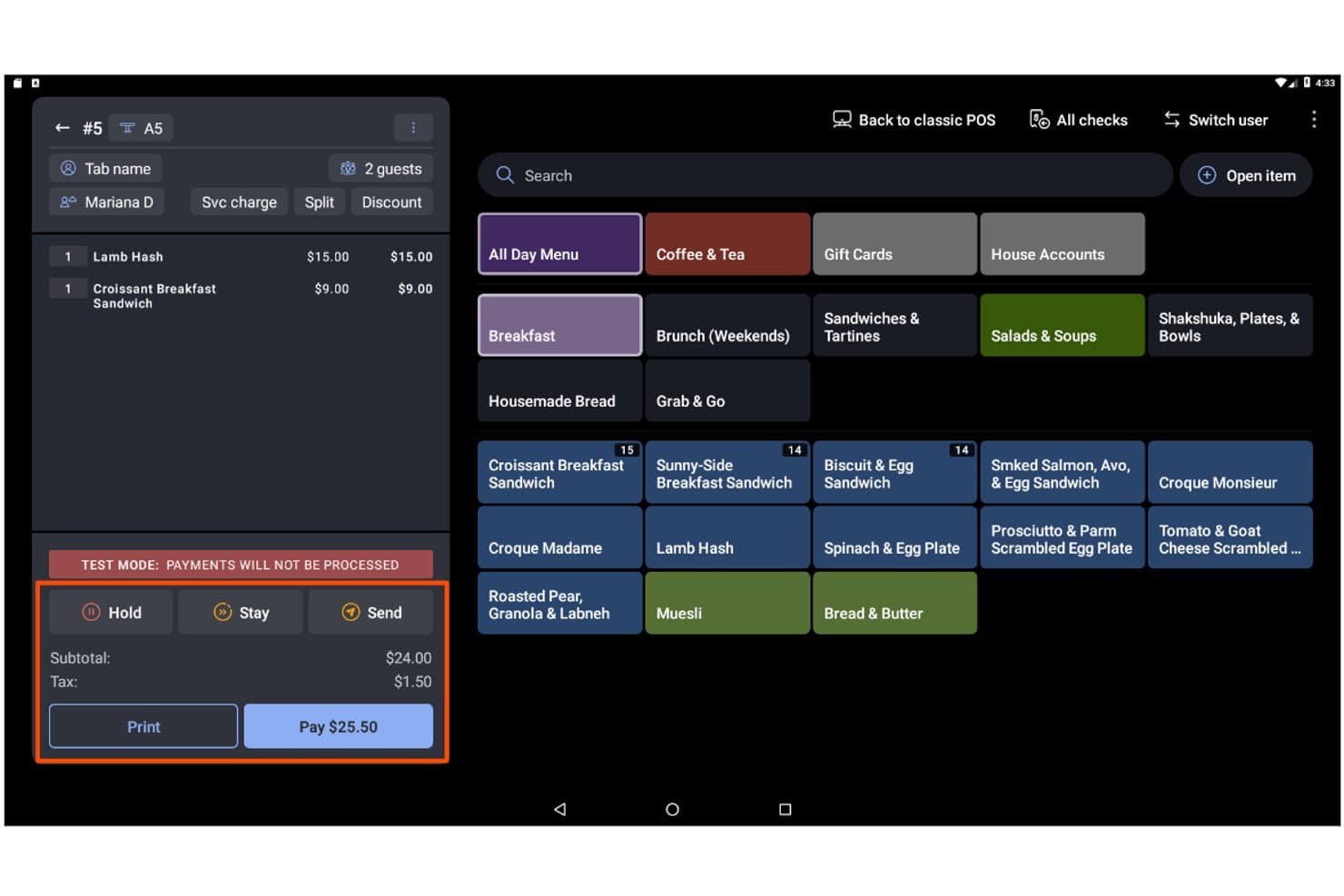
Toast lets users manage orders, items, and payments from one screen. Toast is a cloud-based POS platform built for restaurants and food-adjacent businesses, combining in-person and online order management, payment processing, inventory tracking, loyalty, and multi-location reporting in one system.
Who Is Toast Best For?
Toast is the go-to choice for restaurant operators and food-service businesses that need a POS built around the specific demands of food and beverage workflows.
Why I Picked Toast
Toast earns its spot on my shortlist because no other POS platform centralizes restaurant order management quite like this one. I love how DoorDash, Uber Eats, and Grubhub orders flow directly into the POS and kitchen display system without a separate tablet or manual re-entry. Toast IQ, the built-in AI assistant, proactively surfaces trends and flags anomalies across all your order channels so you can act fast.
Toast Key Features
- Offline mode: Toast keeps processing orders even when your internet goes down, then auto-syncs data once the connection is restored.
- Toast Go® 3 handheld device: A purpose-built mobile terminal that lets staff take orders and accept payments tableside.
- xtraCHEF inventory management: Tracks ingredient-level inventory in real time, automates purchase orders, and generates recipe costing and COGS reports.
- Toast Loyalty: A built-in digital loyalty program with customizable rewards, segmented campaigns, and automated triggers like birthday offers and lapsed-guest re-engagement.
Toast Integrations
Toast offers 300+ marketplace integrations, including DoorDash, Uber Eats, Grubhub, Shopify, QuickBooks Online, and Google booking. Its open API supports custom integrations.
Pros and Cons
Pros:
- AI flags anomalies and trends automatically
- Offline mode supports order processing uninterrupted
- Menus, pricing, and reporting update instantly
Cons:
- No two-way sync with eCommerce platforms
- Must use Toast's payment processing only
Learn more about Toast: Best for advanced retail analytics
- Not available
- From $89/month (billed annually)
Visit WebsiteCustomer Rating:4.1/5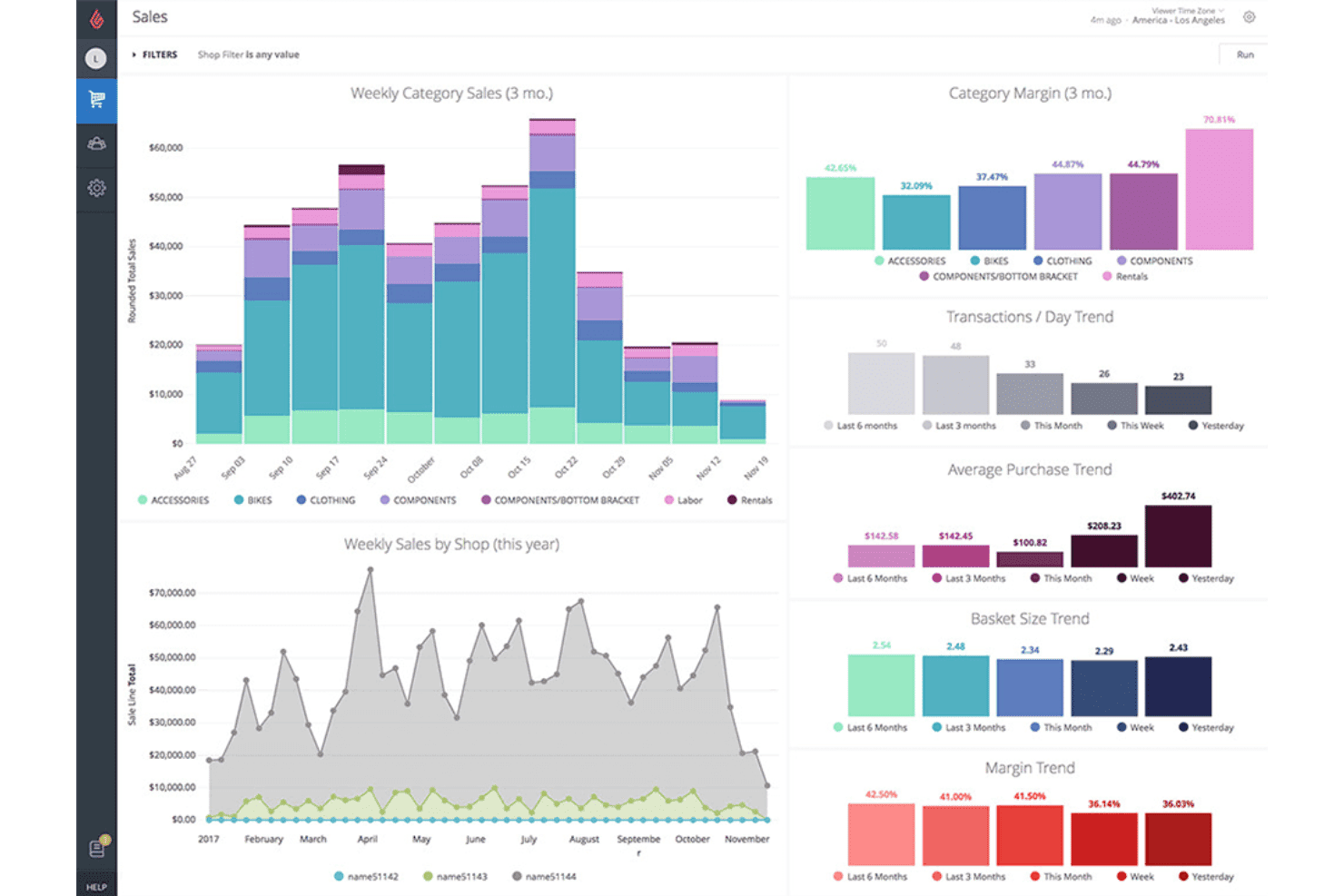
Lightspeed tracks sales trends, margins, and basket size across categories. Lightspeed is a cloud-based retail POS platform that combines in-store and online transaction processing, multi-location inventory management, omnichannel selling, and advanced analytics reporting.
Who Is Lightspeed Best For?
Lightspeed is a strong fit for multi-location retailers who need deep inventory visibility and analytics across every store and sales channel.
Why I Picked Lightspeed
I picked Lightspeed as one of the best because its Insights module goes well beyond standard POS reporting. It delivers demand forecasting, cross-location KPI comparisons, and scheduled report delivery that surface what's actually driving or dragging performance across every store. I love that it can auto-draft purchase orders based on real sales patterns, so you're not manually chasing reorder points when stock runs low across multiple locations.
Lightspeed Key Features
- Omnichannel inventory sync: Real-time two-way sync keeps product data, pricing, and stock levels aligned across your POS, Lightspeed eCom, and third-party platforms like Shopify and WooCommerce simultaneously.
- Integrated loyalty program: Tiered loyalty lets customers earn and redeem points across in-store and online purchases through unified omni customer accounts.
- Lightspeed Payments: A built-in payment processor that accepts contactless, Apple Pay, Google Pay, split tender, and card-not-present transactions at a flat 1.5% card-present rate.
- Mobile Scanner POS App: Turns iOS and Android devices into handheld registers for stock counts, order fulfillment, and payment processing on the floor or at pop-up events.
Lightspeed Integrations
Lightspeed supports integrations with Shopify, WooCommerce, BigCommerce, QuickBooks, Xero, Klaviyo, Mailchimp, NuORDER, Amazon, and eBay. An open REST API on the Plus plan supports custom integrations and workflows.
Pros and Cons
Pros:
- Omnichannel selling and loyalty programs unified
- Multi-location inventory and reporting management
- Advanced demand forecasting and sales analytics
Cons:
- Additional fees for using external payment processors
- Limited native offline transaction capabilities
Learn more about Lightspeed: Best for free starter plan availability
- Free plan + Free trial available
- From $10.00 (billed annually)
Visit WebsiteCustomer Rating:4.3/5
eHopper lets users manage orders and browse menu items by category. eHopper is a cloud-based POS platform that combines in-store transaction processing, a proprietary hosted eCommerce storefront, inventory management, CRM, and built-in marketing tools—all within a single system designed for small and independent retailers.
Who Is eHopper Best For?
eHopper suits independent retailers and small business owners who want an all-in-one POS and online store without paying a monthly fee to get started.
Why I Picked eHopper
eHopper earns its spot on my list because it's one of the only online POS platforms with a permanently free plan, making it genuinely accessible for independent retailers who aren't ready to commit to monthly fees. I'm particularly impressed by the OmniChannel plan's built-in hosted storefront, which syncs product catalogs and inventory with the in-store POS in real time, so you're never manually reconciling stock between channels. The cash discount program is another standout: qualifying merchants can run the full platform at $0/month by passing card fees to customers.
eHopper Key Features
- Multi-processor payment support: eHopper lets you connect your preferred third-party payment processor—including Stripe, PayPal, and Authorize.Net—rather than locking you into a single provider.
- Built-in CRM with customer profiles: The system stores individual customer purchase histories and enables segmentation for targeted email and SMS marketing campaigns.
- Employee time clock and permissions: Staff can clock in and out directly from the POS terminal, with role-based access controls limiting what each employee can view or edit.
- Purchase order management: You can create and track vendor purchase orders tied to real-time inventory levels, streamlining the restocking process from within the platform.
eHopper Integrations
eHopper offers native integrations with QuickBooks Online, Authorize.Net, PayPal, Stripe, Poynt, and PAX terminals, plus multiple payment processors. It also provides API access for custom integrations.
Pros and Cons
Pros:
- Accepts multiple payment processors and methods
- Built-in eCommerce site syncs inventory
- Free starter plan with no time limit
Cons:
- iOS devices and iPads not supported
- No native sync with Shopify or WooCommerce
Learn more about eHopper: Best for rapid staff training tools
- 30-day free trial
- From $39/month
Visit WebsiteCustomer Rating:3.8/5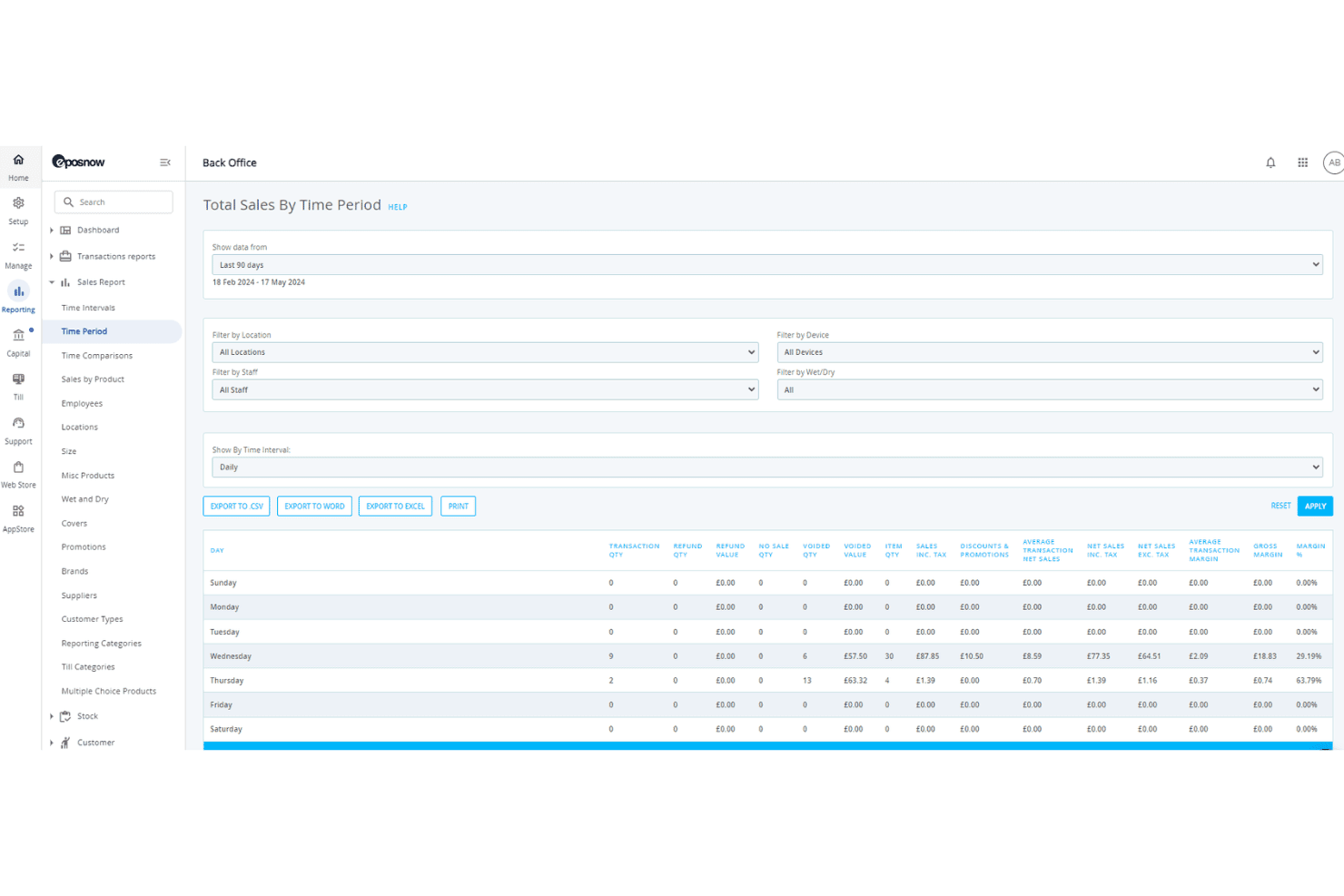
Epos Now breaks down sales performance by day of the week. Epos Now is a cloud-based POS platform that combines in-store transaction processing, real-time inventory management, omnichannel ecommerce sync, and built-in CRM and staff management tools.
Who Is Epos Now Best For?
Epos Now is a strong fit for retailers and multi-location operators who need new staff up and running at the register fast, without lengthy onboarding.
Why I Picked Epos Now
Epos Now earns its spot on my shortlist because of how seriously it treats staff onboarding as a feature, not an afterthought. The platform is built so new hires can be trained at the register in around 15 minutes, with role-based permissions and unique login methods set up just as fast. I also like that the time clock and shift tracking are baked directly into the same system, so there's no separate tool to manage.
Epos Now Key Features
- Real-time inventory sync: Two-way sync across Shopify, WooCommerce, and BigCommerce keeps stock levels accurate across all channels automatically.
- Built-in CRM: Customer profiles store full purchase history, enabling targeted promotions and loyalty point tracking directly from the POS.
- Multi-site manager: A single dashboard lets you control pricing, tax rules, and inventory allocation across multiple store locations.
- AI-powered sales insights: The Sidekick assistant analyzes product margins and flags pricing opportunities using your live sales data.
Epos Now Integrations
Epos Now offers 100+ marketplace integrations, including Shopify, WooCommerce, BigCommerce, QuickBooks Online, Xero, Salesforce, Mailchimp, Deputy, and Zapier. Its open API supports custom integrations for enterprise workflows.
Pros and Cons
Pros:
- Offline card payments continue during outages
- Multi-location inventory sync with real-time updates
- Staff training completed in around 15 minutes
Cons:
- Premium support costs extra each month
- Contract cancellation is complex and restrictive
Learn more about Epos Now:
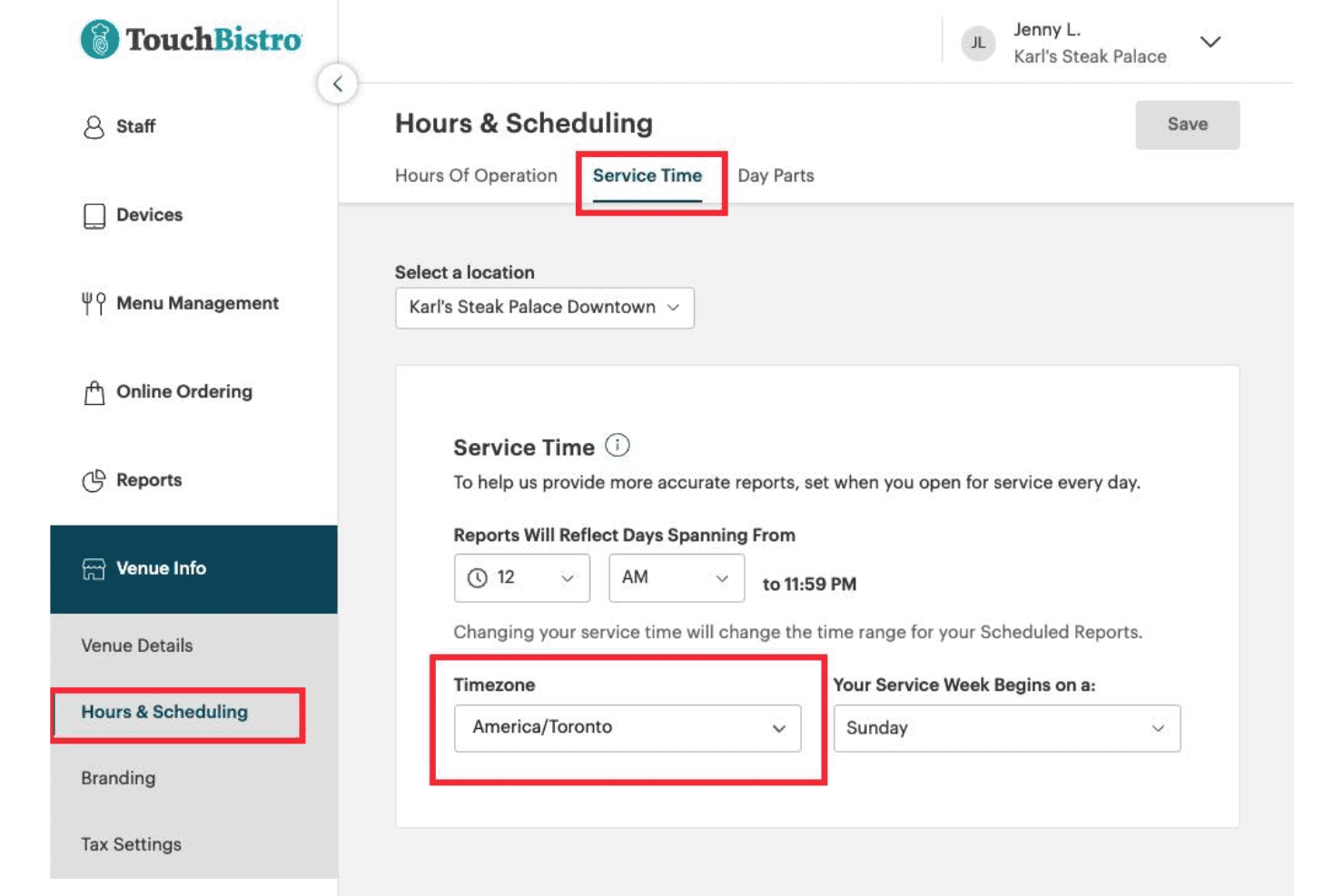
TouchBistro lets users set service time and timezone per location. TouchBistro is a restaurant-focused POS system that combines tableside ordering, floor plan management, online ordering, loyalty, and back-of-house tools like inventory and labor management in one platform.
Who Is TouchBistro Best For?
TouchBistro is a strong fit for full-service and quick-service restaurants that want tableside ordering, loyalty, and back-of-house tools in one iPad-native system.
Why I Picked TouchBistro
TouchBistro earns its spot on my list because its tableside ordering setup is genuinely one of the best I've seen in a restaurant POS. Staff can take orders, fire tickets to the kitchen, and process payments directly from an iPad at the table using TouchBistro One, which cuts down on errors from re-entering orders at a terminal. The floor plan management ties directly into the ordering flow, so servers always know table status in real time.
TouchBistro Key Features
- Commission-free online ordering: Customers can place pickup and delivery orders through your website, Google listing, and social channels without per-order commissions eating into your margins.
- 50+ cloud-based reports: Sales, labor, inventory, and loyalty reports are all accessible from any internet-connected device, not just your in-venue terminals.
- Built-in loyalty CRM: TouchBistro Loyalty captures visit frequency, spend history, and order data for each guest, letting you segment and target customers through email and in-app campaigns.
- Offline transaction continuity: The system processes orders and payments locally between devices during internet outages, so a dropped connection doesn't halt service.
TouchBistro Integrations
TouchBistro documents integrations with Restaurant365, MarginEdge, Deliverect, UrbanPiper, Worldpay, Chase Payment Solutions, and Moneris. It doesn’t offer native connectors for Shopify, WooCommerce, BigCommerce, or Magento, limiting its fit for omnichannel retail.
Pros and Cons
Pros:
- Loyalty and marketing built into POS
- Commission-free online ordering for restaurants
- Tableside ordering on iPad or handheld device
Cons:
- Many essential features cost extra
- Not suitable for retail or eCommerce
Learn more about TouchBistro:
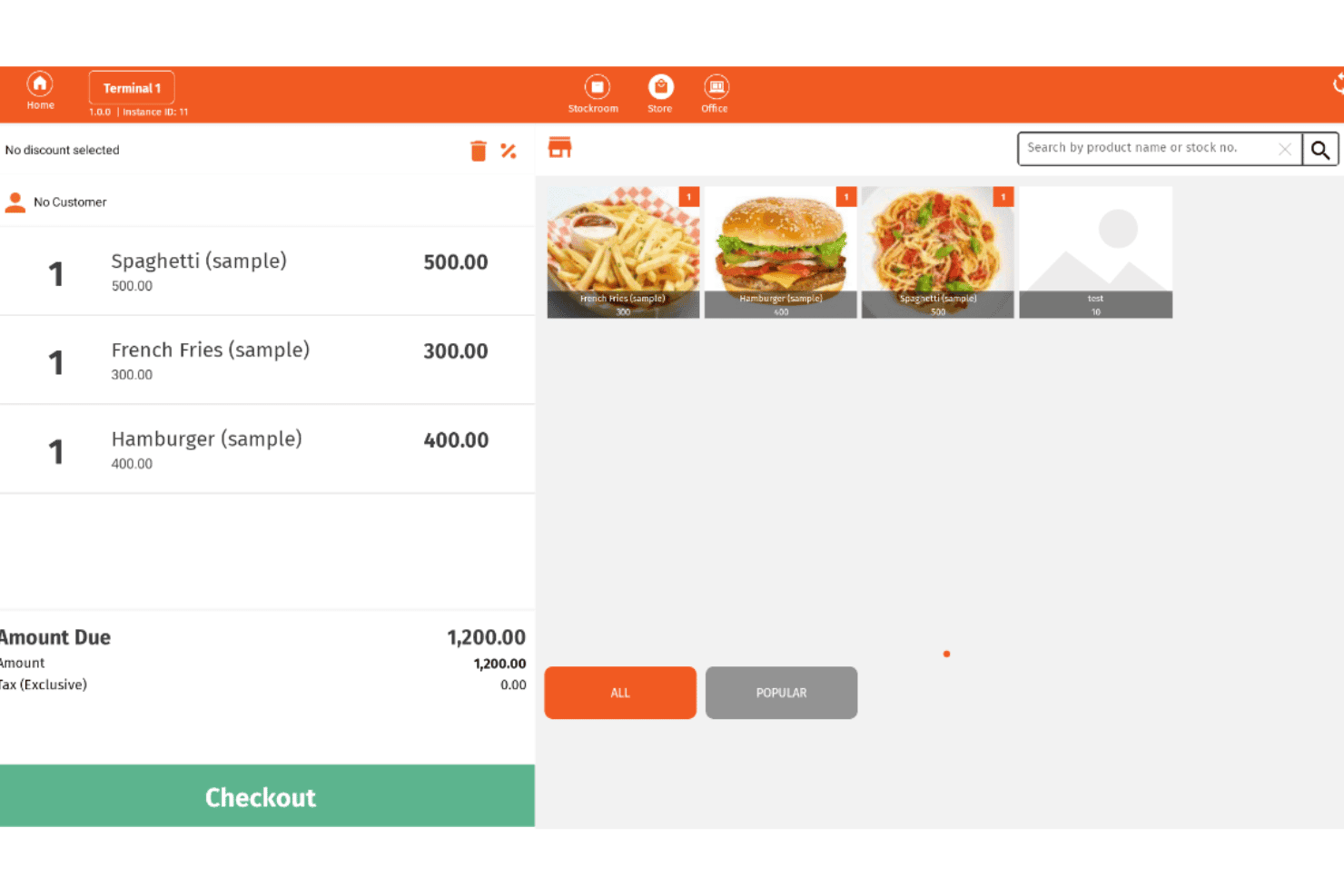
Imonggo lets users manage orders and checkout from a POS interface. Imonggo is a browser-based POS system that handles sales transactions, inventory tracking, customer management, and basic reporting across single and multi-branch retail operations.
Who Is Imonggo Best For?
Imonggo is a strong fit for independent retailers and small shop owners who want to start selling quickly without technical setup or upfront costs.
Why I Picked Imonggo
Imonggo earns its spot on my shortlist because it's the only browser-based POS here that gets you selling without a single installation. I love that you can open a browser, create an account, and run a live transaction in minutes. Its offline mode processes sales locally and auto-syncs when your connection returns, so a spotty signal won't kill your checkout flow.
Imonggo Key Features
- Loyalty and reward points program: Customers earn points on purchases that can be redeemed as instant discounts at checkout.
- Branch-specific pricing: Each retail location can carry its own product pricing, independent of other branches in the same account.
- CSV data import and export: Bulk-upload your product catalog via CSV and export sales invoice data for use in external accounting tools.
- Configurable tax settings: Set inclusive or exclusive tax rates at the item, branch, or global level to support varied regional tax requirements.
Imonggo Integrations
Imonggo has documented integrations with Shopify, Xero, Authorize.net, Stripe, Dymo Label, and Cyclr. It also offers a REST API for custom integrations.
Pros and Cons
Pros:
- Branch-specific product pricing is fully supported
- Loyalty points redeem instantly at checkout
- Setup requires only a browser and account
Cons:
- Shopify is the only native eCommerce sync
- No contactless or mobile wallet support
Learn more about Imonggo: Best for multi-location inventory tracking
- 30-day free trial
- From $4/user/month
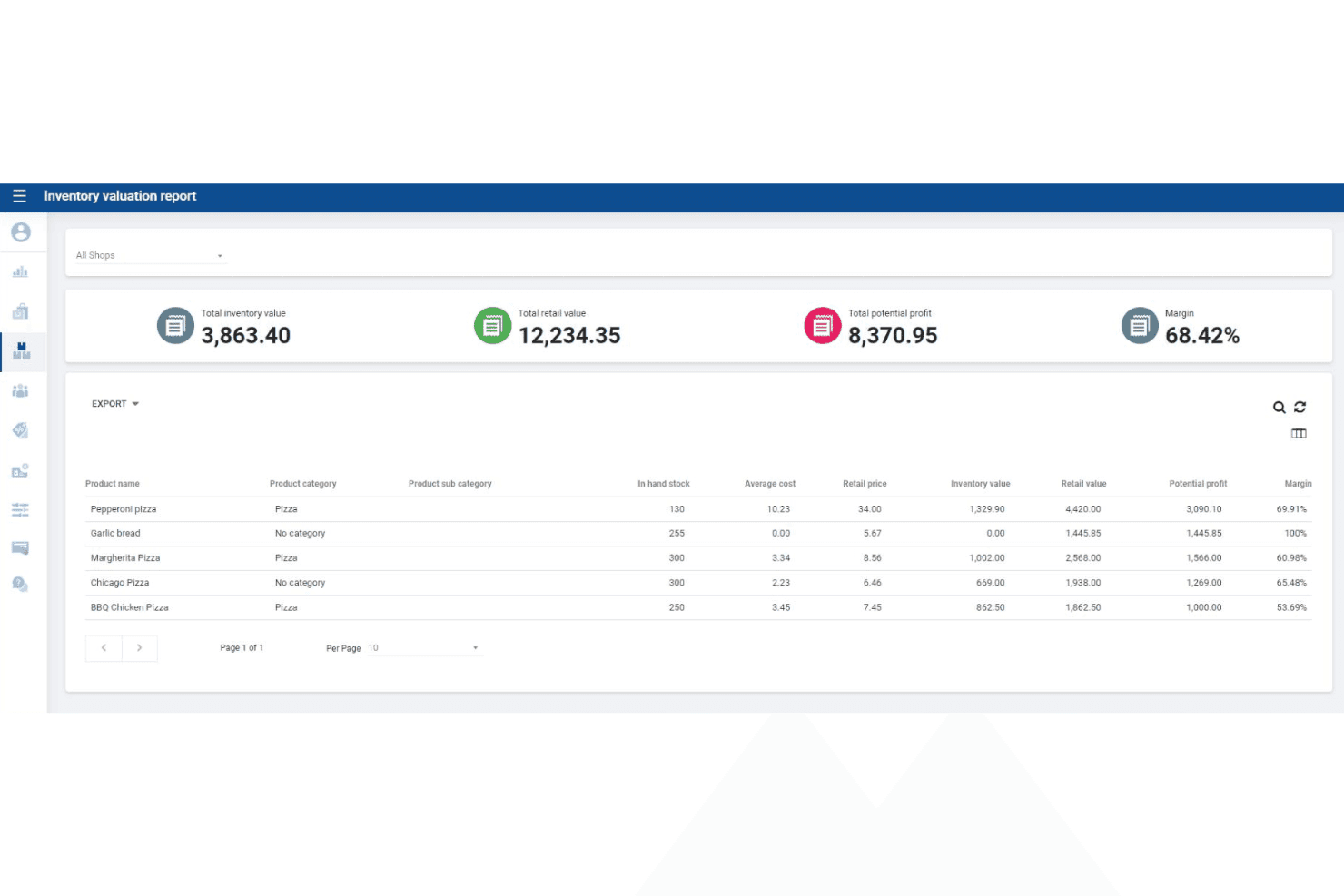
SalesPlay POS tracks inventory value, retail value, and profit margins. SalesPlay POS is a cloud-based point of sale system that covers in-store billing, multi-location inventory tracking, CRM, loyalty programs, and sales reporting across Android devices and a web browser interface.
Who Is SalesPlay POS Best For?
SalesPlay POS is a strong fit for small and growing retailers managing stock across multiple store locations from a single, centralized system.
Why I Picked SalesPlay POS
SalesPlay POS earns its spot on my shortlist because real-time stock tracking across multiple locations is available even on the free plan. I'm particularly impressed by the centralized Back Office, which lets you view inventory levels, transfer stock between stores, and generate shop-wise reports from a single dashboard. The Advanced Inventory add-on takes it further with full purchase order and goods received note workflows, so you're managing the entire stock lifecycle in one place.
SalesPlay POS Key Features
- Offline mode: Records transactions without an internet connection and automatically syncs data once connectivity is restored.
- Point-based loyalty program: Assigns and tracks reward points per customer across all store locations, with manual adjustment available from the Back Office.
- Xero and QuickBooks integration: Connects directly to both accounting platforms via Back Office settings to sync sales data for bookkeeping.
- Self-order kiosk app: Provides a dedicated customer-facing ordering interface that syncs with the POS in real time.
SalesPlay POS Integrations
SalesPlay POS offers documented integrations with Shopify, WooCommerce, Xero, and QuickBooks. It also provides an open API for custom integrations covering orders, inventory, payments, and accounting.
Pros and Cons
Pros:
- Built-in CRM with loyalty and customer profiles
- Centralized Back Office manages all stores
- Multi-location stock tracking on free plan
Cons:
- Full inventory sync to ecommerce not confirmed
- No native iOS app support
Learn more about SalesPlay POS: Best for real-time sales monitoring
- Not available
- From $668 (one-time, includes 3-year license)

Cloud POS gives real-time insight into sales, orders, and payment data. Cloud POS is a POS hardware and software marketplace that bundles PAX terminal hardware with a locally stored cash register software license, alongside resold cloud-based platforms like ePOS Now and Shopify POS.
Who Is Cloud POS Best For?
Cloud POS suits small, independent retailers who want a no-monthly-fee hardware-software bundle and prefer working with a full-service deployment partner over self-managing a cloud POS setup.
Why I Picked Cloud POS
I picked Cloud POS as one of the best because of how it surfaces real-time sales data through ePOS Now's live reporting dashboard, letting you spot revenue trends as they happen rather than after the fact. I like that its end-of-day reporting automatically calculates cash-up totals and logs historical data, so you're not piecing together numbers manually at close. Its processor-agnostic setup also means you can connect your existing payment processor without switching hardware.
Cloud POS Key Features
- Processor-agnostic payment support: Cloud POS connects to major processors—including First Data, TSYS, Heartland, and Worldpay—without locking you into a single provider.
- PAX terminal compatibility: Bundles include Android-based PAX terminals that accept EMV chip, NFC/contactless, magnetic swipe, and keyed card entry.
- ePOS Now loyalty app integration: An add-on loyalty app lets you run customer reward programs directly through the ePOS Now platform.
- eCommerce website integration: Cloud POS can add a checkout-enabled product catalog to your existing website, with backend access to sales and customer data.
Cloud POS Integrations
Cloud POS supports integrations with Shopify POS, ePOS Now, and 100+ POS systems through the eConduit (Payroc) payment API, including Lightspeed, Vend, and Heartland Retail. It also supports payment connections with processors such as First Data, TSYS, Heartland, and Worldpay.
Pros and Cons
Pros:
- Full-service POS deployment and onboarding
- Works with many major payment processors
- No monthly fee hardware-software bundle option
Cons:
- Advanced features require third-party add-ons
- No native cloud POS software offered
Learn more about Cloud POS:

NRS lets cashiers process sales across departments with multiple payment options. NRS is a POS system purpose-built for independent convenience stores, bodegas, and liquor stores, offering in-store sales, EBT/eWIC payment acceptance, real-time inventory tracking, and a proprietary ecommerce storefront with local delivery integration.
Who Is NRS Best For?
NRS is a strong fit for independent convenience store, bodega, and liquor store owners who need built-in EBT/eWIC support, a pre-loaded product database, and local delivery integration out of the box.
Why I Picked NRS
NRS earns its spot on my shortlist because no other POS system I've reviewed matches its depth of support for independent convenience store operators. I love that EBT and eWIC acceptance are built directly into NRS Pay, so bodega and c-store owners can serve SNAP customers without bolting on a separate solution. The 100,000+ pre-loaded UPC pricebook also means new store owners aren't manually entering thousands of products on day one.
NRS Key Features
- NRS Pay payment acceptance: NRS Pay supports credit, debit, EBT, eWIC, Apple Pay, Google Pay, and contactless payments directly through the POS.
- Food delivery platform integrations: DoorDash, Grubhub, and Uber Eats orders can be managed from within the NRS POS system for an additional monthly fee per platform.
- BOSS Club coupon rewards program: A built-in customer rewards program is included free on every plan, letting customers enroll via phone number at the register.
- Anti-theft alerts: Real-time push notifications flag suspicious POS activity to the merchant's mobile app, available as an add-on or included on Advanced and Elite plans.
NRS Integrations
NRS has documented integrations with DoorDash, Grubhub, Uber Eats, Stripe, QuickBooks Online, and the BOSS Local Shopping App. It offers a smaller connectivity set, with no documented Shopify, WooCommerce, BigCommerce, or open API integrations.
Pros and Cons
Pros:
- Real-time inventory sync across channels
- Loyalty program included on all plans
- EBT and eWIC payments accepted natively
Cons:
- Limited eCommerce integrations outside proprietary system
- No offline mode for internet outages
Learn more about NRS: Best for integrating with online stores
- 3-day free trial
- From $89/month
Visit WebsiteCustomer Rating:4.4/5
Shopify POS connects to multiple sales channels from one dashboard. Shopify POS is a cloud-native point-of-sale system that unifies in-store transactions, multi-location inventory, omnichannel order management, and payment processing across physical and digital retail channels.
Who Is Shopify POS Best For?
Shopify POS is a natural fit for retailers who already run—or plan to run—an online store and want their in-store and digital operations managed from a single back office.
Why I Picked Shopify POS
Shopify POS earns its spot on my shortlist because no other POS system closes the gap between physical and digital retail the way it does. If you're already selling on Shopify, your in-store and online inventory, orders, and customer profiles share a single back office with zero middleware. I particularly like the BOPIS and ship-from-store capabilities, which let store staff fulfill online orders directly from floor inventory without jumping between systems.
Shopify POS Key Features
- Tap to Pay on iPhone and Android: Accept contactless payments using your existing iPhone or Android device, with no card reader required.
- Staff roles and permissions: Assign custom POS access levels and unique PIN logins to each staff member, with manager approval required for discounts or refunds.
- Multi-location inventory transfers: Move stock between store locations directly from the POS app, with inventory counts updating in real time across all locations.
- 200+ real-time reports: Access retail-specific sales, cash flow, and product performance reports from any device on the Grow plan and above.
Shopify POS Integrations
Shopify POS natively integrates with Shopify’s ecommerce platform. Its marketplace offers 100+ POS-specific apps, including QuickBooks, Xero, Klaviyo, Smile.io, and Better Reports, while its open API supports custom integrations.
Pros and Cons
Pros:
- Buy online, return or pickup in-store
- Tap to Pay on iPhone and Android
- Real-time sync for online and in-store sales
Cons:
- Advanced inventory tools require Pro add-on
- No built-in loyalty program
Learn more about Shopify POS:
Alte soluții software POS online
Iată câteva opțiuni suplimentare de software POS online care nu au fost incluse în lista mea scurtă, dar care merită totuși analizate:
- 11CloverBest for customizable hardware options
- 12SquareBest for mobile payment flexibility
- 13PayPal POSBest for accepting PayPal payments in-store
- 14Hike POSBest for integrated appointment scheduling
- 15LoyverseBest for managing customer loyalty programs
- 16Stripe TerminalBest for unified online and in-person payments
- 17Toshiba CommerceBest for enterprise-grade hardware compatibility
- 18QuickBooks POSBest for syncing with accounting software
- 19Salesforce Retail Cloud POSBest for CRM-driven sales insights
Related Reviews
How I Evaluate Online POS Software
I evaluate online POS tools in two layers: the core must-haves—cloud-based checkout, real-time inventory, omnichannel sync—and the differentiators that determine the right fit for your stores.
Core Functionality (Table Stakes for This List)
When I'm selecting tools for my list, I rank each one on a scale from 0 (does not offer the functionality) to 5 (excels in this area) for each core functionality listed below. Then, I calculate the tool's total score into a percentage. Each tool needs to achieve a minimum total score of 65% to be considered for inclusion.
- Cloud-Based Transaction Processing: I check whether the POS runs fully in a browser or cloud-hosted app, so you can ring up sales from a tablet on the floor or a laptop in a pop-up shop.
- Payment Processing: Each tool should support cards, contactless, and mobile wallets, plus integrate with processors like Square, Stripe, or proprietary gateways.
- Real-Time Inventory Tracking: I look for automatic stock updates the moment a sale happens, across every register and location, with low-stock alerts to prevent overselling.
- Omnichannel Sales Sync: Product catalogs, pricing, and stock levels should stay aligned between in-store registers and online storefronts—whether that's Shopify, WooCommerce, or a built-in webstore.
- Sales Reporting and Analytics: Useful dashboards matter here—things like hourly sales trends, top-selling SKUs, and margin breakdowns that help you make restocking and staffing decisions.
- Customer Management: I evaluate whether the platform captures buyer profiles, tracks purchase history, and supports loyalty or rewards programs to drive repeat business.
Once I have a list of tools that meet this criteria, I consider what sets each platform apart.
Differentiating Factors (What Sets Vendors Apart)
Here's how I compare and contrast different vendors:
Standout Features
Offline mode is a big one—if your internet drops mid-transaction, the system should keep processing sales and sync everything once you're back online. I also look at employee management features like role-based permissions and shift tracking, which matter when you're running a team across multiple registers. Mobile POS hardware support is worth evaluating too, especially if you run pop-up events or need staff to check out customers anywhere on the floor with a handheld device.
Beyond Features
Integrations matter a lot here. I check whether a platform connects natively to your accounting software, eCommerce storefront, and marketing tools—so you're not manually exporting CSV files every week. Pricing transparency is another factor I evaluate closely, especially how per-register and per-location fees add up as you grow. Scalability ties into this: a system that works for one shop should also let you manage five locations from a single dashboard without a complete platform change.
Cum alegeți software-ul POS online
Este ușor să vă pierdeți în liste lungi de funcții și structuri complexe de prețuri. Pentru a vă ajuta să rămâneți concentrați în timp ce parcurgeți procesul unic de selecție a software-ului, iată o listă de verificare cu factorii de care trebuie să țineți cont:
| Factor | Aspecte de luat în considerare |
| Scalabilitate | Va susține sistemul dezvoltarea afacerii, de exemplu prin adăugarea unor locații, case de marcat sau utilizatori noi, fără actualizări majore sau costuri suplimentare? |
| Integrări | Se conectează nativ POS-ul la instrumentele dvs. de contabilitate, comerț electronic sau gestionare a inventarului sau veți avea nevoie de soluții alternative ori de API-uri personalizate? |
| Posibilitate de personalizare | Puteți adapta fluxurile de lucru, chitanțele și permisiunile utilizatorilor pentru a corespunde proceselor de afaceri și cerințelor privind identitatea vizuală? |
| Ușurință în utilizare | Va putea personalul să învețe și să utilizeze rapid sistemul, chiar și în condițiile unei fluctuații ridicate de personal sau ale angajărilor sezoniere? |
| Implementare și configurare inițială | Cât timp va dura să începeți să utilizați sistemul și ce resurse (instruire, migrare, configurarea echipamentelor) va trebui să alocați? |
| Cost | Sunt toate taxele clare, inclusiv cele pentru echipamente, procesarea plăților și asistență, sau există costuri ascunse care v-ar putea afecta marjele? |
| Măsuri de securitate | Oferă POS-ul criptare de la un capăt la altul, conformitate PCI și controale ale accesului utilizatorilor pentru a proteja datele clienților și ale companiei? |
| Disponibilitatea asistenței | Puteți contacta serviciul de asistență în timpul programului de lucru și există mai multe canale (chat, telefon, e-mail) pentru probleme urgente? |
Ce este software-ul POS online?
Software-ul POS online este un sistem bazat pe cloud care permite companiilor să proceseze tranzacții de vânzare, să gestioneze inventarul și să urmărească activitatea clienților folosind dispozitive conectate la internet. Multe platforme funcționează prin intermediul unei aplicații POS care poate rula pe dispozitive mobile, precum tablete și iPhone-uri, sau pe case de marcat tradiționale conectate la echipamente POS.
Aceste sisteme permit comercianților cu amănuntul, restaurantelor și altor tipuri de companii să monitorizeze activitatea vânzărilor din canalele fizice și digitale, de pe o singură platformă centrală. Deoarece software-ul rulează în cloud, echipele pot vizualiza date în timp real, pot gestiona operațiunile de la distanță și pot automatiza sarcinile administrative esențiale.
Funcții
Iată funcțiile esențiale pe care ar trebui să le ofere orice software POS online performant:
- Procesarea tranzacțiilor de vânzare: Gestionează vânzările în persoană și online, calculează totalurile, aplică reduceri și procesează diverse tipuri de plată la finalizarea cumpărăturii.
- Gestionarea inventarului: Monitorizează nivelurile stocurilor în timp real, actualizează cantitățile după fiecare vânzare și vă avertizează când articolele sunt pe cale să se epuizeze sau nu mai sunt în stoc.
- Asistență pentru mai multe locații: Vă permite să gestionați vânzările, inventarul și personalul din mai multe magazine sau puncte de vânzare prin intermediul unui singur tablou de bord.
- Gestionarea clienților: Stochează profilurile clienților, istoricul achizițiilor și datele de contact pentru a susține programele de fidelizare și serviciile personalizate.
- Rapoarte și analize: Generează rapoarte detaliate despre vânzări, inventar și performanța personalului pentru a vă ajuta să luați decizii de afaceri informate.
- Controale de acces bazate pe roluri: Vă permit să atribuiți permisiuni și să restricționați accesul la date sensibile pe baza rolurilor și responsabilităților personalului.
- Personalizarea chitanțelor: Vă permite să proiectați și să imprimați chitanțe cu marca proprie, mesaje personalizate, sigle și informații legale obligatorii.
- Posibilitatea de a efectua tranzacții offline: Vă permite să continuați procesarea vânzărilor chiar dacă se întrerupe conexiunea la internet, sincronizând datele după ce reveniți online.
- Procesarea integrată a plăților: Acceptă o gamă variată de metode de plată, inclusiv carduri de credit, portofele mobile și plăți contactless, toate în cadrul aceluiași sistem.
Beneficii
Implementarea unui software POS online oferă mai multe beneficii pentru echipa și afacerea dumneavoastră. Iată câteva dintre acestea:
- Gestionarea centralizată a vânzărilor: Accesați și gestionați întreaga activitate de vânzare din toate locațiile și canalele prin intermediul unui singur tablou de bord bazat pe cloud.
- Vizibilitatea inventarului în timp real: Monitorizați instantaneu nivelurile stocurilor și reduceți riscul vânzărilor peste stoc sau al epuizării stocurilor cu ajutorul urmăririi automate a inventarului.
- Acceptarea flexibilă a plăților: Oferiți clienților o varietate de opțiuni de plată, inclusiv carduri și portofele mobile, prin procesarea integrată a plăților.
- Securitate îmbunătățită a datelor: Protejați informațiile sensibile despre afacere și clienți cu ajutorul criptării încorporate, al conformității PCI și al controalelor de acces bazate pe roluri.
- Integrare și instruire mai rapide: Aduceți rapid personalul nou la nivelul necesar cu interfețe intuitive, tururi ghidate ale produsului și resurse de instruire accesibile.
- Informații utile pentru afacere: Utilizați instrumentele încorporate de raportare și analiză pentru a identifica tendințe, a urmări performanța și a lua decizii informate.
- Continuitatea afacerii: Continuați să procesați vânzările chiar și în timpul întreruperilor conexiunii la internet, cu ajutorul funcțiilor de efectuare a tranzacțiilor offline, care sincronizează datele după restabilirea conexiunii.
Costuri și prețuri
Selectarea unui software POS online necesită înțelegerea diferitelor modele și planuri de tarifare disponibile. Costurile variază în funcție de funcții, dimensiunea echipei, suplimente și alți factori. Tabelul de mai jos prezintă planurile comune, prețurile lor medii și funcțiile incluse de obicei în soluțiile software POS online:
Tabel comparativ al planurilor pentru software POS online
| Tipul planului | Preț mediu | Funcții comune |
| Plan gratuit | $0 | Procesarea de bază a vânzărilor, urmărirea limitată a inventarului, acces pentru un singur utilizator și raportare standard. |
| Plan personal | $10-$30/utilizator/lună | Asistență pentru mai mulți utilizatori, gestionarea extinsă a inventarului, profiluri de bază ale clienților și asistență prin e-mail. |
| Plan pentru afaceri | $40-$80/utilizator/lună | Gestionarea mai multor locații, raportare avansată, procesarea integrată a plăților și acces bazat pe roluri. |
| Plan pentru întreprinderi | $100-$200+/ utilizator/lună | Integrări personalizate, gestionarea dedicată a contului, asistență prioritară, securitate avansată și acces la API. |
Întrebări frecvente
Iată câteva răspunsuri la întrebările frecvente despre software-ul POS online:
Poate software-ul POS online să funcționeze fără conexiune la internet?
Da, multe soluții software POS online oferă posibilitatea de a procesa tranzacții offline. Aceasta înseamnă că puteți continua să procesați vânzările în timpul întreruperilor conexiunii la internet, iar sistemul va sincroniza automat datele după restabilirea conexiunii.
Cât de sigur este software-ul POS online pentru gestionarea plăților și a datelor clienților?
Software-ul POS online utilizează de obicei criptarea, conformitatea PCI și controale de acces bazate pe roluri pentru a proteja informațiile sensibile. Confirmați întotdeauna că furnizorul ales respectă standardele de securitate din industrie și oferă actualizări regulate pentru a contracara noile amenințări.
Ce hardware este necesar pentru a utiliza software POS online?
Majoritatea soluțiilor software POS online funcționează pe computere, tablete sau smartphone-uri obișnuite. De asemenea, este posibil să aveți nevoie de imprimante de bonuri, scanere de coduri de bare și terminale de plată compatibile, în funcție de configurația afacerii și de dispozitivele acceptate de software.
Pot integra software-ul POS online cu instrumentele existente de comerț electronic sau contabilitate?
Da, multe platforme software POS online oferă integrări cu sisteme populare de comerț electronic, contabilitate și gestionare a stocurilor. Verificați existența integrărilor native sau a API-urilor disponibile pentru a asigura un flux de date fără probleme între instrumentele dumneavoastră.
Cât timp durează configurarea software-ului POS online?
Durata configurării variază în funcție de furnizor și de complexitatea afacerii. Multe soluții oferă integrare ghidată, resurse de instruire și tururi ale produsului pentru a vă ajuta să începeți rapid—adesea în câteva ore până la câteva zile pentru majoritatea întreprinderilor mici și mijlocii.