

Un terminal POS este coloana vertebrală a comerțului cu amănuntul în locații fizice — este modul în care procesezi plățile, urmărești vânzările, gestionezi inventarul și îți menții afacerea în bună funcționare.
Dacă sistemul actual se blochează în timpul orelor aglomerate, nu poate procesa plăți contactless sau te lasă să ghicești ce produse sunt pe cale să se epuizeze, este timpul pentru un upgrade.
Având peste un deceniu de experiență în operațiunile de retail, am văzut cum sistemul POS nepotrivit poate încetini procesul de plată, poate deruta personalul și poate crea probleme contabile la sfârșitul lunii.
Acest ghid elimină zgomotul de marketing pentru a-ți arăta exact ce terminale POS oferă tranzacții rapide și fiabile, acceptă toate metodele de plată așteptate de clienții tăi (de la carduri cu cip la portofele digitale) și fac posibilă gestionarea inventarului în timp real — fără o curbă de învățare abruptă sau comisioane ascunse.
Fiecare recomandare de aici se bazează pe experiență operațională reală, astfel încât poți avea încredere că primești sfaturi bazate pe ani de experiență în retail, nu doar pe afirmații de marketing.
Why Trust Our Software Recommendations
6,700+
Reviews
20
Industry experts
16+
Evaluation factors
14
Years
Our team has been testing and reviewing software since 2012. As retail leaders ourselves, we know how difficult—and important—it is to choose the right software.
For this guide, we evaluated tools using hands-on testing and independent research, scoring tools using our selection criteria.
Our reviews reflect our independent judgment—not a sales pitch.
Tabel comparativ: terminale POS
Acum să comparăm rapid aceste terminale de top pe baza prețurilor, informațiilor despre perioada de testare și a domeniilor în care excelează.
Sorted by: Default
| Tool | Starting Price | Website | |
|---|---|---|---|
Best for built-in AI for independent stores | Not rated | $499/month Free demo available | Website |
Best all-around POS terminal | 4.7 out of 5 | $49/month Free plan + 30-day trial available | Website |
Best for B2B sellers | 4.2 out of 5 | $99/month Free demo available | Website |
Best for high-volume businesses in various industries | 4.7 out of 5 | Pricing upon request Free demo available | Website |
Best for real-time inventory management | 4.8 out of 5 | $59/month Free trial + free demo available | Book Demo |
Best for omnichannel retail integration | 4.4 out of 5 | $89/month 3-day free trial | Website |
Best for iPad POS systems | 5.0 out of 5 | Pricing upon request Free demo available | Website |
Best for scalability | 5.0 out of 5 | Pricing upon request | Website |
Best for transparent payment solutions | 4.4 out of 5 | From Interchange + 0.40% + 8¢ Free demo available | Website |
Best for ease of use | 3.8 out of 5 | $16/month 90-day free trial | Website |


Cele mai bune terminale POS pentru plăți mai eficiente, analizate
Iată recenziile noastre detaliate ale acestor terminale POS de top, inclusiv avantajele, dezavantajele, funcțiile principale și motivele pentru care le-am ales.
 Best for built-in AI for independent stores
- Free demo available
- From $499/month (billed annually)
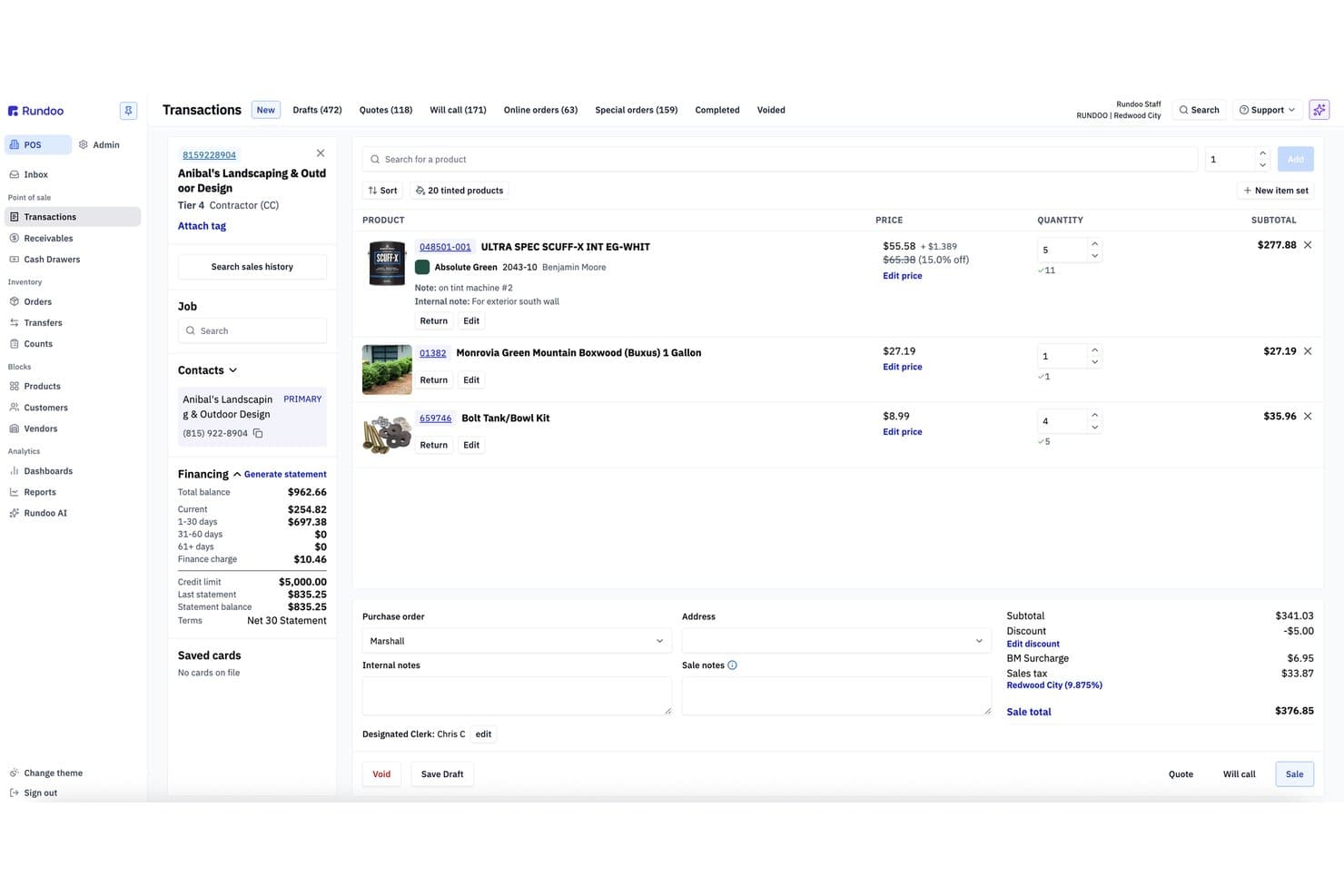
Rundoo offers a full-featured POS transaction screen with product line items, customer financing details, pricing, discounts, and sale totals for contractor accounts. Rundoo is a browser-based POS platform built for independent supply stores—hardware, paint, farm & feed, lawn & garden, and lumber—combining point of sale, inventory tracking, charge account management, and AI-powered reporting in one system.
Who Is Rundoo Best For?
Rundoo is built for independent supply store owners running one or more locations in the hardware, paint, farm & feed, lawn & garden, or lumber trades.
Why I Picked Rundoo
Rundoo earns its spot on my shortlist because of Dooey, its built-in AI that reads your store's own sales, inventory, and charge account data to surface answers on demand. I love that instead of pulling manual reports, you can ask it something like "which products lost margin last month?" and get a direct answer. It also uses that same data to generate purchase orders based on sales velocity and seasonal patterns, which is genuinely useful for stores managing hundreds of SKUs.
Rundoo Key Features
- Real-time inventory sync: All sales, returns, and orders adjust stock counts live across every register and location.
- Integrated charge account management: Handle customer and contractor charge accounts, statements, and credit limits from the POS.
- Multi-vendor catalog access: Search vendor catalogs like Orgill, AllPro, and Emery Jensen right from the POS interface.
- Browser-based register interface: Run sales on any counter PC, tablet, or mobile device using just a web browser.
Rundoo Integrations
Rundoo offers native integrations with Stripe, QuickBooks, Benjamin Moore COLORx, Orgill, Do It Best, True Value, Sherwin-Williams, PPG, and more. An API is available for custom integrations.
Pros and Cons
Pros:
- Runs on any browser without proprietary hardware
- Charge account management built directly into POS
- AI auto-generates POs from sales data
Cons:
- No native loyalty program or store credit tools
- Locked to Stripe for all payment processing
Learn more about Rundoo: Best all-around POS terminal
- Free plan + 30-day trial available
- From $49/month
Visit WebsiteCustomer Rating:4.7/5
The Square Stand is one of several POS terminal options you can choose from. Square gives you a flexible POS terminal setup whether you’re running a busy retail floor, a coffee bar, or a mobile service business that lives on pop-ups and events.
You get card-present hardware that talks directly to your POS software, so you can keep checkouts fast, inventory accurate, and fees predictable across locations.
Why I Picked Square
I picked Square because you can match the hardware to how you sell—Square Stand on an iPad for countertop checkouts, Square Register for full-service lanes, Square Terminal or Handheld for tableside or curbside orders—all running the same POS software and catalog.
You keep payments under control through flat, published processing rates tied to every terminal, so you always know your cost per in-person swipe or tap.
Your team also gets built-in tools like tipping, item modifiers, and customer profiles right on the terminal screens, which reduce order errors while capturing the data you actually need.
I like that you can start with a single Stand or Terminal, then add more devices and locations later without re-platforming your POS or swapping acquirers.
Square Key Features
In addition to the hardware variety, Square includes a few terminal-friendly features merchants will actually lean on day to day.
- Offline Card Acceptance: Keep taking chip and tap payments during internet blips, then automatically upload them once you’re back online.
- Team Management Tools: Track clock-ins, permissions, and sales by staff member directly from your POS terminals.
- Customer Profiles and Receipts: Capture emails and phone numbers at checkout to send digital receipts and build marketing lists.
- Inventory and Item Modifiers: Let staff customize orders (sizes, add-ons, modifiers) while keeping item counts and recipes accurate in the background.
Square Integrations
Integrations include Square Online, WooCommerce, Wix, BigCommerce, Ecwid, GoDaddy Websites + Marketing, QuickBooks Online, Xero, Magento, and Zen Cart.
Pros and Cons
Pros:
- Built-in tipping, modifiers, and customer profiles support retail and F&B.
- Multiple hardware options fit counters, food trucks, and service routes.
- Transparent, flat in-person processing rates simplify cost forecasting.
Cons:
- Tied to Square’s ecosystem; you can’t run terminals on Windows.
- Larger setups with multiple registers and accessories can feel space-hungry.


Stax Pay offers a range of features and integrations to streamline payment processing and enhance business operations. Stax Pay helps B2B and high-volume sellers get out of the “rate roulette” game with subscription-style pricing and tools that actually fit complex invoices and larger tickets.
You get POS hardware flexibility plus invoicing, ACH, and online payments in one place, so your finance team isn’t babysitting five different systems.
Why I Picked Stax Pay
I picked Stax Pay because its membership pricing helps you control costs through a flat monthly fee, which matters when your average ticket is higher than most retail environments.
You get card-present terminals, a virtual terminal, ACH support, and online checkout, so your team can take payments whether the customer is standing at the counter or paying a large invoice remotely.
The invoicing and recurring billing tools also reduce manual collections by letting you send invoices with embedded payment links and automate repeat charges.
Its reporting views give you fee visibility by channel, helping you decide which payment methods to encourage without running manual reconciliations.
Stax Pay Key Features
Here are a few extra features that are especially useful if you’re treating your POS terminals as part of a larger B2B payments stack.
- Omni-Channel Acceptance: Use terminals, a virtual terminal, and hosted payment pages together so in-person, phone, and online payments all run through the same platform.
- Text-To-Pay And Payment Links: Let your team send secure payment links or text-based requests so customers can pay larger invoices from their phone or inbox.
- Recurring Billing Tools: Set up subscription or installment schedules directly in the platform so repeat B2B orders and retainers are billed automatically.
- Surcharge And Fee Programs: Configure surcharging or convenience fees where allowed so you can protect margins on card-heavy customer segments.
Stax Pay Integrations
Integrations include QuickBooks Online, NetSuite, Salesforce, HubSpot, and Avalara.
Pros and Cons
Pros:
- Hardware-agnostic approach lets you pair Stax with a range of POS terminals.
- Supports cards, ACH, and invoicing, which fits complex B2B payment flows.
- Membership pricing can lower costs for high-ticket, high-volume B2B merchants.
Cons:
- Primarily suited to US-based businesses, with more limited international support.
- Monthly subscription fees may be hard to justify for low-volume sellers.
Learn more about Stax: Best for high-volume businesses in various industries
- Free demo available
- Pricing upon request
Visit WebsiteCustomer Rating:4.7/5
Payment Depot's unique interchange+ pricing model helps high-volume businesses save on payment processing fees. Payment Depot’s membership-style pricing is built for retailers and restaurants that run serious card volume through physical terminals and don’t want surprises on their monthly statement.
You get interchange-plus pricing tied to a predictable subscription, plus access to modern terminals and POS options without being locked into a single hardware ecosystem.
Why I Picked Payment Depot
I picked Payment Depot because the subscription model lets you control terminal costs as volume scales—your savings come from wholesale interchange rates plus a flat monthly fee instead of padded markups.
For in-store checkout, you can pair that pricing with Clover or Vital Select POS terminals, so your team gets familiar, well-supported hardware while finance gets cleaner fee structures.
You can also use SwipeSimple-powered terminals and mobile readers, which means your field staff or pop-up locations can accept tapped, dipped, or keyed payments without a separate processor.
I like that you can often reprogram many existing terminals rather than buying a full new fleet, which matters if you’re trying to upgrade processing economics without torching your hardware budget this year.
Payment Depot Key Features
Once you’ve locked in the pricing model, these terminal-focused features do most of the day-to-day work.
- Terminal Catalog And Reprogramming: Access a wide range of countertop, smart, and mobile terminals, or have many existing devices reprogrammed so you can shift processors without a full hardware refresh.
- Multi-Processor Back Ends: Run terminals on Fiserv (Clover) or TSYS (Vital) so you can match processing rails and hardware to your risk profile, ticket size, and existing bank relationships.
- Virtual Terminal And Payment Links: Let staff key in phone orders or send payment links through a browser-based virtual terminal so finance teams can keep card-present and card-not-present flows under one provider.
- Mobile App And Terminal Options: Use SwipeSimple’s mobile app and compatible terminals so store associates, field reps, or pop-up locations can take chip, swipe, or tap payments on the same pricing plan.
Payment Depot Integrations
Integrations include Clover POS, SwipeSimple, Vital Select, Authorize.Net, Shopify, WooCommerce, BigCommerce, PrestaShop, OpenCart, and Revel Systems.
Pros and Cons
Pros:
- Many existing terminals can be reprogrammed, reducing upfront hardware spend.
- Supports Clover and Vital Select terminals for modern, retail-ready POS hardware.
- Membership pricing is attractive for high-volume terminal and in-store traffic.
Cons:
- Limited to US-based, non–high-risk merchants for in-store processing.
- Less cost-effective for lower-volume merchants with modest terminal usage.
Learn more about Payment Depot: Best for real-time inventory management
- Free trial + free demo available
- From $59/month
Visit WebsiteCustomer Rating:4.8/5
KORONA POS includes CRM tools to manage customer information, track purchase history, and personalize customer interactions. KORONA POS gives high-volume retailers, ticketing venues, and franchises a way to keep terminals, inventory, and locations aligned without constant manual fixes.
It’s built for operators who care about real-time stock accuracy across multiple terminals.
Why I Picked KORONA POS
I picked KORONA POS because every terminal syncs inventory in real time, so your stock counts stay accurate with each sale, return, or transfer.
I like that you can manage products and pricing centrally, giving multi-location retailers one source of truth for how their terminals behave.
You also get flexibility with hardware and payment processors, so you can negotiate better rates and keep using terminals you already own.
KORONA POS Key Features
Here are a few terminal-focused capabilities that matter once you’re running day-to-day operations.
- Multi-Store Control: Adjust pricing, inventory, and products per location from one dashboard.
- Ticketing and Access Control: Sell tickets and manage entry directly from each terminal.
- Cash Management Tools: Track drawer counts, variances, and paid in/out activity per device.
- Advanced Reporting: Build custom sales and inventory reports grouped by terminal or store.
KORONA POS Integrations
Integrations include QuickBooks, WooCommerce, Shopify, Magento, BigCommerce, Mailchimp, PayPal, Stripe, Worldpay, Authorize.Net, and CardConnect.
Pros and Cons
Pros:
- Strong multi-location controls for franchises and multi-store retailers.
- Supports mixed hardware setups without vendor lock-in.
- Real-time terminal-level stock updates reduce inventory errors.
Cons:
- Report customization can take time to configure.
- Each terminal requires its own license fee.
Learn more about KORONA POS: Best for omnichannel retail integration
- 3-day free trial
- From $89/month
Visit WebsiteCustomer Rating:4.4/5
Shopify POS lets you quickly access features and products through its smart grid. Shopify POS gives you a dedicated countertop terminal that actually talks to the rest of your retail stack—online inventory, customer profiles, and store locations all live in one place.
It’s best for omnichannel retailers already on Shopify who want a customer-facing terminal that cuts line time without creating a second data silo.
Why I Picked Shopify POS
I picked Shopify POS because you can run your in-store terminal and online store from the same product catalog and inventory engine, so you aren’t reconciling two sets of stock after every weekend.
Your customers get a dedicated, buyer-facing display on the POS Terminal, which shows itemized carts and payment flows so they can review line items, add a tip, and choose receipt options without crowding your staff’s screen.
Your team can use the POS smart grid to pin discounts, apps, and popular products to the home screen, which speeds up checkout during busy hours.
You also get native support for tap, chip, and swipe payments via Shopify Payments, so you can accept modern payment methods while keeping fees and payouts in a single place.
Shopify POS Key Features
In addition to the terminal hardware itself, Shopify POS gives retailers tools your team will actually use at the counter and in the back office.
- Unified Product Catalog: Manage products, prices, and variants once, then sell them across online and in-store channels.
- Omnichannel Inventory: Track inventory by location and support pickups, ship-from-store, and transfers without spreadsheets.
- Customer Profiles: Store purchase history and preferences to power targeted promos and loyalty programs.
- Staff Permissions: Assign roles and access levels so associates can sell confidently without touching sensitive settings.
Shopify POS Integrations
Integrations include QuickBooks, Xero, Mailchimp, Klaviyo, LoyaltyLion, Yotpo, ShipStation, DHL Express, UPS, and Canada Post.
Pros and Cons
Pros:
- Shared catalog and inventory let you sell online and in-store from one system.
- Smart grid layout lets staff pin key apps, discounts, and products.
- Dedicated customer-facing terminal display improves transparency and tipping at checkout.
Cons:
- POS Terminal and in-person card acceptance require Shopify Payments in supported countries.
- Advanced retail workflows may need additional paid apps from the Shopify App Store.
Learn more about Shopify POS: 7Best for iPad POS systems
Lavu
- Free demo available
- Pricing upon request
Visit WebsiteCustomer Rating:5/5
Lavu offers an easy-to-use iPad POS terminal for restaurants and other businesses in the food and beverage industry. Lavu gives restaurant teams an iPad-based terminal that actually keeps up with peak service—tableside orders, bar tabs, and delivery tickets all flow through one screen instead of a pile of devices.
It’s best for restaurants, bars, and cafés that want mobile, Wi-Fi–friendly hardware tied to strong inventory and reporting tools rather than a basic cash register.
Why I Picked Lavu
I picked Lavu for operators who want an iPad terminal built for real restaurant chaos, not just slow hours—its offline card support helps you keep taking payments even when the internet dips.
You get a single iPad screen that pulls together orders, payments, and online sales using built-in online ordering and the MenuDrive platform, so your team isn’t re-keying delivery tickets by hand.
I like that your staff can fire tickets straight to a kitchen display system while real-time inventory updates in the background, keeping menu availability accurate during rushes.
It’s a great fit if you run a restaurant, bar, or café and want lightweight iPad terminals your servers can carry tableside instead of being locked to a bulky counter POS.
Lavu Key Features
In addition to the core ordering and payment tools, here are a few terminal-focused features that matter for busy food-and-beverage teams.
- Dual Pricing And Cash Discount: Offer cash discounts and dual pricing to offset card fees while keeping totals clear for guests.
- Loyalty And Gift Cards: Run built-in loyalty programs and digital or physical gift cards directly from the terminal.
- Manager Mobile App: Check live sales, labor, and key reports from a manager app when you’re off-site.
- Menu And Floor Layout Tools: Build menus, modifiers, and floor layouts in the back office so every terminal shows clear sections and pricing.
Lavu Integrations
Integrations include Marketman, Bar-i Liquid Accounting, Digital Pour, Restaurant365, OpenTable, Otter, Chowly, Up'n Go, QuickBooks, and Xero.
Pros and Cons
Pros:
- Real-time inventory and reporting help prevent stockouts during service.
- MenuDrive online ordering feeds directly into the POS and kitchen.
- iPad terminals support fast tableside ordering and in-seat payments.
Cons:
- Total cost increases as you add online ordering and advanced features.
- iPad-only design limits reuse of existing non-Apple POS hardware.
Learn more about Lavu:

Epos Now offers an all-in-one POS solution with features tailored for retail and hospitality industries. For growing retail and hospitality businesses, Epos Now gives you a POS terminal setup that can flex from a single store to multiple locations without forcing a full hardware reset.
It’s a good fit if you want cloud-based control over tills, tablets, and handhelds while keeping your existing workflows mostly intact.
Why I Picked Epos Now
I picked Epos Now because it lets you scale from one terminal to many by running the same cloud back office across different hardware setups, so you can add lanes or locations without rebuilding your system.
You can also choose between Epos Now’s own payment service or supported third-party processors, which helps you negotiate better rates instead of being locked into a single option.
I like that your team can log in from anywhere to check real-time performance and device activity, which keeps you on top of what’s happening at each register.
For retailers adding new channels or locations, that combination of flexible terminals, processor choice, and remote visibility makes it easier to grow without replacing everything that already works.
Epos Now Key Features
Here are a few practical features that matter when you’re picking a POS terminal setup for a growing retail or hospitality business.
- Real-Time Multilocation Inventory: Sync stock levels across stores and channels so terminals always reflect what you actually have on hand.
- Centralized Back Office: Manage products, pricing, promotions, and user permissions from one dashboard instead of configuring each device individually.
- Built-In Reporting And Dashboards: Track sales, item performance, and peak hours from any device to guide staffing and purchasing decisions.
- Staff And Permissions Management: Set role-based access on each terminal so cashiers, supervisors, and managers only see the tools they need.
Epos Now Integrations
Integrations include QuickBooks, Xero, Sage, Mailchimp, Shopify, WooCommerce, BigCommerce, PayPal, Stripe, and Zapier.
Pros and Cons
Pros:
- Lets you choose between in-house and third-party payment processors.
- Supports over 100 third-party apps for custom retail setups.
- Works with a wide range of POS hardware and terminals.
Cons:
- Long-term contracts and paid support plans may reduce flexibility.
- Pricing details are limited online; many plans require a quote.
Learn more about ePOS : Best for transparent payment solutions
- Free demo available
- From Interchange + 0.40% + 8¢ (varies by volume)
Visit WebsiteCustomer Rating:4.4/5
Helcim's terminals can process chip and PIN cards, swipe cards, and contactless payments. Helcim’s smart terminals are built for retailers who care about transparent pricing as much as fast checkout—you get interchange-plus rates, no long-term contracts, and hardware that works at the counter and on the floor.
It’s a good fit for small and midsize merchants in the US and Canada that want card-present payments, inventory, and customer data living in one system instead of five.
Why I Picked Helcim
I picked Helcim because you get interchange-plus pricing with automatic volume discounts, so your effective rate drops as your in-store card volume grows.
That cost control is tied to real tools: a smart terminal with built-in POS software, printer, and card reader that keeps in-person and online sales, inventory, and customer profiles in sync.
I also like that you can use Tap to Pay on iPhone through the Helcim POS app, which lets your team take contactless payments anywhere on the sales floor without extra hardware. For margin-conscious retailers, Fee Saver and compliant surcharging options help you offset card fees using settings built directly into the terminal and POS.
If you want to keep your existing POS or custom setup, the smart terminal is API-ready, so you can plug Helcim’s hardware and pricing into your current stack instead of rebuilding everything from scratch.
Helcim Key Features
In addition to the core pricing model and smart terminal, here are a few features that matter for retail teams.
- All-In-One Smart Terminal: Combines POS software, EMV card reader, and receipt printer in a single device that runs on Wi-Fi or 4G.
- Centralized Product Catalog: Manage items, prices, and taxes in Helcim so your terminals, POS app, and online checkout pull from the same product data.
- Customer Profiles: Store cards on file, track purchase history, and manage customer details from the same system you use at the terminal.
- Next-Business-Day Deposits: Batch card-present transactions to get funds in your bank account as early as the next business day.
Helcim Integrations
Integrations include QuickBooks Online, Xero, WooCommerce, Foxy.io, Great Exposure, and Magento.
Pros and Cons
Pros:
- Tap to Pay on iPhone enables line-busting and pop-up checkout without extra hardware.
- Smart terminal syncs payments, inventory, and customer data across in-store and online.
- Transparent interchange-plus pricing with automatic volume discounts for higher card volume.
Cons:
- Only available to merchants in the United States and Canada.
- Inventory and staff tools are lighter than full-scale retail management suites.
Learn more about Helcim:

The Clover Flex has a simple, modern look. Clover Flex gives you a full POS terminal in one handheld device—taking chip, swipe, and contactless payments while you walk the floor, work curbside, or run events.
It’s best for busy retailers who want quick setup, simple staff training, and hardware that can actually survive a full shift without running back to the counter.
Why I Picked Clover
I picked Clover because you get a true all-in-one handheld terminal—payments, receipts, inventory lookups, and basic customer data all live on a single device instead of a patchwork of gadgets.
Your team can accept chip, swipe, and tap payments (including Apple Pay, Google Pay, and Samsung Pay) on the same terminal, so you’re not turning away wallet users or slowing down the line with workarounds.
I also like that Flex can pair with other Clover devices, so you can start with a single handheld and later add a counter station without rebuilding your setup.
Setup is straightforward, and once it’s configured, staff mostly live on the home screen and app tiles instead of fighting through menus.
Clover Key Features
In addition to the handheld form factor, Clover brings a few practical tools that matter when you’re choosing a POS terminal.
- All-Day Battery And Connectivity: Up to 8 hours of battery life plus WiFi and LTE options keep staff taking payments anywhere on the floor without constantly docking the device.
- Built-In Printing And Scanning: Integrated receipt printer, camera, and barcode scanner mean you can print receipts and scan items or tickets without separate hardware.
- Employee Profiles And Permissions: Role-based logins control who can issue refunds, apply discounts, or access reports, which helps you keep shrink and voids under control.
- On-Device Apps And Add-Ons: Access to Clover’s App Market lets you add tools like loyalty, inventory, or time tracking directly to the terminal as your needs grow.
Clover Integrations
Integrations include Apple Pay, Google Pay, Samsung Pay, QuickBooks (via Commerce Sync), Xero, Shopify, WooCommerce, Adobe Commerce, and WordPress/WooCommerce payment plugins.
Pros and Cons
Pros:
- App Market offers accounting, loyalty, and inventory add-ons as you scale.
- Long battery life plus LTE/WiFi supports true line-busting and tableside pay.
- Handheld device with printer and scanner replaces multiple hardware pieces.
Cons:
- Many advanced reporting and vertical-specific tools require extra paid apps.
- Hardware and payment processing are typically bundled into multi-year terms.
Learn more about Clover:
Alte opțiuni
Deși următoarele terminale POS nu au ajuns pe lista mea principală, aceste opțiuni alternative pe care le-am descoperit în timpul cercetării merită în continuare luate în considerare dacă niciuna dintre opțiunile de mai sus nu ți s-a părut alegerea potrivită.
- 11Merchant OneBest for low rates and fees
- 12ShopifyBest for ecommerce and retail
- 13HeartlandBest for apparel and fashion retailers
- 14PayPal ZettleBest option with no monthly fee
- 15ToastBest for durable hardware
- 16Revel SystemsBest for large restaurant chains
- 17CardPointeBest for range of payment methods
- 18ProMerchantBest for transparent pricing
- 19TouchBistroBest for restaurants
- 20GoDaddy PoyntBest for analytics features
- 21Payline DataBest for versatile POS options
- 22eHopperBest mobile terminal
- 23IT RetailBest for grocery stores
How I Evaluate POS Terminals
I split my evaluation into two layers: baseline must-haves like EMV acceptance, inventory sync, and peripheral support, and differentiators that reveal which terminal fits your operation.
Core Functionality (Table Stakes For This List)
When I'm selecting tools for my list, I rank each one on a scale from 0 (does not offer the functionality) to 5 (excels in this area) for each core functionality listed below. Then, I calculate the tool's total score into a percentage. Each tool needs to achieve a minimum total score of 65% to be considered for inclusion.
- Payment Processing: I check whether a terminal accepts EMV chip, contactless/NFC, magstripe, and mobile wallets—and whether it locks you into a single processor or gives you options.
- Inventory Management: Real-time stock tracking matters, especially when a sale at one register should instantly update counts across every location and channel.
- Sales Transaction Handling: I look at the full transaction flow—ring-ups, discounts, tax calculations, returns, exchanges, and receipt options—to see how it handles a busy checkout line.
- Hardware Compatibility: Each terminal should support standard peripherals like barcode scanners, receipt printers, cash drawers, and card readers without requiring a proprietary-only setup.
- Reporting & Analytics: I evaluate whether a system generates meaningful sales, tax, and inventory reports at the store and multi-location level, not just basic daily totals.
- Customer Management: The ability to tie purchase history to individual profiles and support loyalty programs turns a terminal into more than a cash register.
Once I have a list of tools that meet this criteria, I consider what sets each platform apart.
Differentiating Factors (What Sets Vendors Apart)
Here's how I compare and contrast different vendors:
Standout Features
Offline mode is a big deal—if your internet drops mid-transaction, a terminal that queues sales locally and syncs once connectivity returns keeps checkout moving. I also evaluate ecommerce integration, since retailers selling through Shopify or BigCommerce need inventory and orders to stay unified across channels. Mobile POS capability matters for stores running pop-ups or needing line-busting during peak hours on tablets or handhelds.
Beyond Features
Total cost of ownership is one of the first things I evaluate—some vendors bundle hardware and processing fees, while others charge separately, so I look at the full picture before comparing. PCI compliance and P2PE support also weigh heavily, since a breach at the register can be devastating for any retailer. Hardware flexibility rounds out my assessment: I check whether a system lets you bring your own devices or locks you into proprietary equipment that's expensive to replace or scale.
Ce este un terminal POS?
Terminalele POS sunt dispozitive electronice care îți permit să încasezi plăți, să urmărești vânzările și să gestionezi inventarul chiar la casa de marcat.
Acesta conectează componentele hardware — precum cititoarele de carduri, scanerele de coduri de bare și imprimantele de bonuri — la procesatorul tău de plăți și la sistemul de gestionare a inventarului.
Angajații din retail și proprietarii micilor afaceri le folosesc pentru a înregistra rapid cumpărăturile clienților, a accepta carduri și portofele digitale și a urmări în timp real ce produse se vând.
Te scapă de neplăcerea de a jongla cu mai multe instrumente sau de a gestiona un inventar încâlcit, punând tot ce ai nevoie într-un singur loc.
Cum să alegi terminalul POS
Alegerea terminalului POS potrivit nu înseamnă să alegi orice este la modă sau are cel mai spectaculos ecran. Înseamnă să potrivești nevoile afacerii tale, metodele de plată și realitățile de zi cu zi cu un dispozitiv care funcționează cu adevărat pentru echipa și clienții tăi.
Iată cum poți lua o decizie inteligentă și practică — fără bătăi de cap.
| Ce trebuie să faci | De ce este important |
|---|---|
| Ce trebuie să faciEnumeră funcțiile indispensabile (de exemplu, plăți contactless, scaner de coduri de bare, suport pentru mai multe magazine) | De ce este importantEvită să cheltuiești bani pe funcții pe care nu le vei folosi niciodată sau să nu ai funcțiile de care ai nevoie în fiecare zi. |
| Ce trebuie să faciAnalizează procesul actual de plată și problemele acestuia | De ce este importantIdentifică exact unde sistemul POS existent te încetinește sau generează erori, astfel încât să știi ce trebuie remediat. |
| Ce trebuie să faciVerifică compatibilitatea hardware și integrările | De ce este importantAsigură-te că terminalul POS funcționează cu procesatorul tău de plăți, cu software-ul de gestionare a inventarului și cu dispozitivele mobile pe care le folosești deja. |
| Ce trebuie să faciCompară prețurile — analizează costurile inițiale, taxele lunare și ratele tranzacțiilor | De ce este importantTe ajută să îți stabilești corect bugetul și să identifici costurile ascunse care îți pot reduce marjele. |
| Ce trebuie să faciCere o demonstrație reală (nu doar un videoclip) și testează sistemul cu tranzacții reale | De ce este importantConfirmă că sistemul este ușor de învățat pentru personal, funcționează în cele mai aglomerate perioade și nu se blochează din cauza combinației de metode de plată utilizate. |
| Ce trebuie să faciÎntreabă despre asistență și opțiunile de upgrade | De ce este importantTe asigură că poți primi ajutor rapid și că nu vei rămâne cu hardware învechit pe măsură ce afacerea ta se dezvoltă. |
Funcțiile terminalelor POS excelente
Terminalul POS trebuie să aibă câteva funcții esențiale pentru a te asigura că clienții tăi rămân mulțumiți și continuă să îți aducă venituri. Iată funcțiile pe care trebuie să le cauți:
- Acceptă toate metodele principale de plată. Carduri cu cip, plăți prin glisare, plăți contactless, portofele digitale și plăți mobile — niciun client nu este refuzat.
- Monitorizarea inventarului în timp real. Actualizează instantaneu nivelurile stocurilor pe măsură ce au loc vânzările, astfel încât să știți mereu ce aveți disponibil.
- Scanner de coduri de bare integrat și imprimantă de chitanțe integrată. Accelerează finalizarea comenzii și reduce erorile de introducere manuală.
- Opțiuni POS bazate pe cloud și mobile. Accesați vânzările și rapoartele de oriunde — din magazin, depozit sau din mers.
- Securitate integrată și conformitate PCI. Protejează datele sensibile de plată și vă ajută să evitați problemele.
- Permisiuni de utilizator personalizabile. Controlați cine poate procesa rambursări, accesa rapoarte sau gestiona inventarul.
- Integrări fără întreruperi. Se conectează la instrumentele de contabilitate, comerț electronic și programe de fidelizare.
Beneficiile principale ale terminalelor POS
Iată ce obțineți de la terminalele POS care se ridică la nivelul așteptărilor:
- Finalizări mai rapide și mai precise ale comenzilor. Cozi mai scurte, clienți mai mulțumiți și mai puține greșeli la casă.
- Control mai bun al inventarului. Reduceți rupturile de stoc și comenzile excesive cu ajutorul datelor actualizate la minut.
- Opțiuni flexibile de plată. Acceptați plăți în magazin, la evenimente temporare sau la bordură — în orice mod doresc clienții să plătească.
- Informații utile pentru afacere. Obțineți rapoarte clare despre vânzări, inventar și performanța angajaților, fără să căutați prin foi de calcul.
- Instruire mai ușoară a personalului. Interfețele intuitive permit noilor angajați să învețe rapid.
- Experiență îmbunătățită pentru clienți. Oferiți programe de fidelizare, carduri cadou și chitanțe rapide pentru a-i determina pe cumpărători să revină.
- Se adaptează creșterii afacerii. Adăugați locații, dispozitive sau canale de vânzare noi fără să schimbați sistemele.
Costurile și prețurile terminalelor POS
Prețurile terminalelor POS variază foarte mult, așa că merită să citiți cu atenție toate detaliile înainte de a vă înscrie. Iată o defalcare clară care vă ajută să vă stabiliți bugetul:
| Tipul planului | Preț mediu | Funcții comune | Potrivit pentru |
|---|---|---|---|
| Tipul planuluiNivel de bază | Preț mediu$100–$500 o singură dată sau $15–$30/lună | Funcții comuneProcesare de bază a plăților, inventar simplu, imprimarea chitanțelor | Potrivit pentruAfaceri mici, evenimente temporare |
| Tipul planuluiNivel intermediar | Preț mediu$500–$1,500 o singură dată sau $30–$80/lună | Funcții comuneInventar avansat, scanarea codurilor de bare, POS mobil, raportare | Potrivit pentruRetaileri în creștere, magazine cu mai multe locații |
| Tipul planuluiSoluție completă/în cloud | Preț mediu$1,000–$3,000+ pentru configurare sau $80–$200/lună | Funcții comuneVânzări omnicanal, programe de fidelizare, integrări, analize | Potrivit pentruRetaileri consacrați, comerț electronic, volume mari |
| Tipul planuluiPersonalizat/întreprindere | Preț mediuPrețuri personalizate | Funcții comuneAsistență pentru mai multe magazine, manager de cont dedicat, integrări personalizate | Potrivit pentruLanțuri mari, francize |
- Comisioanele pentru tranzacții variază de obicei între 1.5% și 3% pentru fiecare vânzare, în funcție de procesatorul de plăți și de tipul cardului.
- Atenție la comisioanele suplimentare: închirierea echipamentelor, actualizările software, conformitatea PCI și asistența se pot aduna.
- Unii furnizori percep taxe pentru fiecare terminal sau locație — verificați cu atenție dacă intenționați să vă extindeți.
- Majoritatea furnizorilor oferă o demonstrație sau o perioadă de probă gratuită, însă echipamentele pot necesita un depozit sau achiziția în avans.
Dacă nu sunteți siguri ce se potrivește afacerii dumneavoastră, începeți cu un plan lunar și treceți la unul superior pe măsură ce creșteți. Nu vă angajați într-un contract pe termen lung decât dacă sunteți siguri că sistemul își respectă promisiunile.
Întrebări frecvente despre terminalele POS
Iată răspunsurile la câteva întrebări frecvente despre terminalele POS:
Poate un terminal POS să funcționeze offline dacă se întrerupe conexiunea Wi-Fi?
Da, multe terminale POS moderne pot funcționa offline. Veți putea procesa în continuare vânzări, dar unele funcții, precum actualizările în timp real ale stocului, pot fi suspendate până când reveniți online. Confirmați întotdeauna capacitățile offline cu furnizorul.
Cât de sigure sunt terminalele POS împotriva fraudelor și atacurilor informatice?
Terminalele POS folosesc acum măsuri de securitate solide, precum criptarea, tokenizarea și conformitatea cu PCI DSS. Pentru cea mai bună protecție, mențineți hardware-ul și software-ul actualizate și instruiți-vă echipa cu privire la practicile de securitate.
Ce integrări software ar trebui să caut la un terminal POS?
Căutați terminale POS care se conectează la sistemele de gestionare a stocurilor, contabilitate, comerț electronic și fidelizare. Integrarea reduce introducerea manuală a datelor și vă eficientizează afacerea.
Există taxe sau costuri ascunse asociate terminalelor POS la care ar trebui să fiu atent?
Unii furnizori percep costuri suplimentare pentru configurare, abonamente software, procesarea plăților sau anumite integrări. Solicitați de la început o listă completă de prețuri pentru a evita costurile neașteptate.
Cât de dificil este să instruiesc angajații noi pentru utilizarea unui terminal POS?
Majoritatea sistemelor POS moderne sunt ușor de utilizat și concepute pentru instruire rapidă — uneori în mai puțin de o oră. Interfețele cu ecran tactil și asistența furnizorului pot accelera și mai mult integrarea noilor angajați.
Am nevoie de terminale POS diferite pentru mai multe locații ale magazinului?
De obicei, nu. Multe platforme POS acceptă mai multe locații într-un singur sistem, dar verificați cerințele hardware și întrebați furnizorii despre compatibilitatea cu mai multe locații înainte de achiziție.
Ce fel de rapoarte ar trebui să ofere un terminal POS modern?
Așteptați-vă la rapoarte despre vânzări, stocuri, performanța angajaților și informații despre clienți. Rapoartele de calitate ajută la identificarea tendințelor, gestionarea stocurilor și luarea unor decizii de afaceri mai inteligente.