

Ai încercat vreodată să găsești un scaner dispărut care „a părăsit depozitul vineri”, dar cumva a ajuns în contabilitate? Bine ai venit în lumea gestionării defectuoase a activelor—unde foile de calcul se duc să moară, iar echipamentele se teleportează în mod misterios între departamente.
Indiferent dacă gestionezi activitatea într-un depozit, ții evidența echipamentelor tehnologice de birou sau jonglezi cu inventarul intern din mai multe locații, software-ul de gestionare a inventarului de active îți poate economisi mult timp (și multe bătăi de cap).
Acesta urmărește ce deții, unde se află, cine îl folosește și când necesită atenție—astfel încât nimic să nu se piardă printre detalii.
Am analizat mii de instrumente pentru operațiuni și știm care dintre ele oferă rezultate reale pentru echipele din comerțul cu amănuntul, comerț electronic și logistică. Instrumentele din această listă au fost alese pentru capacitatea lor de a reduce perioadele de nefuncționare, de a preveni pierderile și de a face auditurile mult mai puțin dificile.
Dacă ești gata să nu mai alergi după fantomele codurilor de bare și să începi să gestionezi activele ca un profesionist, ai ajuns în locul potrivit.
Why Trust Our Software Recommendations
6,700+
Reviews
20
Industry experts
16+
Evaluation factors
14
Years
Our team has been testing and reviewing software since 2012. As retail leaders ourselves, we know how difficult—and important—it is to choose the right software.
For this guide, we evaluated tools using hands-on testing and independent research, scoring tools using our selection criteria.
Our reviews reflect our independent judgment—not a sales pitch.
Tabel comparativ al software-urilor de gestionare a inventarului de active
Tabelul de mai jos compară prețurile, funcțiile remarcabile și cazurile ideale de utilizare pentru selecțiile mele de top de software pentru gestionarea inventarului de active.
Sorted by: Default
| Tool | Starting Price | Website | |
|---|---|---|---|
Best for scalable multi-site management | 4.7 out of 5 | $35 per user/month 30-day free trial + free demo available | Book Demo |
Best for facility management | 4.7 out of 5 | Pricing upon request Free demo available | Website |
Best for compliance tracking | 4.9 out of 5 | $380/month Free demo available | Website |
Best for mobile access | 4.6 out of 5 | $24/user/month 7-day free trial + free demo available | Website |
Best for predictive maintenance | 4.5 out of 5 | $45/user/month Free plan + free trial + free demo available | Website |
Best for RFID tracking | 4.6 out of 5 | $63.55/month 15-day free trial | Website |
Best for visual inventory | 4.4 out of 5 | $49/month Free plan available and 14-day free trial | Website |
Best for customizable reporting | 4.2 out of 5 | Pricing upon request 7-day free trial + free demo available | Website |
Best for manufacturing needs | 4.0 out of 5 | $229/month Free demo available | Website |
Best for IoT integration | Not rated | Pricing upon request Free demo available | Website |


Cel mai bun software de gestionare a inventarului de active, analizat
Acum urmează recenziile! Fiecare recenzie de mai jos oferă o privire detaliată asupra funcțiilor principale, avantajelor și dezavantajelor, integrărilor și cazurilor ideale de utilizare ale fiecărui instrument, pentru a te ajuta să găsești cea mai bună soluție de gestionare a inventarului de active pentru tine.
 Best for scalable multi-site management
- 30-day free trial + free demo available
- Single plan at $35 per user/month (billed annually)
Visit WebsiteCustomer Rating:4.7/5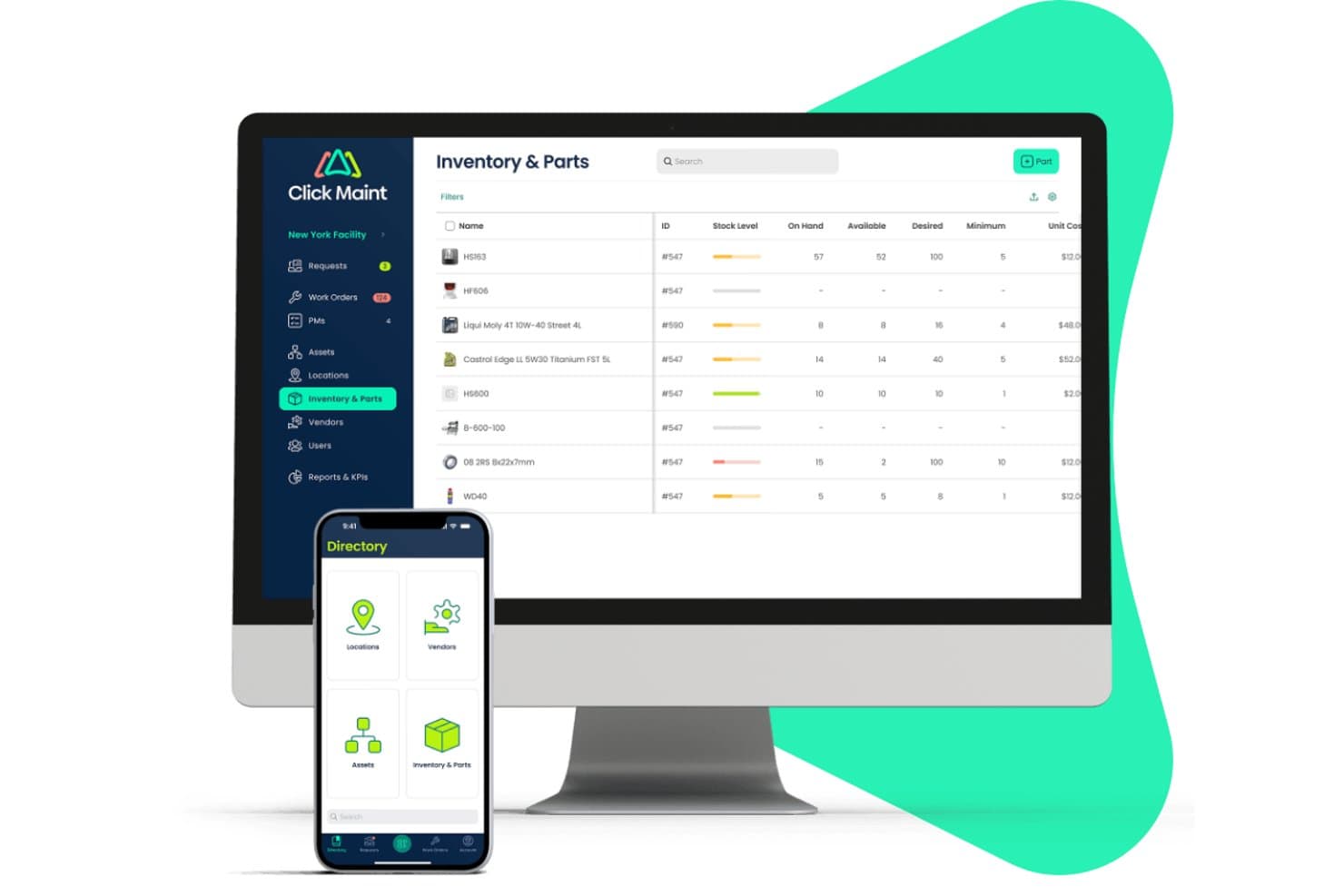
Click Maint CMMS offers a dedicated Inventory & Parts module displaying stock levels, on-hand quantities, availability, and minimum thresholds across parts, accessible on both desktop and mobile. Click Maint CMMS is a maintenance and asset management platform that combines work order management, preventive maintenance scheduling, parts inventory tracking, and multi-location asset monitoring with QR code scanning and mobile access.
Who Is Click Maint CMMS Best For?
It's a strong fit for small to mid-sized operations and facilities teams managing assets and maintenance across multiple physical locations.
Why I Picked Click Maint CMMS
I picked Click Maint CMMS as one of the best because its location hierarchy lets you mirror your actual site structure, assigning assets, work orders, and technicians to specific stores or facilities. I particularly like its QR code scanning, which makes it easy to pull up an asset's full history and status from the floor of any location. Its KPI dashboard tracks maintenance performance per site, so I can spot which location is generating the most unplanned downtime.
Click Maint CMMS Key Features
- Preventive maintenance scheduling: Set up flexible recurring maintenance intervals for assets or equipment.
- Parts and inventory management: Track stock levels, locations, vendors, and order parts using custom units of measurement.
- Mobile app access: Manage work orders, assets, and scan QR codes from any iOS or Android device.
- Audit logs and reporting: Export detailed logs and generate standard maintenance reports for compliance and record-keeping.
Click Maint CMMS Integrations
Click Maint CMMS offers integrations with SAP, Oracle, Microsoft Dynamics, QuickBooks, and Xero, and provides an API for custom integrations.
Pros and Cons
Pros:
- Mobile app supports maintenance and asset tasks
- QR code scanning for on-floor updates
- Real-time asset tracking across multiple sites
Cons:
- Lacks built-in loss prevention tools
- No asset depreciation tracking
Learn more about Click Maint CMMS: Best for facility management
- Free demo available
- Pricing upon request
Visit WebsiteCustomer Rating:4.7/5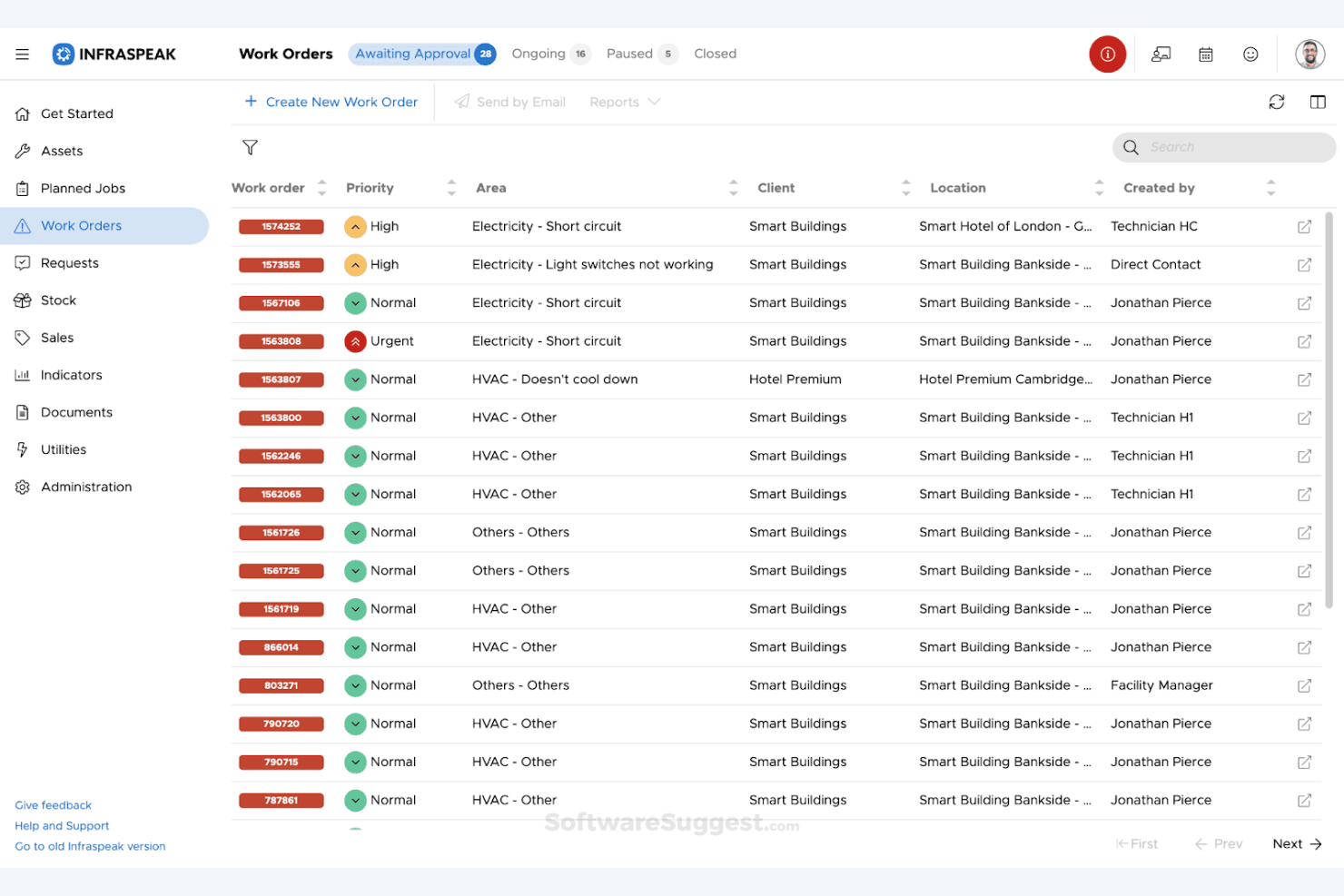
Infraspeak provides work order tracking with priority and status filters. Infraspeak is a facilities management and enterprise asset management platform that combines asset tracking, preventive and reactive maintenance scheduling, inventory management, IoT sensor integration, and multi-location oversight in one system.
Who Is Infraspeak Best For?
Infraspeak is a strong fit for facility and operations managers overseeing multi-site retail environments where equipment uptime, preventive maintenance, and compliance are top priorities.
Why I Picked Infraspeak
I've included Infraspeak in my top picks because it's the strongest facility management option on this list, particularly for retail teams running maintenance-heavy, multi-site operations. I love how its AI engine (Gear™) automatically calculates asset health scores and flags maintenance outliers before equipment like refrigeration units or HVAC systems fail. Its condition-based preventive maintenance scheduling ties directly to individual asset records, so your team isn't guessing when to act.
Infraspeak Key Features
- Infraspeak Network™: Connects your internal maintenance teams, field technicians, and external contractors in a shared workspace for coordinated work order management.
- IoT sensor integration: Monitors real-time conditions of critical equipment like refrigeration units, HVAC systems, and lighting directly through connected sensors.
- Modular Hub™ architecture: Lets you build a custom solution by selecting only the apps, integrations, and add-ons your operation actually needs.
- Compliance document management: Tracks document expiry dates and PPE checklists to keep your sites audit-ready and reduce the risk of regulatory fines.
Infraspeak Integrations
Infraspeak supports 100+ integrations, including SAP, Zoho, Primavera, Xero, QuickBooks, Sage, and Philips, plus API access through its Developer Portal and Zapier.
Pros and Cons
Pros:
- IoT sensor integration for live equipment monitoring
- Real-time multi-site asset and team tracking
- Preventive maintenance scheduling with AI-driven insights
Cons:
- Asset depreciation methods not transparently documented
- No loss prevention or shrinkage analytics
Learn more about Infraspeak:
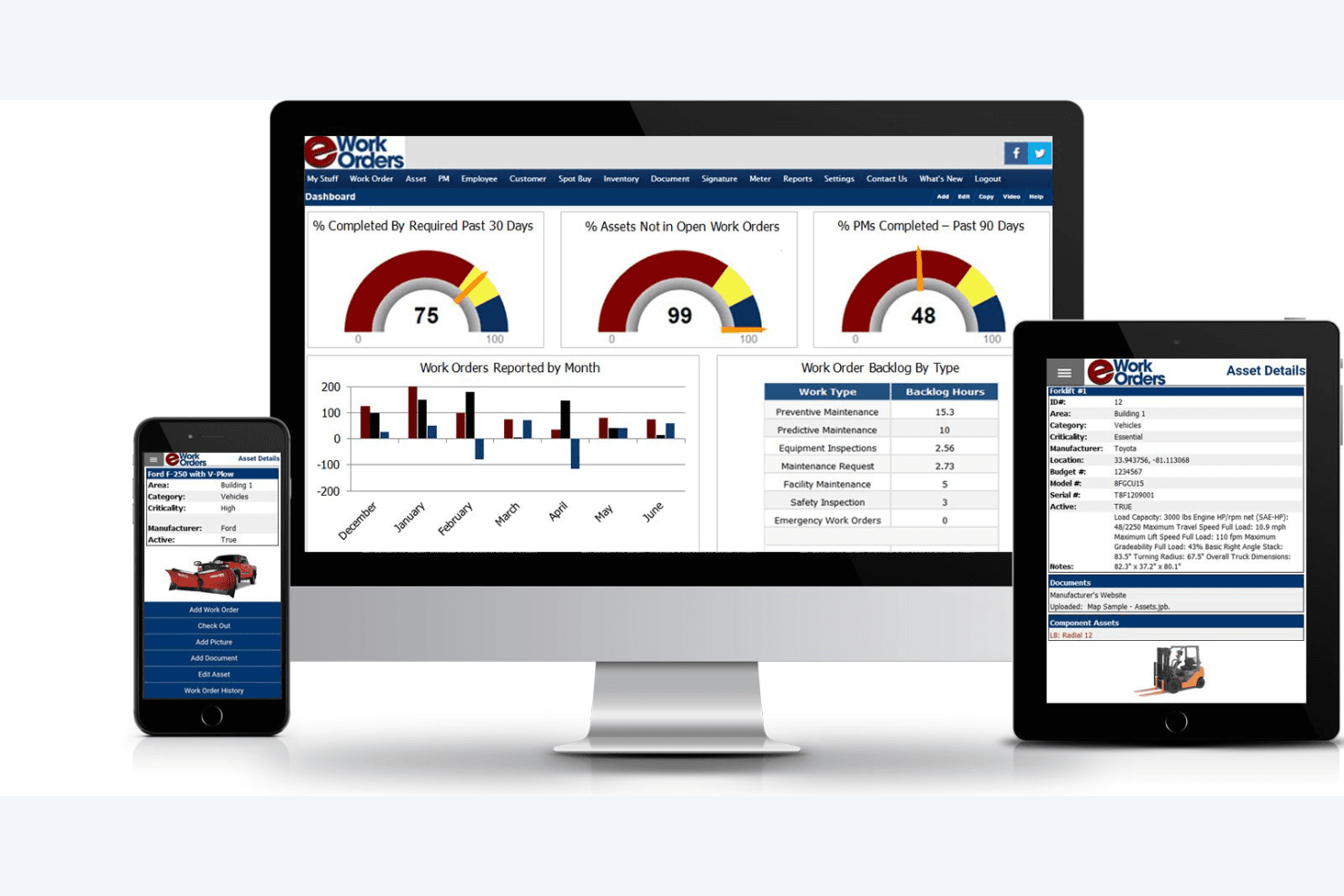
eWorkOrders covers KPIs, work order trends, and asset details across devices. eWorkOrders is a CMMS and asset management platform that covers preventive maintenance scheduling, full asset lifecycle tracking, multi-site location management, barcode scanning, IoT sensor integration, and compliance-focused audit logging.
Who Is eWorkOrders Best For?
eWorkOrders is a strong fit for facilities and maintenance teams in regulated industries that need airtight audit trails and inspection records across multiple sites.
Why I Picked eWorkOrders
I picked eWorkOrders as one of the best because its compliance tracking goes deeper than a simple activity log. Every action gets a permanent, timestamped audit trail, and the platform layers on top of that with inspection scheduling, certificate storage, and digital signature capture. That combination means when a Joint Commission or OSHA audit comes around, the records are already organized and ready to pull. I also like that condition-based PM triggers auto-generate work orders the moment an IoT sensor breach is detected, like a refrigeration unit crossing a temperature threshold.
eWorkOrders Key Features
- Asset lifecycle tracking: Records every asset from procurement through disposal, including purchase cost, depreciation, warranty status, and full service history.
- IoT-triggered work orders: Automatically generates work orders when sensor thresholds are breached, such as a refrigeration unit exceeding a set temperature.
- Preventive maintenance scheduling: Supports time-based, meter-based, and condition-based PM triggers with auto-assigned checklists and technician routing.
- GIS mapping and GPS tracking: Pins assets to an interactive map with real-time location updates for mobile assets across multiple sites.
eWorkOrders Integrations
eWorkOrders supports integrations with AssetWatch, SAP, Oracle, Microsoft Dynamics, QuickBooks, Sage, Power BI, Tableau, and Microsoft Active Directory. Enterprise plans include REST API access for custom integrations, plus Zapier.
Pros and Cons
Pros:
- Preventive maintenance triggers via IoT sensors
- Real-time GPS and GIS asset mapping
- Detailed compliance and audit trail tracking
Cons:
- Outdated, data-heavy interface frustrates users
- No support for RFID asset scanning
Learn more about eWorkOrders: Best for mobile access
- 7-day free trial + free demo available
- From $24/user/month
Visit WebsiteCustomer Rating:4.6/5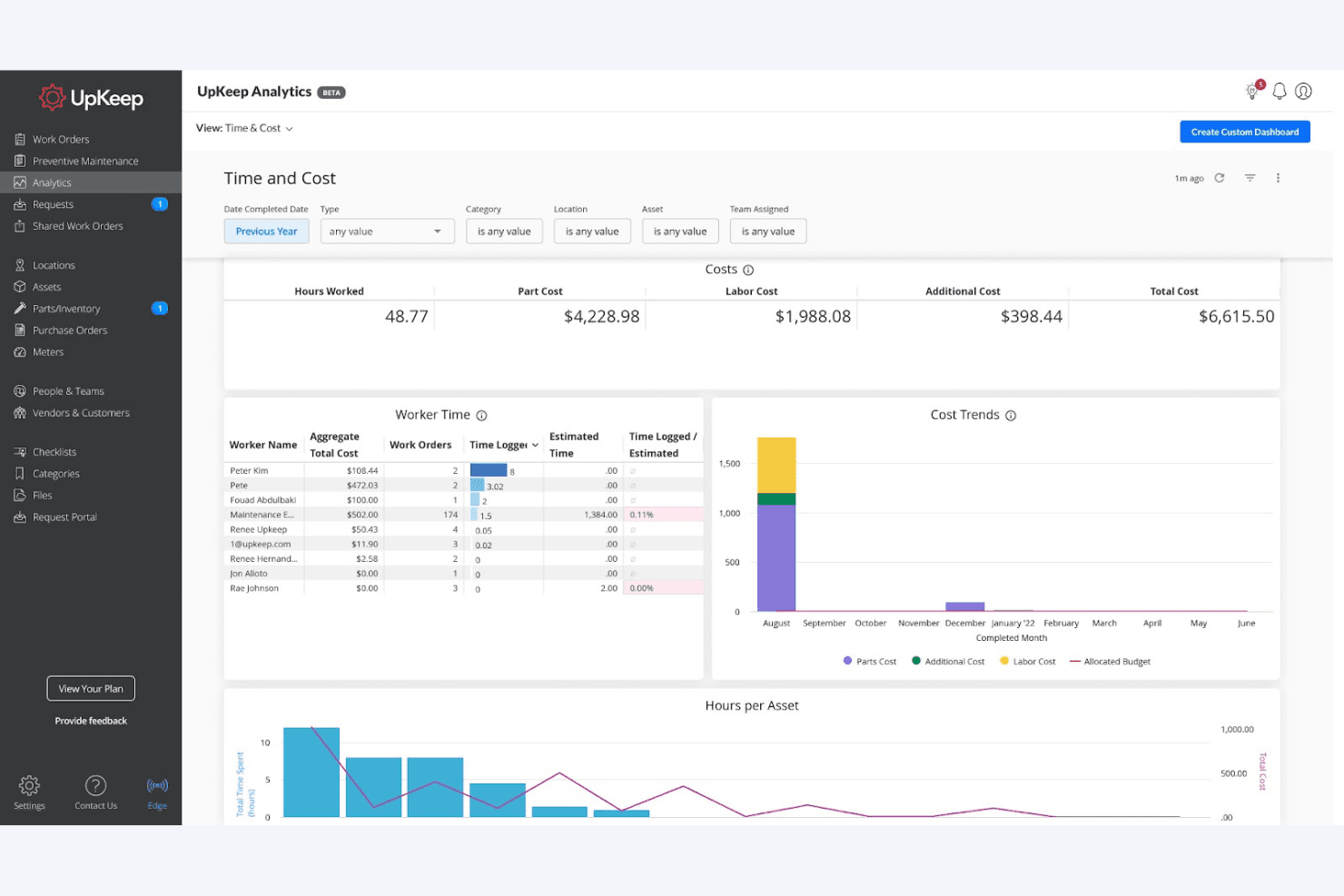
UpKeep tracks labor, parts, and total maintenance costs over time. UpKeep is a mobile-first CMMS and asset management platform that combines asset tracking, preventive maintenance scheduling, work order management, parts inventory, and IoT sensor integration.
Who Is UpKeep Best For?
UpKeep is a strong fit for operations and facilities teams managing equipment across multiple physical locations who need full asset and maintenance visibility from a mobile device.
Why I Picked UpKeep
UpKeep earns its spot on my shortlist because its mobile-first design is genuinely the best I've seen in this category. I love that technicians can scan a QR code on any asset, pull up its full maintenance history, and close out a work order entirely from their phone, even offline. UpKeep Edge sensors add another layer I find compelling: when a refrigeration unit spikes in temperature, the platform automatically opens a work order before anyone notices a problem.
UpKeep Key Features
- Asset lifecycle tracking: Logs every asset event from procurement to disposal, including depreciation calculations, warranty status, and accumulated maintenance costs versus replacement cost thresholds.
- Nova AI natural language queries: Lets you ask plain-language questions about your asset and maintenance data, such as which assets failed most last quarter, without building manual reports.
- Parts and inventory management: Tracks MRO parts quantities, costs, and vendors, with automatic stock count updates when parts are added to work orders via QR scan.
- Custom drag-and-drop dashboards: Builds live reporting views with KPIs like MTTR, MTBF, and PM compliance, with scheduled PDF delivery to stakeholders.
UpKeep Integrations
UpKeep offers documented integrations with SAP, Oracle, NetSuite, Microsoft Dynamics, QuickBooks Online, Xero, Infor, and Coupa. Enterprise plans add a REST API and webhooks for custom integrations, with Zapier also supported.
Pros and Cons
Pros:
- IoT sensors automate preventive maintenance scheduling
- AI-powered work order and asset queries
- Native mobile app with offline QR scanning
Cons:
- Key features only on higher-priced tiers
- No native RFID or POS system support
Learn more about UpKeep: 5Best for predictive maintenance
Fiix
- Free plan + free trial + free demo available
- From $45/user/month
Visit WebsiteCustomer Rating:4.5/5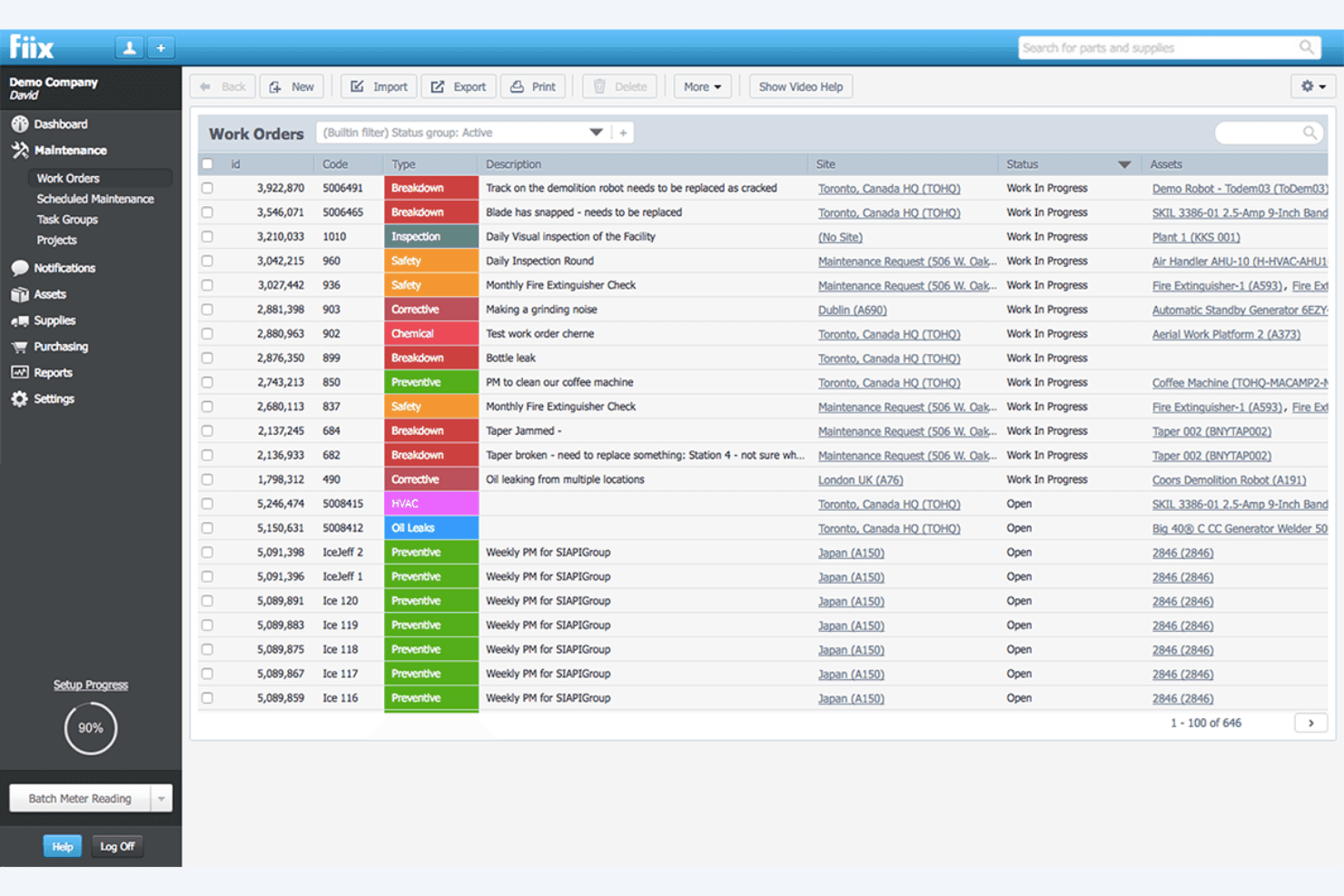
Fiix lets users manage and track all work orders in one view. Fiix is a CMMS and asset management platform that combines preventive maintenance scheduling, AI-powered predictive maintenance, multi-site asset tracking, and parts inventory management.
Who Is Fiix Best For?
Fiix is a strong fit for operations and facilities teams managing high-value equipment like refrigeration, HVAC, or store fixtures across multiple locations.
Why I Picked Fiix
Fiix earns its spot on my shortlist because its AI-driven predictive maintenance capabilities are genuinely ahead of the curve. I'm particularly impressed by Fiix Foresight, which detects asset performance anomalies before failures occur, and Fiix Asset Health, which uses Augury-powered wireless sensors to flag equipment issues with 99.9%+ failure detection accuracy. For retailers managing refrigeration units or HVAC systems across locations, that kind of early warning is hard to overstate.
Fiix Key Features
- Multi-site asset tracking: Manage assets, inventory, and maintenance workflows across unlimited locations from a single dashboard, with roll-up reporting and per-site KPIs.
- QR and barcode scanning: Scan asset and parts labels via iOS or Android to instantly pull up records, log work orders, or update inventory—even without an internet connection.
- Parts inventory management: Track spare parts stock levels, set reorder points, link parts to work orders, and forecast stockouts using AI-driven parts forecasting.
- Custom asset records: Build detailed asset profiles with custom fields, parent-child hierarchies, warranty info, repair history, and file attachments for any equipment type.
Fiix Integrations
Fiix offers integrations with Oracle NetSuite, SAP, Microsoft Dynamics AX, Sage, Infor, Power BI, Tableau, and Looker Studio through its Integration Hub and marketplace. An open API supports custom integrations, with advanced connectivity available on Enterprise.
Pros and Cons
Pros:
- Mobile app enables offline barcode scanning
- Multi-site dashboard supports large retail chains
- Predictive maintenance alerts prevent unexpected failures
Cons:
- No retail POS or shrinkage analytics
- Lacks RFID asset tracking support
Learn more about Fiix: 6Best for RFID tracking
Ezo
- 15-day free trial
- From $63.55/month (billed annually)
Visit WebsiteCustomer Rating:4.6/5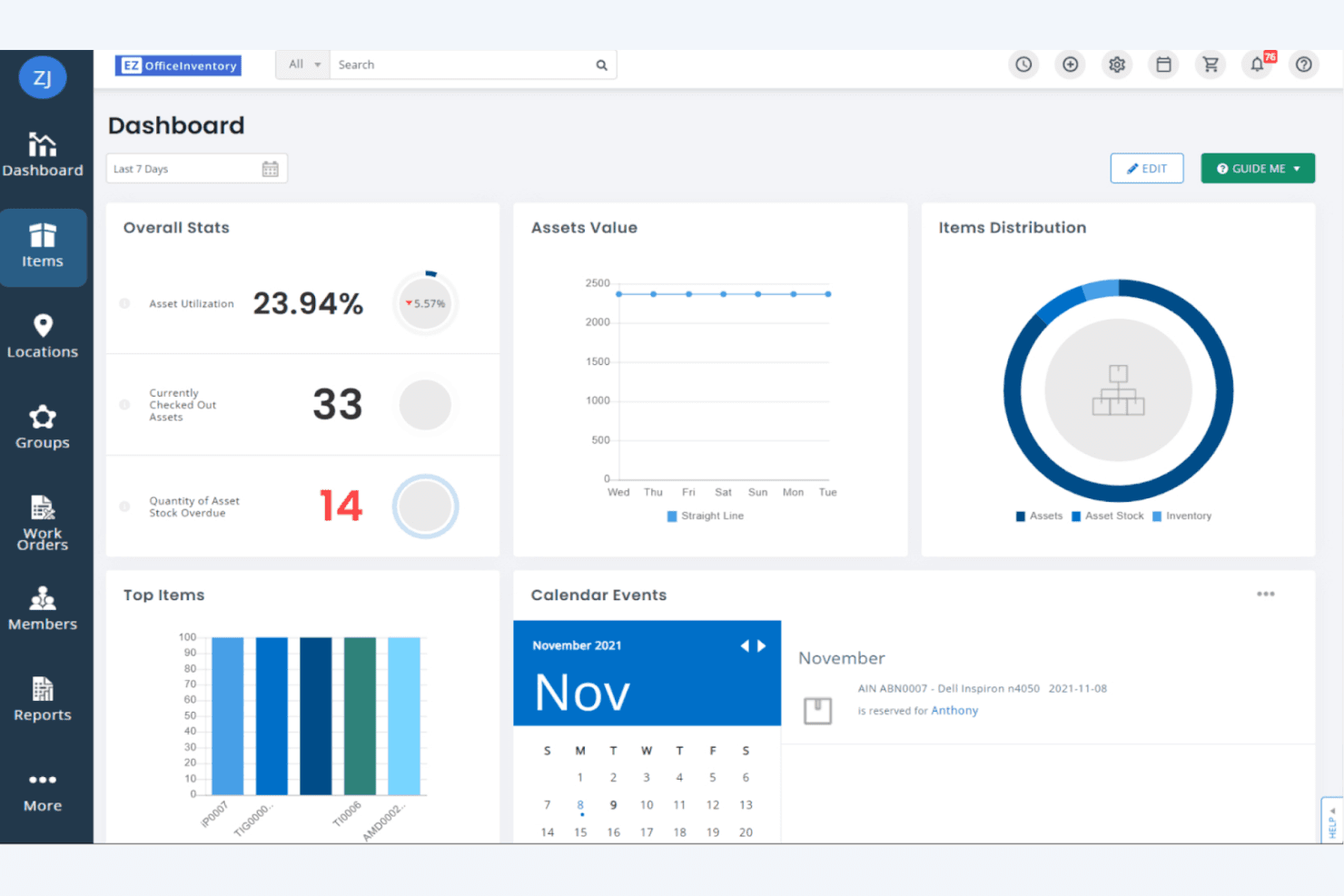
EZOfficeInventory gives users a real-time asset management dashboard. Ezo is an asset inventory management platform that combines barcode, QR, and RFID scanning with multi-location tracking, asset lifecycle management, maintenance scheduling, and audit reporting.
Who Is Ezo Best For?
Ezo is a strong fit for operations and facilities teams managing assets across multiple physical locations who need bulk RFID scanning to run faster, more accurate audits.
Why I Picked Ezo
I picked Ezo as one of the best because its RFID tracking goes well beyond basic scanning. Using an external RFID reader paired with the iOS app, my team can bulk-scan entire rooms of assets in seconds, which makes large-scale inventory audits far less painful. Custody chain records and location-based permissions mean every asset is accountable at every transfer point, across unlimited locations.
Ezo Key Features
- Asset lifecycle management: Tracks each asset from procurement through disposal, including depreciation, warranty alerts, calibration schedules, and vendor records linked directly to individual asset profiles.
- Custody audit workflows: Custodians acknowledge asset ownership via mobile app or desktop, creating a timestamped chain-of-custody record for every transfer and status change.
- Custom report builder: Drag-and-drop report creation tool lets you build, schedule, and auto-export tailored reports covering depreciation, maintenance compliance, and asset utilization.
- Self-service asset request portal: Staff can submit, track, and receive approval for asset requests through a dedicated portal without involving an admin for each transaction.
Ezo Integrations
Ezo offers documented integrations with Zendesk, Jira Service Management, Okta, Azure AD, Dropbox, OneDrive, Samsara, and Trackunit. It also provides a RESTful API for custom connections and supports Zapier.
Pros and Cons
Pros:
- Customizable workflows for multi-site operations
- Unlimited-location tracking with custody transfers
- Bulk RFID scanning for rapid audits
Cons:
- Full maintenance features require paid add-on
- No native POS or ERP integrations
Learn more about Ezo: Best for visual inventory
- Free plan available and 14-day free trial
- From $49/month
Visit WebsiteCustomer Rating:4.4/5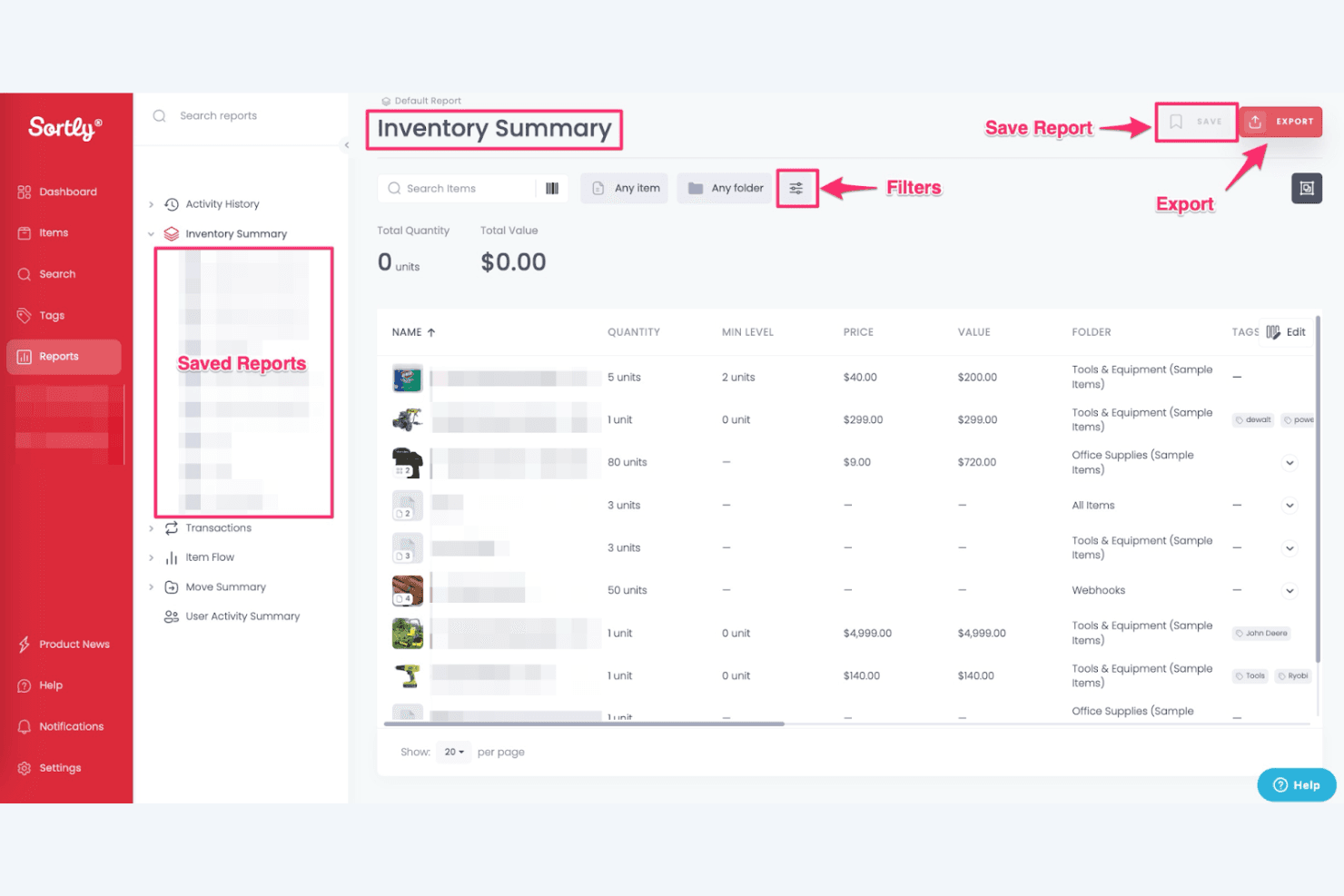
Sortly lets users view, filter, and export inventory summary reports. Sortly is a cloud-based asset inventory management platform that organizes items through a visual, photo-first folder hierarchy with barcode and QR code scanning, multi-location tracking, and mobile-first stock count workflows.
Who Is Sortly Best For?
Sortly is a great fit for small-to-mid-sized retail and operations teams that need a mobile-first, photo-driven way to track assets across multiple locations without enterprise-level complexity.
Why I Picked Sortly
Sortly earns its spot on my shortlist because no other tool in this category makes visual asset identification as central to the workflow. Each item record holds up to 8 high-resolution photos, so my team can confirm asset condition and verify the right item at a glance, without relying on text descriptions alone. I also like how the folder-based location hierarchy mirrors real physical spaces, making it easy to organize assets by store, room, or department and move items between locations with a full audit trail.
Sortly Key Features
- Custom tags: Apply searchable tags to any item to group and filter assets across folders and locations without restructuring your hierarchy.
- Stock count workflows: Create and assign guided physical inventory counts that walk team members through each item step by step.
- Low stock alerts: Set quantity thresholds on any item so you get notified by email or in-app when stock drops below your minimum.
- Check-in/check-out tracking: Log who took an item, when, and from where using a mobile scan, creating a clear accountability trail for every asset movement.
Sortly Integrations
Sortly offers four documented native integrations: QuickBooks Online, Amazon Business US, Slack, and Microsoft Teams. Enterprise plans also include API access and webhooks for custom integrations.
Pros and Cons
Pros:
- Photo-first folder hierarchy mimics real locations
- Mobile app offers offline stock tracking
- Visual inventory with up to 8 photos
Cons:
- Lacks depreciation or asset disposal features
- No RFID or GPS location tracking
Learn more about Sortly: Best for customizable reporting
- 7-day free trial + free demo available
- Pricing upon request
Visit WebsiteCustomer Rating:4.2/5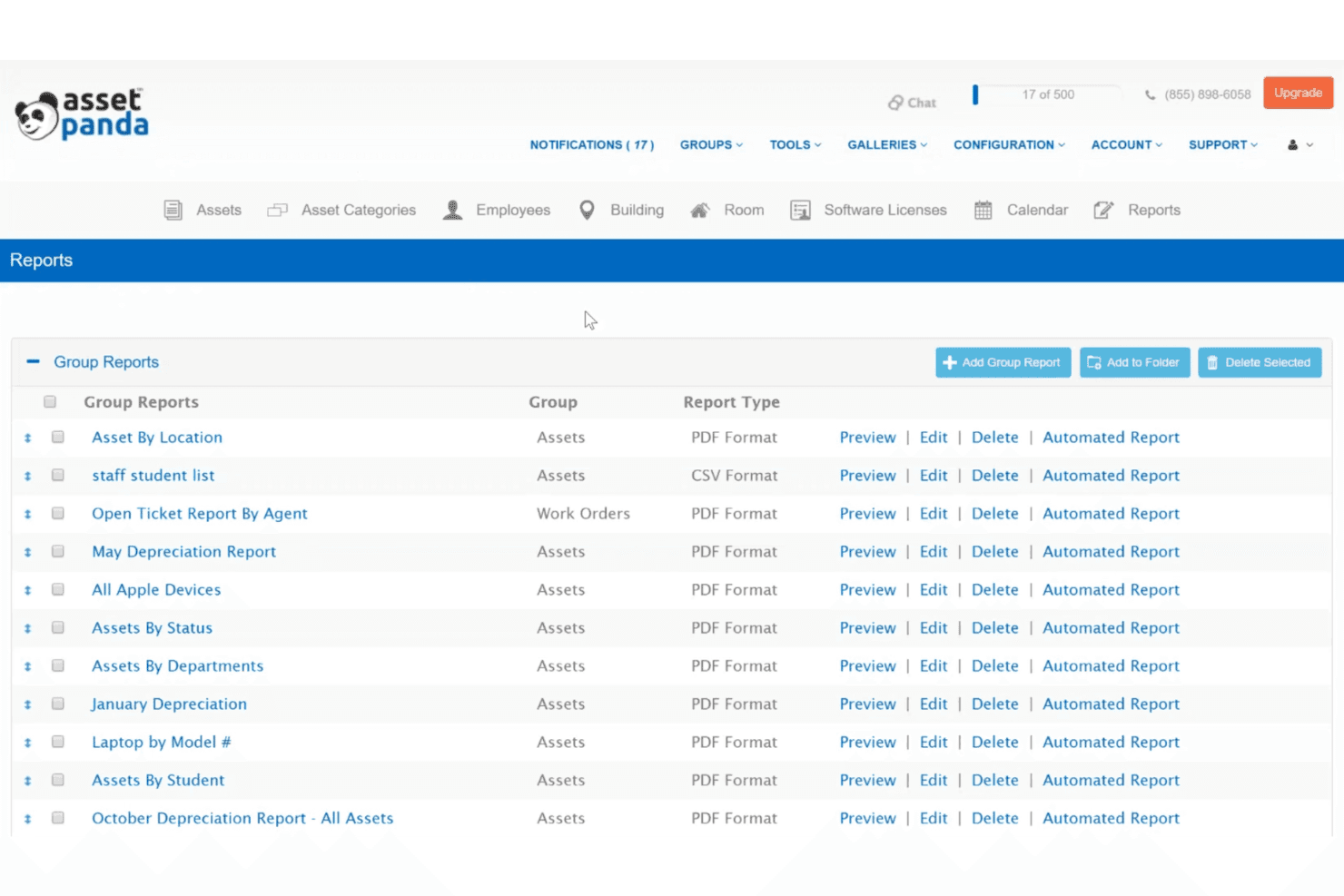
Asset Panda lets users generate and manage custom group reports. Asset Panda is a cloud-based asset inventory management platform that centralizes asset tracking, lifecycle management, barcode scanning, maintenance scheduling, and audit reporting across multiple locations.
Who Is Asset Panda Best For?
Asset Panda is a strong fit for multi-location operations and IT teams that need deep customization in how they track, report on, and audit assets across dozens or hundreds of sites.
Why I Picked Asset Panda
Asset Panda earns its spot on my shortlist because its custom report builder is genuinely one of the most flexible I've seen in this category. I can drag and drop any data field into a report, filter by location, asset type, or lifecycle stage, and schedule automated exports in CSV, XLS, or PDF. The immutable audit trail logs every field change with before/after values and timestamps, which makes compliance documentation far less painful than piecing together records manually.
Asset Panda Key Features
- Multi-location asset assignment: Assign assets to both a fixed location and a specific user simultaneously, supporting parallel tracking across 150+ sites.
- Preventive maintenance scheduling: Set work order triggers by time interval, meter reading, or usage, then assign tasks to technicians with calendar and Gantt chart views.
- Check-in/check-out with signature capture: Record asset custody transfers with electronic signatures, integrated directly with DocuSign for accountability documentation.
- Asset kitting: Bundle multiple assets into a group for batch check-out and bulk updates in a single scan session.
Asset Panda Integrations
Asset Panda offers 30+ native integrations, including QuickBooks Online, Xero, NetSuite, Microsoft Entra ID, Okta, Jamf Pro, Microsoft Intune, ServiceNow, Jira ITSM, and DocuSign. It also supports an open API, webhooks, and Zapier for custom connectivity.
Pros and Cons
Pros:
- Immutable audit trails for compliance
- Unlimited custom fields for asset records
- Drag-and-drop custom report builder
Cons:
- No shrinkage or loss anomaly analytics
- No real-time GPS or RFID tracking
Learn more about Asset Panda: Best for manufacturing needs
- Free demo available
- From $229/month (billed annually)
Visit WebsiteCustomer Rating:4/5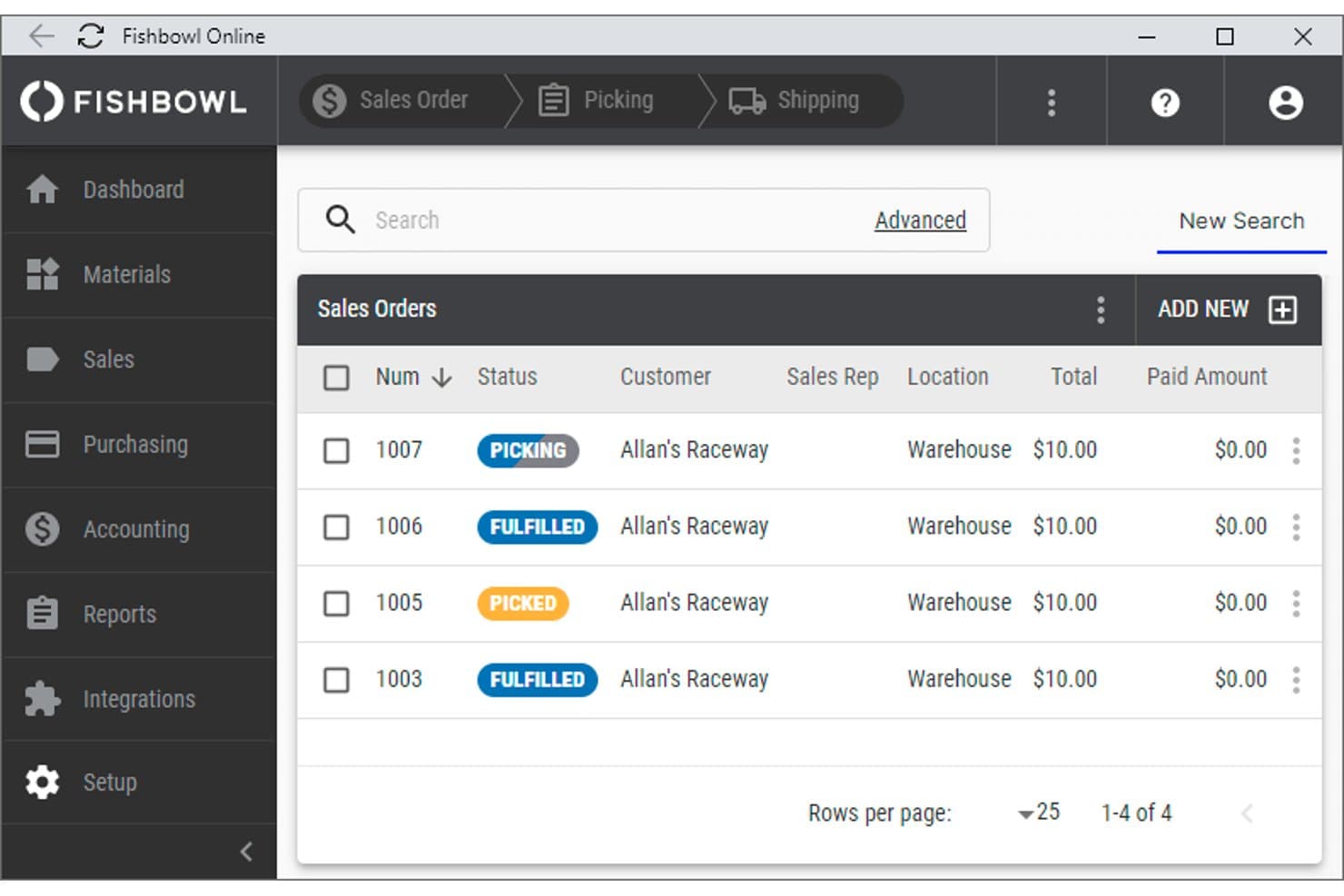
Fishbowl Inventory tracks sales orders with status, customer, and payment details. Fishbowl Inventory is an inventory and asset tracking platform built for manufacturing and distribution operations, offering multi-location management, barcode scanning, serial and lot tracking, and deep QuickBooks and Xero integration.
Who Is Fishbowl Inventory Best For?
Fishbowl Inventory is a strong fit for manufacturers and distributors who need inventory and asset tracking tightly connected to QuickBooks or Xero.
Why I Picked Fishbowl Inventory
Fishbowl Inventory earns its spot on my shortlist because it's purpose-built for manufacturers who need asset and inventory tracking to work as one system. I like that its Parts & Asset Tracking module handles serial number tracking, lot traceability, and full stock history across unlimited warehouses in real time. The Fishbowl GO mobile app makes barcode scanning on the warehouse floor genuinely fast, with hardware support for Zebra and Motorola scanners built in.
Fishbowl Inventory Key Features
- Lot and serial number traceability: Tracks individual items through their full history using lot numbers, serial numbers, and expiration dates across all locations.
- AI-powered demand forecasting: Fishbowl AI Insights™ analyzes inventory data to flag shortages, automate purchase orders, and generate replenishment recommendations.
- 200+ report types: Generates exportable reports in PDF, CSV, or email format, with GAAP-compliant audit trails available on higher-tier plans.
- 3PL inventory tracking: Monitors inventory held at third-party logistics locations, tracking ownership and movement across remote warehouse sites.
Fishbowl Inventory Integrations
Fishbowl Inventory integrates with QuickBooks, Xero, Square, Shopify, Amazon, eBay, WooCommerce, Magento, BigCommerce, and Salesforce. Its Advanced plans include an open API for custom integrations.
Pros and Cons
Pros:
- Native mobile app for barcode scanning
- Deep QuickBooks and Xero financial integration
- Real-time stock tracking across unlimited locations
Cons:
- Asset depreciation tied to accounting software
- No preventive maintenance scheduling module
Learn more about Fishbowl Inventory:
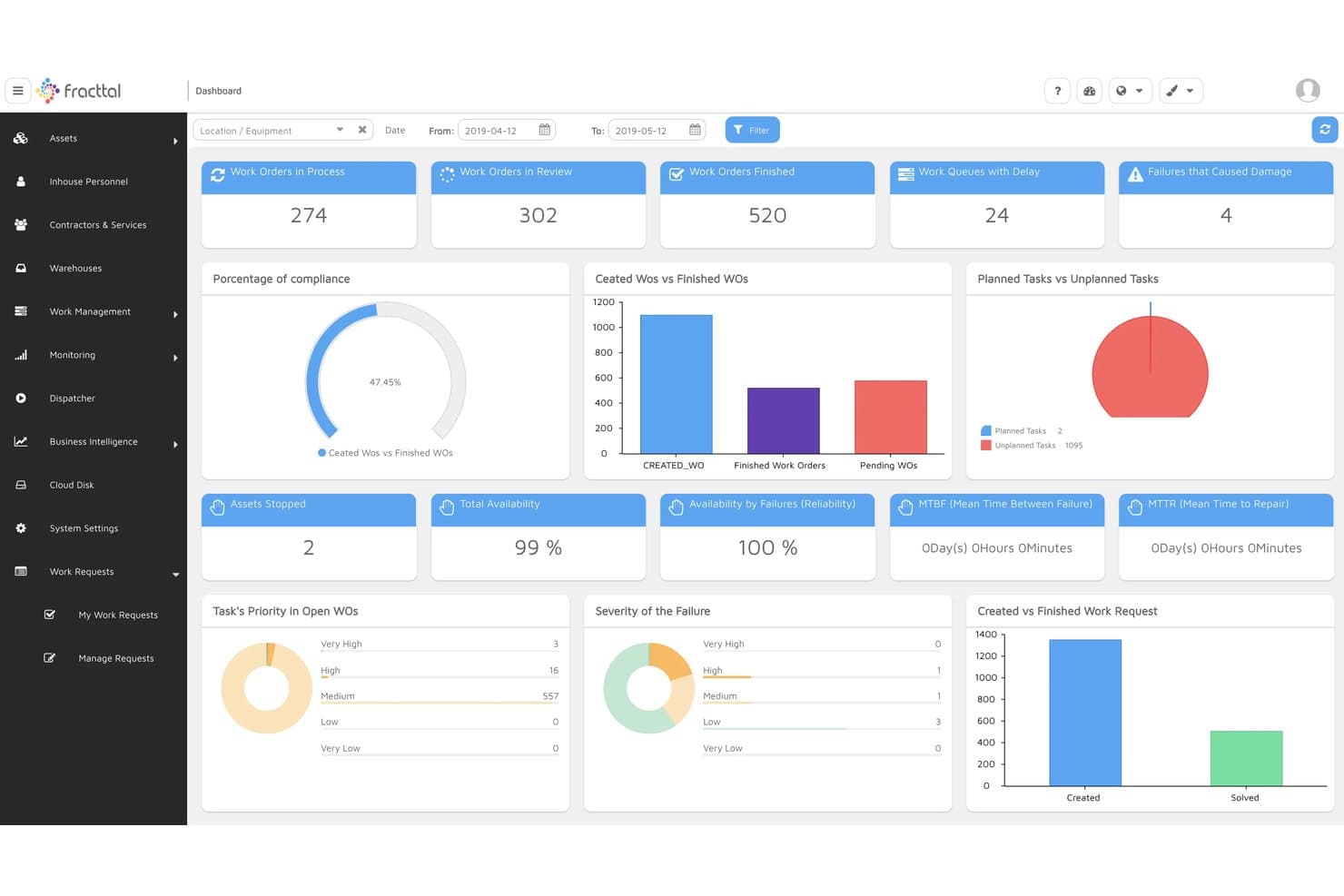
Fracttal provides KPIs for work orders, asset availability, and maintenance performance. Fracttal is a CMMS and EAM platform that combines asset tracking, IoT sensor monitoring, preventive and predictive maintenance scheduling, and multi-location inventory management for physical equipment.
Who Is Fracttal Best For?
Fracttal is a strong fit for operations and facilities teams managing equipment-heavy environments where IoT sensor monitoring and preventive maintenance are central to daily work.
Why I Picked Fracttal
I picked Fracttal because its native IoT capabilities go further than what most asset management tools offer out of the box. Fracttal Sense connects directly to sensors monitoring temperature, vibration, and energy consumption, then automatically triggers work orders when thresholds are breached—something I find invaluable for managing refrigeration units or HVAC systems across multiple sites. The predictive maintenance layer uses AI to flag potential failures before they happen, so you're responding to data rather than breakdowns.
Fracttal Key Features
- Hierarchical asset tree view: Organizes assets, components, and subcomponents in a customizable structure so you can see how equipment relates across your locations.
- QR code scanning via mobile app: Field technicians can scan asset tags on iOS or Android to pull up asset records, log data, and close work orders on the spot.
- Automated spare parts reordering: Sets reorder points for maintenance parts inventory across multiple locations and triggers restocking alerts when stock dips below threshold.
- Vendor and warranty management: Centralizes service contracts, warranty records, and third-party access so your team has the full supplier picture alongside each asset.
Fracttal Integrations
Fracttal offers 49+ documented integrations, including SAP, Oracle, Microsoft Dynamics, Microsoft Power BI, Microsoft SQL Server, Google Sheets, and Salesforce Service Cloud. It supports MQTT, OPC, PLC, and SCADA connectivity, plus an open REST API for custom integrations.
Pros and Cons
Pros:
- Predictive AI maintenance reduces asset downtime
- Mobile app offers offline QR scanning
- IoT sensor alerts for real-time monitoring
Cons:
- Lacks depreciation scheduling without ERP integration
- No native shrinkage or loss analytics
Learn more about Fracttal:
Alte programe software pentru gestionarea inventarului de active
Iată câteva opțiuni suplimentare de software pentru gestionarea inventarului de active care nu au ajuns pe lista mea scurtă, dar merită totuși verificate:
- 11AssetTigerBest for free access
- 12Asset InfinityBest for cloud-based storage
- 13FlowtracBest for barcode scanning
- 14FreshserviceBest for IT service management
- 15LansweeperBest for network discovery
- 16LimbleBest for maintenance teams
- 17GLPIBest for open-source customization
- 18InvGate Asset ManagementBest for user-friendly interface
- 19SyncroBest for managed service providers
- 20WorkwizeBest for remote work solutions
- 21PreyBest for device recovery
- 22SetylBest for subscription management
- 23IBM MaximoBest for enterprise asset management
- 24GoCodesBest for QR code tracking
- 25ServiceNow ITAMBest for workflow automation
- 26ManageEngine Asset ExplorerBest for IT asset management
How I Evaluate Asset Inventory Management Software
I evaluate these tools in two layers: core capabilities every platform must have—like asset tagging and multi-store audit tools—and differentiators that matter most to retail teams.
Core Functionality (Table Stakes For This List)
When I'm selecting tools for my list, I rank each one on a scale from 0 (does not offer the functionality) to 5 (excels in this area) for each core functionality listed below. Then, I calculate the tool's total score into a percentage. Each tool needs to achieve a minimum total score of 65% to be considered for inclusion.
- Asset Tagging & Identification: I check whether a platform supports barcode, QR, or RFID scanning natively or only through third-party apps—especially for tagging fixtures and POS hardware across stores.
- Centralized Asset Database: Every tool I evaluate needs a unified asset register that tracks location, condition, and assignment across multiple retail sites in real time.
- Check-In/Check-Out Tracking: I look for full transfer logging when assets move between stores, employees, or warehouses—like reassigning a handheld scanner from one location to another.
- Audit & Cycle Count Tools: Scheduled audits and mobile cycle counts matter here, particularly for loss prevention teams reconciling what's on the floor versus what's in the system.
- Depreciation & Lifecycle Management: I evaluate how each tool handles depreciation methods, warranty expiration alerts, and end-of-life disposal tracking for equipment like self-checkout kiosks.
- Reporting & Analytics: The reporting engine needs to support filtered views by location, asset type, or status—useful for generating compliance reports or reviewing utilization trends.
Once I have a list of tools that meet this criteria, I consider what sets each platform apart.
Differentiating Factors (What Sets Vendors Apart)
Here's how I compare and contrast different vendors:
Standout Features
Mobile app quality matters here—I look for apps that let store associates scan assets and run cycle counts from the sales floor. Offline mode pairs with this, since backrooms and warehouses often lack reliable connectivity, and missed scans during an audit defeat the purpose. Maintenance workflow automation is another differentiator, because teams managing refrigeration units or POS terminals benefit from automated work orders instead of manual ticketing. I also check for vendor and contract management, which gives equipment managers one place to track lease terms and warranty renewals.
Beyond Features
Integrations with your retail tech stack are a big deal—I check whether a platform connects to POS systems and accounting tools like QuickBooks or NetSuite so depreciation data flows into your general ledger without manual entry. Compliance and audit readiness also factor in, especially for loss prevention teams who need immutable audit trails that hold up with external auditors. Total cost of ownership deserves attention too, since hardware like RFID readers and label printers can add up fast on top of per-asset or per-location licensing fees.
Cum să alegi software-ul de gestionare a inventarului de active
Este ușor să te pierzi într-o avalanșă de funcții. În schimb, concentrează-te pe ceea ce produce cu adevărat rezultate pentru afacerea ta.
Folosește această listă de verificare pentru a trece dincolo de zgomotul informațional și a găsi o platformă care funcționează pentru fluxurile tale de lucru din lumea reală.
| Factor | Ce trebuie să urmărești |
|---|---|
| FactorScalabilitate | Ce trebuie să urmăreștiNu cumpăra doar pentru ziua de azi—planifică pentru creștere. Alege un software care poate gestiona mai multe active, utilizatori și locații pe măsură ce afacerea ta se extinde. Puncte bonus pentru niveluri flexibile de preț. |
| FactorIntegrări | Ce trebuie să urmăreștiAsigură-te că funcționează bine cu ecosistemul tău. Caută integrări native cu ERP-ul, instrumentele de contabilitate, serviciul de asistență sau sistemele de gestionare a depozitelor pentru a menține datele în circulație fără efort suplimentar. |
| FactorPosibilități de personalizare | Ce trebuie să urmăreștiO soluție universală nu se potrivește nimănui. Cele mai bune instrumente îți permit să personalizezi câmpurile, rapoartele, alertele și tablourile de bord, astfel încât platforma să funcționeze așa cum lucrează echipa ta—nu invers. |
| FactorUșurință în utilizare | Ce trebuie să urmăreștiNu ar trebui să ai nevoie de un manual pentru a înregistra o solicitare de mentenanță. Caută interfețe clare, cât mai puține clicuri și fluxuri de lucru care au sens imediat. |
| FactorÎncadrare în buget | Ce trebuie să urmăreștiCorelează funcțiile cu bugetul tău, nu invers. Evită platformele care percep taxe suplimentare pentru lucruri precum utilizatori, scanări sau acces API. |
| FactorSecuritate | Ce trebuie să urmăreștiStochezi date sensibile despre active—tratează-le ca atare. Caută criptare, controale de acces pentru utilizatori și actualizări de securitate regulate. Certificările de conformitate reprezintă un avantaj. |
| FactorAcces mobil | Ce trebuie să urmăreștiDacă echipa ta lucrează în mai multe depozite, pe șantiere sau în birouri la distanță, funcționalitatea mobilă este obligatorie. Verifică dacă există aplicații mobile complete—nu doar versiuni web greoaie. |
| FactorCapacități de raportare | Ce trebuie să urmăreștiDatele sunt utile doar dacă le poți folosi. Caută instrumente de raportare care îți permit să segmentezi, să analizezi și să exporți indicatorii care te interesează, de la tendințele de utilizare la deprecierea activelor. |
Tendințe în software-ul de gestionare a inventarului de active
Gestionarea activelor nu mai înseamnă doar foi de calcul și registre de predare-primire. De la automatizare la sustenabilitate, iată ce schimbă regulile jocului în acest an—și ce trebuie să cauți în următoarea ta platformă de gestionare a activelor.
- Inteligența artificială și învățarea automată contribuie la luarea unor decizii mai inteligente. Sistemele de gestionare a activelor utilizează inteligența artificială pentru a analiza tiparele de utilizare, a prevedea defecțiunile și a recomanda fluxuri de lucru — ajutând echipele să reducă costurile și perioadele de nefuncționare fără ezitări.
- IoT oferă vizibilitate în timp real. Senzorii conectați transmit acum date continue despre active către tablourile de bord. Acest lucru permite urmărirea în timp real a activelor fizice, precum echipamentele hardware, vehiculele și dispozitivele mobile, îmbunătățind gestionarea ciclului de viață și programarea lucrărilor de mentenanță.
- Indicatorii de sustenabilitate devin indispensabili. Companiile depășesc sfera urmăririi activelor și se concentrează pe eficiența energetică și impactul asupra mediului. Instrumentele moderne ajută acum la urmărirea consumului de resurse și a deprecierii echipamentelor pentru a sprijini raportarea ESG.
- Gestionarea activelor IT (ITAM) și SAM se apropie. Organizațiile renunță la sistemele izolate în favoarea platformelor complete, care urmăresc atât activele hardware, cât și licențele software. Acest lucru înseamnă o vizibilitate mai bună asupra ciclului de viață al activelor și decizii mai inteligente privind achizițiile.
- Securitatea cibernetică nu mai este opțională. Deoarece informațiile sensibile despre active circulă prin cloud, soluțiile de gestionare a activelor includ acum criptare, controale de acces pentru utilizatori și piste de audit pentru a vă proteja datele și a asigura conformitatea.
- Platformele concepute în primul rând pentru dispozitivele mobile conduc schimbarea. Fie că lucrați de pe iOS, Android sau de pe un scanner robust pentru depozite, o aplicație mobilă cu funcționalitate completă este acum esențială. Echipele au nevoie de acces la informații despre active, notificări și ordine de lucru de oriunde.
- API-urile și integrările sunt așteptate, nu opționale. Conexiunile fără întreruperi cu instrumente precum Microsoft Dynamics, ServiceNow și bazele de date pentru gestionarea configurațiilor (CMDB) ajută echipele să simplifice fluxurile de lucru și să centralizeze datele despre active în întreaga organizație.
Ce este software-ul de gestionare a inventarului de active?
Software-ul de gestionare a inventarului de active vă ajută să țineți evidența obiectelor fizice — de la laptopurile din birou până la stivuitoarele din depozit.
Acesta înregistrează unde se află activele, cine le utilizează, când au nevoie de mentenanță și de cât timp sunt folosite. Este un centru unic pentru gestionarea ciclului de viață al tuturor bunurilor deținute de companie.
Aceste instrumente sunt concepute pentru managerii operaționali, echipele IT, coordonatorii facilităților și pentru oricine s-a săturat să caute prin foi de calcul sau să se întrebe unde a dispărut imprimanta de etichete.
Multe platforme oferă acum aplicații mobile, instrumente de mentenanță predictivă, integrări IoT și rapoarte potrivite pentru audit, pentru a vă ajuta să preveniți atât defecțiunile, cât și problemele legate de conformitate.
Fie că gestionați echipamente IT, utilaje industriale sau orice altceva, software-ul de inventariere a activelor vă ajută să nu mai faceți presupuneri și să începeți să gestionați pe baza datelor.
Funcțiile software-ului de gestionare a inventarului de active
Dacă un instrument nu poate îndeplini cerințele de bază, nu merită inclus pe listă. Dincolo de funcționalitatea de bază, cele mai bune platforme de gestionare a activelor oferă flexibilitatea, automatizarea și integrările de care au nevoie echipele moderne.
Iată funcțiile care aduc cu adevărat rezultate:
- Urmărirea activelor. Știți ce dețineți, unde se află și cine utilizează activele — fie că este vorba despre laptopuri, stivuitoare sau dispozitive mobile.
- Compatibilitate cu coduri de bare și RFID. Scanați activele în câteva secunde cu funcții integrate pentru coduri de bare și RFID, pentru actualizări rapide și fără erori în toate locațiile.
- Tablouri de bord și rapoarte personalizabile. Creați vizualizări care scot în evidență ceea ce contează: starea ciclului de viață al activelor, deprecierea, informațiile despre garanții și multe altele.
- Acces prin aplicație mobilă. Gestionați activele în timp real de pe iOS sau Android — ideal pentru echipele de teren, depozite și oricine nu lucrează permanent la birou.
- Gestionarea mentenanței și a ordinelor de lucru. Programați lucrările de mentenanță preventivă, atribuiți ordine de lucru și urmăriți istoricul intervențiilor pentru a menține totul în funcțiune.
- Integrări și API-uri. Sincronizați software-ul de urmărire a activelor cu instrumente precum Microsoft, ServiceNow sau platforma de asistență pentru a simplifica fluxurile de lucru și schimbul de date.
- Funcții pentru conformitate și audit. Generați piste de audit, urmăriți garanțiile și păstrați documentația pentru a răspunde cerințelor autorităților de reglementare și ale echipelor de achiziții.
- Câmpuri personalizate și clasificare flexibilă. Adaptați sistemul la fluxurile de lucru — nu invers — cu câmpuri care corespund tipurilor de active și cazurilor dumneavoastră de utilizare.
- Securitate și controale de acces. Configurați rolurile utilizatorilor, restricționați accesul la datele sensibile despre active și asigurați echipei IT vizibilitatea necesară fără a compromite securitatea.
- Accesibilitate bazată pe cloud. Accesați sistemul de gestionare a activelor de oriunde și oricând, fără limitările soluțiilor instalate local.
Beneficiile software-ului de gestionare a inventarului de active
Gestionarea manuală a activelor este calea sigură către pierderi de timp, echipamente lipsă și deprecieri inexplicabile. Iată ce câștigați de fapt atunci când treceți la o soluție modernă de gestionare a activelor:
- Mai puține bătăi de cap, mai multă automatizare. Spuneți adio foilor de calcul și urmăririi manuale. Fluxurile de lucru automatizate reduc erorile umane și eliberează echipa pentru a se concentra pe activități cu impact mai mare.
- Decizii mai inteligente. Cu date în timp real despre active și rapoarte detaliate, puteți lua decizii informate privind modernizările, achizițiile și planificarea ciclului de viață — fără presupuneri.
- Responsabilitate mai clară. Aflați cine a împrumutat un anumit echipament, când trebuie returnat și dacă a fost reparat. Această claritate reduce pierderile de active și simplifică auditurile.
- Durată de viață mai lungă a activelor. Instrumentele de întreținere preventivă și urmărirea garanțiilor contribuie la prelungirea duratei de viață a echipamentelor și la reducerea perioadelor costisitoare de nefuncționare.
- Conformitate îmbunătățită. Fie că este vorba despre gestionarea activelor IT (ITAM) sau despre audituri hardware, documentația integrată și funcțiile de gestionare a configurațiilor vă mențin pregătiți pentru audit.
- Acces de oriunde. Platformele bazate pe cloud și aplicațiile mobile oferă echipei dumneavoastră vizibilitate și control deplin — fie că se află la birou, în depozit sau în deplasare.
- Integrare mai strânsă cu ecosistemul dumneavoastră. Cu opțiuni API robuste și integrări native, instrumentul de gestionare a activelor se poate conecta la centre de servicii, instrumente de urmărire a inventarului, sisteme de achiziții și multe altele.
Costurile și prețurile software-ului de gestionare a inventarului de active
Prețurile software-ului pentru inventarul de active pot varia foarte mult — mai ales după ce luați în considerare numărul de utilizatori, funcțiile și dacă gestionați câteva laptopuri sau mii de active hardware în mai multe locații.
Pentru a vă planifica mai bine bugetul, iată o privire rapidă asupra elementelor incluse de obicei în planuri și a aspectelor la care trebuie să fiți atenți.
| Tipul planului | Preț mediu | Funcții comune | Ideal pentru |
|---|---|---|---|
| Tipul planuluiPlan gratuit | Preț mediu$0 | Funcții comuneUrmărirea de bază a activelor, număr limitat de utilizatori, tablouri de bord simple și raportare de bază | Ideal pentruStartup-uri sau echipe mici cu nevoi reduse de urmărire |
| Tipul planuluiPlan personal | Preț mediu$5–$25/utilizator/lună | Funcții comuneEtichetarea activelor, acces la aplicația mobilă, câmpuri personalizate, alerte de întreținere | Ideal pentruDepartamente individuale sau echipe IT |
| Tipul planuluiPlan pentru companii | Preț mediu$25–$50/utilizator/lună | Funcții comuneCompatibilitate cu coduri de bare/RFID, acces bazat pe cloud, rapoarte detaliate, notificări în timp real | Ideal pentruIMM-uri cu inventare de active în creștere |
| Tipul planuluiPlan pentru întreprinderi | Preț mediu$50–$100+/utilizator/lună | Funcții comuneAcces complet la API, automatizarea fluxurilor de lucru, integrări cu instrumente ERP/ITAM, controale de securitate | Ideal pentruOrganizații mari cu ecosisteme complexe de active |
Aspecte suplimentare privind costurile
- Prețuri per activ sau per scanare. Unele instrumente percep tarife în funcție de numărul de active urmărite sau de frecvența scanării acestora — fiți atenți la taxele bazate pe utilizare.
- Suplimente și funcții premium. Raportarea avansată, integrările API și modulele ITAM este posibil să nu fie incluse în prețul de bază.
- Costurile implementării. Platformele pentru întreprinderi includ adesea taxe de inițiere sau de configurare, în special pentru implementările locale.
- Nivelurile de asistență. Asistența live 24/7 sau managerii dedicați pentru succesul clienților pot costa suplimentar — verificați ce este inclus efectiv în planul dumneavoastră.
Software pentru gestionarea inventarului de active – întrebări frecvente
Mai ai câteva întrebări? Iată-le pe cele care contează cu adevărat acum că știi ce pot face aceste instrumente și ce să cauți.
Care este diferența dintre software-ul pentru inventarul de active și gestionarea activelor IT (ITAM)?
ITAM este o formă specifică de gestionare a activelor, axată pe urmărirea activelor digitale, precum laptopurile, licențele software și dispozitivele mobile. Software-ul pentru inventarul de active are un domeniu mai larg – poate urmări totul, de la unelte la camioane. Unele platforme le gestionează pe ambele, dar asigură-te că cea aleasă are funcții potrivite pentru activele și fluxurile tale de lucru.
Pot instrumentele pentru inventarul de active să ajute la auditurile de conformitate?
Absolut. Cele mai bune sisteme de gestionare a activelor înregistrează istoricul utilizării, informațiile despre garanție, evidențele de service și predarea activelor către utilizatori – toate acestea fac auditurile mai puțin dificile. Dacă activezi într-o industrie reglementată, caută instrumente cu funcții solide de raportare, acces bazat pe roluri și jurnale pregătite pentru audit.
Cât de personalizabile sunt, de fapt, instrumentele de gestionare a activelor?
Unele instrumente îți oferă control total – câmpuri personalizate, rapoarte personalizate, automatizarea fluxurilor de lucru și chiar panouri de control personalizate. Altele? Nu prea mult. Dacă nevoile tale de urmărire a activelor sunt unice (și, să fim sinceri, de obicei sunt), asigură-te că poți adapta platforma la procesele tale fără să creezi soluții improvizate pentru a compensa limitările.
Am nevoie de un administrator dedicat pentru a rula software-ul de gestionare a inventarului de active?
Nu întotdeauna, dar complexitatea crește odată cu volumul de utilizare. Dacă gestionezi mii de active fizice sau integrezi fluxuri de lucru API între departamente, s-ar putea să ai nevoie de cineva care să își asume responsabilitatea pentru acest sistem. Echipele mai mici se pot ocupa, de obicei, intern de aceste activități – atât timp cât instrumentul este ușor de utilizat și beneficiază de suport bun.
Ce fac dacă am deja date despre active în foi de calcul?
Majoritatea platformelor acceptă importuri CSV pentru a face migrarea mai puțin dificilă. Unele oferă chiar asistenți de configurare sau asistență personalizată la implementare, care te ajută să extragi datele existente despre active din Excel și să le transferi într-un sistem creat cu adevărat pentru urmărire. Doar nu te aștepta să fie magie – date greșite introduse înseamnă rezultate greșite.
Este mai bine să aleg o soluție în cloud sau una instalată local pentru gestionarea activelor?
Dacă nu ai cerințe stricte de securitate sau acces la internet zero, alege o soluție în cloud. Vei beneficia de actualizări mai rapide, acces mobil și mai puține bătăi de cap pentru departamentul IT. Soluțiile instalate local își au în continuare locul, dar sunt, de obicei, excesive pentru toate organizațiile, cu excepția celor mai mari și mai strict securizate.