

A verdade é esta: o melhor sistema de POS para a sua pequena empresa é aquele que não lhe dificulta o trabalho e lhe permite vender — de forma rápida, fiável e sem esgotar a sua conta bancária.
Depois de mais de uma década a trabalhar na gestão de operações de retalho — a reparar terminais de POS a meio da azáfama do almoço, a formar novos colaboradores à última hora e, sim, a regatear com senhorios — vi o que funciona e o que não passa de uma embalagem apelativa.
Esta lista não é sobre entusiasmo exagerado; é sobre as soluções de POS que realmente fazem a diferença para as pequenas empresas, agora mesmo. Vamos pô-lo a funcionar com ferramentas que justificam o seu custo.
Why Trust Our Software Recommendations
6,700+
Reviews
20
Industry experts
16+
Evaluation factors
14
Years
Our team has been testing and reviewing software since 2012. As retail leaders ourselves, we know how difficult—and important—it is to choose the right software.
For this guide, we evaluated tools using hands-on testing and independent research, scoring tools using our selection criteria.
Our reviews reflect our independent judgment—not a sales pitch.
Tabela comparativa de software de POS para pequenas empresas
Esta tabela comparativa resume os detalhes de preços das minhas principais escolhas de software de POS para pequenas empresas:
| Tool | Best For | Trial Info | Price | ||
|---|---|---|---|---|---|
| 1 | Best with AI-powered workflows for supply stores | Free demo available | From $499/month (billed annually) | Website | |
| 2 | Best for integrating payment management with analytics | Free demo available | From $99/month | Website | |
| 3 | Best for advanced inventory tracking | Free trial + free demo available | From $59/month | Website | |
| 4 | Best for ecommerce, mobile, and physical payment terminals | Free demo available | Pricing upon request | Website | |
| 5 | Best omnichannel POS system | 3-day free trial | From $89/month | Website | |
| 6 | Best for iPad-driven restaurant POS systems | Free demo available | Pricing upon request | Website | |
| 7 | Best for scalability | Pricing upon request | Website | ||
| 8 | Best for small businesses saving on fees | Free demo available | From Interchange + 0.40% + 8¢ (varies by volume) | Website | |
| 9 | Best for hardware options | 90-day free trial | From $16/month | Website | |
| 10 | Best for direct, low-cost processing | Free quote available | Pricing upon request | Website |


Os 10 melhores softwares de POS para pequenas empresas, analisados
Abaixo, encontrará uma visão geral dos melhores sistemas de POS para pequenas empresas. Cada visão geral inclui um resumo das funcionalidades de destaque, integrações, detalhes de preços disponíveis e algumas vantagens e desvantagens dignas de nota.
 Best with AI-powered workflows for supply stores
- Free demo available
- From $499/month (billed annually)
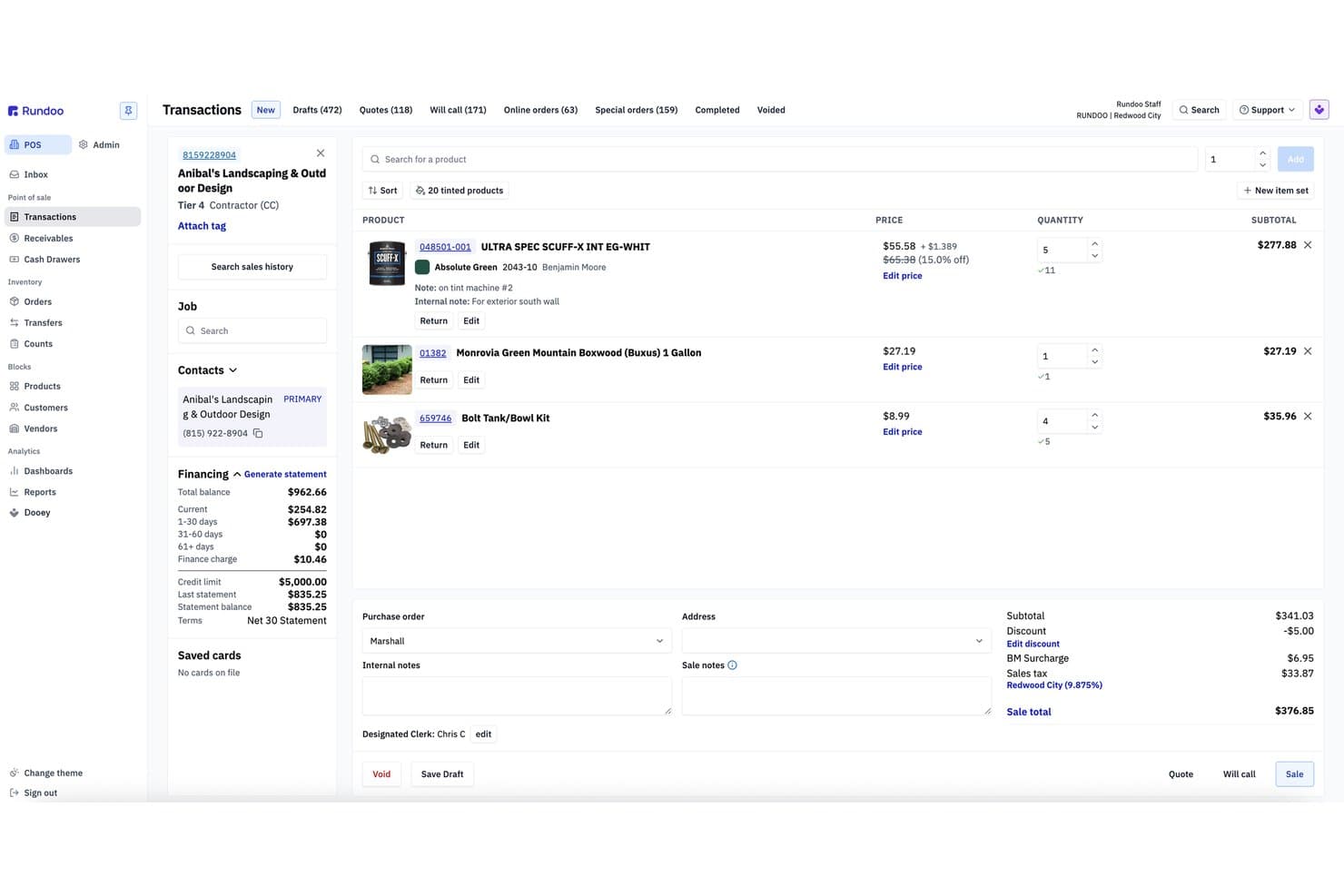
Rundoo offers a detailed POS transaction screen with product listings, customer financing info, pricing, and sale totals for small business use. Rundoo is a POS and ERP platform built for independent supply stores—hardware, paint, farm & feed, lawn & garden, and lumber—combining point of sale, real-time inventory, purchasing, customer accounts, and an AI assistant in one system.
Who Is Rundoo Best For?
Rundoo is a strong fit for independent supply store owners in hardware, paint, farm & feed, lawn & garden, and lumber retail.
Why I Picked Rundoo
Rundoo earns its spot on my shortlist because of Dooey, its built-in AI assistant that does things I haven't seen in other small business POS tools. I can ask it to generate a purchase order based on recent sales trends and current stock levels, or pull a report on which products lost margin last month. It also runs live price comparisons against nearby competitors, which is genuinely useful for a paint or hardware store owner trying to stay sharp on pricing.
Rundoo Key Features
- Integrated distributor catalogues: Access real-time supplier product data and automated ordering from top hardware and paint industry vendors.
- Charge accounts for contractors: Manage contractor credit, billing, per-customer pricing, and direct statements from within the POS.
- Real-time inventory syncing: Track stock across locations with instant updates as sales and receipts are recorded.
- Native eCommerce module: Sell online with a built-in web storefront fully connected to in-store inventory and pricing.
Rundoo Integrations
Rundoo offers native integrations with QuickBooks, Orgill, Emery Jensen, House-Hasson, and Do it Best. An API is available for custom integrations.
Pros and Cons
Pros:
- Deep distributor catalog access from the POS
- Built specifically for hardware and supply stores
- Automates purchase orders and reporting
Cons:
- Smaller user community than mainstream POS tools
- Niche focus excludes most general retailers
Learn more about Rundoo: 2Best for integrating payment management with analytics
Stax
- Free demo available
- From $99/month
Visit WebsiteCustomer Rating:4.2/5
Stax Pay offers an all-in-one POS solution for processing payments, reporting, and analytics. Stax Pay is a payment processing platform that provides businesses with integrated solutions, including payment acceptance, automated billing, and compliant surcharging. Its all-in-one POS and business management software allows for secure in-person and online payment processing, as well as the integration of necessary tools, like accounting software, within a single dashboard
Why I picked Stax Pay: I selected Stax Pay because it offers a unified business management platform that supports both in-person and online credit card payment processing. This all-in-one approach is ideal for small businesses looking to consolidate functions like invoicing, scheduling of recurring billing, payment tracking, and financial management. I also like that the platform offers robust analytics and reporting capabilities to monitor trends, refunds, and transaction history.
Stax Pay Standout Features and Integrations
Standout features include scheduled and automated payments, synchronized in-person and online transaction information, and integrated business tools. The platform also offers a compliant surcharging feature that allows businesses to pass on credit card processing fees to customers.
Additionally, Stax Pay offers a suite of POS capabilities for different payment scenarios, including SaaS platform integration, ACH payments, online and mobile payments, and in-person transactions.
Integrations include Slack, Zapier, Microsoft Office, Google Suite, and CRMs. You can also integrate payment processing capabilities into software and mobile apps with comprehensive mobile software development kits in Javascript and Python.
Pros and Cons
Pros:
- All-in-one tools and point-of-sale solution
- Recurring billing and invoicing tools
- Cost-effective with potential savings on processing fees
Cons:
- Potential additional costs
- May not be best suited to low-volume businesses
Learn more about Stax: Best for advanced inventory tracking
- Free trial + free demo available
- From $59/month
Visit WebsiteCustomer Rating:4.8/5
KORONA POS is a comprehensive solution for various industries, including retail, quick service restaurants, and ticketing services. KORONA POS is a cloud-based point-of-sale system designed to cater to a wide range of business types, including retail stores, wineries, event spaces, and more. Known for its versatility and robust feature set, Korona POS offers an intuitive interface that simplifies the sales process for both employees and managers.
Why I picked KORONA POS: One of the key reasons Korona POS stands out for small businesses is its scalability and ease of use. The system is designed to grow with your business, offering seamless integration with various hardware and software tools. Additionally, Korona POS offers robust inventory management features that help small business owners keep track of stock levels in real time, reducing the risk of overstocking or stockouts. The system's customer relationship management (CRM) tools also enable businesses to maintain strong customer relationships.
KORONA POS Standout Features and Integrations
Standout features include detailed and customizable reporting tools, allowing businesses to generate comprehensive reports on sales, inventory, and customer behavior. Furthermore, its integrated payment processing supports a variety of payment methods, including credit cards, mobile payments, and contactless transactions.
Integrations include QuickBooks, WooCommerce, Shopify, Magento, BigCommerce, Mailchimp, and various payment processors such as PayPal, Stripe, Worldpay, Authorize.Net, and CardConnect.
Pros and Cons
Pros:
- Provides robust inventory management tools
- The system is highly customizable
- Supports multiple business locations
Cons:
- Lacks on-location installation support
- Each terminal incurs a separate cost
Learn more about KORONA POS: Best for ecommerce, mobile, and physical payment terminals
- Free demo available
- Pricing upon request
Visit WebsiteCustomer Rating:4.7/5
Membership-based pricing makes for a cost-effective solution for high-volume businesses in various industries. Payment Depot is a merchant solutions provider that offers a POS system for ecommerce, mobile, and physical payment terminals. By focusing on transparent interchange pricing, it helps companies reduce the amount they spend on merchant service fees, making it a cost-saving solution for small and medium-sized businesses.
Why I picked Payment Depot: I selected Payment Depot because of its flexibility, which makes it a good option for businesses of different sizes and industries. It's suitable for small businesses in retail, services, restaurants and bars, healthcare, and more. A free payment gateway is available as well as virtual terminal capabilities provided through partnerships like SwipeSimple. These allow merchants to process payments online, via mobile, and over the phone without incurring additional gateway fees.
Payment Depot Standout Features and Integrations
Standout features include the membership-based pricing model for credit card processing, which offers tailored interchange+ pricing. The company is also recognized for its commitment to customer care, and has garnered positive feedback from clients who have experienced cost savings.
Integrations include Shopify, WooCommerce, BigCommerce, PrestaShop, and OpenCart. It also integrates with payment systems such as authorize.net and business management systems like Revel Systems.
Pros and Cons
Pros:
- Cost-effective for businesses with high transaction volumes
- User interface is straightforward and intuitive
- Comprehensive equipment offerings
Cons:
- Limited to US-based, non-high-risk merchants
- Not ideal for low-volume businesses
Learn more about Payment Depot:

Shopify POS provides a unified and consistent experience (for both customers and employees) across platforms and sales channels. Shopify POS is software that helps streamline business operations by unifying sales channels. By focusing on omnichannel solutions, Shopify helps deliver a more consistent customer experience.
Why I picked Shopify POS: I selected Shopify POS because it’s specially designed for omnichannel retailers. Customers and employees will have a predictable experience and workflow whether the order is an online, in-store, or ship-to-home order.
Standout features include real-time inventory monitoring so companies with multiple sales channels can ensure their most up-to-date inventory numbers are syncing across channels, helping avoid canceled transactions and surprise out-of-stock alerts.
I also like how Shopify’s real-time syncing also applies to customer data. It used to be difficult to analyze customer behavior when dealing with multiple sales channels—but Shopify makes it simpler by unifying customer data records across channels and automatically tagging transactions to a specific customer account based on factors like the credit card used.
Integrations include PayPal, Stripe, Authorize.Net, Square, QuickBooks, Xero, FreshBooks, Mailchimp, Klaviyo, Zendesk, Google Analytics, Metrilo, ShipStation, and Easyship.
Pros and Cons
Pros:
- Competitive payment processing rates for high-volume businesses
- Customer relationship management and data-tracking features
- Precise inventory management and tracking (with omnichannel syncing)
Cons:
- Many features require two paid subscriptions: Shopify + POS Pro, which starts at $89/month
- No free tier ($39/month + processing fees is the cheapest option)
Learn more about Shopify POS: 6Best for iPad-driven restaurant POS systems
Lavu
- Free demo available
- Pricing upon request
Visit WebsiteCustomer Rating:5/5
Lavu's iPad POS system centralizes restaurant activities, like ordering, menu customizations, and inventory management, in one place. Lavu is a POS system designed specifically for restaurants, bars, and other food and beverage establishments. As a cloud-based solution, Lavu offers a comprehensive suite of tools that centralize various aspects of restaurant management, from order processing and inventory management to employee scheduling and CRM.
Why I picked Lavu: I particularly like Lavu's iPad POS system, which offers a seamless and user-friendly experience, allowing staff to take orders, process payments, and manage tables with ease. This mobility and flexibility are crucial for small businesses that need to maximize space and efficiency. Additionally, the iPad POS system supports multiple payment methods, ensures quick transactions, and integrates smoothly with other Lavu features, making it a powerful tool for any small restaurant or bar.
Lavu Standout Features and Integrations
Standout features include the order management system, allowing businesses to tailor menus and ordering processes. The inventory management feature helps track stock levels in real-time, and the employee management tools, such as scheduling and time tracking, help optimize staff productivity and monitor performance.
Integrations include Digital Pour, Marketman, CheddarSuite, Up'n Go, CheckPlease, OpenTable, Pepper, LoyaltyMatch, Restaurant365, Shogo, Quickbooks, Xero, ADP, DoorDash, Uber Eats, Grubhub, and more.
Pros and Cons
Pros:
- Inventory management tools
- Reporting and analytics features
- Custom-built POS for restaurants
Cons:
- Not suitable for businesses outside the food and beverage industry
- Limited offline functionality
Learn more about Lavu:

Epos Now offers POS software and hardware for a range of businesses, including those in retail and hospitality. Epos Now is a provider of POS software designed to meet the of various business sizes, including small businesses. Offering a range of both hardware and software solutions, Epos Now aims to centralize operations for organizations in the retail and hospitality industries. The system is known for its user-friendly interface, extensive features, and cloud-based functionality.
Why I picked Epos Now: As a small business POS software, Epos Now stands out for its scalability, cloud-based nature, and feature-rich platform. The cloud-based system allows business owners to access real-time data from anywhere. This flexibility ensures that the software can grow alongside the business, adapting to increased demands. Other features that support small businesses include the ability to manage multiple locations, detailed sales and inventory reporting, and customizable user permissions.
Epos Now Standout Features and Integrations
Standout features include its customer relationship management (CRM) tools for tracking customer purchase histories and preferences, and its inventory management system for users to track stock levels, set up automatic reorder alerts, and manage suppliers efficiently. Additionally, Epos Now offers detailed analytics, providing insights into sales trends, employee schedules, and overall business health.
Integrations include WooCommerce, BigCommerce, Magento, PayPal, Stripe, Sage, Zapier, Google Analytics, Workforce.com, APO, Deputy, Deliveroo, Mr Yum, Hopt, QuickBooks, Xero, Mailchimp, Shopify, Appointedd, simpleERB, Worldpay, and more.
Pros and Cons
Pros:
- Flexible and customizable software
- Good reporting features
- User-friendly interface
Cons:
- Initial setup can take time
- Occasional slow system performance
Learn more about ePOS : Best for small businesses saving on fees
- Free demo available
- From Interchange + 0.40% + 8¢ (varies by volume)
Visit WebsiteCustomer Rating:4.4/5
Helcim's POS terminals are equipped to handle a variety of different payment methods, including debit and credit cards. Helcim's POS software for small businesses is designed to facilitate the acceptance of payments through various channels, including in-store, online, and mobile transactions.
Why I picked Helcim: I selected Helcim because it emphasizes transparent pricing without long-term contracts or hidden fees. It also provides a secure environment for processing payments, adhering to industry-standard security protocols.
Helcim Standout Features and Integrations
Standout features include an integrated system that allows businesses to manage sales, track inventory, and process payments using a single platform. It includes invoicing, customer management, and reporting tools to help business owners keep track of their sales and customer interactions.
I also like how Helcim offers a suite of services such as merchant accounts, POS systems, card readers, and an online payment gateway, which are designed to support the transactional needs of businesses across different industries.
Integrations include Xero Payments, QuickBooks, Great Exposure, Foxy.io, and WooCommerce.
Pros and Cons
Pros:
- Terminals and printers can be connected via USB or Bluetooth
- Excellent value for money
- Quick and easy application and approval processes
Cons:
- Lacks a manual or instructions
- Card terminal can be clunky for clients
Learn more about Helcim:

Clover offers multiple hardware options for its POS system. Clover offers POS and small business management systems for all types of businesses—whether you need a countertop POS or a handheld device.
Why I Picked Clover: I selected Clover because of its high-quality hardware options. Clover has handheld, mobile, and countertop POS hardware, and multiple terminals and devices that you can easily link together to customize your system.
Clover Standout Features and Integrations:
Standout features include the ability to accept multiple payment options (all major credit cards, mobile payments, cash, and even check scanning). This makes it easy for customers and ensures you don’t miss any sales.
I also like that Clover has team management and scheduling features built into the POS software.
Integrations include QuickBooks by Commerce Sync, Thrive Inventory, Digital Loyalty, Time Clock, and Skipcart Delivery.
Pros and Cons
Pros:
- 24/7 phone support
- Offline functionality
- Countertop, portable, and mobile POS devices
Cons:
- Expensive
- No free hardware
Learn more about Clover: Best for direct, low-cost processing
- Free quote available
- Pricing upon request
Visit WebsiteCustomer Rating:5/5
Merchant One offers a range of terminal options, including countertop terminals, mobile card readers, and virtual terminals. Merchant One is a payment processing service that offers businesses the ability to accept and manage credit card transactions.
Why I picked Merchant One: I selected Merchant One because it offers various tools designed to assist small business owners in managing day-to-day sales activities, tracking inventory levels, and understanding customer purchasing patterns. Merchant One's POS software is also part of a broader suite of services that includes merchant accounts and payment processing, aiming to provide a comprehensive system for small businesses to handle their financial transactions.
Merchant One Standout Features and Integrations
Standout features include competitive pricing structures, including interchange-plus pricing, which can provide businesses with transparency and potentially lower processing costs. This pricing model separates the interchange fees charged by card networks from the markup charged by the payment processor, allowing businesses to see the exact costs involved.
I also like how Merchant One supports a wide range of payment methods, including credit and debit cards, electronic checks, and mobile payments.
Integrations include First Data Corporation, Fifth Third Bank N.A., Maitre'D, Micros, Paytrace Gateway, Payeezy Gateway, Payflow Pro, Authorize.net, Aloha, and USAePay.
Pros and Cons
Pros:
- Offers a variety of hardware options
- User-friendly interface
- Provides a mobile app for on-the-go payments
Cons:
- May not be suitable for low-volume businesses
- Limited transparency in contract terms
Learn more about Merchant One:
Outras opções de software de POS
Durante a minha pesquisa, selecionei ainda algumas ferramentas. Não chegaram a entrar na minha lista principal, mas podem continuar a merecer uma análise mais aprofundada.
- 11PayPal POSBest for no commitment
- 12ToastBest POS software for restaurants with multiple locations
- 13eHopperBest for value
- 14Revel SystemsBest for delivery services and take-out restaurants
- 15ProMerchantBest for transparent pricing and personalized support
- 16NCR SilverBest for remote teams
- 17TouchBistroBest for restaurant management
- 18Payline DataBest for enhancing customer loyalty
- 19STAXBest for high transaction volumes
- 20SquareMost versatile POS software
- 21AgilironBest for omnichannel businesses
- 22Odoo ERPBest for integrated business management software
- 23Rain POSBest for specialty retail stores
- 24Stripe TerminalBest for integration of online payments
- 25Brilliant POSBest for advanced inventory management
How I Evaluate POS Software for Small Business
I look at every POS in two layers: the baseline a boutique owner or pop-up vendor needs just to run a register, and the differentiators that make one platform the right long-term fit.
Core Functionality (Table Stakes For This List)
When I'm selecting tools for my list, I rank each one on a scale from 0 (does not offer the functionality) to 5 (excels in this area) for each core functionality listed below. Then, I calculate the tool's total score into a percentage. Each tool needs to achieve a minimum total score of 65% to be considered for inclusion.
- Payment Processing: I check whether the system handles cards, contactless, and mobile wallets at the counter—plus how many processor options you actually get.
- Inventory Management: Real-time stock tracking across SKUs and variants matters, especially for boutiques juggling sizes and colors across a small catalog.
- Retail Checkout Interface: I evaluate the register screen for speed and retail-readiness—barcode scanning, returns, discounts, and receipt options all factor in.
- Sales Reporting & Analytics: A shop owner needs to pull sales-by-product, daily tax summaries, and trend data without exporting everything to a spreadsheet.
- Customer Management & Loyalty: I look at how each tool stores purchase history and whether it supports loyalty points or repeat-buyer rewards out of the box.
- Hardware Compatibility: Whether you're running an iPad register at a weekend market or a full countertop setup, the POS should support your hardware choices.
Once I have a list of tools that meet this criteria, I consider what sets each platform apart.
Differentiating Factors (What Sets Vendors Apart)
Here's how I compare and contrast different vendors:
Standout Features
Offline mode is a big deal for pop-up vendors and market sellers who can't guarantee a stable connection—I check whether the POS queues transactions and syncs automatically once you're back online. eCommerce sync matters just as much for shops that sell in-store and online, since a native connection keeps inventory accurate across channels without manual updates. I also evaluate built-in marketing tools like email or SMS campaigns tied to purchase data, which help small retailers drive repeat visits without a separate platform.
Beyond Features
Pricing transparency is one of the first things I evaluate—hidden processing fees or surprise per-register charges can wreck a small retailer's margins fast. I also look at how each vendor handles hardware, including whether they offer bundled kits or let you bring your own iPad or tablet to keep startup costs low. Integrations with accounting tools like QuickBooks or Xero matter too, since most small shop owners need sales data flowing into their books without manual entry. Finally, I check for 24/7 support availability, because register issues during a Saturday rush can't wait until Monday.
O que é um software de POS para pequenas empresas?
O software de POS para pequenas empresas é uma ferramenta que processa vendas, acompanha o inventário e liga os pagamentos à sua retaguarda.
Substitui a antiga caixa registadora por um sistema que processa cartões, carteiras digitais e dinheiro, atualizando automaticamente as quantidades em stock.
Para os pequenos operadores, um bom POS reduz os erros, acelera o pagamento e produz relatórios de vendas claros, sem folhas de cálculo até altas horas da noite.
Muitos incluem também funcionalidades adicionais, como a gestão de horários dos colaboradores, programas de fidelização de clientes e integrações com plataformas de comércio eletrónico ou software de contabilidade.
O resultado: menos tempo a lidar com transações e mais tempo a gerir o negócio.
Como escolher um software de POS para pequenas empresas
Escolher entre os melhores sistemas de POS para retalho não significa procurar o maior número de funcionalidades — significa adequar o software ao modelo de negócio, aos colaboradores e aos clientes.
A escolha certa deve acelerar as transações, manter o inventário sob controlo e fornecer relatórios que irá realmente utilizar, sem reduzir as suas margens.
| Passo | O que fazer | Dica profissional |
|---|---|---|
| Passo1. Defina os indispensáveis | O que fazerEnumere os requisitos indispensáveis: tipos de pagamento, controlo de inventário, modo offline. | Dica profissionalClassifique-os por impacto — o que mantém a loja a funcionar se nada mais funcionar? |
| Passo2. Verifique a compatibilidade das integrações | O que fazerCertifique-se de que o POS se liga à contabilidade, ao comércio eletrónico, ao processamento salarial ou ao CRM que já utiliza. | Dica profissionalMudar de plataforma mais tarde é dispendioso — escolha uma que funcione bem com o seu conjunto de ferramentas. |
| Passo3. Compare os custos reais | O que fazerAnalise as taxas do software, o hardware e as taxas de processamento — não apenas o preço mensal. | Dica profissionalPeça aos fornecedores faturas de exemplo para detetar custos ocultos. |
| Passo4. Teste a facilidade de utilização | O que fazerFaça um teste gratuito e peça aos funcionários que lidam diretamente com os clientes para processarem transações reais. | Dica profissionalSe um novo funcionário não conseguir registar uma venda em 10 minutos, procure outra solução. |
| Passo5. Avalie a escalabilidade | O que fazerCertifique-se de que o POS consegue crescer com mais localizações, utilizadores ou canais de venda. | Dica profissionalEscolha um software que possa crescer sem duplicar os custos. |
| Passo6. Verifique o apoio | O que fazerConfirme o horário do apoio e os tempos de resposta antes de assinar. | Dica profissionalLigue para a linha de apoio fora do horário normal — veja quanto tempo demora a falar com uma pessoa. |
Principais funcionalidades do software POS para pequenas empresas
O POS adequado para pequenas empresas reúne capacidades práticas — nada de ornamental. Eis as funcionalidades que importam no balcão e na gestão administrativa.
- Depósitos e contestações. Visibilidade sobre o calendário de disponibilização de fundos, ferramentas básicas para estornos contestados e extratos que associam as taxas às transações.
- Pagamentos integrados. Suporta pagamentos por aproximação, cartão com chip, banda magnética, cartões-presente, carteiras digitais, pagamentos divididos e aplicação de sobretaxas em conformidade.
- Motor fiscal. Aplica taxas estaduais, locais e especiais com regras ao nível do artigo, isenções e atualizações automáticas.
- Inventário e catálogo. Gere variantes, conjuntos/composições, códigos de barras, encomendas de compra, alertas de stock baixo e atualizações em lote.
- Sincronização omnicanal. Mantém alinhadas as encomendas em loja, no comércio eletrónico e em dispositivos móveis — um inventário, um catálogo de produtos, um registo de cliente.
- Fluxos de pagamento. Botões personalizados, descontos, reservas/ vendas a prestações, orçamentos, gorjetas/contas abertas e recibos digitais ou impressos.
- Perfis de clientes e fidelização. Armazena o histórico de compras, categoriza segmentos, atribui pontos ou crédito e suporta promoções ou cartões-presente.
- Gestão de funcionários e permissões. Acesso baseado em funções, registo de horas, relatórios de turnos e aprovações de responsáveis para ações sensíveis.
- Relatórios e exportações. Vendas por artigo, canal, operador de caixa ou período do dia, com filtros personalizados, exportações CSV e conectores de informação empresarial.
- Hardware e periféricos. iPad, Android ou terminais proprietários — além de leitores certificados, impressoras, leitores de códigos, gavetas de dinheiro e balanças.
- Modo offline. Permite continuar a realizar vendas presenciais com cartão durante interrupções e sincroniza as transações e o inventário quando a ligação é restabelecida.
- Integrações e API. Ligações nativas ao comércio eletrónico, à contabilidade, ao CRM e ao processamento salarial — além de APIs REST e webhooks para fluxos personalizados.
- Segurança e conformidade. PCI-DSS, encriptação ponto a ponto, tokenização, registos de auditoria de utilizadores e gestão de dispositivos.
- Gestão de numerário. Atribuição de caixas, depósitos cegos, depósitos no cofre e fecho de caixa com acompanhamento de diferenças.
Principais benefícios do software POS para pequenas empresas
As funcionalidades são os mecanismos — os benefícios são os resultados que importam quando tem de gerir funcionários, stock e clientes. Eis o que as pequenas empresas obtêm com o POS adequado:
- Pagamento mais rápido, menos erros. Os pagamentos integrados e os fluxos intuitivos aceleram as filas, reduzem os erros e mantêm os clientes satisfeitos.
- Maior controlo do inventário. O acompanhamento do stock em tempo real significa que não haverá ruturas inesperadas nem os constrangedores momentos de “acabou” — preserva vendas e confiança.
- Visibilidade financeira clara. Os relatórios integrados transformam as vendas diárias em informações acionáveis, ajudando os proprietários a tomar decisões mais acertadas sobre compras e pessoal.
- Maior retenção de clientes. As ferramentas de fidelização e os perfis de clientes facilitam a recompensa dos clientes habituais e a criação de relações duradouras.
- Menos atrito na gestão do trabalho. O planeamento de horários, as permissões e o registo de horas dos funcionários reduzem a carga administrativa e mantêm claras as responsabilidades.
- Crescimento contínuo entre canais. Um sistema que gere as vendas online, móveis e em loja permite expandir sem caos.
- Continuidade do negócio. O modo offline mantém as transações a funcionar mesmo quando a Internet falha — protegendo as receitas e a reputação.
- Confiança na conformidade. A segurança PCI e os pagamentos encriptados reduzem o risco de violações de dados e multas, proporcionando tranquilidade.
Em suma: um sistema POS moderno liberta tempo, reduz custos ocultos e ajuda as pequenas empresas a competir com empresas maiores sem aumentar os custos operacionais.
Preços e análise de custos do software POS para pequenos negócios
O preço do POS não se resume ao valor apresentado no software — é uma combinação de mensalidades, equipamento e custos de processamento. Eis uma breve visão geral do que pode esperar:
| Plano | Preço médio | Funcionalidades comuns | Mais indicado para |
|---|---|---|---|
| PlanoInicial | Preço médio$0–$30/mês + 2.5–3.5% por transação | Funcionalidades comunsProcesso de pagamento básico, compatibilidade com leitores de cartões, relatórios limitados | Mais indicado paraEmpreendedores individuais, lojas temporárias, lojas muito pequenas |
| PlanoStandard | Preço médio$30–$100/mês + 2.0–3.0% por transação | Funcionalidades comunsProcessos de pagamento completos, sincronização de inventário, logins de funcionários, relatórios de vendas | Mais indicado paraPequenos retalhistas, cafés, restaurantes de serviço rápido |
| PlanoAvançado | Preço médio$100–$300/mês + 1.8–2.9% por transação | Funcionalidades comunsProgramas de fidelização, gestão de funcionários, integrações com comércio eletrónico | Mais indicado paraNegócios em crescimento, operações com várias localizações |
| PlanoEmpresarial | Preço médio$300+/mês + taxas de processamento personalizadas | Funcionalidades comunsProcessos personalizados, suporte dedicado, conjuntos de equipamento | Mais indicado paraRetalhistas de grande volume, franquias, restaurantes com várias localizações |
A maioria dos fornecedores anuncia mensalidades baixas, mas obtém os seus lucros através do processamento de pagamentos. O equipamento — como terminais, impressoras de recibos ou iPads — pode representar centenas de dólares pagos inicialmente ou ser incluído em contratos de aluguer. Se pretende comparar diferentes fornecedores, explorar alternativas ao Square pode ajudá-lo a encontrar estruturas de preços mais vantajosas.
Aspectos importantes a ter em conta:
- Alguns planos “gratuitos” incluem taxas de processamento mais elevadas.
- Podem aplicar-se descontos a negócios de grande volume, mas é necessário negociá-los.
- O equipamento proprietário pode obrigá-lo a permanecer num único ecossistema.
- Os custos ocultos (taxas de reversão de pagamentos, taxas de extrato, níveis de suporte) acumulam-se — peça sempre uma fatura de exemplo.
Perguntas frequentes sobre programas POS para pequenas empresas
Vamos responder às principais perguntas que ainda possa ter, no final deste artigo informativo.
Qual é o maior custo oculto dos sistemas POS?
\u003cp data-start=\u0022258\u0022 data-end=\u0022745\u0022\u003eComissões de processamento. Os fornecedores atraem-no com mensalidades baixas, mas cada pagamento com cartão tem um custo. Alguns incluem equipamento ou programas “gratuitamente”, enquanto cobram mais de 3% por transação. Com o tempo, esse valor supera largamente o da subscrição.\u003c/p\u003e
\u003cp data-start=\u0022258\u0022 data-end=\u0022745\u0022\u003eTenha também atenção às comissões de estorno, às taxas de extrato e aos custos adicionais de funcionalidades que presumiu estarem incluídas. Peça sempre uma fatura de exemplo e faça as contas com base no seu volume de vendas — é a forma mais rápida de perceber o custo real.\u003c/p\u003e
Preciso de equipamento proprietário ou posso utilizar o meu?
\u003cp data-start=\u0022747\u0022 data-end=\u00221261\u0022\u003eDepende do fornecedor. Alguns sistemas são compatíveis com qualquer equipamento, permitindo-lhe utilizá-los num iPad com um leitor de cartões. Outros exigem terminais e impressoras de marca própria, o que aumenta os custos, mas pode proporcionar maior fiabilidade.\u003c/p\u003e
\u003cp data-start=\u0022747\u0022 data-end=\u00221261\u0022\u003ePara as pequenas empresas, a flexibilidade é importante — poder começar com dispositivos existentes e optar por equipamento mais especializado à medida que cresce ajuda a manter os custos controlados. Se comprar equipamento proprietário, confirme se é alugado, financiado ou adquirido a pronto.\u003c/p\u003e
\u003cdiv class=\u0022_tableContainer_1rjym_1\u0022\u003e\u003c/div\u003e
Quão seguros são os sistemas POS para processar pagamentos de clientes?
\u003cp data-start=\u00221263\u0022 data-end=\u00221779\u0022\u003eOs bons sistemas cumprem as normas PCI-DSS, encriptam todas as transações e utilizam a tokenização dos dados dos cartões, para que as informações sensíveis nunca passem pelos seus servidores. Isto ajuda a manter a conformidade e reduz a sua responsabilidade em caso de violação de dados.\u003c/p\u003e
\u003cp data-start=\u00221263\u0022 data-end=\u00221779\u0022\u003eTambém deverá procurar permissões baseadas em funções, para que os funcionários vejam apenas o que precisam, e atualizações automáticas que corrijam falhas de segurança. As pequenas empresas são alvos frequentes de fraude, pelo que escolher um sistema com uma conformidade robusta integrada é indispensável.\u003c/p\u003e
Um sistema POS pode realmente ajudar-me a aumentar as vendas ou apenas registá-las?
\u003cp data-start=\u00221781\u0022 data-end=\u00222289\u0022\u003eUm POS moderno pode ser um motor de crescimento. Os programas de fidelização, as promoções direcionadas e os perfis de clientes contribuem para aumentar a repetição das compras. As análises mostram quais os produtos que vendem mais rapidamente e em que momentos, ajudando-o a gerir o inventário de forma mais eficiente.\u003c/p\u003e
\u003cp data-start=\u00221781\u0022 data-end=\u00222289\u0022\u003eAs integrações com o comércio eletrónico permitem-lhe alcançar clientes para além do tráfego da loja. Até funcionalidades simples, como os recibos digitais, ajudam a criar relações duradouras com os clientes. Os melhores sistemas não se limitam a registar vendas — oferecem ferramentas para aumentá-las.\u003c/p\u003e
Quanto tempo demora a configurar um sistema POS?
\u003cp data-start=\u00222291\u0022 data-end=\u00222793\u0022\u003eO tempo de configuração varia, mas a maioria dos sistemas POS na nuvem pode estar operacional num dia, se estiver a importar um catálogo pequeno e a utilizar dispositivos existentes. A migração de um sistema antigo, as configurações para vários locais ou a integração com o comércio eletrónico podem prolongar o processo por uma semana ou mais.\u003c/p\u003e
\u003cp data-start=\u00222291\u0022 data-end=\u00222793\u0022\u003eO mais importante é preparar os dados: limpe as listas de produtos e as informações dos clientes antes de começar. Pergunte aos fornecedores que recursos de integração disponibilizam — os bons oferecem guias passo a passo, ferramentas de migração e apoio em direto.\u003c/p\u003e
O que acontece se a minha Internet falhar durante o horário de funcionamento?
\u003cp data-start=\u00222795\u0022 data-end=\u00223244\u0022\u003eÉ aqui que o modo offline é importante. Um POS adequado permite-lhe continuar a aceitar pagamentos com cartão e a registar vendas em dinheiro enquanto a Internet está indisponível, sincronizando depois as transações quando voltar a estar ligado à Internet.\u003c/p\u003e
\u003cp data-start=\u00222795\u0022 data-end=\u00223244\u0022\u003eAlguns fornecedores limitam as operações que pode realizar offline, por isso teste essa funcionalidade antes de se comprometer. Para as pequenas empresas, isto não é apenas uma comodidade — pode fazer a diferença entre manter a caixa aberta e perder a receita de um dia inteiro.\u003c/p\u003e