

Se passou mais tempo a lidar com modelos do Squarespace do que propriamente a fazer crescer a sua loja, não está sozinho. É simples, é bonito e é extremamente popular — mas, por vezes, simplesmente não lhe dá espaço para criar aquilo de que a sua empresa realmente precisa.
Pode ser a personalização limitada. Talvez sejam as taxas de transação. Ou talvez queira apenas algo que não o faça sentir que está a criar dentro de uma caixa com a etiqueta “suficientemente bom”.
É aqui que entra uma boa alternativa ao Squarespace.
Testámos dezenas de criadores de sites e plataformas de comércio eletrónico — analisámos os preços, explorámos as funcionalidades, testámos intensivamente os modelos — e identificámos as opções que realmente vale a pena considerar.
Quer precise de algo mais barato, mais simples, mais flexível ou mais potente, este guia ajudá-lo-á a filtrar o ruído e a encontrar a ferramenta certa para a próxima etapa do seu negócio.
O que é o Squarespace?
O Squarespace é como a Apple dos criadores de sites — design elegante, modelos selecionados e uma experiência de utilização que parece refinada desde o primeiro momento.
Foi criado para profissionais criativos, empreendedores com projetos paralelos e pequenas empresas que pretendem um site com aspeto profissional sem tocar numa única linha de código.
Tem acesso a um editor de arrastar e largar, ferramentas de SEO integradas, funcionalidades de comércio eletrónico e várias integrações que funcionam bem logo à partida.
É uma opção sólida para sites simples e comércio eletrónico ligeiro — mas, se pretende crescer, personalizar extensivamente ou sair do seu ecossistema elegante, mas controlado, atingirá rapidamente os seus limites.
Why Trust Our Software Recommendations
6,700+
Reviews
20
Industry experts
16+
Evaluation factors
14
Years
Our team has been testing and reviewing software since 2012. As retail leaders ourselves, we know how difficult—and important—it is to choose the right software.
For this guide, we evaluated tools using hands-on testing and independent research, scoring tools using our selection criteria.
Our reviews reflect our independent judgment—not a sales pitch.
Tabela comparativa de alternativas ao Squarespace
Esta tabela comparativa rápida apresenta as principais informações sobre preços e os casos de utilização mais relevantes de cada alternativa ao Squarespace:
| Tool | Best For | Trial Info | Price | ||
|---|---|---|---|---|---|
| 1 | Best for visual canvas with pixel-level control | Free plan + free trial available | From $10/month (billed annually) | Website | |
| 2 | Best for mobile-responsive designs | Free plan + 14-day free trial + free demo available | From $8/month | Website | |
| 3 | Best for extensive app marketplace | 3-day free trial + free demo available | From $29/month (billed annually) | Website | |
| 4 | Best for extensive customization | Free plan + 14-day trial available | From $99/month | Website | |
| 5 | Best for free website creation | Free plan available | From $16/month | Website | |
| 6 | Best for multichannel selling | Free plan available | From $9.99/month (billed annually) | Website | |
| 7 | Best for ease of use | Free plan available | From $8/month (billed annually) | Website | |
| 8 | Best for affordable pricing | Not available | From $41/month | Website | |
| 9 | Best for built-in ecommerce tools | 14-day free trial available | From $35/month | Website | |
| 10 | Best for no commission fees | Free plan available | Pricing upon request | Website |


As 10 melhores alternativas ao Squarespace, analisadas e classificadas \u0026amp;
Testei cuidadosamente cada uma destas plataformas para perceber como são realmente de utilizar — para além do texto de marketing. Estas análises apresentam os pontos fortes, os pontos fracos e as funcionalidades particularmente úteis de cada opção, para que possa decidir qual é a ferramenta que realmente merece um lugar no seu conjunto tecnológico.
 Best for visual canvas with pixel-level control
- Free plan + free trial available
- From $10/month (billed annually)
Visit WebsiteCustomer Rating:4.4/5
Framer lets users add scroll animations and effects to text layers. Framer is a visual website builder that appeals to designers, freelancers, and small businesses who want pixel-level creative control without being locked into a rigid template system.
Who Is Framer Best For?
Framer is a strong fit for freelance designers and design-forward small businesses that want full creative control over their site's look, layout, and interactions.
Why I Picked Framer
I picked Framer as one of the best because it gives you a genuinely open canvas where you can place, style, and animate elements exactly where you want them, with no grid constraints forcing your hand. I love how reusable components and code overrides let you build a site that looks nothing like a template, and Framer's AI agents can restyle typography, adjust responsive breakpoints, and update copy across the whole site from a single prompt. It's the closest thing I've found to designing in a tool like Figma and publishing directly from that same environment.
Framer Key Features
- AI site agents: Prompt-driven agents update copy, restyle typography, adjust responsive breakpoints, and manage CMS content across your entire site.
- Shopify plugin integration: A marketplace plugin connects your Framer site to a Shopify store, syncing product data, inventory, and routing customers to Shopify checkout.
- Branching and staging environment: Create branches to preview and test design changes before pushing them live, available on the Pro plan.
- Custom code injection: Add analytics tags, marketing pixels, chat widgets, and custom CSS or JavaScript to specific pages or site-wide.
Framer Integrations
Framer offers native integrations with Google Sheets, Formspark, HubSpot, and Typeform, plus marketplace integrations such as ShopifyConnect, Tally Forms, and Cal.com. Its Server API, Fetch API endpoints, and MCP server support custom integrations and external data sources.
Pros and Cons
Pros:
- Reviewers praise responsive controls and animations
- Design and publishing share one workflow
- Open canvas enables custom page layouts
Cons:
- Reviewers report difficulty exporting or moving sites
- No native product catalog, cart, or checkout
Learn more about Framer: 2Best for mobile-responsive designs
Duda
- Free plan + 14-day free trial + free demo available
- From $8/month
Visit WebsiteCustomer Rating:4.6/5
Duda lets users track site visitor stats by date range and traffic source. Duda is a visual website builder built for agencies and freelancers who need to design, launch, and manage responsive client sites without writing code—covering everything from drag-and-drop editing and built-in SEO tools to native ecommerce and appointment booking.
Who Is Duda Best For?
Duda is a strong fit for freelancers and agencies who build and manage multiple client sites and need responsive design controls without writing code from scratch.
Why I Picked Duda
I picked Duda as one of the best because its device-specific editor lets you tweak layouts independently for desktop, tablet, and mobile, so a client's site doesn't just shrink down—it's actually designed for each screen. I love that you can preview and adjust every breakpoint in real time, which is something I rely on when building sites for service businesses that see heavy mobile traffic. The responsive-first approach, paired with reusable sections and site-wide theme controls, makes it a sharp Squarespace alternative when consistent, polished design across devices is non-negotiable.
Duda Key Features
- Developer Mode: Access and edit your site's HTML, CSS, and JavaScript directly for advanced customization beyond the visual editor.
- Dynamic Pages: Generate multiple pages automatically from a connected data collection using a single shared page layout.
- Client content collection: Gather business information, images, and social profiles from clients through a branded, client-facing form.
- SEO audit dashboard: Review and address site optimization opportunities, broken links, and image alt-text gaps from a centralized dashboard.
Duda Integrations
Duda documents integrations with Google Analytics, Google Sheets, Airtable, Mailchimp, Constant Contact, Square POS, Facebook, Instagram, and Google Shopping. It also supports REST APIs, webhooks, JavaScript APIs, an App Store, and Zapier.
Pros and Cons
Pros:
- SEO audits cover practical on-page fixes
- Reusable sections suit repeat client builds
- Separate mobile, tablet, and desktop editing
Cons:
- Store tools fall short for complex catalogs
- Switching templates after launch is awkward
Learn more about Duda: Best for extensive app marketplace
- 3-day free trial + free demo available
- From $29/month (billed annually)
Visit WebsiteCustomer Rating:4.5/5
Shopify's dashboard gives sellers a real-time overview of sales and traffic. Shopify is a commerce platform built for entrepreneurs and growing brands who want to sell online, in person, and across social channels—all from one place.
Who Is Shopify Best For?
Shopify is a strong fit for ecommerce entrepreneurs and growing product-based businesses that need a scalable platform with a vast ecosystem of apps to extend their store's capabilities.
Why I Picked Shopify
I picked Shopify as one of the best because its app marketplace is genuinely unmatched, with over 16,000 apps covering everything from loyalty programs like Smile to multichannel selling via Shopify Marketplace Connect, which lets you list directly on Amazon, Walmart, and eBay from one dashboard. I love that each app goes through a 100-checkpoint review before it hits the store, so you're not just getting volume, you're getting vetted options that slot into your existing setup without breaking things.
Shopify Key Features
- Abandoned checkout automation: Shopify automatically sends re-engagement emails to customers who started but didn't complete a purchase, with editable content and wait-time controls.
- Shopify Markets: Merchants can manage multiple regional markets from a single store, with localized pricing, currency, language, and domain settings per market.
- Built-in SEO tools: Shopify auto-generates sitemaps, canonical tags, robots.txt, and structured data, while letting you manually edit titles, meta descriptions, URLs, and image alt text.
- B2B catalogs: Merchants can create separate product catalogs with custom pricing and storefront experiences for wholesale buyers, available across Basic, Grow, Advanced, and Plus plans.
Shopify Integrations
Shopify offers 16,000+ marketplace integrations, including QuickBooks, Canva, Smile, and Shopify Marketplace Connect for Amazon, Target Plus, Walmart, and eBay. Its GraphQL, Storefront, and Admin APIs support custom integrations.
Pros and Cons
Pros:
- Inventory routing supports multiple stock locations
- Store operations stay together across sales channels
- Reviewers praise quick professional store setup
Cons:
- Paid apps add setup and management overhead
- Content pages and blogs feel less flexible
 Best for extensive customization
- Free plan + 14-day trial available
- From $99/month
Visit WebsiteCustomer Rating:4.3/5
OpenCart's Elite Dashboard tracks sales, orders, and customer metrics. OpenCart is a free, open-source ecommerce platform built for developers and technically minded store owners who want full control over how their online store looks, functions, and scales.
Who Is OpenCart Best For?
OpenCart is a strong fit for developers and technically minded ecommerce entrepreneurs who want full control over their store without paying monthly platform fees.
Why I Picked OpenCart
I picked OpenCart as one of the best Squarespace alternatives because it gives developers and technically minded store owners complete control over how their storefront looks and functions. The Theme Editor lets you work directly in Twig, HTML, CSS, and JavaScript, so you can reshape templates at a structural level rather than working around a builder's constraints. Pair that with a marketplace of 13,000+ modules and themes, and you can build a store tailored to almost any catalog or workflow requirement.
OpenCart Key Features
- Multi-store management: Run multiple storefronts from a single admin panel, with store-specific products, themes, pricing, and settings.
- 36 built-in payment methods: Accept payments through natively integrated gateways including PayPal, Klarna, Authorize.Net, and Amazon Payments, with hundreds more via the marketplace.
- GDPR management tools: Handle customer data-access and erasure requests, manage consent records, and configure request-processing workflows directly from the admin interface.
- Reward points system: Set up a loyalty program that lets customers earn and redeem points to encourage repeat purchases.
OpenCart Integrations
OpenCart includes 36 native payment methods, including PayPal, Klarna, and Authorize.Net, plus shipping integrations such as FedEx, UPS, and USPS. Its marketplace offers 13,000+ modules and themes, and its API supports custom integrations.
Pros and Cons
Pros:
- Reviewers value its product and order controls
- One admin panel manages multiple storefronts
- Developers can reshape storefront templates directly
Cons:
- Self-hosting adds server setup and upkeep
- No documented drag-and-drop page builder
Learn more about OpenCart:

Weebly lets users manage their entire store item library in one place. Weebly is a beginner-friendly website builder, owned by Square, that lets small business owners and solo sellers create a site and start selling online without writing a single line of code.
Who Is Weebly Best For?
Weebly is a strong fit for small business owners and solo sellers who want to get a site and simple online store live quickly without a steep learning curve.
Why I Picked Weebly
I've included Weebly in my top picks because it's one of the few website builders that lets you launch a fully functional site and online store without spending a cent. The free plan isn't just a teaser: it supports product listings, cart and checkout, and inventory tracking right out of the box. I also appreciate how the Square payment integration works natively, so if you're already running in-person sales through Square, your online store connects without any extra setup.
Weebly Key Features
- Drag-and-drop website builder: Add and arrange text, photos, maps, videos, and other elements on your pages directly in a browser without writing code.
- Email marketing tools: Build campaigns using pre-designed templates, segment your contact lists, schedule sends, and track opens and clicks from a single dashboard.
- Abandoned cart emails: Automatically send recovery emails to shoppers who enter their email at checkout but don't complete their purchase, with a configurable delay of 20 minutes to two days.
- App Center marketplace: Browse and connect over 350 third-party apps, including tools for forms, galleries, social feeds, and site enhancements.
Weebly Integrations
Weebly offers marketplace integrations through its App Center, which displays 355 apps, including Form Builder, Instagram Feed, WhatsApp Chat, and Media Gallery. Native integrations include Square, Stripe, PayPal, and Authorize.net for payments; Etsy and Shopify support store imports.
Pros and Cons
Pros:
- Ready-made themes provide a practical launch point
- Inventory and order tools suit small catalogs
- Drag-and-drop edits make page updates quick
Cons:
- Variant limits complicate larger assortments
- Rigid sections constrain distinctive layouts
Learn more about Weebly: Best for multichannel selling
- Free plan available
- From $9.99/month (billed annually)
Visit WebsiteCustomer Rating:4.2/5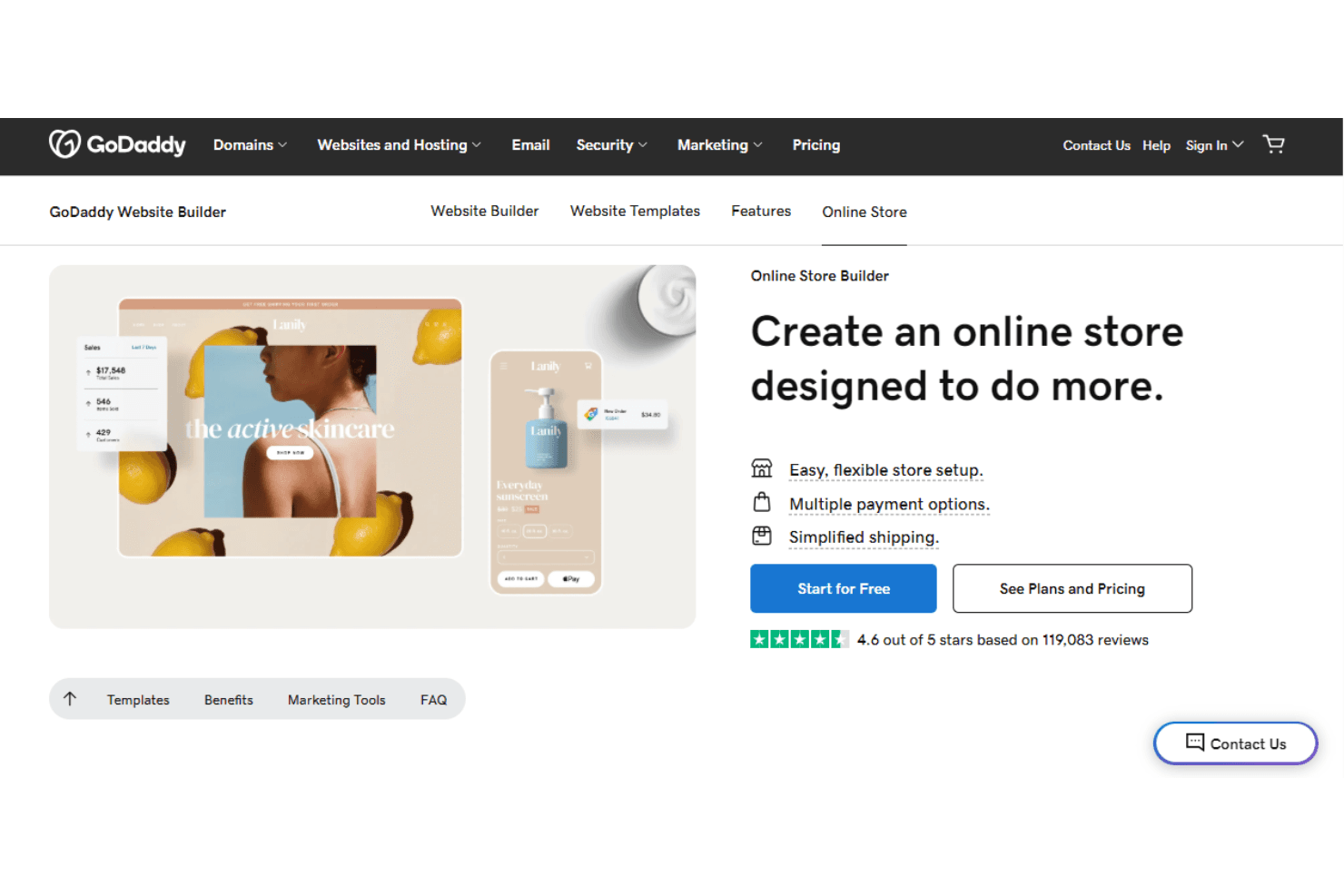
GoDaddy lets users build and launch an online store with ease. GoDaddy Website Builder is an AI-powered site builder for small businesses and ecommerce sellers who want to get online fast, sell across multiple channels, and manage inventory, payments, and marketing from one place.
Who Is GoDaddy Best For?
GoDaddy is a strong fit for small business owners and ecommerce sellers who want to manage a website, online store, and marketplace listings from a single platform.
Why I Picked GoDaddy
I picked GoDaddy as one of the best Squarespace alternatives because it lets you sell across Amazon, eBay, Etsy, Walmart, and Google Shopping from a single dashboard, with inventory syncing across every connected channel automatically. I love that you can import existing listings directly from those marketplaces to seed your GoDaddy store, then push updates back out without managing each channel separately. The built-in POS connection also means your in-person and online inventory stay aligned in one place.
GoDaddy Key Features
- AI-powered site builder: Generate a website from a text prompt and refine copy, visuals, and layout through conversation or direct editing.
- Abandoned cart recovery: Enable automated reminder emails for shoppers who leave items in their cart, with configurable send timing.
- Built-in SEO optimization: Automatically optimizes page structure, meta titles, and descriptions for both conventional search and AI-powered search results.
- Appointment booking: Accept and manage appointment bookings directly through your website, included on Professional and Ultimate plans.
GoDaddy Integrations
GoDaddy connects to 90+ tools, including Notion, Google Business Profile, Mailchimp, GoDaddy Payments, Stripe, and GitHub. It also offers a REST API and custom API connections through Airo prompts.
Pros and Cons
Pros:
- Inventory updates as orders arrive
- Built-in SEO and campaigns support promotion
- Prompt-led site creation speeds launch
Cons:
- Product options and choices are capped
- Layouts rely on predefined sections
Learn more about GoDaddy: Best for ease of use
- Free plan available
- From $8/month (billed annually)
Visit WebsiteCustomer Rating:4/5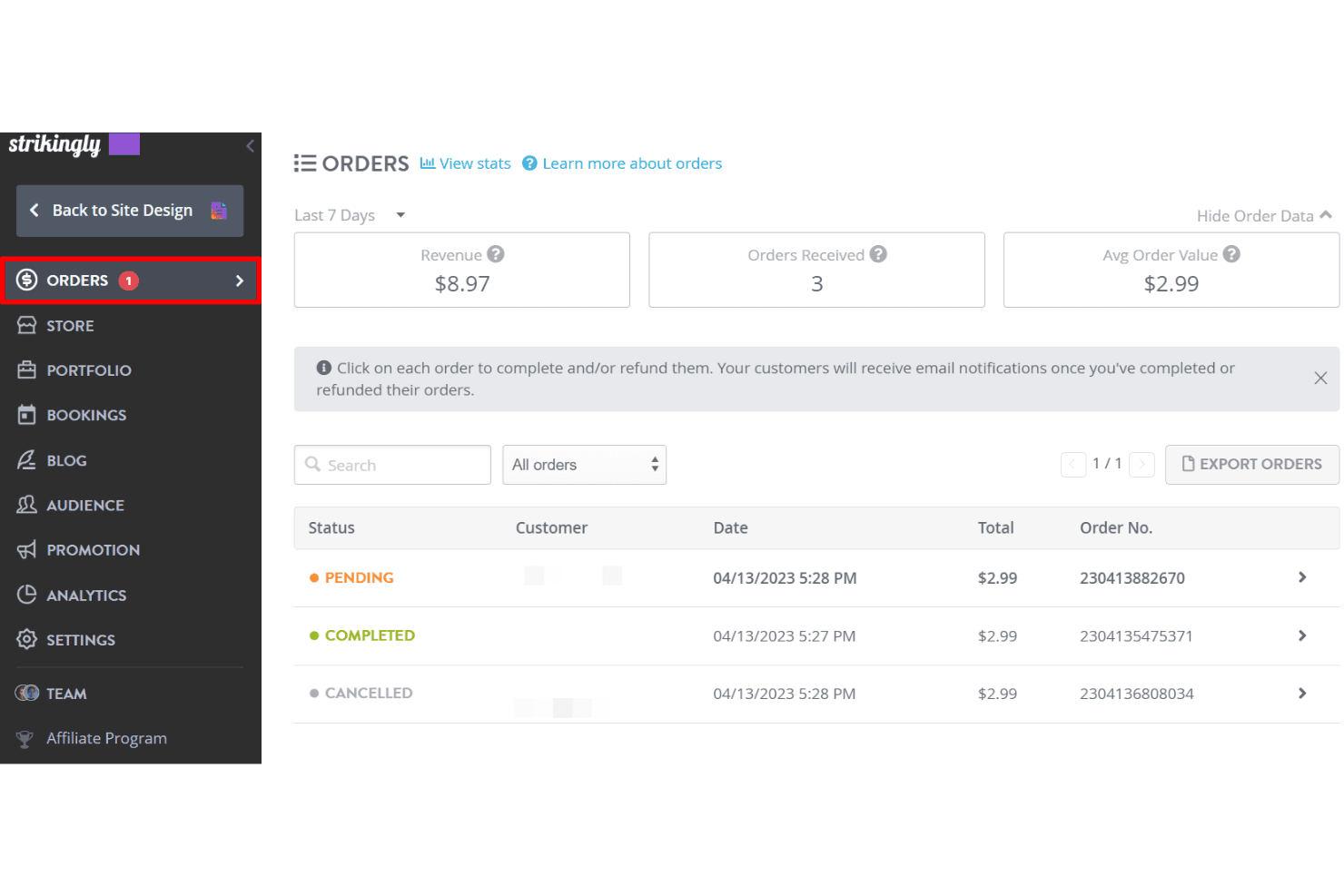
Strikingly lets users track and manage store orders in one dashboard. Strikingly is a no-code website builder designed for small businesses and solo sellers who want to get a site with a built-in store up and running quickly, without dealing with complex setup or design decisions.
Who Is Strikingly Best For?
Strikingly is a good fit for solo sellers and early-stage small businesses that want to launch a simple site with a basic store quickly, without any technical setup.
Why I Picked Strikingly
I picked Strikingly as one of the best because it removes almost every barrier between having an idea and having a live site with a store attached. The AI site builder can generate a full site from just a name and a business description, and Simple Store lets you sell physical or digital products with a built-in cart, automatic order emails, and an order dashboard for fulfillment and refunds. If you're switching from Squarespace and want to be selling again the same day, that kind of zero-friction setup is genuinely hard to beat.
Strikingly Key Features
- Simple Store order dashboard: Manage order fulfillment, process refunds, and track inventory from a single dashboard, with CSV export for order data.
- Multi-currency support: Accept payments in a wide range of global currencies, with Stripe, PayPal, and Square available as payment gateways.
- Site membership tools: Create password-protected pages, site memberships, and paid subscription memberships to gate content for different audiences.
- CSV product import: Bulk-create or update your store catalog by uploading a CSV file, including products with multiple variants.
Strikingly Integrations
Strikingly offers a small set of documented integrations, including Stripe, PayPal, Square, Typeform, Eventbrite, Facebook Comments, SoundCloud, SlideShare, Pinterest, and Disqus. No public API or Zapier integration is documented.
Pros and Cons
Pros:
- Simple storefront suits small product catalogs
- Built-in order dashboard handles refunds and inventory
- Quickly publish mobile-ready sites without coding
Cons:
- Moving away requires rebuilding the entire site
- Rigid layouts limit visual redesign options
Learn more about Strikingly:

Shift4Shop lets users launch an online store for free. Shift4Shop is a hosted ecommerce platform built for small businesses and online sellers who need a full store—product management, checkout, marketing tools, and multichannel selling—without the high monthly costs of competing platforms.
Who Is Shift4Shop Best For?
Shift4Shop is a strong fit for cost-conscious ecommerce entrepreneurs and small business owners who want a full-featured online store without paying premium platform prices.
Why I Picked Shift4Shop
I picked Shift4Shop as one of the best because it packs a genuinely full ecommerce store into a $41/month plan, with no transaction fees and no caps on products or staff users. I especially appreciate the abandoned-cart email sequences, which let me configure multiple timed messages at intervals from one hour to seven days, and the native multichannel connections to eBay, Facebook, and Google Shopping that sync inventory automatically. That combination of built-in selling tools at a low flat rate is tough to beat when you're migrating away from Squarespace's higher-priced ecommerce tiers.
Shift4Shop Key Features
- Built-in SEO tools: Shift4Shop automatically generates and refreshes sitemaps daily and supports customizable meta tags, human-readable URLs, and Google Search Console integration.
- Customer group price levels: Merchants can assign different pricing tiers to customer groups, with options for self-registration and group-specific payment and shipping methods.
- Automation rules: Configurable triggers automatically update orders, adjust customer group assignments, and launch email campaigns based on set order or customer conditions.
- REST API access: Shift4Shop provides a REST API and front-end API for connecting the store to external services or building custom apps, with support for products, orders, customers, and webhooks.
Shift4Shop Integrations
Shift4Shop offers native integrations with PayPal, eBay, Facebook, Google Merchant Center, Google Ads, Google Analytics, and Google Tag Manager, plus marketplace integrations such as QuickBooks. It also supports REST and front-end APIs and Zapier.
Pros and Cons
Pros:
- Product options and customer-group pricing
- HTML and CSS permit deeper theme edits
- Built-in inventory and order controls
Cons:
- Support tickets can take time to resolve
- Theme changes often require code edits
Learn more about Shift4Shop: Best for built-in ecommerce tools
- 14-day free trial available
- From $35/month
Visit WebsiteCustomer Rating:3.5/5
Volusion's File Editor is accessible directly from the Design menu. Volusion is a dedicated ecommerce platform built for product-focused sellers who need native inventory management, flexible checkout, and payment tools without relying on third-party apps to handle the basics.
Who Is Volusion Best For?
Volusion is a strong fit for small business owners and ecommerce entrepreneurs who want native inventory, checkout, and payment tools without piecing together third-party apps.
Why I Picked Volusion
I picked Volusion as one of the best because its built-in ecommerce tools cover what most platforms leave to third-party apps. I'm particularly impressed by the native inventory management, which supports warehouse configuration, low-stock alerts, and automatic purchase orders, and the Premium Checkout, which handles guest checkout, promo codes, and multi-currency payments without add-ons. If you're migrating from Squarespace to sell products seriously, those capabilities come ready out of the box.
Volusion Key Features
- Multi-currency display: Storefronts can show product prices in shoppers' native currencies at the point of browsing.
- Customer pricing tiers: Merchants can set different price levels for different customer groups, supporting wholesale and loyalty pricing.
- Site Designer blocks: Pre-built, reusable content blocks can be styled, rearranged, and applied across multiple pages or domains.
- Rewards points: Customers can earn and redeem rewards points toward future purchases directly at checkout.
Volusion Integrations
Volusion offers integrations with Volusion Payments Powered by Stripe, PayPal Checkout, Amazon Pay, Smarty, Authorize.net, NMI, and Fort Point Payments. Its XML API supports custom product, order, and customer data imports and exports.
Pros and Cons
Pros:
- Guest checkout reduces purchase friction
- Customer pricing tiers support differentiated offers
- Built-in purchase orders support replenishment
Cons:
- SEO reporting feels dated beside alternatives
- Dated themes constrain storefront presentation
Learn more about Volusion: 10Best for no commission fees
Jimdo
- Free plan available
- Pricing upon request
Visit WebsiteCustomer Rating:3.5/5
Jimdo helps small business owners build a professional website easily. Jimdo is an AI-assisted website builder designed for small business owners who want to launch a professional site and online store quickly, without design or coding skills.
Who Is Jimdo Best For?
Jimdo suits solo entrepreneurs and small business owners who want to sell online without paying commission fees and need a site up quickly.
Why I Picked Jimdo
I picked Jimdo as one of the best Squarespace alternatives because it charges zero commission on every sale you make through its online store. That means if you're moving 50 or 500 orders a month, every dollar of revenue stays yours. I also appreciate that Jimdo's AI setup generates your site structure, copy, and product pages from a short questionnaire, so you're not rebuilding from scratch after leaving Squarespace.
Jimdo Key Features
- AI website generator: Builds your site structure, page copy, and images from a short questionnaire about your business.
- Smart Forms: Creates customizable forms for inquiries, newsletter signups, consultations, and lead capture directly on your site.
- Business Listings sync: Distributes your business information across online directories to keep your listings consistent.
- Visitor statistics: Tracks traffic sources and site visits so you can monitor how people find and browse your website.
Jimdo Integrations
Jimdo offers built-in connections to Google Analytics, Google Search Console, Google Ads, Meta, Facebook Shop, and Instagram Shop, plus Smart Apps embeds for Calendly, Google Forms, and Typeform. It has no official app store, and API availability isn’t documented.
Pros and Cons
Pros:
- Reviewers report setup within an hour
- AI drafts site structure and copy
- No commission on online-store sales
Cons:
- Small-store tools omit abandoned-cart recovery
- Assigned designs offer less choice than Squarespace
Learn more about Jimdo:
Outras alternativas ao Squarespace
Eis algumas alternativas adicionais ao Squarespace que não entraram na minha lista final, mas que continuam a merecer atenção:
- 11WebnodeBest for AI website building
- 12Big CartelBest for artists and small businesses
- 13Adobe CommerceBest for enterprise-level solutions
- 14WebflowBest for custom design control
- 15Hostinger ReachBest for diverse hosting options
- 16WixBest for creative design options
- 17WooCommerceBest for WordPress users
- 18BigCommerceBest for large-scale online businesses
- 19Square OnlineBest for brick-and-mortar expansion
- 20PrestaShopBest for open-source ecommerce
How I Evaluate Squarespace Alternatives
I split my evaluation into two layers: baseline must-haves like catalog management, integrated checkout, and inventory sync, then differentiators that determine the best fit for retail teams.
Core Functionality (Table Stakes For This List)
When I'm selecting tools for my list, I rank each one on a scale from 0 (does not offer the functionality) to 5 (excels in this area) for each core functionality listed below. Then, I calculate the tool's total score into a percentage. Each tool needs to achieve a minimum total score of 65% to be considered for inclusion.
- Ecommerce Storefront Builder: I evaluate template variety, visual editor flexibility, and mobile responsiveness—like whether a boutique owner can build a polished store without touching code.
- Product Catalog Management: Handling hundreds of SKUs with variants, images, and categories matters. I check for bulk import/export and how well collections organize seasonal merchandise.
- Integrated Payment Processing: Gateway options, digital wallet support, and multi-currency checkout all factor in—especially for retailers selling across regions or at pop-up events.
- Inventory & Order Management: I look at real-time stock tracking and fulfillment workflows, like whether a retailer running two warehouses can route orders and get low-stock alerts automatically.
- Omnichannel & POS Integration: Connecting the online store with in-store POS, marketplaces like Amazon, and social channels like Instagram Shopping is what I evaluate here.
- Retail Marketing Tools: Discount engines, abandoned cart recovery, SEO controls, and email integrations all come into play—tools that help drive traffic and convert browsers into buyers.
Once I have a list of tools that meet this criteria, I consider what sets each platform apart.
Differentiating Factors (What Sets Vendors Apart)
Here's how I compare and contrast different vendors:
Standout Features
Built-in loyalty and rewards programs can turn one-time shoppers into repeat buyers, which I find especially valuable for boutiques building a local following. I also look at whether a platform offers B2B or wholesale storefronts alongside the DTC store—retailers selling to both consumers and resellers need tiered pricing without managing two separate systems. AI merchandising tools are another differentiator, particularly for larger catalogs where automated product recommendations and personalized search help surface the right items.
Beyond Features
Total cost of ownership matters a lot when switching platforms. I evaluate transaction fees, app costs, and theme pricing—not just the subscription—since these add up fast for high-volume retailers. Migration support is another key factor; moving a full product catalog and customer data from Squarespace is a real project, and platforms that offer import tools or partner agencies make the transition far smoother. I also consider the depth of each vendor's app ecosystem, especially connectors to shipping carriers, accounting tools, and 3PLs that retail teams already rely on.
Por que motivo procurar uma alternativa ao Squarespace?
O Squarespace oferece uma experiência elegante logo à partida: modelos refinados, um editor de arrastar e largar e funcionalidades suficientes para criar a maioria dos sites simples. Mas, quando começa a crescer — ou precisa de algo além do básico — poderá descobrir que a plataforma não acompanha o seu desenvolvimento.
Eis alguns dos motivos mais comuns que levam os utilizadores a procurar outras opções:
- Precisa de mais liberdade de design. Os modelos do Squarespace têm um excelente aspeto, mas um controlo mais aprofundado do layout ou a edição de HTML/CSS? Nem por isso. Plataformas como o Webflow ou o WordPress oferecem essa flexibilidade granular, com ferramentas de design avançadas adequadas a um design web mais avançado.
- O comércio eletrónico é demasiado limitado. Se precisa de fluxos de pagamento personalizados, subscrições ou automatização, as capacidades de comércio eletrónico do Squarespace podem parecer uma solução demasiado básica—especialmente para empresas com necessidades específicas que vão além do essencial.
- O preço não corresponde à potência. Os planos pagos incluem uma interface polida, mas nem sempre oferecem as funcionalidades avançadas, as ferramentas de IA ou as integrações que esperaria tendo em conta o custo.
- Está a expandir o negócio. As empresas em crescimento ultrapassam frequentemente os limites de largura de banda, as ferramentas de marketing e as opções de plug-ins do Squarespace—especialmente quando têm necessidades específicas de escalabilidade e controlo.
- O SEO e o desempenho precisam de mais força. As ferramentas de SEO integradas são adequadas para principiantes, mas, para uma otimização séria e melhores classificações nos motores de pesquisa, outras plataformas com ferramentas de design e capacidades técnicas mais robustas vão mais longe.
- Quer melhores integrações. Se gere vários canais—como redes sociais, marketing por e-mail ou marketplaces—irá deparar-se com limitações, especialmente quando a sua estratégia de design web depende de ferramentas integradas e de ferramentas de IA para automatizar e personalizar experiências.
Se alguma destas situações lhe é familiar, está no sítio certo. Classifiquei e analisei as melhores alternativas ao Squarespace que oferecem funcionalidades de comércio eletrónico mais robustas, mais opções de personalização e ferramentas que acompanham efetivamente o crescimento do seu negócio. Para uma análise aprofundada de um dos principais concorrentes, consulte a nossa análise do Shopify vs Squarespace.
Principais funcionalidades a procurar nas alternativas ao Squarespace
Se está a deixar o Squarespace, concentre-se em ferramentas que lhe ofereçam mais poder, flexibilidade e controlo—não apenas modelos diferentes. Eis as funcionalidades essenciais que deve priorizar:
- Flexibilidade e personalização do design. A capacidade de editar layouts, ajustar CSS e controlar o aspeto do seu site é fundamental se pretende ter um site que realmente pareça seu. O Squarespace pode parecer rígido—alternativas como o Webflow ou o WordPress oferecem mais controlo criativo.
- Funcionalidades robustas de comércio eletrónico. Pense para além de “adicionar ao carrinho”. Procure ferramentas compatíveis com variantes de produtos, processos de pagamento personalizáveis, pagamentos recorrentes, subscrições e transferências digitais. Estas funcionalidades são essenciais para expandir qualquer loja online séria.
- Otimização de SEO e desempenho. As ferramentas de SEO devem ir além do básico. O controlo dos URL, a edição do texto alternativo, tempos de carregamento rápidos e a adaptação a dispositivos móveis influenciam a classificação e a capacidade de conversão do seu site.
- Integrações de terceiros e suporte para plug-ins. Quer se trate de sincronizar o seu CRM, automatizar o marketing ou incorporar feeds de redes sociais, as integrações poupam tempo e desbloqueiam funcionalidades avançadas. Plataformas como o Shopify e o WooCommerce destacam-se neste aspeto.
- Experiência do utilizador e facilidade de utilização. Uma curva de aprendizagem acentuada pode comprometer o progresso. Procure editores intuitivos de arrastar e largar, processos de configuração simples e interfaces organizadas que ajudem os principiantes a criar sites com confiança, sem sacrificar as opções avançadas.
- Escalabilidade e desempenho a longo prazo. A sua plataforma deve crescer consigo—pense em largura de banda ilimitada, planos por níveis com melhorias relevantes e um desempenho que se mantenha sólido mesmo quando aumentam o tráfego e o número de produtos.
- Preços transparentes e valor real. Não aceite pagar por tudo à parte. Esteja atento a taxas de transação ocultas, funcionalidades essenciais bloqueadas em planos de nível superior ou limites de largura de banda que atrasem o seu crescimento. Um bom preço deve corresponder ao que realmente recebe.
Tendências que estão a moldar as alternativas ao Squarespace
Escolher uma plataforma não se resume ao que funciona agora—trata-se também de perceber o que está a ganhar força. Estas são as tendências que estamos a acompanhar e que podem determinar o sucesso ou o fracasso da sua estratégia para o site ao longo do próximo ano.
- O design orientado por AI está a ficar mais inteligente — e mais específico. Ferramentas como a Webnode e a Jimdo utilizam ferramentas de AI para acelerar a criação de sites, mas o verdadeiro poder está na personalização assistida por AI e nas recomendações de conteúdo. Isto não é apenas tecnologia de preenchimento — está a reformular a forma como os sites convertem.
- O código aberto está a regressar discretamente. Com a crescente frustração em relação à dependência dos fornecedores e ao aumento excessivo dos preços, opções de código aberto como a OpenCart e a WooCommerce estão a recuperar popularidade entre equipas tecnicamente experientes que pretendem controlo total e zero limitações de caixa negra.
- As experiências de finalização da compra estão finalmente a receber a atenção que merecem. As taxas de abandono do carrinho são terríveis e as plataformas estão finalmente a começar a perceber isso. Espere mais personalização, menos redirecionamentos e uma lógica de vendas adicionais mais inteligente — mesmo fora do ecossistema de aplicações da Shopify.
- O “simples” já não vende. Os utilizadores estão mais experientes e o nível de exigência é mais elevado. Um editor básico de arrastar e largar já não é suficiente — os principiantes de hoje querem flexibilidade de design sem complexidade, e as melhores plataformas estão a descobrir como oferecer ambas.
- As ferramentas de SEO estão a dividir-se em dois grupos. Algumas plataformas estão a apostar fortemente em SEO técnico sério — dados estruturados, otimização de imagens e até marcação de esquema. Outras estão a simplificá-lo excessivamente. Se o tráfego for importante, escolha em conformidade.
- O comércio eletrónico já não se destina apenas a produtos. Cada vez mais criadores e empresas de serviços exigem ferramentas de comércio eletrónico para vender subscrições, reservas, conteúdos restritos e produtos digitais. As alternativas ao Squarespace que suportam estes casos de utilização estão a ganhar rapidamente vantagem.
Custos e preços das alternativas ao Squarespace
A maioria dos criadores de sites de comércio eletrónico oferece preços por escalões, com base nas funcionalidades, na largura de banda e no suporte. Eis uma síntese do aspeto dos planos típicos em geral — para que possa avaliar o que é justo, o que está inflacionado e aquilo que realmente irá obter.
| Tipo de plano | Preço médio | Funcionalidades comuns | Mais adequado para |
| Gratuito | $0/mês | Editor de arrastar e largar, modelos limitados, domínio com marca, ferramentas básicas de comércio eletrónico | Principiantes e casos de utilização para testes |
| Básico | $8–15/mês | Domínio personalizado, sem anúncios da plataforma, ferramentas básicas de SEO, modelos iniciais, suporte por e-mail | Sites pessoais ou atividades secundárias |
| Padrão | $16–29/mês | Acesso total aos modelos, SEO melhorado, funcionalidades básicas de comércio eletrónico, integrações simples | Pequenas empresas e lojas individuais |
| Empresarial | $30–79/mês | Ferramentas avançadas de comércio eletrónico, sem taxas de transação, integrações de marketing, análise | Equipas em crescimento ou lojas online profissionais |
| Premium/Profissional | $80–200+/mês | Venda em vários canais, finalização da compra personalizada, automatização, relatórios avançados, suporte prioritário | Operações em expansão ou configurações com várias marcas |
Considerações adicionais sobre os custos
- Taxas de transação. Algumas plataformas (sobretudo nos planos de níveis inferiores) continuam a cobrar por venda, a menos que faça uma atualização. Verifique sempre esta questão antes de se comprometer.
- Plug-ins e aplicações. Ferramentas como a Shopify e o WordPress podem exigir suplementos pagos ou aplicações de terceiros para desbloquear funcionalidades essenciais.
- Limites de alojamento e largura de banda. Esteja atento aos limites ocultos de largura de banda ou armazenamento, especialmente nos planos “ilimitados”.
- Domínios personalizados e SSL. Algumas plataformas incluem estes elementos, enquanto outras cobram um valor adicional — especialmente nos planos de entrada.
- Níveis de suporte. O suporte 24 horas por dia, 7 dias por semana, ou o acesso a um gestor de conta está normalmente reservado aos níveis de preço mais elevados.