


Shopify versus Squarespace: Vergelijking & beoordelingen door experts voor 2026

We review tools independently, and commissions help fund our testing. See our transparency policy, our methodology, or suggest a tool.
Shopify is built for retailers chasing growth—massive catalogs, multiple sales channels, and automation everywhere. Squarespace is the designer's best friend—clean templates, easy edits, and just enough cart to sell books, prints, or services.
Decide upfront: do you need brute‑force commerce or pixel control?
Replatforming isn’t cheap. Themes, data migrations, and new workflows can derail launches and budgets.
I've audited dozens of builds and watched teams burn months undoing a wrong choice. The cure: match platform DNA to your catalog size, sales targets, and content demands before you sign a contract.
In this guide I compare these ecommerce platforms side by side—pricing quirks, hidden fees, integrations, security, and real limits—so you can pull the trigger with eyes wide open.
Shopify is gebouwd voor retailers die groei najagen—enorme catalogi, meerdere verkoopkanalen en overal automatisering. Squarespace is de beste vriend van ontwerpers—strakke sjablonen, eenvoudig bewerken en precies genoeg winkelwagenfunctionaliteit om boeken, prints of diensten te verkopen.
Bepaal vooraf: heb je brute kracht voor e-commerce nodig of controle tot op de pixel?
Overstappen naar een ander platform is niet goedkoop. Thema's, datamigraties en nieuwe workflows kunnen lanceringen en budgetten ontsporen.
Ik heb tientallen implementaties doorgelicht en teams maanden zien verspillen aan het herstellen van een verkeerde keuze. De oplossing: stem de aard van het platform af op de omvang van je catalogus, je verkoopdoelen en je contentbehoeften voordat je een contract ondertekent.
In deze gids vergelijk ik deze e-commerceplatforms naast elkaar—prijsdetails, verborgen kosten, integraties, beveiliging en daadwerkelijke beperkingen—zodat je met open ogen de knoop kunt doorhakken.
Shopify
4.5/5
- 3-day free trial
- From $29/month (billed annually)
Squarespace

4.6/5
- 14-day free trial
- From $19/month (billed annually)
Waarom u onze softwareaanbevelingen kunt vertrouwen
6,700+
Reviews
20
Industry experts
16+
Evaluation factors
14
Years
Ons team test en beoordeelt software sinds 2012. Als retailleiders weten we zelf hoe moeilijk — en belangrijk — het is om de juiste software te kiezen.
Voor deze gids hebben we tools geëvalueerd met behulp van praktijktests en onafhankelijk onderzoek, waarbij we tools beoordeelden aan de hand van onze selectiecriteria.
Onze reviews weerspiegelen ons onafhankelijke oordeel — geen verkooppraatje.
| Shopify | Squarespace | |
|---|---|---|
| Free Trial | 3-day free trial | 14-day free trial |
| Pricing | From $29/month (billed annually) | From $19/month (billed annually) |
Shopify versus Squarespace: prijzen en verborgen kosten
Shopify en Squarespace werken allebei met abonnementen in verschillende niveaus, maar ze verpakken hun waarde op een andere manier.
Shopify biedt abonnementen die laagdrempelig beginnen en meegroeien—denk aan meer functies, uitgebreidere ondersteuningsniveaus en lagere tarieven voor betalingsverwerking naarmate je opschaalt. Squarespace bundelt de meeste essentiële functies in zijn instapabonnementen en bewaart het hoogste niveau voor grotere catalogi en medewerkersrechten, in plaats van uitgebreide extra's voor e-commerce.
De vermelde prijs vertelt nooit het hele verhaal.
Bij Shopify kunnen apps van derden, premiumthema's en optionele POS-hardware je maandelijkse uitgaven flink boven de basiskosten duwen. Als je Shopify's eigen betaaloplossing overslaat, krijg je bovendien bij elke verkoop een extra transactietoeslag.
Squarespace vermijdt die toeslagen, maar je betaalt afzonderlijk voor e-mailcampagnes, ledenomgevingen of boekingstools, en de betalingstarieven blijven gelijk ongeacht het volume.
Mijn vuistregel: breng de functies in kaart die je in het eerste jaar nodig hebt, tel realistische kosten voor uitbreidingen op en vergelijk vervolgens het gecombineerde totaal voor beide platforms.
Jaarlijkse facturering verlaagt beide rekeningen aanzienlijk, maar leg je pas vast als je zeker weet dat het platform bij je groeiplan past.
| Shopify | Squarespace | |
|---|---|---|
| A/B Testing | No | No |
| API | Yes | Yes |
| Data Export | Yes | Yes |
| Data Import | Yes | Yes |
| External Integrations | Yes | Yes |
| Multi-User | No | Yes |
| Third-Party Plugins/Add-Ons | No | Yes |
| Integratie | Shopify | Squarespace |
|---|---|---|
| IntegratiePayPal | Shopify✅ | Squarespace✅ |
| IntegratieStripe | Shopify✅ | Squarespace✅ |
| IntegratieQuickBooks | Shopify✅ | Squarespace✅ |
| IntegratieMailchimp | Shopify✅ | Squarespace✅ |
| IntegratieAmazon | Shopify✅ | Squarespace❌ |
| IntegratieeBay | Shopify✅ | Squarespace❌ |
| IntegratieEtsy | Shopify✅ | Squarespace❌ |
| IntegratieGoogle Analytics | Shopify✅ | Squarespace✅ |
| IntegratieAPI | Shopify✅ | Squarespace✅ |
| IntegratieZapier | Shopify✅ | Squarespace✅ |
Als het gaat om direct inzetbare koppelingen, is Shopify de duidelijke krachtpatser voor omnichannelverkoop.
Ik kan vermeldingen rechtstreeks vanuit het beheer synchroniseren met Amazon, eBay en zelfs Etsy — zonder omwegen van derden — en bestellingen vervolgens terugsturen voor centrale orderafhandeling. Voeg de duizenden koppelingen uit de App Store toe en je hebt vrijwel eindeloze mogelijkheden om boekhoud-, verzend- of loyaliteitstools toe te voegen naarmate het bedrijf groeit.
Squarespace kiest voor een meer samengestelde aanpak.
De basisintegraties — Stripe, PayPal, QuickBooks, Mailchimp, Google Analytics en Zapier — zijn ingebouwd en eenvoudig te activeren, maar het platform laat koppelingen met verkoopplatforms bewust achterwege. Daardoor blijft het dashboard overzichtelijk voor makers die zich richten op merkverhalen en e-mailmarketing, in plaats van voorraad over vijf verkoopkanalen te beheren.
Kort gezegd: Shopify vergroot je bereik; Squarespace houdt je technologiestack gestroomlijnd.
| Factor | Shopify | Squarespace |
|---|---|---|
| FactorPCI-naleving | ShopifyAutomatische PCI DSS op elk abonnement | SquarespacePCI DSS via geïntegreerde betaalgateways |
| FactorSSL-versleuteling | ShopifyGratis SSL-certificaten voor elke winkel | SquarespaceGratis SSL-certificaten voor elke site |
| FactorGegevensback-ups | ShopifyDagelijkse geautomatiseerde back-ups met herstel met één klik | SquarespaceAutomatische momentopnamen met herstel naar een specifiek tijdstip |
| FactorFraudebescherming | ShopifyIngebouwde fraudeanalyse op alle abonnementen | SquarespaceToevoegingskoppelingen nodig voor geavanceerde controle |
Beide platforms beveiligen de essentiële zaken — PCI, SSL, dagelijkse back-ups en 99.9 % uptime — direct uit de doos. Shopify voegt realtime fraudeanalyse en controles op transactiesnelheid toe, waardoor winkels met grote volumes beschermd zijn tegen terugboekingen.
Squarespace houdt het risico laag door betalingen via Stripe of PayPal te laten verlopen. Dat is prima voor kleinere catalogi, maar je hebt een plug-in nodig als je dezelfde geautomatiseerde fraudebeoordeling wilt.
Kortom: beveiliging is bij beide platforms een basisvereiste, maar de extra beschermingsmaatregelen van Shopify werpen hun vruchten af zodra het aantal bestellingen begint toe te nemen.
| Factor | Shopify | Squarespace |
|---|---|---|
| FactorInstallatieproces | ShopifyEen begeleide wizard leidt je door belastingen, verzending en het afrekenen in je eerste Shopify-winkel | SquarespaceIntuïtieve startprocedure met branchespecifieke sjablonen voor een Squarespace-website |
| FactorProductbeheer | ShopifyBulkuploads via CSV, barcodescans en voorraadbeheer op meerdere locaties | SquarespaceEenvoudige editor met slepen en neerzetten—het meest geschikt voor kleinere catalogi en digitale producten |
| FactorOntwerpaanpassingen | ShopifyThema-editor plus toegang tot de code; duizenden sjablonen in de Shopify-themawinkel | SquarespaceVolledig met slepen en neerzetten opgebouwde lay-outs met verzorgde sjablonen—beginners hebben geen code nodig |
| FactorMobiele app | ShopifyEen volledige beheerdersapp verwerkt onderweg bestellingen, producten en POS | SquarespaceDe mobiele app biedt mogelijkheden voor inhoudsbewerkingen en basisfunctionaliteit voor e-commerce |
Beide platforms blijven gebruiksvriendelijk, maar ze zijn gericht op verschillende niveaus van gebruiksgemak.
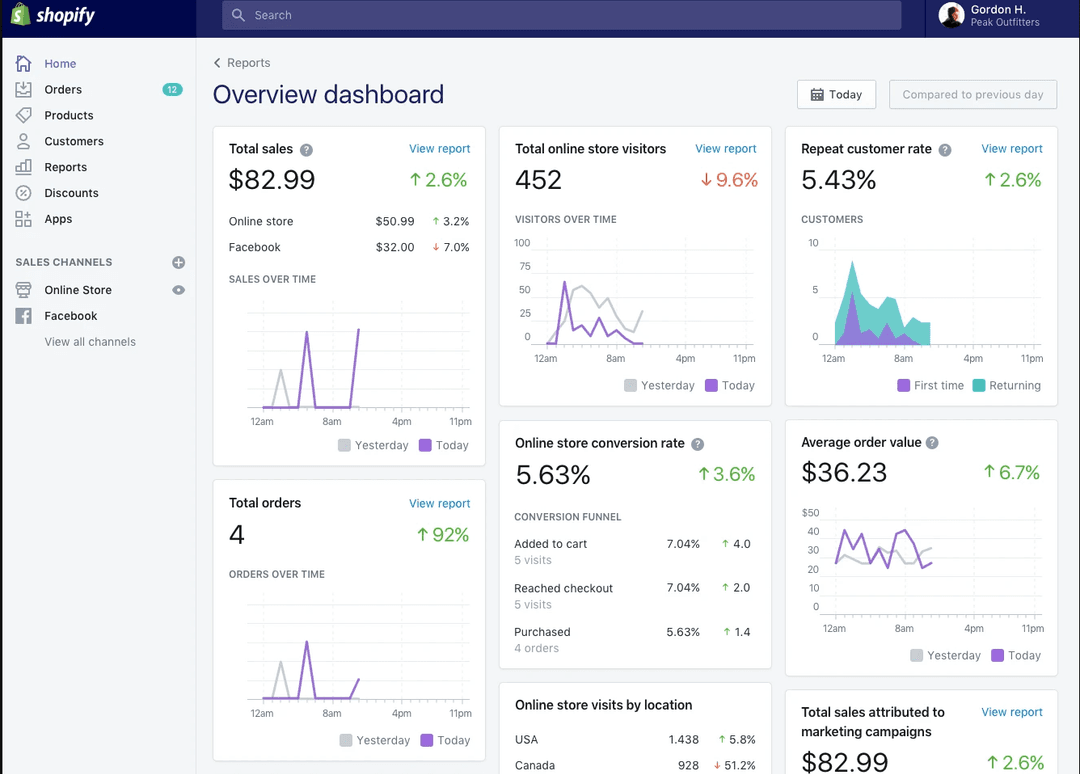
De wizard en mobiele app van Shopify voelen als zijwieltjes die verdwijnen naarmate je e-commercebedrijf groeit; zodra je het dashboard verkent, zijn krachtige voorraadtools en plug-ins van derden met één klik bereikbaar.
Squarespace houdt daarentegen de volledige ervaring vrij van code—ideaal als je liever lettertypen en lay-outs aanpast dan in instellingen duikt.
Voor beginners die snel een strakke website willen, legt Squarespace de lat hoog; voor verkopers die van plan zijn het aantal SKU's uit te breiden, POS toe te voegen of meerdere verkoopkanalen te optimaliseren, wint de uitgebreidere gereedschapsset van Shopify op de lange termijn.
Shopify
- You can easily customize your store with a wide range of themes.
- Shopify's app store offers tools to boost your store's functionality.
- It provides reliable security to protect your customers' data.
- You might find transaction fees if not using Shopify Payments.
- Shopify's blogging feature is less robust than others.
- It can be challenging to manage multiple currencies.
Squarespace
- You can create stunning websites with its beautiful design templates.
- It's easy to use, even if you're not tech-savvy.
- The drag-and-drop interface makes site customization simple.
- Your site customization options are limited compared to some competitors.
- The customer support can be slow and less responsive.
- You might find the onboarding process a bit challenging if you're new to ecommerce.
Shopify
- Boutique RetailersShopify’s customizable themes help your store stand out in a crowded market.
- Artisan ShopsYou can easily showcase and sell unique products with Shopify’s flexible product listings.
- StartupsShopify’s user-friendly interface allows you to set up quickly and focus on growth.
- Small BusinessesIts app store provides tools to expand your store’s capabilities as your business grows.
- Online MarketplacesShopify’s secure checkout process builds trust with your customers.
- Subscription ServicesYou can manage recurring payments and customer subscriptions efficiently with Shopify’s built-in tools.
Squarespace
- Creative professionalsShow portfolios with visually appealing templates.
- Small business ownersSet up an online store quickly with user-friendly tools.
- PhotographersPresent work beautifully using built-in gallery options.
- ArtistsCreate a sleek online gallery to sell artwork.
- DesignersBuild a professional site with modern, clean aesthetics.
- BloggersEasily craft and manage content with built-in blogging features.
Wie moet Shopify gebruiken en wie Squarespace?
Als je routekaart dropshipping, verkoop via meerdere kanalen of een fysieke winkelbalie omvat, gebruik dan Shopify.
De uitgebreide appstore, robuuste API en geavanceerde SEO-tools laten je elk onderdeel van een groeiend e-commerceplatform optimaliseren—of klanten nu kopen via sociale media, je Shopify-winkel of een fysiek verkooppunt.
Creatieve ondernemers en kleine dienstverlenende bedrijven die daarentegen een handvol digitale of fysieke producten verkopen, moeten Squarespace gebruiken.
Met de op design gerichte sjablonen, ingebouwde marketingtools en een vaste structuur voor transactiekosten kun je binnen enkele uren een verzorgde Squarespace-website lanceren, zonder te hoeven worstelen met plug-ins of code.
| Shopify | Squarespace | |
|---|---|---|
| App Ecosystem | Shopify Massive Shopify App Store for dropshipping, email marketing, and API plugins | Squarespace Curated plugin shelf—fewer third-party apps but streamlined functionality |
| Core Focus | Shopify Ecommerce-first platform built for a scalable online store, POS, and multichannel checkout | Squarespace Design-led website builder that layers in ecommerce features for a Squarespace site |
| Design Flexibility | Shopify Theme editor plus code access and SEO features; thousands of templates in the Shopify Theme Store | Squarespace Pure drag-and-drop layouts with polished templates—no coding for beginners |
| Pricing | Shopify Tiered Shopify plans; extra transaction fees if you skip Shopify Payments or other gateways | Squarespace Flat Squarespace pricing with most ecommerce tools baked in, no gateway surcharge |
| Scalability | Shopify Handles high-volume catalogs, Amazon/Etsy sales channels, and Shopify Plus upgrades | Squarespace Best for small business catalogs and simpler ecommerce business needs |
| Ecommerce Functionality | Both ecommerce platforms let you sell products (physical or digital) from a single online store—complete with carts, secure checkout, and inventory management that even supports dropshipping. |
|---|---|
| Mobile Usability | Every template is mobile-optimized out of the box, so your ecommerce website delivers a friendly user experience and fast mobile checkout that search engines love. |
| Payment Gateways | Stripe, PayPal, Shopify Payments, and other payment processors plug in fast; SSL encryption keeps every credit-card swipe safe while minimizing extra transaction fees. |
| SEO Tools | Built-in SEO features—custom meta tags, clean URLs, and automatic sitemaps—help you optimize pages so your online business ranks higher and stays discoverable on Google. |