

Med så mange ulike regnskapsprogrammer for netthandel tilgjengelig er det vanskelig å finne ut hvilket som passer for deg. Du vet at du vil effektivisere komplekse regnskapsoppgaver som å spore salg, beregne skatter og håndtere lagerkostnader – men nå må du finne ut hvilket verktøy som er best. Jeg hjelper deg! I dette innlegget gjør jeg valget enklere ved å dele mine personlige erfaringer med bruk av dusinvis av ulike regnskapsverktøy for nettbutikker i alle størrelser, og mine anbefalinger av de beste regnskapsprogrammene for netthandel totalt sett.
Hva er regnskapsprogramvare for netthandel?
Regnskapsprogramvare for netthandel er et spesialisert verktøy utviklet for å håndtere økonomiske transaksjoner og regnskapsoppføringer for nettbaserte virksomheter. Den automatiserer og organiserer salg, utgifter, lagerbeholdning og skatteberegninger, og integreres sømløst med ulike netthandelsplattformer og betalingsformidlere.
Formålet er å forenkle regnskapsprosessen, gi økonomisk innsikt i sanntid og bidra til nøyaktig rapportering. Det er avgjørende for netthandelsvirksomheter å opprettholde økonomisk nøyaktighet, overholde skatteregler og ta velinformerte økonomiske beslutninger. Slik støttes virksomhetens samlede effektivitet og vekst i det digitale markedet.
Hvorfor du kan stole på våre programvareanbefalinger
6,700+
Reviews
20
Industry experts
16+
Evaluation factors
14
Years
Teamet vårt har testet og anmeldt programvare siden 2012. Vi er selv ledere i detaljhandelen, så vi vet hvor vanskelig og hvor viktig det er å velge riktig programvare.
I denne guiden har vi vurdert verktøyene gjennom praktisk testing og uavhengig research og gitt dem poeng ut fra våre utvelgelseskriterier.
Anmeldelsene våre bygger på vår uavhengige vurdering, ikke på salgsargumenter.
Sammenligningstabell for regnskapsprogrammer for netthandel
| Tool | Best For | Trial Info | Price | ||
|---|---|---|---|---|---|
| 1 | Best comprehensive accounting platform | Free trial available | From $38/month | Website | |
| 2 | Best for audit-ready, expert-certified books | 15-day free trial | From $69/month (billed annually) | Website | |
| 3 | Best for integrations | Offers an unlimited free trial | From $29/user/month | Website | |
| 4 | Best for hands-off accounting | Free trial available | From $249/month (billed annually) | Website | |
| 5 | Best for real-time tracking and multi-currency support | Free demo available | Pricing upon request | Website | |
| 6 | Best for growing teams | Not available | From $27/month | Website | |
| 7 | Best for Zoho users | 14-day free trial | From $15/month (billed annually) | Website | |
| 8 | Best for simplifying ecommerce accounting | 14-day free trial | Pricing upon request | Website | |
| 9 | Best purchase-to-pay (P2P) automation solution | Demo available upon request | From £129 | Website | |
| 10 | Best for accounting workflows | Free demo available | From £1,200/month | Website |


Oversikt over de 10 beste regnskapsprogrammene for netthandel
Her er en kort beskrivelse av hvert regnskapsprogram for netthandel, med informasjon om hva det egner seg best til, noen bemerkelsesverdige funksjoner, skjermbilder og priser.
 Best comprehensive accounting platform
- Free trial available
- From $38/month
Visit WebsiteCustomer Rating:4/5
Track sales and expenses to save time and reduce paperwork. QuickBooks Online is a cloud-based accounting platform that covers bookkeeping, invoicing, sales tax tracking, inventory management, and ecommerce channel integrations for Shopify, Amazon, and eBay.
Who Is QuickBooks Online Best For?
QuickBooks Online is a strong fit for small to mid-sized ecommerce businesses that need a full accounting suite without hiring a dedicated accountant.
Why I Picked QuickBooks Online
QuickBooks Online earns its spot as one of the best on my shortlist because no other accounting tool covers the full ecommerce accounting stack as completely. I particularly like how it handles sales tax across multiple states with economic nexus tracking built right in—something that trips up a lot of growing ecommerce businesses. I also rely on its automatic payout matching, which separates Amazon or Shopify payouts into revenue, fees, and taxes without manual reconciliation.
QuickBooks Online Key Features
- Inventory tracking: Monitor stock levels, set reorder points, and generate purchase orders directly within your books.
- Cash flow forecasting: Project future cash positions based on outstanding invoices, bills, and historical transaction data.
- Profit & loss by class: Segment income and expenses by sales channel, product line, or location to compare performance.
- Bank feed syncing: Connect bank and credit card accounts to auto-import and categorize transactions daily.
Pros and Cons
Pros:
- It automatically backs up financial data.
- User-friendly interface.
- It’s accessible from anywhere.
Cons:
- Inconsistent customer support.
- It offers limited customizability.
Learn more about QuickBooks Online: Best for audit-ready, expert-certified books
- 15-day free trial
- From $69/month (billed annually)
Visit WebsiteCustomer Rating:4.3/5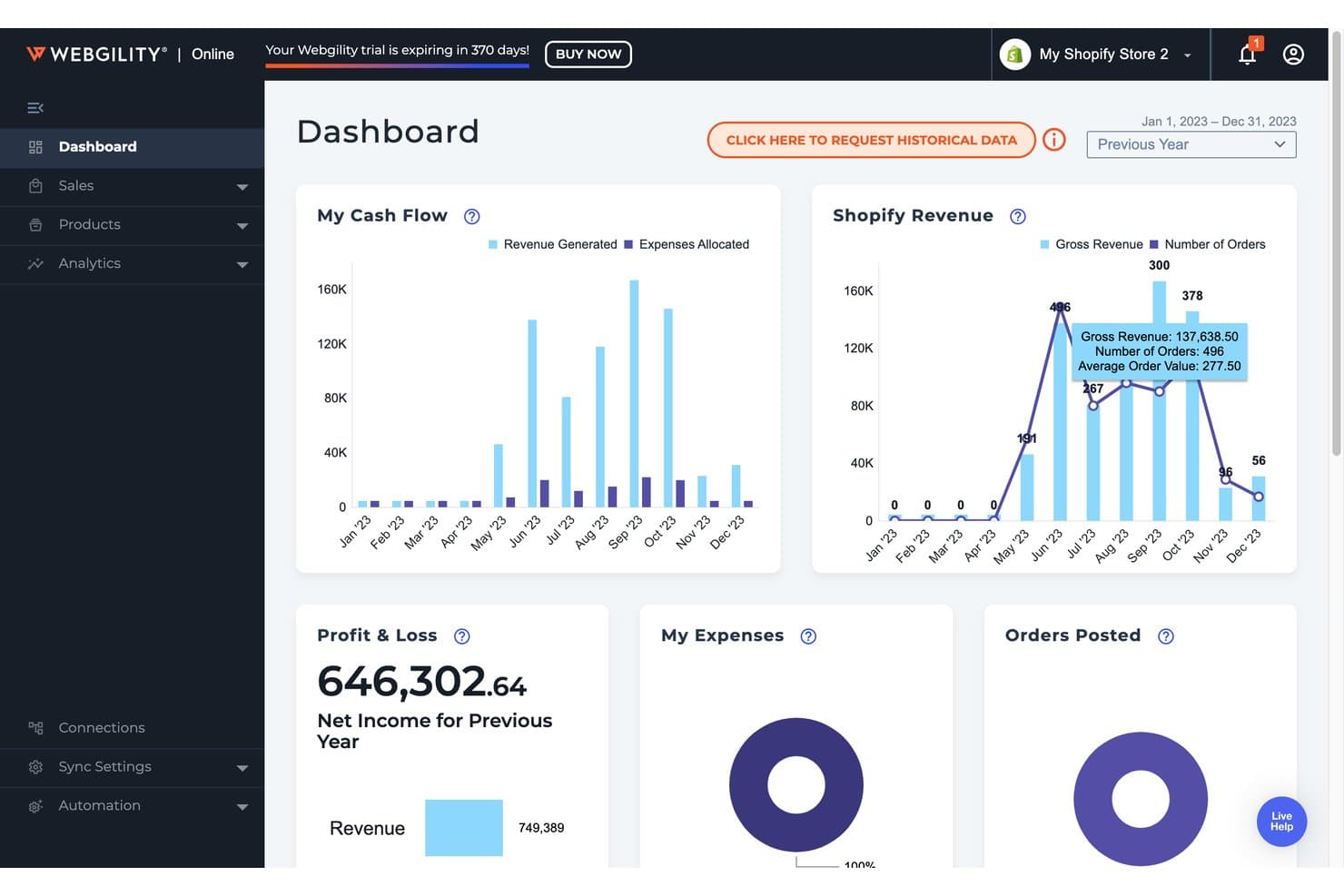
Webgility offers an ecommerce accounting dashboard displaying cash flow, Shopify revenue, profit & loss, and order tracking in one unified view. Webgility is an ecommerce accounting automation platform that syncs order-level transaction data—including fees, payouts, taxes, and inventory—across multichannel sales platforms directly into QuickBooks and Xero, with human accountant verification built into its higher-tier plans.
Who Is Webgility Best For?
Webgility is a strong fit for small to mid-sized multichannel ecommerce businesses that sell on Amazon, Shopify, or Walmart and run their books on QuickBooks.
Why I Picked Webgility
I picked Webgility because no other ecommerce accounting tool pairs automation with a human accountant who certifies your books each month. The Monthly Reconciliation Guarantee means a dedicated ecommerce accountant reviews exceptions, resolves discrepancies, and signs off on a close-ready audit trail. I especially like that order-level posting captures every fee, payout, and refund before that review happens, so the accountant is verifying clean data, not chasing errors.
Webgility Key Features
- Real-time inventory sync: Sync inventory levels instantly across all connected channels to avoid overselling.
- Multi-channel integrations: Connect to 50+ platforms including Shopify, Amazon, Walmart, eBay, and BigCommerce.
- Sales tax automation: Calculate and track multi-state and international sales tax with Avalara AvaTax integration.
- Advanced B2B/wholesale workflows: Manage invoice posting, partial shipments, and purchase order syncing for wholesale orders.
Webgility Integrations
Webgility offers 50+ native integrations, including Shopify, Amazon, Walmart, eBay, WooCommerce, BigCommerce, Xero, QuickBooks Online, QuickBooks Desktop, and Avalara AvaTax.
Pros and Cons
Pros:
- Automated order posting with fees and payouts
- Handles multi-entity accounting workflows
- Monthly accountant review for reconciliation accuracy
Cons:
- No automated project or class tracking
- Requires QuickBooks or Xero to operate
Learn more about Webgility: 3Best for integrations
A2X
- Offers an unlimited free trial
- From $29/user/month
Visit WebsiteCustomer Rating:4.9/5
Rigorous reconciliation is the foundation of A2X’s commitment to meeting accounting standards. A2X is ecommerce accounting software that automates payout reconciliation across Amazon, Shopify, eBay, Etsy, Walmart, and PayPal, feeding categorized transaction summaries directly into QuickBooks Online, Xero, Sage, or NetSuite.
Who Is A2X Best For?
A2X is a good fit for ecommerce sellers and their accountants or bookkeepers who sell across multiple channels and need clean, audit-ready financials in their accounting platform.
Why I Picked A2X
A2X earns its spot on my shortlist because its integration coverage is hard to beat in this category. It connects every major sales channel—Amazon, Shopify, eBay, Etsy, Walmart, and PayPal—directly to QuickBooks Online, Xero, Sage, or NetSuite. What I like most is how it handles payout reconciliation: instead of flooding your accounting platform with thousands of individual order entries, A2X sends a single summary entry that maps exactly to each payout in your bank. I also appreciate that it accounts for payment gateways like Stripe and PayPal separately, keeping fees clean and categorized.
A2X Key Features
- Sales tax and VAT workflows: Categorize sales tax and VAT collected across channels and map them to the correct tax accounts in your accounting platform.
- COGS and IMS workflows: Import cost of goods data from inventory management systems or CSV files to track product-level costs alongside your revenue.
- A2X Subledger: Links payout summaries to originating orders and SKUs in a double-entry record, giving you full drill-down visibility for month-end close.
- A2X Clarity: Delivers profitability analytics by SKU, channel, kit, or customer, built on the same reconciled transaction data that powers A2X Core.
Pros and Cons
Pros:
- Excellent user interface.
- It provides straightforward integrations.
- It’s easy to use.
Cons:
- Customer support needs work.
- The setup process has a learning curve.
Learn more about A2X: Best for hands-off accounting
- Free trial available
- From $249/month (billed annually)
Visit WebsiteCustomer Rating:4.5/5
Monitor up-to-date cash flow and transactions to understand financial health. Bench is a bookkeeping and accounting service for small businesses that pairs proprietary software with a dedicated team of human bookkeepers to handle monthly bookkeeping, financial reporting, and tax filing.
Who Is Bench Best For?
Bench is a strong fit for small business owners and ecommerce entrepreneurs who want their books handled for them rather than managing software themselves.
Why I Picked Bench
I've included Bench in my top picks because it's one of the only accounting solutions on this list that takes bookkeeping entirely off your plate. A dedicated bookkeeper handles your monthly transaction categorization and reconciliation, then delivers finalized financial statements through the Bench platform. I especially like the automated account syncing, which pulls transactions from your sales channels and payment processors directly into your books without manual data entry.
Bench Key Features
- Real-time financial reporting: Access and download up-to-date income statements and balance sheets directly from the Bench platform at any time.
- Tax filing and advisory: Licensed Enrolled Agents and CPAs handle your annual income tax preparation, filing, and quarterly estimated tax payments.
- Year-end financial package: Your bookkeeping team prepares a complete year-end financial package, ready to hand off to your tax advisor at the start of tax season.
- Notification center: Get timely reminders to stay on top of financial tasks, document requests, and filing deadlines.
Pros and Cons
Pros:
- The user interface is easy to use.
- Great email and phone support.
- Excellent expense tracking tools.
Cons:
- It doesn’t connect all business accounts.
- There’s a learning curve to preparing reports.
Learn more about Bench: Best for real-time tracking and multi-currency support
- Free demo available
- Pricing upon request
Visit WebsiteCustomer Rating:4/5
The accounts page shows everything users need to know about the company’s accounts. NetSuite is a cloud ERP platform that combines core accounting, order management, inventory, and ecommerce operations into a single unified system for growing and enterprise-level businesses.
Who Is NetSuite Best For?
NetSuite is a strong fit for mid-market to enterprise retailers and ecommerce businesses managing complex financials across multiple entities, subsidiaries, or global markets.
Why I Picked NetSuite
I've included NetSuite in my top picks because the combination of real-time financial visibility and multi-currency support is rare at this depth in a single platform. Through NetSuite OneWorld, my team can process transactions across more than 190 currencies with real-time conversion and automatic consolidation at both subsidiary and headquarters levels. I also rely on the role-based dashboards and real-time financial reporting, which surface up-to-the-minute performance data without needing to run manual exports. For ecommerce businesses selling across multiple regions, that live visibility into cross-currency order and revenue data lets your finance team move faster.
NetSuite Key Features
- Revenue recognition: Automates revenue scheduling and reporting in compliance with ASC 606 and IFRS 15 standards.
- SuiteTax: Calculates, processes, and reports on taxes across multiple jurisdictions and countries within a single tax engine.
- Order-to-cash automation: Automates the full order management cycle, from order capture through invoicing and payment collection.
- Financial consolidation: Consolidates financials across multiple subsidiaries, business units, and legal entities in real time.
Pros and Cons
Pros:
- Navigation throughout the platform is easy.
- Remote teams can access the company’s data from anywhere.
- It provides the reports you need to monitor and track transactions.
Cons:
- It provides the reports you need to monitor and track transactions.
- The software can be complex for new users because of the customization options.
Learn more about NetSuite:

Manage tasks and expenses effectively through the visual dashboard. Xero is a cloud-based accounting platform with multi-currency invoicing, inventory tracking, bank reconciliation, and native integrations with Shopify, Amazon, and other major ecommerce channels.
Who Is Xero Best For?
Xero is a good fit for small to mid-sized ecommerce businesses that sell across multiple channels and need a single place to manage their finances.
Why I Picked Xero
Xero earns its spot as one of the best on my shortlist because it scales with your team without requiring a platform migration. I like that you can add users with role-based permissions, so your bookkeeper, operations lead, and CFO each see exactly what they need. The Analytics Plus add-on gives my team cash flow forecasting and financial health scorecards that become more valuable as transaction volume grows.
Xero Key Features
- Multi-currency invoicing: Send invoices and accept payments in 160+ currencies, with automatic exchange rate updates.
- Bank reconciliation: Connect live bank feeds from 21,000+ institutions and match transactions automatically.
- Inventory Plus: Track stock levels and cost of goods, with direct syncing to Shopify and Amazon FBA.
- Sales tax tools: Calculate and apply tax rates on invoices, with detailed tax reports for filing.
Pros and Cons
Pros:
- It’s easy to navigate.
- Simple to use.
- An excellent option for small businesses.
Cons:
- It isn’t suitable for complex accounting needs.
- Custom reporting is complex.
Learn more about Xero: Best for Zoho users
- 14-day free trial
- From $15/month (billed annually)
Visit WebsiteCustomer Rating:4.3/5
View transactions related to a single customer, including all crucial details. Zoho Books is a cloud-based accounting platform for growing businesses that covers invoicing, expense tracking, inventory management, bank reconciliation, sales tax compliance, and multi-currency transactions.
Who Is Zoho Books Best For?
Zoho Books is a strong fit for small to mid-sized businesses already using other Zoho products who need accounting software that connects natively with their existing tools.
Why I Picked Zoho Books
Zoho Books earns its spot on my shortlist because of how tightly it connects with the rest of the Zoho suite. My team can sync customer contacts and deal data from Zoho CRM directly into Zoho Books, so invoices get generated without re-entering data across systems. I also like the native Zoho Inventory connection, which keeps stock levels and order statuses in sync across sales channels in real time.
Zoho Books Key Features
- Multi-currency transactions: Automatically applies live exchange rates to invoices, bills, and payments across 170+ currencies.
- Sales tax compliance: Calculates, tracks, and files sales tax across multiple regions, with support for tax groups and compound taxes.
- Automated bank feeds: Connects to your bank accounts and credit cards to import and categorize transactions daily.
- Client portal: Lets customers view invoices, make payments, and approve estimates directly through a branded self-service portal.
Pros and Cons
Pros:
- Users can customize reports.
- It’s easy to set up banking feeds.
- Simple user interface layout.
Cons:
- It doesn’t have many advanced features.
- Share options need improvement.
Learn more about Zoho Books: Best for simplifying ecommerce accounting
- 14-day free trial
- Pricing upon request
Visit WebsiteCustomer Rating:4.5/5
Track income and expenses in real-time to know where the business stands. Kashoo is a cloud-based accounting platform for small businesses and sole proprietors that covers invoicing, expense tracking, bank transaction imports, sales tax, multi-currency support, and payment collection.
Who Is Kashoo Best For?
Kashoo is a good fit for small business owners and freelancers who need straightforward accounting without the complexity of enterprise-level software.
Why I Picked Kashoo
I've included Kashoo in my top picks because it strips accounting down to what small ecommerce businesses actually need, without the bloat. I really like how automatic bank transaction imports pull in sales and expenses across connected accounts in real time, so your books stay current without manual data entry. The built-in sales tax tracking is another feature I find genuinely useful, since it handles tax calculations across transactions automatically rather than requiring a separate tool or manual reconciliation.
Kashoo Key Features
- Multi-currency support: Accept and record transactions in multiple currencies, with automatic exchange rate conversions applied across your books.
- Invoice creation and payment collection: Build and send branded invoices, then collect payments via credit card directly through the platform.
- Inventory tracking: Add product details and monitor inventory value on hand, keeping your product costs reflected in your financial records.
- Income and expense categorization: Assign categories to income and expenses to organize transactions and generate accurate profit and loss reports.
Pros and Cons
Pros:
- Simple implementation.
- It works on the cloud.
- Fast and easy to use.
Cons:
- The mobile app isn’t robust.
- The reporting features need improvement.
Learn more about Kashoo: 9Best purchase-to-pay (P2P) automation solution
Yooz
- Demo available upon request
- From £129
Visit WebsiteCustomer Rating:4.4/5
Yooz features an intelligent workflow that customizes invoice approval routes according to organizational rules and dynamic three-way matching to ensure charges are verified against purchase orders. Yooz is an AP and purchase-to-pay automation platform that handles invoice capture, coding, approval workflows, payment automation, vendor statement reconciliation, and budget management across the full procure-to-pay cycle.
Who Is Yooz Best For?
Yooz is a good fit for mid-market and enterprise finance teams that manage high invoice volumes and need structured, automated approval workflows across multiple entities.
Why I Picked Yooz
Yooz's P2P automation covers the full procurement cycle in a single platform, from purchase request creation to vendor payment — a capability most AP tools don't offer. I particularly like the line-level 2- or 3-way PO matching, which reconciles invoices against purchase orders and delivery receipts without manual intervention. The real-time budget management dashboard lets finance teams track spend against budget as POs and invoices move through approval, avoiding end-of-month surprises.
Yooz Key Features
- Omnichannel document capture: Automatically ingests invoices in any format or channel and uses YoozSmartSplit technology to split and classify document batches without manual sorting.
- No-code workflow configuration: Build and modify approval workflows using a BPMN2 engine that supports sequential, parallel, and no-touch approvals, plus auto-escalation and auto-delegation rules.
- AI-powered fraud detection: Flags fake documents, atypical amounts, duplicate invoices, and unverified vendor details using a proprietary AI model before payments are processed.
- Multi-entity management: Handles multi-currency, multi-tax, multi-location, and cross-country operations across unlimited entities within a single platform instance.
Pros and Cons
Pros:
- Extremely easy to use software
- Tons of 3rd-party integrations
- Excellent auto matching feature
Cons:
- Can't sort by document date
- Can be difficult to customize the dashboard
Learn more about Yooz:

Use real-time reporting with the metrics that matter most based on who’s viewing the dashboard. Sage Intacct is a cloud-based financial management and accounting platform built for mid-sized and growing businesses, covering multi-entity consolidation, AI-powered AP automation, real-time dashboards, budgeting, and revenue recognition.
Who Is Sage Intacct Best For?
Sage Intacct is a strong fit for mid-market companies with complex, multi-entity financial operations that need more than a small-business accounting tool can offer.
Why I Picked Sage Intacct
I've included Sage Intacct in my top picks because it's genuinely one of the most workflow-driven accounting platforms I've used. The AP Automation agent handles bill entry end-to-end, matching vendors, flagging duplicates, and creating draft bills with over 90% accuracy. The Close agent then tracks every month-end task, surfaces bottlenecks, and keeps close on schedule. For ecommerce businesses processing high transaction volumes across multiple channels, those two features alone cut a significant amount of manual accounting work.
Sage Intacct Key Features
- Multi-entity consolidation: Manage financials across multiple business entities, currencies, and subsidiaries from a single account.
- Revenue recognition: Automate revenue scheduling and recognition in compliance with ASC 606 and IFRS 15.
- Multi-dimensional reporting: Tag transactions across custom dimensions like channel, location, or product line for granular financial analysis.
- Sales and use tax management: Calculate and track tax obligations across multiple jurisdictions directly within the platform.
Pros and Cons
Pros:
- It allows in-depth views of finances.
- It’s a flexible platform.
- Custom reports are beneficial.
Cons:
- The user interface isn’t user-friendly.
- The learning curve is steep.
Learn more about Sage Intacct:
Andre alternativer for regnskap i netthandel
Her er noen flere alternativer som ikke kom med på listen over de beste regnskapsprogrammene for netthandel:
- 11WaveBest free ecommerce accounting software
- 12Multiview ERPBest for financial visibility
- 13FulfilBest for automated transaction recording
- 14SettleBest for AP automation
- 15Acumatica Cloud ERPBest for customizability
- 16DualEntryBest for supporting multi-entity consolidation
- 17FreeAgentBest for simplifying accounting tasks for small businesses.
- 18FinancialForceBest for Salesforce users.
- 19BlackLineBest cloud-based accounting automation tool.
- 20SAP Business OneBest for simplifying key accounting processes.
Andre typer økonomisk programvare for netthandel
Hvis du ser etter mer økonomisk programvare for netthandelsvirksomheten din, finner du her noen håndplukkede lister over verktøy du bør sjekke ut:
- Plattformer for kjøp nå, betal senere
- Kredittkortbehandling
- Programvare for beregning av salgsskatt i netthandel
- Programvare for betalingsbehandling
How I Evaluate Ecommerce Accounting Software
I split my evaluation into two layers: the baseline requirements—like reconciling Amazon settlements to the penny—and the differentiators that separate one tool from another.
Core Functionality (Table Stakes For This List)
When I'm selecting tools for my list, I rank each one on a scale from 0 (does not offer the functionality) to 5 (excels in this area) for each core functionality listed below. Then, I calculate the tool's total score into a percentage. Each tool needs to achieve a minimum total score of 65% to be considered for inclusion.
- Ecommerce Platform Integrations: I check for native connections to major platforms like Shopify, Amazon, eBay, WooCommerce, and BigCommerce rather than relying on CSV imports or third-party middleware.
- Sales & Payout Reconciliation: Each tool should match marketplace settlements and processor payouts to bank deposits, splitting out fees, refunds, and taxes automatically.
- Inventory & COGS Tracking: I look for real-time inventory valuation across channels and warehouses, with support for costing methods like FIFO or weighted average.
- Sales Tax Management: Multi-jurisdiction tax tracking matters here, especially for sellers with nexus obligations across several regions or VAT/GST requirements.
- General Ledger & Accounting Sync: I evaluate whether the tool syncs journal entries to platforms like QuickBooks, Xero, or NetSuite, or provides its own double-entry ledger.
- Multi-Channel Financial Reporting: Reports should break down profitability by channel, SKU, or product line so sellers can see exactly where margins are strongest.
Once I have a list of tools that meet this criteria, I consider what sets each platform apart.
Differentiating Factors (What Sets Vendors Apart)
Here's how I compare and contrast different vendors:
Standout Features
Multi-currency support with automatic FX gain/loss tracking matters for sellers listing on international marketplaces where payouts arrive in different currencies. I also look for historical data backfill, which lets you import months of past transactions at onboarding so your books are accurate from the start. Automated categorization rules round things out by mapping fees, refunds, and income to the right accounts without manual sorting each payout cycle.
Beyond Features
Pricing transparency is a big one. I check whether plans scale by order volume or connected channels, since a tool that gets expensive as you add marketplaces defeats the purpose. I also evaluate whether a vendor offers a certified accountant network or partner program, which makes onboarding smoother when your CPA already knows the platform. Integration depth with 3PLs, shipping tools, and ad platforms matters too, because profitability tracking falls apart without connected spend data.
Viktige funksjoner:
Her er noen funksjoner netthandelsplattformen du tar i bruk, bør ha for å hjelpe deg med å håndtere økonomien bedre:
- Skatteforberedelse: Du kan gjøre livet enklere for deg selv og regnskapsføreren din med regnskapsprogramvare for netthandel som tilbyr automatiske skatteberegninger, skatterapportering og flere skattesatser.
- Bokføring: Regnskapsprogramvare av høy kvalitet håndterer mange daglige bokføringsoppgaver, for eksempel oppdatering av hovedbøker, bankavstemminger, sporing av avskrivning og amortisering av eiendeler samt håndtering av lønn og fradrag.
- Finansiell rapportering og prognoser: Regnskapsprogramvaren for netthandel lagrer økonomiske data og lar deg bruke denne informasjonen til å lage rapporter og prognoser som gir deg verdifull forretningsinnsikt.
- Utestående fordringer: Regnskapsløsninger for netthandel kan håndtere fakturering og holde oversikt over hva kundene skylder og hvilke betalinger som er mottatt.
- Fakturabehandling: Regnskapsplattformen du bruker, bør som et minimum kunne håndtere fakturering, inkludert utskrift av fakturaer og vedlikehold av grunnleggende kundeinformasjon, for eksempel navn, adresser og kontonumre.
- Variable lønnsplaner: Enten teamet ditt er fastlønnet eller du betaler dem per time, bør plattformen du velger, beregne nøyaktig hva du skylder dem, inkludert frynsegoder.
- Avstemming av bankkontoer: Hvis virksomheten din har flere bankkontoer, er det viktig å bruke regnskapsprogramvare som kan holde oversikt over dem og avstemme dem ved hjelp av funksjoner for hovedbok og avstemming av kassabok.
- Fraktverktøy: Disse kan spare deg for mye tid ved å forenkle fraktprosessen med fraktetiketter, beregning av fraktkostnader og verktøy for sporing av forsendelser.
- Lagerstyring: Regnskapsprogramvare for netthandel som kan håndtere lagerbeholdning og lagernivåer samt spore beholdningen, kan hjelpe deg med å sikre at du ikke bestiller for mange eller for få produkter.
Brukervennlighet:
All programvare for netthandel bør være enkel å lære, bruke og navigere i. Netthandel er unikt ved at du trenger mange programmer, systemer og verktøy for å holde virksomheten i gang. Hvis bare ett av dem er vanskelig å lære og administrere, forsinker det hele prosessen. Regnskapsprogramvare for netthandel bør følge den samme retningslinjen. Jeg ser etter programvare som har omfattende opplæringsmateriell, nyttig kundestøtte og et intuitivt brukergrensesnitt.
Programvareintegrasjoner:
Selv med den mest funksjonsrike og rimelig prisede applikasjonen tilgjengelig vil den ikke være særlig nyttig for nettbutikken din hvis programvaren ikke kan integreres med de nåværende systemene dine. Programvaren du velger, bør integreres med tredjepartsløsninger som løsninger for bygging av nettbutikker, fraktsystemer og lønnsapplikasjoner. Ved å bruke regnskapsprogramvare for netthandel som fungerer med den eksisterende teknologistakken din, sikrer du at du ikke opplever kompatibilitetsproblemer som kan føre til tidkrevende feil.
Valuta for pengene:
Det er viktig å bruke en regnskapsløsning for netthandel som tilbyr funksjonene du trenger til en overkommelig pris, og som kan skaleres etter hvert som virksomheten vokser. Du kommer til å ønske deg en plattform du kan fortsette å bruke uten å bekymre deg for å bytte til en ny. Mange verktøy bruker trinnvis prissetting, slik at du kan begynne å bruke programvaren på et rimelig nivå og enkelt gå over til et mer avansert nivå senere. Du bør bruke programmer som lar deg betale bare for det du trenger, og som gjør det enkelt å tilpasse abonnementet uten å bruke mer enn nødvendig.
Vanlige spørsmål
Her er noen populære spørsmål som folk stiller når de søker etter ny regnskapsprogramvare for netthandel, med svar for enkelhets skyld.
Hva er fordelene med regnskapsprogramvare for netthandel?
Enten du starter din første nettbutikk, eller virksomheten din har vært i drift i flere år, er det mange fordeler ved å bruke regnskapsprogramvare for netthandel. Her er noen av fordelene ved å bruke regnskapsprogramvare for netthandel som organisasjonen din bør ha i bakhodet.
- Sparer tid: En god regnskapsplattform for netthandel vil automatisere prosesser som fakturering og betalingspåminnelser med lenker for betaling på nett. Hvis det oppstår en feil, sender plattformen deg automatisk et varsel og fremhever hva som gikk galt. Automatisering kan eliminere manuelle prosesser, spare tid og forbedre nøyaktigheten.
- Økonomisk oversikt: Når du håndterer virksomhetens økonomi, vil programvaren du bruker, gjøre det enkelt å hente ut økonomiske rapporter. Regnskapsplattformen gjør det enkelt å samle inn økonomiske rapporter og opplysninger, for eksempel utestående fordringer eller saldobalanser.
- Synkroniserer alle økonomiske data: Det kan ta lang tid å gå frem og tilbake mellom plattformer for å samle inn viktige data hvis de er lagret på flere plattformer, for eksempel bankkontoer, lønnstjenester og kredittkortkontoer. Regnskapsprogramvaren for netthandel synkroniserer alle data fra nettbaserte regnskapsverktøy via API. Dette betyr at du ikke trenger å laste ned økonomisk informasjon fra hver kilde og bruke tid på å legge inn data for å opprette et komplett økonomisk register.
- Forbedrer beslutningstakingen: Regnskapsplattformen bidrar til å forbedre beslutningsprosessen ved å gi innsyn i virksomhetens sanntidsdata og nøkkeltall, for eksempel kunders kjøpsfrekvens, inntekter, lagernivåer og produktsalg. Denne informasjonen kan si noe om virksomhetens økonomiske helse. Et høyere nivå av innsikt og kontroll kan skape et solid grunnlag for å ta viktige forretningsbeslutninger.
- Organiserer registre: Det siste du ønsker å se, er rotete økonomiske opplysninger for virksomheten. Regnskapsprogramvaren for netthandel bidrar til å organisere regnskapsregistrene dine. Denne plattformen organiserer enkelt kontoer, fakturaer, kvitteringer og andre økonomiske registre – nå slipper du å lete febrilsk etter informasjonen du trenger.
Kan Shopify brukes som regnskapsprogramvare?
Hvis du vurderer å bruke Shopify til regnskapsprosessene dine, er det noen begrensninger du bør være oppmerksom på. Shopify er ikke en regnskapsplattform, men et system for netthandel. Det betyr at du kan bruke det til å overvåke salg og lagerbeholdning, men du kan ikke gjøre ting som å opprette fakturaer eller håndtere utestående fordringer. Etter hvert som virksomheten din vokser ved bruk av Shopify, bør du begynne å vurdere å integrere plattformen med en av regnskapsløsningene for netthandel jeg nevnte ovenfor. Da sikrer du at du har alt du trenger for å opprettholde korrekte økonomiske registre og utføre viktige regnskapsprosesser.
Finnes det gratis regnskapsprogramvare for netthandel?
Små bedrifter eller oppstartsbedrifter kan ha nytte av gratis regnskapsprogramvare. Et eksempel på dette er Wave Accounting, som tilbyr regnskapsprogramvare, fakturaprogramvare eller bankprogramvare som kun er tilgjengelig i USA, som en kostnadsfri tjeneste uten tidsbegrensning. Et annet eksempel er Zoho Books, som tilbyr et kostnadsfritt abonnement uten tidsbegrensning for virksomheter med inntekter under 50 000 dollar per regnskapsår.