

Il software per l'inserimento degli ordini automatizza il modo in cui inserisci, monitori e gestisci gli ordini dei clienti, semplificando l'eliminazione degli errori costosi, mantenendo sincronizzato l'inventario e consegnando sempre i prodotti giusti.
Ma diciamoci la verità: la gestione degli ordini non è sempre semplice come dovrebbe essere.
Tra errori di inserimento manuale, scambi di inventario e quei momenti in cui ti chiedi “dove è finito quell'ordine?”, può sembrare un mal di testa senza fine.
È qui che entra in gioco il software giusto per l'inserimento degli ordini. Automatizza l'inserimento dei dati, elimina gli errori e fai scorrere gli ordini senza intoppi, così passerai meno tempo a risolvere i problemi e più tempo a far crescere concretamente la tua attività.
In questa guida analizzerò i migliori strumenti software per l'inserimento degli ordini, illustrerò cosa fanno e ti aiuterò a capire quale sia più adatto alla tua attività. Troviamo la soluzione perfetta per te.
Perché fidarsi dei nostri consigli sui software
6,700+
Reviews
20
Industry experts
16+
Evaluation factors
14
Years
Il nostro team testa e recensisce software dal 2012. In quanto leader del retail noi stessi, sappiamo quanto sia difficile — e importante — scegliere il software giusto.
Per questa guida, abbiamo valutato gli strumenti attraverso test pratici e ricerche indipendenti, assegnando un punteggio agli strumenti in base ai nostri criteri di selezione.
Le nostre recensioni riflettono il nostro giudizio indipendente, non un discorso di vendita.
Tabella di confronto dei software per l'inserimento degli ordini
Qui puoi confrontare le nostre migliori scelte di sistemi per l’inserimento degli ordini in base ai prezzi, alle informazioni sulle prove gratuite e ai casi d’uso ideali.
| Tool | Best For | Trial Info | Price | ||
|---|---|---|---|---|---|
| 1 | Ideale per aziende di noleggio | Prova gratuita di 14 giorni | A partire da $29/mese | Website | |
| 2 | Ideale per aziende di vendita al dettaglio | Demo gratuita disponibile | Prezzo su richiesta | Website | |
| 3 | Ideale per la gestione finanziaria | Prova gratuita di 7 giorni | Da $99/mese | Website | |
| 4 | Ideale per la gestione ordini B2B | Demo gratuita disponibile | Prezzi disponibili su richiesta | Website | |
| 5 | Ideale per soluzioni ecommerce | Demo gratuita disponibile | Prezzo su richiesta | Website | |
| 6 | Il migliore per ottimizzazione dei percorsi e delle consegne | Prova gratuita di 14 giorni | Da $200/mese | Website | |
| 7 | Ideale per piccole e medie imprese | Demo gratuita + prova gratuita di 15 giorni disponibile | A partire da $49/mese | Website | |
| 8 | Ideale per lo scambio elettronico di dati | Prova gratuita disponibile | Da $19.95/mese | Website | |
| 9 | Ideale per l'integrazione con la contabilità | Prova gratuita di 14 giorni | Da $49/mese | Website | |
| 10 | Ideale per il tracciamento dei pacchi | Prova gratuita disponibile | A partire da $142/località/mese | Website |


I 10 migliori software in assoluto per l'inserimento degli ordini, recensiti
Bene, passiamo finalmente alle recensioni. Per ciascuno troverai un’analisi dettagliata delle funzionalità principali, dei pro e dei contro, delle integrazioni e dei casi d’uso ideali di ogni strumento per l’inserimento degli ordini, per aiutarti a trovare quello migliore per il tuo marchio.
 Ideale per aziende di noleggio
- Prova gratuita di 14 giorni
- A partire da $29/mese
Visit WebsiteCustomer Rating:4.8/5
Booqable semplifica la gestione di inventario, prenotazioni e clienti per i noleggi. Booqable è un software di gestione noleggi progettato per aziende che affittano prodotti e attrezzature. Serve le società di noleggio offrendo strumenti per gestire inventario, prenotazioni e interazioni con i clienti in modo efficiente.
Perché ho scelto Booqable: Fornisce una soluzione su misura per le aziende di noleggio, concentrandosi sulla gestione dell'inventario e delle prenotazioni. Il software include funzionalità come aggiornamenti in tempo reale sulla disponibilità e capacità di prenotazione online. Puoi inoltre personalizzare periodi e prezzi di noleggio, il che aggiunge flessibilità alla tua attività. Nella mia esperienza, l'attenzione di Booqable alla gestione dei noleggi lo rende uno strumento prezioso per le aziende del settore.
Funzionalità e integrazioni principali:
Le funzionalità includono aggiornamenti in tempo reale della disponibilità, periodi di noleggio personalizzabili e gestione dettagliata delle prenotazioni. Puoi gestire facilmente il tuo inventario, assicurando un tracciamento accurato degli articoli noleggiati. Gli strumenti di gestione clienti della piattaforma ti aiutano a mantenere solide relazioni con i clienti.
Le integrazioni includono Shopify, WooCommerce, WordPress, Squarespace, Zapier, Google Calendar, Stripe, PayPal, Authorize.Net e Mollie.
Pros and Cons
Pros:
- Pensato per le aziende di noleggio
- Aggiornamenti in tempo reale sulla disponibilità
- Periodi di noleggio personalizzabili
- Ottimi strumenti di gestione clienti
Cons:
- Limitato al settore del noleggio
- Opzioni di personalizzazione limitate
- Potrebbe non adattarsi a grandi imprese
Learn more about Booqable: Ideale per aziende di vendita al dettaglio
- Demo gratuita disponibile
- Prezzo su richiesta
Visit WebsiteCustomer Rating:4.4/5
Brightpearl unifica la gestione di vendite, inventario e clienti per i rivenditori. Brightpearl è una piattaforma operativa pensata per le aziende di vendita al dettaglio, che le aiuta a gestire ordini, inventario e dati dei clienti. È progettata per i rivenditori che necessitano di unificare i loro canali di vendita e semplificare le operazioni.
Perché ho scelto Brightpearl: Offre una potente automazione per la gestione degli ordini e dell'inventario, fondamentale per i rivenditori con più canali di vendita. La piattaforma supporta aggiornamenti in tempo reale dei livelli di inventario, riducendo il rischio di vendite in eccesso. Puoi anche beneficiare delle sue funzionalità di contabilità integrate, che semplificano la gestione finanziaria. Nella mia esperienza, l'enfasi di Brightpearl sulle operazioni di vendita al dettaglio la rende una scelta eccellente per le aziende che cercano efficienza.
Funzionalità e integrazioni principali:
Le funzionalità includono aggiornamenti in tempo reale dell'inventario, elaborazione automatizzata degli ordini e contabilità integrata. La piattaforma offre anche reportistica avanzata per aiutarti a prendere decisioni aziendali informate. Le sue capacità di vendita multicanale assicurano la gestione delle tue vendite attraverso vari canali.
Le integrazioni includono Shopify, Amazon, eBay, BigCommerce, Magento, WooCommerce, Xero, QuickBooks, ShipStation e Salesforce.
Pros and Cons
Pros:
- Supporta la vendita multicanale
- Aggiornamenti in tempo reale dell'inventario
- Strumenti di reporting completi
- Automatizza la gestione finanziaria
Cons:
- Opzioni di personalizzazione limitate
- Richiede conoscenze tecniche
- Può non essere adatta ai piccoli rivenditori
Learn more about Brightpearl: Ideale per la gestione finanziaria
- Prova gratuita di 7 giorni
- Da $99/mese
Visit WebsiteCustomer Rating:4.4/5
TallyPrime semplifica la contabilità, il magazzino e la gestione delle paghe per le aziende. TallyPrime è un software di contabilità e gestione finanziaria progettato per le aziende che cercano soluzioni finanziarie complete. È particolarmente adatto a piccole e medie imprese che necessitano di una gestione efficiente di contabilità, magazzino e funzioni di gestione delle paghe.
Perché ho scelto TallyPrime: Offre una solida suite di strumenti di gestione finanziaria, rendendolo ideale per le aziende che si concentrano su contabilità e conformità. Il software fornisce funzionalità come la fatturazione automatica e la conformità GST, fondamentali per l'accuratezza finanziaria. Puoi anche usufruire delle sue capacità di gestione dell'inventario, assicurandoti di tenere efficacemente traccia delle scorte. Secondo la mia esperienza, l'attenzione di TallyPrime alla gestione finanziaria lo rende una scelta affidabile per le aziende che danno la priorità alla contabilità.
Funzionalità e integrazioni principali:
Le funzionalità includono il supporto multi-valuta, una gestione flessibile degli ordini e la sincronizzazione dei dati. Il tuo team può facilmente gestire le paghe e generare bilanci finanziari. Gli strumenti di reportistica offrono preziose informazioni sulla salute finanziaria dell'azienda.
Le integrazioni includono Microsoft Excel, Microsoft Office e Zoho CRM.
Pros and Cons
Pros:
- Solide funzionalità di conformità GST
- Fatturazione automatica
- Gestione completa delle paghe
- Supporto multi-valuta
Cons:
- Integrazioni limitate con terze parti
- Richiede conoscenze di contabilità
- Potrebbe non essere adatto a grandi aziende
Learn more about TallyPrime: Ideale per la gestione ordini B2B
- Demo gratuita disponibile
- Prezzi disponibili su richiesta
Visit WebsiteCustomer Rating:5/5
Orderwerks semplifica la gestione e il monitoraggio degli ordini B2B per le aziende. Orderwerks è una piattaforma di gestione ordini B2B progettata per le aziende che gestiscono processi d'ordine complessi. Serve settori che richiedono un monitoraggio dettagliato e la gestione degli ordini provenienti da più clienti.
Perché ho scelto Orderwerks: Offre funzionalità dettagliate di monitoraggio e gestione degli ordini, fondamentali per gli ambienti B2B. La piattaforma mette a disposizione strumenti come prezzi personalizzati e cataloghi specifici per cliente. È inoltre possibile gestire gli ordini tramite una dashboard intuitiva che semplifica il processo. Secondo la mia esperienza, l'attenzione di Orderwerks sulla gestione degli ordini B2B la rende una scelta eccellente per le aziende che necessitano di un controllo dettagliato.
Funzionalità principali & integrazioni:
Le funzionalità includono opzioni di prezzi personalizzati, cataloghi specifici per cliente e una dashboard intuitiva. È possibile tracciare gli ordini in modo efficiente, garantendo accuratezza ed affidabilità. Gli strumenti di reportistica della piattaforma offrono informazioni dettagliate sulle prestazioni della gestione ordini.
Le integrazioni comprendono QuickBooks, Xero, Magento, WooCommerce, Shopify, Salesforce, Oracle, SAP, Microsoft Dynamics e NetSuite.
Pros and Cons
Pros:
- Supporta prezzi personalizzati
- Gestione di cataloghi specifici per cliente
- Monitoraggio dettagliato degli ordini
- Strumenti di reportistica approfonditi
Cons:
- Richiede competenze tecniche
- Opzioni di personalizzazione limitate
- Potrebbe non essere adatto ad aziende più piccole
Learn more about Orderwerks: Ideale per soluzioni ecommerce
- Demo gratuita disponibile
- Prezzo su richiesta
Visit WebsiteCustomer Rating:4.3/5
Unicommerce semplifica la gestione dell'inventario, degli ordini e dei magazzini per l'ecommerce. Unicommerce è una piattaforma di gestione ecommerce rivolta alle aziende che desiderano ottimizzare le proprie operazioni online. Serve le piattaforme ecommerce offrendo gestione di inventario e ordini insieme a soluzioni per il magazzino.
Perché ho scelto Unicommerce: Fornisce un controllo centralizzato su più canali di vendita, caratteristica essenziale per le aziende ecommerce. Il software include funzionalità come aggiornamenti in tempo reale dell’inventario e tracciamento degli ordini. Puoi anche gestire i resi in modo efficiente, riducendo problemi operativi. Nella mia esperienza, l’attenzione di Unicommerce alla gestione ecommerce lo rende uno strumento affidabile per i rivenditori online.
Caratteristiche principali e integrazioni:
Le caratteristiche includono monitoraggio dettagliato dell’inventario, gestione efficace degli ordini e strumenti per la gestione del magazzino. Il tuo team può gestire con facilità resi e cambi tramite l’apposito modulo. Le analisi offerte dalla piattaforma forniscono informazioni sulla performance delle vendite.
Le integrazioni includono Amazon, Flipkart, Myntra, Snapdeal, Shopify, Magento, WooCommerce, eBay, Paytm e Tata CLiQ.
Pros and Cons
Pros:
- Controllo centralizzato dei canali di vendita
- Gestione efficiente dei resi
- Aggiornamenti dell’inventario in tempo reale
- Pensato per le aziende ecommerce
Cons:
- Opzioni di personalizzazione limitate
- Può essere complesso da configurare
- Potrebbe non essere adatto ai piccoli rivenditori
Learn more about Unicommerce: Il migliore per ottimizzazione dei percorsi e delle consegne
- Prova gratuita di 14 giorni
- Da $200/mese
Visit WebsiteCustomer Rating:4.4/5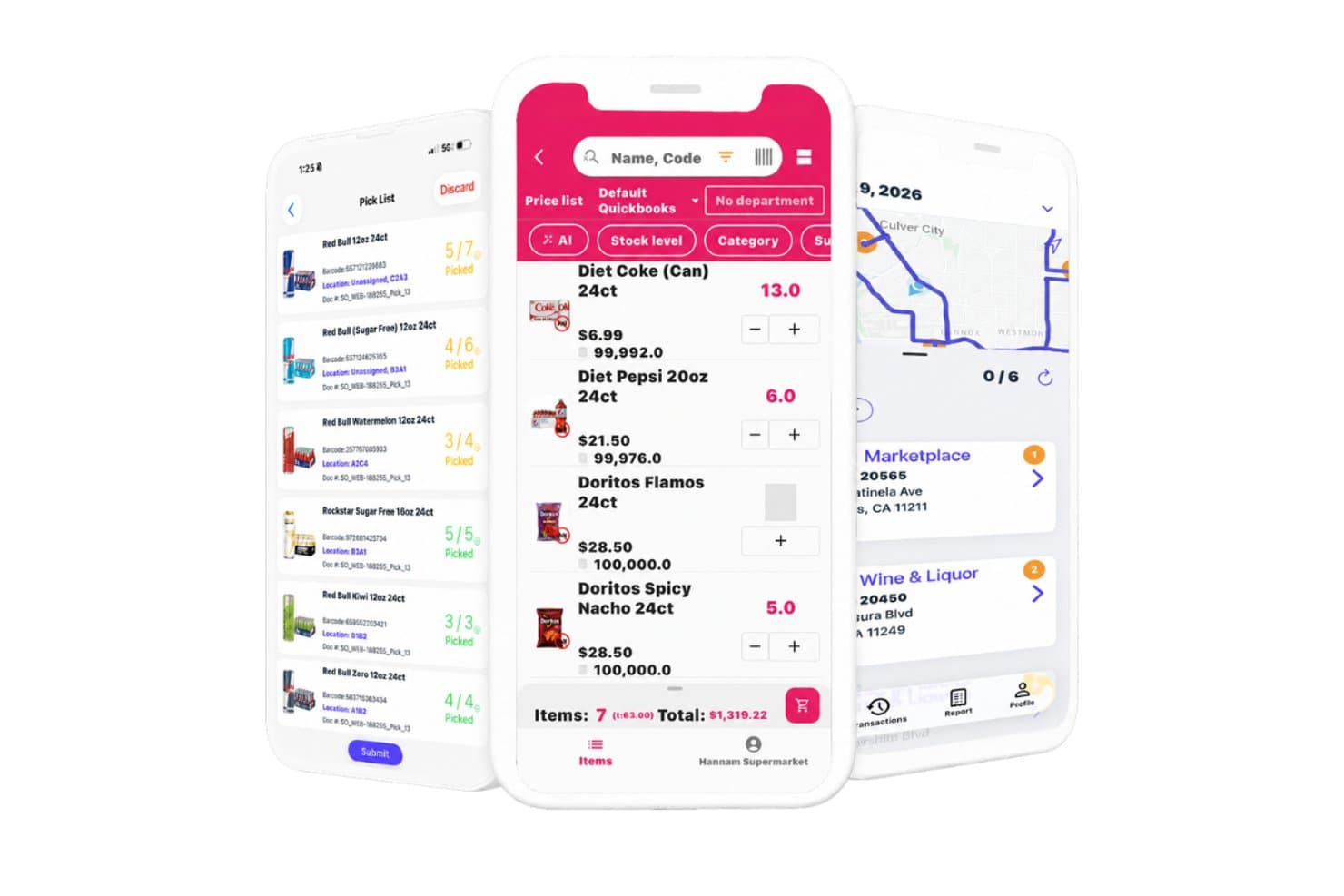
InSitu Sales offre una suite di app mobili con gestione liste di prelievo, interfaccia per l'inserimento ordini con prezzi prodotto e una mappa dei percorsi di consegna basata su GPS per le squadre di vendita B2B. InSitu Sales è una piattaforma mobile per l'inserimento ordini e la vendita sul campo, progettata per distributori all'ingrosso, che unisce acquisizione ordini, inventario in tempo reale, ottimizzazione dei percorsi, tracciamento GPS e gestione delle consegne tramite una suite di app collegate per agenti, preparatori e autisti.
Per chi è ideale InSitu Sales?
È particolarmente indicato per piccoli distributori all'ingrosso nel settore alimentare, delle bevande o per operazioni DSD, con agenti sul territorio che gestiscono i clienti in aree definite.
Perché ho scelto InSitu Sales
InSitu Sales si conquista un posto nella mia selezione perché è uno dei pochi strumenti per l'inserimento ordini che davvero chiude il cerchio tra acquisizione ordini e consegna dell'ultimo miglio. Apprezzo molto come l'app Dispatch offra agli autisti percorsi ottimizzati mentre l'app Rep acquisisce nuovi ordini sul campo. Alla consegna, gli autisti raccolgono prove fotografiche e firme elettroniche, così esiste una documentazione per ogni ordine evaso.
Caratteristiche principali di InSitu Sales
- App mobile per inserimento ordini: Gli agenti di vendita possono registrare gli ordini dei clienti su dispositivi iOS o Android, anche offline.
- Visibilità dell'inventario in tempo reale: Visualizza istantaneamente la disponibilità dei prodotti e le giacenze durante l'inserimento ordine.
- Prezzi cliente multilivello: Supporta listini prezzi personalizzati, sconti e promozioni specifiche per ogni segmento di clientela.
- Integrazione con QuickBooks ed ERP: Sincronizza dati di ordini, inventario e clienti direttamente con QuickBooks, SAP Business One, Xero e altri.
Integrazioni di InSitu Sales
InSitu Sales offre integrazioni native con QuickBooks Online, QuickBooks Desktop, SAP Business One, Oracle NetSuite, Xero, Zoho, Odoo, Epicor, Siigo e Fishbowl, e mette a disposizione un'API per integrazioni personalizzate.
Pros and Cons
Pros:
- Tracciamento GPS in tempo reale per gli agenti sul campo
- L'inserimento ordini offline garantisce operatività anche con connettività instabile
- Supporta la scansione di codici a barre nell'app mobile
Cons:
- Necessari piani a pagamento per opzioni white label dell'app
- Personalizzazione limitata di report e analisi
Learn more about InSitu Sales: Ideale per piccole e medie imprese
- Demo gratuita + prova gratuita di 15 giorni disponibile
- A partire da $49/mese

ERPAG gestisce inventario, vendite, acquisti e produzione per le aziende. ERPAG è un sistema di pianificazione delle risorse aziendali (ERP) basato su cloud pensato per piccole e medie imprese. Aiuta a gestire inventario, vendite, acquisti e produzione, offrendo una soluzione completa per le operazioni aziendali.
Perché ho scelto ERPAG: Offre una vasta gamma di funzionalità pensate per soddisfare le esigenze delle aziende più piccole, come il controllo dell'inventario e la gestione della produzione. Il software include strumenti per gestire transazioni in più valute, rendendolo ideale per le aziende che operano a livello internazionale. L'interfaccia intuitiva di ERPAG assicura che il tuo team possa adattarsi rapidamente al sistema. Nella mia esperienza, la sua attenzione alle piccole imprese lo rende una scelta pratica per le aziende in crescita.
Funzionalità e integrazioni principali:
Funzionalità includono scansione dei codici a barre, tracciamento dei lotti e tracciamento dei numeri di serie. Puoi anche gestire i processi produttivi tramite i suoi moduli di produzione. Le sue capacità di reportistica dettagliata offrono approfondimenti sulle prestazioni aziendali.
Le integrazioni includono QuickBooks, Shopify, WooCommerce, Xero, Stripe, PayPal, Square, Amazon, Etsy ed eBay.
Pros and Cons
Pros:
- Supporta transazioni multivaluta
- Strumenti di reportistica dettagliati
- Pensato per le piccole imprese
- Include moduli per la produzione
Cons:
- Scalabilità limitata per aziende più grandi
- Opzioni di personalizzazione di base
- Richiede alcune conoscenze tecniche
Learn more about ERPAG: Ideale per lo scambio elettronico di dati
- Prova gratuita disponibile
- Da $19.95/mese

TrueCommerce EDI automatizza e ottimizza lo scambio di dati nella catena di fornitura. TrueCommerce EDI Solutions è una piattaforma di scambio elettronico di dati (EDI) che serve le aziende desiderose di automatizzare e ottimizzare le comunicazioni nella catena di fornitura. Aiuta le imprese a migliorare l'efficienza facilitando uno scambio di dati senza interruzioni tra partner.
Perché ho scelto TrueCommerce EDI Solutions: Offre una soluzione EDI completa che semplifica le complesse comunicazioni della catena di fornitura. La piattaforma fornisce funzionalità come lo scambio automatico di dati e la visibilità in tempo reale delle transazioni. Puoi inoltre gestire efficacemente più partner commerciali, migliorando le tue attività della catena di fornitura. Nella mia esperienza, l'attenzione di TrueCommerce sull'EDI lo rende indispensabile per le aziende che necessitano di funzionalità affidabili di scambio dati.
Caratteristiche distintive & integrazioni:
Caratteristiche includono scambio automatico di dati, visibilità in tempo reale delle transazioni e gestione multi-partner. Puoi monitorare le tue transazioni con precisione, garantendo accuratezza e affidabilità. Gli strumenti di analisi della piattaforma forniscono approfondimenti sulle prestazioni della catena di fornitura.
Le integrazioni includono QuickBooks, NetSuite, SAP, Microsoft Dynamics, Sage, Oracle, Shopify, Amazon, eBay e WooCommerce.
Pros and Cons
Pros:
- Semplifica le comunicazioni della catena di fornitura
- Monitoraggio delle transazioni in tempo reale
- Gestisce più partner commerciali
- Aumenta l'affidabilità dello scambio dati
Cons:
- Richiede competenze tecniche
- Potrebbe non essere adatto alle piccole imprese
- Opzioni di personalizzazione limitate
Learn more about TrueCommerce: Ideale per l'integrazione con la contabilità
- Prova gratuita di 14 giorni
- Da $49/mese

QuickBooks Commerce integra inventario, ordini e contabilità per le aziende. QuickBooks Commerce è una piattaforma di gestione aziendale progettata per le piccole e medie imprese che desiderano integrare la gestione dell'inventario e degli ordini con le funzioni contabili. Aiuta le aziende a ottimizzare le operazioni fornendo strumenti per la vendita, la gestione dell'inventario e il monitoraggio finanziario.
Perché ho scelto QuickBooks Commerce: Offre un'integrazione perfetta con QuickBooks Online, rendendolo una scelta ideale per le aziende che danno priorità alle funzionalità contabili. Il software offre funzionalità come il monitoraggio dell'inventario e la gestione degli ordini, fondamentali per mantenere registri finanziari accurati. È anche possibile automatizzare varie attività finanziarie, riducendo il carico di lavoro manuale per il team. Nella mia esperienza, la capacità di QuickBooks Commerce di integrare contabilità e gestione dell'inventario lo rende ideale per le aziende che desiderano unificare le proprie operazioni.
Caratteristiche principali & integrazioni:
Le caratteristiche includono monitoraggio dell'inventario, gestione degli ordini e report delle vendite. È possibile automatizzare gli ordini di acquisto per mantenere efficacemente i livelli di stock. Il software offre anche report finanziari dettagliati per aiutarti a prendere decisioni aziendali informate.
Le integrazioni includono Shopify, Amazon, eBay, Etsy, WooCommerce, BigCommerce, Square, PayPal, Stripe e Magento.
Pros and Cons
Pros:
- Si integra perfettamente con QuickBooks Online
- Automatizza le attività finanziarie
- Fornisce report finanziari dettagliati
- Supporta le vendite multicanale
Cons:
- Richiede conoscenze contabili
- Potrebbe non essere adatto a grandi aziende
- Funzionalità di reportistica di base
Learn more about QuickBooks Commerce: 10Ideale per il tracciamento dei pacchi
Packagex
- Prova gratuita disponibile
- A partire da $142/località/mese

PackageX semplifica il tracciamento e la gestione dei pacchi per i team logistici. PackageX è un software per la gestione e il tracciamento dei pacchi progettato per le aziende che gestiscono grandi volumi di consegne. Serve i team di logistica e supply chain offrendo un monitoraggio e una gestione efficienti dei pacchi.
Perché ho scelto PackageX: Eccelle nell'offrire funzionalità di tracciamento in tempo reale, fondamentale per le aziende che necessitano di una gestione precisa delle consegne. Il software include funzionalità come notifiche automatiche e scansione dei pacchi. È inoltre possibile ottimizzare i percorsi di consegna per incrementare l'efficienza. Nella mia esperienza, l'attenzione di PackageX al tracciamento dei pacchi lo rende indispensabile per i team logistici.
Funzionalità principali e integrazioni:
Le funzionalità includono tracciamento in tempo reale, notifiche automatiche e ottimizzazione dei percorsi di consegna. Puoi anche gestire la sicurezza dei pacchi grazie alle funzionalità di scansione. Le analisi della piattaforma forniscono approfondimenti sulle prestazioni di consegna.
Le integrazioni includono Shopify, WooCommerce, Magento, Salesforce, Microsoft Dynamics, Oracle, QuickBooks, Netsuite, Xero e SAP.
Pros and Cons
Pros:
- Tracciamento in tempo reale
- Ottimizza i percorsi di consegna
- Aumenta la sicurezza dei pacchi
- Fornisce analisi sulle consegne
Cons:
- Opzioni di personalizzazione limitate
- La configurazione iniziale può essere complessa
- Potrebbe non essere adatto a piccole imprese
Learn more about Packagex:
Altri software per l'inserimento degli ordini
Ecco alcune opzioni aggiuntive di sistemi per l’inserimento degli ordini che non sono entrate nella mia selezione, ma che vale comunque la pena prendere in considerazione:
- 11ConexiomIdeale per l'elaborazione automatica degli ordini
- 12Ability CommerceIdeale per una gestione ordini complessa
- 13Cin7 CoreIdeale per la gestione dell'inventario
Come valuto il software di inserimento ordini
Valuto gli strumenti su due livelli: capacità di base che determinano l'inclusione e fattori differenzianti che sono rilevanti per i team retail che gestiscono ordini all'ingrosso, inventario multicanale e volumi di punta stagionali.
Funzionalità di base (requisiti fondamentali per questa lista)
Quando seleziono gli strumenti per la mia lista, valuto ciascuno su una scala da 0 (non offre la funzionalità) a 5 (eccelle in quest'area) per ogni funzionalità di base elencata di seguito. Poi, calcolo il punteggio totale dello strumento in percentuale. Ogni strumento deve ottenere un punteggio totale minimo del 65% per essere considerato per l'inclusione.
- Acquisizione & inserimento ordini: Verifico se ciascuno strumento consente allo staff di creare ordini rapidamente con ricerca prodotto, campi quantità e prezzi—come un rappresentante che inserisce un ordine all'ingrosso da 50 righe durante una chiamata.
- Gestione catalogo prodotti: Un catalogo ricercabile con varianti SKU e prezzi a più livelli è importante, soprattutto per i retailer che gestiscono collezioni stagionali per stile, colore e taglia.
- Sincronizzazione inventario in tempo reale: Valuto se i livelli di stock si aggiornano durante l'inserimento degli ordini, così un associato in negozio o un rappresentante B2B può vedere realmente cosa è disponibile prima di fissare una data di evasione.
- Gestione clienti & account: Ogni strumento dovrebbe mantenere i profili dei clienti con indirizzi di spedizione, cronologia ordini e prezzi specifici per account—utile quando un cliente all'ingrosso abituale si aspetta che i termini negoziati siano applicati automaticamente.
- Consolidamento ordini multicanale: Esamino come la piattaforma raggruppa ordini da POS in negozio, e-commerce, vendite telefoniche e canali marketplace in una coda unificata.
- Stato ordine & tracciamento evasione: I team devono avere visibilità su ogni fase del ciclo di vita dell'ordine, quindi valuto come lo strumento gestisce gli aggiornamenti di stato da "in attesa" a "spedito" ed "evaso".
Dopo aver selezionato i software che soddisfano questi criteri, considero cosa differenzia ciascuna piattaforma.
Fattori differenzianti (cosa distingue i fornitori)
Ecco come confronto e valuto i diversi fornitori:
Funzionalità distintive
L'inserimento ordini via mobile è importante—cerco app native che permettano ai rappresentanti di inserire ordini all'ingrosso durante fiere o visite in negozio, idealmente anche offline. Un portale self-service B2B riduce anche il carico di lavoro; i clienti ricorrenti possono riordinare in autonomia senza occupare il team vendite. Valuto anche la connettività EDI e con marketplace, dato che i negozianti che ricevono ordini da Amazon, Faire o Shopify hanno bisogno di un'acquisizione automatica anziché di reinserimenti manuali su ogni canale.
Oltre le funzionalità
La profondità dell'integrazione conta—verifico se uno strumento si collega nativamente con POS, contabilità ed e-commerce che un team retail già usa, come Shopify, QuickBooks o Square. Anche la migrazione di cataloghi prodotti e database clienti è un aspetto che valuto attentamente, perché una cattiva esperienza di onboarding può bloccare l'adozione per settimane. Considero inoltre la compatibilità settoriale: strumenti pensati per retailer di abbigliamento con griglie di inventario a matrice risolvono problemi molto diversi rispetto a quelli per la distribuzione all'ingrosso di alimenti e bevande.
Cos'è il software per l'inserimento degli ordini?
Il software per l'inserimento degli ordini è uno strumento che ti aiuta a elaborare e monitorare gli ordini dei clienti dall'inizio alla fine. Automatizza l'inserimento dei dati, mantiene gli ordini organizzati e riduce gli errori derivanti dalla gestione manuale.
Gli addetti alle vendite, i responsabili dell'inventario e i team del servizio clienti lo utilizzano per assicurarsi che ogni ordine venga elaborato rapidamente e con precisione.
In questo modo risparmi tempo, eviti gli scambi e mantieni soddisfatti i tuoi clienti.
Come scegliere un ottimo software per l'inserimento degli ordini
È facile perdersi in un mare di funzionalità appariscenti e fasce di prezzo confuse. Invece di rimanere bloccato dall'indecisione, concentrati su ciò che conta davvero per la tua attività.
Ecco una checklist rapida per rimanere sulla buona strada:
| Fattore | Cosa considerare |
|---|---|
| FattoreScalabilità | Cosa considerareRiesce a stare al passo con la crescita della tua attività? Assicurati che gestisca l'aumento dei volumi degli ordini, un maggior numero di utenti e l'espansione delle linee di prodotti senza rallentare fino a diventare inutilizzabile. |
| FattoreIntegrazioni | Cosa considerareFunziona bene con il tuo stack tecnologico esistente? La sincronizzazione con i sistemi contabili, il CRM e i canali di e-commerce dovrebbe essere fluida, non un incubo. |
| FattorePersonalizzazione | Cosa considerarePuoi adattarlo ai tuoi flussi di lavoro? Cerca opzioni per personalizzare i processi degli ordini, i report e i ruoli degli utenti, così non dovrai accontentarti di una soluzione uguale per tutti. |
| FattoreFacilità d'uso | Cosa considerareSe il tuo team ha bisogno di un manuale di formazione grande quanto un romanzo solo per elaborare un ordine, è meglio lasciar perdere. Cerca un'interfaccia intuitiva e facile da usare. |
| FattoreBudget | Cosa considerareQual è il costo reale? Considera i canoni di abbonamento, i costi di configurazione e le spese aggiuntive per le funzionalità indispensabili o l'assistenza. Le commissioni a sorpresa sono il nemico. |
| FattoreMisure di sicurezza | Cosa considerareI dati dei tuoi clienti valgono oro: proteggili. Assicurati che il software disponga di crittografia, accesso basato sui ruoli e certificazioni di conformità per mantenere tutto al sicuro. |
| FattoreServizi di assistenza | Cosa considerareQuando qualcosa si rompe (perché succederà), chi ti coprirà le spalle? Cerca un'assistenza via chat, e-mail o telefono con tempi di risposta rapidi: punti bonus per la disponibilità 24 ore su 24, 7 giorni su 7. |
| FattoreStrumenti di reporting | Cosa considerareNon puoi correggere ciò che non misuri. I migliori strumenti offrono dashboard in tempo reale, analisi avanzate e report personalizzati per aiutarti a monitorare le prestazioni. |
Principali tendenze nei software per l'inserimento degli ordini
Abbiamo analizzato aggiornamenti dei prodotti, comunicati stampa e registri delle versioni dei fornitori per capire cosa ci aspetta nel settore dei software per l'inserimento degli ordini. Ecco le principali tendenze che stanno plasmando il settore:
- Analisi basate sull'intelligenza artificiale. Sempre più piattaforme utilizzano l'intelligenza artificiale per prevedere la domanda, ottimizzare l'inventario e aiutare le aziende a prendere decisioni più intelligenti. Fornitori come Cin7 Core stanno già sfruttando l'intelligenza artificiale per migliorare le previsioni e ridurre gli sprechi.
- Soluzioni basate sul cloud. Tutto si sta spostando sul cloud, compresi i software per l'inserimento degli ordini. Gli strumenti basati sul cloud offrono una maggiore accessibilità, aggiornamenti fluidi e flussi di lavoro adatti al lavoro da remoto, diventando indispensabili per i team distribuiti.
- Funzionalità per la sostenibilità. Con la crescita dei consumatori attenti all'ambiente, alcuni software includono ora il monitoraggio dell'impronta di carbonio e metriche di sostenibilità per aiutare le aziende a ridurre gli sprechi e raggiungere gli obiettivi ambientali.
- Interfacce utente migliorate. I software macchinosi sono ormai superati. I fornitori stanno introducendo dashboard eleganti e intuitive, con layout personalizzabili che semplificano la gestione degli ordini e la rendono (osiamo dirlo) persino piacevole.
- Blockchain per la trasparenza. Alcune piattaforme lungimiranti stanno sperimentando la tecnologia blockchain per creare registri degli ordini tracciabili e a prova di manomissione. Questo potrebbe aumentare la fiducia tra aziende, fornitori e clienti.
Funzionalità dei software per l'inserimento degli ordini
Non tutti gli strumenti per l'inserimento degli ordini sono uguali. Ecco cosa cercare quando scegli un software che non rallenti il tuo lavoro:
- Monitoraggio in tempo reale. Monitora l'avanzamento degli ordini in ogni fase per tenere aggiornati sia il tuo team sia i clienti.
- Inserimento dati automatizzato. Riduci gli errori manuali e risparmia ore di lavoro ripetitivo grazie all'automazione intelligente.
- Flussi di lavoro personalizzabili. Adatta il software ai tuoi processi specifici, perché una soluzione uguale per tutti funziona raramente nel mondo degli affari.
- Gestione dell'inventario. Previeni le rotture di stock e le scorte eccessive monitorando l'inventario in tempo reale.
- Dashboard per la gestione degli ordini. Un centro di controllo ordinato e centralizzato semplifica il monitoraggio, l'aggiornamento e la gestione degli ordini dall'inizio alla fine.
- Reporting avanzato. Ottieni informazioni basate sui dati riguardo alle tendenze delle vendite, all'efficienza dell'evasione degli ordini e alle prestazioni degli ordini.
- Supporto multicanale. Gestisci in un unico luogo gli ordini provenienti da tutti i tuoi canali di vendita: negozi online, marketplace e persino acquisti in negozio.
- Misure di sicurezza. Proteggi i dati della tua azienda e dei clienti con crittografia, controlli degli accessi e funzionalità di conformità.
- Funzionalità di integrazione. Collegati senza problemi agli strumenti contabili, ai CRM e alle piattaforme di e-commerce per creare un sistema fluido dall'inizio alla fine.
- Strumenti di comunicazione con i clienti. Automatizza gli aggiornamenti e le notifiche sugli ordini per tenere informati e soddisfatti i clienti (senza ulteriore impegno da parte tua).
Vantaggi dei software per l'inserimento degli ordini
Ti chiedi ancora se un software per l'inserimento degli ordini valga l'investimento? Ecco come semplifica il flusso di lavoro, riduce gli errori e fa sì che i clienti tornino da te:
- Maggiore precisione. Dite addio agli errori causati dalla digitazione e agli sbagli nell'inserimento manuale: l'automazione mantiene gli ordini precisi.
- Efficienza migliorata. Un'elaborazione più rapida, flussi di lavoro personalizzabili e una dashboard facile da usare consentono al vostro team di lavorare senza ostacoli.
- Migliore gestione dell'inventario. Niente più supposizioni: monitorate i livelli delle scorte in tempo reale ed evitate di vendere più prodotti di quelli disponibili o di rimanere con scorte insufficienti.
- Maggiore soddisfazione dei clienti. Le notifiche automatiche e una comunicazione fluida fanno sì che i clienti siano sempre informati (e soddisfatti).
- Analisi basate sui dati. I report avanzati aiutano a individuare le tendenze, ottimizzare i flussi di lavoro e prendere decisioni aziendali più intelligenti.
- Risparmio di tempo. Liberate il vostro team dalle attività ripetitive, così potrà concentrarsi sulla crescita e sulla strategia invece di occuparsi dei problemi legati all'inserimento degli ordini.
- Scalabilità. Che dobbiate elaborare 100 ordini o 100.000, il software giusto cresce insieme a voi senza rallentare.
Costi e prezzi del software per l'inserimento degli ordini
Scegliere il software giusto per l'inserimento degli ordini significa trovare un equilibrio tra funzionalità, scalabilità e costi. Alcune piattaforme offrono prezzi fissi, mentre altre applicano un costo per utente o persino per ordine.
Comprendere i diversi livelli di prezzo può aiutarvi a evitare di pagare troppo per funzionalità che non vi servono o di rinunciare a quelle di cui avete bisogno.
Tabella comparativa dei piani per il software di inserimento degli ordini
| Tipo di piano | Prezzo medio | Funzionalità comuni | Ideale per |
|---|---|---|---|
| Tipo di pianoPiano gratuito | Prezzo medio$0 | Funzionalità comuniGestione di base degli ordini, assistenza clienti limitata, integrazioni minime. | Ideale perStartup e persone con attività secondarie che testano l'automazione prima di crescere. |
| Tipo di pianoPiano personale | Prezzo medio$5-$25/ utente/mese | Funzionalità comuniMonitoraggio degli ordini, report di base, assistenza via e-mail, personalizzazioni limitate. | Ideale perPiccole imprese e gestori individuali che gestiscono volumi ridotti di ordini. |
| Tipo di pianoPiano aziendale | Prezzo medio$30-$75/ utente/mese | Funzionalità comuniGestione avanzata dell'inventario, supporto multicanale, notifiche automatiche, analisi dettagliate. | Ideale perMarchi di e-commerce in fase di crescita e rivenditori di medie dimensioni che necessitano di automazione. |
| Tipo di pianoPiano aziendale avanzato | Prezzo medio$100-$200/ utente/mese | Funzionalità comuniPersonalizzazione completa, assistenza prioritaria, report completi, solide misure di sicurezza avanzate. | Ideale perGrandi rivenditori e aziende che richiedono il pieno controllo e la conformità normativa. |
Costi aggiuntivi a cui prestare attenzione
- Commissioni basate sulle transazioni. Alcune piattaforme applicano un costo per ogni ordine elaborato: per le aziende con grandi volumi, i costi possono aumentare rapidamente.
- Costi di integrazione e API. Avete bisogno di collegarvi al vostro ERP, CRM o ai corrieri? Alcune integrazioni prevedono un costo aggiuntivo.
- Assistenza premium. La chat dal vivo e l'e-mail sono generalmente incluse, ma l'assistenza telefonica 24 ore su 24, 7 giorni su 7 o un account manager dedicato? Questi servizi costano extra.
- Avviamento e formazione. Gli strumenti di livello aziendale possono richiedere costi di configurazione o formazione a pagamento per il vostro team.
- Personalizzazione e scalabilità. Se avete bisogno di flussi di lavoro personalizzati, automazione avanzata o funzionalità per la conformità normativa, aspettatevi di pagare di più.
Domande frequenti sul software di inserimento degli ordini
Ecco alcune risposte alle domande più comuni sul software di inserimento degli ordini:
In che modo il software di inserimento degli ordini migliora concretamente l'efficienza?
Elimina l’inserimento manuale dei dati, riducendo gli errori e velocizzando l’elaborazione degli ordini. Grazie al monitoraggio in tempo reale e all’automazione, mantiene aggiornati i dati sull’inventario, previene i colli di bottiglia nel processo di evasione e lascia al tuo team più tempo da dedicare alla crescita, invece di correggere gli errori.
Qual è la differenza tra inserimento degli ordini e gestione degli ordini?
Il processo di inserimento degli ordini consiste nell’acquisire e registrare gli ordini, ovvero il primo passaggio del processo. La gestione degli ordini comprende tutto, dall’inserimento dell’ordine all’evasione, inclusi monitoraggio, fatturazione, resi e aggiornamenti per i clienti.
Pensa all’inserimento degli ordini come alla partenza della gara, mentre la gestione degli ordini ti porta fino al traguardo.
Il software di inserimento degli ordini può gestire ordini complessi?
Sì. Gli strumenti giusti possono gestire prodotti in bundle, configurazioni personalizzate, prezzi speciali ed evasione da più sedi.
Molti offrono anche flussi di lavoro personalizzabili e automazione, facilitando l’elaborazione degli ordini non standard senza ricorrere a soluzioni manuali alternative.
Quali integrazioni dovrei cercare in un software di inserimento degli ordini?
Come minimo, dovrebbe sincronizzarsi con la tua piattaforma di commercio elettronico, il sistema di gestione dell’inventario, il software di contabilità e il CRM.
Punti extra se si connette ai corrieri, ai gateway di pagamento e ai sistemi di gestione del magazzino: quanto più fluide sono le tue operazioni, tanto meglio.
È meglio un software di inserimento degli ordini basato sul cloud o installato localmente?
Per la maggior parte delle aziende, la soluzione basata sul cloud è la scelta migliore: è più scalabile, accessibile da qualsiasi luogo e si aggiorna automaticamente.
Una soluzione installata localmente può funzionare per le aziende con rigorosi requisiti di sicurezza o conformità, ma di solito richiede costi iniziali più elevati e manutenzione da parte del reparto informatico.
Qual è l'errore più grande che le aziende commettono quando scelgono un software di inserimento degli ordini?
Scegliere l’opzione più economica o quella con più funzionalità senza considerare scalabilità e integrazioni. Ti serve un sistema che cresca insieme a te, che funzioni bene con gli strumenti che già utilizzi e che non richieda un dottorato per essere usato.