

Con così tante soluzioni software di contabilità per l'e-commerce disponibili, capire quale sia quella giusta per te è difficile. Sai di voler semplificare attività contabili complesse come il monitoraggio delle vendite, il calcolo delle imposte e la gestione dei costi di inventario, ma ora devi capire quale strumento sia il migliore. Ci penso io! In questo articolo ti aiuterò a scegliere facilmente, condividendo la mia esperienza personale nell'utilizzo di decine di diversi strumenti contabili con negozi online di ogni dimensione, insieme alla mia selezione dei migliori software di contabilità per l'e-commerce in assoluto.
Che cos'è il software di contabilità per l'e-commerce?
Il software di contabilità per l'e-commerce è uno strumento specializzato progettato per gestire le transazioni e i registri finanziari delle attività online. Automatizza e organizza le vendite, le spese, l'inventario e i calcoli fiscali, integrandosi perfettamente con diverse piattaforme di e-commerce e fornitori di servizi di pagamento.
Lo scopo è semplificare il processo contabile, fornire informazioni finanziarie in tempo reale e agevolare una reportistica accurata. È essenziale per le attività di e-commerce mantenere l'accuratezza finanziaria, rispettare le normative fiscali e prendere decisioni finanziarie informate, sostenendo così l'efficienza e la crescita complessive dell'attività nel mercato digitale.
Perché fidarsi dei nostri consigli sui software
6,700+
Reviews
20
Industry experts
16+
Evaluation factors
14
Years
Il nostro team testa e recensisce software dal 2012. In quanto leader del retail noi stessi, sappiamo quanto sia difficile — e importante — scegliere il software giusto.
Per questa guida, abbiamo valutato gli strumenti attraverso test pratici e ricerche indipendenti, assegnando un punteggio agli strumenti in base ai nostri criteri di selezione.
Le nostre recensioni riflettono il nostro giudizio indipendente, non un discorso di vendita.
Tabella comparativa dei software di contabilità per l'e-commerce
| Tool | Best For | Trial Info | Price | ||
|---|---|---|---|---|---|
| 1 | La migliore piattaforma di contabilità completa | Prova gratuita di 30 giorni | A partire da $19/mese | Website | |
| 2 | Ideale per libri pronti per audit e certificati da esperti | Prova gratuita disponibile | Da $69/mese (fatturazione annuale) | Website | |
| 3 | Ideale per le integrazioni | Offre una prova gratuita illimitata | Da $29/utente/mese | Website | |
| 4 | Ideale per una contabilità senza pensieri | Prova gratuita disponibile | Da $249/mese (fatturazione annuale) | Website | |
| 5 | Ideale per monitoraggio in tempo reale e supporto multi-valuta | Demo gratuita disponibile | Prezzo su richiesta | Website | |
| 6 | Ideale per team in crescita | Prova gratuita di 30 giorni disponibile | Da $2.50/mese | Website | |
| 7 | Ideale per utenti Zoho | Piano gratuito + demo gratuita disponibile | Da $15/mese (fatturato annualmente) | Website | |
| 8 | Ideale per semplificare la contabilità ecommerce | Prova gratuita di 14 giorni disponibile | A partire da $30/mese | Website | |
| 9 | Migliore soluzione di automazione purchase-to-pay (P2P) | Demo disponibile su richiesta | A partire da £129 | Website | |
| 10 | Ideale per i flussi di lavoro di contabilità | Demo gratuita disponibile | Prezzo su richiesta | Website |


Panoramica dei 10 migliori software di contabilità per l'e-commerce
Ecco una breve descrizione di ciascun software di contabilità per l’e-commerce, per illustrarne il caso d’uso migliore, alcune caratteristiche degne di nota, schermate e informazioni sui prezzi.
 La migliore piattaforma di contabilità completa
- Prova gratuita di 30 giorni
- A partire da $19/mese
Visit WebsiteCustomer Rating:4/5
Monitora vendite e spese per risparmiare tempo e ridurre la burocrazia. QuickBooks Online è una piattaforma di contabilità basata su cloud che include gestione della contabilità, fatturazione, monitoraggio delle imposte sulle vendite, gestione dell'inventario e integrazioni con canali ecommerce come Shopify, Amazon ed eBay.
Per chi è ideale QuickBooks Online?
QuickBooks Online è particolarmente indicato per piccole e medie imprese ecommerce che necessitano di una suite contabile completa senza dover assumere un commercialista dedicato.
Perché ho scelto QuickBooks Online
QuickBooks Online si è guadagnato il suo posto tra i migliori della mia lista perché nessun altro strumento copre l'intera gamma contabile per l'ecommerce in modo così completo. Apprezzo in particolare come gestisce le imposte sulle vendite in diversi stati con il tracciamento del nexus economico integrato—un aspetto che crea difficoltà a molte aziende ecommerce in crescita. Mi affido anche alla sua funzione di abbinamento automatico dei pagamenti, che separa i pagamenti Amazon o Shopify in ricavi, commissioni e tasse senza bisogno di riconciliazione manuale.
Caratteristiche chiave di QuickBooks Online
- Monitoraggio inventario: Tieni sotto controllo le giacenze, imposta punti di riordino e genera ordini di acquisto direttamente nei tuoi registri contabili.
- Previsione del flusso di cassa: Proietta le posizioni future di cassa in base a fatture aperte, bollette e dati storici delle transazioni.
- Conto economico per categoria: Segmenta entrate e spese per canale di vendita, linea di prodotto o sede per confrontare le prestazioni.
- Sincronizzazione dei movimenti bancari: Collega conti bancari e carte di credito per importare e categorizzare automaticamente le transazioni ogni giorno.
Pros and Cons
Pros:
- Esegue automaticamente il backup dei dati finanziari.
- Interfaccia intuitiva.
- Accessibile ovunque.
Cons:
- Assistenza clienti incoerente.
- Offre personalizzazione limitata.
Learn more about QuickBooks Online: Ideale per libri pronti per audit e certificati da esperti
- Prova gratuita disponibile
- Da $69/mese (fatturazione annuale)
Visit WebsiteCustomer Rating:4.3/5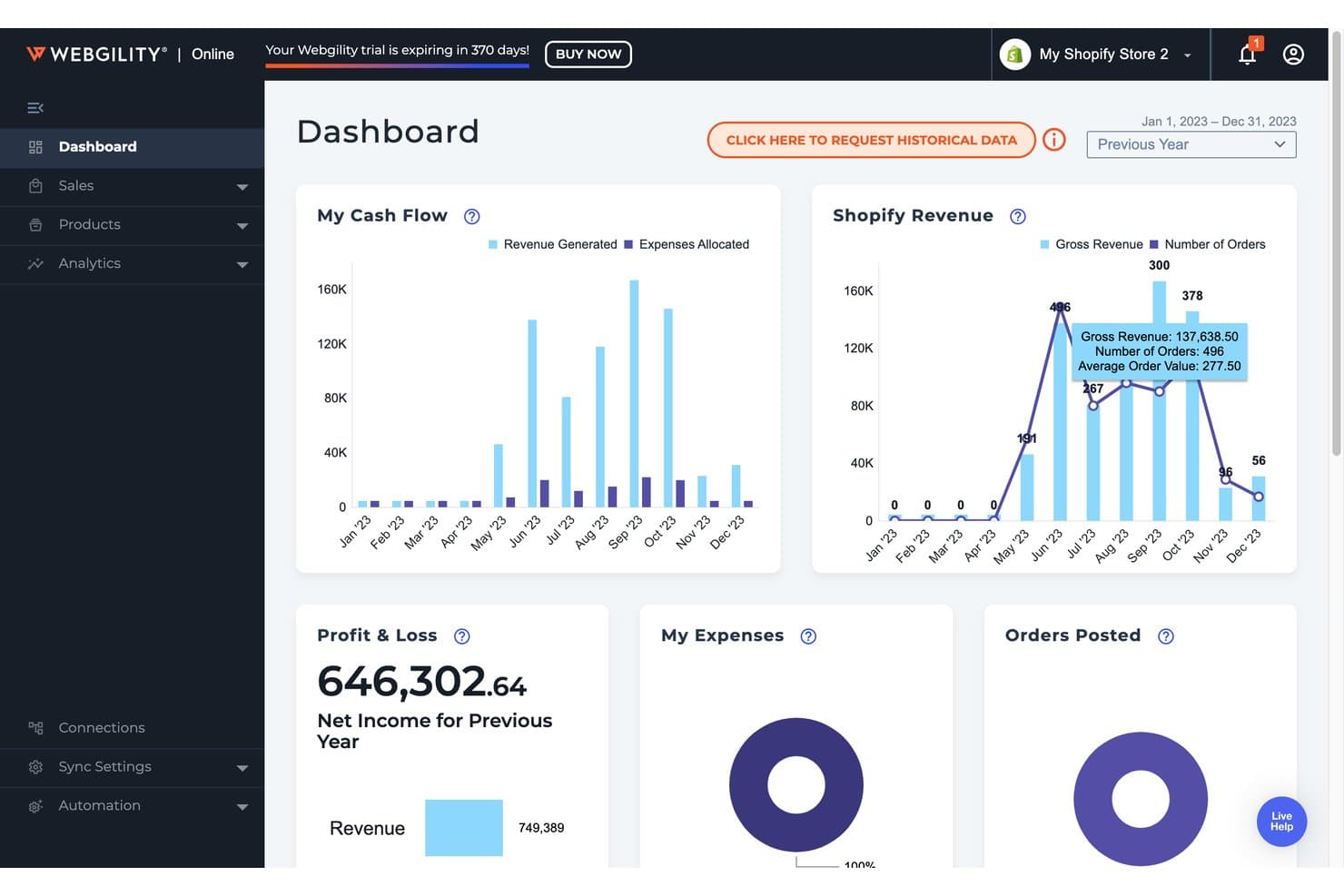
Webgility offre un cruscotto contabile per l'ecommerce che mostra flusso di cassa, ricavi Shopify, profitti e perdite e tracciamento degli ordini in un'unica visualizzazione. Webgility è una piattaforma di automazione della contabilità per l'ecommerce che sincronizza i dati delle transazioni a livello di ordine—including commissioni, pagamenti, tasse e inventario—fra piattaforme di vendita multicanale direttamente su QuickBooks e Xero, con la verifica di un contabile umano inclusa nei suoi piani di livello superiore.
Per Chi È Webgility?
Webgility è particolarmente adatto per le piccole e medie imprese di ecommerce multicanale che vendono su Amazon, Shopify o Walmart e gestiscono la contabilità con QuickBooks.
Perché Ho Scelto Webgility
Ho scelto Webgility perché nessun altro strumento di contabilità per l'ecommerce unisce automazione e la revisione di un contabile umano che certifica i libri ogni mese. La Garanzia di Riconciliazione Mensile significa che un commercialista dedicato per l'ecommerce esamina le eccezioni, risolve le discrepanze e approva una traccia di audit pronta per la chiusura. Mi piace particolarmente che la registrazione a livello di ordine raccolga ogni commissione, pagamento e rimborso prima della revisione, in modo che il contabile verifichi dati puliti invece di inseguire errori.
Caratteristiche Principali di Webgility
- Sincronizzazione dell'inventario in tempo reale: Sincronizza istantaneamente i livelli di inventario su tutti i canali collegati, evitando le vendite eccedenti.
- Integrazioni multicanale: Collega oltre 50 piattaforme tra cui Shopify, Amazon, Walmart, eBay e BigCommerce.
- Automazione delle imposte sulle vendite: Calcola e traccia le tasse di vendita multi-stato e internazionali con l'integrazione Avalara AvaTax.
- Workflow avanzati B2B/all'ingrosso: Gestisci la registrazione delle fatture, le spedizioni parziali e la sincronizzazione degli ordini di acquisto per gli ordini all'ingrosso.
Integrazioni Webgility
Webgility offre oltre 50 integrazioni native, tra cui Shopify, Amazon, Walmart, eBay, WooCommerce, BigCommerce, Xero, QuickBooks Online, QuickBooks Desktop e Avalara AvaTax.
Pros and Cons
Pros:
- Revisione mensile del commercialista per l'accuratezza delle riconciliazioni
- Gestisce flussi contabili multi-entità
- Registrazione automatica degli ordini con commissioni e pagamenti
Cons:
- Richiede QuickBooks o Xero per funzionare
- Nessun tracciamento automatico di progetti o classi
Learn more about Webgility: 3Ideale per le integrazioni
A2X
- Offre una prova gratuita illimitata
- Da $29/utente/mese
Visit WebsiteCustomer Rating:4.9/5
Una rigorosa riconciliazione è alla base dell’impegno di A2X nel rispettare gli standard contabili. A2X è un software di contabilità per ecommerce che automatizza la riconciliazione dei pagamenti su Amazon, Shopify, eBay, Etsy, Walmart e PayPal, inviando riepiloghi delle transazioni già categorizzati direttamente su QuickBooks Online, Xero, Sage o NetSuite.
Per chi è indicato A2X?
A2X è indicato per venditori ecommerce e per i loro commercialisti o contabili che operano su più canali e hanno bisogno di dati finanziari chiari e pronti per la revisione nella propria piattaforma di contabilità.
Perché ho scelto A2X
A2X merita un posto nella mia lista perché la sua copertura delle integrazioni è difficilmente superabile in questa categoria. Collega ogni principale canale di vendita—Amazon, Shopify, eBay, Etsy, Walmart e PayPal—direttamente a QuickBooks Online, Xero, Sage o NetSuite. Quello che apprezzo di più è come gestisce la riconciliazione dei pagamenti: invece di riempire la piattaforma contabile con migliaia di singole voci d’ordine, A2X invia una sola voce riepilogativa che corrisponde esattamente a ogni pagamento in banca. Apprezzo anche che gestisca separatamente i gateway di pagamento come Stripe e PayPal, mantenendo le commissioni chiare e categorizzate.
Funzionalità principali di A2X
- Flussi operativi IVA e imposte di vendita: Categoria l’IVA e le imposte di vendita raccolte attraverso i diversi canali e abbinale ai corretti conti fiscali nella piattaforma di contabilità.
- Flussi operativi COGS e IMS: Importa i dati sul costo del venduto dai sistemi di gestione magazzino o da file CSV per tenere traccia dei costi a livello di prodotto insieme al fatturato.
- Sottocontabilità A2X: Collega i riepiloghi dei pagamenti agli ordini di origine e agli SKU in una registrazione a partita doppia, offrendo piena visibilità approfondita per la chiusura mensile.
- A2X Clarity: Fornisce analisi sulla redditività per SKU, canale, kit o cliente, basati sugli stessi dati riconciliati delle transazioni che alimentano A2X Core.
Pros and Cons
Pros:
- Interfaccia utente eccellente.
- Offre integrazioni semplici e immediate.
- È facile da usare.
Cons:
- L’assistenza clienti potrebbe essere migliorata.
- Il processo di configurazione richiede apprendimento.
Learn more about A2X: Ideale per una contabilità senza pensieri
- Prova gratuita disponibile
- Da $249/mese (fatturazione annuale)
Visit WebsiteCustomer Rating:4.5/5
Monitora flussi di cassa e transazioni aggiornati per comprendere la salute finanziaria. Bench è un servizio di contabilità e tenuta dei libri contabili per piccole imprese che unisce un software proprietario a un team dedicato di contabili umani per gestire la contabilità mensile, la rendicontazione finanziaria e la dichiarazione dei redditi.
Per Chi È Ideale Bench?
Bench è particolarmente indicato per i titolari di piccole imprese e imprenditori e-commerce che desiderano affidare la gestione della contabilità, invece di occuparsi autonomamente del software.
Perché Ho Scelto Bench
Ho incluso Bench tra le mie migliori scelte perché è una delle poche soluzioni contabili di questa lista che si occupa completamente della tenuta dei libri contabili. Un contabile dedicato gestisce la categorizzazione e riconciliazione mensile delle transazioni e poi fornisce i rendiconti finanziari finali tramite la piattaforma Bench. Apprezzo in particolare la sincronizzazione automatica degli account, che importa le transazioni dai tuoi canali di vendita e processori di pagamento direttamente nella contabilità, eliminando la necessità di inserimento manuale dei dati.
Caratteristiche Principali di Bench
- Rendicontazione finanziaria in tempo reale: Accedi e scarica situazioni patrimoniali e conti economici aggiornati direttamente dalla piattaforma Bench in qualsiasi momento.
- Dichiarazione dei redditi e consulenza fiscale: Agenti iscritti all'albo e commercialisti gestiscono la preparazione della dichiarazione dei redditi annuale, la presentazione telematica e i pagamenti fiscali trimestrali stimati.
- Pacchetto finanziario di fine anno: Il tuo team contabile prepara un pacchetto finanziario completo di fine anno, pronto da consegnare al tuo consulente fiscale all'inizio della stagione delle dichiarazioni.
- Centro notifiche: Ricevi promemoria tempestivi per rimanere aggiornato sulle attività finanziarie, richieste di documenti e scadenze di presentazione.
Pros and Cons
Pros:
- L'interfaccia utente è facile da usare.
- Ottimo supporto via email e telefono.
- Eccellenti strumenti di monitoraggio delle spese.
Cons:
- Non si collega a tutti i conti aziendali.
- C'è una curva di apprendimento nella preparazione dei report.
Learn more about Bench: Ideale per monitoraggio in tempo reale e supporto multi-valuta
- Demo gratuita disponibile
- Prezzo su richiesta
Visit WebsiteCustomer Rating:4/5
La pagina dei conti mostra tutto ciò che gli utenti devono sapere sui conti dell’azienda. NetSuite è una piattaforma ERP cloud che combina contabilità principale, gestione degli ordini, inventario e operazioni di ecommerce in un unico sistema unificato per aziende in crescita e di livello enterprise.
Per chi è ideale NetSuite?
NetSuite è particolarmente adatto a rivenditori e aziende ecommerce di fascia media e enterprise che gestiscono finanze complesse tra più entità, filiali o mercati globali.
Perché ho scelto NetSuite
Ho incluso NetSuite tra le mie scelte principali perché la combinazione di visibilità finanziaria in tempo reale e supporto multi-valuta è rara a questo livello di profondità su una singola piattaforma. Tramite NetSuite OneWorld, il mio team può gestire transazioni in oltre 190 valute con conversione in tempo reale e consolidamento automatico sia a livello di filiale che di sede centrale. Faccio anche affidamento sulle dashboard basate sui ruoli e sulla reportistica finanziaria in tempo reale, che forniscono dati sulle performance aggiornati all’istante senza dover effettuare esportazioni manuali. Per le aziende ecommerce che vendono in più regioni, questa visibilità immediata su ordini e ricavi in valuta diversa consente al team finanziario di agire più velocemente.
Funzionalità principali di NetSuite
- Riconoscimento dei ricavi: Automatizza la pianificazione e la reportistica dei ricavi secondo gli standard ASC 606 e IFRS 15.
- SuiteTax: Calcola, elabora e gestisce la tassazione su più giurisdizioni e paesi tramite un unico motore fiscale.
- Automazione dall’ordine all’incasso: Automatizza l’intero ciclo di gestione dell’ordine, dalla ricezione alla fatturazione e riscossione dei pagamenti.
- Consolidamento finanziario: Consolida le finanze di più filiali, unità aziendali ed entità legali in tempo reale.
Pros and Cons
Pros:
- Fornisce i report necessari a monitorare e tracciare le transazioni.
- I team da remoto possono accedere ai dati aziendali ovunque si trovino.
- La navigazione all’interno della piattaforma è semplice.
Cons:
- Il software può essere complesso per i nuovi utenti a causa delle numerose opzioni di personalizzazione.
- Fornisce i report necessari a monitorare e tracciare le transazioni.
Learn more about NetSuite: 6Ideale per team in crescita
Xero
- Prova gratuita di 30 giorni disponibile
- Da $2.50/mese
Visit WebsiteCustomer Rating:4.4/5
Gestisci attività e spese in modo efficace tramite la dashboard visiva. Xero è una piattaforma di contabilità basata su cloud con fatturazione multivaluta, tracciamento dell'inventario, riconciliazione bancaria e integrazioni native con Shopify, Amazon e altri principali canali ecommerce.
Per Chi È Ideale Xero?
Xero è adatto a piccole e medie imprese ecommerce che vendono su più canali e hanno bisogno di un unico luogo dove gestire le proprie finanze.
Perché Ho Scelto Xero
Xero si guadagna il posto tra i migliori della mia lista perché cresce insieme al tuo team senza richiedere una migrazione della piattaforma. Mi piace il fatto che sia possibile aggiungere utenti con permessi basati sui ruoli, così il tuo contabile, il responsabile delle operazioni e il CFO vedranno esattamente ciò di cui hanno bisogno. Il componente aggiuntivo Analytics Plus offre al mio team previsioni di flusso di cassa e scorecard di salute finanziaria che diventano più preziose all'aumentare del volume delle transazioni.
Funzionalità Principali di Xero
- Fatturazione multivaluta: Invia fatture e accetta pagamenti in oltre 160 valute, con aggiornamenti automatici dei tassi di cambio.
- Riconciliazione bancaria: Collega feed bancari in tempo reale da oltre 21.000 istituti e abbina automaticamente le transazioni.
- Inventory Plus: Monitora i livelli di magazzino e il costo della merce venduta, con sincronizzazione diretta su Shopify e Amazon FBA.
- Strumenti per le tasse sulle vendite: Calcola e applica le aliquote fiscali sulle fatture, con report fiscali dettagliati per la dichiarazione.
Pros and Cons
Pros:
- È facile da navigare.
- Facile da usare.
- Un'ottima opzione per le piccole imprese.
Cons:
- Non è adatto a esigenze contabili complesse.
- La creazione di report personalizzati è complessa.
Learn more about Xero: Ideale per utenti Zoho
- Piano gratuito + demo gratuita disponibile
- Da $15/mese (fatturato annualmente)
Visit WebsiteCustomer Rating:4.3/5
Visualizza le transazioni relative a un singolo cliente, includendo tutti i dettagli fondamentali. Zoho Books è una piattaforma di contabilità basata su cloud per aziende in crescita che copre la fatturazione, la registrazione delle spese, la gestione dell'inventario, la riconciliazione bancaria, la conformità fiscale sulle vendite e le transazioni multivaluta.
Per chi è più indicato Zoho Books?
Zoho Books si adatta perfettamente alle piccole e medie imprese che già utilizzano altri prodotti Zoho e necessitano di un software contabile che si integri nativamente con gli strumenti esistenti.
Perché ho scelto Zoho Books
Zoho Books si guadagna il suo posto nella mia shortlist per l'integrazione molto stretta con il resto della suite Zoho. Il mio team può sincronizzare i contatti dei clienti e i dati delle trattative da Zoho CRM direttamente in Zoho Books, così le fatture vengono generate senza dover reinserire informazioni in diversi sistemi. Apprezzo anche la connessione nativa con Zoho Inventory, che mantiene aggiornati in tempo reale livelli di stock e stato degli ordini su tutti i canali di vendita.
Caratteristiche principali di Zoho Books
- Transazioni multivaluta: Applica automaticamente tassi di cambio in tempo reale a fatture, bollette e pagamenti in oltre 170 valute.
- Conformità fiscale sulle vendite: Calcola, traccia e gestisce la dichiarazione dell'imposta sulle vendite in diverse regioni, supportando gruppi di imposte e imposte composte.
- Importazione automatica delle operazioni bancarie: Si collega ai tuoi conti bancari e carte di credito per importare e categorizzare le transazioni ogni giorno.
- Portale clienti: Consente ai clienti di visualizzare fatture, effettuare pagamenti e approvare preventivi direttamente tramite un portale self-service personalizzato.
Pros and Cons
Pros:
- Gli utenti possono personalizzare i report.
- È facile impostare i collegamenti bancari.
- Interfaccia utente semplice.
Cons:
- Non dispone di molte funzionalità avanzate.
- Le opzioni di condivisione devono essere migliorate.
Learn more about Zoho Books: Ideale per semplificare la contabilità ecommerce
- Prova gratuita di 14 giorni disponibile
- A partire da $30/mese
Visit WebsiteCustomer Rating:4.5/5
Monitora entrate e spese in tempo reale per sapere sempre la situazione dell’attività. Kashoo è una piattaforma di contabilità basata su cloud per piccole imprese e lavoratori autonomi che copre la fatturazione, il monitoraggio delle spese, l'importazione delle transazioni bancarie, la gestione dell'IVA, il supporto multi-valuta e la riscossione dei pagamenti.
Per chi è ideale Kashoo?
Kashoo è adatto a proprietari di piccole imprese e freelance che hanno bisogno di una contabilità semplice, senza la complessità dei software di livello aziendale.
Perché ho scelto Kashoo
Ho incluso Kashoo tra le mie scelte principali perché riduce la contabilità all'essenziale di cui hanno davvero bisogno le piccole attività di ecommerce, senza elementi superflui. Mi piace molto il modo in cui l'importazione automatica delle transazioni bancarie registra in tempo reale vendite e spese dai conti collegati, così la contabilità è sempre aggiornata senza inserimenti manuali. Il monitoraggio dell'IVA integrato è un’altra funzione che trovo veramente utile perché gestisce automaticamente i calcoli fiscali sulle transazioni, senza richiedere un ulteriore strumento o riconciliazioni manuali.
Funzionalità principali di Kashoo
- Supporto multi-valuta: Accetta e registra transazioni in valute diverse, con conversioni dei tassi di cambio applicate automaticamente alla contabilità.
- Creazione di fatture e riscossione pagamenti: Crea e invia fatture personalizzate, quindi riscuoti i pagamenti con carta di credito direttamente tramite la piattaforma.
- Gestione dell'inventario: Aggiungi dettagli dei prodotti e monitora il valore delle scorte disponibili, mantenendo i costi dei prodotti aggiornati nei registri contabili.
- Categorizzazione di entrate e spese: Assegna categorie a entrate e spese per organizzare le transazioni e generare report accurati su profitti e perdite.
Pros and Cons
Pros:
- Implementazione semplice.
- Funziona sul cloud.
- Veloce e facile da usare.
Cons:
- L’app mobile non è abbastanza completa.
- Le funzionalità di reportistica devono essere migliorate.
Learn more about Kashoo: 9Migliore soluzione di automazione purchase-to-pay (P2P)
Yooz
- Demo disponibile su richiesta
- A partire da £129
Visit WebsiteCustomer Rating:4.4/5
Yooz offre un workflow intelligente che personalizza i percorsi di approvazione delle fatture in base alle regole organizzative e abbina dinamicamente a tre vie per garantire che i costi siano verificati con gli ordini di acquisto. Yooz è una piattaforma di automazione Accounts Payable (AP) e purchase-to-pay che gestisce l'acquisizione delle fatture, la codifica, i flussi di lavoro di approvazione, l'automazione dei pagamenti, la riconciliazione degli estratti conto dei fornitori e la gestione del budget lungo tutto il ciclo procure-to-pay.
Per Chi è Ideale Yooz?
Yooz è adatto a team finanziari di medie e grandi aziende che gestiscono grandi volumi di fatture e necessitano di flussi di lavoro strutturati e automatizzati per l'approvazione su più entità.
Perché Ho Scelto Yooz
L'automazione P2P di Yooz copre l'intero ciclo di approvvigionamento in un'unica piattaforma, dalla creazione della richiesta d'acquisto al pagamento al fornitore — una funzione che la maggior parte degli strumenti AP non offre. Apprezzo in particolare l'abbinamento a livello di riga a 2 o 3 vie degli ordini di acquisto, che riconcilia le fatture con gli ordini d'acquisto e i documenti di consegna senza intervento manuale. Il cruscotto di gestione del budget in tempo reale consente ai team finanziari di monitorare la spesa rispetto al budget mentre le richieste e le fatture passano attraverso l'approvazione, evitando sorprese a fine mese.
Caratteristiche Principali di Yooz
- Acquisizione documentale omnicanale: Acquisisce automaticamente le fatture in qualsiasi formato o canale e utilizza la tecnologia YoozSmartSplit per suddividere e classificare i lotti di documenti senza ordinamento manuale.
- Configurazione workflow senza codice: Consente di creare e modificare i flussi di lavoro di approvazione utilizzando un motore BPMN2 che supporta approvazioni sequenziali, parallele e senza tocco, oltre a regole di auto-escalation e auto-delega.
- Rilevamento frodi tramite IA: Segnala documenti falsi, importi atipici, fatture duplicate e dettagli fornitori non verificati utilizzando un modello proprietario di intelligenza artificiale prima che vengano effettuati i pagamenti.
- Gestione multi-entità: Gestisce operazioni multi-valuta, multi-imposta, multi-sede e tra paesi diversi su entità illimitate in un'unica istanza della piattaforma.
Pros and Cons
Pros:
- Ottima funzione di auto-abbinamento
- Moltissime integrazioni con terze parti
- Software estremamente facile da usare
Cons:
- Può essere difficile personalizzare il cruscotto
- Non è possibile ordinare per data del documento
Learn more about Yooz: Ideale per i flussi di lavoro di contabilità
- Demo gratuita disponibile
- Prezzo su richiesta
Visit WebsiteCustomer Rating:4.3/5
Usa reportistica in tempo reale con le metriche più rilevanti in base a chi visualizza la dashboard. Sage Intacct è una piattaforma di gestione finanziaria e contabilità basata su cloud, progettata per aziende di medie dimensioni e in crescita, che offre consolidamento multi-entità, automazione AP basata su intelligenza artificiale, dashboard in tempo reale, budgeting e riconoscimento dei ricavi.
Per chi è Sage Intacct?
Sage Intacct è particolarmente adatto a società di fascia media con operazioni finanziarie complesse e multi-entità che hanno bisogno di più di uno strumento di contabilità per piccole imprese.
Perché ho scelto Sage Intacct
Ho incluso Sage Intacct tra le mie migliori scelte perché è davvero una delle piattaforme contabili più orientate ai flussi di lavoro che abbia mai utilizzato. L'agente di Automazione AP gestisce l'inserimento delle fatture end-to-end, abbina i fornitori, segnala i duplicati e crea bozze di fatture con un'accuratezza superiore al 90%. L'agente di Chiusura monitora poi ogni attività di fine mese, evidenzia colli di bottiglia e mantiene la chiusura nei tempi previsti. Per le aziende ecommerce che gestiscono volumi elevati di transazioni su più canali, queste due funzionalità da sole riducono in modo significativo il lavoro manuale di contabilità.
Funzionalità principali di Sage Intacct
- Consolidamento multi-entità: Gestisci la contabilità di più entità aziendali, valute e filiali da un unico account.
- Riconoscimento dei ricavi: Automatizza la pianificazione e il riconoscimento dei ricavi in conformità con ASC 606 e IFRS 15.
- Reportistica multidimensionale: Etichetta le transazioni secondo dimensioni personalizzate come canale, sede o linea di prodotto per un’analisi finanziaria dettagliata.
- Gestione fiscale di vendita e utilizzo: Calcola e monitora le imposte dovute in diverse giurisdizioni direttamente dalla piattaforma.
Pros and Cons
Pros:
- Consente una visione dettagliata delle finanze.
- È una piattaforma flessibile.
- I report personalizzati sono utili.
Cons:
- L'interfaccia utente non è intuitiva.
- La curva di apprendimento è ripida.
Learn more about Sage Intacct:
Altre opzioni di contabilità per l'e-commerce
Ecco alcune altre opzioni che non sono entrate nell’elenco dei migliori software di contabilità per l’e-commerce:
- 11WaveIl miglior software di contabilità ecommerce gratuito
- 12Multiview ERPIdeale per la visibilità finanziaria
- 13FulfilIdeale per la registrazione automatica delle transazioni
- 14SettleIdeale per l'automazione dei conti da pagare
- 15Acumatica Cloud ERPIdeale per la personalizzazione
- 16DualEntryIdeale per il supporto al consolidamento multi-ente
Altri tipi di software finanziario per l'e-commerce
Se cerchi altri software finanziari per l'e-commerce per la tua attività online, ecco alcuni elenchi di strumenti selezionati che dovresti consultare:
- Piattaforme Compra Ora e Paga Dopo
- Elaborazione dei pagamenti con carta di credito
- Software per le imposte sulle vendite nell'e-commerce
- Software per l'elaborazione dei pagamenti
Come Valuto i Software di Contabilità per l'Ecommerce
Divido la mia valutazione in due livelli: i requisiti di base—come la riconciliazione dei pagamenti Amazon fino all'ultimo centesimo—e i fattori differenzianti che distinguono uno strumento dall'altro.
Funzionalità Principali (Requisiti Minimi per Questa Lista)
Quando seleziono gli strumenti per la mia lista, li valuto ciascuno su una scala da 0 (non offre la funzionalità) a 5 (eccelle in questo ambito) per ogni funzionalità principale riportata di seguito. Successivamente, converto il punteggio totale dello strumento in percentuale. Ogni strumento deve ottenere un punteggio minimo totale del 65% per essere considerato per l'inclusione.
- Integrazioni con Piattaforme Ecommerce: Verifico la presenza di connessioni native con le principali piattaforme come Shopify, Amazon, eBay, WooCommerce e BigCommerce, invece di affidarmi alle importazioni CSV o a middleware di terze parti.
- Riconciliazione di Vendite e Pagamenti: Ogni strumento dovrebbe abbinare le liquidazioni dei marketplace e i pagamenti dei processori con i depositi bancari, suddividendo automaticamente commissioni, rimborsi e tasse.
- Gestione dell’Inventario e Monitoraggio Costo del Venduto (COGS): Cerco la valutazione dell’inventario in tempo reale su canali e magazzini, con supporto per metodi di determinazione dei costi come FIFO o media ponderata.
- Gestione delle Imposte sulle Vendite: Il monitoraggio delle tasse in più giurisdizioni è fondamentale qui, soprattutto per i venditori con obblighi di nexus in diverse regioni o requisiti IVA/GST.
- Sincronizzazione Contabile e Libro Mastro: Valuto se lo strumento sincronizza le scritture contabili su piattaforme come QuickBooks, Xero o NetSuite, oppure se offre un proprio libro mastro a partita doppia.
- Reportistica Finanziaria Multicanale: I report devono suddividere la redditività per canale, SKU o linea di prodotto, così i venditori possono vedere esattamente dove i margini sono più alti.
Una volta creata una lista di strumenti che soddisfano questi criteri, considero cosa differenzia ciascuna piattaforma.
Fattori Differenzianti (Cosa Distingue i Fornitori)
Ecco come confronto e distinguo i vari fornitori:
Caratteristiche Distintive
Il supporto multivaluta con tracciamento automatico di profitti/perdite da cambi è importante per i venditori che operano su marketplace internazionali con pagamenti in diverse valute. Cerco anche la possibilità di importare dati storici, essenziale per caricare mesi di transazioni passate durante l’onboarding e garantire libri contabili accurati fin dall'inizio. Le regole di categorizzazione automatica completano il quadro, associando commissioni, rimborsi e ricavi ai conti corretti senza doverli ordinare manualmente a ogni ciclo di pagamento.
Oltre le Caratteristiche
La trasparenza dei prezzi è fondamentale. Verifico se i piani si adattano al volume degli ordini o al numero di canali collegati, poiché uno strumento che diventa troppo costoso man mano che si aggiungono marketplace perde utilità. Valuto inoltre se un fornitore offre una rete di commercialisti certificati o un programma partner, che semplifica l'onboarding se il tuo commercialista già conosce la piattaforma. Anche la profondità delle integrazioni con 3PL, strumenti di spedizione e piattaforme pubblicitarie è importante, perché la misurazione della redditività fallisce senza dati di spesa collegati.
Caratteristiche principali:
Ecco alcune caratteristiche che dovrebbe avere la piattaforma di contabilità per l'e-commerce che implementi, per aiutarti a gestire meglio le finanze:
- Preparazione fiscale: puoi semplificare la vita a te e al tuo commercialista con un software di contabilità per e-commerce che fornisca calcoli fiscali automatici, report fiscali e aliquote fiscali multiple.
- Contabilità: un software di contabilità di alta qualità gestirà molte attività contabili quotidiane, come l'aggiornamento dei libri contabili, le riconciliazioni bancarie, il monitoraggio dell'ammortamento e del deprezzamento dei beni, nonché la gestione delle paghe e delle detrazioni.
- Report finanziari e proiezioni: il tuo software di contabilità per e-commerce conserverà i dati finanziari e ti permetterà di utilizzare queste informazioni per creare report ed effettuare proiezioni, fornendoti informazioni utili per il business.
- Crediti verso clienti: le soluzioni di contabilità per e-commerce possono gestire la fatturazione, monitorare quanto devono i clienti e tenere traccia dei pagamenti.
- Elaborazione delle fatture: la piattaforma contabile che utilizzi dovrebbe, come minimo, essere in grado di gestire la fatturazione, inclusa la stampa delle fatture e la conservazione dei dati anagrafici di base dei clienti, come nomi, indirizzi e numeri di conto.
- Stipendi variabili: indipendentemente dal fatto che il tuo team percepisca uno stipendio fisso o venga pagato a ore, la piattaforma che scegli dovrebbe calcolare con precisione quanto devi corrispondere, compresi i benefit.
- Riconciliazione dei conti bancari: se la tua azienda ha più conti bancari, è essenziale utilizzare un software di contabilità in grado di tenerne traccia e riconciliarli tramite una funzione di libro mastro e la riconciliazione del registro assegni.
- Strumenti per le spedizioni: possono farti risparmiare molto tempo semplificando il processo di spedizione con etichette di spedizione, stime dei costi di spedizione e strumenti per il monitoraggio delle spedizioni.
- Monitoraggio dell'inventario: il software di contabilità per e-commerce in grado di gestire le scorte e i livelli di inventario, oltre a monitorare l'inventario, può aiutarti a evitare di ordinare quantità eccessive o insufficienti di prodotti.
Usabilità:
Qualsiasi software per e-commerce dovrebbe essere facile da imparare, utilizzare e consultare. L'e-commerce è unico perché sono necessari molti software, sistemi e strumenti per mantenere tutto operativo. Se anche uno solo di questi è difficile da imparare e gestire, l'intero processo rallenta. Il software di contabilità per e-commerce dovrebbe seguire questa stessa linea guida. Cerco software che offrano materiali formativi completi, un'assistenza clienti utile e un'interfaccia utente intuitiva.
Integrazioni software:
Anche se hai a disposizione un'applicazione ricca di funzionalità e dal prezzo ragionevole, non sarà molto utile per il tuo negozio e-commerce se il software non può integrarsi con i sistemi che utilizzi attualmente. Il software che scegli dovrebbe integrarsi con soluzioni di terze parti come i sistemi per la creazione di negozi e-commerce, i sistemi di spedizione e le applicazioni per la gestione delle paghe. Utilizzare un software di contabilità per e-commerce compatibile con il tuo attuale insieme di tecnologie ti garantirà di non incontrare problemi di compatibilità che potrebbero causare errori e perdite di tempo.
Rapporto qualità-prezzo:
È importante utilizzare una soluzione di contabilità per e-commerce che offra le funzionalità di cui hai bisogno a un prezzo accessibile e che possa crescere insieme alla tua attività. Avrai bisogno di una piattaforma che tu possa continuare a utilizzare senza preoccuparti di passare a una nuova soluzione. Molti strumenti utilizzano prezzi a livelli, permettendoti di iniziare a usare il software a un costo accessibile e di passare facilmente a un livello più avanzato in futuro. Dovresti utilizzare programmi che ti consentano di pagare solo ciò di cui hai bisogno e di personalizzare facilmente il tuo abbonamento senza spendere più del necessario.
Domande frequenti
Ecco alcune domande frequenti che le persone pongono quando cercano un nuovo software di contabilità per e-commerce, con le relative risposte per comodità.
Quali sono i vantaggi dei software di contabilità per e-commerce?
Che tu stia avviando la tua prima attività di e-commerce o che la tua azienda operi da anni, utilizzare un software di contabilità per e-commerce offre numerosi vantaggi. Ecco alcuni dei vantaggi dell’utilizzo di un software di contabilità per e-commerce per la tua organizzazione da tenere a mente.
\u003cul\u003e
\u003cli\u003e\u003cstrong\u003eRisparmia tempo:\u003c/strong\u003e qualsiasi buona piattaforma di contabilità per e-commerce automatizza processi come la fatturazione e i promemoria di pagamento che includono link per i pagamenti online. Se si verifica un errore, la piattaforma ti invierà automaticamente una notifica e metterà in evidenza cosa non ha funzionato. L’automazione può eliminare i processi manuali, far risparmiare tempo e migliorare la precisione.\u003c/li\u003e
\u003cli\u003e\u003cstrong\u003eVisibilità finanziaria:\u003c/strong\u003e quando gestisci le finanze della tua azienda, il software che utilizzi ti offre un modo semplice per estrarre i report finanziari. La tua piattaforma di contabilità semplifica la raccolta dei report e delle informazioni finanziarie, come i crediti verso clienti o i bilanci di verifica.\u003c/li\u003e
\u003cli\u003e\u003cstrong\u003eSincronizza tutti i dati finanziari:\u003c/strong\u003e può essere necessario molto tempo per passare da una piattaforma all’altra e raccogliere dati essenziali se questi sono archiviati su più piattaforme, come conti bancari, servizi per la gestione delle paghe e conti delle carte di credito. Il tuo software di contabilità per e-commerce sincronizzerà tutti i dati provenienti dagli strumenti di contabilità online tramite API. Questo significa che non dovrai scaricare le informazioni finanziarie da ogni fonte e dedicare tempo all’inserimento dei dati per creare un registro finanziario completo.\u003c/li\u003e
\u003cli\u003e\u003cstrong\u003eMigliora il processo decisionale:\u003c/strong\u003e la tua piattaforma di contabilità contribuirà a migliorare il processo decisionale fornendo visibilità sui dati in tempo reale e sulle metriche chiave della tua azienda, come i tassi di acquisto dei clienti, i ricavi, i livelli delle scorte e le vendite dei prodotti. Queste informazioni possono definire lo stato di salute finanziario della tua azienda. Un livello maggiore di informazioni e controllo può creare una solida base per prendere decisioni aziendali fondamentali.\u003c/li\u003e
\u003cli\u003e\u003cstrong\u003eOrganizza i registri:\u003c/strong\u003e l’ultima cosa che vuoi vedere sono dati finanziari aziendali disordinati. Il tuo software di contabilità per e-commerce ti aiuterà a organizzare i tuoi registri contabili. Questa piattaforma organizzerà facilmente i tuoi conti, le fatture, le ricevute e gli altri registri finanziari: ora non dovrai più affannarti per trovare le informazioni di cui hai bisogno.\u003c/li\u003e
\u003c/ul\u003e
È possibile utilizzare Shopify come software di contabilità?
Se stai valutando l’utilizzo di Shopify per i tuoi processi contabili, ci sono alcune limitazioni da tenere a mente. Shopify non è una piattaforma di contabilità, ma un sistema di e-commerce; ciò significa che puoi utilizzarlo per monitorare le vendite e l’inventario, ma non puoi fare cose come creare fatture o gestire i crediti verso clienti. Man mano che la tua attività cresce utilizzando Shopify, dovresti iniziare a pensare all’integrazione della piattaforma con uno dei software di contabilità per e-commerce che ho elencato sopra, per assicurarti di avere tutto ciò che ti serve per mantenere registri finanziari corretti e svolgere processi contabili fondamentali.
Esiste un software di contabilità per e-commerce gratuito?
Le piccole imprese o le startup possono trarre vantaggio dai software di contabilità gratuiti. Un esempio è Wave Accounting, che offre software di contabilità, software di fatturazione o software bancario disponibile solo negli Stati Uniti come servizio gratuito per sempre. Un altro esempio è Zoho Books, che offre un piano gratuito permanente per le aziende con ricavi inferiori a $50,000 per anno fiscale.