

Ecco la scena: la ressa del sabato mattina è ormai al culmine. La fila alla cassa sembra quella di una svendita del Black Friday per gli utensili elettrici, un cliente ti sta chiedendo se hai quel bullone stranamente specifico che ha visto su TikTok e il tuo sistema POS si è appena bloccato—di nuovo.
Nel frattempo, ti chiedi se oggi sarà finalmente il giorno in cui butterai dalla finestra quell'antico macchinario. Ti serve un sistema POS per negozi di ferramenta che non possa essere descritto appropriatamente come un POS (ehi, è la verità).
Gestire un negozio di ferramenta è già abbastanza difficile senza dover combattere con una tecnologia obsoleta.
Tra la gestione di un'enorme quantità di inventario, il coordinamento delle vendite in negozio e online e la necessità di mantenere soddisfatti i clienti (e il personale), ti serve un sistema POS che non ceda sotto pressione.
Ed è qui che entriamo in gioco noi. Grazie ad anni di esperienza nel commercio al dettaglio e a un sistema di valutazione pratico e diretto, abbiamo fatto il lavoro più impegnativo per trovare i migliori sistemi POS per negozi di ferramenta.
Questi strumenti sono stati selezionati appositamente per affrontare le tue sfide più difficili—il caos dell'inventario, le lunghe file e persino quel cliente che giura di aver comprato da te un “coso” cinque anni fa.
Quindi, entriamo subito nel vivo.
Perché fidarsi dei nostri consigli sui software
6,700+
Reviews
20
Industry experts
16+
Evaluation factors
14
Years
Il nostro team testa e recensisce software dal 2012. In quanto leader del retail noi stessi, sappiamo quanto sia difficile — e importante — scegliere il software giusto.
Per questa guida, abbiamo valutato gli strumenti attraverso test pratici e ricerche indipendenti, assegnando un punteggio agli strumenti in base ai nostri criteri di selezione.
Le nostre recensioni riflettono il nostro giudizio indipendente, non un discorso di vendita.
Tabella di confronto dei sistemi POS per negozi di ferramenta
Qui puoi confrontare i punti di forza unici, i dettagli delle prove e i prezzi per farti un’idea migliore dello strumento più adatto.
| Tool | Best For | Trial Info | Price | ||
|---|---|---|---|---|---|
| 1 | Ideale per l'automazione di ordini e prezzi | Demo gratuita disponibile | Prezzo su richiesta | Website | |
| 2 | Ideale per l'accesso cloud | Gratis da usare | Website | ||
| 3 | Ideale per un'interfaccia facile da usare | Demo gratuita disponibile | Prezzo su richiesta | Website | |
| 4 | Ideale per negozi di materiali da costruzione e ferramenta | Prezzo su richiesta | Website | ||
| 5 | Ideale per l'integrazione con sistemi hardware | Demo gratuita disponibile | A partire da $125/mese | Website | |
| 6 | Ideale per una configurazione rapida | Demo gratuita disponibile | A partire da $49/mese | Website | |
| 7 | Ideale per analisi in tempo reale | Prova gratuita di 30 giorni + download gratuito disponibile | Da $375 (tariffa di licenza una tantum) | Website | |
| 8 | Ideale per la gestione dell'inventario | Demo gratuita disponibile | Prezzo su richiesta | Website | |
| 9 | Ideale come soluzione open-source | Prova gratuita disponibile | Prezzi su richiesta | Website | |
| 10 | Ideale per opzioni di pagamento flessibili | Demo gratuita disponibile | A partire da $149/licenza | Website |


I 10 migliori sistemi POS in assoluto per negozi di ferramenta: la nostra recensione
E ora passiamo alle recensioni. Per ogni sistema POS per negozi di ferramenta che abbiamo scelto, abbiamo incluso un’analisi approfondita delle caratteristiche principali, dei pro e dei contro, delle integrazioni e dei casi d’uso ideali di ogni strumento, per aiutarti a trovare quello più adatto a te.
 Ideale per l'automazione di ordini e prezzi
- Demo gratuita disponibile
- Prezzo su richiesta
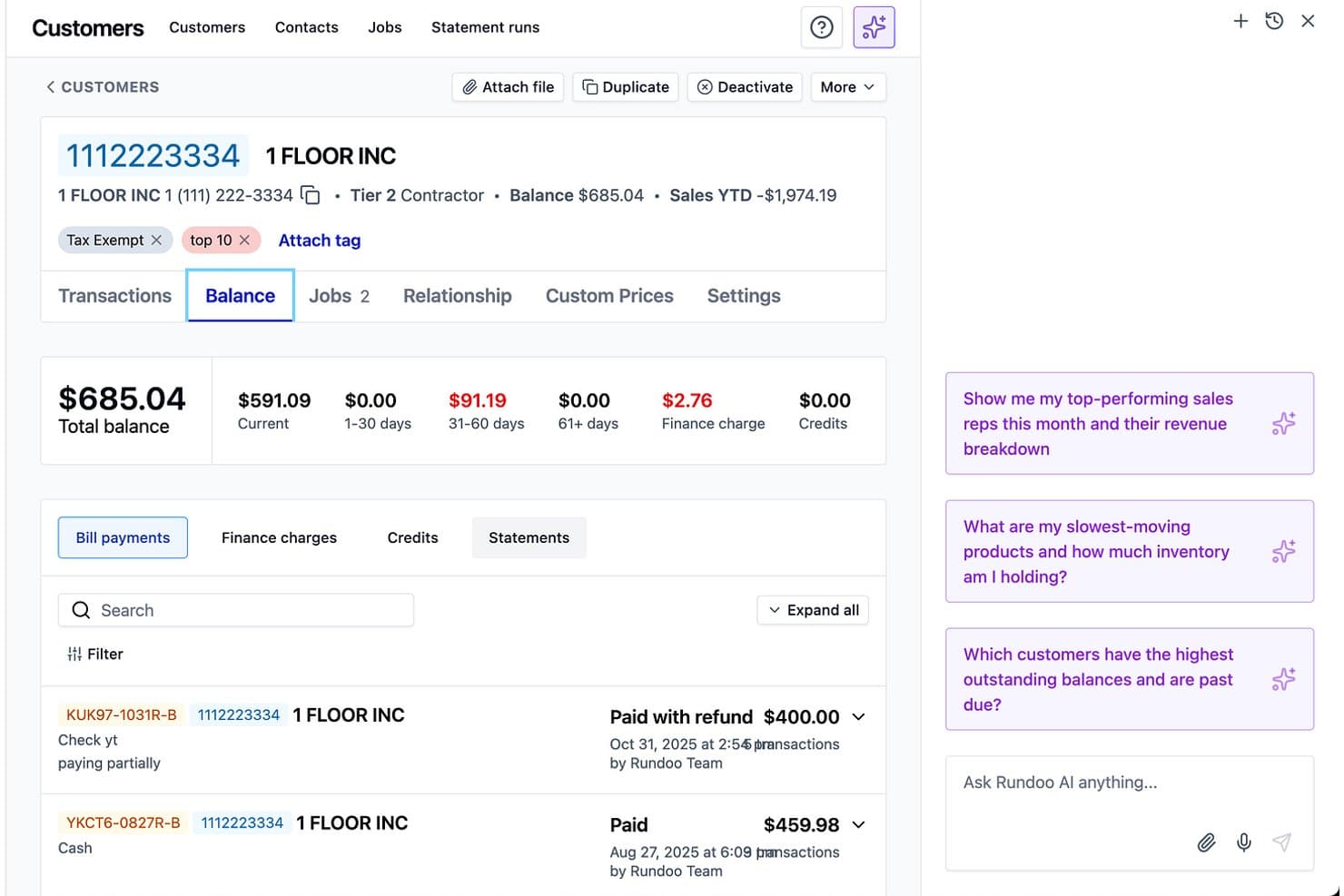
Rundoo offre una schermata dettagliata del saldo clienti e approfondimenti aziendali basati su AI per la gestione della fatturazione in negozio. Rundoo è una piattaforma POS ed ERP per ferramenta progettata specificamente per rivenditori indipendenti di ferramenta, vernici, materiali da costruzione e forniture agricole, che combina la gestione dell'inventario, l'integrazione dei cataloghi dei distributori, la gestione degli account a credito per i clienti professionali e strumenti di acquisto basati su AI in un unico sistema.
Per chi è più adatto Rundoo?
Rundoo è particolarmente indicato per rivenditori indipendenti di ferramenta e operatori di forniture edili che acquistano dai principali distributori e necessitano di gestire conti a credito per i clienti professionali insieme al POS.
Perché ho scelto Rundoo
Rundoo si guadagna il suo posto tra i migliori grazie a Dooey, il suo assistente AI integrato che genera ordini di acquisto basandosi sulla reale cronologia di vendita, le giacenze attuali e le tendenze stagionali. Apprezzo anche il fatto che Dooey segnali gli aumenti di costo dei fornitori prima che arrivino in cassa, offrendomi tempo per regolare i margini prima della prossima vendita. In pratica, questo significa non dover più controllare manualmente listini prezzi o inseguire errori di prezzo a posteriori.
Funzionalità principali di Rundoo
- Gestione inventario multi-unità: Tieni traccia degli articoli per scatola, pezzo, chilo o gallone per esigenze complesse di SKU e unità di misura.
- Integrazione con cataloghi di distributori di ferramenta: Cerca, confronta e ordina dai cataloghi dei principali fornitori direttamente dal sistema.
- Gestione degli account a credito per professionisti: Gestisci prezzi a scaglioni, estratti conto e fatturazione dei crediti per clienti professionali.
- Strumenti mobili per etichette e inventario: Conta gli articoli e stampa etichette da scaffale o cassetta tramite l'app Staff mobile in negozio.
Integrazioni di Rundoo
Rundoo offre integrazioni native con Stripe, QuickBooks, Benjamin Moore COLORx, Orgill, Do It Best, True Value, Sherwin-Williams, PPG e altri. È disponibile una API per integrazioni personalizzate.
Pros and Cons
Pros:
- Generazione automatica di ordini di acquisto tramite AI dalla cronologia vendite
- Progettato specificamente per la vendita al dettaglio di ferramenta e materiali edili
- Visibilità dell'inventario di più punti vendita tra tutte le sedi
Cons:
- Nessuna modalità offline del POS chiaramente documentata
- Piattaforma recente con una community di utenti ancora piccola
Learn more about Rundoo:

Moon POS offre strumenti per operazioni retail efficienti e gestione aziendale. Moon POS è una soluzione versatile pensata per le attività al dettaglio, offrendo strumenti per supportare operazioni efficienti e la gestione aziendale.
Perché ho scelto Moon POS: L'accesso cloud di Moon POS consente al tuo team di gestire le operazioni ovunque ci sia una connessione internet. Il sistema offre inoltre compatibilità mobile, rendendo semplice gestire le vendite anche in movimento. In più, la possibilità di accedere ai dati in tempo reale a distanza è un vantaggio significativo. Questa caratteristica è particolarmente utile per le aziende con più sedi o esigenze di gestione da remoto.
Funzionalità principali & integrazioni:
Le funzionalità includono dettagliati report di vendita che offrono una panoramica sulle performance giornaliere e mensili. Gli strumenti di gestione dell'inventario aiutano a monitorare i livelli di stock e a riordinare in modo efficiente. Inoltre, la funzione di gestione clienti consente di mantenere registri dettagliati della clientela, favorendo strategie di marketing personalizzate.
Le integrazioni includono QuickBooks, Xero, WooCommerce, Shopify, Magento, BigCommerce, PayPal, Stripe, Square e Authorize.Net.
Pros and Cons
Pros:
- Accesso cloud per la gestione da remoto
- Compatibilità mobile per vendite in mobilità
- Supporta la gestione multi-sede
Cons:
- Richiede una connessione internet per tutte le funzionalità
- Curva di apprendimento per i nuovi utenti
Learn more about Moon POS: Ideale per un'interfaccia facile da usare
- Demo gratuita disponibile
- Prezzo su richiesta
Visit WebsiteCustomer Rating:3.8/5
Epos Now è un POS cloud per la gestione di vendite, inventario e clienti. Epos Now è un sistema di punto vendita basato su cloud progettato principalmente per le piccole e medie imprese dei settori retail e dell'ospitalità. Aiuta a semplificare la gestione delle vendite, dell'inventario e dei clienti.
Perché ho scelto Epos Now: L'interfaccia intuitiva di Epos Now garantisce che il tuo team possa imparare e utilizzare il sistema rapidamente. Il pannello di controllo user-friendly del software offre inoltre un facile accesso ai report di vendita e ai dati di inventario. Inoltre, propone ricevute personalizzabili e il tracciamento delle vendite, che sostengono direttamente il suo obiettivo di fornire un'interfaccia semplice da usare. Secondo la mia esperienza, la semplicità di Epos Now è un fattore chiave per le aziende che desiderano ridurre al minimo i tempi di formazione.
Caratteristiche e integrazioni principali:
Le funzionalità includono la gestione dell'inventario che ti aiuta a monitorare facilmente i livelli di scorte. I report in tempo reale offrono una panoramica costante sulle prestazioni di vendita. Inoltre, le funzionalità di gestione delle relazioni con i clienti ti permettono di gestire efficacemente dati dei clienti e programmi di fidelizzazione.
Le integrazioni includono QuickBooks, Xero, Sage, Shopify, WooCommerce, BigCommerce, Mailchimp, Zapier, Magento e Salesforce.
Pros and Cons
Pros:
- Interfaccia touchscreen intuitiva
- Report di vendita personalizzabili
- Monitoraggio delle vendite in tempo reale
Cons:
- Funzionalità offline limitate
- Funzioni di inventario di base
Learn more about Epos Now:

ECI è una soluzione di gestione per negozi di materiali edili e ferramenta. ECI è un sistema POS per la vendita al dettaglio progettato su misura per negozi di materiali da costruzione e ferramenta. Offre strumenti per ottimizzare le operazioni di vendita specializzate.
Perché ho scelto ECI: Pensato specificamente per negozi di materiali edili, ECI offre una gestione avanzata dell'inventario adatta ai beni all'ingrosso. Il suo sistema di punto vendita gestisce con facilità transazioni complesse. In generale, l'attenzione del software per esigenze specifiche del settore come il tracciamento degli ordini e la contabilità di commessa lo distingue dalla concorrenza. Questo, unito alle potenti funzionalità di reportistica e previsione, aiuta a ottimizzare l'inventario e migliorare i processi decisionali dei magazzini di materiale edile.
Funzionalità e integrazioni principali:
Le funzionalità includono un avanzato tracciamento degli ordini per aiutarti a gestire in modo efficiente gli ordini dei clienti. Le funzioni di calcolo dei costi di commessa ti permettono di monitorare le spese collegate a specifici progetti. Inoltre, l’analisi in tempo reale offre informazioni per ottimizzare le prestazioni del tuo negozio.
Le integrazioni includono QuickBooks, Sage, Xero, Shopify, WooCommerce, BigCommerce, Salesforce, Magento, PayPal e Stripe.
Pros and Cons
Pros:
- Funzionalità di calcolo costi di commessa
- Analisi dei dati in tempo reale
- Supporta la gestione di inventario all'ingrosso
Cons:
- Configurazione iniziale complessa
- Richiede conoscenza del settore
Learn more about ECI: Ideale per l'integrazione con sistemi hardware
- Demo gratuita disponibile
- A partire da $125/mese

Celerant è un sistema per la gestione di negozi di ferramenta e vernici. Celerant è un sistema di gestione per negozi al dettaglio progettato per ferramenta e negozi di vernici. Offre funzionalità di punto vendita, gestione dell'inventario e relazioni con i clienti, rivolgendosi alle aziende che desiderano integrare funzioni specifiche per il settore ferramenta.
Perché ho scelto Celerant: Celerant è progettato per soddisfare le esigenze dei negozi di ferramenta, rendendolo una delle migliori soluzioni per i rivenditori del settore. La sua compatibilità con le attrezzature dei negozi garantisce un funzionamento senza intoppi, aspetto che ho trovato particolarmente vantaggioso. Insieme a queste funzionalità, la compatibilità plug-and-play di Celerant riduce la complessità dell'installazione, mentre la sincronizzazione in tempo reale con il software semplifica la gestione dell'inventario e delle vendite.
Funzionalità e integrazioni principali:
Funzionalità includono un avanzato monitoraggio dell'inventario che aiuta a gestire i livelli di stock con precisione. La funzione POS mobile consente di elaborare le transazioni ovunque nel negozio. Inoltre, possono essere impostati programmi di fidelizzazione della clientela che premiano gli acquisti ripetuti.
Integrazioni includono QuickBooks, SAP, Magento, Shopify, WooCommerce, BigCommerce, Mailchimp, Salesforce, Avalara e Amazon.
Pros and Cons
Pros:
- Gestione dell'inventario avanzata
- Programmi di fidelizzazione personalizzabili
- Supporta la gestione di più negozi
Cons:
- Processo di configurazione complesso
- Aggiornamenti software frequenti necessari
Learn more about Celerant : Ideale per una configurazione rapida
- Demo gratuita disponibile
- A partire da $49/mese

POS Nation offre una soluzione POS su misura per negozi di ferramenta di piccole e medie dimensioni. POS Nation Systems è un sistema POS hardware che offre una soluzione affidabile per i proprietari di ferramenta di piccole e medie dimensioni, supportando efficacemente le loro operazioni quotidiane di vendita al dettaglio.
Perché ho scelto POS Nation Systems: Il rapido avvio di POS Nation Systems è ideale per le aziende che hanno bisogno di essere operative in tempi brevi. Include pacchetti hardware preconfigurati per semplificare l'installazione. Nel complesso, questo aiuta a ridurre i tempi di inattività e a concentrarsi maggiormente sulle vendite. Oltre a queste caratteristiche, anche il processo di configurazione semplice è vantaggioso per i negozi che dispongono di un supporto tecnico minimo.
Funzionalità e integrazioni principali:
Le funzionalità includono il monitoraggio dell'inventario in tempo reale, che consente di controllare i livelli di magazzino durante le vendite. La funzione di reportistica sulle vendite fornisce una panoramica sulle metriche delle prestazioni giornaliere e mensili. Inoltre, gli strumenti di gestione clienti permettono di tracciare la cronologia e le preferenze degli ordini di acquisto.
Le integrazioni comprendono QuickBooks, Xero, Shopify, WooCommerce, Magento, Mailchimp, PayPal, Square, Authorize.Net e Stripe.
Pros and Cons
Pros:
- Pacchetti hardware preconfigurati
- Monitoraggio dell'inventario in tempo reale
- Strumenti di gestione clienti
Cons:
- Richiede assistenza tecnica iniziale
- Scalabilità limitata per grandi aziende
Learn more about POS Nation Systems: Ideale per analisi in tempo reale
- Prova gratuita di 30 giorni + download gratuito disponibile
- Da $375 (tariffa di licenza una tantum)

RetailEasy semplifica le operazioni e sostiene la crescita dei rivenditori di ferramenta. RetailEasy è una soluzione specializzata per il punto vendita, progettata per soddisfare le esigenze uniche dei negozi di ferramenta e dei piccoli rivenditori, offrendo un software affidabile per snellire le operazioni e supportare la crescita aziendale.
Perché ho scelto RetailEasy: RetailEasy offre analisi in tempo reale, fornendo informazioni su vendite e inventario che possono favorire decisioni aziendali migliori. La capacità del software di generare report dettagliati aiuta a monitorare efficacemente le prestazioni del negozio. Inoltre, l'accesso a dati sempre aggiornati consente di apportare tempestive modifiche alle strategie di inventario e vendita. Questa caratteristica è fondamentale per i negozi che mirano a ottimizzare costantemente le proprie operazioni.
Caratteristiche salienti e integrazioni:
Le funzionalità includono la gestione dell'inventario che aiuta a monitorare i livelli di stock e a riordinare in modo efficiente. Gli strumenti di gestione delle relazioni con i clienti permettono di mantenere registri dettagliati delle interazioni con i clienti. Inoltre, il software supporta la gestione di più punti vendita se la tua attività si espande.
Le integrazioni includono QuickBooks, Zoho, Shopify, WooCommerce, Magento, BigCommerce, Tally, SAP, Oracle e Salesforce.
Pros and Cons
Pros:
- Offre analisi in tempo reale
- Supporta la gestione di più punti vendita
- Capacità di reporting dettagliate
Cons:
- Configurazione iniziale complessa
- Flessibilità di personalizzazione limitata
Learn more about RetailEasy: Ideale per la gestione dell'inventario
- Demo gratuita disponibile
- Prezzo su richiesta

RMH POS è pensato per aziende di vendita al dettaglio focalizzate su vendite, inventario e servizio clienti. RMH POS è progettato specificamente per negozi al dettaglio e ferramenta. Si concentra sull'ottimizzazione delle vendite, sulla gestione dell'inventario e sul miglioramento del servizio clienti per le piccole e medie imprese.
Perché ho scelto RMH POS: RMH POS si distingue come una soluzione affidabile per la gestione dell'inventario, rendendolo una scelta ideale per i negozi con esigenze di stock diversificate. Aiuta a mantenere livelli di magazzino ottimali, riducendo sia eccedenze che esaurimenti di scorte, mentre la precisione del software è particolarmente vantaggiosa per i rivenditori di ferramenta che gestiscono un'ampia gamma di prodotti.
Funzionalità e integrazioni principali:
Funzionalità includono reportistica avanzata che fornisce approfondimenti sulle tendenze di vendita e sulle prestazioni. L'interfaccia utente personalizzabile permette di adattare il sistema al flusso di lavoro del proprio negozio. Inoltre, il programma di fidelizzazione clienti aiuta a trattenere e premiare i migliori clienti.
Integrazioni includono QuickBooks, Microsoft Dynamics 365, Magento, WooCommerce, Shopify, Xero, Sage, PayPal, Stripe e Authorize.Net.
Pros and Cons
Pros:
- Rifornimento delle scorte automatizzato
- Report dettagliati sull'inventario
- Interfaccia utente personalizzabile
Cons:
- Necessità frequente di aggiornamenti
- Curva di apprendimento ripida per i nuovi utenti
Learn more about RMH POS: Ideale come soluzione open-source
- Prova gratuita disponibile
- Prezzi su richiesta

Floreant è una soluzione POS open-source per piccole e medie imprese. Floreant è un sistema di punto vendita open-source progettato per piccole e medie imprese, inclusi i negozi di ferramenta.
Perché ho scelto Floreant: In quanto soluzione open-source, Floreant ti consente di personalizzare il software in base alle tue esigenze specifiche. Puoi modificare le funzionalità e aggiungere opzioni in base alle necessità del tuo negozio. In generale, questo tipo di flessibilità è ideale per le aziende che desiderano avere il controllo sul proprio sistema POS. Insieme a queste caratteristiche, Floreant è anche una scelta conveniente per chi preferisce un approccio su misura.
Caratteristiche e integrazioni principali:
Le caratteristiche includono la personalizzazione del menu, che ti permette di configurare facilmente le categorie e gli articoli dei tuoi prodotti. Gli strumenti di reportistica forniscono informazioni sulle prestazioni di vendita e sui livelli di inventario. Inoltre, il sistema supporta più terminali, risultando adatto anche per strutture più grandi.
Le integrazioni includono PayPal, Stripe, Square, QuickBooks, Xero, WooCommerce, Shopify, Magento, BigCommerce e Authorize.Net.
Pros and Cons
Pros:
- Completamente personalizzabile grazie al codice open-source
- Conveniente per le piccole imprese
- Supporta più terminali
Cons:
- Opzioni di supporto ufficiale limitate
- Richiede aggiornamenti software frequenti
Learn more about Floreant: Ideale per opzioni di pagamento flessibili
- Demo gratuita disponibile
- A partire da $149/licenza

Counterpoint è un sistema POS affidabile e adattabile per attività di vendita al dettaglio. Counterpoint è un sistema POS affidabile progettato per le attività di vendita al dettaglio. Offre adattabilità per soddisfare le esigenze di diversi esercizi, inclusi i negozi di ferramenta.
Perché ho scelto Counterpoint: Counterpoint è noto per offrire opzioni di elaborazione dei pagamenti flessibili che rispondono a varie preferenze della clientela. Puoi impostare piani di pagamento dilazionato e gestire facilmente pagamenti suddivisi. Oltre a queste funzioni, anche la versatilità dei metodi di pagamento di Counterpoint è preziosa per i negozi che vogliono rivolgersi a una clientela eterogenea.
Funzionalità principali e integrazioni:
Le funzionalità includono monitoraggio avanzato dell'inventario che ti aiuta a tenere sotto controllo i livelli di magazzino e i riordini. Il programma di fidelizzazione clienti è pensato per mantenere i clienti abituali offrendo ricompense. Inoltre, i report dettagliati sulle vendite forniscono una panoramica delle performance del negozio nel tempo.
Le integrazioni includono QuickBooks, Shopify, WooCommerce, Magento, BigCommerce, Salesforce, Mailchimp, PayPal, Stripe e Xero.
Pros and Cons
Pros:
- Supporta pagamenti dilazionati e suddivisi
- Gestione delle gift card inclusa
- Strumenti dettagliati di report sulle vendite
Cons:
- Opzioni di personalizzazione limitate
- Aggiornamenti software frequenti richiesti
Learn more about Counterpoint:
Altri sistemi POS per negozi di ferramenta
Ecco alcune opzioni aggiuntive di sistemi POS per negozi di ferramenta che non sono entrate nella mia selezione, ma che vale comunque la pena prendere in considerazione:
- 11The General StoreIdeale per i piccoli rivenditori
- 12MT-POS Professional EditionIdeale per i servizi di assistenza
- 13KORONA POSLa soluzione migliore per la scalabilità
Come Valuto i Sistemi POS per Ferramenta
Divido la mia valutazione in criteri di base—supporto alle unità di misura, integrazione con i distributori, gestione dei conti A/R per appaltatori—e fattori che distinguono un sistema dall'altro nel settore della ferramenta.
Funzionalità Principali (Requisiti Minimi per Questa Lista)
Quando seleziono gli strumenti per la mia lista, ne valuto ciascuno su una scala da 0 (non offre la funzionalità) a 5 (eccelle in quest'area) per ogni funzionalità principale elencata qui sotto. Quindi calcolo il punteggio totale dello strumento in percentuale. Ogni strumento deve raggiungere un punteggio totale minimo del 55% per essere preso in considerazione per l'inclusione.
- Gestione Inventario Specifica per Ferramenta: Verifico se un sistema può gestire grandi quantità di SKU con conversioni di unità di misura—vendendo una scatola di viti singolarmente, a scatole o a colli senza creare SKU separati.
- Integrazione Catalogo Distributore: Ogni ferramenta dipende dai feed di prezzi di cooperative come Orgill, Do it Best, Ace o True Value, quindi cerco sincronizzazioni catalogo native e supporto ordini EDI.
- Cassa POS & Pagamenti: Un registratore veloce e touch-friendly è fondamentale quando hai una fila di appaltatori alle 6 del mattino, quindi valuto la velocità di scansione dei codici a barre, i pagamenti frazionati e l'integrazione delle carte.
- Ordini Speciali & Preventivi: I clienti richiedono spesso articoli non disponibili a magazzino, quindi cerco un workflow chiaro dal preventivo all'ordine speciale fino al PO che tenga traccia degli acconti e avvisi l'acquirente all'arrivo.
- Conti per Appaltatori & B2B: I conti a credito con prezzi a scaglioni e rendiconti A/R sono standard nella ferramenta, e valuto come ogni sistema gestisce il tracciamento dei lavori e i report di invecchiamento.
- Acquisti & Rifornimento: Cerco punti di riordino automatici e logica min/max che generano PO per fornitore, soprattutto per categorie in rapida rotazione come fissaggi e materiale elettrico.
Una volta raccolto un elenco di strumenti che soddisfano questi criteri, considero cosa differenzia ogni piattaforma.
Fattori Distintivi (Cosa Distingue i Fornitori)
Ecco come confronto i diversi fornitori:
Caratteristiche Distintive
Il POS mobile è un grande elemento di differenziazione per negozi con area legno o giardinaggio dove i clienti non possono portare gli articoli in cassa. Cerco checkout su tablet che gestisce la scansione dei codici a barre e l'elaborazione dei pagamenti direttamente in corsia. Anche la sincronizzazione eCommerce è importante, soprattutto per i negozi affiliati alle cooperative dove aggiornamenti in tempo reale di inventario e prezzi evitano di vendere troppo nello shop online. Per i negozi che noleggiano attrezzi o rimorchi, un modulo di noleggio integrato con gestione di prenotazioni e restituzioni evita la necessità di affiancare un altro sistema al POS.
Oltre le Caratteristiche
L'affiliazione a una cooperativa è un fattore determinante—verifico se il fornitore ha partnership certificate con gruppi come Ace, Do it Best o Orgill, poiché questo di solito significa cataloghi precaricati e supporto file promo già disponibili. Anche l'implementazione è fondamentale, soprattutto per negozi che migrano da sistemi legacy come Epicor Eagle o Paladin con decine di migliaia di SKU e anni di storicità A/R. Il modello di implementazione è importante, perché un negozio in area rurale con connessione instabile ha bisogno di una cassa offline che non si blocchi al momento del pagamento.
Come scegliere un sistema POS per negozi di ferramenta
Scegliere il sistema POS giusto non deve sembrare come montare un mobile senza istruzioni.
Ecco una tabella rapida e senza fronzoli per aiutarti a concentrarti su ciò che conta davvero:
| Fattore | Cosa considerare |
|---|---|
| FattoreScalabilità | Cosa considerareRiuscirà a stare al passo con la tua crescita? Un buon sistema POS può gestire un numero maggiore di vendite, inventari più ampi e persino configurazioni con più punti vendita senza difficoltà. Non accontentarti di una soluzione che cederà sotto pressione quando l'attività crescerà rapidamente. |
| FattoreIntegrazioni | Cosa considerareFunziona bene con gli altri strumenti? Assicurati che si sincronizzi con il software di contabilità, il sistema di gestione dell'inventario e la piattaforma di commercio elettronico. Nessuno ha tempo da perdere con l'inserimento manuale degli stessi dati o con strumenti che non comunicano tra loro. |
| FattorePersonalizzazione | Cosa considerarePuoi adattarlo alle tue esigenze? Evita le soluzioni standardizzate. Cerca funzionalità che puoi modificare, come report, ricevute e programmi fedeltà, così il tuo POS si adatterà perfettamente al tuo negozio. |
| FattoreSemplicità d'uso | Cosa considerareIl tuo team lo utilizzerà davvero? Se per utilizzarlo il personale ha bisogno di un dottorato, non fa al caso tuo. Scegli un sistema con un'interfaccia intuitiva e una curva di apprendimento così breve da essere quasi inesistente. Velocità e semplicità sono importanti, soprattutto nei fine settimana più impegnativi. |
| FattoreBudget | Cosa considerareVale il prezzo richiesto? Non considerare soltanto il prezzo indicato: includi nel calcolo i costi mensili, quelli dell'hardware e gli eventuali costi nascosti. Punti extra se è disponibile una prova gratuita, così puoi testarlo prima di impegnarti. |
| FattoreMisure di sicurezza | Cosa considerareTerrà al sicuro i tuoi dati? Proteggi i tuoi clienti e la tua attività con funzionalità come la crittografia dei dati, l'elaborazione sicura dei pagamenti e i controlli degli accessi. Nessuno ha tempo da perdere con i disastri causati da una violazione dei dati. |
| FattoreDurata dell'hardware | Cosa considerareRiuscirà a gestire il lavoro intenso di un negozio di ferramenta? L'hardware del POS deve essere abbastanza resistente da sopportare polvere, sporco e uso intensivo. Hai bisogno di strumenti robusti quanto l'ambiente del tuo negozio. |
| FattoreAssistenza clienti | Cosa considerareTi sosterranno quando le cose andranno storte? Cerca fornitori che offrano assistenza 24 ore su 24, 7 giorni su 7, tempi di risposta rapidi e supporto tramite chat dal vivo o telefono. Perché i problemi tecnologici non aspettano l'orario di apertura. |
| FattoreFunzionalità di reportistica | Cosa considerarePuò fornirti le informazioni di cui hai bisogno? Un sistema POS valido dovrebbe fornire report che ti aiutino a monitorare le tendenze delle vendite, l'andamento dell'inventario e il comportamento dei clienti, così potrai prendere decisioni basate sui dati anziché su supposizioni. |
Attieniti a questa guida rapida per evitare i problemi dei POS e trovare un sistema che renda molto più semplice la gestione del tuo negozio di ferramenta.
Cos'è un sistema POS per negozi di ferramenta?
Un sistema POS per negozi di ferramenta è una soluzione per il punto vendita progettata specificamente per gestire le sfide uniche della gestione di un negozio di ferramenta.
Consideralo come il tuo centro di comando per gestire vendite, inventario e interazioni con i clienti. Che tu venda un singolo bullone o fornisca a un appaltatore una dotazione completa di utensili, un buon sistema POS fa funzionare tutto senza intoppi.
Ecco cosa fa generalmente:
- Elabora le transazioni. Gestisce pagamenti in contanti, con carta, contactless e altro ancora, così la fase di pagamento è sempre rapida e senza complicazioni.
- Gestisce l'inventario. Tiene traccia di migliaia di SKU, così saprai sempre se hai in magazzino quella specifica vite o quella punta per trapano.
- Supporta i dati dei clienti. Salva i profili dei clienti per programmi fedeltà, promozioni mirate e un servizio personalizzato.
- Fornisce report. Genera informazioni in tempo reale sulle tendenze delle vendite, sui prodotti più venduti e sul comportamento dei clienti per aiutarti a prendere decisioni più consapevoli.
- Si integra con altri strumenti. Si sincronizza con il software di contabilità, le piattaforme di commercio elettronico e persino il tuo elaboratore di pagamenti per semplificare le operazioni.
A differenza dei sistemi POS generici, le soluzioni per negozi di ferramenta sono progettate per gestire le esigenze complesse del tuo negozio, come l'inventario all'ingrosso, le vendite agli appaltatori e la gestione delle varianti dei prodotti, ad esempio le diverse dimensioni delle viti o le tonalità di vernice.
Tendenze dei sistemi POS per negozi di ferramenta da tenere d'occhio
Ecco le tendenze dei sistemi POS per negozi di ferramenta e perché sono importanti per la tua attività:
- Soluzioni basate sul cloud. I sistemi POS si stanno spostando sul cloud, consentendoti di accedere ai dati in tempo reale e gestire il tuo negozio da qualsiasi luogo. Che tu abbia più sedi o voglia semplicemente controllare le vendite mentre pranzi, i sistemi basati sul cloud ti mantengono connesso.
- Pagamenti contactless. I clienti apprezzano la velocità e la sicurezza delle opzioni di pagamento contactless e tramite codice QR, e i moderni sistemi POS rendono facile offrirle. Pagamenti più rapidi significano clienti più soddisfatti e code più brevi: un vantaggio per tutti.
- Analisi basate sui dati. Le analisi avanzate stanno trasformando i dati grezzi in informazioni utili, aiutandoti a comprendere le tendenze delle vendite, monitorare il comportamento dei clienti e pianificare promozioni più efficaci. È come avere un consulente aziendale integrato nel tuo POS.
- Programmi fedeltà integrati. Gli strumenti di fidelizzazione integrati rendono facile premiare i clienti abituali, monitorare i punti e creare promozioni mirate. I clienti si sentono apprezzati e tu costruisci relazioni a lungo termine senza dover utilizzare app di terze parti.
- Gestione dell'inventario basata sull'intelligenza artificiale. L'intelligenza artificiale elimina le supposizioni dalla gestione dell'inventario. Questi sistemi analizzano le vendite e le tendenze stagionali per automatizzare i riordini, aiutandoti a evitare di rimanere senza i prodotti più venduti o di accumulare scorte di prodotti che rimangono sugli scaffali.
Caratteristiche dei migliori sistemi POS per ferramenta
Quando scegli un sistema POS per ferramenta, cerca queste funzionalità indispensabili che rendono la gestione del negozio più semplice ed efficiente:
- Gestione avanzata dell'inventario. Tiene sotto controllo i livelli delle scorte, imposta avvisi di riordino e gestisce persino le varianti dei prodotti (come taglie, colori o pesi) per mantenere gli scaffali riforniti senza effettuare ordini eccessivi.
- Reportistica completa sulle vendite. Fornisce informazioni chiare e utili sulle tendenze delle vendite, sui prodotti più performanti e sugli andamenti stagionali, aiutandoti a prendere decisioni aziendali più efficaci.
- Programmi fedeltà integrati. Ti consente di premiare facilmente i clienti abituali con punti, sconti o vantaggi esclusivi, costruendo relazioni a lungo termine e fidelizzando il marchio.
- Accesso al cloud. Ti permette di gestire il negozio da qualsiasi luogo, con aggiornamenti in tempo reale sulle vendite, sull'inventario e sulle prestazioni dei dipendenti: l'ideale per le attività con più sedi.
- Opzioni di pagamento contactless. Supporta NFC, codici QR e portafogli digitali per pagamenti più rapidi, maggiore sicurezza per i clienti e un'esperienza di pagamento moderna.
- Analisi basate sui dati. Analizza le vendite e il comportamento dei clienti per ottimizzare i livelli dell'inventario, perfezionare le attività di marketing e aumentare i profitti.
- Funzionalità POS mobili. Trasforma tablet o smartphone in postazioni di pagamento, così puoi servire i clienti più rapidamente, anche nelle ore di punta o in diverse aree del negozio.
- Previsione dell'inventario basata sull'intelligenza artificiale. Automatizza le previsioni delle scorte utilizzando le vendite passate e le tendenze stagionali, riducendo il rischio di esaurimento delle scorte e di eccesso di inventario.
Un ottimo sistema POS non si limita a gestire le transazioni: diventa la spina dorsale del tuo negozio, migliorando le operazioni e offrendo un'esperienza migliore sia a te sia ai tuoi clienti.
Vantaggi dell'utilizzo dei sistemi POS per ferramenta
Passare a un sistema POS moderno non rende soltanto più semplice il tuo lavoro: offre vantaggi concreti e misurabili al tuo negozio. Ecco cosa puoi aspettarti:
- Maggiore precisione dell'inventario. Di' addio agli errori manuali. Grazie al monitoraggio in tempo reale e agli avvisi automatici di riordino, avrai sempre ciò di cui i clienti hanno bisogno senza accumulare scorte eccessive.
- Processo di pagamento più rapido. Funzionalità come i pagamenti contactless e i sistemi POS mobili mantengono scorrevoli le code, rendendo i clienti più soddisfatti e liberando tempo per il tuo team.
- Maggiore fidelizzazione dei clienti. I programmi fedeltà integrati ti consentono di premiare i clienti abituali con punti, sconti e promozioni, incoraggiando visite ripetute e relazioni più solide.
- Decisioni più intelligenti. Grazie all'accesso a report dettagliati sulle vendite e ad analisi approfondite, puoi basare le tue decisioni su dati concreti invece che su supposizioni, sia che si tratti di ordinare l'inventario o di organizzare una promozione.
- Gestione da remoto. I sistemi basati sul cloud ti consentono di supervisionare la tua attività da qualsiasi luogo, sia che tu gestisca più sedi sia che ti conceda una rara giornata libera.
- Risparmio sui costi. Ottimizzando l'inventario, riducendo gli sprechi e semplificando le operazioni, un buon sistema POS ti aiuta a ridurre i costi e migliorare i margini di profitto nel tempo.
Investire nel sistema POS giusto per ferramenta ti offre gli strumenti per gestire un'attività più efficiente, orientata al cliente e redditizia, rendendo al contempo il tuo lavoro molto più semplice.
Costi e prezzi dei sistemi POS per ferramenta
Comprendere la struttura dei prezzi dei sistemi POS per ferramenta è essenziale per trovarne uno che rientri nel tuo budget offrendo al contempo le funzionalità giuste.
I costi possono variare significativamente a seconda delle dimensioni della tua attività, delle funzionalità necessarie e degli eventuali componenti aggiuntivi.
Tabella comparativa dei piani per i sistemi POS per ferramenta
Ecco una panoramica aggiornata dei livelli di prezzo più comuni, dei costi medi e del tipo di attività più adatto a ciascun piano:
| Tipo di piano | Prezzo medio | Funzionalità comuni | Ideale per |
|---|---|---|---|
| Tipo di pianoPiano gratuito | Prezzo medio$0 | Funzionalità comuniGestione di base delle vendite, monitoraggio semplice dell'inventario e report limitati. | Ideale perPiccoli negozi con un'unica sede, agli inizi o che stanno testando per la prima volta un sistema POS. |
| Tipo di pianoPiano personale | Prezzo medio$20–$50/utente/mese | Funzionalità comuniGestione delle vendite, controllo di base dell'inventario, assistenza clienti e analisi semplici. | Ideale perNegozi indipendenti o piccoli rivenditori con esigenze moderate di gestione dell'inventario. |
| Tipo di pianoPiano aziendale | Prezzo medio$50–$100/utente/mese | Funzionalità comuniGestione avanzata dell'inventario, programmi fedeltà, report dettagliati sulle vendite, supporto per più negozi e integrazioni. | Ideale perNegozi in crescita con volumi di transazioni più elevati o attività con più sedi. |
| Tipo di pianoPiano per grandi aziende | Prezzo medio$100+/utente/mese | Funzionalità comuniFunzionalità completamente personalizzabili, assistenza dedicata, analisi avanzate e integrazione con sistemi esterni. | Ideale perGrandi catene di ferramenta o attività che richiedono flussi di lavoro personalizzati e integrazioni solide. |
Altri aspetti da considerare sui prezzi
- Costi delle apparecchiature. Non dimenticare le apparecchiature fisiche, come lettori di carte, scanner di codici a barre, stampanti per ricevute e tablet. Le apparecchiature possono costare da $300 a $2,000 a seconda delle tue esigenze.
- Componenti aggiuntivi. Molti sistemi offrono funzionalità opzionali come programmi fedeltà, strumenti di marketing o report avanzati a fronte di costi aggiuntivi. Verifica cosa è incluso nel tuo piano per evitare spese impreviste.
- Commissioni sulle transazioni. Alcuni fornitori applicano commissioni sulle transazioni, soprattutto per i piani gratuiti o a basso costo. Queste commissioni possono aumentare rapidamente per i negozi con volumi di vendita elevati.
- Sconti a lungo termine. Molti fornitori offrono sconti per gli abbonamenti annuali, consentendo spesso di risparmiare il 10–20% rispetto ai pagamenti mensili. Valuta di sottoscrivere un piano annuale per risparmiare, se il sistema è adatto alla tua attività.
- Periodi di prova gratuiti. La maggior parte dei fornitori offre periodi di prova gratuiti, che ti permettono di testare le funzionalità e l'usabilità del sistema prima di impegnarti. Approfittane per assicurarti che il sistema sia adatto alle esigenze e al flusso di lavoro del tuo negozio.
Abbinando le dimensioni e le esigenze della tua attività al livello di prezzo giusto, eviterai di pagare troppo per funzionalità che non ti servono o di spendere troppo poco per un sistema che non è in grado di stare al passo.
Domande frequenti sui sistemi POS per negozi di ferramenta
Ecco alcune risposte alle domande comuni sui sistemi POS per negozi di ferramenta:
Quali componenti fisici sono necessari per un sistema POS?
Per un sistema POS sono necessari diversi componenti fisici, come lettori di codici a barre, stampanti per ricevute e cassetti portadenaro. Il terminale è l’elemento centrale che collega tutti questi componenti. Disporre dei componenti fisici giusti garantisce un funzionamento fluido e un’elaborazione efficiente delle transazioni nel negozio.
Qual è la differenza tra componenti fisici e software POS?
I componenti fisici POS includono dispositivi come registratori di cassa, lettori di carte di credito e schermi tattili. Il software POS gestisce le vendite, l’inventario e i dati dei clienti. Insieme, formano un sistema completo che consente di monitorare le transazioni, gestire le scorte e offrire un servizio clienti migliore.
Quali sono i due sistemi operativi più comuni per i dispositivi POS?
I sistemi basati su Windows sono i più comuni e vengono utilizzati nelle configurazioni POS tradizionali. I sistemi basati su \u003ca href=\u0022https://theretailexec.com/tools/best-android-pos-system/\u0022\u003eAndroid\u003c/a\u003e seguono a breve distanza e offrono compatibilità con molte applicazioni aziendali e componenti hardware. La scelta del sistema operativo giusto dipende dalle esigenze specifiche del negozio e dalla tecnologia già disponibile.
Quali sono i requisiti funzionali di un sistema POS?
Le funzioni principali includono la gestione dell’inventario, l’elaborazione delle vendite, la gestione dei pagamenti e la reportistica. Queste funzionalità aiutano a monitorare le scorte, elaborare le vendite in modo efficiente, accettare diversi metodi di pagamento e ricavare informazioni utili dai dati sulle vendite. Soddisfare questi requisiti garantisce un sistema POS completo.
Quanto è sicuro un sistema POS?
I sistemi POS includono misure di sicurezza come la crittografia e controlli di accesso sicuri per proteggere i dati. Anche gli aggiornamenti regolari e la conformità alle normative sulla protezione dei dati contribuiscono a mantenere la sicurezza. Assicurarsi che queste funzionalità siano presenti aiuta a proteggere l’azienda e le informazioni dei clienti.
Un sistema POS può integrarsi con altri strumenti aziendali?
Sì, molti sistemi POS offrono funzionalità di integrazione con software di contabilità, piattaforme di commercio elettronico e strumenti di gestione delle relazioni con i clienti. L’integrazione di questi sistemi può semplificare le operazioni e offrire una visione più completa delle attività aziendali.