


Acumatica contro QuickBooks: confronto dettagliato e recensioni degli esperti per il 2026

Recensiamo gli strumenti in modo indipendente, e le commissioni aiutano a finanziare i nostri test. Consulta la nostra politica sulla trasparenza, la nostra metodologia o suggerisci uno strumento.
Scegliere tra Acumatica e QuickBooks Enterprise significa valutare un ERP flessibile basato sul cloud rispetto a una piattaforma familiare e intuitiva per gli utenti: entrambe sono valide opzioni per i software di contabilità e gestione dell'inventario. Se hai difficoltà a decidere quale soluzione manterrà accurate le tue finanze e sotto controllo il tuo inventario, non sei il solo.
Questo articolo analizza come ciascuna piattaforma gestisce la contabilità, l'inventario e le operazioni quotidiane, così potrai scegliere con sicurezza quella più adatta alla crescita e alla complessità della tua azienda.
Acumatica
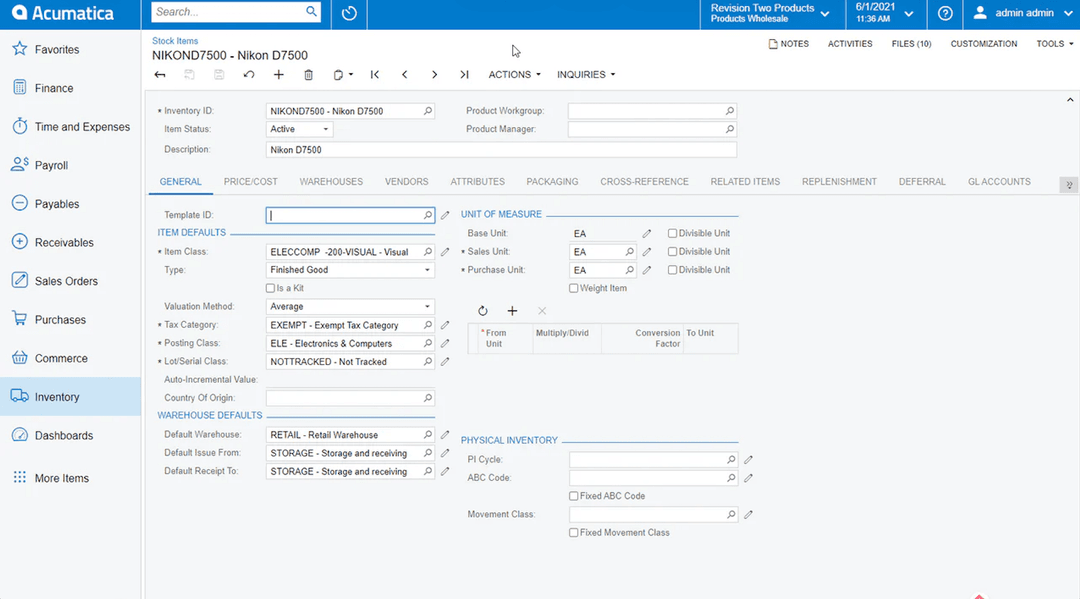
4.4/5
- Free demo available
- Pricing upon request
QuickBooks Desktop Enterprise
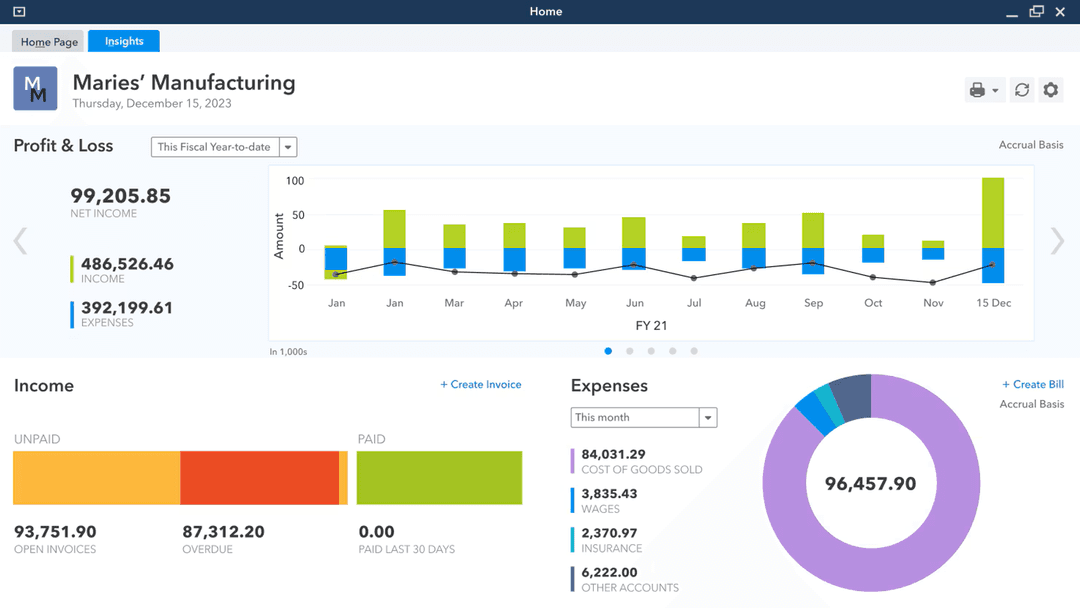
4.2/5
- Free product tour
- From $140.84/month
Perché fidarsi dei nostri consigli sui software
6,700+
Reviews
20
Industry experts
16+
Evaluation factors
14
Years
Il nostro team testa e recensisce software dal 2012. In quanto leader del retail noi stessi, sappiamo quanto sia difficile — e importante — scegliere il software giusto.
Per questa guida, abbiamo valutato gli strumenti attraverso test pratici e ricerche indipendenti, assegnando un punteggio agli strumenti in base ai nostri criteri di selezione.
Le nostre recensioni riflettono il nostro giudizio indipendente, non un discorso di vendita.
| Acumatica | QuickBooks Desktop Enterprise | |
|---|---|---|
| Free Trial | Free demo available | Free product tour |
| Pricing | Pricing upon request | From $140.84/month |
Prezzi e costi nascosti di Acumatica e QuickBooks
Per ottenere un prezzo esatto per Acumatica, dovrai contattare il loro team. Il prezzo si basa generalmente sul numero di applicazioni utilizzate, sui livelli di risorse e sulla quantità di dati da archiviare, oltre che sull'opzione di distribuzione. Il prezzo di QuickBooks Enterprise dipende dal numero di utenti necessari, dai moduli avanzati per l'inventario e i prezzi e dall'eventuale necessità di hosting.
Per scegliere il fornitore giusto, non fermarti al prezzo indicato e definisci le tue esigenze attuali e future. Elenca le funzionalità e le integrazioni che utilizzerai realmente, stima come potrebbero crescere il numero di utenti o il volume delle transazioni e chiedi a ciascun fornitore una suddivisione dettagliata di tutti i potenziali costi, inclusi supporto, aggiornamenti e componenti aggiuntivi. Questo approccio ti aiuta a evitare sorprese e garantisce che il tuo investimento sia in linea con i piani a lungo termine della tua azienda.
Per ottenere un prezzo esatto per Acumatica, dovrai contattare il loro team. Il prezzo si basa generalmente sul numero di applicazioni utilizzate, sui livelli di risorse e sulla quantità di dati da archiviare, oltre che sull’opzione di distribuzione. Il prezzo di QuickBooks Enterprise dipende dal numero di utenti necessari, dai moduli avanzati per l’inventario e i prezzi e dall’eventuale necessità di hosting.
Per scegliere il fornitore giusto, non fermarti al prezzo indicato e definisci le tue esigenze attuali e future. Elenca le funzionalità e le integrazioni che utilizzerai realmente, stima come potrebbero crescere il numero di utenti o il volume delle transazioni e chiedi a ciascun fornitore una suddivisione dettagliata di tutti i potenziali costi, inclusi supporto, aggiornamenti e componenti aggiuntivi. Questo approccio ti aiuta a evitare sorprese e garantisce che il tuo investimento sia in linea con i piani a lungo termine della tua azienda.
| Acumatica | QuickBooks Desktop Enterprise | |
|---|---|---|
| Accounts Payable | Yes | Yes |
| Accounts Receivable | Yes | Yes |
| API | Yes | No |
| Budgeting | Yes | Yes |
| Calendar Management | Yes | No |
| Customer Management | Yes | Yes |
| Dashboard | Yes | Yes |
| Data Export | Yes | Yes |
| Data Import | Yes | Yes |
| Data Visualization | Yes | Yes |
| Expense Tracking | Yes | Yes |
| External Integrations | Yes | Yes |
| Forecasting | Yes | Yes |
| Inventory Tracking | Yes | Yes |
| Multi-Currency | Yes | Yes |
| Multi-User | Yes | Yes |
| Notifications | Yes | Yes |
| Payroll | Yes | Yes |
| Supplier Management | Yes | Yes |
| Integrazione | Acumatica | QuickBooks |
| Shopify | ✅ | ✅ |
| Salesforce | ✅ | ✅ |
| Avalara | ✅ | ✅ |
| Magento (Adobe Commerce) | ✅ | ❌ |
| Microsoft Dynamics 365 | ✅ | ❌ |
| Bill.com | ✅ | ✅ |
| Expensify | ✅ | ✅ |
| Square | ❌ | ✅ |
| PayPal | ✅ | ✅ |
| API | ✅ | ✅ |
| Zapier | ✅ | ✅ |
Acumatica e QuickBooks supportano entrambi integrazioni popolari come Shopify, Salesforce e Bill.com, ma Acumatica si collega a un numero maggiore di piattaforme ERP e commerciali, mentre QuickBooks offre un supporto migliore per strumenti di pagamento al dettaglio come Square. Entrambi forniscono accesso tramite API e Zapier, quindi la maggior parte delle aziende troverà la flessibilità di cui ha bisogno, ma la scelta potrebbe dipendere da alcune integrazioni chiave specifiche del tuo flusso di lavoro.
| Fattore | Acumatica | QuickBooks |
| Crittografia dei dati | Utilizza la crittografia da punto a punto per i dati in transito e a riposo. | Crittografa i dati utilizzando protocolli conformi agli standard del settore, sia in transito sia a riposo. |
| Conformità normativa | Supporta la conformità a standard come GDPR e SOC 1/2. | Soddisfa i requisiti per SOC 2, PCI DSS e conformità al GDPR. |
| Controlli di accesso degli utenti | Offre autorizzazioni granulari basate sui ruoli e registri di controllo. | Fornisce autorizzazioni utente personalizzabili e registri dettagliati delle attività. |
| Disponibilità e backup | Garantisce un'elevata disponibilità con copie di sicurezza giornaliere automatizzate e ripristino in caso di emergenza. | Offre una disponibilità affidabile con copie di sicurezza continue e opzioni di ripristino. |
| Autenticazione a più fattori | Supporta l'autenticazione a più fattori per tutti gli utenti, migliorando la sicurezza degli account. | Offre l'autenticazione a più fattori per l'accesso agli account e per le operazioni sensibili. |
Acumatica e QuickBooks offrono entrambi elevati livelli di sicurezza e conformità, ma i controlli di accesso granulari e le opzioni di ripristino in caso di emergenza di Acumatica gli conferiscono un vantaggio per le organizzazioni complesse. QuickBooks si distingue per le sue funzionalità di conformità semplici e per la disponibilità affidabile, rappresentando una scelta solida per le aziende che desiderano protezioni affidabili e facili da gestire.
| Fattore | Acumatica | QuickBooks |
| Interfaccia utente | Pannelli di controllo e menu personalizzabili, ma può risultare complessa per i nuovi utenti. | Impostazione chiara e intuitiva, progettata per una navigazione rapida e per le attività quotidiane. |
| Processo di avvio | Configurazione guidata con risorse per la formazione, ma con una curva di apprendimento più ripida. | La procedura di avvio passo dopo passo e i suggerimenti integrati nell'applicazione semplificano l'avvio. |
| Automazione dei flussi di lavoro | Opzioni di automazione avanzate, anche se la configurazione può richiedere il supporto informatico. | Automazione integrata per fatturazione, riconciliazione e aggiornamenti dell'inventario con una configurazione minima. |
| Assistenza clienti | Offre chat dal vivo, assistenza telefonica e una base di conoscenze, ma i tempi di risposta variano. | Fornisce assistenza 24 ore su 24, 7 giorni su 7, e un'ampia comunità in linea per ottenere rapidamente risposte. |
| Esperienza su dispositivi mobili | L'applicazione per dispositivi mobili copre le funzionalità principali, ma è meno curata rispetto alla versione per computer. | Applicazione per dispositivi mobili molto apprezzata, con accesso completo alla maggior parte delle funzionalità. |
QuickBooks è più facile da imparare e utilizzare quotidianamente per la maggior parte degli utenti, mentre la flessibilità di Acumatica comporta una curva di apprendimento più ripida. Tenendo conto di questo, Acumatica è generalmente adatto ai team che necessitano di personalizzazioni approfondite e flussi di lavoro avanzati, mentre QuickBooks è indicato per una gestione contabile e dell'inventario semplice e intuitiva.
Acumatica
- Customization is actually possible. You can shape the system to fit your business, not the other way around.
- Unlimited user access, no gotchas. Add as many people as you want without getting dinged for every login.
- Support that answers the phone. When you hit a wall, you’re not left yelling into the void.
- Interface isn’t exactly intuitive. Some screens feel designed by accountants, for accountants.
- Expect a real learning curve. Onboarding isn’t “set it and forget it”—you’ll need to invest time.
- Occasional performance hiccups. Especially if you push the system hard or over-customize.
QuickBooks Desktop Enterprise
- Serious financial reporting: Get in-depth, customizable reports built for real oversight.
- Robust inventory management: Advanced inventory tools handle complex tracking, not just basics.
- Customizable workflows: Tailor the system to your specific operations and reporting needs.
- Outdated user interface: Feels clunky compared to modern small business accounting solutions.
- Steep learning curve: Initial setup and training take real time and effort.
- Limited mobile access: Desktop-first design holds back teams that need flexibility.
Acumatica
- Manufacturing companiesHandles complex production processes and inventory management without missing a beat.
- Distribution businessesAdvanced supply chain features keep your operation running smoothly.
- Retail operationsReal-time data insights let you actually track sales and inventory.
- Finance departmentsRobust financial reporting tools streamline your day-to-day.
- Growing enterprisesScalability and unlimited users mean you’re set for expansion.
- Inventory managersDetailed tracking keeps you out of trouble with overstock or shortages.
QuickBooks Desktop Enterprise
- Retail chainsManage large inventories and multiple locations with advanced tracking tools.
- Manufacturing companiesUse detailed financial and job costing features to keep projects profitable.
- Accounting departmentsSimplify complex workflows with in-depth reporting and multi-user support.
- Wholesale distributorsTrack inventory levels and streamline order management efficiently.
- Finance teamsGet customizable reports and deep insight into cash flow, receivables, and forecasting.
- Large enterprisesHandle multi-company accounting and scale up without sacrificing control.
Chi dovrebbe utilizzare Acumatica e chi dovrebbe utilizzare QuickBooks?
Acumatica è ideale per aziende di medie e grandi dimensioni con inventari complessi, operazioni multi-entità o esigenze specifiche del settore, soprattutto quando dispongono di risorse informatiche per supportare personalizzazioni e integrazioni. QuickBooks Enterprise è più adatto alle aziende in crescita, ai negozi al dettaglio e ai fornitori di servizi che desiderano una configurazione rapida, una navigazione semplice, una contabilità affidabile e un monitoraggio di base dell'inventario senza una curva di apprendimento ripida. Se la tua azienda sta crescendo rapidamente o necessita di un'automazione avanzata dei flussi di lavoro, Acumatica è la soluzione più adatta. Per una gestione contabile e dell'inventario semplice e conveniente, è difficile battere QuickBooks.
| Acumatica | QuickBooks Desktop Enterprise | |
|---|---|---|
| Automation Features | Acumatica Advanced automation for inventory, approvals, and processes. | QuickBooks Desktop Enterprise Automation mainly for invoicing, payments, inventory, and reconciliation. |
| Core Focus | Acumatica Covers tons of ERP functions for powering your entire business, from inventory and accounting to order and warehouse management. | QuickBooks Desktop Enterprise Less robust all-around ERP features, mostly focusing on accounting and inventory management. |
| Customization | Acumatica Highly customizable workflows, dashboards, and reports. | QuickBooks Desktop Enterprise Some customization, but is more focused on out-of-the-box simplicity |
| Multichannel Support | Acumatica Built-in support for multi-entity and multi-currency operations. | QuickBooks Desktop Enterprise Basic multi-entity support, often requires workarounds. |
| User Interface | Acumatica Feature-rich but complex, designed for power users. | QuickBooks Desktop Enterprise Streamlined and intuitive, designed for everyday users. |
| Cloud-Based Access | Both offer secure, cloud-based platforms for anytime, anywhere access. |
|---|---|
| Discovery and Inventory | Each solution includes inventory management features like stock tracking, reorder points, and reporting, though Acumatica supports more advanced scenarios. |
| Financial Reporting | Both generate standard financial reports (P&L, balance sheet, cash flow), with customizable templates and export options. |
| Integration Options | Both connect with popular business tools such as Shopify, Salesforce, and Bill.com, and support API and Zapier for custom integrations. |
| User Permissions | Each platform allows admins to set user roles and permissions, helping control access to sensitive financial and inventory data. |