

Les logiciels de tableaux de menus numériques vous permettent de contrôler et de mettre à jour vos menus sur tous les écrans de votre entreprise depuis un seul endroit. Pour les groupes de commerces et de restaurants qui gèrent des dizaines ou des centaines d’établissements, le bon outil résout le chaos des promotions de dernière minute, des changements de prix et des mises à jour de conformité, sans des semaines de travail manuel.
Dans ce guide, vous trouverez mes choix de 2026 parmi les logiciels de tableaux de menus numériques qui conviennent le mieux aux équipes multisites ayant besoin d’une supervision centralisée, d’une intégration au point de vente, d’une cohérence de marque et d’une visibilité opérationnelle. Découvrez comment ces solutions vous permettent de conserver des menus soignés, adaptables et toujours synchronisés.
Pourquoi faire confiance à nos recommandations de logiciels
6,700+
Reviews
20
Industry experts
16+
Evaluation factors
14
Years
Notre équipe teste et évalue des logiciels depuis 2012. En tant que dirigeants du commerce de détail nous-mêmes, nous savons à quel point il est difficile — et important — de choisir le bon logiciel.
Pour ce guide, nous avons évalué les outils grâce à des tests pratiques et une recherche indépendante, en notant les outils selon nos critères de sélection.
Nos avis reflètent notre jugement indépendant — et non un argumentaire de vente.
| Tool | Best For | Trial Info | Price | ||
|---|---|---|---|---|---|
| 1 | Best for AI-driven menu board fleet oversight | 14-day free trial + free demo available | Pricing upon request | Website | |
| 2 | Best for multi-location menu and ad scheduling | Free demo available | Pricing upon request | Website | |
| 3 | Best for hardware-agnostic menu board deployments | 14-day free trial + free demo available | From $20/screen/month (billed annually) | Website | |
| 4 | Best for white-glove menu board rollouts | Free trial + free demo available | From $15/month (billed annually) | Website | |
| 5 | Best for enterprise signage at multi-location scale | Free demo available | Pricing upon request | Website | |
| 6 | Best for QSR dayparting across locations | 30-day free trial + free demo available | From $14/screen/month (billed annually) | Website | |
| 7 | Best for SOC 2-certified menu board management | 14-day free trial + free demo available | From $3.5/device/month (billed annually) | Website | |
| 8 | Best for Apple TV-native menu board deployments | 14-day free trial + free demo available | From $7/screen/month (billed annually) | Website | |
| 9 | Best for perpetual-license menu board management | Free demo available | From $450 one-time | Website | |
| 10 | Best for enterprise menu board fleet management | Free demo available | From $14/month/player | Website |


Avis sur les logiciels de tableaux de menus numériques
Voici mes résumés détaillés des meilleurs logiciels de tableaux de menus numériques qui ont intégré ma sélection. Mes avis proposent un examen approfondi des fonctionnalités, des capacités et des intégrations de chaque logiciel pour vous aider à trouver celui qui vous convient le mieux.
 Idéal pour la supervision des parcs de panneaux de menus pilotée par l’IA
- Essai gratuit de 14 jours + démonstration gratuite disponible
- Tarifs sur demande
Visit WebsiteCustomer Rating:4.5/5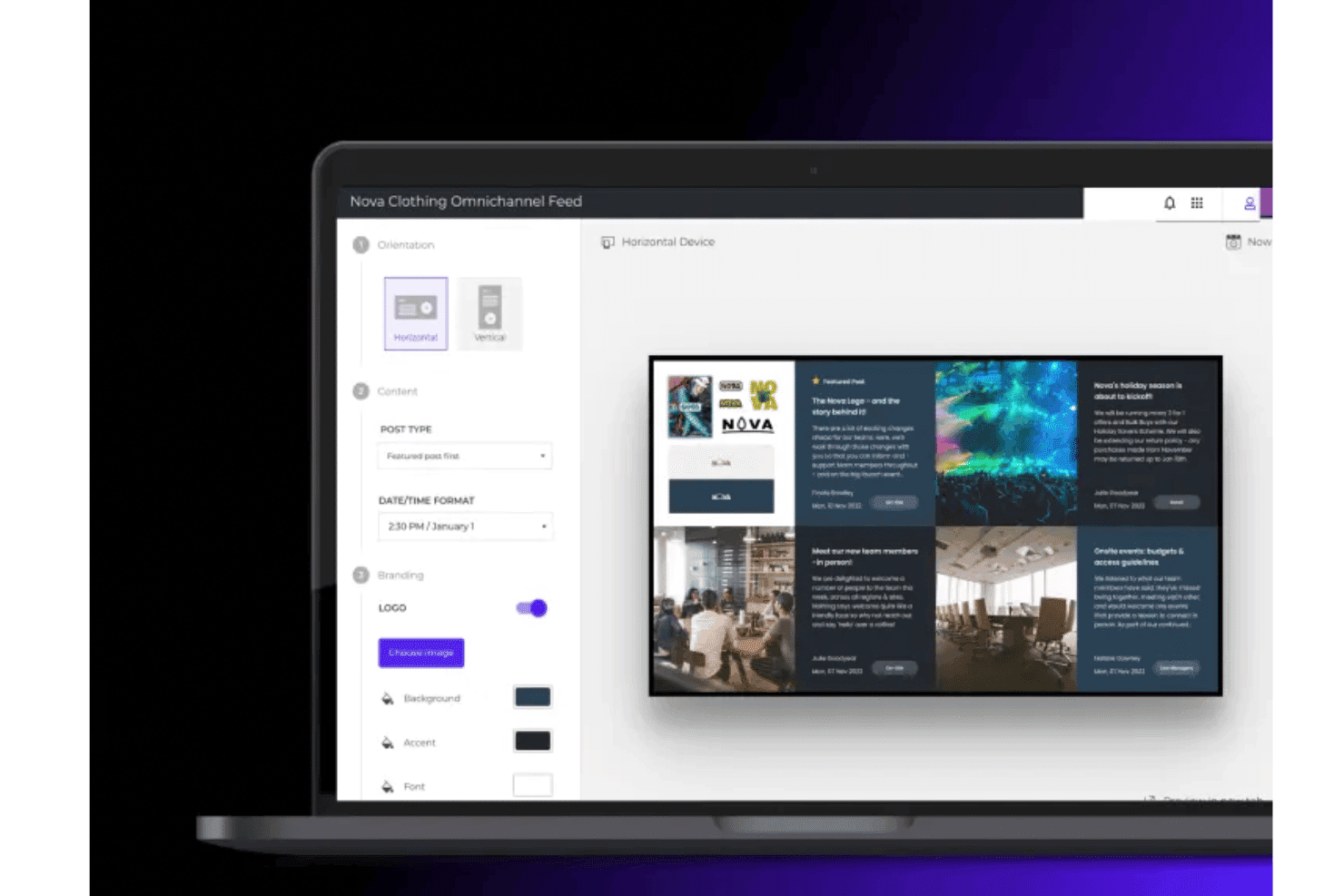
Poppulo permet aux équipes de créer et de personnaliser des mises en page de panneaux de menus numériques avec du contenu de marque, des images et des flux dynamiques. Poppulo est une plateforme de signalétique numérique d’entreprise qui combine la gestion de contenu dans le cloud, la programmation multi-écrans, la surveillance à distance de parcs et l’intégration de flux de données en temps réel afin de gérer des déploiements de panneaux de menus numériques à grande échelle sur des sites répartis.
À qui Poppulo convient-il le mieux ?
Poppulo convient particulièrement aux chaînes de magasins et aux exploitants de franchises qui ont besoin d’une gouvernance centralisée de grands parcs d’écrans répartis sur des centaines ou des milliers de sites.
Pourquoi j’ai choisi Poppulo
J’ai choisi Poppulo parmi les meilleures solutions, car son agent IA transforme réellement la gestion des parcs de panneaux de menus à grande échelle. Il surveille la lecture des contenus et les données des appareils sur des milliers d’écrans, signale les anomalies et fait automatiquement ressortir les tendances en matière de performance des contenus. Associé au suivi de l’état des appareils en temps réel et à son outil de suivi de l’état des appareils, votre équipe informatique peut localiser un écran hors ligne dans un site précis avant même que quiconque dans ce magasin ne s’en aperçoive.
Principales fonctionnalités de Poppulo
- Programmation par plages horaires : Remplace automatiquement les contenus selon l’heure de la journée sur tous les sites, sans intervention manuelle, pour couvrir le petit-déjeuner, le déjeuner, le dîner et d’autres segments horaires définis.
- Autorisations de publication basées sur les rôles : Définissez des contrôles d’accès détaillés afin que les équipes centrales gèrent les normes de marque tandis que les équipes locales publient du contenu dans les limites définies.
- Rapports de preuve de diffusion : Suivez précisément quel contenu a été diffusé, sur quel écran et à quel moment, ce qui est utile pour vérifier les dépenses de marketing coopératif et la conformité des franchisés.
- Widgets de données en direct : Importez directement sur les écrans des flux en temps réel provenant de la météo, des réseaux sociaux, des indicateurs clés de performance de l’entreprise et de sources RSS, sans exiger de connexion de la part des utilisateurs.
Intégrations de Poppulo
Poppulo propose des intégrations natives pertinentes pour les déploiements de panneaux de menus, notamment Oracle Hospitality Integration Platform (OHIP), Salesforce, Microsoft Power BI, Tableau, et bien d’autres.
Pros and Cons
Pros:
- L’IA surveille l’état des appareils et la lecture des contenus en temps réel
- La programmation par plages horaires automatise le remplacement des contenus des panneaux de menus
- La preuve de diffusion confirme les exigences des campagnes et de conformité
Cons:
- Nécessite un accompagnement professionnel pour l’intégration et la configuration
- Trop complexe pour les entreprises implantées sur un seul site
Learn more about Poppulo: Idéal pour la planification des menus et des publicités sur plusieurs établissements
- Démonstration gratuite disponible
- Tarification sur demande
Visit WebsiteCustomer Rating:4.6/5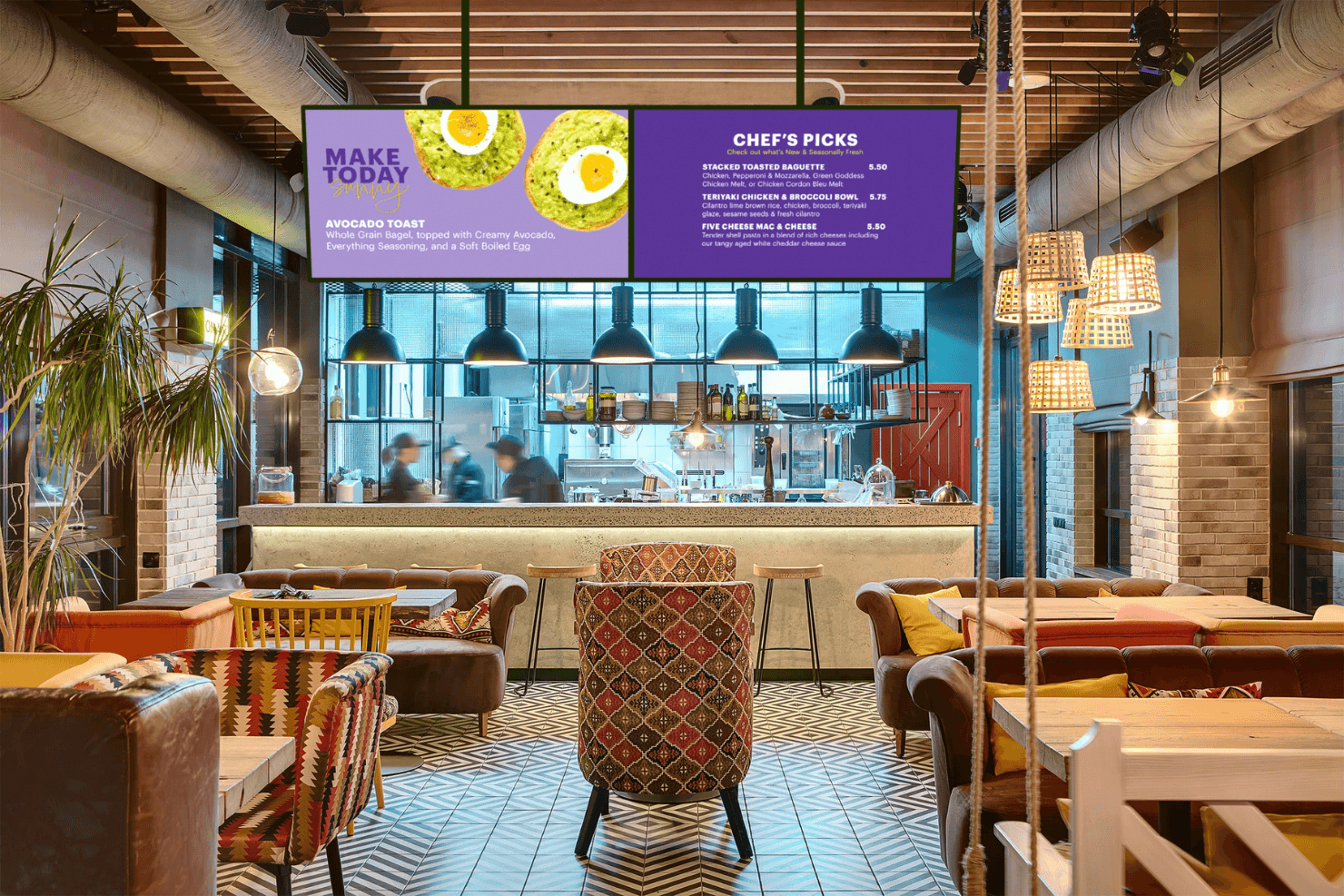
Spectrio alimente les tableaux de menus numériques des restaurants avec du contenu dynamique. Spectrio est une plateforme infonuagique de tableaux de menus et d'affichage numérique qui combine la gestion de contenu multiécran, la planification par périodes de la journée, la mesure de l'audience et un planificateur de publicités pour l'affichage de menus et de promotions piloté par des campagnes sur de vastes réseaux d'écrans.
À qui Spectrio convient-il le mieux ?
Spectrio convient particulièrement aux exploitants de franchises et de chaînes qui gèrent le contenu affiché sur des écrans dans des dizaines ou des centaines d'établissements.
Pourquoi j'ai choisi Spectrio
Spectrio figure sur ma liste restreinte parce qu'il est véritablement conçu pour les exploitants qui gèrent des écrans dans des dizaines ou des centaines d'établissements. J'aime particulièrement la façon dont le planificateur de publicités et les outils de planification par périodes de la journée fonctionnent ensemble, vous permettant d'automatiser les changements de menus selon l'heure et de diffuser des campagnes promotionnelles propres à chaque établissement depuis une seule interface infonuagique. La couche de gouvernance des franchises est ce qui le distingue vraiment : les équipes du siège peuvent verrouiller le contenu essentiel à la marque tout en laissant aux établissements individuels la possibilité de le personnaliser.
Fonctionnalités clés de Spectrio
- Spectrio Measure : Utilise des capteurs radar et de vision par ordinateur pour suivre en temps réel les caractéristiques démographiques de l'audience, le temps de présence et l'occupation, avec prise en charge des tests de contenu A/B.
- Réseau de médias de vente au détail : Permet de monétiser jusqu'à 30 % de votre inventaire d'écrans en diffusant des publicités de marque programmatiques parallèlement à vos propres messages en magasin.
- Remplacement des messages d'urgence : Diffuse instantanément des alertes d'urgence et du contenu de sécurité sur chaque écran connecté depuis le CMS.
- Bornes interactives à écran tactile : Prend en charge les bornes de comptoir et autonomes pour l'orientation en libre-service, l'exploration des produits et l'interaction avec la marque.
Intégrations de Spectrio
Spectrio propose des intégrations natives avec Google Sheets, Slack et Google Calendar, ainsi qu'une prise en charge des partenaires matériels pour les lecteurs BrightSign, Samsung Tizen et LG WebOS.
Pros and Cons
Pros:
- Mesure de l'audience et déclenchement du contenu pilotés par l'IA
- Prend en charge la planification promotionnelle complexe sur plusieurs établissements
- Réseau de médias de vente au détail pour générer des revenus publicitaires en magasin
Cons:
- L'intégration au point de vente n'est pas encore entièrement disponible
- Des problèmes de fiabilité des lecteurs matériels ont été signalés
Learn more about Spectrio: 3Idéal pour les déploiements de menus indépendants du matériel
Fugo
- Essai gratuit de 14 jours + démonstration gratuite disponible
- À partir de $20/écran/mois (facturé annuellement)
Visit WebsiteCustomer Rating:4.5/5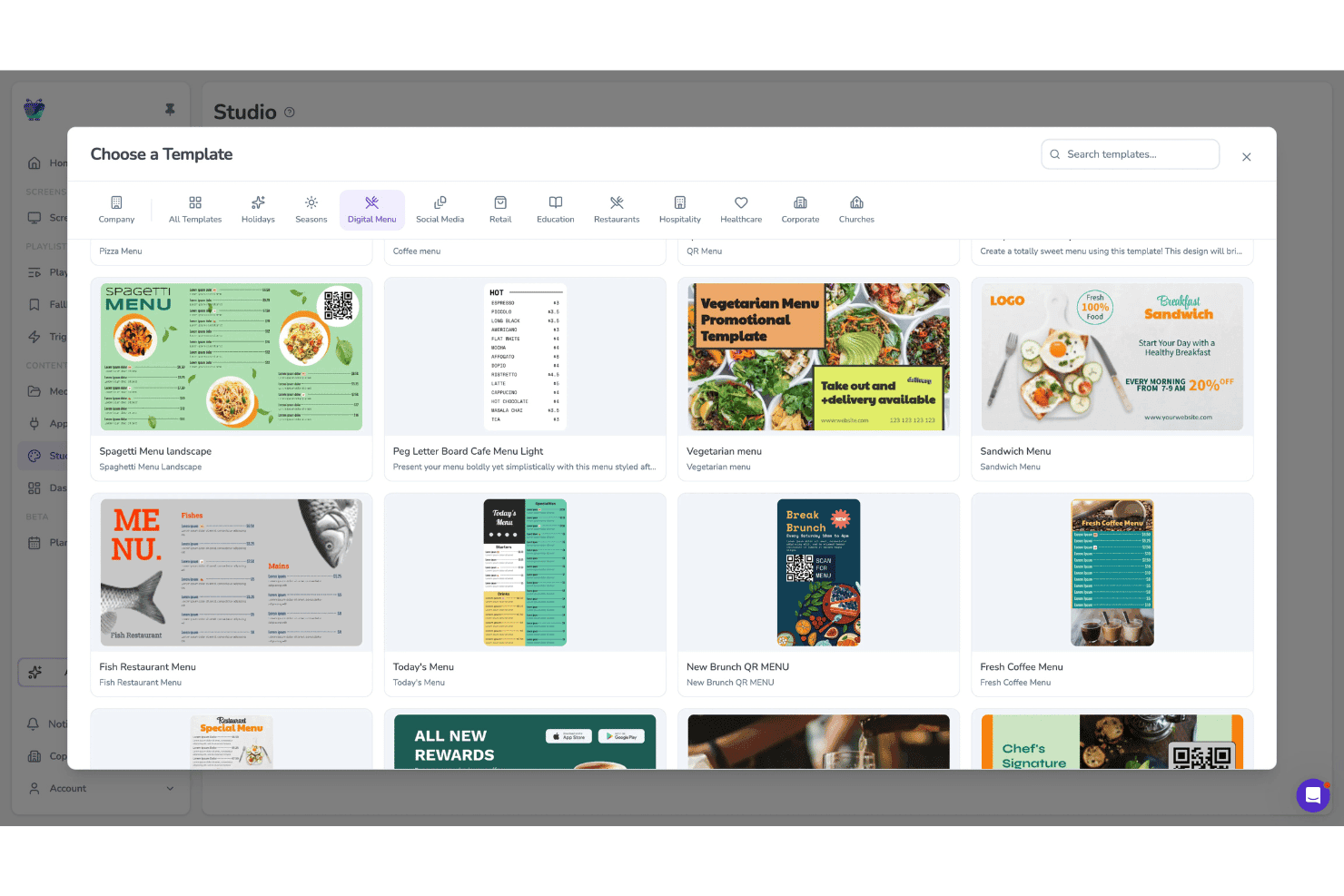
Fugo permet aux utilisateurs de choisir parmi des modèles de menus numériques pour les écrans. Fugo est une plateforme cloud de menus numériques et d'affichage numérique qui combine un studio de conception par glisser-déposer, une programmation multi-écrans avec segmentation horaire, une gestion de parc à distance et une application de lecture indépendante du matériel.
À qui Fugo convient-il le mieux ?
Fugo convient particulièrement aux exploitants de services alimentaires et de commerces disposant de plusieurs sites, qui doivent diffuser du contenu de menus sur un parc matériel hétérogène sans être liés à des écrans propriétaires.
Pourquoi j'ai choisi Fugo
Fugo figure dans ma sélection parce qu'il fonctionne sur pratiquement tous les matériels d'écran que vous possédez déjà, des clés Amazon Fire TV aux écrans Samsung Tizen en passant par les appareils Raspberry Pi, de sorte que vous n'êtes jamais contraint d'acheter du matériel propriétaire. Je suis particulièrement impressionné par l'application dédiée Menu numérique, qui vous permet de créer et de mettre à jour les menus directement dans le CMS, avec notamment des indicateurs de produits épuisés et des icônes d'allergènes qui se synchronisent sur chaque site dès leur publication.
Fonctionnalités clés de Fugo
- Programmateur avec segmentation horaire : Définissez des règles de contenu selon l'heure de la journée, le jour de la semaine et les jours fériés afin de changer automatiquement les listes de lecture des menus sans mises à jour manuelles.
- Éditeur de canevas multi-zones : Créez des mises en page d'écran avec plusieurs zones de contenu indépendantes, prenant en charge des médias mixtes, des superpositions de texte et des widgets de données en direct côte à côte.
- Rapports de preuve de diffusion : Accédez aux journaux de lecture qui confirment quel contenu a été diffusé, sur quel écran et à quel moment ; cette fonctionnalité est disponible avec les forfaits Core et Enterprise.
- Affichage des icônes d'allergènes : Ajoutez et mettez à jour les icônes alimentaires et d'allergènes pour chaque article du menu directement dans l'application Menu numérique, les modifications étant synchronisées instantanément sur tous les écrans connectés.
Intégrations de Fugo
Fugo propose des intégrations avec Power BI, Looker, Workspace et d'autres services, ainsi que des murs de réseaux sociaux pour Facebook et X. Les systèmes de point de vente se connectent via une API ; une API REST est disponible avec le forfait Enterprise pour les intégrations personnalisées.
Pros and Cons
Pros:
- Fonctionne avec presque tous les matériels d'écran existants
- Application Menu numérique intégrée pour les restaurants
- Les icônes d'allergènes et de conformité sont mises à jour instantanément
Cons:
- Aucun connecteur de point de vente prêt à l'emploi disponible
- Certaines fonctionnalités tactiles seraient peu fiables
Learn more about Fugo: Idéal pour les déploiements de menus numériques avec accompagnement haut de gamme
- Essai gratuit et démonstration gratuite disponibles
- À partir de 15 $/mois (facturé annuellement)
Visit WebsiteCustomer Rating:4.7/5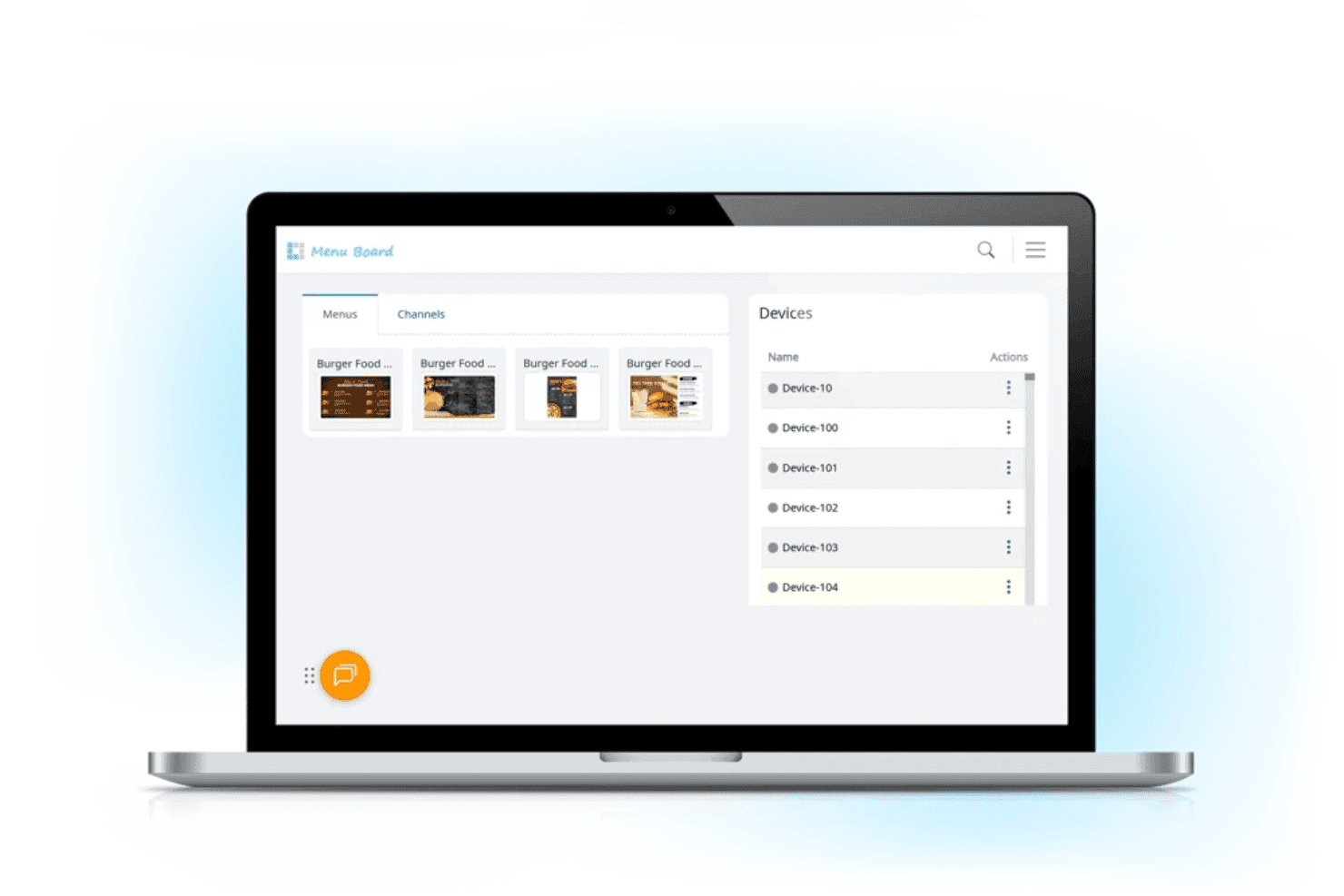
L Squared permet aux équipes de restauration de gérer le contenu des menus numériques et les appareils d'affichage connectés depuis un tableau de bord centralisé. L Squared est une plateforme de menus numériques et d'affichage basée sur le cloud, conçue pour les opérateurs multisites. Elle combine un CMS centralisé, une programmation automatisée par période de la journée, une bibliothèque de plus de 150 widgets et la prise en charge de bornes tactiles.
À qui L Squared convient-il le mieux ?
L Squared convient particulièrement aux opérateurs d'entreprises et de franchises qui souhaitent un déploiement de bout en bout géré de manière complète, avec l'approvisionnement du matériel, l'installation et l'assistance continue inclus.
Pourquoi j'ai choisi L Squared
J'ai choisi L Squared comme l'une des meilleures solutions en raison de sa gestion particulièrement complète des déploiements de menus numériques, depuis l'approvisionnement du matériel jusqu'à l'installation et l'assistance continue. Ce que je trouve véritablement impressionnant, c'est le marchandisage intelligent par période de la journée, qui fait automatiquement alterner les menus du petit-déjeuner, du déjeuner et du dîner selon un calendrier, sans que personne n'ait à intervenir dans le tableau de bord. Associée à une gouvernance de niveau entreprise sur plus de 10 000 écrans, cette fonctionnalité permet aux opérateurs multisites de bénéficier d'un déploiement entièrement géré, difficile à reproduire avec un outil en libre-service.
Fonctionnalités clés de L Squared
- Bibliothèque de widgets avec données en direct : Accédez à plus de 50 widgets avec le forfait Professionnel, notamment la météo en temps réel, les actualités, les flux des réseaux sociaux et les résultats sportifs, afin d'afficher du contenu contextuel sur n'importe quel écran.
- Contrôle d'accès basé sur les rôles : Attribuez des autorisations jusqu'au niveau de chaque écran, avec l'authentification unique (SSO) et l'authentification multifacteur intégrées pour la gestion des équipes d'entreprise.
- Remplacement des messages d'urgence : Diffusez instantanément des alertes de sécurité ou des annonces urgentes sur tous les écrans connectés, en interrompant automatiquement le contenu programmé.
- Prise en charge des bornes tactiles : Déployez des écrans tactiles interactifs pour la commande en libre-service, la découverte de produits, l'orientation ainsi que la consultation des informations sur les allergènes ou les valeurs nutritionnelles.
Intégrations de L Squared
L Squared propose plus de 100 intégrations basées sur des widgets et des connexions natives avec l'écosystème Microsoft, notamment Microsoft 365, Power BI et Teams, ainsi qu'avec Cisco Meraki, Achievers et bien d'autres.
Pros and Cons
Pros:
- Le contenu des menus s'adapte automatiquement selon l'heure
- Prise en charge des bornes tactiles pour une utilisation interactive
- Contrôles des appareils et audits de niveau entreprise
Cons:
- Processus d'intégration initiale lent
- Pannes fréquentes du service signalées dans un avis
Learn more about L Squared: Idéal pour la signalétique d'entreprise à l'échelle de plusieurs sites
- Démonstration gratuite disponible
- Tarification sur demande
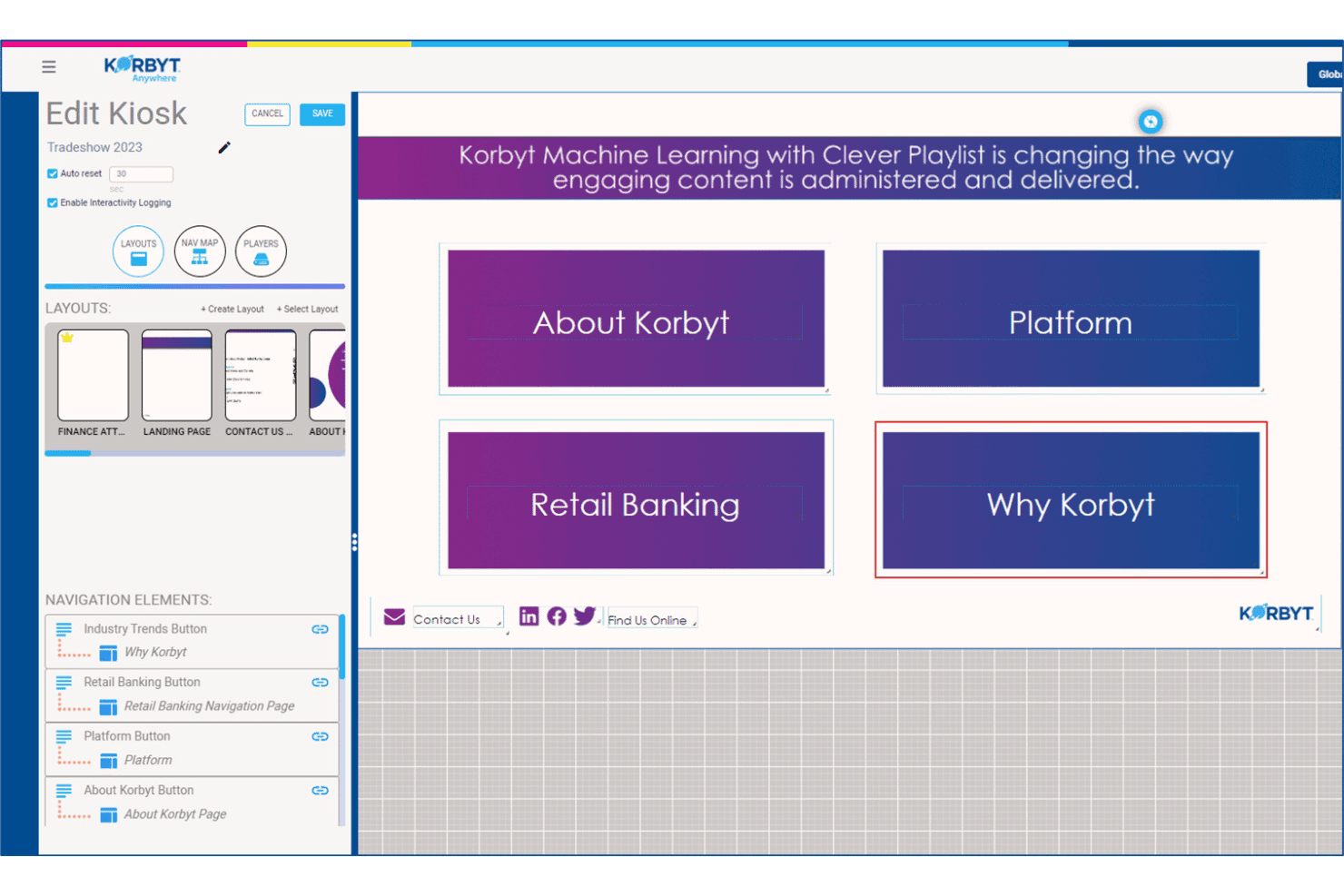
Korbyt permet aux utilisateurs de créer et de gérer des mises en page de navigation interactives pour les bornes en libre-service. Korbyt est une plateforme de signalétique numérique d'entreprise qui propose la gestion de contenu, la planification sur plusieurs écrans, l'analyse de l'audience et la création de contenu optimisée par l'IA sur des réseaux d'écrans à grande échelle.
À qui Korbyt convient-il le mieux ?
Korbyt convient particulièrement aux équipes informatiques et de communication d'entreprise qui gèrent de vastes réseaux d'écrans distribués sur des dizaines ou des centaines de sites.
Pourquoi j'ai choisi Korbyt
Korbyt figure dans ma sélection parce qu'aucune autre plateforme que j'ai testée n'égale sa capacité à régir le contenu sur des centaines de sites simultanément. Je suis particulièrement séduit par les listes de lecture intelligentes, son moteur de planification optimisé par ML qui ajuste automatiquement le contenu diffusé sur chaque écran en fonction du lieu, du moment de la journée et des déclencheurs de données en direct, sans intervention manuelle. Ajoutez à cela des workflows d'approbation fondés sur les rôles et des contrôles de verrouillage de la marque, et vos équipes régionales peuvent mettre à jour leurs écrans sans compromettre vos normes de marque.
Principales fonctionnalités de Korbyt
- Analyse de l'audience Korbyt Optics : Un module complémentaire basé sur une caméra USB qui suit la présence des spectateurs et leur temps d'attention devant les écrans, déclenchant des changements de contenu en temps réel selon l'audience détectée.
- Agent de création de contenu génératif CreateAI : Génère des visuels de signalétique conformes à la marque à partir d'une invite textuelle, en utilisant vos logos, polices et couleurs de marque enregistrés.
- Concepteur de mises en page multizones : Un outil de conception par glisser-déposer qui vous permet de diviser un écran en zones de contenu indépendantes, chacune étant contrôlée par différentes équipes ou sources de données.
- Remplacement pour les messages d'urgence : Diffuse instantanément des alertes urgentes sur tous les écrans connectés, interrompant toute liste de lecture active sur l'ensemble de votre réseau de sites.
Intégrations de Korbyt
Korbyt propose des intégrations natives avec ServiceNow, Cisco Webex, Zoom Rooms, Crestron, Barco ClickShare, Adobe Experience Manager, Google Drive, Dropbox et Box, ainsi que des intégrations avec l'écosystème Microsoft.
Pros and Cons
Pros:
- Gère facilement la gouvernance de contenu multimarque
- Prend en charge les déploiements sur site, dans le cloud et hybrides
- Outils intégrés de mesure de l'audience par caméra
Cons:
- Aucune fonctionnalité de synchronisation des articles de menu de commerce de détail
- Se concentre sur la signalétique d'entreprise et bancaire
Learn more about Korbyt: Idéal pour la programmation selon le moment de la journée des restaurants à service rapide sur plusieurs sites
- Essai gratuit de 30 jours + démonstration gratuite disponible
- À partir de $14/écran/mois (facturé annuellement)
Visit WebsiteCustomer Rating:4.9/5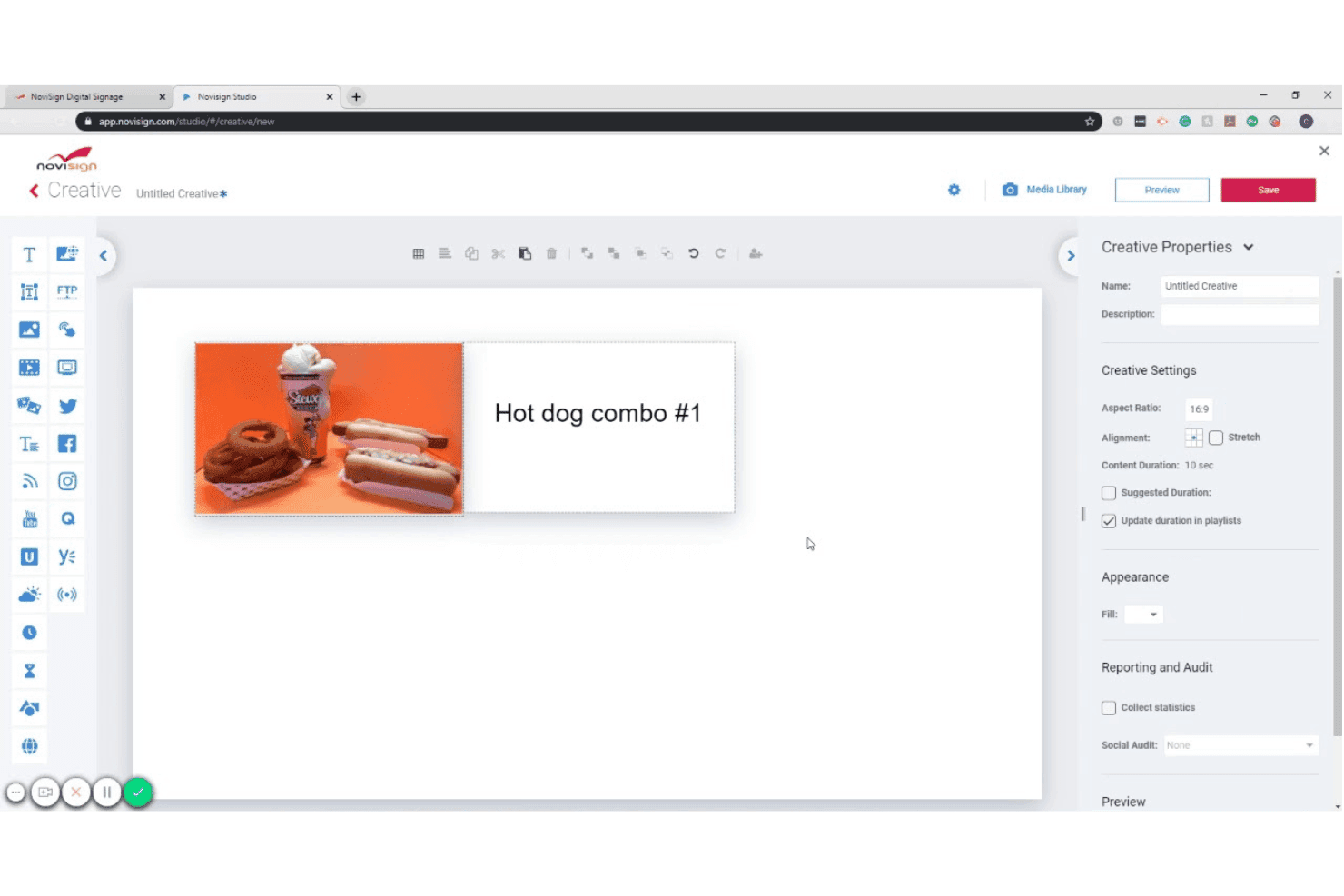
NoviSign permet aux utilisateurs de concevoir des créations d'affichage numérique avec des images et du texte. NoviSign est une plateforme de tableaux de menus numériques basée sur le cloud qui combine un éditeur de contenu par glisser-déposer, une programmation selon le moment de la journée, des intégrations de données en direct et la gestion des écrans sur plusieurs sites avec prise en charge d'Android, Samsung Tizen, LG webOS, BrightSign et d'autres systèmes d'exploitation pour écrans.
À qui NoviSign convient-il le mieux ?
NoviSign convient particulièrement aux exploitants de restaurants à service rapide et à service décontracté qui gèrent le contenu de tableaux de menus sur plusieurs sites.
Pourquoi ai-je choisi NoviSign ?
NoviSign figure sur ma liste restreinte, notamment parce que son automatisation selon le moment de la journée gère efficacement la complexité de la programmation à laquelle les exploitants de restaurants à service rapide sont confrontés dans des dizaines ou des centaines de sites. J'apprécie le fait de pouvoir créer un nombre illimité de listes de lecture associées à des moments précis de la journée, comme le petit-déjeuner, le déjeuner, le dîner et l'heure de l'apéritif, et de les faire basculer automatiquement sans que personne n'ait à intervenir sur les écrans. La synchronisation native avec le système de point de vente Toast est également un véritable facteur de différenciation : elle transmet directement à vos tableaux les prix des menus et la disponibilité des articles en temps réel, dès qu'une modification est effectuée dans le système de point de vente.
Principales fonctionnalités de NoviSign
- Plus de 500 modèles de conception : Choisissez parmi une bibliothèque de modèles propres à différents secteurs, notamment les tableaux de menus numériques, le commerce de détail et l'hôtellerie, puis personnalisez-les directement dans l'éditeur de canevas par glisser-déposer.
- Mises en page d'écran multizones : Divisez un écran unique en plusieurs zones de contenu afin d'afficher simultanément les éléments du menu dans une zone et du contenu promotionnel ou des flux sociaux dans une autre.
- Rapports de preuve de diffusion : Générez des rapports indiquant quel contenu a été diffusé, sur quel écran et à quel moment ; ils sont utiles pour vérifier les campagnes de marketing coopératif et réaliser des audits de conformité du contenu.
- Contenu déclenché par l'IoT et les capteurs : Connectez des lecteurs RFID, des scanners de codes-barres et d'autres capteurs IoT afin de déclencher à l'écran des modifications contextuelles du contenu en fonction d'événements réels.
Intégrations de NoviSign
NoviSign propose des intégrations natives avec Toast POS, Power BI, Tableau et Google Sheets, et se connecte à Zapier pour accéder à plus de 5 000 applications supplémentaires. La plateforme prend également en charge les réseaux publicitaires DOOH et fournit une API pour les intégrations personnalisées.
Pros and Cons
Pros:
- Programmation centralisée pour plusieurs établissements
- Bibliothèque de modèles pour la conception de menus
- Gestion multimarque avec sous-comptes
Cons:
- Aucun lecteur iOS pris en charge
- Nombre minimum d'écrans pour le forfait Premium
Learn more about NoviSign: Idéal pour la gestion de tableaux de menus certifiée SOC 2
- Essai gratuit de 14 jours + démonstration gratuite disponible
- À partir de 3,5 $/appareil/mois (facturation annuelle)
Visit WebsiteCustomer Rating:4.8/5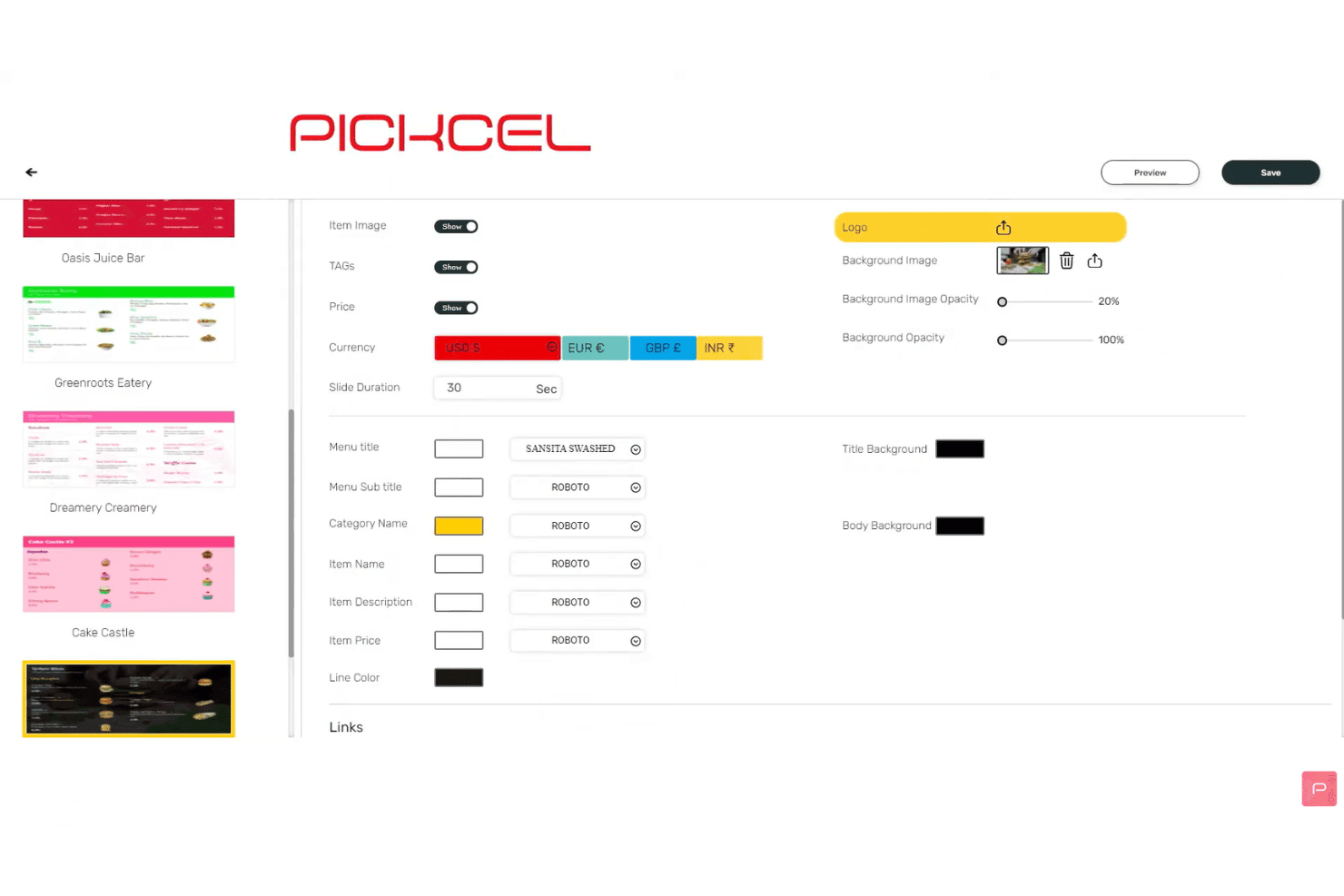
Pickcel permet aux utilisateurs de personnaliser les paramètres d’affichage des menus et les polices. Pickcel est une plateforme cloud de tableaux de menus numériques avec un éditeur de contenu glisser-déposer, une segmentation horaire automatisée, une programmation multi-écrans, des intégrations de données de point de vente et une gestion à distance de parcs couvrant plus de 50 types d’appareils.
À qui Pickcel convient-il le mieux ?
Pickcel convient particulièrement aux équipes informatiques et opérationnelles des enseignes de restauration et de commerce de détail implantées sur plusieurs sites, qui ont besoin de certifications de sécurité de niveau entreprise ainsi que d’une gestion quotidienne de leurs tableaux de menus.
Pourquoi ai-je choisi Pickcel ?
Pickcel figure sur ma liste restreinte, car c’est la seule plateforme de tableaux de menus numériques que j’ai trouvée à associer les certifications SOC 2 Type II et ISO 27001 à un CMS de tableaux de menus complet, ce qui est important lorsque les évaluations de sécurité informatique font partie de votre processus d’approvisionnement. J’apprécie particulièrement l’option de déploiement sur site, qui permet aux marques réglementées d’héberger elles-mêmes l’intégralité de la plateforme afin de garantir une souveraineté complète des données. Les journaux d’audit et les contrôles RBAC permettent de suivre et de gérer les autorisations de chaque modification de contenu sur l’ensemble des sites.
Principales fonctionnalités de Pickcel
- Segmentation horaire automatisée : Programmez le changement automatique du contenu des menus entre les plages du petit-déjeuner, du déjeuner, du dîner et de la nuit, en fonction de l’heure ou du jour de la semaine.
- Flux de données Google Sheets et Excel : Connectez des feuilles de calcul actualisées en temps réel afin que les prix et les articles des menus se mettent automatiquement à jour à l’écran chaque fois que les données sources changent.
- Éditeur de mise en page multizone : Divisez un écran unique en plusieurs zones de contenu, chacune pouvant diffuser simultanément des médias, des widgets ou du contenu de menu indépendants.
- Rapports de diffusion effective : Exportez les journaux de lecture des campagnes et les rapports de disponibilité des appareils au format CSV afin de vérifier la diffusion du contenu sur l’ensemble de votre réseau d’écrans.
Intégrations de Pickcel
Pickcel propose des intégrations natives avec Square, Shopify, Google Sheets, Excel et Canva, et se connecte à Zapier. Une API REST ouverte et des webhooks sont disponibles pour les intégrations personnalisées.
Pros and Cons
Pros:
- Prend en charge plus de 50 types d’appareils et systèmes d’exploitation
- Changement automatisé des menus pour les campagnes par plage horaire
- Déploiement sur site avec journaux d’audit et RBAC
Cons:
- Le choix de modèles est plus limité que chez les concurrents
- Quelques signalements de performances lentes du tableau de bord
Learn more about Pickcel: Idéal pour les déploiements de tableaux de menus natifs sur Apple TV
- Essai gratuit de 14 jours + démonstration gratuite disponible
- À partir de $7/écran/mois (facturé annuellement)
Visit WebsiteCustomer Rating:4.5/5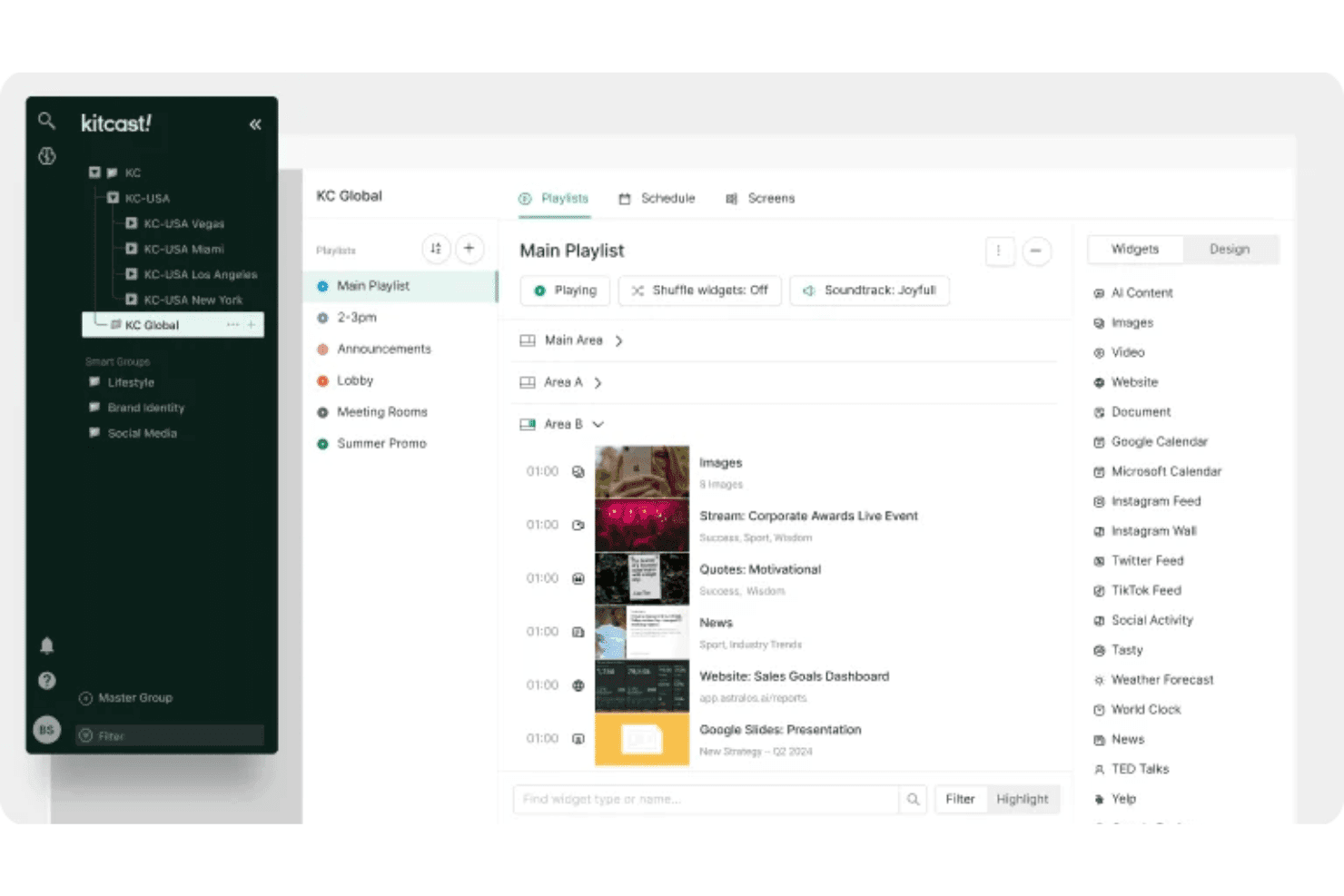
Kitcast permet aux utilisateurs d'organiser les listes de lecture et les widgets sur plusieurs écrans. Kitcast est une plateforme d'affichage numérique basée sur le cloud, dotée d'une application native pour Apple TV qui couvre la planification des contenus, la publication de menus synchronisés avec le POS, l'automatisation par plages horaires et la gestion à distance de plusieurs écrans.
À qui Kitcast convient-il le mieux ?
Kitcast convient particulièrement aux restaurants et aux cafés qui utilisent du matériel Apple TV et qui ont besoin de tableaux de menus se synchronisant automatiquement avec leur POS.
Pourquoi ai-je choisi Kitcast ?
Kitcast figure dans ma présélection, car il s'agit de la seule plateforme d'affichage numérique conçue nativement pour tvOS. Cela signifie qu'Apple TV affiche chaque élément du tableau de menus — widgets en direct, vidéos et tarification dynamique — sans les solutions de contournement nécessaires avec les autres plateformes sur le matériel Apple. J'apprécie particulièrement la synchronisation avec les systèmes POS Square, Toast et Clover, grâce à laquelle les articles en rupture de stock sont automatiquement estompés ou masqués dès que l'inventaire change. Associée à une véritable automatisation par plages horaires, elle permet de passer du petit-déjeuner au déjeuner selon un calendrier prédéfini, sans aucune intervention manuelle.
Principales fonctionnalités de Kitcast
- Autorisations basées sur les rôles : les administrateurs peuvent verrouiller à l'échelle de l'entreprise les normes de marque telles que les polices, les couleurs et les mises en page, tandis que les éditeurs locaux mettent à jour les prix et les offres spéciales dans les limites approuvées.
- Remplacement par alertes d'urgence : l'intégration CAP du forfait Pro permet de diffuser instantanément des alertes de sécurité ou des annonces sur tous les écrans de votre parc, en remplaçant tout contenu actif.
- Journaux de preuve de diffusion : Kitcast génère des enregistrements vérifiés indiquant quel contenu a été diffusé, sur quel écran et à quel moment — ce qui est utile pour les rapports de franchise et le respect des obligations liées au marketing coopératif.
- Générateur de contenu IA : générez des mises en page de menus et des visuels promotionnels directement à partir d'instructions textuelles, sans avoir besoin d'un outil de conception distinct ni d'une bibliothèque de ressources externe.
Intégrations de Kitcast
Kitcast propose des intégrations natives avec Square, Toast, Clover, Lightspeed Restaurant, Revel Systems, Canva, Google Workspace et l'écosystème Microsoft, notamment Microsoft 365, SharePoint et Azure AD via SCIM.
Pros and Cons
Pros:
- Déploiement natif de tableaux de menus sur Apple TV
- Remplacement par alertes d'urgence sur tous les écrans
- Autorisations basées sur les rôles pour la gouvernance de la marque
Cons:
- Documentation limitée sur les fonctionnalités interactives pour écrans tactiles
- Aucune fonctionnalité intégrée de personnalisation de l'audience
Learn more about Kitcast: 9Idéal pour la gestion de menus numériques avec licence perpétuelle
Mvix
- Démo gratuite disponible
- À partir de $450 en une fois
Visit WebsiteCustomer Rating:4.6/5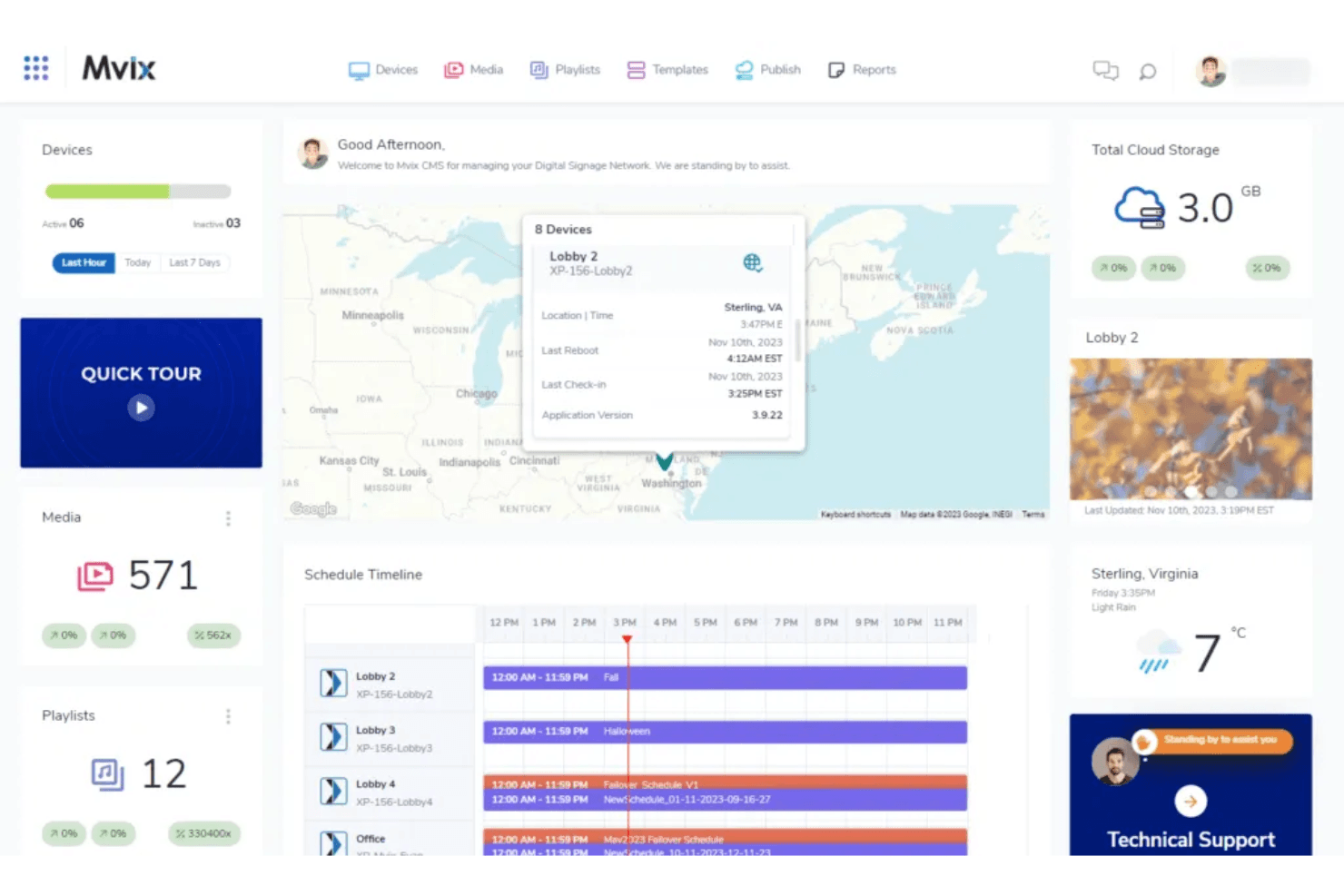
Le tableau de bord de Mvix permet aux utilisateurs de surveiller les appareils, les programmations et les contenus dans une seule vue. Mvix est une plateforme d'affichage et de menus numériques qui associe des lecteurs multimédias propriétaires à un CMS basé sur le cloud, avec une conception de mises en page multizones, une programmation par période de la journée, une intégration aux systèmes de point de vente et une gestion des appareils à distance.
À qui Mvix convient-il le mieux ?
Mvix convient particulièrement aux exploitants multisites et aux équipes informatiques qui souhaitent éviter les frais SaaS récurrents en achetant du matériel avec une licence CMS à vie incluse.
Pourquoi j'ai choisi Mvix
Mvix figure sur ma liste restreinte, car c'est la seule plateforme de menus numériques que j'ai trouvée qui inclut une licence CMS à vie dans un achat de matériel unique, sans frais récurrents par écran. J'apprécie particulièrement l'application de répartition par période de la journée, qui automatise la rotation du contenu selon les périodes (du petit-déjeuner à la fin de soirée) sans aucune intervention manuelle de planification. L'application de création de menus synchronise également les prix et l'état des stocks en direct depuis Toast, Clover et Square, afin que les menus numériques se mettent à jour en temps réel lorsque des articles sont épuisés ou que les prix changent.
Principales fonctionnalités de Mvix
- Concepteur de mises en page multizones : Divisez n'importe quel écran en 10 zones de contenu indépendantes au maximum, chacune pouvant diffuser simultanément des contenus différents.
- Portail d'état des appareils : Surveillez l'utilisation du processeur, le stockage, la puissance du signal Wi-Fi et la température de chaque lecteur de votre réseau depuis un tableau de bord unique.
- Remplacement par alerte d'urgence : L'intégration des protocoles IPAWS/CAP remplace instantanément tous les contenus programmés sur chaque écran par un message d'urgence.
- Dossiers magiques : Synchronisez automatiquement le contenu depuis Microsoft Office 365 ou Google Drive afin que vos écrans se mettent à jour chaque fois que les fichiers sources changent.
Intégrations de Mvix
Mvix propose des intégrations natives avec Toast, Square, Power BI, Tableau, Klipfolio et Slack, ainsi que des flux sociaux provenant de Facebook, Instagram et X. La plateforme fournit également des API RESTful et des notifications web pour connecter des systèmes personnalisés de point de vente, de CRM et de ressources humaines.
Pros and Cons
Pros:
- Licence CMS à vie incluse avec l'achat du matériel
- Concepteur de mises en page multizones pour les menus numériques
- La lecture hors ligne permet aux écrans de continuer à fonctionner
Cons:
- La configuration nécessite souvent une expertise informatique
- Des problèmes matériels ont été signalés par certains utilisateurs
Learn more about Mvix: Idéal pour la gestion des parcs de menus numériques d'entreprise
- Démo gratuite disponible
- À partir de $14/mois/lecteur
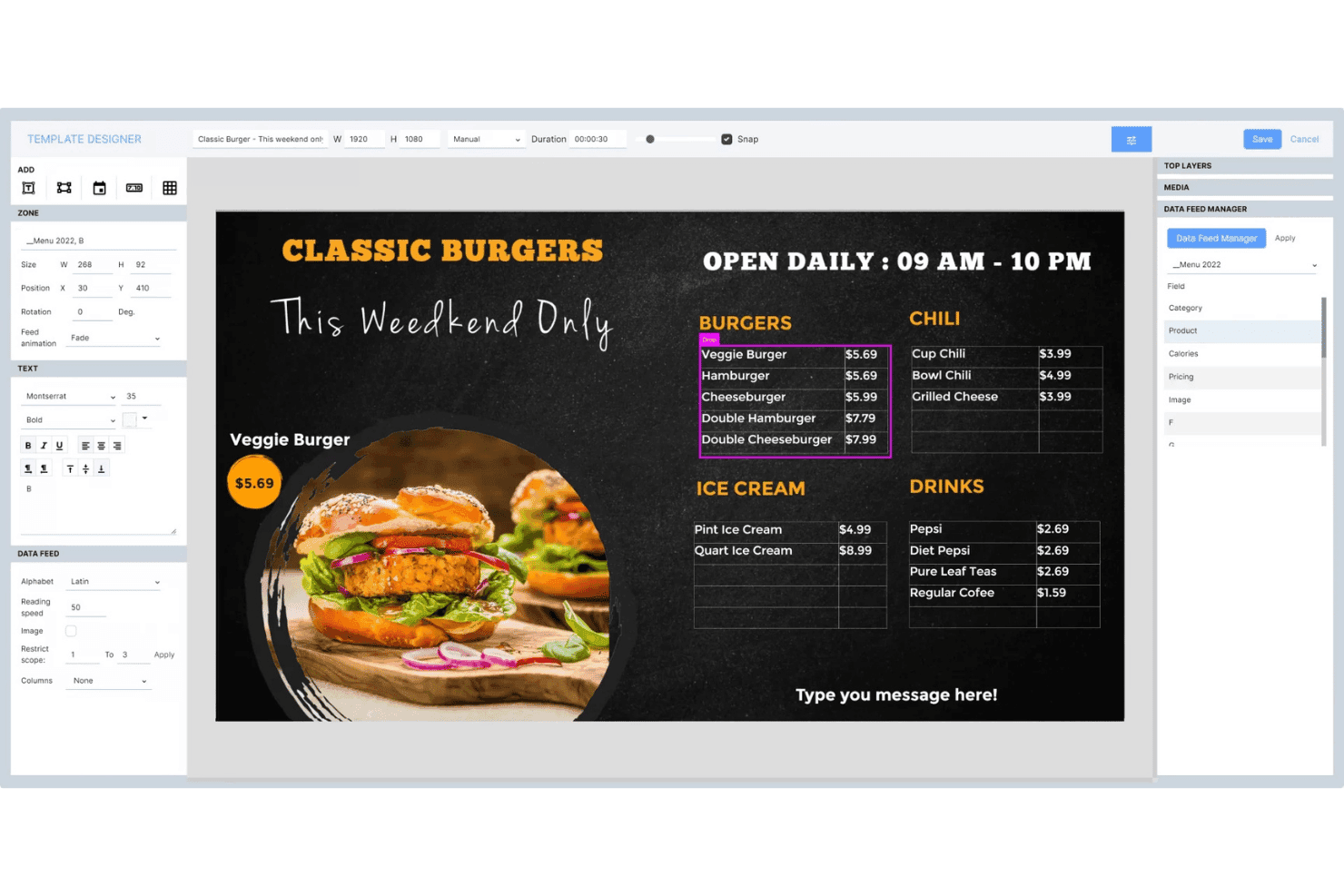
Navori Labs permet aux utilisateurs de concevoir des menus numériques dynamiques avec des flux de données en direct. Navori Labs est une plateforme de menus numériques et d'affichage dynamique conçue pour les déploiements à grande échelle. Elle offre une gestion de contenu multilocataire, une programmation par période de la journée, une intégration des données en direct et une surveillance à distance de parcs comprenant des milliers d'écrans.
À qui Navori Labs convient-il le mieux ?
Navori Labs convient particulièrement aux chaînes de restauration rapide d'entreprise et aux détaillants présents sur plusieurs sites qui doivent gérer des milliers d'écrans répartis entre franchises, régions et marques depuis un seul système dorsal.
Pourquoi j'ai choisi Navori Labs
Navori Labs figure dans ma sélection parce qu'aucune autre plateforme que j'ai testée ne permet de faire évoluer aussi proprement la gestion des menus numériques sur des milliers de sites. Je suis particulièrement impressionné par son architecture multilocataire, qui permet aux équipes centrales de définir des listes de lecture nationales tandis que les franchisés gèrent le contenu local dans un cadre de règles défini. Son moteur de programmation par période de la journée fait automatiquement passer les menus du petit-déjeuner à ceux du déjeuner sans intervention manuelle, et la synchronisation en temps réel avec les systèmes de point de vente transmet directement aux écrans les prix et l'état des produits en rupture de stock.
Principales fonctionnalités de Navori Labs
- Architecture multilocataire : Sépare le contenu, les autorisations et les données entre les marques, les franchises ou les régions au sein d'une seule instance du système dorsal.
- Analyse d'audience AQUAJI : Utilise la vision par ordinateur au moyen de caméras connectées pour mesurer la fréquentation, le temps d'attente et les données démographiques afin d'établir des rapports sur les performances du contenu.
- Prise en charge prioritaire des alertes d'urgence : S'intègre à CAP, OmniAlert et aux systèmes d'alarme des bâtiments pour diffuser instantanément des alertes en plein écran sur tous les écrans gérés.
- Prise en charge des écrans tactiles interactifs : Permet les déclencheurs de type « soulever pour découvrir », les déclencheurs RFID/NFC, la reconnaissance des gestes et les entrées de capteurs IoT pour les configurations de bornes et d'écrans en libre-service.
Intégrations de Navori Labs
Navori Labs propose des intégrations natives avec Microsoft Power BI, Vistar Media, Hivestack, Screenfeed, Facebook, Instagram, LinkedIn et X (Twitter), ainsi que des connecteurs de données en direct pour les flux RSS, JSON, XML et iCal.
Pros and Cons
Pros:
- Évolue jusqu'à des dizaines de milliers d'écrans
- Gestion multilocataire pour les franchises et les marques
- Alertes d'urgence intégrées pour la conformité dans le commerce de détail
Cons:
- Les fonctionnalités avancées peuvent sembler déroutantes au début
- Les détails sur la compatibilité avec les systèmes de point de vente ne sont pas publiés
Learn more about Navori Labs:
Autres logiciels de tableaux de menus numériques
Voici quelques autres logiciels de tableaux de menus numériques qui n’ont pas intégré ma sélection, mais qui méritent tout de même d’être examinés :
- 11WallboardIdéal pour automatiser les tableaux de menus synchronisés avec le POS
- 12OptiSignsIdéal pour les mises à jour de menus dictées par les périodes de la journée à grande échelle
- 13YodeckIdéal pour la gestion de tableaux de menus avec offre gratuite
- 14Look Digital SignageIdéal pour les kiosques de menus tactiles
- 15TelemetryTVIdéal pour les tableaux de menus développés par des développeurs et pilotés par API
- 16Samsung VXTIdéal pour les réseaux d'affichage de menus natifs Samsung
- 17XiboIdéal pour la planification de tableaux de menus à code source ouvert
- 18NowSignageIdéal pour les licences de tableaux de menus tout compris
Related Reviews
How I Evaluate Digital Menu Board Software
I split my evaluation into baseline criteria every tool must meet—like dayparting, remote display management, and POS sync—and differentiating factors that separate a capable platform from the right one for multi-location operators.
Core Functionality (Table Stakes for This List)
When I'm selecting tools for my list, I rank each one on a scale from 0 (does not offer the functionality) to 5 (excels in this area) for each core functionality listed below. I then calculate the tool's total score into a percentage, using 65% as a benchmark to help assess its overall fit for the list.
- Content management system: I look for a cloud CMS with multi-user roles, asset libraries, and folder structures that let teams organize menus by brand, location, or campaign without stepping on each other's work.
- Multi-screen scheduling: Dayparting is where this gets real. I evaluate whether a platform can automate breakfast-to-lunch menu swaps across dozens of screens grouped by region, time zone, or store format.
- Remote display management: I check for screen health monitoring, offline alerts, and remote reboot capabilities so your team can troubleshoot a down screen in another city without dispatching anyone.
- Template and design tools: A drag-and-drop editor with dynamic data fields matters here. I look at whether you can build branded menu layouts that auto-populate pricing or item availability from a connected data source.
- Data and POS integrations: Real-time sync with POS systems like Square, Toast, or Lightspeed is what I evaluate. Menu price changes or 86'd items should reflect on screens within minutes, not hours.
- Hardware and OS compatibility: I consider how many player types a platform supports. The best options work across Android, BrightSign, Windows, Fire TV, and smart TVs so you're not locked into one hardware vendor.
Once I have a list of tools that meet the criteria, I consider what sets each platform apart.
Differentiating Factors (What Sets Vendors Apart)
Here's how I compare and contrast different vendors:
Standout Features
Dynamic dayparting automation is the first thing I evaluate. I check whether a platform can auto-swap menus across breakfast, lunch, and dinner without manual triggers—and whether those rules hold across time zones for multi-region fleets. Emergency messaging override is equally important. If a safety alert needs to hit every screen instantly, I look for single-command overrides that preempt scheduled content. AI-driven content personalization rounds out my focus. Platforms like Poppulo use audience analytics to adjust on-screen content based on foot traffic or queue length, which can directly influence upsell timing during peak hours.
Beyond Features
I evaluate total cost of ownership closely, since per-screen pricing models can balloon fast when you're adding locations. Some vendors bundle hardware, while others charge separately for players, premium templates, or POS integrations. Scalability governance matters just as much. I check whether a platform lets you segment content permissions by region or franchise so corporate can lock brand assets while local teams swap daily specials. Proof-of-play reporting is another factor I look for, especially if you run vendor-funded promotions that require verified playback logs to recoup co-op marketing dollars.
Comment choisir un logiciel de tableaux de menus numériques
Lorsque vous évaluez un logiciel de tableaux de menus numériques, concentrez-vous sur la manière dont chaque option vous permettra de gérer le contenu, les mises à jour et la conformité à l’échelle dont votre équipe a besoin, sans sacrifier la supervision ni la flexibilité :
| Si votre priorité est... | Recherchez... |
|---|---|
| Si votre priorité est...Des mises à jour rapides des menus sur plusieurs établissements | Recherchez...Une planification centralisée par groupes avec segmentation par période de la journée |
| Si votre priorité est...La conformité de la marque et la possibilité d’effectuer des audits | Recherchez...Des contrôles d’autorisation fondés sur les rôles et des journaux de preuve de diffusion |
| Si votre priorité est...La synchronisation en direct des prix et des articles avec le point de vente | Recherchez...Des intégrations natives et en temps réel avec les systèmes de point de vente |
| Si votre priorité est...Une perturbation matérielle minimale lors du déploiement | Recherchez...Une large compatibilité avec les appareils et les systèmes d’exploitation |
| Si votre priorité est...Des performances fiables pour de vastes parcs d’appareils | Recherchez...Des garanties de disponibilité de niveau entreprise et des alertes |
Comment évaluer votre sélection
- Testez la segmentation des menus par période de la journée à grande échelle : Effectuez un changement de menu basé sur l’heure dans au moins 10 établissements pendant votre période d’essai.
- Demandez des rapports de preuve de diffusion : Demandez des exemples de journaux de lecture indiquant la date, l’établissement et les détails du contenu.
- Vérifiez la vitesse de connexion au point de vente : Effectuez une mise à jour de menu en direct via votre système de point de vente actuel et mesurez les temps de mise à jour des écrans dans un délai d’une minute.
- Évaluer les contrôles d’accès : Attribuez et testez les niveaux d’accès basés sur les rôles dans un compte multi-région fictif en 48 heures.
- Compromis — contrôle vs rapidité du SaaS : Déterminez si le contrôle d’une licence perpétuelle vaut le ralentissement des mises à jour des fonctionnalités par rapport aux fournisseurs proposant un abonnement.
Qu’est-ce qu’un logiciel de menu numérique ?
Un logiciel de menu numérique est une plateforme infonuagique qui vous permet de gérer, planifier et mettre à jour des menus numériques affichés sur des écrans dans plusieurs établissements. Il fournit aux équipes des commerces de détail et des restaurants un point central pour contrôler le contenu des menus, automatiser la diffusion selon les moments de la journée, synchroniser les données avec les systèmes de point de vente et garantir la cohérence de la marque. Ce logiciel est conçu pour les entreprises qui ont besoin de modifications de contenu rapides et coordonnées, sans mises à jour manuelles sur chaque site. Fonctionnalités
Fonctionnalités des logiciels de menus numériques
Lors du choix d’un logiciel de menus numériques, recherchez les fonctionnalités clés suivantes :
- Système de gestion de contenu : Centralise l’ensemble du contenu de vos menus de restaurant et de votre signalétique, afin que votre équipe puisse organiser, mettre à jour et approuver les éléments depuis un seul endroit. Prend en charge le contrôle des versions, la publication planifiée et les autorisations des utilisateurs pour assurer une image de marque cohérente à grande échelle.
- Planification multi-écrans : Permet d’attribuer des affichages de menus numériques distincts à différents établissements, écrans ou moments de la journée. Permet de coordonner les changements de menus pour le petit-déjeuner, le déjeuner ou les offres à durée limitée, sans mises à jour manuelles.
- Gestion à distance des écrans : Permet de surveiller, contrôler et dépanner chaque écran numérique dans tous les établissements, où que vous soyez. Fournit un suivi de l’état des écrans, des alertes hors ligne et des commandes de redémarrage afin de résoudre rapidement les problèmes d’affichage.
- Outils de création et modèles : Propose des éditeurs glisser-déposer, des mises en page personnalisables, des modèles de menus, des animations et des champs dynamiques pour les prix ou les données des articles. Facilite la création de menus accrocheurs et nets sur tous les écrans.
- Intégrations aux systèmes de point de vente : Synchronise directement les données des menus avec votre système de point de vente, en automatisant les changements de prix, l’ajout de nouveaux articles et les mises à jour de leur disponibilité. Réduit la saisie manuelle et maintient les menus à jour sur tous les écrans.
- Compatibilité avec les appareils et les systèmes d’exploitation : Prend en charge un large éventail de lecteurs multimédias et de matériels, notamment Android, Windows, Fire TV, BrightSign et les téléviseurs intelligents, afin de déployer des menus électroniques sur différents types d’appareils.
- Gestion des rôles et des autorisations des utilisateurs : Permet de définir des niveaux d’accès par région, service ou personne. Contribue à maintenir la conformité et l’intégrité de la marque, tout en offrant aux équipes locales la flexibilité nécessaire pour mettre à jour les menus.
- Rapports de preuve de diffusion : Suit quand et où le contenu des menus a été affiché. Utile pour vérifier la publicité coopérative, la conformité légale ou les audits opérationnels.
- Gestion de la bibliothèque de ressources : Fournit une bibliothèque multimédia centralisée pour stocker les images, les vidéos et les modèles. Simplifie la création de contenu et garantit que les équipes utilisent des ressources approuvées.
- Prise en charge de la lecture hors ligne : Garantit que les menus restent visibles sur les écrans même en cas de coupure de la connexion Internet. Indispensable pour maintenir un service ininterrompu sur tous les sites.
Fonctionnalités courantes d’IA des logiciels de menus numériques
Au-delà des fonctionnalités standard des logiciels de menus numériques présentées ci-dessus, nombre de ces solutions intègrent l’IA avec des fonctionnalités telles que :
- Personnalisation du contenu pilotée par l’IA : Utilise des analyses d’audience en temps réel pour ajuster les menus de signalétique numérique selon des facteurs tels que la fréquentation, l’heure de la journée ou les caractéristiques démographiques des clients, afin de favoriser des promotions plus pertinentes et l’engagement des clients.
- Recommandations automatisées de ventes additionnelles : Analyse les données de vente et le comportement des clients pour suggérer directement sur le menu des suppléments ou des formules à forte marge. Cela peut contribuer à augmenter les ventes en présentant des suggestions ciblées pendant le processus de commande.
- Optimisation dynamique des prix : Surveille en continu les niveaux de stock, les tendances de la demande et les prix des concurrents afin d’ajuster automatiquement les prix des menus. Cela vous permet de réagir aux évolutions du marché et de maximiser les revenus sans intervention manuelle.
- Planification prédictive des menus : utilise les données historiques de ventes et des facteurs externes comme la météo ou les événements locaux pour prévoir la demande et planifier automatiquement les changements de menu. Cela garantit que vos articles les plus populaires ou les plus rentables sont mis en avant lorsqu’ils sont susceptibles de se vendre le mieux.
- Amélioration des éléments visuels : utilise l’IA pour améliorer les images des menus en ajustant l’éclairage, le recadrage ou même en générant de nouveaux visuels qui correspondent au style de votre marque. Cela permet de conserver des menus attrayants sur le plan visuel sans dépendre d’un travail manuel de conception graphique.
Avantages des logiciels de menus numériques
La mise en œuvre d’un logiciel de menus numériques offre plusieurs avantages à votre équipe et à votre entreprise. Voici quelques-uns de ceux dont vous pouvez bénéficier :
- Gestion centralisée du contenu : accédez à une plateforme logicielle d’affichage numérique pour contrôler, mettre à jour et organiser le contenu des menus de chaque établissement depuis un seul tableau de bord.
- Planification automatisée des menus : utilisez les fonctionnalités de planification multi-écrans et de segmentation horaire pour remplacer les menus du petit-déjeuner, du déjeuner ou des événements spéciaux sans avoir à gérer les contraintes liées à la mise à jour manuelle des menus imprimés.
- Intégration en temps réel au système de point de vente : connectez-vous directement à votre système de point de vente afin que les prix et la disponibilité des articles affichés à l’écran soient mis à jour dans les minutes qui suivent les changements.
- Gestion à distance des écrans : surveillez l’état des appareils, résolvez les pannes d’écran et diffusez des messages urgents sur n’importe quel écran sans vous rendre sur place.
- Contrôles de conformité de la marque : définissez les rôles et les autorisations des utilisateurs pour garantir que seul le contenu approuvé est mis en ligne, tout en assurant la traçabilité des audits et les rapports de preuve de diffusion.
- Flexibilité matérielle et des systèmes d’exploitation : déployez des menus sur différents types de lecteurs — comme Android, Windows ou des téléviseurs intelligents — afin de ne pas être lié à un seul fournisseur.
- Personnalisation fondée sur l’IA : tirez parti de fonctionnalités comme l’analyse de l’audience et les suggestions automatisées de ventes additionnelles pour adapter le contenu des menus en fonction du comportement des clients en temps réel.
Coûts et tarification
Le choix d’un logiciel de menus numériques nécessite de comprendre les différents modèles et forfaits tarifaires disponibles. Les coûts varient en fonction des fonctionnalités, de la taille de l’équipe, des options supplémentaires et d’autres facteurs. Le tableau ci-dessous récapitule les forfaits courants, leurs prix moyens et les fonctionnalités généralement incluses dans les solutions logicielles de menus numériques :
Tableau comparatif des forfaits de logiciels de menus numériques
| Type de forfait | Prix moyen | Fonctionnalités courantes |
|---|---|---|
| Type de forfaitForfait gratuit | Prix moyen$0-$10/screen/month | Fonctionnalités courantesPlanification de base du contenu, accès limité aux modèles, bibliothèque multimédia de base et assistance pour un seul utilisateur. |
| Type de forfaitForfait personnel | Prix moyen$10-$20/screen/month | Fonctionnalités courantesPlanification multi-écrans, bibliothèque de modèles étendue, gestion du contenu dans le cloud et intégration limitée au système de point de vente. |
| Type de forfaitForfait professionnel | Prix moyen$20-$40/screen/month | Fonctionnalités courantesAutorisations fondées sur les rôles, segmentation horaire, gestion à distance des écrans, synchronisation avec le système de point de vente et rapports de preuve de diffusion. |
| Type de forfaitForfait entreprise | Prix moyen$40-$100/screen/month | Fonctionnalités courantesIntégrations avancées, marque blanche, personnalisation fondée sur l’IA, contrôles détaillés des autorisations et assistance conforme aux accords de niveau de service. |