


Wix Vs. Shopify: Detailed Comparison and Expert Reviews for 2026

We review tools independently, and commissions help fund our testing. See our transparency policy, our methodology, or suggest a tool.
Choosing between Wix and Shopify means weighing flexibility against specialization. Wix gives you creative control with drag-and-drop design, while Shopify focuses on scalable, commerce-first tools built for growth. If you’re deciding which ecommerce platform will help your business thrive, you’re not alone. Balancing ease of use, customization, and long-term potential is a challenge for every retail and ecommerce team.
This article breaks down how Wix and Shopify stack up on features, pricing, and real-world performance, so you can confidently pick the platform that fits your goals and workflow.
Wix eCommerce
5/5
- Free demo available.
- From $16/month.
Shopify
4.5/5
- 3-day free trial
- From $29/month (billed annually)
Why Trust Our Software Recommendations
6,700+
Reviews
20
Industry experts
16+
Evaluation factors
14
Years
Our team has been testing and reviewing software since 2012. As retail leaders ourselves, we know how difficult—and important—it is to choose the right software.
For this guide, we evaluated tools using hands-on testing and independent research, scoring tools using our selection criteria.
Our reviews reflect our independent judgment—not a sales pitch.
| Wix eCommerce | Shopify | |
|---|---|---|
| Free Trial | Free demo available. | 3-day free trial |
| Pricing | From $16/month. | From $29/month (billed annually) |
Wix vs. Shopify Pricing & Hidden Costs
Wix uses a tiered subscription model with plans scaling depending on storage space, basic/advanced marketing and ecommerce features, and the number of collaborators. Shopify also offers tiered plans, but every plan is built specifically for ecommerce, with transaction fees that vary depending on your payment provider. Both platforms may charge extra for premium apps, themes, or third-party integrations, and Shopify’s transaction fees can add up if you don’t use its own payment gateway.
To find the right fit, look beyond the monthly subscription and consider the total cost of ownership, including transaction fees, add-ons, and any features you’ll need as your store grows. Map out your must-have features, estimate your sales volume, and factor in the cost of any integrations or apps you’ll rely on.
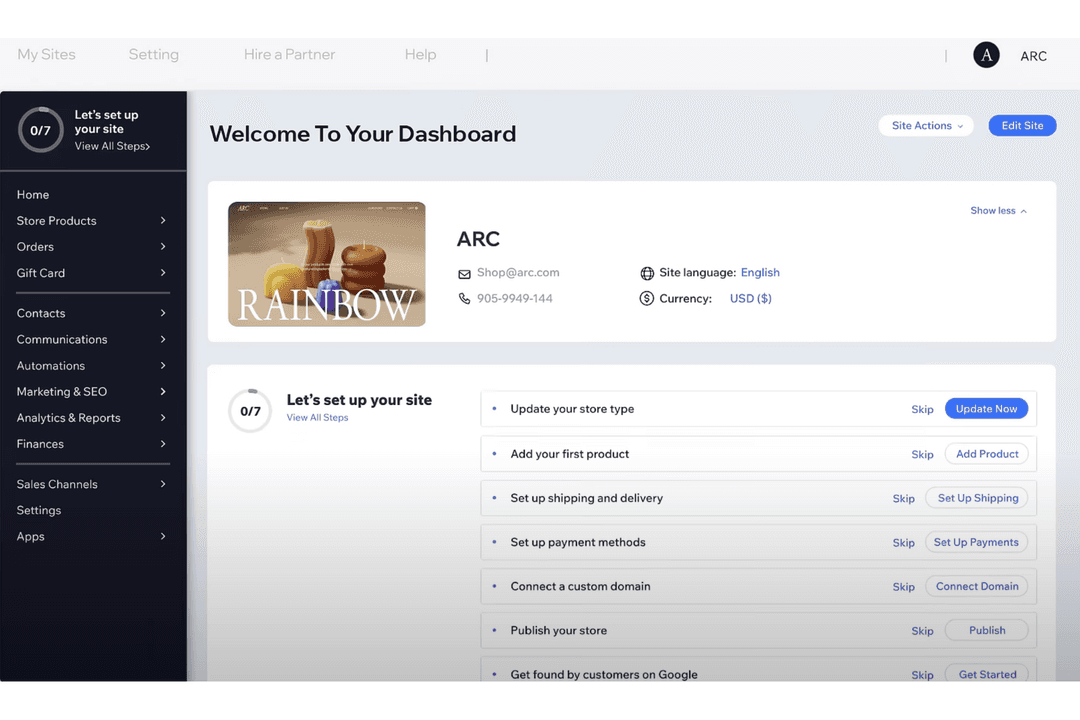
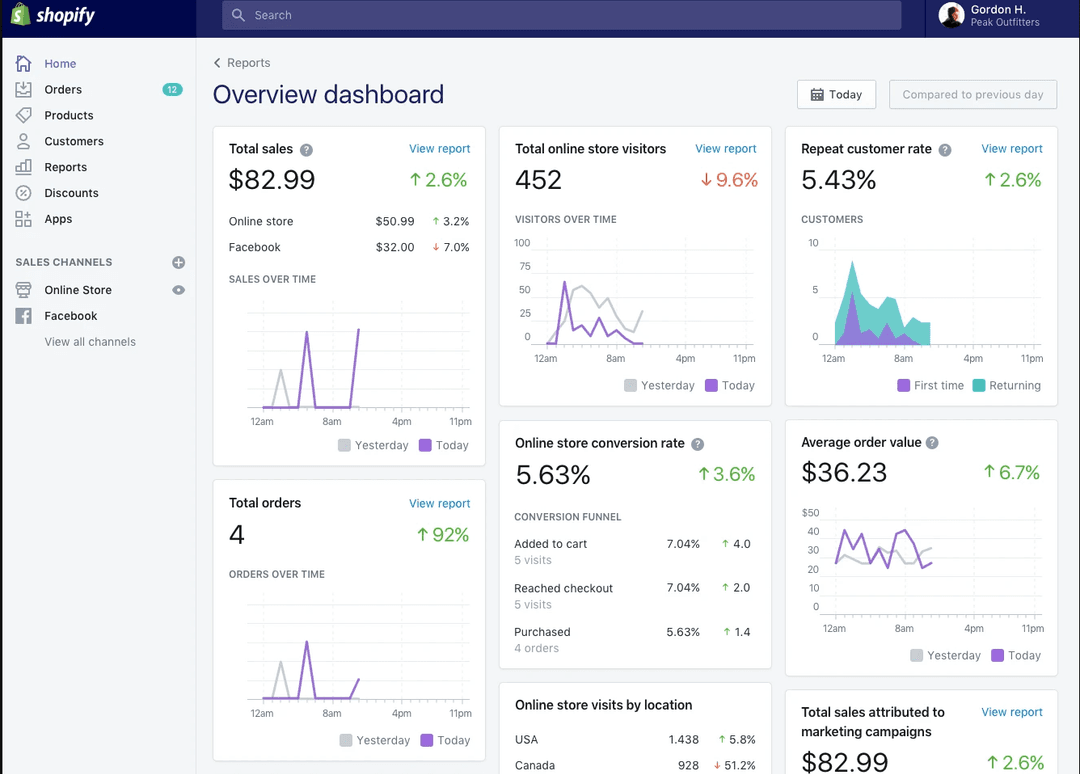
Wix’s drag-and-drop editor and built-in ecommerce design templates let you quickly customize your storefront and update content without coding, making daily site changes simple for teams focused on branding and visuals. Shopify’s product management dashboard and integrated inventory tracking help you handle large catalogs and process orders efficiently, supporting businesses that prioritize streamlined operations and sales growth.
| Wix eCommerce | Shopify | |
|---|---|---|
| 2-Factor Authentication | Yes | Yes |
| A/B Testing | No | No |
| Analytics | Yes | Yes |
| API | No | Yes |
| BitCoin | No | No |
| Conversion Tracking | No | Yes |
| Dashboard | No | Yes |
| Data Export | Yes | Yes |
| Data Import | Yes | Yes |
| Data Visualization | No | No |
| Design Templates | Yes | Yes |
| External Integrations | No | Yes |
| Inventory Tracking | No | Yes |
| Keyword Tracking | No | Yes |
| Marketing Automation | Yes | Yes |
| Multi-User | Yes | No |
| Notifications | No | Yes |
| Order Management | Yes | Yes |
| Payment Gateway Integration | No | Yes |
| Payment Processor | No | No |
| PayPal | No | Yes |
| Product Catalog | No | Yes |
| Review Monitoring | No | Yes |
| SAP Integration | No | No |
| Scheduling | No | No |
| Stripe | No | No |
| Third-Party Plugins/Add-Ons | Yes | No |
| Integration | Wix | Shopify |
| PayPal | ✅ | ✅ |
| Stripe | ✅ | ✅ |
| Square | ✅ | ✅ |
| QuickBooks | ✅ | ✅ |
| Mailchimp | ✅ | ✅ |
| Amazon | ✅ | ✅ |
| eBay | ✅ | ✅ |
| Printful | ✅ | ✅ |
| ShipStation | ✅ | ✅ |
| Google Analytics | ✅ | ✅ |
| API | ✅ | ✅ |
| Zapier | ✅ | ✅ |
Wix and Shopify both offer integrations through their app marketplaces, but Shopify’s ecosystem is significantly larger and more e-commerce-focused, with thousands of apps for sales, fulfillment, marketing, and inventory. Wix provides a smaller range of ecommerce integrations that blend built-in tools with third-party apps for broader website and store management functionality, while Shopify generally offers more advanced and scalable commerce-specific integrations.
| Factor | Wix | Shopify |
|---|---|---|
| FactorPCI Compliance | WixPCI DSS compliant for online payments and processes transactions securely. | ShopifyPCI DSS Level 1 certified, meeting the highest standard for payment security. |
| FactorSSL Encryption | WixProvides free SSL certificates for all sites to encrypt data. | ShopifyIncludes SSL certificates on every store for secure data transmission. |
| FactorData Privacy | WixAdheres to GDPR and CCPA with built-in privacy tools and consent banners. | ShopifyOffers GDPR and CCPA compliance features, including customer data management tools. |
| FactorUptime Guarantee | WixDelivers 99.9% uptime with global data centers and automatic backups. | ShopifyMaintains 99.99% uptime with redundant infrastructure and 24/7 monitoring. |
| FactorFraud Protection | WixIncludes basic fraud detection for online payments. | ShopifyAdvanced fraud analysis tools and chargeback management for all stores. |
Shopify edges ahead with more advanced fraud protection and a higher uptime guarantee, making it a stronger choice for high-volume or risk-sensitive stores. Wix covers the essentials well, but Shopify’s security and compliance features are more robust for businesses that need extra peace of mind.
| Factor | Wix | Shopify |
| User Interface | Drag-and-drop editor lets you visually build and rearrange your site with no coding. | Dashboard is organized for quick access to products, orders, and analytics, but less visual customization. |
| Onboarding | Guided setup walks you through each step with tooltips and templates. | Step-by-step onboarding focuses on store setup, product import, and payment configuration. |
| Store Setup | Launch a basic store in minutes with pre-built layouts and simple settings. | Store setup is streamlined for ecommerce, but adding advanced features may require more steps. |
| Support | 24/7 support via chat and phone, plus a searchable help center. | 24/7 support through chat, email, and phone, with extensive documentation and community forums. |
| Learning Curve | Minimal learning curve for beginners, especially for design tasks. | Slightly steeper learning curve for advanced ecommerce features and reporting. |
Wix is easier for beginners and teams focused on design, while Shopify’s workflow is built for ecommerce but may take longer to master. Wix stands out for its intuitive editor and fast setup, while Shopify’s structured dashboard and support resources help users manage complex stores as they grow.
Wix eCommerce
- You can easily customize your store with a wide range of templates.
- The platform's intuitive drag-and-drop editor simplifies website building.
- It offers robust marketing tools to help your ecommerce store get noticed online.
- Your store may face limitations when scaling for larger operations.
- Advanced ecommerce features aren't as powerful as some competitors.
- The platform's performance can be slower with heavy content.
Shopify
- You can easily customize your store with a wide range of themes.
- Shopify's app store offers tools to boost your store's functionality.
- It provides reliable security to protect your customers' data.
- You might find transaction fees if not using Shopify Payments.
- Shopify's blogging feature is less robust than others.
- It can be challenging to manage multiple currencies.
Wix eCommerce
- Small Retail ShopsWix eCommerce lets you create a beautiful online storefront with ease, perfect for showcasing unique products.
- Artisanal BusinessesYou can highlight your craftsmanship with customizable Wix templates that reflect your brand's personality.
- Local ServicesWix's booking and scheduling features make it easy for you to manage appointments and customer interactions.
- Clothing BoutiquesIts visual design capabilities help you create an engaging online presence that attracts fashion lovers.
- Creative EntrepreneursWix's simple interface allows you to focus on your creative work while maintaining a professional online store.
- Non-Technical UsersThe platform's user-friendly tools and support mean you don't need coding skills to manage your ecommerce site.
Shopify
- Boutique RetailersShopify’s customizable themes help your store stand out in a crowded market.
- Artisan ShopsYou can easily showcase and sell unique products with Shopify’s flexible product listings.
- StartupsShopify’s user-friendly interface allows you to set up quickly and focus on growth.
- Small BusinessesIts app store provides tools to expand your store’s capabilities as your business grows.
- Online MarketplacesShopify’s secure checkout process builds trust with your customers.
- Subscription ServicesYou can manage recurring payments and customer subscriptions efficiently with Shopify’s built-in tools.
Who Should Use Wix, And Who Should Use Shopify?
Wix is a great fit for small retailers, creative businesses, and teams that want full control over site design without technical complexity. Shopify is better suited for fast-growing brands, established ecommerce teams, and anyone who needs advanced selling tools, marketplace integrations, or robust inventory management. If your priority is a visually unique storefront and simple setup, Wix delivers. If you’re planning for scale, multi-channel sales, or high transaction volumes, Shopify is the smarter long-term choice.
| Wix eCommerce | Shopify | |
|---|---|---|
| Automation Tools | Wix eCommerce Basic automation for emails and order notifications. | Shopify Advanced automation for inventory, shipping, and marketing workflows. |
| Design Flexibility | Wix eCommerce Drag-and-drop editor with full creative control over site layout. | Shopify Theme-based customization with limited drag-and-drop options. |
| Ecommerce Focus | Wix eCommerce General website builder with ecommerce features built in, depending on the plan. | Shopify Purpose-built for ecommerce with advanced selling and inventory tools. |
| Marketplace Integrations | Wix eCommerce Broad range of integrations, many of which are unrelated to ecommerce. | Shopify More extensive integration marketplace, mostly geared for ecommerce use cases. |
| Scalability | Wix eCommerce Best for small to medium shops; limited for very large catalogs. | Shopify Highly scalable for large stores and global operations. |
| Customer Support | Both provide 24/7 customer support via multiple channels, including live chat and phone, plus searchable help centers. |
|---|---|
| Mobile Optimization | Both offer mobile-responsive templates and storefronts, so your site looks good and functions well on any device. |
| Payment Gateways | Both support major payment providers like PayPal and Stripe, letting you accept credit cards and digital wallets. |
| SSL Security | Both include free SSL certificates for all stores, ensuring secure data transmission for customers. |
| Website & Online Store | Both platforms allow you to build a website and sell products online without needing to code. |