

KORONA POS vs. Bottle POS: Expert Comparison and Reviews for 2026
Ready to pick the right POS? I’ll break down KORONA POS vs. Bottle POS, spotlighting differences, drawbacks, and standout features so you can make a smart decision.

We review tools independently, and commissions help fund our testing. See our transparency policy, our methodology, or suggest a tool.
KORONA POS
4.8/5
- Free trial + free demo available
- From $59/month
Bottle POS
4.1/5
- Free demo available
- From $59/month
Why Trust Our Software Recommendations
6,700+
Reviews
20
Industry experts
16+
Evaluation factors
14
Years
Our team has been testing and reviewing software since 2012. As retail leaders ourselves, we know how difficult—and important—it is to choose the right software.
For this guide, we evaluated tools using hands-on testing and independent research, scoring tools using our selection criteria.
Our reviews reflect our independent judgment—not a sales pitch.
| KORONA POS | Bottle POS | |
|---|---|---|
| Free Trial | Free trial + free demo available | Free demo available |
| Pricing | From $59/month | From $59/month |
KORONA POS vs. Bottle POS Pricing & Hidden Costs
KORONA POS uses a transparent, subscription-based pricing model with month-to-month billing and no required payment processor, which gives you flexibility to shop for lower transaction rates. Features scale across tiers, so you’ll pay more as you unlock advanced inventory, reporting, and add-ons like ticketing—but core functionality and support are included without long-term contracts.
Bottle POS starts with a similar entry price and scales with more advanced features, automations, and specific integrations. In most cases, using Bottle POS also means committing to their in-house payment processing, which can impact your overall costs. Additional expenses—like extra registers, add-ons (such as auto invoicing), or custom configurations—can increase the total price beyond the base subscription.
To get the best value, it’s important to look beyond the monthly fee and understand how each system handles payment processing, scaling costs, and included features. KORONA gives you more flexibility and cost control over time, while Bottle POS offers a more bundled, all-in-one approach that may be simpler upfront but less customizable as your needs evolve.
Both KORONA POS and Bottle POS cover the core POS essentials, including sales tracking, real-time inventory management, employee permissions, reporting, barcode scanning, and customer profiles. Either system can handle day-to-day operations without issue, giving you the foundational tools needed to run transactions, manage stock, and monitor performance.
The real difference comes down to flexibility vs. specialization. KORONA POS is built as a flexible, multi-industry platform, offering customizable workflows, open API access, and the freedom to choose your own payment processor and hardware—along with features like ticketing and franchise management. Bottle POS, by contrast, is purpose-built for liquor stores, with standout features like case-break inventory, automated invoice scanning, built-in compliance tools, and tightly integrated ecommerce and delivery through BottleZoo and DoorDash.
| KORONA POS | Bottle POS | |
|---|---|---|
| 2-Factor Authentication | Yes | Yes |
| API | Yes | No |
| Barcode Scanning | Yes | Yes |
| BitCoin | No | No |
| Budgeting | Yes | No |
| Contact Management | Yes | No |
| Custom Reports | Yes | Yes |
| Customer Management | Yes | Yes |
| Customer Rewards | Yes | Yes |
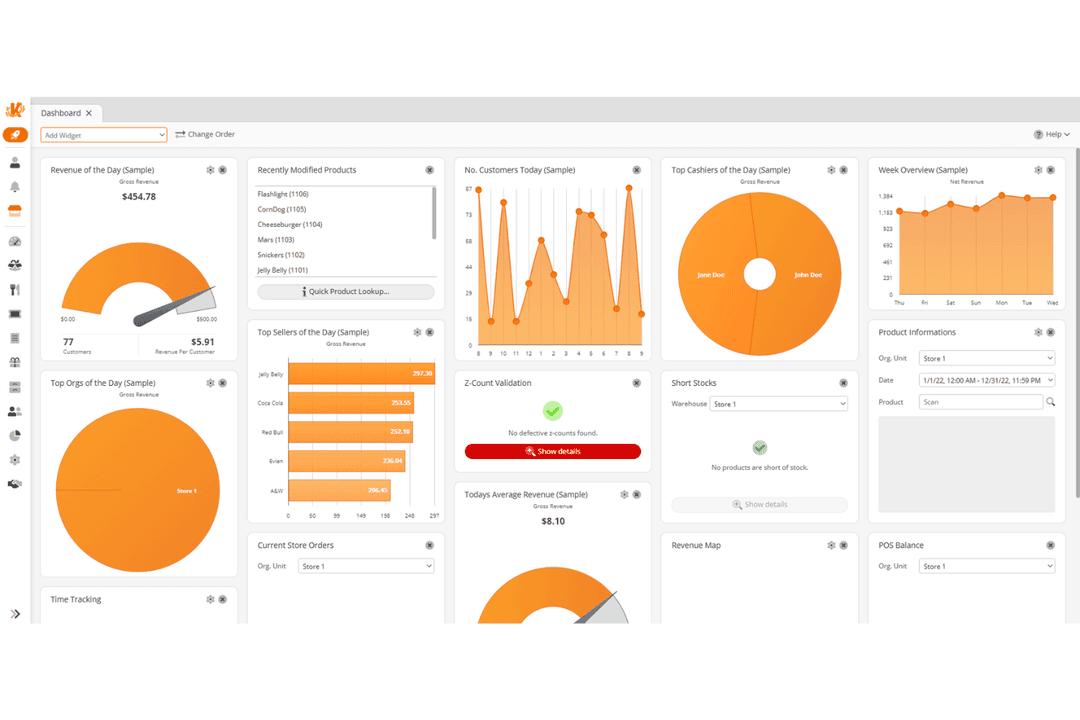
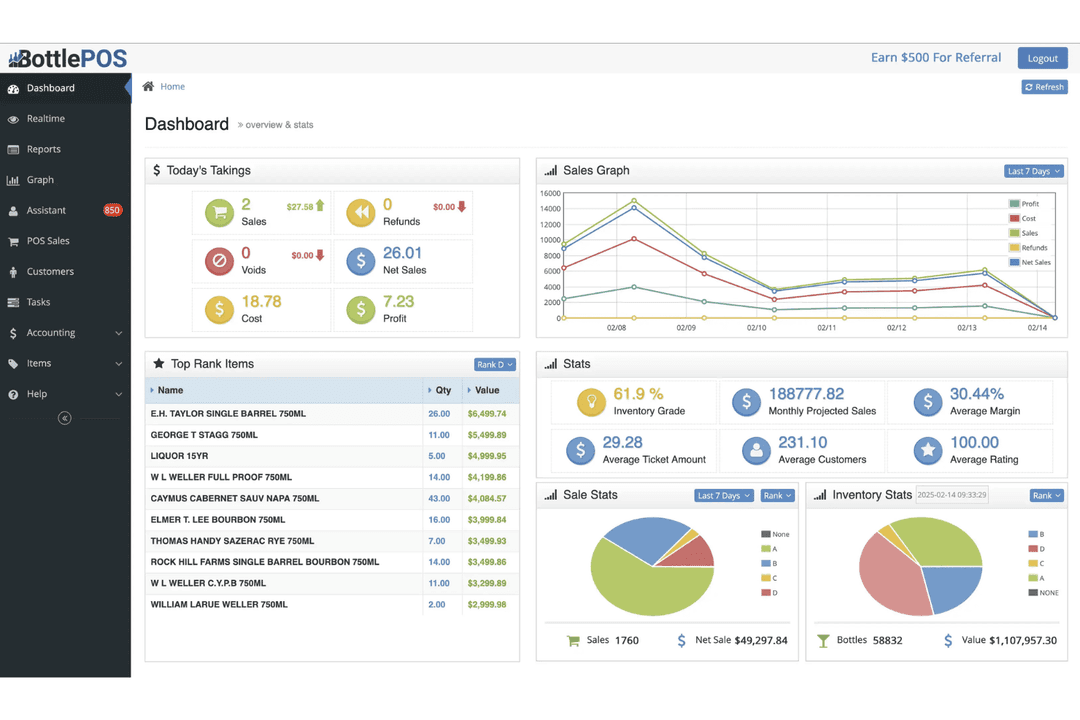
| Dashboard | Yes | Yes |
| Data Export | Yes | Yes |
| Data Import | Yes | Yes |
| Data Visualization | Yes | Yes |
| External Integrations | Yes | Yes |
| Forecasting | Yes | Yes |
| Fraud Detection | Yes | Yes |
| Inventory Tracking | Yes | Yes |
| Multi-Currency | Yes | No |
| Multi-User | Yes | Yes |
| Notifications | Yes | Yes |
| Offline Access | Yes | Yes |
| Order Management | Yes | Yes |
| Payment Processor | Yes | Yes |
| PayPal | Yes | No |
| Stripe | Yes | No |
| Supplier Management | Yes | Yes |
| Tax Management | No | Yes |
| Third-Party Plugins/Add-Ons | Yes | Yes |
| Workflow Management | No | Yes |
| Integration | KORONA POS | Bottle POS |
|---|---|---|
| IntegrationQuickBooks | KORONA POS✅ | Bottle POS✅ |
| IntegrationWooCommerce | KORONA POS✅ | Bottle POS❌ |
| IntegrationDoorDash | KORONA POS❌ | Bottle POS✅ |
| IntegrationShopify | KORONA POS❌ | Bottle POS❌ |
| IntegrationBottleZoo | KORONA POS❌ | Bottle POS✅ |
| IntegrationbLoyal | KORONA POS✅ | Bottle POS❌ |
| IntegrationCMS Max | KORONA POS✅ | Bottle POS❌ |
| IntegrationNearSt | KORONA POS✅ | Bottle POS❌ |
| IntegrationAPI | KORONA POS✅ | Bottle POS❌ |
| IntegrationZapier | KORONA POS❌ | Bottle POS❌ |
KORONA POS offers a broader, more flexible integration ecosystem with a wide range of partners and an open API, making it easier to connect custom tools and build tailored workflows. Bottle POS supports some integrations, but its approach is more guided and partner-driven, with tightly connected tools like BottleZoo, DoorDash, QuickBooks, and Fintech—prioritizing simplicity and liquor-specific functionality over a large, open marketplace.
| Factor | KORONA POS | Bottle POS |
|---|---|---|
| FactorPCI Compliance | KORONA POSWorks with PCI-compliant payment processors to ensure secure transactions. | Bottle POSPCI-DSS compliant with end-to-end encryption for all payment transactions. |
| FactorData Security | KORONA POSRole-based access controls and secure cloud-based system architecture. | Bottle POSEncrypted payment data, transaction logs, and secure handling of customer information. |
| FactorUser Permissions | KORONA POSHighly customizable user roles and permissions for detailed access control. | Bottle POSRole-based permissions with employee tracking and manager overrides. |
| FactorReliability | KORONA POSCloud-based system with ongoing support and system monitoring. | Bottle POSCloud-based system with operational safeguards for continuous store performance. |
KORONA POS and Bottle POS both provide PCI-compliant payment handling, cloud-based infrastructure, and role-based user permissions to secure system access. Overall, both systems are designed to keep transactions and data secure, with reliable cloud environments supporting day-to-day operations. KORONA POS tends to offer more flexibility with more customizable security controls, but your data will be safe with either system.
| Factor | KORONA POS | Bottle POS |
|---|---|---|
| FactorUser Interface | KORONA POSDesigned with advanced setups in mind, with customizable back-office tools. That said, the interface is a bit dated. | Bottle POSSimple, liquor-focused interface designed for fast checkout and minimal training. |
| FactorOnboarding | KORONA POSGuided onboarding with live training, demos, and ongoing support resources. | Bottle POSHands-on onboarding with dedicated support, setup assistance, and data migration help. |
| FactorLearning Curve | KORONA POSModerate learning curve, especially for advanced features and reporting. | Bottle POSVery easy for staff to learn, with most cashiers trained in minutes. |
| FactorCustomer Support | KORONA POSIn-house support via phone, email, and resources, with 24/7 emergency support. | Bottle POS24/7 support with onboarding specialists and direct assistance during setup and beyond. |
| FactorHardware Setup | KORONA POSFlexible hardware options with guided setup and configuration support. | Bottle POSSupports existing hardware with onboarding assistance and compatibility checks. |
Bottle POS is easier to pick up quickly, especially for frontline staff, with a simple interface and fast onboarding that gets most teams up and running in hours or days. KORONA POS, on the other hand, comes with a steeper learning curve but offers more depth once you’re familiar with the system.
Bottle POS's setup is only for liquor businesses: Those that want a fast, guided setup with minimal friction. On the other hand, KORONA POS's interface is a stronger fit for those willing to invest time upfront to unlock more advanced features and flexibility, whether you're running a liquor store, retail store, or quick service restaurant.
KORONA POS
- Highly customizable POS built for specific retail industry needs.
- Flexible payments, hardware options, and no long-term contracts required.
- Deep inventory management with automation and real-time tracking.
- Steeper learning curve due to the depth of features.
- User interface feels dated compared to modern POS competitors.
- Ecommerce capabilities are weaker for businesses primarily selling online.
Bottle POS
- Compliance features help stores manage age verification and regulatory requirements.
- Real-time inventory sync across multiple registers.
- Liquor store barcode catalog matches common brews and spirits.
- Fewer third-party app integrations than most competitors.
- Mandatory payment processing agreements limit flexibility for merchant payment provider choices.
- Hardware compatibility options are somewhat restrictive.
KORONA POS
- Inventory-Heavy Specialty RetailersShops like pet stores, gift shops, and thrift stores benefit from deep inventory and customizable reporting.
- Quick-Service Restaurants (QSRs)Best suited for cafes, bakeries, and counter-service setups (not full-service dining) with simple menu and order workflows.
- Liquor, Vape, and Smoke ShopsBuilt-in age verification, strong inventory controls, and compliance-friendly workflows make this a natural fit for liquor stores and other age-restricted shops.
- Convenience StoresHigh SKU counts, fast transactions, and real-time inventory tracking support busy, high-volume environments.
- Ticketing (Amusement Parks and Attractions)Integrated ticketing, admission control, and retail sales in one system make it ideal for hybrid operations.
- Franchises and Multi-Location RetailersCentralized reporting, product syncing, and royalty tools help manage multiple stores efficiently.
Bottle POS
- Liquor StoresBuilt-in barcode recognition and age verification make compliance and checkout fast and simple.
- Multi-Location ChainsCentralized management lets you control inventory, pricing, and reporting from one dashboard.
- Delivery and Omnichannel RetailersDoorDash integrations and synchronized inventory help liquor stores manage online, delivery, and in-store sales together.
- High-Volume RetailersFast barcode scanning, quick checkout tools, and automated receiving help busy stores reduce bottlenecks.
- Compliance-Focused BusinessesAutomated state reporting, ID verification, and transaction tracking help reduce regulatory risk and paperwork.
- Stores With Large Product CatalogsAI invoice processing and automated product creation help retailers manage thousands of wine, beer, and liquor SKUs efficiently.
Who Should Use KORONA POS, and Who Should Use Bottle POS?
KORONA POS is best suited for businesses that need flexibility and depth—especially multi-location retailers, specialty shops, and operations with more complex workflows. If you want control over your payment processor, need advanced reporting and inventory tools, or plan to scale into multiple locations or business models (like ticketing or franchise operations), KORONA POS gives you the customization to grow without switching systems later.
It’s a better fit if you’re willing to invest time upfront to learn the system in exchange for long-term flexibility.
Bottle POS, on the other hand, is ideal for liquor stores and beverage retailers that want a system built specifically for their day-to-day operations. If your priority is getting up and running quickly with minimal setup, built-in ecommerce and delivery, and liquor-specific features like age verification and case-break inventory, Bottle POS is the more straightforward choice.
It’s especially strong for single-location or small multi-store operators who want a guided, all-in-one solution without needing to customize or manage multiple integrations.
| KORONA POS | Bottle POS | |
|---|---|---|
| Customization | KORONA POS Highly customizable workflows, reporting, and system configuration. | Bottle POS More structured, with predefined workflows optimized for liquor retail. |
| Ecommerce & Delivery | KORONA POS Integrates with third-party tools; less built-in ecommerce depth. | Bottle POS Built-in ecommerce (BottleZoo) + direct delivery integrations (DoorDash, etc.). |
| Industry Fit | KORONA POS Built for multi-industry retail, including specialty, QSR, and ticketing. | Bottle POS Purpose-built for liquor stores, wine shops, and beverage retailers. |
| Inventory Approach | KORONA POS Flexible inventory system with automation and customization across retail types. | Bottle POS Liquor-specific inventory with case-break tracking, auto invoicing, and supplier workflows. |
| Payment Processing Flexibility | KORONA POS Processor-agnostic—choose your own provider. | Bottle POS Often requires in-house payment processing for full functionality. |
| Barcode Scanning & Checkout | Both support barcode-based checkout for fast and accurate transactions. |
|---|---|
| Cloud-Based Access | Both offer cloud-based systems for remote access, real-time data syncing, and centralized management. |
| Customer Management | Both offer customer profiles, purchase tracking, and loyalty or engagement tools. |
| Employee Management | Both include tools for managing staff activity, performance, and access within the POS system. |
| Multi-Location Management | Both allow businesses to manage multiple locations with centralized reporting and controls. |
| Sales Reporting | Both provide sales and inventory reporting to track performance and make data-driven decisions. |