

An AI UGC platform lets you use artificial intelligence to create, manage, or customize creator-style assets for your brand or campaigns. These platforms can generate avatar-led videos, scripts, voiceovers, product visuals, and AI images without coordinating a traditional shoot. This AI-generated UGC differs from genuine content from real customers or footage recorded by real people, so brands should present it accurately. If you’re looking to boost creative output, scale ad variations, or make video production more cost-effective, these AI tools can help your team work faster and smarter. In this guide, you’ll find the most capable AI UGC platforms for %%bwz_year%%, with insights into what makes each one unique so you can pick a solution that fits your goals and workflow.
Why Trust Our Software Recommendations
6,700+
Reviews
20
Industry experts
16+
Evaluation factors
14
Years
Our team has been testing and reviewing software since 2012. As retail leaders ourselves, we know how difficult—and important—it is to choose the right software.
For this guide, we evaluated tools using hands-on testing and independent research, scoring tools using our selection criteria.
Our reviews reflect our independent judgment—not a sales pitch.
AI UGC Platform Comparison Table
This comparison table summarizes pricing details for my top AI UGC platform selections:
| Tool | Best For | Trial Info | Price | ||
|---|---|---|---|---|---|
| 1 | Best for conversational ad creation | Free plan available | Pricing upon request | Website | |
| 2 | Best for cinematic creator-style effects | 7-day free trial | Pricing upon request | Website | |
| 3 | Best for batch-generating ad variations | Free plan available | From $29/month | Website | |
| 4 | Best for creating ads with a digital twin | Free plan available | From $24.99/month | Website | |
| 5 | Best for creating ads from product photos | Not available | From $19/month | Website | |
| 6 | Best for high-volume URL-to-ad creation | Free plan available | From $39/month | Website | |
| 7 | Best for multilingual avatar localization | Free plan available | From $24/month (billed annually) | Website | |
| 8 | Best for replicating proven ad formats | Free plan available | From $29/month (billed annually) | Website | |
| 9 | Best for access to 1,000+ AI actors | No free trial available | Pricing upon request | Website | |
| 10 | Best for avatars that hold your product | $1 trial available | From $59/month | Website |


Best AI UGC Platform Reviews
Below are my detailed summaries of the best AI UGC platforms that made it onto my shortlist. My reviews offer a detailed look at the features, capabilities, and best use cases of each platform to help you find the best one for you.
 Best for conversational ad creation
- Free plan available
- Pricing upon request
Visit WebsiteCustomer Rating:4.9/5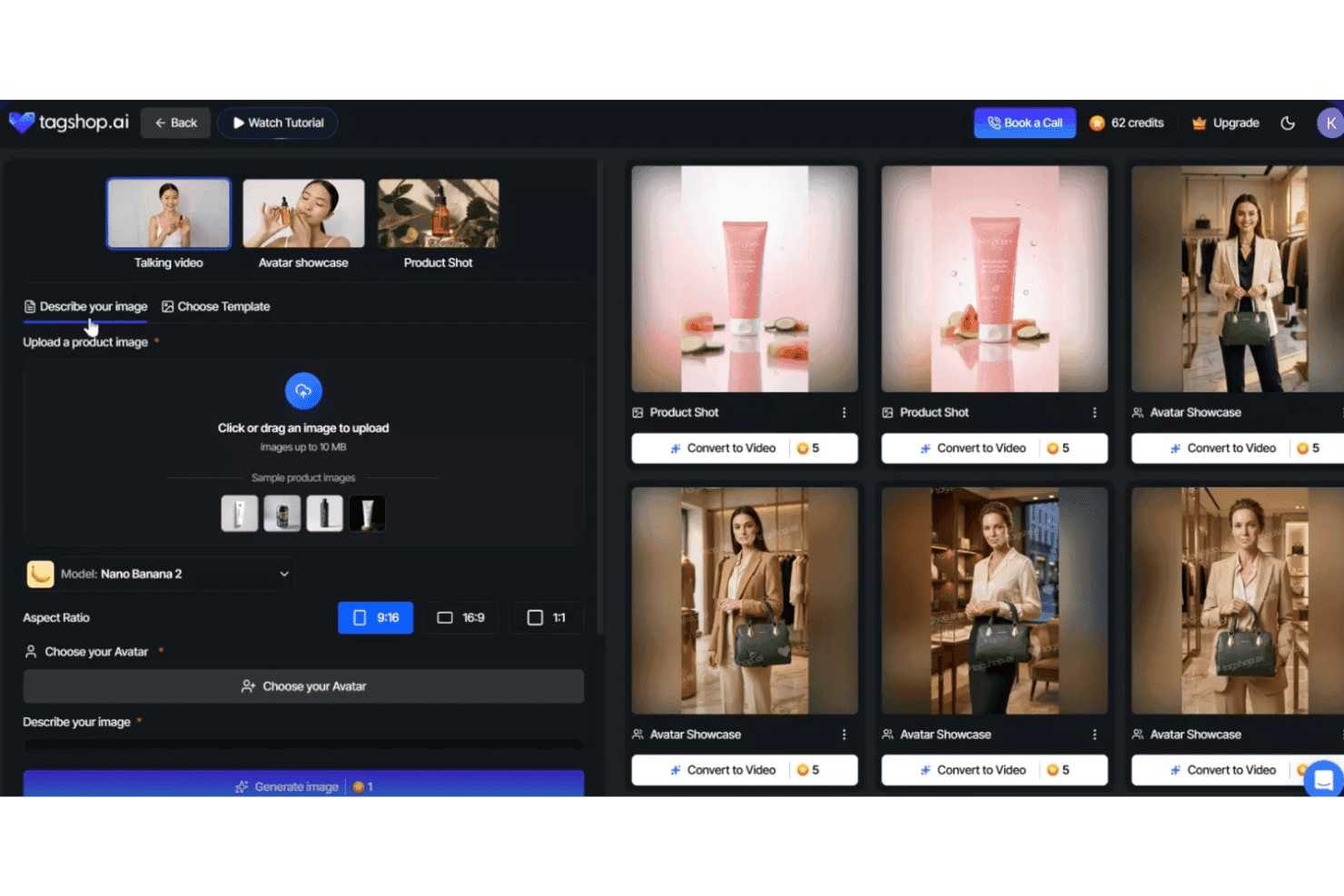
Tagshop AI offers an AI image generation studio with avatar showcase, product shot, and talking video creation tools alongside a gallery of generated results. Tagshop AI is an AI UGC video ad generator that turns product URLs, images, or text prompts into short-form creator-style video ads using a conversational AI agent, 300+ avatars, AI scriptwriting, voice cloning, and 75+ language support.
Who Is Tagshop AI Best For?
It's a strong fit for DTC brands and ecommerce growth marketers who need to produce paid social ad creatives at scale without relying on human creators.
Why I Picked Tagshop AI
Tagshop AI earns its spot on my shortlist because of how the AI Video Agent actually works: you chat your way through a creative brief rather than clicking through a rigid step-by-step builder. I like that pasting a Shopify product URL lets the agent pull imagery and key benefits before auto-generating a hook-driven script. The AI Twin feature then lets me spin up multiple ad angles from that same brief using a consistent branded avatar.
Tagshop AI Key Features
- 300+ AI avatars: Choose from a wide range of diverse on-camera spokespeople for creator-style video output.
- 75+ languages and accents: Generate localized AI video and voiceover scripts for global retail campaigns.
- Built-in video editor: Edit, trim, and add overlays or captions directly within the platform before exporting.
- Direct publishing to Meta and TikTok: Launch video ads straight to social channels without dealing with third-party uploads.
Tagshop AI Integrations
Tagshop AI offers native integrations with Shopify, WooCommerce, BigCommerce, Magento, Wix, PrestaShop, Webflow, Weebly, WordPress, Klaviyo, Meta, and TikTok. An API is available for custom integrations.
Pros and Cons
Pros:
- Bulk video generation for entire product catalogs
- AI Twin enables branded avatar consistency
- Conversational agent creates scripts from prompts
Cons:
- Limited scene and gesture variation for UGC
- Some avatar movements appear visibly stiff
Learn more about Tagshop AI: Best for cinematic creator-style effects
- 7-day free trial
- Pricing upon request
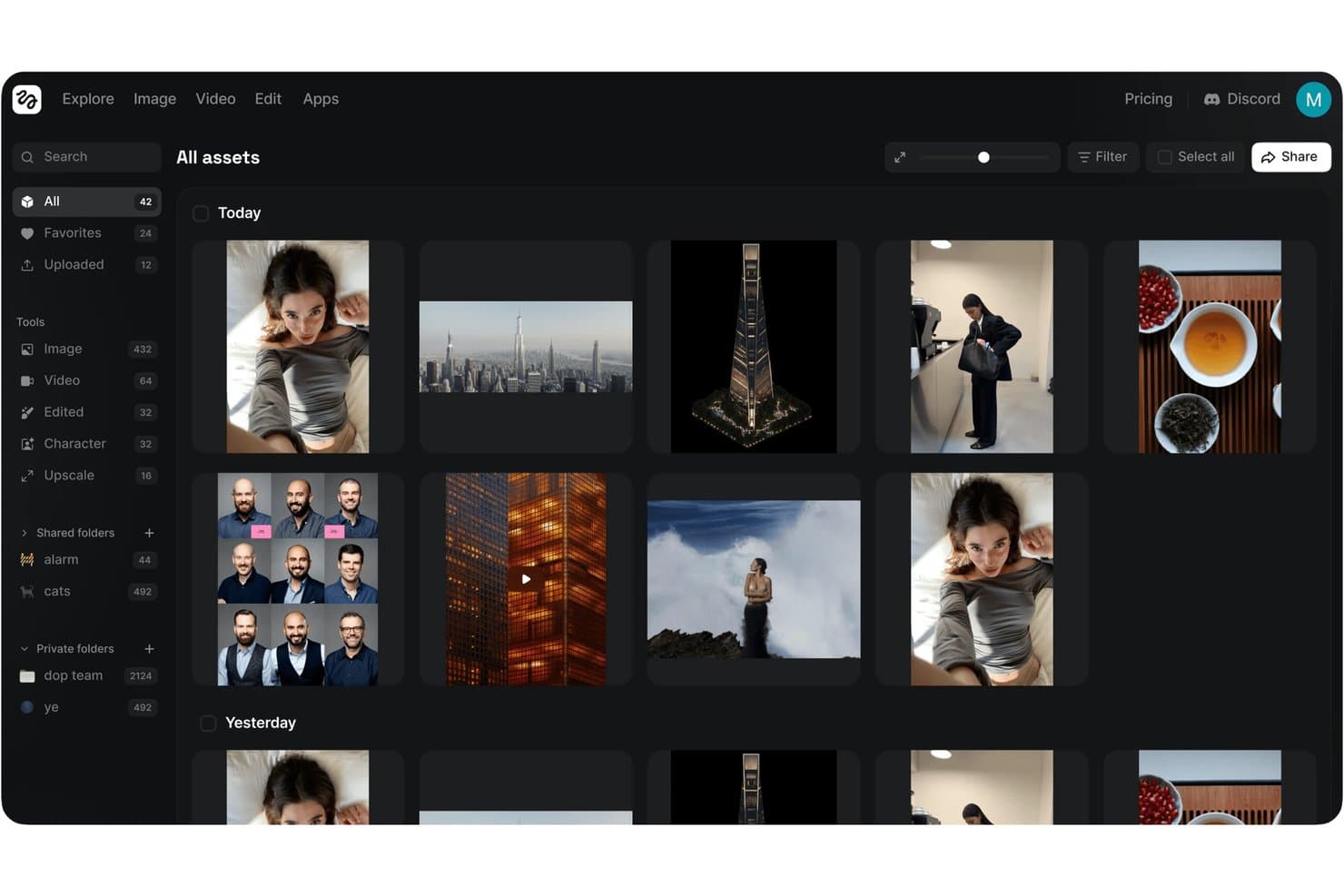
Higgsfield offers an AI-powered asset management platform where users can generate, organize, and browse AI-created images and videos across categories like characters, upscale, and shared folders. Higgsfield is an AI video generation platform built around UGC-style creator content, combining cinematic motion presets, Soul ID character consistency, LipSync Studio, and a Marketing Studio with URL-based product extraction.
Who Is Higgsfield Best For?
It's a strong fit for brand social media managers and DTC marketing teams producing high-volume, creator-style ad content for TikTok, Reels, and Shorts.
Why I Picked Higgsfield
Higgsfield earns its spot on my shortlist because it combines UGC-oriented creative workflows with cinematic motion and camera controls. Its presets cover creator-style formats such as selfie, fashion, and product-focused shots, while Soul ID is designed to maintain a recognizable character identity across generated content. Cinema Studio adds controls for elements such as lenses, framing, and camera movement, which is what makes Higgsfield’s cinematic output feel distinct from a conventional avatar-led AI UGC workflow.
Higgsfield Key Features
- LipSync Studio: Syncs voiceovers with facial movement for AI-generated characters in video content.
- Product Marketing Studio: Extracts product information from a URL and generates marketing video creatives.
- One-click AI Apps: Use prebuilt workflows for formats such as UGC ads, influencer-style videos, product visuals, and short-form social content. Higgsfield’s current public materials do not consistently publish a fixed app count.
- Cinema Studio camera controls: Lets you design unique camera movements within generated videos for added cinematic flair.
Higgsfield Integrations
Higgsfield offers native integrations with Adobe After Effects and Claude, and provides access to multiple AI video and image generation models within its platform. An API is available for custom integrations.
Pros and Cons
Pros:
- Product data extracted directly from URLs
- 50-plus UGC creator-style motion presets
- Soul ID facial consistency across all scenes
Cons:
- Multilingual support details not clearly documented
- No native ecommerce platform integration
Learn more about Higgsfield:
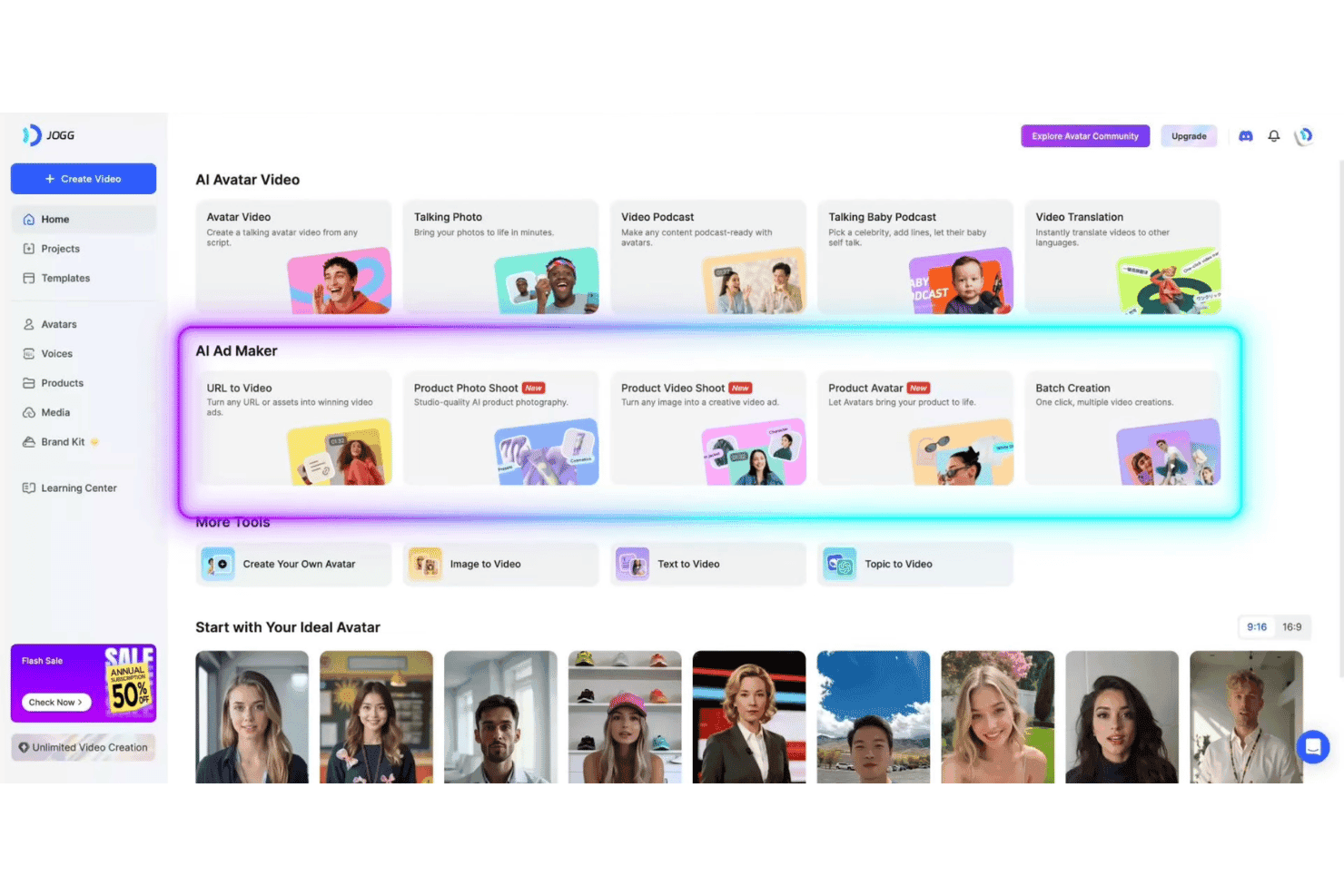
JoggAI offers a comprehensive AI video creation platform featuring Avatar Video, AI Ad Maker tools, and avatar selection for personalized content. JoggAI is an AI video generation platform that turns product URLs, images, and scripts into UGC-style avatar videos, with tools for voice cloning, AI scriptwriting, batch creative generation, and multilingual video translation.
Who Is JoggAI Best For?
JoggAI is a strong fit for DTC brands and ecommerce performance marketers who need to produce high volumes of product ad creatives without relying on human creators.
Why I Picked JoggAI
JoggAI earns its spot on my shortlist because its URL-to-video workflow combines product-page extraction with batch video generation. You can paste a supported ecommerce product URL and let the platform pull available product information and media before generating different scripts, avatars, and video treatments. Its current URL-to-video page documents generating up to 10 videos at once, giving you a practical way to compare different spokesperson styles, hooks, and calls to action for the same product without building each version separately.
JoggAI Key Features
- AvatarX advanced avatar model: Access higher realism and more natural movement with the AvatarX avatar suite.
- AI voice cloning: Create a reusable cloned voice from uploaded or recorded audio. Available voices and supported languages vary by JoggAI feature, so the platform’s broader language counts should not be treated as the voice-cloning limit.
- Custom avatar creation: Create avatars using photos or text prompts to match specific products or audiences.
- Video translation: Instantly translate generated videos into multiple languages with AI-powered lip sync.
JoggAI Integrations
JoggAI supports product URL parsing from Shopify, Amazon, and eBay, offers an API for custom integrations, and connects with Zapier.
Pros and Cons
Pros:
- Auto-parses product pages from major platforms
- UGC avatars available in 200+ languages
- Batch generates up to 100 video variations
Cons:
- No direct publishing to TikTok or Meta
- Lip-sync quality is inconsistent in outputs
Learn more about JoggAI:
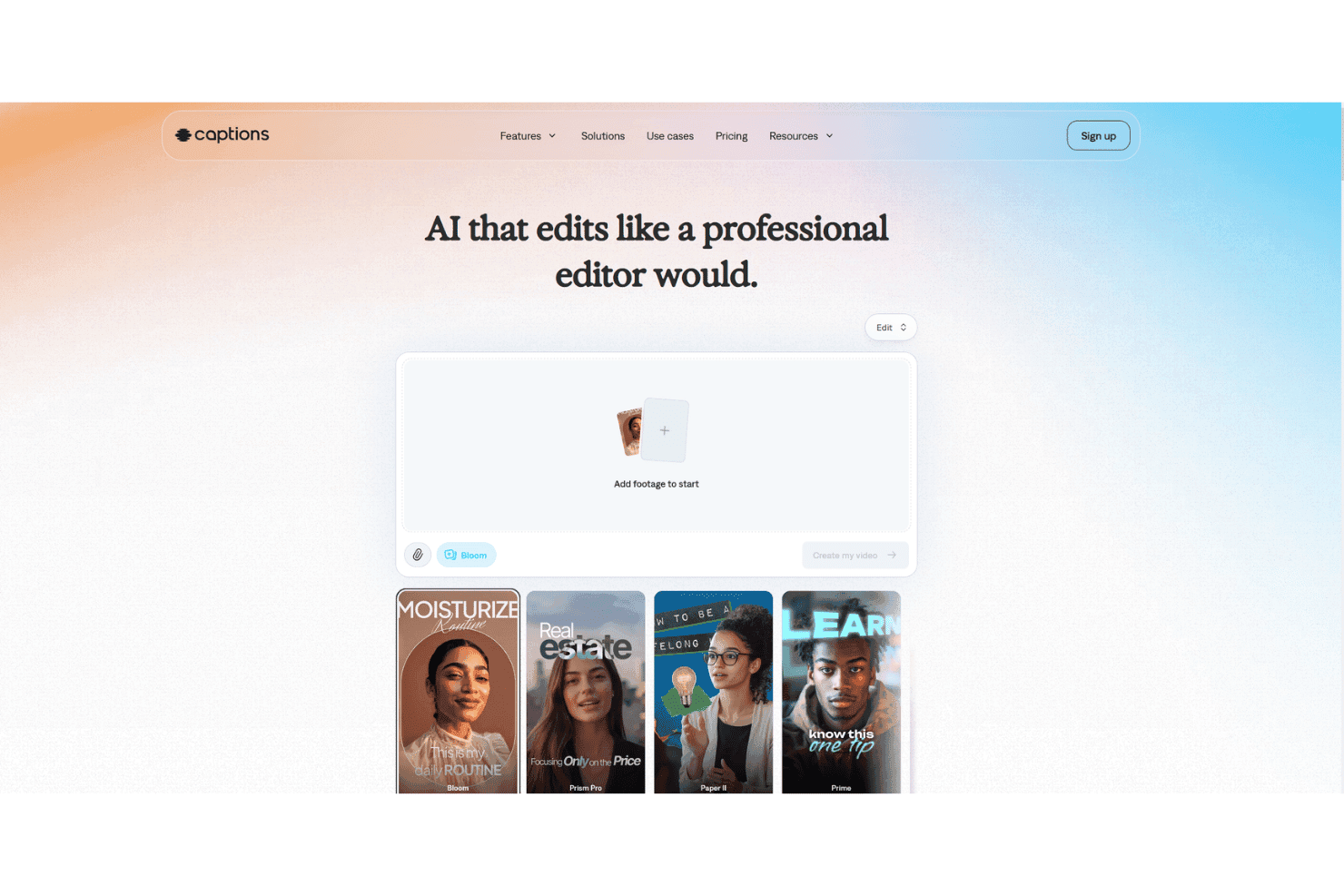
Captions offers an AI-powered video editor that automatically styles and edits footage with professional templates like Bloom, Prism Pro, Paper II, and Prime. Captions is an AI UGC video platform that generates short-form, creator-style ad content using stock AI avatars, custom digital twins, AI voiceover, and multilingual lip-sync dubbing for TikTok, Reels, and Shorts.
Who Is Captions Best For?
Captions is a strong fit for DTC brands and social media managers who need a fast, solo-friendly workflow for producing creator-style video ads without a film crew.
Why I Picked Captions
Captions earns its spot on my shortlist because the AI Twin feature lets you create a reusable digital version of a spokesperson for UGC-style ads, reducing the need to record every variation separately. Max plans currently support up to 30 AI Twins, while generated videos consume plan credits. I also like the AI dubbing and lip-sync tools, which can adapt a source recording into supported languages while adjusting the speaker’s mouth movements. Together, these features make it possible to develop localized campaign variations from a smaller amount of original footage.
Captions Key Features
- Chat-based editor: Build and modify video scripts using a conversational AI interface.
- AI Shorts generator: Instantly create vertical, short-form video content formatted for TikTok, Reels, and Shorts.
- Dynamic caption templates: Apply animated captions with customizable styles and automatic scene sync.
- Multi-language subtitles: Generate and export subtitles in over 100 languages for global reach.
Captions Integrations
Native integrations are not clearly documented. Captions is available as an iOS, Android, and web app, and offers API access for custom integrations.
Pros and Cons
Pros:
- Vertical short-form ad video focus
- Multilingual lip sync and dubbing options
- AI digital twin cloning for creators
Cons:
- Batch ad variant workflow not supported
- No direct Shopify or Amazon integration
Learn more about Captions:
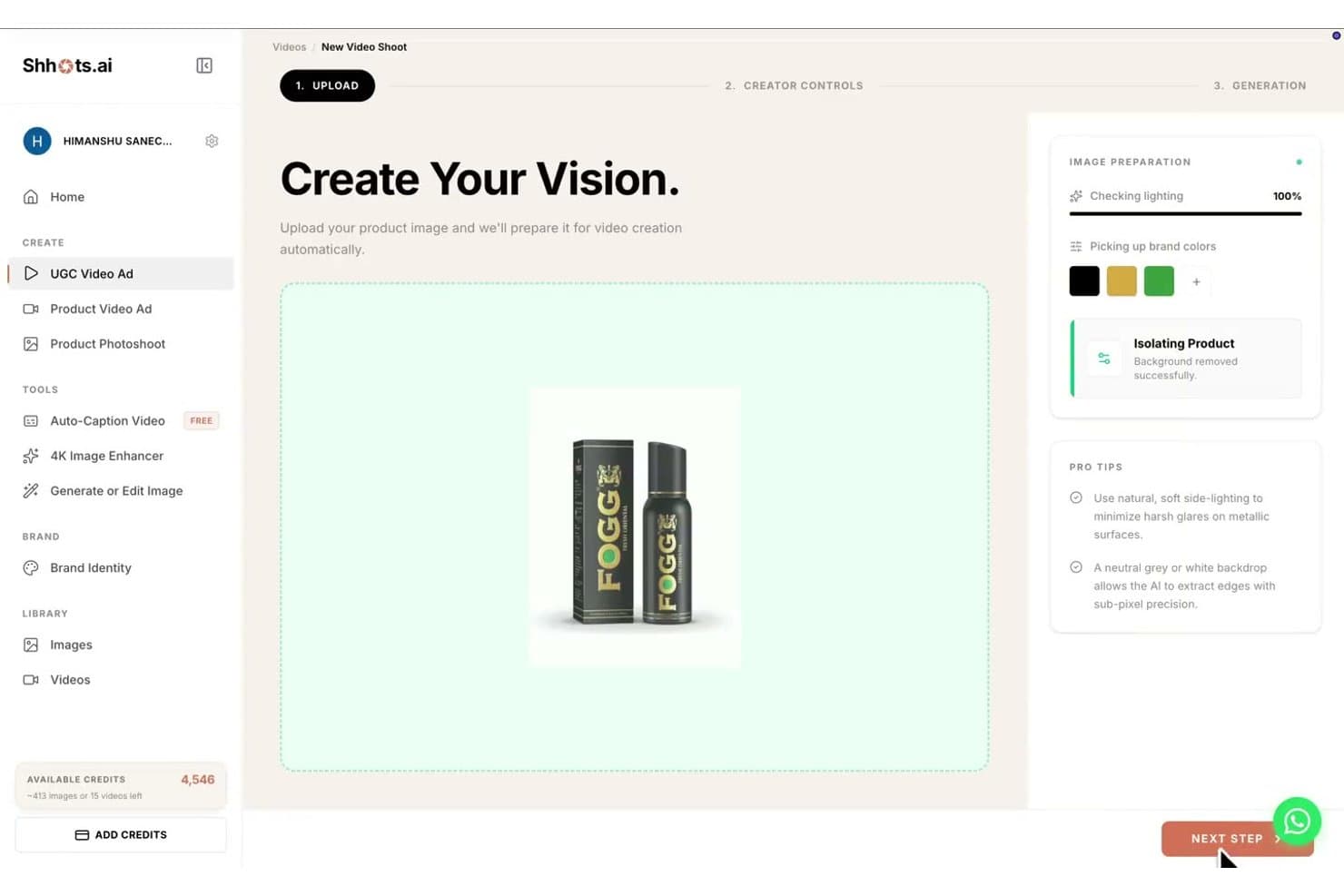
Shhots AI offers a UGC video ad creation workflow with automatic image preparation, brand color detection, and product background removal. Shhots AI is an AI UGC ad generator that converts a single product photo into avatar-led video ads, static image creatives, and cinematic product videos ready for TikTok, Reels, Facebook, and Google.
Who Is Shhots AI Best For?
Shhots AI is a strong fit for ecommerce brands and DTC marketers who need a steady volume of paid social ad creative without the cost of hiring real UGC creators or running product shoots.
Why I Picked Shhots AI
I picked Shhots AI as one of the best because it can turn a product photo or product-page URL into several types of ecommerce creative, including avatar-led UGC videos, static ads, and cinematic product videos. Its UGC workflow can place the product with an AI presenter so the output is more visually connected to the item than a basic scripted talking-head video. Shhots provides access to AI video models such as Kling, Veo, and Seedance, but its current documentation does not confirm that it automatically selects the best model for each product.
Shhots AI Key Features
- Shopify product input: Paste a Shopify product URL to import available product information into the standard creation workflow without installing an app. API access and custom Shopify integration for larger catalogs are Enterprise options.
- Multi-language support: Create ads and UGC videos in 12 different languages for broad audience coverage.
- Creative variation: Generate different UGC videos, product videos, and static ad concepts from the same product assets. Automated workflows for catalogs of 200 or more assets require an Enterprise arrangement.
- Commercial license on all plans: Download watermark-free assets with a full commercial license for use in every paid subscription.
Shhots AI Integrations
Shhots AI offers a native Shopify app for direct catalog integration and supports ad creation from any product page URL. An API is available for custom integrations.
Pros and Cons
Pros:
- Commercially licensed assets on all paid plans
- Bulk video creation from Shopify catalogs
- Product-in-hand avatar demonstrations for retail ads
Cons:
- Only 12 languages supported for localization
- No free trial or free plan
Learn more about Shhots AI: Best for high-volume URL-to-ad creation
- Free plan available
- From $39/month
Visit WebsiteCustomer Rating:4.6/5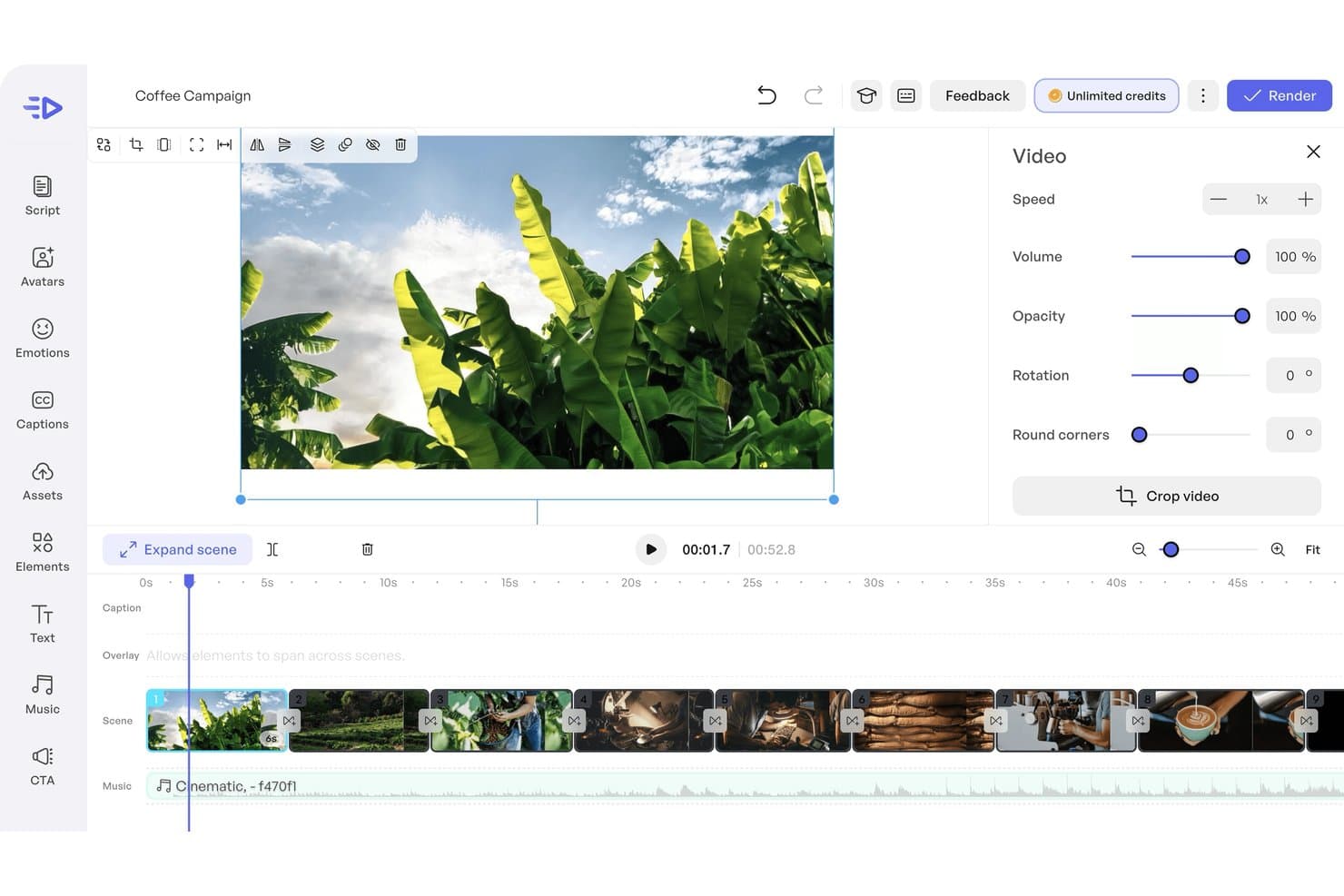
Creatify AI offers a video editing timeline with scene management, video property controls, and music overlay tools for UGC campaign creation. Creatify is an AI video ad platform that turns product URLs into short-form UGC-style video ads using AI avatars, AI-generated scripts, voice synthesis, and batch creative generation across 75+ languages.
Who Is Creatify Best For?
Creatify is a strong fit for DTC ecommerce brands and performance marketers who run paid social at scale and need a high volume of video ad creatives on demand.
Why I Picked Creatify
Creatify earns its spot on my shortlist because its URL-to-video workflow significantly reduces the setup required to turn a product page into an ad. You can paste a supported product URL, let the platform extract available product information and imagery, and then generate scripts and avatar-led UGC-style videos from those assets. Its variation tools make it useful when you need to test different hooks, presenters, and creative angles across paid social campaigns. Creatify still documents Batch Mode through a dedicated workflow, although its help center says the feature has been removed from the main dashboard and does not confirm the previously stated 50-video limit.
Creatify Key Features
- AI media buyer: Automatically optimizes ad delivery and creative testing across Meta, TikTok, and AppLovin.
- Competitor ad tracker: Search and review over 10 million Meta ads for competitive insights and inspiration.
- Bring your own avatar: Upload custom spokesperson videos to create branded digital avatars for your ads.
- Multilingual voice synthesis: Choose from 140+ voice options and 75+ languages for localized video ad production.
Creatify Integrations
Creatify offers native integrations with Meta Ads, TikTok Ads, Google Ads, Shopify, Google Analytics, AppLovin, YouTube, Snap, and Amazon. An API is available for custom integrations.
Pros and Cons
Pros:
- Includes 1,500+ AI avatars and 75+ languages
- Batch generates up to 50 ad variants
- Converts Shopify or Amazon URLs into videos
Cons:
- Limited advanced editing for generated video output
- Avatars sometimes show unnatural facial movements
Learn more about Creatify: Best for multilingual avatar localization
- Free plan available
- From $24/month (billed annually)
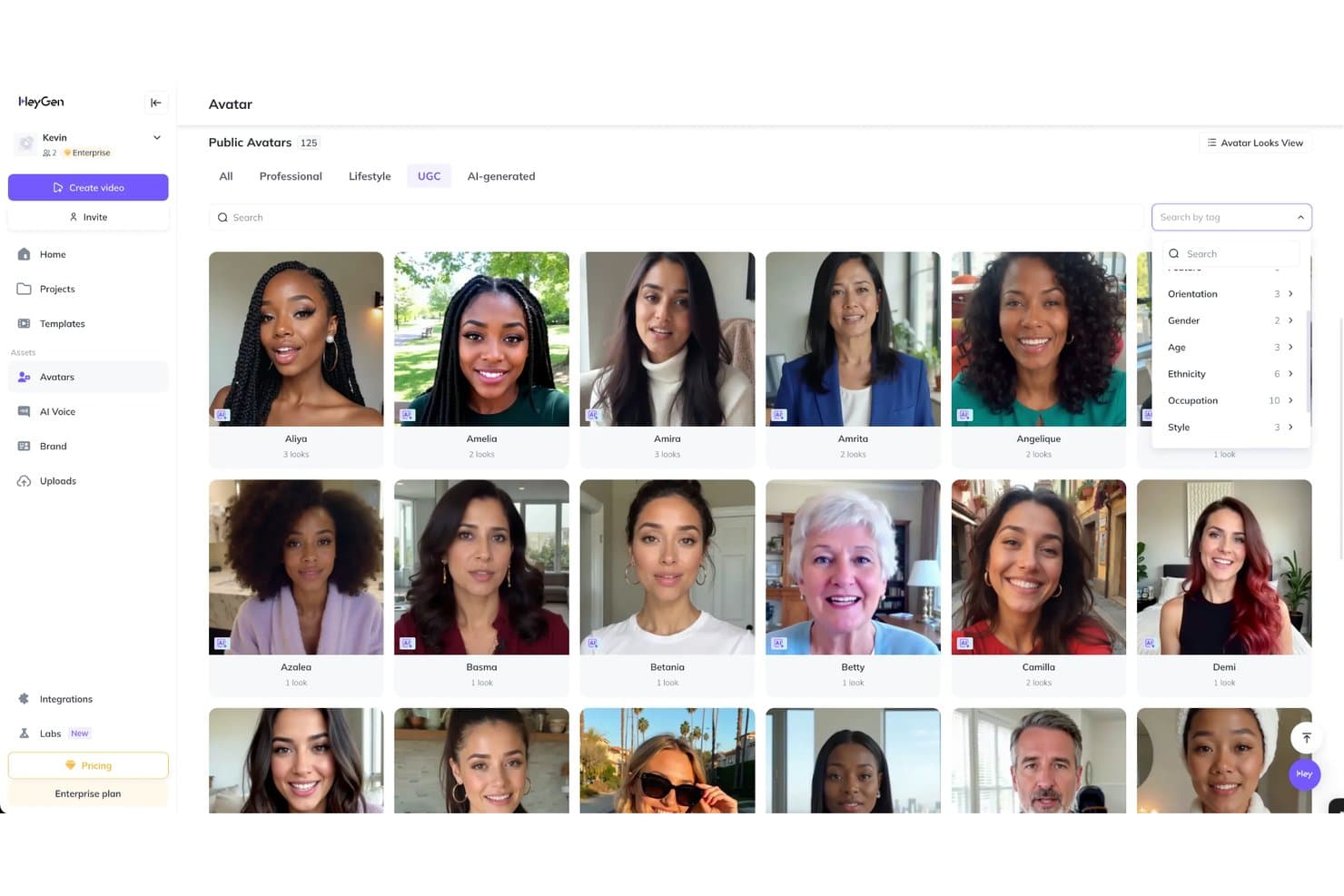
HeyGen offers a UGC avatar library with 125 public avatars filterable by orientation, gender, age, ethnicity, occupation, and style. HeyGen is an AI video generation platform that lets you create avatar-driven, short-form video content using digital twins, stock avatars, voice cloning, and multilingual lip-sync translation across 175+ languages.
Who Is HeyGen Best For?
HeyGen is a strong fit for brand and marketing teams running product campaigns across multiple regions who need localized video content without per-market production costs.
Why I Picked HeyGen
HeyGen earns its spot on my shortlist because its multilingual localization goes beyond replacing subtitles. Its video translation tools can translate spoken content while adjusting lip movements to the target language, helping you turn one source video into localized versions without filming each one separately. The voice-cloning functionality is especially useful because it can preserve characteristics of the original speaker’s voice across supported languages instead of replacing every version with a generic text-to-speech voice.
HeyGen Key Features
- UGC Ads and Reaction Videos: Create short-form, vertical videos styled for TikTok, Instagram, and YouTube using avatars.
- Product Ads generator: Upload product images and scripts to place products in avatars’ hands with music, captions, and voiceover.
- Photo-to-video conversion: Animate static images by pairing them with avatar-driven motion and speech for engaging content.
- Template and API-based batch generation: Produce multiple video variants in bulk using template libraries and workflow automation tools.
HeyGen Integrations
HeyGen offers native integrations with Canva, Figma, HubSpot, Salesforce, Airtable, Asana, Notion, Slack, Zoom, Vimeo, and Zapier. An API is available for custom integrations.
Pros and Cons
Pros:
- Multilingual support covers 175+ languages
- Voice cloning maintains original speaker tone
- Realistic avatars with accurate mouth movements
Cons:
- No native catalog sync for ecommerce
- Avatars can appear stiff or unnatural
Learn more about HeyGen: Best for replicating proven ad formats
- Free plan available
- From $29/month (billed annually)
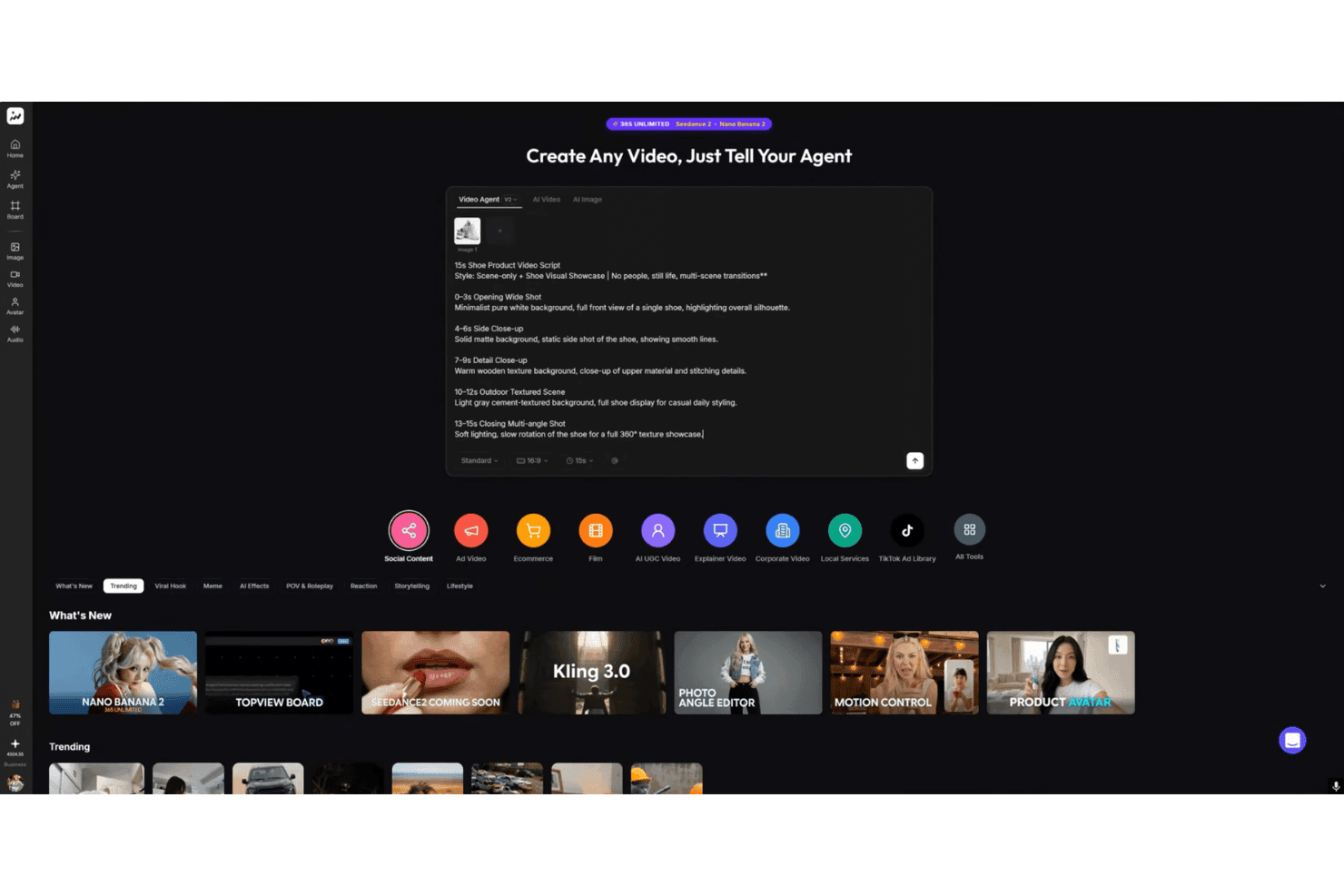
TopView.ai offers an AI-powered video agent interface where users can input detailed video scripts to automatically generate multi-scene product showcase videos. TopView.ai is an AI video agent that converts product URLs or images into UGC-style short-form ads using AI avatars, voice cloning, and AI script generation—without a traditional video editing workflow.
Who Is TopView.ai Best For?
DTC brands, ecommerce marketers, and social media managers who need a high-volume pipeline of product ad creatives for TikTok, Reels, and paid social.
Why I Picked TopView.ai
I picked TopView.ai as one of the best because its Video Clone workflow can use an existing video as a creative reference and reproduce elements such as its style, hook, and script structure with your own product assets. That gives you a more concrete starting point than developing every ad format from scratch, without implying that the platform recreates another ad’s exact shot sequence. Its Product Avatar tools also let an AI presenter display or interact with a product, making the resulting video more product-focused than a standard talking-head clip.
TopView.ai Key Features
- Voice cloning support: Create videos using your own AI-generated voice.
- Product Anyshoot module: Turn static product images into realistic lifestyle scenes.
- Concurrent rendering: Generate multiple video tasks at the same time for higher volume production.
- Multilingual AI voiceover: Produce content in more than 20 languages using synthetic voices.
TopView.ai Integrations
TopView.ai supports native integrations with Amazon, Shopify, and eBay for automatic product import, and provides an API for custom integrations.
Pros and Cons
Pros:
- Access to viral TikTok ad references
- Converts product URLs to UGC videos instantly
- Product avatar can hold and interact items
Cons:
- Limited reviews from established enterprise buyers
- No built-in A/B testing for video variants
Learn more about TopView.ai:
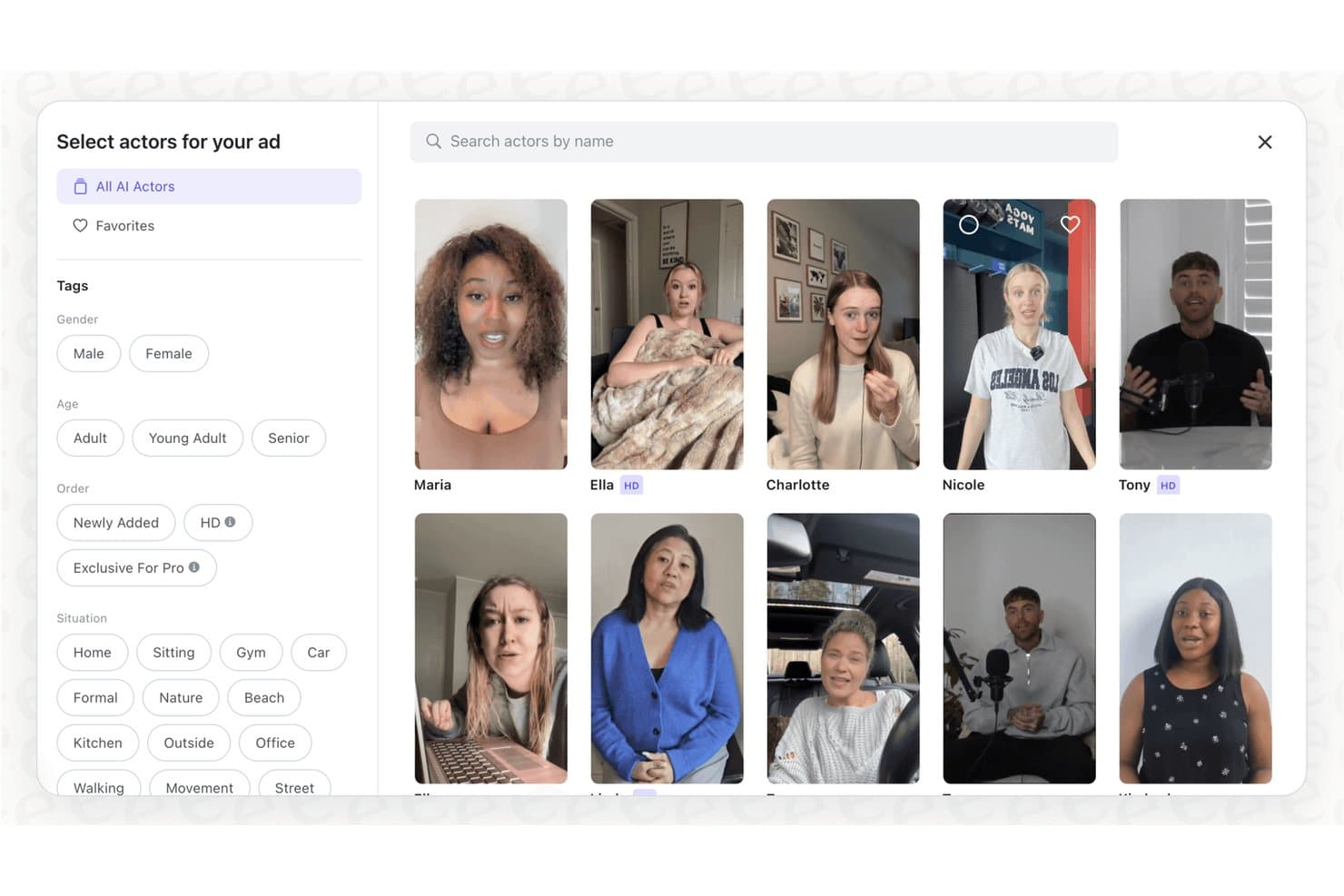
Arcads offers a diverse AI actor library with filtering options by gender, age, situation, and HD quality for UGC ad creation. Arcads is an AI UGC video platform that generates short-form, creator-style video ads using a library of over 1,000 AI actors, with built-in lip-sync, multilingual localization, and batch ad variation tools.
Who Is Arcads Best For?
Arcads is a strong fit for DTC brands and mobile app studios that run high-volume paid social campaigns and need a constant supply of creator-style video ads without sourcing human talent.
Why I Picked Arcads
I picked Arcads as one of the best because the depth of its actor library makes it especially useful for brands producing ads for different products, audiences, and campaign styles. With 1,000+ AI actors, you can choose an on-screen persona that fits each creative brief without using the same face across every ad. I also like that Arcads offers prompt-based performance controls and supports lip-sync across 30+ languages, helping you adapt the same campaign concept for multiple markets without organizing additional shoots.
Arcads Key Features
- Ready-made ad presets: Select from templates designed specifically for ecommerce, SaaS, and mobile app ad creative.
- Infinite workflow canvas: Organize, remix, and manage multiple video ads and creative variations in a single visual workspace.
- AI product placement: Drop your product images into scenes so AI actors can display or interact with real items on camera.
- Creative variation workflow: Generate, organize, and compare multiple scripts, actors, and video variations within the platform’s visual workflow canvas.
Arcads Integrations
Native integrations are not clearly documented. Arcads offers an API for custom integrations.
Pros and Cons
Pros:
- Direct upload of products for in-scene placement
- Batch generate short-form videos in one workflow
- 1,000+ AI actors across demographics and styles
Cons:
- No Shopify or Amazon catalog sync available
- AI does not generate scripts from prompts
Learn more about Arcads:
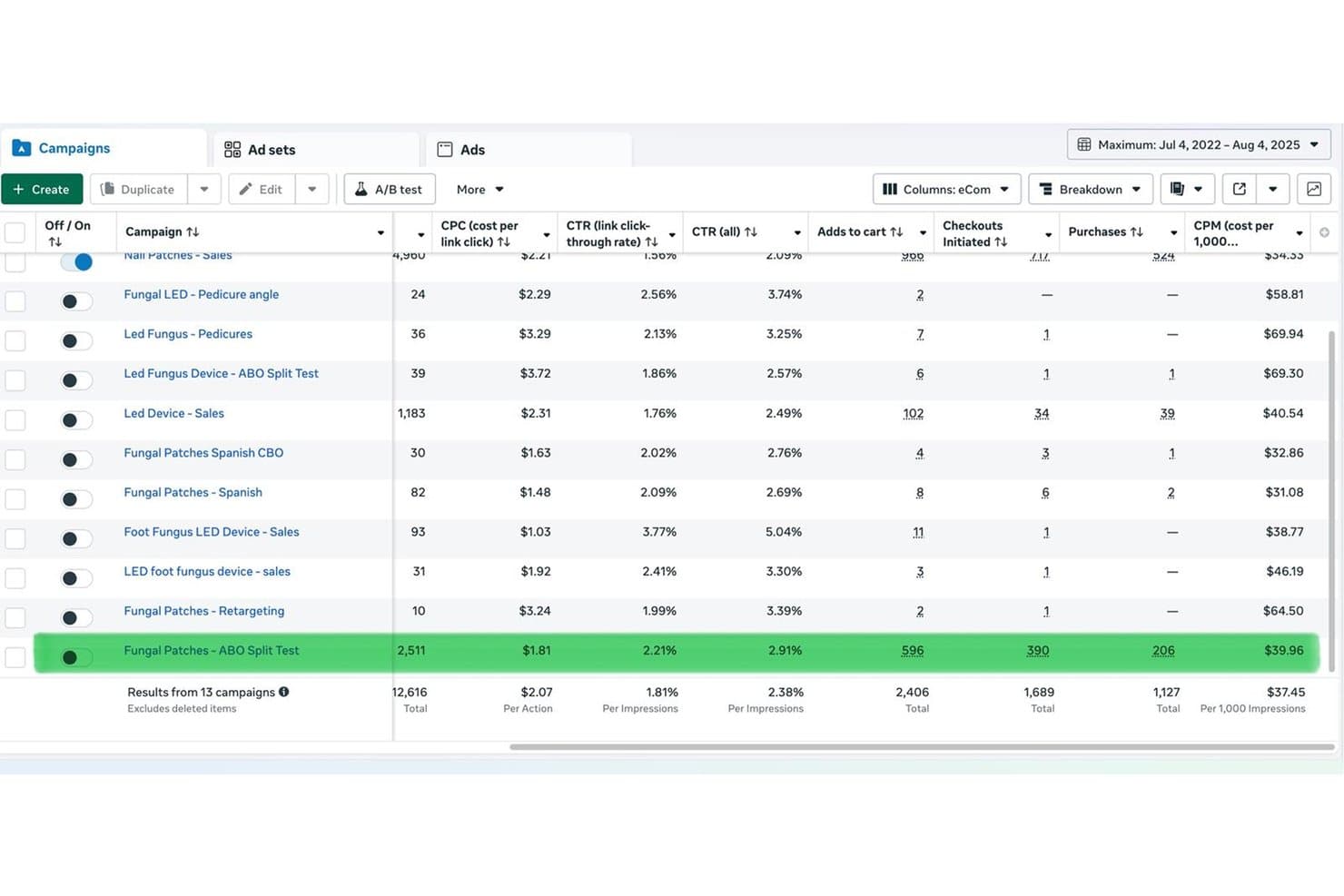
MakeUGC features a Facebook Ads Manager campaigns dashboard showing performance metrics including CPC, CTR, add to carts, checkouts, purchases, and CPM across 13 campaigns. MakeUGC is an AI UGC video ad platform that generates creator-style video content using a library of 1,000+ AI avatars, AI script generation, product-in-hand video, batch creation, and multilingual lip-sync across 50+ languages.
Who Is MakeUGC Best For?
MakeUGC is a strong fit for DTC brands and ecommerce marketers who need a consistent volume of product-focused video ads without relying on human creators.
Why I Picked MakeUGC
MakeUGC earns its spot on my shortlist because its Product in Hand feature can generate videos in which an AI avatar holds and presents a product using an uploaded product image. The platform also offers Gesture Video controls intended to produce more expressive avatar movement than a basic talking-head presentation. I also like its Video Agent, which can use existing ads as structural inspiration when creating a new version for your product. Product in Hand and Video Agent are currently included with the Pro plan rather than the entry-level plan.
MakeUGC Key Features
- Batch Mode: Generate multiple video variations in one workflow for creative testing; this feature is included with Growth and higher plans.
- Content library: Browse and recreate top-performing UGC ads with one click.
- AI scripting: Automatically script product-focused videos with AI-driven copywriting tools.
- B-roll video generator: Incorporate supplemental video clips for richer, more dynamic ads.
MakeUGC Integrations
MakeUGC offers native integrations with ElevenLabs and supports API access for custom integrations. Native integrations are not clearly documented beyond these options.
Pros and Cons
Pros:
- Over 1,000 diverse AI avatar options
- Video Agent recreates proven ad formats automatically
- Avatars can physically hold and display products
Cons:
- Monthly credits expire if unused
- No native Shopify or Amazon catalog sync
Learn more about MakeUGC:
Other AI UGC Platforms
Here are some additional AI UGC platform options that didn’t make it onto my shortlist, but are still worth checking out:
How I Evaluate AI UGC Platforms
I break my evaluation into two layers: acceptance criteria every platform must hit to generate UGC-style product ads at scale, and differentiating factors that separate the best from the rest.
Core Functionality (Table Stakes For This List)
When I'm selecting tools for my list, I rank each one on a scale from 0 (does not offer the functionality) to 5 (excels in this area) for each core functionality listed below. Then, I calculate the tool's total score into a percentage. Each tool needs to achieve a minimum total score of 65% to be considered for inclusion.
- AI Avatar Generation: I evaluate the size and diversity of the avatar library, plus whether the platform supports custom avatar cloning from your own footage.
- AI Voice & Script: The script tools should go beyond basic templates—I look for AI-generated hooks, CTAs, and natural-sounding voice options.
- Product Integration: I check whether the platform can pull product data from a URL or storefront like Shopify, rather than relying on manual uploads.
- UGC-Style Video Output: Videos need to look like real creator content—vertical format, casual settings, and natural gestures—not polished corporate talking heads.
- Batch Creative Variation: For paid social testing, I look at how many ad variants you can generate at once and whether you can swap hooks or avatars in bulk.
- Multilingual Localization: Platforms should support enough languages and accents to run localized campaigns, with accurate lip-sync across each output.
Once I have a list of tools that meet the criteria, I consider what sets each platform apart.
Differentiating Factors (What Sets Vendors Apart)
Here's how I compare and contrast different vendors:
Standout Features
Custom avatar cloning is a big separator here—it lets you build a branded spokesperson from a short video clip and reuse that face across dozens of campaigns. This can supplement partnerships with content creators when you need additional versions, although it does not turn synthetic footage into a genuine customer endorsement. I also evaluate how well a platform combines B-roll, product shots, and captions with avatar footage, since that determines whether your output is ready to publish. A strong hook and script generator matters too, especially when you’re testing multiple creative angles for the same product across TikTok or Reels.
Beyond Features
Output quality is the first thing I evaluate beyond features. High-quality lip-sync and natural-looking gestures can make an ad less distracting, but they do not guarantee stronger ROAS; performance still depends on your offer, targeting, messaging, and creative strategy. Licensing and commercial usage rights also matter, especially as ad platforms refine their rules for labelling AI-generated media. I consider the pricing model too, since credit-based plans can get expensive quickly when you’re running dozens of creative tests per week.
How to Choose AI UGC Platform
It’s easy to get bogged down in long feature lists and complex pricing structures. To help you stay focused as you work through your unique software selection process, here’s a checklist of factors to keep in mind:
| Factor | What to Consider |
|---|---|
| FactorScalability | What to ConsiderWill the platform handle your projected creative volume and support growth as your campaign volume increases? |
| FactorIntegrations | What to ConsiderDoes it work with your current ecommerce, DAM, or ad platforms like Shopify or Meta Ads Manager? |
| FactorCustomizability | What to ConsiderCan you tailor avatars or scripts to your brand’s voice, look, and compliance needs without major workarounds? |
| FactorEase of use | What to ConsiderWill your team need hours of training, or can users generate varied video ads with minimal ramp-up time? |
| FactorImplementation and onboarding | What to ConsiderHow quickly can you get campaigns up and running? Will you need dedicated IT resources to set up user access? |
| FactorCost | What to ConsiderDoes the pricing structure align with your test-and-learn cadence? Watch for per-credit plans if you need frequent variants. |
| FactorSecurity safeguards | What to ConsiderWhat controls exist to protect product images, user profiles, and campaign data—especially with AI-generated assets? |
| FactorSupport availability | What to ConsiderAre live chat or dedicated account managers available if you hit a snag, especially before a campaign launch? |
What Are AI UGC Platforms?
AI UGC platforms are software tools that generate user-generated content style videos using artificial intelligence, mimicking authentic creator delivery for product marketing. They let your team create branded, shoppable short-form ads at scale by combining AI-generated avatars, voiceovers, and scripts with your actual product imagery—making it easier to maintain a steady flow of localized, on-brand creative for campaigns across digital channels.
Features of AI UGC Platform
When selecting AI UGC platform, keep an eye out for the following key features:
- Video export options: Export finished videos in various formats and resolutions to fit requirements for paid social, organic, or catalog placements.
- Collaboration tools: Share drafts, gather feedback, and approve creative assets within the platform to speed up decision-making across marketing teams.
- Brand asset library: Store, manage, and re-use logos, design elements, and product images for consistency across all generated content.
- Template management: Build, save, and repurpose custom video templates so future campaigns launch faster and maintain a consistent style.
- Content scheduling: Schedule when your UGC-style videos should be published to keep up with campaign calendars or product launches.
- Multi-channel publishing: Post videos directly to different platforms like Instagram, TikTok, or YouTube without leaving the tool.
- User permissions: Set different access levels for team members or external collaborators to keep control over editing and publishing.
- Analytics dashboard: Track video performance metrics such as views, engagement, and conversions to refine future creative choices.
- Revision history: Access and restore earlier versions of videos, helping teams recover from editing mistakes or review creative changes.
- Support portals: Receive direct help and guidance through help centers, live chat, or tutorial resources for troubleshooting or onboarding.
Common AI UGC Platform AI Features
How it works varies by platform, but many of these solutions use AI in the following ways:
- AI avatar generation: Create realistic digital humans that deliver product messages in a natural, creator-style format without hiring real talent.
- AI voice synthesis: Generate lifelike voiceovers in multiple languages and accents, allowing for rapid localization and consistent brand tone.
- Script generation: Use AI to craft engaging ad scripts, hooks, and calls to action tailored to your product and target audience.
- Automated creative variation: Instantly produce dozens of video variants by swapping scripts, avatars, or product visuals for A/B testing and campaign optimization.
- Lip-sync and gesture automation: AI matches voiceovers to avatar mouth movements and gestures, making videos feel more authentic and less robotic.
- Product data integration: Automatically pull product details from ecommerce platforms or URLs, letting AI populate video content with accurate, up-to-date information.
Benefits of AI UGC Platform
Implementing AI UGC platform provides several benefits for your team and your business. Here are a few you can look forward to:
- Faster creative production: AI-driven avatars, scripts, and voiceovers can accelerate UGC content and video production, helping your team launch and revise campaigns more quickly.
- Cost reduction: You can generate product demonstrations and campaign variations while reducing how often you need additional shoots or new content creators. Any synthetic endorsements should still be clearly distinguished from genuine customer testimonials.
- Creative testing at scale: Instantly produce and iterate dozens of video variants, making it easier to optimize ad performance with rapid A/B testing.
- Localized global campaigns: Multilingual AI features let you roll out video ads in multiple languages with native accents and accurate lip-sync.
- Consistent brand presence: Centralized asset libraries and brand controls help maintain a unified look and message across every creative piece.
- Easier workflow management: Built-in collaboration, permissions, and publishing tools simplify project workflows and team coordination.
- Rights and compliance assurance: Built-in safeguards support commercial usage rights, AI-disclosure requirements, and likeness protections for peace of mind.
Costs and Pricing of AI UGC Platform
Selecting AI UGC platform requires an understanding of the various pricing models and plans available. Costs vary based on features, team size, add-ons, and more. The table below summarizes common plans, their average prices, and typical features included in AI UGC platform solutions:
Plan Comparison Table for AI UGC Platform
| Plan Type | Average Price | Common Features |
|---|---|---|
| Plan TypeFree Plan | Average Price$0 | Common FeaturesLimited video exports, watermarked outputs, basic templates, and single user access. |
| Plan TypePersonal Plan | Average Price$20-$50/user/month | Common FeaturesMore export options, access to basic avatars, script assistance, and standard creative templates. |
| Plan TypeBusiness Plan | Average Price$60-$150/user/month | Common FeaturesCustom branding, premium avatars, collaboration tools, analytics, and workflow integrations. |
| Plan TypeEnterprise Plan | Average Price$200+/user/month | Common FeaturesUnlimited exports, custom avatar cloning, advanced permissions, API access, and dedicated support. |
AI UGC Platform FAQs
Here are some answers to common questions about AI UGC platform:
Can AI UGC platforms be used for both ads and organic content?
Yes. AI UGC platforms can create assets for both paid advertising and organic social channels. Teams commonly use them for TikTok, Instagram Reels, YouTube Shorts, product pages, and other placements that require a steady supply of short-form creative.
How customizable are the avatars and scripts in these tools?
Most platforms let you adjust avatar appearance, clothing, voice, and script tone. Some even support custom avatar cloning, so you can match known spokespeople or influencers based on your brand’s needs.
Are videos from AI UGC platforms allowed on major ad networks?
Yes, but ad networks like Meta and TikTok are increasingly requiring AI-disclosure labels. It’s important to check each platform’s policy and ensure your chosen tool provides export options that meet these requirements.
What should I know about data privacy with these platforms?
You should review each vendor’s approach to storing creative assets, personal likenesses, and product data. Look for clear privacy policies, permission controls, and licensing guidelines to avoid misuse or compliance risk.
Can these tools integrate with our creative or ad management stack?
Most leading solutions offer integrations with ad platforms, DAMs, or APIs. Double-check whether your stack—like Google Drive, Meta Ads Manager, or workflow tools—is supported before committing.