

Programele de gestionare a atelierelor de prelucrare a lemnului vă ajută să conectați gestionarea afacerii, gestionarea materialelor, estimarea costurilor, programarea și procesele de producție. Configurația potrivită depinde de modul în care operați: dacă conduceți o mică afacere, este posibil să aveți nevoie de urmărirea proiectelor și de CRM, în timp ce un producător în creștere poate avea nevoie de o soluție ERP care să conecteze inventarul, achizițiile și zona de producție. În acest ghid, compar instrumente concepute pentru industria prelucrării lemnului, de la programe ERP complete până la aplicații specializate pentru proiectarea mobilierului și prelucrarea CNC.
Why Trust Our Software Recommendations
6,700+
Reviews
20
Industry experts
16+
Evaluation factors
14
Years
Our team has been testing and reviewing software since 2012. As retail leaders ourselves, we know how difficult—and important—it is to choose the right software.
For this guide, we evaluated tools using hands-on testing and independent research, scoring tools using our selection criteria.
Our reviews reflect our independent judgment—not a sales pitch.
Tabel comparativ: programe de gestionare a atelierelor de prelucrare a lemnului
Comparați alăturat prețurile și specificațiile programelor de gestionare a atelierelor de prelucrare a lemnului incluse în lista mea scurtă.
Sorted by: Default
| Tool | Starting Price | Website | |
|---|---|---|---|
Best for automatic cut lists and reports | 4.3 out of 5 | $49.99/month 14-day free trial available | Website |
Best for customizable millwork workflows | Not rated | Pricing upon request Free demo available | Website |
Best for visual lead-to-install tracking | Not rated | $199/month 14-day free trial available | Website |
Best for mobile cabinet shop operations | Not rated | Pricing upon request No free trial available | Website |
Best for browser-based CNC production | Not rated | $110/month 7-day free trial available | Website |
Best for online custom-product ordering | Not rated | Pricing upon request Free demo available | Website |
Best for identifying workflow bottlenecks | Not rated | Pricing upon request Free demo available | Website |
Best for bid-to-billing job control | Not rated | Pricing upon request Free demo available | Website |
Best for multi-site factory operations | Not rated | Pricing upon request Free demo available | Website |
Best for modular design-to-manufacture | Not rated | Pricing upon request Free demo available | Website |


Recenzii ale celor mai bune programe de gestionare a atelierelor de prelucrare a lemnului
Mai jos sunt prezentate rezumatele mele detaliate ale celor mai bune programe de gestionare a atelierelor de prelucrare a lemnului incluse în lista mea scurtă. Recenziile mele oferă o analiză detaliată a funcțiilor, a celor mai potrivite cazuri de utilizare și a integrărilor fiecărui program, pentru a vă ajuta să îl găsiți pe cel mai potrivit pentru dumneavoastră.
 Best for automatic cut lists and reports
- 14-day free trial available
- From $49.99/month (billed annually)
Visit WebsiteCustomer Rating:4.3/5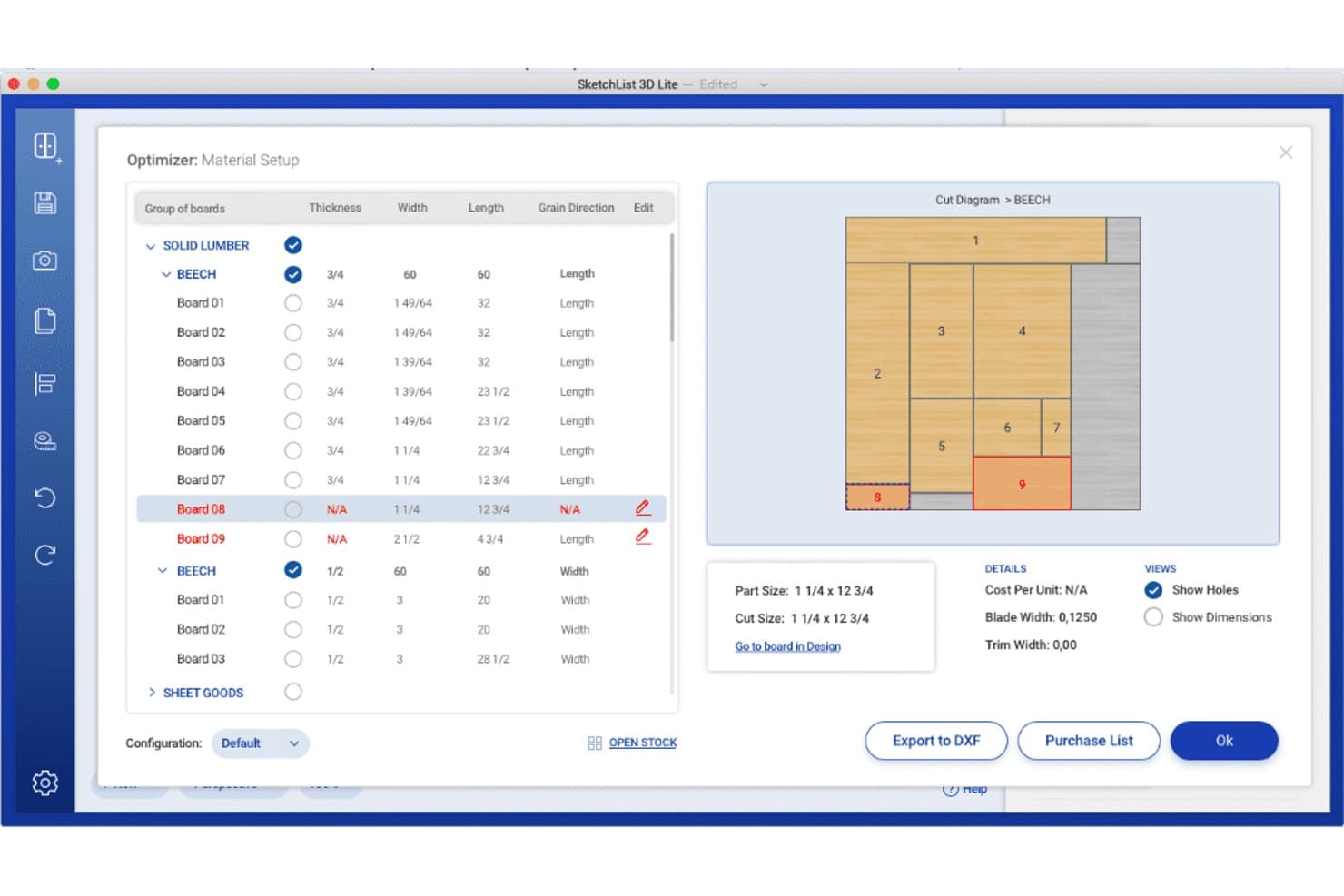
SketchList 3D offers a material optimizer with cut diagrams, board grouping, grain direction settings, and export options for wood shop planning. SketchList 3D is a woodworking design tool built for cabinet makers that combines 3D visualization, automatic cut list generation, bill of materials reporting, and job cost estimation.
Who Is SketchList 3D Best For?
SketchList 3D is a good fit for independent cabinet makers and small custom woodworking shops that need design-to-cut-list workflows without full CAD complexity.
Why I Picked SketchList 3D
I picked SketchList 3D because it keeps your cut lists, bills of materials, cost information, drawings, and material layouts aligned with design changes. You can export reports as PDF or CSV and hand DXF files off to separate CAM software for CNC programming. However, you’ll need another application to generate G-code because SketchList is a design and planning tool rather than a CAM system.
SketchList 3D Key Features
- Cabinet Wizard: Lets you adjust over 70 cabinet parameters including dimensions, joinery, door styles, and materials.
- Shop drawings and elevations: Auto-generates detailed shop drawings and 2D elevations from your design.
- Pre-built materials library: Includes reusable materials, hardware, and contour templates for fast configuration.
- Real-time 3D visualization: Displays project designs in realistic 3D with photo background import for client spaces.
SketchList 3D Integrations
SketchList 3D offers native integrations with CNC routers through DXF file export and supports CAD tool integration using the same DXF format. CSV and PDF exports are available for shop floor workflows. Native integrations with other software vendors are not clearly documented.
Pros and Cons
Pros:
- Outputs shop drawings and detailed elevation views
- Instant cut list and BOM updates from designs
- Cabinet Wizard with extensive customization options
Cons:
- Lacks customer order and job scheduling tools
- No lumber or hardware inventory management
Learn more about SketchList 3D: Best for customizable millwork workflows
- Free demo available
- Pricing upon request
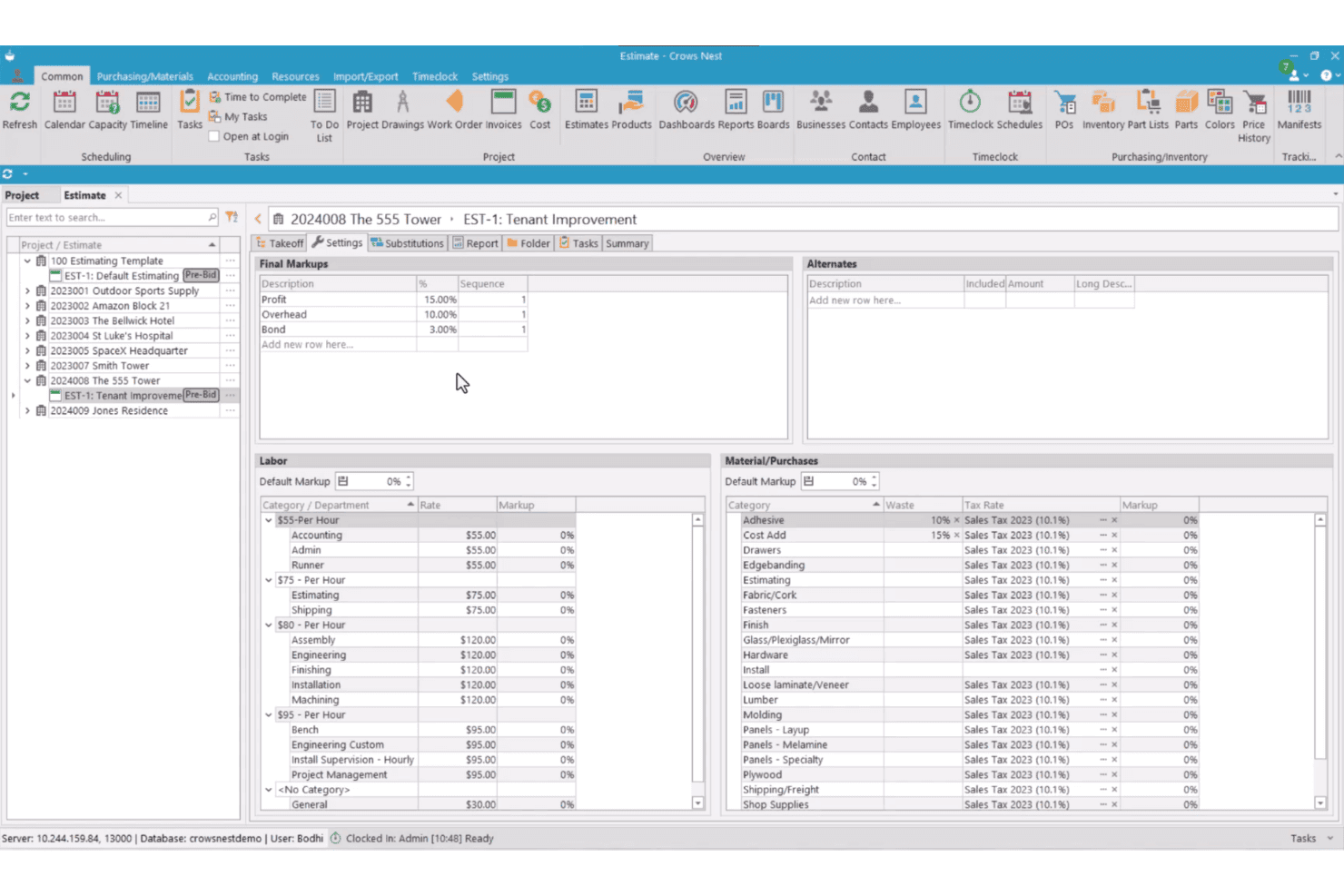
Crows Nest features an estimate settings screen with labor rates, material categories, tax rates, and final markups for a tenant improvement project. Crows Nest is a modular ERP and project management platform built for millwork and cabinet shops, covering estimating, job costing, production scheduling, purchasing, and inventory from a single system.
Who Is Crows Nest Best For?
Crows Nest suits project-based millwork and architectural woodworking shops that need a configurable ERP without being forced into a rigid, one-size-fits-all system.
Why I Picked Crows Nest
I picked Crows Nest because you can configure its workflows, dashboards, reports, and modules around your existing operations. Its Task Management engine can trigger and assign a task when a predecessor is completed, with due dates tied to project milestones. You also get more than 300 standard report layouts and tools for creating custom reports and dashboards.
Crows Nest Key Features
- Dynamic estimating module: Generate detailed takeoffs, apply vendor material pricing, and create alternate quotes for custom jobs.
- Integrated document management: Store, track, and share all project-related documents, drawings, and revisions in one place.
- Production work order management: Create and manage production work orders with scheduling and shop labor tracking.
- Mobile inventory management: Use mobile devices for real-time inventory updates, receiving purchase orders, and tracking manifests on the shop floor.
Crows Nest Integrations
Crows Nest offers native integrations with QuickBooks, Sage, Xero, Microvellum, and CabinetVision. An API is available for custom integrations.
Pros and Cons
Pros:
- Built-in document and drawing management system
- Comprehensive job costing and tracking tools
- Highly customizable workflow modules for unique shops
Cons:
- Reliance on third-party tools for cut lists
- No retail point of sale features
Learn more about Crows Nest: Best for visual lead-to-install tracking
- 14-day free trial available
- From $199/month
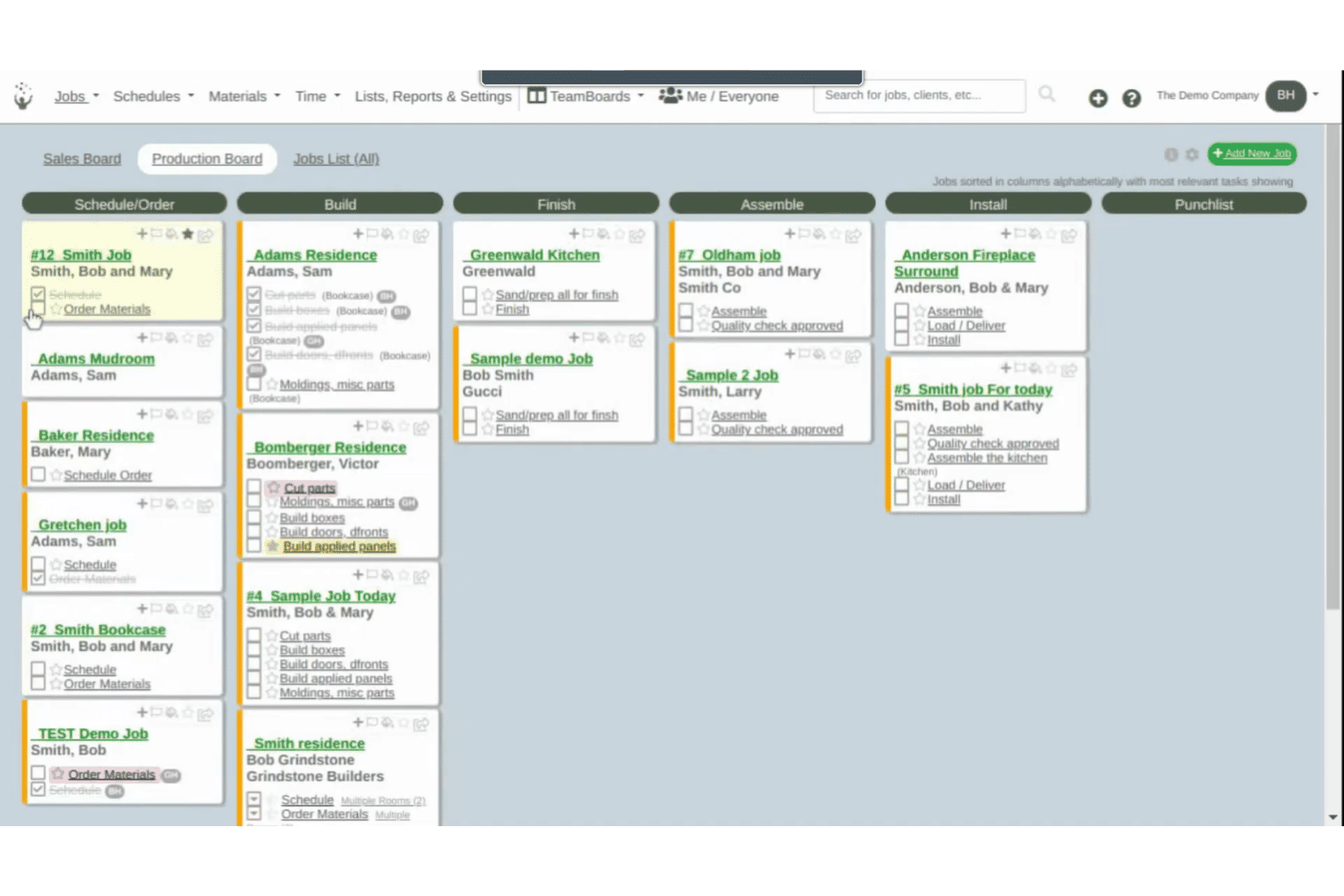
Cabinetshop Maestro offers a Kanban-style Production Board that organizes cabinet jobs across workflow stages including Build, Finish, Assemble, Install, and Punchlist. Cabinetshop Maestro is a project management tool built specifically for cabinet shops, covering job tracking, scheduling, proposals, invoicing, time tracking, and job costing across the full project lifecycle.
Who Is Cabinetshop Maestro Best For?
It's a strong fit for small to mid-sized custom cabinet shops that need a simple, shop-specific system to manage jobs from first contact through installation.
Why I Picked Cabinetshop Maestro
I picked Cabinetshop Maestro because its visual workflow boards show you where every active job sits from lead through installation. Each job also has a centralized folder for project details, files, notes, tasks, discussions, and scheduling information. This gives you a clearer operational view without requiring a full manufacturing ERP.
Cabinetshop Maestro Key Features
- Job scheduling and calendars: Plan jobs and assign due dates across the team’s calendar view.
- Proposals and invoicing: Build estimates and send invoices directly from within the platform.
- Labor time tracking: Log work hours by job and task for accurate cost records.
- Job costing reports: View real job costs against estimates using built-in reporting tools.
Cabinetshop Maestro Integrations
Native integrations are not clearly documented. Cabinetshop Maestro does not integrate directly with QuickBooks or design software like Cabinet Vision, Mozaik, or SketchUp, and it does not offer an API for custom integrations.
Pros and Cons
Pros:
- Built for cabinet shop project tracking
- Easy drag-and-drop job scheduling
- Visual workflow boards for job progress
Cons:
- No cut list or BOM generation
- No inventory management or material tracking
Learn more about Cabinetshop Maestro: Best for mobile cabinet shop operations
- No free trial available
- Pricing upon request
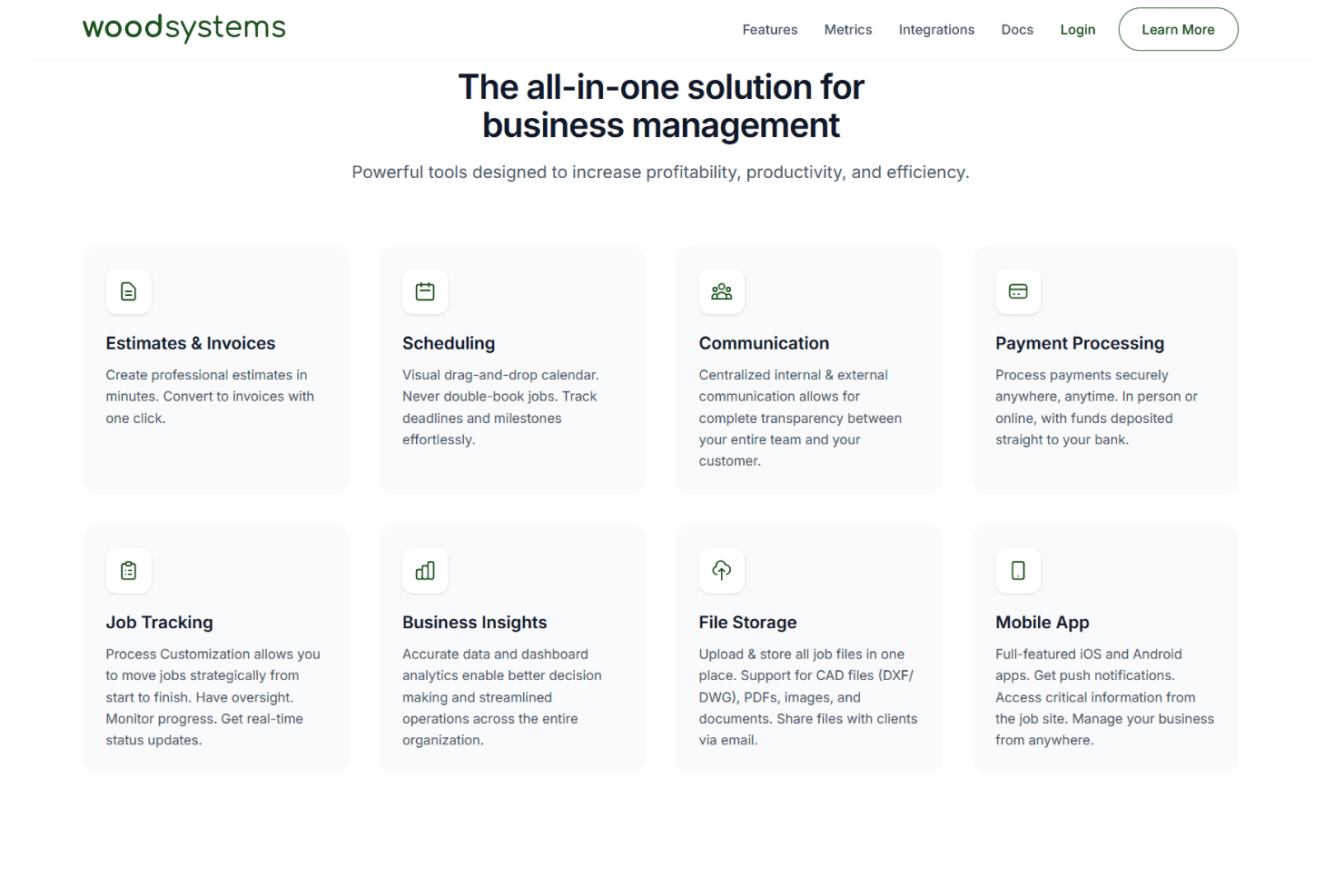
Woodsystems offers an all-in-one business management platform featuring estimates, scheduling, communication, payment processing, job tracking, business insights, file storage, and a mobile app. Woodsystems is a cloud-based ERP for custom cabinet and woodworking shops that combines estimating, job tracking, scheduling, payments, and client communication in a single platform with native mobile apps.
Who Is Woodsystems Best For?
Woodsystems is a good fit for custom cabinet shop owners who need to manage jobs, quotes, and client communication from a mobile device on the go.
Why I Picked Woodsystems
I picked Woodsystems because you can access estimates, invoices, scheduling, job tracking, files, payments, and customer communication through its web, iOS, and Android applications. Its mobile apps support push notifications and let you manage job information away from the office. You can also convert estimates to invoices without re-entering the project details.
Woodsystems Key Features
- Drag-and-drop scheduling calendar: Visually manage project timelines, shop deadlines, and installation appointments.
- QuickBooks integration: Sync job and financial data with your existing accounting system.
- CAD file storage and sharing: Attach DXF and DWG files directly to jobs and email them to clients.
- Centralized email integration: Send estimates and invoices from your Gmail, Outlook, or Microsoft 365 account.
Woodsystems Integrations
Woodsystems offers native integrations with Gmail, Outlook, Google Drive, OneDrive, Dropbox, QuickBooks, Microsoft 365, and Stripe.
Pros and Cons
Pros:
- Easy CAD file sharing with clients
- Visual scheduling for shop projects and installs
- Mobile apps allow on-site job management
Cons:
- Does not generate cut lists or BOMs
- No lumber or materials inventory tracking
Learn more about Woodsystems: Best for browser-based CNC production
- 7-day free trial available
- From $110/month
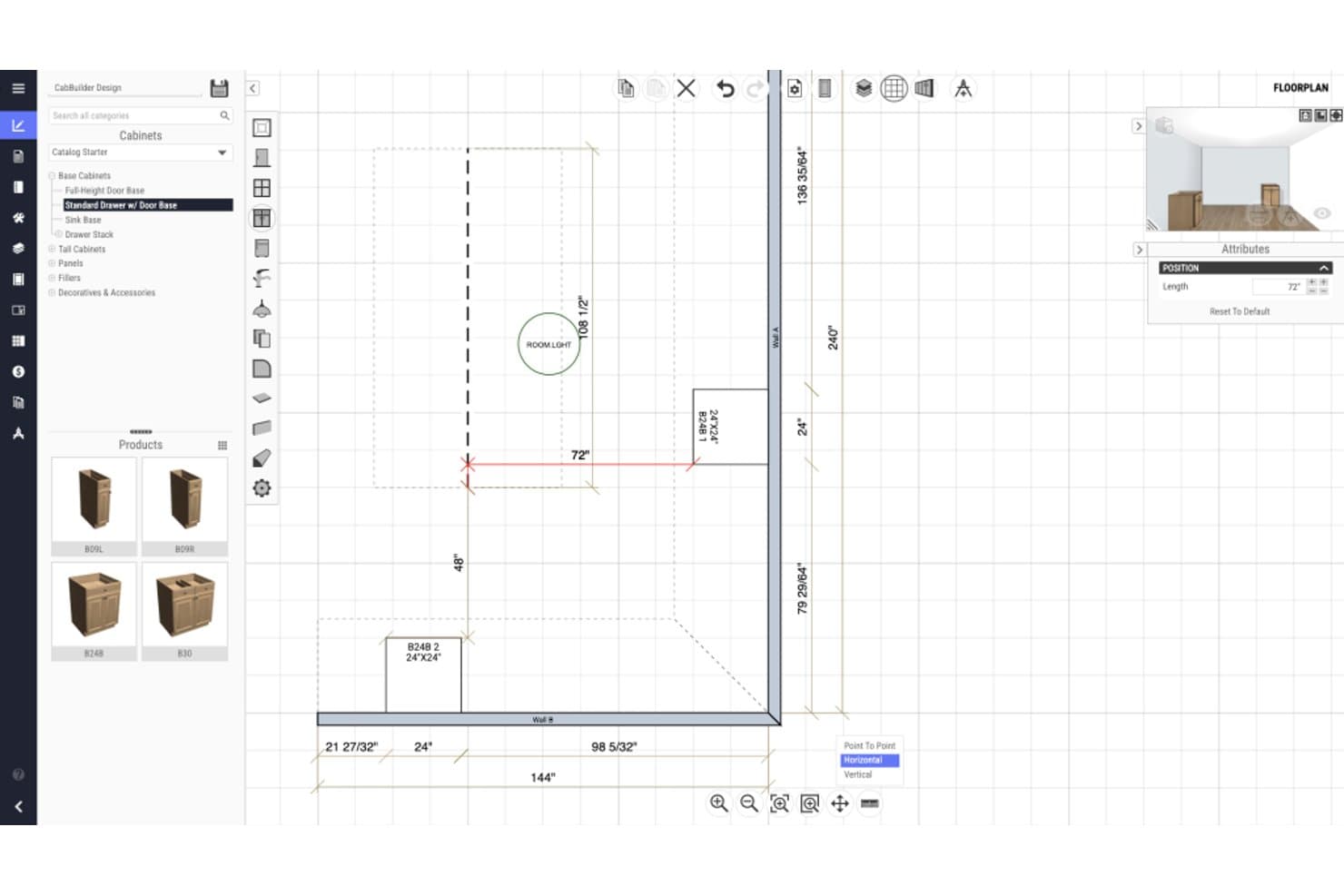
CabBuilder offers a floorplan design view where users can input and visualize cabinet dimensions with precise measurements in a 2D layout. CabBuilder is a browser-based cabinet design and CNC production tool that generates 3D designs, cutlists, optimized part nesting, and machine-ready CNC code for custom cabinet and woodworking manufacturers.
Who Is CabBuilder Best For?
CabBuilder suits small to mid-sized custom cabinet shops that need a direct path from design to CNC machine output without a full ERP system.
Why I Picked CabBuilder
I picked CabBuilder because it gives you cabinet design and production tools through a browser-compatible interface that works across Windows, macOS, iPad, and other tablets. With the CNC or Enterprise plan, you can nest cut-list parts, generate machine code through a CNC-specific post processor, and simulate toolpaths before cutting. The Pro plan focuses on cut lists and manual production rather than direct CNC output.
CabBuilder Key Features
- 3D design rendering: View and modify cabinet designs with instant updates in a real-time 3D workspace.
- Custom cabinet library: Access and build a library of framed and frameless cabinet templates for reuse across projects.
- Automated job reports: Generate detailed job and cost reports directly from your project specifications and design files.
- Door Builder module: Specify custom door profiles and produce cutlists and CNC code for doors and drawer fronts.
CabBuilder Integrations
CabBuilder offers native integrations with ProKitchen and supports CNC hardware through a free post processor. Native integrations with other business software are not clearly documented.
Pros and Cons
Pros:
- Custom cabinet and construction template library
- Strong 3D cabinet design and cutlist tools
- Browser-based direct CNC code generation
Cons:
- Lacks production scheduling and job tracking
- No lumber inventory management module
Learn more about CabBuilder:
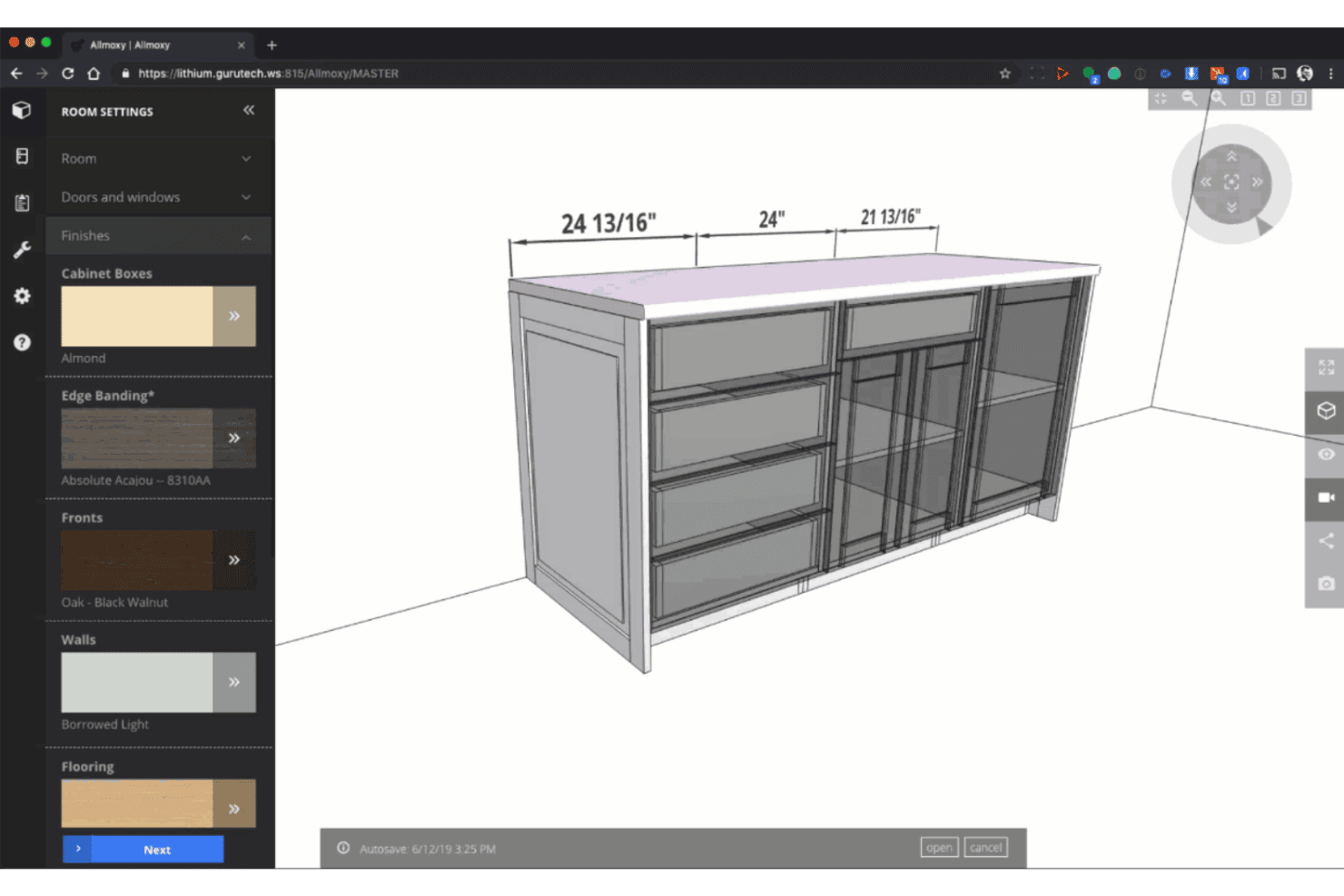
Allmoxy offers a 3D cabinet design tool with customizable finishes, edge banding, and material settings for furniture configuration. Allmoxy is a cloud-based ERP built for custom wood product manufacturers, combining online order configuration, cut list generation, production data automation, and supply and inventory management in one platform.
Who Is Allmoxy Best For?
Allmoxy is a strong fit for cabinet door, drawer, and component manufacturers that sell through wholesale dealer networks and need self-serve B2B ordering.
Why I Picked Allmoxy
I picked Allmoxy because it supports online configuration and ecommerce ordering for custom cabinetry and components. You can give customers or dealers access to catalogs, pricing, orders, invoices, and status updates through an online portal. Orders can then feed automated production data, including parts lists, cut lists, labels, and machine-data exports.
Allmoxy Key Features
- Workflow automation triggers: Automatically notify teams and customers when jobs move through specific workflow stages.
- Supply and inventory management: Manage materials, track stock levels, and control supplier relationships from the same system.
- Integrated invoice and accounting tools: Create invoices, process payments, and handle accounting activities within the platform.
- Customer portal access: Give customers real-time access to order statuses, invoices, and delivery updates through a secure online portal.
Allmoxy Integrations
Allmoxy offers native integrations with Microvellum, ClosetPro, TigerStop, Cabinet Vision, and CadCode. An API is also available for custom integrations.
Pros and Cons
Pros:
- Dealer portal supports repeat B2B ordering
- Auto-generates machine-ready cut lists
- Purpose-built for cabinet and component orders
Cons:
- No built-in shop floor production scheduling
- Limited job costing and profitability reporting
Learn more about Allmoxy: Best for identifying workflow bottlenecks
- Free demo available
- Pricing upon request
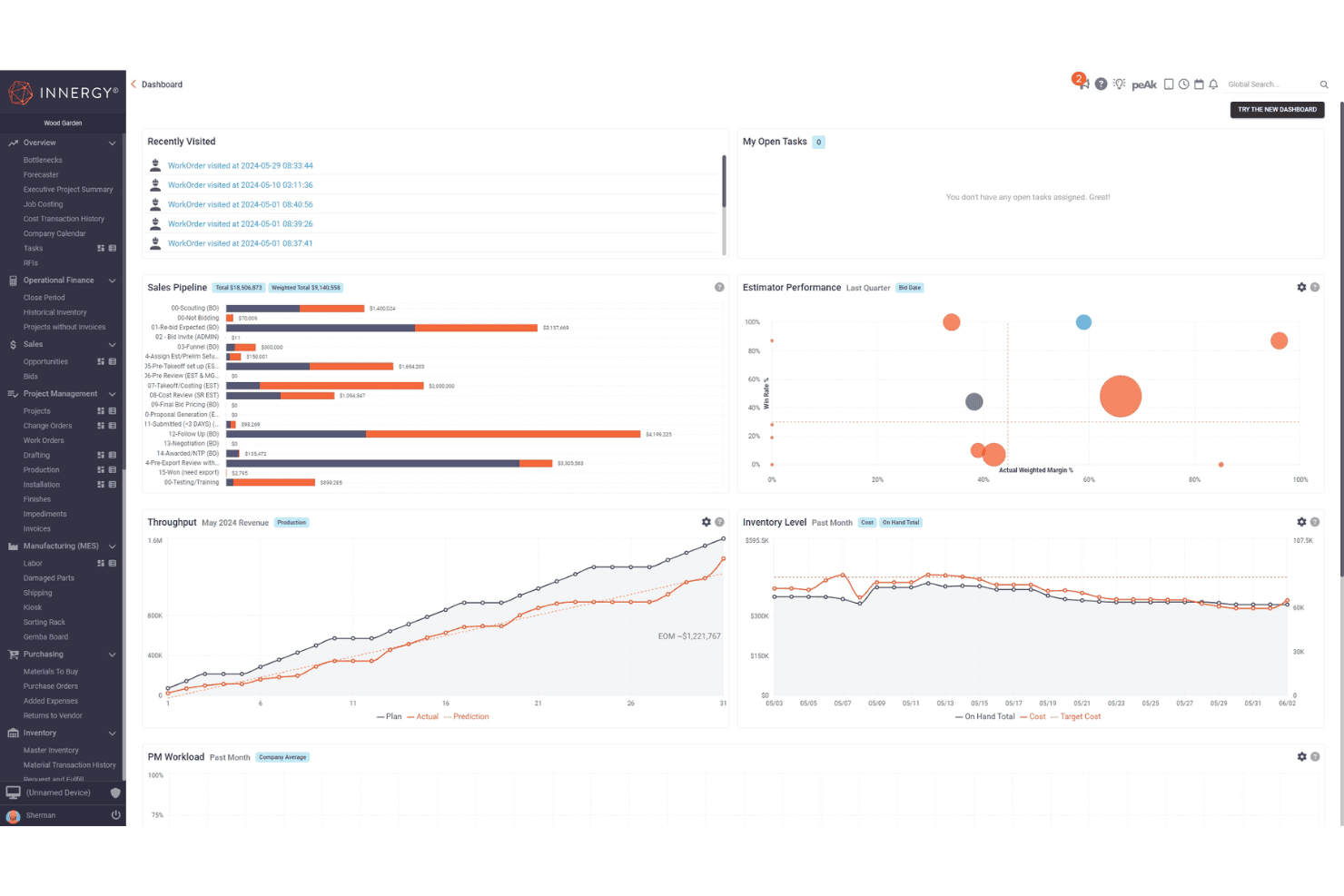
INNERGY offers a comprehensive project management dashboard featuring sales pipeline, throughput, inventory level, and estimator performance widgets. INNERGY is a cloud-based ERP built specifically for millwork and custom woodworking businesses, combining estimating, shop floor execution, job costing, project management, and production scheduling in one platform.
Who Is INNERGY Best For?
INNERGY is a strong fit for commercial millwork shops and custom cabinet producers that need end-to-end job tracking across sales, production, and installation.
Why I Picked INNERGY
I picked INNERGY because its Bottleneck Report helps you identify workflow constraints before they disrupt production. Its Throughput Widget uses that report to establish a monthly target and compare planned output with actual daily progress. This helps you spot slippage and decide where to adjust capacity.
INNERGY Key Features
- On-screen takeoff: Complete project takeoffs directly on digital blueprints with auto-calculating pricing.
- One-click bill of materials: Generate a detailed bill of materials from engineering design files with a single click.
- Integrated project management: Track project status, completion milestones, and invoicing in real time across teams.
- Job costing and payroll: Monitor actual and estimated job costs while running payroll and labor tracking from the same platform.
INNERGY Integrations
INNERGY offers native integrations with QuickBooks, Sage, NetSuite, and Microvellum, and provides an API for custom integrations.
Pros and Cons
Pros:
- Includes project estimating, costing, and scheduling
- Purpose-built for millwork and wood fabrication shops
- Bottleneck report pinpoints stalled production tasks
Cons:
- Limited lumber species inventory granularity
- No native CNC cut optimization tools
Learn more about INNERGY:
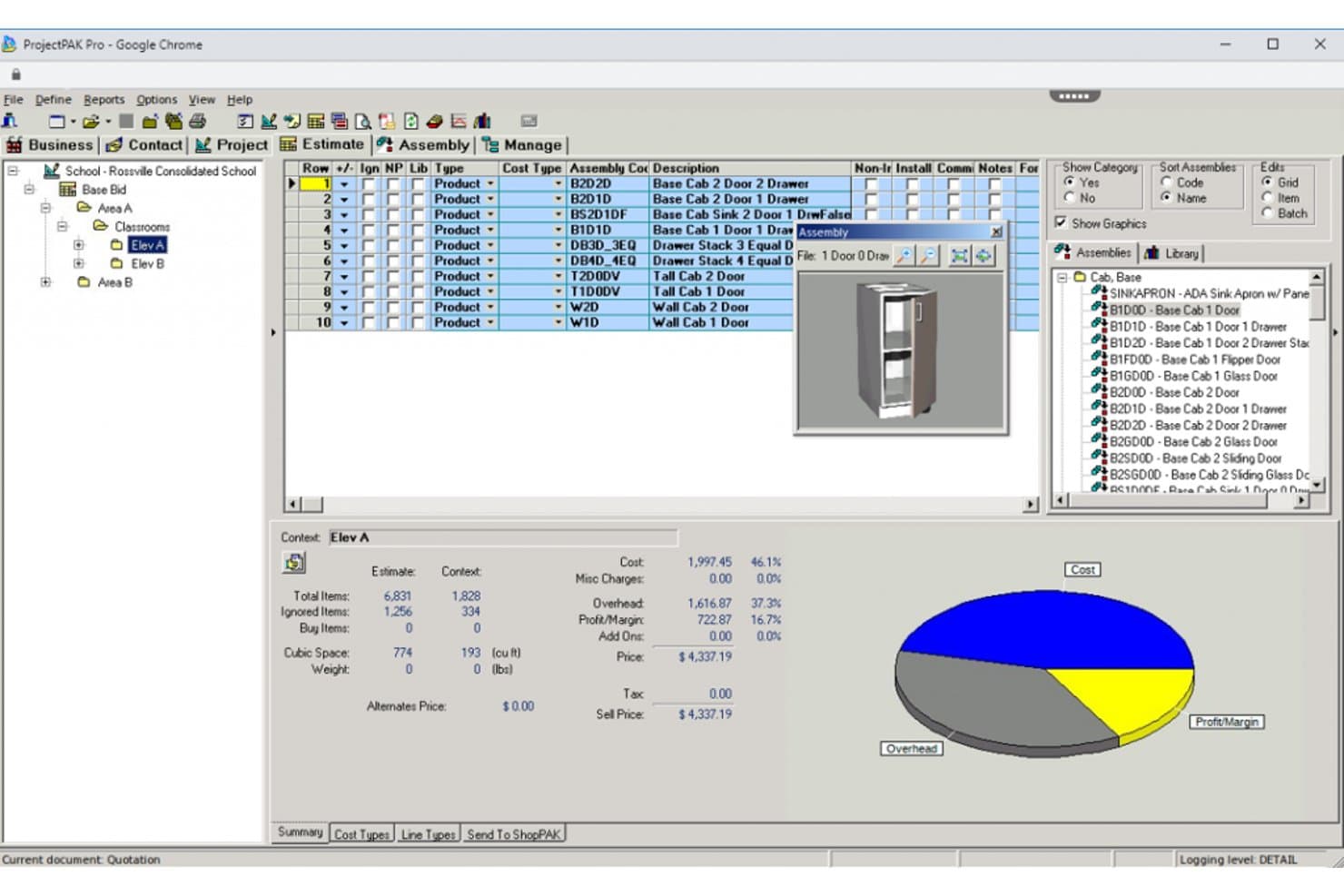
TradeSoft offers a wood shop management interface with assembly lists, 3D cabinet previews, cost breakdowns, and a pie chart showing overhead, cost, and profit margins. TradeSoft is a purpose-built estimating and job management platform for custom woodworking manufacturers, combining parametric estimating, shop floor job tracking, purchasing, inventory management, and progress billing in a single database.
Who Is TradeSoft Best For?
TradeSoft is a strong fit for architectural millwork shops and custom casework manufacturers that run complex, make-to-order production workflows.
Why I Picked TradeSoft
I picked TradeSoft because it connects ProjectPAK estimating with ShopPAK job management, helping you manage work from bidding through purchasing, production, shipping, and billing. You can build estimates from configurable job specifications and product libraries, then carry awarded work into job costing, inventory, work orders, and progress billing. Optional modules add scheduling, shop-floor data collection, and engineering links.
TradeSoft Key Features
- Pre-built casework and cabinetry databases: Access extensive libraries of parametric commercial casework and residential cabinetry items.
- Integrated purchasing and receiving: Manage purchase orders, receipt of goods, and material tracking in one connected workflow.
- Inventory management with multi-location support: Track inventory by location, audit all activity, and apply FIFO, LIFO, or weighted average costing.
- Shop floor data collection: Capture live labor inputs and production data directly from the shop floor using barcodes or handheld devices.
TradeSoft Integrations
TradeSoft offers native integrations with PlanSwift and provides engineering links for updating bills of materials from CAD and engineering software. It also has built-in interfaces to accounting packages, and an API is available for custom integrations.
Pros and Cons
Pros:
- Shop floor data collection by job section
- AIA-style progress billing and applications
- Cabinet and casework estimating templates included
Cons:
- Cut list generation requires third-party software
- No POS or retail sales workflows
Learn more about TradeSoft: Best for multi-site factory operations
- Free demo available
- Pricing upon request
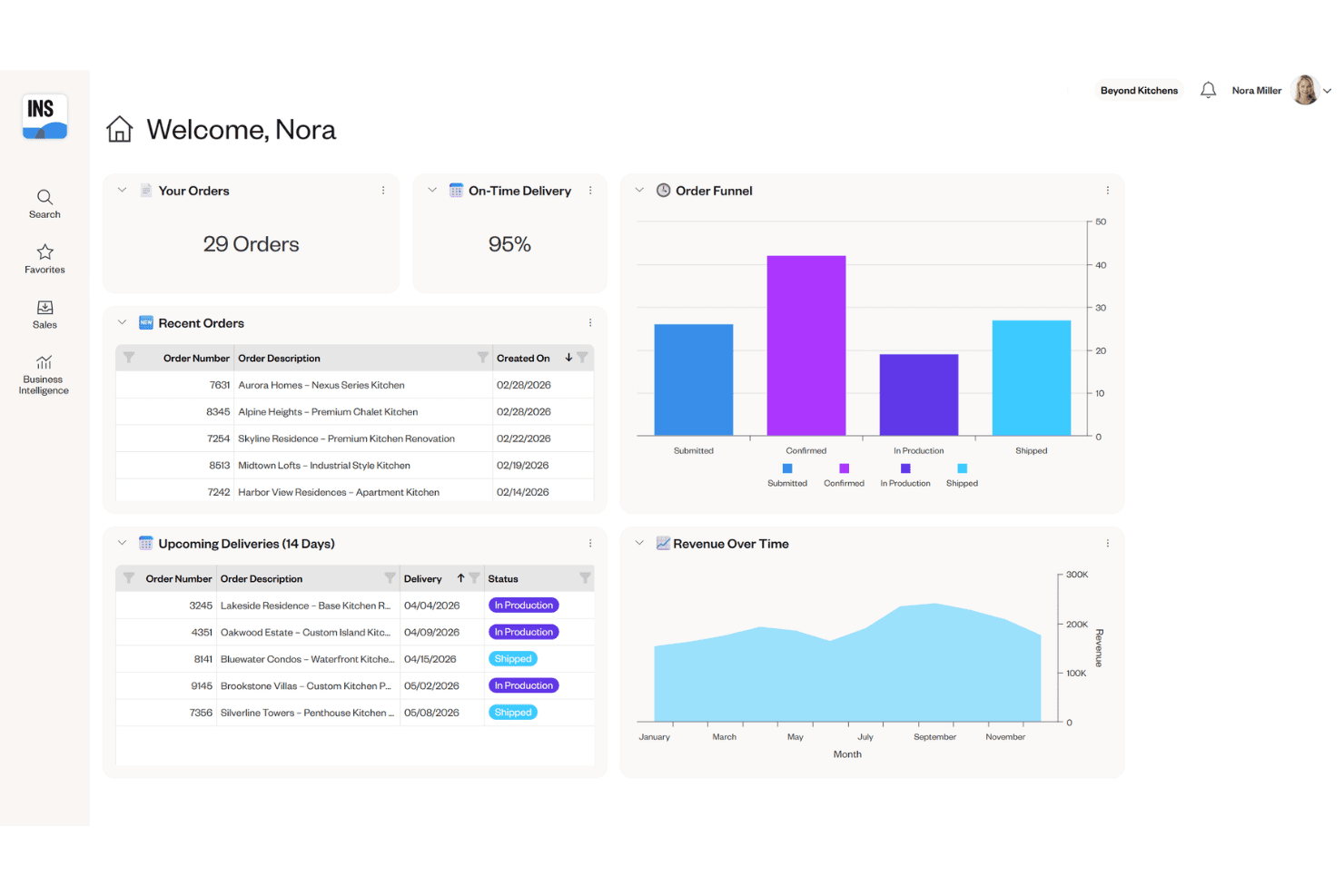
Cyncly Insight provides a dealer dashboard with order tracking, on-time delivery metrics, an order funnel chart, and revenue over time analytics. Cyncly Insight is an enterprise ERP and MES platform built for cabinet, furniture, and millwork manufacturers, combining production scheduling, order management, inventory tracking, and shop floor execution across multi-site factory operations.
Who Is Cyncly Insight Best For?
Cyncly Insight is a strong fit for mid-to-large cabinet and millwork manufacturers running multiple production facilities who need centralized scheduling and real-time shop floor visibility.
Why I Picked Cyncly Insight
I picked Cyncly Insight because it helps you coordinate planning and production across larger manufacturing operations. You can manage production and shift scheduling across multiple sites, automate work-order sequencing, and plan resources around available inventory. Its machine-data collection and SCADA capabilities can also give you real-time information from connected production equipment.
Cyncly Insight Key Features
- Visual order configuration: Let sales or design teams configure cabinet and furniture orders in real time using integrated 3D visualization.
- Machine data collection: Capture performance metrics directly from CNC machines and production equipment for accurate shop floor reporting.
- Integrated warehouse management (WMS): Track raw materials, finished goods, and inventory movement digitally across multiple warehouse locations.
- Role-based shop floor access: Assign permissions and workflows to operators, supervisors, and engineers for secure, modular process control.
Cyncly Insight Integrations
Cyncly Insight offers native integrations with 3CAD Visual CPQ, Design Flex, Winner Flex, Innoplus, Mozaik, Cyncly Payments, and supports direct connections to CNC machines and RFID hardware. An API for custom integrations is not clearly documented.
Pros and Cons
Pros:
- WMS supports complex, multi-location inventory
- Real-time equipment status from CNC machines
- Built for multi-factory scheduling and tracking
Cons:
- No built-in POS or retail workflows
- Not designed for small wood shops
Learn more about Cyncly Insight: Best for modular design-to-manufacture
- Free demo available
- Pricing upon request
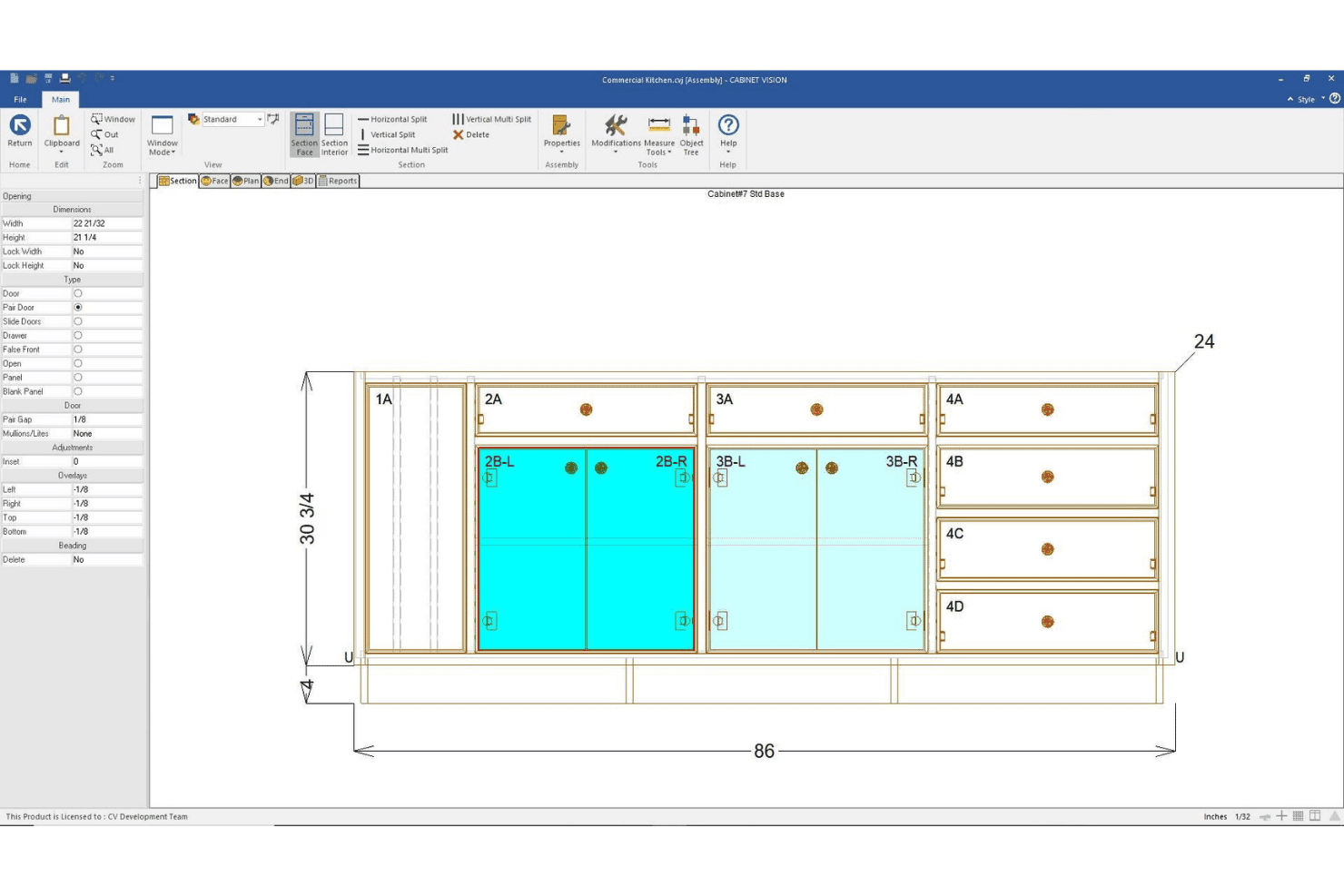
CABINET VISION by Hexagon offers a face section view of a commercial kitchen base cabinet assembly with labeled openings, pair doors, and precise measurements. CABINET VISION is a modular CAD/CAM design-to-manufacture platform for cabinet, closet, and furniture makers. It supports design, bidding, costing, material optimization, cut lists, and bills of materials. Machine-ready G-code requires Hexagon’s S2M CENTER and the appropriate machining modules rather than the base design product alone.
Who Is CABINET VISION by Hexagon Best For?
It's a strong fit for cabinet and closet manufacturers of any size that need to connect custom design directly to CNC production output.
Why I Picked CABINET VISION by Hexagon
I picked CABINET VISION because it gives you a modular path from cabinet design and costing to production output. Its bidding tools calculate materials, labor, and other costs from the engineered design, while xReporting provides more than 150 predefined reports. If you add S2M CENTER and the appropriate machining modules, you can use the same design data to generate machine-ready programs for supported CNC equipment.
CABINET VISION by Hexagon Key Features
- x2D CAD: Draft shop drawings and architectural submittals with built-in 2D CAD tools.
- xReporting: Access over 150 predefined reports or build custom reports for materials and jobs.
- Paperless Traveller: Digitize production tracking, nesting, and defect recut reporting on the shop floor.
- xCRM: Organize customer contacts, manage job records, and track job revisions in one place.
CABINET VISION by Hexagon Integrations
CABINET VISION offers native integrations with ALPHACAM and S2M CENTER for direct CNC machine output and supports hardware library integrations like Blum e-services. An API is available for custom integrations.
Pros and Cons
Pros:
- Built-in bidding and job revision tracking
- Modular licensing for targeted feature selection
- Generates CNC code for complex cabinet parts
Cons:
- No built-in project scheduling module
- No real-time lumber inventory visibility
Learn more about CABINET VISION by Hexagon:
Alte programe de gestionare a atelierelor de prelucrare a lemnului
Iată câteva opțiuni suplimentare de programe de gestionare a atelierelor de prelucrare a lemnului care nu au ajuns pe lista mea scurtă, dar merită totuși analizate:
- 11SeradexBest for CAD-to-ERP production flow
- 12MRPeasyBest for simplified small-shop MRP
- 13Joinery CoreBest for visual workshop scheduling
- 14JobmanBest for automated capacity planning
How I Evaluate Wood Shop Management Software
I evaluate wood shop management software across six operational areas, including estimating, inventory, bills of materials, production scheduling, customer orders, and job costing. I don’t expect every tool to perform every function because ERP, job-management, and CAD/CAM products support different parts of your workflow. Instead, I assess how well each product supports its intended shop-management use case and require a minimum overall score of 55% for inclusion.
Core Functionality (Table Stakes For This List)
When I'm selecting tools for my list, I rank each one on a scale from 0 (does not offer the functionality) to 5 (excels in this area) for each core functionality listed below. Then, I calculate the tool's total score into a percentage. Each tool needs to achieve a minimum total score of 55% to be considered for inclusion.
- Wood Job Estimating: I check whether the tool handles board feet, hardware, finishes, and labor in a single estimate—not just generic line-item quoting.
- Lumber Inventory Tracking: Tracking by species, dimensions, and board feet matters. I look for tools that also account for offcuts and reorder alerts.
- Cut List & BOM Generation: I evaluate whether the tool auto-generates cut lists from project specs and optimizes yield from sheet goods and stock lumber.
- Production Job Scheduling: Shops juggle multiple jobs across saws, CNC machines, and finishing stations. I look for multi-stage scheduling with resource assignment.
- Customer Order Management: I look for deposit tracking, change-order handling, and delivery updates tied to specific jobs—especially for custom cabinetry work.
- Shop Costing & Profitability: Each tool should compare actual material, labor, and overhead costs against the original estimate for real margin visibility.
Once I have a list of tools that meet the criteria, I consider what sets each platform apart.
Differentiating Factors (What Sets Vendors Apart)
Here's how I compare and contrast different vendors:
Standout Features
Cut list optimization is a big differentiator. I look for tools that generate nesting layouts from project designs to reduce waste on sheet goods and stock lumber. CAD/CAM integration also matters because shops that import SketchUp or AutoCAD files directly into their BOM save hours of manual re-entry on every project. Shop floor time tracking rounds things out; barcode or tablet-based clock-in at each workstation gives you the labor data you need to compare actual costs against your original estimates.
Beyond Features
Shop size and business model fit is one of the first things I consider. A solo woodworker building custom furniture has very different needs than a 20-person cabinet shop running production batches. I also evaluate integrations with adjacent systems—especially QuickBooks or Xero for accounting and design tools like SketchUp for BOM handoff. Licensing structure matters too. Some vendors charge per user, which adds up fast when you need shop floor employees on the system.
Cum să alegeți un program de gestionare a atelierului de prelucrare a lemnului
Este ușor să vă pierdeți în liste lungi de funcții și structuri complexe de prețuri. Pentru a vă ajuta să rămâneți concentrați pe parcursul procesului unic de selecție a programului, iată o listă de verificare cu factorii de care trebuie să țineți cont:
| Factor | Ce trebuie luat în considerare |
|---|---|
| FactorPosibilitatea de extindere | Ce trebuie luat în considerareVa fi acest program potrivit pentru atelierul dumneavoastră și pe măsură ce creșteți sau adăugați locații noi? Verificați dacă poate gestiona în timp mai mulți utilizatori, proiecte sau articole de inventar. |
| FactorIntegrări | Ce trebuie luat în considerareSe conectează instrumentul fără probleme la sistemele dumneavoastră de contabilitate, CAD/CAM, furnizori sau comerț electronic? Întrebați dacă fiecare conexiune este nativă, bazată pe API sau realizată prin exporturi de fișiere ori printr-un serviciu terț. |
| FactorPosibilități de personalizare | Ce trebuie luat în considerarePuteți adapta fluxurile de lucru, formularele și rapoartele la operațiunile dumneavoastră specifice? Luați în considerare dacă afacerea dumneavoastră are nevoie de câmpuri personalizate sau de roluri de utilizator. |
| FactorUșurință în utilizare | Ce trebuie luat în considerareÎl va folosi efectiv echipa dumneavoastră în zona de producție? Căutați meniuri simple, navigare clară și acces de pe mobil/tabletă pentru operatori și personalul de birou. |
| FactorImplementare și integrare inițială | Ce trebuie luat în considerareCât durează configurarea și ce instruire/asistență oferă furnizorul? Întrebați despre importul datelor vechi și despre ce este necesar din partea dumneavoastră. |
| FactorCost | Ce trebuie luat în considerarePrețul este calculat per utilizator, per atelier sau pe module? Analizați costurile de configurare, instruire și suplimente și verificați dacă pentru perioada de testare gratuită este necesar un card de credit. |
| FactorMăsuri de securitate | Ce trebuie luat în considerareCum protejează instrumentul datele sensibile despre clienți și lucrări? Verificați existența criptării, a procedurilor de backup al datelor și a controalelor privind permisiunile utilizatorilor. |
| FactorNecesități interne de resurse | Ce trebuie luat în considerareCine din echipa dumneavoastră va gestiona și întreține sistemul zi de zi? Luați în calcul administrarea și actualizările continue, precum și disponibilitatea personalului pentru depanare. |
Ce este un program de gestionare a atelierului de prelucrare a lemnului?
Programele de gestionare a atelierelor de prelucrare a lemnului sunt platforme digitale specializate care ajută companiile din domeniul prelucrării lemnului să organizeze ofertarea, urmărirea inventarului, programarea lucrărilor și gestionarea comenzilor. În funcție de amploarea sa, un produs poate fi o aplicație specializată pentru gestionarea lucrărilor sau un program ERP mai complex, care acoperă și achizițiile, producția și fluxurile financiare. Aceste instrumente acceptă procese specifice materialelor, precum estimarea costurilor, generarea listelor de debitare și urmărirea comenzilor clienților.
Funcțiile programelor de gestionare a atelierelor de prelucrare a lemnului
Când alegeți un program de gestionare a atelierului de prelucrare a lemnului, urmăriți următoarele funcții esențiale:
- Estimarea lucrărilor din lemn: Oferă devize detaliate pe baza picioarelor de scândură, listelor de debitare, materialelor, finisajelor și manoperei, pentru a vă ajuta să calculați cu exactitate prețul proiectelor personalizate.
- Urmărirea stocului de cherestea: Monitorizează stocul de materii prime în funcție de specie, dimensiuni și picioare de scândură, cu actualizări în timp real, astfel încât să nu rămâneți niciodată fără materialele necesare în timpul lucrării.
- Generarea listelor de debitare și a listelor de materiale: Creează liste precise de debitare și liste de materiale pe baza specificațiilor proiectului, ajutându-vă să planificați și să optimizați utilizarea materialelor.
- Programarea lucrărilor de producție: Vă permite să atribuiți sarcini, să alocați resurse și să urmăriți proiectele în fiecare etapă a fluxului de lucru din atelier.
- Gestionarea comenzilor clienților: Gestionează devizele, avansurile, modificările comenzilor și urmărirea livrărilor într-un singur loc, asociat fiecărui proiect de prelucrare a lemnului.
- Calcularea costurilor și a profitabilității atelierului: Monitorizează costurile reale în raport cu estimările, urmărind materialele, manopera și cheltuielile indirecte pentru fiecare lucrare, pentru a susține analiza marjelor.
- Integrarea cataloagelor furnizorilor: Se conectează la cataloage cu prețuri în timp real pentru feronerie și materiale, accelerând achizițiile și întocmirea devizelor.
- Urmărirea timpului de lucru în atelier: Înregistrează orele de muncă la fiecare post de lucru — adesea prin cod de bare sau tabletă — pentru a oferi transparență asupra progresului lucrărilor și productivității.
- Integrarea CAD/CAM: Importă direct în fluxul de lucru fișiere de proiectare din instrumentele CAD, reducând introducerea manuală a datelor și minimizând erorile.
- Urmărirea livrărilor și a logisticii: Vă ține la curent cu starea expedițiilor și programul livrărilor, contribuind la predarea comenzilor către clienți la timp.
Beneficiile software-ului de gestionare a atelierului de prelucrare a lemnului
Implementarea software-ului de gestionare a atelierului de prelucrare a lemnului oferă mai multe beneficii echipei și afacerii dumneavoastră. Iată câteva dintre acestea:
- Estimarea exactă a lucrărilor: Calculele fiabile pentru materiale, feronerie și manoperă vă permit să oferiți cu încredere prețuri pentru proiecte și să protejați marjele.
- Controlul stocului în timp real: Urmărirea automatizată a cherestelei, feroneriei și resturilor de material ajută la prevenirea epuizării stocurilor și a comenzilor excesive.
- Programare simplificată: Coordonarea producției, sarcinilor și livrărilor dintr-un singur sistem menține fiecare lucrare pe drumul cel bun, de la început până la sfârșit.
- Gestionarea îmbunătățită a clienților: Gestionați centralizat devizele, modificările comenzilor și stadiile proiectelor pentru o comunicare clară și mai puține neînțelegeri.
- O perspectivă mai clară asupra profitabilității: Comparați estimările lucrărilor cu costurile reale folosind rapoarte centralizate, pentru a identifica zonele în care atelierul dumneavoastră câștigă sau pierde bani.
- Reducerea muncii manuale: Funcții precum integrarea CAD/CAM și accesul la cataloagele furnizorilor reduc timpul necesar introducerii datelor și activităților administrative.
- Termene de execuție mai scurte: Fluxurile de lucru consecvente, urmărirea producției și gestionarea livrărilor vă pot ajuta să finalizați și să livrați lucrările mai eficient.
Costurile și prețurile software-ului de gestionare a atelierului de prelucrare a lemnului
Alegerea software-ului de gestionare a atelierului de prelucrare a lemnului necesită înțelegerea diferitelor modele și planuri de preț disponibile. Costurile variază în funcție de funcții, dimensiunea echipei, suplimente și alți factori. Tabelul de mai jos rezumă planurile comune, prețurile medii ale acestora și funcțiile incluse de obicei în soluțiile software de gestionare a atelierului de prelucrare a lemnului:
Tabel comparativ al planurilor pentru software-ul de gestionare a atelierului de prelucrare a lemnului
| Tipul planului | Preț mediu | Funcții comune |
|---|---|---|
| Tipul planuluiPlan gratuit | Preț mediu$0 | Funcții comuneEstimarea de bază a lucrărilor, urmărirea limitată a stocului și raportarea standard. |
| Tipul planuluiPlan personal | Preț mediu$20-$40/utilizator/lună | Funcții comuneGestionarea îmbunătățită a stocului, programare simplă, gestionarea clienților și asistență prin e-mail. |
| Tipul planuluiPlan pentru companii | Preț mediu$50-$100/utilizator/lună | Funcții comuneCalcularea avansată a costurilor lucrărilor, instrumente complete pentru listele de debitare, integrări, cataloage ale furnizorilor, fluxuri de lucru personalizate și analize. |
| Tipul planuluiPlan pentru întreprinderi | Preț mediu$120-$200/utilizator/lună | Funcții comuneAsistență pentru mai multe ateliere, integrări personalizate, permisiuni avansate, configurare inițială dedicată și asistență prioritară. |
Întrebări frecvente despre software-ul de gestionare a atelierelor de prelucrare a lemnului
Iată câteva răspunsuri la întrebările frecvente despre software-ul de gestionare a atelierelor de prelucrare a lemnului:
Poate software-ul de gestionare a atelierelor de prelucrare a lemnului să gestioneze atât lucrări personalizate, cât și lucrări de producție?
Da, majoritatea platformelor acceptă o combinație de lucrări personalizate și linii standard de produse. Puteți organiza proiectele pe baza specificațiilor clientului sau a SKU-urilor recurente, puteți aloca materiale și puteți urmări fluxurile de lucru pentru ambele tipuri de lucrări.
Cum funcționează integrarea cu instrumentele de contabilitate și CAD?
Majoritatea sistemelor se conectează la QuickBooks sau Xero pentru a sincroniza facturile și cheltuielile, iar integrarea CAD vă permite să importați proiecte din SketchUp sau instrumente similare pentru a genera liste de debitare și liste de materiale (BOM) cu o introducere manuală minimă.
La ce fel de integrare inițială sau instruire ar trebui să mă aștept?
Furnizorii oferă de obicei sesiuni de integrare inițială, acces la centrul de ajutor și resurse de instruire concepute pentru proprietarii atelierelor, personalul administrativ și utilizatorii din atelier, pentru a se asigura că toată lumea este pregătită să utilizeze eficient sistemul.
Am nevoie de resurse IT dedicate pentru a gestiona software-ul?
Nu, majoritatea soluțiilor sunt bazate pe cloud și necesită puțină implicare din partea departamentului IT. Totuși, cineva din cadrul personalului ar trebui să se simtă confortabil să învețe sisteme noi, să gestioneze accesul utilizatorilor și să efectueze depanări de bază.
Pot utiliza software-ul dacă conexiunea mea la internet nu este fiabilă?
Unele instrumente de gestionare a atelierelor de prelucrare a lemnului oferă acces offline pentru funcții esențiale, precum urmărirea timpului și gestionarea stocurilor. Altele pot necesita o conexiune stabilă, așa că verificați capacitățile offline ale fiecărei soluții înainte de a lua o decizie.