

As melhores soluções de pagamentos internacionais ajudam os retalhistas a receber, converter, manter e enviar dinheiro entre países e moedas. Podem apoiar o pagamento online, os pagamentos a fornecedores, os ganhos em marketplaces e os pagamentos aos beneficiários, mas as comissões, as taxas de câmbio, os prazos de entrega e a cobertura de moedas variam. Este guia compara as opções com base nas suas funcionalidades e adequação operacional, para que possa escolher uma solução que corresponda aos seus canais de vendas, às necessidades dos fornecedores e aos seus fluxos de trabalho financeiros.
Why Trust Our Software Recommendations
6,700+
Reviews
20
Industry experts
16+
Evaluation factors
14
Years
Our team has been testing and reviewing software since 2012. As retail leaders ourselves, we know how difficult—and important—it is to choose the right software.
For this guide, we evaluated tools using hands-on testing and independent research, scoring tools using our selection criteria.
Our reviews reflect our independent judgment—not a sales pitch.
Tabela comparativa: soluções de pagamentos internacionais
Compare lado a lado os preços e as especificações das soluções de pagamentos internacionais que entraram na minha lista final.
Score legend (out of 5)
- Excellent4.5–5
- Good4–4.4
- Average3–3.9
- Below average2–2.9
- Poor1–1.9
Sorted by: Default
| Tool | Starting Price | Website | |||||||
|---|---|---|---|---|---|---|---|---|---|
Best for linking checkout to supplier payouts | 3.3 out of 5 | 3 | 4 | 4 | 3 | 3 | 3 | $29/month Free plan + free demo available | Website |
Best for unifying global checkout and payouts | 3.7 out of 5 | 2 | 4 | 4 | 4 | 4 | 4 | $0.13 + payment method fee Not available | Website |
Best for consolidating marketplace earnings | 3.3 out of 5 | 3 | 3 | 4 | 4 | 3 | 3 | Pricing upon request Not available | Website |
Best for AP workflows synced with accounting | 3.5 out of 5 | 3 | 4 | 4 | 3 | 4 | 3 | $24.99/month Free plan + 30-day free trial + free demo available | Website |
Best for bulk marketplace payouts with wallets | 3.5 out of 5 | 3 | 4 | 4 | 3 | 3 | 4 | $2,399/year Free trial + free demo available | Website |
Best for marketplace funds and seller payouts | 3.7 out of 5 | 3 | 4 | 5 | 4 | 3 | 3 | Pricing upon request Not available | Website |
Best for supplier finance and FX hedging | 3.5 out of 5 | 2 | 4 | 4 | 4 | 4 | 3 | Pricing upon request Not available | Website |
Best for online sales and overseas suppliers | 3.5 out of 5 | 4 | 3 | 4 | 3 | 3 | 4 | £10/month Not available | Website |
Best for multi-currency receipts and spending | 3.8 out of 5 | 4 | 4 | 4 | 4 | 3 | 4 | From 0.23% per transaction Not available | Website |
Best for bridging fiat and stablecoin rails | 3.5 out of 5 | 3 | 5 | 4 | 4 | 3 | 2 | Pricing upon request Not available | Website |


Avaliações de soluções de pagamentos internacionais
Seguem-se os meus resumos das melhores soluções de pagamentos internacionais incluídas na minha lista final. Comparo as comissões, as funcionalidades e os casos de utilização de cada plataforma para ajudar a encontrar a opção mais adequada.
 Best for linking checkout to supplier payouts
- Free plan + free demo available
- From $29/month
Visit WebsiteCustomer Rating:4.4/5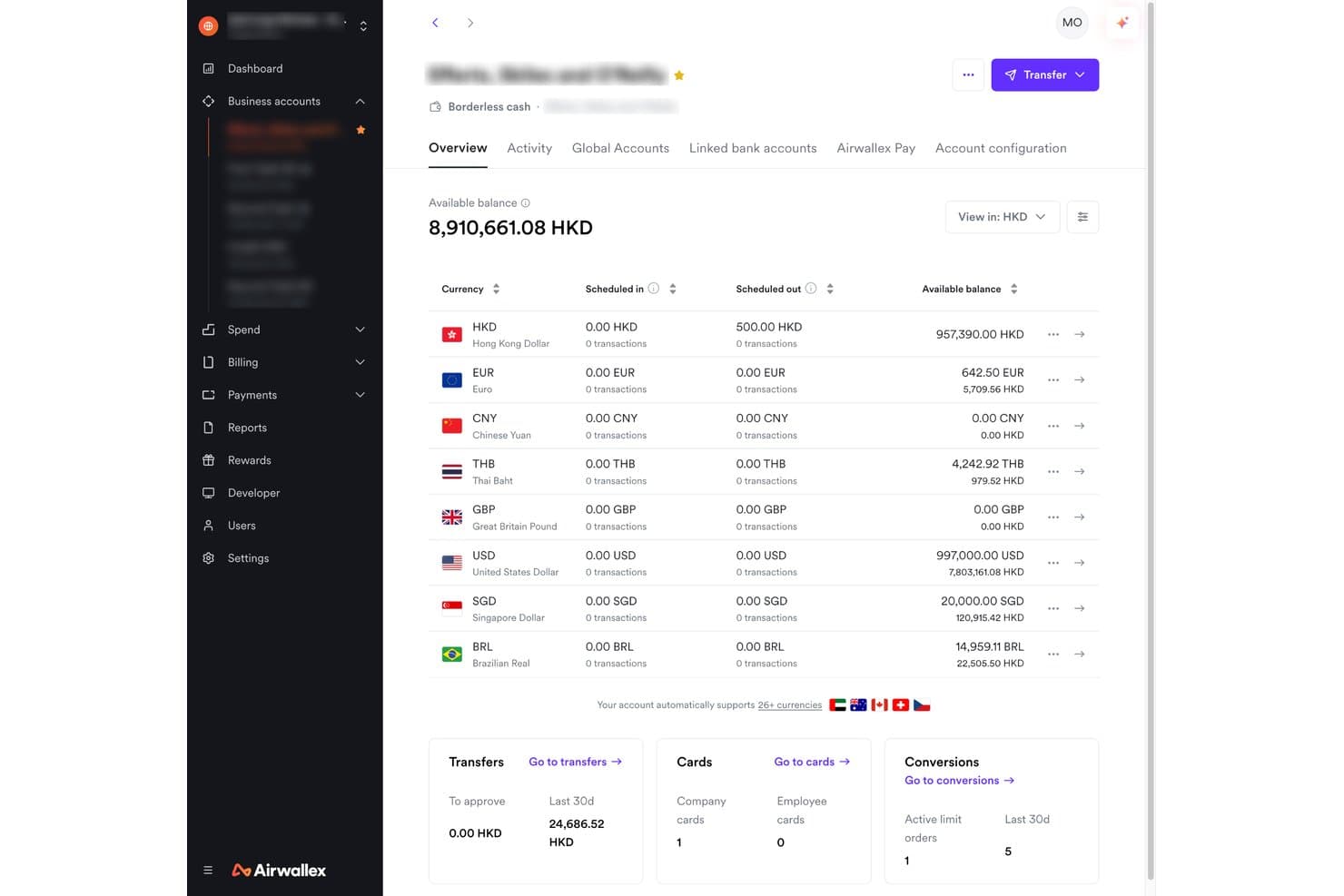
Airwallex displays multi-currency balances in one borderless account. Airwallex is a cross-border payment processing platform that connects global checkout with multi-currency settlement, local payment method acceptance in 180+ countries, and supplier payouts across 200+ countries and 90+ currencies.
Who Is Airwallex Best For?
Airwallex suits ecommerce businesses that need to connect global checkout with cross-border supplier payouts across 200+ countries without switching platforms.
Why I Picked Airwallex
I picked Airwallex because it connects global checkout with multi-currency settlement and international supplier payouts in one platform. I particularly like that eligible EUR payments can settle directly into a EUR Wallet balance, which can then fund supplier payments without an additional currency conversion when the payout currency matches. Its payout network also covers 200+ countries and regions, while the Batch Transfer API supports up to 1,000 transfers per batch, making it easier to manage international supplier payments after a sales cycle.
Airwallex Key Features
- Localized checkout display: Automatically show local-currency pricing and available payment methods based on customer location when currency conversion is enabled.
- Optimize 360: Uses smart retries, intelligent routing, and issuer-aware logic to improve payment approvals across markets.
- Sentinel fraud detection: Scores device, identity, behavioral, and network signals in real time to detect and block fraudulent transactions.
- Payment plugins for major platforms: Connect Airwallex Payments to Shopify, WooCommerce, Magento, and Salesforce Commerce Cloud through supported ecommerce integrations.
Airwallex Integrations
Airwallex integrates with QuickBooks Online, Xero, Oracle NetSuite, Microsoft Dynamics 365 Business Central, Shopify, WooCommerce, BambooHR, Workday, and Zapier. It also provides APIs, SDKs, and webhooks for custom financial integrations.
Pros and Cons
Pros:
- Batch webhooks report payout processing and funding statuses
- Batch APIs disclose payout fees and beneficiary amounts
- Checkout proceeds can fund overseas supplier payouts
Cons:
- Paid transfers can still fail recipient-bank processing
- Compliance document requests can delay supplier transfers
Learn more about Airwallex: Best for unifying global checkout and payouts
- Not available
- From $0.13 + payment method fee
Visit WebsiteCustomer Rating:3.8/5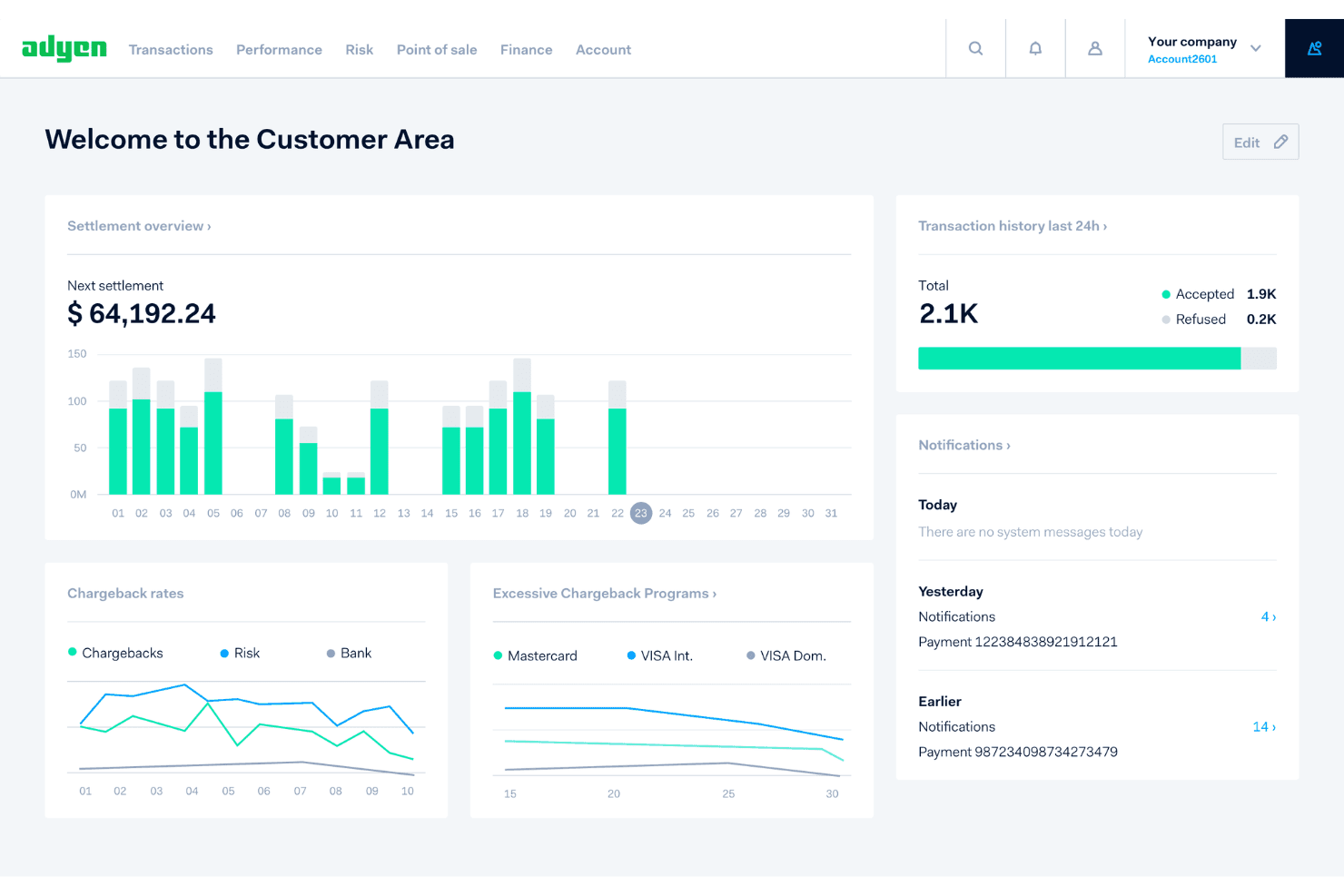
Adyen's dashboard gives merchants a real-time overview of payments and settlements. Adyen is a global payments platform that supports end-to-end payment processing, multi-currency settlement, local payment rails, and automated payouts through its integrated payments infrastructure.
Who Is Adyen Best For?
Adyen is a strong fit for mid-market and enterprise ecommerce businesses that need a single platform to handle payment acceptance, multi-currency settlement, and automated payouts across global markets.
Why I Picked Adyen
Adyen earns its spot on my shortlist it combines global payment acceptance, multi-currency settlement, and automated payouts within one platform. I particularly like its support for local payment rails, including SEPA, Faster Payments, and ACH, which allow eligible payouts to move through domestic clearing networks instead of relying on SWIFT. Its configurable payout schedules also let businesses trigger transfers based on balance thresholds, fixed amounts, or specified times, giving finance teams more control over fund movements.
Adyen Key Features
- Intelligent payment routing: Route transactions across acquiring paths prioritized for conversion, cost, or a balance of both using Adyen Uplift.
- Batch payment processing: Submit multiple payout requests in structured CSV files through encrypted SFTP batch uploads.
- Role-based access controls: Assign user roles that limit access to financial reports, bank accounts, payment data, and platform operations in the Customer Area.
- 3D Secure 2 authentication: Integrate native or redirect-based card authentication into checkout to support issuer verification and applicable authentication requirements.
Adyen Integrations
Adyen offers native integrations with Shopify, WooCommerce, BigCommerce, Adobe Commerce, Salesforce Commerce Cloud, Oracle NetSuite, Microsoft Dynamics 365, SAP Commerce, Chargebee, and Zuora. It also supports custom integrations through APIs, SDKs, and webhooks.
Pros and Cons
Pros:
- Supports configurable payout schedules and batch transfers
- Provides detailed payout tracking and trace data
- Handles local payment methods across markets
Cons:
- Cross-border arrival times and fees can vary
- FX management fee calculations depend on contractual terms
Learn more about Adyen: Best for consolidating marketplace earnings
- Not available
- Pricing upon request
Visit WebsiteCustomer Rating:3.2/5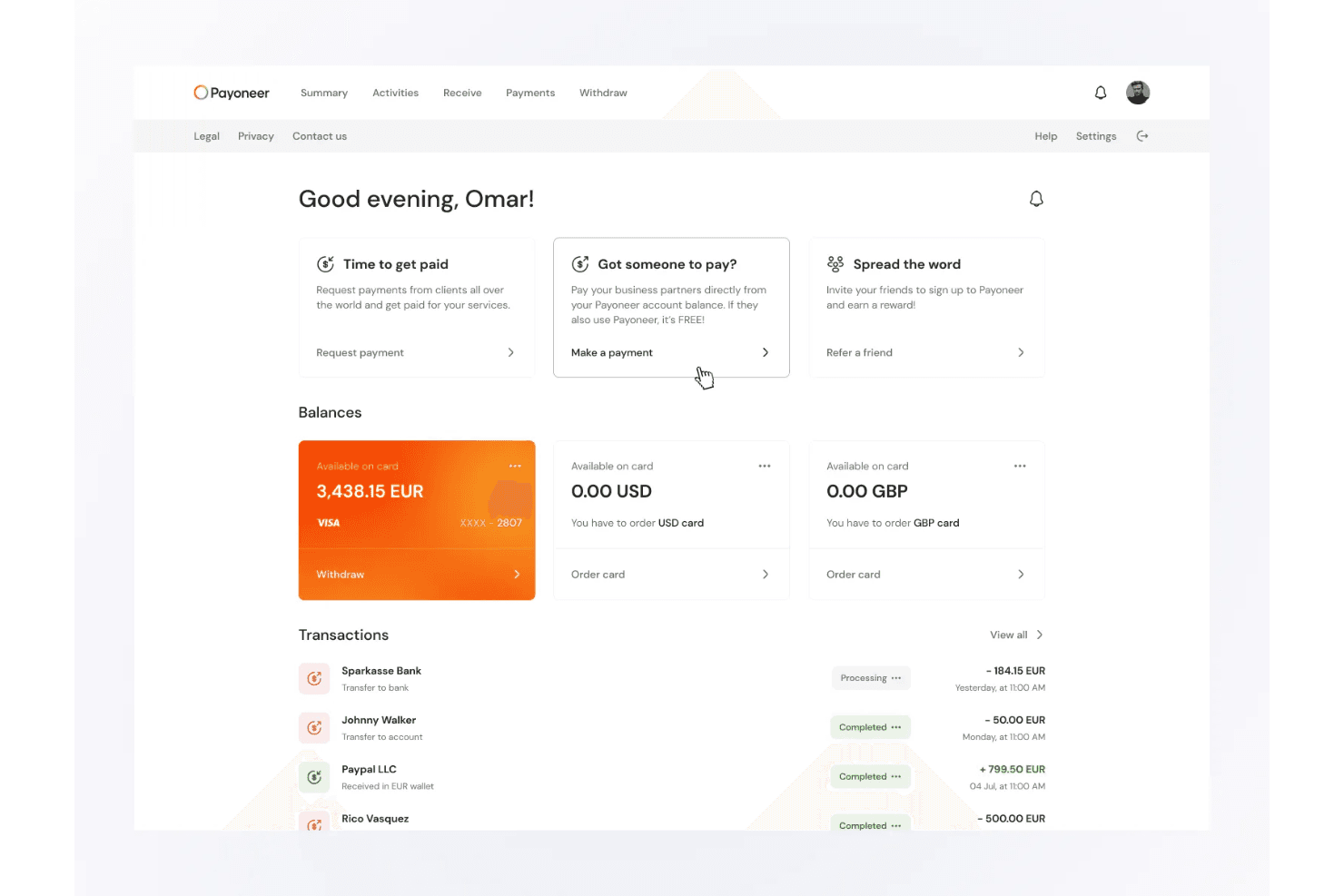
Bank withdrawals transfer funds directly to local accounts. Payoneer is a cross-border payments platform that lets businesses receive funds from 190+ countries, hold and convert multi-currency balances, send batch payments to suppliers and contractors, and collect payouts from 100+ global marketplaces.
Who Is Payoneer Best For?
Payoneer is a strong fit for ecommerce sellers and freelancers who collect payouts from multiple global marketplaces and need to consolidate those earnings in one account.
Why I Picked Payoneer
I picked Payoneer as one of the best because of how well it handles the reality of selling across multiple global marketplaces at once. If your revenue is split across Amazon, eBay, Shopee, and Upwork, Payoneer pulls those payouts into a single account from 100+ platforms. I also like the Smart FX feature, which lets you hold balances in 10 currencies and set target conversion rates so you're not forced to convert at a bad moment.
Payoneer Key Features
- Mass Payout: Send up to 500 payout instructions in a single API call, or upload recipients via CSV, Excel, or XML through the Admin Console.
- Tax form workflows: Collect and validate W-8 and W-9 forms, generate eligible 1099 and 1042 filings, and submit them directly to the IRS.
- Payoneer Checkout: Accept online payments through a Stripe-powered gateway with support for cards, digital wallets, buy now pay later options, and local payment methods.
- Corporate cards: Issue physical and virtual Mastercard cards funded from Payoneer balances, with per-card spending limits and real-time expense tracking.
Payoneer Integrations
Payoneer offers native integrations with QuickBooks, Xero, NetSuite, Zoho Books, Amazon, Walmart, eBay, Upwork, and Fiverr, plus ecommerce plugins for Shopify, WooCommerce, Shopline, and Shoplazza. Its Mass Payout API supports custom payout integrations.
Pros and Cons
Pros:
- Batch payments cover overseas contractors
- Receive and hold multiple currencies
- Marketplace payouts consolidate across platforms
Cons:
- Verification holds can delay fund access
- Conversion and withdrawal charges can add up
 4Best for AP workflows synced with accounting
Veem
- Free plan + 30-day free trial + free demo available
- From $24.99/month
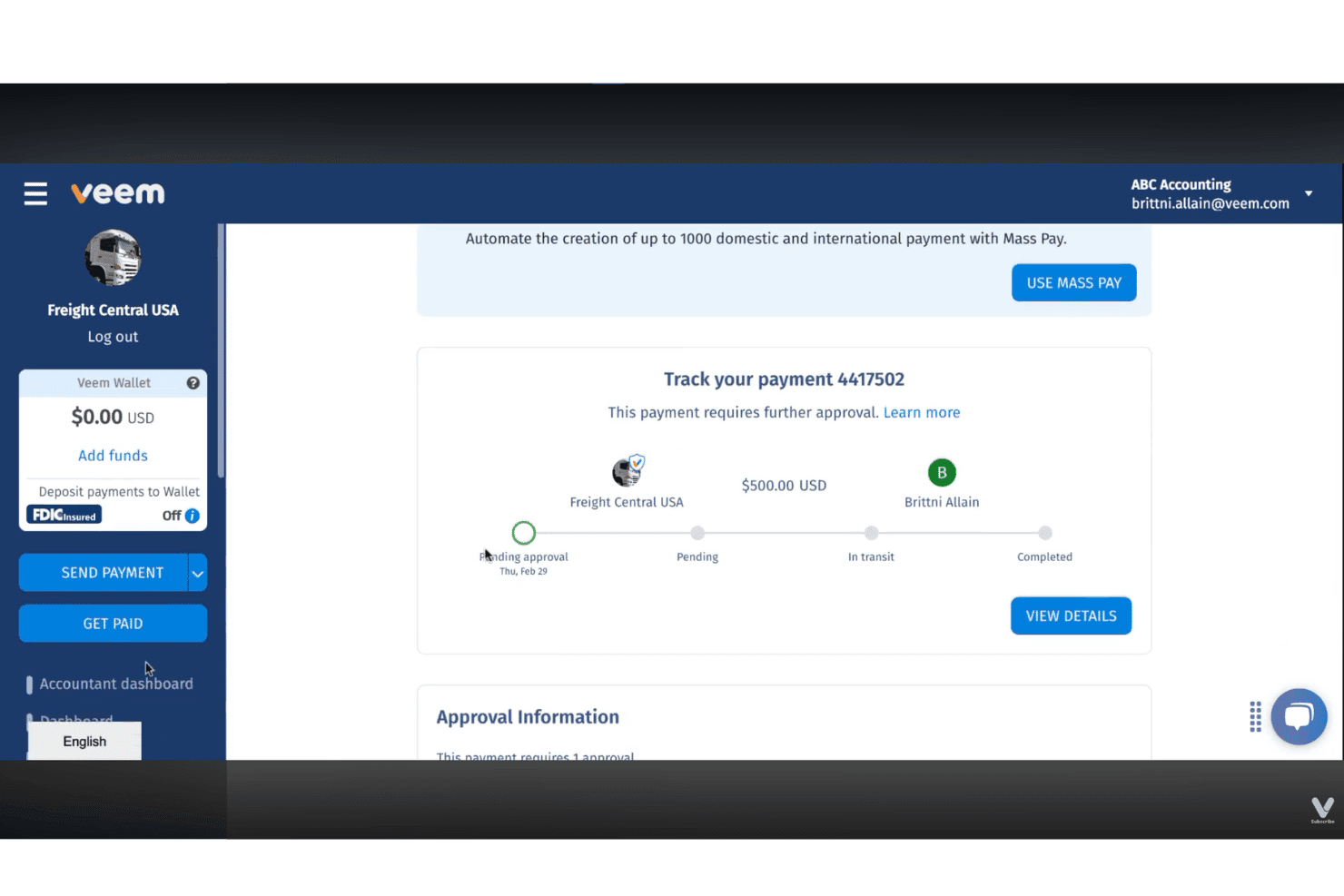
Veem lets users track payments and manage approvals in real time. Veem is a business payments platform for sending and receiving domestic and international transactions, with multi-currency wallet support, approval workflows, recurring and batch payments, and native accounting integrations.
Who Is Veem Best For?
Veem is a strong fit for accounts payable teams at SMBs that need to sync international payments directly with QuickBooks Online, NetSuite, or Xero.
Why I Picked Veem
I've included Veem in my top picks because it connects international payment processing with accounting workflows through real-time, two-way synchronization. With Premium, I can configure approval rules to route outgoing payments for sign-off, while integrations with QuickBooks Online, NetSuite, and Xero synchronize bills and payment records to support automatic reconciliation. I also like its multi-currency Wallet, which lets businesses hold balances in 15+ currencies and use those funds to pay overseas vendors.
Veem Key Features
- Multi-currency wallet: Hold and manage balances in 15 currencies, convert between them, and pay suppliers directly from Wallet funds.
- Virtual Bank Account: Receive payments using dedicated local banking details, with USD, CAD, EUR, and GBP accounts available to eligible businesses.
- Payment tracking with timestamps: Monitor each payment through multiple real-time stages, from funds leaving your account to confirmation of delivery.
- Recurring payment scheduling: Set up weekly or monthly payment schedules with custom intervals, end dates, or occurrence counts for ongoing vendor or contractor payments.
Veem Integrations
Veem offers native integrations with QuickBooks Online, Xero, and Oracle NetSuite for accounting synchronization and payment reconciliation. It also connects with Zapier for workflow automation and offers a REST API for custom payment integrations.
Pros and Cons
Pros:
- Timestamped tracking shows transfer progress
- Wallet balances support direct supplier payouts
- Payments reach 100+ countries in 80+ currencies
Cons:
- Currency conversions incur a $5 minimum FX fee
- Receiving banks may delay crediting completed transfers
Learn more about Veem: Best for bulk marketplace payouts with wallets
- Free trial + free demo available
- From $2,399/year (billed annually)
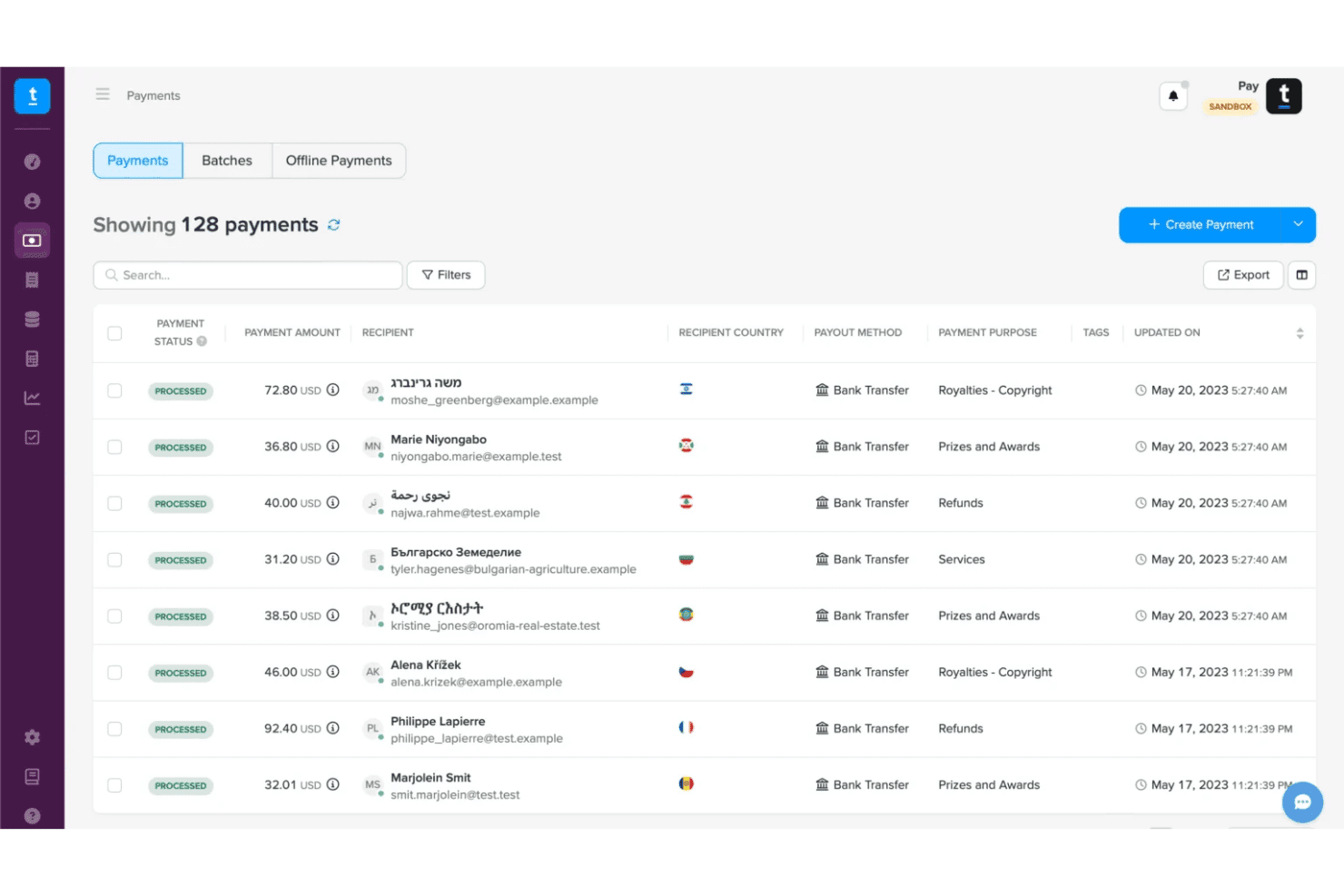
Trolley lets users track and manage bulk payment statuses in one place. Trolley is a payout automation platform that lets businesses send payments to recipients in 210+ countries via local bank transfers, digital wallets, PayPal, debit cards, and checks.
Who Is Trolley Best For?
Trolley is a strong fit for marketplace operators and ecommerce businesses that need to send high-volume payouts to vendors, sellers, or creators across dozens of countries.
Why I Picked Trolley
I picked Trolley as one of the best because of how well it handles bulk payouts to marketplace sellers and vendors across dozens of countries. What I find especially useful is the digital wallet coverage: 38 wallets across 25 countries, including M-Pesa, GCash, ShopeePay, and AliPay. Pair that with batch payment processing and CSV or API-triggered imports, and you have a solid setup for paying hundreds of recipients at once.
Trolley Key Features
- Recipient payment portal: Recipients can log in to a self-serve portal to enter their payout details and check the status of their payments.
- White-label onboarding: Customize recipient onboarding with your business's logo, colors, and branding, with custom-domain options where supported.
- Approval workflows: Set payout approval limits, require multiple approvers, and configure user roles and permissions before payments are processed.
- AML and sanctions screening: Screen recipients against global sanctions and compliance watchlists, with PEP checks, risk scoring, and transaction monitoring.
Trolley Integrations
Trolley documents native integrations with QuickBooks Online, Xero, Oracle NetSuite, and Microsoft Dynamics 365 for bill synchronization, payment updates, and accounting reconciliation. It also connects with Zapier for workflow automation and provides APIs, SDKs, and webhooks for custom integrations.
Pros and Cons
Pros:
- Automated recipient emails provide payout status updates
- Wallet coverage broadens recipient payout options
- CSV batches suit high-volume creator payouts
Cons:
- Currency conversions carry a published 2% margin
- Bank transfers below recipient-specific minimums cannot be processed
Learn more about Trolley:
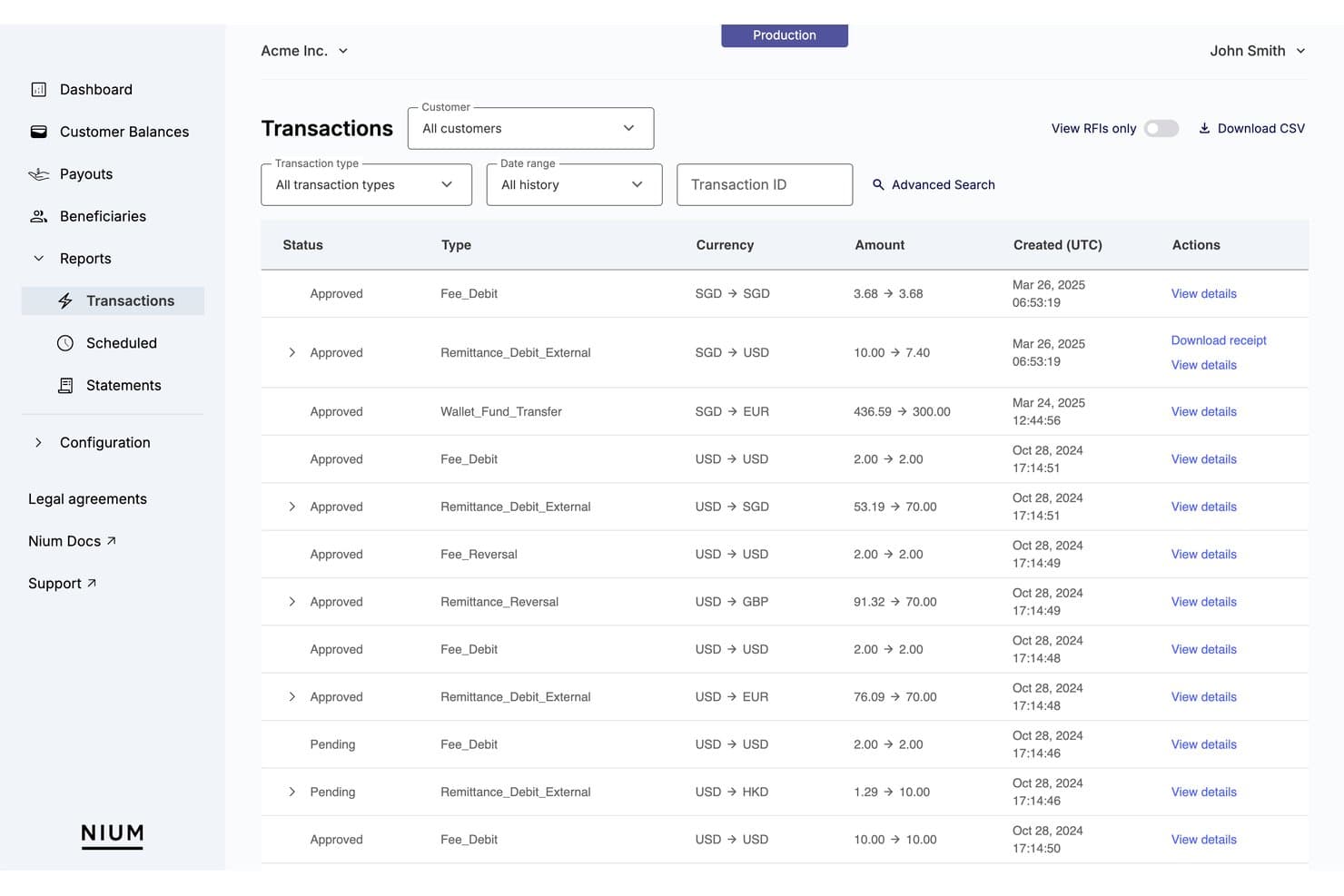
Nium lets users track and filter cross-border transaction history in detail. Nium is a cross-border payments infrastructure platform that lets businesses send payouts to 190+ countries in 100+ currencies, hold multi-currency balances, verify beneficiary accounts, and issue physical and virtual cards—all through a single API integration.
Who Is Nium Best For?
Nium is a strong fit for marketplace operators and platforms that need to collect buyer funds, split commissions, and pay sellers across multiple countries and currencies through a single API.
Why I Picked Nium
I picked Nium as one of the best because its marketplace infrastructure is genuinely built for the complexity of multi-seller payouts. I love that you can configure commission-split rules, hold seller balances in multi-currency accounts, and pay out to 190+ countries, all through a single API. The marketplace docs also walk through collecting buyer funds from PSPs into virtual accounts, with each transaction visible in the dashboard and Transactions API for clean reconciliation.
Nium Key Features
- Multi-currency account balances: Hold funds in 100+ currencies within a single account and convert or pay out without opening separate accounts per currency.
- FX rate locking: Lock exchange rates upfront for periods ranging from 5 minutes to 24 hours before executing a payout.
- Account verification API: Verify beneficiary bank details against connected clearing systems, with account status and supported name-matching results returned before payment.
- Stablecoin-to-fiat payouts: Fund payout flows with USDC across networks including Solana, Ethereum, and Stellar, with Nium converting and delivering local currency to recipients.
Nium Integrations
Nium supports custom integrations through its REST APIs, SDKs, and webhooks for payment automation, foreign exchange, and financial workflows. It also offers SWIFT-based connectivity and a beta MCP Server for Cursor, Claude Code, and VS Code. A comprehensive list of prebuilt accounting, HRIS, or payroll integrations is not publicly documented.
Pros and Cons
Pros:
- Automated reconciliation tracks marketplace commissions and seller transactions
- Multi-currency balances cover broad payout corridors
- Marketplace commission splits support seller payouts
Cons:
- “Paid” status may not confirm receipt
- Marketplace payment providers require compliance approval before funding
Learn more about Nium:
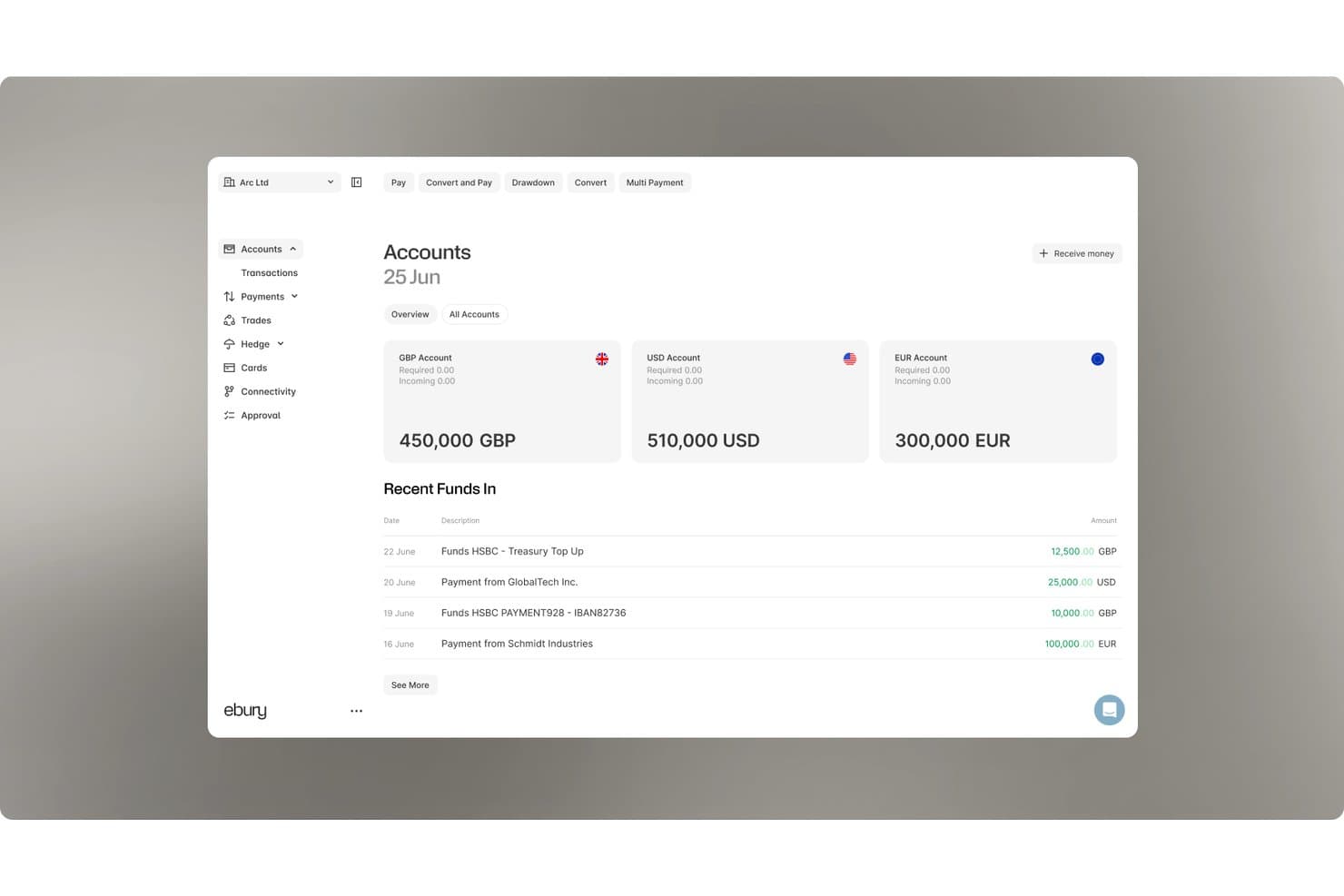
Ebury lets users monitor multi-currency account balances and recent funds. Ebury is a cross-border payments and FX platform that lets businesses send payments in 140+ currencies, hold multi-currency accounts, manage FX exposure through hedging tools, and finance supplier payments.
Who Is Ebury Best For?
Ebury is a strong fit for mid-market businesses with active cross-border trade that need to manage supplier payments, FX exposure, and multi-currency collections in one platform.
Why I Picked Ebury
I picked Ebury as one of the best because it's one of the few platforms on my shortlist that combines supplier payment financing with FX hedging and international payments. I particularly like that eligible businesses can use Supplier Payment Finance to pay overseas suppliers in their local currencies, then repay Ebury in their own currency within up to 150 days. Ebury also offers forward contracts and non-deliverable forwards to manage currency exposure, alongside financing terms that allow early repayment without additional fees, although accrued interest still applies.
Ebury Key Features
- Multi-currency accounts: Hold, send, receive, and convert money across global accounts in 29+ currencies from one platform.
- Bulk payment file upload: Upload payment files to process thousands of international transfers, with API support for high-volume payouts.
- Payment approval workflows: Configure custom approval rules to control which payments get authorized before they're sent.
- SWIFT GPI and UETR tracking: Monitor eligible SWIFT payments through live tracking updates and unique transaction references.
Ebury Integrations
Ebury integrates with Oracle NetSuite, Xero, QuickBooks Online, Sage, SAP, Odoo, Exact Online, Cobase, Kyriba, and Agicap. It also supports custom API integrations for payments, foreign exchange, and reconciliation. Integration capabilities and availability vary by region.
Pros and Cons
Pros:
- Tracks international payments through SWIFT GPI
- Offers forward contracts covering 60+ currencies
- Supports supplier finance with FX hedging
Cons:
- Intermediary-bank reviews can delay international payments
- Currency availability varies by destination
Learn more about Ebury: Best for online sales and overseas suppliers
- Not available
- From £10/month
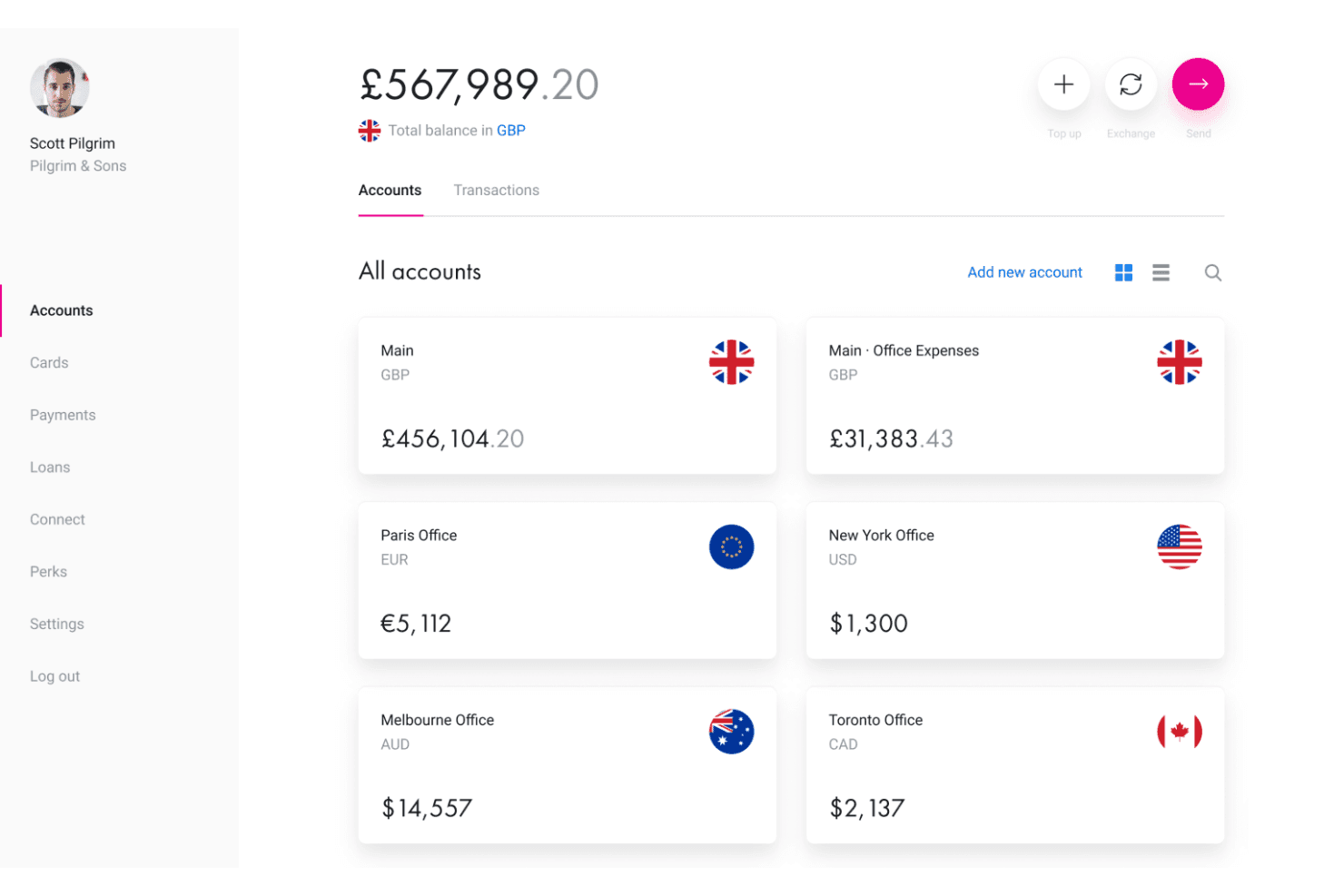
Revolut Business lets users manage multi-currency accounts across global offices. Revolut Business is a multi-currency business account that supports international and local transfers, currency exchange, bulk and recurring payments, and online payment acceptance across 25+ currencies.
Who Is Revolut Business Best For?
Revolut Business is a strong fit for ecommerce businesses that sell online and pay overseas suppliers, thanks to its multi-currency accounts, payment acceptance integrations with Shopify and WooCommerce, and built-in FX tools.
Why I Picked Revolut Business
Revolut Business earns its spot on my shortlist because it combines ecommerce payment acceptance and international supplier payments within one business platform. I particularly like its Shopify and WooCommerce plugins, which bring Revolut's payment gateway into online checkouts, while Revolut Pay lets customers pay directly from their Revolut accounts in one click. Businesses can also hold balances in 25+ currencies, and eligible UK and EEA companies can use FX Forwards to lock exchange rates for future payments.
Revolut Business Key Features
- Revolut BillPay: Capture supplier invoices, extract payment details, manage approvals, and pay bills directly from your Business account.
- FX Forwards: Lock exchange rates for future currency conversions up to 12 months ahead, subject to business eligibility.
- Bulk payments: Upload CSV, XML, or BACS files to send payments to multiple recipients across currencies in a single batch.
- Limit and stop orders: Set target exchange rates to trigger currency purchases or sales, with stop orders executing at the prevailing market rate.
Revolut Business Integrations
Revolut Business offers 45+ integrations, including Xero, QuickBooks, FreeAgent, Sage Accounting, Shopify, WooCommerce, Personio, Workday, Zoho People, Zapier, and Slack. It also provides a Business API for custom payment automation, transaction synchronization, and financial workflows.
Pros and Cons
Pros:
- Bulk and scheduled international payments
- Offers interbank exchange rates within monthly plan allowances
- Hold balances across 25+ currencies
Cons:
- Currency exchanges incur fees beyond monthly allowances
- Transfer reviews can interrupt supplier payments
Learn more about Revolut Business: Best for multi-currency receipts and spending
- Not available
- From 0.23% per transaction
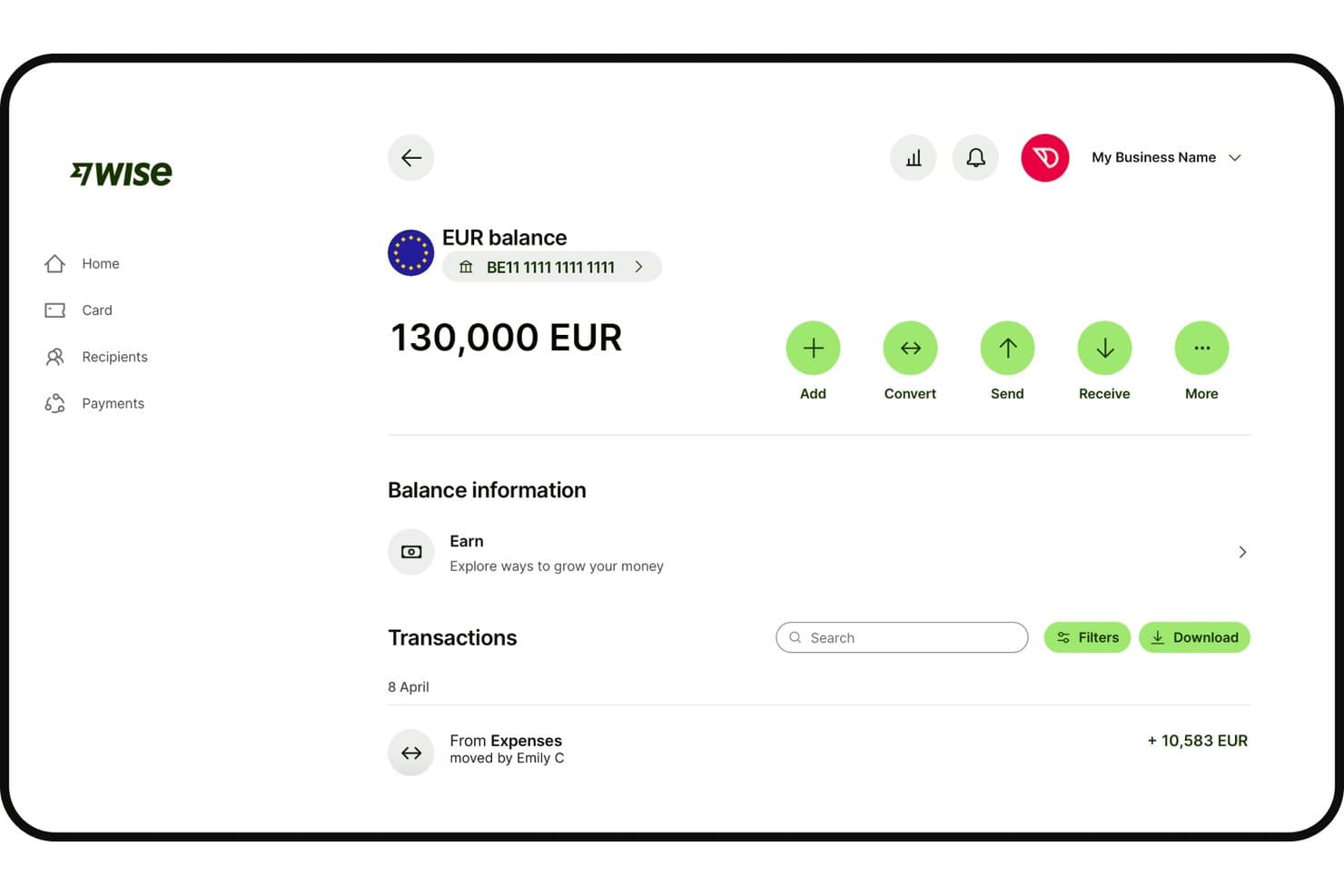
Wise Business displays EUR balance with transaction history and actions. Wise Business is a multi-currency business account for sending payments to 160+ countries, receiving funds in local currencies, holding and converting 40+ currencies, and spending internationally with physical and digital cards.
Who Is Wise Business Best For?
Wise Business is a strong fit for ecommerce businesses and global teams that regularly receive payments in multiple currencies and need to spend internationally without converting everything through a single base currency.
Why I Picked Wise Business
I picked Wise Business as one of the best for its ability to hold and convert 40+ currencies in one account while supporting international payments and spending. I particularly like its local account details, which let eligible businesses receive payments using identifiers such as an IBAN, US routing number, UK sort code, or Australian BSB. Combined with physical and digital Multi-Currency Cards that spend directly from available currency balances, this gives businesses a practical way to manage international transactions without unnecessary conversions.
Wise Business Key Features
- BatchTransfer: Upload a CSV or XLSX file to send up to 1,000 international payments in a single transfer.
- Scheduled transfers and standing orders: Set one-time future transfers or recurring payments with a custom frequency and end date.
- Open API: Automate recipient creation, transfer preparation, batch payouts, and payment tracking through Wise's API at no extra charge, with funding subject to account eligibility.
- Accounting software sync: Connect directly with QuickBooks, Xero, Oracle NetSuite, and other platforms to sync multi-currency transactions and receipts.
Wise Business Integrations
Wise Business offers integrations with QuickBooks, Xero, Oracle NetSuite, Sage, Zoho Books, Odoo, and Microsoft Dynamics 365 Business Central, among other accounting platforms. It also offers an open API for custom payment automation and financial workflows.
Pros and Cons
Pros:
- Mid-market exchange rates without hidden markups
- Local account details receive payments in multiple currencies
- Holds 40+ currencies without forced conversion
Cons:
- Support cannot expedite restricted-account reviews
- Transfers can pause for compliance checks
Learn more about Wise Business: Best for bridging fiat and stablecoin rails
- Not available
- Pricing upon request
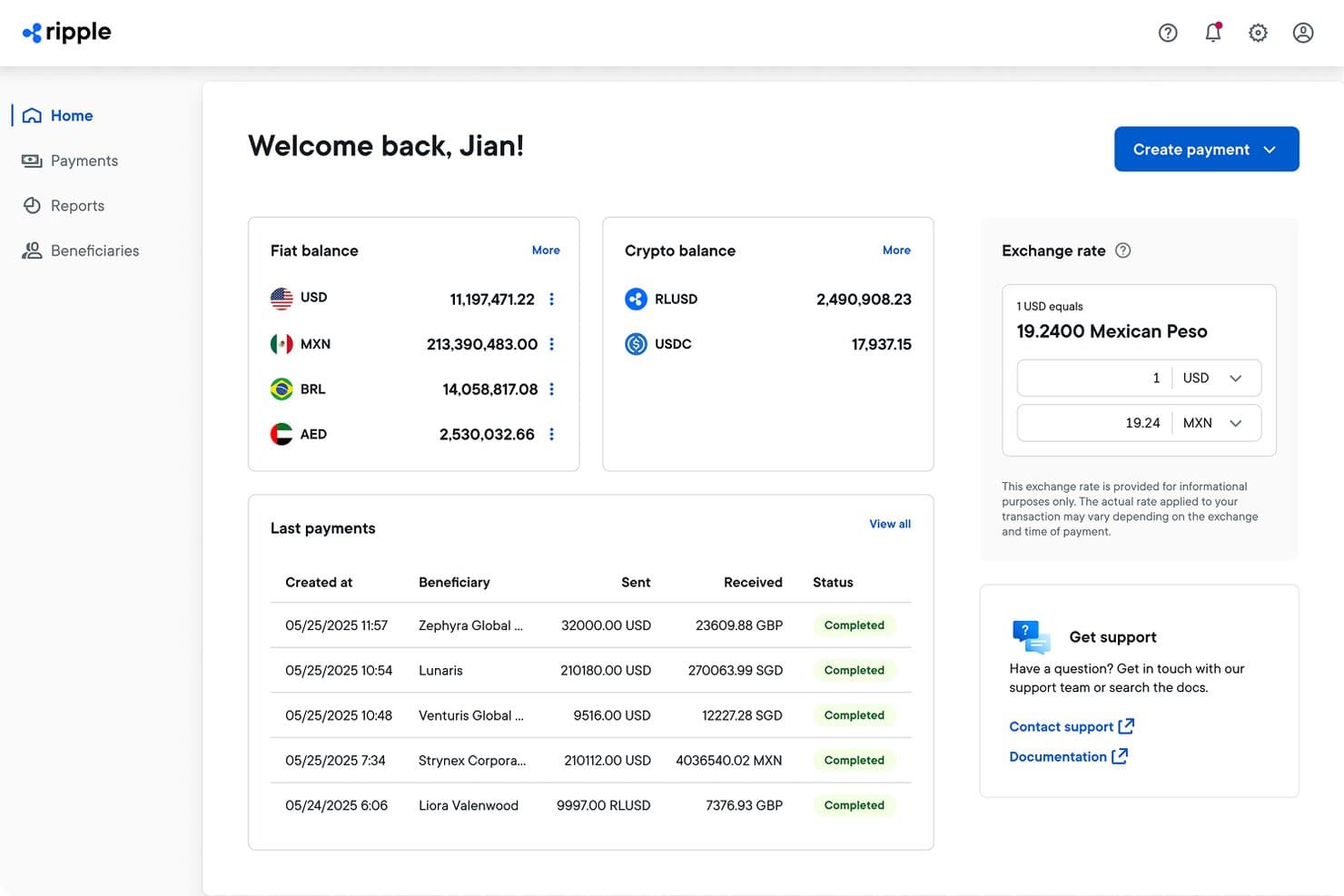
Ripple Payments lets users send cross-border payments in multiple currencies. Ripple Payments is a cross-border payments platform that lets businesses accept, hold, convert, and pay out in both fiat currencies and stablecoins across 60+ markets through a single API integration.
Who Is Ripple Payments Best For?
Ripple Payments is a strong fit for finance and treasury teams at businesses that need to move money across borders using both fiat and stablecoin rails.
Why I Picked Ripple Payments
I've included Ripple Payments in my top picks because it's one of the few platforms that lets your business accept, hold, convert, and pay out in both fiat and stablecoins through a single API, without being locked into one token issuer. I particularly like that its OTC desk handles fiat-to-stablecoin conversion in-house, so you're not dependent on a third-party market maker when moving funds across rails. Its payout network covers 60+ markets with documented local rails like Brazil PIX, Mexico SPEI, and UK Faster Payments, with payments settling in as little as 3–5 seconds, although end-to-end payout times vary by corridor.
Ripple Payments Key Features
- Batch payment processing: Upload a validated batch payment file, review a consolidated quote, and monitor individual payment states through the payment hopper in the UI.
- Payment channels and reconciliation: Create reusable payer channels and automatically reconcile incoming payments through Ripple Collections.
- REST API with webhooks: Access payment operations programmatically via REST API, with state-transition webhooks for production monitoring and Java, Python, TypeScript, and Go SDKs available.
- Corridor-specific compliance fields: Provide required payment-purpose codes and beneficiary identity information for supported payment corridors.
Ripple Payments Integrations
Ripple Payments supports custom integrations through its REST API, SDKs, and webhooks for cross-border payment processing and transaction tracking. However, it does not publicly document a comprehensive list of prebuilt third-party software integrations.
Pros and Cons
Pros:
- Supports fiat and stablecoin payouts without mandatory prefunding
- Local payout rails span 60+ markets
- In-house OTC conversion avoids third-party market makers
Cons:
- Payment rail availability depends on enabled corridors
- Payment quotes expire after 15 minutes by default
Learn more about Ripple Payments:
Outras soluções de pagamentos internacionais
Eis algumas opções adicionais que não entraram na minha lista final, mas que continuam a merecer atenção:
- 11BILLBest for syncing overseas FX gains and losses
- 12Papaya GlobalBest for turning payroll files into payments
- 13TipaltiBest for global payee tax compliance
- 14RapydBest for virtual account receipts into wallets
- 15WorldFirstBest for marketplace-embedded seller accounts
- 16ThunesBest for wallet-heavy emerging markets
- 17OFXBest for batching payroll and vendor payments
- 18ConveraBest for compliance across many jurisdictions
- 19StatrysBest for Hong Kong company setup and banking
- 20Xe BusinessBest for managed or API payout batches
How I Evaluate Cross-Border Payment Solutions
I split my evaluation into three parts. Core functionality carries the most weight: tools must handle transactions in multiple currencies and meet compliance requirements across the jurisdictions they serve. From there, I look at standout features like multi-currency virtual accounts, then consider onboarding support and pricing transparency.
Core Functionality (Table Stakes For This List)
When I'm selecting tools for my list, I score each one on a scale from 0 (does not offer the functionality) to 5 (excels in this area) for each core functionality listed below. I then convert the total into a percentage to help assess each tool's overall fit, with extra weight on any functionalities I've deemed essential.
- Multi-Currency Transactions (Essential): I check whether a platform lets you send, receive, and hold balances in the currencies your business actually touches—not just convert at the point of transfer.
- Regulatory Compliance (Essential): Licensing, sanctions screening, and AML coverage across served jurisdictions all factor in, especially for retailers operating in multiple regions.
- Competitive FX Conversion: I look at rate transparency and how close conversions land to the mid-market rate, since even small markups compound across high-volume supplier payments.
- Local Payment Rail Access: Platforms that connect to domestic banking networks in destination countries can cut delivery times and fees compared to generic international wires.
- Payment Tracking and Transparency: I evaluate whether you get clear visibility into fees, status updates, and estimated arrival so your AP team isn't chasing payment confirmations.
- Bulk and Recurring Payments: The ability to upload batch files or schedule repeating transfers matters when you're paying dozens of suppliers or running regular marketplace payouts.
Once I have a list of tools that meet the criteria, I consider what sets each platform apart.
Differentiating Factors (What Sets Vendors Apart)
Here's how I compare and contrast different vendors:
Standout Features
I look for multi-currency virtual accounts that provide local account details, like IBANs or ACH routing numbers, so you can collect payments as if you're a local entity. That matters when you're receiving marketplace earnings in one country and paying suppliers in another. I also evaluate each platform's API and developer toolkit, checking whether you can embed FX conversion and payment tracking directly into your ecommerce or ERP workflows. Platforms like Airwallex and Nium offer deep API coverage, while others lean on prebuilt integrations. Marketplace payout automation is another differentiator—I check whether a platform handles split payments and mass disbursements to global sellers without manual file uploads.
Beyond Features
I check whether pricing stays predictable as volume grows, since intermediary bank charges and receiving fees can quietly erode margins on recurring supplier payments. Onboarding speed matters too—platforms like Airwallex and Payoneer offer guided KYB workflows and regional support teams, which cuts the time to a first payout when you're expanding into a new market. I also evaluate role-based access controls and audit trails, because AP teams sharing a single login is a governance gap most retailers don't notice until it's a problem.
Como escolher soluções de pagamentos internacionais
Escolha um fornecedor acompanhando um pagamento real, desde a venda até ao fornecedor, e verificando onde os custos cambiais, os atrasos e as falhas de reconciliação podem afetar as suas margens.
| Se a sua prioridade for | Procure |
|---|---|
| Se a sua prioridade forConhecer o verdadeiro custo da conversão | ProcureUma discriminação por escrito da margem cambial, das comissões de transferência e dos custos cobrados por intermediários |
| Se a sua prioridade forPagar atempadamente a fornecedores estrangeiros | ProcureEstimativas claras de entrega e registos do estado dos pagamentos para as moedas de destino |
| Se a sua prioridade forAssociar as transferências às faturas | ProcureRegistos de pagamentos descarregáveis com montantes, moedas, comissões e referências |
| Se a sua prioridade forOperar em vários mercados | ProcureConfirmação por escrito das moedas suportadas e da disponibilidade do serviço em cada país |
Como avaliar a sua lista final
- Calcule o custo de uma transferência real: Peça um orçamento por escrito para um pagamento típico a um fornecedor, incluindo o montante de origem, o montante de destino, a taxa de câmbio e todas as comissões indicadas.
- Teste o prazo de pagamento: Envie um pequeno pagamento de teste a um fornecedor e registe a hora de envio, a hora de receção e as atualizações de estado.
- Analise os registos de reconciliação: Peça um relatório de pagamentos de exemplo e verifique se a sua equipa consegue associar três transferências a faturas utilizando referências, moedas e comissões.
- Confirme a cobertura dos mercados: Peça um documento com a lista das moedas e dos países suportados e, em seguida, confirme que abrange cada mercado de recebimentos e pagamentos previsto.
- Escolha o compromisso mais adequado: Prefira uma plataforma de comércio eletrónico que combine pagamentos e recebimentos quando a redução do número de sistemas for mais importante; prefira um fornecedor especializado em pagamentos internacionais quando as transferências para fornecedores e o controlo cambial forem prioritários.
O que são soluções de pagamentos internacionais?
As soluções de pagamento transfronteiriço são serviços e ferramentas que ajudam as empresas a receber, converter, manter e enviar dinheiro entre países e moedas. Os retalhistas utilizam-nas para cobrar pagamentos aos clientes, pagar a fornecedores estrangeiros e distribuir receitas de plataformas de comércio eletrónico. Funcionalidades como redes de pagamento locais, conversão de moeda e acompanhamento de pagamentos podem afetar as taxas, os prazos de entrega e a reconciliação.
Funcionalidades
Eis as principais funcionalidades que procuro nas soluções de pagamento transfronteiriço:
- Transações em várias moedas: A plataforma permite enviar, receber e manter fundos nas moedas suportadas. A sua equipa pode manter saldos nas moedas utilizadas para vendas ou pagamentos a fornecedores, em vez de converter imediatamente todos os montantes.
- Conversão cambial: O serviço converte fundos entre moedas e apresenta a taxa de câmbio e as taxas aplicáveis. Uma estrutura de preços clara ajuda a estimar o montante que um fornecedor irá receber e a avaliar o custo antes de confirmar uma transferência.
- Redes de pagamento locais: A plataforma pode encaminhar pagamentos através de redes bancárias nacionais nos destinos suportados. Isto pode afetar os prazos de entrega e as taxas em comparação com uma transferência bancária internacional, pelo que deve verificar quais as redes disponíveis nos mercados onde efetua pagamentos.
- Acompanhamento de pagamentos: As atualizações de estado indicam se uma transferência está pendente, foi enviada ou foi concluída, juntamente com uma previsão de chegada, quando disponível. A sua equipa pode utilizar esta informação para responder às perguntas dos fornecedores e acompanhar pagamentos atrasados.
- Pagamentos em massa e recorrentes: Os carregamentos em lote permitem enviar vários pagamentos a fornecedores em conjunto, enquanto o agendamento suporta transferências regulares. Estas ferramentas são úteis quando paga a muitos fornecedores ou repete pagamentos segundo um calendário definido.
- Conformidade regulamentar: O fornecedor aplica requisitos como verificações de identidade, análise de sanções e controlos de prevenção do branqueamento de capitais nas jurisdições onde presta serviços. Confirme se o serviço e a cobertura de conformidade se aplicam à sua empresa e aos países envolvidos.
- Registos de pagamentos e reconciliação: Os relatórios registam detalhes como montantes, moedas, taxas e referências de pagamento. A sua equipa financeira pode utilizar esses registos para associar as transferências às faturas e investigar diferenças.
- Conectividade através de API: Uma API permite à sua equipa ligar funções de pagamento, como transferências ou atualizações de estado, a sistemas de comércio eletrónico, ERP ou financeiros. Os pontos de acesso disponíveis e o trabalho de integração variam, pelo que deve verificar se suportam o fluxo de trabalho pretendido.
Vantagens
Eis algumas vantagens comuns que pode esperar ao utilizar soluções de pagamento transfronteiriço:
- Flexibilidade cambial: Enviar, receber e manter várias moedas permite à sua empresa pagar a fornecedores ou gerir receitas de vendas sem converter imediatamente todos os saldos.
- Custos cambiais mais previsíveis: Os detalhes da taxa e das comissões ajudam a estimar o montante no destino antes de confirmar uma transferência.
- Acesso a pagamentos locais: As ligações a redes de pagamento nacionais podem afetar os prazos de entrega e as taxas em comparação com as transferências bancárias internacionais.
- Maior visibilidade dos pagamentos: As atualizações do estado das transferências e os prazos de chegada estimados ajudam a sua equipa a acompanhar os pagamentos e a responder às perguntas dos fornecedores.
- Reconciliação mais simples: Os registos de pagamentos com montantes, moedas, taxas e referências ajudam a sua equipa financeira a associar as transferências às faturas.
- Menos trabalho manual com pagamentos: Os carregamentos em lote e os calendários de transferências recorrentes permitem à sua equipa gerir vários pagamentos a fornecedores em menos etapas.
- Suporte à conformidade: As verificações de identidade, a análise de sanções e os controlos de prevenção do branqueamento de capitais ajudam a responder aos requisitos nas jurisdições abrangidas.
Preços
Os preços variam consoante o fornecedor e combinam frequentemente taxas de transação com subscrições mensais opcionais. Eis os intervalos de subscrição e as funcionalidades típicos que pode encontrar nas soluções de pagamento transfronteiriço.
Tabela de comparação de planos para soluções de pagamento transfronteiriço
| Tipo de plano | Preço médio | Funcionalidades comuns |
|---|---|---|
| Tipo de planoPlano gratuito | Preço médio$0/mês, mais taxas de transação | Funcionalidades comunsConfiguração da conta, conversão de moeda, acompanhamento básico de transferências e suporte padrão. |
| Tipo de planoPlano pessoal | Preço médio$0–$30/mês, mais taxas de transação | Funcionalidades comunsSaldos em várias moedas, transferências internacionais, acompanhamento de pagamentos e suporte por e-mail. |
| Tipo de planoPlano empresarial | Preço médio$0–$100/mês, mais taxas de transação | Funcionalidades comunsAcesso para vários utilizadores, pagamentos em lote, relatórios de pagamentos e suporte prioritário. |
| Tipo de planoPlano empresarial avançado | Preço médio$100–$1,000+/mês, mais taxas de transação | Funcionalidades comunsFluxos de trabalho de pagamento personalizados, acesso à API, taxas de câmbio negociadas, suporte dedicado e relatórios avançados. |
Perguntas frequentes
Eis as respostas a algumas perguntas frequentes sobre soluções de pagamentos transfronteiriços:
Quanto tempo demoram os pagamentos transfronteiriços a fornecedores?
Os prazos de entrega variam consoante o prestador, a rota de pagamento, a moeda e o destino. As horas-limite dos bancos, os fins de semana, os feriados, as verificações de conformidade ou os dados incorretos do beneficiário podem atrasar uma transferência. Os bancos intermediários e os sistemas de pagamento locais também podem afetar os prazos de receção. Consulte a estimativa do prestador para o país e o par de moedas específicos e efetue os pagamentos antes da hora-limite indicada. Para encomendas de inventário urgentes, preveja uma margem de segurança e peça ao fornecedor que confirme a receção. Um estado marcado como “enviado” nem sempre significa que os fundos foram recebidos.
De que informações preciso para pagar a um fornecedor estrangeiro?
Normalmente, precisará do nome legal do fornecedor, dos dados da conta bancária, do país de destino, da moeda e do montante do pagamento. Dependendo da rota, o banco também poderá exigir um código de encaminhamento ou um identificador bancário. Poderá igualmente pedir a morada do destinatário ou o motivo do pagamento. Alguns prestadores solicitam uma fatura ou documentos comprovativos para determinadas transferências, e as verificações de conformidade podem dar origem a perguntas adicionais. Os requisitos variam consoante o destino e o prestador, por isso consulte o formulário de pagamento antes de enviar um lote. Confirme os dados do beneficiário com os registos bancários do fornecedor para evitar erros.
Preciso de uma conta bancária separada em cada país?
Não, nem sempre precisa de uma conta bancária separada em cada país. Alguns prestadores de serviços transfronteiriços disponibilizam dados de contas locais ou permitem-lhe manter saldos em moedas suportadas através de uma única conta empresarial. A disponibilidade depende da localização da sua empresa, do prestador e das moedas. Os dados de uma conta local não significam automaticamente que tenha uma entidade legal local ou que cumpra todas as regras de pagamento de cada plataforma. Antes de abrir uma conta, confirme se o prestador suporta o país da sua empresa e cada rota de cobrança e pagamento pretendida. Verifique também se a plataforma aceita esses dados da conta para efeitos de liquidação.