
O software POS na cloud é um sistema de ponto de venda que funciona na cloud, permitindo à sua equipa gerir vendas, inventário e dados de clientes a partir de qualquer dispositivo com ligação à Internet. Se procura o melhor software POS na cloud, é provável que pretenda simplificar as operações, manter o inventário atualizado e proporcionar uma experiência consistente em todos os canais.
Este guia compara as principais opções para 2026, para que possa avaliar rapidamente funcionalidades, integrações e pontos fortes exclusivos e encontrar a solução mais adequada para a sua empresa de comércio a retalho ou de comércio eletrónico.
Why Trust Our Software Recommendations
6,700+
Reviews
20
Industry experts
16+
Evaluation factors
14
Years
Our team has been testing and reviewing software since 2012. As retail leaders ourselves, we know how difficult—and important—it is to choose the right software.
For this guide, we evaluated tools using hands-on testing and independent research, scoring tools using our selection criteria.
Our reviews reflect our independent judgment—not a sales pitch.
Tabela de comparação de software POS na cloud
Esta tabela de comparação resume os detalhes de preços das minhas principais seleções de software POS na cloud.
Sorted by: Default
| Tool | Starting Price | Website | |
|---|---|---|---|
Best for AI-powered order and price automation | Not rated | $499/month Free demo available | Website |
Best for restaurant management features | 4.2 out of 5 | $90/month Free demo available | Website |
Best for multi-location inventory control | 4.1 out of 5 | $89/month Not available | Website |
Best for rapid setup and onboarding | 3.8 out of 5 | $39/month 30-day free trial | Website |
Best for industry-specific POS setups | Not rated | $35/month Free plan available | Website |
Best for enterprise-level analytics | Not rated | Pricing upon request Not available | Website |
Best for unified customer and inventory management | Not rated | Pricing upon request Free demo available | Website |
Best for ticketing and event sales | 4.8 out of 5 | $59/month Free trial + free demo available | Book Demo |
Best for ecommerce integration | 4.4 out of 5 | $89/month 3-day free trial | Website |
Best for customizable hardware options | 3.8 out of 5 | $16/month 90-day free trial | Website |


Análises de software POS na cloud
Seguem-se os meus resumos detalhados do software POS na cloud que integrou a minha lista de opções. As minhas análises apresentam uma visão detalhada das funcionalidades, integrações e melhores casos de utilização de cada plataforma, para ajudar a encontrar a melhor opção para si.
 Best for AI-powered order and price automation
- Free demo available
- From $499/month (billed annually)
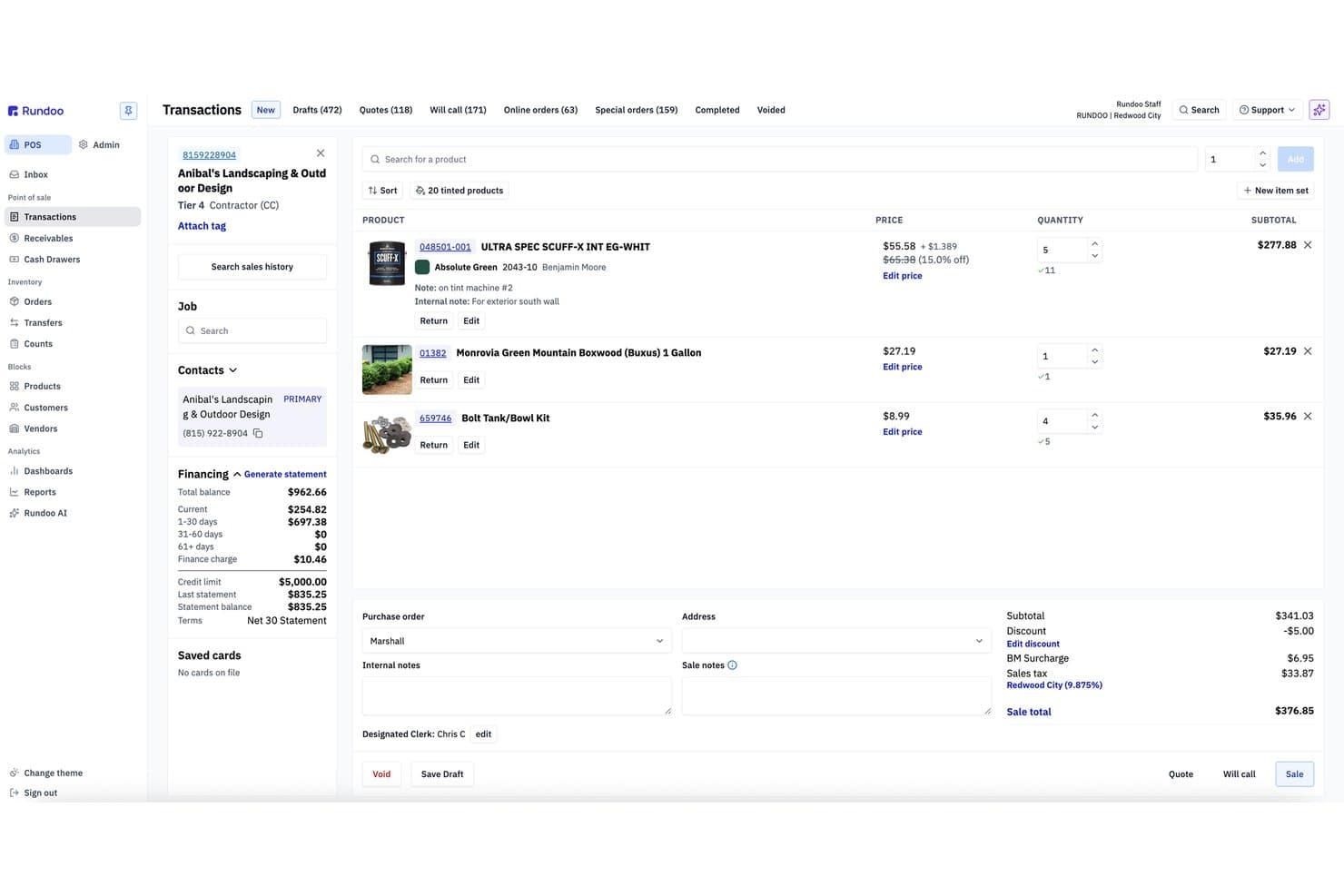
Rundoo offers a cloud-based POS transaction interface with product listings, customer financing details, and real-time order totals. Rundoo is a cloud-native POS and ERP platform built for independent supply stores, combining point-of-sale, real-time inventory management, vendor catalog integration, and AI-driven reporting in a single system.
Who Is Rundoo Best For?
Rundoo is a strong fit for independent hardware, paint, lumber, farm & feed, and lawn & garden store owners operating one or more locations in the US and Canada.
Why I Picked Rundoo
Rundoo earns its spot on my shortlist because of Dooey, its AI assistant built into every screen of the platform. I love how it drafts purchase orders by analyzing sales history, low-stock levels, and seasonality, cutting out the manual work entirely. It also benchmarks store prices against nearby competitors in real time, which is a level of pricing intelligence I haven't seen built natively into a cloud POS before.
Rundoo Key Features
- Cloud-based POS platform: Runs entirely in-browser with no local server required for checkout or reporting.
- Multi-location inventory management: Tracks inventory, SKUs, and transfers across all connected stores in real time.
- Vendor catalog integrations: Directly integrates with major supplier catalogs like True Value, Do It Best, and Orgill.
- Support for hardware peripherals: Works with barcode scanners, Star receipt printers, cash drawers, and Wi-Fi-enabled Stripe card readers.
Rundoo Integrations
Rundoo offers native integrations with Stripe, QuickBooks, Benjamin Moore COLORx, True Value, Do It Best, Orgill, Emery Jensen, AllPro, House Hasson, Blish-Mize, and Lancaster. An API is available for custom integrations.
Pros and Cons
Pros:
- Purpose-built for specialty supply retail verticals
- Built-in competitor price benchmarking in real time
- AI automates purchase orders from sales data
Cons:
- Single payment processor limits merchant flexibility
- No native ecommerce channel sync available
Learn more about Rundoo: Best for restaurant management features
- Free demo available
- From $90/month
Visit WebsiteCustomer Rating:4.2/5
Toast offers a modern POS system built for restaurants, making it easy to manage orders, menu items, discounts, and payments from one streamlined interface. Toast is purpose-built for restaurants that need more than just a basic POS, offering tools for front-of-house, kitchen, and delivery management. It’s a strong fit for quick-service, full-service, and multi-location restaurants looking to connect orders, payments, and staff workflows in one system. Toast helps address challenges like menu changes, table management, and online ordering all from a single cloud-based platform.
Why I Picked Toast
What sets Toast apart for me is its deep focus on restaurant management features that go beyond standard POS capabilities. Toast offers built-in tools for menu management, allowing you to update items and pricing across all terminals instantly. The platform also supports kitchen display systems, which help streamline order flow from front-of-house to the kitchen. If you’re looking for cloud POS software that’s tailored to the unique needs of restaurants, Toast’s specialized features make it a strong choice.
Toast Key Features
Some other features that make Toast appealing for restaurant teams include:
- Tableside ordering and payments: Take orders and process payments directly at the table using handheld devices.
- Loyalty program management: Set up and manage customer rewards programs that integrate with the POS.
- Online ordering integration: Connect your POS to Toast’s online ordering system for takeout and delivery.
- Employee scheduling tools: Build and manage staff schedules within the same platform.
Toast Integrations
Integrations include 7shifts, Homebase, Grubhub, DoorDash, OpenTable, MarketMan, Restaurant365, xtraCHEF, QuickBooks, and Resy.
Pros and Cons
Pros:
- Tableside ordering and payment capability
- Built in kitchen display system support
- Menu updates apply instantly across devices
Cons:
- Customer support response can vary
- Menu setup can take time initially
Learn more about Toast: Best for multi-location inventory control
- Not available
- From $89/month (billed annually)
Visit WebsiteCustomer Rating:4.1/5
Lightspeed's cloud POS interface offers table management, customizable menu grids, and more. Lightspeed is designed for retailers and hospitality businesses that need to manage inventory across multiple locations from a single dashboard. It’s especially useful for businesses with complex stock needs, like boutiques, bike shops, or multi-store operations. Lightspeed helps you track inventory movement, transfer stock between stores, and keep product data consistent everywhere you sell.
Why I Picked Lightspeed
For retailers managing inventory across several locations, Lightspeed stands out for its multi-location inventory control features. You can track stock levels in real time at each store, transfer products between locations, and set automated reorder points to avoid stockouts.
I picked Lightspeed because it lets you centralize inventory management while still customizing product catalogs for each site. This makes it a strong fit for businesses that need to keep inventory accurate and consistent across multiple stores.
Lightspeed Key Features
Some other features that make Lightspeed appealing for retailers and hospitality businesses include:
- Integrated purchase ordering: Create and send purchase orders to suppliers directly from the platform.
- Customer profiles and sales history: Store detailed customer information and track purchase history for personalized service.
- Built-in analytics and reporting: Access sales, inventory, and employee performance reports in real time.
- Omnichannel selling tools: Sync your in-store and online sales channels for unified inventory and order management.
Lightspeed Integrations
Integrations include QuickBooks, Xero, Mailchimp, Shopify, BigCommerce, 7shifts, MarketMan, Grubhub, Deputy, and OpenTable.
Pros and Cons
Pros:
- Real time analytics for sales and performance
- Integrated purchase ordering with suppliers
- Centralized multi location inventory management
Cons:
- Customer support hours may be limited
- Catalog imports can be slow
Learn more about Lightspeed: Best for rapid setup and onboarding
- 30-day free trial
- From $39/month
Visit WebsiteCustomer Rating:3.8/5
Epos Now offers a cloud-based POS system with multi-device support, including smartphone, tablet, and desktop interfaces showing real-time sales analytics, payment processing, and inventory management dashboards. Getting your POS system up and running quickly is where Epos Now shines. This cloud-based platform is designed for retailers and hospitality businesses that want minimal setup time and guided onboarding. Epos Now helps teams start selling fast without complex installation or lengthy training.
Why I Picked Epos Now
Epos Now is built for businesses that want to get started with cloud POS software quickly, without a complicated onboarding process. I picked Epos Now because it offers guided setup wizards and step-by-step onboarding resources that help new users configure their system in minutes.
The platform also provides preloaded product catalogs and industry-specific templates, so retailers and hospitality teams can start processing sales right away. This focus on rapid deployment makes Epos Now a strong choice for businesses that need to minimize downtime and get staff trained fast.
Epos Now Key Features
In addition to its quick onboarding tools, Epos Now offers several other features worth noting:
- Real-time sales reporting: Access up-to-the-minute sales data and analytics from any device.
- Multi-location management: Oversee inventory, staff, and sales across multiple stores from a single dashboard.
- Integrated payment processing: Accept a wide range of payment types, including contactless and mobile payments.
- Customer loyalty program tools: Set up and manage loyalty schemes directly within the POS system.
Epos Now Integrations
Integrations include Loyalzoo, Mailchimp, Shopify, Epos Now Online, Sage, Epos Now Delivery, Epos Now Order & Pay, Deputy, KDS, and OpenTable.
Pros and Cons
Pros:
- Real time sales and inventory visibility
- Preloaded catalogs help teams start quickly
- Guided onboarding simplifies initial setup
Cons:
- Occasional syncing delays with third party tools
- Reporting customization is limited
Learn more about Epos Now:

Square offers a cloud-based POS floor plan view showing real-time table and bar status with color-coded timers for restaurant management. Square offers a cloud POS platform designed for retailers, restaurants, and service businesses that want integrated payment processing and flexible hardware options. It’s a strong fit if you need to accept payments anywhere, manage sales in real time, and connect in-person and online transactions. Square helps simplify checkout and unify your sales data across channels.
Why I Picked Square
For businesses that need integrated payment processing, Square stands out with its built-in payment acceptance and fast deposit options. I picked Square because it lets you handle card, contactless, and mobile payments directly through the POS, without needing third-party processors. The system also includes real-time sales tracking and digital receipts, which help unify your payment and sales data. These features make Square a strong choice if you want a cloud POS that keeps payment processing simple and fully connected to your daily operations.
Square Key Features
Some other features in Square’s cloud POS platform that are useful for retailers and service businesses include:
- Inventory management: Track stock levels, set alerts for low inventory, and manage product variants directly from the POS dashboard.
- Employee management: Assign roles, track hours, and monitor sales performance for each team member.
- Customer directory: Build and maintain a database of customer profiles, including purchase history and contact information.
- Online ordering integration: Sync your in-person and online sales channels, allowing customers to place orders for pickup or delivery.
Square Integrations
Integrations include QuickBooks, Xero, Wix, WooCommerce, BigCommerce, Mailchimp, Homebase, 7shifts, Jotform, and OpenTable.
Pros and Cons
Pros:
- Quick setup with minimal training required
- Compact hardware options including tap to pay devices
- Purpose built POS solutions for retail restaurant and services
Cons:
- Occasional account freezes and holds
- Not ideal for high-volume, multi-location chains
Learn more about Square:

Shift4 offers a detailed dashboard with operational modules including Time Clock, Orders, Reports, Tables, and more. Shift4 is a cloud-based commerce platform that combines payment processing, POS capabilities, and online transaction tools into a single system. It’s designed for businesses in retail, hospitality, and restaurants that want to manage in-person and digital payments together. With solutions like SkyTab POS and Shift4 One, the platform focuses on connecting payments, hardware, and business operations in one place.
Why I Picked Shift4
Shift4 stands out for its ability to bring payments, POS, and online commerce into a single ecosystem. I picked Shift4 because it allows businesses to manage transactions across multiple channels without relying on separate providers. The platform supports in-person payments, mobile transactions, and online checkout, all tied to one backend system.
Its bundled approach to hardware, software, and payment processing makes it a strong option for businesses that want fewer vendors and a more unified setup. This is especially useful for hospitality and retail teams that need consistent transaction management across different sales environments.
Shift4 Key Features
Some other features that make Shift4 appealing for retail and hospitality businesses include:
- Omnichannel payment processing: Accept in-store, mobile, and online payments from a single platform
- All-in-one dashboard: Access reporting, transaction data, and business insights in one place
- Mobile and contactless payments: Support tap-to-pay and digital wallet transactions
- Hardware solutions: Use terminals, handheld devices, and payment readers designed for different setups
Shift4 Integrations
Integrations include Shopify, WooCommerce, BigCommerce, Oracle, PAR Technology, and various hospitality and property management systems.
Pros and Cons
Pros:
- Unified dashboard for transaction and reporting data
- Supports retail hospitality and restaurant workflows
- Combines payments POS and online commerce tools
Cons:
- Features vary depending on selected products
- POS offering is less defined than standalone systems
Learn more about Shift4: Best for unified customer and inventory management
- Free demo available
- Pricing upon request

Retail Cloud POS unifies sales, inventory, and customer data in one place. Retail Cloud POS by Salesforce is designed for retailers who need to connect in-store and online operations through a single platform. This solution is a good fit for businesses looking to manage inventory, sales, and customer data in real time across multiple locations. It’s especially useful for teams that want to unify their retail processes and gain deeper insights into customer behavior.
Why I Picked Retail Cloud POS by Salesforce
I chose Retail Cloud POS because it brings together customer and inventory management in a single, cloud-based platform. The system lets you track inventory levels in real time and syncs data across all sales channels, which is essential for retailers managing multiple locations. I also appreciate how it centralizes customer profiles, allowing your team to access purchase history and preferences at any touchpoint. These features make it easier to deliver consistent service and keep inventory accurate, no matter where your customers shop.
Retail Cloud POS by Salesforce Key Features
Some other features that stand out in Retail Cloud POS by Salesforce include:
- Omnichannel order management: Manage orders from online, in-store, and mobile channels within a single dashboard.
- Mobile POS functionality: Use tablets or smartphones as checkout devices to serve customers anywhere on the sales floor.
- Customizable promotions engine: Set up and manage discounts, coupons, and special offers tailored to your business needs.
- Real-time analytics and reporting: Access up-to-date sales, inventory, and customer data to support decision-making.
Retail Cloud POS by Salesforce Integrations
Integrations include Commerce Cloud, Loyalty Management, Service Cloud, Data 360, Marketing Cloud, Tableau, and Slack.
Pros and Cons
Pros:
- Advanced analytics with Salesforce Data 360
- Built-in omnichannel order management tools
- Mobile POS supports in-aisle checkout
Cons:
- Setup can be complex for smaller retailers
- Requires Salesforce ecosystem for full functionality
Learn more about Retail Cloud POS by Salesforce: Best for ticketing and event sales
- Free trial + free demo available
- From $59/month
Visit WebsiteCustomer Rating:4.8/5
KORONA POS offers a comprehensive touchscreen interface with a receipt preview panel, numeric keypad, and extensive function buttons for liquor selection, glassware, inventory management, payment processing, and administrative tasks. KORONA POS is built for you if you need a cloud POS that handles ticketing and event sales. The platform is designed for event venues, museums, amusement parks, and attractions that need to manage both retail and admission sales in one system. KORONA POS helps teams track ticket inventory, process group sales, and manage timed entry with features tailored for high-volume, event-driven environments.
Why I Picked KORONA POS
KORONA POS stands out for businesses that need advanced ticketing and event sales capabilities within their cloud POS software. I picked KORONA POS because it offers built-in ticketing tools that let you sell, validate, and track tickets directly from the POS.
The system supports timed entry, group sales, and season passes, making it a strong fit for venues with complex admission needs. With real-time reporting on ticket sales and attendance, KORONA POS helps event-driven businesses manage both retail and ticketing operations in one place.
KORONA POS Key Features
Some other features that make KORONA POS appealing for retail and event-driven businesses include:
- Customizable product and pricing catalogs: Set up unique pricing, discounts, and product bundles for different events or retail items.
- Employee time tracking: Monitor staff hours and manage permissions directly within the POS system.
- Inventory management tools: Track stock levels, automate reorder points, and manage multiple locations from one dashboard.
- CRM and customer profiles: Store customer data, purchase history, and preferences to support targeted marketing and loyalty programs.
KORONA POS Integrations
Integrations include Bottlecapps, Card Market, mapAds, TimeForge, City Hive, CMS Max, Octopus Bridge, springbig, bLoyal, and Quick PO.
Pros and Cons
Pros:
- Highly configurable employee permissions
- Strong multi location inventory tracking
- Built in ticketing for events and attractions
Cons:
- Limited marketing automation features
- Interface feels outdated to some users
Learn more about KORONA POS:

Shopify POS offers a mobile-friendly point-of-sale system that lets retailers manage customers, apply discounts, build carts, and complete checkout seamlessly across iPad and iPhone devices. Shopify POS brings your ecommerce and in-person sales together in one system if you’re running both an online and physical store. It’s especially useful for retailers who want to sync inventory, orders, and customer data across all channels. Shopify POS helps you manage omnichannel operations without juggling separate tools or databases.
Why I Picked Shopify POS
Shopify POS stands out for retailers who want a true bridge between their online and in-store operations. I picked Shopify POS because it automatically syncs inventory, orders, and customer profiles across ecommerce and physical locations, so you always have a single source of truth.
The unified dashboard lets you manage products, track sales, and fulfill orders from any channel without switching systems. This makes Shopify POS a strong fit for businesses focused on omnichannel selling and customer experience.
Shopify POS Features
Some other features that make Shopify POS useful for retailers include:
- Customizable smart grid: Organize frequently used actions, discounts, and products on your POS home screen for quick access.
- Integrated hardware support: Connect barcode scanners, receipt printers, and card readers directly to the POS system.
- Staff management tools: Assign roles, track sales by staff members, and manage permissions from the dashboard.
- Mobile checkout capability: Process sales and accept payments anywhere in your store using mobile devices.
Shopify POS Integrations
Integrations include Shopify Payments, Shop Pay, Shopify Fulfillment Network, Shopify Inbox, Shopify Email, Shopify Flow, QuickBooks Online, Xero, Mailchimp, and Google Analytics.
Pros and Cons
Pros:
- Mobile POS functionality for flexible checkout
- Supports buy online pick up in store workflows
- Unified inventory across online and retail channels
Cons:
- Refund processing can be slow
- Advanced reporting requires higher tiers
Learn more about Shopify POS: 10Best for customizable hardware options
Clover
- 90-day free trial
- From $16/month
Visit WebsiteCustomer Rating:3.8/5
Clover offers an all-in-one POS dashboard where businesses can manage orders, transactions, tips, shifts, inventory, customers, discounts, and reporting from one centralized hub. Clover gives retailers and restaurants a wide range of hardware options that can be tailored to fit different counter spaces and workflows. It’s a strong choice for businesses that want to mix and match terminals, handhelds, and accessories to suit their unique setup. With Clover, you can build a POS system that matches your brand’s look and operational needs, whether you run a café, boutique, or multi-location shop.
Why I Picked Clover
Unlike many cloud POS systems that offer limited hardware choices, Clover lets you select from a variety of terminals, registers, and handheld devices to match your business’s physical setup. I picked Clover because you can combine countertop stations, mobile card readers, and customer-facing displays to create a tailored checkout experience.
The modular hardware lineup means you can start small and add more devices as your business grows or your needs change. This flexibility is especially useful for retailers and restaurants that want a POS system to fit their unique space and workflow.
Clover Key Features
In addition to its flexible hardware options, Clover offers several other features that support retail and restaurant operations:
- Inventory management tools: Track stock levels, set low-stock alerts, and manage product variants from the dashboard.
- Employee permissions and time tracking: Assign roles, set access levels, and monitor employee hours within the system.
- Integrated payment processing: Accept credit, debit, contactless, and mobile wallet payments without third-party processors.
- App marketplace: Access a wide range of add-on apps for loyalty programs, accounting, and marketing directly from Clover’s marketplace.
Clover Integrations
Integrations include QuickBooks, Mailchimp, WooCommerce, BigCommerce, Shopify, Yelp, Xero, Gusto, Homebase, and more.
Pros and Cons
Pros:
- App marketplace supports added functionality
- Built in loyalty and gift card functionality
- Flexible hardware options for different setups
Cons:
- Initial setup can be complex
- Locked into using Clover's merchant services
Learn more about Clover:
Outro software POS na cloud
Eis algumas opções adicionais de software POS na cloud que não entraram na minha lista de opções, mas que ainda vale a pena consultar:
How I Evaluate Cloud POS Software
I split my evaluation into two layers: the baseline every checkout system must clear to qualify and the differentiators—like offline resilience or vertical fit—that separate one platform from another.
Core Functionality (Table Stakes For This List)
When I'm selecting tools for my list, I rank each one on a scale from 0 (does not offer the functionality) to 5 (excels in this area) for each core functionality listed below. Then, I calculate the tool's total score into a percentage. Each tool needs to achieve a minimum total score of 65% to be considered for inclusion.
- Cloud-Based Transaction Processing: I check whether the system runs natively in the cloud and works across tablets, phones, and desktops so staff can ring up sales from anywhere on the floor.
- Real-Time Inventory Tracking: Stock counts need to update the moment a sale, return, or transfer happens—I look for live SKU and variant-level tracking across all connected registers.
- Integrated Payment Processing: I evaluate which payment methods and gateways each platform supports, from tap-to-pay and mobile wallets to split tenders at checkout.
- Multi-Location & Omnichannel Support: For retailers with more than one store or an online shop, I look at how the platform centralizes inventory, orders, and pricing across channels.
- Customer & Loyalty Management: I consider how each tool captures customer profiles and purchase history, and whether it supports loyalty rewards or targeted discounts at the register.
- Sales Reporting & Analytics: Dashboards should surface daily sales, top sellers, and staff performance in real time—I evaluate report depth and whether data is accessible remotely.
Once I have a list of tools that meet this criteria, I consider what sets each platform apart.
Differentiating Factors (What Sets Vendors Apart)
Here's how I compare and contrast different vendors:
Standout Features
Offline resilience matters a lot—I look at whether a platform can keep processing sales and queuing transactions when Wi-Fi drops mid-shift, then sync everything once connectivity returns. Built-in ecommerce sync is another factor I weigh, since retailers selling online and in-store need unified inventory without relying on third-party middleware. I also evaluate each vendor's API and app marketplace to see how easily it connects to accounting tools, marketing platforms, and ERPs your team already uses.
Beyond Features
Total cost of ownership is one of the first things I evaluate—whether pricing is per register or per location, whether you can bring your own payment processor, and how much proprietary hardware adds to the bill. Retail vertical fit also matters because an apparel shop managing size/color matrices has very different catalog needs than a grocery store tracking weight-based items. I check onboarding and support quality too, since migrating from a legacy POS mid-operation demands fast data imports and responsive help when registers go down.
Como escolher software POS na cloud
É fácil perder-se em listas extensas de funcionalidades e estruturas de preços complexas. Para o ajudar a manter o foco enquanto analisa o seu processo específico de seleção de software, eis uma lista de verificação dos fatores a ter em conta:
| Fator | O que considerar |
|---|---|
| FatorEscalabilidade | O que considerarO software suportará o seu crescimento, como a adição de novas localizações, caixas ou canais de vendas? Verifique se existem limites relativamente a utilizadores, produtos ou transações. |
| FatorIntegrações | O que considerarO POS liga-se nativamente aos seus sistemas de contabilidade, comércio eletrónico ou inventário? Confirme a compatibilidade com o seu conjunto tecnológico atual para evitar trabalho manual. |
| FatorPossibilidade de personalização | O que considerarPode adaptar os fluxos de trabalho, os recibos ou as permissões dos utilizadores de modo a corresponderem aos processos da sua empresa? Procure definições flexíveis, não apenas opções de imagem de marca. |
| FatorFacilidade de utilização | O que considerarO seu pessoal aprenderá rapidamente a utilizar o sistema? Teste a clareza e a rapidez da interface, especialmente durante períodos de grande movimento. |
| FatorImplementação e integração inicial | O que considerarQuanto tempo demorará a configuração e que recursos serão necessários? Informe-se sobre a migração de dados, a formação e o suporte durante a implementação. |
| FatorCusto | O que considerarTodos os custos são claros, incluindo hardware, processamento e complementos? Compare o custo total de propriedade, não apenas as tarifas mensais. |
| FatorMedidas de segurança | O que considerarO POS cumpre a conformidade com a norma PCI e oferece encriptação de dados? Informe-se sobre as ferramentas de prevenção de fraude e os controlos de acesso dos utilizadores. |
| FatorDisponibilidade do suporte | O que considerarQue canais de suporte são disponibilizados e durante que horário? Considere se precisa de assistência 24 horas por dia, 7 dias por semana, ou de uma gestão de conta dedicada. |
O que é o software POS na cloud?
O software POS baseado na nuvem é um sistema de ponto de venda que funciona online, permitindo às pequenas empresas processar vendas, gerir inventário e aceder aos dados da empresa a partir de qualquer dispositivo com ligação à Internet. Ao contrário de um POS tradicional ou de uma caixa registadora, estes sistemas armazenam as informações de forma segura na nuvem, facilitando a manutenção da segurança dos dados e o acesso a informações de POS de retalho em tempo real em diferentes locais.
Este tipo de software ajuda as empresas a substituir sistemas antigos por ferramentas mais flexíveis, proporcionando às equipas uma melhor visibilidade das operações e apoiando decisões mais informadas. O software POS baseado na nuvem é amplamente utilizado por retalhistas e prestadores de serviços que necessitam de controlo centralizado e acesso remoto aos dados da empresa.
Funcionalidades
Ao selecionar um software POS na nuvem, tenha em atenção as seguintes funcionalidades essenciais:
- Processamento de vendas: Processe transações presenciais e online, aceite vários tipos de pagamento e emita recibos digitais ou impressos sem depender de um POS tradicional ou de uma caixa registadora
- Gestão de inventário: Acompanhe os níveis de stock em tempo real e gira produtos numa ou em várias localizações, com visibilidade em tempo real do POS de retalho
- Gestão de clientes: Armazene perfis de clientes, histórico de compras e dados de contacto para apoiar a repetição de compras e um serviço personalizado
- Relatórios e análise: Gere relatórios de vendas e desempenho que ajudam as equipas a tomar decisões informadas com base em dados atualizados
- Gestão de funcionários: Atribua funções, defina permissões e acompanhe a atividade dos funcionários no sistema
- Suporte para várias localizações: Gira vendas, inventário e relatórios em várias lojas a partir de uma única plataforma
- Pagamentos integrados: Aceite cartões de crédito, cartões de débito e pagamentos móveis diretamente no POS
- Ligações a software de contabilidade: Sincronize os dados das transações com o software de contabilidade para simplificar a escrituração e o acompanhamento financeiro
- Controlos de segurança dos dados: Proteja os dados das transações e dos clientes através de armazenamento seguro, encriptação e controlos de acesso
- Modo offline: Continue a processar vendas e a armazenar dados das transações durante interrupções da ligação à Internet
Vantagens
A implementação de um software POS na nuvem proporciona várias vantagens à sua equipa e à sua empresa. Eis algumas das vantagens que pode esperar:
- Gestão centralizada: Aceda aos dados de vendas, inventário e clientes de todas as localizações a partir de um único painel baseado na nuvem.
- Informações em tempo real: Acompanhe as tendências de vendas, os níveis de inventário e o desempenho dos funcionários com relatórios e análises atualizados.
- Acessibilidade remota: Gira a sua empresa e processe transações a partir de qualquer dispositivo com ligação à Internet, esteja no local ou noutro lugar.
- Escalabilidade: Adicione novos terminais, localizações ou utilizadores à medida que a sua empresa cresce, sem grandes alterações ao hardware ou ao software.
- Atualizações automáticas: Receba automaticamente novas funcionalidades, correções de segurança e atualizações de conformidade, reduzindo as necessidades de manutenção de TI.
- Melhoria da experiência do cliente: Proporcione pagamentos mais rápidos, recibos digitais e um serviço personalizado utilizando ferramentas integradas de gestão de clientes.
- Continuidade do negócio: Continue a processar vendas e a armazenar dados mesmo durante falhas de ligação à Internet, através da funcionalidade de modo offline.
Custos e preços
A seleção de um software POS na nuvem exige uma compreensão dos vários modelos de preços e planos disponíveis. Os custos variam consoante as funcionalidades, o tamanho da equipa, os complementos, entre outros fatores. A tabela abaixo resume os planos comuns, os respetivos preços médios e as funcionalidades normalmente incluídas nas soluções de software POS na nuvem:
Tabela de comparação de planos para software POS na nuvem
| Tipo de plano | Preço médio | Funcionalidades comuns |
|---|---|---|
| Tipo de planoPlano gratuito | Preço médio$0 | Funcionalidades comunsProcessamento básico de vendas, gestão de inventário limitada, suporte para um único terminal e relatórios básicos. |
| Tipo de planoPlano pessoal | Preço médio$10-$40/utilizador/mês | Funcionalidades comunsAcesso a vários dispositivos, ferramentas de inventário alargadas, perfis de clientes e gestão básica de funcionários. |
| Tipo de planoPlano empresarial | Preço médio$40-$100/utilizador/mês | Funcionalidades comunsSuporte para várias localizações, relatórios avançados, pagamentos integrados, programas de fidelização e automatização fiscal. |
| Tipo de planoPlano empresarial de grande dimensão | Preço médio$100-$300/utilizador/mês | Funcionalidades comunsIntegrações personalizadas, suporte dedicado, segurança avançada, acesso à API e serviços personalizados de integração inicial. |
Perguntas frequentes sobre software de POS na nuvem
Eis algumas respostas a perguntas comuns sobre software de POS na nuvem:
O software de POS na nuvem pode funcionar sem ligação à Internet?
Sim, a maioria dos softwares de POS na nuvem oferece um modo que permite processar vendas e armazenar dados de transações mesmo sem ligação à Internet. Assim que voltar a estar online, o sistema sincroniza automaticamente os seus dados para garantir que os registos se mantêm corretos.
Quão seguro é o software de POS na nuvem para processar pagamentos?
O software de POS na nuvem utiliza encriptação, conformidade com a norma PCI e controlos de acesso dos utilizadores para proteger os dados de pagamento. Confirme sempre se o seu fornecedor cumpre as normas de segurança do setor e disponibiliza atualizações regulares para responder a novas ameaças.
De que hardware preciso para utilizar software de POS na nuvem?
Normalmente, precisa de um tablet, computador ou smartphone com acesso à Internet, além de hardware opcional, como impressoras de recibos, leitores de códigos de barras e gavetas de dinheiro. Muitos sistemas são compatíveis com vários dispositivos de terceiros, mas deve verificar sempre os requisitos específicos.
Posso integrar o software de POS na nuvem com a minha plataforma de comércio eletrónico?
Sim, muitas soluções de POS na nuvem oferecem integrações com plataformas de comércio eletrónico populares, permitindo sincronizar o inventário, as vendas e os dados dos clientes entre canais. Verifique se existem integrações nativas ou interfaces de programação de aplicações disponíveis para garantir a compatibilidade com os seus sistemas atuais.
Como posso migrar os meus dados para um novo sistema de POS na nuvem?
A maioria dos fornecedores disponibiliza ferramentas de importação de dados, guias de configuração ou apoio inicial para ajudar a transferir o inventário e os dados de clientes e vendas do seu sistema antigo. Informe-se sobre os formatos de ficheiro suportados e se a assistência à migração está incluída no seu plano.