

Skybasert POS-programvare er et kassasystem som kjører i skyen, slik at teamet ditt kan administrere salg, lagerbeholdning og kundedata fra alle enheter med internettilkobling. Hvis du ser etter den beste skybaserte POS-programvaren, ønsker du sannsynligvis å forenkle driften, holde lagerbeholdningen nøyaktig og levere en konsistent opplevelse på tvers av alle kanaler.
Denne veiledningen sammenligner de beste alternativene for 2026, slik at du raskt kan vurdere funksjoner, integrasjoner og unike styrker for å finne det riktige alternativet for detaljhandels- eller netthandelsvirksomheten din.
Hvorfor du kan stole på våre programvareanbefalinger
6,700+
Reviews
20
Industry experts
16+
Evaluation factors
14
Years
Teamet vårt har testet og anmeldt programvare siden 2012. Vi er selv ledere i detaljhandelen, så vi vet hvor vanskelig og hvor viktig det er å velge riktig programvare.
I denne guiden har vi vurdert verktøyene gjennom praktisk testing og uavhengig research og gitt dem poeng ut fra våre utvelgelseskriterier.
Anmeldelsene våre bygger på vår uavhengige vurdering, ikke på salgsargumenter.
Sammenligningstabell for skybasert POS-programvare
Denne sammenligningstabellen oppsummerer prisdetaljene for mine beste utvalg av skybasert POS-programvare.
| Tool | Best For | Trial Info | Price | ||
|---|---|---|---|---|---|
| 1 | Best for AI-powered order and price automation | Free demo available | From $499/month (billed annually) | Website | |
| 2 | Best for restaurant management features | Free demo available | From $69/month | Website | |
| 3 | Best for multi-location inventory control | 14-day free trial | From $89/month (billed annually) | Website | |
| 4 | Best for rapid setup and onboarding | 30-day free trial | From $39/month | Website | |
| 5 | Best for industry-specific POS setups | Free plan available | From $35/month | Website | |
| 6 | Best for enterprise-level analytics | Free demo available | Pricing available upon request | Website | |
| 7 | Best for unified customer and inventory management | Free demo available | Pricing upon request | Website | |
| 8 | Best for ticketing and event sales | Free trial + free demo available | From $59/month | Website | |
| 9 | Best for ecommerce integration | 3-day free trial | From $89/month | Website | |
| 10 | Best for customizable hardware options | 90-day free trial | From $16/month | Website |


Omtaler av skybasert POS-programvare
Nedenfor finner du mine detaljerte sammendrag av den skybaserte POS-programvaren som kom med på kortlisten min. Omtalene mine gir en grundig gjennomgang av funksjonene, integrasjonene og de beste bruksområdene for hver plattform, slik at du kan finne den beste for deg.
 Best for AI-powered order and price automation
- Free demo available
- From $499/month (billed annually)
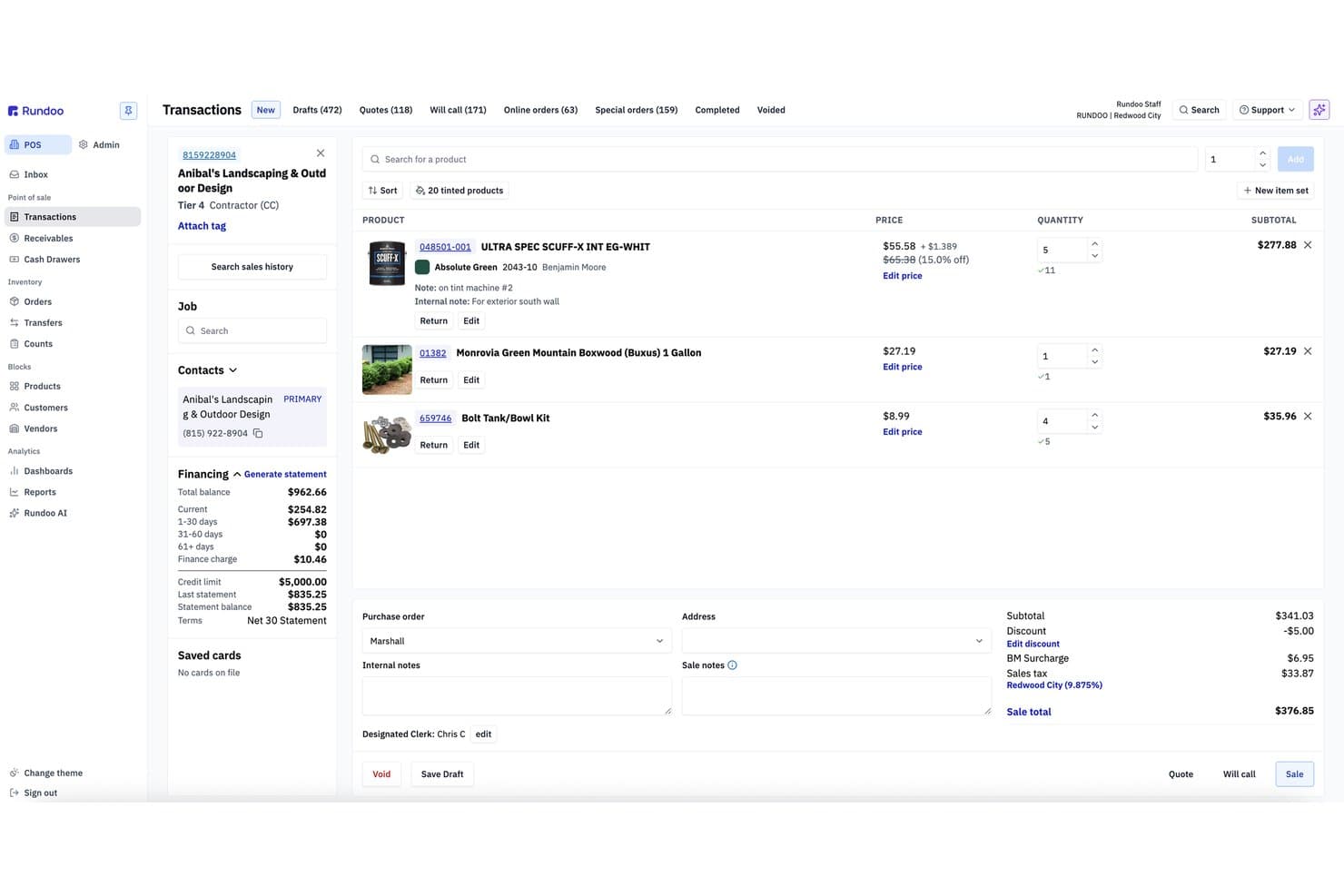
Rundoo offers a cloud-based POS transaction interface with product listings, customer financing details, and real-time order totals. Rundoo is a cloud-native POS and ERP platform built for independent supply stores, combining point-of-sale, real-time inventory management, vendor catalog integration, and AI-driven reporting in a single system.
Who Is Rundoo Best For?
Rundoo is a strong fit for independent hardware, paint, lumber, farm & feed, and lawn & garden store owners operating one or more locations in the US and Canada.
Why I Picked Rundoo
Rundoo earns its spot on my shortlist because of Dooey, its AI assistant built into every screen of the platform. I love how it drafts purchase orders by analyzing sales history, low-stock levels, and seasonality, cutting out the manual work entirely. It also benchmarks store prices against nearby competitors in real time, which is a level of pricing intelligence I haven't seen built natively into a cloud POS before.
Rundoo Key Features
- Cloud-based POS platform: Runs entirely in-browser with no local server required for checkout or reporting.
- Multi-location inventory management: Tracks inventory, SKUs, and transfers across all connected stores in real time.
- Vendor catalog integrations: Directly integrates with major supplier catalogs like True Value, Do It Best, and Orgill.
- Support for hardware peripherals: Works with barcode scanners, Star receipt printers, cash drawers, and Wi-Fi-enabled Stripe card readers.
Rundoo Integrations
Rundoo offers native integrations with Stripe, QuickBooks, Benjamin Moore COLORx, True Value, Do It Best, Orgill, Emery Jensen, AllPro, House Hasson, Blish-Mize, and Lancaster. An API is available for custom integrations.
Pros and Cons
Pros:
- Purpose-built for specialty supply retail verticals
- Built-in competitor price benchmarking in real time
- AI automates purchase orders from sales data
Cons:
- Single payment processor limits merchant flexibility
- No native ecommerce channel sync available
Learn more about Rundoo: Best for restaurant management features
- Free demo available
- From $69/month
Visit WebsiteCustomer Rating:4.2/5
Toast offers a modern POS system built for restaurants, making it easy to manage orders, menu items, discounts, and payments from one streamlined interface. Toast is purpose-built for restaurants that need more than just a basic POS, offering tools for front-of-house, kitchen, and delivery management. It’s a strong fit for quick-service, full-service, and multi-location restaurants looking to connect orders, payments, and staff workflows in one system. Toast helps address challenges like menu changes, table management, and online ordering all from a single cloud-based platform.
Why I Picked Toast
What sets Toast apart for me is its deep focus on restaurant management features that go beyond standard POS capabilities. Toast offers built-in tools for menu management, allowing you to update items and pricing across all terminals instantly. The platform also supports kitchen display systems, which help streamline order flow from front-of-house to the kitchen. If you’re looking for cloud POS software that’s tailored to the unique needs of restaurants, Toast’s specialized features make it a strong choice.
Toast Key Features
Some other features that make Toast appealing for restaurant teams include:
- Tableside ordering and payments: Take orders and process payments directly at the table using handheld devices.
- Loyalty program management: Set up and manage customer rewards programs that integrate with the POS.
- Online ordering integration: Connect your POS to Toast’s online ordering system for takeout and delivery.
- Employee scheduling tools: Build and manage staff schedules within the same platform.
Toast Integrations
Integrations include 7shifts, Homebase, Grubhub, DoorDash, OpenTable, MarketMan, Restaurant365, xtraCHEF, QuickBooks, and Resy.
Pros and Cons
Pros:
- Tableside ordering and payment capability
- Built in kitchen display system support
- Menu updates apply instantly across devices
Cons:
- Customer support response can vary
- Menu setup can take time initially
Learn more about Toast: Best for multi-location inventory control
- 14-day free trial
- From $89/month (billed annually)
Visit WebsiteCustomer Rating:4.1/5
Lightspeed's cloud POS interface offers table management, customizable menu grids, and more. Lightspeed is designed for retailers and hospitality businesses that need to manage inventory across multiple locations from a single dashboard. It’s especially useful for businesses with complex stock needs, like boutiques, bike shops, or multi-store operations. Lightspeed helps you track inventory movement, transfer stock between stores, and keep product data consistent everywhere you sell.
Why I Picked Lightspeed
For retailers managing inventory across several locations, Lightspeed stands out for its multi-location inventory control features. You can track stock levels in real time at each store, transfer products between locations, and set automated reorder points to avoid stockouts.
I picked Lightspeed because it lets you centralize inventory management while still customizing product catalogs for each site. This makes it a strong fit for businesses that need to keep inventory accurate and consistent across multiple stores.
Lightspeed Key Features
Some other features that make Lightspeed appealing for retailers and hospitality businesses include:
- Integrated purchase ordering: Create and send purchase orders to suppliers directly from the platform.
- Customer profiles and sales history: Store detailed customer information and track purchase history for personalized service.
- Built-in analytics and reporting: Access sales, inventory, and employee performance reports in real time.
- Omnichannel selling tools: Sync your in-store and online sales channels for unified inventory and order management.
Lightspeed Integrations
Integrations include QuickBooks, Xero, Mailchimp, Shopify, BigCommerce, 7shifts, MarketMan, Grubhub, Deputy, and OpenTable.
Pros and Cons
Pros:
- Real time analytics for sales and performance
- Integrated purchase ordering with suppliers
- Centralized multi location inventory management
Cons:
- Customer support hours may be limited
- Catalog imports can be slow
Learn more about Lightspeed: Best for rapid setup and onboarding
- 30-day free trial
- From $39/month
Visit WebsiteCustomer Rating:3.8/5
Epos Now offers a cloud-based POS system with multi-device support, including smartphone, tablet, and desktop interfaces showing real-time sales analytics, payment processing, and inventory management dashboards. Getting your POS system up and running quickly is where Epos Now shines. This cloud-based platform is designed for retailers and hospitality businesses that want minimal setup time and guided onboarding. Epos Now helps teams start selling fast without complex installation or lengthy training.
Why I Picked Epos Now
Epos Now is built for businesses that want to get started with cloud POS software quickly, without a complicated onboarding process. I picked Epos Now because it offers guided setup wizards and step-by-step onboarding resources that help new users configure their system in minutes.
The platform also provides preloaded product catalogs and industry-specific templates, so retailers and hospitality teams can start processing sales right away. This focus on rapid deployment makes Epos Now a strong choice for businesses that need to minimize downtime and get staff trained fast.
Epos Now Key Features
In addition to its quick onboarding tools, Epos Now offers several other features worth noting:
- Real-time sales reporting: Access up-to-the-minute sales data and analytics from any device.
- Multi-location management: Oversee inventory, staff, and sales across multiple stores from a single dashboard.
- Integrated payment processing: Accept a wide range of payment types, including contactless and mobile payments.
- Customer loyalty program tools: Set up and manage loyalty schemes directly within the POS system.
Epos Now Integrations
Integrations include Loyalzoo, Mailchimp, Shopify, Epos Now Online, Sage, Epos Now Delivery, Epos Now Order & Pay, Deputy, KDS, and OpenTable.
Pros and Cons
Pros:
- Real time sales and inventory visibility
- Preloaded catalogs help teams start quickly
- Guided onboarding simplifies initial setup
Cons:
- Occasional syncing delays with third party tools
- Reporting customization is limited
Learn more about Epos Now:

Square offers a cloud-based POS floor plan view showing real-time table and bar status with color-coded timers for restaurant management. Square offers a cloud POS platform designed for retailers, restaurants, and service businesses that want integrated payment processing and flexible hardware options. It’s a strong fit if you need to accept payments anywhere, manage sales in real time, and connect in-person and online transactions. Square helps simplify checkout and unify your sales data across channels.
Why I Picked Square
For businesses that need integrated payment processing, Square stands out with its built-in payment acceptance and fast deposit options. I picked Square because it lets you handle card, contactless, and mobile payments directly through the POS, without needing third-party processors. The system also includes real-time sales tracking and digital receipts, which help unify your payment and sales data. These features make Square a strong choice if you want a cloud POS that keeps payment processing simple and fully connected to your daily operations.
Square Key Features
Some other features in Square’s cloud POS platform that are useful for retailers and service businesses include:
- Inventory management: Track stock levels, set alerts for low inventory, and manage product variants directly from the POS dashboard.
- Employee management: Assign roles, track hours, and monitor sales performance for each team member.
- Customer directory: Build and maintain a database of customer profiles, including purchase history and contact information.
- Online ordering integration: Sync your in-person and online sales channels, allowing customers to place orders for pickup or delivery.
Square Integrations
Integrations include QuickBooks, Xero, Wix, WooCommerce, BigCommerce, Mailchimp, Homebase, 7shifts, Jotform, and OpenTable.
Pros and Cons
Pros:
- Quick setup with minimal training required
- Compact hardware options including tap to pay devices
- Purpose built POS solutions for retail restaurant and services
Cons:
- Occasional account freezes and holds
- Not ideal for high-volume, multi-location chains
Learn more about Square: Best for enterprise-level analytics
- Free demo available
- Pricing available upon request

Shift4 offers a detailed dashboard with operational modules including Time Clock, Orders, Reports, Tables, and more. Shift4 is a cloud-based commerce platform that combines payment processing, POS capabilities, and online transaction tools into a single system. It’s designed for businesses in retail, hospitality, and restaurants that want to manage in-person and digital payments together. With solutions like SkyTab POS and Shift4 One, the platform focuses on connecting payments, hardware, and business operations in one place.
Why I Picked Shift4
Shift4 stands out for its ability to bring payments, POS, and online commerce into a single ecosystem. I picked Shift4 because it allows businesses to manage transactions across multiple channels without relying on separate providers. The platform supports in-person payments, mobile transactions, and online checkout, all tied to one backend system.
Its bundled approach to hardware, software, and payment processing makes it a strong option for businesses that want fewer vendors and a more unified setup. This is especially useful for hospitality and retail teams that need consistent transaction management across different sales environments.
Shift4 Key Features
Some other features that make Shift4 appealing for retail and hospitality businesses include:
- Omnichannel payment processing: Accept in-store, mobile, and online payments from a single platform
- All-in-one dashboard: Access reporting, transaction data, and business insights in one place
- Mobile and contactless payments: Support tap-to-pay and digital wallet transactions
- Hardware solutions: Use terminals, handheld devices, and payment readers designed for different setups
Shift4 Integrations
Integrations include Shopify, WooCommerce, BigCommerce, Oracle, PAR Technology, and various hospitality and property management systems.
Pros and Cons
Pros:
- Unified dashboard for transaction and reporting data
- Supports retail hospitality and restaurant workflows
- Combines payments POS and online commerce tools
Cons:
- Features vary depending on selected products
- POS offering is less defined than standalone systems
Learn more about Shift4: Best for unified customer and inventory management
- Free demo available
- Pricing upon request

Retail Cloud POS unifies sales, inventory, and customer data in one place. Retail Cloud POS by Salesforce is designed for retailers who need to connect in-store and online operations through a single platform. This solution is a good fit for businesses looking to manage inventory, sales, and customer data in real time across multiple locations. It’s especially useful for teams that want to unify their retail processes and gain deeper insights into customer behavior.
Why I Picked Retail Cloud POS by Salesforce
I chose Retail Cloud POS because it brings together customer and inventory management in a single, cloud-based platform. The system lets you track inventory levels in real time and syncs data across all sales channels, which is essential for retailers managing multiple locations. I also appreciate how it centralizes customer profiles, allowing your team to access purchase history and preferences at any touchpoint. These features make it easier to deliver consistent service and keep inventory accurate, no matter where your customers shop.
Retail Cloud POS by Salesforce Key Features
Some other features that stand out in Retail Cloud POS by Salesforce include:
- Omnichannel order management: Manage orders from online, in-store, and mobile channels within a single dashboard.
- Mobile POS functionality: Use tablets or smartphones as checkout devices to serve customers anywhere on the sales floor.
- Customizable promotions engine: Set up and manage discounts, coupons, and special offers tailored to your business needs.
- Real-time analytics and reporting: Access up-to-date sales, inventory, and customer data to support decision-making.
Retail Cloud POS by Salesforce Integrations
Integrations include Commerce Cloud, Loyalty Management, Service Cloud, Data 360, Marketing Cloud, Tableau, and Slack.
Pros and Cons
Pros:
- Advanced analytics with Salesforce Data 360
- Built-in omnichannel order management tools
- Mobile POS supports in-aisle checkout
Cons:
- Setup can be complex for smaller retailers
- Requires Salesforce ecosystem for full functionality
Learn more about Retail Cloud POS by Salesforce: Best for ticketing and event sales
- Free trial + free demo available
- From $59/month
Visit WebsiteCustomer Rating:4.8/5
KORONA POS offers a comprehensive touchscreen interface with a receipt preview panel, numeric keypad, and extensive function buttons for liquor selection, glassware, inventory management, payment processing, and administrative tasks. KORONA POS is built for you if you need a cloud POS that handles ticketing and event sales. The platform is designed for event venues, museums, amusement parks, and attractions that need to manage both retail and admission sales in one system. KORONA POS helps teams track ticket inventory, process group sales, and manage timed entry with features tailored for high-volume, event-driven environments.
Why I Picked KORONA POS
KORONA POS stands out for businesses that need advanced ticketing and event sales capabilities within their cloud POS software. I picked KORONA POS because it offers built-in ticketing tools that let you sell, validate, and track tickets directly from the POS.
The system supports timed entry, group sales, and season passes, making it a strong fit for venues with complex admission needs. With real-time reporting on ticket sales and attendance, KORONA POS helps event-driven businesses manage both retail and ticketing operations in one place.
KORONA POS Key Features
Some other features that make KORONA POS appealing for retail and event-driven businesses include:
- Customizable product and pricing catalogs: Set up unique pricing, discounts, and product bundles for different events or retail items.
- Employee time tracking: Monitor staff hours and manage permissions directly within the POS system.
- Inventory management tools: Track stock levels, automate reorder points, and manage multiple locations from one dashboard.
- CRM and customer profiles: Store customer data, purchase history, and preferences to support targeted marketing and loyalty programs.
KORONA POS Integrations
Integrations include Bottlecapps, Card Market, mapAds, TimeForge, City Hive, CMS Max, Octopus Bridge, springbig, bLoyal, and Quick PO.
Pros and Cons
Pros:
- Highly configurable employee permissions
- Strong multi location inventory tracking
- Built in ticketing for events and attractions
Cons:
- Limited marketing automation features
- Interface feels outdated to some users
Learn more about KORONA POS:

Shopify POS offers a mobile-friendly point-of-sale system that lets retailers manage customers, apply discounts, build carts, and complete checkout seamlessly across iPad and iPhone devices. Shopify POS brings your ecommerce and in-person sales together in one system if you’re running both an online and physical store. It’s especially useful for retailers who want to sync inventory, orders, and customer data across all channels. Shopify POS helps you manage omnichannel operations without juggling separate tools or databases.
Why I Picked Shopify POS
Shopify POS stands out for retailers who want a true bridge between their online and in-store operations. I picked Shopify POS because it automatically syncs inventory, orders, and customer profiles across ecommerce and physical locations, so you always have a single source of truth.
The unified dashboard lets you manage products, track sales, and fulfill orders from any channel without switching systems. This makes Shopify POS a strong fit for businesses focused on omnichannel selling and customer experience.
Shopify POS Features
Some other features that make Shopify POS useful for retailers include:
- Customizable smart grid: Organize frequently used actions, discounts, and products on your POS home screen for quick access.
- Integrated hardware support: Connect barcode scanners, receipt printers, and card readers directly to the POS system.
- Staff management tools: Assign roles, track sales by staff members, and manage permissions from the dashboard.
- Mobile checkout capability: Process sales and accept payments anywhere in your store using mobile devices.
Shopify POS Integrations
Integrations include Shopify Payments, Shop Pay, Shopify Fulfillment Network, Shopify Inbox, Shopify Email, Shopify Flow, QuickBooks Online, Xero, Mailchimp, and Google Analytics.
Pros and Cons
Pros:
- Mobile POS functionality for flexible checkout
- Supports buy online pick up in store workflows
- Unified inventory across online and retail channels
Cons:
- Refund processing can be slow
- Advanced reporting requires higher tiers
Learn more about Shopify POS: 10Best for customizable hardware options
Clover
- 90-day free trial
- From $16/month
Visit WebsiteCustomer Rating:3.9/5
Clover offers an all-in-one POS dashboard where businesses can manage orders, transactions, tips, shifts, inventory, customers, discounts, and reporting from one centralized hub. Clover gives retailers and restaurants a wide range of hardware options that can be tailored to fit different counter spaces and workflows. It’s a strong choice for businesses that want to mix and match terminals, handhelds, and accessories to suit their unique setup. With Clover, you can build a POS system that matches your brand’s look and operational needs, whether you run a café, boutique, or multi-location shop.
Why I Picked Clover
Unlike many cloud POS systems that offer limited hardware choices, Clover lets you select from a variety of terminals, registers, and handheld devices to match your business’s physical setup. I picked Clover because you can combine countertop stations, mobile card readers, and customer-facing displays to create a tailored checkout experience.
The modular hardware lineup means you can start small and add more devices as your business grows or your needs change. This flexibility is especially useful for retailers and restaurants that want a POS system to fit their unique space and workflow.
Clover Key Features
In addition to its flexible hardware options, Clover offers several other features that support retail and restaurant operations:
- Inventory management tools: Track stock levels, set low-stock alerts, and manage product variants from the dashboard.
- Employee permissions and time tracking: Assign roles, set access levels, and monitor employee hours within the system.
- Integrated payment processing: Accept credit, debit, contactless, and mobile wallet payments without third-party processors.
- App marketplace: Access a wide range of add-on apps for loyalty programs, accounting, and marketing directly from Clover’s marketplace.
Clover Integrations
Integrations include QuickBooks, Mailchimp, WooCommerce, BigCommerce, Shopify, Yelp, Xero, Gusto, Homebase, and more.
Pros and Cons
Pros:
- App marketplace supports added functionality
- Built in loyalty and gift card functionality
- Flexible hardware options for different setups
Cons:
- Initial setup can be complex
- Locked into using Clover's merchant services
Learn more about Clover:
Annen skybasert POS-programvare
Her er noen flere alternativer for skybasert POS-programvare som ikke kom med på kortlisten min, men som likevel er verdt å undersøke:
How I Evaluate Cloud POS Software
I split my evaluation into two layers: the baseline every checkout system must clear to qualify and the differentiators—like offline resilience or vertical fit—that separate one platform from another.
Core Functionality (Table Stakes For This List)
When I'm selecting tools for my list, I rank each one on a scale from 0 (does not offer the functionality) to 5 (excels in this area) for each core functionality listed below. Then, I calculate the tool's total score into a percentage. Each tool needs to achieve a minimum total score of 65% to be considered for inclusion.
- Cloud-Based Transaction Processing: I check whether the system runs natively in the cloud and works across tablets, phones, and desktops so staff can ring up sales from anywhere on the floor.
- Real-Time Inventory Tracking: Stock counts need to update the moment a sale, return, or transfer happens—I look for live SKU and variant-level tracking across all connected registers.
- Integrated Payment Processing: I evaluate which payment methods and gateways each platform supports, from tap-to-pay and mobile wallets to split tenders at checkout.
- Multi-Location & Omnichannel Support: For retailers with more than one store or an online shop, I look at how the platform centralizes inventory, orders, and pricing across channels.
- Customer & Loyalty Management: I consider how each tool captures customer profiles and purchase history, and whether it supports loyalty rewards or targeted discounts at the register.
- Sales Reporting & Analytics: Dashboards should surface daily sales, top sellers, and staff performance in real time—I evaluate report depth and whether data is accessible remotely.
Once I have a list of tools that meet this criteria, I consider what sets each platform apart.
Differentiating Factors (What Sets Vendors Apart)
Here's how I compare and contrast different vendors:
Standout Features
Offline resilience matters a lot—I look at whether a platform can keep processing sales and queuing transactions when Wi-Fi drops mid-shift, then sync everything once connectivity returns. Built-in ecommerce sync is another factor I weigh, since retailers selling online and in-store need unified inventory without relying on third-party middleware. I also evaluate each vendor's API and app marketplace to see how easily it connects to accounting tools, marketing platforms, and ERPs your team already uses.
Beyond Features
Total cost of ownership is one of the first things I evaluate—whether pricing is per register or per location, whether you can bring your own payment processor, and how much proprietary hardware adds to the bill. Retail vertical fit also matters because an apparel shop managing size/color matrices has very different catalog needs than a grocery store tracking weight-based items. I check onboarding and support quality too, since migrating from a legacy POS mid-operation demands fast data imports and responsive help when registers go down.
Slik velger du skybasert POS-programvare
Det er lett å gå seg vill i lange funksjonslister og komplekse prisstrukturer. For å hjelpe deg med å holde fokus mens du går gjennom den unike prosessen med å velge programvare, får du her en sjekkliste over faktorer du bør ha i tankene:
| Faktor | Hva du bør vurdere |
|---|---|
| FaktorSkalerbarhet | Hva du bør vurdereVil programvaren støtte veksten din, for eksempel ved å legge til nye lokasjoner, kassaapparater eller salgskanaler? Se etter begrensninger på brukere, produkter eller transaksjoner. |
| FaktorIntegrasjoner | Hva du bør vurdereKan POS-systemet kobles direkte til regnskaps-, netthandels- eller lagersystemene dine? Bekreft kompatibiliteten med den eksisterende teknologiplattformen din for å unngå manuelt arbeid. |
| FaktorTilpasningsmuligheter | Hva du bør vurdereKan du tilpasse arbeidsflyter, kvitteringer eller brukertillatelser slik at de samsvarer med forretningsprosessene dine? Se etter fleksible innstillinger, ikke bare alternativer for merkevarebygging. |
| FaktorBrukervennlighet | Hva du bør vurdereVil de ansatte lære systemet raskt? Test grensesnittet med tanke på tydelighet og hastighet, særlig i travle salgsperioder. |
| FaktorImplementering og innføring | Hva du bør vurdereHvor lang tid vil oppsettet ta, og hvilke ressurser kreves? Spør om datamigrering, opplæring og støtte under utrullingen. |
| FaktorKostnad | Hva du bør vurdereEr alle gebyrer tydelige, inkludert maskinvare, betalingsbehandling og tillegg? Sammenlign de totale eierkostnadene, ikke bare månedsprisene. |
| FaktorSikkerhetstiltak | Hva du bør vurdereOppfyller POS-systemet PCI-kravene, og tilbyr det datakryptering? Spør om verktøy for å forhindre svindel og kontroller for brukertilgang. |
| FaktorTilgjengelig kundestøtte | Hva du bør vurdereHvilke støttekanaler tilbys, og på hvilke tidspunkter? Vurder om du trenger hjelp døgnet rundt eller dedikert kundeoppfølging. |
Hva er skybasert POS-programvare?
Skybasert POS-programvare er et kassasystem som opererer på nettet, slik at små bedrifter kan behandle salg, administrere lagerbeholdning og få tilgang til forretningsdata fra alle internettilkoblede enheter. I motsetning til et tradisjonelt POS-system eller et kassaapparat lagrer disse systemene informasjon sikkert i skyen, noe som gjør det enklere å ivareta datasikkerheten og få tilgang til sanntidsinnsikt fra detaljhandelens POS-systemer på tvers av lokasjoner.
Denne typen programvare hjelper bedrifter med å erstatte eldre systemer med mer fleksible verktøy, gir team bedre oversikt over driften og støtter mer velinformerte beslutninger. Skybasert POS-programvare brukes mye av forhandlere og tjenesteleverandører som trenger sentralisert kontroll og ekstern tilgang til forretningsdataene sine.
Funksjoner
Når du velger skybasert POS-programvare, bør du se etter følgende viktige funksjoner:
- Salgsbehandling: Håndter transaksjoner i butikk og på nettet, godta flere betalingstyper og utsted digitale eller trykte kvitteringer uten å være avhengig av et tradisjonelt POS-system eller kassaapparat
- Lagerstyring: Følg lagernivåene i sanntid og administrer produkter på én eller flere lokasjoner med sanntidsoversikt fra detaljhandelens POS-system
- Kundeadministrasjon: Lagre kundeprofiler, kjøpshistorikk og kontaktopplysninger for å støtte gjentatte kjøp og personlig service
- Rapportering og analyse: Generer salgs- og resultatrapporter som hjelper team med å ta velinformerte beslutninger ved hjelp av oppdaterte data
- Medarbeideradministrasjon: Tildel roller, angi tillatelser og følg med på de ansattes aktivitet i systemet
- Støtte for flere lokasjoner: Administrer salg, lagerbeholdning og rapportering på tvers av flere butikker fra én enkelt plattform
- Integrerte betalinger: Godta kredittkort, debetkort og mobilbetalinger direkte i POS-systemet
- Tilkoblinger til regnskapsprogramvare: Synkroniser transaksjonsdata med regnskapsprogramvare for å forenkle bokføring og økonomisk oppfølging
- Datasikkerhetskontroller: Beskytt transaksjons- og kundedata med sikker lagring, kryptering og tilgangskontroller
- Frakoblet modus: Fortsett å behandle salg og lagre transaksjonsdata ved avbrudd i internettilkoblingen
Fordeler
Implementering av skybasert POS-programvare gir flere fordeler for teamet og bedriften din. Her er noen av fordelene du kan se frem til:
- Sentralisert administrasjon: Få tilgang til salgs-, lager- og kundedata for alle lokasjoner fra ett enkelt skybasert kontrollpanel.
- Sanntidsinnsikt: Følg med på salgstrender, lagernivåer og medarbeidernes resultater med oppdatert rapportering og analyse.
- Ekstern tilgjengelighet: Administrer bedriften og behandle transaksjoner fra alle internettilkoblede enheter, enten du er på eller utenfor arbeidsstedet.
- Skalerbarhet: Legg til nye kassaapparater, lokasjoner eller brukere etter hvert som bedriften vokser, uten store endringer i maskinvare eller programvare.
- Automatiske oppdateringer: Motta nye funksjoner, sikkerhetsoppdateringer og samsvarsoppdateringer automatisk, noe som reduserer behovet for IT-vedlikehold.
- Forbedret kundeopplevelse: Tilby raskere betaling, digitale kvitteringer og personlig service ved hjelp av integrerte verktøy for kundeadministrasjon.
- Kontinuitet i virksomheten: Fortsett å behandle salg og lagre data selv under strømbrudd i internettforbindelsen ved hjelp av funksjonalitet for frakoblet modus.
Kostnader og priser
Valg av skybasert POS-programvare krever en forståelse av de ulike prismodellene og abonnementene som er tilgjengelige. Kostnadene varierer basert på funksjoner, teamstørrelse, tillegg og mer. Tabellen nedenfor oppsummerer vanlige abonnementer, gjennomsnittsprisene deres og typiske funksjoner som er inkludert i skybaserte POS-programvareløsninger:
Sammenligningstabell for abonnementer for skybasert POS-programvare
| Abonnementstype | Gjennomsnittspris | Vanlige funksjoner |
|---|---|---|
| AbonnementstypeGratisabonnement | Gjennomsnittspris$0 | Vanlige funksjonerGrunnleggende salgsbehandling, begrenset lagerstyring, støtte for én kasse og grunnleggende rapportering. |
| AbonnementstypePersonlig abonnement | Gjennomsnittspris$10-$40/bruker/måned | Vanlige funksjonerTilgang fra flere enheter, utvidede lagerverktøy, kundeprofiler og grunnleggende medarbeideradministrasjon. |
| AbonnementstypeBedriftsabonnement | Gjennomsnittspris$40-$100/bruker/måned | Vanlige funksjonerStøtte for flere lokasjoner, avansert rapportering, integrerte betalinger, lojalitetsprogrammer og automatisering av skatter. |
| AbonnementstypeStorbedriftsabonnement | Gjennomsnittspris$100-$300/bruker/måned | Vanlige funksjonerTilpassede integrasjoner, dedikert kundestøtte, avansert sikkerhet, API-tilgang og tilpassede tjenester for oppstart. |
Vanlige spørsmål om skybasert POS-programvare
Her er noen svar på vanlige spørsmål om skybasert POS-programvare:
Kan skybasert POS-programvare fungere uten nett?
Ja, de fleste skybaserte POS-programmer tilbyr en frakoblet modus som lar deg behandle salg og lagre transaksjonsdata selv uten internettilkobling. Når du er på nett igjen, synkroniserer systemet dataene dine automatisk for å sikre at oppføringene forblir korrekte.
Hvor sikkert er skybasert POS-programvare for betalingsbehandling?
Skybasert POS-programvare bruker kryptering, PCI-samsvar og tilgangskontroller for brukere for å beskytte betalingsdata. Bekreft alltid at leverandøren oppfyller bransjens sikkerhetsstandarder og tilbyr regelmessige oppdateringer for å håndtere nye trusler.
Hvilken maskinvare trenger jeg for å bruke skybasert POS-programvare?
Du trenger vanligvis et nettbrett, en datamaskin eller en smarttelefon med internettilgang, samt valgfri maskinvare som kvitteringsskrivere, strekkodeskannere og kassaskuffer. Mange systemer er kompatible med en rekke tredjepartsenheter, men sjekk alltid de spesifikke kravene.
Kan jeg integrere skybasert POS-programvare med netthandelsplattformen min?
Ja, mange skybaserte POS-løsninger tilbyr integrasjoner med populære netthandelsplattformer, slik at du kan synkronisere lagerbeholdning, salg og kundedata på tvers av kanaler. Se etter innebygde integrasjoner eller tilgjengelige API-er for å sikre kompatibilitet med de eksisterende systemene dine.
Hvordan flytter jeg dataene mine til et nytt skybasert POS-system?
De fleste leverandører tilbyr verktøy for dataimport, oppsettsveiledninger eller hjelp med oppstart for å hjelpe deg med å overføre lagerbeholdning, kunde- og salgsdata fra det gamle systemet. Spør om støttede filformater og om migreringshjelp er inkludert i abonnementet ditt.