

Amazon PPC-programvare hjelper teamet ditt med å administrere, automatisere og optimalisere betal-per-klikk-annonseringskampanjer på Amazons markedsplass. Hvis du leter etter den beste Amazon PPC-programvaren, ønsker du sannsynligvis å forbedre annonseytelsen, kontrollere kostnadene og få bedre innsikt i hva som driver salget ditt. Med så mange alternativer og funksjoner å vurdere kan det riktige verktøyet utgjøre en stor forskjell i hvordan du administrerer bud, søkeord og rapportering. Denne listen hjelper deg med å sammenligne de beste løsningene for 2026, slik at du kan finne det som passer best for forretningsmålene og annonseringsstrategien din.
Hvorfor du kan stole på våre programvareanbefalinger
6,700+
Reviews
20
Industry experts
16+
Evaluation factors
14
Years
Teamet vårt har testet og anmeldt programvare siden 2012. Vi er selv ledere i detaljhandelen, så vi vet hvor vanskelig og hvor viktig det er å velge riktig programvare.
I denne guiden har vi vurdert verktøyene gjennom praktisk testing og uavhengig research og gitt dem poeng ut fra våre utvelgelseskriterier.
Anmeldelsene våre bygger på vår uavhengige vurdering, ikke på salgsargumenter.
Sammenligningstabell: Amazon PPC-programvare
Denne sammenligningstabellen oppsummerer prisdetaljene for mine beste utvalgte Amazon PPC-programvarer.
| Tool | Best For | Trial Info | Price | ||
|---|---|---|---|---|---|
| 1 | Best with verified partnerships for ad channels | 30-day free trial + free demo available | From $119/month + 1.75% of ad revenue (billed annually) | Website | |
| 2 | Best for flat-fee Amazon bid automation | 30-day free trial | From $199/month | Website | |
| 3 | Best for creative ad testing | 30-day free trial | From $40/month + 1% of ad spend | Website | |
| 4 | Best for cross-platform ad management | 14-day free trial | From $66/month | Website | |
| 5 | Best for real-time profit analytics | 30-day free trial + free demo available | From $15/month (billed annually) | Website | |
| 6 | Best for multilingual campaign support | Free demo available | From $799/month | Website | |
| 7 | Best for enterprise-level automation | Free demo available | Pricing upon request | Website | |
| 8 | Best for customizable rule-based workflows | 7-day free trial + free demo available | From $499/month | Website | |
| 9 | Best for bulk campaign management | 14-day free trial available | From $79.99/month | Website | |
| 10 | Best for advanced keyword discovery | Free trial + free demo available | Pricing upon request | Website |


Anmeldelser av den beste Amazon PPC-programvaren
Nedenfor finner du mine detaljerte sammendrag av Amazon PPC-programvarene som kom med på kortlisten. Anmeldelsene mine gir en grundig gjennomgang av funksjonene, de beste bruksområdene og prisene for hver plattform, slik at du kan finne den beste løsningen for deg.
 Best with verified partnerships for ad channels
- 30-day free trial + free demo available
- From $119/month + 1.75% of ad revenue (billed annually)
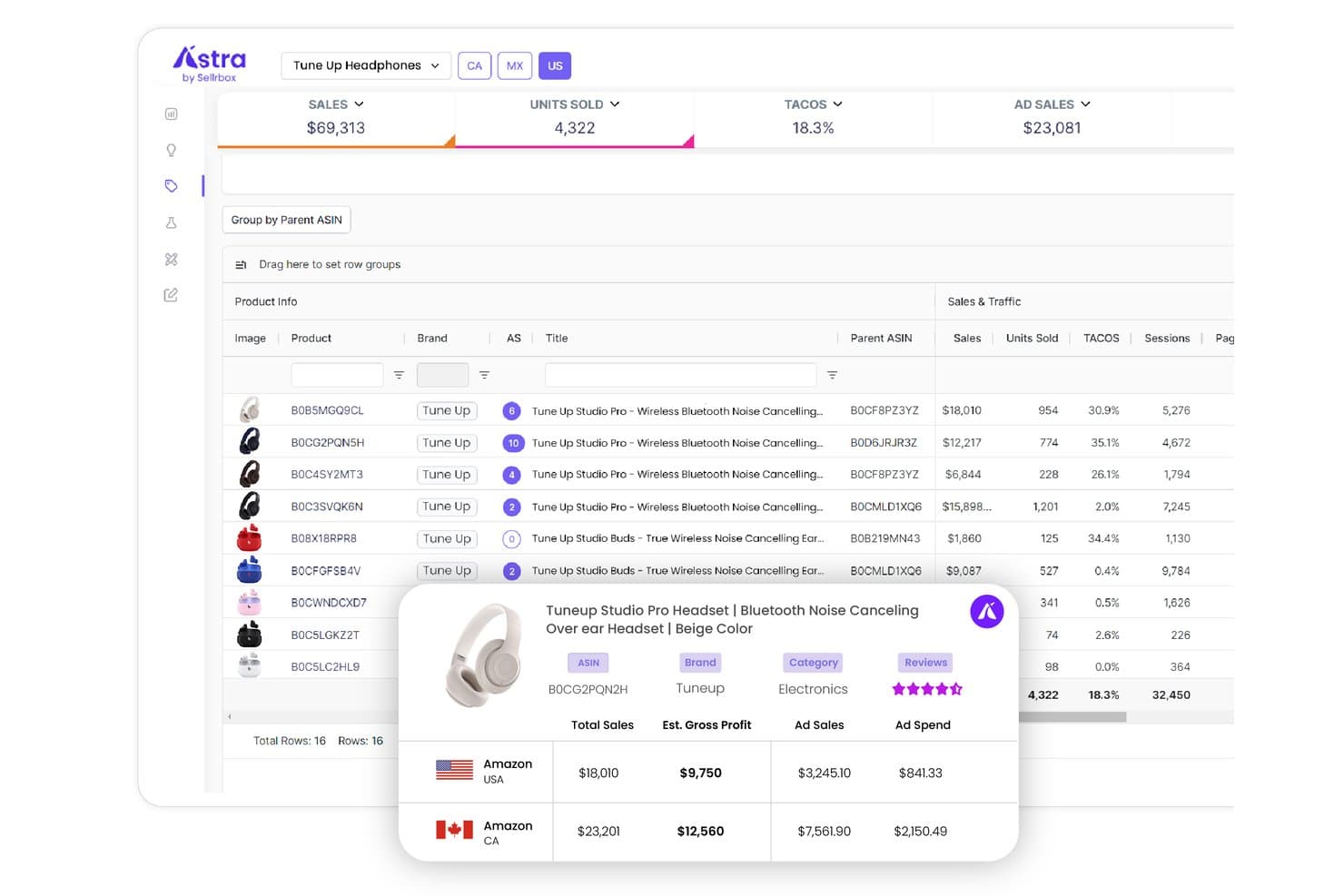
Astra by Sellrbox offers a product-level PPC analytics dashboard showing sales, units sold, TACOS, and ad sales metrics with a detailed popup for individual ASIN performance across Amazon USA and Canada. Astra by Sellrbox is an AI-powered Amazon PPC platform that automates the full advertising workflow, from keyword research and campaign creation to bid optimization and dayparting across Sponsored Products, Sponsored Brands, and Sponsored Display.
Who Is Astra by Sellrbox Best For?
Astra by Sellrbox suits Amazon sellers and growing ecommerce brands that want to move from manual or rule-based ad management to a fully automated, AI-driven PPC workflow.
Why I Picked Astra by Sellrbox
Astra by Sellrbox earns its spot because its verified partnerships with Amazon Ads, Walmart, and TikTok Shop translate directly into the product's ad capabilities, not just its branding. I like that the Amazon Ads partner status enables hourly bid adjustments across Sponsored Products, Sponsored Brands, and Sponsored Display from a single dashboard. I also appreciate the three AI strategy modes: ACOS Target, Monthly Budget Target, and Constant Bid, each tuned to a distinct campaign goal rather than applying one-size-fits-all logic.
Astra by Sellrbox Key Features
- Automated keyword harvesting: The platform continuously discovers and applies high-performing new keywords to your campaigns.
- Negative targeting automation: Automatically detects and blocks wasteful targets to reduce unnecessary ad spend.
- Dayparting scheduling: Schedule ad pausing and ramping by hour or day to align with demand patterns.
- Predictive inventory tracking: Monitors stock levels and ad status to avoid wasted spend on low or out-of-stock products.
Astra by Sellrbox Integrations
Astra by Sellrbox offers native integrations with Amazon Ads, Walmart Connect, and TikTok Shop. An API is available for custom integrations.
Pros and Cons
Pros:
- Verified partnerships with ad channel platforms
- Advanced dayparting with automated scheduling
- AI-driven campaign creation and bid strategies
Cons:
- Reporting lack deep historical analytics
- Limits base tier to single marketplace
Learn more about Astra by Sellrbox: Best for flat-fee Amazon bid automation
- 30-day free trial
- From $199/month
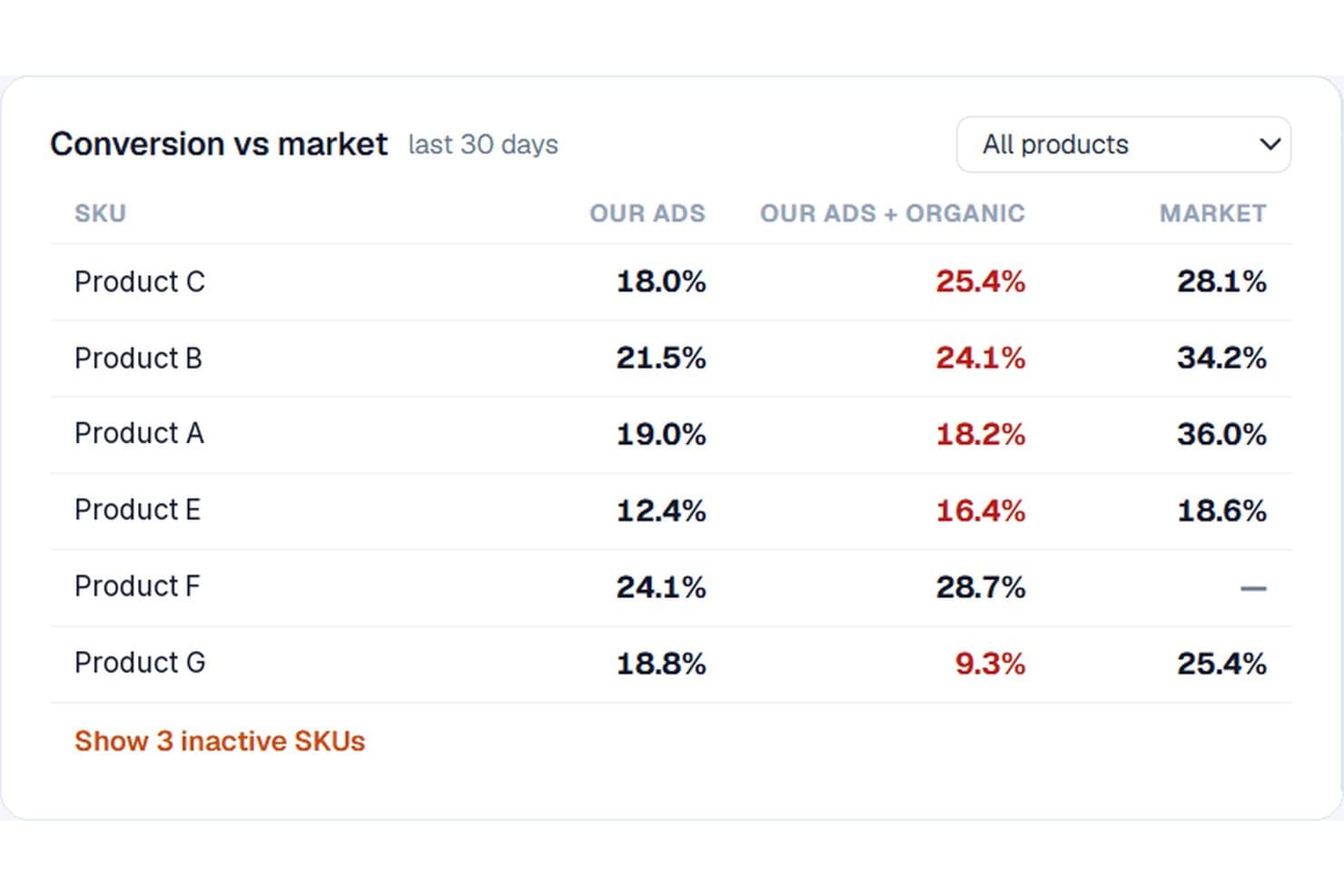
Pulse Pilot PPC compares your conversion rates against market benchmarks per SKU. Pulse Pilot PPC is an Amazon PPC software that combines rule-based bid management, AI-driven automation, and keyword harvesting across Sponsored Products, Sponsored Brands, and Sponsored Display campaigns.
Who Is Pulse Pilot PPC Best For?
Pulse Pilot PPC is a strong fit for Amazon sellers and small agencies managing Sponsored Ads in the US, Canada, or Mexico who want predictable, flat-fee pricing over percentage-of-spend models.
Why I Picked Pulse Pilot PPC
Pulse Pilot PPC earns its spot on my shortlist because flat-fee pricing at $199/month means your costs stay fixed whether you're spending $5,000 or $50,000 on ads. I love how the market conversion benchmark flags whether a high-ACoS keyword is a bidding problem or a listing problem, so you're not blindly cutting bids. The Copilot shadow mode also lets you see exactly what the AI would change before it touches anything, which I find genuinely useful when testing new campaigns.
Pulse Pilot PPC Key Features
- Harvest rules: Automatically promotes converting search terms into exact, phrase, broad, or ASIN targets while adding a matching negative in the source campaign.
- Dayparting grid: Lets you manually paint an hour-by-hour weekly bid schedule or have Claude generate one from your hourly data and refresh it weekly.
- Spend Shield: Sets weekly or monthly budget ceilings per campaign or tag and adjusts daily budgets to stay on pace without ever exceeding your cap.
- Sales Funnel diagnostics: Compares your search, click, add-to-cart, and purchase rates against market benchmarks to pinpoint whether your listing or your price is losing sales.
Pulse Pilot PPC Integrations
Pulse Pilot PPC integrates with the Amazon Ads API and Amazon Selling Partner API for advertising, inventory, pricing, and listing-health data. It’s also available through the Amazon Selling Partner Appstore.
Pros and Cons
Pros:
- Shadow mode previews AI decisions
- Market benchmarks diagnose listing problems
- Transparent bid-change audit trails
Cons:
- No profit-based optimization
- Sponsored Display controls remain limited
Learn more about Pulse Pilot PPC: Best for creative ad testing
- 30-day free trial
- From $40/month + 1% of ad spend
Visit WebsiteCustomer Rating:5/5
Adlabs boosts efficiency in ad tracking. Adlabs stands out for Amazon advertisers who want to test and optimize creative assets before launching campaigns. The platform is built for brands and agencies focused on improving ad performance through data-driven creative testing. If your team needs to compare different ad variations and understand which visuals or copy drives the best results, Adlabs offers specialized tools for creative experimentation.
Why I Picked Adlabs
For Amazon PPC teams focused on creative performance, Adlabs offers a unique approach to ad testing that goes beyond basic campaign management. The platform lets you run controlled experiments with different ad creatives, so you can see which images, headlines, or calls-to-action actually drive clicks and conversions. I appreciate that Adlabs provides detailed analytics on creative elements, helping you make data-backed decisions about what to launch at scale. If you want to maximize the impact of your Amazon ads through systematic creative testing, Adlabs is purpose-built for that need.
Adlabs Key Features
Some other features that make Adlabs valuable for Amazon PPC teams include:
- Automated Creative Rotation: Cycles through multiple ad creatives to ensure even exposure during tests.
- Audience Segmentation Tools: Allows you to test creative performance across different audience groups.
- Real-Time Performance Tracking: Displays up-to-the-minute results for each creative variation.
- Bulk Creative Uploads: Lets you import and manage multiple ad assets at once.
Adlabs Integrations
Integrations include Amazon Ads.
Pros and Cons
Pros:
- Real-time tracking for creative results
- Automated rotation of ad variations
- Creative testing tools for ad performance
Cons:
- Limited reporting customization options
- Lacks campaign budget management features
Learn more about AdLabs:

Optmyzr measures results from tailored strategies. Optmyzr gives retail marketers and agencies a way to manage Amazon PPC alongside Google, Microsoft, and other ad platforms from one dashboard. This tool is a fit for teams juggling multiple channels who want unified workflows and reporting across their paid media. If you need to coordinate Amazon campaigns with broader digital ad strategies, Optmyzr brings cross-platform control to your PPC management.
Why I Picked Optmyzr
Managing Amazon PPC in isolation can make it tough to coordinate campaigns across all your paid channels, which is why Optmyzr’s cross-platform ad management stands out. The platform lets you manage Amazon, Google, and Microsoft Ads from a single interface, so you can align strategies and reporting without switching tools. I appreciate that Optmyzr includes unified budget pacing and cross-channel reporting, which helps you keep spend and performance in sync across platforms. For teams running multi-channel campaigns, Optmyzr brings everything together in one place.
Optmyzr Key Features
Some other features that make Optmyzr useful for Amazon PPC management include:
- Rule-Based Automations: Lets you set custom rules to automate bid changes, keyword management, and campaign adjustments.
- Shopping Campaign Builder: Helps you quickly create and structure Amazon shopping campaigns with bulk editing tools.
- Ad Testing Tools: Provides A/B testing for ad copy and creative variations within your Amazon campaigns.
- Change History Tracking: Keeps a detailed log of all campaign changes for easy auditing and troubleshooting.
Optmyzr Integrations
Integrations include Google Ads, Microsoft Ads, Amazon Ads, Meta Ads, and LinkedIn Ads.
Pros and Cons
Pros:
- Unified reporting across multiple platforms
- Rule-based automation for campaign optimization
- Cross-platform management across ad channels
Cons:
- Reporting customization options are restricted
- Limited support for Amazon international markets
Learn more about Optmyzr: Best for real-time profit analytics
- 30-day free trial + free demo available
- From $15/month (billed annually)

Sellerboard empowers businesses to monitor costs. sellerboard offers real-time profit analytics designed for Amazon sellers who want deeper visibility into their ad spend and margins. This platform is a strong fit for ecommerce businesses that need to track PPC performance alongside actual profitability. If you’re looking to connect your advertising data directly to your bottom line, sellerboard brings those insights together in one place.
Why I Picked sellerboard
I chose sellerboard because its real-time profit analytics go beyond standard PPC reporting, giving you a clear picture of how your ad spend impacts actual profits. The platform tracks every cost associated with your Amazon business—including PPC, fees, and returns—so you can see true profitability at a glance. I like that sellerboard automatically updates profit calculations as campaigns run, helping you make quick, informed decisions. This focus on real-time, actionable financial data makes it especially useful for sellers who want to connect advertising performance directly to their bottom line.
sellerboard Key Features
Some other features in sellerboard that stand out for Amazon PPC management include:
- PPC Dashboard: View all your Amazon ad campaigns, performance metrics, and spend in one centralized dashboard.
- Automated Campaign Optimization: Set rules to automatically adjust bids and budgets based on your chosen performance criteria.
- Keyword Tracking: Monitor keyword rankings and performance to identify which terms drive the most profitable traffic.
- Inventory Management Integration: Connect ad performance data with inventory levels to avoid overspending on products that are low or out of stock.
sellerboard Integrations
Integrations include Amazon, Shopify, Walmart, and eBay.
Pros and Cons
Pros:
- Automated bid and budget adjustments
- Tracks fees, refunds, and true margins accurately
- Real-time profit tracking tied to ad performance
Cons:
- Reporting customization options are limited
- Limited support beyond Amazon advertising
Learn more about sellerboard: Best for multilingual campaign support
- Free demo available
- From $799/month
Visit WebsiteCustomer Rating:5/5
AdBrew helps advertisers monitor campaign performance, track key Amazon advertising metrics, and compare sales, spend, and efficiency trends from a centralized dashboard. AdBrew is an Amazon PPC automation platform that combines AI-driven bid management, rule-based automation, keyword harvesting, and multi-marketplace campaign analytics with retail-aware optimization across Sponsored Products, Brands, and Display ad types.
Who Is AdBrew Best For?
AdBrew is a strong fit for Amazon sellers and agencies managing PPC campaigns across multiple marketplaces who need advanced automation and analytics in one platform.
Why I Picked AdBrew
I've included AdBrew in my top picks because its multi-marketplace support covers nine Amazon marketplaces, including the US, UK, Germany, Japan, Spain, Italy, Canada, India, and Australia, all from a single account. What I like specifically is that the bulk campaign launcher lets you replicate and deploy campaign structures across those marketplaces without rebuilding everything from scratch per locale. The digital shelf analytics also tracks keyword visibility by placement across markets, so you can spot where a product ranks differently in, say, Amazon.de vs. Amazon.co.uk and adjust targeting accordingly.
AdBrew Key Features
- AI-powered bid automation: Automatically adjusts bids for keywords, placements, and targets based on performance data and custom rules you define.
- Keyword harvesting: Pulls converting search terms from auto and broad campaigns and promotes them as exact or phrase match targets.
- Dayparting: Schedules bid multipliers by hour of day using Amazon Marketing Stream data to control spend during peak and low-conversion windows.
- Amazon Marketing Cloud reports: Runs AMC-based audience and attribution reports to analyze multi-touch ad performance across campaign types.
AdBrew Integrations
AdBrew offers a small set of integrations, including Google Looker Studio, Google Sheets, Claude, and ChatGPT. Its primary connectivity comes through direct connections with Amazon Ads, Amazon DSP, Amazon Marketing Cloud, Amazon Marketing Stream, and Walmart Connect, which are core to its platform functionality rather than third-party integrations. Zapier support and a public API for custom integrations are not clearly documented.
Pros and Cons
Pros:
- No-code AMC audience and report builder
- DSP access without minimum spend requirements
- Hourly dayparting with stream-based analytics
Cons:
- Limited to Amazon and Walmart channels
- Initial campaign setup can be complex
Learn more about AdBrew:

Pacvue supports teams with campaign insights. Pacvue is built for large brands and agencies that need advanced automation and control over Amazon PPC campaigns. With a focus on enterprise-level features, it appeals to teams managing high ad spend and complex account structures. If your business requires customizable rules, cross-channel reporting, and granular workflow automation, Pacvue brings these capabilities together in one platform.
Why I Picked Pacvue
What sets Pacvue apart is its focus on enterprise-level automation for Amazon PPC management. The platform lets you build custom rule-based automations for bidding, budget allocation, and keyword management, which is essential for teams handling large-scale campaigns. I appreciate how Pacvue’s workflow automation tools help reduce manual work and maintain control over complex account structures. For businesses that need to manage multiple brands or marketplaces with precision, Pacvue’s automation capabilities make it a strong choice.
Pacvue Key Features
In addition to its automation capabilities, Pacvue offers several other features designed for advanced Amazon PPC management:
- Cross-Channel Reporting: Analyze performance data from Amazon alongside other retail media channels in a unified dashboard.
- Share of Voice Tracking: Monitor your brand’s visibility and competitor activity across key search terms.
- Dayparting Controls: Schedule ads to run at specific times of day or days of the week for optimal performance.
- Customizable Alerts: Set up notifications for campaign anomalies, budget thresholds, or performance changes.
Pacvue Integrations
Integrations include Amazon Advertising, Amazon DSP, and Amazon Marketing Cloud.
Pros and Cons
Pros:
- Cross-channel reporting in one dashboard
- Share of voice tracking for competitive insights
- Advanced automation for large scale campaigns
Cons:
- Limited integrations outside Amazon ecosystem
- Interface can feel complex for new users
Learn more about Pacvue: Best for customizable rule-based workflows
- 7-day free trial + free demo available
- From $499/month

atom11 organizes campaign alerts in one place. atom11 is built for teams that want to design highly customizable, rule-based workflows for Amazon PPC management. This platform appeals to advertisers and agencies who need granular control over campaign automation and decision logic. If your business requires tailored automation that adapts to unique strategies or complex account structures, atom11 offers flexibility that’s hard to find in other Amazon PPC tools.
Why I Picked atom11
What sets atom11 apart is its focus on customizable rule-based workflows, which is especially valuable for Amazon PPC teams with complex or evolving strategies. The platform lets you build detailed automation rules using a visual workflow editor, so you can tailor campaign actions to your exact requirements. I appreciate that atom11 supports conditional logic and multi-step triggers, giving you granular control over how and when optimizations are applied. For advertisers who want to move beyond basic automation and create workflows that match their unique business logic, atom11 offers a level of flexibility that’s rare in Amazon PPC software.
atom11 Key Features
Some other features that make atom11 a strong option for Amazon PPC teams include:
- Multi-Account Management: Manage and automate campaigns across multiple Amazon accounts from a single dashboard.
- Custom Data Imports: Import external data sources to inform and trigger workflow actions.
- Automated Reporting: Schedule and generate detailed performance reports for campaigns and keywords.
- Change Logs: Track all workflow changes and campaign adjustments with a built-in audit trail.
atom11 Integrations
Integrations include Amazon Ads and Power BI.
Pros and Cons
Pros:
- Multi-account management from one dashboard
- Supports complex multi-step automation logic
- Custom rule-based workflows with visual builder
Cons:
- Limited integrations beyond Amazon Ads
- Workflow setup requires technical expertise
Learn more about atom11: Best for bulk campaign management
- 14-day free trial available
- From $79.99/month

SellerMetrics strengthens control over campaign decisions. SellerMetrics is designed for advertisers who need to manage large volumes of Amazon PPC campaigns quickly and efficiently. This tool is especially useful for agencies and high-volume sellers looking to make bulk changes across multiple campaigns and keywords. If your team spends too much time on repetitive campaign adjustments, SellerMetrics offers features that help you centralize and automate those tasks.
Why I Picked SellerMetrics
Bulk campaign management is where SellerMetrics really shines, making it a strong choice for Amazon PPC teams handling high campaign volumes. The platform lets you update bids, budgets, and keywords across multiple campaigns at once, which is essential for agencies or sellers managing hundreds of ad groups. I like that SellerMetrics includes bulk negative keyword management and mass campaign creation, so you can quickly implement changes without repetitive manual work. For anyone who needs support for large-scale campaign adjustments, SellerMetrics offers the focused tools to get it done efficiently.
SellerMetrics Key Features
In addition to its bulk management capabilities, SellerMetrics offers several other features worth noting:
- Automated Bid Optimization: Adjusts bids automatically based on performance data and custom rules.
- Search Term Analysis: Identifies high- and low-performing search terms for more precise targeting.
- Customizable Reporting Dashboard: Lets you build and schedule reports tailored to your KPIs.
- Dayparting Controls: Enables scheduling of ads to run at specific times of day for better budget allocation.
SellerMetrics Integrations
Integrations include Amazon Ads.
Pros and Cons
Pros:
- Search term analysis for targeting improvements
- Automated bid optimization with custom rules
- Bulk editing for campaigns and keywords
Cons:
- No mobile app for campaign management
- No integrations with external analytics tools
Learn more about SellerMetrics: Best for advanced keyword discovery
- Free trial + free demo available
- Pricing upon request

Intentwise centralizes campaign performance data. Intentwise is designed for Amazon advertisers who want to uncover high-impact keywords and optimize their PPC campaigns with data-driven insights. The platform appeals to brands and agencies looking to expand reach and improve targeting through advanced keyword discovery tools. If your team needs to identify new keyword opportunities and analyze search trends at scale, Intentwise offers specialized features for deep keyword analysis.
Why I Picked Intentwise
What sets Intentwise apart in terms of Amazon PPC software is its focus on advanced keyword discovery and analysis. The platform’s keyword recommendations engine uses real-time search data to surface new, relevant terms you might not find elsewhere. I like that you can analyze keyword performance across multiple campaigns and marketplaces, which helps you spot trends and gaps in your targeting. For teams that want to continually expand and refine their keyword lists, Intentwise’s discovery and analytics tools are a strong fit.
Intentwise Key Features
Some other features that make Intentwise useful for Amazon PPC management include:
- Automated Campaign Optimization: Continuously adjusts bids and budgets based on performance data.
- Search Term Analytics: Breaks down search term performance to help you refine targeting.
- Customizable Reporting Dashboards: Lets you build and share reports tailored to your team’s needs.
- Retail Media Data Integration: Connects retail media data from multiple sources for unified analysis.
Intentwise Integrations
Integrations include Amazon Ads, Walmart Connect, Instacart, Target Roundel, and Criteo.
Pros and Cons
Pros:
- Multi-marketplace support for global campaigns
- Search term analytics for deeper insights
- Advanced keyword discovery using search data
Cons:
- Limited integrations beyond retail media platforms
- Onboarding process can require manual setup
Learn more about Intentwise:
Annen Amazon PPC-programvare
Her er noen flere alternativer for Amazon PPC-programvare som ikke kom med på kortlisten min, men som likevel er verdt å undersøke:
- 11Scale InsightsBest for automated search term harvesting
- 12SellerMate.AIBest for AI-powered optimization suggestions
- 13BidXBest for AI-driven bid adjustments
- 14SellozoBest for dayparting ad scheduling
- 15QuartileBest for multi-marketplace management
- 16HectorBest for AI-powered campaign creation
- 17FluencyBest for sponsored display automation
- 18Zon.ToolsBest for advanced rule-based automation
- 19PerpetuaBest for AI-driven bid optimization
- 20AdvigatorBest for real-time keyword suggestions
- 21Helium 10 AdsBest for integration with product research tools
- 22AdbrewBest for customizable reporting dashboards
- 23XnurtaBest for negative keyword automation
- 24SignalyticsBest for AI-based audience targeting
- 25AdBadgerBest for podcast-led Amazon PPC education and optimization insights
- 26TrellisBest for cross-channel ad management
How I Evaluate Amazon PPC Software
I look at Amazon PPC tools in two layers: baseline criteria like live API sync and bid automation, and differentiators like TACoS tracking and agency workspaces.
Core Functionality (Table Stakes For This List)
When I'm selecting tools for my list, I rank each one on a scale from 0 (does not offer the functionality) to 5 (excels in this area) for each core functionality listed below. Then, I calculate the tool's total score into a percentage. Each tool needs to achieve a minimum total score of 65% to be considered for inclusion.
- Amazon Ads API Integration: I check whether the tool syncs with Sponsored Products, Brands, and Display in real time, or if it relies on delayed CSV imports.
- Automated Bid Management: Whether it's rule-based or ML-driven, I evaluate how the tool adjusts bids toward ACoS or ROAS targets across keywords and placements.
- Keyword & Search Term Optimization: I look for automated harvesting of converting search terms from auto campaigns and bulk negative keyword application to cut wasted spend.
- Campaign Structure Automation: Tools should support bulk campaign creation and templating, especially for catalogs with hundreds of ASINs that can't be launched one by one.
- Performance Analytics & Reporting: I evaluate whether dashboards track Amazon-specific metrics like ACoS, TACoS, and ROAS at the campaign, keyword, and ASIN level.
- Multi-Account & Marketplace Support: For teams managing multiple brands or selling across regions, I look at how the tool consolidates accounts into a single view.
Once I have a list of tools that meet the criteria, I consider what sets each platform apart.
Differentiating Factors (What Sets Vendors Apart)
Here's how I compare and contrast different vendors:
Standout Features
Competitor intelligence can be a real differentiator. I evaluate whether a platform tracks share of voice and competitor ASIN positioning, which helps inform bid adjustments in crowded categories. Profitability tracking matters just as much. I look for tools that factor in COGS and Amazon fees at the ASIN level, because ACoS alone won't reveal true campaign profitability. For brands running full-funnel strategies, I also check whether the tool manages Amazon DSP campaigns alongside Sponsored Ads.
Beyond Features
Pricing structure matters a lot in this space. Some tools charge a percentage of ad spend, which scales fast for high-volume sellers, while others use flat monthly fees. I evaluate which model fits different budget trajectories. Account type compatibility is equally important—I check whether a platform supports Seller Central, Vendor Central, or both, plus agency workflows like white-labeled dashboards and client workspaces. I also look for Amazon Ads API partner status, which signals that the vendor meets Amazon's own technical and compliance standards.
Slik velger du Amazon PPC-programvare
Det er lett å gå seg vill i lange funksjonslister og kompliserte prisstrukturer. For å hjelpe deg med å holde fokus mens du går gjennom den unike prosessen din for valg av programvare, får du her en sjekkliste over faktorer du bør ha i mente:
| Faktor | Hva du bør vurdere |
|---|---|
| FaktorSkalerbarhet | Hva du bør vurdereVil programvaren støtte veksten din hvis du legger til flere produkter, kampanjer eller markedsplasser? Se etter begrensninger på antall brukere eller kampanjer. |
| FaktorIntegrasjoner | Hva du bør vurdereKan den kobles direkte til de eksisterende verktøyene dine for netthandel, analyse eller rapportering? Bekreft at den er kompatibel med teknologistakken din. |
| FaktorTilpasningsmuligheter | Hva du bør vurdereKan du tilpasse dashbord, rapporter eller arbeidsflyter slik at de samsvarer med teamets prosesser og KPI-er? Unngå rigide oppsett som passer likt for alle. |
| FaktorBrukervennlighet | Hva du bør vurdereHvor raskt kan nye teammedlemmer lære seg systemet? Se etter tydelig navigasjon og minimale opplæringskrav. |
| FaktorImplementering og oppstart | Hva du bør vurdereHvilke ressurser trengs for å komme i gang? Vurder tilgjengeligheten av støtte ved migrering, opplæring og veiledninger for oppsett. |
| FaktorKostnad | Hva du bør vurdereEr prisnivåene tilpasset bruken og budsjettet ditt? Vær oppmerksom på skjulte gebyrer, minste avtaleperioder eller ekstra kostnader for tillegg. |
| FaktorSikkerhetstiltak | Hva du bør vurdereTilbyr leverandøren datakryptering, brukertillatelser og samsvar med personvernstandarder? Spør om revisjonsspor og tilgangskontroller. |
| FaktorTilgjengelig kundestøtte | Hva du bør vurdereHvilke supportkanaler tilbys, og i hvilke tidsrom? Vurder om du trenger direkte chat, telefon eller dedikert kundeansvarlig. |
Hva er Amazon PPC-programvare?
Amazon PPC-programvare er et verktøy som hjelper bedrifter med å administrere og forbedre annonser med betaling per klikk (PPC) på Amazon. Disse plattformene støtter kampanjeadministrasjon, søkeordsundersøkelser og budjusteringer, noe som gjør det enklere å kontrollere annonseforbruket og forbedre resultatene. Ved å bruke automatisering og dataanalyse kan team identifisere relevante søkeord, optimalisere kampanjer og følge med på viktige måltall som ACOS (annonsekostnader i prosent av salg) og ROAS (avkastning på annonseforbruk), som måler hvor effektivt annonser genererer inntekter. Alt i alt hjelper Amazon PPC-programvare annonsører med å ta informerte beslutninger og oppnå mer konsekvente resultater fra annonseringen.
Funksjoner
Når du velger Amazon PPC-programvare, bør du se etter følgende viktige funksjoner:
- Kampanjeadministrasjon: Lar deg opprette, organisere og overvåke flere annonsekampanjer fra ett enkelt kontrollpanel, noe som gjør det enklere å ha oversikt over annonseringen.
- Automatisering av bud: Justerer bud automatisk basert på resultatdata, noe som bidrar til bedre PPC-optimalisering og mindre manuelt arbeid
- Søkeordsundersøkelse: Finn relevante søkeord ved hjelp av dataanalyseverktøy som fremhever nye muligheter og trender
- Søkeordsoptimalisering: Forbedre målrettingen ved å identifisere søkeord som gir gode og svake resultater, slik at kampanjeresultatene blir bedre
- Administrasjon av sponsede produkter: Opprett og administrer kampanjer for sponsede produkter for å øke produktenes synlighet og antallet konverteringer
- Resultatrapportering: Bruk dataanalyse til å følge med på kampanjemåltall, identifisere trender og forbedre beslutningsgrunnlaget over tid
- Automatiseringsverktøy: Bruk regler og automatisering på kampanjehandlinger som budendringer, oppdateringer av søkeord og budsjettjusteringer
- Sesonginnsikt: Juster kampanjer basert på sesongtrender for å opprettholde resultatene gjennom svingninger i etterspørselen
- Budsjettkontroller: Sett grenser og fordel forbruket effektivt mellom kampanjer for å støtte konsekvent PPC-optimalisering
- Egendefinerte varsler: Varsler deg om betydelige endringer i kampanjeresultater, forbruk eller andre viktige måltall, slik at du raskt kan reagere på problemer.
Vanlige AI-funksjoner
I tillegg til standardfunksjonene i Amazon PPC-programvare som er nevnt ovenfor, tar mange av disse løsningene i bruk AI med funksjoner som:
- Prediktiv budoptimalisering: Bruker AI-algoritmer til å analysere historiske data og beregne de optimale budbeløpene for hvert søkeord eller produkt, slik at du kan maksimere annonseytelsen samtidig som kostnadene holdes under kontroll.
- Automatisk søkeordsoppdagelse: Skanner kontinuerlig søketrender og kampanjedata for å foreslå nye søkeord med høyt potensial som du kanskje ikke målretter mot ennå.
- Dynamisk budsjettfordeling: Justerer kampanjebudsjettene dine i sanntid basert på resultatsignaler, slik at annonseforbruket rettes mot de mest effektive kampanjene og produktene.
- Avviksdeteksjon: Overvåker kampanjedata for uvanlige mønstre eller plutselige endringer og varsler deg om potensielle problemer eller muligheter som krever oppmerksomhet.
- AI-basert resultatprognose: Forutser fremtidige kampanjeresultater ved hjelp av maskinlæringsmodeller, slik at du kan sette realistiske mål og planlegge annonseringsstrategien med større trygghet.
Fordeler
Implementering av Amazon PPC-programvare gir flere fordeler for teamet og bedriften din. Her er noen av fordelene du kan se frem til:
- Mer effektiv annonsering: Sentralisert kampanjeadministrasjon og automatiserte budjusteringer hjelper deg med å få mer ut av annonseforbruket.
- Bedre innsikt i resultater: Detaljert rapportering og analyse på ASIN-nivå gir deg et tydelig bilde av hva som fungerer, og hvor du bør optimalisere.
- Raskere respons på markedsendringer: Egendefinerte varsler og AI-drevet avviksdeteksjon lar deg reagere raskt på endringer i kampanjeresultater eller konkurrentaktivitet.
- Mindre manuelt arbeid: Automatisering av rutineoppgaver som søkeordsoppdagelse, budadministrasjon og planlegging frigjør teamet ditt til arbeid med høyere verdi.
- Bedre kontroll over budsjettet: Innebygde budsjettkontroller og funksjoner for dynamisk fordeling bidrar til å forhindre overforbruk og sørger for at ressursene går til kampanjene som gir best resultater.
- Mer presis målretting: Administrasjon av negative søkeord og AI-drevne søkeordsforslag forbedrer evnen din til å nå de riktige kundene.
- Skalerbarhet for vekst: Støtte for flere kampanjer, produkter og markedsplasser betyr at annonseringen kan vokse sammen med bedriften din.
Kostnader og priser
Valg av Amazon PPC-programvare krever en forståelse av de ulike prismodellene og tilgjengelige planene. Kostnadene varierer basert på funksjoner, teamstørrelse, tillegg og mer. Tabellen nedenfor oppsummerer vanlige planer, gjennomsnittsprisene deres og typiske funksjoner som er inkludert i løsninger for Amazon PPC-programvare:
Sammenligningstabell for planer
| Plantype | Gjennomsnittspris | Vanlige funksjoner |
|---|---|---|
| PlantypeGratisplan | Gjennomsnittspris$0 | Vanlige funksjonerGrunnleggende kampanjeadministrasjon, begrenset søkeordsporing, begrenset rapportering og e-poststøtte. |
| PlantypePersonlig plan | Gjennomsnittspris$30-$80/måned | Vanlige funksjonerTilgang for én bruker, standard budadministrasjon, grunnleggende automatisering, søkeordsporing og grunnleggende analyser. |
| PlantypeBedriftsplan | Gjennomsnittspris$150-$400/måned | Vanlige funksjonerTilgang for flere brukere, avansert rapportering, administrasjon av negative søkeord, budsjettkontroller og integrasjoner. |
| PlantypeVirksomhetsplan | Gjennomsnittspris$800-$2,000/måned | Vanlige funksjonerTilpassede brukerroller, dedikert kundeansvarlig, API-tilgang, avansert automatisering og prioritert støtte. |
Vanlige spørsmål om Amazon PPC-programvare
Her er noen svar på vanlige spørsmål om Amazon PPC-programvare:
Kan Amazon PPC-programvare administrere flere Amazon-markedsplasser?
Ja, mange løsninger for Amazon PPC-programvare støtter administrasjon av kampanjer på tvers av flere Amazon-markedsplasser. Dette hjelper selgere som opererer i ulike land eller regioner, med å holde annonseringen organisert og konsekvent fra én enkelt plattform.
Hvordan bidrar Amazon PPC-programvare til å kontrollere annonseforbruket?
Amazon PPC-programvare tilbyr funksjoner som automatisert budadministrasjon, budsjettkontroller og varsler i sanntid. Disse verktøyene hjelper deg med å sette forbruksgrenser, justere bud basert på resultater og unngå overforbruk på kampanjer som gir svake resultater.
Kreves det teknisk ekspertise for å bruke Amazon PPC-programvare?
Nei, det meste av Amazon PPC-programvaren er utviklet for brukere uten avanserte tekniske ferdigheter. Se etter løsninger med intuitive kontrollpaneler, veiledet oppstart og tilgjengelige støtteressurser som hjelper teamet ditt raskt i gang.
Hvilke datasikkerhetstiltak bør jeg forvente fra Amazon PPC-programvare?
Forvent funksjoner som datakryptering, tilgangskontroller for brukere og samsvar med personvernstandarder. Spør leverandørene om sikkerhetssertifiseringene deres og hvordan de beskytter sensitive annonserings- og salgsdata.
Kan Amazon PPC-programvare integreres med andre e-handelsverktøy?
Ja, mange løsninger tilbyr integrasjoner med e-handelsplattformer, analyseverktøy og rapporteringssystemer. Dette lar deg synkronisere data, automatisere arbeidsflyter og få et mer fullstendig bilde av annonseringsresultatene dine.