

Recensione di QuickBooks Desktop Enterprise: pro, contro, caratteristiche principali e prezzi
QuickBooks Desktop Enterprise è pensato per i professionisti che necessitano di una gestione finanziaria completa, non di semplici fogli di calcolo. Se l'inventario, la contabilità per commessa o gli approfondimenti in tempo reale sono importanti, questa soluzione è all'altezza.

Recensiamo gli strumenti in modo indipendente, e le commissioni aiutano a finanziare i nostri test. Consulta la nostra politica sulla trasparenza, la nostra metodologia o suggerisci uno strumento.
QuickBooks Desktop Enterprise is an order management system software built for mid-sized, product-based businesses that need advanced inventory tracking, purchase order management, and multi-location fulfillment inside a familiar accounting environment. I'd consider it over NetSuite if your team is already invested in the QuickBooks ecosystem and wants more advanced order and inventory capabilities without the overhead of a full cloud ERP implementation.
QuickBooks Desktop Enterprise Evaluation Summary
4.2/5
- From $140.84/month
- Free product tour
Perché fidarsi dei nostri consigli sui software
6,700+
Reviews
20
Industry experts
16+
Evaluation factors
14
Years
Il nostro team testa e recensisce software dal 2012. In quanto leader del retail noi stessi, sappiamo quanto sia difficile — e importante — scegliere il software giusto.
Per questa guida, abbiamo valutato gli strumenti attraverso test pratici e ricerche indipendenti, assegnando un punteggio agli strumenti in base ai nostri criteri di selezione.
Le nostre recensioni riflettono il nostro giudizio indipendente, non un discorso di vendita.
QuickBooks Desktop Enterprise Overview
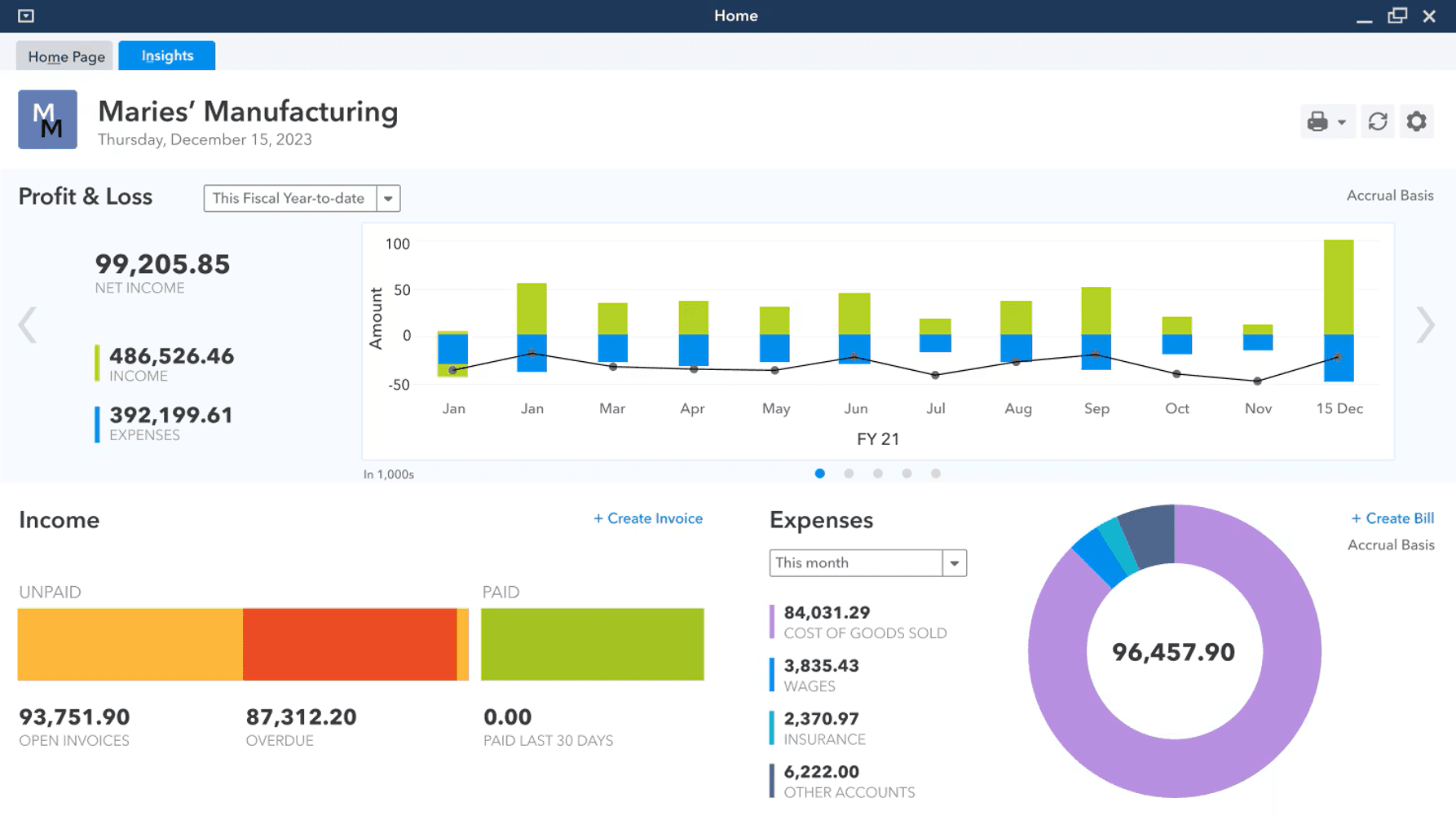
In my opinion, QuickBooks Desktop Enterprise is a heavy hitter for businesses with complex accounting needs.
You’re getting robust inventory management, advanced reporting, and real financial management tools—no frills, just depth where it matters. The price and learning curve are real, but if you need detailed workflows, automation, and reliable customer support, it earns its spot.
Pros
- Serious financial reporting: Get in-depth, customizable reports built for real oversight.
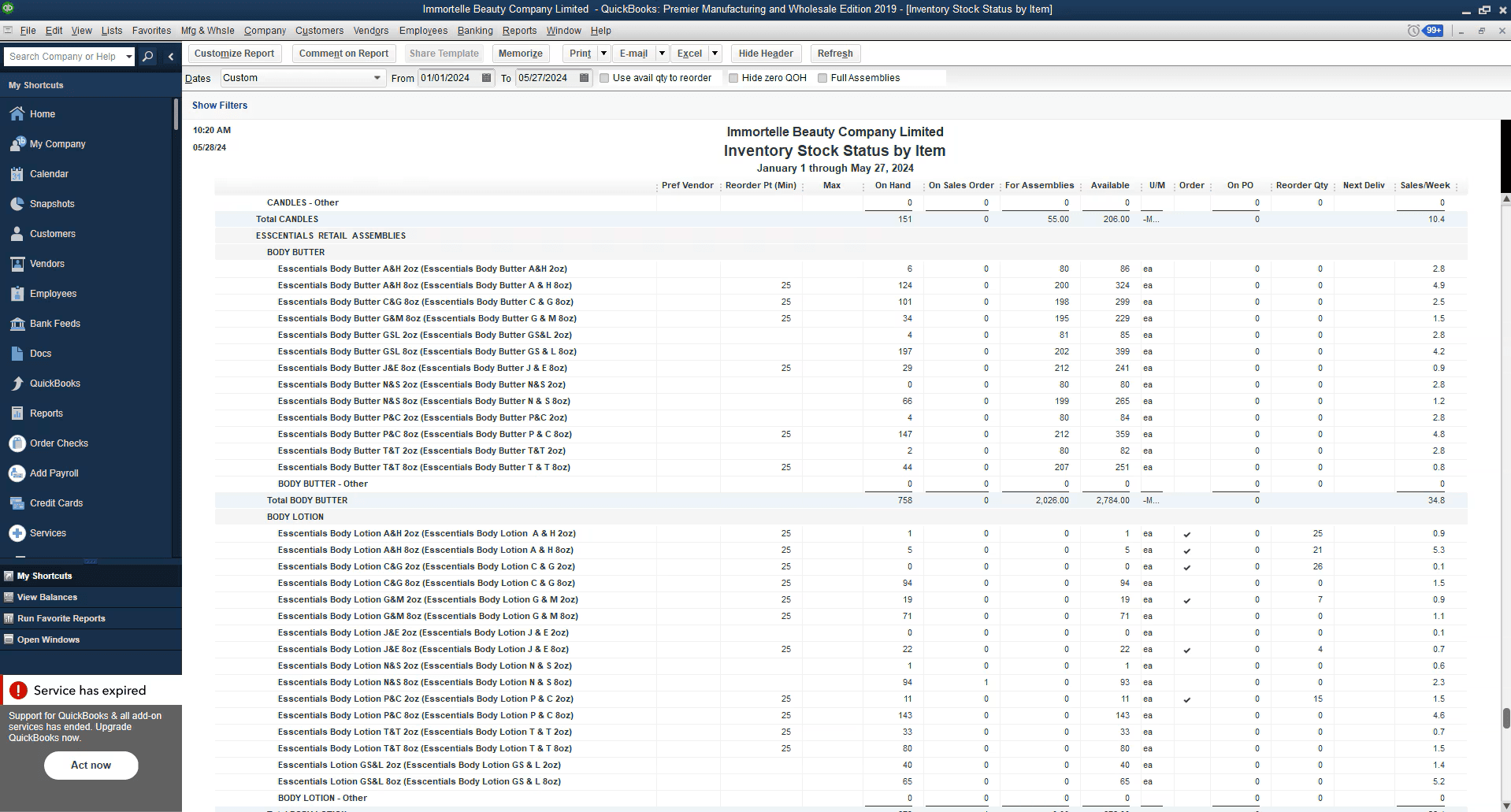
- Robust inventory management: Advanced inventory tools handle complex tracking, not just basics.
- Customizable workflows: Tailor the system to your specific operations and reporting needs.
Cons
- Outdated user interface: Feels clunky compared to modern small business accounting solutions.
- Steep learning curve: Initial setup and training take real time and effort.
- Limited mobile access: Desktop-first design holds back teams that need flexibility.


Is QuickBooks Desktop Enterprise Right For Your Needs?
Who Would be a Good Fit for QuickBooks Desktop Enterprise?
Medium to large retail businesses, manufacturers, and wholesale distributors that require advanced inventory management, complex job costing, and detailed financial oversight will get the most value here.
If your operation relies on granular reporting, customizable workflows, and you don’t mind investing time into setup, QuickBooks Desktop Enterprise fits.
It’s for operators who need to streamline accounting processes and gain real visibility into their business—not small shops looking for a quick fix.
- Retail chainsManage large inventories and multiple locations with advanced tracking tools.
- Manufacturing companiesUse detailed financial and job costing features to keep projects profitable.
- Accounting departmentsSimplify complex workflows with in-depth reporting and multi-user support.
- Wholesale distributorsTrack inventory levels and streamline order management efficiently.
- Finance teamsGet customizable reports and deep insight into cash flow, receivables, and forecasting.
- Large enterprisesHandle multi-company accounting and scale up without sacrificing control.
Who Would be a Bad Fit for QuickBooks Desktop Enterprise?
Small businesses, startups, freelancers, or anyone with straightforward accounting needs should look elsewhere.
If your team is looking for a simple, user-friendly solution with modern design and strong mobile access, the desktop version will feel clunky.
Operators who don’t need in-depth reporting, advanced inventory, or who want plug-and-play bookkeeping are better off with QuickBooks Online or other cloud-based solutions.
- FreelancersToo complex and expensive for basic bookkeeping and invoicing.
- Small retail shopsThe learning curve and feature set are overkill for simple inventory management.
- StartupsCost and complexity outweigh the benefits when you’re just starting out.
- Remote teamsLimited mobile and cloud access make collaboration tough
- Creative agenciesProject management features are limited compared to dedicated tools.
- Non-profit organizationsMost don’t need advanced financial features or inventory tracking.
La Nostra Metodologia di Recensione
Come Testiamo e Valutiamo gli Strumenti
Abbiamo trascorso anni a costruire, perfezionare e migliorare il nostro sistema di test e valutazione dei software. Il nostro schema di valutazione è progettato per cogliere le sfumature della selezione dei software e per comprendere cosa rende uno strumento efficace, concentrandosi su aspetti critici del processo decisionale. Qui sotto puoi vedere esattamente come funzionano i nostri test e valutazioni attraverso sette criteri. Questo ci permette di fornire una valutazione imparziale del software basata su funzionalità principali, caratteristiche distintive, facilità d’uso, onboarding, supporto clienti, integrazioni, recensioni dei clienti e rapporto qualità-prezzo.
Funzionalità di base (25% della valutazione finale)
Il punto di partenza della nostra valutazione è sempre la funzionalità principale dello strumento. Ha le funzioni e le caratteristiche di base che un utente si aspetterebbe? Alcune di queste funzionalità sono bloccate a piani tariffari di livello superiore? Alla base, ci aspettiamo che uno strumento regga il confronto con le capacità minime dei suoi concorrenti.
Caratteristiche distintive (25% della valutazione finale)
Successivamente valutiamo caratteristiche distintive e non comuni che vadano oltre la normale funzionalità presente in strumenti simili. Un punteggio alto riflette funzionalità specializzate o uniche che rendono il prodotto più veloce, efficiente o che offrano valore aggiunto all’utente. Valutiamo anche quanto sia facile integrare il software con altri strumenti della consueta infrastruttura tecnologica per espanderne la funzionalità e l’utilità. Gli strumenti che offrono molte integrazioni native, connessioni di terze parti e accesso API per costruire integrazioni personalizzate ottengono il punteggio più alto.
Facilità d’uso (10% della valutazione finale)
Consideriamo quanto sia rapido e semplice eseguire le attività definite nelle funzionalità di base utilizzando lo strumento. I software che ottengono un punteggio alto sono ben progettati, intuitivi, offrono app mobili, modelli pronti e rendono compiti complessi relativamente semplici.
Onboarding (10% della valutazione finale)
Sappiamo quanto sia importante una rapida adozione da parte del team per una nuova piattaforma, quindi valutiamo quanto sia facile imparare a usare uno strumento con una formazione minima. Esaminiamo quanto tempo impiega un membro del team a configurarsi e iniziare a utilizzare lo strumento senza esperienza. Le soluzioni con punteggi elevati richiedono poco o nessun supporto.
Supporto clienti (10% della valutazione finale)
Valutiamo quanto sia rapido e facile ricevere assistenza e trovare aiuto tramite telefono, live chat o base di conoscenza. Gli strumenti e le aziende che forniscono un supporto in tempo reale ottengono i punteggi migliori, mentre i chatbot hanno i punteggi più bassi.
Recensioni dei clienti (10% della valutazione finale)
Oltre ai nostri test e valutazioni, consideriamo il net promoter score dei clienti attuali e passati. Esaminiamo la loro propensione, data la possibilità, a scegliere nuovamente lo strumento per le sue funzionalità di base. Un punteggio elevato riflette un alto net promoter score da clienti attuali o passati.
Rapporto qualità-prezzo (10% della valutazione finale)
Infine, considerando tutti gli altri criteri, valutiamo il prezzo medio dei piani base rispetto alle funzionalità fondamentali e teniamo in considerazione il valore degli altri criteri di valutazione. Il software che offre di più, a meno, ottiene punteggi più alti.
Core Features
Inventory management: Track inventory levels, sales, and stock across locations in real time.
Financial reporting: Generate detailed, customizable reports for true financial management.
Sales order fulfillment: Manage and track sales orders to streamline order management workflows.
Purchase order management: Create, track, and organize purchase orders within the system.
Pricing management: Adjust and control pricing easily to keep up with changing market demands.
Job costing: Break down project costs and monitor profitability for better cash flow control.
Ease of Use
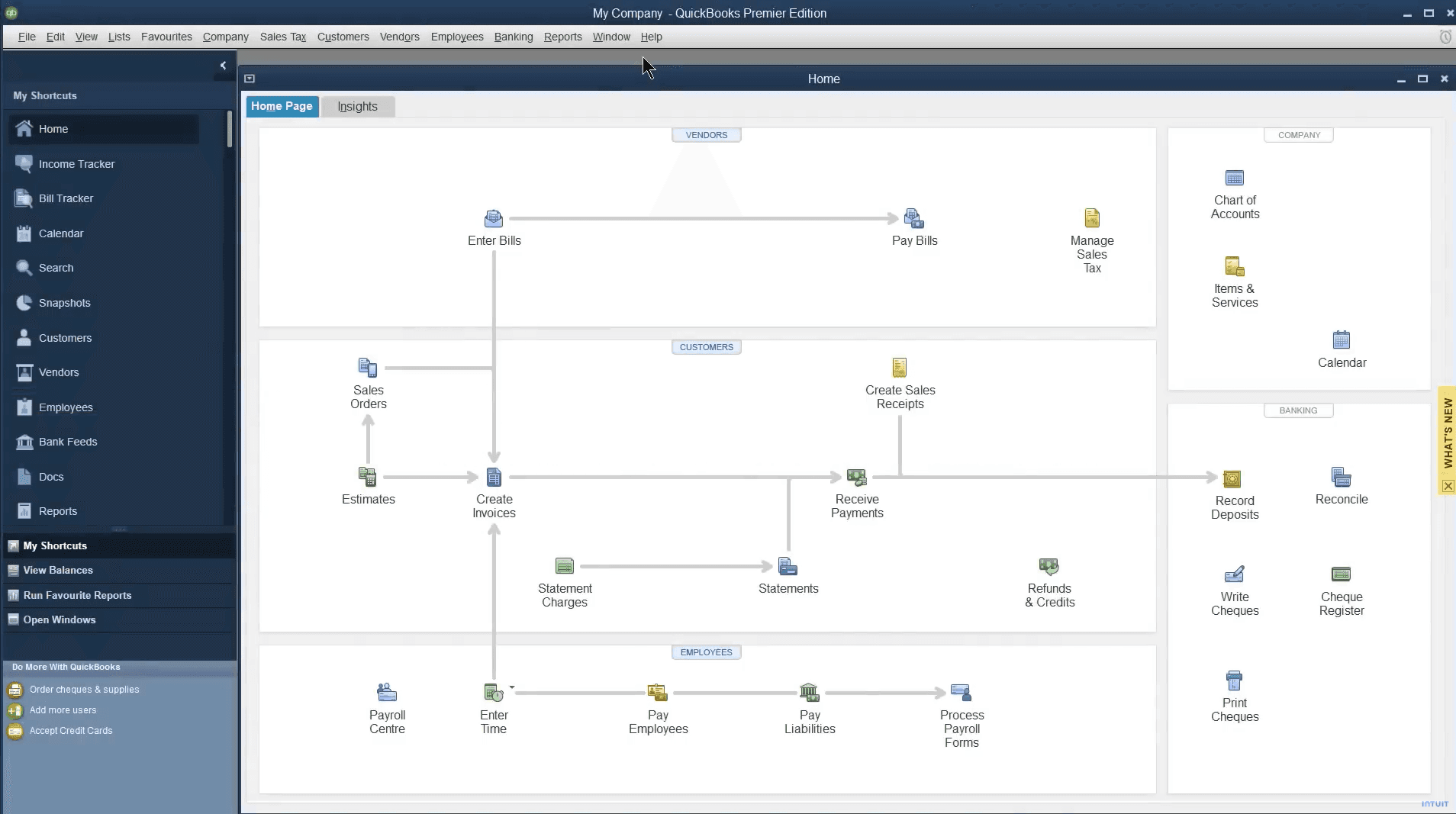
QuickBooks Desktop Enterprise isn’t winning awards for user experience or a modern interface, but what it lacks in looks, it makes up for in depth.
Operators coming from simpler accounting software or cloud-based options like QuickBooks Online should expect a real learning curve. Once you’re over that initial hump, the system’s advanced features and customizable dashboards give you control over even the most complex business needs.
It’s user-friendly only if your definition of user-friendly includes serious power under the hood.
QuickBooks Desktop Enterprise Specs
- 2-Factor Authentication: No
- Accounts Payable: Yes
- Accounts Receivable: Yes
- API: No
- Balance Sheet: Yes
- Billing/Invoicing: Yes
- BitCoin: No
- Budgeting: Yes
- Calendar Management: No
- Contact Management: No
- CRM Integration: Yes
- Customer Management: Yes
- Dashboard: Yes
- Data Export: Yes
- Data Import: Yes
- Data Visualization: Yes
- Expense Tracking: Yes
- External Integrations: Yes
- Forecasting: Yes
- General Account Ledger: Yes
- Inventory Tracking: Yes
- Multi-Currency: Yes
- Multi-User: Yes
- Notifications: Yes
- P&L: Yes
- PayPal: Yes
- Payroll: Yes
- SAP Integration: No
- Stripe: Yes
- Supplier Management: Yes
- Tax Management: Yes
Alternatives to QuickBooks Desktop Enterprise



QuickBooks Desktop Enterprise FAQs
E adesso?
Il settore della vendita al dettaglio non si ferma mai, e neppure tu dovresti farlo. Iscriviti alla nostra newsletter per ricevere gli ultimi approfondimenti, strategie e risorse professionali dai principali leader del settore retail che ne stanno plasmando il futuro.