


Acumatica vs. QuickBooks: Detailed Comparison and Expert Reviews for 2026

We review tools independently, and commissions help fund our testing. See our transparency policy, our methodology, or suggest a tool.
Choosing between Acumatica and QuickBooks Enterprise means weighing a flexible, cloud-based ERP against a familiar, user-friendly platform—both strong contenders in accounting and inventory management software. If you’re struggling to decide which solution will keep your finances accurate and your inventory under control, you’re not alone.
This article breaks down how each platform handles accounting, inventory, and day-to-day operations, so you can confidently choose the right fit for your business’s growth and complexity.
Acumatica
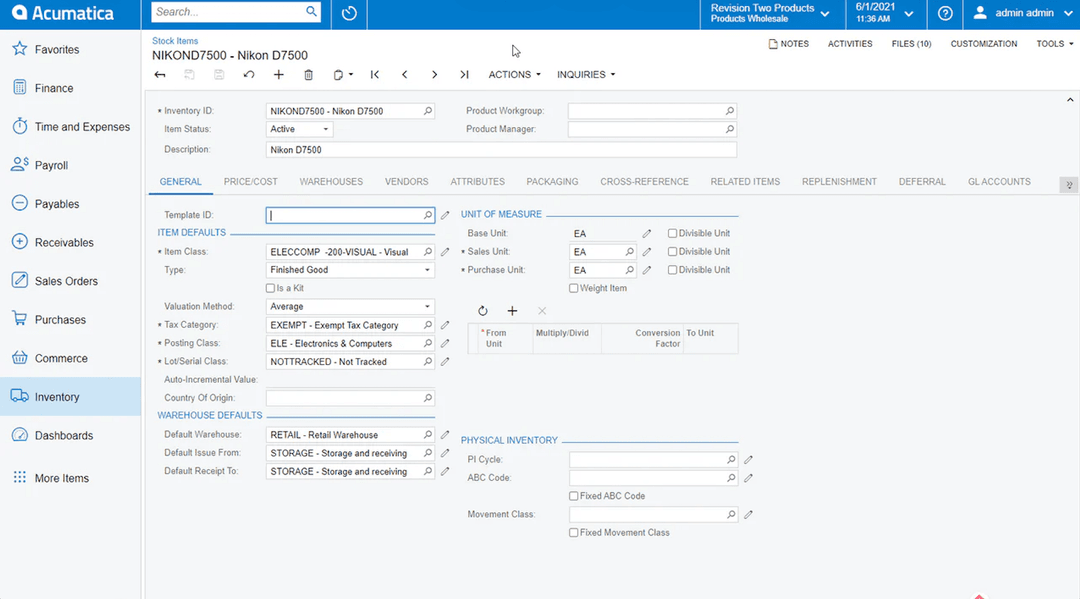
4.4/5
- Free demo available
- Pricing upon request
QuickBooks Desktop Enterprise
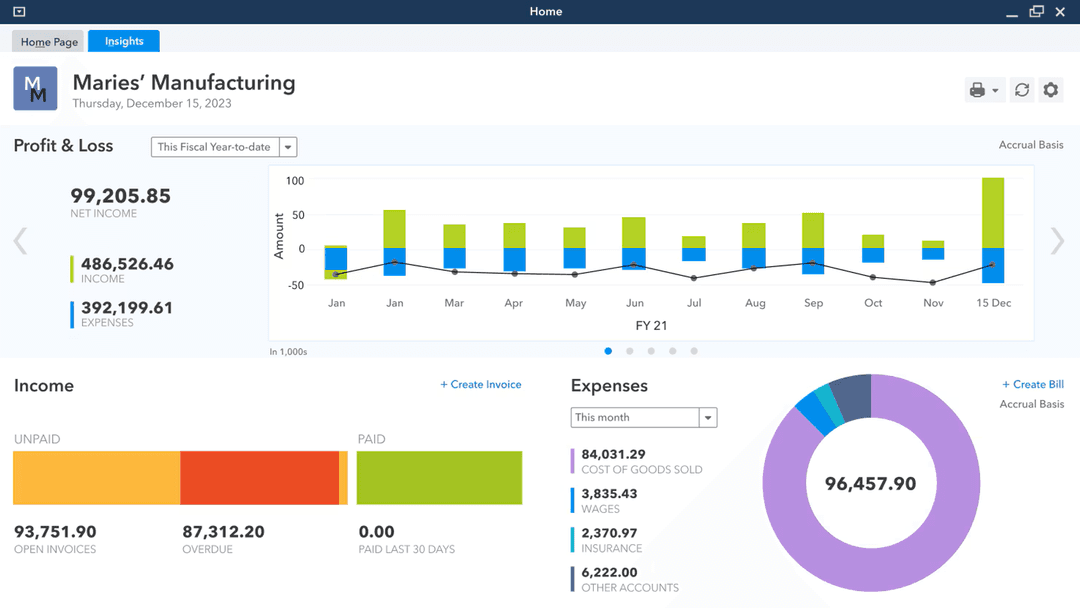
4.2/5
- Free product tour
- From $140.84/month
Why Trust Our Software Recommendations
6,700+
Reviews
20
Industry experts
16+
Evaluation factors
14
Years
Our team has been testing and reviewing software since 2012. As retail leaders ourselves, we know how difficult—and important—it is to choose the right software.
For this guide, we evaluated tools using hands-on testing and independent research, scoring tools using our selection criteria.
Our reviews reflect our independent judgment—not a sales pitch.
| Acumatica | QuickBooks Desktop Enterprise | |
|---|---|---|
| Free Trial | Free demo available | Free product tour |
| Pricing | Pricing upon request | From $140.84/month |
Acumatica vs. QuickBooks Pricing & Hidden Costs
To get exact pricing with Acumatica, you’ll need to contact their team. Pricing is generally based on the number of applications you have, the resource levels and data storage you require, and the deployment option. QuickBooks Enterprise pricing depends on the number of users you require, advanced inventory and pricing modules, and whether you require hosting.
To choose the right vendor, look beyond the sticker price and map out your current and future needs. List the features and integrations you’ll actually use, estimate how your user count or transaction volume might grow, and ask each vendor for a detailed breakdown of all potential costs—including support, upgrades, and add-ons. This approach helps you avoid surprises and ensures your investment matches your business’s long-term plans.
To get exact pricing with Acumatica, you’ll need to contact their team. Pricing is generally based on the number of applications you have, the resource levels and data storage you require, and the deployment option. QuickBooks Enterprise pricing depends on the number of users you require, advanced inventory and pricing modules, and whether you require hosting.
To choose the right vendor, look beyond the sticker price and map out your current and future needs. List the features and integrations you’ll actually use, estimate how your user count or transaction volume might grow, and ask each vendor for a detailed breakdown of all potential costs—including support, upgrades, and add-ons. This approach helps you avoid surprises and ensures your investment matches your business’s long-term plans.
| Acumatica | QuickBooks Desktop Enterprise | |
|---|---|---|
| Accounts Payable | Yes | Yes |
| Accounts Receivable | Yes | Yes |
| API | Yes | No |
| Budgeting | Yes | Yes |
| Calendar Management | Yes | No |
| Customer Management | Yes | Yes |
| Dashboard | Yes | Yes |
| Data Export | Yes | Yes |
| Data Import | Yes | Yes |
| Data Visualization | Yes | Yes |
| Expense Tracking | Yes | Yes |
| External Integrations | Yes | Yes |
| Forecasting | Yes | Yes |
| Inventory Tracking | Yes | Yes |
| Multi-Currency | Yes | Yes |
| Multi-User | Yes | Yes |
| Notifications | Yes | Yes |
| Payroll | Yes | Yes |
| Supplier Management | Yes | Yes |
| Integration | Acumatica | QuickBooks |
| Shopify | ✅ | ✅ |
| Salesforce | ✅ | ✅ |
| Avalara | ✅ | ✅ |
| Magento (Adobe Commerce) | ✅ | ❌ |
| Microsoft Dynamics 365 | ✅ | ❌ |
| Bill.com | ✅ | ✅ |
| Expensify | ✅ | ✅ |
| Square | ❌ | ✅ |
| PayPal | ✅ | ✅ |
| API | ✅ | ✅ |
| Zapier | ✅ | ✅ |
Acumatica and QuickBooks both cover popular integrations like Shopify, Salesforce, and Bill.com, but Acumatica connects with more ERP and commerce platforms, while QuickBooks offers stronger support for retail payment tools like Square. Both provide API and Zapier access, so most businesses will find the flexibility they need, but your choice may hinge on a few key integrations specific to your workflow.
| Factor | Acumatica | QuickBooks |
| Data Encryption | Uses end-to-end encryption for data in transit and at rest. | Encrypts data using industry-standard protocols both in transit and at rest. |
| Regulatory Compliance | Supports compliance with standards like GDPR and SOC 1/2. | Meets requirements for SOC 2, PCI DSS, and GDPR compliance. |
| User Access Controls | Offers granular role-based permissions and audit trails. | Provides customizable user permissions and detailed activity logs. |
| Uptime & Backups | Guarantees high uptime with automated daily backups and disaster recovery. | Delivers reliable uptime with continuous backups and recovery options. |
| Multi-Factor Authentication | Supports MFA for all users to enhance account security. | Offers MFA for account access and sensitive actions. |
Both Acumatica and QuickBooks deliver strong security and compliance, but Acumatica’s granular access controls and disaster recovery options give it an edge for complex organizations. QuickBooks stands out for its straightforward compliance features and reliable uptime, making it a solid choice for businesses that want trusted, easy-to-manage protections.
| Factor | Acumatica | QuickBooks |
| User Interface | Customizable dashboards and menus, but can feel complex for new users. | Clean, intuitive layout designed for quick navigation and daily tasks. |
| Onboarding Process | Guided setup with training resources, but a steeper learning curve. | Step-by-step onboarding and in-app tips make getting started simple. |
| Workflow Automation | Advanced automation options, though setup may require IT support. | Built-in automation for invoicing, reconciliation, and inventory updates with minimal setup. |
| Customer Support | Offers live chat, phone, and a knowledge base, but response times vary. | Provides 24/7 support and a large online community for quick answers. |
| Mobile Experience | Mobile app covers core features but is less polished than desktop. | Highly rated mobile app with full access to most features. |
QuickBooks is easier for most users to pick up and use daily, while Acumatica’s flexibility comes with a steeper learning curve. With that in mind, Acumatica generally works for teams that need deep customization and advanced workflows, and QuickBooks is good for straightforward, user-friendly accounting and inventory management.
Acumatica
- Customization is actually possible. You can shape the system to fit your business, not the other way around.
- Unlimited user access, no gotchas. Add as many people as you want without getting dinged for every login.
- Support that answers the phone. When you hit a wall, you’re not left yelling into the void.
- Interface isn’t exactly intuitive. Some screens feel designed by accountants, for accountants.
- Expect a real learning curve. Onboarding isn’t “set it and forget it”—you’ll need to invest time.
- Occasional performance hiccups. Especially if you push the system hard or over-customize.
QuickBooks Desktop Enterprise
- Serious financial reporting: Get in-depth, customizable reports built for real oversight.
- Robust inventory management: Advanced inventory tools handle complex tracking, not just basics.
- Customizable workflows: Tailor the system to your specific operations and reporting needs.
- Outdated user interface: Feels clunky compared to modern small business accounting solutions.
- Steep learning curve: Initial setup and training take real time and effort.
- Limited mobile access: Desktop-first design holds back teams that need flexibility.
Acumatica
- Manufacturing companiesHandles complex production processes and inventory management without missing a beat.
- Distribution businessesAdvanced supply chain features keep your operation running smoothly.
- Retail operationsReal-time data insights let you actually track sales and inventory.
- Finance departmentsRobust financial reporting tools streamline your day-to-day.
- Growing enterprisesScalability and unlimited users mean you’re set for expansion.
- Inventory managersDetailed tracking keeps you out of trouble with overstock or shortages.
QuickBooks Desktop Enterprise
- Retail chainsManage large inventories and multiple locations with advanced tracking tools.
- Manufacturing companiesUse detailed financial and job costing features to keep projects profitable.
- Accounting departmentsSimplify complex workflows with in-depth reporting and multi-user support.
- Wholesale distributorsTrack inventory levels and streamline order management efficiently.
- Finance teamsGet customizable reports and deep insight into cash flow, receivables, and forecasting.
- Large enterprisesHandle multi-company accounting and scale up without sacrificing control.
Who Should Use Acumatica, And Who Should Use QuickBooks?
Acumatica is best for midsize to large businesses with complex inventory, multi-entity operations, or industry-specific needs—especially those with IT resources to support customization and integration. QuickBooks Enterprise is better for growing businesses, retail shops, and service providers who want fast setup, easy navigation, reliable accounting, and basic inventory tracking without a steep learning curve. If your business is scaling rapidly or needs advanced workflow automation, Acumatica is the better fit. For straightforward accounting and inventory management on a budget, QuickBooks is hard to beat.
| Acumatica | QuickBooks Desktop Enterprise | |
|---|---|---|
| Automation Features | Acumatica Advanced automation for inventory, approvals, and processes. | QuickBooks Desktop Enterprise Automation mainly for invoicing, payments, inventory, and reconciliation. |
| Core Focus | Acumatica Covers tons of ERP functions for powering your entire business, from inventory and accounting to order and warehouse management. | QuickBooks Desktop Enterprise Less robust all-around ERP features, mostly focusing on accounting and inventory management. |
| Customization | Acumatica Highly customizable workflows, dashboards, and reports. | QuickBooks Desktop Enterprise Some customization, but is more focused on out-of-the-box simplicity |
| Multichannel Support | Acumatica Built-in support for multi-entity and multi-currency operations. | QuickBooks Desktop Enterprise Basic multi-entity support, often requires workarounds. |
| User Interface | Acumatica Feature-rich but complex, designed for power users. | QuickBooks Desktop Enterprise Streamlined and intuitive, designed for everyday users. |
| Cloud-Based Access | Both offer secure, cloud-based platforms for anytime, anywhere access. |
|---|---|
| Discovery and Inventory | Each solution includes inventory management features like stock tracking, reorder points, and reporting, though Acumatica supports more advanced scenarios. |
| Financial Reporting | Both generate standard financial reports (P&L, balance sheet, cash flow), with customizable templates and export options. |
| Integration Options | Both connect with popular business tools such as Shopify, Salesforce, and Bill.com, and support API and Zapier for custom integrations. |
| User Permissions | Each platform allows admins to set user roles and permissions, helping control access to sensitive financial and inventory data. |