

Recensione di Acumatica: vantaggi, svantaggi, funzionalità e prezzi
Acumatica si distingue come soluzione ERP basata sul cloud con accesso illimitato per gli utenti, ideale per le aziende di medie dimensioni che necessitano di funzionalità concrete, non di esagerazioni da SaaS. Se scalabilità e flessibilità sono importanti, vale la pena prenderla in considerazione.

Recensiamo gli strumenti in modo indipendente, e le commissioni aiutano a finanziare i nostri test. Consulta la nostra politica sulla trasparenza, la nostra metodologia o suggerisci uno strumento.
Acumatica is a cloud-based order management system software built for mid-market businesses that need to manage orders, inventory, fulfillment, and customer data within a single ERP. I'd consider it a strong alternative to NetSuite if your team is growing—Acumatica prices by computing resources, not per user, so adding seats doesn't drive up costs the way it tends to with NetSuite.
Acumatica Evaluation Summary
4.4/5
- Pricing upon request
- Free demo available
Perché fidarsi dei nostri consigli sui software
6,700+
Reviews
20
Industry experts
16+
Evaluation factors
14
Years
Il nostro team testa e recensisce software dal 2012. In quanto leader del retail noi stessi, sappiamo quanto sia difficile — e importante — scegliere il software giusto.
Per questa guida, abbiamo valutato gli strumenti attraverso test pratici e ricerche indipendenti, assegnando un punteggio agli strumenti in base ai nostri criteri di selezione.
Le nostre recensioni riflettono il nostro giudizio indipendente, non un discorso di vendita.
Acumatica Overview
In my opinion, Acumatica is the rare ERP system that actually delivers on the promise of streamlining business operations—if you’re willing to put in the work.
Customization and scalability are real strengths here, not just marketing fluff, and unlimited user access means you’re not nickel-and-dimed as your business grows.
Integration options are robust, with most of the major retail, accounting, and ecommerce platforms supported right out of the box.
That said, Acumatica doesn’t pretend to be a turnkey solution for every small shop. The learning curve is real, the interface could use a bit of work, and you’ll need to invest in setup and training if you want to see the platform’s true value.
But for mid-sized and growing companies—especially those with complex inventory, finance, or multichannel needs—it’s a legitimate contender in a space full of half-baked “cloud ERP” promises.
Pros
- Customization is actually possible. You can shape the system to fit your business, not the other way around.
- Unlimited user access, no gotchas. Add as many people as you want without getting dinged for every login.
- Support that answers the phone. When you hit a wall, you’re not left yelling into the void.
Cons
- Interface isn’t exactly intuitive. Some screens feel designed by accountants, for accountants.
- Expect a real learning curve. Onboarding isn’t “set it and forget it”—you’ll need to invest time.
- Occasional performance hiccups. Especially if you push the system hard or over-customize.


Is Acumatica Right For Your Needs?
Who Would be a Good Fit for Acumatica?
Acumatica is best suited for mid-sized manufacturers, distributors, and retail operations that need a true ERP system to wrangle complex business operations.
If your finance and inventory teams demand robust reporting, and your business is growing fast enough to outpace most off-the-shelf software, you’ll actually benefit from Acumatica’s scalability and unlimited user access.
Companies planning for growth—or sick of being nickel-and-dimed every time they add a new seat—will find real long-term value here.
- Manufacturing companiesHandles complex production processes and inventory management without missing a beat.
- Distribution businessesAdvanced supply chain features keep your operation running smoothly.
- Retail operationsReal-time data insights let you actually track sales and inventory.
- Finance departmentsRobust financial reporting tools streamline your day-to-day.
- Growing enterprisesScalability and unlimited users mean you’re set for expansion.
- Inventory managersDetailed tracking keeps you out of trouble with overstock or shortages.
Who Would be a Bad Fit for Acumatica?
If you’re a small business with a tight budget, or a startup that needs a simple, user-friendly solution out of the box, Acumatica probably isn’t for you.
The interface can be less intuitive than you’d like, and the upfront complexity isn’t worth it unless you truly need deep ERP capabilities.
Budget-conscious teams, freelancers, or anyone just looking for basic inventory or order management will likely find the system overkill for their needs.
- Small startupsComplexity and cost will swamp you.
- FreelancersWay more system than you’ll ever need.
- Non-technical teamsLess intuitive interface and setup can frustrate.
- Budget-conscious companiesPricing won’t work if you’re counting every penny.
- Simple retail shopsAdvanced features are wasted on basic inventory needs.
- Temporary projectsNo need to roll out a full ERP for a short-term gig.
La Nostra Metodologia di Recensione
Come Testiamo e Valutiamo gli Strumenti
Abbiamo trascorso anni a costruire, perfezionare e migliorare il nostro sistema di test e valutazione dei software. Il nostro schema di valutazione è progettato per cogliere le sfumature della selezione dei software e per comprendere cosa rende uno strumento efficace, concentrandosi su aspetti critici del processo decisionale. Qui sotto puoi vedere esattamente come funzionano i nostri test e valutazioni attraverso sette criteri. Questo ci permette di fornire una valutazione imparziale del software basata su funzionalità principali, caratteristiche distintive, facilità d’uso, onboarding, supporto clienti, integrazioni, recensioni dei clienti e rapporto qualità-prezzo.
Funzionalità di base (25% della valutazione finale)
Il punto di partenza della nostra valutazione è sempre la funzionalità principale dello strumento. Ha le funzioni e le caratteristiche di base che un utente si aspetterebbe? Alcune di queste funzionalità sono bloccate a piani tariffari di livello superiore? Alla base, ci aspettiamo che uno strumento regga il confronto con le capacità minime dei suoi concorrenti.
Caratteristiche distintive (25% della valutazione finale)
Successivamente valutiamo caratteristiche distintive e non comuni che vadano oltre la normale funzionalità presente in strumenti simili. Un punteggio alto riflette funzionalità specializzate o uniche che rendono il prodotto più veloce, efficiente o che offrano valore aggiunto all’utente. Valutiamo anche quanto sia facile integrare il software con altri strumenti della consueta infrastruttura tecnologica per espanderne la funzionalità e l’utilità. Gli strumenti che offrono molte integrazioni native, connessioni di terze parti e accesso API per costruire integrazioni personalizzate ottengono il punteggio più alto.
Facilità d’uso (10% della valutazione finale)
Consideriamo quanto sia rapido e semplice eseguire le attività definite nelle funzionalità di base utilizzando lo strumento. I software che ottengono un punteggio alto sono ben progettati, intuitivi, offrono app mobili, modelli pronti e rendono compiti complessi relativamente semplici.
Onboarding (10% della valutazione finale)
Sappiamo quanto sia importante una rapida adozione da parte del team per una nuova piattaforma, quindi valutiamo quanto sia facile imparare a usare uno strumento con una formazione minima. Esaminiamo quanto tempo impiega un membro del team a configurarsi e iniziare a utilizzare lo strumento senza esperienza. Le soluzioni con punteggi elevati richiedono poco o nessun supporto.
Supporto clienti (10% della valutazione finale)
Valutiamo quanto sia rapido e facile ricevere assistenza e trovare aiuto tramite telefono, live chat o base di conoscenza. Gli strumenti e le aziende che forniscono un supporto in tempo reale ottengono i punteggi migliori, mentre i chatbot hanno i punteggi più bassi.
Recensioni dei clienti (10% della valutazione finale)
Oltre ai nostri test e valutazioni, consideriamo il net promoter score dei clienti attuali e passati. Esaminiamo la loro propensione, data la possibilità, a scegliere nuovamente lo strumento per le sue funzionalità di base. Un punteggio elevato riflette un alto net promoter score da clienti attuali o passati.
Rapporto qualità-prezzo (10% della valutazione finale)
Infine, considerando tutti gli altri criteri, valutiamo il prezzo medio dei piani base rispetto alle funzionalità fondamentali e teniamo in considerazione il valore degli altri criteri di valutazione. Il software che offre di più, a meno, ottiene punteggi più alti.
Core Features
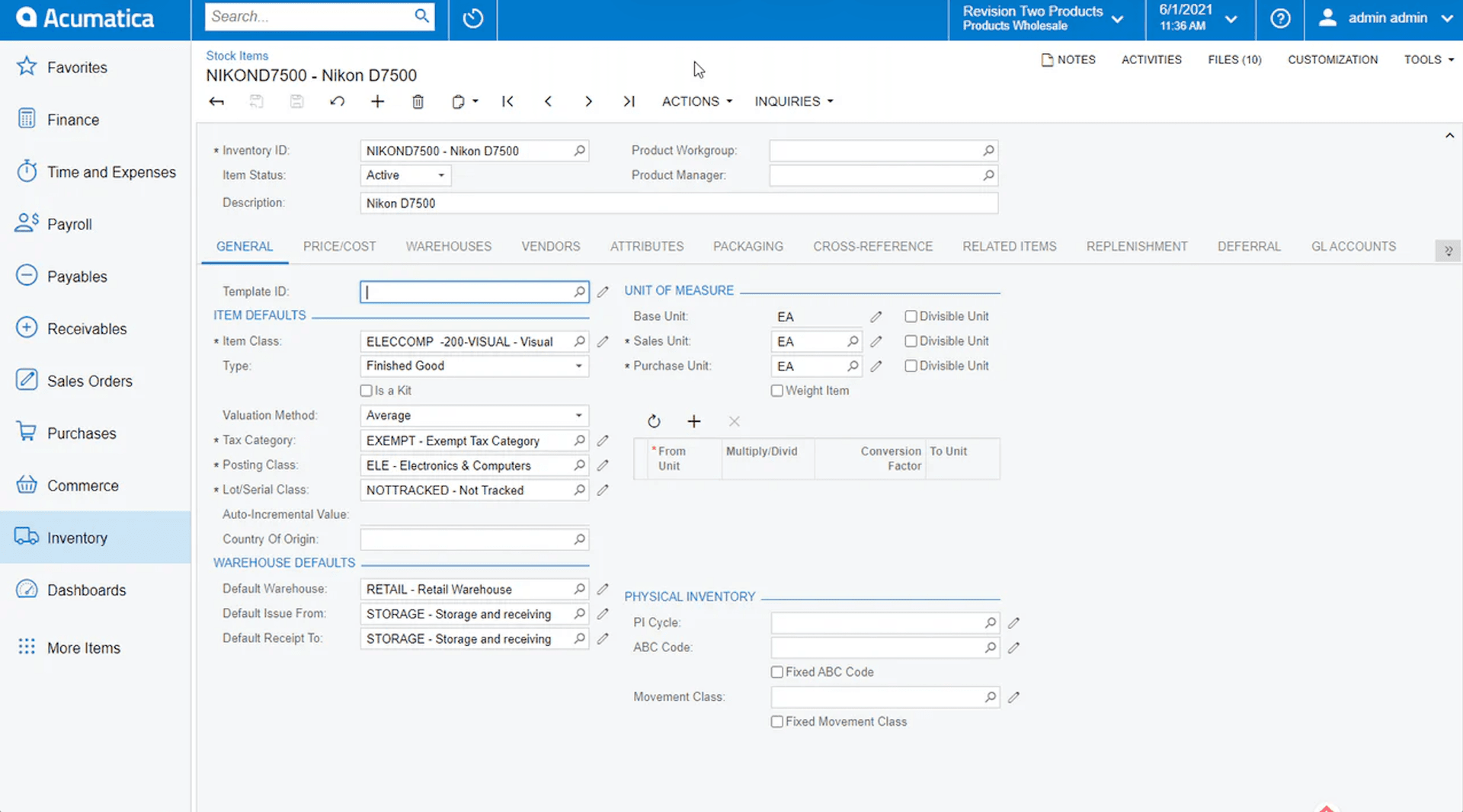
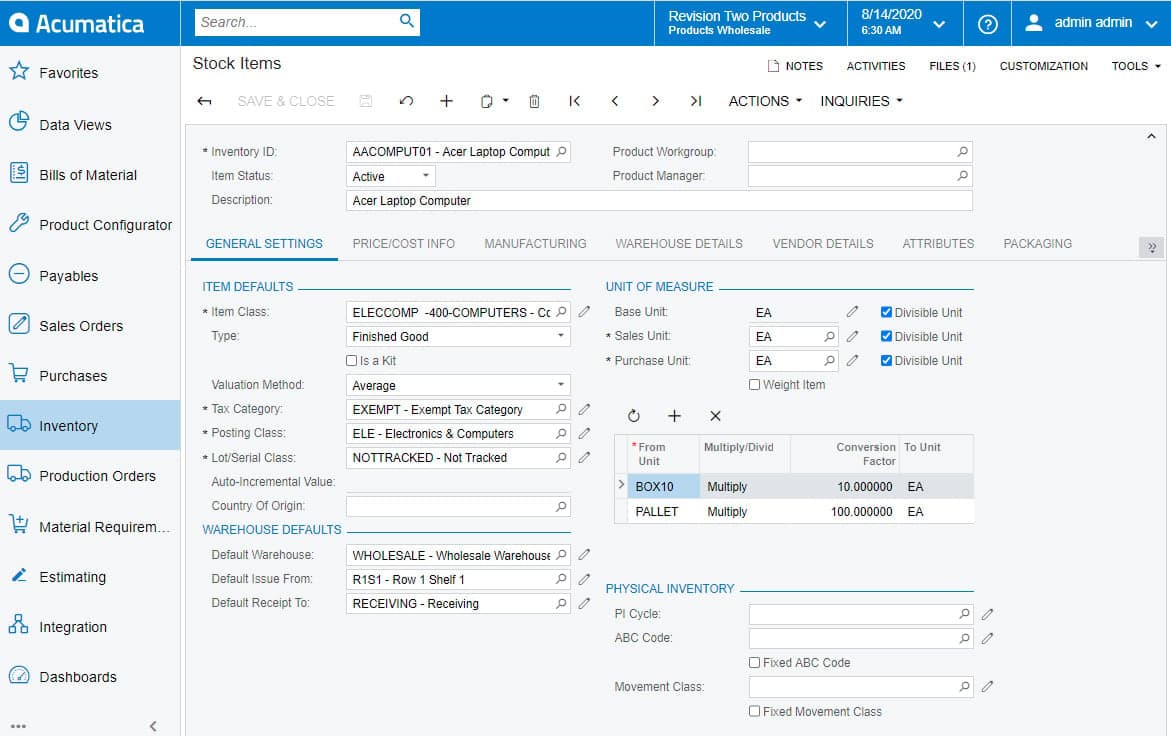
- Inventory management. Track inventory in real time and avoid costly overstock with cloud-based tools built for retail and distribution.
- Order processing. Streamline every step from order entry to fulfillment, so your team spends less time chasing paperwork and more time driving business operations.
- Financial management. Keep your general ledger, financial reports, and accounting in check with ERP software made for growing businesses.
- Customer management. Centralize your CRM and customer data, so your sales team isn’t digging through spreadsheets to get the full story.
- Purchasing automation. Automate procurement and keep supply chain hiccups from slowing you down—across all your modules.
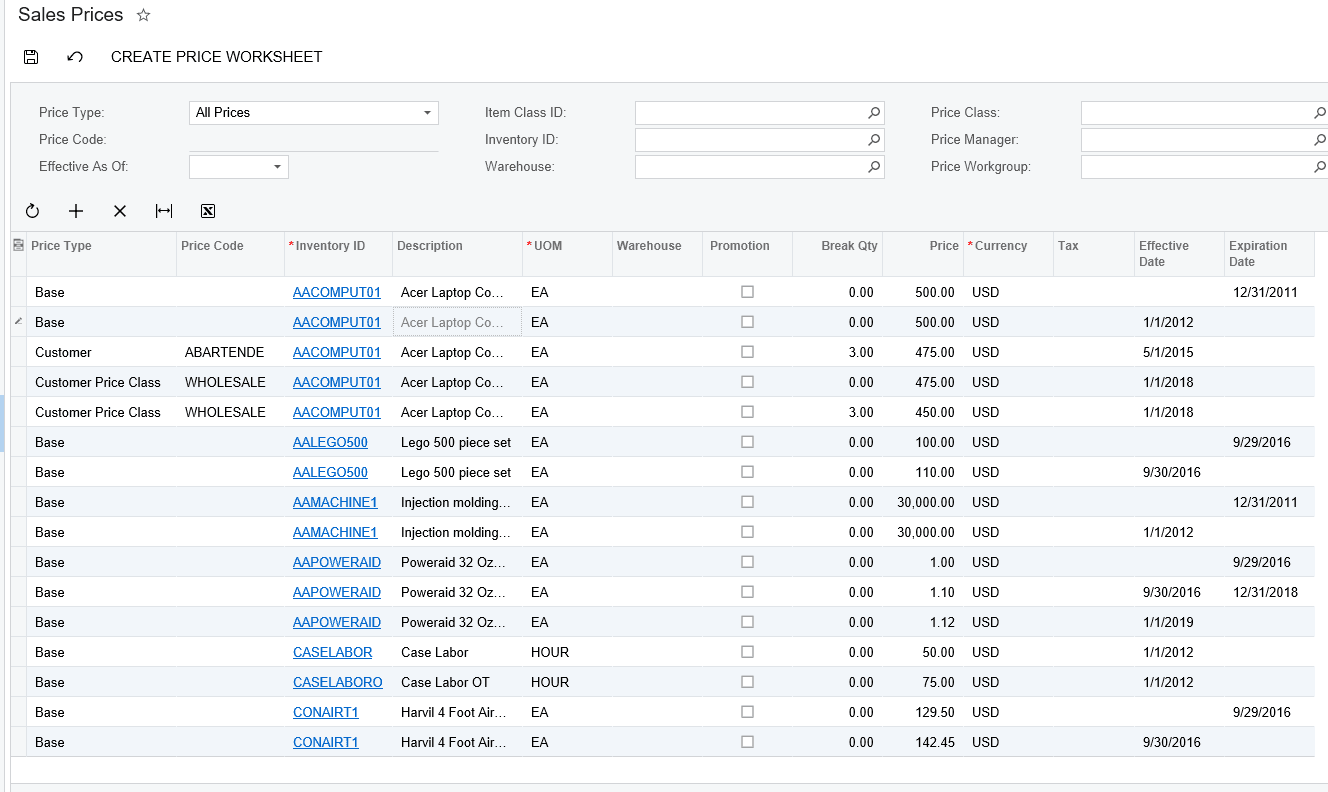
- Sales management. Monitor sales activity and performance in real time, with dashboards that actually support decision-making.
Ease of Use
Acumatica isn’t winning any awards for being the most user-friendly ERP system out of the box.
If you’re used to consumer apps or simpler order management systems, the interface can feel a bit clunky—especially for non-technical end users. The navigation is functional but not exactly intuitive, and finding the right modules or dashboards can take some getting used to.
That said, once your team pushes through the initial learning curve, Acumatica starts to make more sense.
The flexibility and depth of the cloud-based platform give growing businesses real control over workflow and reporting. It’s a classic case of “powerful, but time-consuming”—you get the features, but you’ll need to train up.
Acumatica Specs
- Accounts Payable: Yes
- Accounts Receivable: Yes
- API: Yes
- Budgeting: Yes
- Calendar Management: Yes
- Compliance Tracking: No
- Customer Management: Yes
- Dashboard: Yes
- Data Export: Yes
- Data Import: Yes
- Data Visualization: Yes
- Expense Tracking: Yes
- External Integrations: Yes
- Financial Analysis: No
- Forecasting: Yes
- Inventory Tracking: Yes
- Multi-Currency: Yes
- Multi-User: Yes
- Notifications: Yes
- Order Management: Yes
- Payroll: Yes
- Project Management: Yes
- Purchase Orders: Yes
- Resource Management: Yes
- Scheduling: Yes
- Supplier Management: Yes
- Task Scheduling/Tracking: Yes
- Third-Party Plugins/Add-Ons: Yes
- Warehouse Management: Yes
- Workflow Management: Yes
Alternatives to Acumatica


Acumatica FAQs
Qual è il prossimo passo?
Il settore della vendita al dettaglio non si ferma mai e nemmeno tu dovresti. Iscriviti alla nostra newsletter per ricevere gli ultimi approfondimenti, strategie e risorse professionali dai principali leader del settore della vendita al dettaglio che stanno plasmando il settore.