

Le migliori alternative a Mixpanel offrono analisi accurate dei prodotti, un facile monitoraggio degli eventi e report flessibili in grado di adattarsi alla crescita della tua attività digitale. Se stai cercando alternative a Mixpanel, probabilmente desideri informazioni più intelligenti, interfacce più pulite e modi migliori per collegare i dati sull'utilizzo del prodotto ai ricavi o al comportamento dei clienti. Trovare la soluzione giusta è fondamentale per i team sotto pressione che devono migliorare le conversioni, stabilire le priorità delle funzionalità e dimostrare il ROI, il tutto senza rallentare il flusso di lavoro. In questa guida troverai le migliori alternative a Mixpanel per 2026, i motivi per cui si distinguono, a chi sono più adatte e cosa dovresti cercare quando confronti le tue opzioni.
Che cos'è Mixpanel?
Mixpanel è una piattaforma di analisi dei prodotti che monitora le interazioni degli utenti all'interno di applicazioni web e mobili. Ti aiuta a misurare il coinvolgimento, analizzare il comportamento e capire come le persone utilizzano il tuo prodotto. Con Mixpanel, i team possono monitorare gli eventi, creare canalizzazioni e segmentare gli utenti per ottenere informazioni utili. Questo facilita l'identificazione delle opportunità di miglioramento del prodotto, l'ottimizzazione delle esperienze degli utenti e l'aumento della fidelizzazione attraverso i canali digitali.
Tabella di confronto delle alternative a Mixpanel
Questa tabella di confronto mette in evidenza i prezzi e le opzioni di prova gratuita delle mie migliori alternative a Mixpanel, per aiutarti a trovare una soluzione adatta al tuo budget e alle esigenze della tua attività.
| Tool | Best For | Trial Info | Price | ||
|---|---|---|---|---|---|
| 1 | Ideale per il monitoraggio multicanale dei siti web | Piano gratuito disponibile | Prezzi su richiesta | Website | |
| 2 | Ideale per analisi comportamentali avanzate | Piano gratuito disponibile | Prezzi su richiesta | Website | |
| 3 | Ideale per coinvolgimento clienti personalizzato | Prova gratuita di 30 giorni + demo gratuita disponibile | Da $75/mese | Website | |
| 4 | Ideale per la visualizzazione in tempo reale dei percorsi utente | Demo gratuita disponibile | Prezzi su richiesta | Website | |
| 5 | Ideale per la raccolta automatica delle interazioni utente | Piano gratuito + prova gratuita + demo gratuita disponibili | Prezzi su richiesta | Website | |
| 6 | Ideale per segmentazione di pubblico a livello enterprise | Piano gratuito + demo gratuita disponibile | Prezzo su richiesta | Website | |
| 7 | Ideale per analisi prodotto open-source | Piano gratuito + demo gratuita disponibile | Da $0.00005/evento | Website | |
| 8 | Ideale per insight granulari sull'esperienza digitale | Prova gratuita di 15 giorni + piano gratuito + demo gratuita disponibili | Da $39/mese (fatturato annualmente) | Website | |
| 9 | Ideale per la personalizzazione dell'analisi eventi open-source | Prova gratuita di 30 giorni + piano gratuito disponibile | Da $2.5/mese | Website | |
| 10 | Ideale per consigli personalizzati basati sull'IA | Demo gratuita disponibile | Prezzi su richiesta | Website |


Perché fidarsi dei nostri consigli sui software
6,700+
Reviews
20
Industry experts
16+
Evaluation factors
14
Years
Il nostro team testa e recensisce software dal 2012. In quanto leader del retail noi stessi, sappiamo quanto sia difficile — e importante — scegliere il software giusto.
Per questa guida, abbiamo valutato gli strumenti attraverso test pratici e ricerche indipendenti, assegnando un punteggio agli strumenti in base ai nostri criteri di selezione.
Le nostre recensioni riflettono il nostro giudizio indipendente, non un discorso di vendita.
Recensioni delle migliori alternative a Mixpanel
Di seguito trovi i miei riepiloghi dettagliati delle migliori alternative a Mixpanel incluse nella mia selezione. Le mie recensioni offrono un’analisi approfondita delle funzionalità, delle integrazioni e dei casi d’uso migliori di ciascuna piattaforma, per aiutarti a trovare quella più adatta a te.
 Ideale per il monitoraggio multicanale dei siti web
- Piano gratuito disponibile
- Prezzi su richiesta
Visit WebsiteCustomer Rating:4.6/5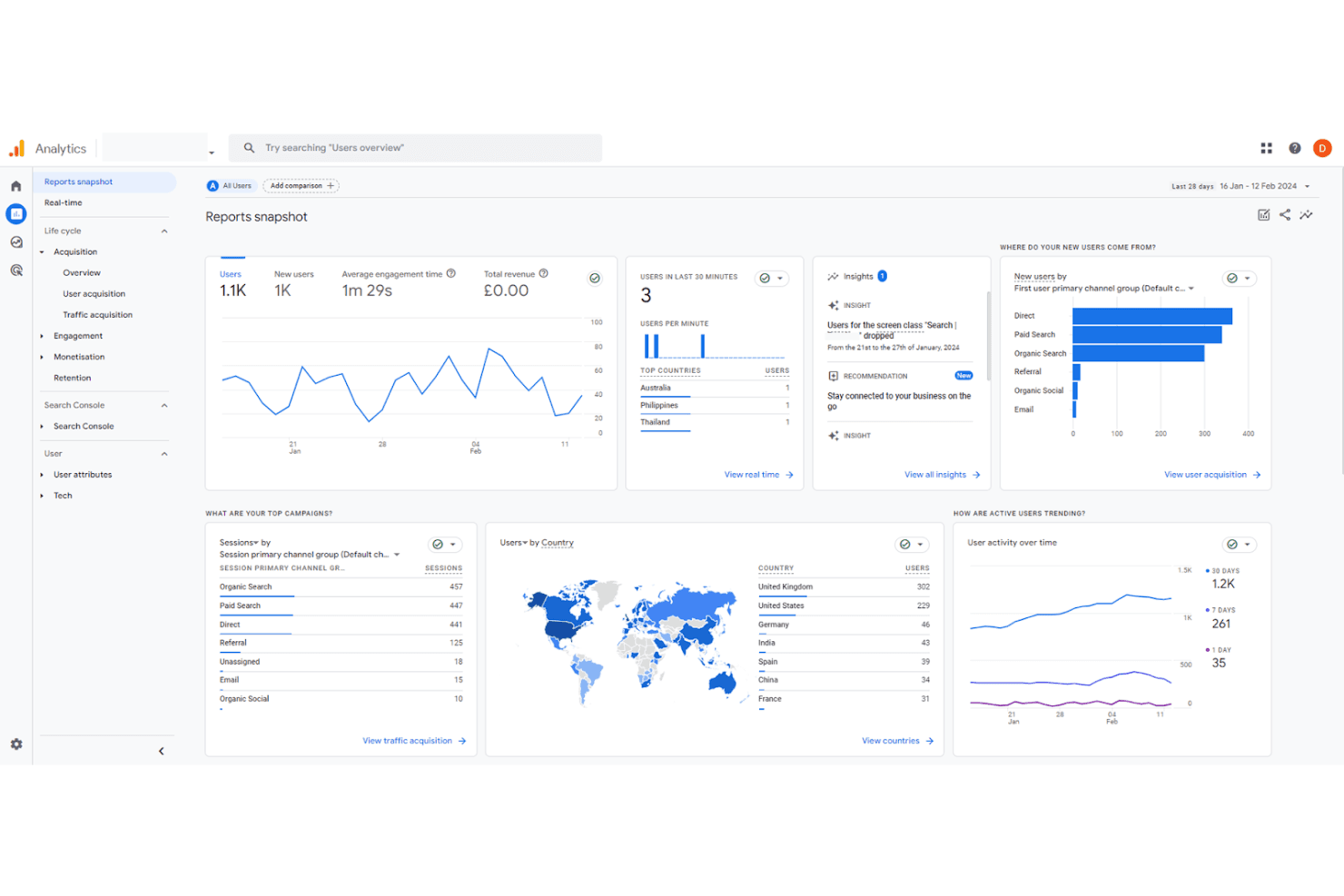
Google Analytics analizza il traffico per decisioni più intelligenti. Google Analytics è una piattaforma gratuita di analisi web di Google che traccia le fonti di traffico, il comportamento degli utenti e i percorsi di conversione su siti web e app, rappresentando un punto di partenza naturale per i team che desiderano migrare da strumenti basati sugli eventi.
Per chi è più indicato Google Analytics?
Google Analytics è particolarmente adatto per i team di marketing ed ecommerce che devono monitorare l’acquisizione del traffico, le performance delle campagne e la conversione onsite su più canali.
Perché Google Analytics è una valida alternativa a Mixpanel
Ho incluso Google Analytics tra le mie migliori scelte perché il suo raggruppamento dei canali e la modellizzazione dell’attribuzione sono difficili da replicare altrove. Faccio affidamento sui report di acquisizione del traffico per scomporre le performance per fonte, mezzo e campagna in un’unica vista, e l’attribuzione basata sui dati di GA4 ridistribuisce il merito delle conversioni in base ai reali percorsi degli utenti. Il report Conversioni collega poi il completamento degli obiettivi a specifici canali, offrendo al mio team un quadro chiaro di ciò che genera ricavi.
Funzionalità principali di Google Analytics
- Report Esplorazione: Crea analisi personalizzate utilizzando modelli di esplorazione del funnel, analisi dei percorsi e sovrapposizione dei segmenti direttamente nell’interfaccia.
- Costruttore di pubblici: Definisci segmenti di utenti in base a comportamento, dati demografici o sequenze di eventi, quindi pubblicali su Google Ads per il retargeting.
- Reportistica in tempo reale: Monitora utenti attivi, eventi e conversioni mentre accadono sul sito o sull’app.
- Esportazione BigQuery: Invia dati grezzi a livello di evento su BigQuery per interrogazioni personalizzate e analisi approfondite al di fuori dell’interfaccia GA4.
Integrazioni di Google Analytics
Google Analytics offre integrazioni native con Google Ads, Google Search Console, Google Merchant Center, BigQuery, Firebase, Shopify e BigCommerce. Sono disponibili un’API e il Measurement Protocol per integrazioni personalizzate.
Pros and Cons
Pros:
- Integrazione approfondita con l’ecosistema Google Ads
- Segmentazione dettagliata del pubblico per il remarketing
- Motore avanzato di segmentazione del pubblico
Cons:
- Supporto limitato all’analisi di app mobile
- Configurazione complessa per il tracciamento degli eventi
Learn more about Google Analytics: Ideale per analisi comportamentali avanzate
- Piano gratuito disponibile
- Prezzi su richiesta
Visit WebsiteCustomer Rating:4.5/5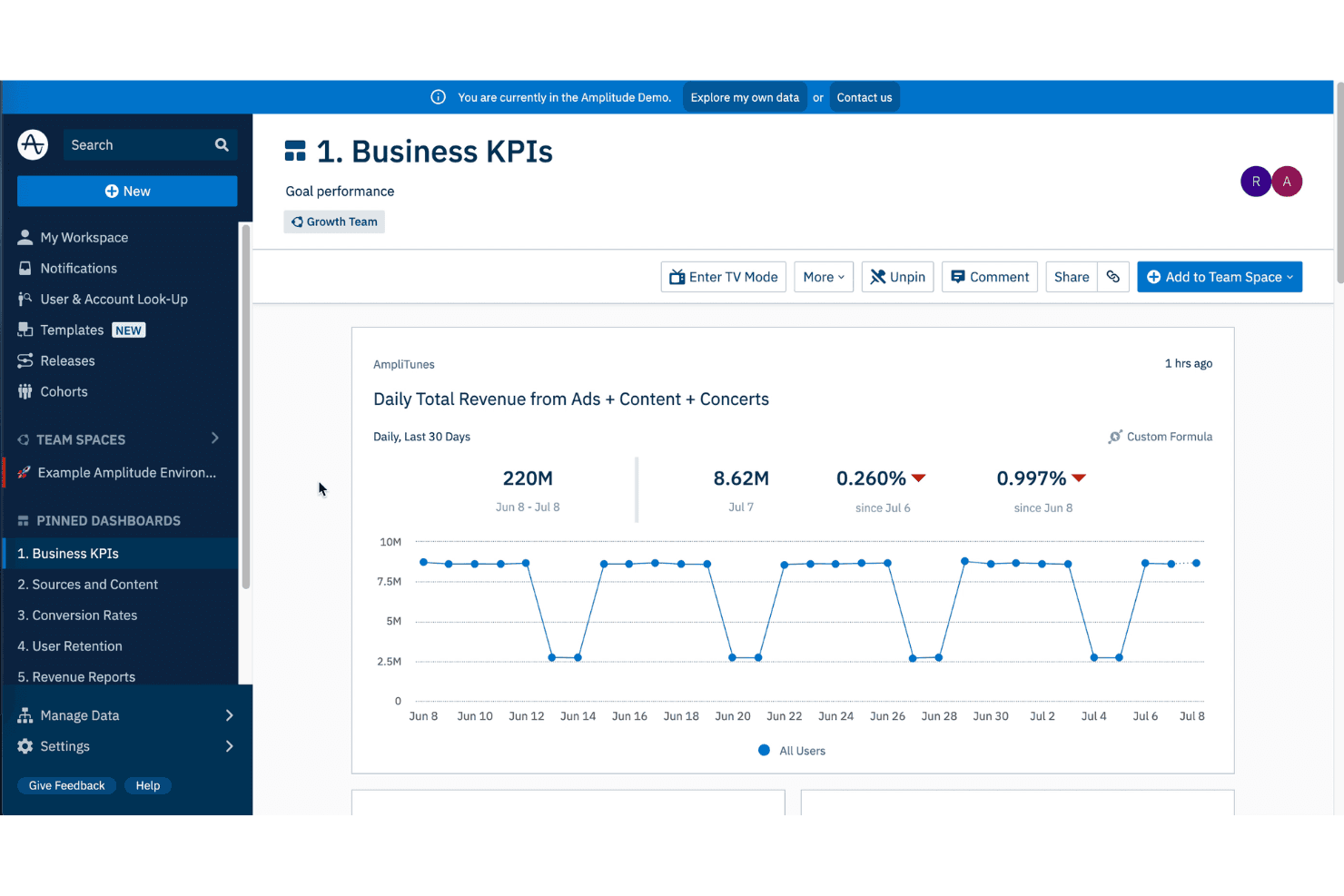
Amplitude traccia l'attività degli utenti per ottimizzare l'esperienza sul prodotto. Se il tuo team conduce esperimenti frequenti e ha bisogno di collegare direttamente i dati comportamentali alle decisioni di prodotto, Amplitude è una piattaforma di analisi digitale progettata per l'analisi dei funnel, il tracciamento delle coorti e la modellazione predittiva.
Per chi è più adatto Amplitude?
Amplitude è ideale per i team di crescita e di prodotto di aziende di medie e grandi dimensioni che devono collegare il comportamento degli utenti agli esiti di fatturato.
Perché Amplitude è una valida alternativa a Mixpanel
Amplitude si guadagna un posto nella mia selezione grazie alla profondità con cui collega i dati comportamentali agli esperimenti di prodotto. In particolare, apprezzo Amplitude Experiment, che consente di eseguire test A/B e collegare i risultati direttamente alle coorti comportamentali che hai già creato, evitando così il passaggio tra strumenti diversi. Mi affido inoltre alla funzione Pathfinder per visualizzare ogni percorso effettuato dagli utenti all'interno di un prodotto, facilitando l'individuazione e la rapida correzione di pattern di navigazione non previsti.
Funzionalità principali di Amplitude
- Analisi dei funnel: Mappa i tassi di abbandono a ciascun passaggio di un flusso di conversione per qualsiasi segmento di utenti.
- Analisi della fidelizzazione: Traccia la frequenza con cui gli utenti ritornano a compiere azioni specifiche su base giornaliera, settimanale o su intervalli personalizzati.
- Replay delle sessioni: Guarda le sessioni utente individuali insieme ai dati degli eventi per vedere esattamente cosa è successo prima dell'abbandono.
- Compass: Identifica quali funzionalità del prodotto sono maggiormente correlate alla retention a lungo termine degli utenti.
Integrazioni di Amplitude
Amplitude offre oltre 60 integrazioni native tra CDP (Segment, RudderStack, mParticle), data warehouse (Snowflake, BigQuery), strumenti di marketing (Braze, Iterable, Customer.io), CRM (Salesforce, HubSpot) e piattaforme pubblicitarie. Fornisce inoltre un'API per integrazioni personalizzate.
Pros and Cons
Pros:
- Analisi A/B test integrate per esperimenti
- Traccia la fidelizzazione delle coorti utenti
- Analizza segmenti di coorti comportamentali
Cons:
- Elevati costi di archiviazione per alti volumi
- Richiede conoscenza SQL per la configurazione
Learn more about Amplitude: Ideale per coinvolgimento clienti personalizzato
- Prova gratuita di 30 giorni + demo gratuita disponibile
- Da $75/mese
Visit WebsiteCustomer Rating:4.5/5
CleverTap aiuta le aziende a fidelizzare gli utenti attraverso esperienze personalizzate. CleverTap è una piattaforma per il coinvolgimento e la fidelizzazione dei clienti, pensata per aziende digitali e mobile-first che necessitano di connettere analytics ed esecuzione di campagne multicanale in un unico luogo.
Per chi è ideale CleverTap?
CleverTap è particolarmente adatto ai team di crescita e marketing di app mobile di fascia media ed enterprise, in settori come fintech, media ed ecommerce.
Perché CleverTap è una valida alternativa a Mixpanel
Ho inserito CleverTap tra le mie scelte migliori perché apprezzo come colmi il divario tra analytics comportamentali e personalizzazione in tempo reale. Mentre Mixpanel si limita agli insight, CleverTap permette di agire direttamente su di essi. Mi piace in modo particolare la funzione IntelliNODE, che ottimizza i percorsi delle campagne scegliendo la variante di messaggio con le migliori performance per ogni singolo utente, durante il percorso. Anche il motore di raccomandazione dei prodotti spicca, suggerendo le prossime azioni migliori basate sulle transazioni di profili clienti simili.
Funzionalità principali di CleverTap
- Archiviazione dati TesseractDB™: Un database progettato appositamente che conserva oltre tre anni di dati granulari sugli utenti per analisi comportamentali a lungo termine.
- Ottimizzatore del ciclo di vita: Mappa l’intera base utenti su specifiche fasi del ciclo di vita utilizzando framework come AARRR, così puoi individuare gli utenti in base alla loro posizione nel percorso cliente.
- A/B testing per campagne ed esperienze in app: Permette di testare testo dei messaggi, CTA, creatività ed elementi UI dell’app senza attendere un nuovo ciclo di rilascio.
- Segmentazione automatizzata: Crea micro-segmenti basati su comportamenti passati, azioni in tempo reale e punteggi RFM (recenza, frequenza, valore) per individuare utenti a rischio o di alto valore.
Integrazioni CleverTap
CleverTap offre oltre 100 integrazioni in categorie come attribution, CRM, CDP, data warehouse, ecommerce, remarketing e automazione workflow, inclusi Shopify, Salesforce, HubSpot, Segment, mParticle, AppsFlyer, Amplitude, Snowflake, BigQuery e Google Ads. Si connette anche con Zapier e dispone di un’API per integrazioni personalizzate.
Pros and Cons
Pros:
- Messaggistica push mobile avanzata e in-app
- Segmentazione utenti in tempo reale per campagne
- Costruttore visuale di percorsi per automazione del coinvolgimento
Cons:
- Per una funzionalità completa è necessaria l’integrazione SDK
- Alcune integrazioni richiedono configurazione manuale
Learn more about CleverTap: Ideale per la visualizzazione in tempo reale dei percorsi utente
- Demo gratuita disponibile
- Prezzi su richiesta
Visit WebsiteCustomer Rating:4.7/5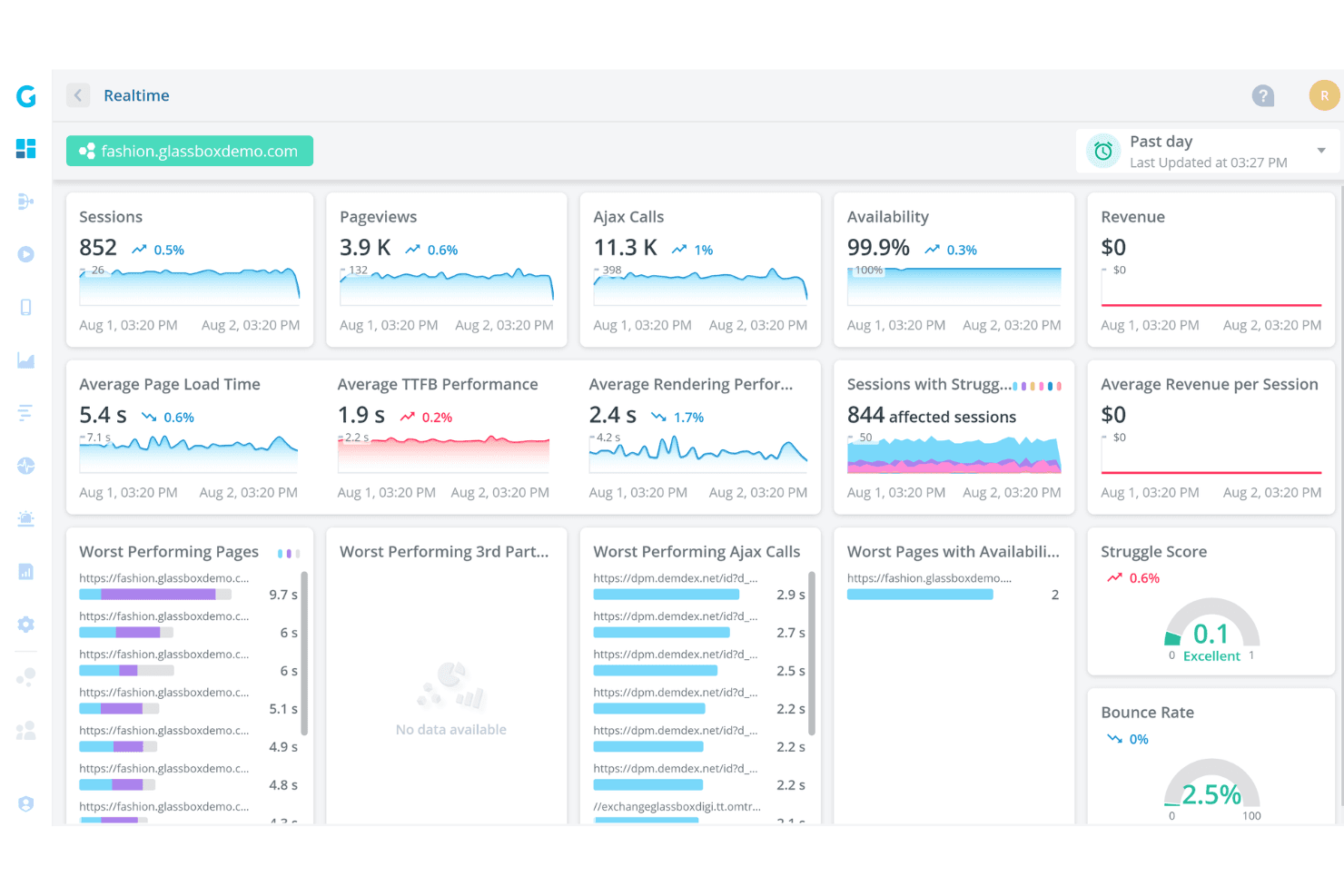
Glassbox analizza le interazioni per aumentare la soddisfazione. Glassbox è una piattaforma di analisi dell'esperienza digitale progettata per settori regolamentati che cattura il 100% delle sessioni utente e utilizza insight guidati dall'IA per mettere in evidenza punti di attrito, barriere alla conversione e interruzioni del percorso su web e app mobile native.
Per chi è ideale Glassbox?
Glassbox è particolarmente indicato per i team digitali e di prodotto di grandi aziende nei settori dei servizi finanziari, assicurazioni, retail e viaggi che necessitano di una visibilità approfondita sul comportamento degli utenti a livello di sessione.
Perché Glassbox è una valida alternativa a Mixpanel
Ho inserito Glassbox tra le mie scelte migliori perché la sua Augmented Journey Map™ offre una rappresentazione visiva e in tempo reale dei percorsi degli utenti all’interno di sito o app, mostrando con precisione dove incontrano difficoltà, abbandonano o convertono. A differenza di Mixpanel, dove bisogna costruire i funnel manualmente, Glassbox cattura in automatico ogni evento digitale e segnala i punti di attrito grazie all'IA. Apprezzo inoltre le metriche integrate sull’impatto sui ricavi, che assegnano un valore economico ad ogni fase del percorso, permettendo di stabilire le priorità degli interventi in base al reale costo per il business.
Funzionalità principali di Glassbox
- Replay delle sessioni: Registra ogni sessione utente per intero, consentendo di rivedere ogni interazione e vedere esattamente ciò che ha visto e fatto l’utente.
- Heatmap: Genera sovrapposizioni visive dell’attività di click, scroll e tap su qualsiasi pagina, mostrando dove gli utenti interagiscono o ignorano i contenuti.
- Analisi di crash ed errori: Rileva automaticamente errori JavaScript, errori API e crash dell’app associati a sessioni utente specifiche, così puoi riprodurre e diagnosticare problemi tecnici.
- Tagging codeless degli eventi: Permette di taggare e monitorare gli elementi dell’interfaccia direttamente dalla piattaforma, senza bisogno di scrivere o distribuire nuovo codice.
Integrazioni di Glassbox
Glassbox offre integrazioni native con Adobe Analytics, Google Analytics, Blue Triangle, Google Tag Manager, Adobe Launch, Tealium, Qualtrics, Jira, Slack, Firebase, AB Tasty, Adobe Target, Optimizely, SiteSpect, VWO e Dynamic Yield. È disponibile anche una API open per integrazioni personalizzate e il collegamento di strumenti non nativi.
Pros and Cons
Pros:
- Include la mappatura dei percorsi per analisi multi-step
- Offre la raccolta dati senza tag per un'implementazione rapida
- Si integra con i principali strumenti di analytics e APM
Cons:
- Le feature di analytics mobile sono meno mature
- Le funzionalità avanzate possono richiedere configurazioni tecniche
Learn more about Glassbox: Ideale per la raccolta automatica delle interazioni utente
- Piano gratuito + prova gratuita + demo gratuita disponibili
- Prezzi su richiesta
Visit WebsiteCustomer Rating:4.3/5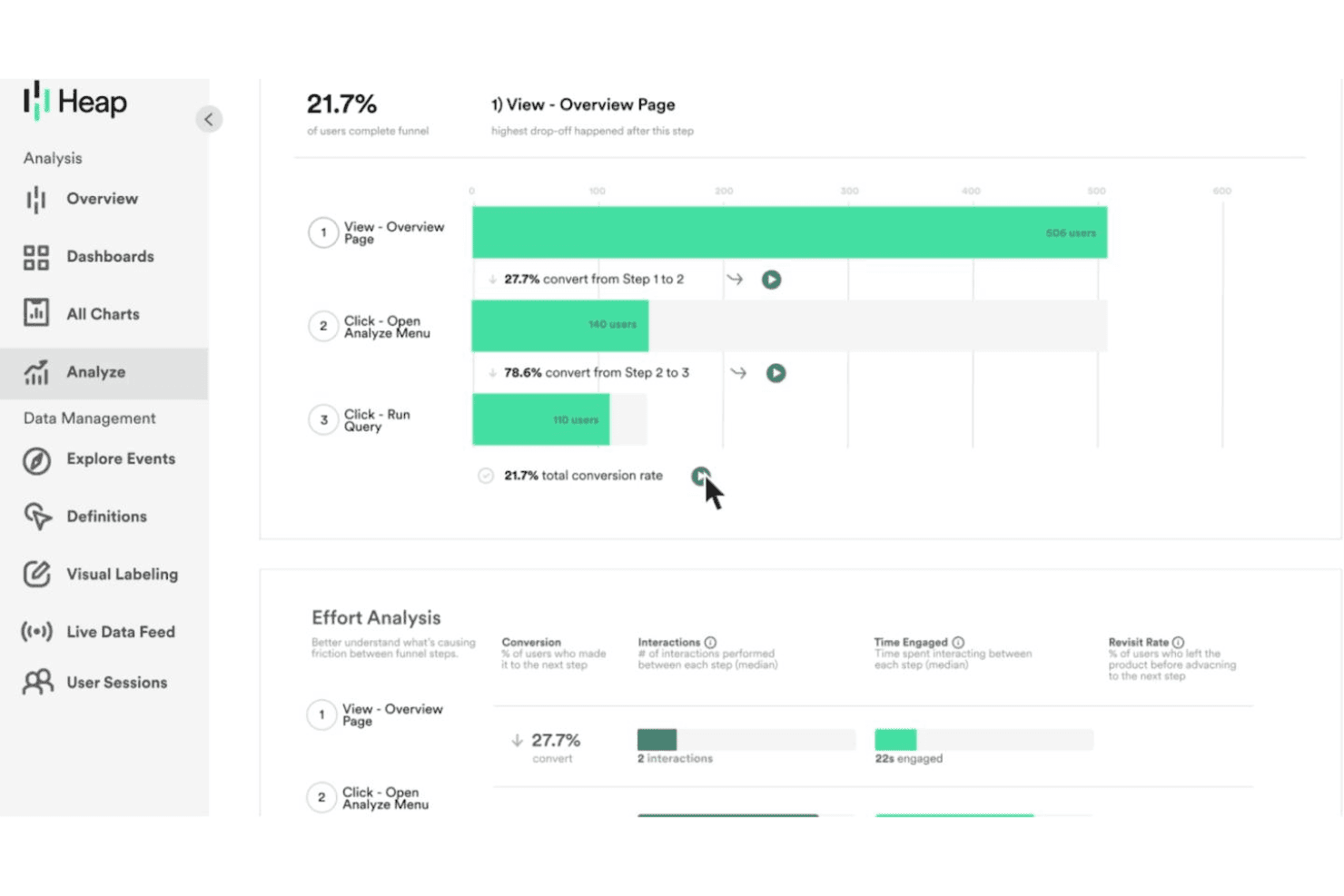
Heap analizza il comportamento degli utenti con dashboard, funnel e insights sui percorsi. Heap è una piattaforma di digital insights creata per team di prodotto e di crescita che desiderano analizzare l'intero percorso utente senza dover taggare manualmente ogni evento in anticipo.
Per chi è ideale Heap?
Heap è particolarmente adatto a team di prodotto di medie e grandi aziende che hanno bisogno di dati comportamentali retrospettivi senza dipendere dagli sviluppatori per tracciare ogni evento.
Perché Heap è una buona alternativa a Mixpanel
Ho incluso Heap tra le mie migliori scelte perché il suo motore di auto-cattura registra ogni clic, tap, invio di modulo e visualizzazione di pagina non appena installi lo snippet, senza bisogno di creare una tassonomia di eventi in anticipo. Mentre con Mixpanel devi decidere cosa tracciare prima ancora che gli utenti utilizzino il prodotto, con Heap posso definire retroattivamente gli eventi sui dati storici. Mi piace anche la funzione Illuminate, che mette in evidenza i punti di abbandono nei percorsi utente che non pensavi di dover analizzare.
Funzionalità principali di Heap
- Heatmaps: Visualizza dove gli utenti cliccano, scorrono e passano il mouse su qualsiasi pagina senza scrivere codice di tracciamento.
- Segmenti: Crea coorti di utenti in base a comportamento, proprietà o azioni per filtrare e confrontare qualsiasi analisi sui tuoi dati.
- Heap Connect: Invia i dati grezzi degli eventi Heap direttamente al tuo data warehouse per query personalizzate e analisi più approfondite.
- Playbook: Accedi a modelli di analisi preconfigurati che ti permettono di eseguire analisi su funnel, retention ed engagement senza costruire report da zero.
Integrazioni Heap
Heap offre integrazioni native in categorie come A/B testing, CRM, marketing automation e commerce, inclusi Salesforce, HubSpot, Shopify, Marketo, Braze, Klaviyo, Iterable, Stripe, Snowflake e Segment. Si integra con Zapier e offre un'API per integrazioni personalizzate.
Pros and Cons
Pros:
- Il replay delle sessioni è incluso in tutti i piani
- Le journey map visualizzano i flussi utente a più step
- Gli strumenti di data governance aiutano a mantenere la qualità degli eventi
Cons:
- Analisi mobile limitata rispetto a Mixpanel
- L'autocattura genera grandi volumi di dati
Learn more about Heap (by Contentsquare): Ideale per segmentazione di pubblico a livello enterprise
- Piano gratuito + demo gratuita disponibile
- Prezzo su richiesta
Visit WebsiteCustomer Rating:4.3/5
Adobe Customer Journey Analytics è una piattaforma di analytics a livello enterprise che consente ai grandi team di analizzare dati dei clienti provenienti da più canali, creare segmenti di pubblico complessi e mappare l’intero percorso cliente attraverso diversi touchpoint.
Per Chi è Adobe Customer Journey Analytics?
Adobe Customer Journey Analytics è particolarmente indicato per i team marketing e i team dati aziendali che hanno bisogno di analizzare grandi volumi di dati sui clienti multi-canale su larga scala.
Perché Adobe Customer Journey Analytics È una Buona Alternativa a Mixpanel
Ho incluso Adobe Customer Journey Analytics tra le mie scelte principali perché la sua segmentazione del pubblico va ben oltre ciò che offrono la maggior parte degli strumenti di analisi. Puoi definire segmenti utilizzando dati d’identità unificati provenienti da web, app, call center e fonti offline, quindi pubblicarli direttamente su Adobe Real-Time CDP o Adobe Journey Optimizer per l’attivazione. Apprezzo anche che i risultati dei segmenti possano essere reimportati in CJA per ulteriori analisi, creando un ciclo continuo di perfezionamento che la maggior parte degli utenti Mixpanel non può replicare.
Funzionalità Chiave di Adobe Customer Journey Analytics
- Analysis Workspace: Un generatore di report drag-and-drop che consente di creare tabelle personalizzate, visualizzazioni e diagrammi di flusso senza scrivere SQL.
- Modellazione di attribuzione multi-touch: Applica modelli di attribuzione basati su regole e algoritmi tra diversi canali per mostrare come ogni touchpoint contribuisce alla conversione.
- Rilevamento anomalie: Segnala automaticamente picchi o cali statisticamente significativi nei tuoi parametri così puoi indagare rapidamente su pattern di dati insoliti.
- Data views: Strati di configurazione virtuale che ti permettono di definire come viene interpretato il dato grezzo, incluso il formato delle metriche, le impostazioni di attribuzione e il comportamento delle dimensioni senza modificare il dataset di origine.
Integrazioni di Adobe Customer Journey Analytics
Adobe Customer Journey Analytics offre integrazioni native con Adobe Target, Adobe Analytics, Microsoft Azure, Amazon S3, Google BigQuery, Snowflake, Salesforce e Microsoft Dynamics 365. Sono disponibili API e SDK per integrazioni personalizzate.
Pros and Cons
Pros:
- Unifica fonti dati online e offline
- La governance brevettata protegge i dati dei clienti
- L’IA automatizza segmentazione e modellazione dell’attribuzione
Cons:
- Configurazione complessa che richiede competenze tecniche avanzate
- Al di fuori di Adobe, le integrazioni richiedono lavoro manuale
Learn more about Adobe Customer Journey Analytics: Ideale per analisi prodotto open-source
- Piano gratuito + demo gratuita disponibile
- Da $0.00005/evento
Visit WebsiteCustomer Rating:4.5/5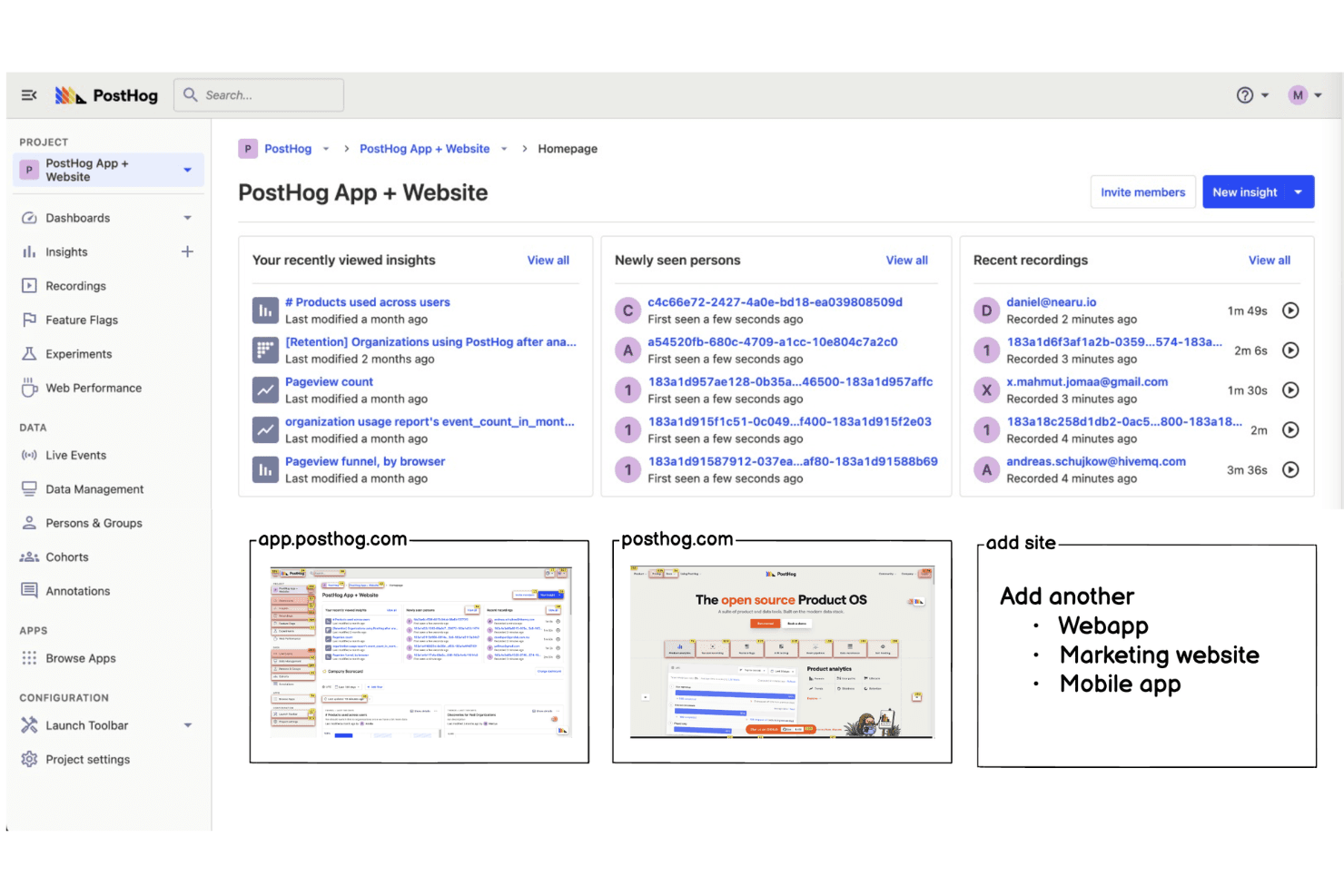
PostHog offre ai team il pieno controllo per monitorare il comportamento degli utenti. PostHog è una piattaforma di analisi prodotto open-source che offre ai team di prodotto e ingegneristici il monitoraggio degli eventi, la registrazione delle sessioni, i feature flag e i test A/B in un'unica suite autogestibile.
Per chi è pensato PostHog?
PostHog è particolarmente adatto ai team di prodotto e ingegneria di aziende tech, dalle startup alle medie imprese, che desiderano la piena proprietà dei dati senza dover dipendere da fornitori di analytics di terze parti.
Perché PostHog è una valida alternativa a Mixpanel
PostHog merita un posto nella mia lista perché il modello open-source cambia davvero le possibilità offerte dall'analisi dei dati. Apprezzo che sia possibile ospitare autonomamente l'intera piattaforma, il che garantisce pieno controllo su dove risiedano i dati degli eventi. Uso anche la funzione HogQL per eseguire query SQL grezze direttamente sui miei dati degli eventi, qualcosa che Mixpanel non offre nativamente.
Funzionalità chiave di PostHog
- Riproduzione delle sessioni: Registra le sessioni dei singoli utenti in modo che tu possa osservare esattamente come interagiscono con il prodotto, inclusi clic, scroll e rage click.
- Feature flag: Permette di rilasciare nuove funzionalità a segmenti specifici di utenti senza necessità di deploy di codice, con supporto a flag multivariati.
- Esperimenti: Consente di effettuare test A/B e multivariati sulle funzionalità del prodotto con monitoraggio integrato della significatività statistica, collegato direttamente ai tuoi dati di analytics.
- Data warehouse: Sincronizza dati da fonti esterne come Stripe, Hubspot e dal tuo data warehouse per interrogarli insieme ai dati degli eventi prodotto in un unico luogo.
Integrazioni PostHog
PostHog offre un vasto catalogo di integrazioni con oltre 50 destinazioni live e centinaia di fonti per data warehouse, inclusi Slack, HubSpot, Salesforce, Stripe, Snowflake, BigQuery, Shopify, Intercom e Segment. Si connette con Zapier e dispone di un'API per integrazioni personalizzate.
Pros and Cons
Pros:
- La riproduzione delle sessioni è inclusa senza costi aggiuntivi
- I feature flag permettono rollout controllati delle funzionalità
- I funnel e i report di retention sono altamente flessibili
Cons:
- Necessita gestione autonoma dell’infrastruttura
- Richiede manutenzione manuale dell’SDK
Learn more about PostHog: Ideale per insight granulari sull'esperienza digitale
- Prova gratuita di 15 giorni + piano gratuito + demo gratuita disponibili
- Da $39/mese (fatturato annualmente)
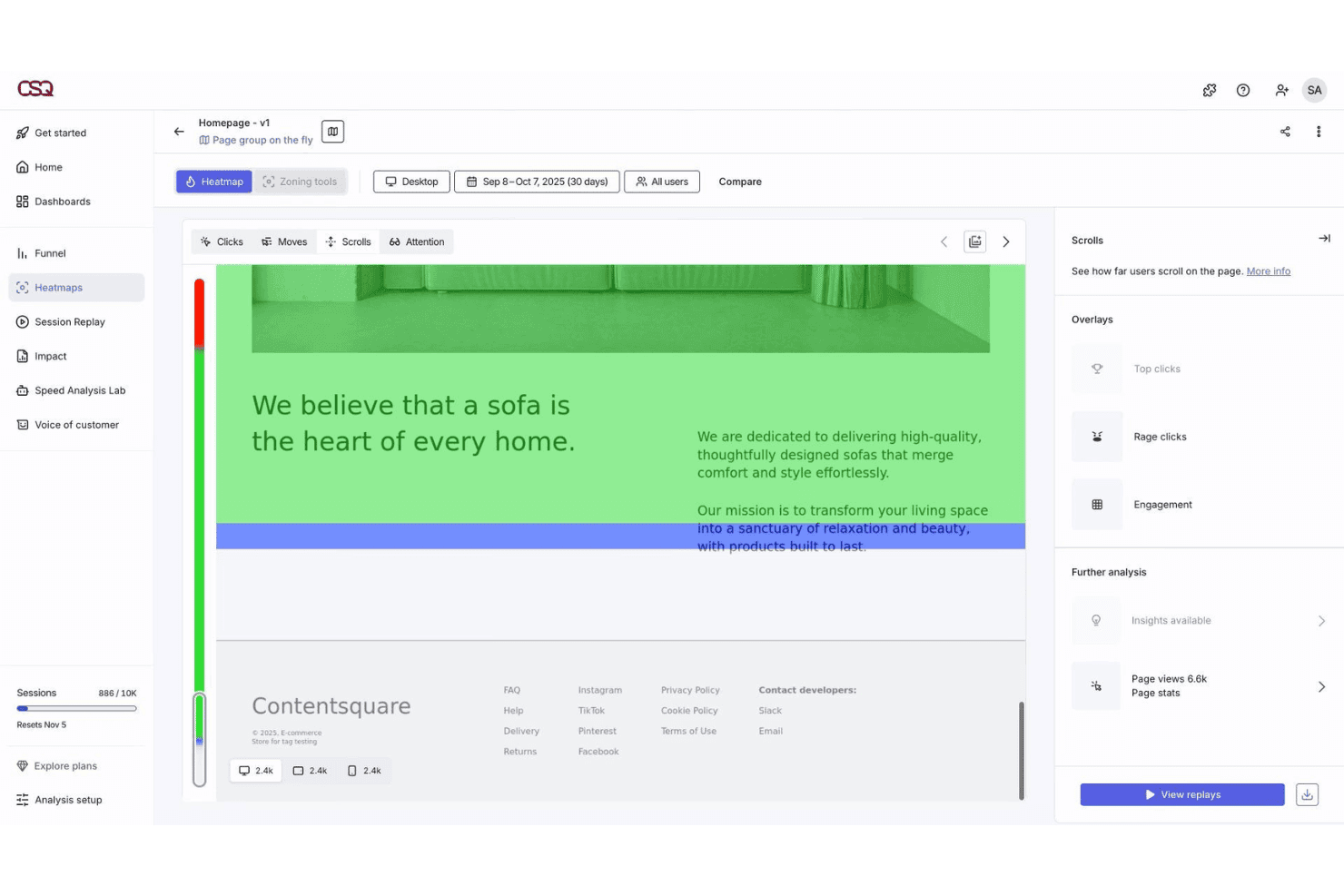
Contentsquare visualizza le interazioni sulle pagine con dettagliate analisi heatmap. Contentsquare è una piattaforma di analisi dell'esperienza digitale che aiuta i team di prodotto, UX e marketing a comprendere come gli utenti interagiscono con contenuti, pagine e funzionalità su web e mobile.
Per Chi È Ideale Contentsquare?
Contentsquare è particolarmente adatto a team ecommerce e retail di fascia media e enterprise che desiderano ottimizzare l'esperienza digitale dei clienti su web e mobile.
Perché Contentsquare è una Buona Alternativa a Mixpanel
Ho inserito Contentsquare tra le mie scelte migliori perché le sue heatmap basate su zone vanno oltre i dati di click standard, mostrando tasso di coinvolgimento, tasso di esposizione e attribuzione dei ricavi per ogni singolo elemento di una pagina. Apprezzo anche CS Find & Fix, che utilizza l'AI per rilevare automaticamente pattern di frizione come rage click e dead click e li collega direttamente alle perdite di ricavi. Questo livello di granularità a livello di pagina è qualcosa che il modello event-based di Mixpanel semplicemente non offre in modo nativo.
Funzionalità Chiave di Contentsquare
- Analisi avanzata dei percorsi: Mappa i percorsi degli utenti su web, app e mobile, collegando clic, uscita dagli step e risultati attraverso più sessioni in un'unica visualizzazione.
- Quantificazione dell'impatto: Collega ogni insight comportamentale alle metriche di ricavo e conversione, così puoi vedere esattamente come i problemi di performance influenzano i risultati economici.
- Sondaggi Voce del Cliente: Permette di lanciare sondaggi generati dall'AI con oltre 40 modelli, abbinando poi le risposte direttamente alle sessioni registrate per il massimo contesto.
- Smart Capture: Registra automaticamente ogni interazione utente fin dal primo giorno su tutti i dispositivi, senza bisogno di tagging manuale o interventi di sviluppo.
Integrazioni Contentsquare
Contentsquare offre integrazioni native con Google Analytics 4, Adobe Analytics, Mixpanel, Optimizely, VWO, Qualtrics, Shopify, Snowflake, Hotjar e Microsoft Teams. È disponibile un'API per integrazioni personalizzate.
Pros and Cons
Pros:
- Insight guidati dall'AI rilevano anomalie comportamentali
- L'analisi dei form individua i campi con massimo abbandono
- Visualizza l'esperienza digitale del cliente
Cons:
- Richiede tagging per alcuni tracking avanzati
- Alto consumo di risorse del browser
Learn more about Contentsquare: Ideale per la personalizzazione dell'analisi eventi open-source
- Prova gratuita di 30 giorni + piano gratuito disponibile
- Da $2.5/mese

OpenPanel offre agli sviluppatori analisi self-hosted con particolare attenzione alla privacy. OpenPanel è una piattaforma di analisi open-source progettata per i team che desiderano il pieno controllo sul tracciamento degli eventi e la privacy dei dati. È particolarmente adatta a sviluppatori e team di prodotto che hanno bisogno di personalizzare le analisi oltre le possibilità offerte da strumenti closed-source come Mixpanel.
Se desideri personalizzare la tua piattaforma di analytics o ospitare i dati autonomamente, OpenPanel offre una flessibilità che si distingue tra le alternative a Mixpanel.
Perché OpenPanel è una valida alternativa a Mixpanel
OpenPanel si distingue per i team che vogliono personalizzare ogni aspetto delle proprie analisi degli eventi. L'ho scelto come alternativa a Mixpanel perché è open-source, quindi puoi modificare il codice e adattare il tracciamento degli eventi alle tue esatte esigenze.
La piattaforma supporta l'auto-gestione (self-hosting), dandoti il pieno controllo sui dati e sulle impostazioni della privacy. Se hai bisogno di creare dashboard personalizzate o adattare le analisi a flussi di lavoro unici, OpenPanel offre una flessibilità che gli strumenti closed-source non possono offrire.
Funzionalità principali di OpenPanel
Altre funzionalità di OpenPanel che possono interessare ai team alla ricerca di alternative a Mixpanel includono:
- Editor dello schema eventi: Definisci e gestisci le proprietà degli eventi direttamente dalla piattaforma per una raccolta dati coerente.
- Generatore di query personalizzate: Esegui query avanzate sui dati degli eventi senza dover utilizzare strumenti esterni o la conoscenza di SQL.
- Controllo degli accessi basato sui ruoli: Assegna permessi agli utenti per gestire chi può visualizzare, modificare o amministrare i progetti di analisi.
- Accesso API: Integra OpenPanel con i tuoi sistemi esistenti o esporta dati in modo programmatico utilizzando un'API documentata.
Integrazioni OpenPanel
Le integrazioni includono HTML/Script, React, Next.js, Remix, Vue, Astro, React Native, Node, Express e Laravel.
Pros and Cons
Pros:
- Completamente open-source con codice trasparente
- Opzione self-hosting per completo controllo dei dati
- Personalizzazione flessibile dello schema eventi
Cons:
- Documentazione limitata rispetto ai grandi fornitori
- Richiede configurazione tecnica e gestione del server
Learn more about OpenPanel: 10Ideale per consigli personalizzati basati sull'IA
Insider
- Demo gratuita disponibile
- Prezzi su richiesta
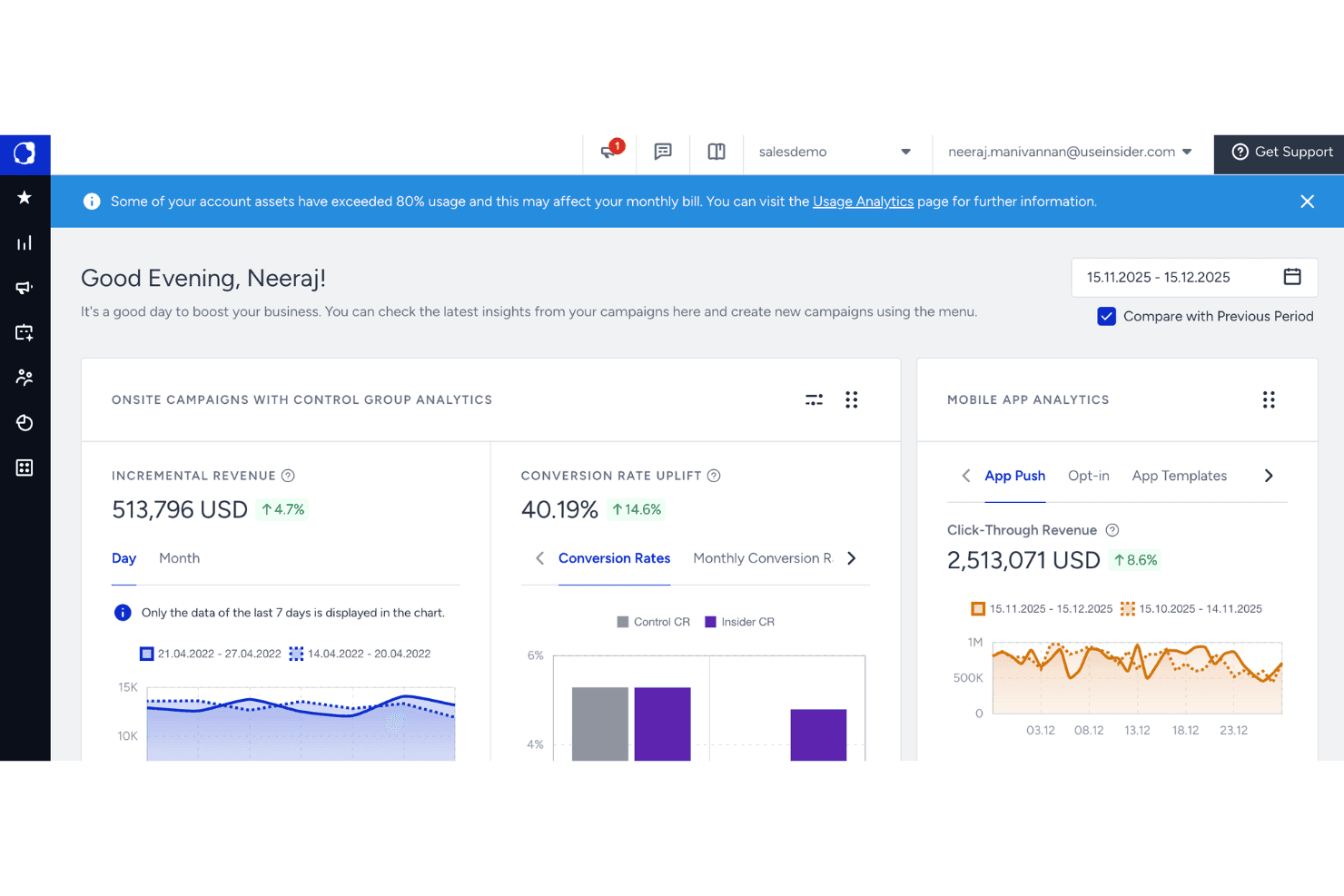
Felix AI di Quantum Metric monitora gli agenti in background e lo stato del sito. Per i team di marketing del commercio elettronico e della vendita al dettaglio che devono agire sui dati comportamentali dei clienti in tempo reale, Insider combina l'analisi multicanale con la personalizzazione su web, dispositivi mobili, email, SMS e WhatsApp.
Per chi è più adatto Insider?
Insider è adatto ai marchi della vendita al dettaglio in fase di crescita e alle aziende della vendita al dettaglio che gestiscono campagne su tre o più canali digitali contemporaneamente.
Perché Insider è una buona alternativa a Mixpanel
Insider si è guadagnato un posto nella mia selezione perché colma il divario tra dati comportamentali e azioni in un modo che Mixpanel semplicemente non riesce a fare. Mi piace molto il fatto che il generatore di percorsi Architect consenta di attivare esperienze personalizzate sulla base di eventi in tempo reale, come la riduzione del prezzo di un articolo nella lista dei desideri, inviando istantaneamente un messaggio SMS o WhatsApp. I segmenti predittivi individuano automaticamente gli acquirenti con intenzioni elevate e quelli a rischio, così posso agire su questi segnali prima che si chiuda la finestra di conversione.
Funzionalità principali di Insider
- Motore di personalizzazione web: Personalizza elementi del sito, come banner e griglie di prodotti, sulla base del comportamento e degli attributi dei visitatori in tempo reale.
- InStory: Aggiunge al sito o all'app caroselli di storie in stile Instagram per mettere in evidenza contenuti personalizzati e prodotti selezionati.
- Generatore di campagne email: Editor con funzionalità di trascinamento della selezione per creare email personalizzate con blocchi di contenuti dinamici adattati a ciascun contatto.
- Analisi dei funnel: Visualizza l'abbandono fase per fase nei percorsi di conversione per individuare con precisione il punto in cui gli utenti escono prima dell'acquisto.
Integrazioni di Insider
Insider offre oltre 100 integrazioni tramite il suo Integration Hub, tra cui Salesforce, Shopify, Shopify Plus, Google Analytics, Amplitude, Mixpanel, Segment, mParticle, Tealium e Google BigQuery. È disponibile un'API per le integrazioni personalizzate.
Pros and Cons
Pros:
- Le previsioni dell'IA individuano i segmenti senza configurazione manuale
- Orchestrazione dei percorsi multicanale da un'unica area di lavoro
- Attivatori comportamentali in tempo reale per messaggi personalizzati
Cons:
- La profondità delle analisi è inferiore a quella delle piattaforme di analisi dedicate
- L'onboarding complesso richiede un supporto dedicato per l'implementazione
Learn more about Insider:
Altre alternative a Mixpanel
Ecco alcune ulteriori alternative a Mixpanel che non sono state incluse nella mia selezione, ma che vale comunque la pena prendere in considerazione:
- 11Quantum Metric Felix AgenticIdeale per notifiche autonome di attrito digitale
- 12KissmetricsIdeale per il monitoraggio dei ricavi basato sulle coorti
- 13BrazeIdeale per l'automazione del coinvolgimento cross-canale
- 14BloomreachIdeale per l'analisi focalizzata sul commercio
- 15MoEngageIdeale per la messaggistica mobile basata su approfondimenti
- 16TealiumIdeale per il tagging omnicanale e l'integrazione dei dati
- 17BlueConicIdeale per la mappatura del ciclo di vita dall'offline all'online
- 18mParticleIdeale per l'orchestrazione e la governance dei dati
- 19LogRocketIdeale per replay delle sessioni e analisi degli errori
- 20Twilio Customer Data Platformil migliore per unificare i profili dei clienti in tempo reale
Come valuto le alternative a Mixpanel
Ogni strumento della mia lista deve gestire il tracciamento basato su eventi, l’analisi dei funnel e la segmentazione degli utenti proprio come fa Mixpanel. Da lì, valuto cosa distingue ciascuno nei campi come modellazione predittiva, orchestrazione cross-channel e governance dei dati.
Funzionalità principali (requisiti fondamentali per questa lista)
Quando seleziono gli strumenti per la mia lista, valuto ciascuno su una scala da 0 (non offre la funzionalità) a 5 (eccelle in questo ambito) per ogni funzionalità principale elencata qui sotto. Poi, calcolo il punteggio totale dello strumento come percentuale. Ogni strumento deve raggiungere un punteggio totale minimo del 60% per essere preso in considerazione.
- Tracciamento basato su eventi: Verifico se la piattaforma acquisisce azioni utente specifiche come click su tasti, visualizzazioni di pagina e aggiunte al carrello, senza la necessità di un pesante intervento degli sviluppatori.
- Analisi dei funnel: Ogni strumento dovrebbe permettere di mappare flussi di conversione multi-step e individuare precisamente dove gli utenti abbandonano prima di completare un acquisto o la registrazione.
- Segmentazione utenti: Cerco filtri flessibili per attributi comportamentali, demografici o proprietà personalizzate così da isolare e confrontare gruppi di pubblico rilevanti.
- Report di retention: Gli strumenti dovrebbero mostrare partecipazione ricorrente su finestre temporali configurabili, aiutandoti a misurare se le campagne portano effettivamente i clienti a tornare.
- Dashboard personalizzate: Valuto come ogni piattaforma permetta di creare e condividere viste in tempo reale delle metriche che il tuo team monitora di più, dai tassi di conversione ai ricavi per canale.
- Esportazione dei dati e API: La possibilità di inviare dati grezzi sugli eventi a warehouse come BigQuery o Snowflake è importante, soprattutto quando il tuo stack di analytics è distribuito su più piattaforme.
Una volta che ho una lista di strumenti che soddisfano questi criteri, considero cosa distingue ogni piattaforma.
Fattori differenzianti (cosa distingue i fornitori)
Ecco come confronto e metto a confronto i diversi fornitori:
Funzionalità principali
L’analisi predittiva è un grande elemento distintivo. Cerco piattaforme in grado di prevedere il rischio di abbandono o la probabilità di acquisto senza che il tuo team debba costruire modelli personalizzati. Anche l’orchestrazione cross-channel conta, soprattutto quando è necessario coordinare i messaggi su email, SMS, notifiche push e le esperienze in sito da un unico flusso di lavoro. Inoltre, valuto come ogni strumento gestisca la personalizzazione in tempo reale, ad esempio adattando dinamicamente suggerimenti di prodotti o i contenuti della homepage in base al comportamento durante la sessione.
Oltre alle funzionalità
La governance dei dati è un aspetto fondamentale. Valuto se ogni piattaforma offre opzioni di residenza dei dati regionali, dal momento che il luogo dove i dati dei tuoi clienti vengono conservati e processati può influire direttamente sugli obblighi normativi. Anche il supporto all’onboarding varia molto tra i fornitori: alcuni prevedono team dedicati per l’implementazione, altri si basano su documentazione self-service. Per i team che migrano da Mixpanel con anni di dati storici sugli eventi, verifico come ogni fornitore gestisce l’importazione dei dati e la mappatura degli schemi durante la transizione.
Perché cercare un'alternativa a Mixpanel?
Sebbene Mixpanel sia una buona scelta tra le alternative a Mixpanel, esistono diversi motivi per cui alcuni utenti cercano soluzioni alternative. Potresti cercare un'alternativa a Mixpanel perché…
- Hai bisogno di registrazioni delle sessioni in tempo reale e di mappe dei percorsi
- Il tuo team desidera prezzi più flessibili o trasparenti
- Hai bisogno di un rilevamento avanzato delle anomalie e di avvisi
- Ti serve un'implementazione più semplice con meno codifica manuale dei tag
- La tua attività opera in regioni con un supporto limitato per Mixpanel
- Desideri integrazioni più approfondite con gli strumenti di sperimentazione
Se una di queste situazioni ti è familiare, sei nel posto giusto. Il mio elenco contiene diverse alternative a Mixpanel più adatte ai team che affrontano queste difficoltà con Mixpanel e cercano soluzioni alternative.
Caratteristiche principali di Mixpanel
Ecco alcune delle caratteristiche principali di Mixpanel, per aiutarti a mettere a confronto ciò che offrono le soluzioni alternative:
- Monitoraggio degli eventi: tiene traccia di ogni interazione dell'utente, come clic, visualizzazioni e invii di moduli, consentendo di analizzare i comportamenti a un livello granulare.
- Analisi del percorso di conversione: mappa i percorsi composti da più passaggi, permettendo di visualizzare come gli utenti attraversano i flussi principali e dove si verificano gli abbandoni.
- Segmentazione per coorti: raggruppa gli utenti in base a comportamenti o attributi condivisi nel tempo, consentendo analisi mirate e messaggi più precisi.
- Analisi della fidelizzazione: misura la frequenza con cui gli utenti tornano o ripetono determinate azioni, aiutando a valutare le strategie di coinvolgimento e a migliorare la fidelizzazione degli utenti.
- Test A/B: consente di eseguire esperimenti con più varianti per scoprire in tempo reale quali modifiche producono risultati migliori per gli utenti.
- Dashboard personalizzate: crea viste su misura delle metriche più significative, inclusi aggiornamenti delle prestazioni in tempo reale e informazioni chiave consultabili rapidamente dal tuo team.
- Esploratore della segmentazione: filtra ed esplora dinamicamente i tuoi dati, permettendoti di individuare schemi, scoprire tendenze e comprendere gli attributi degli utenti nel loro contesto.
- API per l'esportazione dei dati: consentono di estrarre dati grezzi verso strumenti esterni, archivi di dati o piattaforme di visualizzazione per analisi o report avanzati.
- Analisi dei profili utente: mostra una cronologia dettagliata delle azioni dei singoli utenti, incluse sequenze temporali e attributi, per una risoluzione approfondita dei problemi o la personalizzazione.
- SDK per dispositivi mobili e web: offre integrazioni per le principali piattaforme, consentendo di implementare Mixpanel in app native, proprietà web e ambienti multipiattaforma.