
O software de sinalização digital para retalho é um sistema de gestão de conteúdos para criar, agendar e publicar conteúdos numa rede de sinalização digital. Estes conteúdos podem incluir promoções, menus digitais e informações sobre produtos. A maioria das plataformas baseadas na nuvem funciona através de navegadores Web e liga-se a leitores multimédia ou televisores inteligentes compatíveis. Como resultado, pode atualizar os ecrãs sem visitar cada loja. Além disso, a ferramenta certa ajuda a manter uma comunicação consistente e a responder rapidamente às tendências dos consumidores.
Este guia explica em que diferem as principais opções e qual é a mais adequada para cada contexto de retalho.
Why Trust Our Software Recommendations
6,700+
Reviews
20
Industry experts
16+
Evaluation factors
14
Years
Our team has been testing and reviewing software since 2012. As retail leaders ourselves, we know how difficult—and important—it is to choose the right software.
For this guide, we evaluated tools using hands-on testing and independent research, scoring tools using our selection criteria.
Our reviews reflect our independent judgment—not a sales pitch.
Tabela comparativa de software de sinalização digital para retalho
Esta tabela comparativa resume os detalhes de preços das minhas principais seleções de software de sinalização digital para retalho:
Sorted by: Default
| Tool | Starting Price | Website | |
|---|---|---|---|
Best for customizable template libraries | 4.8 out of 5 | $11/screen/month Free demo + 14-day free trial available | Website |
Best for AI-powered content automation | 4.3 out of 5 | $14/player/month Free demo + 30-day free trial available | Website |
Best for programmatic ad management | 2.3 out of 5 | Pricing upon request Free demo available | Website |
Best for built-in content A/B testing | Not rated | $10/screen/month Free trial + free demo available | Website |
Best for offline content playback | 4.9 out of 5 | $13.50/screen/month 14-day free trial | Website |
Best for drag-and-drop screen design | 4.9 out of 5 | $14/screen/month Free demo + 30-day free trial available | Website |
Best for remote device management | 4.8 out of 5 | $20/screen/month 14-day free trial | Website |
Best for custom application deployment | 4.9 out of 5 | $8/device/month Free trial + free demo available | Website |
Best for audience-based content insights | 4.6 out of 5 | Pricing upon request Free demo available | Website |
Best for interactive touchscreen content | 4.6 out of 5 | $450 one-time Free demo available | Website |





Avaliações do melhor software de sinalização digital para retalho
Apresento abaixo os meus resumos detalhados do software de sinalização digital para retalho que integrou a minha seleção. Cada avaliação aborda as funcionalidades, integrações, preços e casos de utilização mais adequados da plataforma, para ajudar a encontrar a opção mais indicada.
 Best for customizable template libraries
- Free demo + 14-day free trial available
- From $11/screen/month (USD, billed monthly)
Visit WebsiteCustomer Rating:4.8/5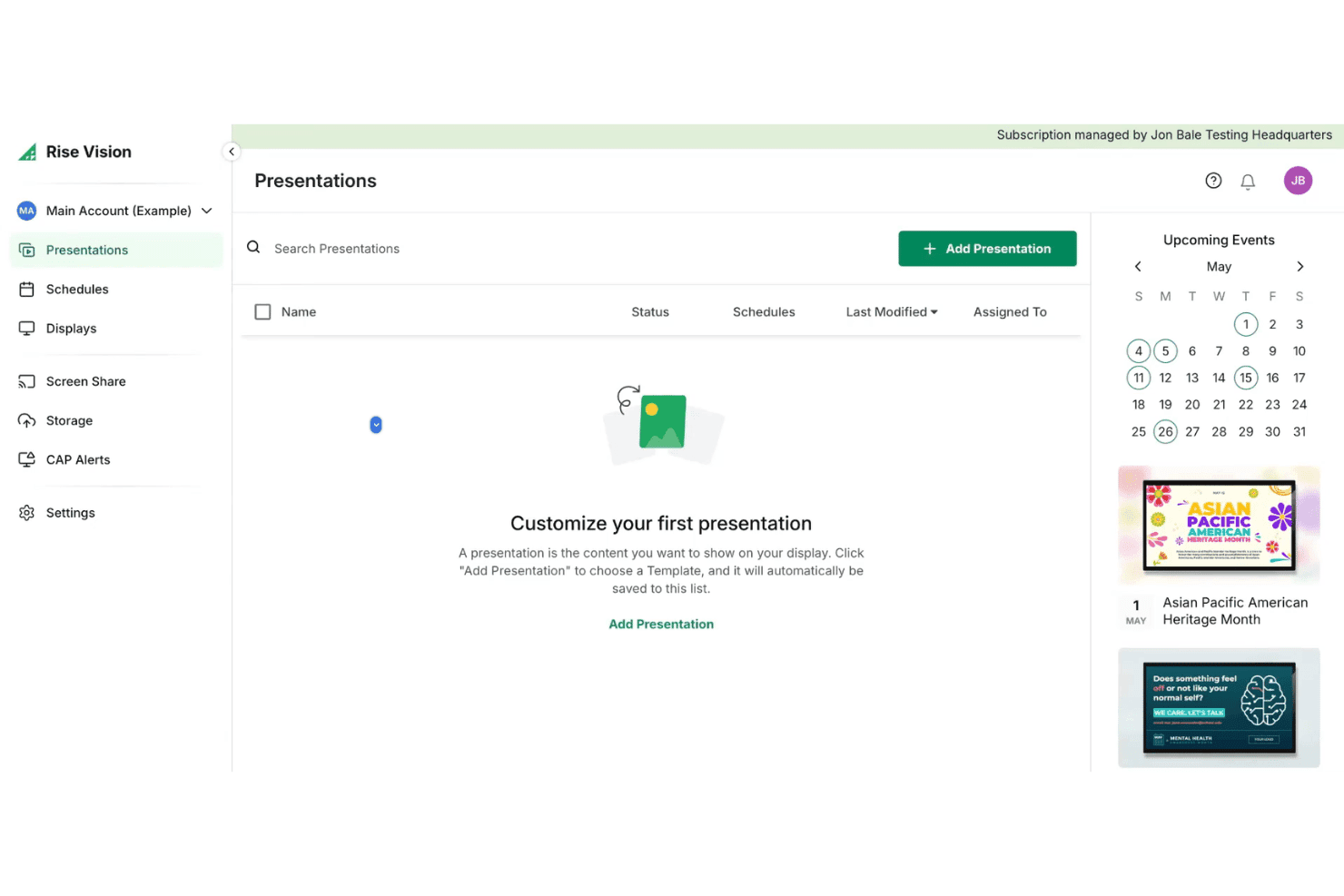
Rise Vision offers a Presentations dashboard where users can create and manage digital signage content alongside an upcoming events calendar. Rise Vision is a cloud-based digital signage platform that lets you design, schedule, and remotely manage content across multiple screens and locations using a template library, playlist scheduling, screen sharing, and a hardware-agnostic media player setup.
Who Is Rise Vision Best For?
Rise Vision is a good fit for small to mid-size multi-location retailers that want templates, screen sharing, and an accessible entry point into digital signage without proprietary hardware.
Why I Picked Rise Vision
Rise Vision earns its spot on my shortlist because of its 750+ animated, customizable templates, which include retail-specific layouts for menu boards, product promotions, and in-store announcements. I particularly like the built-in AI design tool, which turns a text prompt into a branded, animated presentation without starting from scratch. The weekly template recommendations also mean my team always has fresh content options to rotate into playlists without manually sourcing new creative each time.
Rise Vision Key Features
- Hardware-agnostic player support: Use existing screens and media players including Windows, Chrome OS, Android, and more.
- Emergency alert integrations: Connect with CAP systems to instantly trigger emergency messages across your screens.
- Remote device management: Monitor, provision, and update all connected displays from a cloud-based dashboard.
- User access: Assign granular permissions and use single sign-on (SSO) on supported plans to manage access across locations.
Rise Vision Integrations
Rise Vision integrates with Canva, Google Workspace, Microsoft 365, Microsoft Power BI, Domo, Meta, and YouTube. It also connects with Common Alerting Protocol services such as Singlewire, Punch Alert, E2Campus, Rave, Alertus, and CrisisGo, while its screen sharing tools support live collaboration content.
Pros and Cons
Pros:
- Works with most screens and media players
- AI-powered template creation for fast content updates
- Large animated template library for retail uses
Cons:
- Hardware is purchased separately
- Microsoft Power BI requires an Enterprise plan
Learn more about Rise Vision: Best for AI-powered content automation
- Free demo + 30-day free trial available
- From $14/player/month (USD, Cloud Essential)
Visit WebsiteCustomer Rating:4.3/5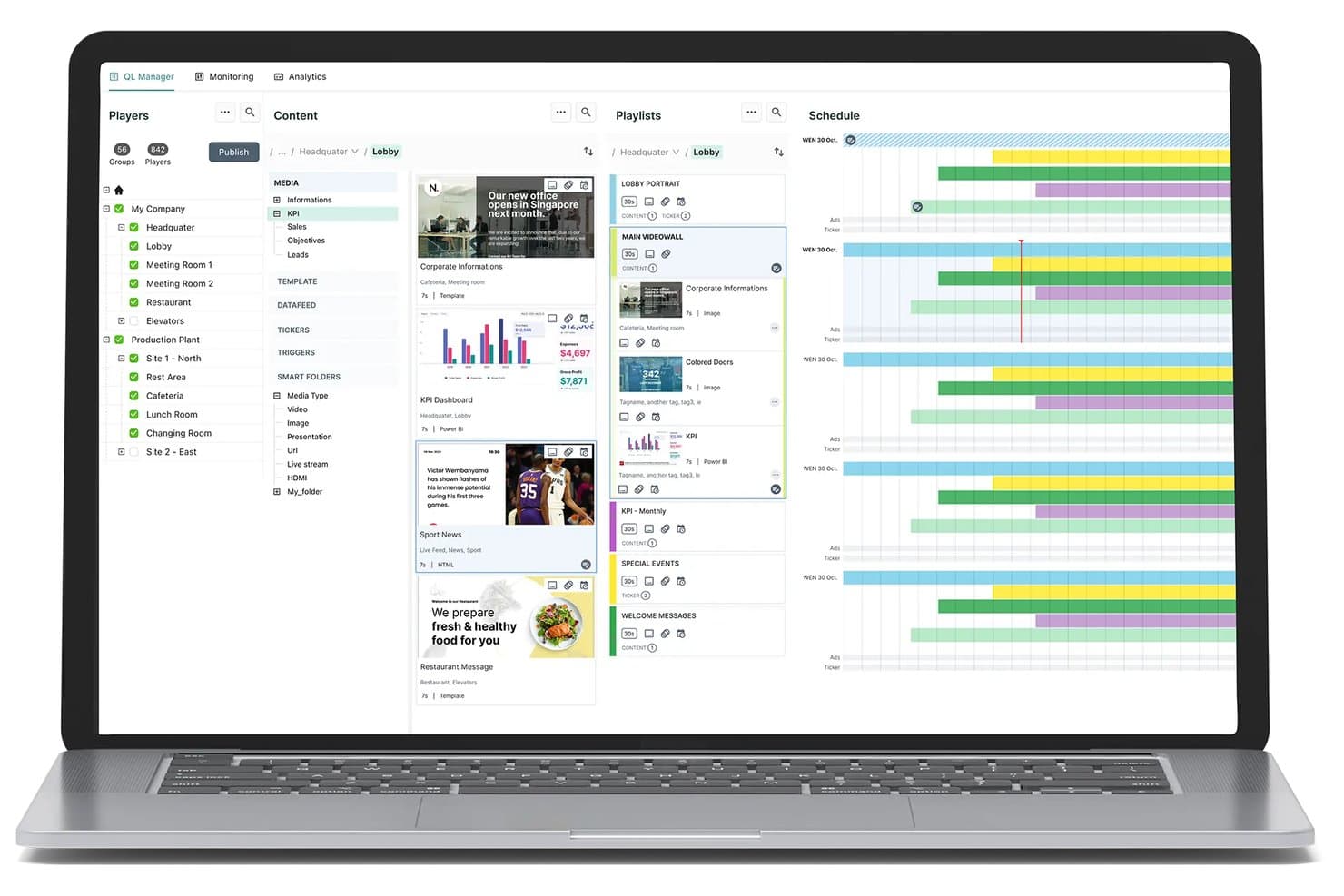
Navori digital signage CMS with content management, playlist scheduling, and multi-location player management. Navori is an enterprise digital signage platform that combines centralized multi-location content management, AI-driven audience analytics, POS data integration, and advanced scheduling across Windows, Android, and SoC displays.
Who Is Navori Best For?
Navori is a strong fit for multi-location retail chains and enterprise store operators managing large screen networks across regional or global locations.
Why I Picked Navori
Navori earns its spot on my shortlist because its AQUAJI computer-vision engine supports real-time content decisions. Rather than relying on scheduled playlists alone, AQUAJI can analyze audience demographics and feed that data into rules that adjust on-screen content. Combined with Navori’s no-code automation tools, this lets teams build campaigns that respond to audience and foot-traffic changes throughout the day.
Navori Key Features
- Centralized multi-location management: Control and deploy content to thousands of screens across store networks from a single dashboard.
- Role-based permissions: Assign user access and publishing rights at global, regional, or local levels for brand control.
- Native POS integration: Sync real-time product, pricing, or inventory data directly with digital signage displays.
- Device health monitoring: Track player status, receive alerts, and manage screen performance remotely.
Navori Integrations
Navori connects with Microsoft Power BI, Salesforce, SAP, Microsoft 365, LinkedIn, Facebook, Instagram, X, Vistar, and Hivestack. Its open API and live data connectors support custom ERP, CRM, and data-feed integrations.
Pros and Cons
Pros:
- Supports regional and demographic content targeting
- Scales easily to thousands of screens
- Real-time content automation with AQUAJI AI
Cons:
- Advanced deployments may require additional onboarding
- Pricing is not publicly listed
Learn more about Navori: Best for programmatic ad management
- Free demo available
- Pricing upon request
Visit WebsiteCustomer Rating:2.3/5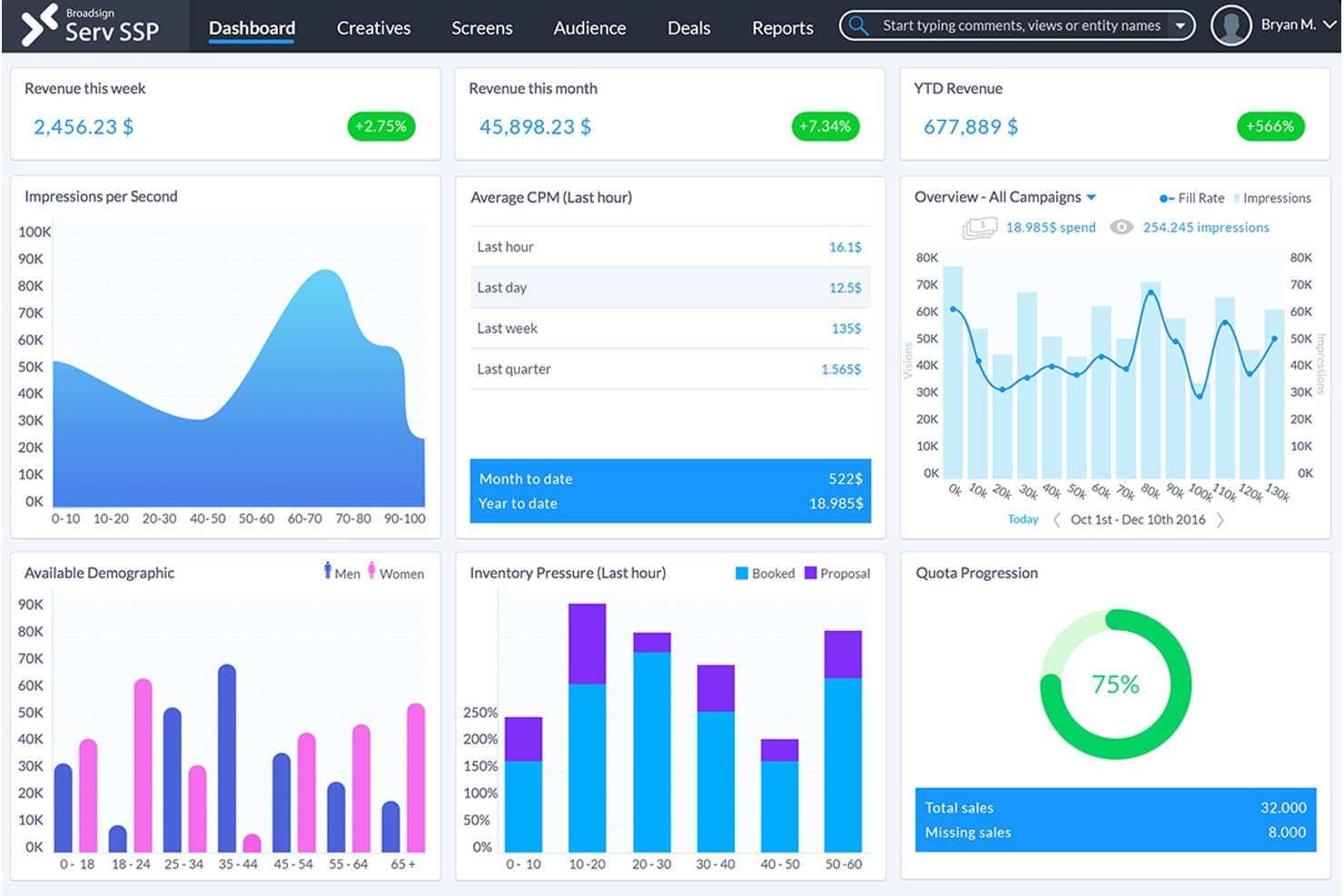
Broadsign SSP dashboard with real-time revenue tracking, impressions, CPM averages, demographic data, and quota progression for digital signage campaign management. Broadsign is an enterprise digital signage platform built for large retail networks, combining content scheduling, campaign management, programmatic ad transactions, and remote screen monitoring across multi-location deployments.
Who Is Broadsign Best For?
Broadsign is a strong fit for enterprise retail chains that operate dozens to thousands of in-store screens and want to run them as a monetized retail media network.
Why I Picked Broadsign
Broadsign earns its spot on my shortlist because of how it handles programmatic demand for in-store retail media. It has a built-in SSP that supports both open exchange and private marketplace transactions, letting retailers sell screen inventory to brand partners without stitching in separate ad tech. I also like its contextual targeting by demographics and POI, plus moment-based triggers like weather that fire campaigns automatically based on real-time conditions.
Broadsign Key Features
- Automated campaign scheduling: Schedule and trigger content updates across multiple locations using customizable rules and timelines.
- Role-based permissions: Assign and manage user roles for granular control over access to different parts of your signage network.
- Remote screen monitoring: View screen and player status, capture screenshots, and monitor device health from a centralized dashboard.
- Branded messaging templates: Create and deploy local or brand-approved messaging alongside paid campaigns.
Broadsign Integrations
Broadsign’s Place Exchange SSP connects with more than 55 demand-side platforms, including Google Display & Video 360 and Yahoo. Broadsign also includes the OutMoove DSP and provides API access for third-party integrations.
Pros and Cons
Pros:
- Reliable large network device monitoring
- Advanced rules-based content scheduling
- Excels at programmatic retail media management
Cons:
- The platform is built primarily for OOH media operators and large networks
- Pricing is not publicly listed
Learn more about Broadsign:- Best for built-in content A/B testing
- Free trial + free demo available
- From $10/screen/month (billed annually)
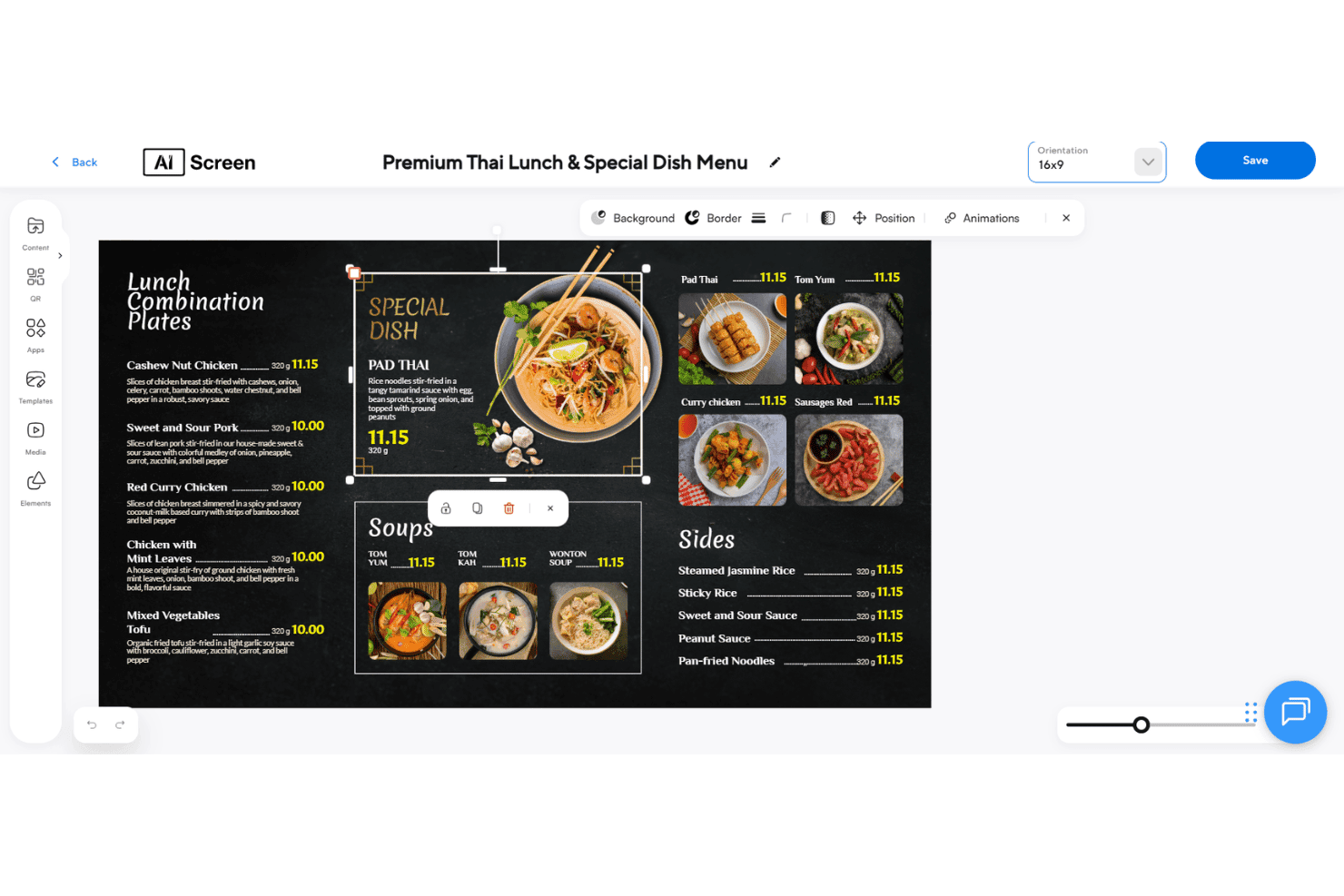
AIScreen offers a drag-and-drop digital signage editor for designing Thai restaurant menu boards with images, pricing, and layout tools. AIScreen is a cloud-based digital signage platform for retail that combines centralized multi-location content management, AI-powered audience targeting, POS integrations, and rule-based content scheduling across Android, Windows, Linux, and Chrome OS devices. It also supports white label deployments for resellers and managed-service providers.
Who Is AIScreen Best For?
AIScreen is a strong fit for multi-location retail operators and food & beverage businesses that need centralized control over in-store screens without enterprise-level complexity.
Why I Picked AIScreen
AIScreen earns its spot on my shortlist because it includes A/B testing in the content workflow. Teams can compare two versions of a promotional display across selected screens and use the platform’s analytics to identify the stronger performer. Its computer-vision tools add audience data to the comparison, so decisions can reflect measured engagement rather than guesswork.
AIScreen Key Features
- Centralized CMS: Control and update content across all store locations from one cloud dashboard.
- 1,500+ retail templates: Access a large library of customizable templates for promotions, menus, and product showcases.
- POS system integrations: Sync digital displays in real time with systems like Square and Clover for accurate pricing and inventory.
- Rule-based content scheduling: Automate playlists to trigger by time, date, weather, or store-specific criteria.
AIScreen Integrations
AIScreen offers 100+ apps and integrations, including Square, Clover, Microsoft and Google Workspace apps, Instagram, Google Reviews, Yelp, TripAdvisor, YouTube Live, Taggbox, and Walls.io. An open API supports custom connections.
Pros and Cons
Pros:
- Advanced rule-based content automation
- AI-powered audience targeting and analytics
- Built-in A/B testing for digital content
Cons:
- Pricing scales with the number of screens
- Advanced access controls require higher-tier plans
Learn more about AIScreen:  Best for offline content playback
- 14-day free trial
- From $13.50/screen/month (billed annually)
Visit WebsiteCustomer Rating:4.9/5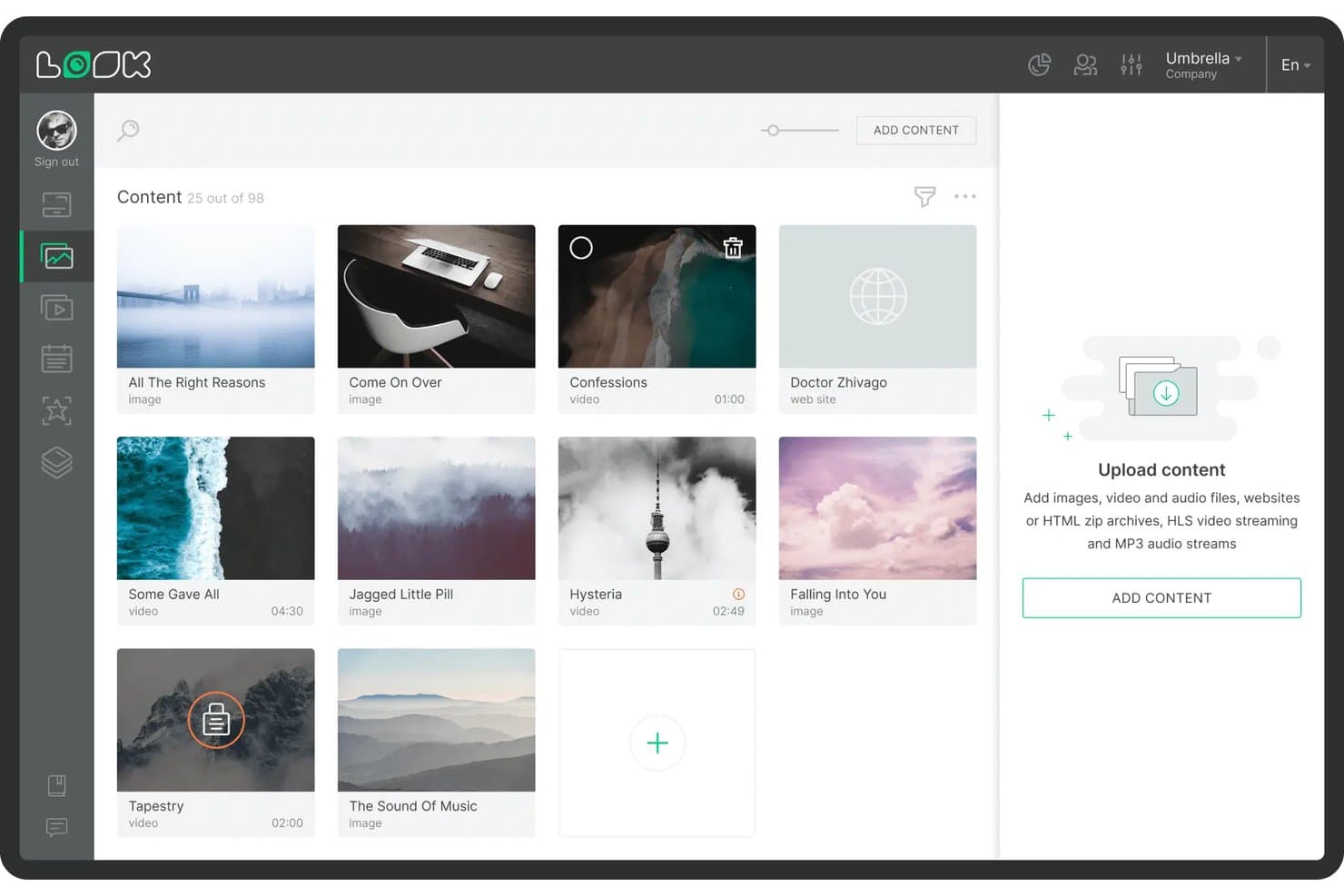
Look Digital Signage offers a content library management interface where users can browse, upload, and organize images, videos, and web content for digital signage displays. Look Digital Signage is a cloud-based digital signage platform that lets you create, schedule, and remotely manage screen content across single or multi-location retail networks, with support for playlists, multi-zone layouts, interactive touch screens, and real-time device monitoring.
Who Is Look Digital Signage Best For?
Look Digital Signage is a good fit for retail marketing and operations teams at SMBs and growing multi-location brands that need remote content control without dedicated IT resources.
Why I Picked Look Digital Signage
Look Digital Signage earns its spot on my shortlist because of how it handles network outages in a retail environment. The Look HDMI Player caches your entire content playlist locally, so screens keep running through store internet drops without going blank during peak traffic hours. I also like the proof-of-play reporting, which lets me verify that scheduled content actually ran on specific screens at specific times, not just that it was pushed to the device.
Look Digital Signage Key Features
- Multi-zone screen layouts: Combine promo videos, widgets, and tickers on the same screen for flexible retail displays.
- Retail content template library: Access drag-and-drop templates designed for promotions, menu boards, and product highlights.
- Interactive touch support: Create touch-friendly kiosks, wayfinding, or QR-triggered interactions for in-store engagement.
- User roles and permissions: Assign content editing access by headquarters or store manager for brand consistency and localized updates.
Look Digital Signage Integrations
Look Digital Signage integrates with Google Slides, YouTube, Instagram, Facebook, Google Reviews, Microsoft Power BI, and RSS feeds. It also supports Zapier workflows, action triggers, and custom API integrations.
Pros and Cons
Pros:
- Multi-zone layouts allow varied display content
- Supports extensive device types and operating systems
- Offline content playback keeps screens running
Cons:
- On-premise and white-label options require a custom quote
- POS connections may require Zapier or custom API work
Learn more about Look Digital Signage: Best for drag-and-drop screen design
- Free demo + 30-day free trial available
- From $14/screen/month (billed annually)
Visit WebsiteCustomer Rating:4.9/5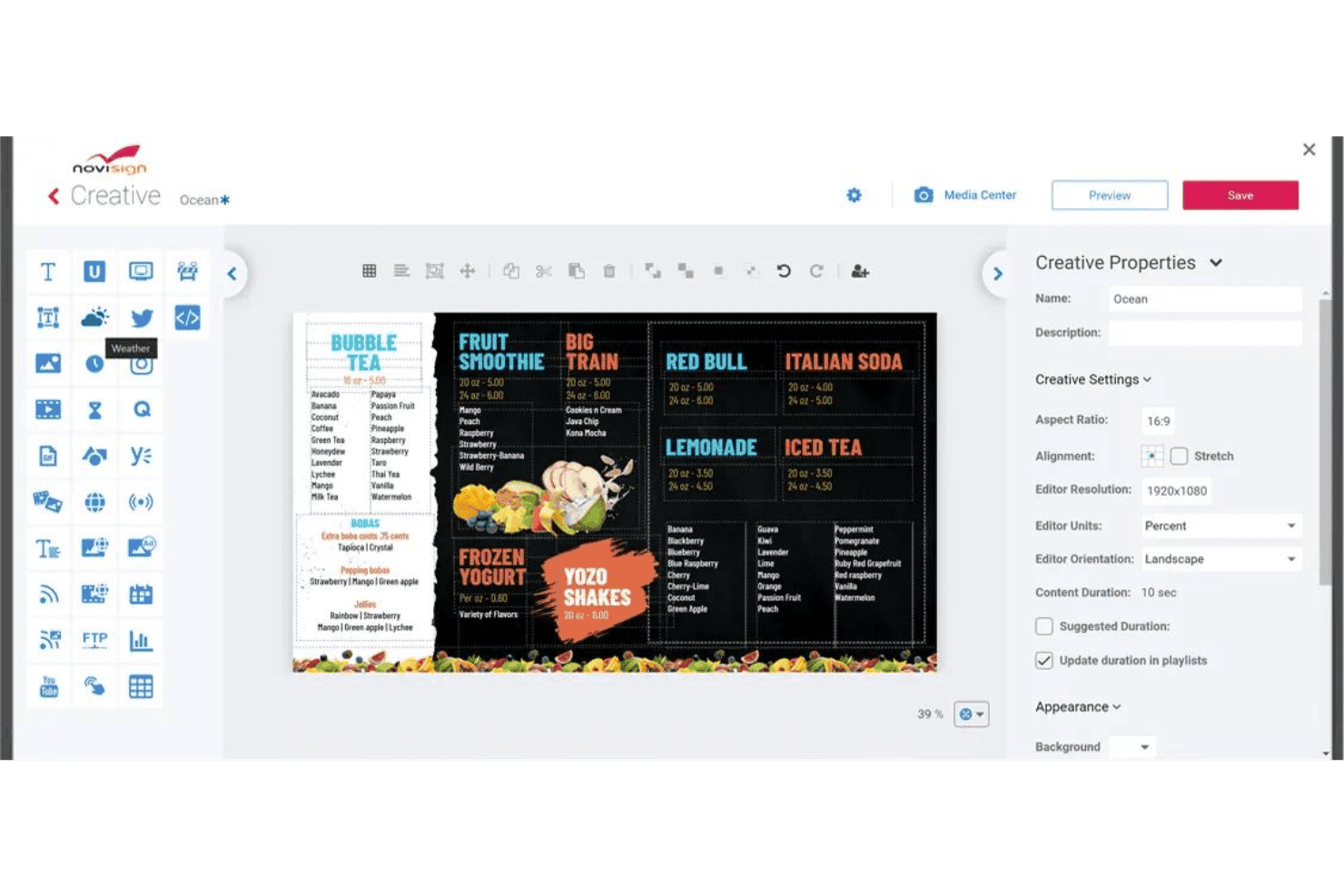
NoviSign offers a drag-and-drop digital signage creative editor with customizable menu board templates and content properties. NoviSign is a cloud-based retail digital signage platform with a drag-and-drop content editor, multi-screen scheduling, remote device management, IoT/RFID triggers, facial recognition targeting, and integrations with POS and live data feeds.
Who Is NoviSign Best For?
NoviSign is a strong fit for retail marketing and visual merchandising teams managing in-store displays across multiple locations without dedicated technical staff.
Why I Picked NoviSign
NoviSign earns its spot on my shortlist because its drag-and-drop editor removes much of the design bottleneck for retail teams. Users can build shelf-edge promotions, digital menu boards, or point-of-sale displays with 50+ widgets and apps plus 500+ customizable templates, without separate design software. Its video wall synchronization tools also support coordinated content across multi-screen window displays and feature walls.
NoviSign Key Features
- POS and data integrations: Syncs with Toast POS, Zapier, Power BI, and Google Sheets for live menu boards and promotions.
- Facial recognition content triggers: Supports targeted displays based on demographic data from in-store cameras.
- IoT and sensor-based automation: Triggers media playback using RFID, barcode scans, or IoT devices.
- Multi-OS remote device management: Manages and monitors screens running on Android, Windows, Chrome OS, LG webOS, and Samsung Tizen.
NoviSign Integrations
NoviSign integrates with Toast POS, Zapier, Microsoft Power BI, Tableau, SharePoint, Google Drive, Dropbox, Outlook, Google Calendar, Amadeus Delphi, Adomni, and Vistar. Its API can also support custom data connections.
Pros and Cons
Pros:
- Built-in facial recognition content triggers
- Large retail-focused template and widget library
- Drag-and-drop editor speeds up content creation
Cons:
- Storage and file-size limits vary by license count
- Toast POS and Zapier require the Business Plus plan
Learn more about NoviSign: Best for remote device management
- 14-day free trial
- From $20/screen/month (billed annually)
Visit WebsiteCustomer Rating:4.8/5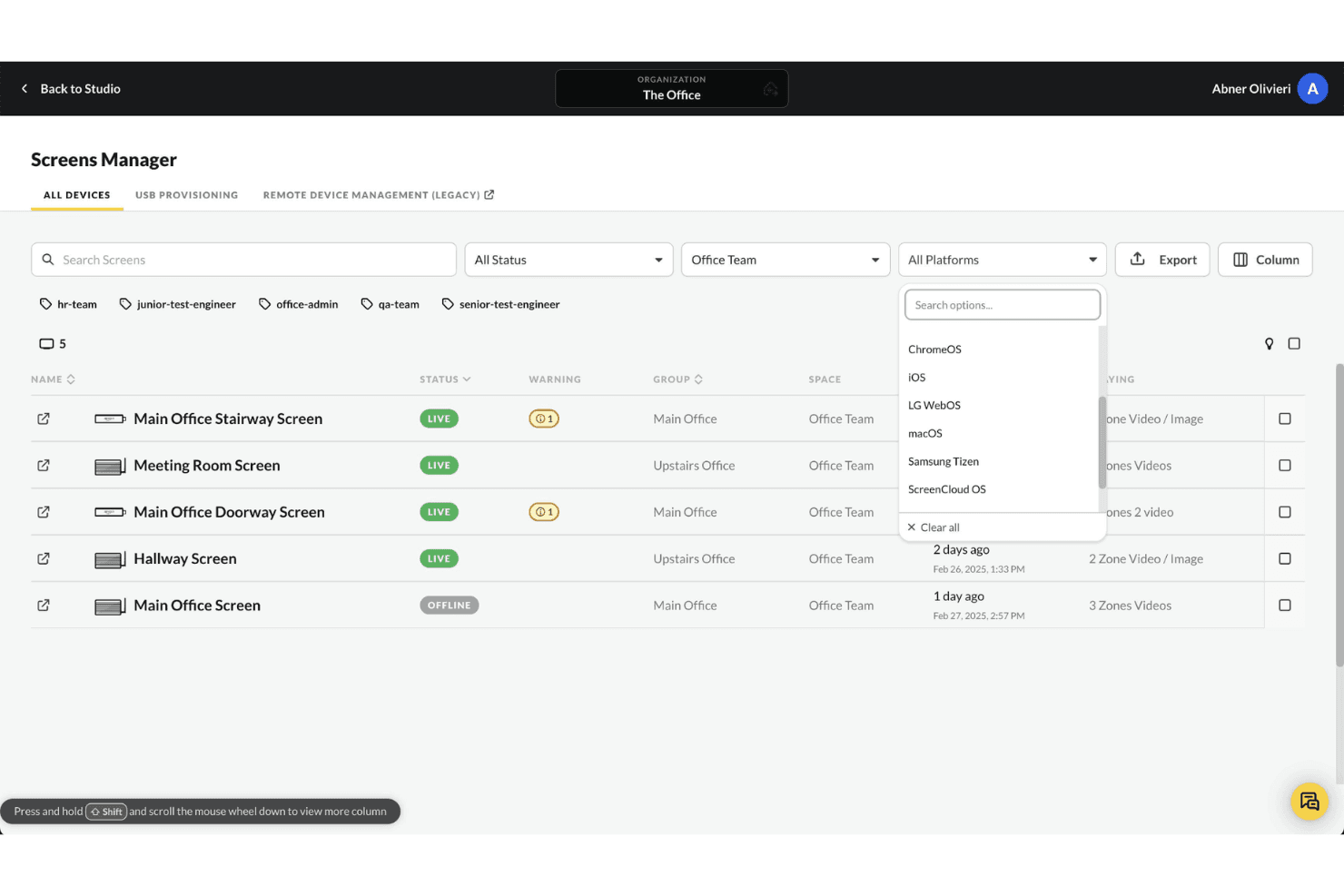
ScreenCloud's Screens Manager allows users to filter connected devices by platform, including ChromeOS, iOS, LG WebOS, macOS, Samsung Tizen, and ScreenCloud OS. ScreenCloud is a cloud-based digital signage platform that lets you manage, schedule, and display content across store screens from a single dashboard, with support for multi-location deployments, touchscreen displays, and 80+ app integrations.
Who Is ScreenCloud Best For?
It's a strong fit for mid-market and enterprise retailers managing distributed screen networks across multiple store locations.
Why I Picked ScreenCloud
ScreenCloud earns its spot on my shortlist because of how it handles large-scale device fleets. I can remotely provision, reboot, and push OTA updates to screens running on Amazon Fire TV, Android, and Chromebox hardware, without touching a single player in-store. Proof-of-play logs and user audit logs let me confirm exactly what's displayed and when, across every location.
ScreenCloud Key Features
- Canvas design editor: Create and arrange engaging retail content using a drag-and-drop visual editor.
- App and integration library: Access 80+ integrations including Google Slides, Instagram, Power BI, and YouTube for dynamic display content.
- Touchscreen display support: Deploy interactive content on in-store touch-enabled screens with ScreenCloud Touch.
- Content scheduling tools: Schedule playlists and templates to display at set times, dates, and locations across your screen network.
ScreenCloud Integrations
ScreenCloud offers 80+ apps and integrations, including Google Slides, YouTube, Instagram, Microsoft Power BI, Microsoft SharePoint, Microsoft Teams, Slack, and Google Workspace. Its GraphQL API supports custom integrations.
Pros and Cons
Pros:
- Drag-and-drop canvas for designing content
- Supports diverse hardware and operating systems
- Reliable remote screen fleet management
Cons:
- Limited audience demographic targeting options
- POS connections may require custom integration work
Learn more about ScreenCloud: Best for custom application deployment
- Free trial + free demo available
- From $8/device/month (billed annually)
Visit WebsiteCustomer Rating:4.9/5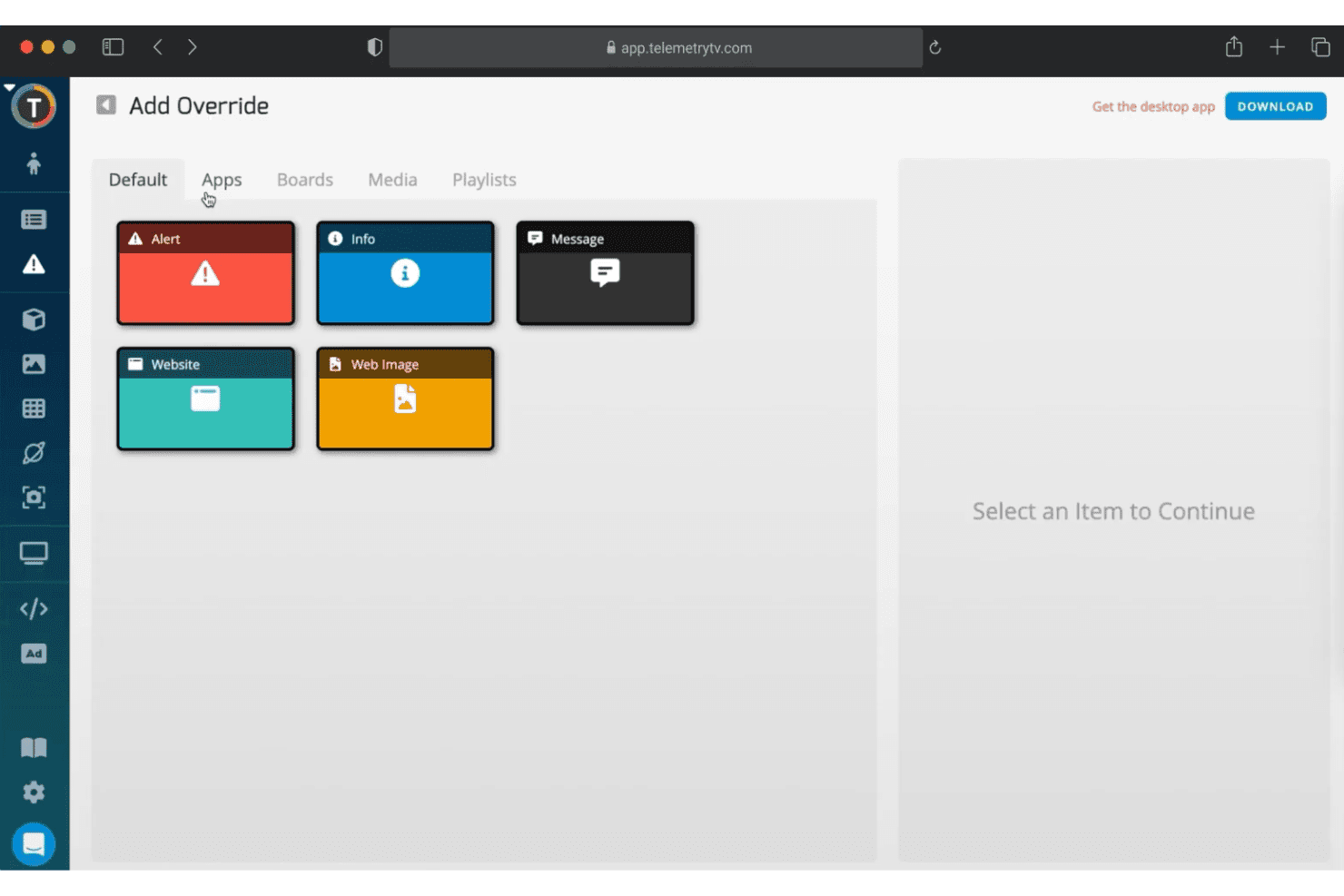
TelemetryTV offers an 'Add Override' feature with app options including Alert, Info, Message, Website, and Web Image for digital signage content control. TelemetryTV is a cloud-based digital signage platform that lets you design, publish, and manage content across display networks—with tools for screen zoning, device management, scheduling, custom app deployment, and live data dashboards.
Who Is TelemetryTV Best For?
It's a strong fit for mid-to-large retail operations and enterprise teams that have in-house development resources and need to deploy custom signage applications at scale.
Why I Picked TelemetryTV
I picked TelemetryTV as one of the best because its custom app deployment capabilities stand out in the retail signage space. Its JavaScript, HTML, and CSS SDK plus Git integration let development teams build and push custom applications directly to screens, from branded self-service kiosks to live product inventory displays. On the Enterprise plan, TelemetryTV can also send RS-232 commands through compatible ChromeOS hardware to control connected commercial displays.
TelemetryTV Key Features
- Screen zones and video wall support: Segment displays and manage dynamic content on large storefront screens or mosaics.
- Playlist scheduling and auto-expiration: Automate when retail content appears, with precise control over timed promotions.
- Built-in Canva editor integration: Create and edit visually engaging retail signage without leaving the platform.
- Device health monitoring and remote management: View real-time status and troubleshoot media players and displays across all store locations.
TelemetryTV Integrations
TelemetryTV offers 70+ turnkey apps, including Canva, YouTube, Google Slides, Slack, and Google Calendar. Its web apps, SDK, and API documentation support custom integrations and embedded data sources.
Pros and Cons
Pros:
- Supports segmented zones and 8K video walls
- Real-time device health and monitoring tools
- Full JS/HTML/CSS SDK for signage apps
Cons:
- Some integrations rely on web apps or embedded sources
- RS-232 control requires an Enterprise plan and compatible ChromeOS hardware
Learn more about TelemetryTV: Best for audience-based content insights
- Free demo available
- Pricing upon request
Visit WebsiteCustomer Rating:4.6/5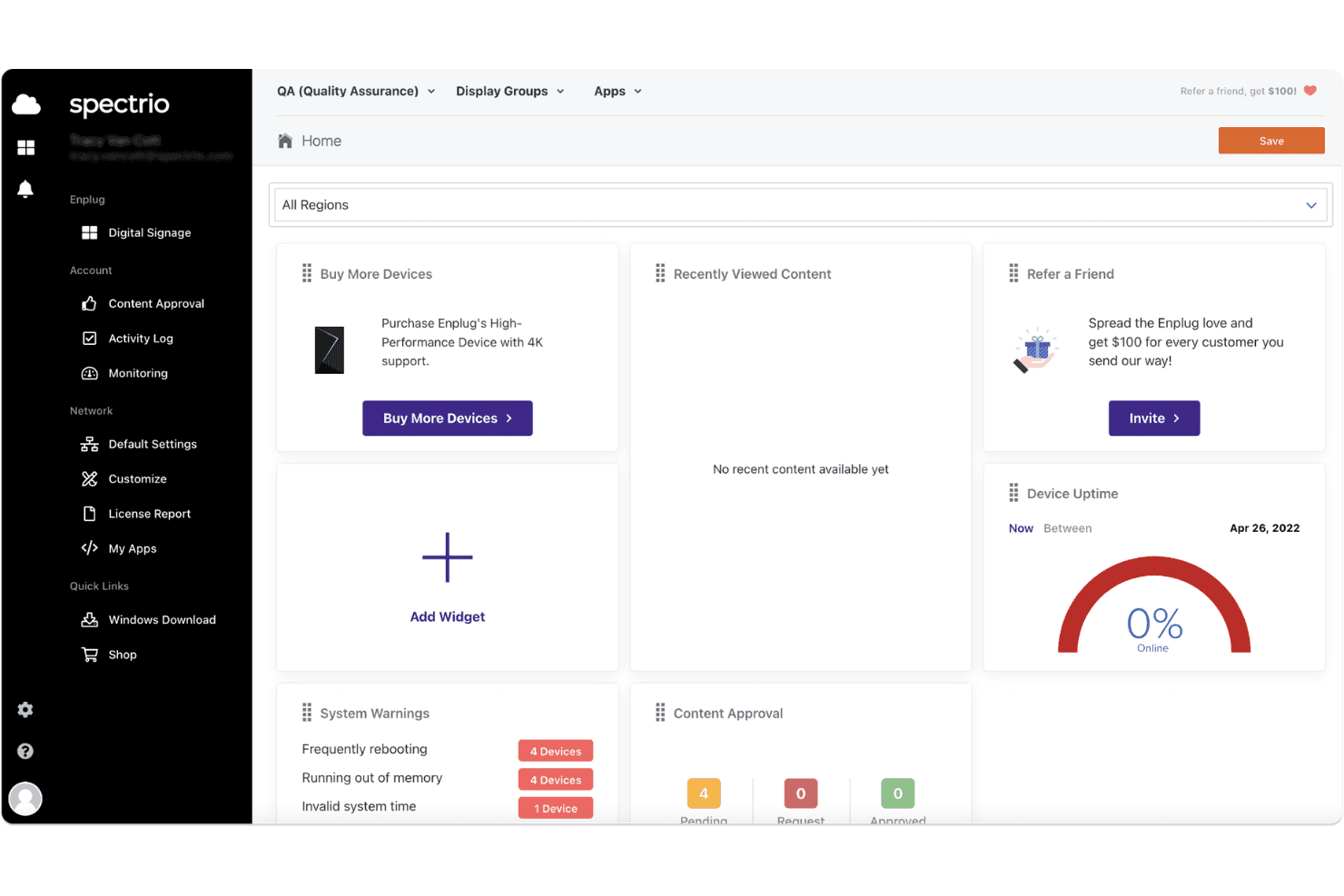
Spectrio's digital signage dashboard displays device uptime, system warnings, content approval status, and quick-access widgets for managing displays. Spectrio is an end-to-end digital signage platform that combines cloud-based content management, audience measurement, retail media network capabilities, and multi-location screen management for franchise and enterprise retailers.
Who Is Spectrio Best For?
Spectrio is a strong fit for multi-location franchise and enterprise retailers that need centrally managed digital signage with built-in audience analytics.
Why I Picked Spectrio
Spectrio earns its spot on my shortlist because it connects audience measurement with content decisions. Its audience measurement tools use radar or computer vision sensors to monitor factors such as occupancy and engagement, while real-time content triggering can change what appears on screen based on preset conditions. This gives retailers a practical way to adapt messaging using in-store audience data.
Spectrio Key Features
- Cloud-based content management: Update and deploy digital signage content across locations from a single online dashboard.
- Retail media network integration: Insert programmatic ad content into display playlists using built-in RMN Gateway tools.
- Multi-OS hardware compatibility: Supports major media players and display devices, including BrightSign, Cisco, LG WebOS, and Samsung.
- Menu board POS integration: Connects with product catalog and point-of-sale data for automated and accurate menu content updates.
Spectrio Integrations
Spectrio supports content from Facebook, Instagram, YouTube, YouTube Live, Yelp, TripAdvisor, Google Sheets, and RSS feeds. It can also connect with POS, ERP, CRM, and database systems, although app availability depends on the deployment.
Pros and Cons
Pros:
- Real-time content triggers via on-site sensors
- Menu boards sync with live product data
- Audience analytics with dwell and proximity tracking
Cons:
- No public pricing or self-serve sign-up
- Occasional backend performance issues reported
Learn more about Spectrio: 10Best for interactive touchscreen content
Mvix
- Free demo available
- From $450 one-time
Visit WebsiteCustomer Rating:4.6/5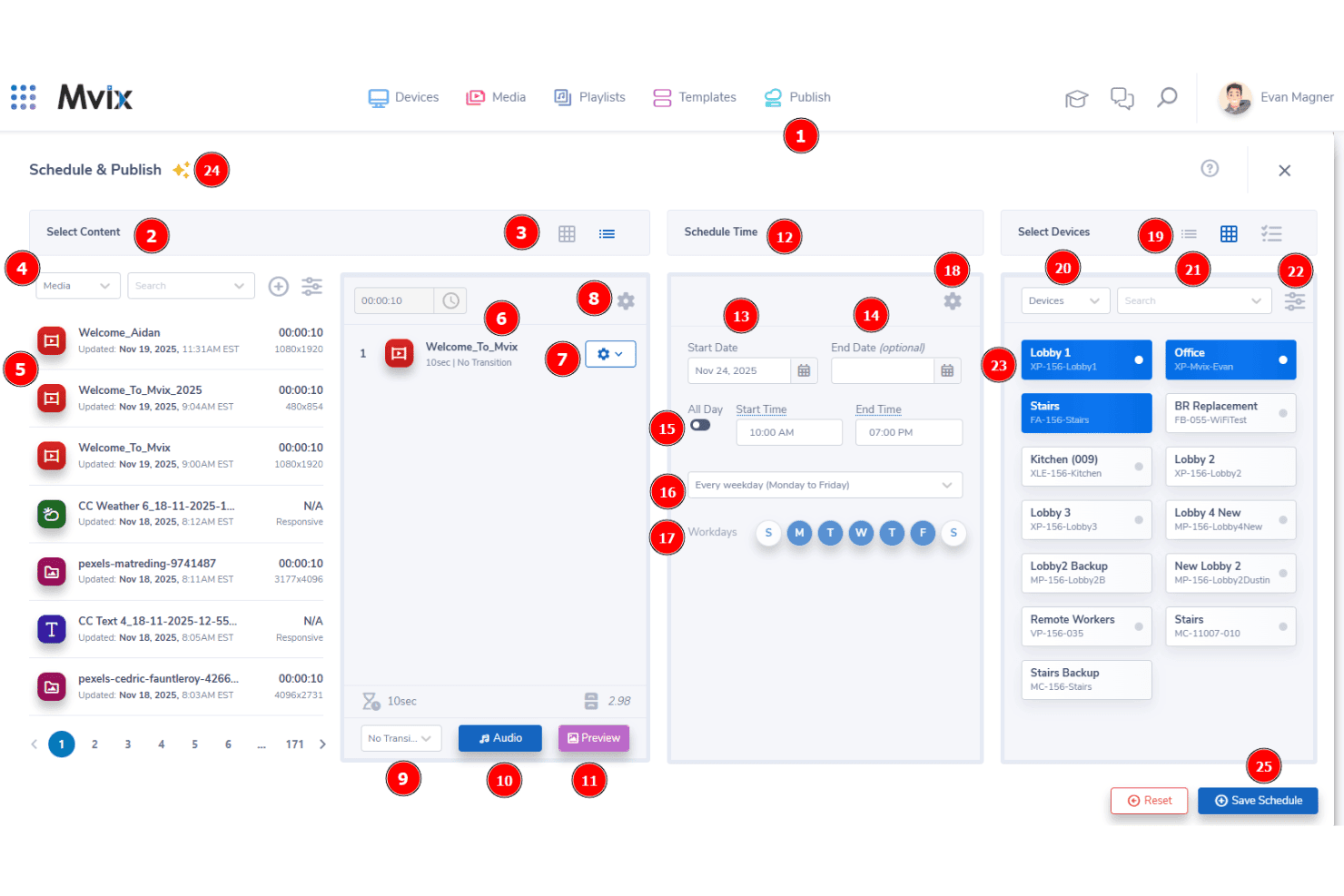
Mvix offers a Schedule & Publish interface that lets users select content, set time schedules, and assign content to specific display devices. Mvix is a cloud-based retail digital signage platform that pairs one-time-purchase media players with a perpetual cloud CMS license, covering multi-location content management, interactive kiosk displays, dayparting, and 150+ data and content integrations.
Who Is Mvix Best For?
Mvix suits multi-location retail operations teams who want enterprise-grade screen management without recurring software subscription fees.
Why I Picked Mvix
I picked Mvix as one of the best because its dedicated touchscreen kiosk capabilities go beyond basic display management. The Select Suite add-on supports touchscreen kiosks and interactive wayfinding with mapped routes for large-format retail floors. Multi-zone layouts can also combine interactive content and promotional messaging on the same display.
Mvix Key Features
- Cloud CMS with unlimited users: Manage content deployment and playlists across all store screens from a single web dashboard.
- 1,000+ template design gallery: Choose retail-specific templates for promotions, menu boards, and product features from a large visual library.
- Device health portal: Monitor and troubleshoot screens and media players remotely with access to live status and control options.
- POS integration via Menu Maker: Connect menus and price feeds from supported POS systems directly to digital displays for real-time updates.
Mvix Integrations
Mvix offers 150+ apps and data integrations, including Canva, Microsoft Power BI, Tableau, Klipfolio, Microsoft Teams, Slack, Pinterest, SmugMug, and Microsoft and Google productivity tools. Its software can also run on supported third-party hardware, including BrightSign, Android, Raspberry Pi, and Samsung Tizen devices.
Pros and Cons
Pros:
- Remote device status and real-time health monitoring
- Multi-zone layouts for complex screen designs
- Interactive touchscreen and kiosk content support
Cons:
- Software-only licensing for third-party hardware is priced separately
- The one-time media-player purchase creates a higher upfront cost
Learn more about Mvix:
Outro software de sinalização digital para retalho
Eis algumas opções adicionais de software de sinalização digital para retalho que não integraram a minha seleção, mas que continuam a merecer atenção:
How I Evaluate Digital Signage Platforms
I split my evaluation into two layers: the baseline functionality, like dayparting and remote device management, every platform must cover, and the differentiators that set the best tools apart.
Core Functionality (Table Stakes For This List)
When I'm selecting tools for my list, I rank each one on a scale from 0 (does not offer the functionality) to 5 (excels in this area) for each core functionality listed below. Then, I calculate the tool's total score as a percentage. Each tool needs to achieve a minimum total score of 65% to be considered for inclusion.
- Multi-Location Management: I check whether you can group screens by store, region, or franchise and assign role-based permissions for local teams.
- Content Scheduling & Dayparting: The platform should let you schedule playlists by time of day, promotional window, or store-specific events like seasonal sales.
- Retail Content Templates: I look for pre-built layouts tailored to retail—promo banners, menu boards, product showcases—not just generic presentation slides.
- Remote Device Management: Store ops teams need remote reboot, status monitoring, and alert capabilities so a blank screen in one location doesn't go unnoticed.
- POS & Data Integrations: I evaluate whether the platform connects to POS or inventory systems to pull live pricing and stock data onto screens automatically.
- Audience Targeting & Localization: Each store has different shoppers, so I look for store-level, zone-level, or demographic-based content targeting options.
Once I have a list of tools that meet the criteria, I consider what sets each platform apart.
Differentiating Factors (What Sets Vendors Apart)
Here's how I compare and contrast different vendors:
Standout Features
Dynamic pricing triggers are a big differentiator; I look for platforms that pull live price or stock changes from your POS and update screens without manual intervention. Audience analytics matter too, especially anonymous sensor tracking that measures dwell time and demographics to help prove campaign ROI. I also evaluate interactive wayfinding and endless aisle features, which let shoppers browse your full catalogue on a touchscreen even when a product isn't physically on the shelf.
Beyond Features
Hardware compatibility is one of the first things I check. You don't want to be locked into one media player brand when your stores already run a mix of BrightSign, Samsung Tizen, or Android devices. Retail tech stack integrations also matter; I look for native connectors to POS systems and data feed support so product and pricing updates flow to screens in real time. Total cost of ownership deserves close attention too, since add-on fees for analytics modules or content design tools can quietly inflate what looked like an affordable per-screen license.
Como escolher a plataforma de sinalização digital certa
É fácil perder-se em listas extensas de funcionalidades e estruturas de preços complexas. Por isso, utilize os seguintes fatores para se manter focado durante o processo de seleção do software:
| Fator | O que considerar |
|---|---|
| FatorEscalabilidade | O que considerarA plataforma consegue gerir toda a sua rede, desde algumas lojas até milhares? Além disso, consegue suportar o crescimento sem exigir uma mudança significativa de plataforma? |
| FatorIntegrações | O que considerarO sistema liga-se às suas plataformas de POS, inventário ou gestão de ativos digitais (DAM)? Caso contrário, precisará de conectores personalizados ou de suporte informático contínuo? |
| FatorCapacidade de personalização | O que considerarPode adaptar modelos, fluxos de trabalho e regras de segmentação? Além disso, pode personalizar conteúdos e permissões para cada localização? |
| FatorFacilidade de utilização | O que considerarAs equipas que trabalham diretamente com os clientes conseguem agendar e atualizar os ecrãs com pouca formação? Ou precisará de pessoal técnico dedicado? |
| FatorImplementação e integração inicial | O que considerarQuanto tempo demora normalmente a implementação? Além disso, o fornecedor inclui formação e apoio à integração inicial? |
| FatorCusto | O que considerarA licença base inclui as funcionalidades essenciais? Procure custos adicionais de análise, integrações, suporte, armazenamento ou ecrãs extra. |
| FatorMedidas de segurança | O que considerarA plataforma disponibiliza encriptação, controlos de acesso e autenticação? Mais importante ainda, cumpre os requisitos de segurança da sua empresa? |
| FatorDisponibilidade do suporte | O que considerarO fornecedor disponibiliza suporte 24 horas por dia, 7 dias por semana, ou um representante dedicado? Isto é especialmente importante se as lojas funcionarem fora do horário comercial habitual. |
O que é o software de sinalização digital para retalho?
O software de sinalização digital para retalho é um sistema de gestão de conteúdos utilizado para criar, agendar, publicar e monitorizar conteúdos em ecrãs digitais nas lojas. Os retalhistas podem utilizá-lo para gerir ecrãs promocionais, painéis de menus digitais, informações sobre produtos, preços, orientação dentro da loja e outras comunicações no ponto de venda a partir de uma plataforma central.
Para retalhistas com vários estabelecimentos, o software de sinalética digital também permite controlar centralmente os ecrãs de diferentes lojas ou regiões. As equipas de marketing e operações podem agendar campanhas, adaptar conteúdos a cada local, monitorizar dispositivos remotamente e ligar os ecrãs a dados do POS ou do inventário sem atualizar manualmente cada ecrã.
Como funciona a sinalética digital no retalho
A maioria dos sistemas de sinalética digital para retalho combina uma plataforma de gestão de conteúdos baseada na nuvem com leitores multimédia ou ecrãs inteligentes compatíveis. As equipas criam ou carregam conteúdos no CMS, atribuem-nos a ecrãs específicos ou a localizações de lojas e agendam o momento em que devem ser apresentados.
As plataformas mais avançadas também podem obter informações em tempo real a partir do POS, do inventário ou de outros sistemas de retalho. Isto permite que as lojas atualizem automaticamente os preços, a disponibilidade dos produtos, as promoções e outros conteúdos dos ecrãs à medida que os dados subjacentes são alterados.
Funcionalidades do software de sinalética digital para retalho
Ao comparar software de sinalética digital para retalho, procure as seguintes funcionalidades essenciais:
- Gestão centralizada de conteúdos: Faça a gestão dos conteúdos digitais de todas as localizações a partir de um único painel. Como resultado, pode manter uma imagem de marca consistente e atualizar campanhas de forma eficiente.
- Agendamento de conteúdos: Agende listas de reprodução ou campanhas para datas, horas ou períodos promocionais específicos. Isto ajuda a apresentar mensagens relevantes no momento certo.
- Modelos específicos para o retalho: Utilize esquemas prontos a usar para promoções, painéis de menus, destaques de produtos e expositores de prateleira. Assim, as equipas podem publicar conteúdos sem terem de criar cada elemento de raiz.
- Monitorização remota de dispositivos: Verifique o estado dos ecrãs, envie atualizações e resolva problemas remotamente. Além disso, os alertas em tempo real podem ajudar as equipas a reduzir o tempo de inatividade.
- Integração com POS e inventário: Ligue os conteúdos dos ecrãs aos preços, aos níveis de stock e às ofertas atuais. Como resultado, é menos provável que os clientes vejam promoções desatualizadas ou produtos indisponíveis.
- Segmentação do público: Adapte os conteúdos por loja, região, zona ou hora do dia. Algumas plataformas também permitem a segmentação com base nos dados demográficos dos clientes ou nos padrões de tráfego.
- Permissões e funções de utilizador: Atribua acessos com base nas responsabilidades de cada utilizador. Por exemplo, as equipas centrais podem controlar a imagem de marca, enquanto os funcionários das lojas gerem conteúdos locais aprovados.
- Compatibilidade com vários dispositivos: Escolha software compatível com vários leitores multimédia e tipos de ecrã. Esta flexibilidade pode reduzir a dependência de um único fornecedor de hardware.
- Relatórios de reprodução e de prova de exibição: Consulte registos que mostram que conteúdos foram reproduzidos, onde foram apresentados e quando foram executados. Consequentemente, pode verificar as campanhas e apoiar os relatórios de conformidade.
- Suporte para reprodução offline: Mantenha os ecrãs em funcionamento com conteúdos previamente sincronizados quando a ligação à Internet falhar. Assim, os problemas temporários de conectividade não interromperão a experiência dos clientes.
Funcionalidades de IA comuns no software de sinalética digital para retalho
Para além das funcionalidades padrão, algumas plataformas de sinalética digital para retalho disponibilizam ou estão a desenvolver as seguintes capacidades de IA:
- Análise do público: A visão computacional baseada em IA pode analisar os dados demográficos dos clientes, o tempo de permanência e o envolvimento. Como resultado, as equipas podem avaliar o desempenho das campanhas e aperfeiçoar as suas estratégias de conteúdos.
- Personalização dinâmica de conteúdos: A IA pode ajustar as mensagens apresentadas no ecrã com base nas características do público, no tráfego da loja ou na hora do dia. Assim, os clientes podem receber informações mais relevantes.
- Agendamento preditivo: A IA pode prever os períodos de maior afluência e recomendar quando os conteúdos devem ser apresentados. Isto ajuda as equipas a melhorar o momento das campanhas para diferentes segmentos de clientes.
- Etiquetagem automática de conteúdos: A IA pode analisar e categorizar elementos multimédia. Por sua vez, os utilizadores podem encontrar e utilizar mais rapidamente os elementos visuais adequados.
- Deteção de anomalias: A IA pode monitorizar os dados dos dispositivos e da reprodução para detetar atividades invulgares. Em seguida, pode alertar a sua equipa antes de um problema afetar a rede de ecrãs.
Benefícios da sinalética digital para retalhistas
O software de sinalética digital para retalho pode proporcionar vários benefícios à sua equipa e à sua empresa:
- Mensagens de marca consistentes: O conteúdo gerido centralmente mantém as promoções e os elementos visuais alinhados em todas as lojas. Além disso, as equipas podem substituir rapidamente materiais desatualizados.
- Lançamento mais rápido de campanhas: As ferramentas de agendamento e os modelos para retalho ajudam as equipas de marketing a lançar ofertas atempadas em várias lojas. Consequentemente, as campanhas exigem menos atualizações manuais.
- Experiências de compra personalizadas: A segmentação do público pode adaptar o conteúdo por loja, localização ou hora do dia. Algumas plataformas também utilizam IA para ajustar as mensagens a públicos específicos.
- Redução dos erros manuais: As integrações com sistemas de ponto de venda e inventário podem manter atualizadas as informações sobre preços e promoções. Por conseguinte, as equipas passam menos tempo a corrigir conteúdos desatualizados nos ecrãs.
- Melhor supervisão dos dispositivos: A monitorização remota e os alertas ajudam as equipas a identificar mais cedo os problemas nos ecrãs. Consequentemente, muitos problemas podem ser resolvidos sem apoio técnico no local.
- Tomada de decisões baseada em dados: Os relatórios analíticos e de comprovação da reprodução mostram como e quando o conteúdo foi apresentado. Pode então utilizar estas informações para melhorar campanhas futuras.
- Promoções na loja mais reativas: As equipas de retalho podem alterar as mensagens promocionais por localização, hora do dia, nível de inventário ou período da campanha sem substituir a sinalética física. Isto facilita a resposta à procura local e a períodos promocionais curtos.
Custos e preços do software de sinalética digital para retalho
O preço do software de sinalética digital para retalho depende geralmente do número de ecrãs ou dispositivos. No entanto, alguns fornecedores cobram uma taxa única pelo leitor ou apresentam propostas empresariais personalizadas. Os custos também podem variar consoante as condições de faturação, o hardware, o armazenamento, o suporte e os complementos.
A tabela abaixo resume os tipos de planos comuns e os preços iniciais habituais. No entanto, deve confirmar os preços atuais diretamente junto de cada fornecedor antes de tomar uma decisão.
Tabela de comparação de planos de software de sinalética digital para retalho
| Tipo de plano | Modelo de preços habitual | Funcionalidades comuns |
|---|---|---|
| Tipo de planoPlano gratuito | Modelo de preços habitual$0 | Funcionalidades comunsSuporte para um ecrã, agendamento básico, modelos e armazenamento ou funcionalidades limitados |
| Tipo de planoPlano pago de entrada | Modelo de preços habitual$8–$20/ecrã/mês | Funcionalidades comunsAgendamento de conteúdos, modelos, atualizações remotas, integrações de aplicações e suporte padrão |
| Tipo de planoPlano avançado | Modelo de preços habitual$12–$30/ecrã/mês | Funcionalidades comunsFunções de utilizador, fluxos de trabalho de aprovação, painéis, comprovação da reprodução e gestão avançada de dispositivos |
| Tipo de planoPlano empresarial | Modelo de preços habitualProposta personalizada | Funcionalidades comunsGestão de identidades, acesso à API, análise de públicos, acordos de nível de serviço, integração e controlos para redes de grande dimensão |
Perguntas frequentes sobre sinalética digital para retalho
Eis algumas respostas a perguntas comuns sobre software de sinalética digital para retalho:
Como é que o software de sinalética digital para retalho melhora o marketing na loja?
O software de sinalética digital para retalho permite atualizar instantaneamente promoções, preços e destaques de produtos em vários locais, mantendo as mensagens atempadas e consistentes. As equipas podem reagir em tempo real a alterações do mercado ou a eventos locais, proporcionando muito mais agilidade do que a sinalética estática.
Que hardware é compatível com a maioria das plataformas de sinalética digital?
A maioria das plataformas suporta os principais tipos de leitores multimédia, como BrightSign, Samsung Tizen, LG webOS, Windows e dispositivos Android. Verifique se os seus ecrãs e leitores atuais estão incluídos na lista de dispositivos suportados, uma vez que a compatibilidade do hardware pode afetar os custos e a flexibilidade da implementação.
Posso gerir ecrãs de várias lojas a partir de um só local?
Sim, a maioria das soluções disponibiliza painéis centralizados para agendar, monitorizar e atualizar conteúdos em todas as suas lojas. Isto evita atualizações manuais repetitivas e permite coordenar campanhas nacionais e locais a partir de um único centro de gestão.
Como posso medir a eficácia do meu conteúdo digital na loja?
Muitas ferramentas incluem análises que acompanham a reprodução de conteúdos, o tempo de permanência do público e o envolvimento através de registos dos dispositivos ou sensores com tecnologia de IA. Estes dados ajudam a compreender o que é mais relevante para os clientes e a aperfeiçoar as mensagens ao longo do tempo.
Quais são as principais preocupações de segurança relativamente à sinalética digital em ambientes de retalho?
Procure plataformas que ofereçam distribuição de conteúdos encriptada, autenticação segura dos dispositivos e acesso baseado em funções. Isto ajuda a proteger dados sensíveis, especialmente quando os sistemas estabelecem ligação a plataformas de ponto de venda ou de análise de clientes, e contribui para o cumprimento dos regulamentos de privacidade de dados.