

O software de gestão de oficinas de madeira ajuda a ligar os processos de gestão empresarial, gestão de materiais, elaboração de orçamentos, planeamento e produção. A configuração adequada depende da forma como trabalha: se gere uma pequena empresa, poderá precisar de acompanhamento de projetos e CRM, enquanto um fabricante em crescimento poderá necessitar de uma solução ERP que ligue o inventário, as compras e a área de produção. Neste guia, comparo ferramentas concebidas para a indústria da madeira, desde software ERP completo a aplicações especializadas de design de armários e CNC.
Why Trust Our Software Recommendations
6,700+
Reviews
20
Industry experts
16+
Evaluation factors
14
Years
Our team has been testing and reviewing software since 2012. As retail leaders ourselves, we know how difficult—and important—it is to choose the right software.
For this guide, we evaluated tools using hands-on testing and independent research, scoring tools using our selection criteria.
Our reviews reflect our independent judgment—not a sales pitch.
Tabela comparativa: software de gestão de oficinas de madeira
Compare lado a lado os preços e as especificações do software de gestão de oficinas de madeira que integrou a minha seleção.
| Tool | Best For | Trial Info | Price | ||
|---|---|---|---|---|---|
| 1 | Best for automatic cut lists and reports | 14-day free trial available | From $49.99/month (billed annually) | Website | |
| 2 | Best for customizable millwork workflows | Free demo available | Pricing upon request | Website | |
| 3 | Best for visual lead-to-install tracking | 14-day free trial available | From $199/month | Website | |
| 4 | Best for mobile cabinet shop operations | No free trial available | Pricing upon request | Website | |
| 5 | Best for browser-based CNC production | 7-day free trial available | From $110/month | Website | |
| 6 | Best for online custom-product ordering | Free demo available | Pricing upon request | Website | |
| 7 | Best for identifying workflow bottlenecks | Free demo available | Pricing upon request | Website | |
| 8 | Best for bid-to-billing job control | Free demo available | Pricing upon request | Website | |
| 9 | Best for multi-site factory operations | Free demo available | Pricing upon request | Website | |
| 10 | Best for modular design-to-manufacture | Free demo available | Pricing upon request | Website |


Avaliações do melhor software de gestão de oficinas de madeira
Abaixo encontram-se os meus resumos detalhados do melhor software de gestão de oficinas de madeira que integrou a minha seleção. As minhas avaliações apresentam uma análise detalhada das funcionalidades, dos melhores casos de utilização e das integrações de cada software, para o ajudar a encontrar a melhor opção para si.
 Best for automatic cut lists and reports
- 14-day free trial available
- From $49.99/month (billed annually)
Visit WebsiteCustomer Rating:4.3/5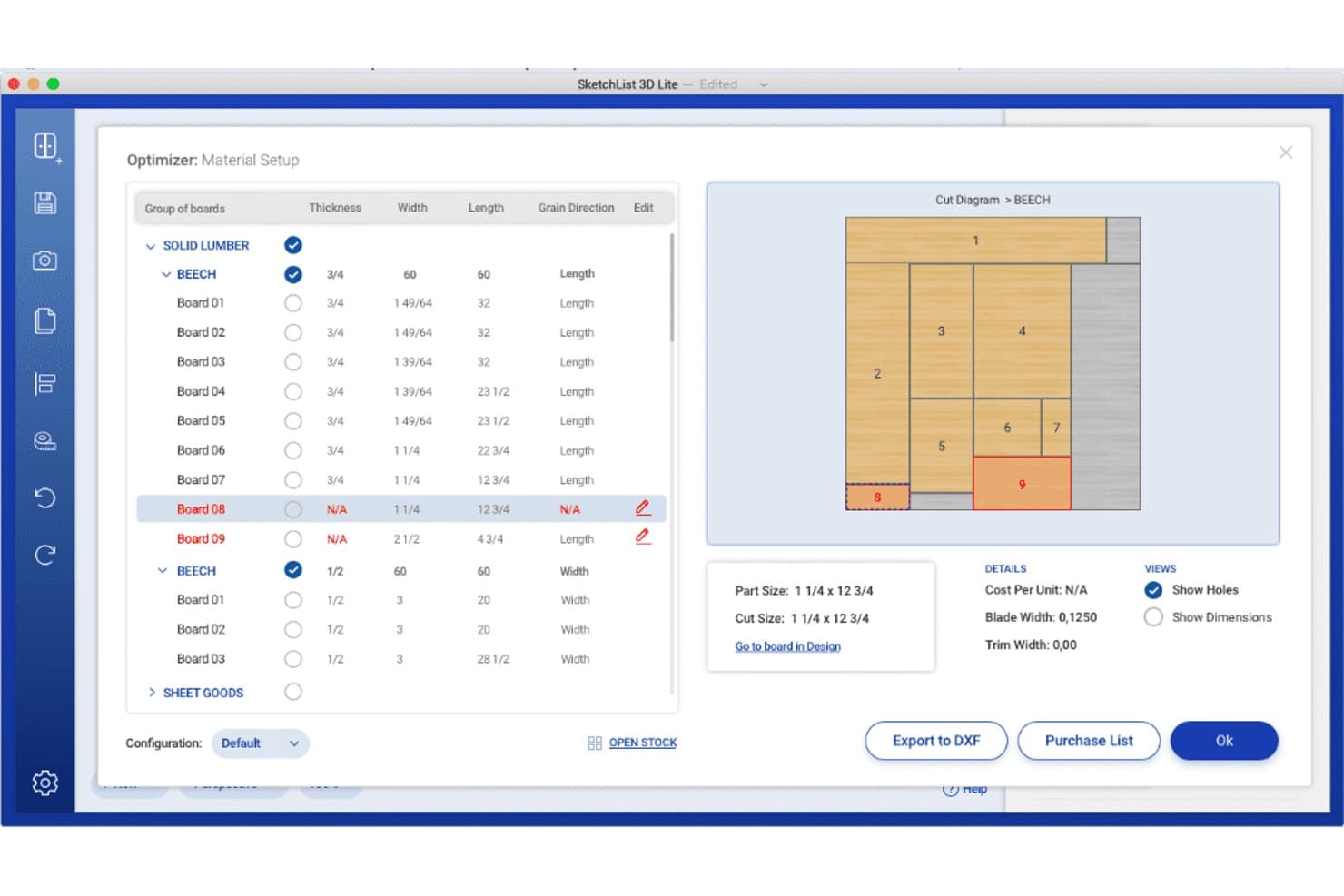
SketchList 3D offers a material optimizer with cut diagrams, board grouping, grain direction settings, and export options for wood shop planning. SketchList 3D is a woodworking design tool built for cabinet makers that combines 3D visualization, automatic cut list generation, bill of materials reporting, and job cost estimation.
Who Is SketchList 3D Best For?
SketchList 3D is a good fit for independent cabinet makers and small custom woodworking shops that need design-to-cut-list workflows without full CAD complexity.
Why I Picked SketchList 3D
I picked SketchList 3D because it keeps your cut lists, bills of materials, cost information, drawings, and material layouts aligned with design changes. You can export reports as PDF or CSV and hand DXF files off to separate CAM software for CNC programming. However, you’ll need another application to generate G-code because SketchList is a design and planning tool rather than a CAM system.
SketchList 3D Key Features
- Cabinet Wizard: Lets you adjust over 70 cabinet parameters including dimensions, joinery, door styles, and materials.
- Shop drawings and elevations: Auto-generates detailed shop drawings and 2D elevations from your design.
- Pre-built materials library: Includes reusable materials, hardware, and contour templates for fast configuration.
- Real-time 3D visualization: Displays project designs in realistic 3D with photo background import for client spaces.
SketchList 3D Integrations
SketchList 3D offers native integrations with CNC routers through DXF file export and supports CAD tool integration using the same DXF format. CSV and PDF exports are available for shop floor workflows. Native integrations with other software vendors are not clearly documented.
Pros and Cons
Pros:
- Outputs shop drawings and detailed elevation views
- Instant cut list and BOM updates from designs
- Cabinet Wizard with extensive customization options
Cons:
- Lacks customer order and job scheduling tools
- No lumber or hardware inventory management
Learn more about SketchList 3D: Best for customizable millwork workflows
- Free demo available
- Pricing upon request
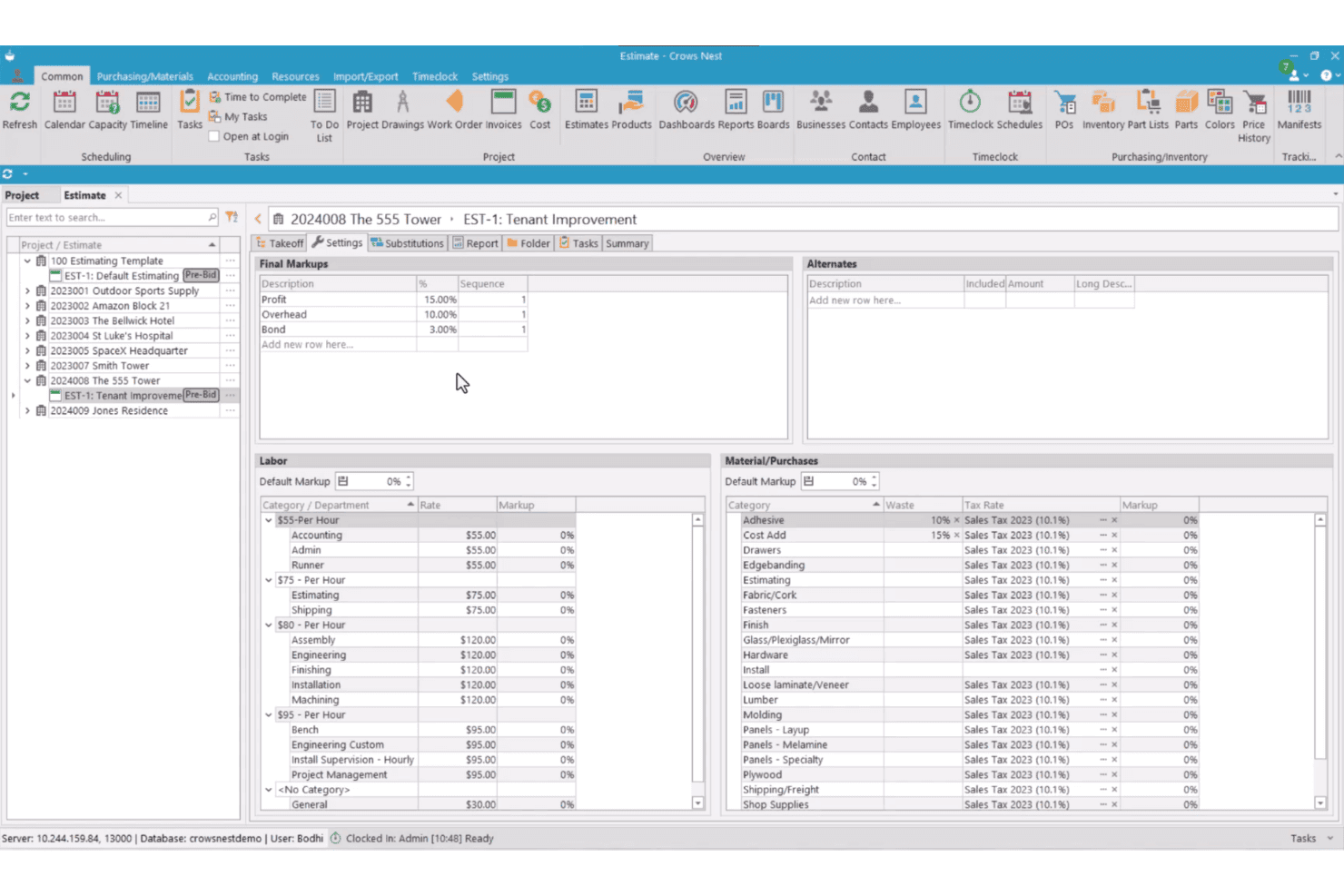
Crows Nest features an estimate settings screen with labor rates, material categories, tax rates, and final markups for a tenant improvement project. Crows Nest is a modular ERP and project management platform built for millwork and cabinet shops, covering estimating, job costing, production scheduling, purchasing, and inventory from a single system.
Who Is Crows Nest Best For?
Crows Nest suits project-based millwork and architectural woodworking shops that need a configurable ERP without being forced into a rigid, one-size-fits-all system.
Why I Picked Crows Nest
I picked Crows Nest because you can configure its workflows, dashboards, reports, and modules around your existing operations. Its Task Management engine can trigger and assign a task when a predecessor is completed, with due dates tied to project milestones. You also get more than 300 standard report layouts and tools for creating custom reports and dashboards.
Crows Nest Key Features
- Dynamic estimating module: Generate detailed takeoffs, apply vendor material pricing, and create alternate quotes for custom jobs.
- Integrated document management: Store, track, and share all project-related documents, drawings, and revisions in one place.
- Production work order management: Create and manage production work orders with scheduling and shop labor tracking.
- Mobile inventory management: Use mobile devices for real-time inventory updates, receiving purchase orders, and tracking manifests on the shop floor.
Crows Nest Integrations
Crows Nest offers native integrations with QuickBooks, Sage, Xero, Microvellum, and CabinetVision. An API is available for custom integrations.
Pros and Cons
Pros:
- Built-in document and drawing management system
- Comprehensive job costing and tracking tools
- Highly customizable workflow modules for unique shops
Cons:
- Reliance on third-party tools for cut lists
- No retail point of sale features
Learn more about Crows Nest: Best for visual lead-to-install tracking
- 14-day free trial available
- From $199/month
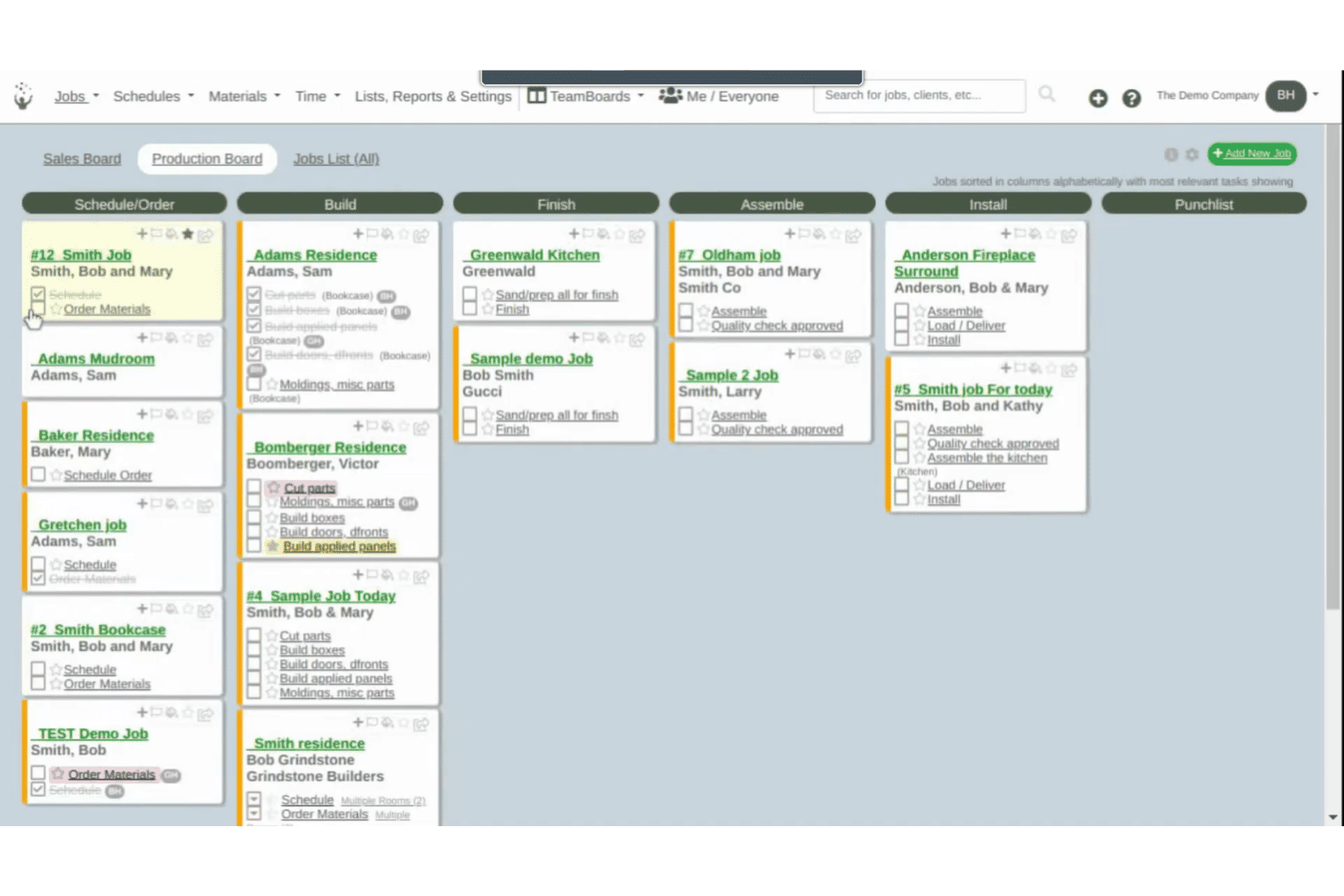
Cabinetshop Maestro offers a Kanban-style Production Board that organizes cabinet jobs across workflow stages including Build, Finish, Assemble, Install, and Punchlist. Cabinetshop Maestro is a project management tool built specifically for cabinet shops, covering job tracking, scheduling, proposals, invoicing, time tracking, and job costing across the full project lifecycle.
Who Is Cabinetshop Maestro Best For?
It's a strong fit for small to mid-sized custom cabinet shops that need a simple, shop-specific system to manage jobs from first contact through installation.
Why I Picked Cabinetshop Maestro
I picked Cabinetshop Maestro because its visual workflow boards show you where every active job sits from lead through installation. Each job also has a centralized folder for project details, files, notes, tasks, discussions, and scheduling information. This gives you a clearer operational view without requiring a full manufacturing ERP.
Cabinetshop Maestro Key Features
- Job scheduling and calendars: Plan jobs and assign due dates across the team’s calendar view.
- Proposals and invoicing: Build estimates and send invoices directly from within the platform.
- Labor time tracking: Log work hours by job and task for accurate cost records.
- Job costing reports: View real job costs against estimates using built-in reporting tools.
Cabinetshop Maestro Integrations
Native integrations are not clearly documented. Cabinetshop Maestro does not integrate directly with QuickBooks or design software like Cabinet Vision, Mozaik, or SketchUp, and it does not offer an API for custom integrations.
Pros and Cons
Pros:
- Built for cabinet shop project tracking
- Easy drag-and-drop job scheduling
- Visual workflow boards for job progress
Cons:
- No cut list or BOM generation
- No inventory management or material tracking
Learn more about Cabinetshop Maestro: Best for mobile cabinet shop operations
- No free trial available
- Pricing upon request
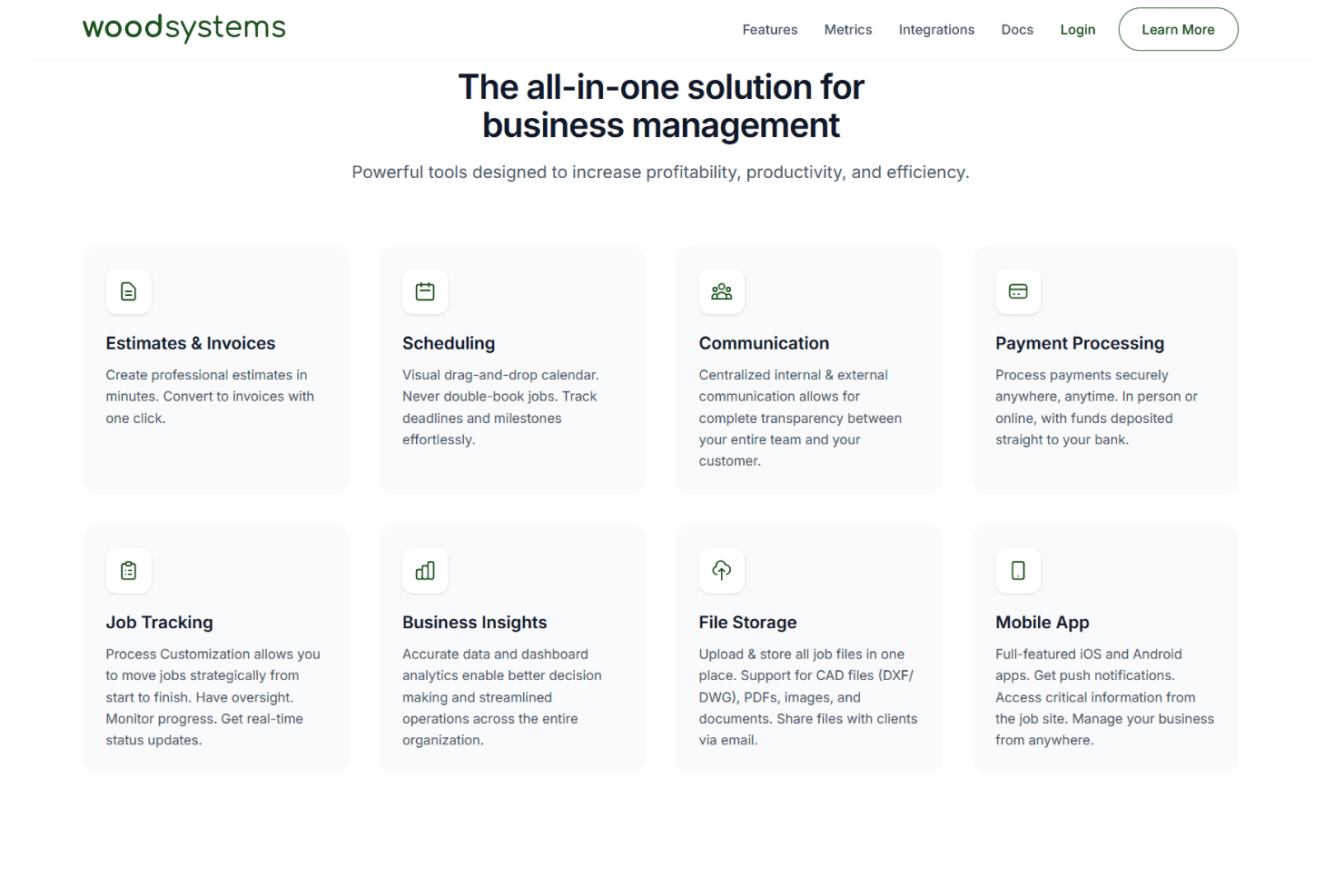
Woodsystems offers an all-in-one business management platform featuring estimates, scheduling, communication, payment processing, job tracking, business insights, file storage, and a mobile app. Woodsystems is a cloud-based ERP for custom cabinet and woodworking shops that combines estimating, job tracking, scheduling, payments, and client communication in a single platform with native mobile apps.
Who Is Woodsystems Best For?
Woodsystems is a good fit for custom cabinet shop owners who need to manage jobs, quotes, and client communication from a mobile device on the go.
Why I Picked Woodsystems
I picked Woodsystems because you can access estimates, invoices, scheduling, job tracking, files, payments, and customer communication through its web, iOS, and Android applications. Its mobile apps support push notifications and let you manage job information away from the office. You can also convert estimates to invoices without re-entering the project details.
Woodsystems Key Features
- Drag-and-drop scheduling calendar: Visually manage project timelines, shop deadlines, and installation appointments.
- QuickBooks integration: Sync job and financial data with your existing accounting system.
- CAD file storage and sharing: Attach DXF and DWG files directly to jobs and email them to clients.
- Centralized email integration: Send estimates and invoices from your Gmail, Outlook, or Microsoft 365 account.
Woodsystems Integrations
Woodsystems offers native integrations with Gmail, Outlook, Google Drive, OneDrive, Dropbox, QuickBooks, Microsoft 365, and Stripe.
Pros and Cons
Pros:
- Easy CAD file sharing with clients
- Visual scheduling for shop projects and installs
- Mobile apps allow on-site job management
Cons:
- Does not generate cut lists or BOMs
- No lumber or materials inventory tracking
Learn more about Woodsystems: Best for browser-based CNC production
- 7-day free trial available
- From $110/month
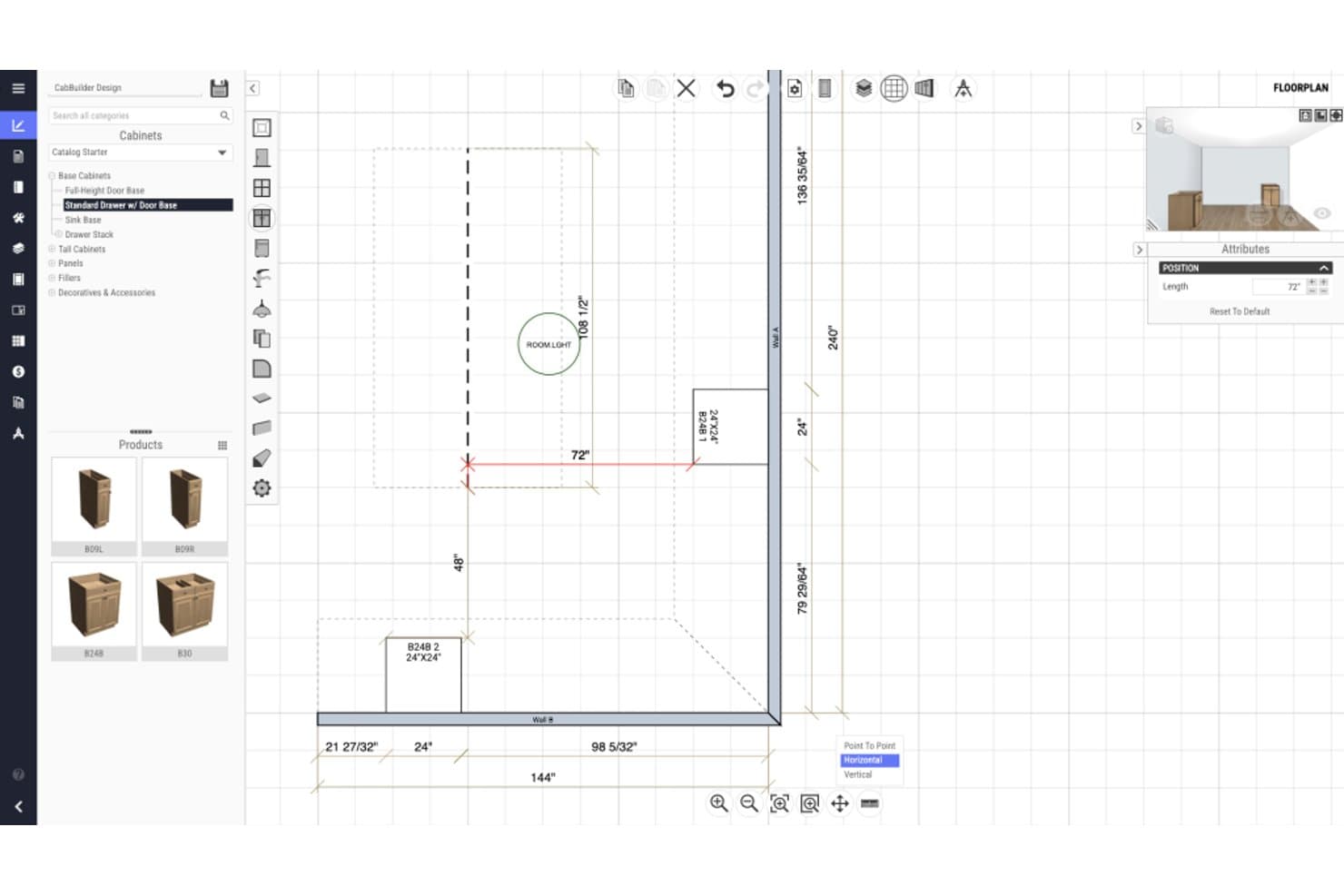
CabBuilder offers a floorplan design view where users can input and visualize cabinet dimensions with precise measurements in a 2D layout. CabBuilder is a browser-based cabinet design and CNC production tool that generates 3D designs, cutlists, optimized part nesting, and machine-ready CNC code for custom cabinet and woodworking manufacturers.
Who Is CabBuilder Best For?
CabBuilder suits small to mid-sized custom cabinet shops that need a direct path from design to CNC machine output without a full ERP system.
Why I Picked CabBuilder
I picked CabBuilder because it gives you cabinet design and production tools through a browser-compatible interface that works across Windows, macOS, iPad, and other tablets. With the CNC or Enterprise plan, you can nest cut-list parts, generate machine code through a CNC-specific post processor, and simulate toolpaths before cutting. The Pro plan focuses on cut lists and manual production rather than direct CNC output.
CabBuilder Key Features
- 3D design rendering: View and modify cabinet designs with instant updates in a real-time 3D workspace.
- Custom cabinet library: Access and build a library of framed and frameless cabinet templates for reuse across projects.
- Automated job reports: Generate detailed job and cost reports directly from your project specifications and design files.
- Door Builder module: Specify custom door profiles and produce cutlists and CNC code for doors and drawer fronts.
CabBuilder Integrations
CabBuilder offers native integrations with ProKitchen and supports CNC hardware through a free post processor. Native integrations with other business software are not clearly documented.
Pros and Cons
Pros:
- Custom cabinet and construction template library
- Strong 3D cabinet design and cutlist tools
- Browser-based direct CNC code generation
Cons:
- Lacks production scheduling and job tracking
- No lumber inventory management module
Learn more about CabBuilder:
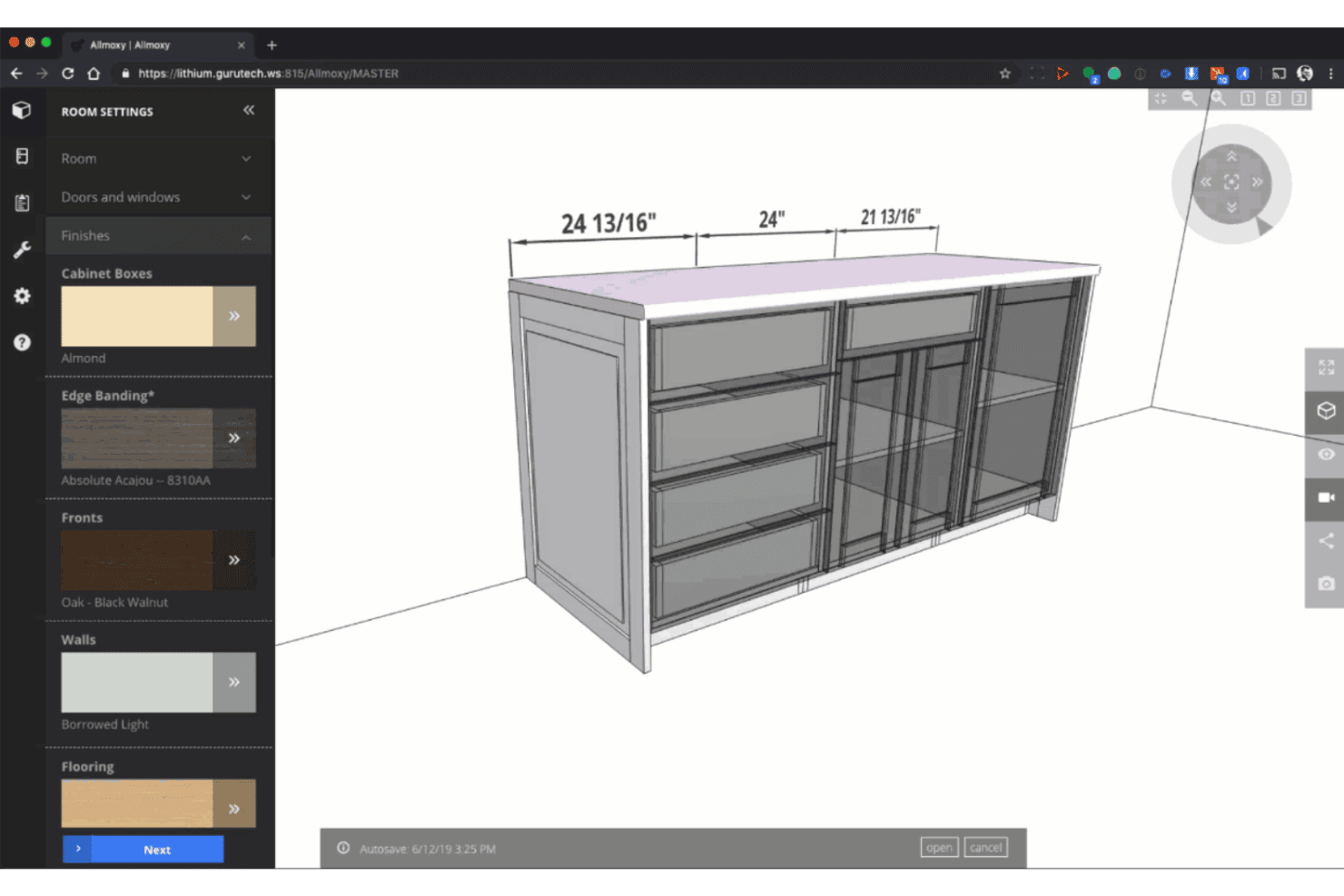
Allmoxy offers a 3D cabinet design tool with customizable finishes, edge banding, and material settings for furniture configuration. Allmoxy is a cloud-based ERP built for custom wood product manufacturers, combining online order configuration, cut list generation, production data automation, and supply and inventory management in one platform.
Who Is Allmoxy Best For?
Allmoxy is a strong fit for cabinet door, drawer, and component manufacturers that sell through wholesale dealer networks and need self-serve B2B ordering.
Why I Picked Allmoxy
I picked Allmoxy because it supports online configuration and ecommerce ordering for custom cabinetry and components. You can give customers or dealers access to catalogs, pricing, orders, invoices, and status updates through an online portal. Orders can then feed automated production data, including parts lists, cut lists, labels, and machine-data exports.
Allmoxy Key Features
- Workflow automation triggers: Automatically notify teams and customers when jobs move through specific workflow stages.
- Supply and inventory management: Manage materials, track stock levels, and control supplier relationships from the same system.
- Integrated invoice and accounting tools: Create invoices, process payments, and handle accounting activities within the platform.
- Customer portal access: Give customers real-time access to order statuses, invoices, and delivery updates through a secure online portal.
Allmoxy Integrations
Allmoxy offers native integrations with Microvellum, ClosetPro, TigerStop, Cabinet Vision, and CadCode. An API is also available for custom integrations.
Pros and Cons
Pros:
- Dealer portal supports repeat B2B ordering
- Auto-generates machine-ready cut lists
- Purpose-built for cabinet and component orders
Cons:
- No built-in shop floor production scheduling
- Limited job costing and profitability reporting
Learn more about Allmoxy: Best for identifying workflow bottlenecks
- Free demo available
- Pricing upon request
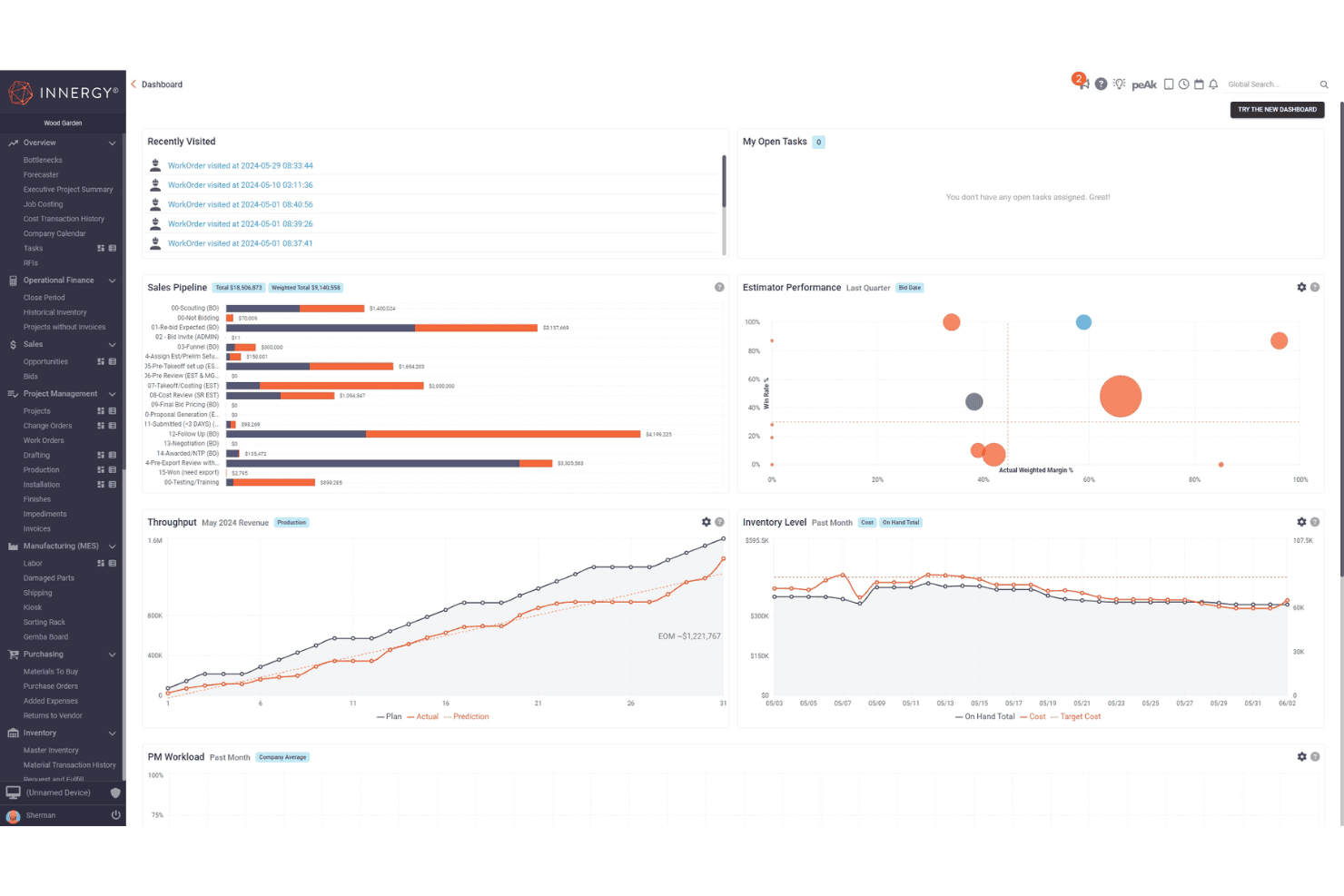
INNERGY offers a comprehensive project management dashboard featuring sales pipeline, throughput, inventory level, and estimator performance widgets. INNERGY is a cloud-based ERP built specifically for millwork and custom woodworking businesses, combining estimating, shop floor execution, job costing, project management, and production scheduling in one platform.
Who Is INNERGY Best For?
INNERGY is a strong fit for commercial millwork shops and custom cabinet producers that need end-to-end job tracking across sales, production, and installation.
Why I Picked INNERGY
I picked INNERGY because its Bottleneck Report helps you identify workflow constraints before they disrupt production. Its Throughput Widget uses that report to establish a monthly target and compare planned output with actual daily progress. This helps you spot slippage and decide where to adjust capacity.
INNERGY Key Features
- On-screen takeoff: Complete project takeoffs directly on digital blueprints with auto-calculating pricing.
- One-click bill of materials: Generate a detailed bill of materials from engineering design files with a single click.
- Integrated project management: Track project status, completion milestones, and invoicing in real time across teams.
- Job costing and payroll: Monitor actual and estimated job costs while running payroll and labor tracking from the same platform.
INNERGY Integrations
INNERGY offers native integrations with QuickBooks, Sage, NetSuite, and Microvellum, and provides an API for custom integrations.
Pros and Cons
Pros:
- Includes project estimating, costing, and scheduling
- Purpose-built for millwork and wood fabrication shops
- Bottleneck report pinpoints stalled production tasks
Cons:
- Limited lumber species inventory granularity
- No native CNC cut optimization tools
Learn more about INNERGY:
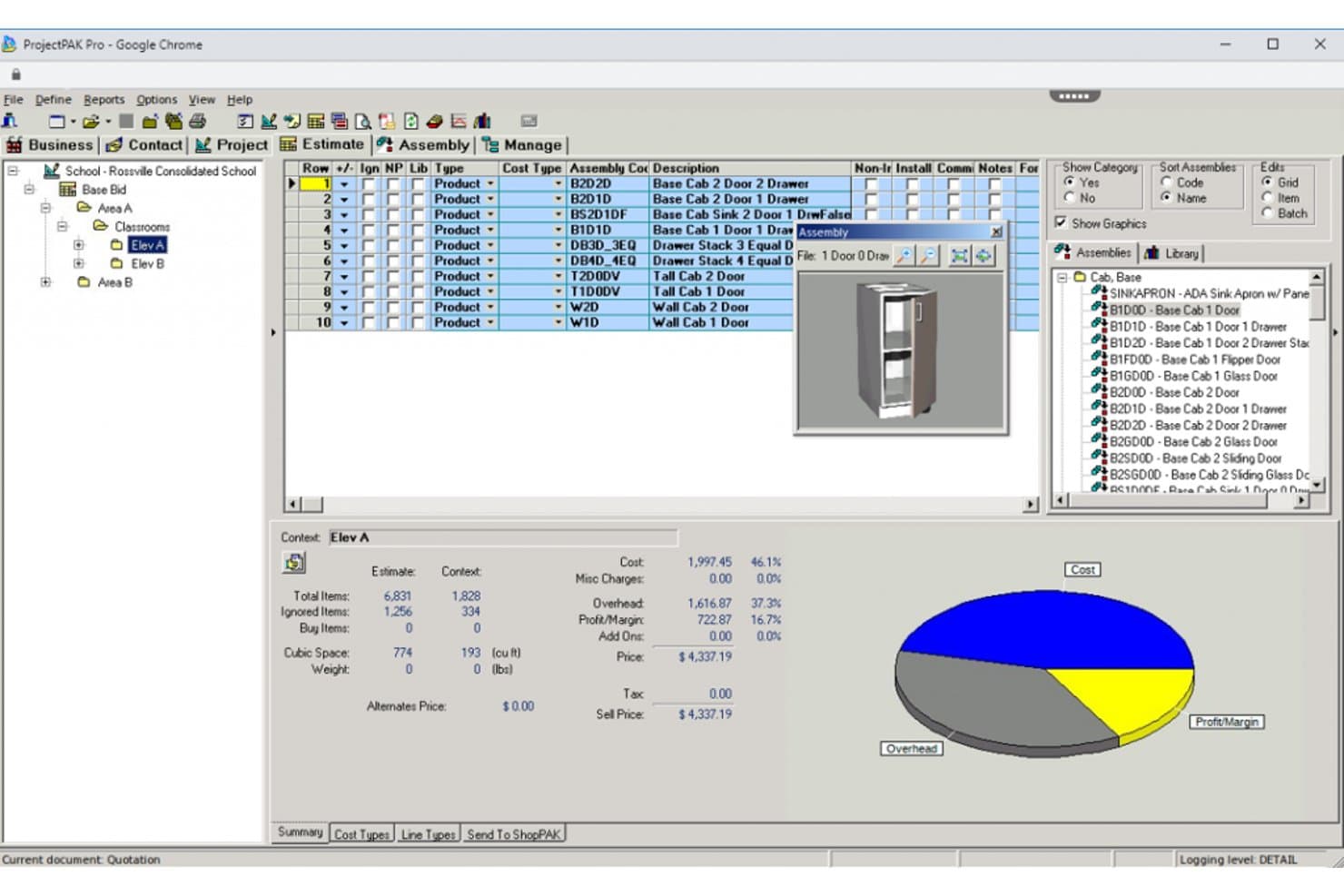
TradeSoft offers a wood shop management interface with assembly lists, 3D cabinet previews, cost breakdowns, and a pie chart showing overhead, cost, and profit margins. TradeSoft is a purpose-built estimating and job management platform for custom woodworking manufacturers, combining parametric estimating, shop floor job tracking, purchasing, inventory management, and progress billing in a single database.
Who Is TradeSoft Best For?
TradeSoft is a strong fit for architectural millwork shops and custom casework manufacturers that run complex, make-to-order production workflows.
Why I Picked TradeSoft
I picked TradeSoft because it connects ProjectPAK estimating with ShopPAK job management, helping you manage work from bidding through purchasing, production, shipping, and billing. You can build estimates from configurable job specifications and product libraries, then carry awarded work into job costing, inventory, work orders, and progress billing. Optional modules add scheduling, shop-floor data collection, and engineering links.
TradeSoft Key Features
- Pre-built casework and cabinetry databases: Access extensive libraries of parametric commercial casework and residential cabinetry items.
- Integrated purchasing and receiving: Manage purchase orders, receipt of goods, and material tracking in one connected workflow.
- Inventory management with multi-location support: Track inventory by location, audit all activity, and apply FIFO, LIFO, or weighted average costing.
- Shop floor data collection: Capture live labor inputs and production data directly from the shop floor using barcodes or handheld devices.
TradeSoft Integrations
TradeSoft offers native integrations with PlanSwift and provides engineering links for updating bills of materials from CAD and engineering software. It also has built-in interfaces to accounting packages, and an API is available for custom integrations.
Pros and Cons
Pros:
- Shop floor data collection by job section
- AIA-style progress billing and applications
- Cabinet and casework estimating templates included
Cons:
- Cut list generation requires third-party software
- No POS or retail sales workflows
Learn more about TradeSoft: Best for multi-site factory operations
- Free demo available
- Pricing upon request
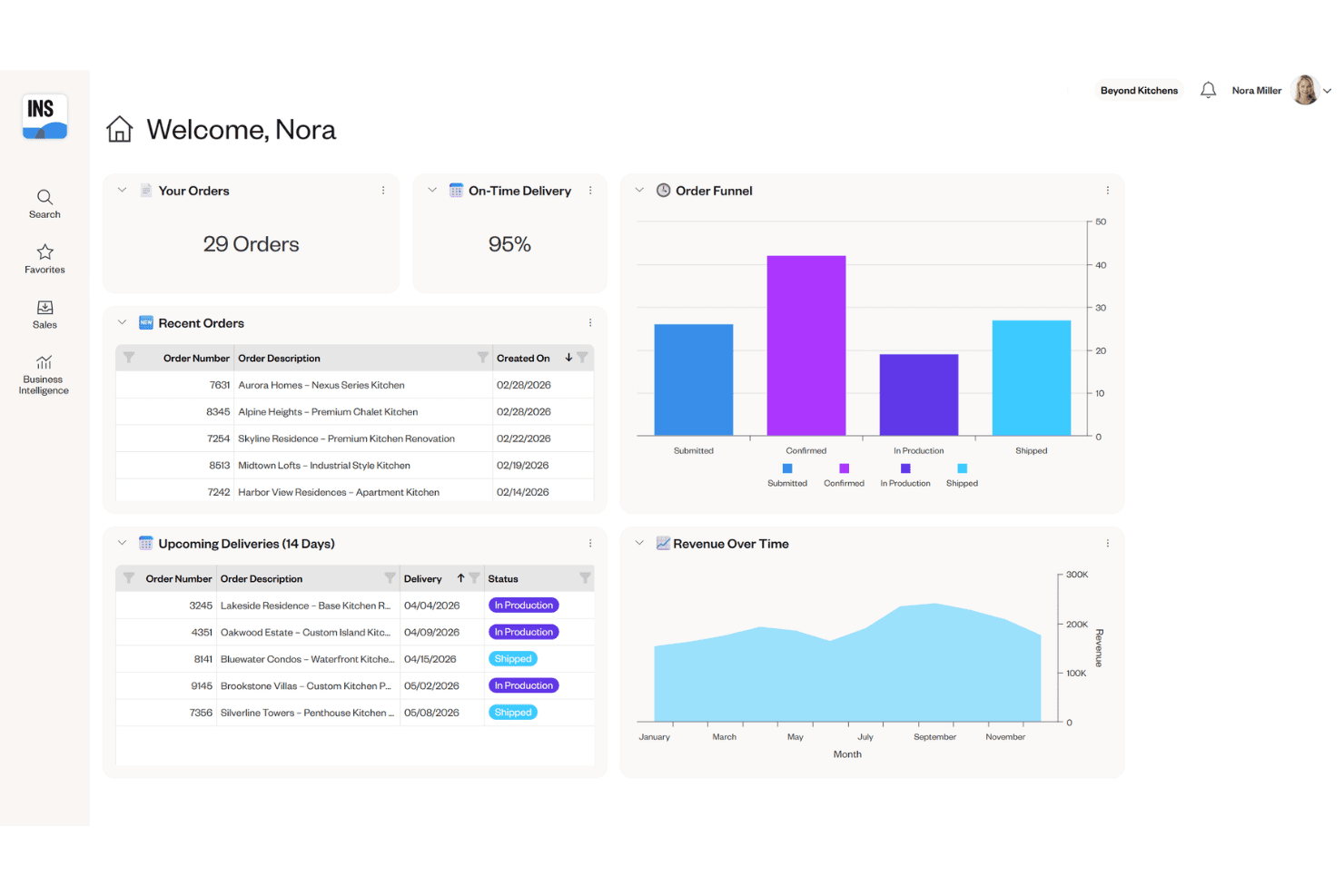
Cyncly Insight provides a dealer dashboard with order tracking, on-time delivery metrics, an order funnel chart, and revenue over time analytics. Cyncly Insight is an enterprise ERP and MES platform built for cabinet, furniture, and millwork manufacturers, combining production scheduling, order management, inventory tracking, and shop floor execution across multi-site factory operations.
Who Is Cyncly Insight Best For?
Cyncly Insight is a strong fit for mid-to-large cabinet and millwork manufacturers running multiple production facilities who need centralized scheduling and real-time shop floor visibility.
Why I Picked Cyncly Insight
I picked Cyncly Insight because it helps you coordinate planning and production across larger manufacturing operations. You can manage production and shift scheduling across multiple sites, automate work-order sequencing, and plan resources around available inventory. Its machine-data collection and SCADA capabilities can also give you real-time information from connected production equipment.
Cyncly Insight Key Features
- Visual order configuration: Let sales or design teams configure cabinet and furniture orders in real time using integrated 3D visualization.
- Machine data collection: Capture performance metrics directly from CNC machines and production equipment for accurate shop floor reporting.
- Integrated warehouse management (WMS): Track raw materials, finished goods, and inventory movement digitally across multiple warehouse locations.
- Role-based shop floor access: Assign permissions and workflows to operators, supervisors, and engineers for secure, modular process control.
Cyncly Insight Integrations
Cyncly Insight offers native integrations with 3CAD Visual CPQ, Design Flex, Winner Flex, Innoplus, Mozaik, Cyncly Payments, and supports direct connections to CNC machines and RFID hardware. An API for custom integrations is not clearly documented.
Pros and Cons
Pros:
- WMS supports complex, multi-location inventory
- Real-time equipment status from CNC machines
- Built for multi-factory scheduling and tracking
Cons:
- No built-in POS or retail workflows
- Not designed for small wood shops
Learn more about Cyncly Insight: Best for modular design-to-manufacture
- Free demo available
- Pricing upon request
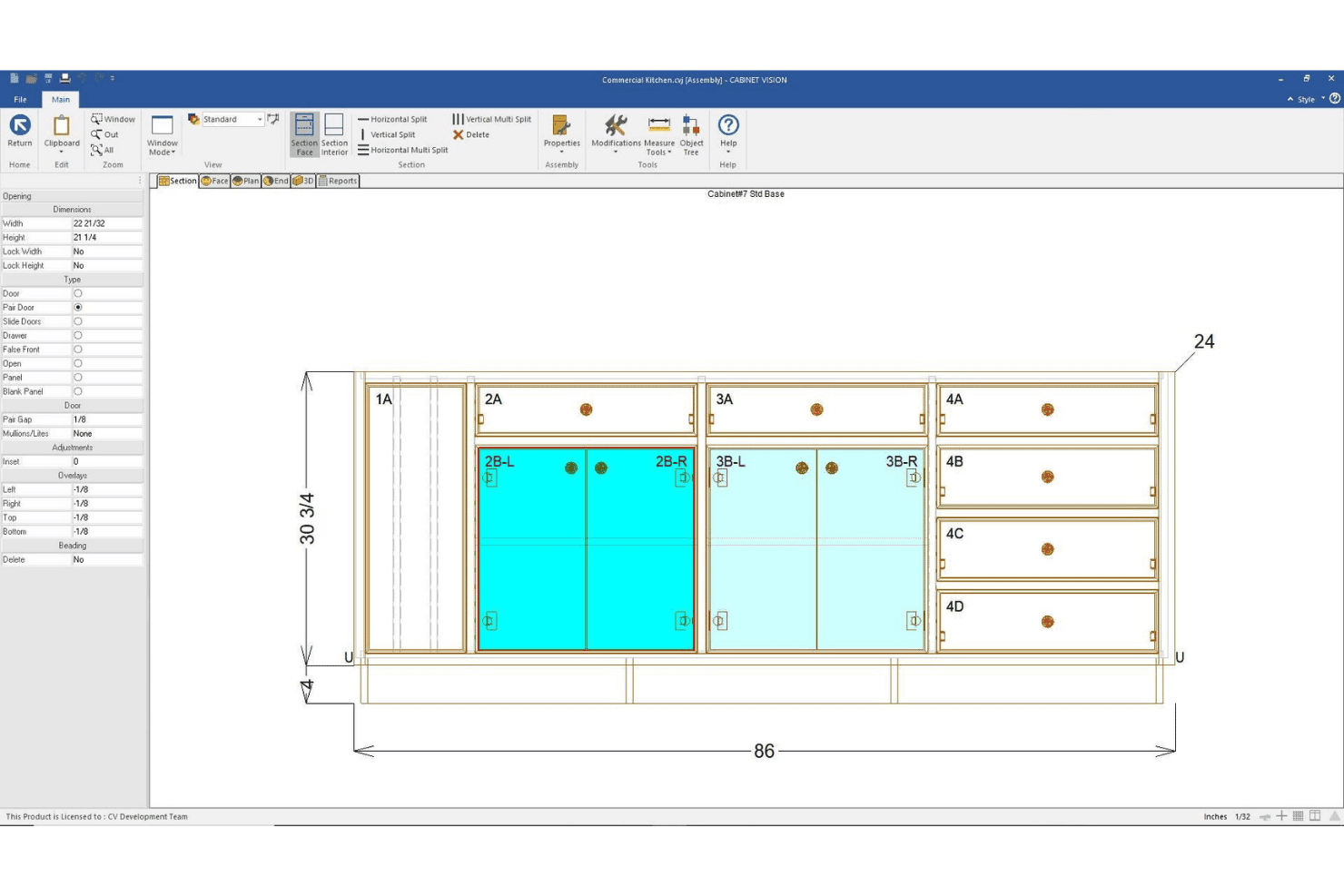
CABINET VISION by Hexagon offers a face section view of a commercial kitchen base cabinet assembly with labeled openings, pair doors, and precise measurements. CABINET VISION is a modular CAD/CAM design-to-manufacture platform for cabinet, closet, and furniture makers. It supports design, bidding, costing, material optimization, cut lists, and bills of materials. Machine-ready G-code requires Hexagon’s S2M CENTER and the appropriate machining modules rather than the base design product alone.
Who Is CABINET VISION by Hexagon Best For?
It's a strong fit for cabinet and closet manufacturers of any size that need to connect custom design directly to CNC production output.
Why I Picked CABINET VISION by Hexagon
I picked CABINET VISION because it gives you a modular path from cabinet design and costing to production output. Its bidding tools calculate materials, labor, and other costs from the engineered design, while xReporting provides more than 150 predefined reports. If you add S2M CENTER and the appropriate machining modules, you can use the same design data to generate machine-ready programs for supported CNC equipment.
CABINET VISION by Hexagon Key Features
- x2D CAD: Draft shop drawings and architectural submittals with built-in 2D CAD tools.
- xReporting: Access over 150 predefined reports or build custom reports for materials and jobs.
- Paperless Traveller: Digitize production tracking, nesting, and defect recut reporting on the shop floor.
- xCRM: Organize customer contacts, manage job records, and track job revisions in one place.
CABINET VISION by Hexagon Integrations
CABINET VISION offers native integrations with ALPHACAM and S2M CENTER for direct CNC machine output and supports hardware library integrations like Blum e-services. An API is available for custom integrations.
Pros and Cons
Pros:
- Built-in bidding and job revision tracking
- Modular licensing for targeted feature selection
- Generates CNC code for complex cabinet parts
Cons:
- No built-in project scheduling module
- No real-time lumber inventory visibility
Learn more about CABINET VISION by Hexagon:
Outro software de gestão de oficinas de madeira
Eis algumas opções adicionais de software de gestão de oficinas de madeira que não entraram na minha seleção, mas que ainda vale a pena conhecer:
- 11SeradexBest for CAD-to-ERP production flow
- 12MRPeasyBest for simplified small-shop MRP
- 13Joinery CoreBest for visual workshop scheduling
- 14JobmanBest for automated capacity planning
How I Evaluate Wood Shop Management Software
I evaluate wood shop management software across six operational areas, including estimating, inventory, bills of materials, production scheduling, customer orders, and job costing. I don’t expect every tool to perform every function because ERP, job-management, and CAD/CAM products support different parts of your workflow. Instead, I assess how well each product supports its intended shop-management use case and require a minimum overall score of 55% for inclusion.
Core Functionality (Table Stakes For This List)
When I'm selecting tools for my list, I rank each one on a scale from 0 (does not offer the functionality) to 5 (excels in this area) for each core functionality listed below. Then, I calculate the tool's total score into a percentage. Each tool needs to achieve a minimum total score of 55% to be considered for inclusion.
- Wood Job Estimating: I check whether the tool handles board feet, hardware, finishes, and labor in a single estimate—not just generic line-item quoting.
- Lumber Inventory Tracking: Tracking by species, dimensions, and board feet matters. I look for tools that also account for offcuts and reorder alerts.
- Cut List & BOM Generation: I evaluate whether the tool auto-generates cut lists from project specs and optimizes yield from sheet goods and stock lumber.
- Production Job Scheduling: Shops juggle multiple jobs across saws, CNC machines, and finishing stations. I look for multi-stage scheduling with resource assignment.
- Customer Order Management: I look for deposit tracking, change-order handling, and delivery updates tied to specific jobs—especially for custom cabinetry work.
- Shop Costing & Profitability: Each tool should compare actual material, labor, and overhead costs against the original estimate for real margin visibility.
Once I have a list of tools that meet the criteria, I consider what sets each platform apart.
Differentiating Factors (What Sets Vendors Apart)
Here's how I compare and contrast different vendors:
Standout Features
Cut list optimization is a big differentiator. I look for tools that generate nesting layouts from project designs to reduce waste on sheet goods and stock lumber. CAD/CAM integration also matters because shops that import SketchUp or AutoCAD files directly into their BOM save hours of manual re-entry on every project. Shop floor time tracking rounds things out; barcode or tablet-based clock-in at each workstation gives you the labor data you need to compare actual costs against your original estimates.
Beyond Features
Shop size and business model fit is one of the first things I consider. A solo woodworker building custom furniture has very different needs than a 20-person cabinet shop running production batches. I also evaluate integrations with adjacent systems—especially QuickBooks or Xero for accounting and design tools like SketchUp for BOM handoff. Licensing structure matters too. Some vendors charge per user, which adds up fast when you need shop floor employees on the system.
Como escolher software de gestão de oficinas de madeira
É fácil perder-se em listas extensas de funcionalidades e estruturas de preços complexas. Para o ajudar a manter-se focado enquanto analisa o seu processo único de seleção de software, apresentamos uma lista de verificação dos fatores a ter em conta:
| Fator | O que considerar |
|---|---|
| FatorEscalabilidade | O que considerarEste software continuará a adequar-se à sua oficina à medida que cresce ou adiciona novas instalações? Verifique se consegue gerir mais utilizadores, projetos ou inventário ao longo do tempo. |
| FatorIntegrações | O que considerarA ferramenta liga-se sem problemas aos seus sistemas de contabilidade, CAD/CAM, fornecedores ou comércio eletrónico? Pergunte se cada ligação é nativa, baseada numa API ou efetuada através de exportações de ficheiros ou de um serviço de terceiros. |
| FatorPersonalização | O que considerarPode adaptar os fluxos de trabalho, formulários e relatórios às suas operações específicas? Considere se a sua empresa necessita de campos personalizados ou de funções de utilizador. |
| FatorFacilidade de utilização | O que considerarA sua equipa irá realmente utilizá-la na área de produção? Procure menus simples, navegação clara e acesso através de dispositivos móveis/tablets para os operadores e o pessoal administrativo. |
| FatorImplementação e integração inicial | O que considerarQuanto tempo demora a configuração e que formação/assistência oferece o fornecedor? Pergunte sobre a importação de dados antigos e o que é necessário da sua parte. |
| FatorCusto | O que considerarO preço é por utilizador, por oficina ou por módulo? Analise os custos de configuração, formação e suplementos, e verifique se um período de avaliação gratuito exige um cartão de crédito. |
| FatorMedidas de segurança | O que considerarComo protege a ferramenta os dados sensíveis dos clientes e dos trabalhos? Verifique a existência de encriptação, rotinas de cópia de segurança dos dados e controlos de permissões dos utilizadores. |
| FatorNecessidades de recursos internos | O que considerarQuem na sua equipa irá gerir e manter o sistema diariamente? Tenha em conta a administração contínua, as atualizações e a capacidade da equipa para resolver problemas. |
O que é o software de gestão de oficinas de madeira?
O software de gestão de oficinas de madeira é uma plataforma digital especializada que ajuda as empresas de carpintaria a organizar orçamentos, acompanhamento de inventário, calendarização de trabalhos e gestão de encomendas. Dependendo do seu âmbito, um produto pode ser uma aplicação específica de gestão de trabalhos ou um software ERP mais abrangente que também engloba compras, produção e fluxos de trabalho financeiros. Estas ferramentas apoiam processos específicos de materiais, como estimativas, geração de listas de corte e acompanhamento de encomendas de clientes.
Funcionalidades do software de gestão de oficinas de madeira
Ao selecionar um software de gestão de oficinas de madeira, esteja atento às seguintes funcionalidades principais:
- Estimativas de trabalhos em madeira: Fornece orçamentos detalhados com base em pés lineares de tábuas, listas de corte, materiais, acabamentos e mão de obra, ajudando a definir preços precisos para projetos personalizados.
- Acompanhamento do inventário de madeira: Acompanha o stock de matérias-primas por espécie, dimensões e pés lineares de tábuas, com atualizações em tempo real, para que nunca fique sem o que precisa a meio de um trabalho.
- Geração de listas de corte e BOM: Cria listas de corte precisas e listas de materiais a partir das especificações do projeto, ajudando a planear e otimizar a utilização dos materiais.
- Calendarização dos trabalhos de produção: Permite atribuir tarefas, alocar recursos e acompanhar os projetos em cada etapa do fluxo de trabalho da sua oficina.
- Gestão de encomendas de clientes: Gere orçamentos, adiantamentos, alterações às encomendas e acompanhamento das entregas num único local associado a cada projeto de carpintaria.
- Custos e rentabilidade da oficina: Monitoriza os custos reais face às estimativas, acompanhando materiais, mão de obra e custos gerais de cada trabalho para apoiar a análise das margens.
- Integração com catálogos de fornecedores: Liga-se a catálogos com preços em tempo real de ferragens e materiais, acelerando as compras e a elaboração de orçamentos.
- Acompanhamento do tempo no espaço de produção: Regista as horas de trabalho em cada posto de trabalho — frequentemente através de códigos de barras ou tablets — para proporcionar transparência relativamente ao progresso e à produtividade dos trabalhos.
- Integração com CAD/CAM: Importa ficheiros de desenho diretamente das ferramentas CAD para o seu fluxo de trabalho, reduzindo a introdução manual de dados e minimizando os erros.
- Acompanhamento das entregas e da logística: Mantém-no atualizado relativamente ao estado das expedições e aos horários de entrega, apoiando a entrega atempada aos clientes.
Benefícios do software de gestão de oficinas de madeira
A implementação de um software de gestão de oficinas de madeira proporciona vários benefícios à sua equipa e à sua empresa. Eis alguns dos que pode esperar:
- Estimativas precisas dos trabalhos: Cálculos fiáveis de materiais, ferragens e mão de obra permitem-lhe orçamentar projetos com confiança e proteger as margens.
- Controlo do inventário em tempo real: O acompanhamento automatizado de madeira, ferragens e sobras ajuda a evitar ruturas de stock e encomendas excessivas.
- Calendarização simplificada: Coordenar a produção, as tarefas e as entregas a partir de um único sistema mantém cada trabalho no bom caminho, do início ao fim.
- Melhor gestão de clientes: Faça a gestão centralizada de orçamentos, alterações às encomendas e estados dos projetos para garantir uma comunicação clara e reduzir os mal-entendidos.
- Melhor visão da rentabilidade: Compare as estimativas dos trabalhos com os custos reais através de relatórios consolidados para identificar onde a sua oficina gera ou perde dinheiro.
- Redução do trabalho manual: Funcionalidades como a integração com CAD/CAM e o acesso aos catálogos dos fornecedores reduzem a introdução de dados e o tempo dedicado a tarefas administrativas.
- Prazos de entrega mais curtos: Fluxos de trabalho consistentes, acompanhamento da produção e gestão das entregas podem ajudá-lo a concluir e entregar os trabalhos de forma mais eficiente.
Custos e preços do software de gestão de oficinas de madeira
A seleção de um software de gestão de oficinas de madeira exige compreender os vários modelos de preços e planos disponíveis. Os custos variam consoante as funcionalidades, a dimensão da equipa, os complementos, entre outros fatores. A tabela abaixo resume os planos comuns, os seus preços médios e as funcionalidades normalmente incluídas nas soluções de software de gestão de oficinas de madeira:
Tabela de comparação de planos para software de gestão de oficinas de madeira
| Tipo de plano | Preço médio | Funcionalidades comuns |
|---|---|---|
| Tipo de planoPlano gratuito | Preço médio$0 | Funcionalidades comunsEstimativas básicas de trabalhos, acompanhamento limitado do inventário e relatórios padrão. |
| Tipo de planoPlano pessoal | Preço médio$20-$40/utilizador/mês | Funcionalidades comunsGestão melhorada do inventário, calendarização simples, gestão de clientes e apoio por correio eletrónico. |
| Tipo de planoPlano empresarial | Preço médio$50-$100/utilizador/mês | Funcionalidades comunsCustos avançados dos trabalhos, ferramentas completas de listas de corte, integrações, catálogos de fornecedores, fluxos de trabalho personalizados e análises. |
| Tipo de planoPlano empresarial de grande dimensão | Preço médio$120-$200/utilizador/mês | Funcionalidades comunsSuporte para várias oficinas, integrações personalizadas, permissões avançadas, integração inicial dedicada e apoio prioritário. |
Perguntas frequentes sobre software de gestão de marcenarias
Eis algumas respostas a perguntas comuns sobre software de gestão de marcenarias:
O software de gestão de marcenarias consegue lidar tanto com trabalhos personalizados como com trabalhos de produção?
Sim, a maioria das plataformas suporta uma combinação de trabalhos personalizados e linhas de produtos padrão. Pode organizar os projetos com base nas especificações do cliente ou em SKUs recorrentes, atribuir materiais e acompanhar os fluxos de trabalho de qualquer um dos tipos de trabalho.
Como funciona a integração com ferramentas de contabilidade e CAD?
A maioria dos sistemas liga-se ao QuickBooks ou ao Xero para sincronizar faturas e despesas, enquanto a integração com CAD permite importar projetos do SketchUp ou de ferramentas semelhantes para gerar listas de corte e listas de materiais com o mínimo de introdução manual.
Que integração inicial ou formação devo esperar?
Os fornecedores disponibilizam normalmente sessões de integração inicial, acesso a um centro de ajuda e recursos de formação concebidos para proprietários de marcenarias, funcionários administrativos e trabalhadores da oficina, para garantir que todos estão preparados para utilizar o sistema de forma eficaz.
Preciso de recursos de TI dedicados para gerir o software?
Não, a maioria das soluções funciona na nuvem e requer pouca intervenção de TI. No entanto, alguém da sua equipa deve sentir-se à vontade para aprender novos sistemas, gerir o acesso dos utilizadores e resolver problemas básicos.
Posso utilizar o software se a minha ligação à Internet for pouco fiável?
Algumas ferramentas de gestão de marcenarias oferecem acesso offline a funções essenciais, como o registo de horas e o inventário. Outras podem exigir uma ligação estável, por isso verifique as capacidades offline de cada solução antes de tomar uma decisão.