

O software de gestão de inventário da Amazon ajuda a sua empresa a monitorizar, organizar e reabastecer os produtos vendidos através da Amazon e de outros canais. Um sistema fiável de gestão de inventário garante níveis de stock precisos, um reabastecimento simplificado e uma melhor visibilidade em todos os armazéns e marketplaces.
Se procura as melhores ferramentas para manter o inventário atualizado, evitar ruturas de stock e gerir vendas multicanal, sabe como os processos manuais ou as folhas de cálculo podem rapidamente resultar em vendas perdidas ou excesso de stock.
Esta lista vai ajudá-lo a comparar as principais soluções de gestão de inventário da Amazon, para que possa escolher a opção mais adequada aos fluxos de trabalho da sua equipa, ao volume de vendas, às necessidades de integração e às principais métricas de inventário. Obtenha uma visão clara das suas opções e tome uma decisão segura para 2026.
Why Trust Our Software Recommendations
6,700+
Reviews
20
Industry experts
16+
Evaluation factors
14
Years
Our team has been testing and reviewing software since 2012. As retail leaders ourselves, we know how difficult—and important—it is to choose the right software.
For this guide, we evaluated tools using hands-on testing and independent research, scoring tools using our selection criteria.
Our reviews reflect our independent judgment—not a sales pitch.
Tabela de comparação de software de gestão de inventário da Amazon
Esta tabela de comparação resume os detalhes de preços das minhas principais escolhas de software de gestão de inventário da Amazon:
| Tool | Best For | Trial Info | Price | ||
|---|---|---|---|---|---|
| 1 | Best for omnichannel inventory synchronization | Free demo available | From $100/month | Website | |
| 2 | Best for easy multi-marketplace listing management | Free plan + free demo available | From $24/month(billed annually) | Website | |
| 3 | Best for real-time, event-driven Amazon sync | Free demo available | Pricing upon request | Website | |
| 4 | Best for direct integration with eBay and Walmart | 30-day free trial | From $49/month | Website | |
| 5 | Best for advanced warehouse and fulfillment workflows | Not available | Pricing upon request | Website | |
| 6 | Best for profit analytics with inventory tracking | 30-day free trial + free demo available | From $15/month (billed annually) | Website | |
| 7 | Best for managing multiple storefronts in one dashboard | 14-day free trial + free demo available | From £1,150/month | Website | |
| 8 | Best for centralized order and inventory control | Free demo available | Pricing upon request | Website | |
| 9 | Best for integrated FBA restock suggestions | Free demo available | From $129/month | Website | |
| 10 | Best for customizable forecasting workflows | Free trial + free demo available | From $175/month | Website |


Avaliações de software de gestão de inventário da Amazon
Abaixo encontram-se os meus resumos detalhados do software de gestão de inventário da Amazon que entrou na minha lista restrita. As minhas avaliações apresentam uma análise detalhada das funcionalidades, dos melhores casos de utilização e das integrações de cada software, para o ajudar a encontrar a melhor opção para a sua empresa.
 Best for omnichannel inventory synchronization
- Free demo available
- From $100/month
Visit WebsiteCustomer Rating:4.3/5
Unicommerce lets users monitor Amazon FBA channel inventory by SKU. Unicommerce is a multi-channel inventory management platform that centralizes stock, orders, warehousing, and returns across 290+ marketplace, cart, and quick commerce integrations—including Amazon across 12+ global regions.
Who Is Unicommerce Best For?
Unicommerce is a strong fit for multi-channel retailers and ecommerce operations teams selling across Amazon alongside Shopify, eBay, and regional marketplaces who need centralized inventory control at scale.
Why I Picked Unicommerce
I've included Unicommerce in my top picks because its Kafka-powered real-time delta sync across 290+ marketplace, cart, and quick commerce integrations is genuinely best-in-class for sellers managing stock across Amazon alongside Shopify, Flipkart, Myntra, and quick commerce channels simultaneously. I particularly like how virtual inventory pools let you allocate stock separately across B2B and D2C channels without risking overselling. Unicommerce also covers Amazon across 12+ global marketplaces from a single dashboard, which makes cross-border selling far more manageable.
Unicommerce Key Features
- Automated low-stock alerts: Sends notifications via email, SMS, and in-app when stock falls below your defined thresholds across any connected channel.
- Purchase order generation: Creates POs tied to demand signals and reorder points, with inbound shipment tracking through the vendor management module.
- Bundle and kit management: Automatically deducts constituent SKU stock when a bundled or combo product sells across any connected marketplace.
- UniCapture video-verified packaging: Records video proof of order packaging for every shipment, supporting dispute resolution and refund settlement.
Unicommerce Integrations
Unicommerce documents 290+ integrations, including Amazon, Shopify, WooCommerce, eBay, Flipkart, Magento, Shiprocket, Delhivery, SAP, and Tally. Custom/API integrations are available on the Enterprise plan.
Pros and Cons
Pros:
- Automated bundle and kit stock deduction
- Supports multi-warehouse and cross-border Amazon sales
- Real-time inventory sync across 290+ channels
Cons:
- No Amazon ASIN-level profitability reporting
- FBA inventory data updates only once daily
Learn more about Unicommerce: Best for easy multi-marketplace listing management
- Free plan + free demo available
- From $24/month(billed annually)
Visit WebsiteCustomer Rating:4.8/5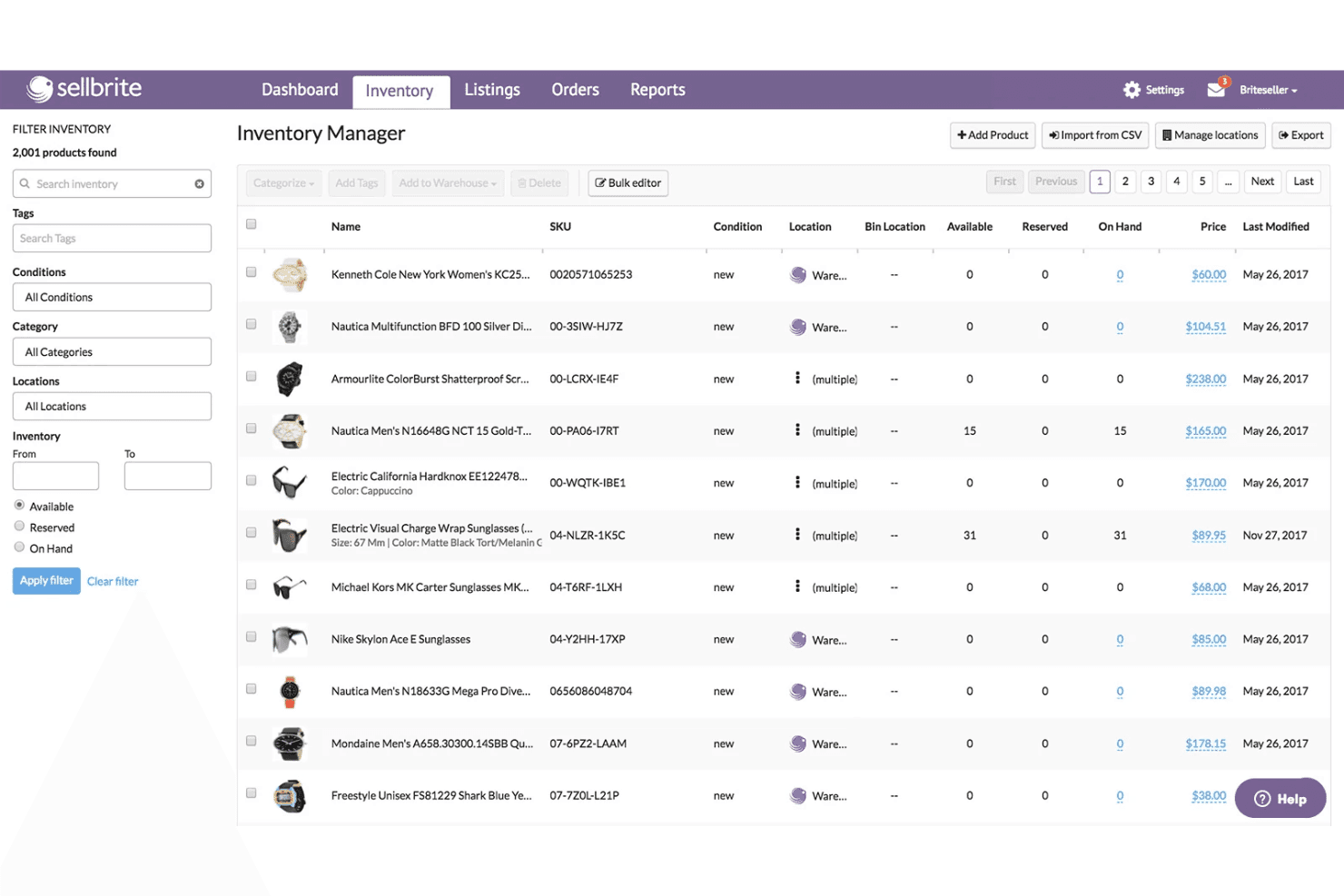
Sellbrite coordinates inventory across multiple locations and product listings. Sellbrite is a multi-channel listing and inventory sync tool that connects Amazon, eBay, Walmart, Etsy, and major shopping carts into a single dashboard for centralized order management, SKU tracking, and cross-channel inventory updates.
Who Is Sellbrite Best For?
Sellbrite is a strong fit for small to mid-sized sellers who need to manage listings and inventory across Amazon, eBay, Etsy, and Walmart from a single, easy-to-navigate dashboard.
Why I Picked Sellbrite
I've included Sellbrite in my top picks because it's the most accessible option for sellers who need to manage Amazon listings alongside eBay, Etsy, Walmart, and a Shopify or WooCommerce storefront from one place. Its 15-minute inventory sync across all connected channels means a sale on Etsy immediately adjusts your Amazon stock, keeping overselling in check without any manual reconciliation. I also like that you can allocate inventory selectively per channel, so you're not exposing your full stock count everywhere at once.
Sellbrite Key Features
- Multi-warehouse inventory allocation: Assign and track stock across multiple physical warehouse locations, with control over how much inventory is pushed to each connected sales channel.
- Amazon FBA multi-channel fulfillment: Route orders from eBay, Etsy, or Shopify to your FBA warehouse for fulfillment via a $19/month add-on.
- Bulk listing management via CSV: Import, update, and export product listings and inventory data in bulk using CSV files across all connected channels.
- Channel-level sales reporting: View revenue and top-seller performance broken down by individual marketplace to compare sales across channels.
Sellbrite Integrations
Sellbrite offers native integrations with Amazon Seller Central, eBay, Walmart, Etsy, Shopify, BigCommerce, WooCommerce, Fulfillment by Amazon, and ShipStation.
Pros and Cons
Pros:
- Broad Amazon, eBay, Etsy, Walmart coverage
- Unlimited SKUs and user seats on all plans
- Multi-channel inventory syncing updates every 15 minutes
Cons:
- No demand forecasting or automated reordering
- Cannot publish new ASINs to Amazon
Learn more about Sellbrite: Best for real-time, event-driven Amazon sync
- Free demo available
- Pricing upon request
Visit WebsiteCustomer Rating:4.1/5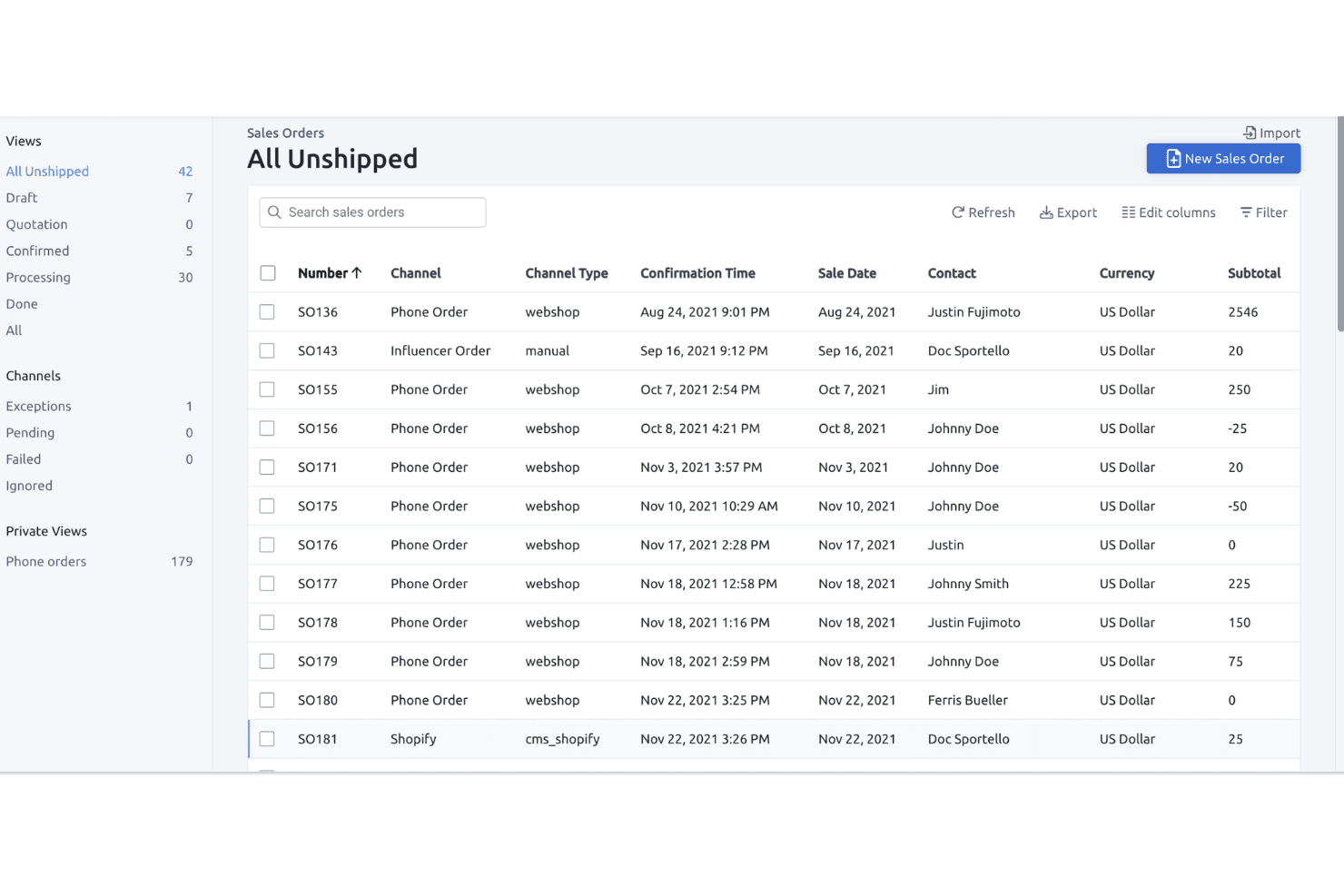
Fulfil lets users track and manage all unshipped sales orders in one view. Fulfil is a multi-channel ERP that unifies Amazon inventory management, order management, warehouse operations, purchasing, and financials across FBA, FBM, and Vendor Central in a single platform.
Who Is Fulfil Best For?
Fulfil is built for multi-channel DTC brands doing $15M or more in annual revenue that need a single ERP to manage Amazon alongside Shopify, warehouse operations, and financials.
Why I Picked Fulfil
Fulfil earns its spot on my shortlist because its Amazon sync is genuinely event-driven, not batch-scheduled. That distinction matters in practice: when a sale closes or a warehouse receives stock, Fulfil updates Amazon's available inventory in real time rather than overnight. I also love its inventory visibility controls, which let you define exactly what Amazon "sees," including safety buffers and inbound stock, so you're never at risk of overselling across all 23 global marketplaces.
Fulfil Key Features
- Amazon settlement auto-reconciliation: Fulfil automatically imports bi-weekly Amazon settlement reports and posts fees, refunds, and payments directly to the native general ledger.
- Multi-warehouse allocation rules: You can assign stock from specific warehouses to specific channels, with per-channel safety buffers and inbound PO inclusion in available-to-sell quantities.
- Amazon Multi-Channel Fulfillment (MCF) routing: Orders from Shopify and other channels can be routed to FBA inventory for fulfillment, with delivery speed options and automatic tracking sync back to each channel.
- AI-powered purchase order generation: Fulfil generates draft purchase orders automatically based on demand forecasts, incorporating MOQ constraints, case pack sizes, and supplier lead times.
Fulfil Integrations
Fulfil supports 25+ native sales channels, including Amazon’s 23 marketplaces, Shopify, Walmart, eBay, and TikTok Shop. It also connects with Amazon MCF, 400+ 3PL locations, 500+ EDI retail partners, and Google BigQuery for reporting.
Pros and Cons
Pros:
- Automatic Amazon settlement and fee reconciliation
- Unified FBA, FBM, and Vendor management
- Real-time, event-driven Amazon inventory synchronization
Cons:
- Setup requires significant time and resources
- No dynamic Amazon repricing feature
Learn more about Fulfil: Best for direct integration with eBay and Walmart
- 30-day free trial
- From $49/month
Visit WebsiteCustomer Rating:4.8/5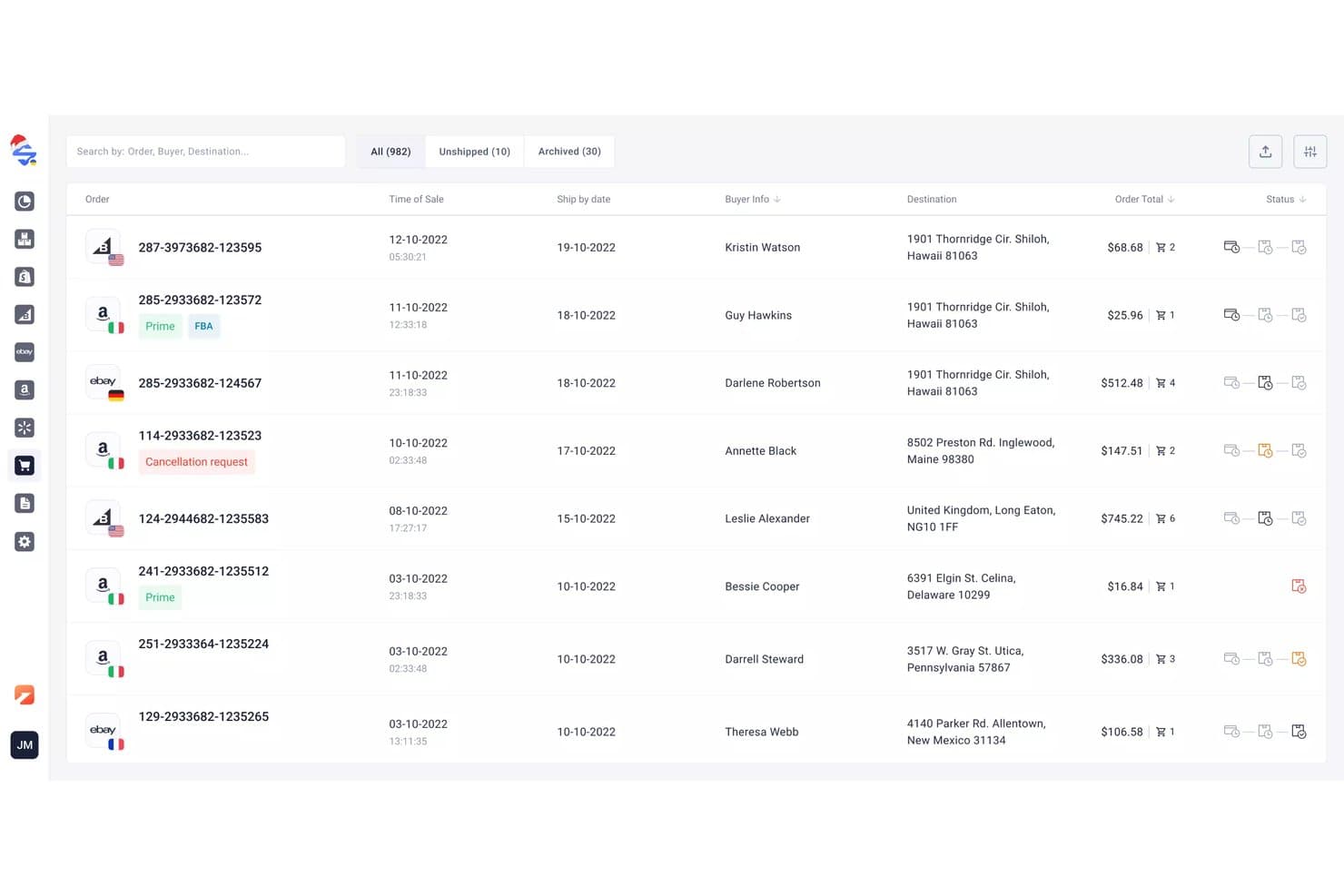
M2E Cloud syncs multi-channel orders across connected marketplaces. M2E Cloud is a multi-channel listing and inventory sync platform that connects Amazon Seller Central across 19+ global marketplaces with eBay, Walmart, TikTok Shop, and 600+ other channels, alongside a built-in repricer and sales analytics dashboard.
Who Is M2E Cloud Best For?
M2E Cloud is a strong fit for multi-channel sellers who need to keep inventory in sync across eBay, Walmart, and Amazon simultaneously.
Why I Picked M2E Cloud
I've included M2E Cloud in my top picks because its native eBay and Walmart integrations are genuinely tight, not bolted on. When a sale closes on Walmart, stock levels update across Amazon and eBay in real time, which is the kind of two-way sync that prevents costly oversells on multiple fronts simultaneously. I also like that the built-in Amazon Repricer, which tracks competitor pricing and targets the Buy Box 24/7, comes included at no extra cost.
M2E Cloud Key Features
- Amazon Multi-Channel Fulfillment (MCF) integration: Automatically routes orders from eBay, Shopify, Walmart, and other connected channels through your Amazon FBA inventory for fulfillment.
- M2E Policies: Lets you set channel-specific rules for pricing, quantity buffers, and shipping templates per marketplace from a single interface.
- M2E Analytics dashboard: Tracks sales volumes, order fees, cancellation rates, top sellers, and geographic customer data across all connected channels at no extra cost.
- Amazon Repricer: Monitors competitor pricing 24/7 and adjusts your Amazon prices within set min/max limits to target the Buy Box automatically.
M2E Cloud Integrations
M2E Cloud connects with Amazon Seller Central, Amazon FBA and MCF, eBay, Walmart, TikTok Shop, Temu, Shopify, BigCommerce, WooCommerce, and Magento. It also supports 600+ marketplace integrations overall and provides an API for custom integrations.
Pros and Cons
Pros:
- Supports FBA and MCF order management
- Built-in Amazon repricer included for free
- Real-time inventory sync across all channels
Cons:
- Lacks ASIN-level profitability analytics
- No automated replenishment or forecasting tools
Learn more about M2E Cloud: Best for advanced warehouse and fulfillment workflows
- Not available
- Pricing upon request
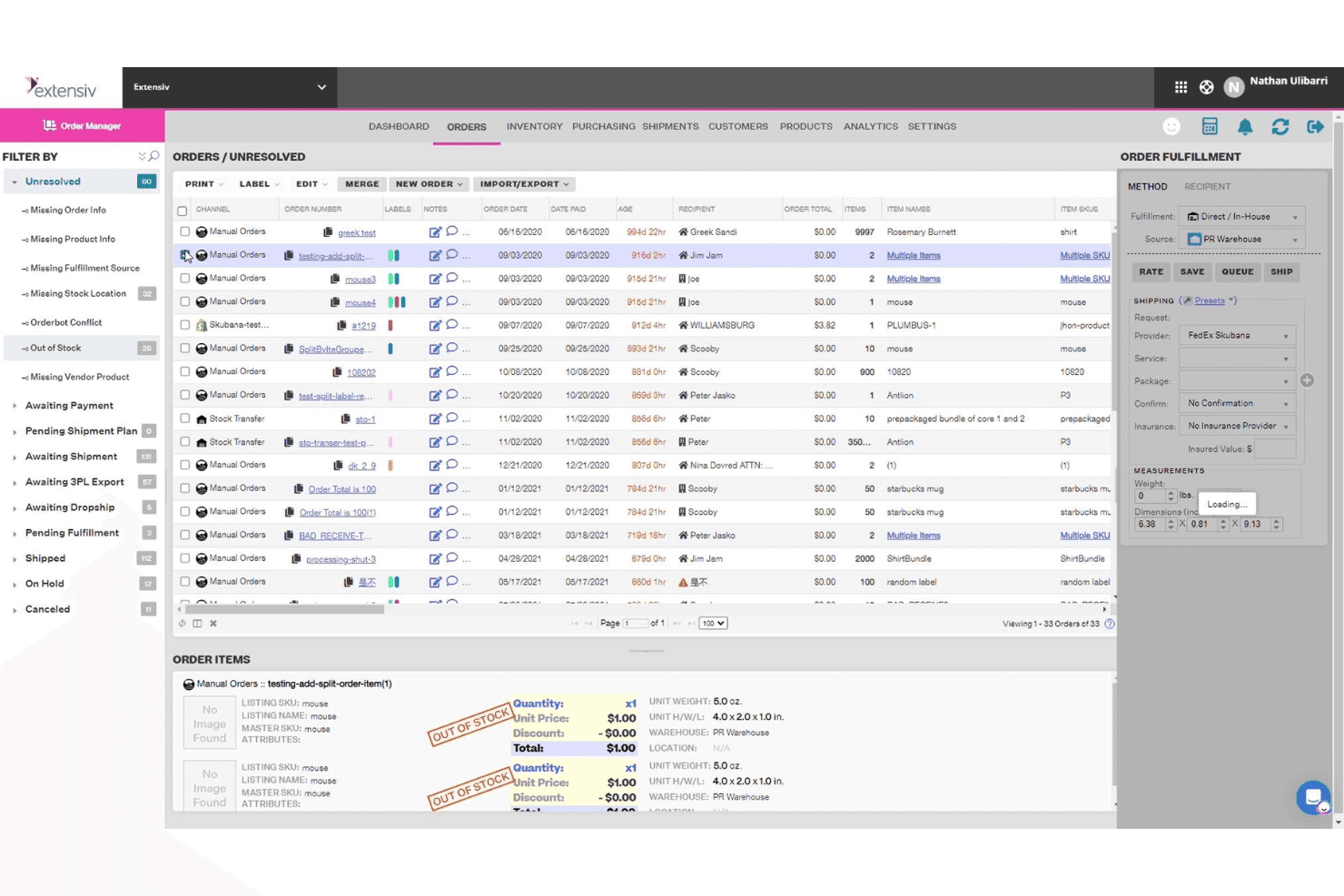
Extensiv groups unresolved orders with key fulfillment details in one view. Extensiv is an order and warehouse management platform that handles FBA, FBM, and Multi-Channel Fulfillment alongside multi-channel inventory sync, automated purchase orders, demand forecasting, and bundle management across 110+ ecommerce integrations.
Who Is Extensiv Best For?
Extensiv is a strong fit for operations teams managing complex fulfillment across multiple warehouses, 3PLs, and sales channels simultaneously.
Why I Picked Extensiv
Extensiv earns its spot on my shortlist because of how well it handles fulfillment complexity that simpler tools can't touch. I picked it specifically for operations running FBA, FBM, and Multi-Channel Fulfillment side by side, since Extensiv manages all three from one place without requiring workarounds. I also like its channel-level inventory allocation, which lets you assign a percentage of available stock per sales channel to prevent overselling across Amazon, Walmart, and Shopify simultaneously. Auto-PO generation tied to supplier lead times and sales velocity makes replenishment genuinely hands-off.
Extensiv Key Features
- FNSKU-to-master SKU mapping: Links multiple FNSKUs to a single master SKU, with preferred FNSKU selection configurable per warehouse location.
- SmartScan barcode scanning: Mobile barcode scanning add-on supports pick, restock, and inventory audit workflows across warehouse locations.
- FIFO cost tracking: Tracks inventory costs using First In, First Out methodology, with COGS history linked to individual purchase orders.
- FBA inbound shipment sync: Automatically syncs inbound FBA shipments created in Seller Central into Extensiv Order Management for unified visibility.
Extensiv Integrations
Extensiv offers 110+ ecommerce integrations, including Amazon Seller Central, Shopify, Walmart, eBay, Etsy, Wayfair, BigCommerce, WooCommerce, and Magento, plus 1,000+ 3PL connections. Integration Manager connects to 60+ order destinations, with custom ERP and NetSuite connections available through developer services.
Pros and Cons
Pros:
- Channel-level stock allocation to prevent overselling
- Automated purchase orders with real-time demand data
- Unified management for FBA, FBM, and MCF
Cons:
- Lacks dedicated in-platform IPI Score dashboard
- No native Amazon repricing automation
Learn more about Extensiv: Best for profit analytics with inventory tracking
- 30-day free trial + free demo available
- From $15/month (billed annually)
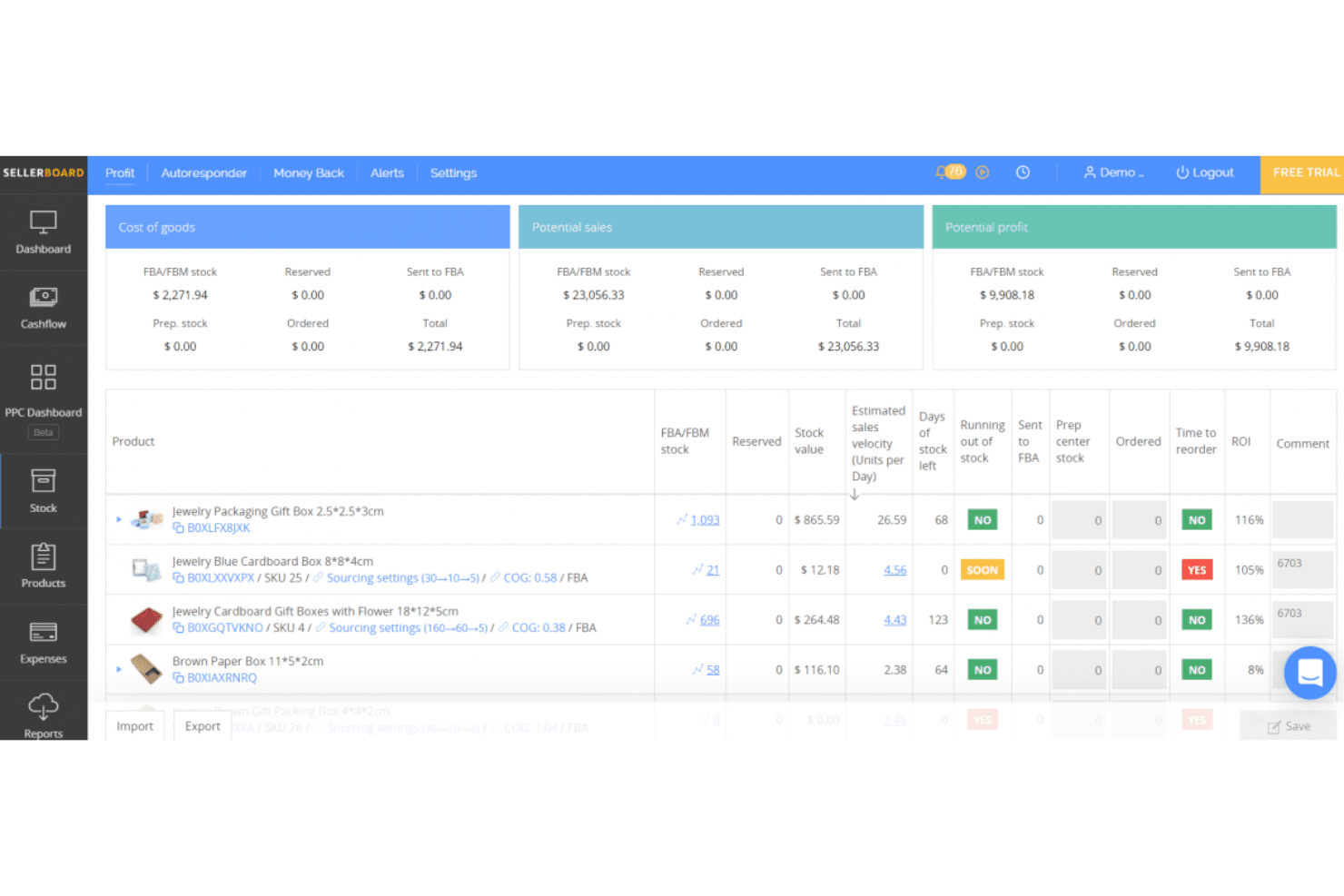
sellerboard assesses Amazon store performance. sellerboard is an Amazon-focused profit analytics and inventory management tool that tracks ASIN-level profitability, FBA fees, demand forecasting, purchase orders, and PPC performance across all 24 global Amazon marketplaces.
Who Is sellerboard Best For?
sellerboard is a strong fit for Amazon FBA sellers who want a clear picture of per-product profitability alongside their inventory planning.
Why I Picked sellerboard
sellerboard earns its spot on my shortlist because no other tool at this price point gives you this level of per-ASIN profit visibility alongside inventory planning. I love that it tracks 100+ Amazon fee types, including AWD storage and inbound placement fees, all attributed at the SKU level. The Low Inventory Fee alerts are particularly useful: sellerboard monitors your stock weekly and flags exactly which ASINs Amazon will penalize, along with the recommended ship-in quantity and date.
sellerboard Key Features
- COGS tracking methods: Supports FIFO, batch, period-based, and marketplace-specific COGS calculation methods to keep profitability data accurate.
- PPC bid automation: Offers manual and autopilot bid optimization modes, with automated keyword harvesting and low-performing keyword negation.
- FBA inbound shipment management: Create and track inbound FBA shipments end-to-end, with inventory counts updated dynamically as shipments progress.
- Multi-marketplace summary dashboard: Aggregates key performance metrics across Amazon, Walmart, and eBay accounts into a single unified view.
sellerboard Integrations
sellerboard offers native marketplace integrations with Amazon Seller Central, Walmart Seller Center, and eBay, plus Amazon Advertising API and Amazon Warehousing & Distribution connectivity. Shopify is supported through the separate sellerboard.io platform.
Pros and Cons
Pros:
- Handles FBA, prep center, and AWD inventory flows
- Automated low inventory fee compliance alerts
- Granular per-ASIN profitability with full fee tracking
Cons:
- Reports of discrepancies in profit calculations
- No real-time cross-channel inventory sync
Learn more about sellerboard: Best for managing multiple storefronts in one dashboard
- 14-day free trial + free demo available
- From £1,150/month
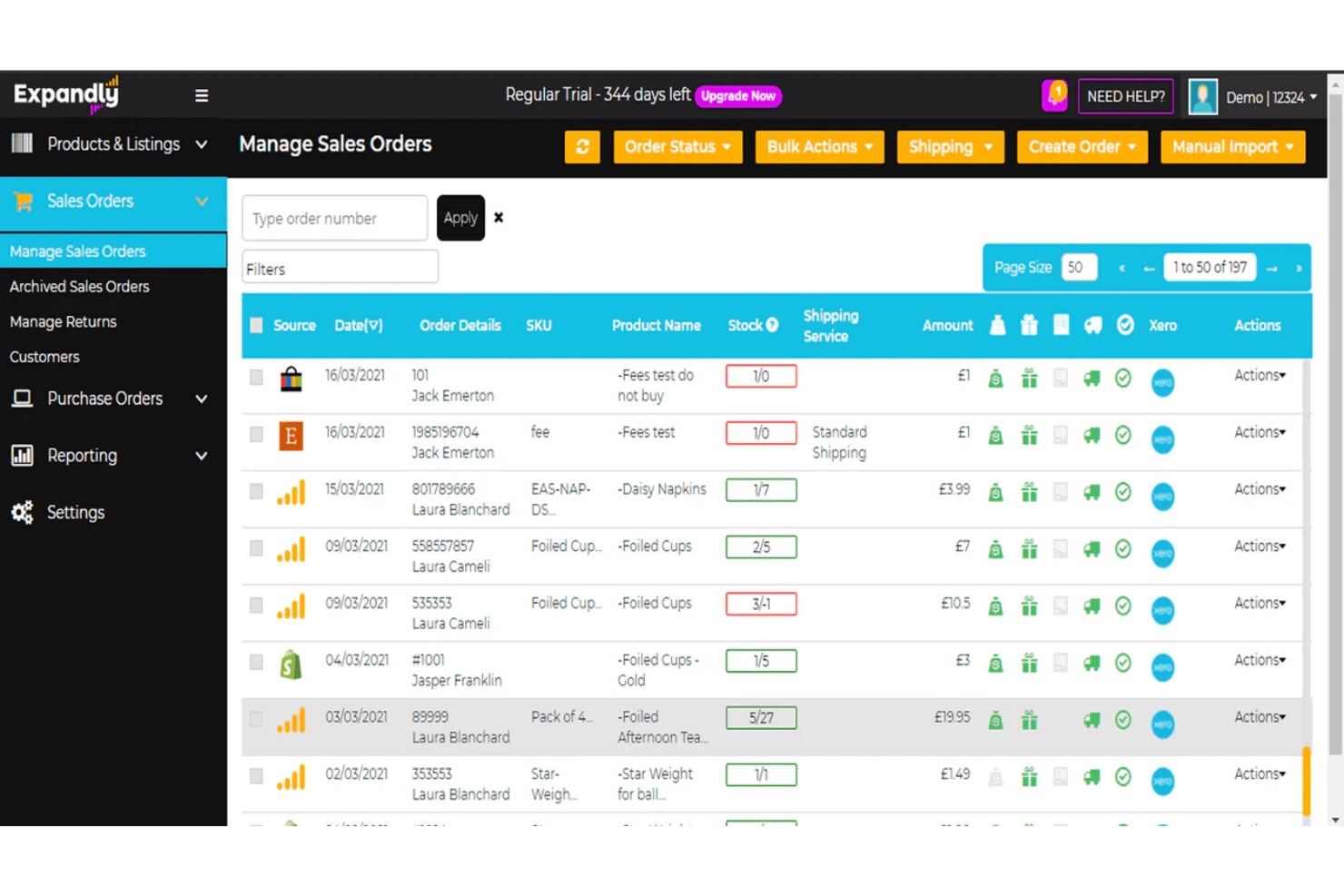
Expandly lets users manage and track all sales orders across channels in one place. Expandly is a multi-channel inventory and order management platform that syncs stock, listings, and orders across Amazon, eBay, Etsy, and 25+ shopping carts from a single dashboard.
Who Is Expandly Best For?
Expandly is a strong fit for multi-channel sellers who run storefronts across Amazon, eBay, Etsy, and multiple shopping carts and need a single place to keep stock levels in sync.
Why I Picked Expandly
I've included Expandly in my top picks because it's genuinely one of the best tools for keeping stock levels accurate across a large mix of storefronts simultaneously. When a sale closes on eBay, Amazon, and Etsy at nearly the same moment, Expandly's automatic sync pushes updated quantities across all 25+ connected channels before an oversell can happen. I also like its kit and bundle handling, where selling a bundled product triggers component-level stock deductions across every channel automatically.
Expandly Key Features
- Purchase order management: Raise POs, log received goods, and sync purchase order data directly to Xero from within the platform.
- Re-order level alerts: Set custom low-stock thresholds that trigger notifications to prompt restocking before you run out.
- Cross-channel FBA fulfillment routing: Route orders from non-Amazon storefronts to Amazon FBA for fulfillment directly through the platform.
- Bulk listing upload: Create and publish product listings to multiple sales channels simultaneously using batch upload tools.
Expandly Integrations
Expandly offers integrations with Amazon Seller Central, eBay, Etsy, Wish, Shopify, WooCommerce, Magento, BigCommerce, Xero, DHL, and FedEx, plus 25+ shopping carts and multiple carriers. API access is available on higher-tier plans for custom integrations.
Pros and Cons
Pros:
- Includes expert UK/EU compliance support
- Handles kits and bundles natively
- Syncs stock across 25+ sales channels
Cons:
- No demand forecasting or auto-replenishment
- No FBA inbound shipment management
Learn more about Expandly: Best for centralized order and inventory control
- Free demo available
- Pricing upon request
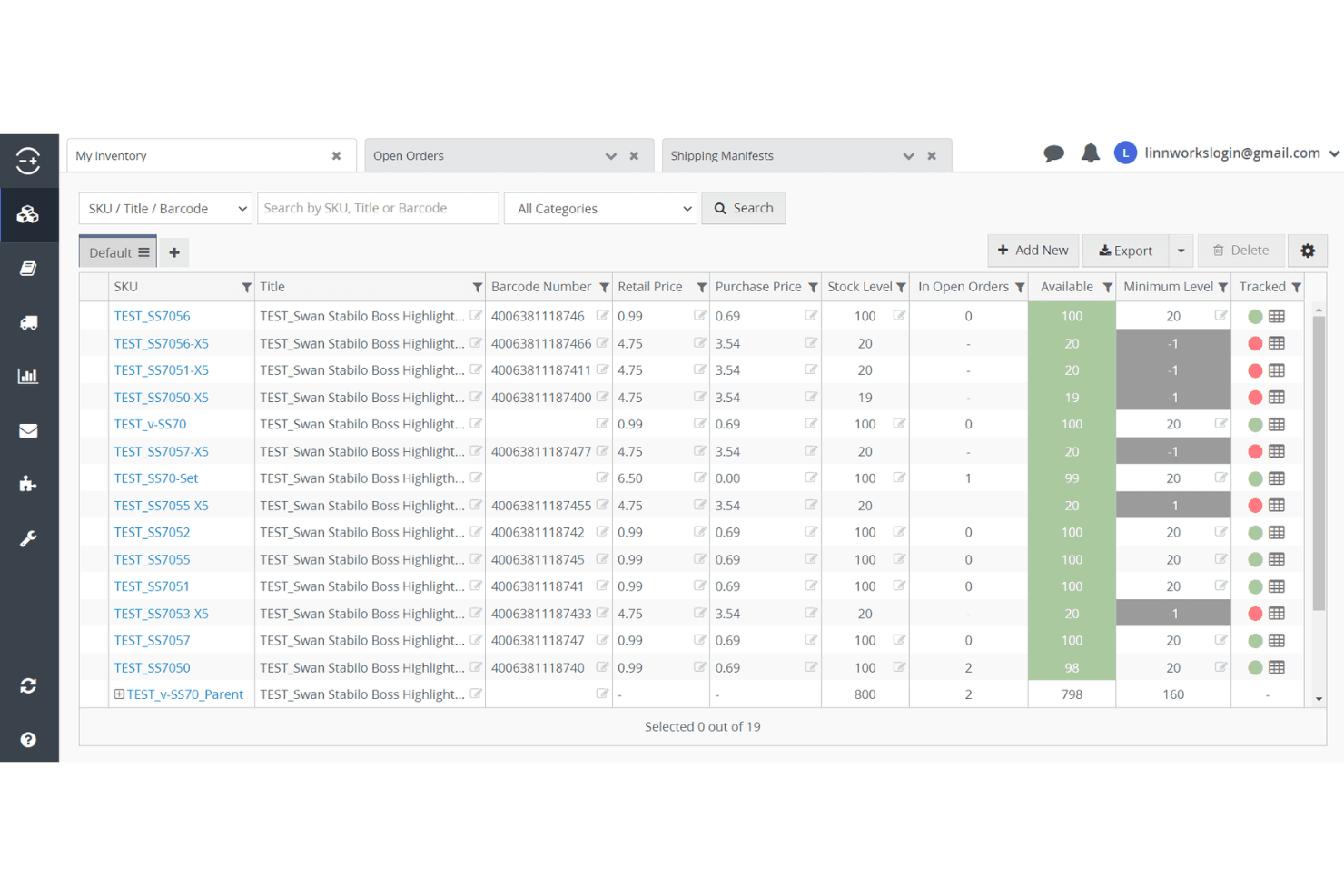
Linnworks lets users track stock levels and orders across all inventory items. Linnworks is a multi-channel inventory and order management platform that centralizes stock control, FBA workflows, inbound shipment management, and order routing across 100+ sales channels, including all global Amazon marketplaces.
Who Is Linnworks Best For?
Linnworks is a strong fit for multi-channel retailers and Amazon sellers who need to manage orders, inventory, and fulfillment across many sales channels from one place.
Why I Picked Linnworks
Linnworks earns its spot on my shortlist because no other platform I've tested matches its depth for centralized order and inventory control across this many channels. I'm particularly impressed by its dual Seller Central and Vendor Central SP-API coverage, which means sellers operating in both modes can manage FBA inbound shipments, hybrid FBA/FBM routing, and Vendor Central purchase orders from a single dashboard. The Rules Engine alone saves serious time by automating fulfillment routing across warehouses, 3PLs, and Amazon fulfillment centers without manual intervention.
Linnworks Key Features
- Amazon Multi-Channel Fulfillment (MCF) integration: Automatically submits non-Amazon orders to Amazon fulfillment centers, syncing inventory quantities and tracking information back to all connected sales channels.
- Rules Engine: Automates order routing across FBA, FBM, 3PL, and warehouse locations using unlimited configurable rules, without manual intervention.
- Kits and bundles management: Natively tracks component-level inventory deductions when a bundled product or kit is sold across any connected channel.
- SkuVault Core WMS: Adds barcode scanning, digital pick lists, cycle counting, and quality control workflows for warehouse operations that feed into FBA replenishment.
Linnworks Integrations
Linnworks advertises 200+ integrations, including Amazon, eBay, Walmart, Shopify, BigCommerce, TikTok Shop, Amazon MCF, QuickBooks Online, Conjura, and Inventory Planner. An open API supports custom integrations.
Pros and Cons
Pros:
- Central dashboard for all FBA workflows
- Real-time sync across 100+ sales channels
- Dual Amazon Seller and Vendor Central support
Cons:
- Cross-channel SKU mapping can be clunky
- ASIN profitability reporting requires add-ons
Learn more about Linnworks: Best for integrated FBA restock suggestions
- Free demo available
- From $129/month
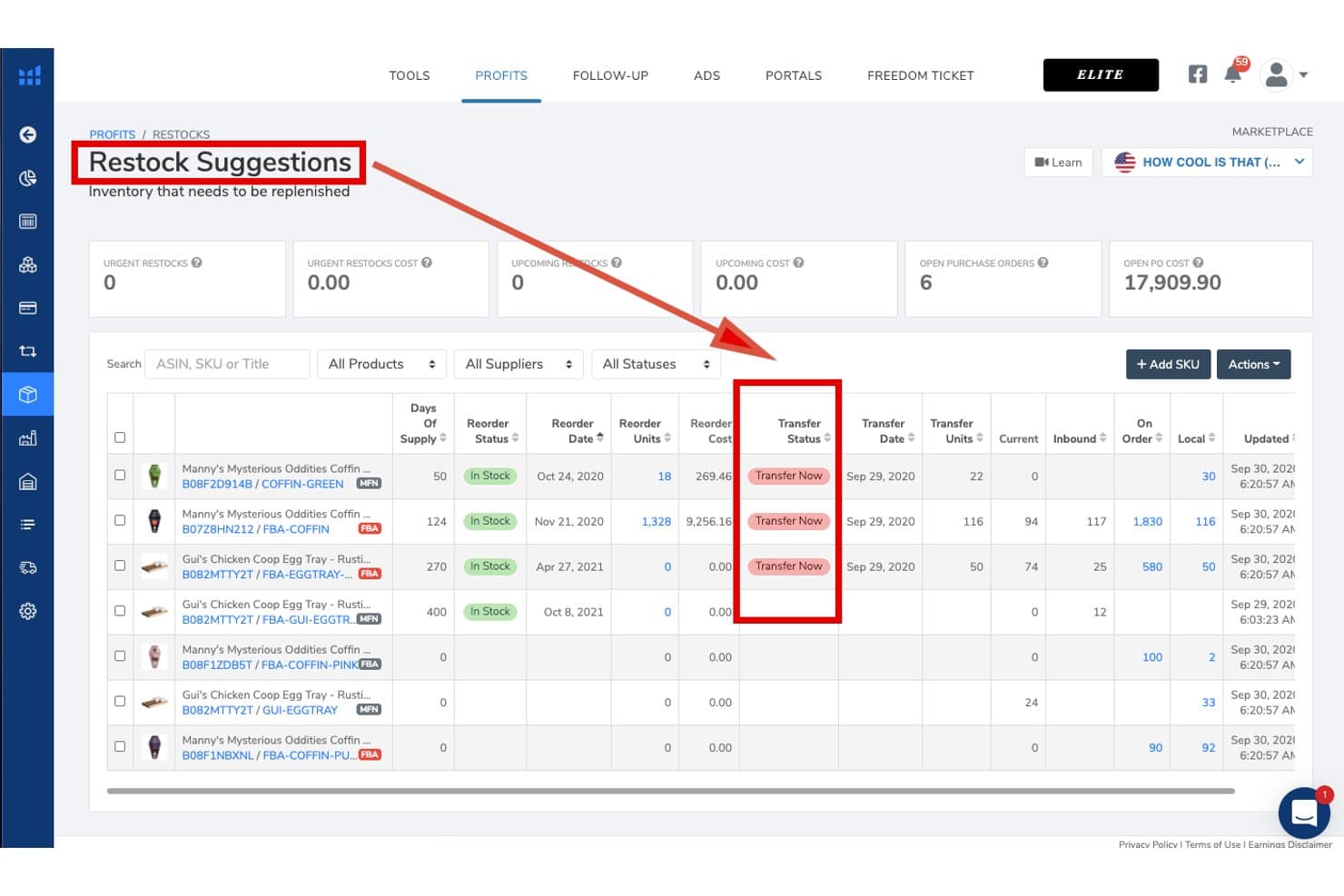
Helium 10 tracks restock needs and transfer status for Amazon inventory. Helium 10 is an Amazon seller platform that combines inventory management, demand forecasting, FBA restock suggestions, supplier and purchase order tracking, listing optimization, keyword research, and ASIN-level profit analytics in one suite.
Who Is Helium 10 Best For?
Helium 10 is a strong fit for Amazon FBA sellers who want restock suggestions, demand forecasting, and supplier management in the same platform they use for product research and listing optimization.
Why I Picked Helium 10
I picked Helium 10 as one of the best because its Restock Suggestions dashboard does something I genuinely find rare: it pulls Amazon sales velocity, lead times, seasonality, and growth curves into a single view, then lets you generate a purchase order in one click. The demand forecasting even handles stockout periods and low-data ASINs, so new product launches don't get skipped over. I also like that supplier details, inbound shipment tracking, and FBA restock signals all live in the same platform you're already using for listing optimization and keyword research.
Helium 10 Key Features
- Profits tool: Tracks real-time revenue, FBA fees, referral fees, ad spend, COGS, and returns at the ASIN level to surface per-product profitability.
- Managed Refund Service: Audits 18 months of FBA transactions to identify and recover reimbursements for lost, damaged, or miscredited inventory.
- Local Warehouse tab: Tracks off-Amazon stock held in your own facility and flags when transferring existing inventory to FBA is cheaper than placing a new supplier order.
- TikTok Shop inventory sync: Maps TikTok products to Amazon SKUs and uses a configurable safety stock threshold to prevent TikTok orders from depleting your FBA inventory.
Helium 10 Integrations
Helium 10 has native Amazon Seller Central integration and an indirect TikTok Shop connection through Amazon Multi-Channel Fulfillment (MCF). Walmart supports research and ads, but no native Shopify, eBay, WooCommerce, accounting, ERP, or 3PL integrations are documented.
Pros and Cons
Pros:
- Handles seasonality and stockout impacts in forecasting
- ASIN-level profit analytics with fee breakdowns
- Advanced Amazon FBA restock suggestions dashboard
Cons:
- No built-in dynamic Amazon repricing tool
- Inventory management is limited on lower plans
Learn more about Helium 10: Best for customizable forecasting workflows
- Free trial + free demo available
- From $175/month
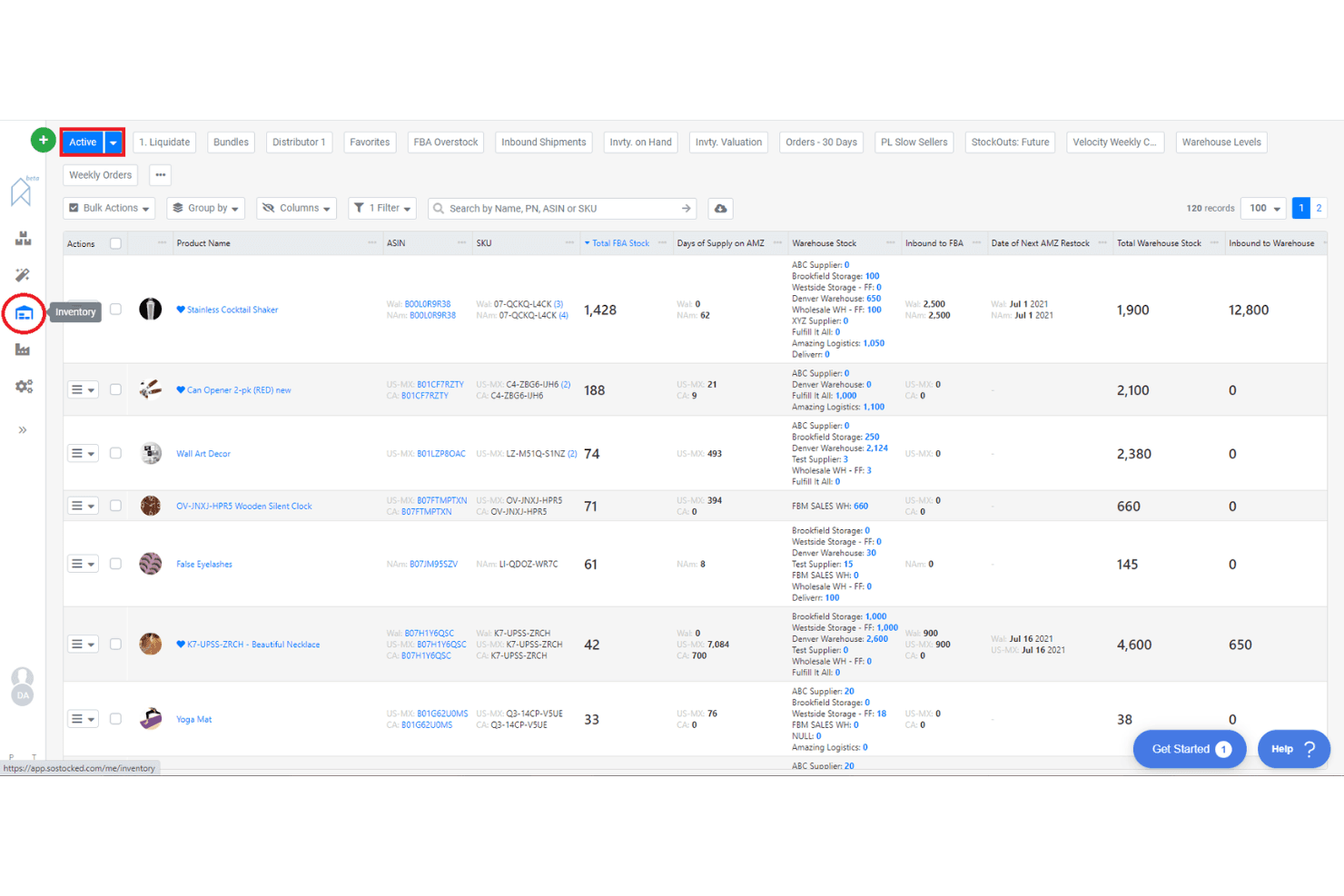
SoStocked lets users monitor inventory levels across multiple warehouses. SoStocked is an Amazon-native inventory management and forecasting platform that combines demand forecasting, purchase order tracking, replenishment alerts, FBA inventory monitoring, and ASIN-level profit analysis.
Who Is SoStocked Best For?
SoStocked is a strong fit for Amazon FBA private label sellers and wholesale brands that need transparent, editable forecasting logic across multiple global marketplaces.
Why I Picked SoStocked
SoStocked earns its spot on my shortlist because no other Amazon inventory tool gives you this level of control over your forecast math. I love that you can edit the underlying velocity calculations line by line, which matters when your sales history includes stockout periods that would otherwise skew your reorder points. The Combo Forecasting feature lets you layer Prime Day or BFCM demand spikes over a seasonal baseline and reuse those models year over year.
SoStocked Key Features
- Adjusted velocity calculation: Removes stockout-affected days from your sales history so your demand data reflects true velocity, not distorted dips.
- IPI restock limits integration: Pulls Amazon Inventory Performance Index restock limits daily and factors them directly into your replenishment and transfer schedules.
- ProfitFlow ASIN-level profit analysis: Forecasts sales, FBA fees, and costs at the individual ASIN level to surface margin leaks and underperforming listings.
- FBA size tier optimizer: Analyzes your product dimensions and packaging to flag resizing opportunities that reduce FBA fulfillment fees.
SoStocked Integrations
SoStocked integrates with Amazon Seller Central through SP-API across global marketplaces, plus Amazon AWD and MCF. It has no native Shopify, Walmart, eBay, WooCommerce, or 3PL integrations, but supports custom data workflows through its Marketplace Sales Conversion Tool.
Pros and Cons
Pros:
- IPI restock limits automatically factored in
- Combo Forecasting for seasonality and events
- Editable forecast formulas for precise control
Cons:
- Manual tracking required for 3PL inventory
- No built-in shipment creation workflow
Learn more about SoStocked:
Outro software de gestão de inventário da Amazon
Eis algumas opções adicionais de software de gestão de inventário da Amazon que não entraram na minha lista restrita, mas que ainda vale a pena conhecer:
- 11RestockProBest for FBA restocking and purchase order automation
- 12Jungle ScoutBest for sales-driven inventory planning
- 13VeeqoBest for high-volume multichannel sellers
- 14BrightpearlBest for integrated accounting workflows
- 15Zoho InventoryBest for automated reorder point management
- 16OrdoroBest for bundled product kitting features
- 17Cin7 CoreBest for built-in B2B portal integration
- 18Finale InventoryBest for barcode-based stock control
- 19LitCommerceBest for quick channel setup and migration
How I Evaluate Amazon Inventory Management Software
I split my evaluation into two layers: the baseline FBA and Seller Central capabilities a tool must have to qualify, and the differentiators that determine the right fit for your operation.
Core Functionality (Table Stakes For This List)
When I'm selecting tools for my list, I rank each one on a scale from 0 (does not offer the functionality) to 5 (excels in this area) for each core functionality listed below. Then, I calculate the tool's total score into a percentage. Each tool needs to achieve a minimum total score of 65% to be considered for inclusion.
- Amazon Seller Central Integration: I check whether a tool connects to Seller Central through a native API or relies on a third-party bridge, and whether it syncs orders, inventory, and listings across multiple Amazon marketplaces.
- FBA Inventory Tracking: A tool should show more than just on-hand quantity. I look for visibility into inbound, reserved, unfulfillable, and stranded units so sellers can catch issues before storage fees pile up.
- Demand Forecasting & Reorder Alerts: I evaluate whether reorder suggestions factor in real Amazon sales velocity, supplier lead times, and seasonal trends rather than relying on static thresholds you have to set manually.
- Multi-Channel Inventory Sync: For sellers listing on Shopify, Walmart, or eBay alongside Amazon, I look at how many channels sync in real time and whether the tool supports buffer stock or channel-specific allocation rules.
- SKU-Level Profitability & Cost Tracking: The best tools in this space break down margin per ASIN after referral fees, FBA fees, COGS, and returns. I evaluate how granular the cost inputs are and whether landed costs are supported.
- Purchase Order & Supplier Management: I look for PO creation tied to demand data, a supplier database, and tracking for inbound shipments to FBA or 3PL warehouses rather than standalone spreadsheet-style logging.
Once I have a list of tools that meet this criteria, I consider what sets each platform apart.
Differentiating Factors (What Sets Vendors Apart)
Here's how I compare and contrast different vendors:
Standout Features
IPI monitoring and restock limit tracking matter because a single rejected shipment can stall sales for weeks. I look for tools that flag when you're approaching capacity thresholds so you can adjust inbound plans. Bundle and kit management is another key area—sellers offering multipacks need component-level deductions that fire automatically at the point of sale. PPC integration adds real value here too, connecting ad spend to stock levels so you can pause campaigns on low-inventory ASINs rather than waste budget.
Beyond Features
Pricing transparency matters a lot in this space. I check whether plans scale by order volume or SKU count, and whether features like forecasting or PPC analytics are locked behind premium tiers. Ecosystem integrations also weigh heavily—your inventory tool needs to sync with QuickBooks or Xero for COGS reconciliation and connect to your 3PLs for inbound workflows. I also evaluate how a tool fits different seller types, since a solo FBA seller running a few hundred SKUs has very different needs than an aggregator managing dozens of brands across multiple fulfillment models.
Como escolher software de gestão de inventário da Amazon
É fácil ficar assoberbado com listas extensas de funcionalidades e estruturas de preços complexas. Para o ajudar a manter o foco enquanto percorre o seu processo específico de seleção de software, eis uma lista de verificação dos fatores a ter em conta:
| Fator | O que deve considerar |
|---|---|
| FatorEscalabilidade | O que deve considerarO software conseguirá gerir o seu volume de encomendas atual e previsto, os SKUs e os novos canais da Amazon? |
| FatorIntegrações | O que deve considerarPermite ligar-se nativamente às suas plataformas de comércio eletrónico, transportadoras e ferramentas de contabilidade? |
| FatorPersonalização | O que deve considerarPode adaptar os fluxos de trabalho, as permissões dos utilizadores e os relatórios aos seus processos empresariais? |
| FatorFacilidade de utilização | O que deve considerarA sua equipa conseguirá aprender a utilizar o sistema rapidamente, sem formação extensiva? |
| FatorImplementação e integração inicial | O que deve considerarQuanto tempo demorará a configuração e de que recursos ou apoio necessitará para começar a utilizar o sistema? |
| FatorCusto | O que deve considerarOs níveis de preços são claros e estão alinhados com a dimensão da sua empresa, o volume de encomendas e as funcionalidades de que necessita? |
| FatorMedidas de segurança | O que deve considerarO fornecedor oferece encriptação de dados, controlos de acesso dos utilizadores e atualizações de segurança regulares? |
| FatorDisponibilidade do apoio | O que deve considerarConsegue contactar o apoio durante o seu horário de funcionamento e existem acordos de nível de serviço para problemas urgentes? |
O que é o software de gestão de inventário da Amazon?
O software de gestão de inventário da Amazon é uma ferramenta digital que ajuda as empresas a acompanhar, organizar e controlar o stock dos seus produtos numa ou várias lojas Amazon. Estes sistemas automatizam as atualizações de inventário, gerem as encomendas e sincronizam os dados dos produtos para evitar vendas excessivas ou ruturas de stock. São essenciais para manter níveis de inventário precisos, apoiar as vendas em vários canais e simplificar os processos de expedição dos vendedores da Amazon.
Funcionalidades
Ao selecionar um software de gestão de inventário da Amazon, esteja atento às seguintes funcionalidades principais:
- Sincronização do inventário: Atualiza automaticamente os níveis de stock em todos os canais da Amazon para evitar vendas excessivas e ruturas de stock.
- Gestão de encomendas: Centraliza o processamento, o acompanhamento e a expedição de todas as vendas da Amazon num único painel.
- Listagem de produtos em massa: Permite carregar, editar e gerir várias listagens de produtos de uma só vez, poupando tempo nas atualizações do catálogo.
- Gestão de encomendas de compra: Acompanha as encomendas aos fornecedores, as entregas e os reabastecimentos para manter níveis de inventário ideais.
- Suporte para vários canais: Gere o inventário e as encomendas na Amazon e noutros canais de vendas a partir de uma única plataforma.
- Alertas de stock: Notifica-o quando o inventário desce abaixo dos limites definidos, para que possa efetuar uma nova encomenda antes de ficar sem stock.
- Geração de etiquetas de expedição: Cria etiquetas de expedição para várias transportadoras diretamente no software, acelerando o processamento das encomendas.
- Relatórios e análises: Fornece relatórios detalhados sobre o inventário, as vendas e as tendências das encomendas para apoiar decisões baseadas em dados.
- Permissões de utilizador: Permitem controlar os níveis de acesso dos diferentes membros da equipa, garantindo operações seguras e organizadas.
- Registos de auditoria: Mantêm registos de todas as alterações ao inventário e ações dos utilizadores, garantindo transparência e conformidade.
Vantagens
A implementação de um software de gestão de inventário da Amazon proporciona várias vantagens à sua equipa e à sua empresa. Eis algumas das vantagens que pode esperar:
- Acompanhamento preciso do stock: A sincronização do inventário em tempo real entre os canais da Amazon ajuda a evitar vendas excessivas e ruturas de stock.
- Processamento centralizado de encomendas: Gerir todas as encomendas da Amazon num único painel reduz o trabalho manual e os erros.
- Expedição mais rápida: A geração integrada de etiquetas de expedição e o encaminhamento de encomendas aceleram o processo de expedição.
- Relatórios melhorados: As análises detalhadas e os registos de auditoria apoiam previsões mais precisas e a conformidade.
- Eficiência em vários canais: Gerir o inventário da Amazon e de outros canais de vendas a partir de uma única plataforma poupa tempo e reduz a complexidade.
- Controlo proativo do inventário: Os alertas automáticos de stock e a gestão de encomendas de compra ajudam-no a efetuar uma nova encomenda antes de ficar sem stock.
- Melhor colaboração da equipa: As permissões de utilizador e os registos de atividade mantêm as operações organizadas e seguras para equipas de qualquer dimensão.
Custos e preços
A seleção de um software de gestão de inventário da Amazon exige uma compreensão dos vários modelos de preços e planos disponíveis. Os custos variam consoante as funcionalidades, a dimensão da equipa, os complementos e outros fatores. A tabela abaixo resume os planos mais comuns, os respetivos preços médios e as funcionalidades normalmente incluídas nas soluções de software de gestão de inventário da Amazon:
Tabela de comparação de planos para software de gestão de inventário da Amazon
| Tipo de plano | Preço médio | Funcionalidades comuns |
|---|---|---|
| Tipo de planoPlano gratuito | Preço médio$0 | Funcionalidades comunsAcompanhamento básico do inventário, gestão limitada de encomendas, suporte para um único canal e relatórios básicos. |
| Tipo de planoPlano pessoal | Preço médio$30-$60/mês | Funcionalidades comunsSincronização do inventário em vários canais, gestão de encomendas, alertas de stock reduzido e ferramentas básicas de expedição. |
| Tipo de planoPlano empresarial | Preço médio$100-$300/mês | Funcionalidades comunsListagem de produtos em massa, gestão de encomendas de compra, relatórios avançados, permissões de utilizador e integrações. |
| Tipo de planoPlano empresarial de grande dimensão | Preço médio$500-$2000/mês | Funcionalidades comunsFluxos de trabalho personalizados, acesso à API, suporte dedicado, análises avançadas e gestão de várias localizações. |
Related Reviews
Perguntas frequentes sobre software de gestão de inventário da Amazon
Eis algumas respostas a perguntas comuns sobre software de gestão de inventário da Amazon:
O software de gestão de inventário da Amazon consegue processar encomendas FBA e FBM?
Sim, a maioria dos softwares de gestão de inventário da Amazon consegue gerir encomendas de Expedição pela Amazon (FBA) e de Expedição pelo vendedor (FBM). Isto permite-lhe acompanhar o inventário, processar encomendas e sincronizar os níveis de stock em ambos os métodos de expedição a partir de um único painel de controlo.
Como funciona a sincronização do inventário com vários marketplaces da Amazon?
A sincronização do inventário atualiza automaticamente os níveis de stock em todos os marketplaces da Amazon ligados quando ocorre uma venda. Isto evita vendas excessivas e garante contagens de inventário precisas, mesmo que venda simultaneamente na Amazon dos EUA, do Reino Unido ou noutros sites regionais.
Que integrações devo procurar num software de gestão de inventário da Amazon?
Procure integrações com as suas plataformas de comércio eletrónico, transportadoras, ferramentas de contabilidade e fornecedores de serviços logísticos externos. Estas ligações ajudam a automatizar fluxos de trabalho, reduzir a introdução manual de dados e manter os sistemas da sua empresa sincronizados.
É difícil migrar para um novo software de gestão de inventário da Amazon?
A migração pode ser simples se o software disponibilizar ferramentas de importação, assistentes de configuração e apoio à integração. Verifique os recursos de formação disponíveis, as opções de importação de dados e o apoio ao cliente para ajudar a sua equipa a fazer uma transição tranquila.
Como funcionam os alertas de stock no software de gestão de inventário da Amazon?
Os alertas de stock notificam-no quando os níveis de inventário descem abaixo de um limite definido. Pode definir pontos de alerta personalizados para cada produto, para saber quando é altura de fazer uma nova encomenda e evitar ficar sem stock.