

As melhores ferramentas de automatização do comércio eletrónico centralizam a gestão de inventário, o processamento de encomendas, a automatização do marketing e os fluxos de trabalho do apoio ao cliente—para que possa sincronizar os níveis de stock em tempo real no Shopify, BigCommerce, WooCommerce e Amazon, acionar acompanhamentos automáticos por e-mail e SMS e encaminhar encomendas sem erros.
Quando as importações de CSV falham perante grandes volumes de SKUs, os e-mails de acompanhamento atrasados inundam a sua fila de apoio e a segmentação manual compromete a recuperação de carrinhos abandonados, precisa de soluções que automatizem tarefas repetitivas.
Com mais de uma década de experiência em operações de retalho—desde controlador de inventário e gestor de armazém até responsável de vendas internacionais e expedição—compilei algumas das principais ferramentas de automatização do comércio eletrónico.
Este guia destaca as plataformas que simplificam os fluxos de trabalho, otimizam o processamento de encomendas e aumentam as taxas de conversão desde o primeiro dia.
Why Trust Our Software Recommendations
6,700+
Reviews
20
Industry experts
16+
Evaluation factors
14
Years
Our team has been testing and reviewing software since 2012. As retail leaders ourselves, we know how difficult—and important—it is to choose the right software.
For this guide, we evaluated tools using hands-on testing and independent research, scoring tools using our selection criteria.
Our reviews reflect our independent judgment—not a sales pitch.
Tabela comparativa: ferramentas de automatização do comércio eletrónico
Esta tabela comparativa apresenta os preços, os detalhes dos períodos de avaliação e o caso de utilização para o qual cada ferramenta é mais indicada.
| Tool | Best For | Trial Info | Price | ||
|---|---|---|---|---|---|
| 1 | Best for ERP-anchored order-to-cash automation | 30-day free trial available | Pricing upon request | Website | |
| 2 | Best for app integrations | Free plan available; 14-day free trial | From $19.99/month (billed annually) | Website | |
| 3 | Best for price monitoring | 14-day free trial | From $99/month | Website | |
| 4 | Best for task automation | Free plan available | From $25/month | Website | |
| 5 | Best for small businesses | Free plan + demo available | Pricing upon request | Website | |
| 6 | Best for user analytics | Free plan available | From $120/month (billed annually) | Website | |
| 7 | Best for social media scheduling | Free plan available | From $5/month per channel (billed annually) | Website | |
| 8 | Best for customer journeys | Free plan available | Pricing upon request | Website | |
| 9 | Best for marketing automation | Free demo available | Pricing upon request | Website | |
| 10 | Best for small business CRM | Free trial + free demo available | From $299/month | Website |


As 10 melhores ferramentas de automatização do comércio eletrónico, analisadas
Cada análise de uma ferramenta de automatização do comércio eletrónico oferece informações práticas sobre funcionalidades, integrações, preços e vantagens e desvantagens no mundo real—para que saiba exatamente o que esperar.
 Best for ERP-anchored order-to-cash automation
- 30-day free trial available
- Pricing upon request
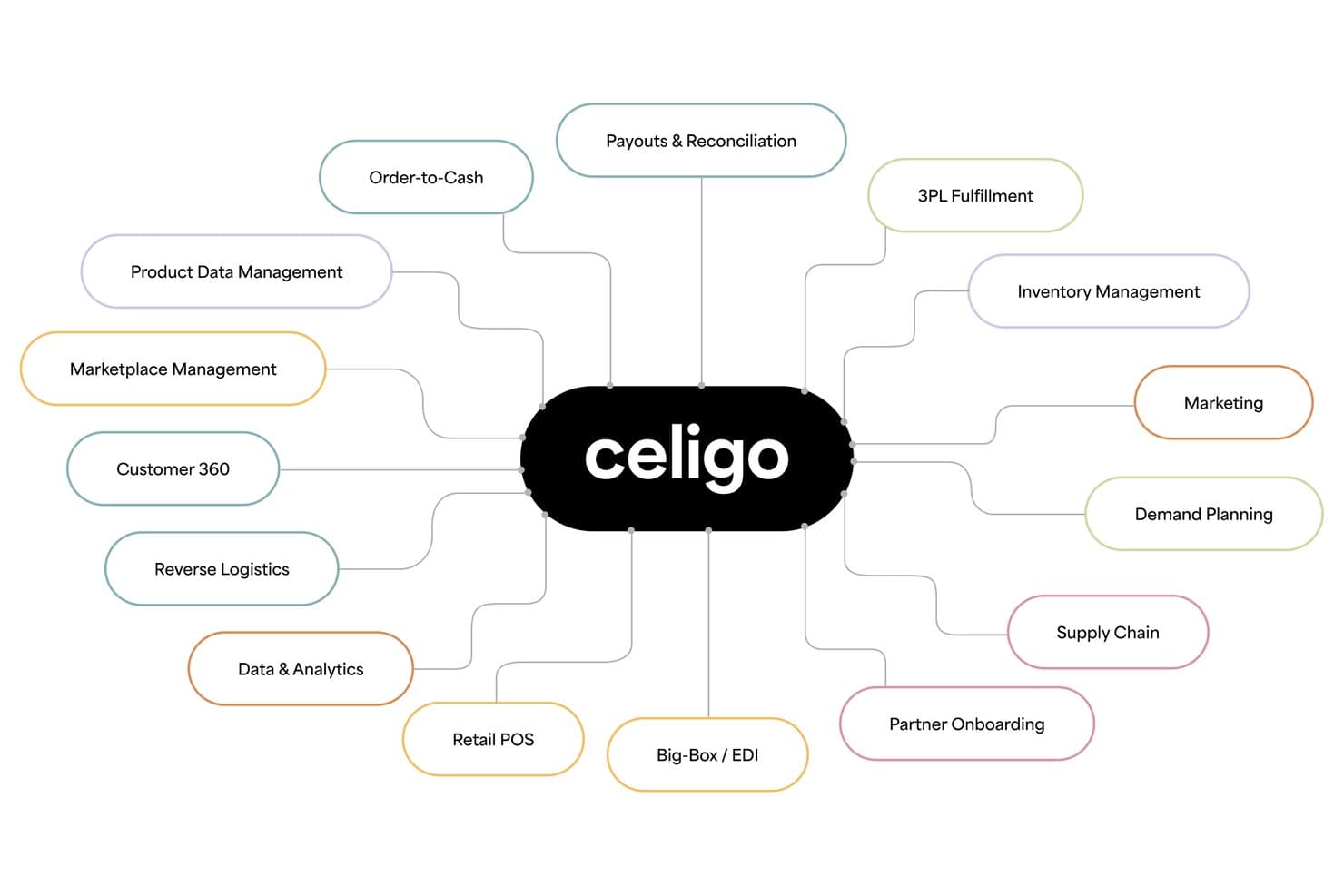
Celigo covers every ecommerce process from supply chain to payouts. Celigo is an iPaaS-based ecommerce automation platform that connects storefronts, marketplaces, ERPs, 3PLs, and marketing tools through prebuilt Integration Apps, AI-powered flow automation, and a 1,000+ connector marketplace to orchestrate order, inventory, and fulfillment workflows across channels.
Who Is Celigo Best For?
Celigo is a strong fit for mid-market and enterprise ecommerce brands running NetSuite or another ERP as their operational backbone and needing to connect it reliably to Shopify, Amazon, or wholesale channels.
Why I Picked Celigo
Celigo earns its spot on my shortlist because it handles the full order-to-cash cycle better than any other iPaaS I've evaluated, especially for brands running NetSuite as their operational core. I'm particularly impressed by its prebuilt Integration Apps for Shopify and NetSuite, which cover orders, inventory, payments, and reconciliation without requiring custom builds. Its AI exception management resolves 95% of errors automatically, and purpose-built agents like the Oversell Check Agent and Amazon Settlement Reconciliation Agent solve real operational problems I've seen trip up high-volume ecommerce teams.
Celigo Key Features
- B2B Manager for EDI: Manage EDI trading partner connections, purchase orders, ASNs, and invoices alongside DTC workflows from a single platform.
- Ora Copilot: An AI assistant embedded in the flow builder that suggests workflows and helps troubleshoot errors during automation design.
- Agent Builder: A low-code environment for creating autonomous AI agents with multi-step logic, multi-system orchestration, and built-in audit trails.
- Flat-rate pricing model: Costs are based on endpoints and flows rather than transaction volume, so peak-season order surges don't drive up your bill.
Celigo Integrations
Celigo provides native integrations with Shopify, NetSuite, Amazon, Walmart, BigCommerce, Salesforce, HubSpot, Snowflake, Stripe, and ShipStation, plus 1,000+ marketplace connectors. Custom connections support HTTP, FTP, JDBC, AS2, GraphQL, and webhooks.
Pros and Cons
Pros:
- Flat-rate pricing for high-volume order peaks
- Prebuilt AI agents for commerce operations
- Handles ERP and ecommerce automation at scale
Cons:
- Complex platform for non-technical ecommerce teams
- No built-in marketing campaign execution
Learn more about Celigo: Best for app integrations
- Free plan available; 14-day free trial
- From $19.99/month (billed annually)
Visit WebsiteCustomer Rating:4.7/5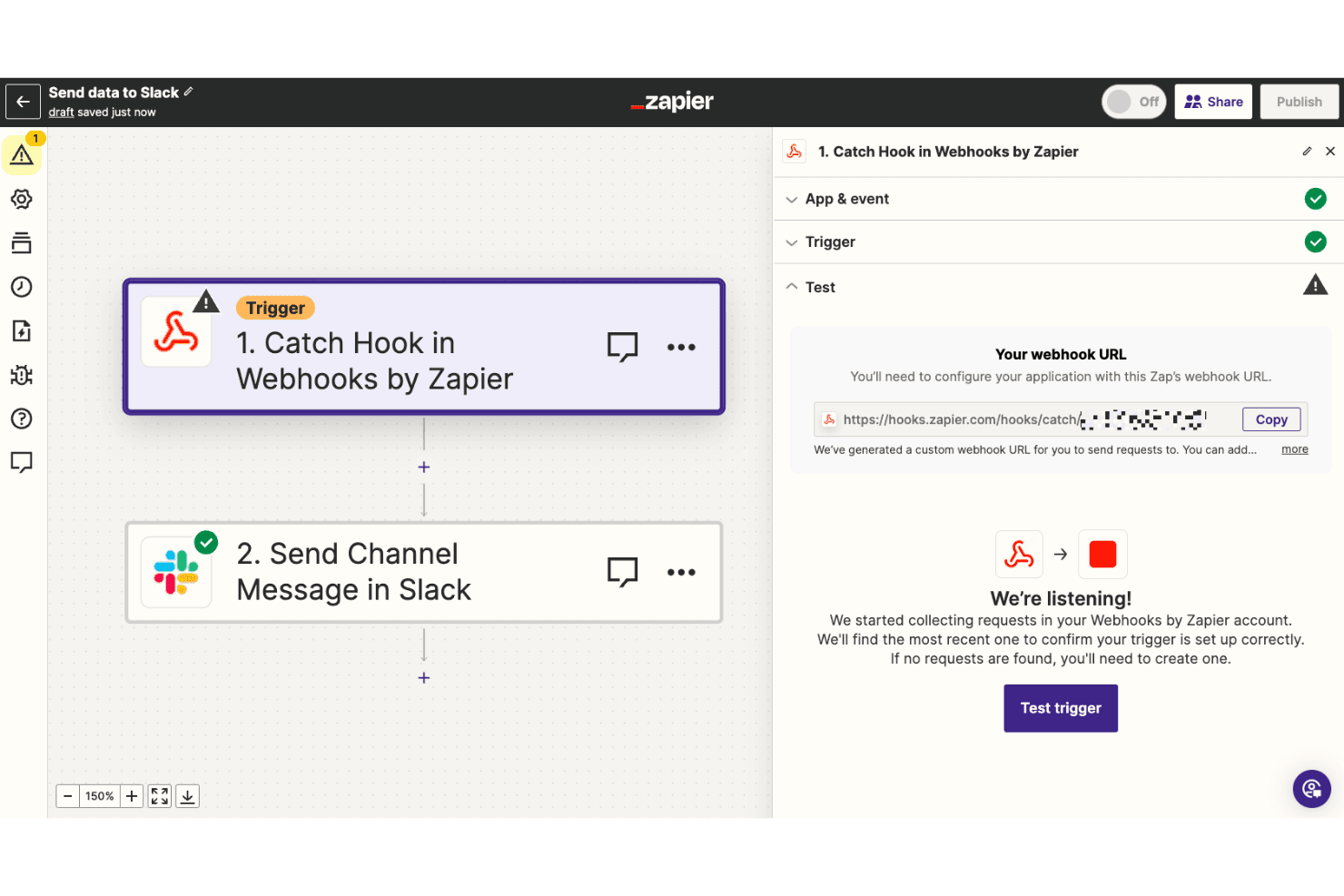
Webhooks connect Zapier with unsupported apps for automation. Zapier is a no-code workflow automation platform that connects 9,000+ apps through a trigger-and-action builder, letting ecommerce teams automate order routing, fulfillment hand-offs, inventory alerts, and customer marketing flows across tools like Shopify, WooCommerce, and BigCommerce.
Who Is Zapier Best For?
Zapier is a strong fit for DTC brands and ecommerce operations teams that need to connect their existing tool stack without writing code.
Why I Picked Zapier
Zapier earns its spot on my shortlist because no other tool comes close to its 9,000+ app ecosystem, which is why I think of it as the connective tissue of any ecommerce stack. I've used Zapier's Paths feature to build conditional order routing logic, like sending high-value Shopify orders to a priority fulfillment queue while flagging fraudulent ones in Slack, all without touching code. Copilot's natural-language builder makes spinning up these workflows fast, even for ops teams without a developer on hand.
Zapier Key Features
- Prebuilt Zap templates: A library of ready-made ecommerce workflows covers common use cases like syncing Shopify orders to Google Sheets, sending abandoned cart emails, and building Google Ads customer lists.
- Delay steps: Built-in delay actions let you stage order hand-offs, holding a fulfillment trigger until a condition window passes.
- AI by Zapier action step: Calls GPT-4 or Claude mid-workflow for tasks like order classification, customer tagging, and product description generation—no API key required.
- Webhooks by Zapier: Catch or send webhooks to connect any app or internal system not covered by a native integration.
Zapier Integrations
Zapier connects to 9,000+ apps, including Shopify, WooCommerce, BigCommerce, Square, eBay, ShipStation, Shippo, Klaviyo, Zoho Inventory, and QuickBooks Online. Webhooks, Code by Zapier, and API Request support custom integrations.
Pros and Cons
Pros:
- Extensive template library for ecommerce workflows
- Copilot AI quickly builds non-technical automations
- Connects over 9,000 business and ecommerce apps
Cons:
- Real-time inventory sync requires a separate tool
- No centralized rule engine for all channels

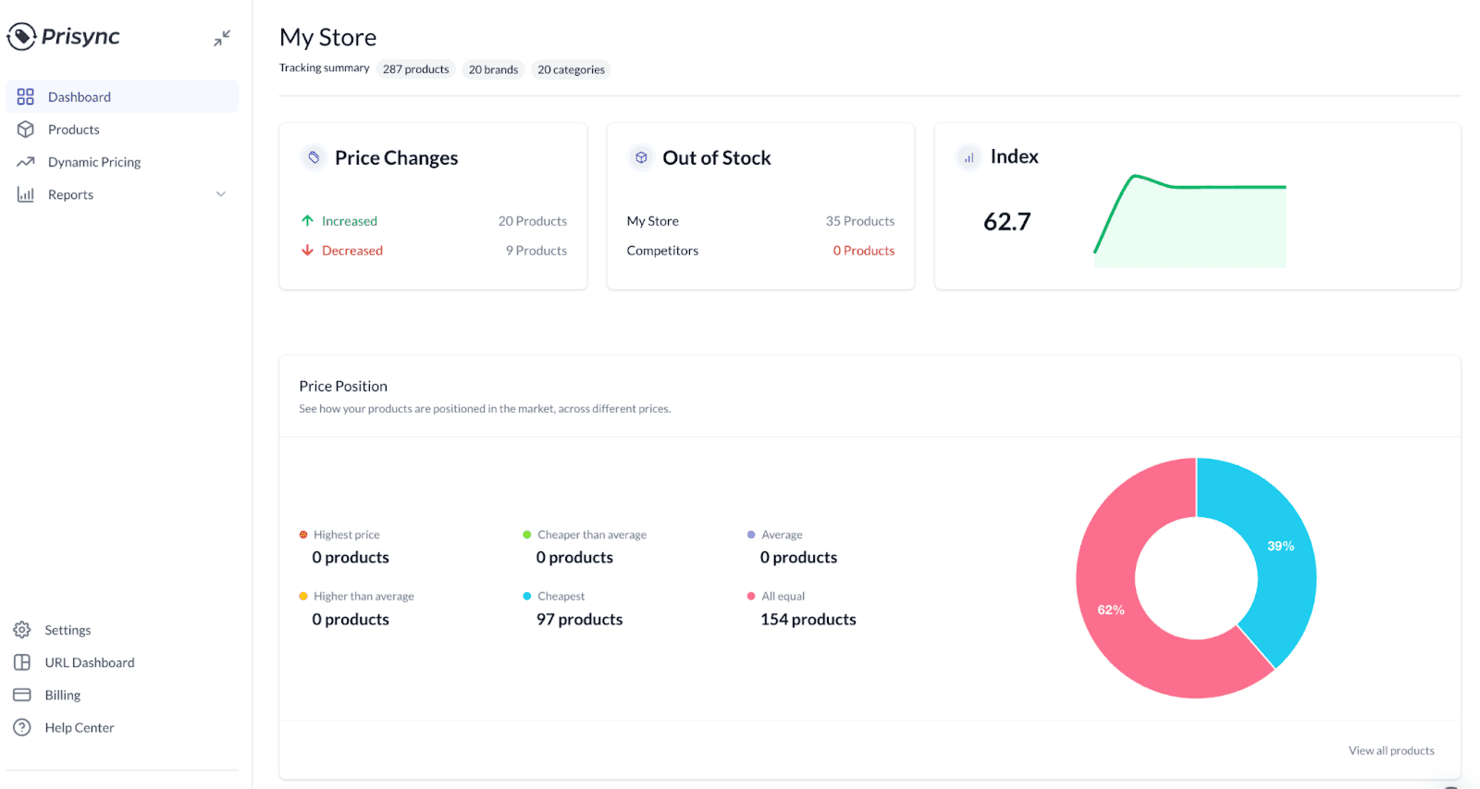
Prisync helps businesses track competitor prices and manage pricing. Prisync is a competitor price monitoring and dynamic repricing tool that tracks rival prices across unlimited URLs and sales channels, monitors stock availability, and automatically adjusts your store's prices based on configurable pricing rules.
Who Is Prisync Best For?
Prisync is a strong fit for online merchandising managers and ecommerce retailers who need to track competitor prices and automate repricing decisions across multiple channels.
Why I Picked Prisync
Prisync earns its spot on my shortlist as the best option for price monitoring because it tracks competitor prices across unlimited URLs and sales channels up to three times per day, covering product variants, stock availability, and worldwide currencies from a single dashboard. I particularly like the dynamic pricing engine, which fires off automatic price adjustments based on rules you define, like beating a competitor's price by a set percentage while protecting a margin floor, without any manual intervention.
Prisync Key Features
- Stock availability monitoring: Tracks whether competitor products are in or out of stock alongside their pricing data, so you can adjust your strategy based on supply signals.
- Product variant price tracking: Monitors prices at the variant level (e.g., size, color) rather than just the parent product, giving you a more accurate competitive picture.
- MAP monitoring: Detects when resellers list your products below the minimum advertised price, available on the Platinum plan.
- Price history analytics: Surfaces historical competitor pricing trends and category performance reports to support longer-term merchandising decisions.
Prisync Integrations
Prisync has five documented integrations: Shopify, Magento 1, Magento 2, Google Shopping, and Amazon. WooCommerce, BigCommerce, and other platforms can connect through its REST API for custom integrations.
Pros and Cons
Pros:
- Reliable customer support with proactive onboarding
- Automated repricing based on custom rules
- Tracks unlimited competitor prices and stock
Cons:
- Workflow automation limited to pricing logic only
- No order, inventory, or fulfillment automation
Learn more about Prisync:
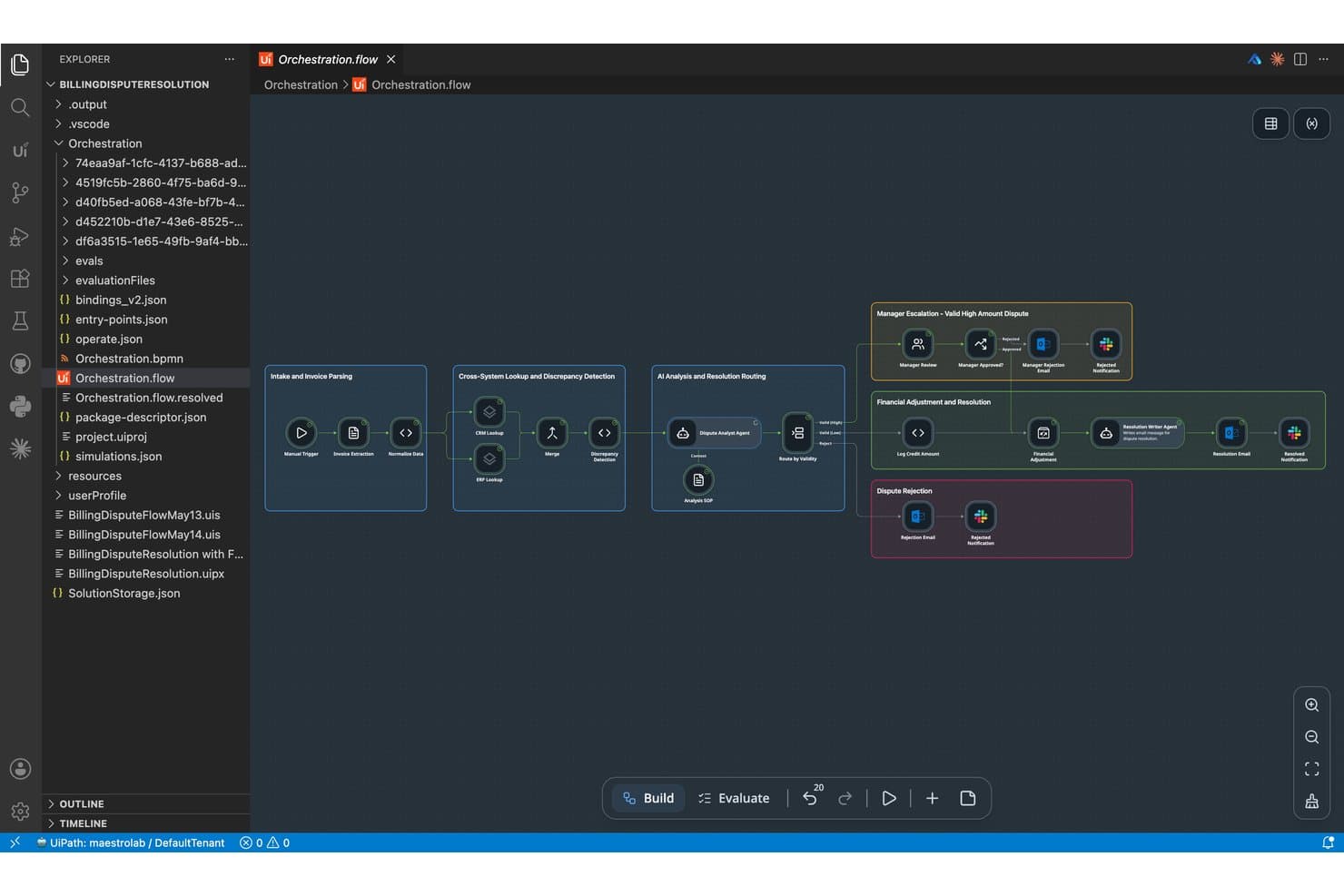
UiPath lets users build AI agent orchestration flows visually. UiPath is an enterprise RPA and agentic automation platform that combines a visual workflow builder, AI-powered document processing, and multi-system orchestration to automate back-office and operational tasks across retail and ecommerce environments.
Who Is UiPath Best For?
UiPath is a strong fit for enterprise retail and operations teams that have developer resources and need to automate complex, multi-system back-office workflows at scale.
Why I Picked UiPath
UiPath earns its spot on my list because its Maestro orchestration engine handles the kind of multi-system, back-office task automation that purpose-built ecommerce tools can't touch. I'm particularly impressed by its Document Understanding capability, which uses AI-powered OCR to extract and process invoices, purchase orders, and shipping documents automatically. In production, that's meant retailers like Landmark Group cutting invoice processing from 90 minutes to 5 minutes per invoice.
UiPath Key Features
- Maestro orchestration engine: Coordinates workflows across AI agents, robots, and human workers within a single, centralized process management layer.
- UiPath Studio and StudioX: A visual, low-code workflow builder with drag-and-drop sequencing, branching logic, error handling, and custom code support (VB.NET, C#).
- Process mining: Analyzes your existing business processes to surface automation opportunities and identify workflow inefficiencies before you build.
- Role-based access control (RBAC): Manages permissions across teams and automation folders in Orchestrator, with full audit logging for governance and compliance.
UiPath Integrations
UiPath offers 136+ prebuilt Integration Service connectors, including Shopify (Preview), WooCommerce, Oracle NetSuite, SAP, Klaviyo, Mailchimp, Stripe, and PayPal. Connector Builder and REST API support enable custom integrations for platforms without dedicated connectors.
Pros and Cons
Pros:
- Offers production-proven orchestration for large retailers
- Enables AI-driven demand and pricing workflows
- Handles complex, multi-system automation at scale
Cons:
- Requires developer resources for custom workflows
- Lacks native ecommerce marketing automation modules
Learn more about UiPath: Best for small businesses
- Free plan + demo available
- Pricing upon request
Visit WebsiteCustomer Rating:4.6/5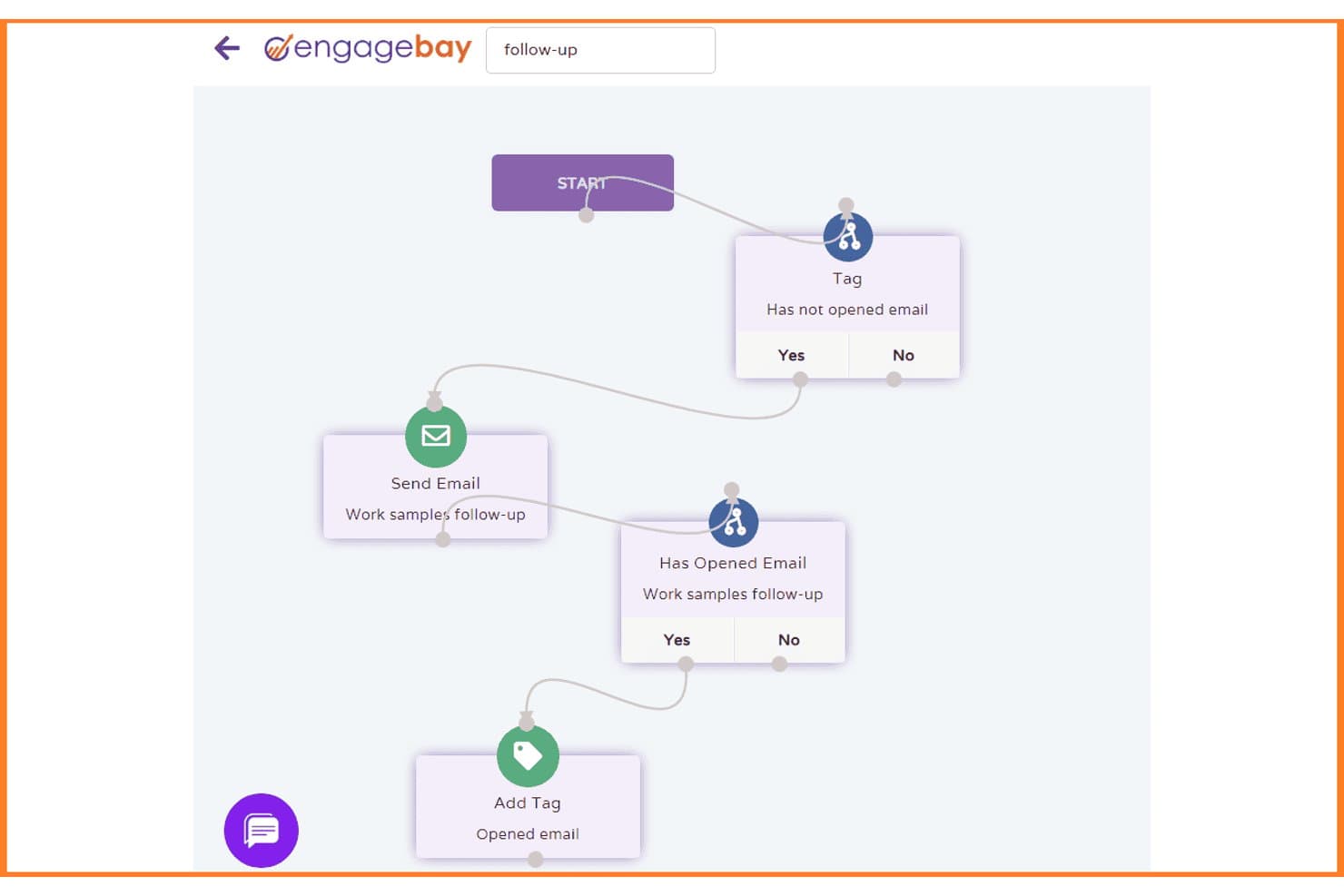
EngageBay automates follow-up emails with conditional branching workflows. EngageBay is an all-in-one CRM and marketing automation platform that combines email marketing, abandoned cart recovery, behavioral segmentation, sales pipeline management, and helpdesk into a single tool.
Who Is EngageBay Best For?
EngageBay is a practical pick for small DTC teams that need CRM, email marketing automation, and customer support in one place without paying enterprise-level prices.
Why I Picked EngageBay
I've included EngageBay in my top picks because it packs CRM, email marketing automation, and helpdesk into one platform at a price small DTC teams can actually afford. I particularly like its pre-built abandoned cart and post-purchase workflows, which trigger across email and SMS based on real Shopify events like cart abandonment and purchase history. Behavioral segmentation using smart lists lets you target customers by what they actually did, not just who they are.
EngageBay Key Features
- Lead scoring: Automatically assigns scores to contacts based on behavioral signals like email opens, link clicks, and site visits.
- Smart list segmentation: Dynamically groups contacts using filters based on tags, custom fields, and activity history.
- Helpdesk ticket automation: Routes, prioritizes, and updates support tickets using rule-based triggers and macros.
- Multi-channel broadcasting: Sends coordinated campaigns across email, SMS, and push notifications from a single workflow.
EngageBay Integrations
EngageBay offers 30+ native integrations, including Shopify, BigCommerce, Xero, Stripe, Gmail, and Slack. It also supports Zapier.
Pros and Cons
Pros:
- Shopify events enable rich behavioral segmentation
- Pre-built ecommerce workflows save setup time
- Combines crm, marketing, and helpdesk in one
Cons:
- Only basic analytics and reporting included
- No native order or inventory automation
Learn more about EngageBay: Best for user analytics
- Free plan available
- From $120/month (billed annually)
Visit WebsiteCustomer Rating:4.5/5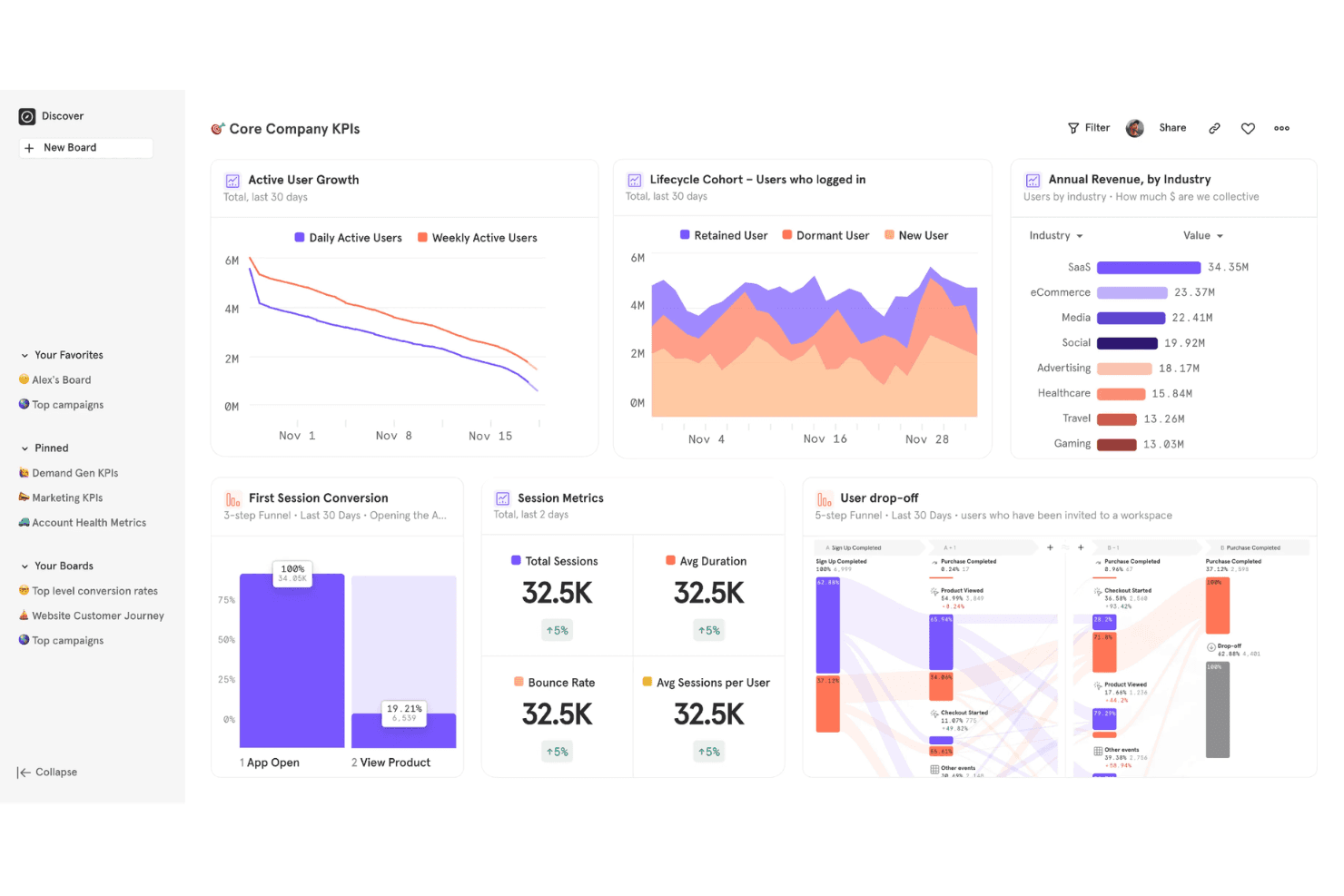
Mixpanel offers a Core Company KPIs dashboard featuring active user growth, lifecycle cohort analysis, annual revenue by industry, session metrics, and user drop-off funnels. Mixpanel is an event-based behavioral analytics platform that tracks user actions across ecommerce storefronts, surfaces funnel drop-off, cohort retention, cart analysis, and A/B testing insights.
Who Is Mixpanel Best For?
Mixpanel suits ecommerce and DTC teams who want to understand why shoppers drop off, which cohorts retain, and how product changes affect revenue—without needing a dedicated data analyst.
Why I Picked Mixpanel
Mixpanel earns its spot on my list because user analytics is where most ecommerce automation decisions should start. I love how the Cart Analysis feature lets you interrogate cart contents at every stage of the purchase journey, so you can see exactly which product categories stall at checkout. The AI Agent continuously monitors your store data and flags anomalies like a sudden drop in repeat buyer rate before you'd catch it manually, and cohort retention reports show precisely when customers lapse so you can time win-back triggers with real precision.
Mixpanel Key Features
- Funnel drop-off analysis: Multi-step funnel reports that pinpoint exactly where shoppers exit the checkout flow, filterable by device type, acquisition channel, or geography.
- Cohort retention reports: Tracks repeat purchase behavior over time, segmenting customers by acquisition source or campaign to measure time-to-second-purchase.
- Behavioral cohort syncing: Exports defined audience segments—like lapsed buyers or VIP spenders—to connected marketing platforms such as Braze or Customer.io to trigger downstream campaigns.
- Ecommerce benchmarking: Compares your store's key metrics against data from 423 billion ecommerce events globally to contextualize performance.
Mixpanel Integrations
Mixpanel offers documented integrations with Braze, MoEngage, Customer.io, Segment, Census, Workato, and Monkedo, plus a Shopify marketplace integration via Vendo. It also provides APIs and third-party connectors, including Zapier, for custom data and workflow connections.
Pros and Cons
Pros:
- Cart analysis pinpoints revenue drop-off stages
- AI surfaces anomalies in shopper behavior
- Deep behavioral analytics for ecommerce teams
Cons:
- Cannot sync or update inventory or orders
- Lacks operational workflow automation features
 Best for social media scheduling
- Free plan available
- From $5/month per channel (billed annually)
Visit WebsiteCustomer Rating:4.4/5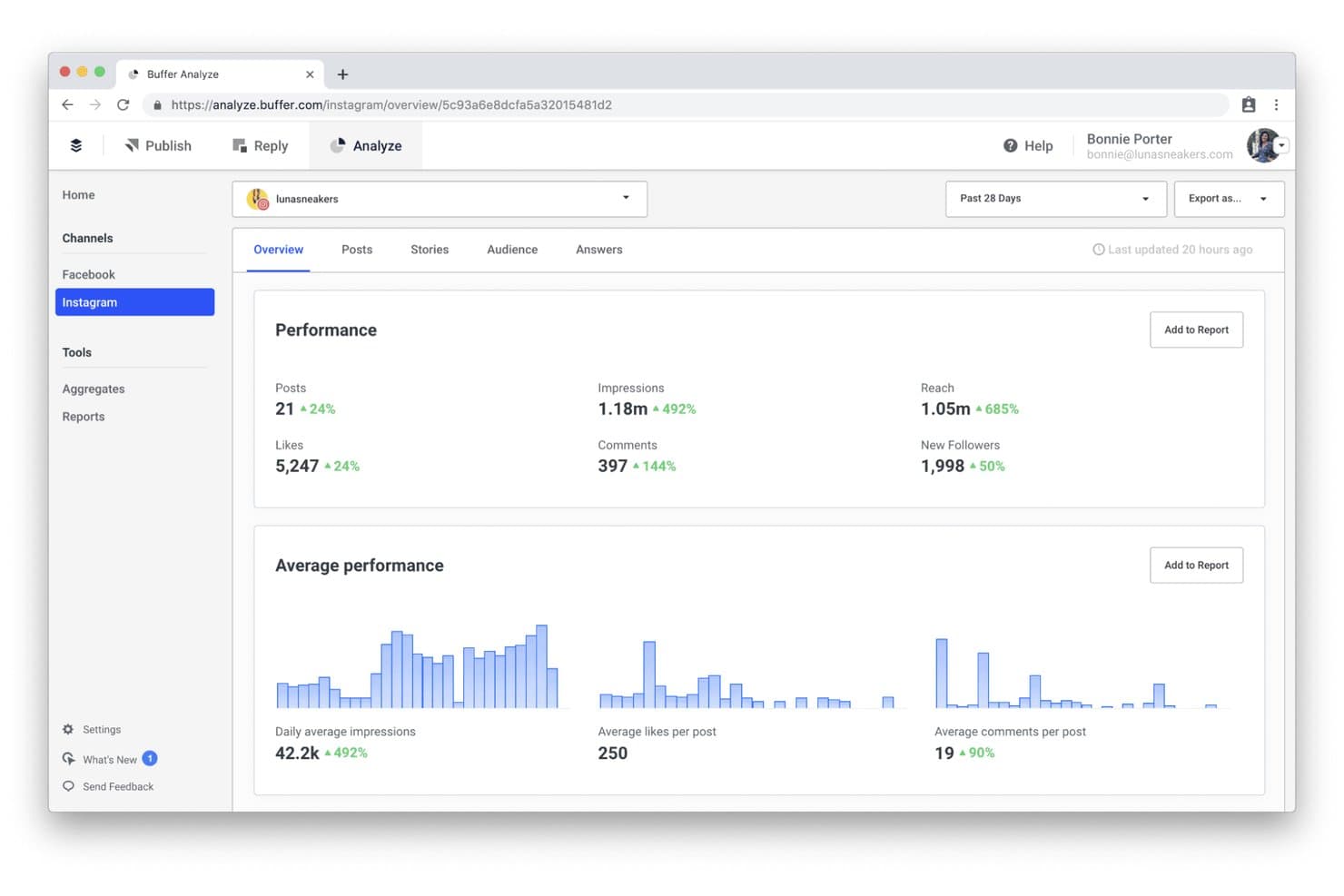
Buffer tracks Instagram performance metrics like reach, impressions, and follower growth. Buffer is a social media scheduling and management platform that lets you plan, publish, and analyze content across 11 social channels, including Instagram, TikTok, Pinterest, LinkedIn, and Threads.
Who Is Buffer Best For?
Buffer suits small DTC brands and solo marketers who want a low-cost, easy way to plan and schedule promotional content across social channels.
Why I Picked Buffer
I picked Buffer as one of the best because it takes the manual grind out of social media scheduling for ecommerce brands running content across multiple platforms. I love how the content queue lets you plan product launch posts, seasonal promotions, and back-in-stock announcements across 11 channels at once, with per-channel copy customization so each post fits its platform. The AI Assistant also speeds up content creation by drafting captions directly from a product brief.
Buffer Key Features
- Content calendar: A visual calendar that lets you map social posts around product launches, promotions, and seasonal campaigns across all connected channels.
- Per-channel copy customization: Lets you tailor post copy, hashtags, and formatting for each social platform from a single scheduling workflow.
- Start Page bio link: A built-in link-in-bio landing page you can use to direct social traffic to specific product pages or promotional URLs.
- Team content approval workflows: A review and approval system that lets team members submit posts for sign-off before they go live.
Buffer Integrations
Buffer doesn’t have native integrations with ecommerce platforms; its documented integrations include Canva, WordPress, Make, and Zapier. A public REST API supports custom connections.
Pros and Cons
Pros:
- AI Assistant drafts social captions from product info
- Helps marketing teams collaborate on content calendar
- Easily schedule posts across 11 social channels
Cons:
- Cannot sync inventory or trigger marketing actions
- No ecommerce automation or order workflows
Learn more about Buffer:
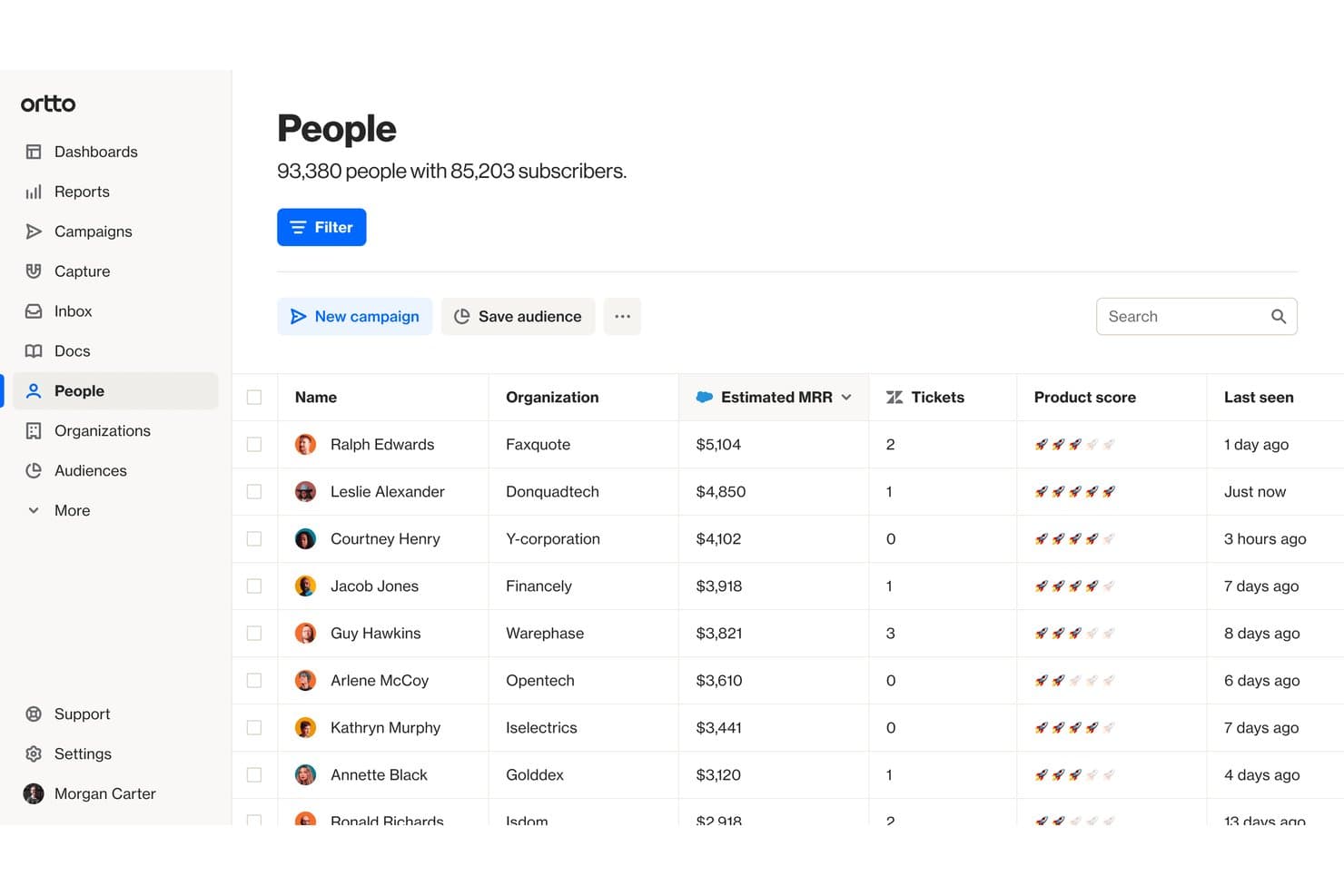
Ortto tracks customer MRR, tickets, and engagement in one view. Ortto is a marketing automation platform built on a native CDP that lets ecommerce brands automate multi-channel customer journeys across email, SMS, push notifications, and ads using a visual, canvas-based journey builder.
Who Is Ortto Best For?
Ortto is a strong fit for DTC ecommerce brands and marketing teams that want to automate the full customer lifecycle—from abandoned cart recovery to post-purchase win-back—across email, SMS, and push in one place.
Why I Picked Ortto
I picked Ortto as one of the best because its visual Journey Builder genuinely sets the bar for lifecycle automation across email, SMS, and push in a single canvas. I love how it handles multi-step abandoned checkout recovery natively, where a sequence can escalate from a reminder email to an SMS with a 10% discount offer, all without leaving the platform. The AI Decision shape takes it further, routing contacts through different journey branches based on real purchase likelihood data.
Ortto Key Features
- Prebuilt ecommerce journey templates: Ready-to-launch automation templates cover scenarios like abandoned checkout recovery, back-in-stock alerts, post-purchase sequences, and win-back campaigns.
- A/B testing within journeys: Test individual messages or entire journey branches directly inside the canvas builder to compare performance before scaling.
- Omnichannel message delivery: Send email, SMS, web push, mobile push, in-app messages, and pop-ups all from within a single journey flow.
- Revenue attribution reporting: Track revenue generated at the journey level and across your full lifecycle program without needing a separate analytics tool.
Ortto Integrations
Ortto offers native integrations with Shopify, WooCommerce, BigCommerce, Magento 2, PrestaShop, Squarespace, Salesforce, HubSpot, Gorgias, and Zendesk. It also supports a REST API, webhooks, and Zapier.
Pros and Cons
Pros:
- Strong AI features for audience and journey design
- Sophisticated abandoned cart and win-back templates
- Visual journey builder unifies omnichannel automation
Cons:
- Reporting depth limited on lower plans
- No order or inventory sync capabilities
Learn more about Ortto: Best for marketing automation
- Free demo available
- Pricing upon request
Visit WebsiteCustomer Rating:4.5/5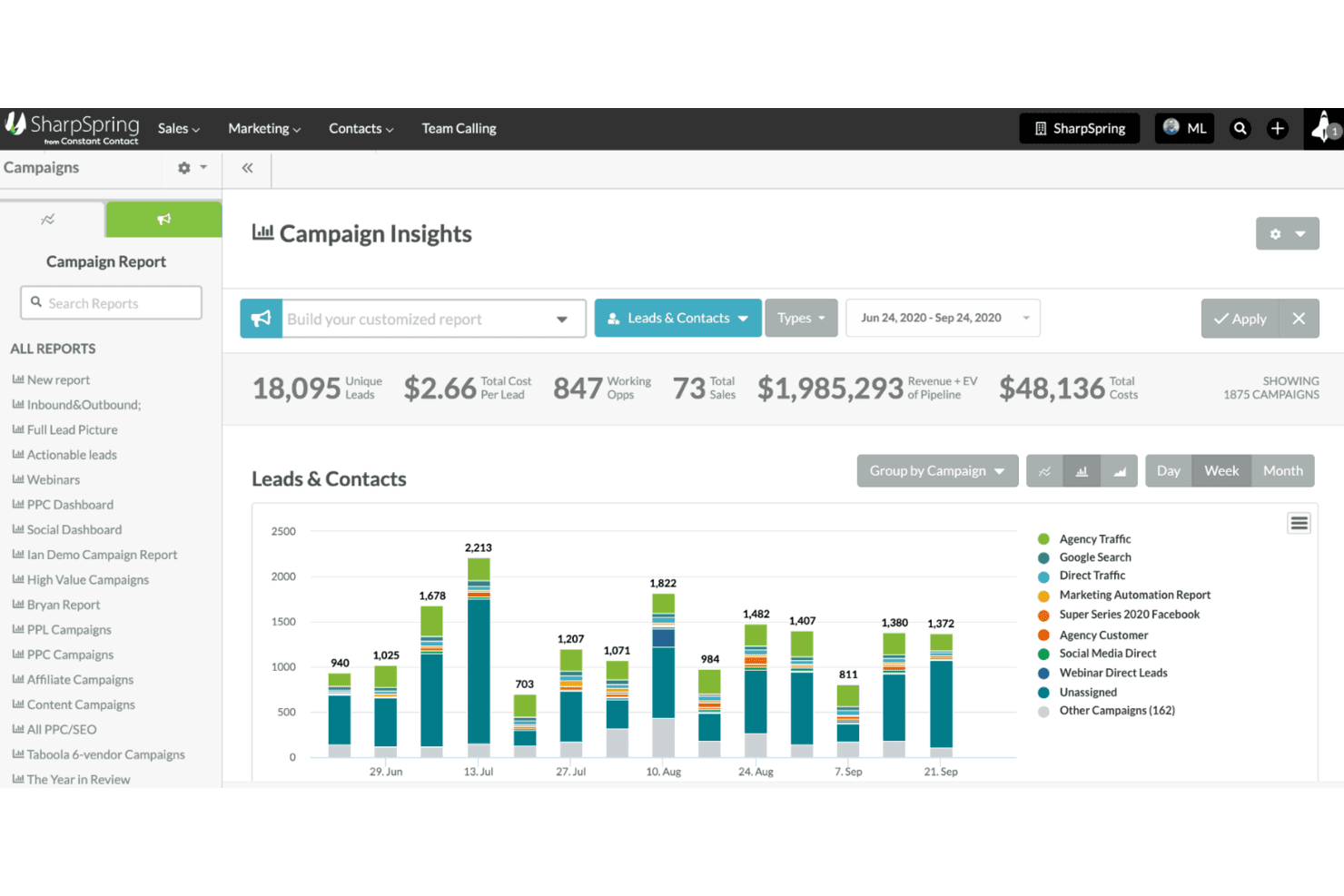
SharpSpring tracks campaign leads, costs, and revenue in one dashboard. SharpSpring is a marketing automation and CRM platform that combines behavioral email automation, lead scoring, workflow builders, and customer segmentation tools.
Who Is SharpSpring Best For?
SharpSpring is a strong fit for ecommerce marketers and digital agencies that need behavioral email automation, lead scoring, and CRM in a single platform.
Why I Picked SharpSpring
I've included SharpSpring in my top picks because its behavioral marketing automation is genuinely built for ecommerce scenarios that move revenue. I like how it handles abandoned cart sequences with dynamic product blocks and urgency timers, then automatically tags high-spend contacts as VIPs for exclusive offer flows. Its behavioral lead scoring, tracking page visits and purchase history, means your team is targeting real buying intent rather than guesswork.
SharpSpring Key Features
- Behavioral lead scoring: Automatically scores contacts based on email opens, page visits, time on page, and form submissions to surface high-intent buyers.
- VisitorID tracking: Identifies anonymous website visitors and builds behavioral profiles that feed directly into segmentation and automation workflows.
- A/B split testing for email: Tests subject lines, content, and send times across email campaigns to identify what drives the most engagement and conversions.
- Campaign ROI reporting: Tracks revenue attribution across campaigns with customizable dashboards that connect marketing activity to actual sales outcomes.
SharpSpring Integrations
SharpSpring has four documented native integrations, including Shopify, Salesforce, Litmus, and PandaDoc. Marketplace integrations include WooCommerce, Veeqo, Stripe, AdRoll, and TradeGecko; it also supports API connections and Zapier.
Pros and Cons
Pros:
- Unlimited users at every plan tier
- Includes VIP and loyalty automation flows
- Strong behavioral triggers for cart recovery
Cons:
- Native ecommerce integrations limited to Shopify
- No order or inventory automation features
Learn more about SharpSpring: 10Best for small business CRM
Keap
- Free trial + free demo available
- From $299/month
Visit WebsiteCustomer Rating:4.1/5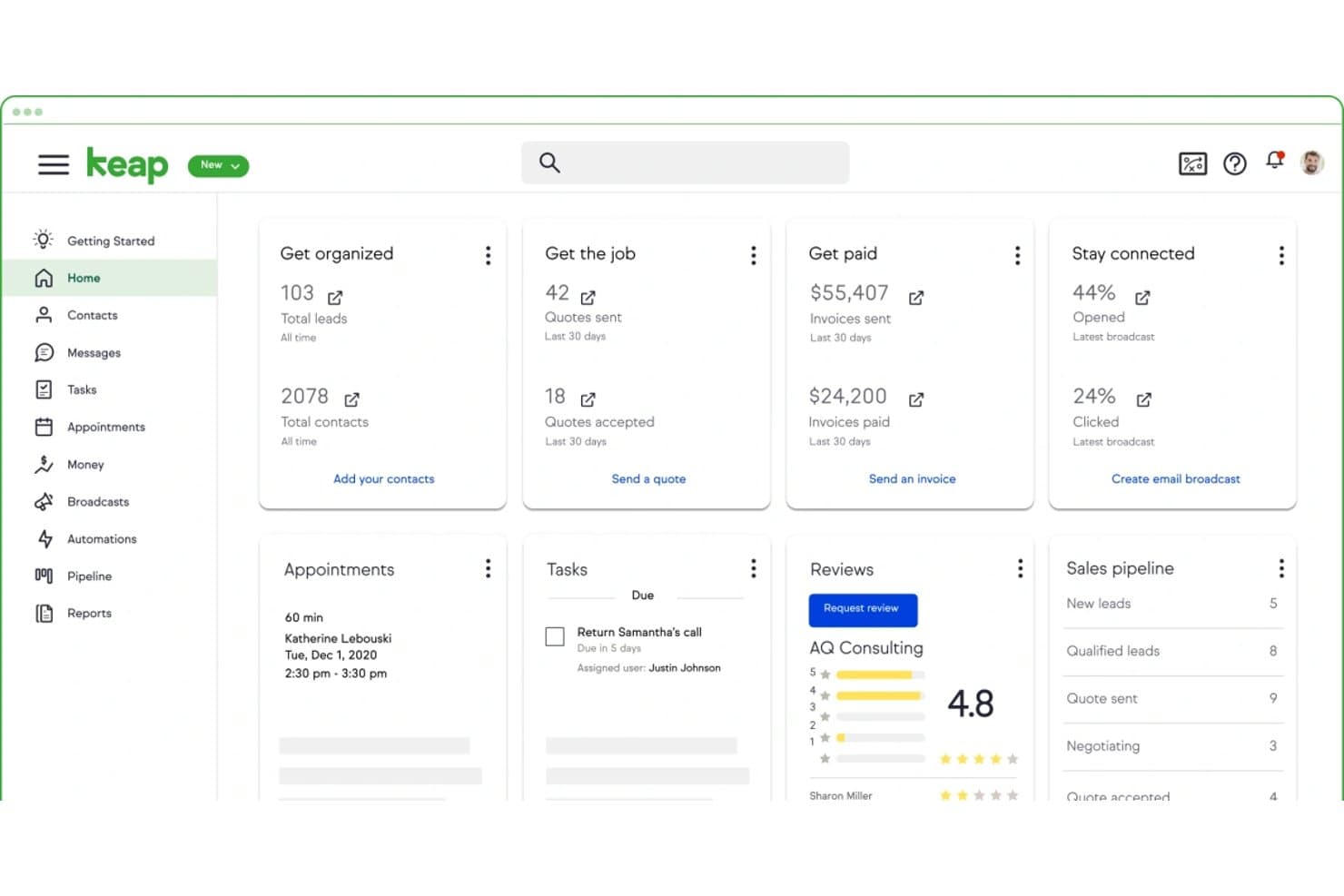
Keap centralizes leads, invoices, tasks, and email stats in one dashboard. Keap is a small business CRM and marketing automation platform that combines email and SMS marketing, sales pipeline management, checkout forms, payment processing, and a visual workflow builder with pre-built automation templates for customer lifecycle campaigns.
Who Is Keap Best For?
Keap is a strong fit for small DTC brands that want to automate customer lifecycle marketing—abandoned cart, win-back, and post-purchase sequences—without managing multiple separate tools.
Why I Picked Keap
I've included Keap in my top picks because it's one of the few small business CRM platforms that folds customer lifecycle automation directly into the buying journey. I love that it ships with 52+ pre-built automation recipes, so setting up abandoned cart sequences or post-purchase win-back campaigns takes minutes, not days. Its AI Automation Assistant can generate full campaign templates from a business goal, which I find genuinely useful for DTC brands running lean teams.
Keap Key Features
- Lead scoring: Ranks contacts by engagement and purchase behavior so you can prioritize high-value customer segments for targeted follow-up.
- Native checkout forms: Embeddable order forms with built-in upsell prompts, order bumps, and promo code support for direct sales funnels.
- Contact segmentation: Tags and filters contacts by purchase history, behavior, and demographics to enable precise list targeting.
- Subscription billing automation: Manages recurring payments, renewal reminders, and failed payment follow-ups without manual intervention.
Keap Integrations
Keap offers approximately 230 native and supported connectors overall. Relevant options include native Shopify, Keap Pay, Stripe, PayPal, and QuickBooks Online integrations, plus a REST API, webhooks, and Zapier.
Pros and Cons
Pros:
- AI assistant generates automation sequences quickly
- Pre-built automation recipes for lifecycle campaigns
- Built-in checkout forms support marketing funnels
Cons:
- Fulfillment automation requires third-party tools
- No inventory or catalog management features
Learn more about Keap:
Outras ferramentas de automatização do comércio eletrónico
Eis algumas opções adicionais de ferramentas de automatização do comércio eletrónico que não entraram na minha seleção, mas que ainda vale a pena conhecer:
- 11ZendeskBest for customer support
- 12BrevoBest for email campaigns
- 13AfterShipBest for shipment tracking
- 14HubSpot MarketingBest for inbound marketing
- 15Recharge.comBest for subscription billing
- 16DripBest for email personalization
- 17Mailchimp Best for email templates
- 18ActiveCampaignBest for customer experience automation
- 19SenderBest for simple email newsletters
- 20ShipStationBest for shipping solutions
- 21KlaviyoBest for targeted email campaigns
- 22OmnisendBest for ecommerce marketing
- 23GetResponseBest for email list growth
- 24Judge.meBest for product reviews
- 25HunchBest for dynamic ad campaigns
- 26Shopify FlowBest for Shopify automation
- 27CartHookBest for post-purchase upsells
Related Reviews
How I Evaluate Ecommerce Automation Tools
I split my evaluation into baseline criteria—like whether a tool can actually sync inventory across Shopify and Amazon—and differentiators that separate good from great.
Core Functionality (Table Stakes For This List)
When I'm selecting tools for my list, I rank each one on a scale from 0 (does not offer the functionality) to 5 (excels in this area) for each core functionality listed below. Then, I calculate the tool's total score into a percentage. Each tool needs to achieve a minimum total score of 65% to be considered for inclusion.
- Workflow Automation Builder: I look for a visual, trigger-and-action builder where teams can create multi-step automations—like tagging high-value orders and routing them to a priority queue—without code.
- Ecommerce Platform Integrations: Native connectors to platforms like Shopify, BigCommerce, WooCommerce, and Amazon matter here, especially bidirectional data access across orders, products, and customers.
- Order & Fulfillment Automation: This covers how well a tool handles real fulfillment logic—splitting orders by warehouse location, placing fraud holds, or routing items to the right 3PL based on SKU type.
- Inventory & Catalog Sync: I evaluate whether stock levels, pricing, and product data stay in sync across channels in near real time, particularly for sellers managing multiple storefronts or marketplaces.
- Customer & Marketing Triggers: Tools should fire automations based on lifecycle events—think abandoned carts, first-time purchases, or VIP spend thresholds—and connect those triggers to email, SMS, or loyalty platforms.
- Multi-Channel Rule Management: I check whether you can manage conditional logic across all your sales channels from one place, with the flexibility to set channel-specific overrides when needed.
Once I have a list of tools that meet this criteria, I consider what sets each platform apart.
Differentiating Factors (What Sets Vendors Apart)
Here's how I compare and contrast different vendors:
Standout Features
Prebuilt workflow templates are a major differentiator—I look for libraries with ready-made recipes for scenarios like back-in-stock alerts or loyalty tier upgrades, since they cut setup time dramatically. AI-powered suggestions take this further when a platform can recommend automations based on your store data or flag anomalies in order patterns. I also evaluate reporting dashboards that show automation performance metrics like tasks completed, errors caught, and estimated time saved per workflow.
Beyond Features
Scalability matters—I check whether a platform can handle order volume spikes during flash sales or holiday peaks without throttling workflows. Pricing transparency is equally important, especially how costs scale with automation usage; a tool that's affordable at 500 orders a month but unpredictable at 50,000 creates real budget risk. I also evaluate ecosystem depth, looking at native connectors to ERPs, 3PLs, and POS systems your team already uses, plus iPaaS compatibility for bridging niche tools in your stack.
O que são ferramentas de automatização do comércio eletrónico?
As ferramentas de automatização do comércio eletrónico são programas informáticos que automatizam tarefas repetitivas nas suas operações de comércio eletrónico—como a sincronização de inventário, o encaminhamento de encomendas, as campanhas de marketing e os acompanhamentos aos clientes.
Estas ferramentas são utilizadas por gestores de comércio eletrónico, profissionais de marketing e equipas operacionais para reduzir o trabalho manual, evitar erros humanos e acelerar os fluxos de trabalho.
Desde a sincronização do stock entre o Shopify e a Amazon até ao acionamento de fluxos automáticos de e-mail e SMS, ajudam a gerir uma loja online mais eficiente e escalável.
Como escolher ferramentas de automatização do comércio eletrónico
Escolher ferramentas de automatização do comércio eletrónico não consiste apenas em procurar funcionalidades—trata-se de resolver os problemas reais do seu fluxo de trabalho. A ferramenta certa deve reduzir as tarefas manuais, integrar-se nos sistemas que já utiliza e acompanhar o crescimento da sua empresa sem criar novos problemas pelo caminho.
Eis como dividir o processo de seleção em passos claros e objetivos.
| Passo | O que fazer |
|---|---|
| PassoMapeie os seus pontos problemáticos | O que fazerEnumere as tarefas que mais tempo consomem—como atualizações em massa de SKUs, acompanhamentos de carrinhos abandonados ou erros no encaminhamento de encomendas. |
| PassoFaça uma auditoria do seu conjunto de tecnologias | O que fazerVerifique quais plataformas de comércio eletrónico, CRM e aplicações já utiliza, para saber com que ferramentas a sua solução de automatização precisa de se integrar. |
| PassoDefina prioridades para os fluxos de trabalho | O que fazerDecida quais os fluxos de trabalho a automatizar primeiro—sincronização de inventário, campanhas de e-mail, serviço de apoio ao cliente—e concentre-se nas ferramentas que fazem melhor essas tarefas. |
| PassoVerifique a profundidade das funcionalidades | O que fazerNão se limite a assinalar opções—certifique-se de que a ferramenta consegue realmente lidar com a sua escala, complexidade e casos extremos sem falhar. |
| PassoTeste a facilidade de utilização com a sua equipa | O que fazerColoque os seus utilizadores reais ao comando. Se o responsável pelas operações não conseguir perceber como funciona em 20 minutos, não é uma solução adequada. |
| PassoCompare os preços por resultado | O que fazerOlhe para além da mensalidade. Esta ferramenta recuperará carrinhos, reduzirá o volume de pedidos de apoio ou diminuirá as horas de introdução manual de dados? |
| PassoAnalise cuidadosamente a integração inicial e o apoio | O que fazerDescubra se a configuração é feita autonomamente ou pela equipa do fornecedor, e com que rapidez obterá ajuda se algo falhar durante a semana de lançamento. |
| PassoExecute um projeto de teste | O que fazerAntes de se comprometer, automatize um fluxo de trabalho importante—como o processo entre a encomenda e o processamento—para verificar se proporciona rapidamente valor real. |
Funcionalidades das ferramentas de automatização do comércio eletrónico
Nem todas as ferramentas de automatização fazem o mesmo trabalho—e esse é precisamente o objetivo.
Algumas concentram-se na sincronização do inventário entre plataformas, outras automatizam as suas campanhas de marketing, enquanto algumas interligam todo o seu conjunto de tecnologias através de fluxos de trabalho condicionais.
As melhores ferramentas resolvem problemas específicos do comércio eletrónico sem o obrigar a juntar à pressa uma dúzia de aplicações.
Eis o que deve procurar:
- Fluxos de trabalho personalizáveis. Deve poder definir acionadores e resultados com base nos seus processos reais—como enviar um SMS quando uma encomenda de elevado valor é expedida ou encaminhar devoluções para um armazém específico.
- Sincronização de inventário em vários canais. Se vende na Shopify, Amazon e BigCommerce, os níveis de stock devem ser atualizados em tempo real em todas as plataformas.
- Fluxos de marketing automatizados. Isto inclui e-mails sobre carrinhos abandonados, acompanhamentos pós-compra, campanhas de SMS sequenciais e recomendações de produtos direcionadas—sem ter de criar cada elemento de raiz.
- Dados de clientes integrados. Pretende uma visão unificada do histórico de compras, do comportamento de navegação e da interação—para que o seu CRM, e-mail e ferramentas de apoio não tenham de fazer suposições.
- Integrações com aplicações. Ferramentas como o Zapier e integrações nativas com a Shopify, WooCommerce, Klaviyo, HubSpot e o seu 3PL podem determinar o sucesso ou o fracasso da automatização.
- Painéis de relatórios. A visibilidade em tempo real sobre o que está a funcionar—taxas de abertura, tempos de processamento, abandono—permite ajustar os fluxos de trabalho e demonstrar o ROI.
- Gestão de erros e alternativas. O que acontece quando uma automatização falha ou uma sincronização é interrompida? As melhores ferramentas assinalam os problemas, reencaminham tarefas e impedem que as operações parem por completo.
Benefícios das ferramentas de automatização do comércio eletrónico
A automatização do comércio eletrónico não consiste em fazer mais—consiste em fazer as coisas certas mais depressa e com menos erros. Quando a sua equipa está enterrada em ficheiros CSV, atualizações de seguimento tardias e envios manuais de campanhas, isso custa-lhe vendas, fidelização e sanidade mental.
Eis o que obtém quando a automatização é feita corretamente:
- Menos erros, clientes mais satisfeitos. Automatizar as atualizações de encomendas, as devoluções e as reposições significa menos envios falhados e pedidos de apoio. Isto tem um impacto real na retenção e na satisfação.
- Horas poupadas todas as semanas. Deixe de etiquetar clientes, importar encomendas ou enviar respostas a perguntar “Onde está a minha encomenda?” manualmente. Esse tempo é reinvestido na estratégia, não em tarefas repetitivas.
- Melhor segmentação, mais conversões. Utilize o comportamento dos clientes para acionar e-mails, SMS e recomendações de produtos que parecem pessoais—sem ter de fazer nada depois da configuração.
- Escalabilidade real. Quer esteja a processar 100 ou 10 000 encomendas por mês, a automatização mantém as operações organizadas sem ter de contratar um coordenador adicional sempre que o volume aumenta.
- Dados mais limpos, decisões mais inteligentes. Quando o seu CRM, a sua loja e as suas ferramentas de marketing estão sincronizados, não está a trabalhar às cegas. Obtém visibilidade sobre o comportamento dos clientes, o ROI do marketing e os estrangulamentos operacionais.
Custos e preços das ferramentas de automatização do comércio eletrónico
As ferramentas de automatização do comércio eletrónico abrangem uma vasta gama de funções—desde a automatização de marketing e a sincronização de inventário até à faturação de subscrições e ao apoio ao cliente—pelo que os seus modelos de preços também variam consideravelmente.
Compreender como será cobrado para além da mensalidade anunciada é fundamental para evitar surpresas e manter o ROI sob controlo.
Em vez de agrupar todas as ferramentas em níveis de planos genéricos, dividimos os preços por categoria de ferramenta.
Desta forma, obtém uma visão clara dos fatores que determinam os custos de cada tipo de software de automatização do comércio eletrónico, do que deve ter em atenção e de como os preços podem aumentar à medida que a sua loja de comércio eletrónico cresce.
| Categoria da ferramenta | Modelo de preços habitual | O que deve ter em conta |
|---|---|---|
| Categoria da ferramentaAutomação de marketing | Modelo de preços habitualNormalmente, o preço é definido com base no tamanho da lista de contactos ou no número de e-mails enviados | O que deve ter em contaOs custos aumentam significativamente à medida que a lista e o volume de SMS crescem. Tenha em atenção as taxas por excesso de utilização nos envios e os limites dos fluxos de trabalho de automação nos níveis inferiores. |
| Categoria da ferramentaSincronização de inventário e encomendas | Modelo de preços habitualMuitas vezes, é cobrada com base no número de SKUs, no número de encomendas ou nos canais de vendas ligados | O que deve ter em contaAs configurações com várias lojas e os catálogos com muitos SKUs podem aumentar os custos. Alguns fornecedores acrescentam taxas pelo acesso à API ou por relatórios avançados. |
| Categoria da ferramentaFaturação de subscrições | Modelo de preços habitualNormalmente, são apresentadas propostas personalizadas com base numa percentagem das receitas, além de taxas mensais | O que deve ter em contaAs taxas de configuração e de transação são comuns. Os preços podem variar consoante os gateways de pagamento e a flexibilidade da faturação. |
| Categoria da ferramentaAutomação de fluxos de trabalho | Modelo de preços habitualPor utilizador ou por número de execuções de tarefas (fluxos de trabalho automatizados) | O que deve ter em contaOs níveis inferiores limitam o número de execuções de tarefas e os conectores de aplicações premium, exigindo atualizações à medida que o volume aumenta. |
| Categoria da ferramentaApoio ao cliente | Modelo de preços habitualCobrado por utilizador de agente ou licença de utilizador | O que deve ter em contaAs funcionalidades avançadas, como o apoio multicanal, as garantias de SLA e os relatórios, implicam muitas vezes custos adicionais. |
Considerações adicionais sobre preços
- As ferramentas de automação de marketing, como a Klaviyo, a Brevo e a Omnisend, começam muitas vezes com preços baixos, mas os custos aumentam rapidamente quando a lista de contactos ou o número de SMS enviados cresce — planeie em conformidade com a expansão.
- As soluções de sincronização de inventário e encomendas podem cobrar taxas adicionais por várias plataformas de comércio eletrónico ou armazéns. Se gere uma operação omnicanal, reserve um orçamento adicional para essas integrações.
- As plataformas de faturação de subscrições, como a Recharge, exigem frequentemente taxas de configuração e podem cobrar taxas de transação ou percentagens das receitas, afetando a rentabilidade de subscrições mais pequenas.
- As plataformas de automação de fluxos de trabalho, como a Zapier, limitam o número de execuções de tarefas nos níveis gratuitos ou inferiores, e os fluxos de trabalho avançados com lógica condicional exigem normalmente planos pagos.
- Os fornecedores de software de apoio ao cliente, incluindo a Zendesk, podem cobrar por canais de apoio adicionais (chat, telefone) e níveis de SLA mais rápidos. Por isso, inclua estes custos no seu orçamento se precisar de apoio premium.
Compreender antecipadamente estas estruturas de preços ajuda as empresas de comércio eletrónico a evitar surpresas desagradáveis e a escolher uma ferramenta alinhada tanto com as necessidades atuais como com o crescimento futuro. Escolha cuidadosamente para manter os custos de automação previsíveis e controláveis à medida que a sua loja online cresce.
Perguntas frequentes sobre ferramentas de automação de comércio eletrónico
Eis algumas respostas a perguntas comuns sobre ferramentas de automação de comércio eletrónico:
Como lidam as ferramentas de automação de comércio eletrónico com a segurança e a conformidade dos dados?
A segurança dos dados é importante quando se automatizam as informações dos clientes e os dados de pagamento. As melhores plataformas de automação de comércio eletrónico cumprem normas do setor, como o RGPD e a PCI DSS, encriptam os dados em trânsito e em repouso e disponibilizam controlos de acesso baseados em funções.
Verifique sempre as certificações de segurança de uma ferramenta e a forma como esta gere as cópias de segurança e as notificações de violações, de modo a proteger a sua loja de comércio eletrónico e a confiança dos clientes.
As ferramentas de automação de comércio eletrónico podem integrar-se com a minha plataforma de comércio eletrónico e CRM existentes?
A maioria das principais ferramentas disponibiliza integrações nativas com plataformas de comércio eletrónico populares, como a Shopify, a WooCommerce e a BigCommerce, bem como com marketplaces como a Amazon.
Também se ligam a CRMs como o HubSpot, o Salesforce e a Klaviyo. Ao escolher, confirme se as integrações abrangem as aplicações específicas de que depende e se suportam a sincronização de dados em tempo real, para manter os seus fluxos de trabalho integrados.
De que nível de conhecimentos técnicos preciso para configurar e gerir a automação de comércio eletrónico?
A complexidade da configuração varia bastante. Algumas plataformas têm editores de arrastar e largar e modelos pré-criados que qualquer pessoa pode utilizar.
Outras, especialmente as ferramentas de automação de fluxos de trabalho ou de Robotic Process Automation (RPA), como a UiPath, podem exigir o apoio de programadores para personalizações avançadas. Tenha em conta a capacidade técnica da sua equipa e a disponibilidade de integração inicial e apoio ao escolher.
As ferramentas de automação de comércio eletrónico funcionam para vendas multicanal e internacionais?
Sim, mas depende da ferramenta. As soluções de sincronização de inventário e encomendas suportam normalmente configurações multicanal, sincronizando o stock e as encomendas entre a Shopify, a Amazon, a BigCommerce e outras plataformas.
As plataformas de automação de marketing suportam normalmente campanhas multilingues e direcionadas por localização geográfica. Se vender internacionalmente, verifique se a ferramenta gere conversões de moeda, regras fiscais e requisitos de conformidade regionais.
Como é que as ferramentas de automatização do comércio eletrónico melhoram a retenção e a fidelização dos clientes?
As plataformas de automatização melhoram a retenção ao acionarem campanhas personalizadas de e-mail e SMS com base no comportamento dos clientes — como acompanhamentos após a compra, recomendações de produtos e recompensas de fidelização.
Ajudam a segmentar os clientes para um marketing direcionado e automatizam a gestão dos programas de fidelização, permitindo-lhe manter um envolvimento contínuo sem esforço manual.
O que devo esperar em termos de manutenção contínua e suporte para as ferramentas de automatização do comércio eletrónico?
A automatização não é algo que se “configura e esquece”. Terá de monitorizar os fluxos de trabalho para detetar falhas, atualizar os acionadores à medida que a sua empresa evolui e gerir as integrações quando as APIs forem atualizadas.
Os bons fornecedores oferecem suporte proativo, painéis detalhados e alertas para detetar problemas numa fase inicial. Certifique-se de que os canais de suporte e os SLA do seu fornecedor correspondem às suas necessidades operacionais.