

The best Mixpanel alternatives deliver accurate product analytics, easy event tracking, and flexible reporting that can scale with your digital business. If you’re searching for Mixpanel alternatives, you probably want smarter insights, cleaner interfaces, and better ways to connect product usage data with revenue or customer behavior. Getting the right solution is make-or-break for teams under pressure to improve conversion, prioritize features, and prove ROI—all without slowing down your workflow. In this guide, you’ll find the top Mixpanel alternatives for 2026, why they stand out, who they fit best, and what you should look for as you compare your options.
What Is Mixpanel?
Mixpanel is a product analytics platform that tracks user interactions within web and mobile applications. It helps you measure engagement, analyze behavior, and understand how people use your product. With Mixpanel, teams can monitor events, create funnels, and segment users to uncover actionable insights. This makes it easier to identify opportunities for product improvements, optimize user experiences, and drive higher retention across digital channels.
Mixpanel Alternatives Comparison Table
This comparison table highlights pricing and free trial options for my top Mixpanel alternatives to help you find a solution that fits your budget and business needs.
| Tool | Best For | Trial Info | Price | ||
|---|---|---|---|---|---|
| 1 | Best for multichannel website tracking | Free plan available | From $50,000/year (billed annually) | Website | |
| 2 | Best for advanced behavioral analysis | Free plan available | Pricing upon request | Website | |
| 3 | Best for personalized customer engagement | 30-day free trial | From $85/month | Website | |
| 4 | Best for real-time journey visualization | Free demo available | Pricing upon request | Website | |
| 5 | Best for auto-capturing user interactions | Free plan available | Pricing upon request | Website | |
| 6 | Best for enterprise-grade audience segmentation | Free plan + free demo available | Pricing upon request | Website | |
| 7 | Best for open-source product analytics | Free plan available | Pricing upon request | Website | |
| 8 | Best for granular digital experience insights | Free plan + free demo + 15-day free trial available | From $39/month (billed annually) | Website | |
| 9 | Best for open-source event analytics customization | 30-day free trial + free plan available | From $2.5/month | Website | |
| 10 | Best for AI-powered individualized recommendations | Free demo available | Pricing upon request | Website |


Why Trust Our Software Recommendations
6,700+
Reviews
20
Industry experts
16+
Evaluation factors
14
Years
Our team has been testing and reviewing software since 2012. As retail leaders ourselves, we know how difficult—and important—it is to choose the right software.
For this guide, we evaluated tools using hands-on testing and independent research, scoring tools using our selection criteria.
Our reviews reflect our independent judgment—not a sales pitch.
Best Mixpanel Alternatives Reviews
Below are my detailed summaries of the best Mixpanel alternatives that made it onto my shortlist. My reviews offer a detailed look at the features, integrations, and best use cases of each platform to help you find the best one for you.
 Best for multichannel website tracking
- Free plan available
- From $50,000/year (billed annually)
Visit WebsiteCustomer Rating:4.6/5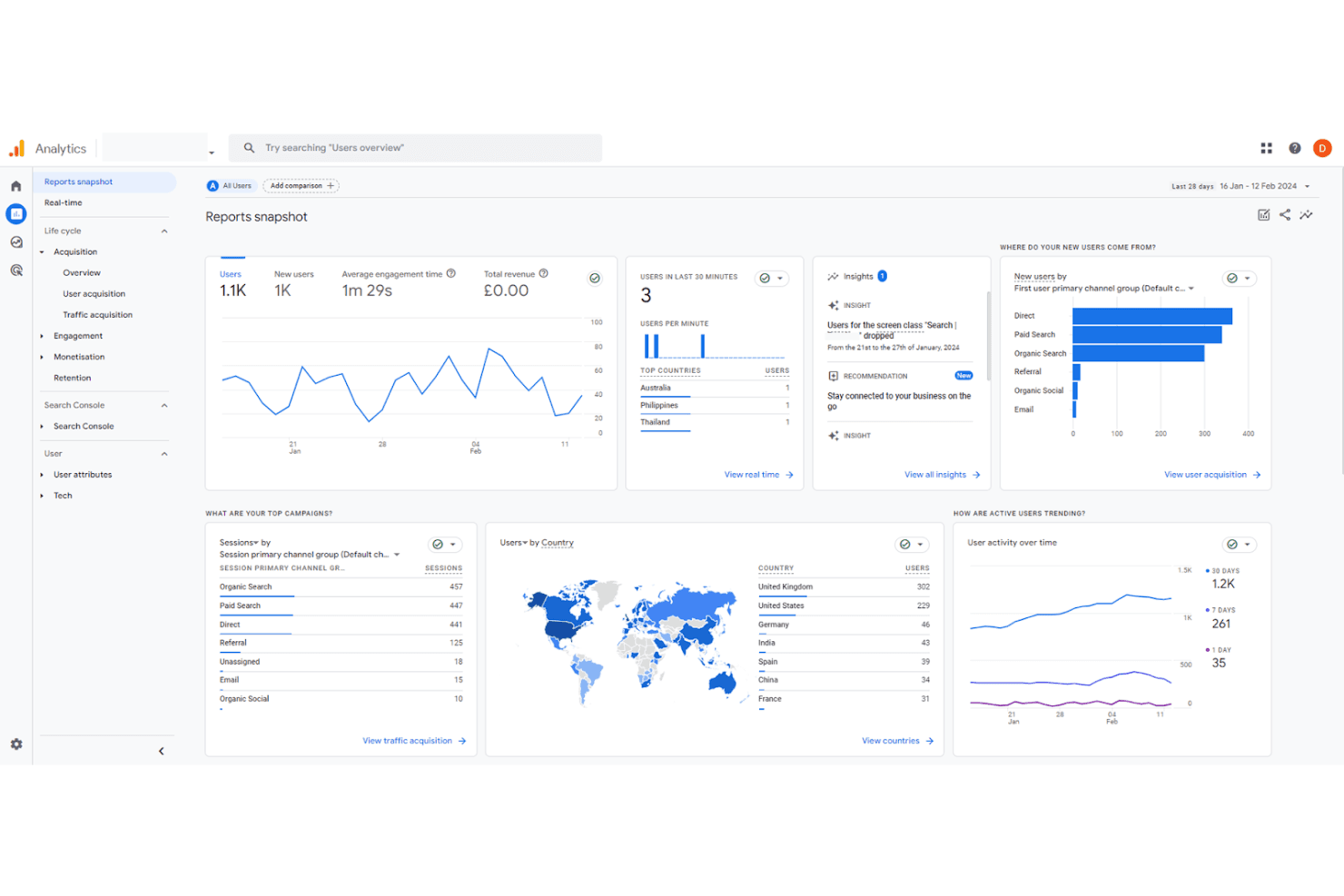
Google Analytics inspects traffic for smarter decisions. Google Analytics is a free web analytics platform from Google that tracks traffic sources, user behavior, and conversion paths across websites and apps, making it a natural starting point for teams migrating away from event-based tools.
Who Is Google Analytics Best For?
Google Analytics is a strong fit for marketing and ecommerce teams that need to track traffic acquisition, campaign performance, and on-site conversion across multiple channels.
Why Google Analytics Is a Good Mixpanel Alternative
I've included Google Analytics in my top picks because its channel grouping and attribution modeling are hard to replicate elsewhere. I rely on traffic acquisition reports to break down performance by source, medium, and campaign in one view, and GA4's data-driven attribution redistributes conversion credit based on actual user paths. The Conversions report then ties goal completions to specific channels, giving my team a clear picture of what's driving revenue.
Google Analytics Key Features
- Exploration reports: Build custom analyses using funnel exploration, path exploration, and segment overlap templates directly in the interface.
- Audience builder: Define user segments based on behavior, demographics, or event sequences, then publish them to Google Ads for retargeting.
- Real-time reporting: Monitor active users, events, and conversions as they happen across your site or app.
- BigQuery export: Send raw event-level data to BigQuery for custom querying and deeper analysis outside the GA4 interface.
Google Analytics Integrations
Google Analytics offers native integrations with Google Ads, Google Search Console, Google Merchant Center, BigQuery, Firebase, Shopify, and BigCommerce. An API and Measurement Protocol are available for custom integrations.
Pros and Cons
Pros:
- Advanced audience segmentation engine
- Detailed audience segmentation for remarketing
- Deep integration with Google Ads ecosystem
Cons:
- Complex configuration for event tracking
- Limited support for mobile app analytics
Learn more about Google Analytics: Best for advanced behavioral analysis
- Free plan available
- Pricing upon request
Visit WebsiteCustomer Rating:4.5/5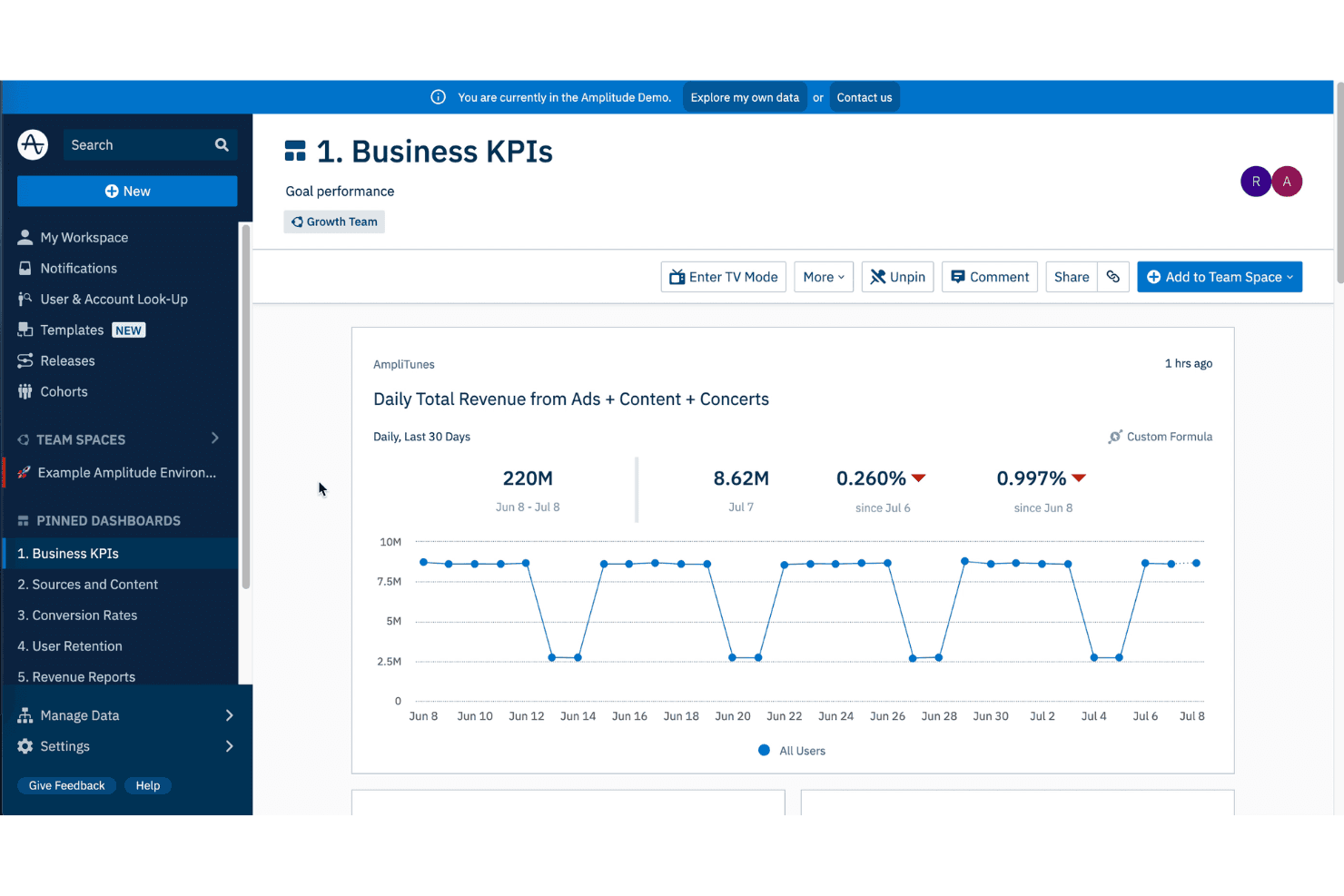
Amplitude maps user activity to optimize product experiences. If your team runs frequent experiments and needs to tie behavioral data directly to product decisions, Amplitude is a digital analytics platform built around funnel analysis, cohort tracking, and predictive modeling.
Who Is Amplitude Best For?
Amplitude is a strong fit for growth and product teams at mid-market and enterprise companies that need to connect user behavior to revenue outcomes.
Why Amplitude Is a Good Mixpanel Alternative
Amplitude earns its spot on my shortlist because of how deeply it connects behavioral data to product experimentation. I particularly like Amplitude Experiment, which lets you run A/B tests and tie results directly to behavioral cohorts you've already built, so you're not jumping between tools. I also rely on its Pathfinder feature to visualize every route users take through a product, which makes it easy to spot unplanned navigation patterns and act on them fast.
Amplitude Key Features
- Funnel analysis: Map drop-off rates at each step in a conversion flow across any user segment.
- Retention analysis: Track how often users return to specific actions over daily, weekly, or custom time intervals.
- Session replay: Watch individual user sessions alongside event data to see exactly what happened before a drop-off.
- Compass: Identifies which product features correlate most strongly with long-term user retention.
Amplitude Integrations
Amplitude offers 60+ native integrations across CDPs (Segment, RudderStack, mParticle), data warehouses (Snowflake, BigQuery), marketing tools (Braze, Iterable, Customer.io), CRMs (Salesforce, HubSpot), and ad platforms. It also provides an API for custom integrations.
Pros and Cons
Pros:
- Analyzes behavioural cohort segments
- Tracks user retention cohorts
- Built-in A/B test analytics for experiments
Cons:
- Requires SQL knowledge for setup
- High volume storage overhead
Learn more about Amplitude: Best for personalized customer engagement
- 30-day free trial
- From $85/month
Visit WebsiteCustomer Rating:4.5/5
CleverTap boosts businesses by personalizing experiences to retain users. CleverTap is a customer engagement and retention platform built for mobile-first and digital businesses that need to connect analytics with multichannel campaign execution in one place.
Who Is CleverTap Best For?
CleverTap is a strong fit for growth and marketing teams at mid-market to enterprise mobile apps in industries like fintech, media, and ecommerce.
Why CleverTap Is a Good Mixpanel Alternative
I've included CleverTap in my top picks because I love how it closes the gap between behavioral analytics and real-time personalization. Where Mixpanel stops at insights, CleverTap lets you act on them directly. I particularly like the IntelliNODE feature, which optimizes campaign paths by selecting the best-performing message variant for each individual user mid-journey. The product recommendations engine also stands out, surfacing next best actions based on transactions from similar customer profiles.
CleverTap Key Features
- TesseractDB™ data storage: A purpose-built database that retains over three years of granular user data for longer-lookback behavioral analysis.
- Lifecycle optimizer: Maps your entire user base to specific lifecycle stages using frameworks like AARRR, so you can target users based on where they are in the customer journey.
- A/B testing for campaigns and app experiences: Lets you test message copy, CTAs, creatives, and in-app UI elements without waiting for a new release cycle.
- Automated segmentation: Builds micro-segments based on past behavior, real-time actions, and RFM (recency, frequency, and value) scoring to identify at-risk or high-value users.
CleverTap Integrations
CleverTap offers 100+ integrations across categories like attribution, CRM, CDP, data warehouse, ecommerce, remarketing, and workflow automation, including Shopify, Salesforce, HubSpot, Segment, mParticle, AppsFlyer, Amplitude, Snowflake, BigQuery, and Google Ads. It also connects with Zapier and provides an API for custom integrations.
Pros and Cons
Pros:
- Visual journey builder for engagement automation
- Real-time user segmentation for campaigns
- Advanced mobile push and in-app messaging
Cons:
- Some integrations require manual configuration
- Requires SDK integration for full functionality
Learn more about CleverTap: Best for real-time journey visualization
- Free demo available
- Pricing upon request
Visit WebsiteCustomer Rating:4.7/5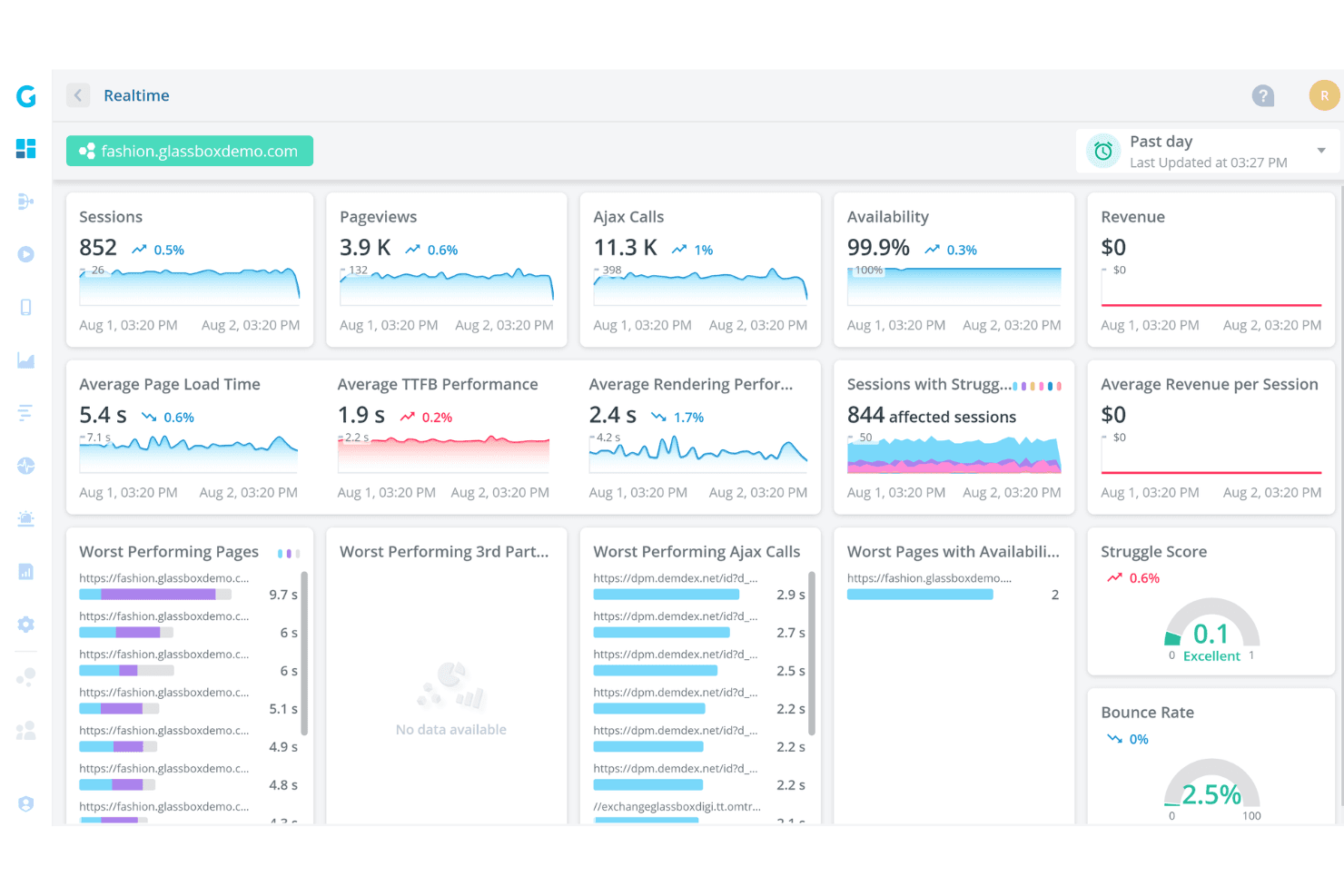
Glassbox audits interactions to enhance satisfaction. Glassbox is a digital experience analytics platform built for regulated industries that captures 100% of user sessions and uses AI-driven insights to surface friction points, conversion barriers, and journey breakdowns across web and native mobile apps.
Who Is Glassbox Best For?
Glassbox is a strong fit for enterprise digital and product teams in financial services, insurance, retail, and travel who need session-level visibility into user behavior.
Why Glassbox Is a Good Mixpanel Alternative
I've included Glassbox in my top picks because its Augmented Journey Map™ gives you a live, visual picture of exactly how users move through your site or app, including where they struggle, drop off, or convert. Unlike Mixpanel, where you build funnels manually, Glassbox automatically captures every digital event and surfaces AI-flagged friction points. I also appreciate the built-in revenue impact metrics, which attach a dollar value to each journey step so you can prioritize fixes by actual business cost.
Glassbox Key Features
- Session replay: Records every user session in full, letting you play back individual interactions to see exactly what a user saw and did.
- Heatmaps: Generates visual overlays of click, scroll, and tap activity across any page, showing where users engage or ignore content.
- Crash and error analytics: Automatically detects JavaScript errors, API failures, and app crashes tied to specific user sessions so you can reproduce and diagnose technical issues.
- Codeless event tagging: Lets you tag and track UI elements for analysis directly in the interface, without writing or deploying new code.
Glassbox Integrations
Glassbox offers native integrations with Adobe Analytics, Google Analytics, Blue Triangle, Google Tag Manager, Adobe Launch, Tealium, Qualtrics, Jira, Slack, Firebase, AB Tasty, Adobe Target, Optimizely, SiteSpect, VWO, and Dynamic Yield. An open API is also available for custom integrations and connecting non-native tools.
Pros and Cons
Pros:
- Integrates with leading analytics and APM tools
- Offers tagless data capture for rapid deployment
- Includes journey mapping for multi-step analysis
Cons:
- Advanced features may require technical setup
- Mobile analytics features are less mature
Learn more about Glassbox: Best for auto-capturing user interactions
- Free plan available
- Pricing upon request
Visit WebsiteCustomer Rating:4.3/5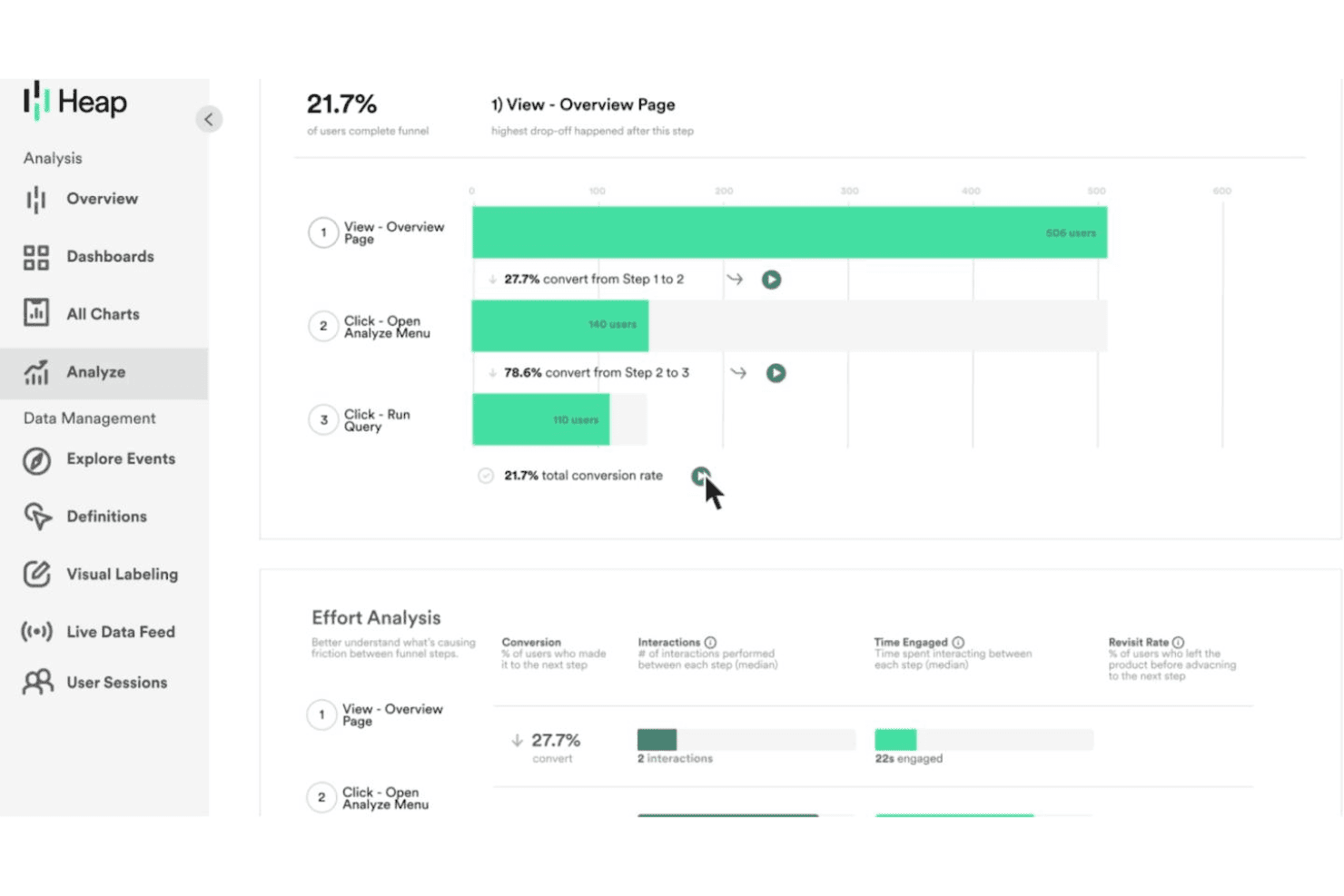
Heap analyzes user behavior with dashboards, funnels, and journey insights. Heap is a digital insights platform built for product and growth teams who want to analyze the full user journey without manually tagging every event in advance.
Who Is Heap Best For?
Heap is a natural fit for mid-size to enterprise product teams that need retroactive behavioral data without relying on engineers to instrument every event.
Why Heap Is a Good Mixpanel Alternative
I've included Heap in my top picks because its auto-capture engine records every click, tap, form submission, and page view the moment you install the snippet, with no event taxonomy to build upfront. Where Mixpanel requires you to decide what to track before users ever touch your product, I can retroactively define events in Heap against historical data. I also like the Illuminate feature, which surfaces drop-off points in user journeys you didn't know to look for.
Heap Key Features
- Heatmaps: Visualize where users click, scroll, and hover on any page without writing any tracking code.
- Segments: Build user cohorts based on behavior, properties, or actions to filter and compare any analysis across your data.
- Heap Connect: Send raw Heap event data directly to your data warehouse for custom querying and deeper analysis.
- Playbooks: Access pre-built analysis templates that let you run funnel, retention, and engagement analyses without building reports from scratch.
Heap Integrations
Heap offers native integrations across categories like A/B testing, CRM, marketing automation, and commerce, including Salesforce, HubSpot, Shopify, Marketo, Braze, Klaviyo, Iterable, Stripe, Snowflake, and Segment. It connects with Zapier and provides an API for custom integrations.
Pros and Cons
Pros:
- Data governance tools help maintain event quality
- Journey maps visualize multi-step user flows
- Session replay is included for all plans
Cons:
- Autocapture creates large data volumes
- Limited mobile analytics compared to Mixpanel
Learn more about Heap (by Contentsquare): Best for enterprise-grade audience segmentation
- Free plan + free demo available
- Pricing upon request
Visit WebsiteCustomer Rating:4.3/5
Adobe Customer Journey Analytics is an enterprise analytics platform that lets large teams analyze cross-channel customer data, build complex audience segments, and map full customer journeys across touchpoints.
Who Is Adobe Customer Journey Analytics Best For?
Adobe Customer Journey Analytics is best suited to enterprise marketing and data teams that need to analyze high volumes of cross-channel customer data at scale.
Why Adobe Customer Journey Analytics Is a Good Mixpanel Alternative
I've included Adobe Customer Journey Analytics in my top picks because its audience segmentation goes well beyond what most analytics tools offer. You can define segments using stitched identity data from web, app, call center, and offline sources, then publish those audiences directly to Adobe Real-Time CDP or Adobe Journey Optimizer for activation. I also appreciate that segment results can be re-ingested back into CJA for further analysis, creating a continuous refinement loop most Mixpanel users simply can't replicate.
Adobe Customer Journey Analytics Key Features
- Analysis Workspace: A drag-and-drop report builder that lets you create custom freeform tables, visualizations, and flow diagrams without writing SQL.
- Multi-touch attribution modeling: Applies rule-based and algorithmic attribution models across channels to show how each touchpoint contributes to conversion.
- Anomaly detection: Automatically flags statistically significant spikes or drops in your metrics so you can investigate unusual data patterns quickly.
- Data views: Virtual configuration layers that let you define how raw data is interpreted, including metric formatting, attribution settings, and dimension behavior, without changing the underlying dataset.
Adobe Customer Journey Analytics Integrations
Adobe Customer Journey Analytics offers native integrations with Adobe Target, Adobe Analytics, Microsoft Azure, Amazon S3, Google BigQuery, Snowflake, Salesforce, and Microsoft Dynamics 365. APIs and SDKs are available for custom integrations.
Pros and Cons
Pros:
- AI automates segmentation and attribution modeling
- Patented data governance protects customer data
- Unifies online and offline data sources
Cons:
- Outside Adobe, integrations require manual work
- Complex setup requires deep technical expertise
Learn more about Adobe Customer Journey Analytics: Best for open-source product analytics
- Free plan available
- Pricing upon request
Visit WebsiteCustomer Rating:4.5/5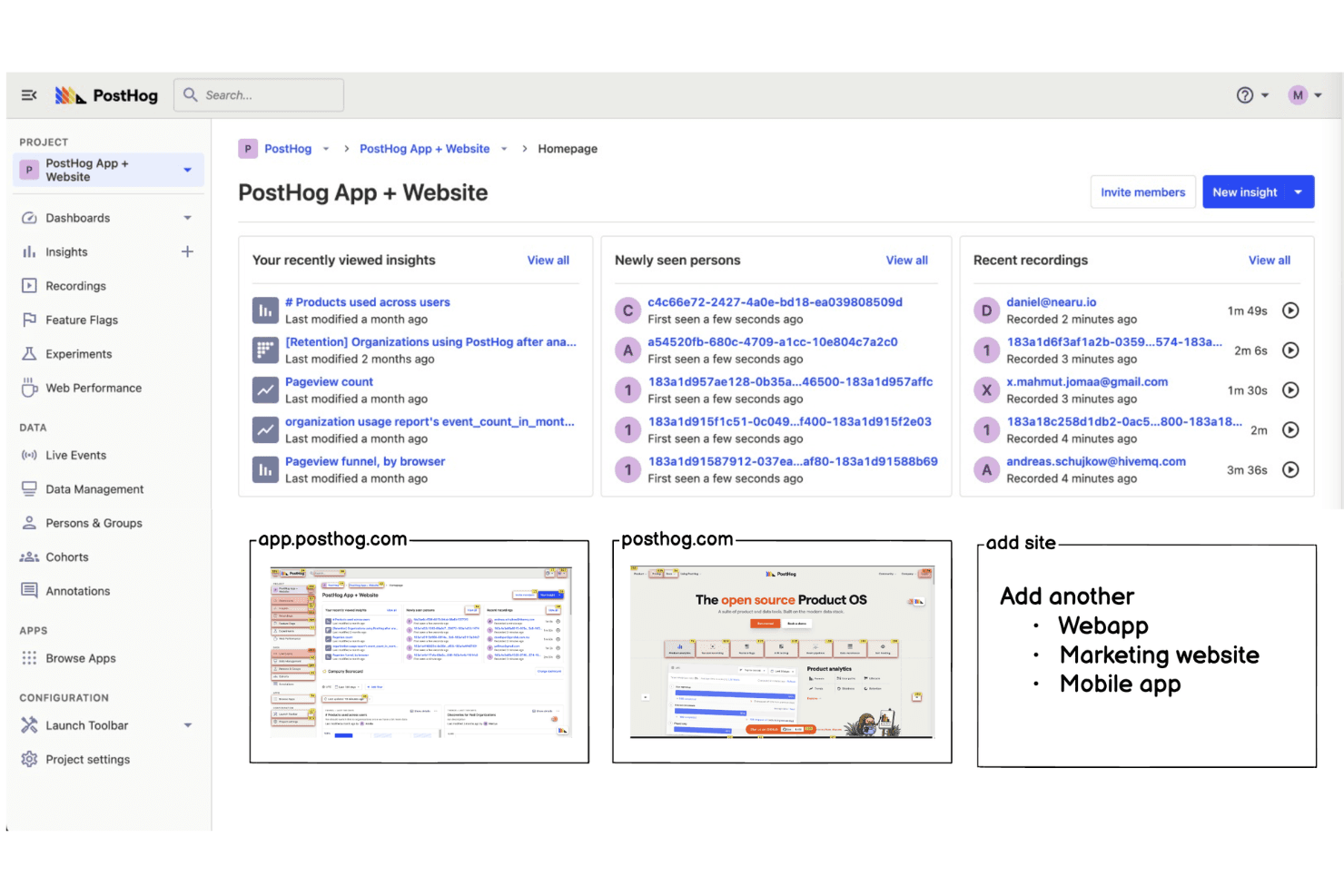
PostHog gives teams full control to track user behaviour. PostHog is an open-source product analytics platform that gives product and engineering teams event tracking, session recording, feature flags, and A/B testing in a single self-hostable suite.
Who Is PostHog Best For?
PostHog is a strong fit for product and engineering teams at early-stage to mid-size tech companies that want full data ownership without relying on third-party analytics vendors.
Why PostHog Is a Good Mixpanel Alternative
PostHog earns its spot on my shortlist because the open-source model genuinely changes what you can do with your analytics data. I like that you can self-host the entire platform, which means full control over where event data lives. I also use the HogQL feature to run raw SQL queries directly against my event data, something Mixpanel doesn't offer natively.
PostHog Key Features
- Session replay: Records individual user sessions so you can watch exactly how users interact with your product, including clicks, scrolls, and rage clicks.
- Feature flags: Roll out new features to specific user segments without a code deployment, with support for multivariate flags.
- Experiments: Run A/B and multivariate tests on product features with built-in statistical significance tracking tied directly to your analytics data.
- Data warehouse: Sync data from external sources like Stripe, Hubspot, and your data warehouse to query alongside product event data in one place.
PostHog Integrations
PostHog offers a large integrations library with 50+ live destinations and hundreds of data warehouse sources, including Slack, HubSpot, Salesforce, Stripe, Snowflake, BigQuery, Shopify, Intercom, and Segment. It connects with Zapier and provides an API for custom integrations.
Pros and Cons
Pros:
- Funnels and retention reports are highly flexible
- Feature flags support controlled feature rollouts
- Session replay is included at no extra cost
Cons:
- Requires manual SDK maintenance
- Requires self-managed infrastructure upkeep
Learn more about PostHog: Best for granular digital experience insights
- Free plan + free demo + 15-day free trial available
- From $39/month (billed annually)
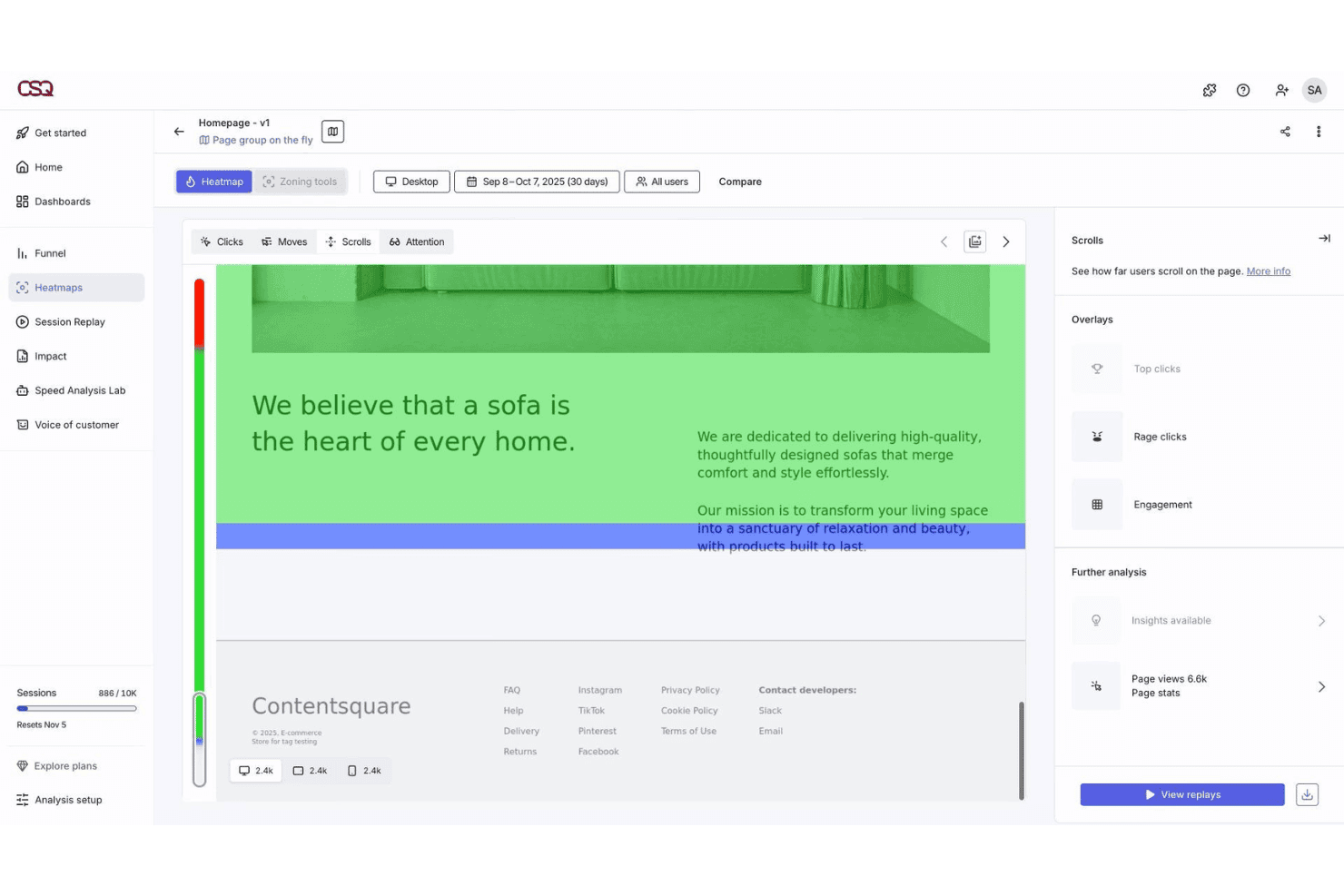
Contentsquare visualizes page interactions with detailed heatmap analytics. Contentsquare is a digital experience analytics platform that helps product, UX, and marketing teams understand how users interact with content, pages, and features across web and mobile.
Who Is Contentsquare Best For?
Contentsquare is a strong fit for mid-market and enterprise ecommerce and retail teams focused on optimizing digital customer experiences across web and mobile.
Why Contentsquare Is a Good Mixpanel Alternative
I've included Contentsquare in my top picks because its zone-based heatmaps go beyond standard click data, showing you engagement rate, exposure rate, and revenue attribution for every individual element on a page. I also appreciate CS Find & Fix, which uses AI to automatically detect friction patterns like rage clicks and dead clicks and ties them directly to revenue loss. That level of page-level granularity is something Mixpanel's event-based model simply doesn't offer out of the box.
Contentsquare Key Features
- Advanced journey analysis: Maps user paths across web, app, and mobile, connecting clicks, drop-offs, and outcomes across multiple sessions in a single view.
- Impact quantification: Ties every behavioral insight to revenue and conversion metrics, so you can see exactly how performance issues affect your bottom line.
- Voice of Customer surveys: Lets you launch AI-generated surveys with 40+ templates, then pairs responses directly with session replays for full context.
- Smart Capture: Automatically records every user interaction from day one across all devices, with no manual tagging or engineering work required.
Contentsquare Integrations
Contentsquare offers native integrations with Google Analytics 4, Adobe Analytics, Mixpanel, Optimizely, VWO, Qualtrics, Shopify, Snowflake, Hotjar, and Microsoft Teams. An API is available for custom integrations.
Pros and Cons
Pros:
- Visualizes digital customer experience
- Form analysis pinpoints drop-off fields
- AI-driven insights detect behavioural anomalies
Cons:
- High browser resource consumption
- Requires tagging for some advanced tracking
Learn more about Contentsquare: Best for open-source event analytics customization
- 30-day free trial + free plan available
- From $2.5/month

OpenPanel empowers developers with privacy-focused, self-hosted analytics. OpenPanel is an open-source analytics platform designed for teams that want full control over event tracking and data privacy. It’s a strong fit for developers and product teams who need to customize analytics beyond what closed-source tools like Mixpanel allow.
If you’re looking to tailor your analytics stack or self-host your data, OpenPanel offers flexibility that stands out among Mixpanel alternatives.
Why OpenPanel Is a Good Mixpanel Alternative
OpenPanel stands out for teams that want to customize every aspect of their event analytics. I picked it as a Mixpanel alternative because it’s open-source, so you can modify the codebase and tailor event tracking to your exact needs.
The platform supports self-hosting, giving you full control over your data and privacy settings. If you need to build custom dashboards or adapt analytics to unique workflows, OpenPanel offers flexibility that closed-source tools can’t match.
OpenPanel Key Features
Some other features in OpenPanel that may interest teams looking for Mixpanel alternatives include:
- Event Schema Editor: Define and manage your event properties directly within the platform for consistent data collection.
- Custom Query Builder: Run advanced queries on your event data without needing external tools or SQL knowledge.
- Role-Based Access Control: Assign user permissions to manage who can view, edit, or administer analytics projects.
- API Access: Integrate OpenPanel with your existing systems or export data programmatically using a documented API.
OpenPanel Integrations
Integrations include HTML/Script, React, Next.js, Remix, Vue, Astro, React Native, Node, Express, and Laravel.
Pros and Cons
Pros:
- Flexible event schema customization
- Self-hosting option for complete data control
- Fully open-source with a transparent codebase
Cons:
- Requires technical setup and server management
- Limited documentation compared to larger vendors
Learn more about OpenPanel:
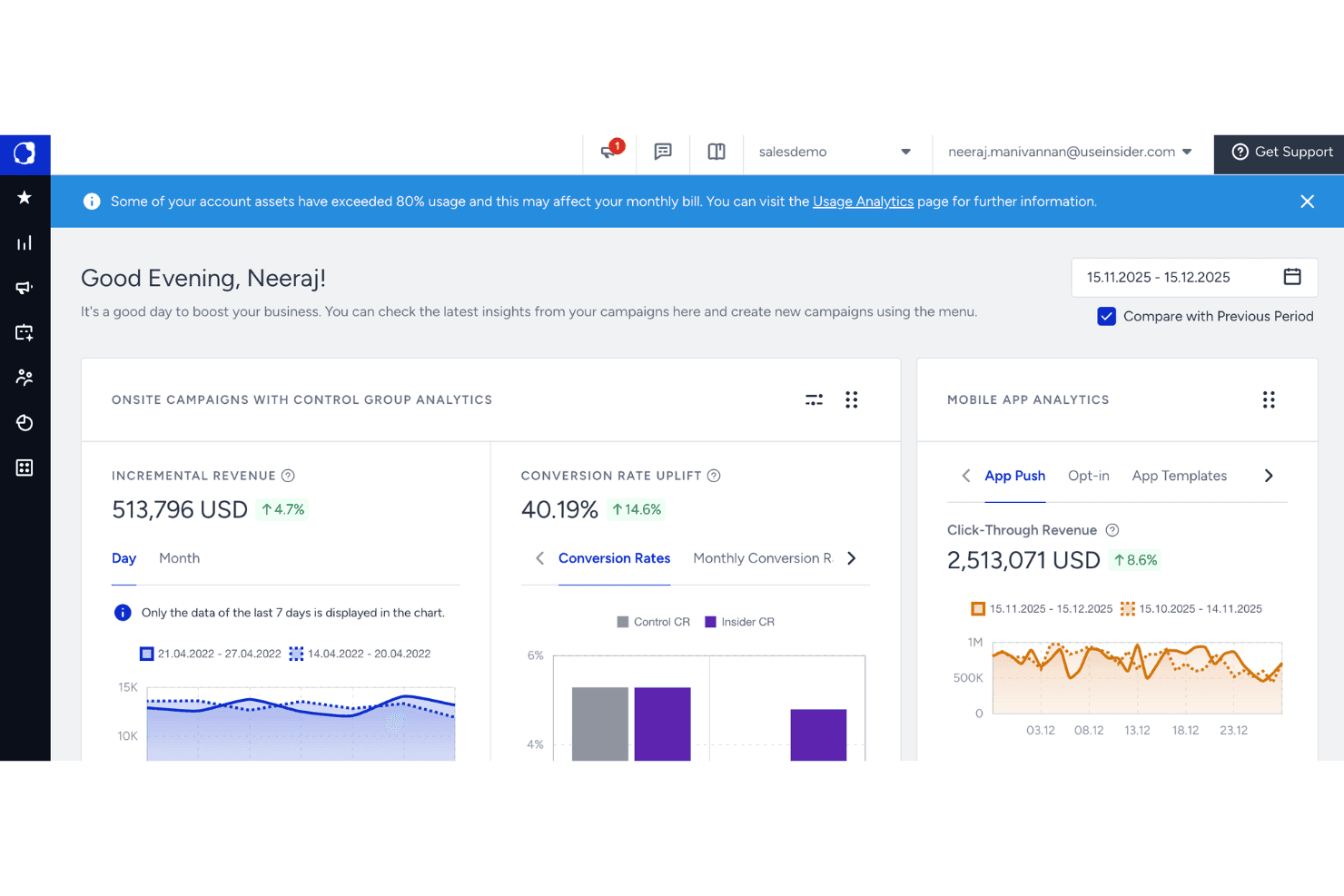
Quantum Metric Felix AI monitors background agents and site health. For ecommerce and retail marketing teams that need to act on customer behavior data in real time, Insider connects cross-channel analytics with personalization across web, mobile, email, SMS, and WhatsApp.
Who Is Insider Best For?
Insider suits growth-stage and enterprise retail brands whose marketing teams run campaigns across three or more digital channels simultaneously.
Why Insider Is a Good Mixpanel Alternative
Insider earns its spot on my shortlist because it bridges the gap between behavioral data and action in a way Mixpanel simply doesn't. I love how the Architect journey builder lets me trigger personalized experiences based on real-time events, like a price drop on a wishlisted item, firing an SMS or WhatsApp message instantly. The predictive segments surface high-intent and at-risk buyers automatically, so I can act on those signals before a conversion window closes.
Insider Key Features
- Web personalization engine: Customizes on-site elements like banners and product grids based on real-time visitor behavior and attributes.
- InStory: Adds Instagram-style story carousels to your site or app to surface personalized content and product highlights.
- Email campaign builder: Drag-and-drop editor for building personalized emails with dynamic content blocks tailored to each contact.
- Funnel analytics: Visualizes step-by-step drop-off across conversion flows to pinpoint where users exit before purchasing.
Insider Integrations
Insider offers 100+ integrations across its Integration Hub, including Salesforce, Shopify, Shopify Plus, Google Analytics, Amplitude, Mixpanel, Segment, mParticle, Tealium, and Google BigQuery. An API is available for custom integrations.
Pros and Cons
Pros:
- Real-time behavioral triggers for personalized messaging
- Cross-channel journey orchestration from one canvas
- AI predictions surface segments without manual setup
Cons:
- Complex onboarding requires dedicated implementation support
- Analytics depth lags behind dedicated analytics platforms
Learn more about Insider:
Other Mixpanel Alternatives
Here are some additional Mixpanel alternatives that didn’t make it onto my shortlist, but are still worth checking out:
- 11Quantum Metric Felix AgenticBest for autonomous digital friction alerts
- 12KissmetricsBest for cohort-based revenue tracking
- 13BrazeBest for cross-channel engagement automation
- 14BloomreachBest for commerce-focused analytics
- 15MoEngageBest for insights-driven mobile messaging
- 16TealiumBest for omnichannel tagging and data integration
- 17BlueConicBest for offline-to-online lifecycle mapping
- 18mParticleBest for data orchestration and governance
- 19LogRocketBest for session replay and error analysis
- 20Twilio Customer Data Platformest for unifying real-time customer profiles
How I Evaluate Mixpanel Alternatives
Every tool on my list needs to handle event-based tracking, funnel analysis, and user segmentation the way Mixpanel does. From there, I evaluate what sets each apart in areas like predictive modeling, cross-channel orchestration, and data governance.
Core Functionality (Table Stakes For This List)
When I'm selecting tools for my list, I rank each one on a scale from 0 (does not offer the functionality) to 5 (excels in this area) for each core functionality listed below. Then, I calculate the tool's total score into a percentage. Each tool needs to achieve a minimum total score of 60% to be considered for inclusion.
- Event-based tracking: I check whether the platform captures granular user actions like button clicks, page views, and cart additions without requiring heavy developer involvement.
- Funnel analysis: Each tool should let you map multi-step conversion flows and pinpoint exactly where users drop off before completing a purchase or signup.
- User segmentation: I look for flexible filtering by behavioral attributes, demographics, or custom properties so you can isolate and compare meaningful audience groups.
- Retention reporting: Tools should show repeat engagement over configurable time windows, helping you measure whether campaigns actually bring shoppers back.
- Custom dashboards: I evaluate how each platform lets you build and share real-time views of the metrics your team tracks most, from conversion rates to revenue by channel.
- Data export and APIs: The ability to push raw event data to warehouses like BigQuery or Snowflake matters, especially when your analytics stack spans multiple platforms.
Once I have a list of tools that meet this criteria, I consider what sets each platform apart.
Differentiating Factors (What Sets Vendors Apart)
Here's how I compare and contrast different vendors:
Standout Features
Predictive analytics is a big differentiator. I look for platforms that can forecast churn risk or purchase likelihood without requiring your team to build custom models. Cross-channel orchestration also matters, especially when you need to coordinate messaging across email, SMS, push, and on-site experiences from a single workflow. Beyond that, I evaluate how each tool handles real-time personalization, like dynamically adjusting product recommendations or homepage content based on in-session behavior.
Beyond Features
Data governance is a key consideration. I evaluate whether each platform offers region-specific data residency options, since where your customer data is stored and processed can directly affect compliance obligations. Onboarding support also varies widely across vendors. Some provide dedicated implementation teams, while others rely on self-serve documentation. For teams migrating from Mixpanel with years of historical event data, I check how each vendor handles data import and schema mapping during the transition.
Why Look For A Mixpanel Alternative?
While Mixpanel is a good choice of Mixpanel alternatives, there are several reasons why some users seek out alternative solutions. You might be looking for a Mixpanel alternative because…
- You need real-time session recordings and journey mapping
- Your team wants more flexible or transparent pricing
- You require advanced anomaly detection and alerting
- You need an easier implementation with less manual tagging
- Your business operates in regions with limited Mixpanel support
- You want deeper integrations with experimentation tools
If any of these sound like you, you’ve come to the right place. My list contains several Mixpanel alternatives that are better suited for teams facing these challenges with Mixpanel and looking for alternative solutions.
Mixpanel Key Features
Here are some of the key features of Mixpanel, to help you contrast and compare what alternative solutions offer:
- Event tracking: Tracks every user interaction—like clicks, views, and form submissions—so you can analyze behaviors at a granular level.
- Funnel analysis: Maps multi-step journeys, letting you visualize how users move through critical flows and where drop-offs occur.
- Cohort segmentation: Groups users based on shared behaviors or attributes over time, enabling targeted analysis and more precise messaging.
- Retention analysis: Measures how often users return or repeat actions, helping you evaluate engagement strategies and improve user loyalty.
- A/B testing: Lets you run experiments with multiple variations to see which changes drive better user outcomes in real time.
- Custom dashboards: Builds tailored views of your most meaningful metrics, including real-time performance updates and at-a-glance insights for your team.
- Segmentation explorer: Dynamically filters and explores your data, so you can surface patterns, discover trends, and understand user attributes in context.
- Data export APIs: Enables raw data extraction to external tools, warehouses, or visualization platforms for advanced analytics or reporting.
- User profile analytics: Shows you a detailed history of actions for individual users, including timelines and attributes, for in-depth troubleshooting or personalization.
- Mobile and web SDKs: Offers integrations for major platforms so you can implement Mixpanel in native apps, web properties, and cross-channel environments.