Key Takeaways
POS System Basics: Understand what is POS, covering its core role in sales transactions, inventory management, and customer data tracking.
Key Benefits and Risks: A POS system speeds up operations and improves accuracy, but brings upfront costs, ongoing fees, and potential technical challenges.
Business Use Cases: Retailers, restaurants, grocers, and market vendors all rely on POS systems; needs vary by business type and channel.
Real-World Results: Case studies demonstrate efficiency gains, data-driven decisions, and faster checkouts after businesses upgrade to modern POS systems.
Features Comparison: Learn how different POS systems and related tools compare so you can identify which platform best fits your operational needs.
A POS system is the operational hub of any retail or hospitality business—and choosing or configuring the wrong one quietly costs you in missed sales, inventory errors, and reporting blind spots. I've seen businesses run on outdated setups that create more problems than they solve.
This guide covers everything: what POS systems actually do, the features that matter most, how they differ by business type, and what to look for when evaluating options. Whether you're selecting your first system or rethinking your current setup, you'll leave with a clear path forward.
What Is a POS System?
A Point of Sale (POS) system is the combination of hardware and software businesses use to process sales, handle payments, manage inventory, and track customer data at the point of purchase. You’ll use a POS system to ring up customers, record transaction details, and monitor key metrics—all from a single platform.
This setup connects sales activity with your back office so your team can make faster decisions in real time.
How Does a POS System Work?
A POS system connects the steps of a sale so the business can process the transaction and update its records at the same time. When a customer chooses an item or service, the system identifies the product, applies the correct price, taxes, discounts, or other charges, and calculates the total.
The customer then pays using cash, card, digital wallet, or another supported method. Once the payment is completed, the POS system records the sale and can automatically update related information such as inventory levels, customer history, employee activity, and sales reports.
Modern POS systems often connect this transaction data with other parts of the business. For example, an in-store purchase can reduce stock levels immediately, appear in daily sales reports, and help managers track which products are selling fastest.
In cloud-based systems, this information can also be synchronized across multiple locations or devices, giving the business a more current view of sales and operations.
Examples of POS Systems
Here are some visual examples of actual POS system interfaces you’ll see in retail or hospitality settings:
Have an account? Log In
DreamsPOS
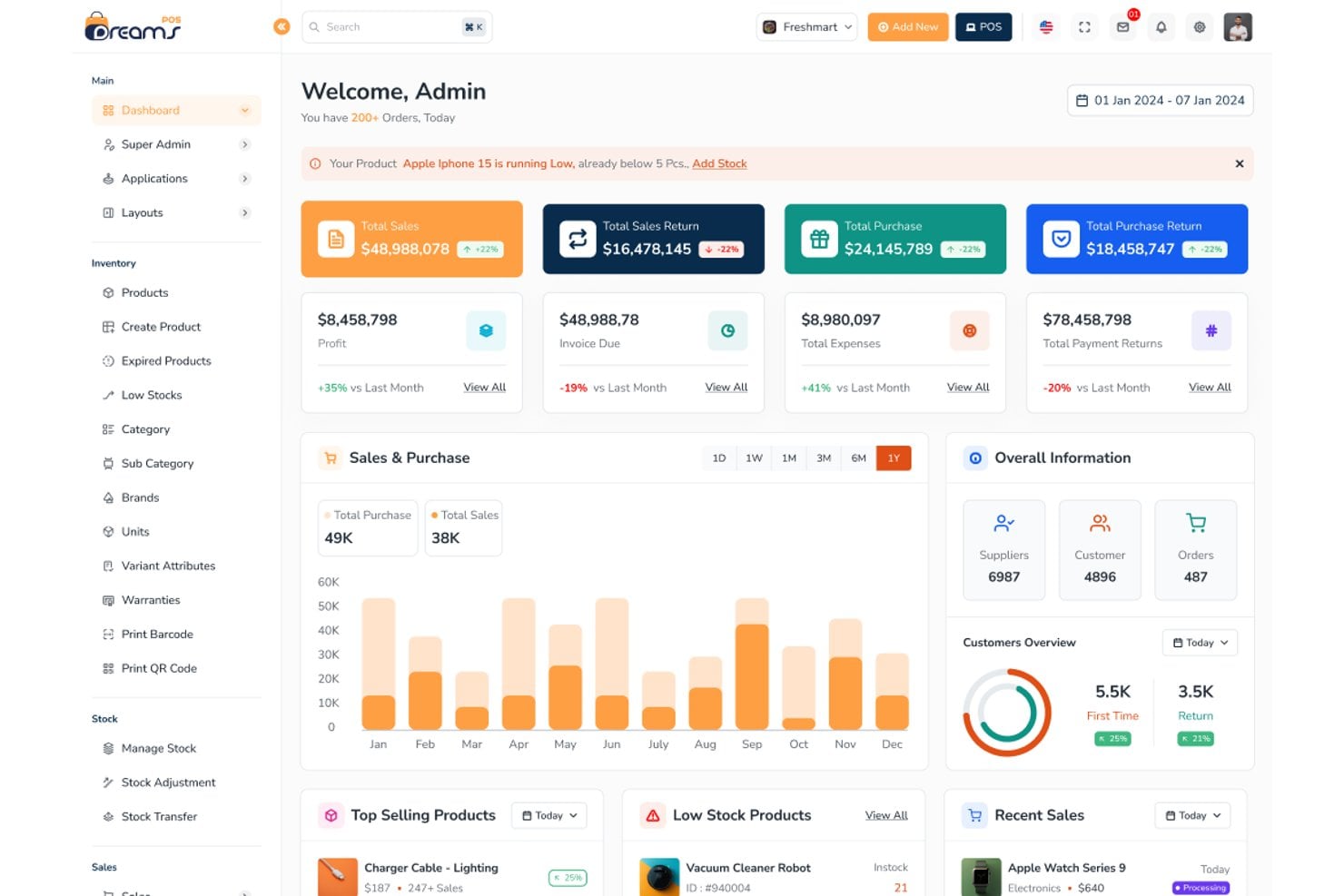
DreamsPOS dashboard gives admins a real-time sales and inventory overview.
Revel Systems
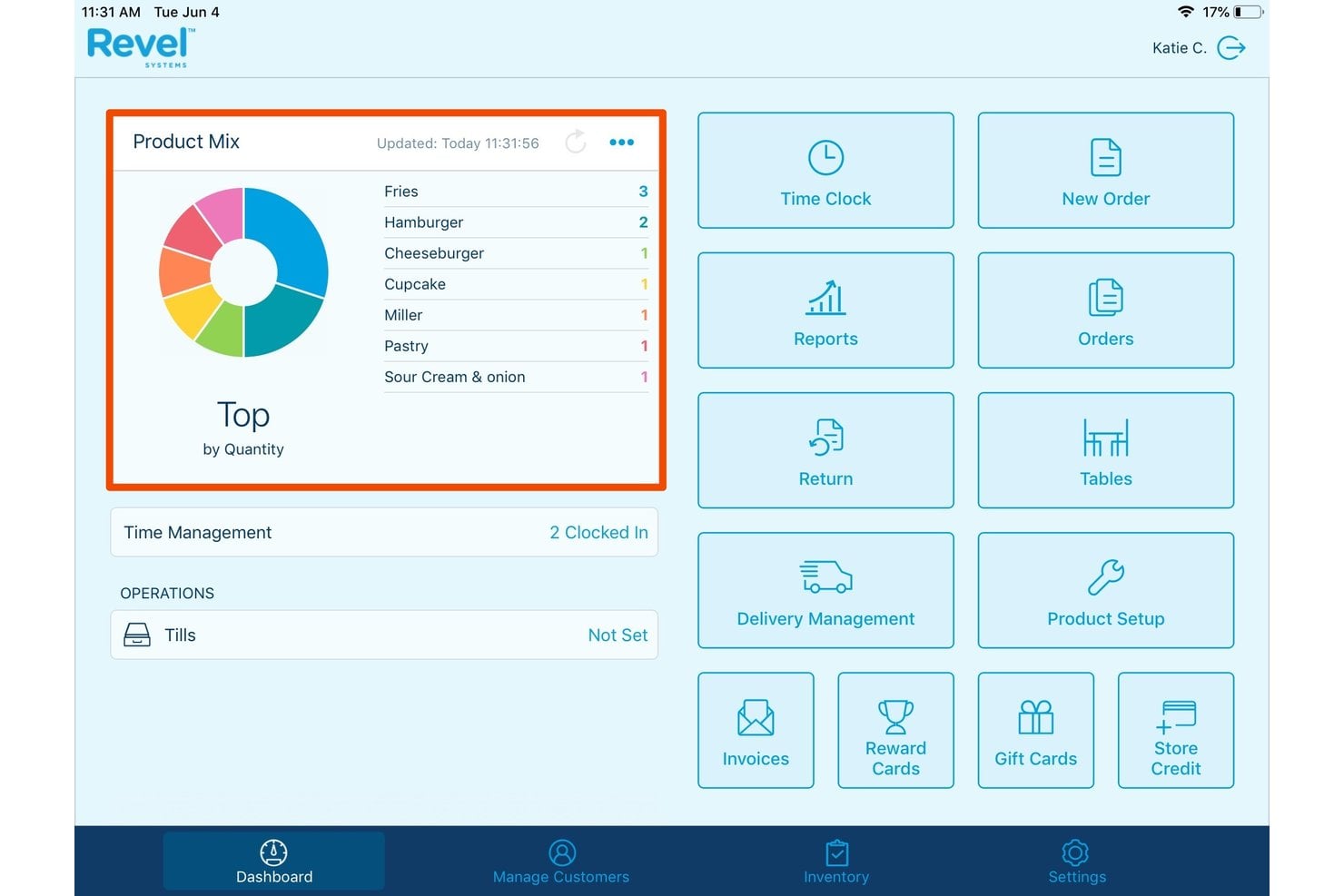
Revel Systems tracks top-selling products by quantity on its dashboard.
KORONA POS
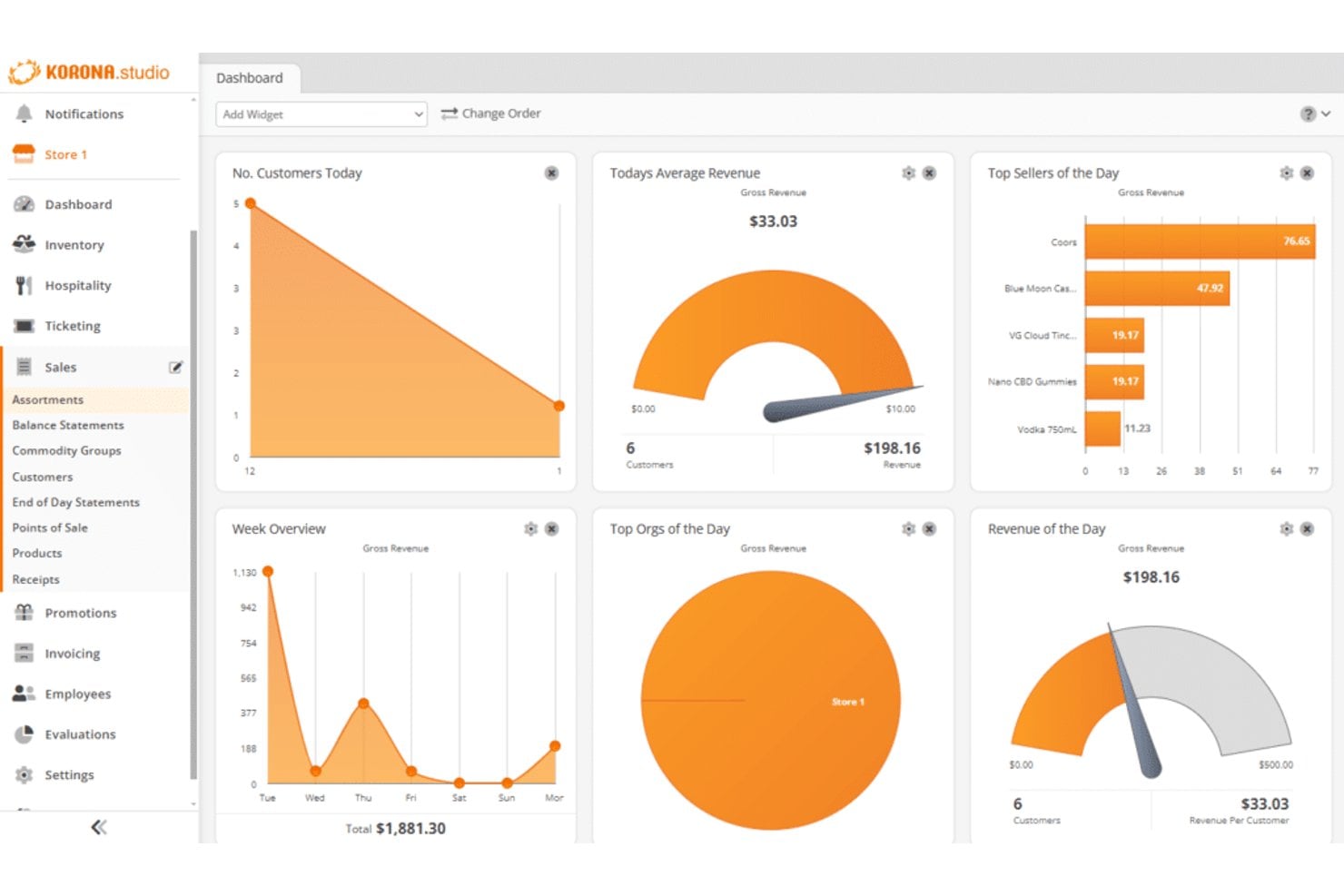
Top POS Systems to Consider
Here's my shortlist of the best POS system solutions:
Who Uses a POS System?
You’ll see POS systems used by teams and businesses in these areas:
- Brick-and-mortar retailers: Clothing shops, electronics stores, and specialty boutiques use POS systems for sales, inventory, and customer data.
- Multi-location retail chains: Regional or national brands rely on POS software to unify data and manage inventory across stores.
- Restaurants and cafes: Hospitality operators use POS systems to manage table orders, split bills, and track menu performance.
- Convenience and grocery stores: These businesses use POS systems for high-volume transactions, barcode scanning, and item-level inventory.
- Pop-up shops and market vendors: Short-term retail setups need mobile or cloud-based POS systems to process sales on the go.
Benefits of POS Systems
A POS system helps your business reduce errors, speed up checkout, and capture real sales data so you can make smarter decisions and increase revenue. While it brings upfront costs and ongoing fees, the payoff in accuracy, controls, and actionable insights usually outweighs the risks of sticking with outdated tools.
Use this table to compare the main benefits and risks retail operators should weigh before implementing a POS system:
| Benefits | Risks |
|---|---|
| BenefitsReduces transactional errors | RisksUpfront hardware and setup costs |
| BenefitsSpeeds up checkout and payment processing | RisksOngoing software subscription fees |
| BenefitsCaptures accurate sales and inventory data | RisksPotential for system outages or downtime |
| BenefitsHelps track customer purchase history | RisksData privacy and security concerns |
| BenefitsCentralizes multi-location operations | RisksStaff require training on new workflows |
| BenefitsEnables real-time reporting and analytics | RisksIntegration challenges with existing tools |
| BenefitsSupports inventory management and reorders | RisksVendor lock-in or limited customization |
POS System Case Studies
Here are a few real-world examples showing how businesses transformed daily operations and decision-making after switching or upgrading their POS systems. These snapshots highlight the practical impacts your team can expect after rollout.
Case Study: Thrifty Shopper's Implementation of Lightspeed Retail
Thrifty Shopper, a 19-location resale chain supporting the nonprofit Rescue Mission Alliance, switched to Lightspeed Retail after their previous POS left customers waiting up to five minutes per credit card transaction.
The team needed a faster checkout experience and reporting tools that could actually surface actionable data without requiring them to manage their own server infrastructure.
Here are the results of Thrifty Shopper's implementation of POS system:
- 95% efficiency increase: Checkout speed improved dramatically across all locations, reducing wait times from several minutes per transaction to near-instant processing.
- Custom reporting access: The team gained the ability to build custom reports tracking average selling price, sell-through rates, and fundraising performance—metrics their previous analytics tool couldn't surface clearly.
- Weekly trend visibility: Managers used weekly sales reports to spot performance gaps, catch inventory discrepancies, and optimize store layouts across locations.
- Store expansion support: With Lightspeed in place, Thrifty Shopper maintained its goal of opening one new store per year, using sales data to evaluate readiness and identify viable locations.
Case Study: Fauchon's Implementation of Shopify POS
Fauchon, the French luxury food and gifting brand, migrated its ecommerce platform from Magento/Adobe Commerce to Shopify in 2024.
In June of that year, it also introduced Shopify POS in its Paris flagship stores to better connect its retail and ecommerce operations. Before the move, Fauchon reported high maintenance costs, slow updates, fragmented retail operations, slower in-store checkout, and limited visibility into inventory and customer data.
Here are the results of Fauchon's implementation of POS system:
- 50% faster checkout: Transaction speed doubled for sales associates, reducing friction at the register during high-traffic periods.
- 20% increase in add-to-cart rate: The ecommerce site saw a significant lift in shopper intent after the platform migration.
- 4% peak ecommerce conversion rate: Fauchon hit this conversion benchmark during its highest-traffic sales period post-migration.
- 36% returning customer rate in December: Repeat purchase behavior increased in the critical holiday month following the Shopify POS rollout.
- Real-time inventory accuracy: Associates could check stock levels and place in-store orders for out-of-stock products using handheld devices, eliminating lost sales at the register.
- Simplified store openings: Standardized hardware and licensing setup reduced the complexity of launching new boutique locations and supporting franchise expansion internationally.
More Articles
Core POS System Features
Here are the features you should expect in any POS system built for retail:
- Sales Transaction Processing: Ring up purchases, accept multiple payment methods, and issue receipts from one central interface.
- Inventory Management: Track product quantities in real time, receive low-stock alerts, and manage reorders before stockouts become a problem.
- Customer Data Capture: Store customer profiles and purchase history for use in marketing, loyalty programs, and customer service.
- Reporting and Analytics: Review sales, cash flow, and inventory reports across different time periods to support better business decisions.
- Multi-Location Support: Keep data synchronized across stores or sales channels so teams can manage multiple locations from one system.
- Employee Management: Set access permissions, track sales by staff member, and monitor user activity for greater accountability.
- Returns and Exchanges Handling: Process returns, exchanges, and refunds accurately while reducing avoidable errors and customer frustration.
- Ecommerce Integration: Connect your online store with in-store operations to keep inventory, orders, and customer data aligned across channels.
POS System Use Cases
POS systems simplify the daily flow of transactions, inventory checks, and customer interactions your teams handle at the counter or online. You can expect greater accuracy and speed in sales processing, easier inventory tracking, and faster access to sales data—making routine tasks smoother for staff and clearer for decision-makers.
These tools let you manage orders, handle returns, and support loyalty programs in one place, tightening up every step from checkout to restock.
Use this table to see how POS systems support core retail processes:
| Process | Description | How Software Helps |
|---|---|---|
| ProcessSales Transaction | DescriptionCompleting purchases and managing payments at checkout. | How Software HelpsPOS systems process multiple payment methods, issue receipts, and track real-time transaction data for every sale. |
| ProcessInventory Management | DescriptionMonitoring stock levels and organizing reorders to avoid stockouts. | How Software HelpsThe software updates inventory counts with each sale, alerts you to low stock, and automates reorder notifications. |
| ProcessReturns and Exchanges | DescriptionProcessing product returns, exchanges, and issuing refunds. | How Software HelpsPOS features track returned items, restock inventory automatically, and log transaction details for accurate records. |
| ProcessCustomer Data Capture | DescriptionCollecting customer details and purchase history during the sales process. | How Software HelpsPOS systems store customer profiles and sales history, enabling targeted marketing, loyalty programs, and service. |
| ProcessMulti-Location Control | DescriptionManaging sales and inventory data across several store locations. | How Software HelpsPOS syncs data between stores, giving you a centralized view and enabling transfers, consolidated reporting, and setup. |
Types of POS Systems & Similar Tools
POS systems come in several forms depending on how and where you sell, and they overlap with tools that handle only part of what a full POS does:
Use this table to understand how each type differs from a standard POS system:
| Type | Differentiator |
|---|---|
| TypeMobile POS (mPOS) | DifferentiatorRuns on smartphones or tablets; built for portable selling at markets, events, or on the shop floor |
| TypeSelf-service kiosk POS | DifferentiatorCustomer-operated checkout terminal; removes the cashier from the transaction entirely |
| TypeOmnichannel POS | DifferentiatorUnifies in-store and online sales in one system; inventory and customer data sync across both channels |
| TypePayment processor | DifferentiatorHandles payment authorization only; no inventory tracking, reporting, or customer data management |
| TypeInventory management software | DifferentiatorTracks stock levels and reorders but doesn't process sales transactions at the register |
| TypeEcommerce platform | DifferentiatorManages online storefronts and digital orders; not built for in-person, in-store transactions |
Now that you understand what a POS system is and what it can do, the next step is narrowing down your options. Read up on how to choose a point of sale system so you can match the right features, pricing model, and integrations to the way your business actually operates.