What Is KORONA Studio?
KORONA Studio is the cloud-based back office included with every KORONA POS subscription. It acts as the central layer where operational data from across a business is collected and made usable. Every sale, void, inventory adjustment, employee action, vendor delivery, and customer-related transaction is automatically imported into Studio.
Where the POS terminal (called KORONA Client) handles checkout, Studio handles everything that happens after the transaction. It runs in a browser, works on any device with internet access, and updates in real time across all connected locations. Users can manage core operations remotely, whether they’re adjusting pricing, checking stock levels, onboarding staff, or reviewing performance across stores.
Managers and owners/operators can access KORONA Studio from any internet-connected device, including laptops or smartphones, while located remotely from the store.
How KORONA Studio Is Organized
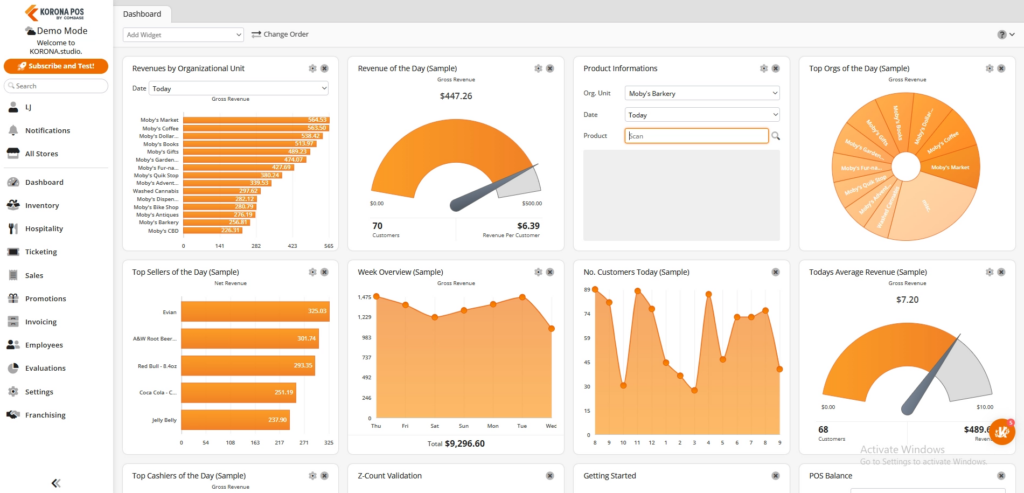
KORONA Studio is structured into several core areas, accessible from the left-hand navigation panel. These include reporting and analytics, inventory management, employee administration, promotions and pricing tools, system settings, and (depending on configuration) multi-location or franchise modules.
While each section serves a distinct purpose, they are tightly interconnected. The system is designed to behave as a single, continuously updated environment rather than separate tools stitched together. For example, a pricing update is reflected at every terminal without requiring a sync, employee permission changes apply at the next login, and new products added to inventory become instantly available across all locations.
Want to learn more about KORONA POS?
Reporting and Analytics

KORONA Studio's report library is organized into separate categories covering everything from high-level business health to individual transaction audits.
These include:
Analysis and Productivity
- ABC Analysis grades every product by profitability and sales velocity
- Revenue statistics by day and by hour
- Customers-per-hour and customers-per-day-of-week tracking
- Top seller and slow seller identification
- Periods to compare for stacking any two time periods side by side
- Supplier analysis and key performance indicators consolidated in one view
Financial
- Payment method breakdowns, groupable by location
- Discount and coupon tracking
- Posting journals and point of sale reports
- Stock valuation
Managerial
- Cashier, Balance, Revenue, and Commission reports
- Organization comparison across all locations
- Cancellation report with timestamps for loss prevention auditing
Inventory
- Advanced shelf life report for perishables approaching expiry
- Stock receipt discrepancies flagging vendor shipment differences
- Movement and internal transfer reports for multi-location stock flows
- Stock valuation report with column totals for current stock, goods value, and total net
| New in April 2026: Three cross-location reports — sales by organizational unit, discount by organizational unit, and a multi-location tax report — consolidate what previously required pulling and reconciling separate reports per location. |
Users can export all reports as PDFs or Excel files. The automatic report dispatch feature lets you schedule reports to be emailed automatically.
Inventory and Product Management
KORONA Studio is where an entire product catalog lives, and even across multiple locations, it remains a single, centralized catalog. The support team can import your existing product database in any format during setup, so you don’t have to rebuild your inventory from scratch.
Features include:
- One consolidated catalog across all locations, with bulk upload and CSV import support
- Multiple barcodes and product codes per item, with container quantities and case break management
- Expiration date tracking with configurable alerts before items pass their prime
- Supplier assignment and reorder levels per product, feeding into automated purchase orders
- Order level optimization that recalculates par levels based on purchase history, seasonality, and sales trends
- Automatic Retail Price Adjustment updates prices when costs change on stock receipt, including container products
- Inventory counts performable from Studio, a POS terminal, or the KORONA mobile app, with automatic booking time configurable to the specific hour
Employee and Cashier Management
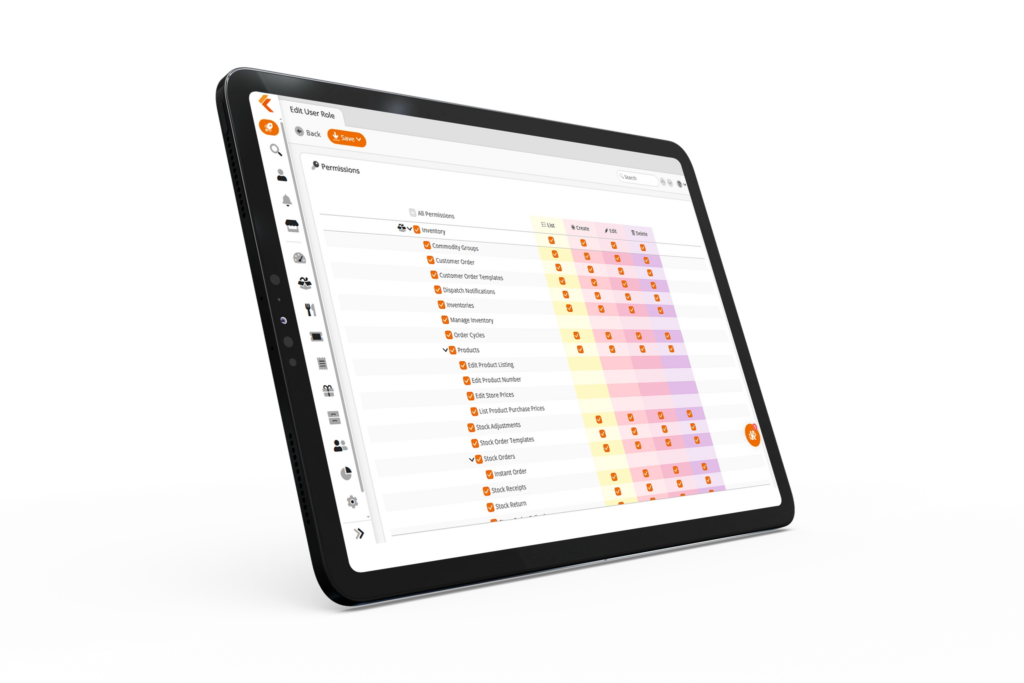
Every employee is created and configured in KORONA Studio. You define their role, set permission levels, assign them to specific terminals or locations, and control exactly what they can and cannot do at the point of sale. Every action is logged and retrievable, so any discrepancy can be traced back to the specific transaction, cashier, and timestamp. Features include:
- Granular permission controls for price overrides, discounts, voids, returns, drawer access, and report access
- Organizational unit filtering to track which cashiers have POS access at which locations
- Maximum cash amount alerts that prompt cashiers to drop their drawer when it exceeds a set limit
- Shift reports to highlight total sales, comps, voids, and discounts
- Full action history per cashier, retrievable by shift, day, or any custom time period
Promotions, Discounts, and Pricing
KORONA Studio's promotions section covers everything from simple percentage-off sales to complex, automatically scheduled and tracked conditional promotions.
Features include:
- Promotion Wizard, which walks you through trigger (product, commodity group, customer group, or purchase threshold), reward (discount, free product, bonus points), and schedule
- Dual pricing support, which sets credit prices as a direct multiple of existing cash prices across your whole catalog
- Price group templates for creating new price groups from existing ones, useful for location-specific or dual pricing structures
- Dual-price labels printable directly from Studio showing both cash and card prices
- Couponing tracking at the receipt level, with filters for every transaction where a promotion was applied or triggered
- Couponing actions report and Discount by Organizational Unit report for promotion performance by location
- Case breaks for mix-and-match bottles or product bundle deals
- Receipt QR codes for repeat purchases, loyalty tracking, or future discounts
Multi-Location and Franchise Tools
For businesses with multiple locations or a franchise structure, KORONA Studio is the central hub for running them all from one place.
Features include:
- Organization comparison report for side-by-side performance across all locations
- Sales by organizational unit report breaking down every location's sales by product or category in one view
- One consolidated product catalog with pricing changes and promotions pushable to all locations at once
- Product transfers between locations managed directly from Studio
- Royalty management module that calculates amounts from sales data and automatically transfers funds to the franchisor on a defined schedule
- Franchisee data isolation so each franchisee sees only their own location's data in Studio
- Franchise order portal letting franchisees restock through an approved catalog with full franchisor visibility into what's being ordered
AI Tools in KORONA Studio
In November 2025, KORONA launched the beta version of an AI Recommendation Tool inside KORONA Studio.
The initial release includes AI-assisted product setup: when you add a new product, the tool can suggest commodity group categorization, sector assignments, and pricing based on the product name.
It also helps align column headers during CSV imports, which removes a common friction point for users migrating large product databases.
The AI can also process distributor invoices and automatically import them into stock receipts.
Who Gets the Most Out of KORONA Studio?
KORONA Studio is useful for any business running KORONA POS, but it delivers the greatest operational value to specific user types:
Multi-location retailers and franchise operators benefit most from the cross-location reporting, centralized product management, and organization comparison tools. Consolidated views now eliminate the need to pull separate reports per location and stitch them together manually.
Specialty retailers with high SKU counts, like liquor stores, convenience stores, smoke shops, and gift shops, get significant value from the inventory tools - order-level optimization, stock receipt discrepancy tracking, shelf-life reporting, and product catalog management tools that handle thousands of items without performance issues.
Business owners who want remote oversight use KORONA Studio as their window into the business. The cashier activity reports, balance reports, and cancellation logs give you enough detail to identify problems without being on the floor. The automatic report dispatch feature means you can get key reports delivered to your inbox on a schedule without logging in daily.
Anyone using dual pricing will find the set prices tool, dual-price label printing, and the price group management features in Studio significantly reduce the administrative overhead of maintaining two price points across a large catalog.
FAQs
Is KORONA Studio included with every plan?
Yes. KORONA Studio is included with every KORONA POS subscription at no extra cost. There is no separate back office fee.
Can I access KORONA Studio on my phone or tablet?
Yes. KORONA Studio is browser-based, so it works on any device with an internet connection (desktop, tablet, or mobile). There is also a dedicated KORONA mobile app for inventory counting and product management.
How often is KORONA Studio updated?
KORONA Studio receives regular cloud updates, including quarterly full updates with a new suite of features. Updates are applied automatically with no action required on the merchant’s end. Release notes are published in the KORONA POS manual so users can see exactly what changed in each update.
Can different employees have different levels of access to KORONA Studio?
Yes. Back-office users can be created with specific permission sets that restrict which areas of KORONA Studio they can access. A store manager might have access to reporting and inventory but not employee setup or pricing configuration, for example.
Does KORONA Studio work if my internet goes down?
KORONA POS can continue processing transactions in offline mode during an internet outage. KORONA Studio itself requires an internet connection, but all transaction data syncs back to Studio automatically once connectivity is restored. Nothing is lost during the offline period.