

Beheersoftware voor houtwerkplaatsen helpt je bedrijfsbeheer, materiaalbeheer, calculatie, planning en productieprocessen met elkaar te verbinden. De juiste inrichting hangt af van de manier waarop je werkt: als je een klein bedrijf runt, heb je mogelijk behoefte aan projecttracking en CRM, terwijl een groeiende fabrikant wellicht een ERP-oplossing nodig heeft die voorraad, inkoop en de werkplaatsvloer met elkaar verbindt. In deze gids vergelijk ik hulpmiddelen die zijn ontwikkeld voor de houtbewerkingsindustrie, van complete ERP-software tot gespecialiseerde toepassingen voor kastontwerp en CNC.
Waarom u onze softwareaanbevelingen kunt vertrouwen
6,700+
Reviews
20
Industry experts
16+
Evaluation factors
14
Years
Ons team test en beoordeelt software sinds 2012. Als retailleiders weten we zelf hoe moeilijk — en belangrijk — het is om de juiste software te kiezen.
Voor deze gids hebben we tools geëvalueerd met behulp van praktijktests en onafhankelijk onderzoek, waarbij we tools beoordeelden aan de hand van onze selectiecriteria.
Onze reviews weerspiegelen ons onafhankelijke oordeel — geen verkooppraatje.
Vergelijkingstabel: beheersoftware voor houtwerkplaatsen
Vergelijk prijzen en specificaties naast elkaar voor de beheersoftware voor houtwerkplaatsen die op mijn selectie is terechtgekomen.
| Tool | Best For | Trial Info | Price | ||
|---|---|---|---|---|---|
| 1 | Best for automatic cut lists and reports | 14-day free trial available | From $49.99/month (billed annually) | Website | |
| 2 | Best for customizable millwork workflows | Free demo available | Pricing upon request | Website | |
| 3 | Best for visual lead-to-install tracking | 14-day free trial available | From $199/month | Website | |
| 4 | Best for mobile cabinet shop operations | No free trial available | Pricing upon request | Website | |
| 5 | Best for browser-based CNC production | 7-day free trial available | From $110/month | Website | |
| 6 | Best for online custom-product ordering | Free demo available | Pricing upon request | Website | |
| 7 | Best for identifying workflow bottlenecks | Free demo available | Pricing upon request | Website | |
| 8 | Best for bid-to-billing job control | Free demo available | Pricing upon request | Website | |
| 9 | Best for multi-site factory operations | Free demo available | Pricing upon request | Website | |
| 10 | Best for modular design-to-manufacture | Free demo available | Pricing upon request | Website |


Beoordelingen van de beste beheersoftware voor houtwerkplaatsen
Hieronder vind je mijn gedetailleerde samenvattingen van de beste beheersoftware voor houtwerkplaatsen die op mijn selectie is terechtgekomen. Mijn beoordelingen geven een gedetailleerd overzicht van de functies, beste toepassingsmogelijkheden en integraties van elke software, zodat je de beste oplossing voor jou kunt vinden.
 Best for automatic cut lists and reports
- 14-day free trial available
- From $49.99/month (billed annually)
Visit WebsiteCustomer Rating:4.3/5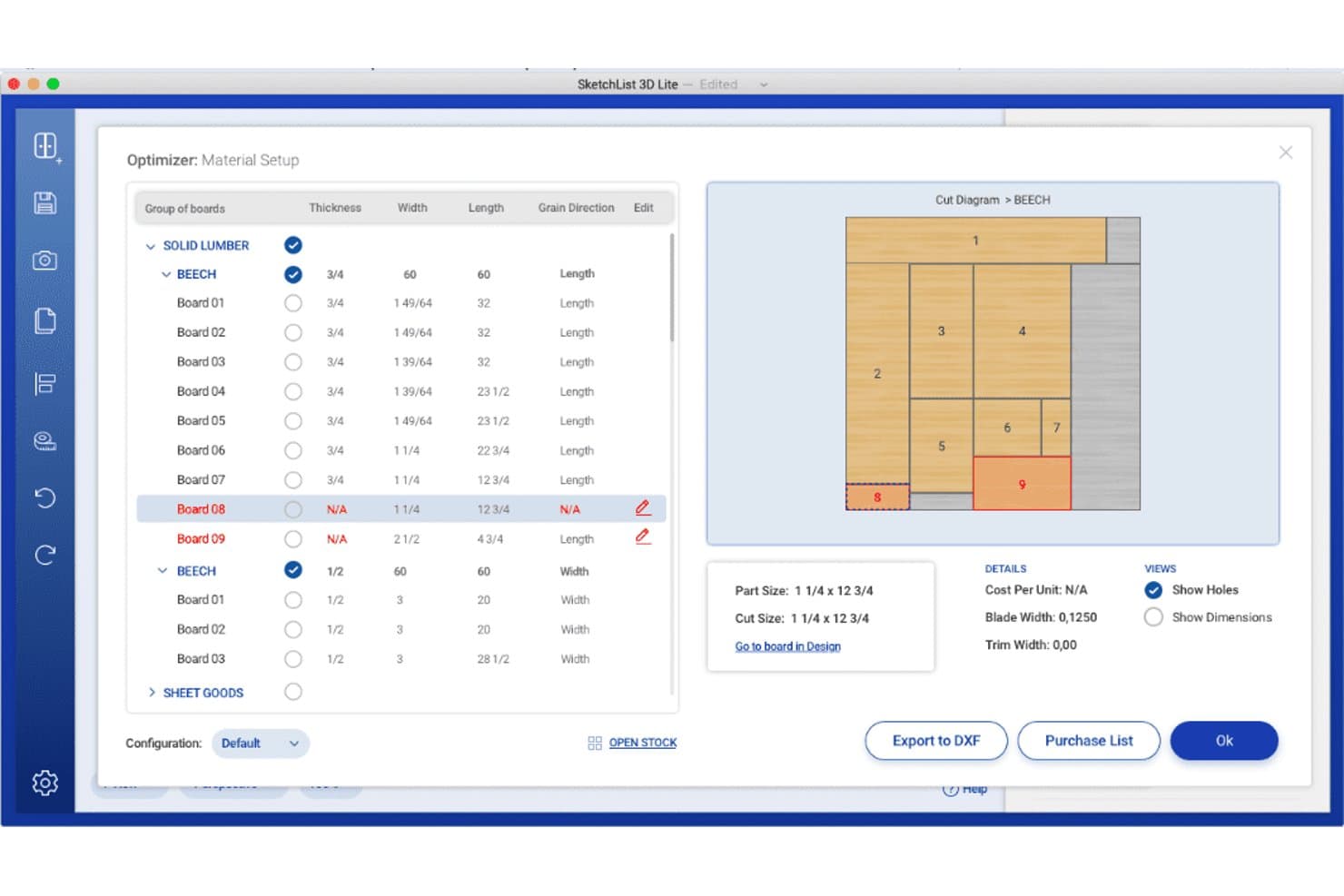
SketchList 3D offers a material optimizer with cut diagrams, board grouping, grain direction settings, and export options for wood shop planning. SketchList 3D is a woodworking design tool built for cabinet makers that combines 3D visualization, automatic cut list generation, bill of materials reporting, and job cost estimation.
Who Is SketchList 3D Best For?
SketchList 3D is a good fit for independent cabinet makers and small custom woodworking shops that need design-to-cut-list workflows without full CAD complexity.
Why I Picked SketchList 3D
I picked SketchList 3D because it keeps your cut lists, bills of materials, cost information, drawings, and material layouts aligned with design changes. You can export reports as PDF or CSV and hand DXF files off to separate CAM software for CNC programming. However, you’ll need another application to generate G-code because SketchList is a design and planning tool rather than a CAM system.
SketchList 3D Key Features
- Cabinet Wizard: Lets you adjust over 70 cabinet parameters including dimensions, joinery, door styles, and materials.
- Shop drawings and elevations: Auto-generates detailed shop drawings and 2D elevations from your design.
- Pre-built materials library: Includes reusable materials, hardware, and contour templates for fast configuration.
- Real-time 3D visualization: Displays project designs in realistic 3D with photo background import for client spaces.
SketchList 3D Integrations
SketchList 3D offers native integrations with CNC routers through DXF file export and supports CAD tool integration using the same DXF format. CSV and PDF exports are available for shop floor workflows. Native integrations with other software vendors are not clearly documented.
Pros and Cons
Pros:
- Outputs shop drawings and detailed elevation views
- Instant cut list and BOM updates from designs
- Cabinet Wizard with extensive customization options
Cons:
- Lacks customer order and job scheduling tools
- No lumber or hardware inventory management
Learn more about SketchList 3D: Best for customizable millwork workflows
- Free demo available
- Pricing upon request
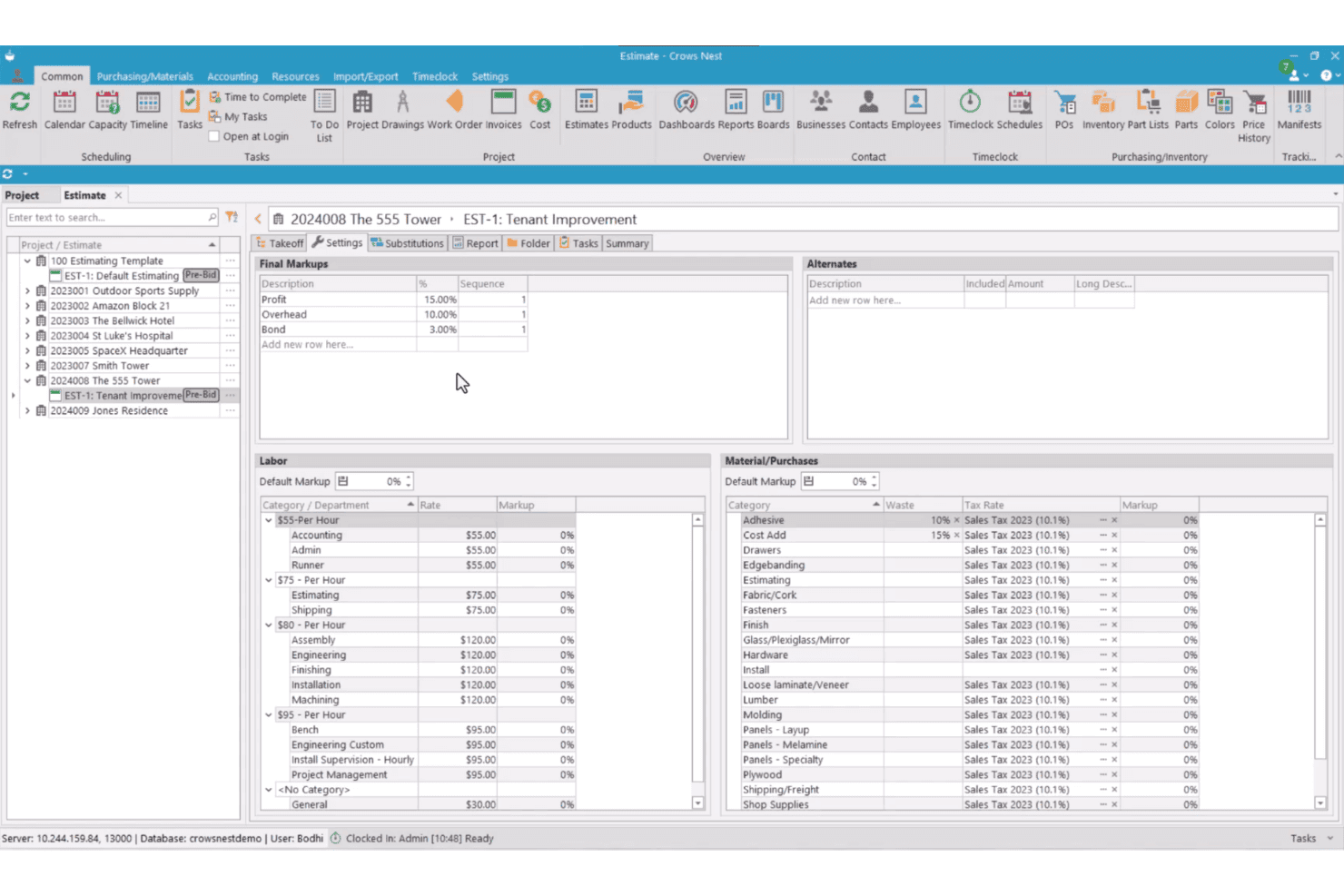
Crows Nest features an estimate settings screen with labor rates, material categories, tax rates, and final markups for a tenant improvement project. Crows Nest is a modular ERP and project management platform built for millwork and cabinet shops, covering estimating, job costing, production scheduling, purchasing, and inventory from a single system.
Who Is Crows Nest Best For?
Crows Nest suits project-based millwork and architectural woodworking shops that need a configurable ERP without being forced into a rigid, one-size-fits-all system.
Why I Picked Crows Nest
I picked Crows Nest because you can configure its workflows, dashboards, reports, and modules around your existing operations. Its Task Management engine can trigger and assign a task when a predecessor is completed, with due dates tied to project milestones. You also get more than 300 standard report layouts and tools for creating custom reports and dashboards.
Crows Nest Key Features
- Dynamic estimating module: Generate detailed takeoffs, apply vendor material pricing, and create alternate quotes for custom jobs.
- Integrated document management: Store, track, and share all project-related documents, drawings, and revisions in one place.
- Production work order management: Create and manage production work orders with scheduling and shop labor tracking.
- Mobile inventory management: Use mobile devices for real-time inventory updates, receiving purchase orders, and tracking manifests on the shop floor.
Crows Nest Integrations
Crows Nest offers native integrations with QuickBooks, Sage, Xero, Microvellum, and CabinetVision. An API is available for custom integrations.
Pros and Cons
Pros:
- Built-in document and drawing management system
- Comprehensive job costing and tracking tools
- Highly customizable workflow modules for unique shops
Cons:
- Reliance on third-party tools for cut lists
- No retail point of sale features
Learn more about Crows Nest: Best for visual lead-to-install tracking
- 14-day free trial available
- From $199/month
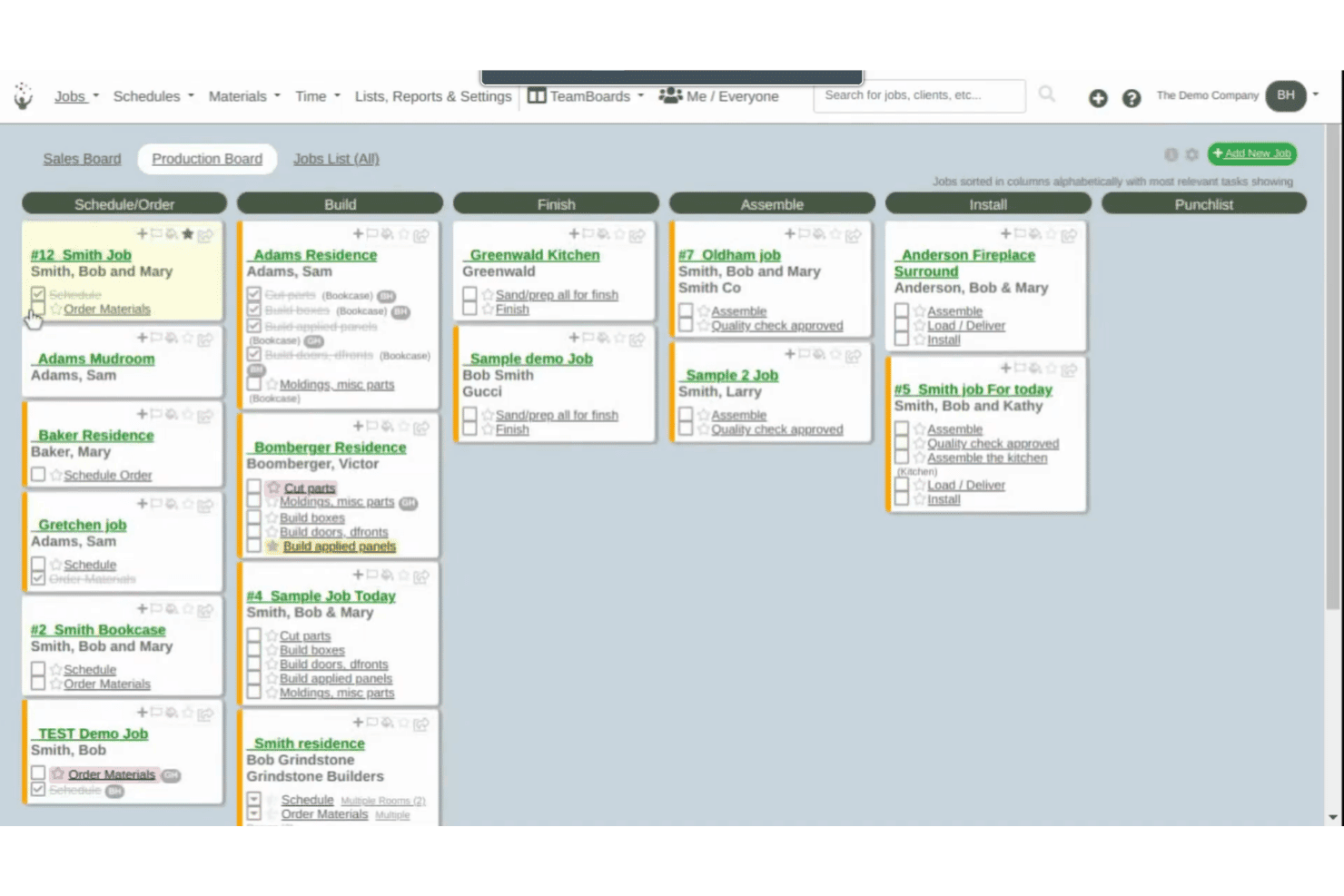
Cabinetshop Maestro offers a Kanban-style Production Board that organizes cabinet jobs across workflow stages including Build, Finish, Assemble, Install, and Punchlist. Cabinetshop Maestro is a project management tool built specifically for cabinet shops, covering job tracking, scheduling, proposals, invoicing, time tracking, and job costing across the full project lifecycle.
Who Is Cabinetshop Maestro Best For?
It's a strong fit for small to mid-sized custom cabinet shops that need a simple, shop-specific system to manage jobs from first contact through installation.
Why I Picked Cabinetshop Maestro
I picked Cabinetshop Maestro because its visual workflow boards show you where every active job sits from lead through installation. Each job also has a centralized folder for project details, files, notes, tasks, discussions, and scheduling information. This gives you a clearer operational view without requiring a full manufacturing ERP.
Cabinetshop Maestro Key Features
- Job scheduling and calendars: Plan jobs and assign due dates across the team’s calendar view.
- Proposals and invoicing: Build estimates and send invoices directly from within the platform.
- Labor time tracking: Log work hours by job and task for accurate cost records.
- Job costing reports: View real job costs against estimates using built-in reporting tools.
Cabinetshop Maestro Integrations
Native integrations are not clearly documented. Cabinetshop Maestro does not integrate directly with QuickBooks or design software like Cabinet Vision, Mozaik, or SketchUp, and it does not offer an API for custom integrations.
Pros and Cons
Pros:
- Built for cabinet shop project tracking
- Easy drag-and-drop job scheduling
- Visual workflow boards for job progress
Cons:
- No cut list or BOM generation
- No inventory management or material tracking
Learn more about Cabinetshop Maestro: Best for mobile cabinet shop operations
- No free trial available
- Pricing upon request
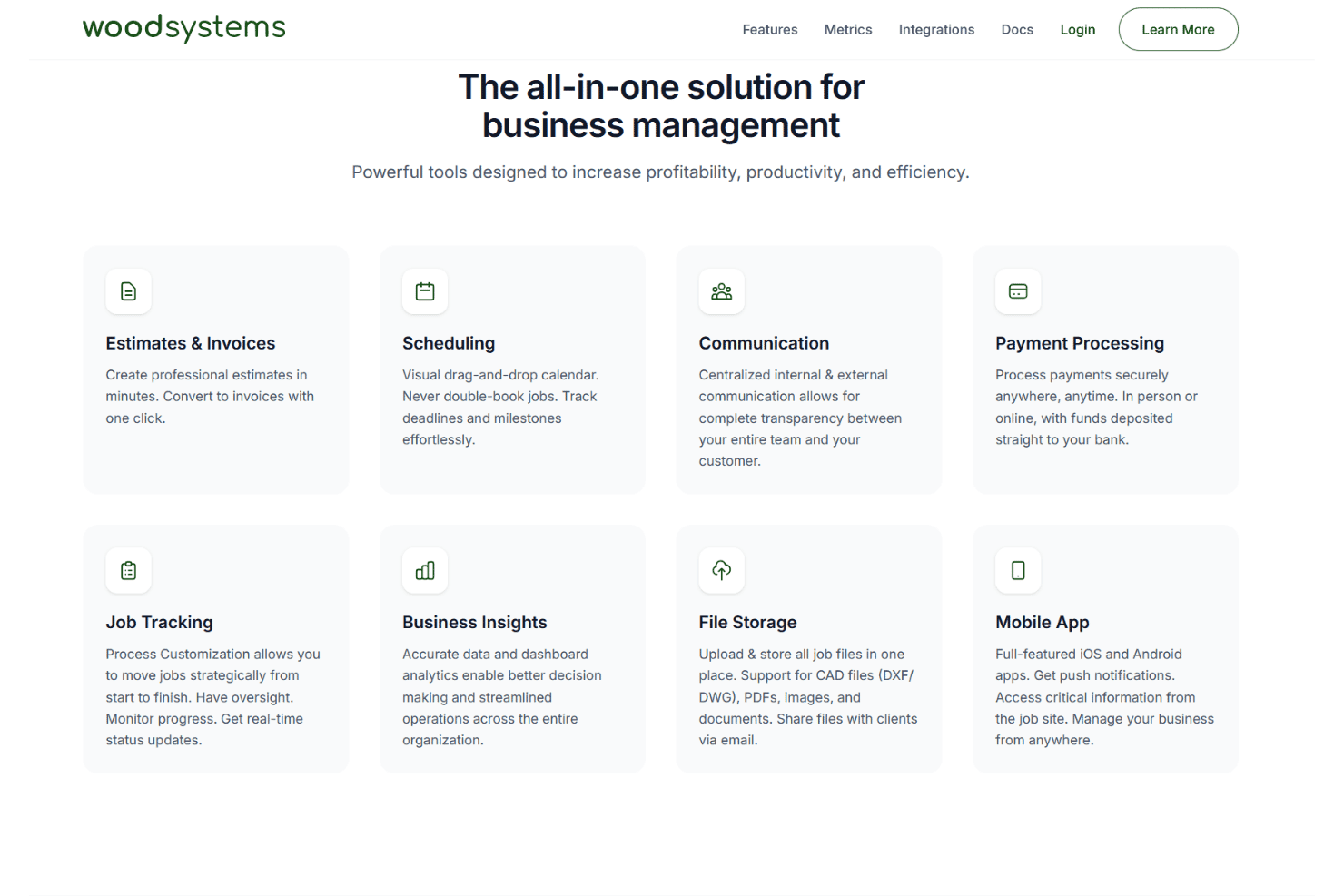
Woodsystems offers an all-in-one business management platform featuring estimates, scheduling, communication, payment processing, job tracking, business insights, file storage, and a mobile app. Woodsystems is a cloud-based ERP for custom cabinet and woodworking shops that combines estimating, job tracking, scheduling, payments, and client communication in a single platform with native mobile apps.
Who Is Woodsystems Best For?
Woodsystems is a good fit for custom cabinet shop owners who need to manage jobs, quotes, and client communication from a mobile device on the go.
Why I Picked Woodsystems
I picked Woodsystems because you can access estimates, invoices, scheduling, job tracking, files, payments, and customer communication through its web, iOS, and Android applications. Its mobile apps support push notifications and let you manage job information away from the office. You can also convert estimates to invoices without re-entering the project details.
Woodsystems Key Features
- Drag-and-drop scheduling calendar: Visually manage project timelines, shop deadlines, and installation appointments.
- QuickBooks integration: Sync job and financial data with your existing accounting system.
- CAD file storage and sharing: Attach DXF and DWG files directly to jobs and email them to clients.
- Centralized email integration: Send estimates and invoices from your Gmail, Outlook, or Microsoft 365 account.
Woodsystems Integrations
Woodsystems offers native integrations with Gmail, Outlook, Google Drive, OneDrive, Dropbox, QuickBooks, Microsoft 365, and Stripe.
Pros and Cons
Pros:
- Easy CAD file sharing with clients
- Visual scheduling for shop projects and installs
- Mobile apps allow on-site job management
Cons:
- Does not generate cut lists or BOMs
- No lumber or materials inventory tracking
Learn more about Woodsystems: Best for browser-based CNC production
- 7-day free trial available
- From $110/month
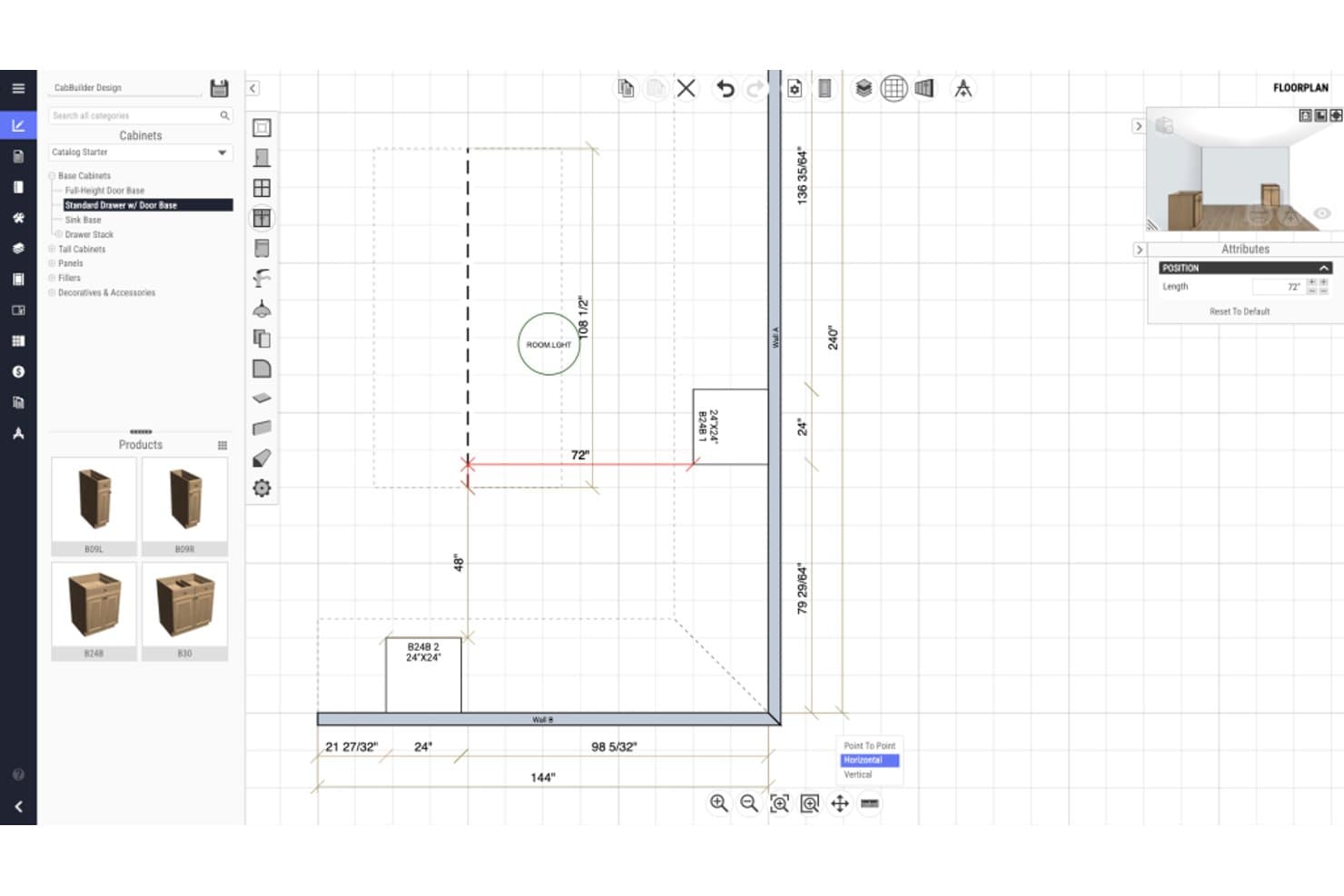
CabBuilder offers a floorplan design view where users can input and visualize cabinet dimensions with precise measurements in a 2D layout. CabBuilder is a browser-based cabinet design and CNC production tool that generates 3D designs, cutlists, optimized part nesting, and machine-ready CNC code for custom cabinet and woodworking manufacturers.
Who Is CabBuilder Best For?
CabBuilder suits small to mid-sized custom cabinet shops that need a direct path from design to CNC machine output without a full ERP system.
Why I Picked CabBuilder
I picked CabBuilder because it gives you cabinet design and production tools through a browser-compatible interface that works across Windows, macOS, iPad, and other tablets. With the CNC or Enterprise plan, you can nest cut-list parts, generate machine code through a CNC-specific post processor, and simulate toolpaths before cutting. The Pro plan focuses on cut lists and manual production rather than direct CNC output.
CabBuilder Key Features
- 3D design rendering: View and modify cabinet designs with instant updates in a real-time 3D workspace.
- Custom cabinet library: Access and build a library of framed and frameless cabinet templates for reuse across projects.
- Automated job reports: Generate detailed job and cost reports directly from your project specifications and design files.
- Door Builder module: Specify custom door profiles and produce cutlists and CNC code for doors and drawer fronts.
CabBuilder Integrations
CabBuilder offers native integrations with ProKitchen and supports CNC hardware through a free post processor. Native integrations with other business software are not clearly documented.
Pros and Cons
Pros:
- Custom cabinet and construction template library
- Strong 3D cabinet design and cutlist tools
- Browser-based direct CNC code generation
Cons:
- Lacks production scheduling and job tracking
- No lumber inventory management module
Learn more about CabBuilder:
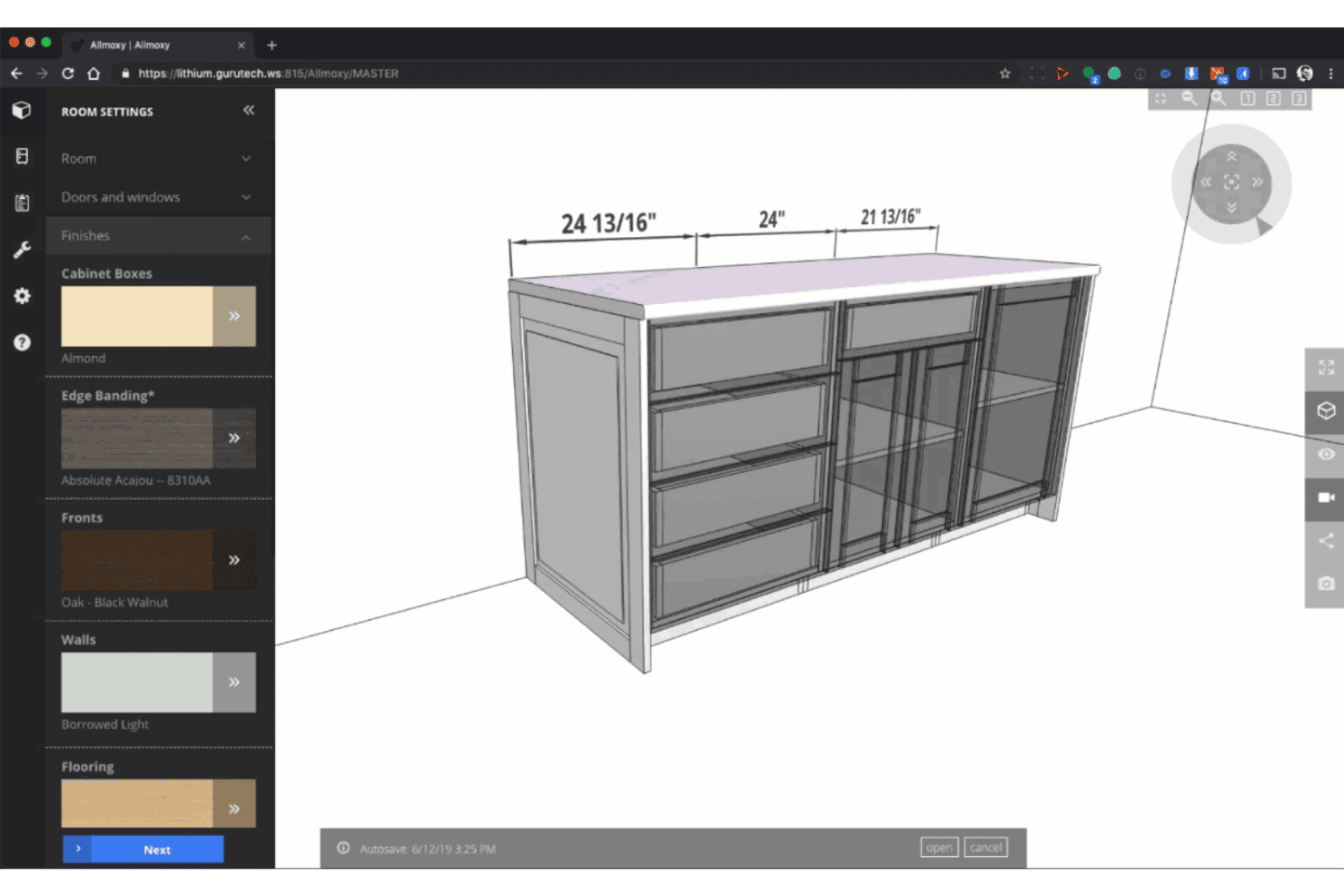
Allmoxy offers a 3D cabinet design tool with customizable finishes, edge banding, and material settings for furniture configuration. Allmoxy is a cloud-based ERP built for custom wood product manufacturers, combining online order configuration, cut list generation, production data automation, and supply and inventory management in one platform.
Who Is Allmoxy Best For?
Allmoxy is a strong fit for cabinet door, drawer, and component manufacturers that sell through wholesale dealer networks and need self-serve B2B ordering.
Why I Picked Allmoxy
I picked Allmoxy because it supports online configuration and ecommerce ordering for custom cabinetry and components. You can give customers or dealers access to catalogs, pricing, orders, invoices, and status updates through an online portal. Orders can then feed automated production data, including parts lists, cut lists, labels, and machine-data exports.
Allmoxy Key Features
- Workflow automation triggers: Automatically notify teams and customers when jobs move through specific workflow stages.
- Supply and inventory management: Manage materials, track stock levels, and control supplier relationships from the same system.
- Integrated invoice and accounting tools: Create invoices, process payments, and handle accounting activities within the platform.
- Customer portal access: Give customers real-time access to order statuses, invoices, and delivery updates through a secure online portal.
Allmoxy Integrations
Allmoxy offers native integrations with Microvellum, ClosetPro, TigerStop, Cabinet Vision, and CadCode. An API is also available for custom integrations.
Pros and Cons
Pros:
- Dealer portal supports repeat B2B ordering
- Auto-generates machine-ready cut lists
- Purpose-built for cabinet and component orders
Cons:
- No built-in shop floor production scheduling
- Limited job costing and profitability reporting
Learn more about Allmoxy: Best for identifying workflow bottlenecks
- Free demo available
- Pricing upon request
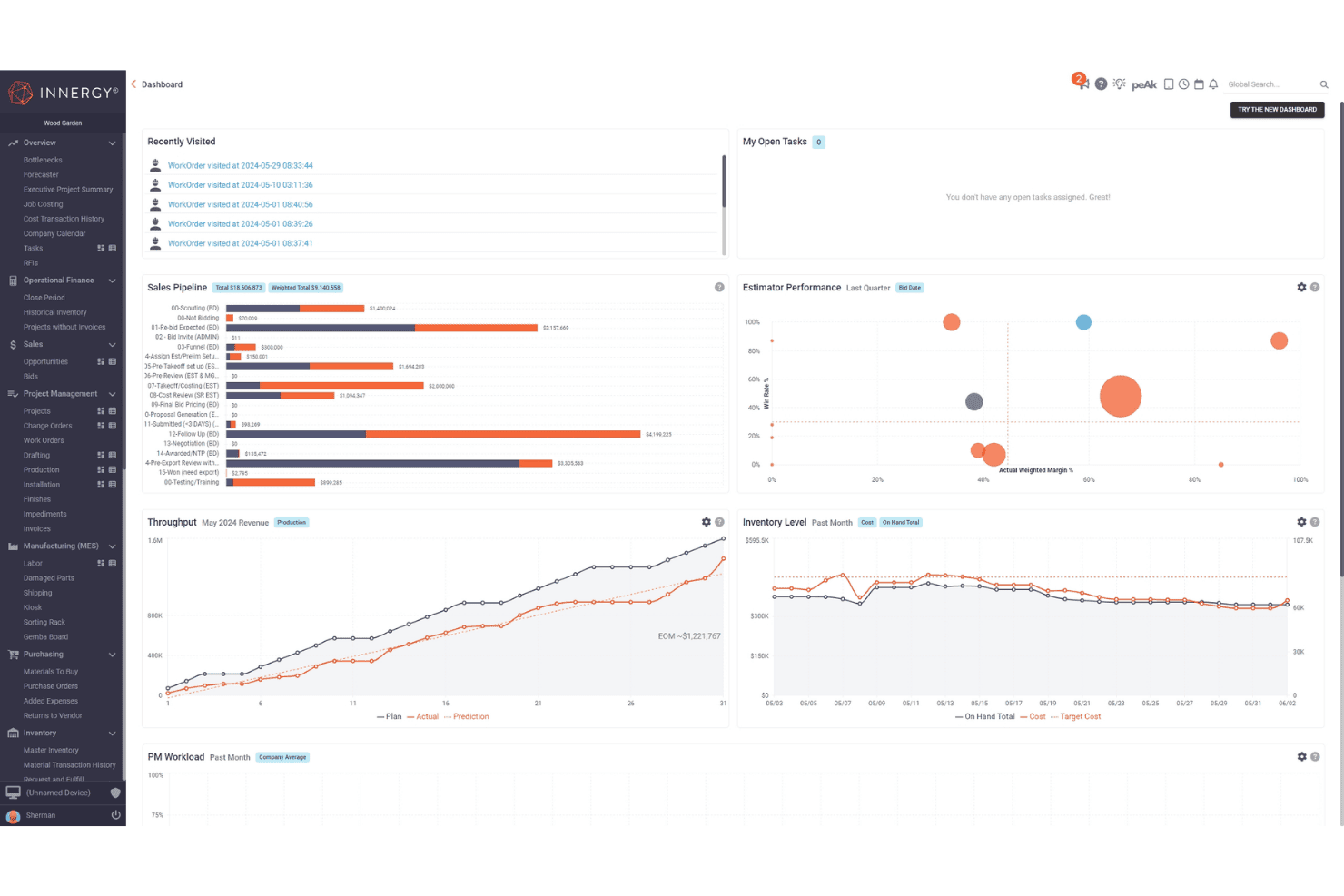
INNERGY offers a comprehensive project management dashboard featuring sales pipeline, throughput, inventory level, and estimator performance widgets. INNERGY is a cloud-based ERP built specifically for millwork and custom woodworking businesses, combining estimating, shop floor execution, job costing, project management, and production scheduling in one platform.
Who Is INNERGY Best For?
INNERGY is a strong fit for commercial millwork shops and custom cabinet producers that need end-to-end job tracking across sales, production, and installation.
Why I Picked INNERGY
I picked INNERGY because its Bottleneck Report helps you identify workflow constraints before they disrupt production. Its Throughput Widget uses that report to establish a monthly target and compare planned output with actual daily progress. This helps you spot slippage and decide where to adjust capacity.
INNERGY Key Features
- On-screen takeoff: Complete project takeoffs directly on digital blueprints with auto-calculating pricing.
- One-click bill of materials: Generate a detailed bill of materials from engineering design files with a single click.
- Integrated project management: Track project status, completion milestones, and invoicing in real time across teams.
- Job costing and payroll: Monitor actual and estimated job costs while running payroll and labor tracking from the same platform.
INNERGY Integrations
INNERGY offers native integrations with QuickBooks, Sage, NetSuite, and Microvellum, and provides an API for custom integrations.
Pros and Cons
Pros:
- Includes project estimating, costing, and scheduling
- Purpose-built for millwork and wood fabrication shops
- Bottleneck report pinpoints stalled production tasks
Cons:
- Limited lumber species inventory granularity
- No native CNC cut optimization tools
Learn more about INNERGY:
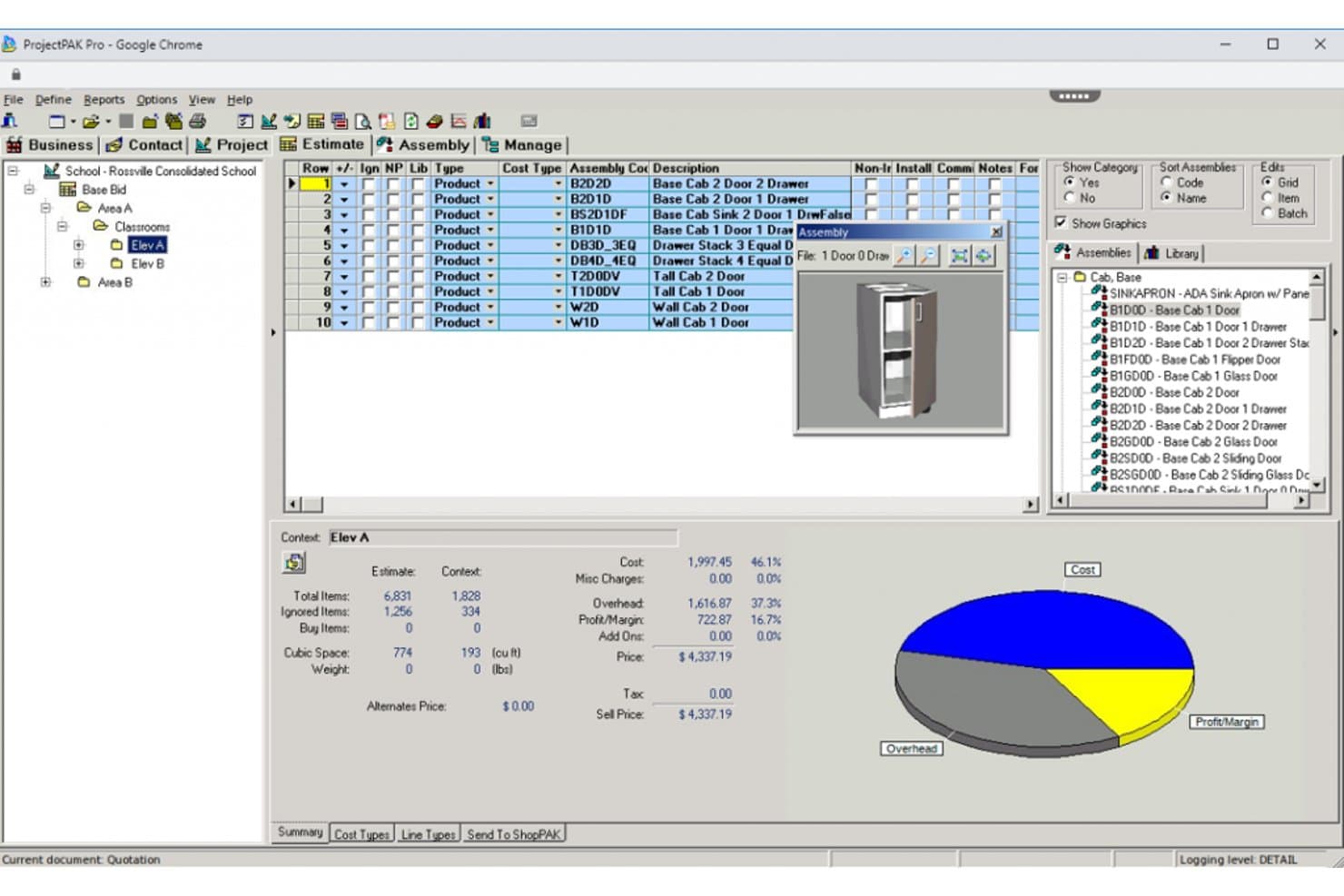
TradeSoft offers a wood shop management interface with assembly lists, 3D cabinet previews, cost breakdowns, and a pie chart showing overhead, cost, and profit margins. TradeSoft is a purpose-built estimating and job management platform for custom woodworking manufacturers, combining parametric estimating, shop floor job tracking, purchasing, inventory management, and progress billing in a single database.
Who Is TradeSoft Best For?
TradeSoft is a strong fit for architectural millwork shops and custom casework manufacturers that run complex, make-to-order production workflows.
Why I Picked TradeSoft
I picked TradeSoft because it connects ProjectPAK estimating with ShopPAK job management, helping you manage work from bidding through purchasing, production, shipping, and billing. You can build estimates from configurable job specifications and product libraries, then carry awarded work into job costing, inventory, work orders, and progress billing. Optional modules add scheduling, shop-floor data collection, and engineering links.
TradeSoft Key Features
- Pre-built casework and cabinetry databases: Access extensive libraries of parametric commercial casework and residential cabinetry items.
- Integrated purchasing and receiving: Manage purchase orders, receipt of goods, and material tracking in one connected workflow.
- Inventory management with multi-location support: Track inventory by location, audit all activity, and apply FIFO, LIFO, or weighted average costing.
- Shop floor data collection: Capture live labor inputs and production data directly from the shop floor using barcodes or handheld devices.
TradeSoft Integrations
TradeSoft offers native integrations with PlanSwift and provides engineering links for updating bills of materials from CAD and engineering software. It also has built-in interfaces to accounting packages, and an API is available for custom integrations.
Pros and Cons
Pros:
- Shop floor data collection by job section
- AIA-style progress billing and applications
- Cabinet and casework estimating templates included
Cons:
- Cut list generation requires third-party software
- No POS or retail sales workflows
Learn more about TradeSoft: Best for multi-site factory operations
- Free demo available
- Pricing upon request
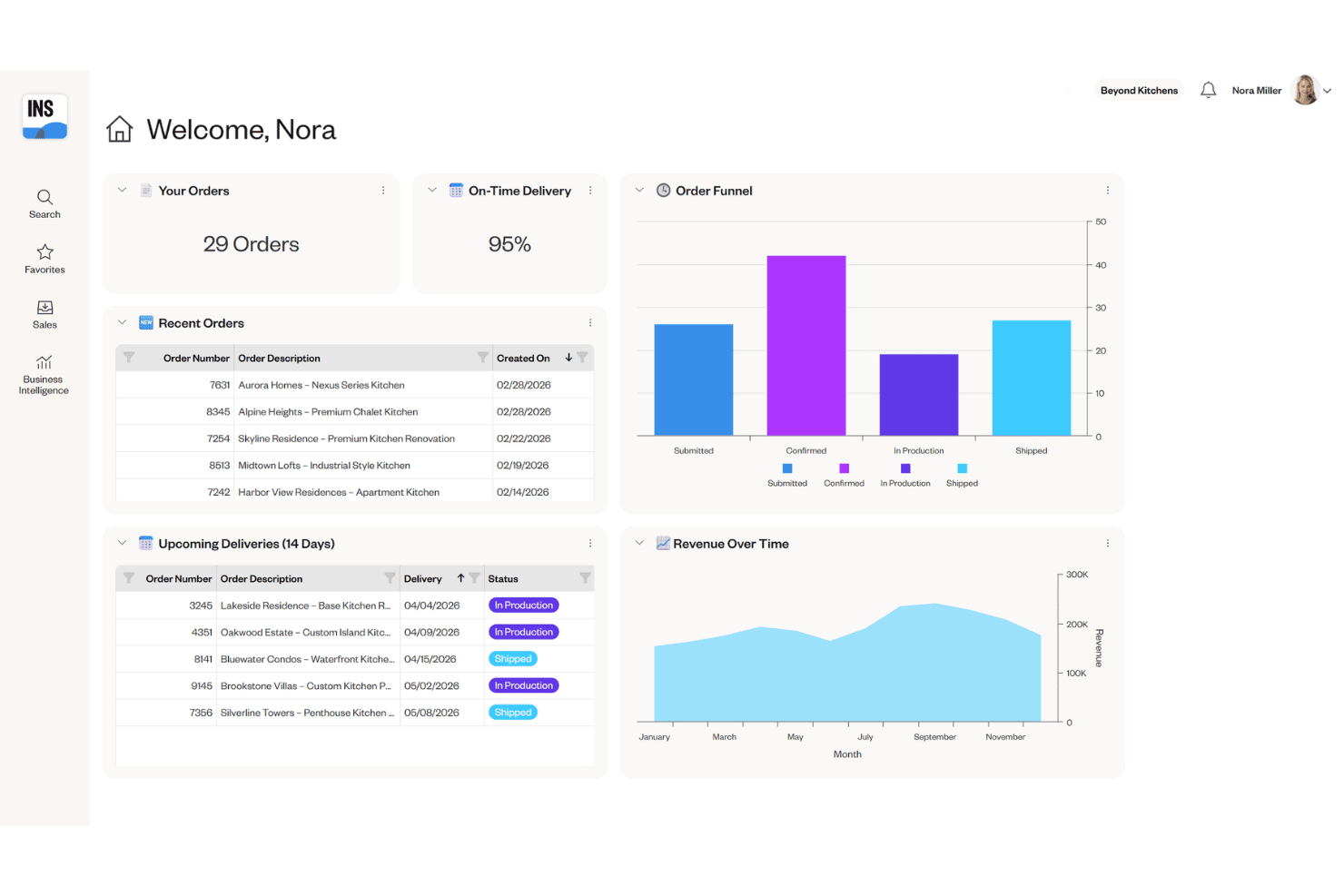
Cyncly Insight provides a dealer dashboard with order tracking, on-time delivery metrics, an order funnel chart, and revenue over time analytics. Cyncly Insight is an enterprise ERP and MES platform built for cabinet, furniture, and millwork manufacturers, combining production scheduling, order management, inventory tracking, and shop floor execution across multi-site factory operations.
Who Is Cyncly Insight Best For?
Cyncly Insight is a strong fit for mid-to-large cabinet and millwork manufacturers running multiple production facilities who need centralized scheduling and real-time shop floor visibility.
Why I Picked Cyncly Insight
I picked Cyncly Insight because it helps you coordinate planning and production across larger manufacturing operations. You can manage production and shift scheduling across multiple sites, automate work-order sequencing, and plan resources around available inventory. Its machine-data collection and SCADA capabilities can also give you real-time information from connected production equipment.
Cyncly Insight Key Features
- Visual order configuration: Let sales or design teams configure cabinet and furniture orders in real time using integrated 3D visualization.
- Machine data collection: Capture performance metrics directly from CNC machines and production equipment for accurate shop floor reporting.
- Integrated warehouse management (WMS): Track raw materials, finished goods, and inventory movement digitally across multiple warehouse locations.
- Role-based shop floor access: Assign permissions and workflows to operators, supervisors, and engineers for secure, modular process control.
Cyncly Insight Integrations
Cyncly Insight offers native integrations with 3CAD Visual CPQ, Design Flex, Winner Flex, Innoplus, Mozaik, Cyncly Payments, and supports direct connections to CNC machines and RFID hardware. An API for custom integrations is not clearly documented.
Pros and Cons
Pros:
- WMS supports complex, multi-location inventory
- Real-time equipment status from CNC machines
- Built for multi-factory scheduling and tracking
Cons:
- No built-in POS or retail workflows
- Not designed for small wood shops
Learn more about Cyncly Insight: Best for modular design-to-manufacture
- Free demo available
- Pricing upon request
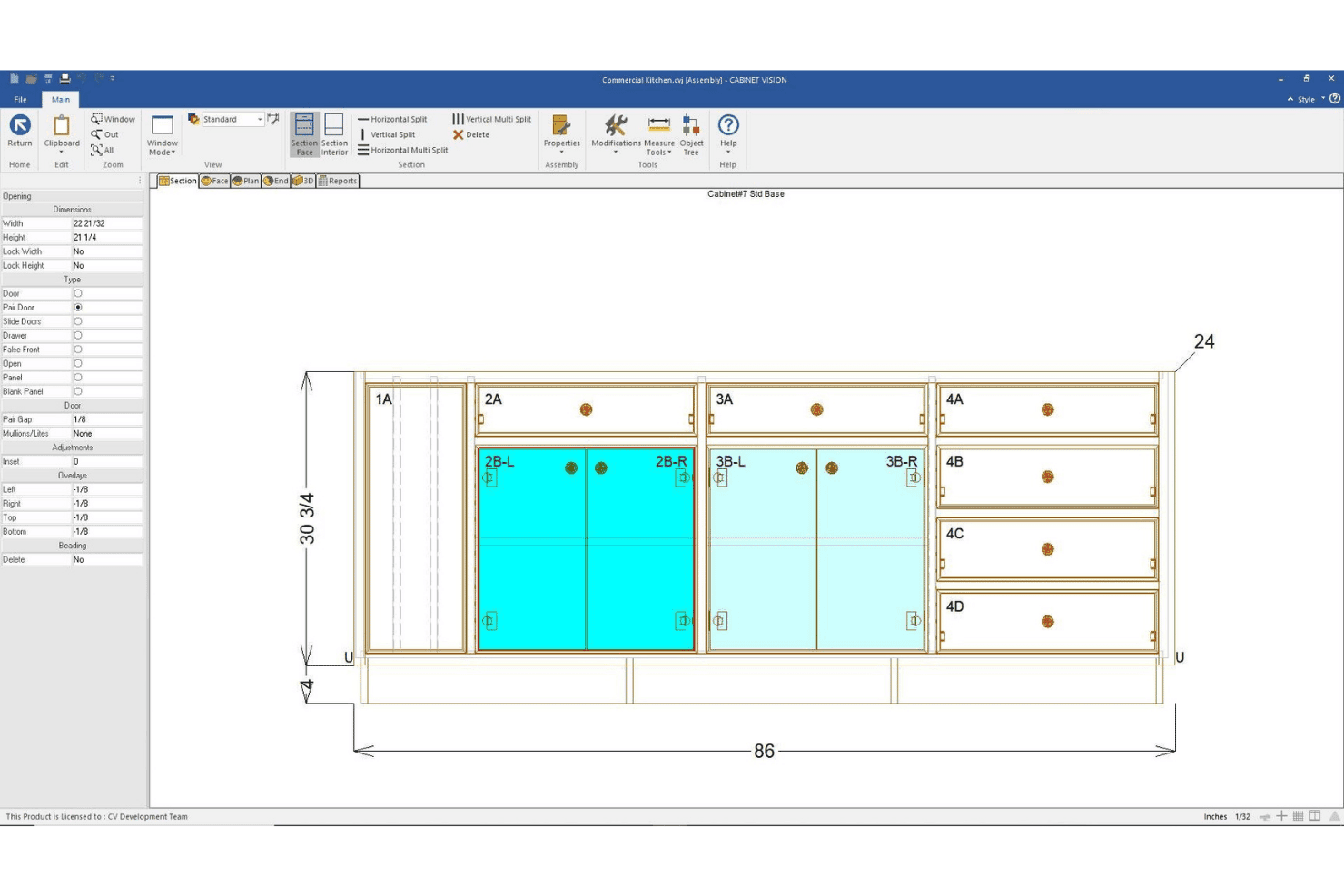
CABINET VISION by Hexagon offers a face section view of a commercial kitchen base cabinet assembly with labeled openings, pair doors, and precise measurements. CABINET VISION is a modular CAD/CAM design-to-manufacture platform for cabinet, closet, and furniture makers. It supports design, bidding, costing, material optimization, cut lists, and bills of materials. Machine-ready G-code requires Hexagon’s S2M CENTER and the appropriate machining modules rather than the base design product alone.
Who Is CABINET VISION by Hexagon Best For?
It's a strong fit for cabinet and closet manufacturers of any size that need to connect custom design directly to CNC production output.
Why I Picked CABINET VISION by Hexagon
I picked CABINET VISION because it gives you a modular path from cabinet design and costing to production output. Its bidding tools calculate materials, labor, and other costs from the engineered design, while xReporting provides more than 150 predefined reports. If you add S2M CENTER and the appropriate machining modules, you can use the same design data to generate machine-ready programs for supported CNC equipment.
CABINET VISION by Hexagon Key Features
- x2D CAD: Draft shop drawings and architectural submittals with built-in 2D CAD tools.
- xReporting: Access over 150 predefined reports or build custom reports for materials and jobs.
- Paperless Traveller: Digitize production tracking, nesting, and defect recut reporting on the shop floor.
- xCRM: Organize customer contacts, manage job records, and track job revisions in one place.
CABINET VISION by Hexagon Integrations
CABINET VISION offers native integrations with ALPHACAM and S2M CENTER for direct CNC machine output and supports hardware library integrations like Blum e-services. An API is available for custom integrations.
Pros and Cons
Pros:
- Built-in bidding and job revision tracking
- Modular licensing for targeted feature selection
- Generates CNC code for complex cabinet parts
Cons:
- No built-in project scheduling module
- No real-time lumber inventory visibility
Learn more about CABINET VISION by Hexagon:
Andere beheersoftware voor houtwerkplaatsen
Hier zijn enkele aanvullende opties voor beheersoftware voor houtwerkplaatsen die mijn selectie niet hebben gehaald, maar die toch de moeite waard zijn om te bekijken:
- 11SeradexBest for CAD-to-ERP production flow
- 12MRPeasyBest for simplified small-shop MRP
- 13Joinery CoreBest for visual workshop scheduling
- 14JobmanBest for automated capacity planning
How I Evaluate Wood Shop Management Software
I evaluate wood shop management software across six operational areas, including estimating, inventory, bills of materials, production scheduling, customer orders, and job costing. I don’t expect every tool to perform every function because ERP, job-management, and CAD/CAM products support different parts of your workflow. Instead, I assess how well each product supports its intended shop-management use case and require a minimum overall score of 55% for inclusion.
Core Functionality (Table Stakes For This List)
When I'm selecting tools for my list, I rank each one on a scale from 0 (does not offer the functionality) to 5 (excels in this area) for each core functionality listed below. Then, I calculate the tool's total score into a percentage. Each tool needs to achieve a minimum total score of 55% to be considered for inclusion.
- Wood Job Estimating: I check whether the tool handles board feet, hardware, finishes, and labor in a single estimate—not just generic line-item quoting.
- Lumber Inventory Tracking: Tracking by species, dimensions, and board feet matters. I look for tools that also account for offcuts and reorder alerts.
- Cut List & BOM Generation: I evaluate whether the tool auto-generates cut lists from project specs and optimizes yield from sheet goods and stock lumber.
- Production Job Scheduling: Shops juggle multiple jobs across saws, CNC machines, and finishing stations. I look for multi-stage scheduling with resource assignment.
- Customer Order Management: I look for deposit tracking, change-order handling, and delivery updates tied to specific jobs—especially for custom cabinetry work.
- Shop Costing & Profitability: Each tool should compare actual material, labor, and overhead costs against the original estimate for real margin visibility.
Once I have a list of tools that meet the criteria, I consider what sets each platform apart.
Differentiating Factors (What Sets Vendors Apart)
Here's how I compare and contrast different vendors:
Standout Features
Cut list optimization is a big differentiator. I look for tools that generate nesting layouts from project designs to reduce waste on sheet goods and stock lumber. CAD/CAM integration also matters because shops that import SketchUp or AutoCAD files directly into their BOM save hours of manual re-entry on every project. Shop floor time tracking rounds things out; barcode or tablet-based clock-in at each workstation gives you the labor data you need to compare actual costs against your original estimates.
Beyond Features
Shop size and business model fit is one of the first things I consider. A solo woodworker building custom furniture has very different needs than a 20-person cabinet shop running production batches. I also evaluate integrations with adjacent systems—especially QuickBooks or Xero for accounting and design tools like SketchUp for BOM handoff. Licensing structure matters too. Some vendors charge per user, which adds up fast when you need shop floor employees on the system.
Zo kies je beheersoftware voor houtwerkplaatsen
Het is gemakkelijk om te verzanden in lange functielijsten en ingewikkelde prijsstructuren. Om je te helpen gefocust te blijven terwijl je jouw unieke softwareselectieproces doorloopt, vind je hier een checklist met factoren om rekening mee te houden:
| Factor | Waar je op moet letten |
|---|---|
| FactorSchaalbaarheid | Waar je op moet lettenPast deze software nog steeds bij je werkplaats wanneer je groeit of nieuwe locaties toevoegt? Controleer of de software na verloop van tijd meer gebruikers, projecten of voorraad kan verwerken. |
| FactorIntegraties | Waar je op moet lettenMaakt het hulpmiddel probleemloos verbinding met je boekhoud-, CAD/CAM-, leveranciers- of e-commercesystemen? Vraag na of elke verbinding eigen functionaliteit gebruikt, op een API is gebaseerd of wordt afgehandeld via bestandsexporten of een externe dienst. |
| FactorAanpasbaarheid | Waar je op moet lettenKun je werkstromen, formulieren en rapporten aanpassen aan je unieke bedrijfsvoering? Ga na of aangepaste velden of gebruikersrollen nodig zijn voor je bedrijf. |
| FactorGebruiksgemak | Waar je op moet lettenGaat je team de software daadwerkelijk op de werkplaatsvloer gebruiken? Let op eenvoudige menu's, duidelijke navigatie en toegang via mobiel apparaat of tablet voor operators en kantoormedewerkers. |
| FactorImplementatie en inwerken | Waar je op moet lettenHoe lang duurt de installatie en welke training en ondersteuning biedt de leverancier? Vraag naar het importeren van oude gegevens en wat er van jouw kant nodig is. |
| FactorKosten | Waar je op moet lettenWordt de prijs berekend per gebruiker, per werkplaats of per module? Bekijk de kosten voor installatie, training en uitbreidingen en controleer of voor een gratis proefperiode een creditcard nodig is. |
| FactorBeveiligingsmaatregelen | Waar je op moet lettenHoe beschermt het hulpmiddel gevoelige klant- en opdrachtgegevens? Controleer of er versleuteling, routines voor gegevensback-ups en beheersing van gebruikersrechten zijn. |
| FactorBenodigde interne middelen | Waar je op moet lettenWie binnen je team beheert en onderhoudt het systeem dagelijks? Houd rekening met voortdurend beheer, updates en de beschikbare capaciteit van medewerkers voor het oplossen van problemen. |
Wat is beheersoftware voor houtwerkplaatsen?
Software voor houtwerkplaatsbeheer is een gespecialiseerd digitaal platform dat houtbewerkingsbedrijven helpt bij het organiseren van offertes, voorraadbeheer, werkplanning en orderbeheer. Afhankelijk van de reikwijdte kan een product een gespecialiseerde toepassing voor werkbeheer zijn of uitgebreidere ERP-software die ook inkoop, productie en financiële workflows omvat. Deze hulpmiddelen ondersteunen materiaalspecifieke processen zoals calculaties, het genereren van zaaglijsten en het volgen van klantorders.
Functies van software voor houtwerkplaatsbeheer
Let bij het kiezen van software voor houtwerkplaatsbeheer op de volgende belangrijke functies:
- Calculatie van houtbewerkingsopdrachten: Biedt gedetailleerde offertes op basis van plankvoeten, zaaglijsten, materialen, afwerkingen en arbeid, zodat je maatwerkprojecten nauwkeurig kunt prijzen.
- Voorraadbeheer van hout: Houdt de voorraad grondstoffen bij op soort, afmetingen en plankvoeten, met realtime updates, zodat je tijdens een opdracht nooit zonder benodigde materialen komt te zitten.
- Genereren van zaaglijsten en BOM: Maakt nauwkeurige zaaglijsten en stuklijsten op basis van projectspecificaties, zodat je het materiaalgebruik kunt plannen en optimaliseren.
- Planning van productieopdrachten: Hiermee kun je taken toewijzen, middelen verdelen en projecten door elke fase van de workflow in je werkplaats volgen.
- Beheer van klantorders: Beheert offertes, aanbetalingen, wijzigingsorders en leveringen op één centrale plek die aan elk houtbewerkingsproject is gekoppeld.
- Kostprijs- en winstgevendheidsbeheer: Houdt de werkelijke kosten tegenover de ramingen bij door materiaal, arbeid en overhead per opdracht te registreren, ter ondersteuning van margeanalyses.
- Integratie van leverancierscatalogi: Maakt verbinding met catalogi met realtime prijzen voor beslag en materialen, waardoor inkopen en offreren sneller verlopen.
- Tijdregistratie op de werkvloer: Registreert arbeidsuren bij elk werkstation—vaak via een barcode of tablet—voor inzicht in de voortgang en productiviteit van opdrachten.
- CAD/CAM-integratie: Importeert ontwerpbestanden rechtstreeks vanuit CAD-programma's in je workflow, waardoor handmatige gegevensinvoer en fouten worden beperkt.
- Volgen van leveringen en logistiek: Houdt je op de hoogte van verzendstatussen en leveringsschema's en ondersteunt tijdige overdracht aan klanten.
Voordelen van software voor houtwerkplaatsbeheer
De implementatie van software voor houtwerkplaatsbeheer biedt verschillende voordelen voor je team en je bedrijf. Dit zijn enkele voordelen waar je naar kunt uitkijken:
- Nauwkeurige calculatie van opdrachten: Betrouwbare berekeningen van materialen, beslag en arbeid betekenen dat je met vertrouwen offertes kunt uitbrengen en marges kunt beschermen.
- Realtime voorraadbeheer: Geautomatiseerde registratie van hout, beslag en reststukken helpt voorraadtekorten en te grote bestellingen te voorkomen.
- Efficiëntere planning: Door productie, taken en leveringen vanuit één systeem te coördineren, blijft elke opdracht van begin tot eind op schema.
- Beter klantbeheer: Beheer offertes, wijzigingsorders en projectstatussen centraal voor duidelijke communicatie en minder misverstanden.
- Meer inzicht in winstgevendheid: Vergelijk opdrachtcalculaties met werkelijke kosten aan de hand van geconsolideerde rapporten om vast te stellen waar je werkplaats geld verdient of verliest.
- Minder handmatig werk: Functies zoals CAD/CAM-integratie en toegang tot leverancierscatalogi verminderen de hoeveelheid gegevensinvoer en administratieve tijd.
- Kortere doorlooptijden: Consistente workflows, productieregistratie en leveringsbeheer kunnen je helpen opdrachten efficiënter af te ronden en te leveren.
Kosten en prijzen van software voor houtwerkplaatsbeheer
Bij het kiezen van software voor houtwerkplaatsbeheer is inzicht in de verschillende beschikbare prijsmodellen en abonnementen vereist. De kosten variëren op basis van functies, teamgrootte, uitbreidingen en meer. In de onderstaande tabel worden veelvoorkomende abonnementen, hun gemiddelde prijzen en typische inbegrepen functies van oplossingen voor houtwerkplaatsbeheer samengevat:
Vergelijkingstabel van abonnementen voor software voor houtwerkplaatsbeheer
| Type abonnement | Gemiddelde prijs | Veelvoorkomende functies |
|---|---|---|
| Type abonnementGratis abonnement | Gemiddelde prijs$0 | Veelvoorkomende functiesBasiscalculatie van opdrachten, beperkt voorraadbeheer en standaardrapportages. |
| Type abonnementPersoonlijk abonnement | Gemiddelde prijs$20-$40/gebruiker/maand | Veelvoorkomende functiesUitgebreider voorraadbeheer, eenvoudige planning, klantbeheer en e-mailondersteuning. |
| Type abonnementZakelijk abonnement | Gemiddelde prijs$50-$100/gebruiker/maand | Veelvoorkomende functiesGeavanceerde kostprijsberekening per opdracht, volledige zaaglijsten, integraties, leverancierscatalogi, aangepaste workflows en analyses. |
| Type abonnementAbonnement voor grote ondernemingen | Gemiddelde prijs$120-$200/gebruiker/maand | Veelvoorkomende functiesOndersteuning voor meerdere werkplaatsen, aangepaste integraties, geavanceerde rechten, persoonlijke onboarding en prioriteitsondersteuning. |
Veelgestelde vragen over software voor het beheer van houtwerkplaatsen
Hier vindt u antwoorden op veelgestelde vragen over software voor het beheer van houtwerkplaatsen:
Kan software voor het beheer van houtwerkplaatsen zowel maatwerk als productiewerk aan?
Ja, de meeste platforms ondersteunen een combinatie van maatwerkopdrachten en standaardproductlijnen. U kunt projecten indelen op basis van klantspecificaties of terugkerende SKU’s, materialen toewijzen en workflows voor beide soorten opdrachten volgen.
Hoe werkt de integratie met boekhoud- en CAD-tools?
De meeste systemen maken verbinding met QuickBooks of Xero om facturen en uitgaven te synchroniseren, terwijl CAD-integratie u in staat stelt ontwerpen uit SketchUp of vergelijkbare tools te importeren om zaaglijsten en stuklijsten (BOM’s) te genereren met zo min mogelijk handmatige invoer.
Welke introductie of training kan ik verwachten?
Leveranciers bieden meestal introductiesessies, toegang tot een helpcentrum en trainingsmateriaal voor werkplaatseigenaren, kantoormedewerkers en werkplaatsmedewerkers, zodat iedereen goed voorbereid is om het systeem effectief te gebruiken.
Heb ik speciale IT-middelen nodig om de software te beheren?
Nee, de meeste oplossingen zijn cloudgebaseerd en vereisen weinig betrokkenheid van IT. Wel moet iemand binnen uw organisatie vertrouwd zijn met het leren werken met nieuwe systemen, het beheren van gebruikerstoegang en het uitvoeren van eenvoudige probleemoplossing.
Kan ik de software gebruiken als mijn internetverbinding onbetrouwbaar is?
Sommige tools voor het beheer van houtwerkplaatsen bieden offline toegang tot belangrijke functies, zoals tijdregistratie en voorraadbeheer. Voor andere is mogelijk een stabiele verbinding vereist. Controleer daarom de offline mogelijkheden van elke oplossing voordat u een beslissing neemt.